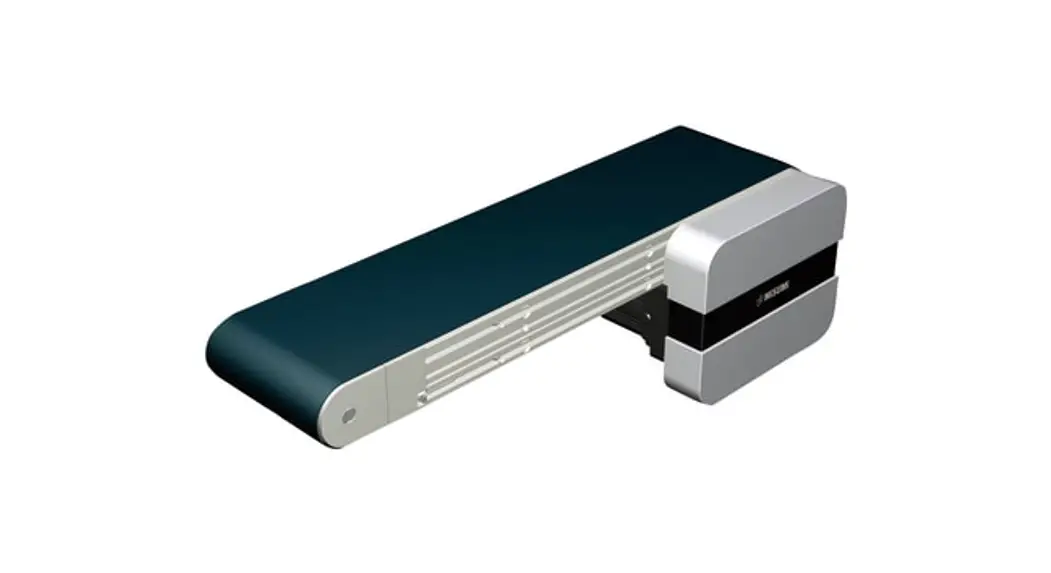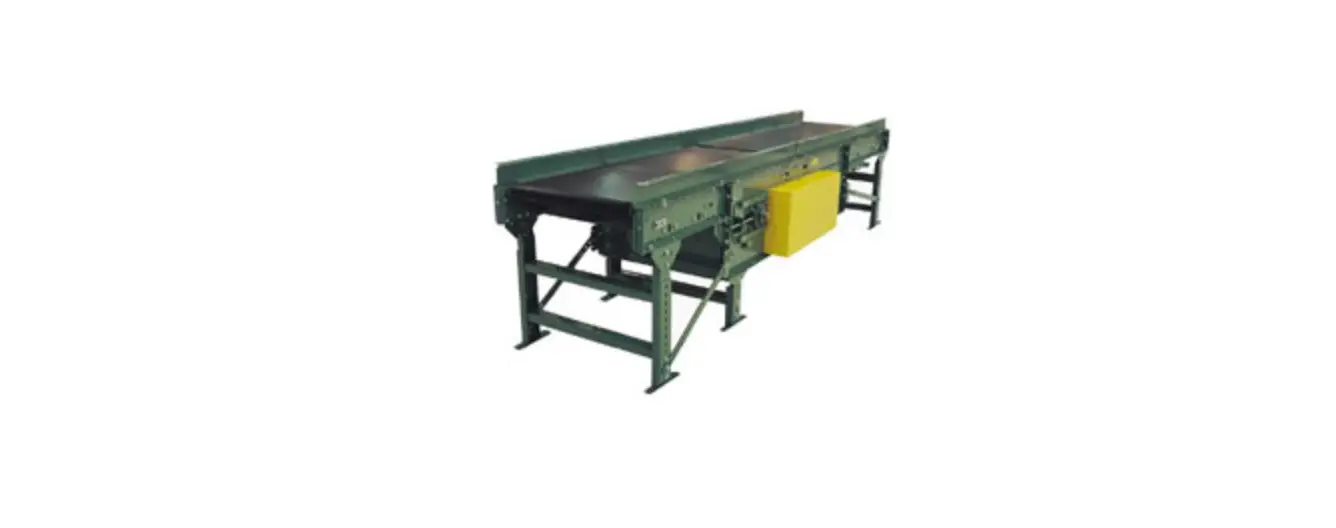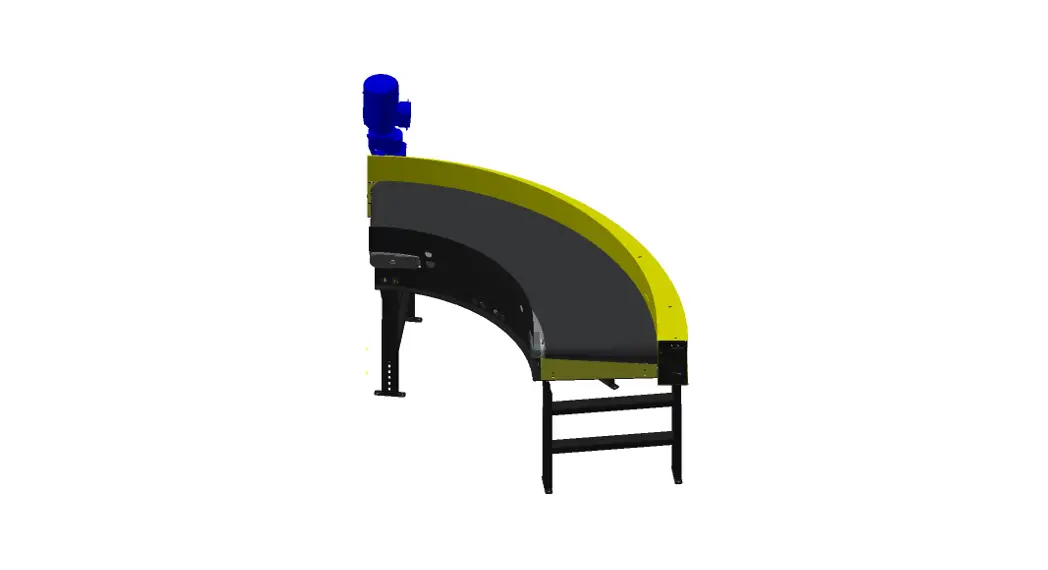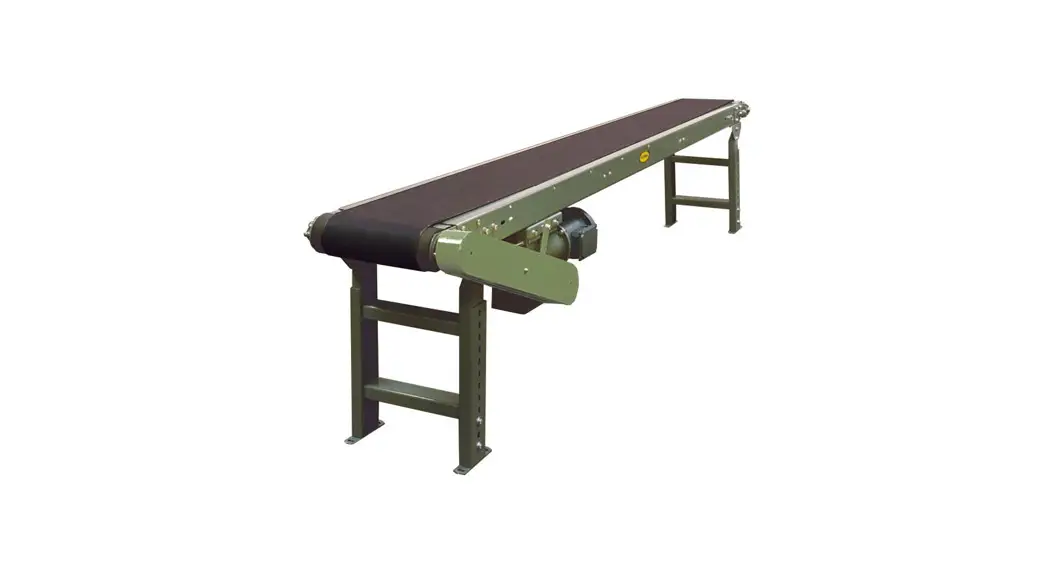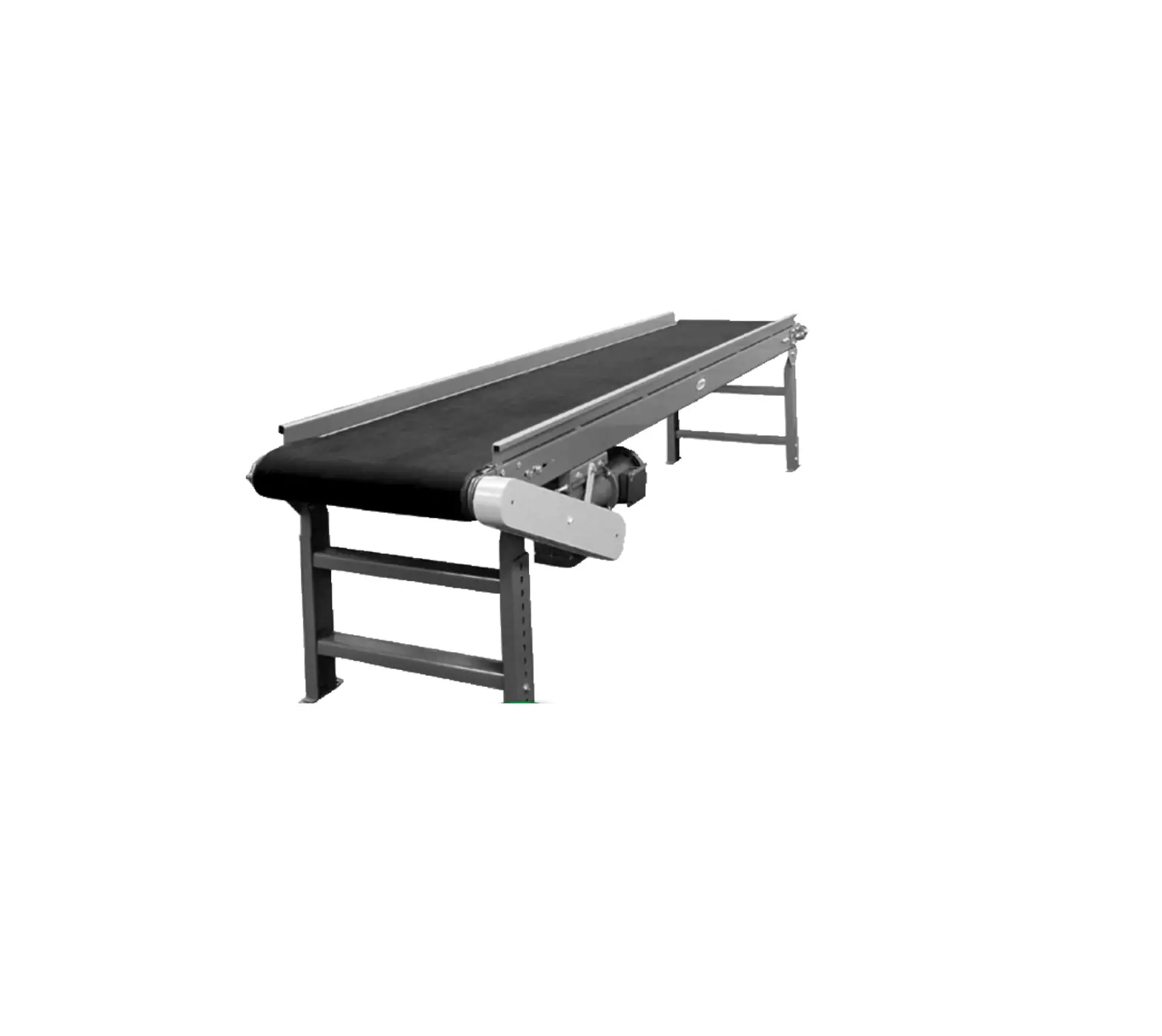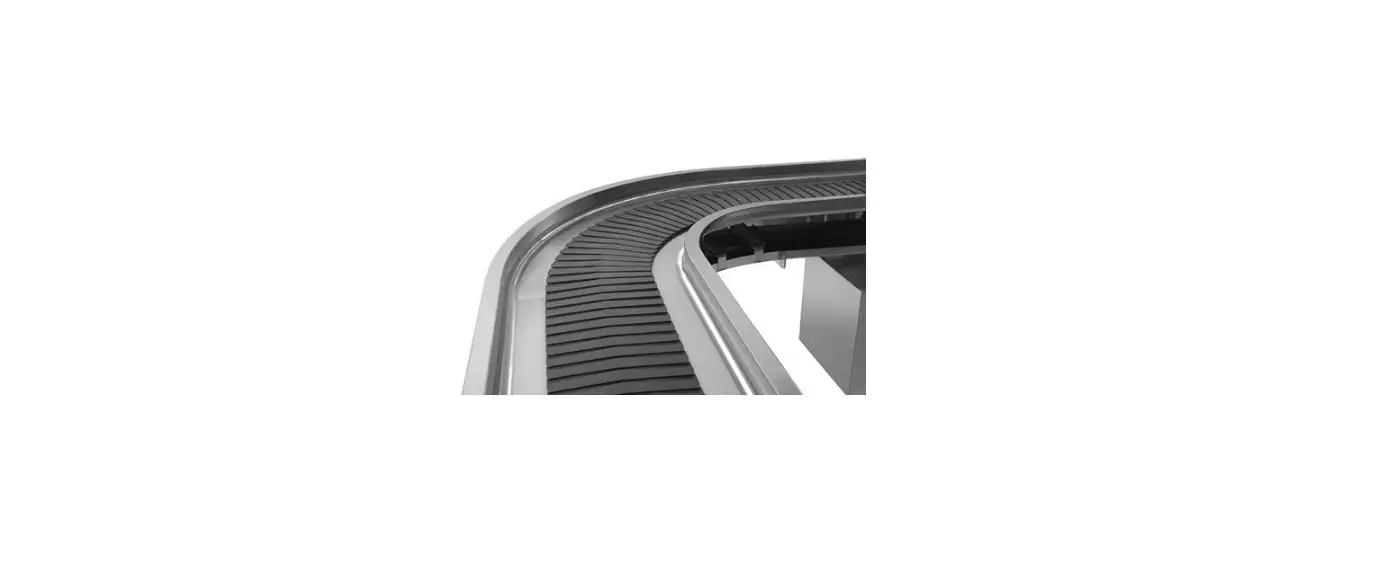

avtec CB Slat Belt Conveyor Operator
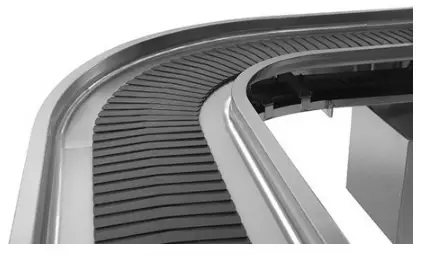
PRODUCT DESCRIPTION
Your AVTEC Conveyor is a custom engineered member of the AVTEC Conveyor Product Group. This manual is intended to describe the product, its applications, installation, operation and maintenance. Since each of our products is engineered and manufactured specifically for you, this manual is written in general terms and may describe options that do not apply to your conveyor. Specific “As Built” shop drawings are included with your conveyor for reference.
CAUTION: This equipment is electrically driven by a motor that is of sufficient power to cause personal injury if improperly or recklessly used. There are a number of safety features engineered into the design and construction of this product, but common sense precautions [i.e., avoid wearing loose clothing, jewelry, etc.] and alertness should be practiced at all times. These conveyors are intended primarily to move trays or racks of dishware and/or utensils. Transporting of individual items such as flatware and direct food contact is not recommended.
TYPICAL APPLICATIONS
Tray Assembly
Empty trays are loaded on one end of the conveyor belt or cords and, as they progress along the length of the conveyor, selected food items and condiments are placed on the trays. Trays are then off-loaded from the conveyor and transported to the serving location.
Plate Assembly
Individual plates are placed on the conveyor belt and selected food items are placed on the plates. These plates are then off-loaded at the end of the conveyor and transported to the serving area.
Tray Return
Soiled dishes and trays are placed on the conveyor belt or cords and transported from the dining area to the dishwashing area, where they are scrapped and otherwise prepared for the dish-washing machine.
Dish and Rack Bussing
These conveyors can be single or double belt width design and transport plates, utensils and racks of soiled hollowware, from the scrapping areas to the dishwashing machine. Dishware can be stacked and transported without racks.
INSTALLATION REQUIREMENTS
General directions are provided attached to the conveyor system on the drive housing, at time of shipping.
Mechanical
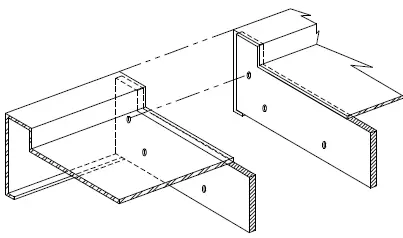
Slider Bed In most applications field joints are intended to be fully welded, ground and polished to meet both operational and aesthetic requirements. When a conveyor is to be used in a generally dry environment, field joints may be bolted. To assemble, slide the sections of the conveyor together and align the edges, then clamp sections and bolt together using hardware provided. Remove clamps.
Vertical Height Adjustment
Motorized systems
Permanently located conveyors should be leveled to within 1/16″ from side to side and 1/32″ per foot from end to end. [Example: An 8′-0″ long conveyor section the maximum deviation between the highest and lowest points should not exceed 1/4″.] This adjustment can be made by adjusting the feet up and down as required.
Gravity (rollers/skate wheels)
Gravity fed conveyors include drain connections, with the drain towards the terminus-end. Floor conditions may limit adjustment, and puddling may occur. (It must be wiped clean)
NOTE: When using mobile conveyors, care should be taken to operate the conveyor on a relatively level section of floor.
Self Cleaning return
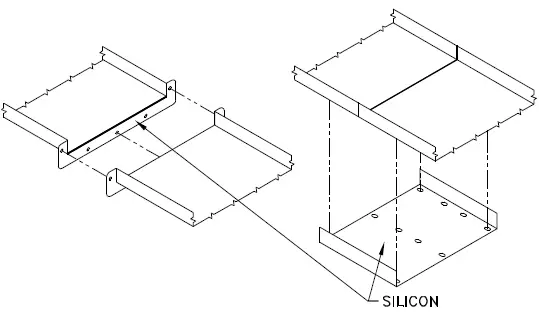
On conveyors equipped with a self-cleaning return system, it is important to align the return pan at all field joints and seal the seam with 100% silicon during installation to insure proper belt operation. [See Fig. 3.2] At the initial time of installation these pans should be wiped free of construction debris prior to initial start-up.
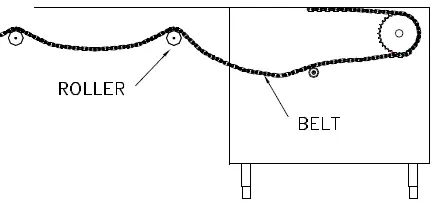
Roller Return
On conveyors equipped with a roller return, feed the belt over all rollers. Slight tension on the belt should allow the ends to come together and still leave slack under the slider bed.
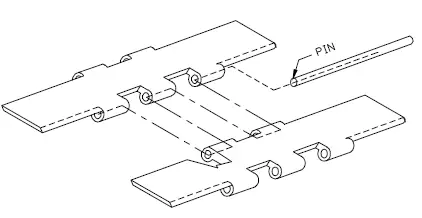
Belt Assembly – Hinge Type
With hinge type belts, align the ends of the belt and insert pin. To disassemble, simply remove the pin
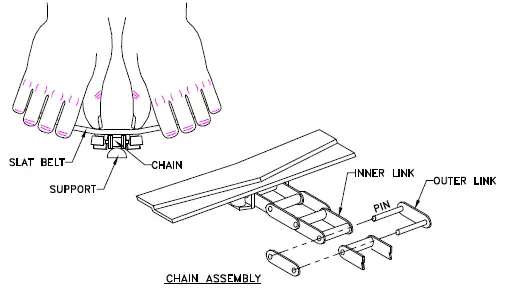
Belt Assembly – Chain Type
For belts with integral drive chain and removable individual slats, the links and slats required for assembly are shipped loose. To assemble, draw the inner links together then inserting the outer links, snap in place. Links can be press-fit together using channel locks or vise grips. In removing the slat from the stainless steel chain, simply place your thumbs on the center of the slat with your fingers gripping the leading edge and “arch” the slat away from the chain while pulling upward. When attaching a slat to the chain, bend the slat upward a fair amount, position the slat carefully so the small bevels in the slat lugs align with the extended pins of the chain and press downward. The chain must be supported from underneath with some object such as a screw driver, handle, or tube. Service people find that the slat can be replaced most easily right over the drive sprocket just before the belt goes down into the drive/wash tank. Do not HAMMER the slat onto the chain, it only ruins the slat and is liable to come off at a later date.
Stringing the Slat Belt
To string the belt, loosen the drive sprocket flange bearing locking collet which allows the sprocket to run freely. Install the belt and connect it together (per fig. 3.4 or 3.5) Center the sprocket by pushing it against alignment hub and tighten the locking collet securely. Test belt alignment by briefly running the system. Any slippage or realignment must be immediately addressed to prevent damage.
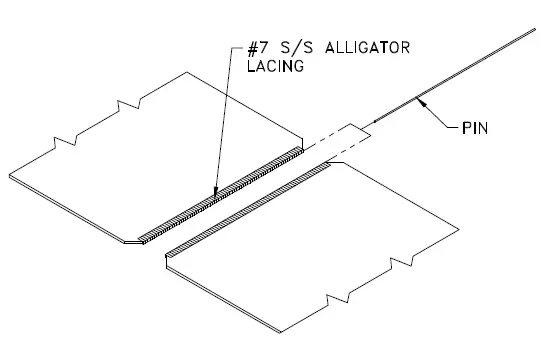
Belt Assembly – Fabric Type
With fabric type belts, align the ends of the belt and insert pin. To disassemble, simply remove the pin.
Belt Assembly – Cord Type
See welding instruction cut sheet, at end of manual.
Power Roller
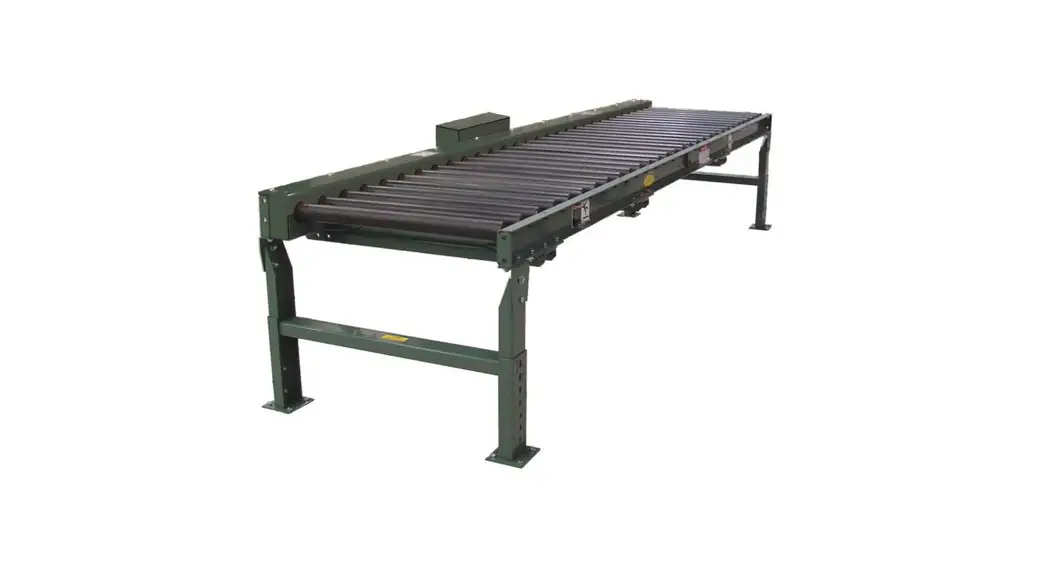
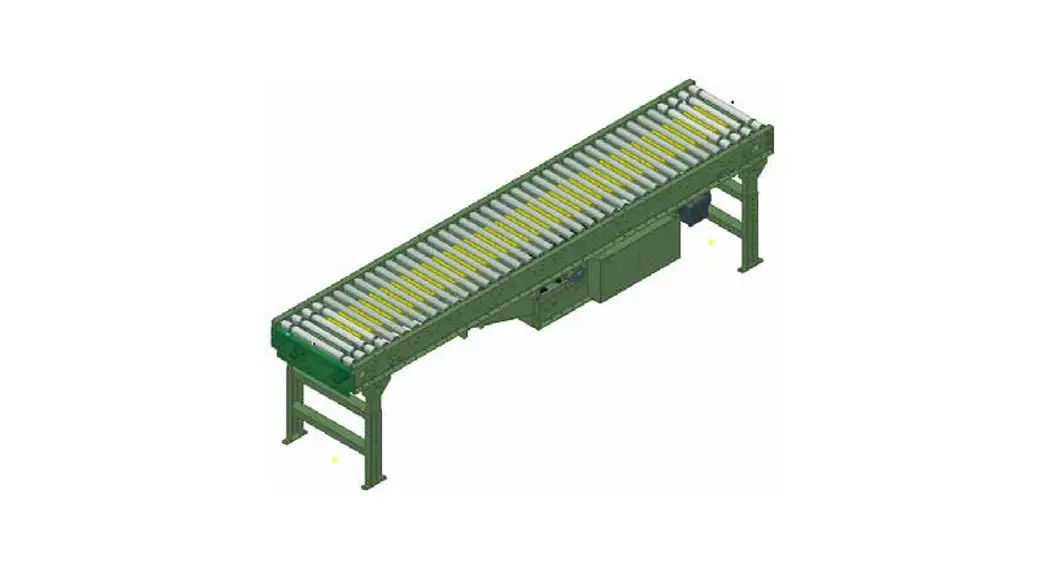
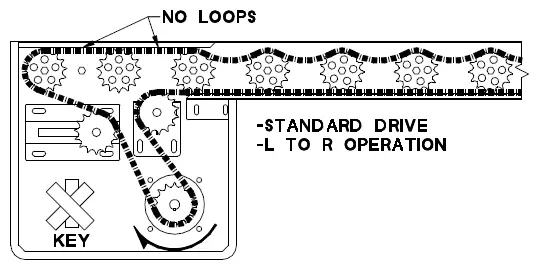
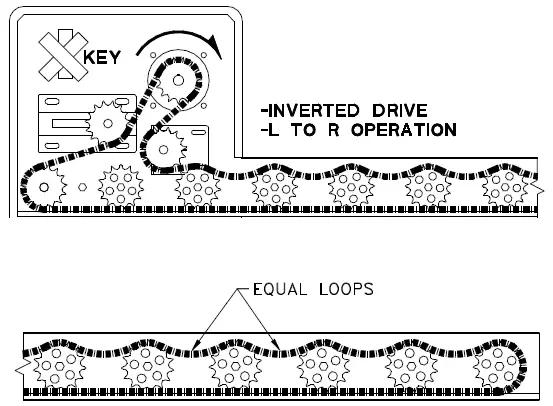
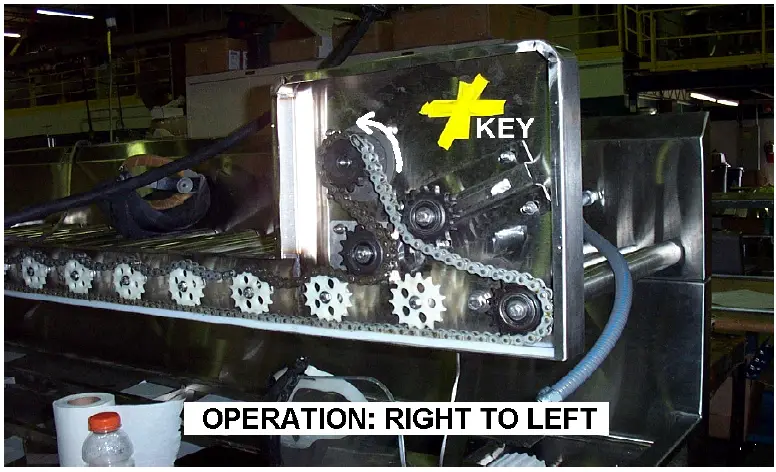
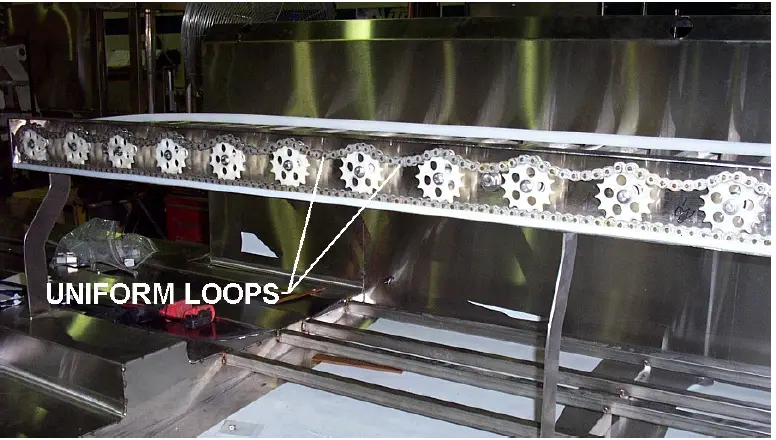
Before start-up, the power roller chain must be realigned. Turn the main sprocket counter-clockwise (Right to Left operation), or clockwise (Left to Right operation) until chain is tight on bottom of sprockets [See Fig. 3.8 and 3.9]. Loop the chain on top of the sprockets to take up all excess slack, as show in Fig. 3.10. For standard drives (motor on bottom) the chain will not loop for the first three (3) rollers over the drive housing [see Fig 3.8]. Be sure to start up the Power Rollers to verify the correct direction of the motor, before installing the key. The motor should turn in the same direction as mentioned above. The key will be taped to the inside of the motor housing.
OPERATION
A control wiring diagram of your specific conveyor is included at the end of this manual. The following is a brief, verbal description of the electrical related features of your unit.
Main Conveyor Control Console
Due to the variety of system options some of the noted controls may not apply to your system. In the event that the system includes more than one conveyor, there may be duplicate sets of controls (one per conveyor). The controls will be labeled for the appropriate system.
- Disconnect Switch
The Disconnect Switch, mounted on the Conveyor Control Panel, is used only when servicing the AVTEC conveyor. To remove power from the conveyor and the components within the Conveyor Control Panel, rotate the handle counter-clockwise so that it is in the off position. The Disconnect Switch must be in the “Off” position in order to open or close the front plate of the Conveyor Control Panel. When it is in the “Off” position, a lock may be installed in the handle to prevent the switch from being turned back on. Turn the handle to the on position in order to restore power to the conveyor and the Conveyor Control Panel. - Speed Control
The speed control knob is located on the main control panel and is clearly labeled. Turn the knob clockwise to increase the speed of the conveyor belt. Turn the knob counter-clockwise to reduce the speed of the conveyor belt. - Conveyor Stop Switch
Pressing the “Stop” switch will cause all operations to stop immediately. If the conveyor is running, it will stop. If the conveyor is in a wash cycle, the conveyor will stop and the water solenoid valve and the detergent pump will shut off. - Conveyor Start Switch
The Conveyor Control Panel includes a “Start” switch. Pressing the “Start” switch will cause the conveyor belt to begin running. The conveyor will continue to run until the “Stop” or “Limit” switch is activated, or until power is otherwise removed from the Conveyor Control Panel. Restarting will restart the wash if in the “Auto” position. - Conveyor Wash Switch
The Control center includes a “Rotary Wash Switch”. There are alternative wash formats. The term belt is used for either slat or cord systems, both of which are provided with wash systems.
The automatic wash feature is recommended for the most efficient wash operation however overriding this function can be made for testing and/or special requirements.- Belt Wash
If the “Wash” is selected while the conveyor is running, the water solenoid valve and the detergent pump will be activated. The water and detergent will continue to run as long as the switch is in this position. The conveyor will continue to run. - Belt Rinse
If the “Rinse” is selected while the conveyor is running, the water solenoid will be energized. The water will continue to run as long as the switch is in this position. The detergent pump will not activate in this position. The conveyor will continue to run. - Auto-Off
Note: Autowash is provided on all wash systems shipped after 01, January 2003. If the “Auto or Off” is selected while the conveyor is running, the water solenoid and the detergent pump will be energized through the P.L.C. program. The conveyor will continue to run. The sequence of operation as factory programmed will activate the rinse, every third revolution of the belt. The detergent will be activated every sixth revolution of the belt. This is considered the “Automatic” Wash feature, and is most efficient in utility and detergent use.
- Belt Wash
- Low Detergent (optional)
If equipped, the wash/rinse indicator light will flash until refilled. The light will only illuminate fully when the Auto wash, rinse, or wash cycles are engaged, and sufficient detergent is provided. - Limit Switch
The Control center includes a “Rotary Limit Switch” control. There are alternative belt run limit switch formats. The term belt is used for either slat or cord systems, both of which are provided with limit switches.- On
If the “On” position is selected while the conveyor is energized, the conveyor will run continuously until a tray reaches the terminus limit switch, generally located at the drive end of the conveyor. - Off
If the “Off” is selected while the conveyor is energized, an operator must be present as the conveyor will run continuously without any limiting stop switch. The primary function of this feature is to eliminate nuisance tripping during peak operations and for overriding trouble situations. - Auto Index (if applicable)
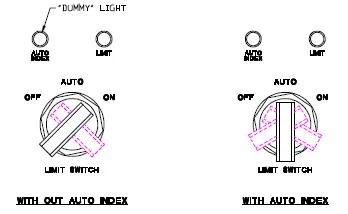
If “Auto” is selected on the limit switch while the conveyor is energized, equipped with a drop-off area limit switch, the belt will only run for a timed period after the drop-off area limit switch is triggered. This maximizes accumulation capacity without requiring operator presence. Factory programmed through the P.L.C. the conveyor will run only for approximately eight (8) seconds after the limit switch is triggered. Field adjustment of the time can only be made through replacement or reprogramming of the P.L.C. If the conveyor dose not have Auto Index, the switch on the control panel will only be a two position switch, and the light above the switch will not turn on (dummy light). This makes it possible to add Auto Index in the future, at a minimal added cost. If the conveyor has Auto index, the switch will be a three position, enabling the user to select Auto. When this is done the light will turn on.
- On
- Power Rollers
The Control center includes a start-stop control for the power roller conveyor. There is no adjustment required for the speed and wash does not apply. Limit switches are not required for these systems. The rollers are powered but, include a slip-type drive allowing the operator to stop items on the rollers without damage or injury to the equipment or operator. - Auto Plate Rinse (optional)
The Control center includes a “Rotary APR Switch” for the plate rinse sprayers, if provided. The functions include;- Auto
If the “Auto” is selected with the system energized, the water solenoid will be opened only upon activation of the electric photo-eye switch. The spray head shut-off must be in the open or on position. The timed cycle in the “auto” position opens the solenoid for approximately ten (10) seconds. Field adjustment of this time can only be made through replacement or reprogramming of the P.L.C.. - On
If the “On” is selected the water solenoid will be continuously open. The water will continue to run as long as the switch is in this position and the manual shut-off is in the open or on position. Individual shutoff can be manually achieved by closing the shut-off located on the spray head. - Off
If the “Off” is selected the water solenoid will not be energized and the water will not flow
- Auto
- Visual Indicators
There are numerous indicator lights located adjacent to their respective controls. These illuminate to indicate that various equipment and/or operations are energized. They are labeled accordingly. A flashing light generally indicates a momentary function is energized, or customer actions are required. There may also be “dummy” lights on the control panel, that may be used in future upgrades. These lights do not light up.
Remote Controls (Optional)
- Conveyor Start Switch
A conveyor Start switch may be located remote on a separate control panel. There may be more than one (1) Start switch. Pressing any Start switch will cause the conveyor belt to go into motion unless the system is not energized or a limit switch is deactivating the belt motion. - Conveyor Stop Switch
A conveyor Stop switch may be located remote on a separate control panel. There may be more than one (1) Stop switch. Pressing any one of the Stop switches will cause the conveyor to stop immediately. Some conveyors are equipped with a large, red, mushroom-shaped Stop switch that is easier for users to operate, “hands-free” or denoted for an “emergency stop”. - Momentary Run Switch
Some conveyors may be equipped with a momentary contact conveyor run switch, remote of the main conveyor control panel. If the conveyor is off, pressing the black Momentary Switch will cause the conveyor to run for as long as the switch is held in, then stop as soon as it is released.
Limit and Safety Switches (optional)
- Limit Switches
A limit switch may be provided with the conveyor. When activated (ON), the “End-Type” limit switch will momentarily stop the conveyor belt, when activated. A momentarytype switch allows the conveyor belt to resume running as soon as the obstruction is removed. This may be used on any type of conveyor and may be located at the end of a clean dish-table. When set to (AUTO) and equipped with a drop-off area “Auto-Indexing Type” limit switch, the conveyor belt will advance the belt for a brief time or distance, to maximize accumulation. Refer to Auto-Indexing.
- Photoelectric Sensor
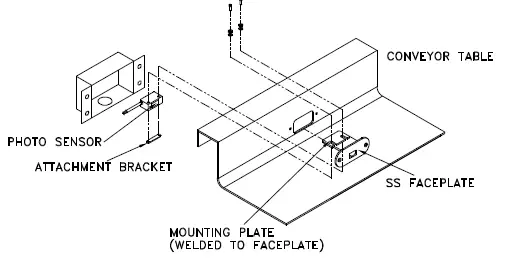
The photoelectric, beam type switch uses a polarized, reflected beam of light to determine when an object has reached the end of the conveyor. When the beam of light is interrupted, the conveyor stops. When the obstruction is removed, the conveyor continues. To service this unit, turn off conveyor and access the switch by removing the screws (or nuts) and switch housing. Reverse steps to re-assemble - Arm Switch Type (optional)
A flexible, movable arm actuator attached to an electrical switch may be mounted in the backsplash of the conveyor bed. When an object moves the arm, the conveyor stops momentarily. When the object is removed, the conveyor continues to run. This type of switch is only used when a beam type switch cannot sense all items entering the limit area. - Pressure Type
A flat plate located at the end of the belt is attached to an electrical switch mounted at the end of the conveyor bed on the tank. When an object moves the plate, the conveyor stops momentarily. When the object is removed, the conveyor continues to run.
- Photoelectric Sensor
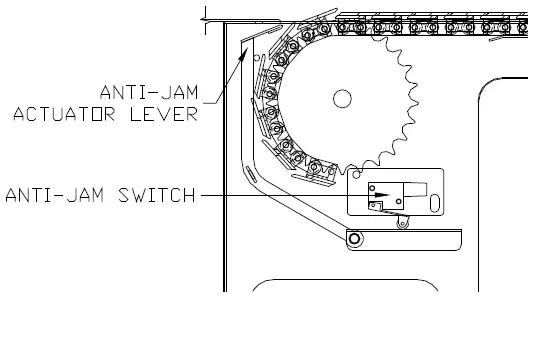
- Anti-Jam Safety Switch (post 01/01/03) The conveyor may be equipped with a retractable anti-jam switch, standard on CI** and CB** models only. The switch is mounted at the drive end, just below the conveyor surface, where the belt enters into the drive. [See Fig. 4.9] When an object becomes wedged between the belt and the table, the switch pivots and electrically causes the conveyor belt to stop. The conveyor will not restart until the anti-jam switch returns to its normal running position AND the Start switch is pressed. This is a NON-Momentary safety device that should not be overridden or disconnected. The obstruction can then be removed or will fall into the scrap basket below.

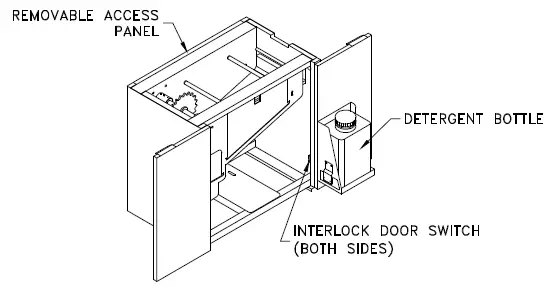
- Drive Door Safety (post 01/01/03) The conveyor may be equipped with a drive door safety switch. When a drive access door is opened, the conveyor will stop operation. The conveyor will not restart until the door is fully closed AND the Start switch is pressed. This is a NON-Momentary safety device that should not be overridden or disconnected.

- Motor Control Adjustments Your Avtec motorized conveyor system is provided with a KB Electronics adjustable frequency drive control. Refer to PentaPower KB Electronics motor control booklet or contact Avtec Ind..
- Water Usage
All of the following information is with the mixing valves half open, which is the factory setting, and what Avtec recommends. The water usage is only while washing, or rinsing
MAINTENANCE
Cleaning
It is important that the AVTEC conveyor is kept clean in order to avoid unsanitary conditions. It has been designed with ease of cleaning in mind. It is recommended that the electrical power to the conveyor be turned off or disconnected while being cleaned. NOTE: DO NOT use steel wool or any other abrasive pad on the conveyor belt, cord, roller or stainless steel surfaces. DO NOT spray the conveyor controls directly with a hose
- Drip Pan – for Slat Type Belt
Standard drip pans are actually UHMW lined
belt return guides that are self-cleaning by the
friction of the belt as it operates. At the initial
time of installation these pans should be
wiped for construction debris prior to initial
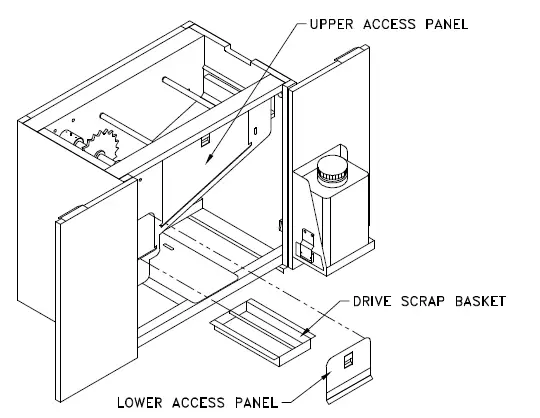
start-up. - Scrap Basket (Tank)
Conveyors equipped with the belts or cords
have a scrap basket to catch debris and
prevent drain blockage. This scrap basket
requires periodic removal to empty its
contents. The basket is located internally
within the wash tank. [See fig. 5.2].
To remove:- Turn off the conveyor
- Remove the lower lift-out access panel
- Simply slide the scrap basket out of tank, clean it and the sump area.
- Reverse steps to install.
Scrap Basket (Tail)
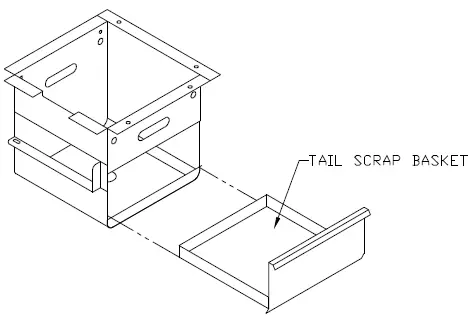
Conveyors equipped with wash have a scrap basket to prevent drain blockage at the tail end. This scrap basket requires periodic removal to empty its contents. The basket islocated at the base of the tail end sprocket support bracket. [See fig. 5.3].
To remove:
- Turn off conveyor
- Simply slide scrap basket out of chute, clean it and the sump area.
- Reverse steps to install.
Detergent Pump Housing/Bottle
Detergent Pump Housing
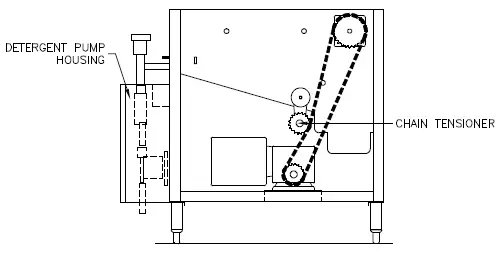
The detergent pump housing is typically located on either side of the drive housing [See fig. 5.4]. To prime pump, the fitting on the discharge side of the pump must be removed to relieve any pressure. The line must be submerged into a liquid solution and the conveyor started with the Belt Wash switch in the wash position. Run the system until fluid is seen flowing through pump. Set stroke of pump with adjustment knob located on pump (factory setting is #2). Use a detergent with a disinfecting agent. (WEAR PROTECTIVE EYE GEAR).
Detergent Bottle
The detergent bottle, if supplied, is mounted on one of the drive doors (see Fig 4.8) with a 5 ft tube and foot valve supplied for insertion into your detergent bottle (tank). AVTEC recommends EVAC Detergent for use in the conveyor system. It generally is effective in water at temperature between 40ºF and 140ºF (Must be minimum 70ºF if sanitization is required. Note: A lubricating type detergent is not required for proper belt operation).
 Access for Servicing
 Access for Servicing
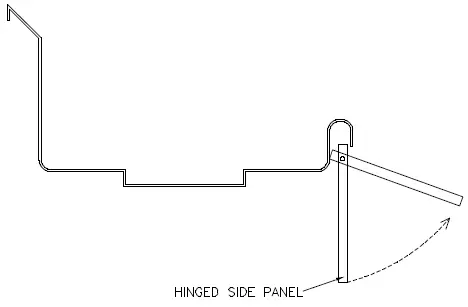
Hinged Side Panel
For most conveyors, access to the lower section requires simply swinging the panels up. The panels remain in the up position until lowered.
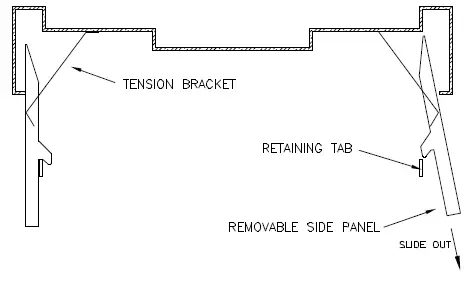
Removable Side Panel (Tray Make-up Only)
Access to the lower section requires removing the side panels. To remove the side panel, lift up the panel past the retaining tab, and slide out in downward and outward
Upper Access Panel
Conveyors equipped with the optional belt wash/rinse feature, have a lift out access panel on the side of the tank to facilitate access to the sprocket, shaft and plumbing. Turn off all power to the conveyor before removing the access panel. [See fig. 5.2]. This is where access to the locking sprocket collet is obtained. Refer to installation requirements for sprocket alignment requirements.
Drive Housing
The standard housing is equipped with double hinged, double pan doors for access to the upper and lower access panels [See fig. 4.8]. The conveyor must be turned off before any maintenance or cleaning is performed. A back access panel, that is removable with tools, for access to sprockets, chain, motor and gear box. The conveyor must be turned off before this panel is removed. An interlock switch will prevent the conveyor from running when a hinged panel is opened.
Routine Servicing
- Gear Box
The gearbox is lubricated for life; overhaul is required to change oil. - Visual Inspection
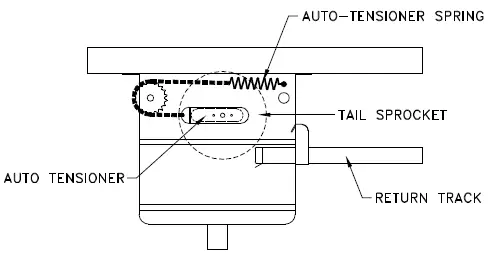
Slat type belt Visually inspect every month for wear, chips, scratches, cracks, signs of misalignment and excessive slack in the belt. The tail take-up [see fig 5.6] should automatically take up any excess slack.
- Fabric type belt
Visually inspect every month for wear, chips, scratches, cracks or signs of misalignment. All fabric belts have a autotake up feature
- Cord type belt
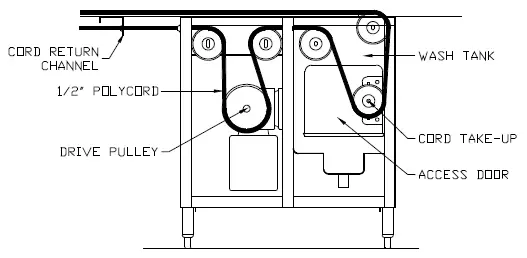
Visually inspect every month for wear, cracks or signs of cutting or twisting. The Cord take-up, located in the drive [see fig 5.8], can be accessed by removing the wash housing access door. - Drive Chain
- Lubricate the Intermediate Drive Chain [which runs from the gearbox to the belt drive sprocket] after one [1] month of operation.
- Lubricate every four [4] months of operation thereafter.
- Recommended Lubricant:
Roller Chain Lubricant McMaster-Carr No. 6159 K11 or equivalent.
PARTS LIST
BELT (CI SERIES)
| ITEM NO. | AVTEC PART NO. | DESCRIPTION |
| 1 | HD BLT0302 | 10″ wide Interlocking Assembly (Grey) |
BELT (CB SERIES)
| ITEM NO. | AVTEC PART NO. | DESCRIPTION |
| 1 | HD CHN0307 | #60 side flexing water proof chain |
| 2 | HD SLT0301 | 10” wide slat w/pins and rollers (blue) |
| 3 | HD SLT0303 | 10” wide slat w/pins and rollers (black) |
| 4 | HD SLT0302 | 10” wide slat w/pins and rollers (gray) |
CORD (CC SERIES)
| ITEM NO. | AVTEC PART NO. | DESCRIPTION |
| 1 | HD CBL0301 | 1/2” Hyfen polyester fiber core polyurethane can-cable |
| 2 | HD BLT0309 | 5/16” Orange-Go polyurethane cord |
FABRIC BELT (CF SERIES)
| ITEM NO. | AVTEC PART NO. | DESCRIPTION |
| 1 | HD BLT0310 | 10.75” wide 2-ply (blue #22-84) [Slim-Line Model] |
| 2 | HD BLT0305 | 10” wide 2-ply (blue #22-84) [K-Line model] |
| 3 | HD BLT0308 | 10” wide 2-ply (white) [Customer Spec.] |
POWER ROLLERS (CP SERIES)
| ITEM NO. | AVTEC PART NO. | DESCRIPTION |
| 1 | HD ROL0308 | 1.9” stainless steel roller |
GRAVITY ROLLERS (CR SERIES)
| ITEM NO. | AVTEC PART NO. | DESCRIPTION |
| 1 | HD ROL0404 | 7.958”L x 1.9” o.d. grey roller (for 24” BFR in turn) |
| 2 | HD ROL0323 | 23.875”L x 1.9” o.d. grey straight roller |
| 3 | HD ROL0401 | 3.375”L x 1.9” o.d. grey straight roller |
| 4 | RP SHT0402 | 3.5” x 7/16” aluminum hex. shaft drilled/tapped/anodized |
| 5 | HD SHT0301 | 24” x 7/16” aluminum hex. shaft drilled/tapped/anodized |
| 6 | HD ROL0302 | 10.75″ grey PVC roller w/shaft |
SKATE WHEELS (CS SERIES)
| ITEM NO. | AVTEC PART NO. | DESCRIPTION |
| 1 | HD WHL0301 | Grey with 5/16” bore; standard for all applications |
| 2 | N/A | 5/8” o.d. white Delrin roller standoff (custom per app.) |
WEAR STRIP
| ITEM NO. | AVTEC PART NO. | DESCRIPTION |
| 1 | PL GID0301 | Snap on rail guide for 1” tubing; CB model up-racking benches only. (consult with engineering prior to order) |
| 2 | PL GID0302 | Modified T-guide rail; roll formed at factory per job. (consult with engineering prior to placing order) |
| 3 | PL STR0302 | Beveled profile strip; CB models only |
| 4 | PL TPE0301 | 10.125” return track liner |
| 5 | PL TPE0302 | Return track liner corner piece; must be cut at factory |
| 6 | PL TPE0303 | Conveyor bed liner; CI models only |
| 7 | PL GID0303 | #50 Chain guide; #7 UHMW profile (CP only!) |
BELT SPROCKET (CI SERIES)
| ITEM NO. | AVTEC PART NO. | DESCRIPTION |
| 1 | HD SPK0312 | UHMW sprocket (drive) |
| 2 | HD SPK0313 | UHMW sprocket (tail) |
BELT SPROCKET (CB SERIES)
| ITEM NO. | AVTEC PART NO. | DESCRIPTION |
| 1 | HD SPK0304 | 60A25 s/s sprocket (drive) |
| 2 | HD SPK0302 | 60B25 UHMW sprocket (tail) |
BELT PULLEYS (CC SERIES)
| ITEM NO. | AVTEC PART NO. | DESCRIPTION |
| 1 | HD PUL0302 | 4.4” dia. Idler pulley (requires machining at factory) |
| 2 | HD PUL0301 | 4.4” dia. Idler pulley for wash tank (requires machining at factory) |
| 3 | HD PUL0303 | Drive sheave; nylon coated |
BELT PULLEYS (CF SERIES)
| ITEM NO. | AVTEC PART NO. | DESCRIPTION |
| 1 | HD ROL0304 | Hi output powered drive roller (Slim-line) |
| 2 | PL PUL0302 | Tail roller with bearings (Slim-line) |
| 3 | PL PUL0303 | 6.5” dia. Steel pulley; crowned w/neoprene lagging (must be ordered as an assy. with drive sprocket) |
| 4 | HD ROL0314 | 13.38”L Snub drive roller (K-Line) |
| 5 | HD ROL0311 | 11”L Snub tail roller (K-Line) |
| 6 | HD ROL0310 | 14.5”L Idler roller (K-Line & S-line) |
| 7 | HD ROL0303 | 11.88” Snub drive roller (S-line) |
| 8 | HD ROL0305 | 11.5” Snub tail roller (S-line) |
INTERMEDIATE DRIVE (CI, CB SERIES)
| ITEM NO. | AVTEC PART NO. | DESCRIPTION |
| 1 | PB CPL0317 | Transtorque shaft coupler (couples sprocket to shaft) |
| 2 | HD SPK0305 | Shaft sprocket |
| 3 | HD SPK0306 | Reducer Sprocket |
| 4 | HD CHN0304 | #50 waterproof roller chain |
| 5 | HD LNK0304 | #50 waterproof connection link |
| 6 | HD LNK0309 | #50 waterproof half link |
BEARINGS (Wash Tank Drive) (CI, CB, CF SERIES)
| ITEM NO. | AVTEC PART NO. | DESCRIPTION |
| 1 | HD BRG0304 | Flanged bearing with locking collet |
| 2 | HD BRG0305 | Flanged bearing adapter (1”) |
| 3 | HD BLK0304 | 3/4” bore pillow block (CF only) |
DRIVE COMPONENTS (CI, CB SERIES)
| ITEM NO. | AVTEC PART NO. | DESCRIPTION |
| 1 | EL MTR0301 | 1/2 HP 3-phase motor |
| 2 | EL MTR0307 | 3/4 HP 3-phase motor |
| 3 | HD RED0308 | 60:1 reducer; shaft is on right as viewed from motor |
| 4 | HD RED0311 | 60:1 reducer; shaft is on left as viewed from motor |
| 5 | HD RED0305 | 80:1 reducer; shaft is on left as viewed from motor |
| 6 | HD RED0306 | 80:1 reducer; shaft is on right as viewed from motor |
| 7 | HD RED0309 | 100:1 reducer; shaft is on right as viewed from motor |
| 8 | HD RED0310 | 100:1 reducer; shaft is on left as viewed from motor |
DRIVE COMPONENTS (CC SERIES)
| ITEM NO. | AVTEC PART NO. | DESCRIPTION |
| 1 | EL MTR0301 | 1/2 HP 3-phase motor |
| 2 | EL MTR0307 | 3/4 HP 3-phase motor |
| 3 | HD RED0307 | Dual shaft reducer |
DRIVE COMPONENTS (CF SERIES)
| ITEM NO. | AVTEC PART NO. | DESCRIPTION |
| 1 | EL MTR0301 | 1/2 HP 3-phase motor |
| 2 | HD RED0305 | 80:1 reducer; shaft is on left as viewed from motor |
| 3 | HD RED0306 | 80:1 reducer; shaft is on right as viewed from motor |
| 4 | HD SPK0306 | Reducer Sprocket |
| 5 | HD SPK0316 | Shaft sprocket |
| 6 | HD CHN0304 | #50 waterproof roller chain |
| 7 | HD LNK0304 | #50 waterproof connection link |
| 8 | HD LNK0309 | #50 waterproof half link |
DRIVE COMPONENTS (CP SERIES)
| ITEM NO. | AVTEC PART NO. | DESCRIPTION |
| 1 | EL MTR0302 | 1/2 HP parallel gear motor |
| 2 | HD SPK0318 | Molded sprocket (roller shaft) |
| 3 | HD SPK0324 | Motor sprocket |
| 4 | HD CHN0304 | #50 waterproof roller chain |
| 5 | HD LNK0304 | #50 waterproof connection link |
| 6 | HD BRG0312 | Molded delrin shaft bearing (press into s/s side rails) |
| 7 | HD IDL0301 | Ball bearing idler sprocket |
CONTROL PANEL COMPONENTS (All models)
| ITEM NO. | AVTEC PART NO. | DESCRIPTION |
| 1 | EL DIS0303 | Disconnect switch |
| 2 | EL DIS0304 | Disconnect handle rod |
| 3 | EL DIS0305 | Disconnect handle |
| 4 | EL SWT0333 | Power switch (Slim-line only!) |
| 5 | EL SWT0312 | 30mm push button (start/stop) |
| 6 | EL SWT0310 | 20mm push button (Old style PLC controls & Aux. Start/Stop Stations) |
| 7 | EL BLK0319 | Normally closed contact block |
| 8 | EL SWT0315 | 2-position selector switch |
| 9 | EL SWT0313 | 3-position selector switch |
| 10 | EL RLY0314 | Power supply/relay (for use with beam switches) |
| 11 | EL RLY0326 | DPDT relay; 24VDC coil |
| 12 | EL RLY0327 | DPDT relay base |
| 13 | EL TPE0301 | Relay; 3PDT; 24VDC coil |
| 14 | EL SWT0342 | Relay base |
| 15 | EL LGT0305 | 1/2″ red indicator light |
| 16 | EL LGT0306 | 5/16” red neon indicator light |
| 17 | HD CNT0304 | Variable frequency drive (1/2 HP) |
| 18 | EL INV0301 | Variable frequency drive (3/4+ HP) |
| 19 | EL PLC0303 | Allen Bradley PLC (20/12 I/O) (Discontinued, consult factory) |
| 20 | EL PLC0302 | Koyo D0-05DR PLC |
| 21 | EL PLC0304 | Koyo D0-06DR PLC |
| 22 | EL PLC0305 | Allen Bradley PLC (10/6 I/O) (Discontinued, consult factory) |
| 23 | EL RLY0328 | Mag. Starter (CP only!) |
| 25 | HD KNB0303 | Speed pot knob |
| 26 | HD SEA0303 | Speed pot cupseal |
| 27 | FA WSH0310 | Speed pot finishing washer |
| 28 | EL SUP0301 | Idec 7.5W 24VDC switching power supply |
DETERGENT UNIT / WASH / APR (All models)
| ITEM NO. | AVTEC PART NO. | DESCRIPTION |
| 1 | PB SOL0301 | Wash solenoid |
| 2 | PB VLV0320 | APR solenoid |
| 3 | HD PMP0302 | Detergent pump |
| 4 | PB VLV0315 | Mixing valve (universal application) |
| 5 | PB HSE0302 | 12”L x 1/2” IPS s/s flex line |
| 6 | PL HSE0303 | 20”L x 1/2″ IPS s/s flex line |
| 7 | HD STN0302 | 1/2″ line strainer |
| 8 | HD TNK0302 | 2 gal. detergent tank |
| 9 | PB VLV0318 | 1/2″ vacuum breaker |
| 10 | PB VLV0347 | 1/2” sweat spring check valve |
| 11 | AS NZL0308 | APR shower head |
SENSORS (All models)
| ITEM NO. | AVTEC PART NO. | DESCRIPTION |
| 1 | EL SEN0301 | Thru beam sensor |
| 2 | EL SEN0303 | Diffuse reflection; short range |
| 3 | EL SEN0304 | Diffuse reflection; long range |
| 4 | EL SEN0302 | Low detergent sensor |
| 5 | EL SWT0331 | Anti-jam micro-switch |
| 6 | EL SWT0332 | Door ajar micro-switch |
WARRANTY
AVTEC INDUSTRIES INC. warrants to the original purchaser for use of our products, that any part thereof which proves to be defective in material or workmanship under normal use within one year from date of installation, will be replaced free of charge, labor to replace such part is warranted for one year from installation. All warranty labor to be performed during regular working hours, with no overtime premium. All Warranty service must be authorized by the factory and be performed by AVTEC’s authorized service personnel. This Warranty is limited to the United States and Canada. This Warranty does not apply to any damage resulting from shipping, improper installation, accident, unauthorized alteration, local codes not previously brought to the attention of AVTEC, misuse, or abuse; and does not cover loss of food, other products or damage to equipment or property resulting from mechanical or electrical failure. AVTEC neither makes nor assumes and does not authorize any other person to assume any other obligation or liability in connection with its products other than that covered in this Warranty.