 ASTRO
ASTRO
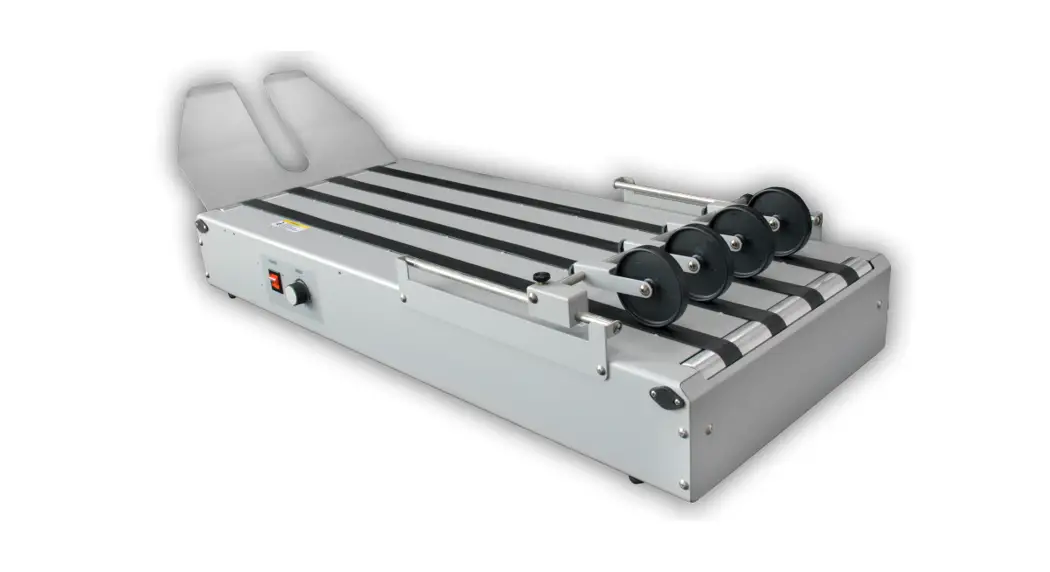
CDM-700 Series
(Covers Domestic 115V & European 220V Models)
Conveyor Stacker 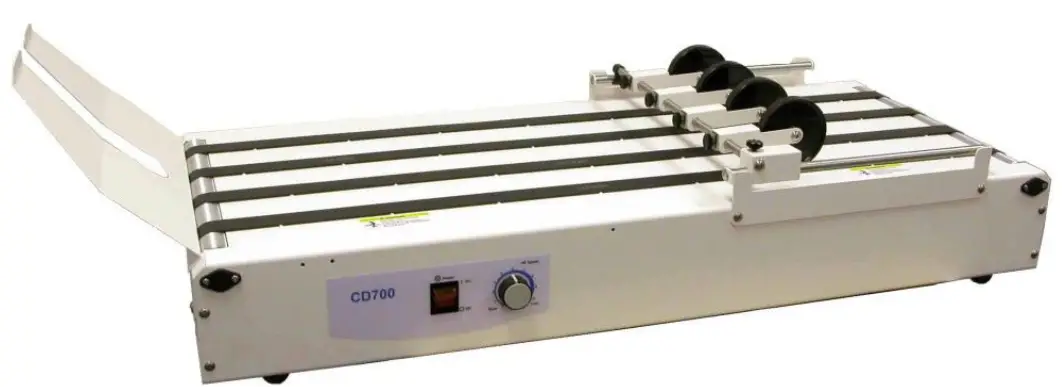 USER’S GUIDE/PARTS CATALOG
This manual is intended solely for the use and information of Astro Machine Corp., its designated agents, customers, and their employees. The information in this guide was obtained from several different sources that are deemed reliable by all industry standards. To the best of our knowledge, that information is accurate in all respects. However, neither Astro Machine Corp. nor any of its agents or employees shall be responsible for any inaccuracies contained herein.
All rights reserved. No part of this book may be reproduced or transmitted in any form or by any means, electronic or mechanical, including photocopying, recording, or any information storage and retrieval system, without permission in writing from the publisher.
INTRODUCTION
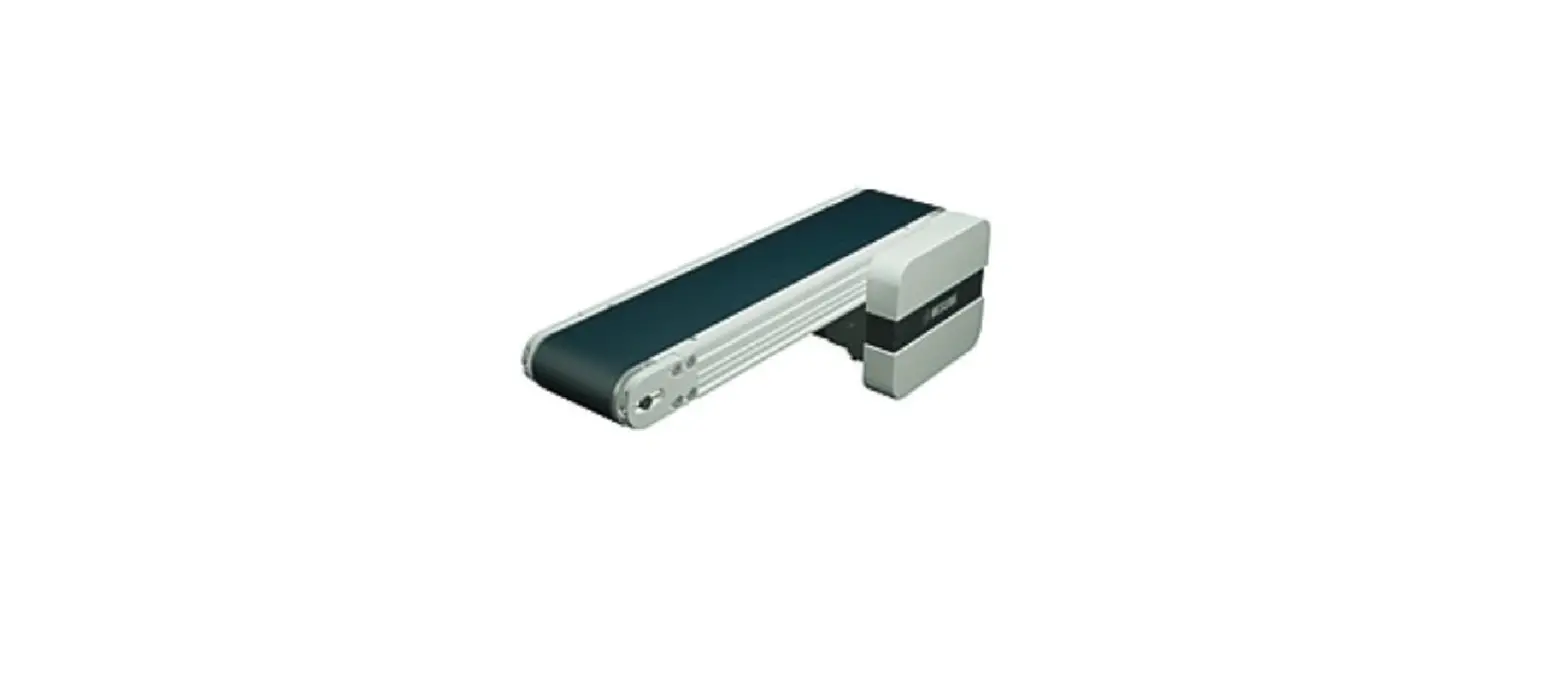
The CDM-700 Conveyor transports media from the Printer and stacks it. As the first piece of stock exits the Printer, the motor-driven Conveyor Tapes under the Stacker Wheels move it. The next piece of stock exits the Printer, overlaps the preceding piece, and is moved along the Conveyor. After clearing the Stacker Wheels, the stock can be unloaded by hand without having to stop the Printer.
SPECIFICATIONS*
| Power Requirements: Optional Availability: | 115 VAC, 60 Hz, 9.0 AMP 220 VAC, 50/60 Hz, 0.5 AMP |
| Motor Circuit BreakerFuse: | 1 AMP 0.5 AMP |
| Speed Of Tapes: | 0″ – 250 feet per minute (variable) |
| Dimensions: | Width: 15″ (38.1 cm) Length: 34.5″ (87.6 cm) Height: Table Top Weight: 33 lbs. (15 kg) |
* MANUFACTURER RESERVES THE RIGHT TO CHANGE SPECIFICATIONS WITHOUT WRITTEN NOTICE.
SAFETY PRECAUTIONS
THIS EQUIPMENT PRESENTS NO PROBLEM WHEN USED PROPERLY.
OBSERVE SAFETY MEASURES WHEN OPERATING THE CONVEYOR:
READ THIS MANUAL CAREFULLY AND FOLLOW RECOMMENDED PROCEDURES.
- KEEP HANDS, HAIR, AND CLOTHING CLEAR OF ROLLERS, TAPES, AND OTHER MOVING PARTS.
- ALWAYS TURN CONVEYOR OFF BEFORE ADJUSTING OR CLEANING.
- DISCONNECT POWER CORD WHEN MAKING ANY ADJUSTMENTS OR PERFORMING ANY MAINTENANCE NOT COVERED IN THIS MANUAL.
WARNING!
ONLY CONNECT CONVEYOR TO A PROPERLY GROUNDED OUTLET! FAILURE TO DO SO CREATES RISK OF ELECTRICAL SHOCK!
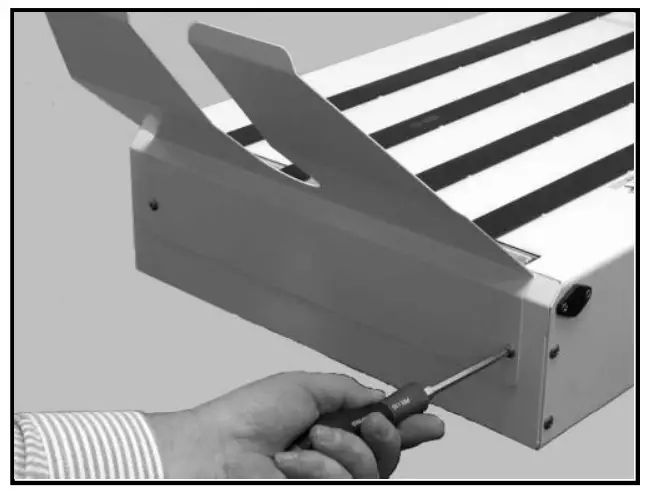
Assembling Conveyor
- Unpack Conveyor. Do not discard carton until Conveyor is assembled.
- Attach Receiving Tray to Conveyor with two screws provided.
Positioning Conveyor
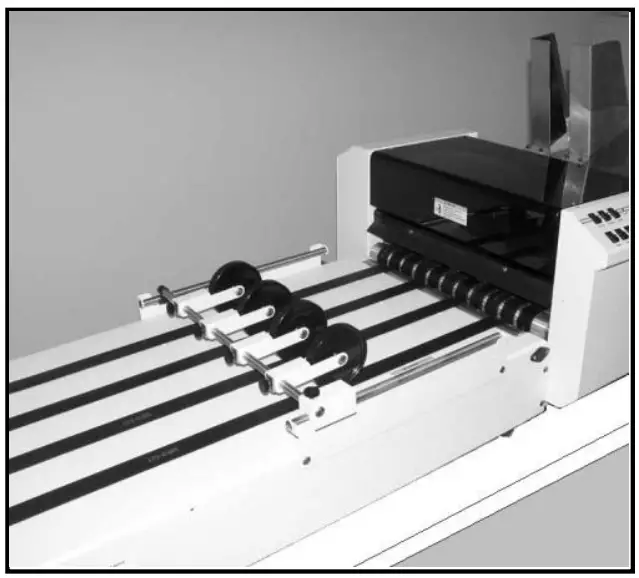
- Place Conveyor on the same sturdy table or workbench next to the Printer as shown.
- Center Conveyor relative to Printer’s exit.
Operating Conveyor
Plug Conveyor into a properly grounded wall outlet using power cord supplied.
CAUTION
CONVEYOR IS DESIGNED TO BE PLUGGED INTO A GROUNDED OUTLET. FOR YOUR SAFETY, DO NOT REMOVE GROUND PIN FROM LINE CORD.
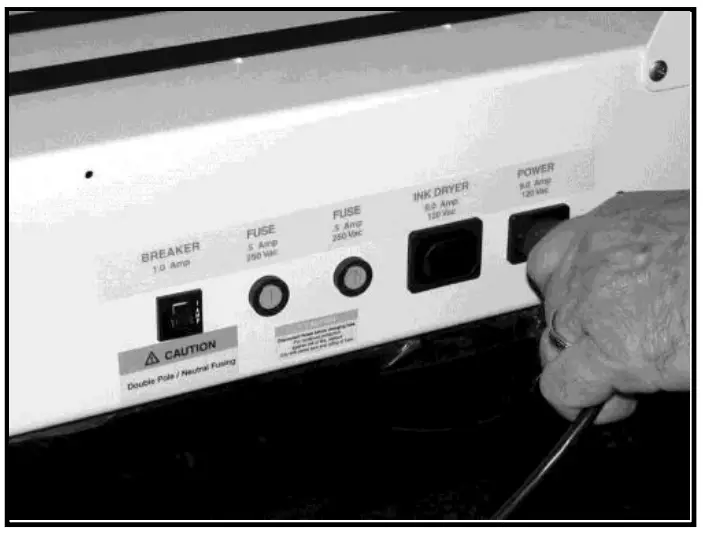
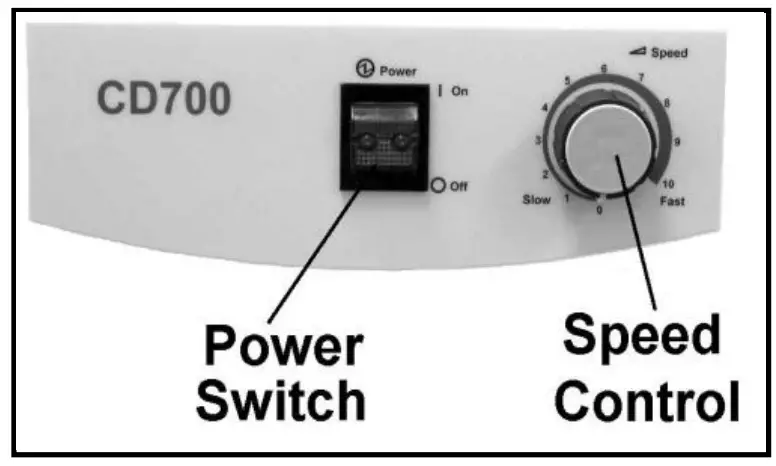
- Turn Conveyor and Printer ON.
- Feed stock through Printer and observe the way it is received by the Conveyor.

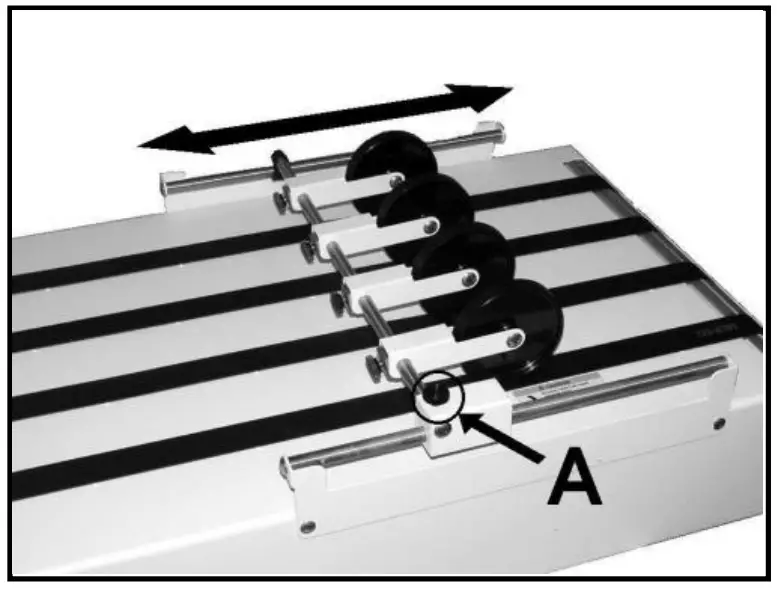
- Loosen Locking Knob [A] and adjust Stacker Wheels so lead edge of media just touches Stacking Rollers as it exits the Printer.
- Adjust Speed Control to set the amount of overlap between the pieces. (For less overlap turn Speed Control clockwise, for more overlap turn Speed Control counterclockwise.)

Reverse Operation
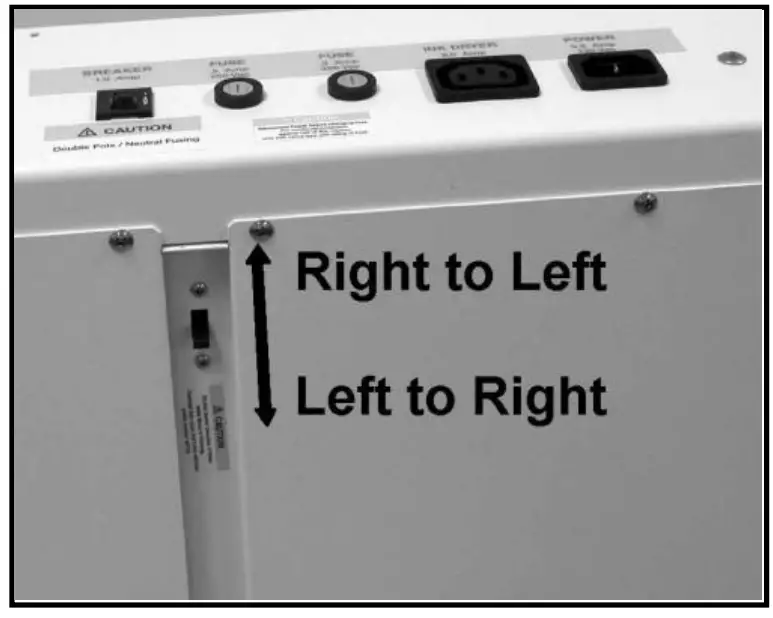
Conveyor is designed to run from right to left. It can alsooperate from left to right. To switch operation direction, first move Guide Roller Assembly and Stacking Tray to opposite sides of the Conveyor. Then switch the Reversing Switch (located under Conveyor) to the reverse operating position.
Troubleshooting
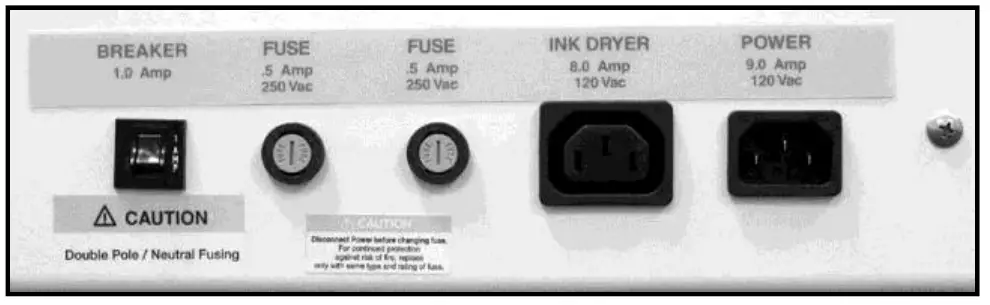
If Conveyor fails to run, check for jammed paper between Tapes and Roller. Also, check Fuse and Motor Circuit Breaker and replace or reset if necessary. Fuse Holders and Circuit Breaker located on rear of Conveyor.
WARNING!
DISCONNECT POWER CORD WHEN CHECKING OR REPLACING FUSE! ALWAYS REPLACE FUSE WITH THE SAME TYPE. FAILURE TO DO SO MAY DAMAGE ELECTRONIC CIRCUIT BOARD.
Optional DTM-255/DTM-250 Conveyor Drop Tray Installation
DTM-255 Drop Tray is for Left-to-Right Operation. DTM-250 Drop Tray is for Right-toLeft Operation. Assemble and install Conveyor Drop Tray on exit end of Conveyor:
- Remove two screws attaching Stacking Tray to Conveyor and remove Tray.
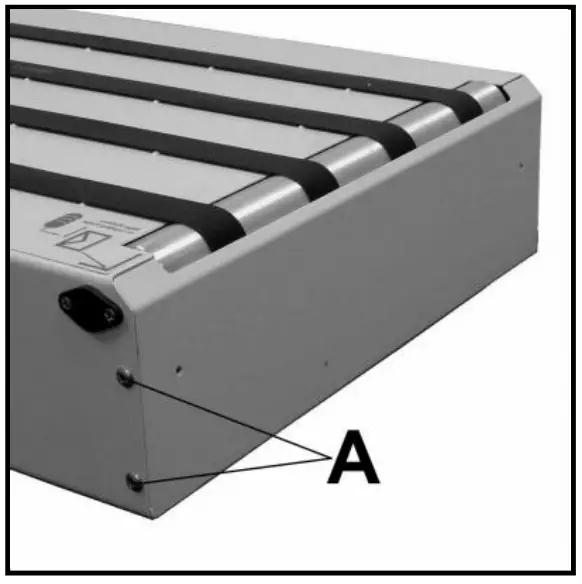
- Remove four screws [A] that mount Front Cover Plate to Conveyor. DO NOT remove Front Cover Plate.

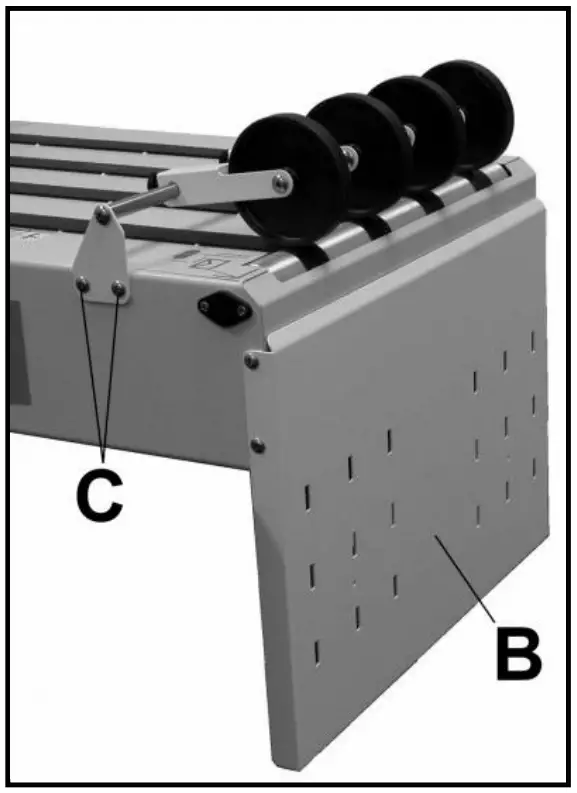
- While holding Front Cover Plate in place, install Drop Tray Support Bracket [B] using four screws removed in Step 2.
- Install Media Guide Roller Assembly using four screws supplied [C]. Mount Media Guide Roller Assembly as shown with Rollers resting on Exit Roller of Conveyor.

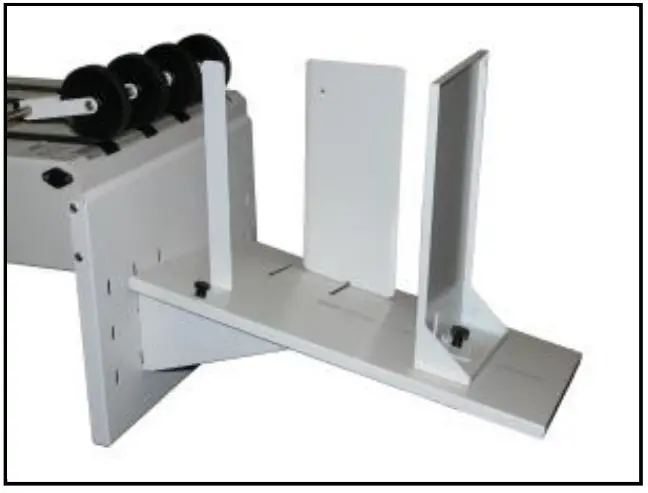
- Install Tray Base on Drop Tray Support Bracket. Tray adjusts up and down to allow stacking more or less media.
- Remove knobs from Guides. Assemble Guides to Tray Base as shown. Largest Guide is the Rear Stop Guide. Second largest Guide is installed on non-operator’s side of Conveyor and smallest Guide is installed on operator’s side as shown.

Optional 57E-600-10 Conveyor Leg Kit Installation (for Use with M-Series Printers)
Install Conveyor Legs on the Conveyor to allow proper alignment with M-Series Printers.
CONTENTS OF KIT:
- Conveyor Legs (2)
- Screws (4)
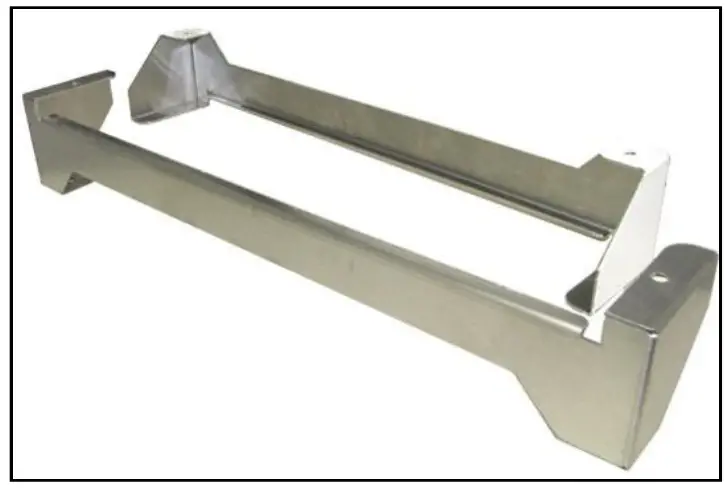
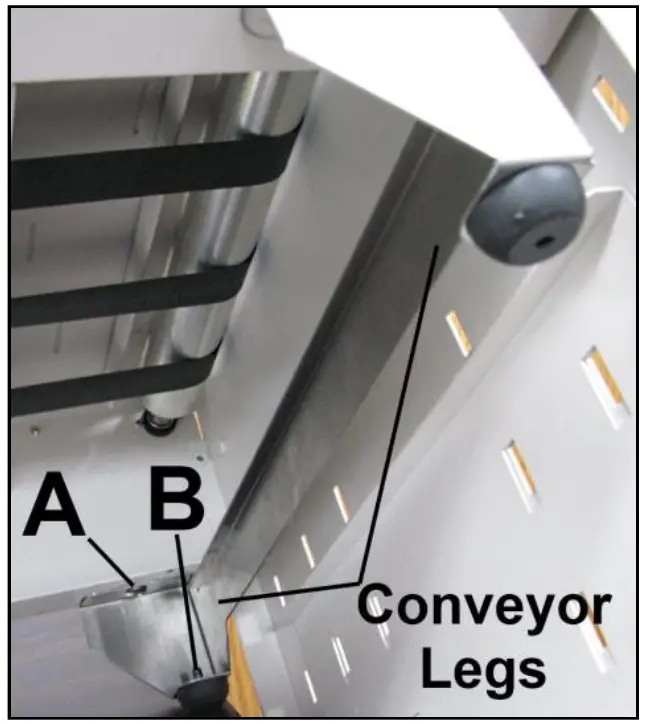
INSTALL CONVEYOR LEGS:
- Remove (4) Rubber Feet from bottom of Conveyor.
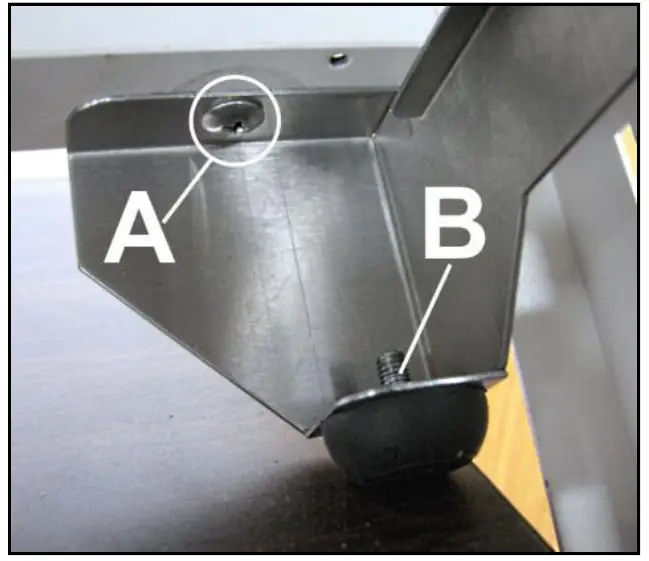
- Attach Conveyor Legs across the bottom front and rear of Conveyor using Rubber Foot holes [A] and four screws included with Kit.

- Reattach Rubber Feet to Conveyor Legs using predrilled holes [B] provided.

Optional DK-700 Dryer Kit
Dryer Kit Includes: Front Exit Roller Assembly, Guide Roller Support, Front Roller Support, Rear Roller Support, 2 Dryer Support Shafts, 8 mounting screws
- Before installing DK-700 Dryer Kit, remove these parts from the CDM-700 Conveyor.
A. Stacking Tray [A] (2 screws).
B. Guide Assembly [B] (4 screws). Remove Operator’s Side Bracket first, then the Rear Support Bracket.
 - Install new Rear Roller Support [C] using two screws (as shown).

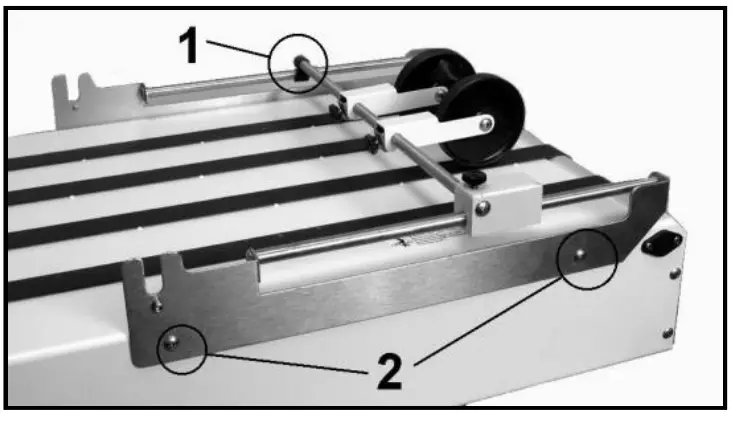
- Hook Guide Roller Support over the shaft on Rear Roller Support [1]. Install Front Roller Support using two screws [2] (as shown).

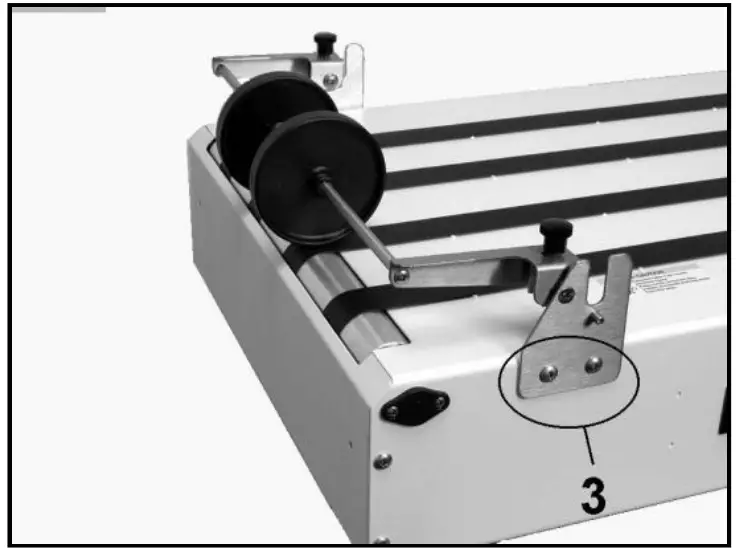
- Install Front Exit Roller Assembly by attaching mounting brackets to Conveyor Frame (as shown) using two screws on each side [3].

- Remove two Levers [4] and Bearing Washers [5] from two Dryer Support Shafts [6]. Install two Shaft Assemblies into holes provided in Dryer (as shown). Reinstall Levers [4] and Bearing Washers [5] on Shafts.
 NOTE: When installing the two Levers [4], make sure the cams on the opposite end of the shaft are in the same position as the cams on the Levers.
 - Dryer Assembly can now be placed in Support Brackets. Make sure Bearing Washers are between the Support Brackets and the cams (as shown).
NOTE: Bearing Washers should go between Support Brackets and cams.
- Plug cord supplied with Dryer into Dryer receptacle, then into receptacle labeled “Dryer” on the Conveyor. Then plug the Conveyor into the wall outlet.

- To operate the Dryer, set the two Levers so media can pass under the Dryer without interference. Then turn Dryer power switch ON. Turn Conveyor ON.
Dryer and Guide Rollers can be adjusted from side to side (by sliding them on Shaft Assemblies) to accommodate varying media sizes and print positioning.
NOTE: Dryer will not operate if Conveyor is not turned ON.
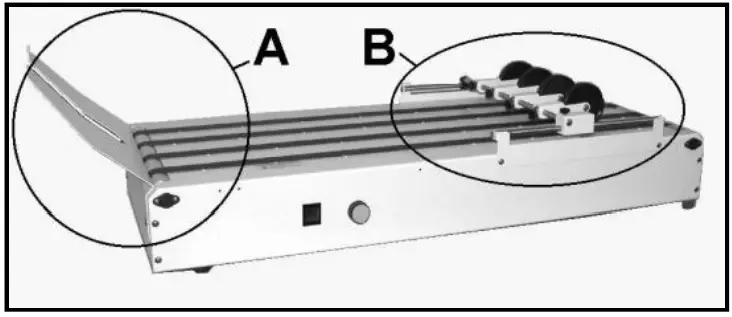 Remove Operator’s Side Bracket first, then the Rear Support Bracket.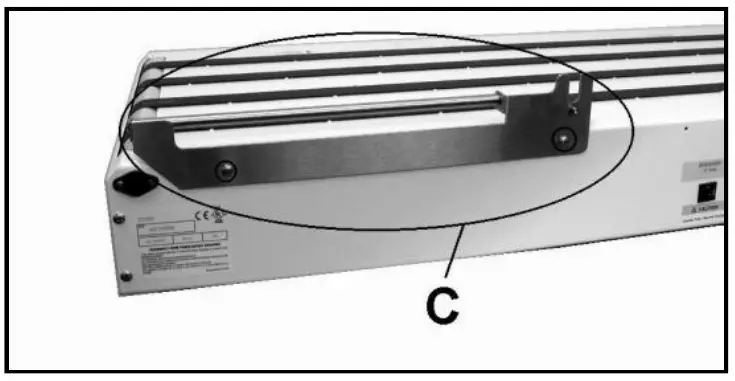
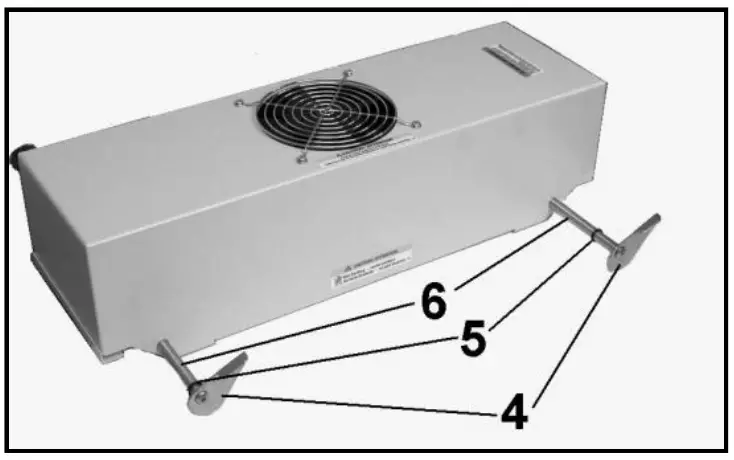 NOTE: When installing the two Levers [4], make sure the cams on the opposite end of the shaft are in the same position as the cams on the Levers.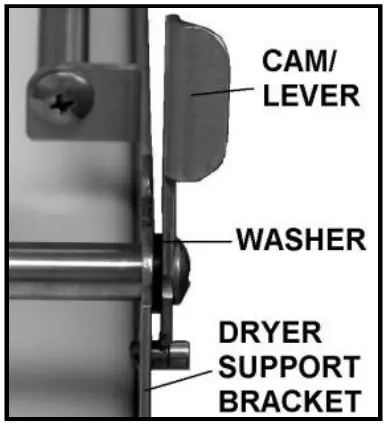
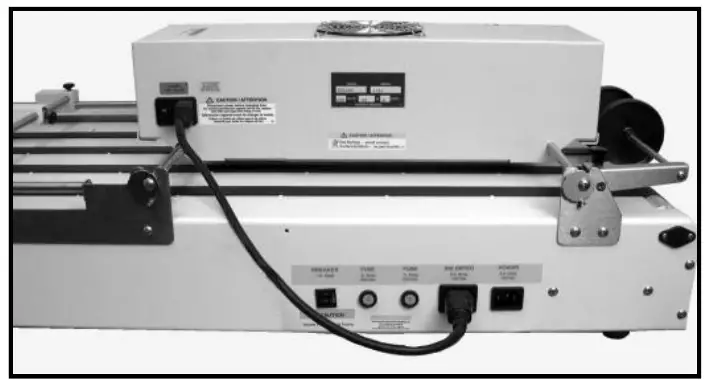
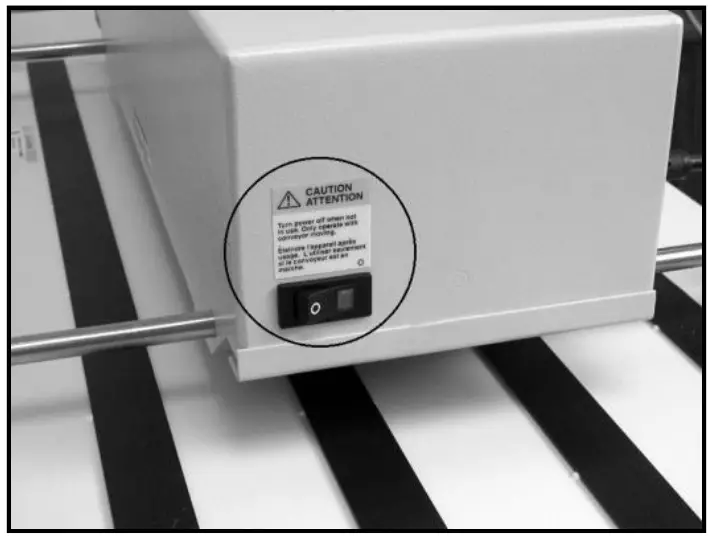
CAUTION
DO NOT OPERATE DRYER IF BELTS ON CONVEYOR ARE NOT TURNING. DO NOT BLOCK CONVEYOR EXIT WHEN USING DRYER.
NOTE: When you see a Key number repeated in a listing, check the voltage of your particular model:
- Voltage: 115V or 220V
PARTS CATALOG
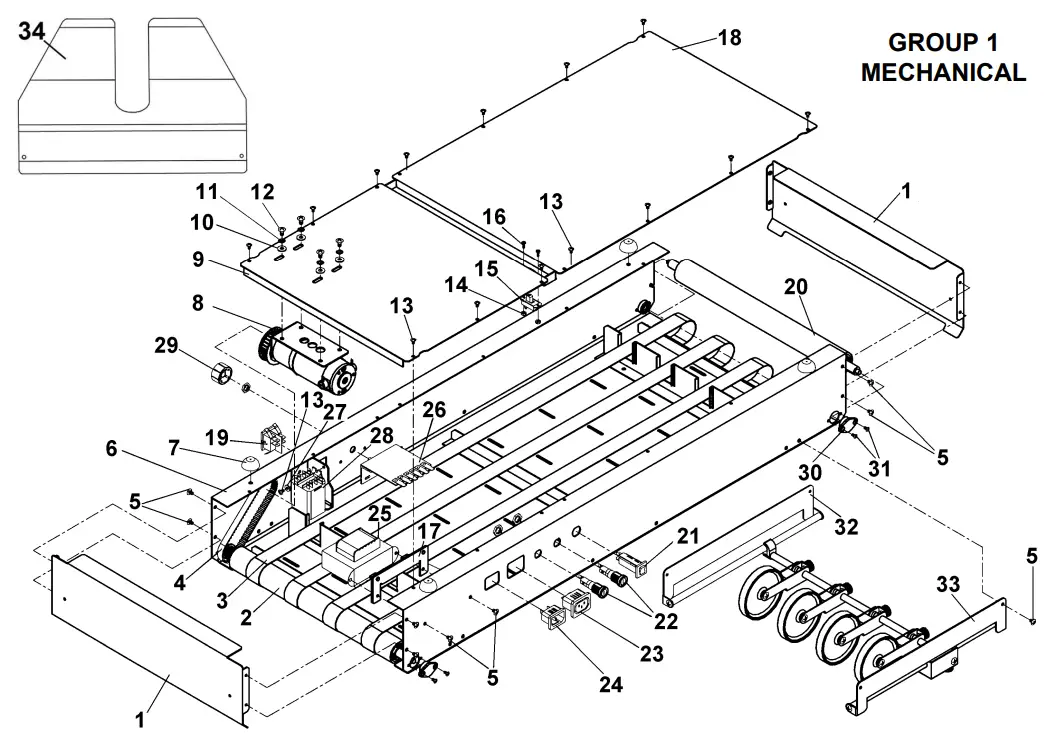
PARTS CATALOG
GROUP 1 – MECHANICAL
| KEY | PART NO. | DESCRIPTION | QTY |
| 1 | 57-150-08 | END CAP, BODY CLOSURE | 2 |
| 2 | 57-100-15 | DRIVE ROLLER ASSEMBLY | 1 |
| 3 | 123-0309 | BELT, CONVEYOR DELIVERY | 4 |
| 4 | 123-0771 | BELT, 120XL037 NEOPRENE CLASS | 1 |
| 5 | 123-1136 | SCREW, 8-32 x 1/4 PH TRUSS HD | 22 |
| 6 | 57P-600-02 | CONVEYOR BODY WELDMENT (115V) | 1 |
| 6 | 57P-610-02 | CONVEYOR BODY WELDMENT (220V) | 1 |
| 7 | 123-0620 | FOOT, #7OASHORA | 4 |
| 8 | 57-100-84 | MOTOR ASSEMBLY | 1 |
| 9 | 57-150-42 | MOTOR BASE | 1 |
| 10 | 123-0100 | WASHER, 1/2 x 0.218 x 0.048 THK | 4 |
| 11 | 123-0237 | STAR-WASHER, #10 EXTERNAL | 4 |
| 12 | 123-0024 | SCREW, 10-32 x 3/8 PH TRUSS HD. MS ZINC | 4 |
| 13 | 123-1135 | SCREW, 6-32 x 1/4 PH TRUSS HD. | 15 |
| 14 | 123-0425 | NUT, HEX 4-40 | 2 |
| 15 | 57-500-04 | SWITCH ASSEMBLY | 1 |
| 16 | 123-1023 | SCREW, 4-40 x 5/16 RH PH | 2 |
| 17 | 57-100-50 | BRACKET, TRANSFORMER | 1 |
| 18 | 57-150-43 | COVER | 1 |
| 19 | 123-1103 | SWITCH | 1 |
| 20 | 57-100-17 | IDLER ROLLER | 3 |
| 21 | 123-1104 | CIRCUIT BREAKER | 1 |
| 22 | 123-0355 | FUSE HOLDER | 2 |
| 23 | 57-500-01 | AC OUTLET ASSEMBLY | 1 |
| 24 | 57-500-03 | AC INLET ASSEMBLY (115V) | 1 |
| 24 | 57-500-21 | FILTER, POWER ENTRY MODULE (220V) | 1 |
| 25 | 57-500-02 | TRANSFORMER (115V, 60Hz) | 1 |
| 25 | 57-500-16 | TRANSFORMER (220V, 50/60Hz) | 1 |
| 26 | 57-500-13 | SPEED CONTROL | 1 |
| 27 | 123-0191 | WASHER, PLAIN #6 | 1 |
| 28 | 123-1106 | RELAY | 1 |
| 29 | 123-1101 | KNOB, PURE TOUCH | 1 |
| 30 | 90-103-52 | BALL BEARING HOUSING ASSEMBLY | 8 |
| 31 | 123-0275 | SCREW, 6-32 x 1/4 OVAL PH. HD. | 16 |
| 32 | 57-601-03 | WHEEL BRACKET ASSY. (SEE GROUP 4) | 1 |
| 33 | 57-601-01 | WHEEL GUIDE & BRACKET ASSEMBLY (SEE GROUP 4) | 1 |
| 34 | 57P-601-16 | RECEIVING TRAY | 1 |
| 35 | 123-0635* | POWER CORD (115V) POWER CORD (220V) | 1 |
| 36 | 123-0635* 123-0735* | DECAL, POWER ENTRY 115V DECAL, POWER ENTRY 220V | 1 |
| * | 57-550-25* 57-550-30* | DROP TRAY KIT, RIGHT-TO-LEFT (SEE PAGE 3) (SEE GROUP 6) | 1 |
| * | DT-255 | DROP TRAY KIT, LEFT-TO-RIGHT (SEE PAGE 3) (SEE GROUP 6A) | 1 |
| * | 57E-600-10 | CONVEYOR LEG KIT FOR USE WITH M-SERIES PRINTERS (SEE PAGE 4) | 1 |
*NOT SHOWN
GROUP 2 – ELECTRICAL
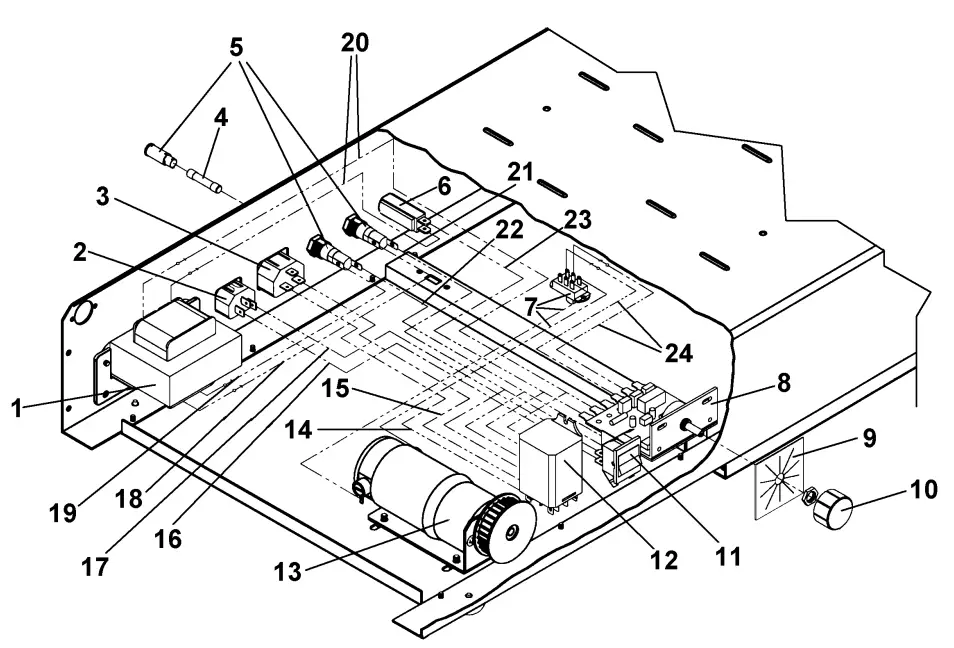
GROUP 2 – ELECTRICAL
| KEY | PART NO. | DESCRIPTION | QTY |
| 1. 1. | 57-500-02 57-500-16 | TRANSFORMER (115V, 60Hz) TRANSFORMER (220V, 50-60Hz) | 1 1 |
| 2. 2. | 57-500-03 57-500-21 | AC/INLET ASSEMBLY (115V) FILTER. POWER ENTRY MODULE (220V) | 1 1 |
| 3. | 57-500-01 | AC/OUTLET ASSEMBLY | 1 |
| 4. 4. | 123-0680 123-1179 | FUSE. .5A 250V (3AG) #313.500 (115V) FUSE. .3A SLOW BLOW, #313.300 (220V) | 2 2 |
| 5. | 123-0355 | FUSE HOLDER | 2 |
| 6. | 123-1104 | CIRCUIT BREAKER | 1 |
| 7. | 57-500-04 | SWITCH ASSEMBLY | 1 |
| 8. | 57-500-13 | SPEED CONTROL ASSEMBLY | 1 |
| 9. | 57-550-20 | INDICATOR PLATE | 1 |
| 10. | 123-1101 | KNOB. PURE TOUCH | 1 |
| 11. | 123-1103 | SWITCH | 1 |
| 12. | 123-1106 | RELAY | 1 |
| 13. | 57-100-84 | MOTOR ASSEMBLY. 24 V DC | 1 |
| 14. | 57-500-15 | WIRE HARNESS. AC/OUTLET | 1 |
| 15. | 57-500-11 | WIRE HARNESS. AC/OUTLET | 1 |
| 16. | 57-500-07 | WIRE HARNESS. AC/INTLET | 1 |
| 17. | 57-500-10 | WIRE HARNESS. FUSE | 1 |
| 18. | 57-500-08 | WIRE HARNESS. FUSE | 1 |
| 19. | 57-500-05 | WIRE HARNESS. FUSE | 1 |
| 20. | 57-500-17 | WIRE HARNESS. TRANSFORMER-SPEED CONTROL | 1 |
| 21. | 57-500-12 | WIRE HARNESS. NC OUTLET | 1 |
| 22. | 57-500-06 | WIRE HARNESS. NC OUTLET | 1 |
| 23. | 57-500-14 | WIRE HARNESS. FUSE | 1 |
| 24. | 57-500-09 | WIRE HARNESS ASSEMBLY. MOTOR | 1 |
GROUP 2A – MOTOR DRIVE
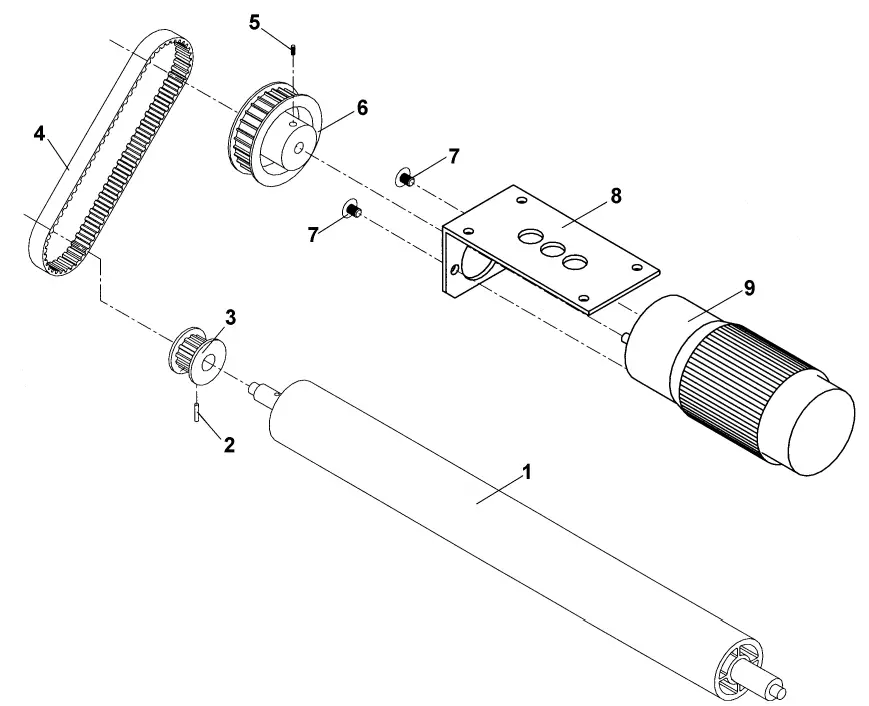
| KEY | PART NO. | DESCRIPTION | QTY. |
| 1 | 57-100-16 | DRIVE ROLLER | 1 |
| 2 | 123-0036 | ROLL PIN | 1 |
| 3 | 57-100-80 | PULLEY, 12XLO | 1 |
| 4 | 123-0771 | BELT, 120XLO31 | 1 |
| 5 | 123-0322 | SET SCREW, 8-32 x 1/4 | 1 |
| 6 | 57-100-78 | MOTOR PULLEY, 28 TEETH | 1 |
| 7 | 123-0017 | SCREW, 10-32 x 1/4 PH TRUSS HD. | 2 |
| 8 | CD-301-06 | MOTOR BRACKET | 1 |
| 9 | 57-100-85 | MOTOR | 1 |
GROUP 3 – LABELS
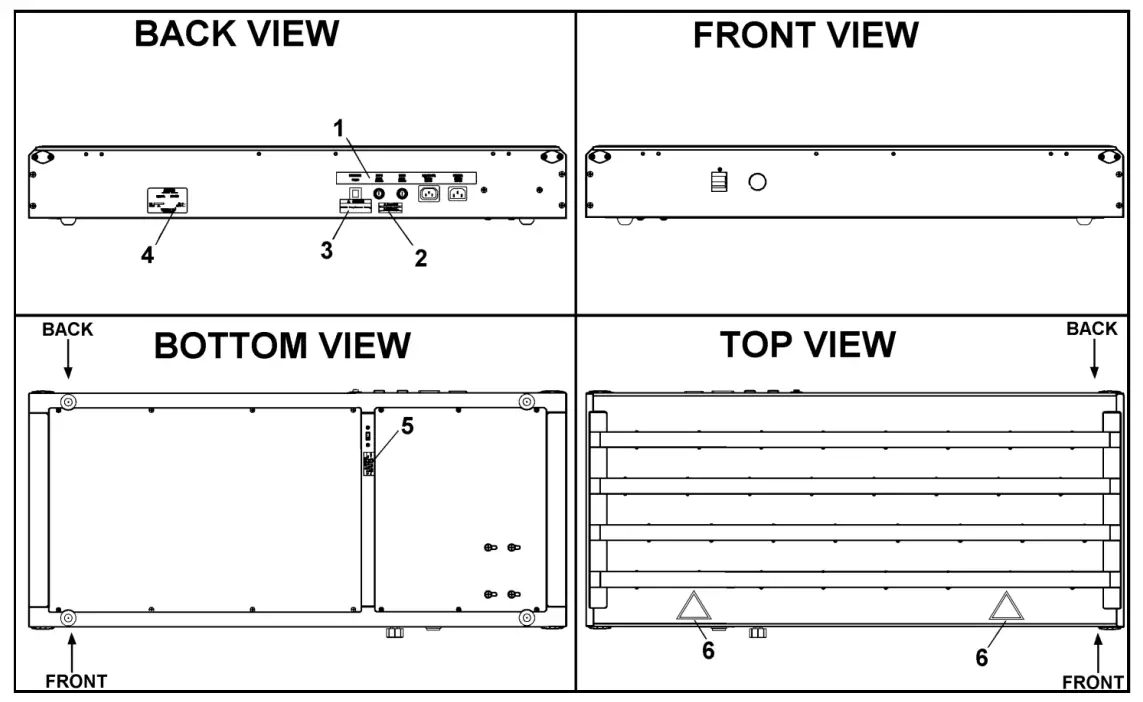
| KEY | PART NO. | DESCRIPTION | QTY. |
| 1 | 57-550-25 | DECAL, POWER ENTRY (115V) | 1 |
| 1 | 57-550-30 | DECAL, POWER ENTRY (220V) | 1 |
| 2 | 123-1033 | LABEL, CAUTION DISCONNECT POWER | 1 |
| 3 | 123-1115 | LABEL, CAUTION/ DOUBLE POLE | 1 |
| 4 | 123-1962 | DECAL, DATA PLATE GENERIC | 1 |
| 5 | 123-1121 | LABEL, CAUTION REVERSE SWITCH | 1 |
| 6 | 123-2597 | LABEL, CAUTION EXPOSED ROLLER | 2 |
GROUP 4 – WHEEL GUIDE AND BRACKET ASSEMBLY
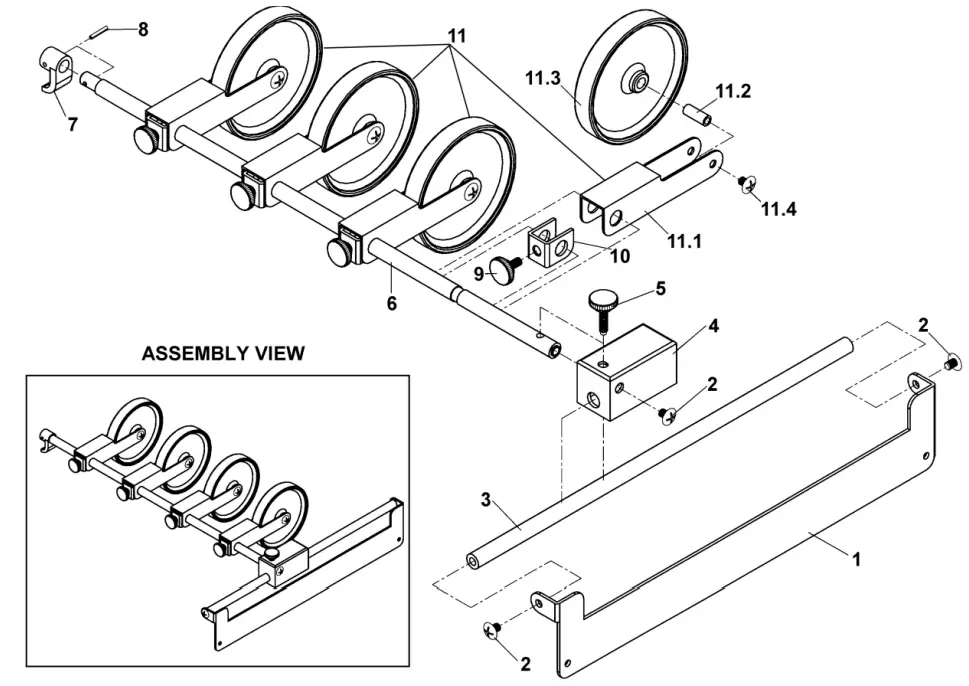
| KEY | PART NO. | DESCRIPTION | QTY. |
| 1. 2. | 57P-601-11 123-0017 | WHEEL BRACKET SCREW, 10-32 x 1/4 PH TRUSS HD. | 2 3 |
| 3 | 57-601-10 | ROD | 2 |
| 4 | 57-150-27 | BRACKET | 1 |
| 5 | 57-100-19 | THUMBSCREW | 1 |
| 6 | 57-601-06 | WHEEL GUIDE SHAFT | 1 |
| 7 | 57-100-28 | SHAFT BRACKET | 1 |
| 8 | 123-0695 | SPRING PIN, 3/32 x 1/2 | 1 |
| 9 | 95-105-19 | MEDIA GUIDE KNOB ASSEMBLY | 4 |
| 10 | 57-601-13 | FORK | 4 |
| 11 | 57P-601-05 | WHEEL ASSEMBLY | 4 |
| 11.1 | 57-150-37 | WHEEL ARM WELDMENT | 4 |
| 11.2 | 57-100-30 | WHEEL SHAFT | 4 |
| 11.3 | CD-300-21 | STACKER WHEEL | 4 |
| 11.4 | 123-0017 | SCREW, 10-32 x 1/4 PH TRUSS HD. | 8 |
GROUP 5 – DT-255 LEFT-TO-RIGHT DROP TRAY (OPTIONAL)
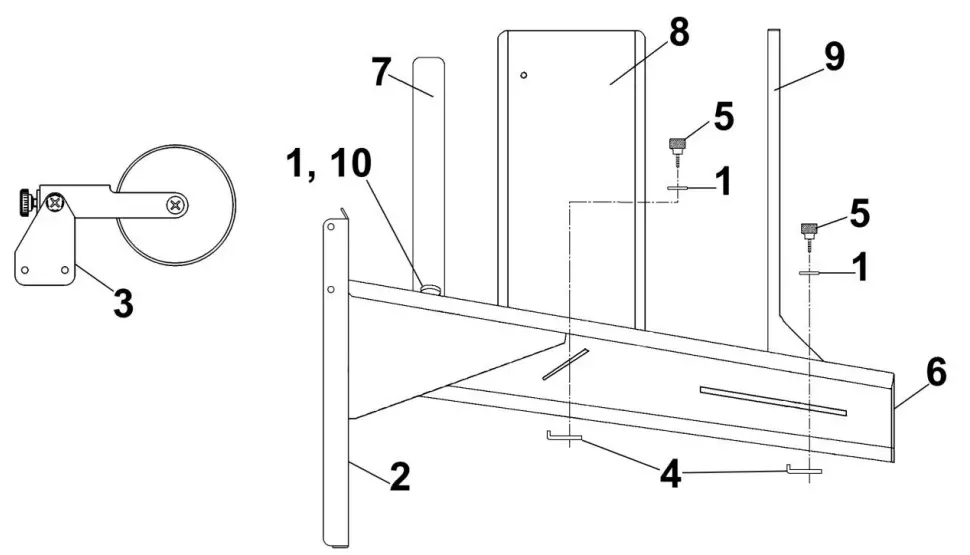
| KEY | PART NO. | DESCRIPTION | QTY. |
| 1. | 123-0068 | WASHER, #10 PLAIN, SS 18-8 | 3 |
| 2. | 57P-602-04 | DROP TRAY BASE | 1 |
| 3. | 57P-602-01 | WHEEL GUIDE AND BRACKET ASSEMBLY (SEE GROUP 68) | 1 |
| 4. | 29-400-16 | NUT | 2 |
| 5. | 29-400-28 | KNOB ASSEMBLY, 10-32 x 1/2 | 2 |
| 6. | 25P-252-09 | DROP TRAY PLATFORM | 1 |
| 7. | 25P-252-17 | MEDIA GUIDE | 1 |
| 8. | 25P-252-20 | SIDE GUIDE ASSEMBLY | 1 |
| 9. | 25P-252-22 | STOPPER ASSEMBLY | 1 |
| 10. | 94-104-06 | KNOB, METERING BRACKET | 1 |
GROUP 5A – DT-255 REAR WHEEL GUIDE AND BRACKET
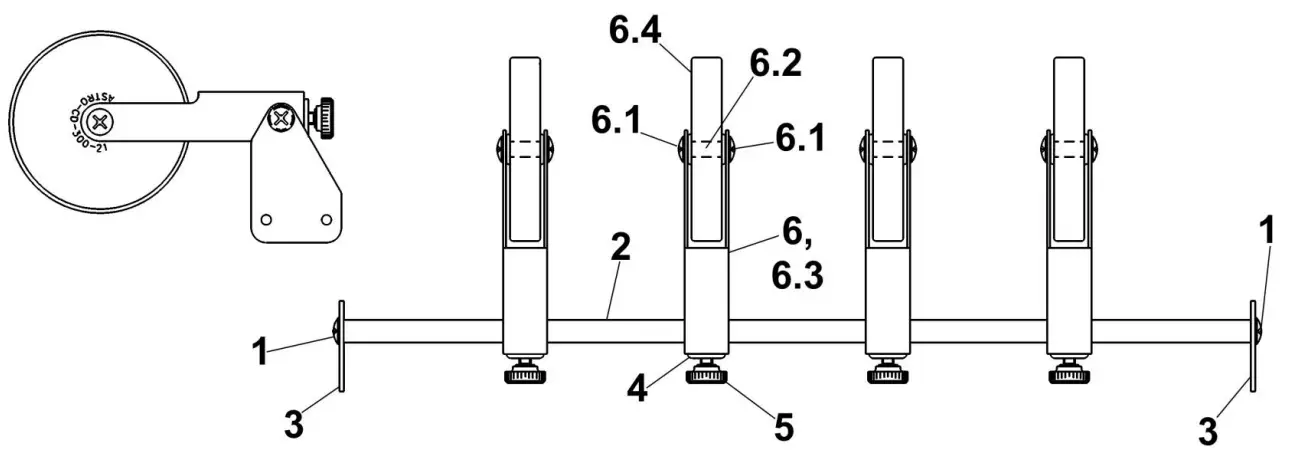
| KEY | PART NO. | DESCRIPTION | QTY. |
| 57P-602-01 | WHEEL GUIDE AND BRACKET ASSEMBLY | 1 | |
| 1.00E+00 | 123-0017 | SCREW, 10-32 x 1/4 PH TRUSS HD. | 2 |
| 2 | 57-602-10 | WHEEL ROD | 1 |
| 3 | 57P-602-11 | BRACKET | 2 |
| 4 | 57-601-13 | FORK | 4 |
| 5 | 95-105-19 | MEDIA GUIDE KNOB ASSEMBLY | 4 |
| 6 | 57P-601-05 | WHEEL ASSEMBLY | 4 |
| 6.1 | 123-0017 | SCREW, 10-32 x 1/4 PH TRUSS HD. | 8 |
| 6.2 | 57-100-30 | WHEEL SHAFT | 4 |
| 6.3 | 57-150-37 | WHEEL ARM WELDMENT | 4 |
| 6.4 | CD-300-21 | STACKER WHEEL | 4 |
GROUP 6 – DK-700 DRYER KIT PARTS (OPTIONAL)
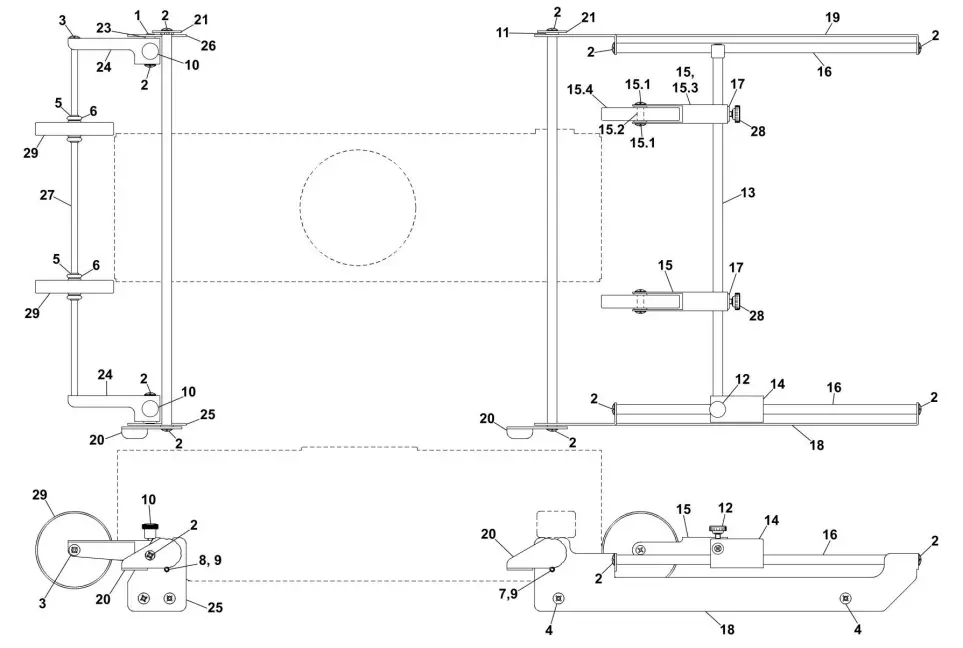
GROUP 6 – DK-700 DRYER KIT PARTS (OPTIONAL)
| KEY | PART NO. | DESCRIPTION | QTY. |
| 1 | 123-0002 | SCREW, 10-32 x 3/8 PH UNDERCUT SS | 2 |
| 2 | 123-0017 | SCREW, 10-32 x 1/4 PH TRUSS HD. | 10 |
| 3 | 123-1135 | SCREW, 6-32 x 1/4 PH TRUSS HD. | 2 |
| 4 | 123-1136 | SCREW, 8-32 x 1/4 PH TRUSS HD. | 8 |
| 5 | 123-1986 | BEARING CLIP | 4 |
| 6 | 123-1987 | O-RING | 4 |
| 7 | 123-2067 | SCREW, 6-32 x 5/16 SOC. HD. CAP | 2 |
| 8 | 123-2078 | SCREW, 6-32 SOC. HD. | 2 |
| 9 | 20-100-38 | SPACER | 4 |
| 10 | 24-101-11 | THUMBSCREW, 10-32 | 2 |
| 11 | 32-110-48 | SPACER | 6 |
| 12 | 57-100-19 | THUMBSCREW | 1 |
| 13 | 57-100-25 | WHEEL GUIDE SHAFT | 1 |
| 14 | 57-150-27 | BRACKET | 1 |
| 15 | 57P-601-05 | WHEEL ASSEMBLY | 2 |
| 15.1 | 123-0017 | SCREW, 10-32 x 1/4 PH TRUSS HD. | 4 |
| 15.2 | 57-100-30 | WHEEL SHAFT | 2 |
| 15.3 | 57-150-37 | WHEEL ARM WELDMENT | 2 |
| 15.4 | CD-300-21 | STACKER WHEEL | 2 |
| 16 | 57-601-10 | WHEEL ROD | 2 |
| 17 | 57-601-13 | FORK | 4 |
| 18 | 57-603-08 | FRONT WHEEL BRACKET | 1 |
| 19 | 57-603-09 | REAR WHEEL BRACKET | 1 |
| 20 | 57-603-12 | HEIGHT ADJUSTMENT ARM | 2 |
| 21 | 57-603-13 | HEIGHT ADJUSTMENT WHEEL | 2 |
| 22 | 57-603-15 | WHEEL ROD | 2 |
| 23 | 57-603-16 | STUD | 2 |
| 24 | 57-603-21 | EXIT WHEEL ARM | 1 |
| 25 | 57-603-23 | EXIT WHEEL BRACKET, L/H | 1 |
| 26 | 57-603-24 | EXIT WHEEL BRACKET, R/H | 1 |
| 27 | 57-603-26 | WHEEL ROD | 1 |
| 28 | 95-105-19 | MEDIA GUIDE KNOB ASSEMBLY | 2 |
| 29 | CD-300-21 | STACKER WHEEL | 2 |
GROUP 7 – 115V CONVEYOR ELECTRICAL
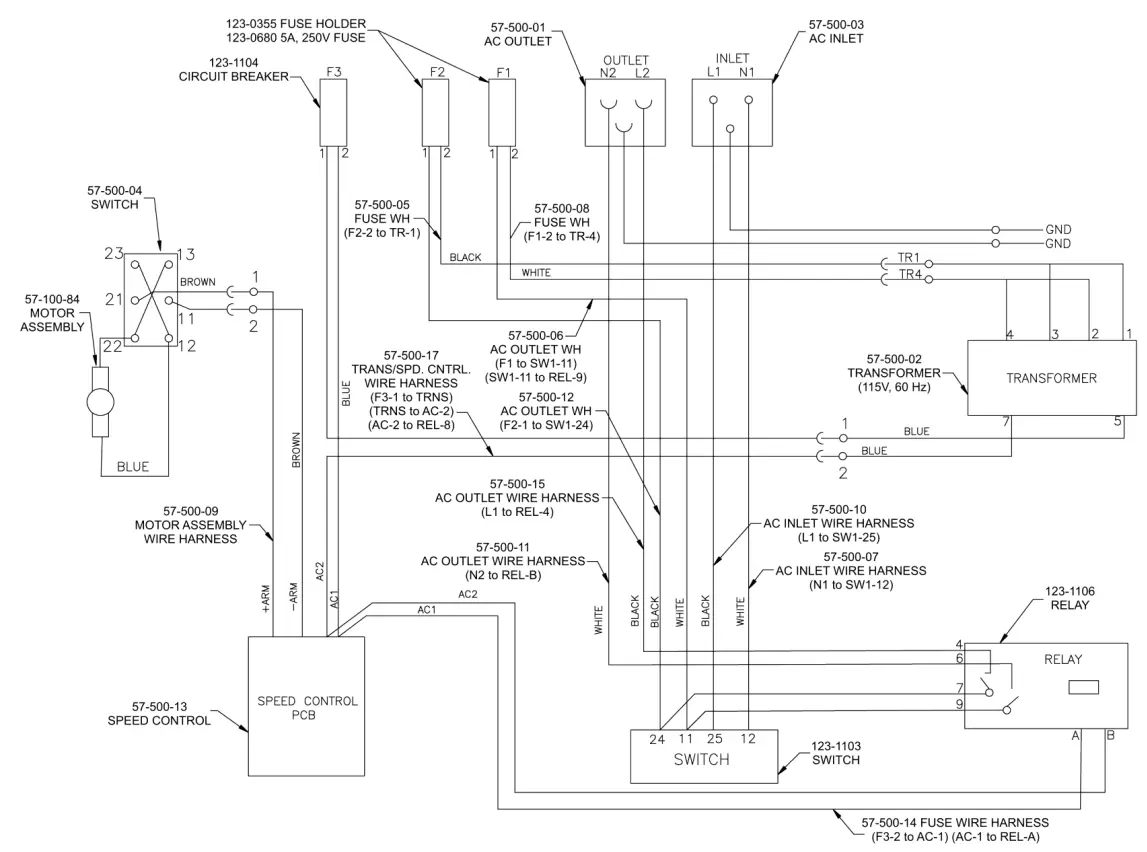
GROUP 7A – 220V CONVEYOR ELECTRICAL
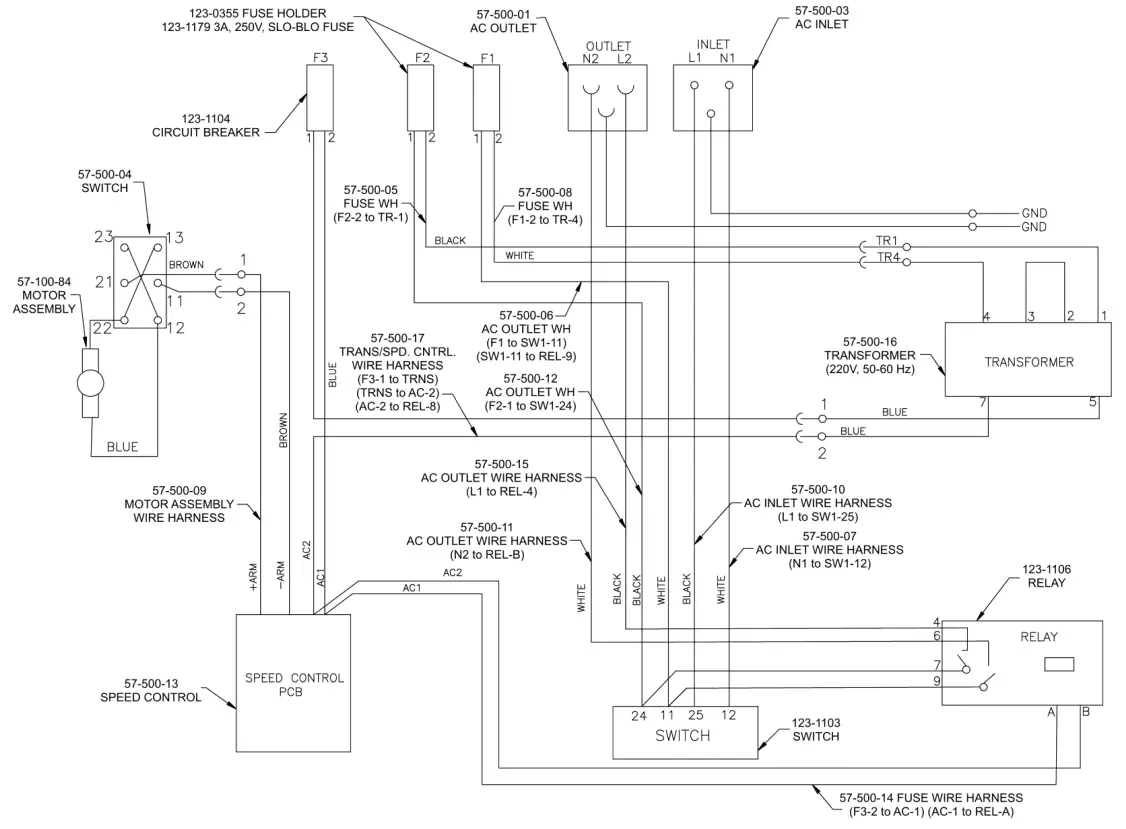
PARTS INDEX
| PART NO | GROUP | KEY | PART NO. | GROUP | KEY |
| 123-0002 | 6 | 1 | 123-2067 | 6 | 7 |
| 123-0017 | 4 | 2 | 123-2078 | 6 | 8 |
| 123-0017 | 2A | 7 | 123-2597 | 3 | 6 |
| 123-0017 | 5A | 1 | 20-100-38 | 6 | 9 |
| 123-0017 | 5A | 6.1 | 24-101-11 | 6 | 10 |
| 123-0017 | 6 | 2 | 25P-252-09 | 5 | 6 |
| 123-0017 | 6 | 15.1 | 25P-252-17 | 5 | 7 |
| 123-0024 | 1 | 12 | 25P-252-20 | 5 | 8 |
| 123-0036 | 2A | 2 | 25P-252-22 | 5 | 9 |
| 123-0068 | 5 | 1 | 32-110-48 | 6 | 11 |
| 123-0100 | 1 | 10 | 29-400-16 | 5 | 4 |
| 123-0191 | 1 | 27 | 29-400-28 | 5 | 5 |
| 123-0237 | 1 | 11 | 57-100-15 | 1 | 2 |
| 123-0275 | 1 | 31 | 57-100-16 | 2A | 1 |
| 123-0309 | 1 | 3 | 57-100-17 | 1 | 20 |
| 123-0322 | 2A | 5 | 57-100-19 | 4 | 5 |
| 123-0355 | 1 | 22 | 57-100-19 | 6 | 12 |
| 123-0355 | 2 | 5 | 57-100-25 | 6 | 13 |
| 123-0425 | 1 | 14 | 57-100-28 | 4 | 7 |
| 123-0620 | 1 | 7 | 57-100-30 | 4 | 9.4 |
| 123-0635 | 1 | 35 | 57-100-30 | 5A | 6.2 |
| 123-0680 | 2 | 4 | 57-100-30 | 6 | 15.2 |
| 123-0695 | 4 | 8 | 57-100-50 | 1 | 17 |
| 123-0735 | 1 | 35 | 57-100-78 | 2A | 6 |
| 123-0771 | 1 | 4 | 57-100-80 | 2A | 3 |
| 123-0771 | 2A | 4 | 57-100-84 | 1 | 8 |
| 123-1023 | 1 | 16 | 57-100-84 | 2 | 13 |
| 123-1033 | 3 | 2 | 57-100-85 | 2A | 9 |
| 123-1081 | 1 | 26 | 57-150-08 | 1 | 1 |
| 123-1101 | 1 | 29 | 57-150-27 | 4 | 4 |
| 123-1101 | 2 | 10 | 57-150-27 | 6 | 14 |
| 123-1103 | 1 | 19 | 57-150-37 | 4 | 9.3 |
| 123-1103 | 2 | 11 | 57-150-37 | 5A | 6.3 |
| 123-1104 | 1 | 21 | 57-150-37 | 6 | 15.3 |
| 123-1104 | 2 | 6 | 57-150-42 | 1 | 9 |
| 123-1106 | 1 | 28 | 57-150-43 | 1 | 18 |
| 123-1106 | 2 | 12 | 57-500-01 | 1 | 23 |
| 123-1115 | 3 | 3 | 57-500-01 | 2 | 3 |
| 123-1117 | 3 | 1 | 57-500-02 | 1 | 25 |
| 123-1121 | 3 | 5 | 57-500-02 | 2 | 1 |
| 123-1135 | 1 | 13 | 57-500-03 | 1 | 24 |
| 123-1135 | 6 | 3 | 57-500-03 | 2 | 2 |
| 123-1136 | 1 | 5 | 57-500-04 | 1 | 15 |
| 123-1136 | 6 | 4 | 57-500-04 | 2 | 7 |
| 123-1179 | 2 | 4 | 57-500-05 | 2 | 19 |
| 123-1962 | 3 | 4 | 57-500-06 | 2 | 22 |
| 123-1986 | 6 | 5 | 57-500-07 | 2 | 16 |
| 123-1987 | 6 | 6 | 57-500-08 | 2 | 18 |
| PART NO. | GROUP | KEY |
| 57-500-09 | 2 | 24 |
| 57-500-10 | 2 | 17 |
| 57-500-11 | 2 | 15 |
| 57-500-12 | 2 | 21 |
| 57-500-13 | 2 | 8 |
| 57-500-14 | 2 | 23 |
| 57-500-15 | 2 | 14 |
| 57-500-16 | 1 | 25 |
| 57-500-16 | 2 | 1 |
| 57-500-17 | 2 | 20 |
| 57-500-21 | 1 | 24 |
| 57-500-21 | 2 | 2 |
| 57-550-20 | 2 | 9 |
| 57-550-25 | 1 | 36 |
| 57-550-25 | 3 | 1 |
| 57-550-30 | 1 | 36 |
| 57-550-30 | 3 | 1 |
| 57-601-01 | 1 | 33 |
| 57-601-03 | 1 | 32 |
| 57-601-06 | 4 | 6 |
| 57-601-10 | 4 | 3 |
| 57-601-10 | 6 | 16 |
| 57-601-13 | 4 | 9.2 |
| 57-601-13 | 5A | 4 |
| 57-601-13 | 6 | 17 |
| 57-602-10 | 5A | 2 |
| 57-603-08 | 6 | 18 |
| 57-603-09 | 6 | 19 |
| 57-603-12 | 6 | 20 |
| 57-603-13 | 6 | 21 |
| 57-603-15 | 6 | 22 |
| 57-603-16 | 6 | 23 |
| 57-603-21 | 6 | 24 |
| 57-603-23 | 6 | 25 |
| 57-603-24 | 6 | 26 |
| 57-603-26 | 6 | 27 |
| 57E-600-10 | 1 | — |
| 57P-600-02 | 1 | 6 |
| 57P-601-05 | 4 | 11 |
| 57P-601-05 | 5A | 6 |
| 57P-601-05 | 6 | 15 |
| 57P-601-11 | 4 | 1 |
| 57P-601-16 | 1 | 34 |
| 57P-602-01 | 5 | 3 |
| 57P-602-01 | 5A | — |
| 57P-602-04 | 5 | 2 |
| 57P-602-04 | 5A | 2 |
| 57P-610-02 | 1 | 6 |
| 90-103-52 | 1 | 30 |
| 94-104-06 | 5 | 10 |
| 95-105-19 | 4 | 9.1 |
| 95-105-19 | 5A | 5 |
| 95-105-19 | 6 | 28 |
| CD-300-21 | 4 | 9.5 |
| CD-300-21 | 5A | 6.4 |
| CD-300-21 | 6 | 15.4 |
| CD-300-21 | 6 | 29 |
| CD-301-06 | 2A | 8 |
| DT-250 | 1 | — |
| DT-255 | 1 | — |
| DT-255 | 5 | — |
Copyright©
2018 Astro Machine Corporation
Elk Grove Village, Illinois 60007 06/22/2018
Part Number: 200-CD700 Rev H
Works Sited:
FP. “EDGE Conveyor Stacker User Guide.” ClubRED, ToolBox – Technical Documents,
22 June 2018, download.fp-usa.com/product_docs/EDGE-Print-Series/cdm-700_operator-parts.pdf.