IMB-1005 Motherboard Jumpers and Headers
IMB-1005 Product Information
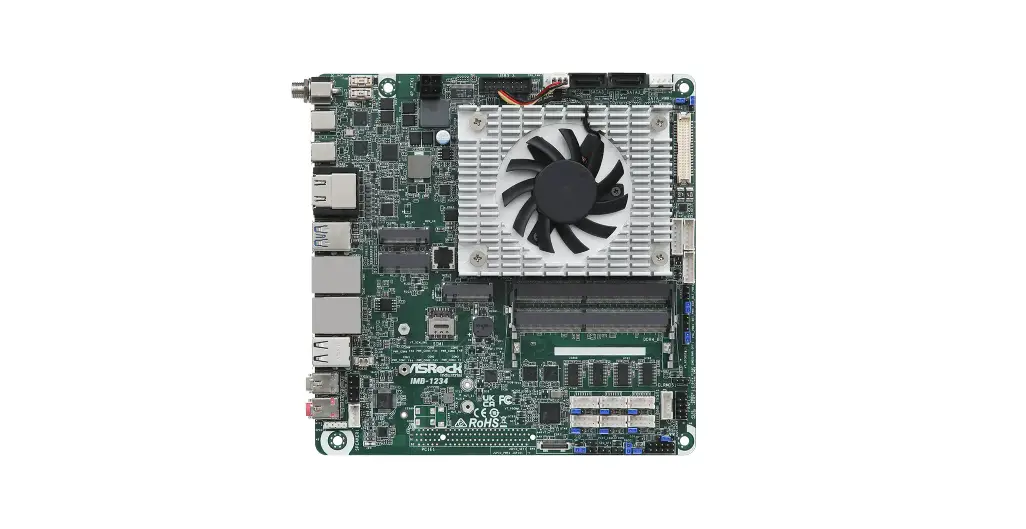
The IMB-1005 is a motherboard designed for industrial use. It
has various connectors and jumpers for different components such as
USB ports, SATA connectors, M.2 sockets, and COM ports. The
motherboard also has a 24-pin ATX power input connector and a 4-pin
CPU fan connector.
Jumpers and Headers Setting Guide
The following are the different jumpers and headers available on
the IMB-1005 motherboard:
COM Port PWR Setting Jumpers
These jumpers are used to set the power for the COM ports. The
available options are:
- PWR_COM1 (For COM Port1)
- PWR_COM2 (For COM Port2)
- PWR_COM3 (For COM Port3)
- PWR_COM4 (For COM Port4)
- PWR_COM5 (For COM Port5)
- PWR_COM6 (For COM Port6)
The jumpers have two pins each. The available power options
are:
- 1-2: +5V
- 2-3: +12V
4-pin Power Connector
This connector is used to provide power to the motherboard. It
has two pins:
- 1-2: GND
- 3-4: DC Input
24-pin ATX Power Input Connector
This connector is used to provide power to the motherboard. It
has 24 pins.
USB2.0 Port (USB2_7)
This connector is used for USB 2.0 devices.
SMBUS_TEST1
This connector is used for SMBus testing.
4-Pin CPU FAN Connector (+12V)
This connector is used to connect the CPU fan to the
motherboard. It has four pins:
- +12V
- CPU_FAN_SPEED
- GND
- FAN_SPEED_CONTROL
SATA Power Output Connector
This connector is used to provide power to SATA devices. It has
two pins:
- GND
- +12V
SATA3 Connector (SATA3_0)
This connector is used for SATA3 devices.
M.2 Key-M Socket (M2_M1)
This socket is used for M.2 Key-M devices.
M.2 Key-E Socket (M2_E1)
This socket is used for M.2 Key-E devices.
M.2 Key-B Socket (M2_B1)
This socket is used for M.2 Key-B devices.
Product Usage Instructions
Follow the instructions below to use the IMB-1005
motherboard:
- Connect the 24-pin ATX power input connector to the
motherboard. - Connect the 4-pin power connector to the motherboard.
- Connect the CPU fan to the 4-pin CPU FAN connector.
- Connect SATA devices to the SATA3 connector and the SATA power
output connector. - Connect M.2 devices to the appropriate M.2 sockets.
- Set the power for the COM ports using the COM Port PWR Setting
Jumpers.
Note: Refer to the user manual for more detailed instructions on
how to use the IMB-1005 motherboard.
Jumpers and Headers Setting Guide
IMB-1005
12
3
4
5
6
7
8
The terms HDMI® and HDMI High-Definition
43
Multimedia Interface, and the HDMI logo are
trademarks or registered trademarks of HDMI
Licensing LLC in the United States and other
countries.
42
HDMI2 HDMI1
1
ATXPWR1
ATX12V1
1
1
1
USB2_7
1 SMBUS_TEST1
1 CPU_FAN1
Industrial
1 SATA_PWR1
SATA3_0
PWR_COM3 PWR_COM1 PWR_COM2
COM1 COM2
Revision History
SIM1
COM3 VGA1
Date
Description
1
1
February 8, 2023
First Release
M2_B1
M2_M1
March 21, 2023
Second Release
41
9
1
April 14, 2023
Third Release
M2_E1
10
May 8, 2023
Fourth Release
11
40
USB 3.2 Gen1 T: USB3H1_2 B: USB3H1_1
Top: LAN1
DDR4_A1 (Support DDR4 Only)
39
38 37 36 35
Top: LINE OUT
Bottom: MIC IN
USB 2.0 T: USB2_4 B: USB2_3
Top: LAN2
HD_AUDIO1
SPEAKER1
1
USB3H1_3_4
PANEL1 PLED PWRBTN
1
1
BAT1
1 HDLED RESET
1 SPDIF1
IMB-1005
PCIE1
1 CC_TALK_OUT1
1 DACC1 1
PWR_COM4 PWR_COM5 PWR_COM6
1
1
1
BUZZ2
1
1
USB2_5_6
1 1
LVDS1
BIOS
PNL_PWR1
BKT_PWR1
R O M JGPIO_PWR1
1
1
1
JGPIO_SET1
CLRMOS1
CLRMOS2
BLT_PWM1
BLT_PWM2
SIO_AT1
CI2
CI1
1
1
1
1
1
1
1
1
1
1
COM4
COM5
COM6
1
JGPIO1
1 BLT_VOL1
1 BLT_PWR1
TPM1
12 13 14 15 16
17
18 19 20 21
COM Port PWR Setting Jumpers
1 : PWR_COM1 (For COM Port1) 1
PWR_COM2 (For COM Port2) 2
PWR_COM3 (For COM Port3) 3
12 : PWR_COM4 (For COM Port4)
PWR_COM5 (For COM Port5)
PWR_COM6 (For COM Port6)
1-2: +5V
2-3: +12V
1 23
2 : 4-pin Power Connector 1
2
1-2: GND
3-4: DC Input
3
4
3 : 24-pin ATX Power Input Connector
1
12
13
24
4 : USB2.0 Port (USB2_7)
5 : SMBUS_TEST1
1
1
Pin
Signal Name
Pin
Signal Name
Pin
Signal Name
Pin
Signal Name
1 GPIO 2 SMB_CLK 3 SMB_DATA 4 GND
6 : 4-Pin CPU FAN Connector (+12V)
+12V
CPU_FAN_SPEED
GND
FAN_SPEED_CONTROL
1
7 : SATA Power Output Connector
GND +12V
1 +5V GND
8 : SATA3 Connector (SATA3_0)
34 33 32 31 30 29 28 27
9 : M.2 Key-M Socket (M2_M1)
10 : M.2 Key-E Socket (M2_E1)
11 : M.2 Key-B Socket (M2_B1)
Pin
Signal Name
1
GND
3
GND
5
NA
7
NA
9
GND
11
NA
13
NA
15
GND
17
NA
19
NA
21
GND
23
NA
25
NA
27
GND
29
NA
31
NA
33
GND
35
NA
37
NA
39
GND
41 PERn0/SATA-B+
43 PERp0/SATA-B-
45
GND
47 PETn0/SATA-A-
49 PETp0/SATA-A+
51
GND
53
PEFCLKn
55
PEFCLKp
57
GND
67
NA
69
PEDET
71
GND
73
GND
75
GND
Signal Name
Pin
+3.3V
2
+3.3V
4
NA
6
NA
8
SATA_LED
10
+3.3V
12
+3.3V
14
+3.3V
16
+3.3V
18
NA
20
NA
22
NA
24
NA
26
NA
28
NA
30
NA
32
NA
34
NA
36
NA
38
NA
40
NA
42
NA
44
NA
46
NA
48
PERST#
50
CLKREQ#
52
NA
54
NA
56
NA
58
NA
68
+3.3V
70
+3.3V
72
+3.3V
74
Pin
Signal Name
1
GND
3
USB_D+
5
USB_D-
7
GND
9
CNV_WGR_D1-
11 CNV_WGR_D1+
13
GND
15 CNV_WGR_D0-
17 CNV_WGR_D0+
19
GND
21 CNV_WGR_CLK-
23 CNV_WGR_CLK+
33
GND
35
PETp
37
PETn
39
GND
41
PERp
43
PERn
45
GND
47
PEFCLKp
49
PEFCLKn
51
GND
53
CLKREQ#
55
NA
57
GND
59
CNV_WT_D1-
61
CNV_WT_D1+
63
GND
65
CNV_WT_D0-
67
CNV_WT_D0+
69
GND
71
CNV_WT_CLK-
73 CNV_WT_CLK+
75
GND
Signal Name
Pin
+3.3V
2
+3.3V
4
NA
6
NA
8
CNV_RF_RESET 10
NA
12
MODEM_CLKREQ 14
NA
16
GND
18
NA
20
CNV_BRI_RSP
22
CNV_BGI_DT
32
CNV_RGI_RSP
34
CNV_BRI_DT
36
NA
38
NA
40
NA
42
NA
44
NA
46
NA
48
SUSCLK
50
PERST0#
52
W_DISABLE1#
54
W_DISABLE2#
56
SMB_DATA
58
SMB_CLK
60
NA
62
NA
64
NA
66
NA
68
NA
70
+3.3V
72
+3.3V
74
Pin
Signal Name
1
NA
3
GND
5
GND
7
USB_D+
9
USB_D-
11
GND
21
GND
23
NA
25
NA
27
GND
29
USB3_RX-
31
USB3_RX+
33
GND
35
USB3_TX-
37
USB3_TX+
39
GND
41
PERn0
43
PERP0
45
GND
47
PETn0
49
PETP0
51
GND
53
PEFCLKn
55
PEFCLKp
57
GND
59
NA
61
NA
63
NA
65
NA
67
NA
69
PEDET
71
GND
73
GND
75
NA
Signal Name
Pin
+3.3V
2
+3.3V
4
FuLL_Card_Power_off 6
W_DISABLE1#
8
WWAN_LED#
10
NA
20
NA
22
NA
24
W_DISABLE2#
26
NA
28
UIM_RESET
30
UIM_CLK
32
UIM_DATA
34
UIM_PWR
36
NA
38
NA
40
NA
42
NA
44
NA
46
NA
48
PERST#
50
CLKREQ#
52
NA
54
NA
56
NA
58
NA
60
NA
62
NA
64
NA
66
NA
68
+3.3V
70
+3.3V
72
+3.3V
74
40 LCD_BLT_VCC 39 LCD_BLT_VCC
38 LCD_BLT_VCC 37 CON_LBKLT_CTL
GND
26 25 24 23
22
13 : USB2.0 Connector (USB2_5_6)
14 : LVDS Panel Connector
1
39
GND
GND
GND
NA
+3.3V
LCD_VCC
2
40
34 LVDS_B_CLK 33 LVDS_B_CLK#
31 LVDS_B_DATA3
30 LVDS_B_DATA3# 29 DPLVDD_EN
28 LVDS_B_DATA2 27 LVDS_B_DATA2#
25 LVDS_B_DATA1
GND
GND
24 LVDS_B_DATA1# 23
22 LVDS_B_DATA0 21 LVDS_B_DATA0#
19 LVDS_A_CLK
GND
18 LVDS_A_CLK# 17
16 LVDS_A_DATA3 15 LVDS_A_DATA3#
13 LVDS_A_DATA2
GND
12 LVDS_A_DATA2# 11
10 LVDS_A_DATA1 9 LVDS_A_DATA1#
7 LVDS_A_DATA0
GND
6 LVDS_A_DATA0# 5
3
1
PIN Signal Name PIN Signal Name
NA
LCD_VCC
32
26
20
14
8
4
2
N/A
GND
N/A
EDP_TX0
* eDP pin definition (switch by BIOS):
GND
N/A
N/A
N/A
36 CON_LBKLT_EN 35
40 LCD_BLT_VCC 39 LCD_BLT_VCC
38 LCD_BLT_VCC 37 CON_LBKLT_CTL
GND
N/A
N/A
29 DPLVDD_EN
N/A
N/A
GND
EDP_AUXP
EDP_TX1#
LCD_VCC
36 CON_LBKLT_EN 35
33
31
27
25
23
21
19
17
15
13
11
9
7
5
3
1
PIN Signal Name PIN Signal Name
N/A
GND
N/A
N/A
GND
N/A
N/A
GND
EDP_AUXN
N/A
GND
EDP_TX0#
EDP_TX1
GND
N/A
N/A
LCD_VCC
34
32
30
28
26
24
22
20
18
16
14
12
10
8
6
4
2
15 : eDP and LVDS Backlight Power Select (LCD_BLT_VCC) (BKT_PWR1) 1 1-2: LCD_BLT_VCC: +5V 2-3: LCD_BLT_VCC: +12V 4-5: LCD_BLT_VCC: DC Input
16 : Digital Input / Output Power Select
(JGPIO_PWR) (JGPIO_PWR1)
1-2: +12V
2-3: +5V 17 : TPM Header
1
TPMPWR
IRA MISO
RST# CS# MOSI GND
CLK
GND
18 : Chassis Intrusion Headers
CI1:
1
Open: Normal
GND
Short: Active Case Open Signal
Cl2:
Open: Active Case Open
Short: Normal
1 23
19 : SIO_AT1 Open: ATX Mode Short: AT Mode
12
3
4
5
6
7
8
Installation of ROM Socket
HDMI2 HDMI1
1
Industrial
1
43
ATXPWR1
USB2_7
SMBUS_TEST1
1 CPU_FAN1
1 SATA_PWR1
SATA3_0
PWR_COM3 PWR_COM1 PWR_COM2
TPM1
42
ATX12V1
1
1
1
COM1 COM2
SIM1
1
1
COM3 VGA1
M2_B1
M2_M1
41
1
M2_E1
40
39
38 37 36 35
USB 3.2 Gen1 T: USB3H1_2 B: USB3H1_1
Top: LAN1
DDR4_A1 (Support DDR4 Only)
Top: LINE OUT
Bottom: MIC IN
USB 2.0 T: USB2_4 B: USB2_3
Top: LAN2
HD_AUDIO1
SPEAKER1
1
1
1
BAT1
IMB-1005
USB3H1_3_4
PANEL1 PLED PWRBTN
1 HDLED RESET
1 SPDIF1
PCIE1
1 CC_TALK_OUT1
1 DACC1 1
PWR_COM4 PWR_COM5 PWR_COM6
1
1
1
BUZZ2
1
1
USB2_5_6
1 1
LVDS1
BIOS
PNL_PWR1
BKT_PWR1
R O M JGPIO_PWR1
1
1
1
JGPIO_SET1
CLRMOS1
CLRMOS2
BLT_PWM1
BLT_PWM2
SIO_AT1
CI2
CI1
1
1
1
1
1
1
1
1
1
1
COM4
COM5
COM6
1
JGPIO1
1 BLT_VOL1
1 BLT_PWR1
34 33 32 31 30 29 28 27
26 25 24 23
22
9
* Do not apply force to the actuator cover after ic inserted.
* Do not apply force to actuator cover when it is opening over 120
10
degree, Otherwise, the actuator cover may be broken.
11
12 13
14 15 16
17
18
* The yellow dot (Pin1) on the ROM must be installed at pin1 position of
19 20
the socket (white arrow area).
21
* Make sure the white dot on the ROM is installed outwards of the
socket.
* For further details of how to install ROM, please refer to ASRI website.
Warning: If the installation does not follow as the picture, then it
may cause severe damage to chipset & MB.
20 : CON_LBKLT_CTL Voltage Level
(BLT_PWM2)
1-2: +3V 2-3: +5V
1 23
21 : Brightness Control Mode (BLT_PWM1) 1 2 3 1-2: From eDP PWM to CON_LBKLT_CTL 2-3: From LVDS PWM to CON_LBKLT_CTL
* Please set to 1-2 when adjusting brightness by Brightness Control bar under OS.
* Please set to 2-3 when adjusting brightness by BLT_VOL1.
22 : Backlight Power Connector (BLT_PWR1)
PIN Signal Name
1
1
GND
2
GND
3 CON_LBKLT_CTL
4 CON_LBKLT_EN
5 LCD_BLT_VCC
6 LCD_BLT_VCC
23 : Backlight Volume Control (BLT_VOL1)
PIN Signal Name
1
1 GPIO_VOL_UP
2 GPIO_VOL_DW
3
PWRDN
4
BLT_UP
5
BLT_DW
6
GND
7
GND
24 : Clear CMOS Jumpers
CLRMOS1:
1-2: Normal
1 23
2-3: Clear CMOS
CLRMOS2:
Open: Normal
Short: Auto Clear CMOS When AC Power On
25 : Digital Input/Output Pin Header (JGPIO1)
PIN Signal Name PIN
Signal Name
PIN
Signal Name
PIN
Signal Name
PIN Signal Name
2 GPP_B15 4 GPP_E1 6 GPP_E2 8 GPP_E13 10
GND
1 SIO_GP34 3 SIO_GP35 5 SIO_GP36 7 SIO_GP37 9 JGPIO_PWR
26 : Digital Input / Output Default Value Setting
(JGPIO_SET1)
1-2: Pull-High 2-3: Pull-Low
1 23
PIN Signal Name
20
19 ESPI_ALERT#
27 : Internal COM Port Headers 1 (COM4, 5, 6) (RS232)
36 : 3W Audio AMP Output Wafer
PIN Signal Name
2
PIN
Signal Name
PIN
Signal Name
PIN
Signal Name
PIN
Signal Name
PIN
1 DDCD# 3 TTXD 5 GND 7 RRTS# 9
2 RRXD 4 DDTR# 6 DDSR# 8 CCTS# 10 * COM5 (RS-232 or TTL (optional))
Signal Name PWR
N/A
28 : eDP and LVDS Panel Power Select (LCD_VCC) (PNL_PWR1)
1-2: LCD_VCC: +3V 1 2-3: LCD_VCC: +5V
4-5: LCD_VCC: +12V
4
3
2
1
1
OUTRN OUTRP OUTLP OUTLN
37 : Front Panel Audio Header
OUT_RET
MIC_RET PRESENCE#
GND
OUT2_L J_SENSE OUT2_R MIC2_R MIC2_L 1
29 : Buzzer
38 : Audio Jacks
BUZZ+ BUZZ-
Green – Line Out Pink – Mic In
30 : DACC1
39 : Top : RJ45 LAN Port (LAN2)
Open: Normal
Bottom : USB 2.0 Ports (USB2_3_4)
Short: Auto Clear CMOS
40 : Top : RJ45 LAN Port (LAN1)
* Note: Auto clear CMOS when system boot improperly.
Bottom : USB 3.2 Gen1 Ports (USB3H1_1_2)
31 : CC_TALK_OUT1
Signal
shared with COM6 (optional)
41 : Top : COM Port (COM3) (RS232/422/485)* Bottom : D-Sub Port (VGA1)
42 : Top : COM Port (COM1) (RS232/422/485)*
32 : SPDIF Header
+5V
Bottom : COM Port (COM2) (RS232/422/485)*
* This motherboard supports RS232/422/485 on COM1, 2, 3 ports. Please refer to
the table below for the pin definition. In addition, COM1, 2, 3 ports (RS232/422/485)
can be adjusted in BIOS setup utility > Advanced Screen > Super IO
33 : System Panel Header
PLED+ PLEDPWRBTN# GND
Configuration. You may refer to our user manual for details.
COM1, 2, 3 Ports Pin Definition
PIN
RS232
RS422
RS485
1
DCD
TX-
RTX-
1 GND
RESET# GND HDLEDHDLED+
34 : USB3.2 Gen1 Connector (USB3H1_3_4)
2
RXD
TX+
RTX+
3
TXD
RX+
N/A
4
DTR
RX-
N/A
5
GND
GND
GND
6
DSR
N/A
N/A
7
RTS
N/A
N/A
IntA_P_D+ IntA_P_DGND IntA_P_SSTX+ IntA_P_SSTXGND IntA_P_SSRX+
IntA_P_SSRXVbus
8
CTS
N/A
N/A
9
PWR
PWR
PWR
10
N/A
N/A
N/A
43 : Top : HDMI Port (HDMI2)
Bottom : HDMI Port (HDMI1)
1
Vbus IntA_P_SSRXIntA_P_SSRX+ GND IntA_P_SSTXIntA_P_SSTX+ GND IntA_P_DIntA_P_D+ DUMIDMY
35 : Battery Connector –
GND
Internal Use
Internal Use
+3VSB
GND
ESPI_IO3
ESPI_IO2
Back Side: ESPI Header (ESPI1)
ESPI_IO1
ESPI_IO0
SMB_DATA
SMB_CLK
GND
+3V
GND
ESPI_CS#
GND
ESPI_CLK
GND
18
17
16
15
14
13
12
11
10
9
8
7
6
5 ESPI_RESET#
4
3
2
1
+