
 Service Bulletin Product
Subject: Insufficient Clutch Departure May Cause Unintended Vehicle Movement, Software Update Automated Transmissions
Document Number: CLIB-0033
Updated: October 13, 2021
Date: December 18, 2018
Issue Description:
Transmission Electronic Control Unit (TECU) software 5569997 has been released to mitigate the possibility of unintended vehicle movement due to insufficient clutch departure. This notification is associated to National Highway Traffic Safety Administration (NHTSA) Campaign Number: 18E-102.
Containment/Corrective Action:
If the installed clutch meets the Affected Models/Population requirements listed below, and the TECU software is less than 5569997, update the software to 5569997 or greater.
NOTICE:
After updating the TECU software (STEP D), complete the instructions in STEP E based on the vehicle engine make and engine model:
STEP E: Record vehicle engine make, and engine model installed in the vehicle:
- If PACCAR MX11 or MX13 engine, the process is complete.
- If Cummins X15 engine, go to STEP F.
- If Navistar A26 engine, go to STEP G.
- If the engine is a Detroit Diesel DD13, DD15, or DD16, Cummins L9, or ISX12, go to STEP H.
Affected Models/Population:
- Automated transmission models: UltraShift PLUS Fuller Advantage SmartAdvantage
- Clutch part number: 122002-35/35A or 122003-42/42A Clutches manufactured between 4/1/2017 through 6/20/2018 Clutch Serial Numbers:
- Start: AU1704010001 / SL1704010001 – 17(Year) 04(Month) 01(Day)
- End: AU1806139999 / SL1806209999 – 18(Year) 06(Month) 13 or 20(Day)
Note: OEM vehicle build dates containing the above clutch serial numbers will vary due to OEM production build schedules.
Field Strategy:
TECU software 5569997 is available in ServiceRanger 1901-01-SCB-2682 Data release or greater at a PRO license.
NOTICE: Ensure the computer with ServiceRanger is connected to the Internet after updating the TECU software to record the update event(s) in the ServiceRanger database. Warranty claims may not be paid if the internet connection for software update validation in ServiceRanger is not completed.
STEP A: Identify the vehicle OEM.
1. Record the vehicle OEM:
· If OEM is DTNA (i.e. Freightliner, Western Star), go to DTNA Recall Campaign FL865.
· If OEM is NOT DTNA, go to STEP B.
STEP B: Verify ServiceRanger Data release is at the latest version.
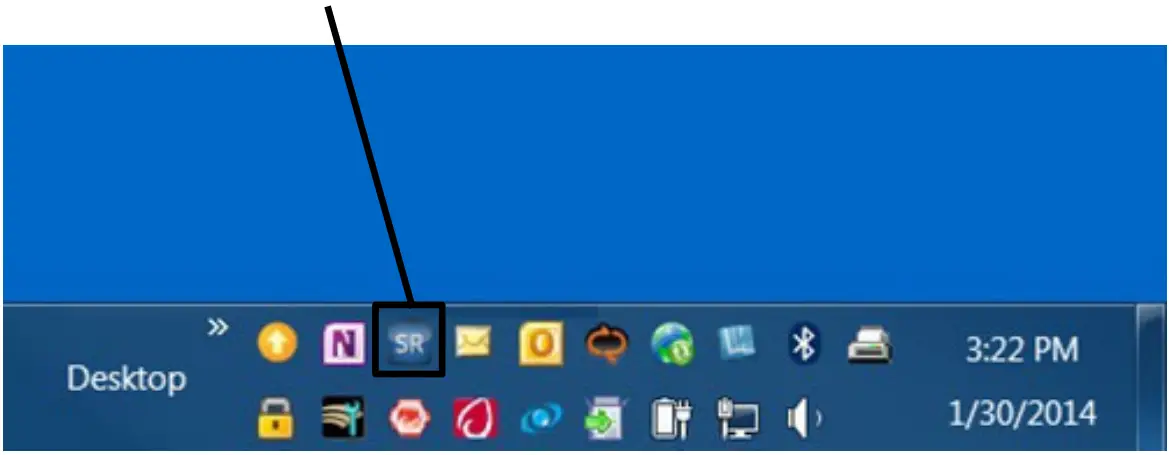
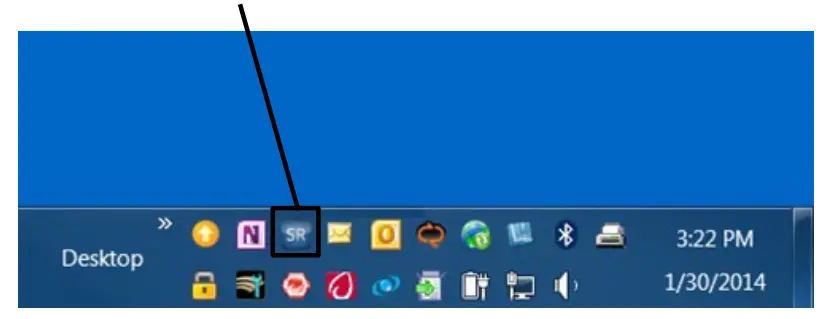
- Left-click the “SR” icon to open the ServiceRanger Update Manager.

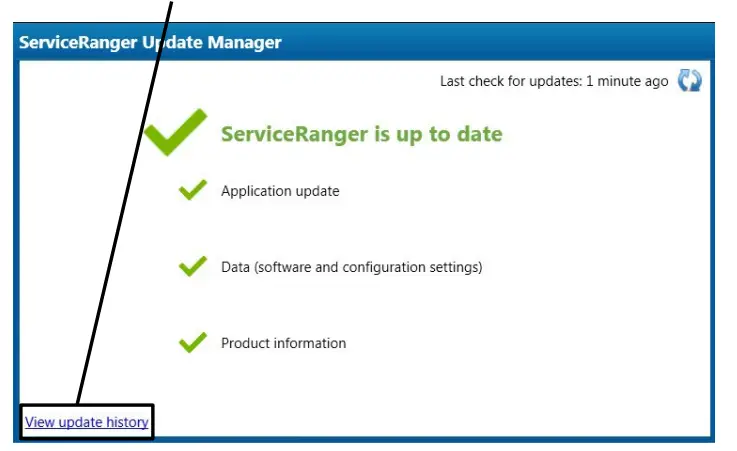
- Select “View update history”.

- Select the “Data Update History” tab.

- Verify that 1901-01-SCB-2682 Data release or greater is Applied.
 · If the Data release Applied is less than 1901-01-SCB-2682, go to STEP C.
· If the Data release Applied is equal to or greater than 1901-01-SCB-2682, go to STEP D.
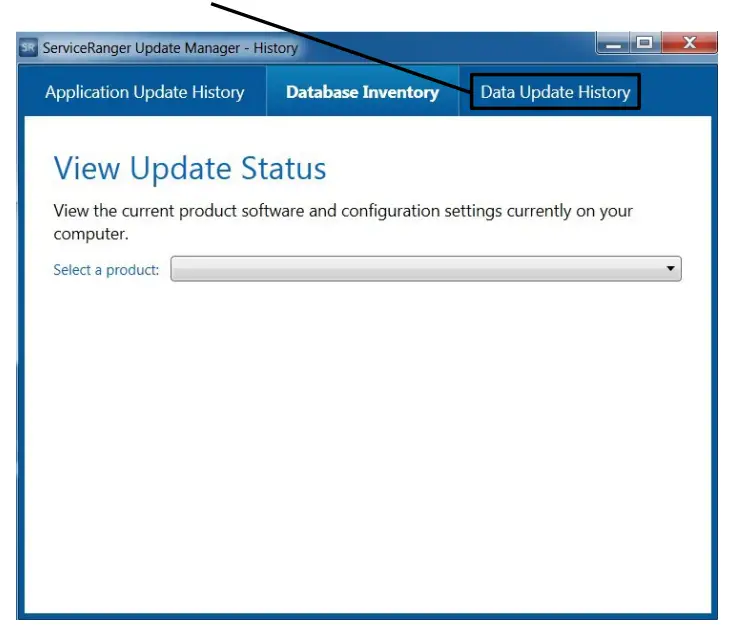
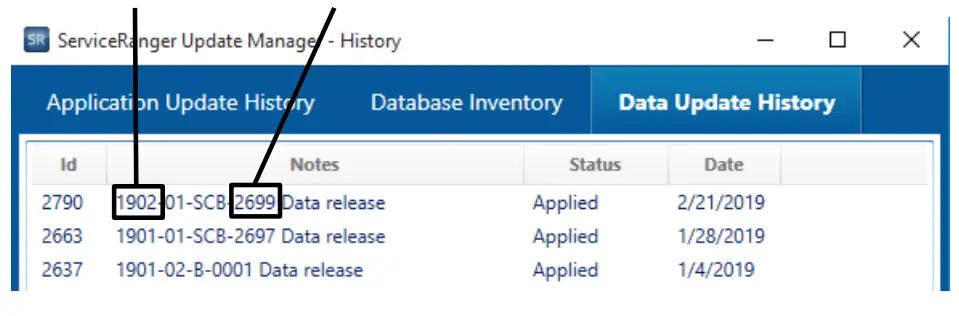 · If the Data release Applied is less than 1901-01-SCB-2682, go to STEP C.
STEP C: Update the ServiceRanger Data release to the latest version.
- Connect the computer to the internet.
- Left-click the “SR” icon to open the ServiceRanger Update Manager.

- Select an icon
 to “Check for updates”.
- After the update is complete, go to Step B.
 to “Check for updates”.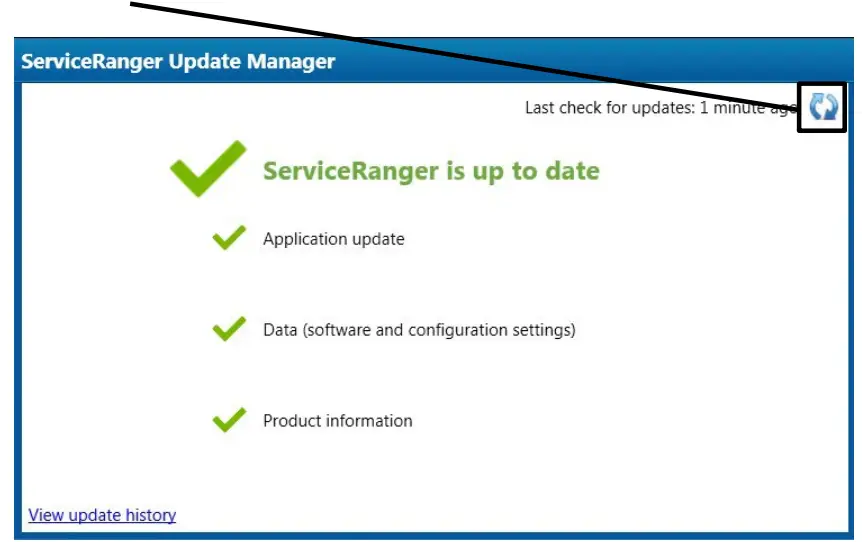
STEP D: Update Transmission Software to 5569997 or greater.
- Close vehicle cab doors. Note: This limits the activity of vehicle/component modules on the vehicle data link.
- Key on.
- Connect ServiceRanger.
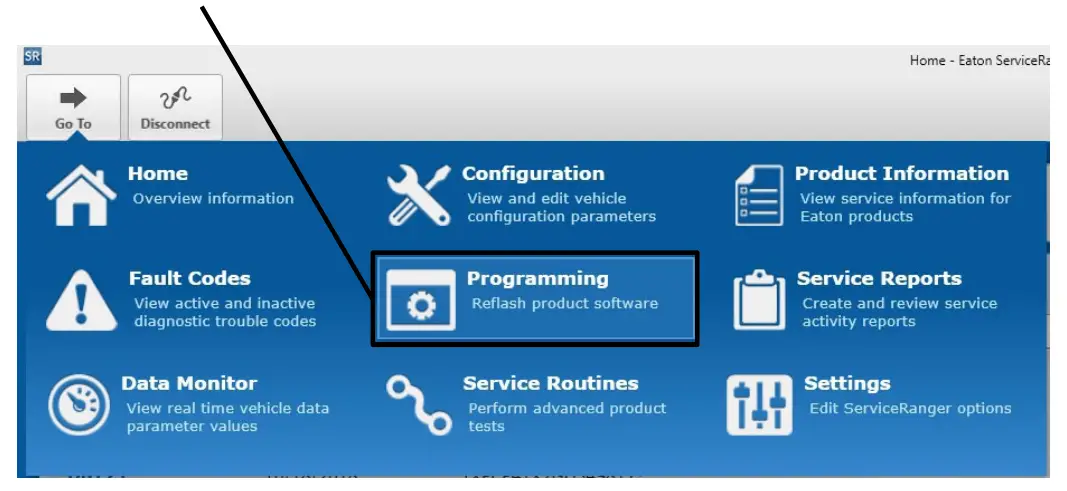
- Go To “Programming”.

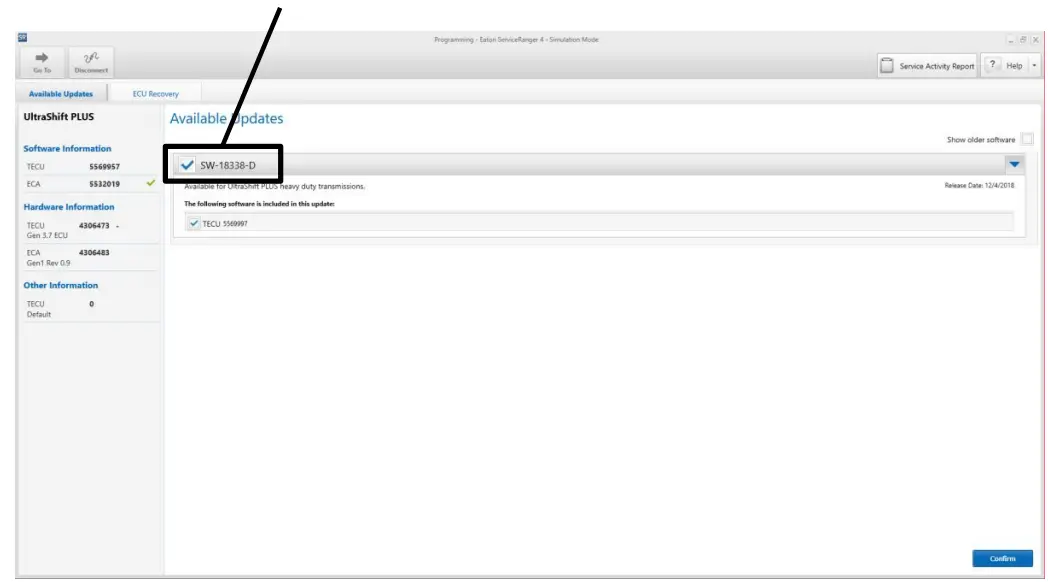
- Select Available Updates SW-18338-D (5569997) or greater.
Note: If the software is 5569997 or greater, no update is required. Go to Step 13 of STEP D.
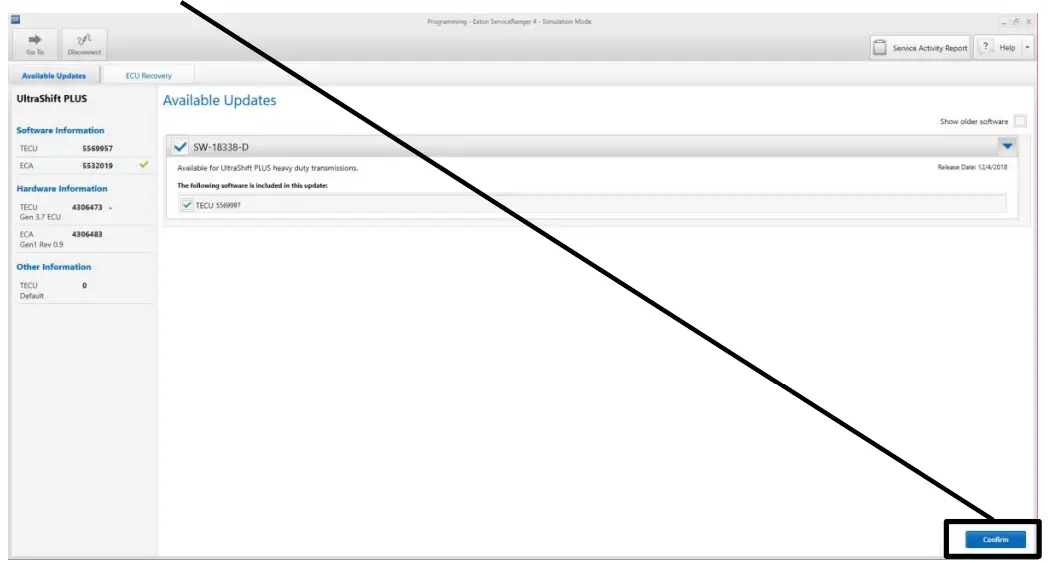
- Select “Confirm”.

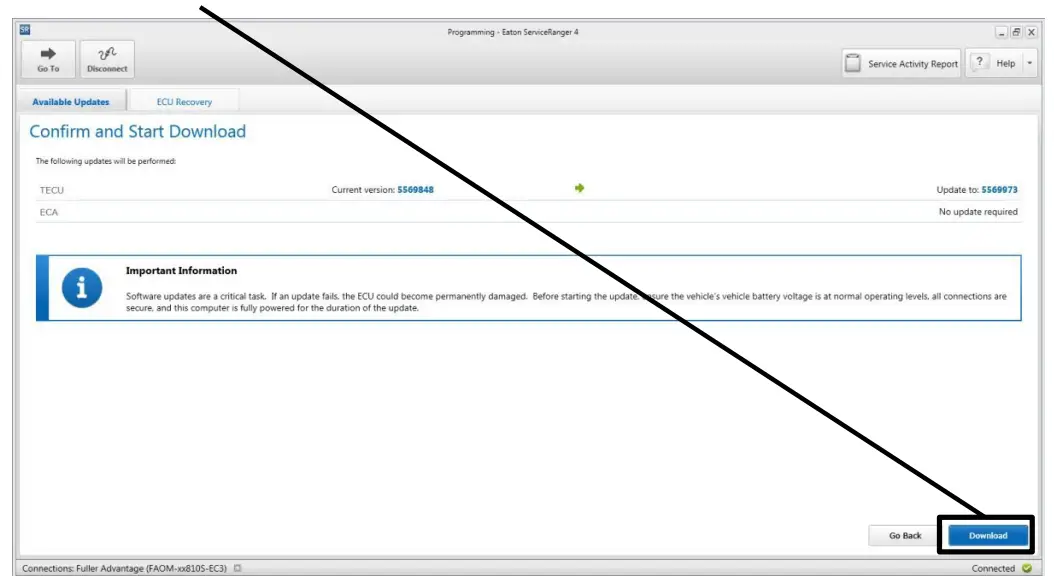
- Select “Download”.

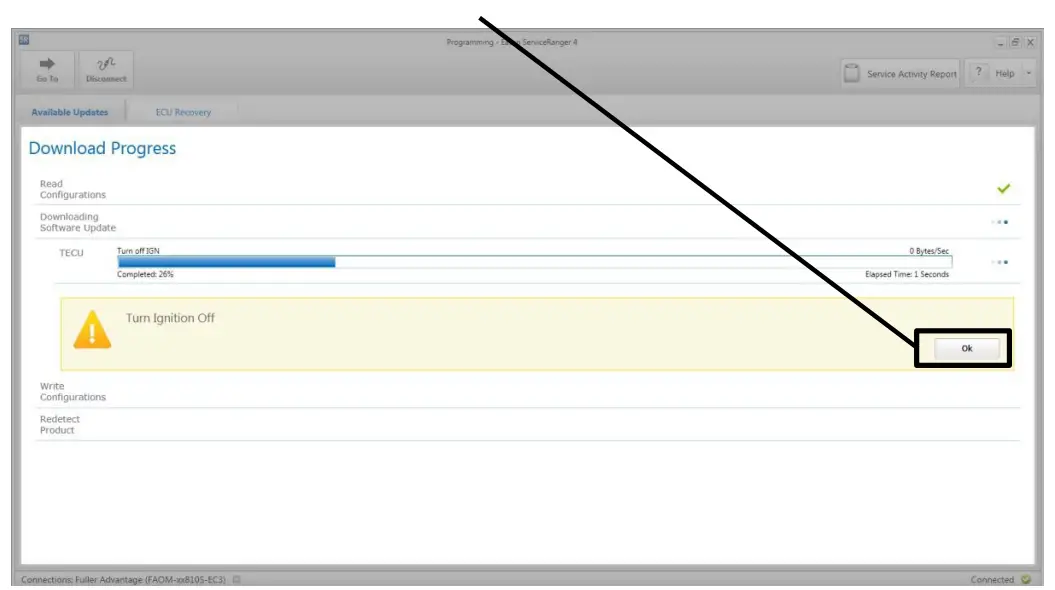
- Turn Ignition Off when prompted and wait 2 minutes. Note: This limits activity of vehicle/component modules on the vehicle data link
- After waiting 2 minutes, select “OK”

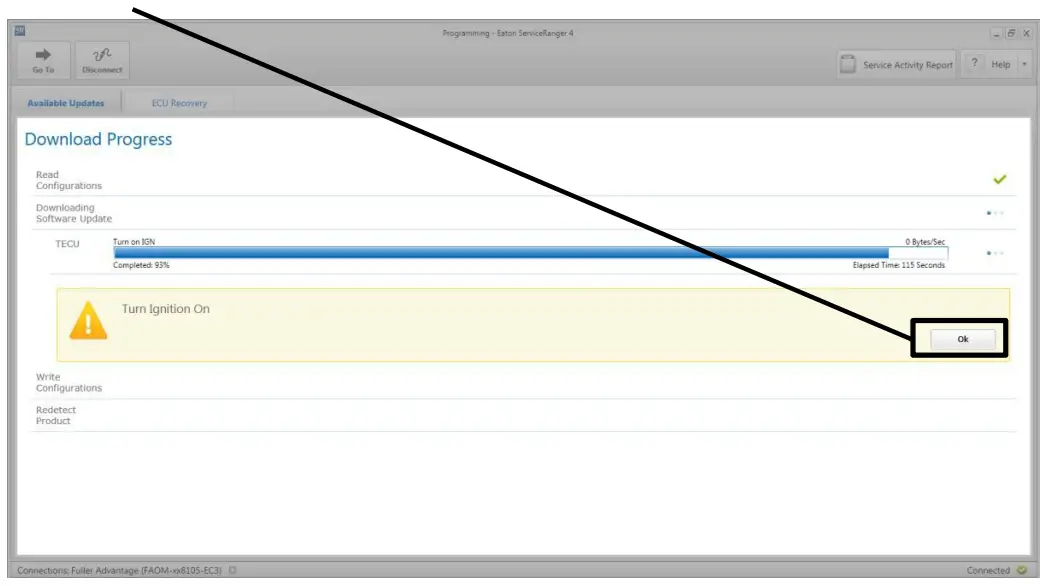
- Turn Ignition On when prompted.
- Select “OK”.

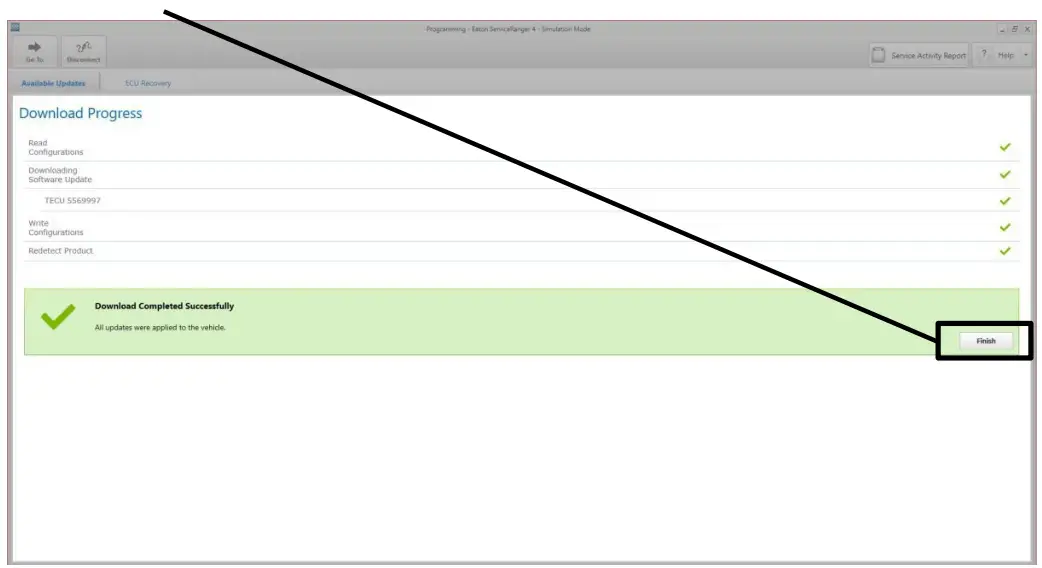
- Select “Finish” when prompted.

- Select “Disconnect”.
- Key off and allow 2-3 minutes for the TECU to perform a complete power-down.
- Go to
STEP E.
NOTICE: Ensure the computer with ServiceRanger is connected to the Internet after updating the TECU software to record the update event(s) in the ServiceRanger database. Warranty claims may not be paid if the internet connection for software update validation in ServiceRanger is not completed.
STEP E: Identify vehicle and engine make, and model installed in the vehicle.
1. Record vehicle engine make, and engine model installed in the vehicle:
- If PACCAR MX11 or MX13 engine, process is complete.
- If Cummins X15 engine, go to STEP F.
- If Navistar A26 engine, go to STEP G.
- If the engine is a Detroit Diesel DD13, DD15, or DD16, Cummins L9, or 12G, go to STEP H.
STEP F: Identify the Cummins X15 Engine Serial Number (ESN) and Engine ECM Code.
1. Record the Engine Serial Number (ESN).
- If the ESN is equal to or greater than 80012737, the process is complete.
- If the ESN is less than 80012737, go to Step 2.
2. Connect Cummins INSITE and record the current Engine ECM Code (Calibration Revision) installed in the ECM.
- If the Engine ECM Code revision is equal to or greater than the code revision indicated below, the process is complete.
- If the Engine ECM Code revision is less than the code revision indicated below, record and update to the latest available Engine ECM Code revision. The process is complete.
Cummins X15 Engine ECM Codes:
| HD10001.11 | H010050.07 | HD10089.07 | HD10147.07 | HD10181.05 | HD10201.04 |
| HD10002.10 | H010054.07 | HD10091.06 | HD10148.07 | HD10182.05 | HD10202.04 |
| HD10005.10 | H010055.07 | HD10094.06 | HD10149.07 | HD10183.05 | HD10203.04 |
| HD10008.09 | H010056.07 | HD10097.06 | HD10150.07 | HD10184.05 | HD10204.04 |
| HD10009.09 | H010057.07 | HD10100.06 | HD10151.07 | HD10185.04 | HD10205.04 |
| HD10011.08 | H010058.07 | HD10103.06 | HD10152.07 | HD10186.04 | HD10206.04 |
| HD10012.08 | H010059.07 | HD10114.06 | HD10162.07 | HD10187.04 | HD10207.04 |
| HD10014.08 | H010060.07 | HD10115.06 | HD10164.07 | HD10188.04 | HD10208.04 |
| H010024.07 | H010061.07 | HD10126.07 | HD10169.05 | HD10189.04 | HD10209.05 |
| HD10025.07 | H010062.07 | HD10127.07 | HD10170.05 | HD10190.04 | HD10210.05 |
| HD10030.08 | H010072.07 | HD10128.07 | HD10171.05 | HD10191.04 | HD10211.05 |
| HD10031.08 | H010073.07 | HD10129.07 | HD10172.05 | HD10192.04 | HD10212.05 |
| HD10032.08 | H010074.07 | HD10130.07 | HD10173.05 | HD10193.04 | HD10213.05 |
| H010036.08 | H010075.07 | HD10131.07 | HD10174.05 | HD10194.04 | HD10214.05 |
| H010037.08 | H010076.07 | HD10132.07 | HD10175.05 | HD10195.04 | HD10215.05 |
| HD10038.08 | H010077.07 | HD10133.07 | HD10176.05 | HD10196.04 | HD10216.05 |
| HD10043.07 | H010078.07 | HD10134.07 | HD10177.05 | HD10197.04 | HD10217.04 |
| HD10044.07 | H010079.07 | 1-010144.07 | HD10178.05 | HD10198.04 | HD10218.04 |
| H010045.07 | H010080.07 | HD10145.07 | HD10179.05 | HD10199.04 | HD10219.04 |
| HD10048.07 | H010087.07 | HD10146.07 | HD10180.05 | HD10200.04 | HD10220.04 |
STEP G: Identify the Navistar A26 Engine calibration.
1. Using the Navistar Service Portal, select the Summary tab and verify the Calibration Status.
- If the status indicates “Calibration is Current”, process is complete
- If the status indicates “Not Current Needs Calibration Update. For Navistar engines use NavKal Campaign tab”, update the ECM to the latest Engine calibration. Process is complete.
STEP H: Identify the installed clutch part number and clutch serial number installed in the vehicle.
NOTICE: This step only applies to vehicles equipped with a Detroit Diesel DD13, DD15, or DD16, Cummins L9, or ISX12.
1. Record the installed clutch part number and serial number, and compare the installed clutch serial number with the tables below:
| Range | Clutch Serial Number | Year | Month | Day |
| Start | AU1704010001 | 17 | 4 | 1 |
| End | AU1806139999 | 18 | 6 | 13 |
| or | ||||
| Range | Clutch Serial Number | Year | Month | Day |
| Start | SL1704010001 | 17 | 4 | 1 |
| End | SL1806209999 | 18 | 6 | 20 |
· If the installed clutch serial number is between the Start and End range, replace the clutch with part number: 122002-35EX (1850 ft-lbs.). or 122003-42A (2250 ft-lbs.).
· If the installed clutch serial number is NOT between the Start and End range, the process is complete.
Warranty Information:
This service bulletin only applies to the Affected Models/Population outlined above.
Warranty Parts:
- Software part number 5569997 or greater
- If clutch replacement is required per STEP H: · Clutch Kit Part Number: 122002-35EX (without LCIB) or 122003-42A
- Pilot bearing reimbursement (up to $50.00) Refer to OEM, engine manufacturer or CLTS1271 for pilot bearing recommendations.
- U-Joint Strap Kit (quantity 1)
- Exhaust and PTO gaskets (if required)
Warranty Labor:
- TECU software update only PACCAR MX11/13:
- TECU software update – 0.5 hours (total 0.5 hours).
Required: Record and submit the engine make and model with the warranty claim.
| Warranty Labor Description | SRT |
| TECU software update | 0.5 |
- TECU software update and STEP F Cummins X15 Engine ECM Code update (if necessary):
- TECU software update and Engine Serial Number (ESN) is equal to or greater than 80012737 – 0.5 hours (total 0.5 hours).
- ECM Code did NOT require an update, the ESN was less than 80012737, and Cummins INSITE was connected – 0.3 hours (total of 0.8 hours).
- ECM Code required an update – 0.5 hour (total 1.0 hour). Required: Record and submit the engine make and model, and ESN with the warranty claim.
| Warranty Labor Description (Choose the single SRT that applies) | SRT |
| TECU software update and Cummins X15 ESN 80012737 | 0.5 |
| The TECU software update, Cummins X15 ESN < 80012737, connect INSITE and ECM code update NOT required | 0.8 |
| TECU software update, Cummins X15 ESN < 80012737, connect INSITE and ECM code update required | 1.0 |
- TECU software update and STEP G Navistar A26 Engine calibration update (if necessary):
- TECU software update and Navistar Service Portal indicated “Calibration is Current” – 0.5 hours (total 0.5 hours).
- Engine calibration required an update – 0.5 hours (total 1.0 hours).
Required: Record and submit the engine make and model, and Engine calibration status with the warranty claim.
| Warranty Labor Description (Choose the single SRT that applies) | SRT |
| TECU software update and Navistar A26 engine calibration is current | 0.5 |
| TECU software update and Navistar A26 engine calibration update required | 1.0 |
- TECU software update and STEP H clutch inspection (if necessary):
- The Clutch serial number recorded in STEP H indicates clutch replacement is NOT required due to the clutch serial number being out of range and the engine is a Detroit Diesel DD13, DD15, or DD16, Cummins L9, or ISX12: TECU software update – 0.5 hour. Clutch inspection – 0.3 hour (total 0.8 hour).
Required: Record and submit the engine make and model and the installed clutch part number and serial number with the warranty claim.
| Warranty Labor Description | SRT |
| TECU software update, clutch inspection and clutch replacement are NOT required | 0.8 |
- TECU software update and STEP H clutch replacement (if necessary):
- The Clutch serial number recorded in STEP H indicates clutch replacement is required due to the clutch serial number being in range and the engine is a Detroit Diesel DD13, DD15, or DD16, Cummins L9, or ISX12:
Note: Warranty does not cover expedited shipping of clutch, flywheel resurfaces or progressive damage. - TECU software update – 0.5 hour. Clutch R&R – (OEM SRTs, includes transmission R&R) OEM installed obstructions R&R – (OEM SRTs)
- Example: Y-Exhaust, PTO, Air Tanks Clutch Calibration – 0.3 hours (total 0.8 plus OEM SRTs).
Required: Record and submit the engine make and model and both the installed and replaced clutch part number and serial number with the warranty claim.
| Warranty Labor Description | SRT |
| TECU software update, clutch calibration and OEM SRTs for clutch replacement and obstructions if required | 0.8 + OEM SRTs |
Note: Warranty claims may not be paid if the internet connection for software update validation in ServiceRanger is not completed.
General Claim Coding:
- Line item tab Repair list
- Primary Causal Part #: 173C147
- Campaign #: 18E-102
- Complaint code: NO COMPLAINT (4)
- Failure Mode Description: LEVER BROKEN (TFM-1017)
- Responsibility Code: VENDOR PART (418)
- Cover Organization: Vehicle
- Part Return Instructions: If the clutch is replaced, return “collect” (LTL Carrier) per TMIB0129.
Warranty Coverage:
- Clutch Replacements on or after May 1, 2019
- Clutches replaced per this document on or after May 1, 2019, will continue Warranty Coverage per the original warranty period / OEM warranty period or standard Aftermarket service part warranty
- All clutches that are registered for Extended Protection Plan that have a longer warranty period than 3yr/350,000-mile coverage will continue with the purchased extended protection plan’s original coverage.
- Replacement clutches for Mexico, Latin America, and the Rest of the World will continue with the original warranty period / OEM warranty period or standard Aftermarket service part warranty for the designated region.
Clutch Replacements on or before April 30, 2019
- Clutches replaced per this document on or before April 30, 2019, for the United States and Canada population stated within (production built, and aftermarket installed) will have a warranty coverage reissued for 3yr/350,000 miles commencing from the failed date on the claim which includes Aftermarket Clutches.
- Claims or repair orders must have a failure and repair date that is on or before April 30, 2019
- The repair order and the claim must contain the original and replaced Clutches manufactured date codes per this document
- All claims must be received on or before July 29, 2019 (90 days from Failed Date) to qualify for the reissued for 3yr/350,000-mile coverage.
The material contained in this bulletin is product improvement information. Eaton is not committed to, or liable for, canvassing existing products.
| Change Log | |
| Date | Description |
| 10/13/2021 | Inserted ISX12 Engine Designation to Step H. |
| 2/4/2021 | Revised Pilot Bearing reimbursement cost and changed DTNA FL document number. |
| 11/18/2020 | Removed DTNA reference and add updated engine information for Step H. |
| 11/7/2019 | Updated Clutch Serial Number in Step H and end dates in Affected Models/Population and Step H. |
| 10/21/2019 | Updated manufactured date range and Clutch Serial Number ranges. |
| 8/5/2019 | Updated DTNA information to reference FL803AB. Removed clutch part number 122002-35A, supplies of 122002-35EX are available. |
| 7/25/2019 | Added DTNA Detroit Diesel engine information. |
| 5/13/2019 | Updated Warranty Labor section. |
| 5/1/2019 | Added pilot bearing for clutch replacement claims. Updated Cummins X15 warranty information and added SRT tables to the warranty labor section. Updated warranty coverage section. Added change log. |
| 3/20/2019 | Added Navistar A26 engine information. Added 122002-35EX replacement clutch part number. Added miscellaneous parts for clutch replacement claims. |
| 2/11/2019 | Added PACCAR MX11/13 and Cummins X15 engine information and clutch replacement instructions. Added warranty information. |
Service Bulletin Product
| 1/28/2019 | Added requirement to connect ServiceRanger to the internet after software downloads |
| 1/7/2019 | 5569997 software released at PRO. |