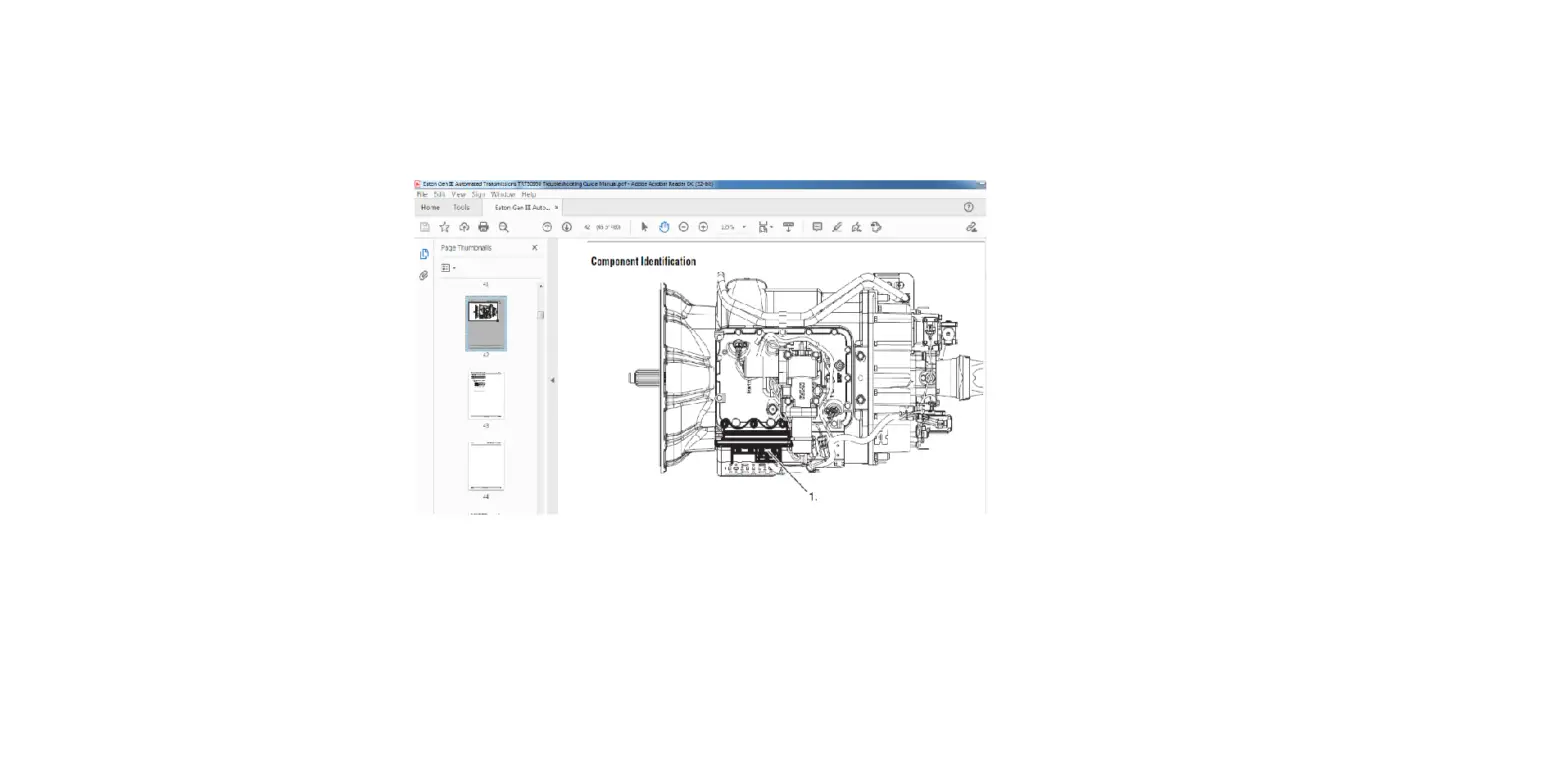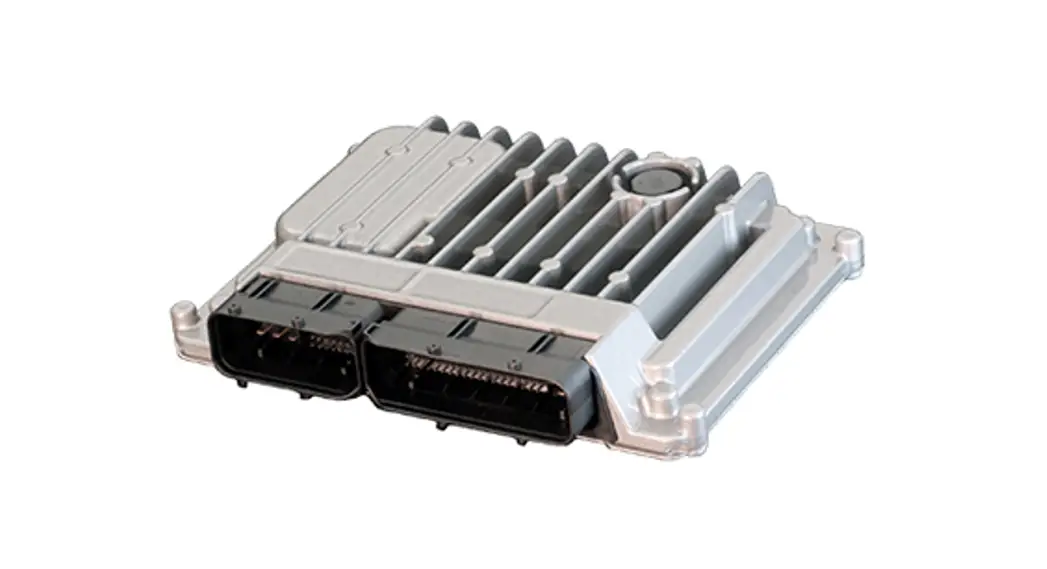

EATON TRIG2610 Cummins Automated Transmission
Product Information
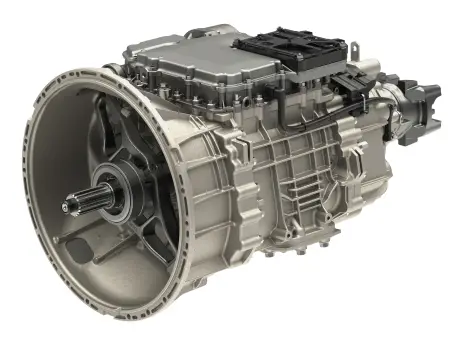
The Eaton Cummins Automated Transmission Technologies – Endurant HD PTO is a heavy-duty automated transmission system that supports PTO (power take-off) configurations for use in various applications. The Endurant HD PTO system has three PTO controlled systems that can support single or dual PTO configuration. The transmission PTO system engagement sequence is important to follow, as it ensures the safe operation of the PTO system. It is important to note that any departure from the instructions, choice of tools, materials and recommended parts mentioned in the installation guide may jeopardize the personal safety of the service technician or vehicle operator.
Product Usage Instructions
Before installing or using the Endurant HD PTO system, it is important to read through the installation guide carefully and thoroughly. Pay close attention to the warnings and cautions, as well as the PTO configurations by model and the Endurant HD – PTO Inputs and Configurations section. When installing the PTO system, follow the recommended procedures for proper service of the unit. Always use genuine Eaton replacement parts, and be sure to use the correct tools and materials recommended in the installation guide. It is important to note that failure to follow indicated procedures creates a high risk of personal injury to the servicing technician. Therefore, it is crucial to follow the PTO Wiring Requirements and Endurant PTO Support Brackets and Sealing instructions carefully. After installation, be sure to test the PTO system operation to ensure proper functionality. Additionally, it is important to maintain regular maintenance and inspections of the PTO system to ensure its safe and efficient operation. If you have any questions or concerns about the installation or usage of the Endurant HD PTO system, refer to the product manual or contact the PTO manufacturers for further assistance.
Warnings and Cautions
The description and specifications contained in this service publication are current at the time of printing. Eaton reserves the right to discontinue or modify its models and/or procedures and to change specifications at any time without notice.
Important Notice
Any reference to brand name in this publication is made as an example of the types of tools and materials recommended for use and should not be considered an endorsement. Equivalents may be used.
This symbol is used throughout this manual to call attention to procedures where carelessness or failure to follow specific instructions may result in personal injury and/or component damage. Departure from the instructions, choice of tools, materials and recommendedparts mentioned in this publication may jeopardize the personal safety of the service technician or vehicle operator.

- Warning: Failure to follow indicated procedures creates a high risk of personal injury to the servicing technician.
- Caution: Failure to follow indicated procedures may cause component damage or malfunction.
- Important: Highly recommended procedures for proper service of this unit.
- Note: Additional service information not covered in the service procedures.
- Tip: Helpful removal and installation procedures to aid in the service of this unit.
Always use genuine Eaton replacement parts. Every effort has been made to ensure the accuracy of all information in this guide. However, Eaton makes no expressed or implied warranty or representation based on the enclosed information.
PTO Configurations
PTO Configurations by Model – Automated
PTO and Auto Neutral Availability
| Split Shaft PTO | Countershaft PTO** | Auto Neutral | |
| Endurant HD | N/A | Available (Default) | Available (Default) |
Note: Thru-Shaft, extended countershaft, and extended auxiliary countershaft PTO availability can be found in the PTO Configuration by Model sections
Heavy-Duty Automated – Endurant HD
| Model | 8-Bolt | 8-Bolt Gear Info. | 8-Bolt Speed | Rear PTO | Rear PTO Speed | Transmission Power Limit for PTO Use (HP and torque) | |
| EEO-14F112C |
137% Opposite of Engine |
137% Opposite of Engine | 95 HP/383 lb-ft @ 950 RPM min.3 | ||||
| EEO-15F112C | 42T 3.156 MODULE, | ||||||
| EEO-16F112C | |||||||
| Yes1 | 20DEG PA, 28.9747 DEG H.A. LEFT HAND | Yes2 | |||||
| EEO-17F112C | |||||||
| EEO-18F112C |
- Note: (1) – Elastomer controlled squeeze seal required at PTO Transmission mounting sealing surfaces. 8-bolt PTO opening is standard on all transmissions.
- Note: (2) – Rear PTO option is a Thru-Shaft PTO and is only available when the Dual PTO Transmission is ordered.
- Note: (3) – PTO horsepower (HP) and torque rating is 8-bolt only, rear PTO only, or both PTO combined.
WARNING
The Endurant Transmission requires a new type of PTO, previous PTO models are not compatible. Contact PTO manufacturer with the information in the chart above to verify the correct PTO for the Endurant Transmission. Failure to use the correct PTO results in transmission damage
PTO Interface
Endurant HD – PTO Inputs and Configurations
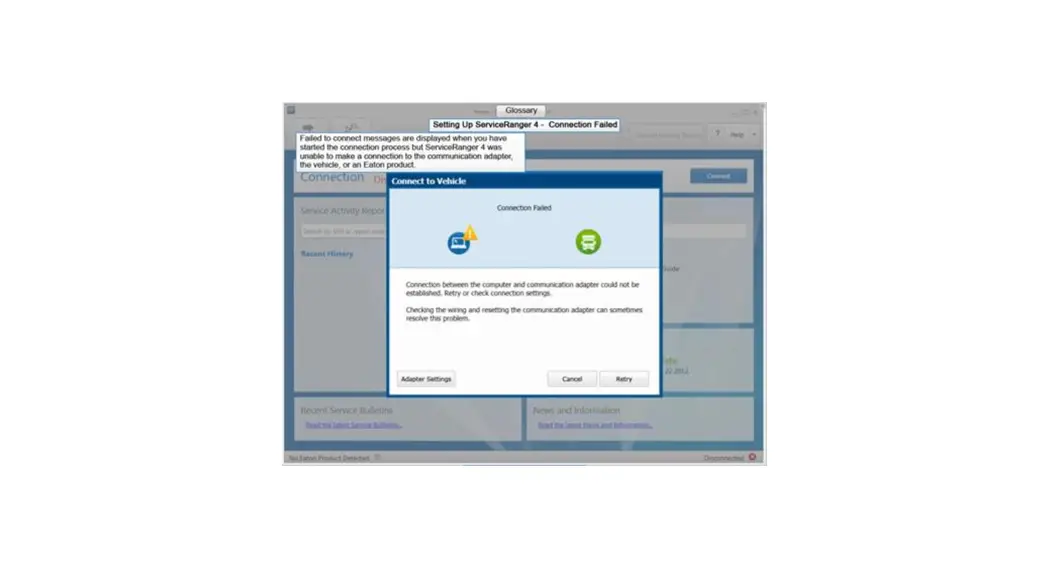
The Endurant transmission is designed to provide enhanced controls for PTO applications.The Transmission Control Module (TCM) must be configured for PTO operation using ServiceRanger software. The default setting for this feature is Disabled.
NOTICE: Failure to configure the TCM for PTO operation results in transmission damage.
Transmission PTO System Engagement Sequence
- The TCM receives a “PTO request” message or signal from the vehicle to enter into a PTO mode.
- The TCM verifies conditions are met for PTO operation. If conditions are met, the TCM supplies a “PTO engage” output to allow PTO engagement.
- The TCM receives a “PTO confirm” message or signal that the PTO is physically engaged and the system is ready for operation.
Note: Refer to Endurant Countershaft PTO Operation section to engage the PTO.
The TCM supports three PTO controlled systems
- J1939 Control
- Hardwire Control
- J1939 Request, J1939 Engage, Hardwire Confirmation – Required for CECU only equipped Peterbilt and Kenworth chassis (refer to OEM for proper PTO configuration).
Single PTO Configuration
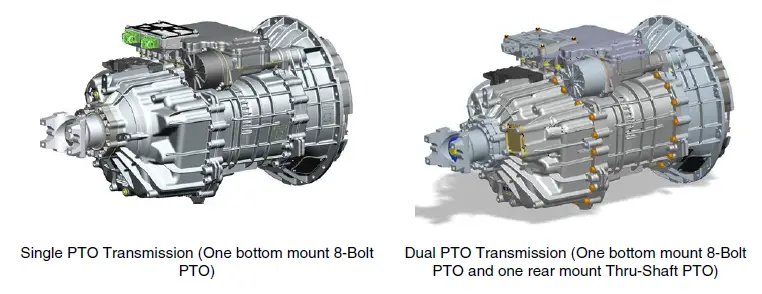
- The Single PTO Transmission is designed to operate one bottom mount 8-Bolt PTO.
- Single PTO configurations:
- J1939 Control, Hardwire Control or
- J1939 Request, J1939 Engage, Hardwire Confirmation
Dual PTO Configuration
- The Dual PTO Transmission is designed to operate one bottom mount 8-Bolt PTO and/or one rear mount Thru-Shaft PTO.
- Dual PTO configurations:
- One J1939 Control and one Hardwire Control or
- Both J1939 Control (refer to OEM for proper PTO configuration)
PTO Wiring Requirements
- Hardwire controlled PTO operation requires a double pole single throw switch.
- Consult PTO manufacturer for power requirements needed for fuses, switches and wires on PTO circuitry.
- TCM request and confirmation circuit lines provide 1 milliamp of current for a 12-volt system.
- The TCM engage circuit load shall draw no more than 0.50 amps with 16 volts applied for a 12 volt vehicle system.
- An 18 AWG TXL cable is required at the TCM 20-way connector for sealing purposes.
Note: The wiring schematics on the following pages show the inactive state for all options. The schematics are for reference only, refer to OEM, body builder and/or PTO manufacturer to ensure proper installation and diagnosis of the PTO wiring.
Endurant Auto Neutral Feature
An auto neutral feature is provided with this transmission which forces the transmission into neutral in all instances when the parking brake is applied. The Endurant system requires the use of the Park Brake Switch signal in the J1939 CCVS1 message to enable function of the Auto Neutral feature.
PTO Wiring Diagrams
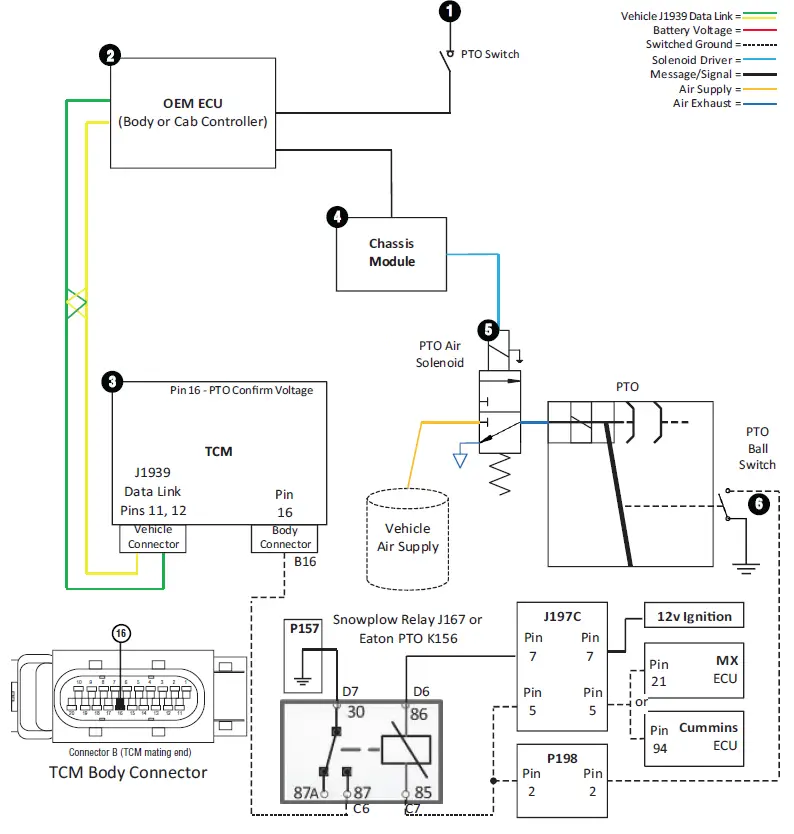
Endurant J1939 PTO Control
Note: All switches shown inactive.
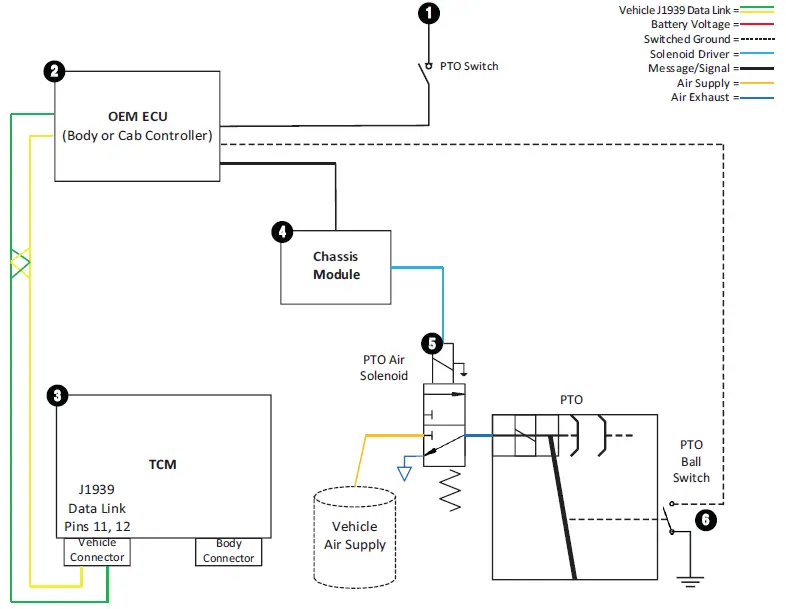
Note: Refer to table on next page for wiring diagram details.
NOTICE: PTO wiring is OEM or body builder installed. Refer to OEM, body builder and/or PTO manufacturer to ensure proper installation and diagnosis of the PTO wiring.
| Endurant J1939 PTO Control | |||||
| Seq. | From (Diagram #) | Description | Method | To (Diagram #) | Status |
| 1 | PTO Switch (1) | sends PTO Engage request | J1939 or signal wire | OEM ECU (2) | Request |
| 2 | OEM ECU (2) | sends PTO Engage request | J1939 | TCM (3) | Request |
| 3 | TCM (3) | sends the PTO Engage message once con- ditions are met | J1939 | OEM ECU (2) | Engage |
| 4 | OEM ECU (2) | sends message to actuate the PTO Air Solenoid | J1939 or signal wire | Chassis Module (4) | Engage |
| 5 | Chassis Module (4) | energizes the PTO Air Solenoid to engage PTO | * | PTO Air Solenoid (5) | Engage |
| 6 | PTO Ball Switch- Ground (6) | closes and provides a ground (Confirma- tion) Indicating PTO is engaged | * | OEM ECU (2) | Confirm |
| 7 | OEM ECU (2) | OEM ECU sends Confirmation message; PTO ready for operation | J1939 | TCM (3) | Confirm |
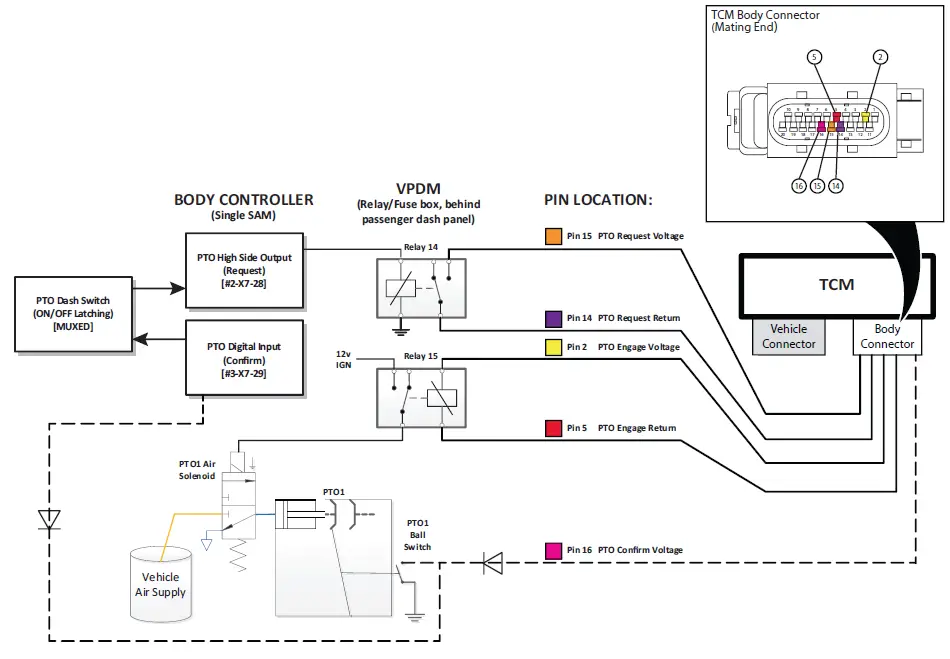
Endurant J1939 Request, J1939 Engage, Hardwire Confirmation PTO Control
Note: All switches shown inactive
CAUTION: Do not induce voltage onto the Return circuits (Pins 5 or 14) or TCM damage could occur. One or more fault codes 900, 905, 920, or 925 with FMI 5 set Active if voltage was induced on Pins 5 or 14.
Note: Refer to table on next page for wiring diagram details
NOTICE: PTO wiring is OEM or body builder installed. Refer to OEM, body builder and/or PTO manufacturer to ensure proper installation and diagnosis of the PTO wiring.
| Endurant J1939 with Hardwire PTO Control | |||||
| Seq. | From (Diagram #) | Description | Method | To (Diagram #) | Status |
| 1 | PTO Switch (1) | sends PTO Engage request | J1939 or signal wire | OEM ECU (2) | Request |
| 2 | OEM ECU (2) | sends PTO Engage request | J1939 | TCM (3) | Request |
| 3 | TCM (3) | sends the PTO Engage message once con- ditions are met | J1939 | OEM ECU (2) | Engage |
| 4 | OEM ECU (2) | sends message to actuate the PTO Air Solenoid | J1939 or signal wire | Chassis Module (4) | Engage |
| 5 | Chassis Module (4) | energizes the PTO Air Solenoid to engage PTO | * | PTO Air Solenoid (5) | Engage |
| 6 | PTO Ball Switch- Ground (6) | closes and provides a ground (Confirma- tion) Indicating PTO is engaged | OEM wiring | TCM (3) | Confirm |
| 7 | TCM (3) | sends Confirmation message; PTO ready for operation | J1939 | OEM ECU (2) | Confirm |
DTNA – Plant or Customer Installed PTO with DTNA Dash Switch and Prep Kit Control Schematic
DTNA – Costumer Installed PTO without DTNA Dash Switch or Prep-Kit Control Schematic
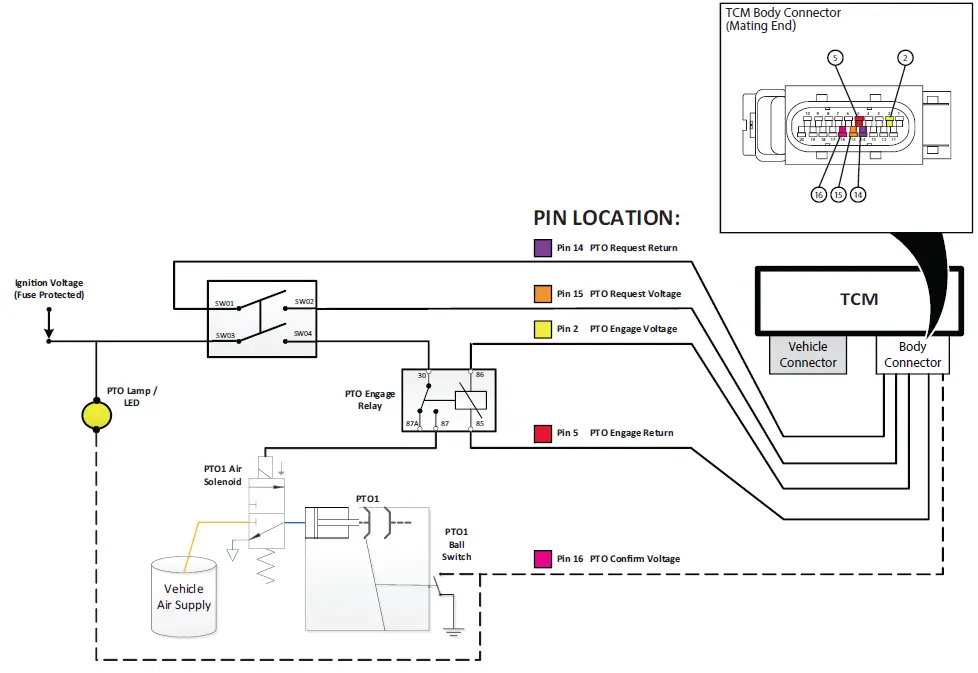
Endurant Hardwire PTO Control with Confirm Switched to Ground
CAUTION: Do not induce voltage onto the Return circuits (Pins 5 or 14) or TCM damage could occur. One or more fault codes 900, 905, 920, or 925 with FMI 5 set Active if voltage was induced on Pins 5 or 14.
Note: Refer to table on next page for wiring diagram details.
NOTICE: PTO wiring is OEM or body builder installed. Refer to OEM, body builder and/or PTO manufacturer to ensure proper installation and diagnosis of the PTO wiring.
| Endurant Hardwire PTO Control with Confirm Switched to Ground | ||
| From | To | Description |
| SW01 – PTO Switch | Pin 14 – TCM Body Conn. (Return | Request |
| Pin 15 – TCM Body Conn. (Voltage) | SW02 – PTO Switch | Request |
| Battery Voltage (Fuse Protected) | SW03 – PTO Switch | Request |
| SW04 – PTO Switch | Pin 30 – PTO Engage Relay | Request |
| Pin 2 – TCM Body Conn. (Voltage) | Pin 86 – PTO Engage Relay | Engage |
| Pin 85 – PTO Engage Relay | Pin 5 – TCM Body Conn. (Return) | Engage |
| Pin 87 – PTO Engage Relay | PTO Air Solenoid | Engage |
| PTO Ball Switch (Ground) | Pin 16 – TCM Body Conn. (Voltage) | Confirm |
| PTO Lamp (-) | Confirm | |
| Battery Voltage (Fuse Protected) | PTO Lamp (+) | Confirm |
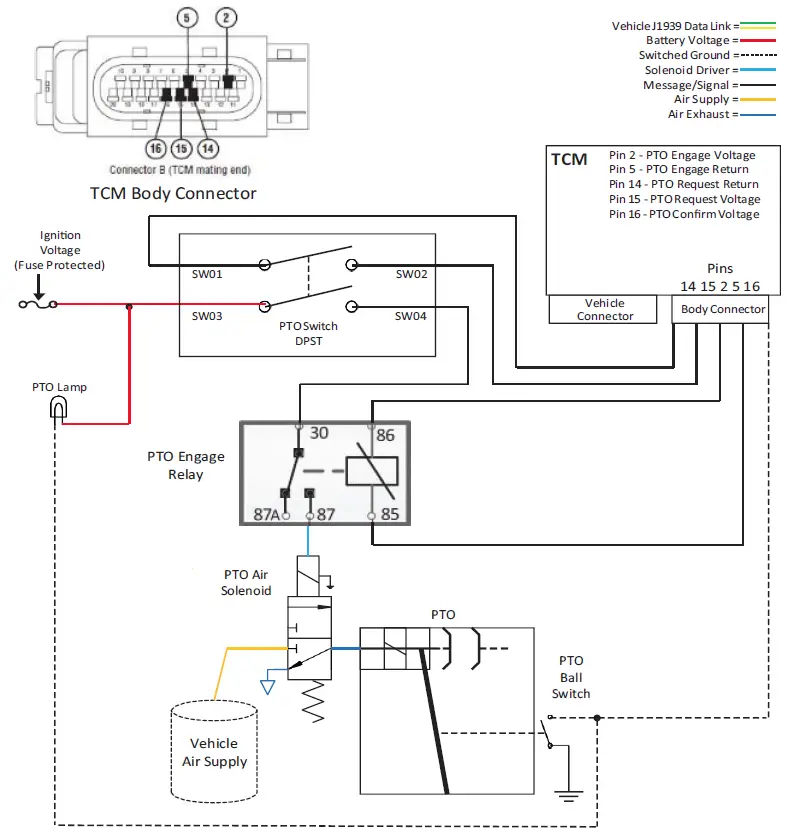
Endurant Hardwire PTO Control with Power Switched Confirmation
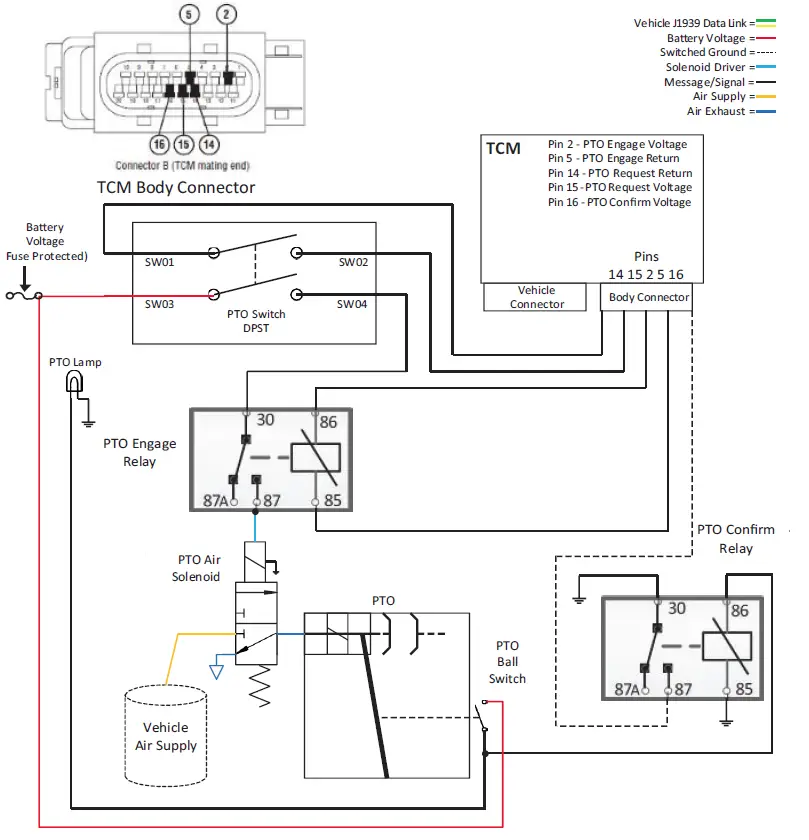
CAUTION: Do not induce voltage onto the Return circuits (Pins 5 or 14) or TCM damage could occur. One or more fault codes 900, 905, 920, or 925 with FMI 5 set Active if voltage was induced on Pins 5 or 14.
Note: Refer to table on next page for wiring diagram details.
NOTICE: PTO wiring is OEM or body builder installed. Refer to OEM, body builder and/or PTO manufacturer to ensure proper installation and diagnosis of the PTO wiring.
| Hardwire PTO Control with Confirm Switched to Power | ||
| From | To | Description |
| SW01 – PTO Switch | Pin 14 – TCM Body Conn. Return | Request |
| Pin 15 – TCM Body Conn. (Voltage) | SW02 – PTO Switch | Request |
| Battery Voltage (Fuse Protected) | SW03 – PTO Switch | Request |
| SW04 – PTO Switch | Pin 30 – PTO Engage Relay | Request |
| Pin 2 – TCM Body Conn. (Voltage) | Pin 86 – PTO Engage Relay | Engage |
| Pin 85 – PTO Engage Relay | Pin 5 – TCM Body Conn. (Return) | Engage |
| Pin 87 – PTO Engage Relay (Voltage) | PTO Air Solenoid | Engage |
| PTO Ball Switch | Confirm | |
| PTO Ball Switch (Voltage) | Pin 86 – PTO Confirm Relay | Confirm |
| PTO Lamp (+) | Confirm | |
| Pin 87 – PTO Confirm Relay (Ground) | Pin 16 – TCM Body Conn. (Voltage) | Confirm |
PTO Support Brackets and Sealing
Endurant – PTO Support Brackets and Sealing
The Endurant transmission is equipped with threaded support bosses for PTO and pump support brackets at designated mounting locations. Consult PTO manufacturers for specific requirements. The following are included as a guideline for fabrication of support brackets and mounting.
Endurant PTO Support Brackets
Note: Threaded support bosses highlighted in Red are for 8-Bolt PTO and highlighted in Yellow are for Rear PTO.
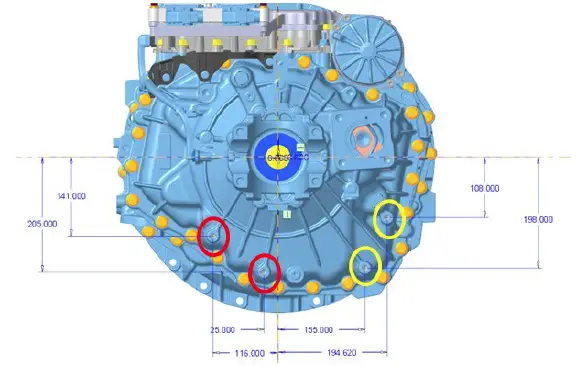
Note: Threaded Support Boss M10 x 1.5, thread depth 25 mm
WARNING
Use only Eaton approved support mounting locations. Not using the proper location could result in transmission damage.
Note: Lifting eyes may be removed after transmission is installed to the engine for installation of additional brackets/ clips.
WARNING
Follow PTO manufacturers guidelines for support requirements of their PTO.
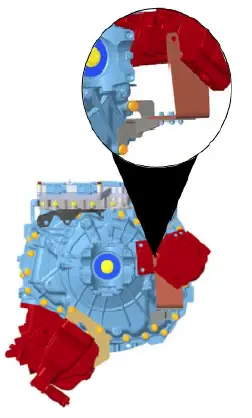
Example of 8-Bolt Bottom Mount and Rear Mount PTO Support Brackets:
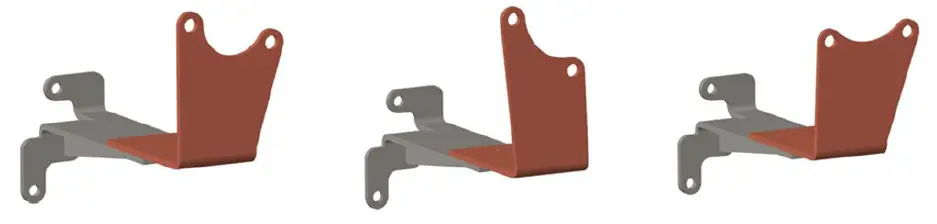
Example Rear Mount PTO Support Brackets:
Endurant PTO Sealing Configuration Examples:
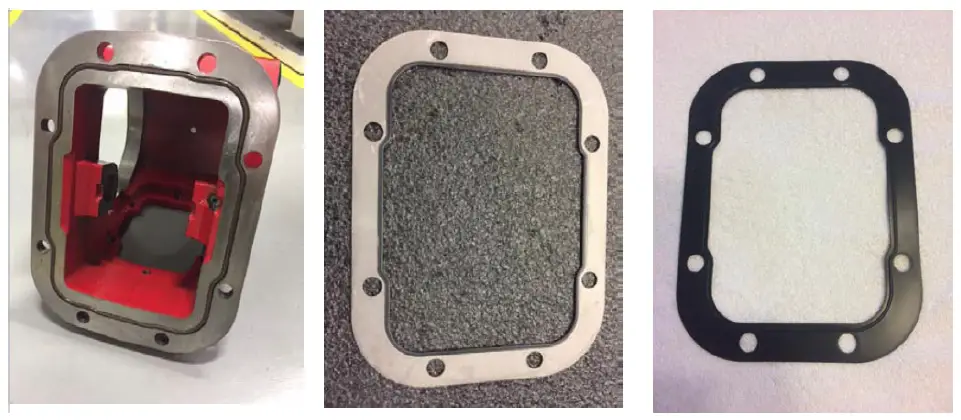
- Chelsea: Push in place elastomer O-ring type seal
- Muncie: Steel gasket with Edge molded elastomer seal
- Bezares: Steel gasket with raised seal surface and elastomer coating on entire gasket surface
PTO Operation
Endurant HD Countershaft PTO Operation
The transmission PTO feature is available in Neutral Mode for Stationary PTO operation and Forward and Reverse Mode start gears 2nd, 4th and R2 for Mobile PTO operation. The forward start gear (2nd or 4th) is automatically selected by the transmission based on grade, load and vehicle weight. All Endurant 12-Speed transmissions are equipped with a bottom mount 8-Bolt PTO opening. An optional rear mount 4-Bolt PTO opening transmission is also available. The default setting for this feature is Disabled unless Enabled at the OEM.
PTO Operation
To engage the PTO:
- Ensure the vehicle is at a complete stop.
- Select Neutral Mode.
- Depress and hold the service brake for Mobile PTO operation.
- Set the vehicle parking brake for Stationary PTO operation. Apply parking brake and follow vehicle manufacturer parking instructions. Failure to follow these instructions could cause unintended vehicle movement resulting in death, serious injury or damage to property.
- Switch the transmission PTO switch to On.
Note: PTO is engaged when the PTO indicator lamp is illuminated and/or display message is indicated.
- For Stationary PTO operation, raise engine RPM as required to operate PTO.
- For Mobile PTO operation, select Forward or Reverse Mode as required for vehicle movement.
To disengage the PTO:
- Ensure the vehicle is at a complete stop.
- Depress and hold the service brake.
- Switch the transmission PTO switch Off
Contact Information
PTO Manufacturers – Contact Information
Bezares USA
27634 Commerce Oaks Dr. Oak Ridge North, TX 77385
- (888) 663-1786
- www.bezares.com
Chelsea Products Division
8225 Hacks Cross Road Olive Branch, MS 38654
- (662) 895-1011
- www.parker.com/chelsea
Muncie Power Products, Inc.
P.O. Box 548 Muncie, IN 47308-0548
- (765)284-7721
- www.munciepower.com
Change Control Log
| Last Revised Date | Description of Clarifications and Updates |
| May 2022 | Updated: Endurant HD PTO Inputs and Configs PTO Manufacturers – Contact Information |
| January 2021 |
Copyright Eaton Cummins Automated Transmission Technologies, 2022. Eaton Cummins Automated Transmission Technologies hereby grant their customers, vendors, or distributors permission to freely copy, reproduce and/or distribute this document in printed format. It may be copied only in its entirety without any changes or modifications. THIS INFORMATION IS NOT INTENDED FOR SALE OR RESALE, AND THIS NOTICE MUST REMAIN ON ALL COPIES.
Note: Features and specifications listed in this document are subject to change without notice and represent the maximum capabilities of the software and products with all options installed. Although every attempt has been made to ensure the accuracy of information contained within, Eaton makes no representation about the completeness, correctness or accuracy and assumes no responsibility for any errors or omissions. Features and functionality may vary depending on selected options.
For spec’ing or service assistance, call 1-800-826-HELP (4357) or visit www.eaton.com/roadranger. In Mexico, call 001-800-826-4357. Roadranger: Eaton and trusted partners providing the best products and services in the industry, ensuring more time on the road. Eaton Cummins Automated Transmission Technologies P.O. Box 4013 Kalamazoo, MI 49003 USA 800-826-HELP (4357) www.eaton.com/roadranger Printed in USA
 Bezares | Power Take-offs, Pumps and Hydraulic Systems for Commercial Vehicle
 Roadranger commercial vehicle product support | Eaton
 Muncie Power Products - Power Take-offs, Hydraulics, and Snow & Ice Products
 - Parker