EPEVER LandStar EU Series Solar Charge Controller with USB Output Instruction Manual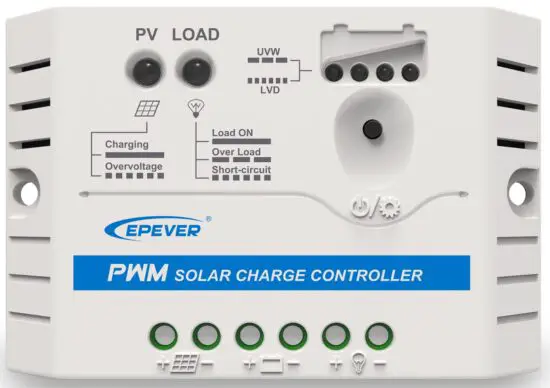
Thank you for selecting the Land Star EU series solar charge controller. Please read this manual carefully before using the product and pay attention to the safety information.
Safety Information
- Read all of the instructions in the manual before installation.
- DO NOT disassemble or attempt to repair the controller.
- Install external fuse or breaker as required.
- Do disconnect the solar module and fuse/ breakers near to battery before installing or moving the controller.
- Power connections must remain tight to avoid excessive heating from a loose connection.
- Only charge batteries that comply with the parameters of controller.
- Battery connection may be wired to one battery or a bank of batteries.
- Risk of electric shock, the PV and load can produce high voltages when the controller is working.
Overview
The Land Star EU series controller is a PWM charge controller with USB output that adopts the most advanced digital technique. It’s an easy operation and cost efficient controller featured as:
- 3-Stage intelligent PWM charging: Bulk, Boost/Equalize, Float.
- Support 3 charging options: Sealed, Gel, and Flooded.
- Battery status LED indicator can indicates battery situation.
- Battery temperature compensation function.
- With humanized settings, operation will be more comfortable and convenient.
- The USB will provide power supply that can charge for electronic equipment.
- Battery type and load output can be set via button.
- Extensive Electronic protection.
Product Features
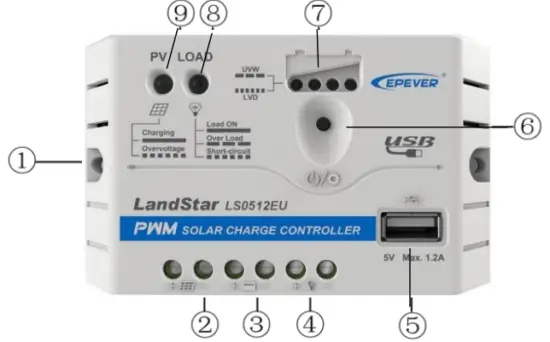
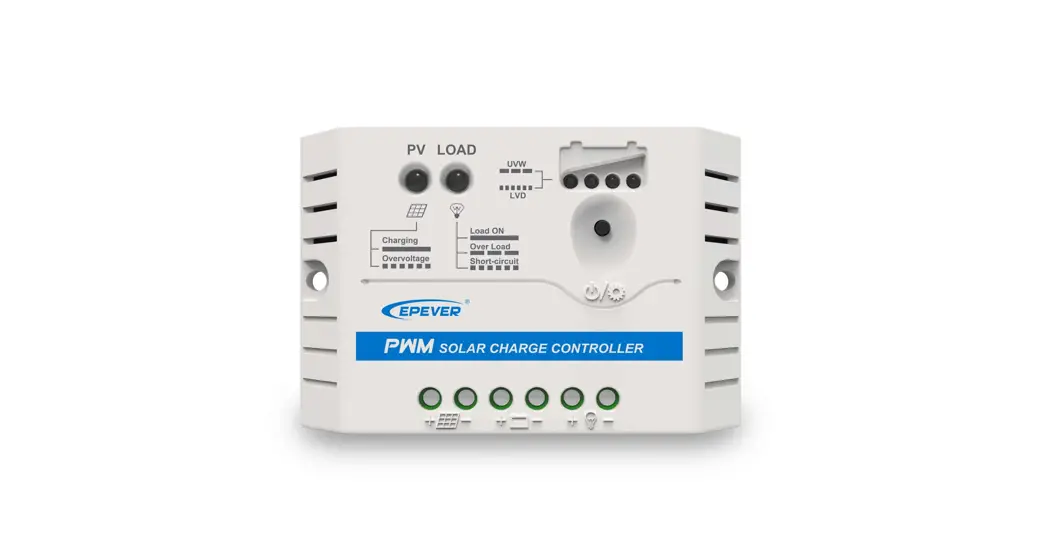
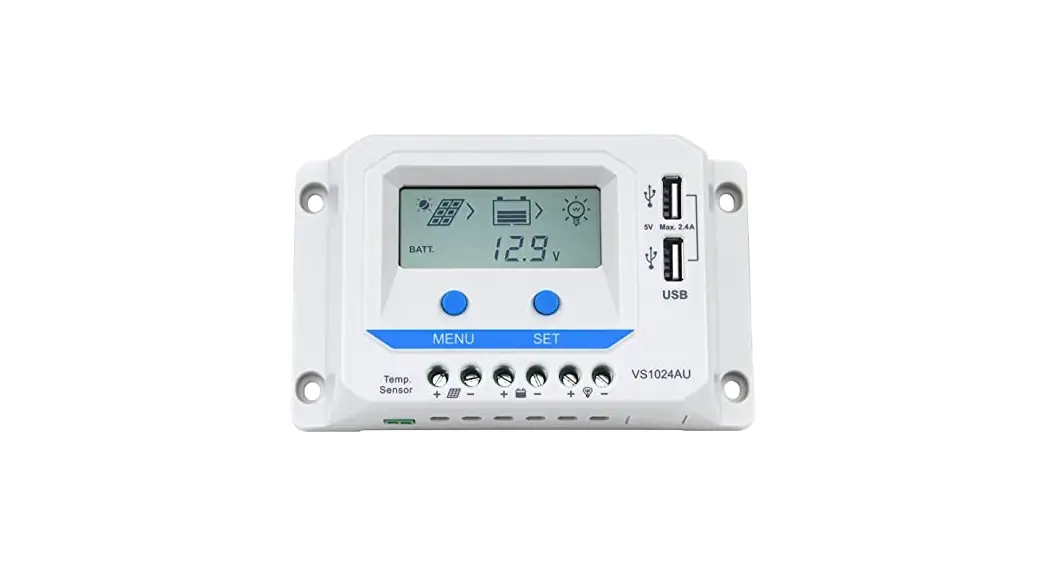
Figure 1 product features
| 1 | Mounting Hole 04.5 | 6 | Button |
| 2 | PV Terminals | 7 | Battery status LED indicator |
| 3 | Battery Terminals | 8 | Load status LED indicator |
| 4 | Load Terminals | 9 | Charging status LED indicator |
| 5 | USB Output Port |
Wiring
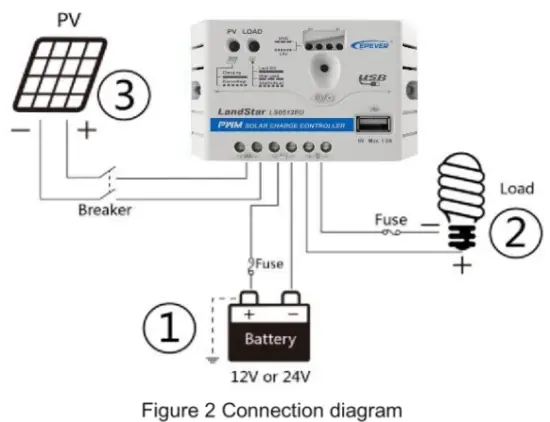
- Connect components to the charge controller in the sequence as shown below and pay much attention to the “+” and “-“. Please don’t insert the fuse or turn on the breaker during the installation. When disconnecting the system, the order will be reserved.
- After power on the controller, check the Battery LED indicator on the controller, it will be on solid green. Otherwise please refer to chapter 8. Always connect the battery first, in order to allow the controller to recognize the system voltage.
- The battery fuse should be installed as close to battery as possible. The suggested distance is within 150mm.
LED Indicators
- Charging and Load status indicator.
Indicator Color Status Instruction Charging status
LED indicatorGreen On Solid In Charging Green OFF No Charging Green Fast Flashing Battery Over
VoltageLoad status LED
indicatorGreen On Solid Load ON Green OFF Load OFF Green Slowly Flashing Load over load Green Fast Flashing Load short circuit - Battery status indicator.

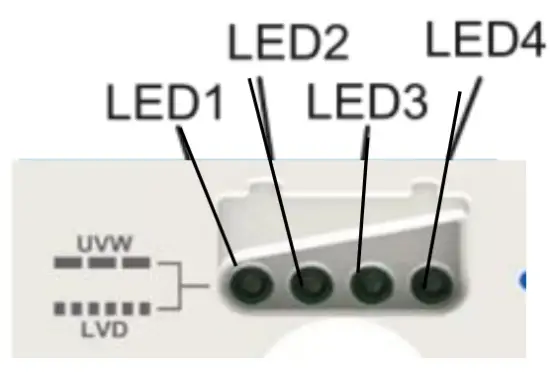
LED1 LED2 LED3 LED4 Battery Status Slowly Flashing X X X Under voltage Fast Flashing x X X Over discharge Battery LED indicator status during voltage is up 0 0 X X 12.8V—, b t<1 3.4V 0 0 0 X 13.4V< Ubat<14.1V 0 0 0 0 14.1V Ubat Battery LED indicator status during voltage is down 0 0 0 X 12.8V<Ubat<13.4V 0 0 X X 12.4V<Ubat<12.8V 0 X X X Ubat< 12.4V
NOTE:
- Voltage value for 12V system at 25°C, please use 2x in 24V system ;
- “Ο”LED indicator on; “X “LED indicator off.
Setting Operations
- Load ON/OFF Setting When the controller is powered on, press the button to control the load output. NOTE: The USB will output when the load is on.
- Battery Type Setting
Operation:
Step 1: Enter setting mode by pressing button for 5s until the battery status LEDs are flashing.
Step 2: Select the desired mode by pressing button.
Step 3: The mode will be saved automatically without any operation for 5S and LED will stop flashing.
Battery Type Indicator.
| LED1 | LED2 | LED3 | Battery type |
| Ο | X | X | Sealed(Default) |
| Ο | Ο | x | Gel |
| ΟΟ | Ο | Ο | Flooded |
Note: “Ο” LED indicator on “X” indicator Off
Protection
- Battery Over Voltage Protection
When the battery voltage reaches to the set point of Over Voltage Disconnect Voltage(OVD), the controller will stop charging the battery to protect the battery from being over charged to break down. - Battery Over Discharge Protection
When the battery voltage reaches to the set point of Low Voltage Disconnect Voltage(LVD), the controller will stop discharging the battery to protect the battery from being over discharged. - Load Overload Protection
Load will be switched off when 1.25 times rated current overload happens. User has to reduce load appliance, then press the button or repower the controller. - Load Short Circuit Protection
Load will be switched off when load short circuit (3 times rated current) happens. User has to clear short circuit, then press the button or repower the controller. - High Voltage Transients Protection
The controller is protected against small high voltage transients. In lightning prone areas, additional external suppression is recommended.
Troubleshooting
| Faults | Possible reasons | Troubleshooting |
| LED Charging indicator turn off during daytime when sunshine falls on PV modules properly | PV array disconnection and tight | Confirm that PV and battery wire connections are correct |
| No LED indicator | Battery voltage maybe less than 8V | Measure battery voltage with the multi-meter. Min.8V can start up the controller |
| Charging status LED indicator Fast flashing | Battery Over Voltage | Check if battery voltage is higher than OVD, and disconnect the PV |
| LED1 Fast flashing | Battery over discharged | When the battery voltage is restored to or above LVR point (low voltage reconnect voltage), the load will recover |
| Load status LED indicator slowly flashing | Load over load |
|
| Load status LED indicator fast flashing | Load short circuit |
|
- When load current reaches1.25 times 1.5 times and 2 times 1.35-1.5 times more than nominal value, the controller will automatically turn off loads in 60s, 5s and 1s respectively.
Technical Specifications
| Item | LS0512EU | LS1012EU | ||
| Nominal system voltage | 12VDC | |||
| Rated charge current | 5A | 10A | ||
| Rated discharge current | 5A | 10A | ||
| Battery input voltage range | 8V-16V | |||
| Max. PV open circuit voltage | 30V | |||
| Self-consumption | 12V55mA; 24V57mA | |||
| Charge Circuit Voltage Drop | 50.13V | |||
| Discharge Circuit Voltage Drop | 50.17V | |||
| Temperature compensation coefficient | -5mV/ ° /2V | |||
| USB Output Port | 5VDC/1.2A | |||
| Working environment temperature | -35 °C ^-+55 °C | |||
| Humidity | 595°i° N.C. | |||
| Enclosure | IP20 | |||
| Grounding | Common Positive | |||
| Overall dimension | 109.7×65.5×20.8mm | 120.3x67x21.8mm | ||
| Mounting dimension | 100.9mm | 111.5mm | ||
| Mounting hole size | 0:1:14.5 | |||
| Terminals | 14AWG/2.5mm2 | 12 AWG /4mm2 | ||
| Net weight | 0.09kg | 0.10kg | ||
| Item | LS1024EU | I LS2024EU | I LS3024EU |
| Nominal system voltage | 12/24VDC Auto | ||
| Rated charge current | 10A | 20A | 30A |
| Rated discharge current | 10A | 20A | 30A |
| Battery input voltage range | 8V-32V | ||
| Max. PV open circuit voltage | 50V | ||
| Self-consumption | 12V55mA; 24V57mA | ||
| Charge Circuit Voltage Drop | 50.13V | ||
| Discharge Circuit Voltage Drop | 50.17V | ||
| Temperature compensation coefficient | -5mV/ °C /2V | ||
| USB Output Port | 5VDC/1.2A | I 5VDC/2A | |
| Working environment temperature | -35 °C — +55 °C | ||
| Humidity | 595% N.C. | ||
| Enclosure | IP20 | ||
| Grounding | Common Positive | ||
| Overall dimension | 120.3x67x 21.8mm | 148×85.6x 34.8mm | 148×106.8x 43.7mm |
| Mounting dimension | 111.5mm | 138mm | 138mm |
Battery Voltage Control Parameters Below parameters are in 12V system at 25 °C, please double the values in 24V system
| Battery Type | Sealed | Gel | Flooded |
| Over Voltage Disconnect Voltage | 16.0V | 16.0V | 16.0V |
| Charging Limit Voltage | 15.0V | 15.0V | 15.0V |
| Over Voltage Reconnect Voltage | 15.0V | 15.0V | 15.0V |
| Equalize Charging Voltage | 14.6V | 14.8V | |
| Boost Charging Voltage | 14.4V | 14.2V | 14.6V |
| Float Charging Voltage | 13.8V | 13.8V | 13.8V |
| Boost Reconnect Charging Voltage | 13.2V | 13.2V | 13.2V |
| Low Voltage Reconnect Voltage | 12.6V | 12.6V | 12.6V |
| Under Voltage Warning Reconnect Voltage | 12.2V | 12.2V | 12.2V |
| Under Voltage Warning Voltage | 12.0V | 12.0V | 12.0V |
| Low Voltage Disconnect Voltage | 11.1V | 11.1V | 11.1V |
| Discharging Limit Voltage | 10.6V | 10.6V | 10.6V |
| Equalize Duration | 120 min. | 120 min. | |
| Boost Duration | 120 min. | 120 min. | 120 min. |
Disclaimer
This warranty does not apply under the following conditions:
- Damage from improper use or use in an unsuitable environment.
- PV or load current, voltage or power exceeding the rated value of controller.
- User disassembly or attempted repair the controller without permission.
- The controller is damaged due to natural elements such as lighting.
- The controller is damaged during transportation and shipment.
Any Changes without Version number: V1.8

SolarV GmbH
[email protected]
www.solarv.de

 SolarV| Hochwertiges Solarmodul für Stromversorgung, Laderegler, Spannungswandler, Batterien, Wechselrichter und Zubehör. | enjoysolar®–Hochwertige Solarmodule von 5Wp bis 300 Wp Mono ,Poly oder Flexibel Module. Laderegler oder Wechselrichter mit optionale