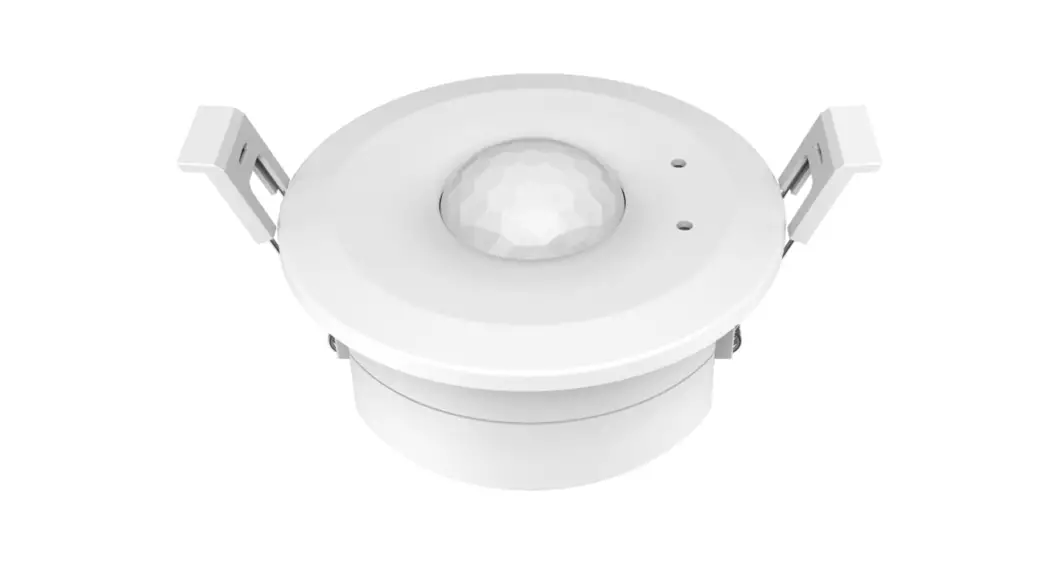
EH-R PIR Induction Dimmer and Switch
PIR Induction Dimmer & Switch
Model No.: EH-R
PIR Induction/ 0-10V output/AC relay output/RF 2.4G
remote/Ceiling mounting
Features
- Ceiling mounting PIR motion detectors with built-in daylight
sensor - Output 1 channel 0/1-10V signal, connect with 0/1-10V dimmable
driver - High voltage AC input, High voltage AC relay output with
zero-cross detection - Works as RF remote, output RF 2.4G signal, matched with RF LED
controller or RF dimmable LED driver optional - Time delay and light threshold can be set via knob
potentiometer
Technical Parameters
- Working voltage: 100-240VAC
- Output signal: 0/1-10V (Max.30mA), RF 2.4GHz
- Output current: Max 4A (AC)
- Power consumption:
Product Usage Instructions
- Mount the PIR Induction Dimmer & Switch on the ceiling
using the provided hardware. - Connect the device to a power source of 100-240VAC.
- Connect the device to a 0/1-10V dimmable driver using the
provided output signal cable. - To use the device as an RF remote, match it with an RF LED
controller or RF dimmable LED driver (optional). - Set the time delay and light threshold using the knob
potentiometer. - The device will detect motion and adjust the lighting
accordingly, using the built-in daylight sensor.
PIR Induction Dimmer & Switch
Model No.: EH-R
PIR Induction/ 0-10V output/AC relay output/RF 2.4G remote/Ceiling mounting
Features
Ceiling mounting PIR motion detectors, built-in daylight sensor. Output 1 channel 0/1-10V signal, connect with 0/1-10V dimmable driver. High voltage AC input, High voltage AC relay output with zero-cross detection. Work as RF remote, output RF 2.4G signal, matched with RF LED controller or RF dimmable LED driver optional. Time delay and light threshold can be set via knob potentiometer.
LVD
Technical Parameters
Working voltage
100-240VAC
Output signal
0/1-10V (Max.30mA), RF 2.4GHz
Output current
Max 4A (AC)
Power consumption
<1.3W(Operation)
Detection zone
Max.(DxH) 10 x 5m
Hold time
10s/30s/90s/3min/10min/30min/+
Stand-by time
0s/30s/90s/3min/10min/30min/+
Daylight threshold
10lux/30lux/50lux/100lux/150lux/200lux/Disable
Expected light
50lux/100lux/150lux/200lux/250lux/300lux/400lux
Mounting height
5m Max.
Detection angle Operation temperature IP rating Warranty
360°(ceilling installation) Ta: -20 OC ~ +50 OC IP20 5 years
User Manual Ver 1.0.0
Page 1
Mechanical Structures and Installations
DIM +
OUTPUT 0/1-10V (Max.30mA)
DIMMER SWITCH 2
0-10V 1-10V 1
INPUT 100-240VAC
NL
DIM –
DIP switch for 0-10V or 1-10V select and switch or dimmer select
AC Lout AC L iutput AC N iutput
Light sensing
HOLD TIME
LIGHT
MATCH
SENSING
RUN
300 251050 200
STANDBY TIME 200 15050 100
LUX 10-off: Threshold 50-400: Expected
100 5010 30
+ +
Hold time Standby time Light adjustment
LED indicator Match key
400 400
100 5010 30
++
10.525GHz
25%
10%
50% SENS
75% 100%
TIME 200 15050 100
LIGHT
MATCH
SENSING
RUN
LUX TIME 10S -+: Hold Time 0S -+: Standby Time
LUX 10-off: Threshold 50-400: Expected
300 251050 200
51.00 mm
86.00 mm
Ceiling (drill hole O 86mm)
95.00 mm Page 2
95.00 mm
Wiring diagram
Used as dimmer or switch, connect with 0/1-10V dimming driver (no use AC OUT)
EH-R
PIR Induction Dimmer & Switch Vin= 100-240VAC Out= 0/1-10V + RF 2.4G Lout= 4A Max. No Load Power 1.3W Ta: -20~+50
OUTPUT 0/1-10V (Max.30mA)
DIMMER SWITCH 2
0-10V 1-10V 1
INPUT 100-240VAC
NL
DIM+
ACN 0/1-10V
DIM-
ACL Dimmable Driver V+
V-
+
Single color LED strip
AC110-220V Used as dimmer or switch, connect with 0/1-10V dimming driver (use AC OUT)
EH-R
PIR Induction Dimmer & Switch Vin= 100-240VAC Out= 0/1-10V + RF 2.4G Lout= 4A Max. No Load Power 1.3W Ta: -20~+50
OUTPUT 0/1-10V (Max.30mA)
DIMMER SWITCH 2
0-10V 1-10V 1
INPUT 100-240VAC
NL
DIM+
ACN 0/1-10V
DIM-
ACL Dimmable Driver V+
V-
+
Single color LED strip
AC110-220V Used as switch, connect with non-dimmable LED light (use AC OUT)
Non-dimmable LED light
EH-R
PIR Induction Dimmer & Switch Vin= 100-240VAC Out= 0/1-10V + RF 2.4G Lout= 4A Max. No Load Power 1.3W Ta: -20~+50
OUTPUT 0/1-10V (Max.30mA)
DIMMER SWITCH 2
0-10V 1-10V 1
INPUT 100-240VAC
NL
Page 2
AC110-220V
0-10V or 1-10V dimming setting
EH-R PIR Induction Dimmer & Switch
Select 0-10V dimmer or 1-10V dimmer according to dimmable LED driver.
0-10V Dimmer
1-10V Dimmer
P0-1W0MV ldeutvye(l(%V))
1100.0 99.0 88.0 77.0 66.0 55.0 44.0 33.0 22.0 11.0
10 20 30 40 50 60 70 80 90 100
Brightness(%)
ON 0-10V 1-10V
1
P1-1W0MV ldeutvye(l(%V))
1100.0 99.0 88.0 77.0 66.0 55.0 44.0 33.0 22.0 11.0
10 20 30 40 50 60 70 80 90 100
Brightness(%)
ON 0-10V 1-10V
1
Note: When the output channel is off, the output dimming signal is 0V or 1V. Please read the dimming section of the dimming driver manual. If the dimming characteristic curve is the same as right, you must select 1-10V dimmer and use AC OUT function, otherwise you can`t turn off the lights.
Output current
100% 90% 80% 70% 60% 50% 40% 30% 20% 10% 1V 2V 3V 4V 5V 6V 7V 8V 9V 10V
Dimming input
Work as RF Remote (two match ways)
The PIR induction Dimmer & Switch can be matched with one or multiple RF LED controller or RF dimmable LED driver, including single color, dual color, RGB, RGBW, RGB+CCT or switch light type, turn on or turn off light by motion detection. End user can choose the suitable match/delete ways. Two options are offered for selection:
Use the controller’s Match key
Match: Short press the match key of the controller, immediately press the match key of the PIR induction Dimmer & Switch.
Delete: Press and hold the match key of the controller for 5s to delete all match, The light blinks 5 times means all matched remotes were deleted.
Use Power Restart
Match: Switch off the power of the controller, then switch on power, repeat again. Immediately short press the match key of the PIR induction Dimmer & Switch 3 times. The light blinks 3 times means match is successful.
.Delete: Switch off the power of the controller, then switch on power, repeat again. Immediately short press the match key of the PIR induction Dimmer & Switch 5 times. The light blinks 5 times means all matched remotes were deleted.
Page 3
Typical application 1: used as a switch
Turns on the light upon detection of motion, and turns off after a pre-selected hold time when there is no movement.
Typical application 2: used as a switch with two-step dimming
Turns on the light upon detection of motion, after a pre-selected hold time, dim to 20% brightness, and turns off after a pre-selected stand-by time when there is no movement.
Typical application 3: used as a dimmer
Turns on the light and dim up to expected brightness level upon detection of motion, and turns off after a pre-selected hold time when there is no movement.
EH-R PIR Induction Dimmer & Switch
Notice for installation of PIR sensor
1.If thesensorisexposedtodirectsunlight, interference signalwillbeintroduced. 2.The sensor should be installed in a dr y environment and keep away from windows, air conditioner and fans. 3. Make sure that the sensor stays away from heat source, such as countertops, kitchen appliances which generate
hot steam, walls and windows in direct sunlight, air conditioner, heating, refrigerators, stoves and so on. 4.There should not be shelter(screen, furniture, large bonsai) within the range of detection.
300 251050 200
300 251050 200
300 251050 200
1. With sufficient ambient light, the sensor does not turn on the light.
2. With insufficient ambient light, the sensor turns on the light when motion is detected.
3. After hold time, the light turns off if no motion detected.
DIMMER SWITCH 2
Select the DIP Switch 2 OFF to set as SWITCH type firstly, then select the combination on knob potentiometer for each specific application.
HOLD TIME
STANDBY TIME 200
15050 100 LUX
+
+
400
Hold time: Refers to the time period remains light on state after no motion detected.
Stand-by time: Refers to the time period remains light on and dim to 20% brightness state after elapse of hold time if no new motion is detected. For two-step dimming switch application, must be 0s.
Daylight sensor: The sensor can be set to only allow the lamp to illuminate when below a defined ambient brightness threshold. Whensettooff(Disable)mode,thedaylight sensor will switch on the lamp when motion is detected regardless of ambient light level. 50lux: twilight operation. 30 lux: evening operation. 10 lux: darkness operation. Note that daylight sensor is active only when lamp totally switches off, and the ambient lux level refers to internal light reaching the sensor.
Setting on this demonstration:
Hold time: 90S
Stand-by time: 0S
Daylight sensor: 50lux
100 5010 30
User Manual Ver 1.0.0
Page 5
1. With sufficient ambient light, the sensor does not turn on the light.
2. With insufficient ambient light, 3. After elapse of hold time,
4. After elapse of stand-by time,
the sensor turns on the light and the sensor dim to 20% brightness the sensor turns off the light if no
dim to 100% brightness when if no new motion detected.
motion detected.
motion is detected.
1. The sensor turns on the light and dim up to expected brightness level when motion is detected.
2. After hold time, the light turns off if no motion detected.
DIMMER SWITCH 2
Select the DIP Switch 2 OFF to set as SWITCH type firstly, then select the combination on knob potentiometer for each specific application.
HOLD TIME
STANDBY TIME 200
15050 100 LUX
+
+
400
Hold time: Refers to the time period remains light on and 100% brightness state after no motion is detected. For two-step dimming switch application, mustbenot +.
Stand-by time: Refers to the time period remains light on and dim to 20% brightness state after elapse of hold time if no new motion is detected. For two-step dimming switch application, must > 0s. If set +, the lights will stay on with 20% brightness.
Daylight sensor: The sensor can be set to only allow the lamp to illuminate when below a defined ambient brightness threshold. Whensettooff(Disable)mode,thedaylight sensor will switch on the lamp when motion is detected regardless of ambient light level. 50lux: twilight operation. 30 lux: evening operation. 10 lux: darkness operation. Note that daylight sensor is active only when lamp totally switches off, and the ambient lux level refers to internal light reaching the sensor.
Setting on this demonstration: Hold time: 90S Stand-by time: 3 min Daylight sensor: 50lux
Page 6
100 5010 30
DIMMER SWITCH 2
HOLD TIME
STANDBY TIME 200
15050 100 LUX
+
+
400
Select the DIP Switch 2 ON to set as DIMMER type firstly, then select the combination on knob potentiometer for each specific application. Hold time: Refers to the time period remains light on state after no motion detected. If set +, the lights will stay on.
Stand-by time: Refers to the time period remains light on and dim to 20% brightness state after elapse of hold time if no new motion is detected. For dimmer application, must be 0s.
Daylight sensor: The sensor can be set to allow the lamp to illuminate to expected brightness level. If the detected brightness is less than the expected brightness, the output will dim up to full brightness(100%). If the detected brightness is larger than the expected brightness, the output will dim down to min brightness(1%). Note that daylight sensor is active only when lamp switches on, and the ambient lux level refers to internal light reaching the sensor.
Setting on this demonstration: Hold time: 90S Stand-by time: 0S
Daylight sensor: 150lux
Page 7
100 5010 30
Page 8