 RAYCHEM
RayStat-M2
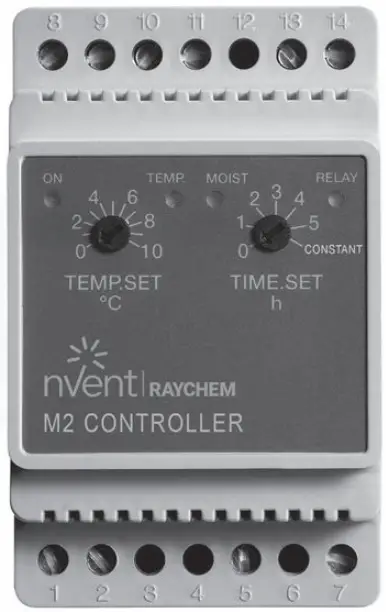
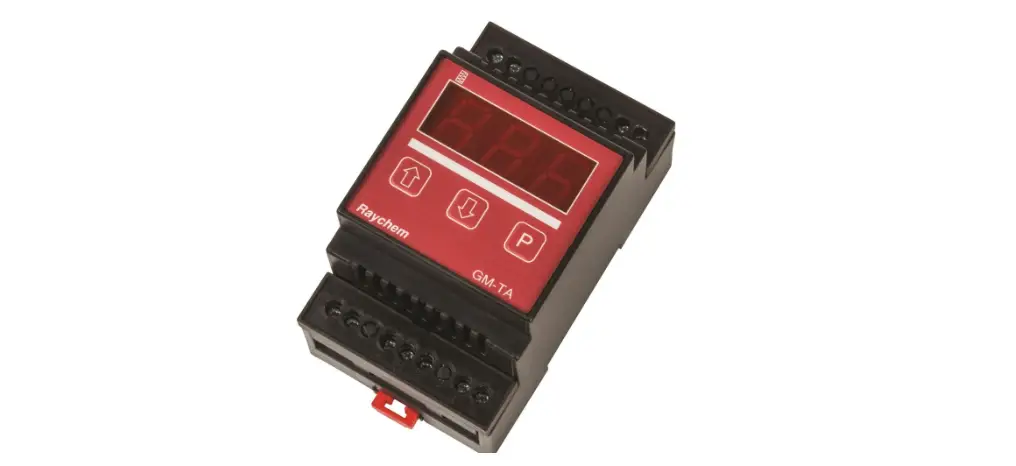
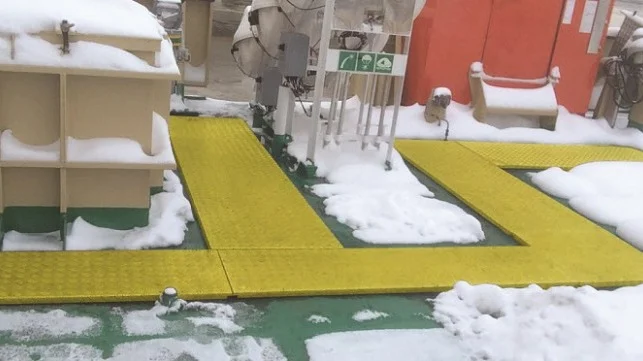
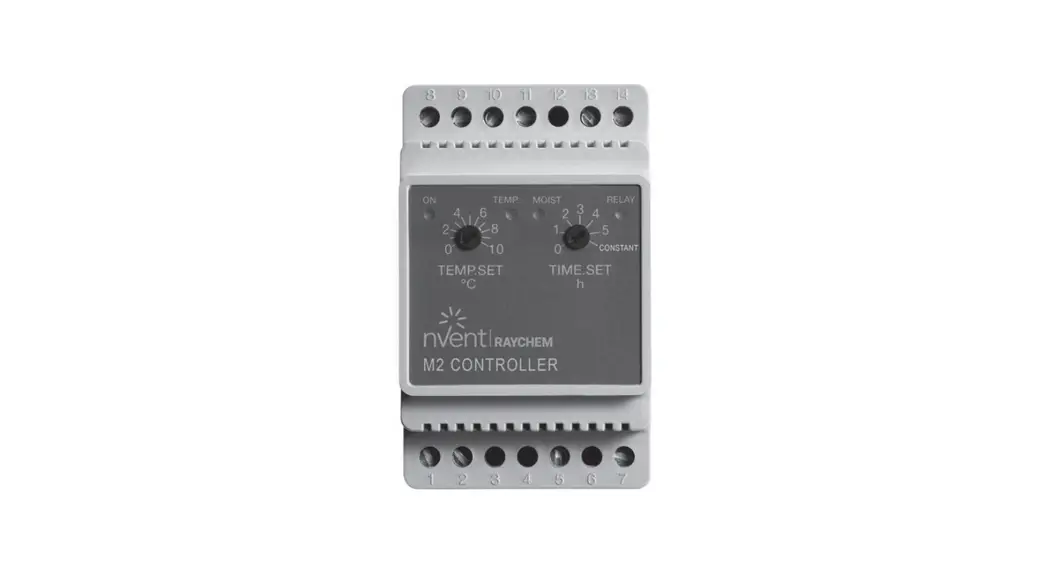
nVent RAYCHEM RayStat-M2 is an electronic controller for economical ice and snow melting on outdoor areas and in gutters. Ice forms due to a combination of low temperature and moisture. RayStat-M2 detects temperature and moisture and the snow melting system will usually only be activated if snow or ice is present. RayStat-M2 is suitable for controlling electric heating cables.
Product program
| RayStat-M2 | Controller. |
| RayStat-M2-G-Sensor | Ground sensor for detecting temperaturand moisture. |
| RayStat-M2-R-Sensor | Gutter sensor for detecting moisture. |
| RayStat-M2-A-Sensor | Ambient Temperature sensor. |
CE and UKCA marking
This product is manufactured in accordance with EU Council Directive 89/336/EEC on electromagnetic compatibility (and subsequent amendments) and EU Council Directive 2006/95/EEC on electrical equipment designed for use within certain voltage limits.
Applied standards
EN 61000-6-3, EN 61000-6-2, EN 60730-1 and EN 60730-2-9.
The product may only be used if the complete installation complies with current directives.
The product carries a manufacturer’s warranty if installed in accordance with these instructions and current regulations.
If the product has been damaged in any way, e.g. during transport, it must be inspected and checked by authorised personnel before being connected to the power supply.
WARNING – Important safety instructions.
Always disconnect the power supply before performing installation or maintenance work on this control unit or any of the components connected to it. This control unit and the components connected to it should only be installed by qualified electricians. Electrical installation must be performed in accordance with applicable local regulations.
Technical data
Controller RayStat-M2:
Supply voltage ……………………………………230 V AC ±10 %, 50-60 Hz
Output relay (NO) ……………………………………………………………… 16 A
On/off differential …………………………………………………………….0.4°C
Temperature Setting for Startup ……………………………………0/+10°C
Run-on time ………………………………………………………………. 0-5 hours
Ambient temperature ………………………………………………. –10/+50°C
Ambient air humidity ……………………………………………………..10-95 %
Enclosure rating …………………………………………………IP 20 / Nema 1
Power consumption ………………………………………………………….. 3 VA
Weight ………………………………………………………………………….. 200 g
Dimensions H/W/D …………………………………………….. 86/52/59 mm
Ground sensor type RayStat-M2-G-Sensor:
Designed to be embedded in outdoor areas.
Detection …………………………………………. Moisture and temperature
Mounting ……………………………………………………………..Outdoor area
Enclosure rating ………………………………………………………………. IP 68
Ambient temperature ………………………………………………. –50/+70°C
Dimensions ………………………………………………………….H32, Ø60 mm
Roof sensor type RayStat-M2-R-Sensor:
Designed to be mounted in gutter or downpipe. Is used together with outdoor sensor RayStat-M2-A-sensor.
Detection …………………………………………………………………… Moisture
Mounting ………………………………………………………………………. Gutter
Enclosure rating ………………………………………………………………. IP 68
Ambient temperature ………………………………………………. –50/+70°C
Dimensions H/W/D …………………………………………………..105/30/13 mm
Outdoor temperature sensor type RayStat-M2-A-Sensor:
Detection …………………………………………………………….. Temperature
Mounting …………………………………………………………………………..Wall
Ambient temperature ………………………………………………. –50/+70°C
Dimensions H/W/D …………………………………………….. 86/45/35 mm
 NOTE: The snow and ice melting system is deactivated in the event of sensor failure – regardless of sensor type.
Sensor installation
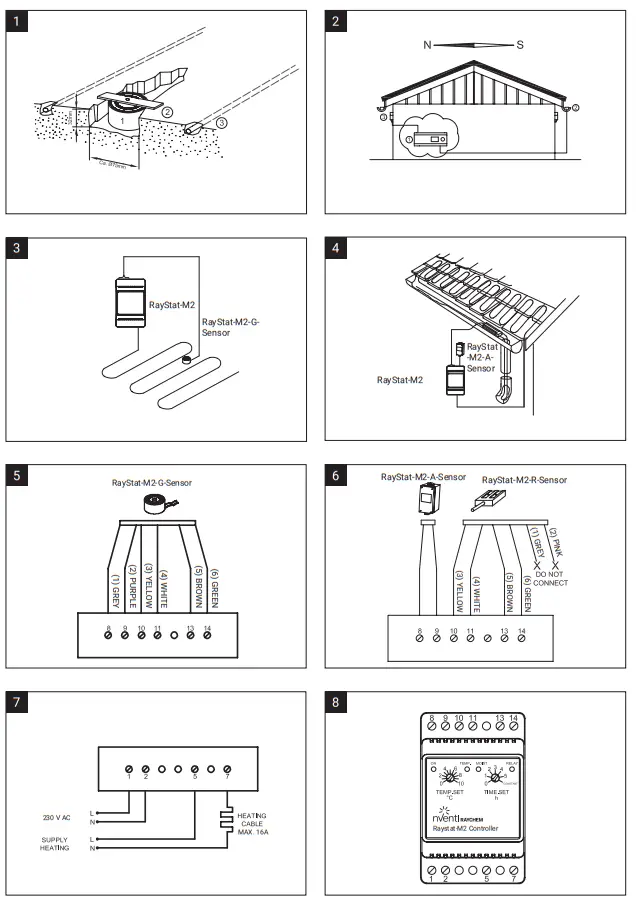
Ground sensor, fig. 1 & 3:
For installation in traced outdoor surfaces where ice and snow are a regular problem. The sensor must be embedded horizontally with its top flush with the surrounding surface.
The sensor cable must be installed in accordance with current regulations.
NOTE: We strongly recommend the use of cable pipes in order to protect the sensor cable. Detailed installation instructions are supplied with the sensor.
With RayStat-M2-G-Sensor, use the accompanying installation plate.
Roof sensor RayStat-M2-R-Sensor, fig. 2 & 4:
For installation in a gutter or downpipe on the sunny side of the building. It is important to ensure that the sensor contact elements face against the flow of melt water. Be aware that the pink (2) and grey (1) wire must not be installed. Detailed installation instructions are supplied with the sensor.
Outdoor temperature sensor RayStat-M2-A-Sensor, fig. 2 & 4:
For use in conjunction with roof sensor RayStat-M2-R-Sensor. Can also be used separately for the detection of temperature alone. The sensor should be mounted on the wall under the eaves on the north side of the building.
Sensor cables
RayStat-M2-G-Sensor and RayStat-M2-R-Sensor are supplied with 10 m cable, which can be extended up to approx. 200 m using standard installation cable: 6×1.5 mm² for RayStat-M2-G-Sensor and 4×1.5 mm² for RayStat-M2-R-Sensor. The RayStat-M2-A- Sensor cable can be up to approx. 50 m in length. Sensor cables must be installed in accordance with current regulations. They must never be installed parallel to power cables as electrical interference may distort the sensor signal.
Controller installation
The control unit should be DIN-rail mounted in an approved panel. Connect supply voltage to terminals 1 and 2. Electrical installation must be performed in accordance with applicable local regulations.
Setup
RayStat-M2 can be set up for ice and snow melting on outdoor areas in conjunction with RayStat-M2-G-Sensor sensors or in gutters/downpipes in conjunction with RayStat-M2-R-Sensor and RayStat-M2-A-Sensor sensors.
- Electric heating control with RayStat-M2-G-Sensor (fig. 5 & 7):
Connect 1 RayStat-M2-G-Sensor sensor to terminals 8-14.
Connect heating cable to output relay according to fig. 7. - Electric heating control with RayStat-M2-R-Sensor + RayStatM2-A-Sensor (fig. 6 & 7): Connect
1 RayStat-M2-R-Sensor sensor to terminals 1014. Note that the pink (2) and grey (1) wires must not be connected. Connect 1 RayStat-M2-A-Sensor sensor to terminals 8 and 9. - Connect heating cable to output relay according to fig. 7.
How to program the sensitivity:
- Turn off the power to the RayStat-M2.
- Connect a wire between terminals 8 and 9
- Connect a wire between terminals 10 and 11
- Turn the TIME SET knob to max. (constantly on).
- Turn the TEMP SET knob to max. (10).
- Turn on the power. The LED for ON will flash.
a The LEDs for TEMP, MOIST and RELAY will light constantly, indicating the factory setting for sensitivity level. - Program the sensitivity level by turning the TIME SET knob from 1-5 (1=min., 2=low, 3=normal/factory setting, 4=high, 5=max.).
a The combination of LEDs will indicate the programmed sensitivity (see matrix below). - Turn off the power and select the required settings for temperature (TEMP SET) and after-run time (TIME SET).
- Remove the wires connecting terminals 8 and 9 and terminals 10 and 11.
- Install the temperature sensor and moisture sensor as normal.
Turn the TIME SET knob from 1-5. The combination of LEDs will indicate the programmed sensitivity:
| TIME SETknob | Sensitivity level | LED for ”TEMP” | LED for ”MOIST” | LED for ”RELAY” |
| 1 | Minimum | ON | OFF | OFF |
| 2 | Low | ON | ON | OFF |
| 3 | Factory Setting | ON | ON | ON |
| 4 | High | OFF | ON | ON |
| 5 | Maximum | OFF | OFF | ON |
Wiring
| Terminal | Colour code | Wiring |
| 1, 2 | Supply voltage, 230 V AC 50/60 Hz | |
| 5, 7 | Output relay, 16 A (fig.7) | |
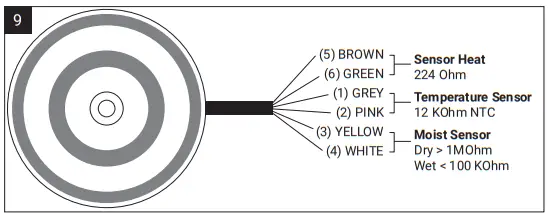
| 8, 9 | grey/pink (1/2) | Temperature sensor 1, RayStat-M2-G-Sensor or RayStat-M2-A-Sensor |
| 10, 11 | yellow/white (5/6) | Moisture sensor, RayStat-M2-G-Sensor or RayStat-M2-R-Sensor |
| 13, 14 | brown/green (3/4) | Sensor heating RayStat-M2-G-Sensor or RayStat-M2-R-Sensor |
Note that the pink (2) and grey (1) wires are not used with a RayStat-M2-R-Sensor sensor.
Environment protection and recycling Help protect the environment by disposing of the packaging and redundant products in a responsible manner.
Product disposal
Products marked with this symbol must not be disposed of along with household waste but must be delivered to a waste collection centre in accordance with current local regulations.
Figures
At the end of this manual there are figures representing the installation and there is a troubleshooting guide.
TROUBLESHOOTING
RAYSTAT-M2-G-Sensor
NTC 12 kΩ @ 25°C – RAYSTAT-M2-G-Sensor / RAYSTAT-M2-A-Sensor
| –20ºC = 112246Ω | 11ºC = 22300Ω | 16ºC = 17750Ω | 21ºC = 14238Ω | 26ºC = 11506Ω | 35ºC = 7978Ω |
| –10ºC = 63929Ω | 12ºC = 21292Ω | 17ºC = 16974Ω | 22ºC = 13636Ω | 27ºC = 11035Ω | 40ºC = 6569Ω |
| 0ºC = 37942Ω | 13ºC = 20335Ω | 18ºC = 16237Ω | 23ºC = 13064Ω | 28ºC = 10587Ω | 45ºC = 5442Ω |
| 5ºC = 29645Ω | 14ºC = 19428Ω | 19ºC = 15537Ω | 24ºC = 12519Ω | 29ºC = 10159Ω | 50ºC = 4535Ω |
| 10ºC = 23364Ω | 15ºC = 18567Ω | 20ºC = 14871Ω | 25ºC = 12000Ω | 30ºC = 9752Ω | 55ºC = 3800Ω |
RAYSTAT-M2-A-Sensor: -> NTC 12 kΩ @ 25°C
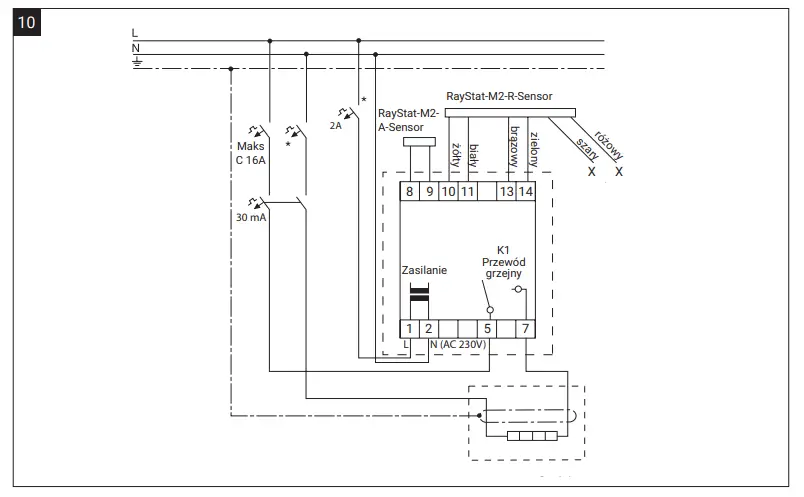
Normal operation mode with ambient and gutter sensors – connections
Voltage-free operation using a contactor – connections
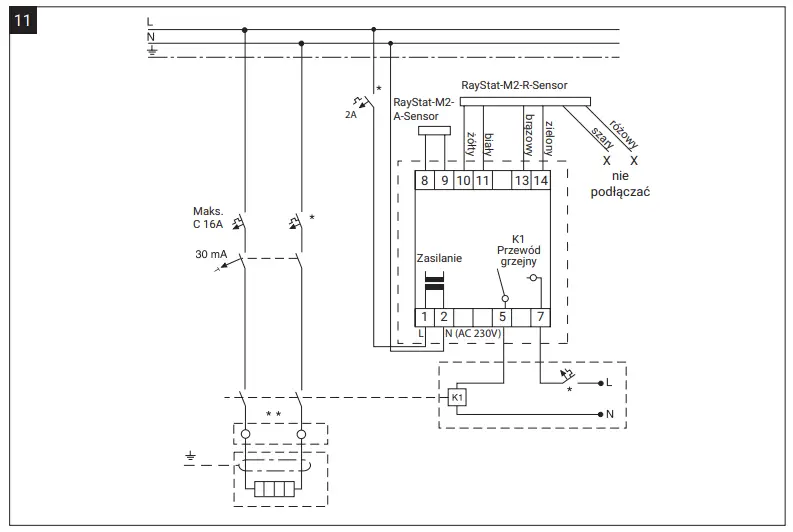
* Local regulations, standards and ordinances may prescribe the use of two or four-pole overcurrent or residual current circuit breakers.
**Depending on the application, single and and multi-field contactors can be used.

| Danmark Tel +45 70 11 04 00 [email protected] | Deutschland Tel 0800 1818205 Fax 0800 1818204 [email protected] | Italia Tel +39 02 577 61 51 Fax +39 02 577 61 55 28 [email protected] | Nederland Tel 0800 0224978 Fax 0800 0224993 [email protected] | United Kingdom Tel 0800 969 013 Fax 0800 968 624 [email protected] |
©2023 nVent. All nVent marks and logos are owned or licensed by nVent Services GmbH or its affiliates. All other trademarks are the property of their respective owners. nVent reserves the right to change specifications without notice.
RAYCHEM-IM-H82008-RaystatM2-ML-2303
 Electrical Heat Tracing | Heat Tracing | nVent RAYCHEM