 PPTP Point-to-Point Tunneling Protocol App
User Guide
App User Guide PPTP
Version: 1.0.2 Date: December 25, 2021
Copyright© Guangzhou Robustel Co., Ltd.
All Rights Reserved.
Revision History
Updates between document versions are cumulative. Therefore, the latest document version contains all updates made to previous versions.
| Release Date | App Version | Doc Version | Details |
| June 6, 2016 | 2.0.0 | v.1.0.0 | First Release |
| June 29, 2018 | 2.0.0 | v.1.0.1 | Revised the company name |
| December 25, 2021 | 2.0.0 | v.1.0.2 | Revised the company name Deleted the document status: Confidential |
Chapter 1 Overview
PPTP (Point-to-Point Tunneling Protocol) is a method for implementing virtual private networks. PPTP uses a control channel over TCP and a GRE tunnel operating to encapsulate PPP packets. PPTP is an App that needs to install into the router in the System->App Center unit.
Chapter 2 App Installation
2.1 Installation
PathSystem->App
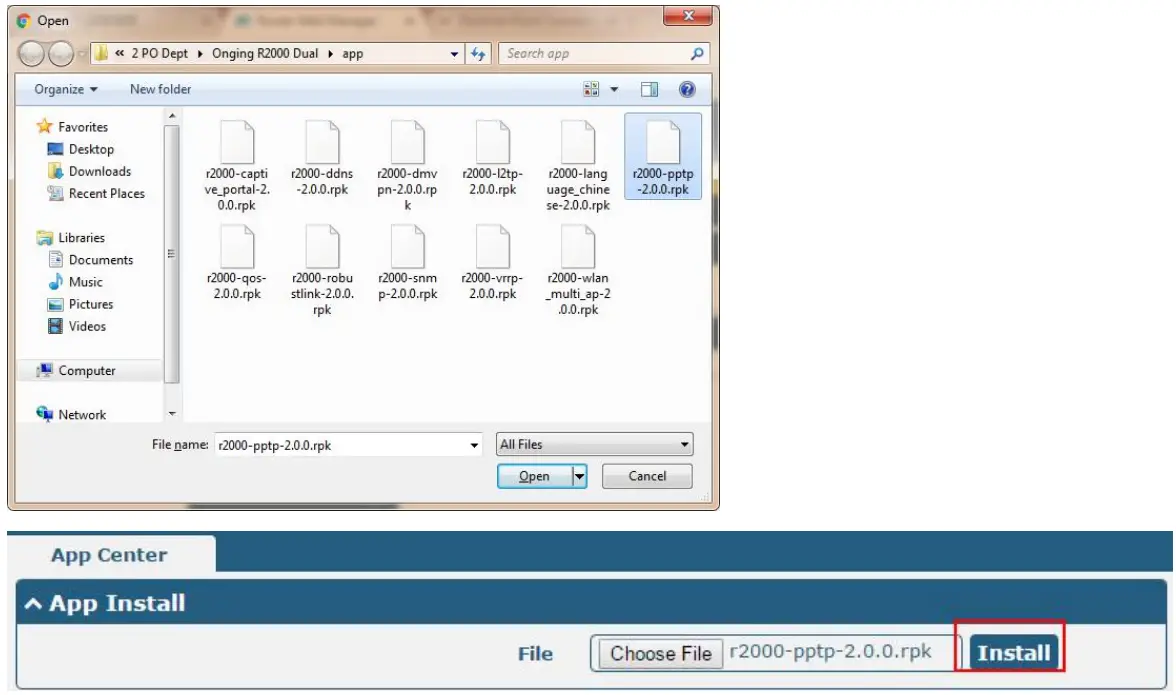
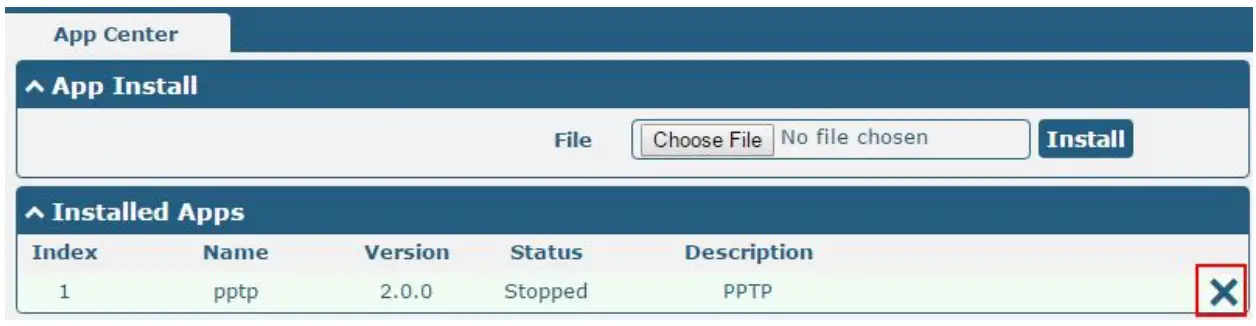
- Please place PPTP App .rpk file (e.g. r2000-PPTP-2.0.0.rpk) into a free disk of PC. And then log in the router configuration page; go to System->App as the following screenshot show.

- Click the “Choose File” button, select the PPTP App .rpk file from the PC, then click the “Install” button of the router configuration page.

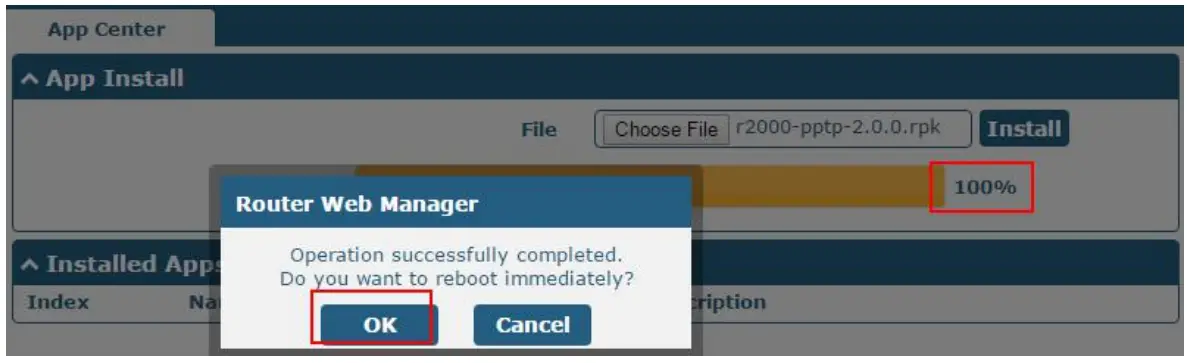
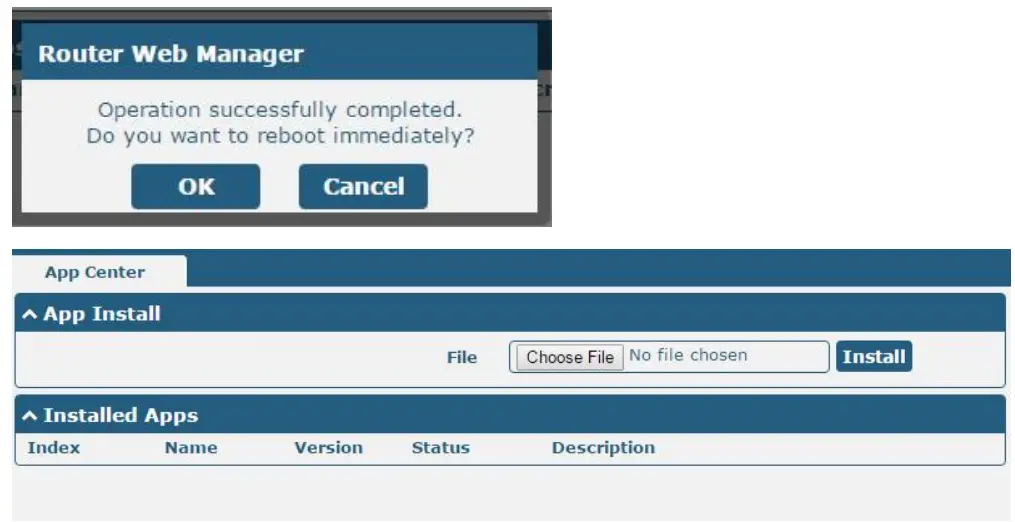
- When the rate of installation progress reaches 100%, the system will pop up a reboot router reminder window. Please click “OK” to make the router reboot.

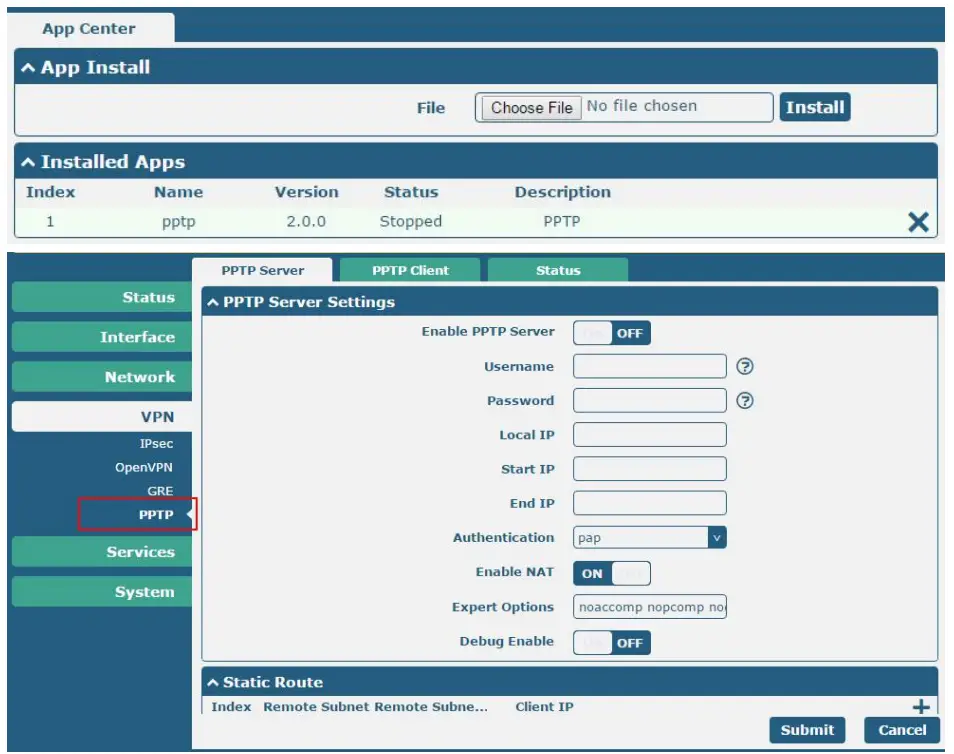
- After the router power on again, log in the configuration page, PPTP will be included in App Center’s “Installed Apps” list, and the function configuration will display in the VPN part.


2.2 Uninstallation
PathSystem->App Center
- Go to “Installed Apps”, find the PPTP App and then click ” X”.

- Click “OK” in the router reboot reminder pop-up window. When the router finish restarting, PPTP had been uninstalled.

Chapter 3 Parameters Description
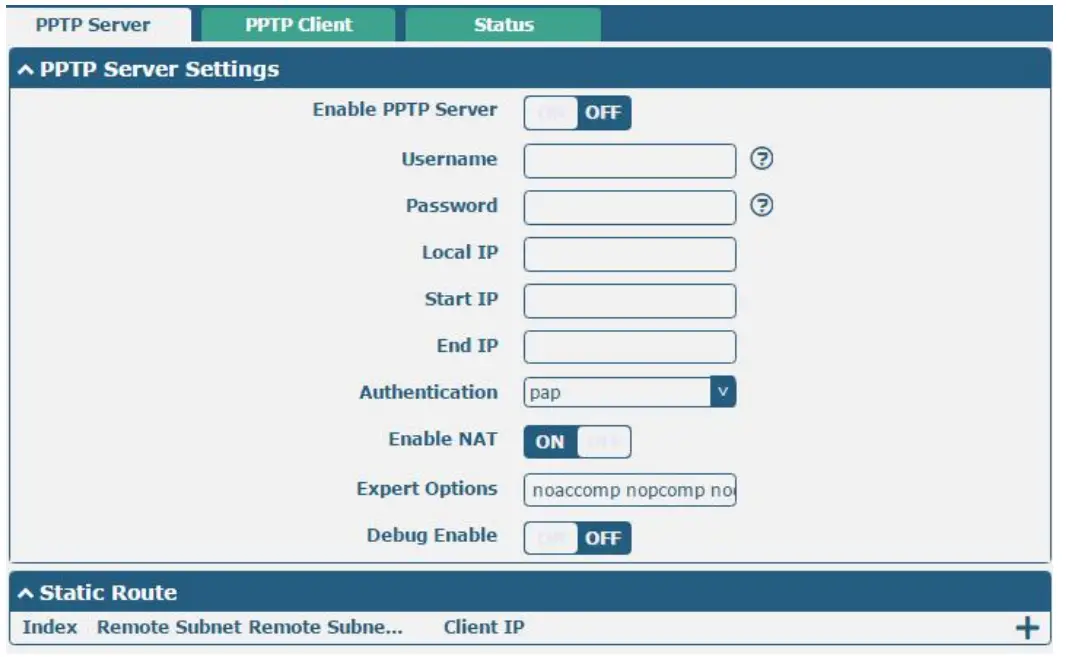
Click the “+” Symbol, it will pop up a Static Router window.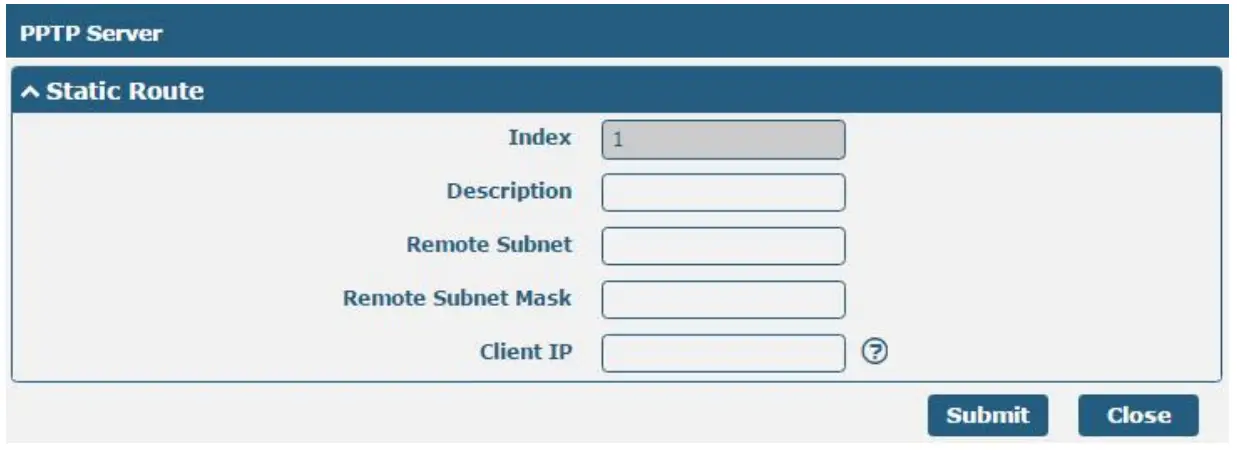
| PPTP | ||
| Item | Description | Default |
| Enable PPTP Server | Click to enable the PPTP server. | OFF |
| Username | Set the username which will assign to the PPTP client. | Null |
| Password | Set the password which will assign to the PPTP client. | Null |
| Local IP | Set the IP address of the PPTP server. | 10.0.0.1 |
| Start IP | Set the IP pool start IP address which will assign to the PPTP clients. | 10.0.0.2 |
| End IP | Set the IP pool end IP address that will assign to the PPTP clients. | 10.0.0.100 |
| Authentication | Select from “PAP”, “CHAP”, “MS-CHAP vl”, and “MS-CHAP v2”. | CHAP |
| PPTP clients need to select the same authentication method based on this server’s authentication method. | ||
| Enable NAT | Click to enable the NAT feature of PPTP. The remote PPTP client’s source IP will be disguised before accessing the router PPTP server | OFF |
| Expert Options | You can enter some other PPP initialization strings in this field. Each string can be separated by a space. | not nobsdcomp |
| Remote Subnet @ Static Route | Enter the remote peer’s private IP address or remote subnet’s gateways address. | Null |
| Remote Subnet Mask @ Static Route | Enter the remote peer’s subnet mask. | Null |
| Client IP @Static Route | Specifying the PPTP client IP address. Empty means anywhere. | Null |
 Click the “+” symbol to add a PPTP client. The max tunnel accounts are 3.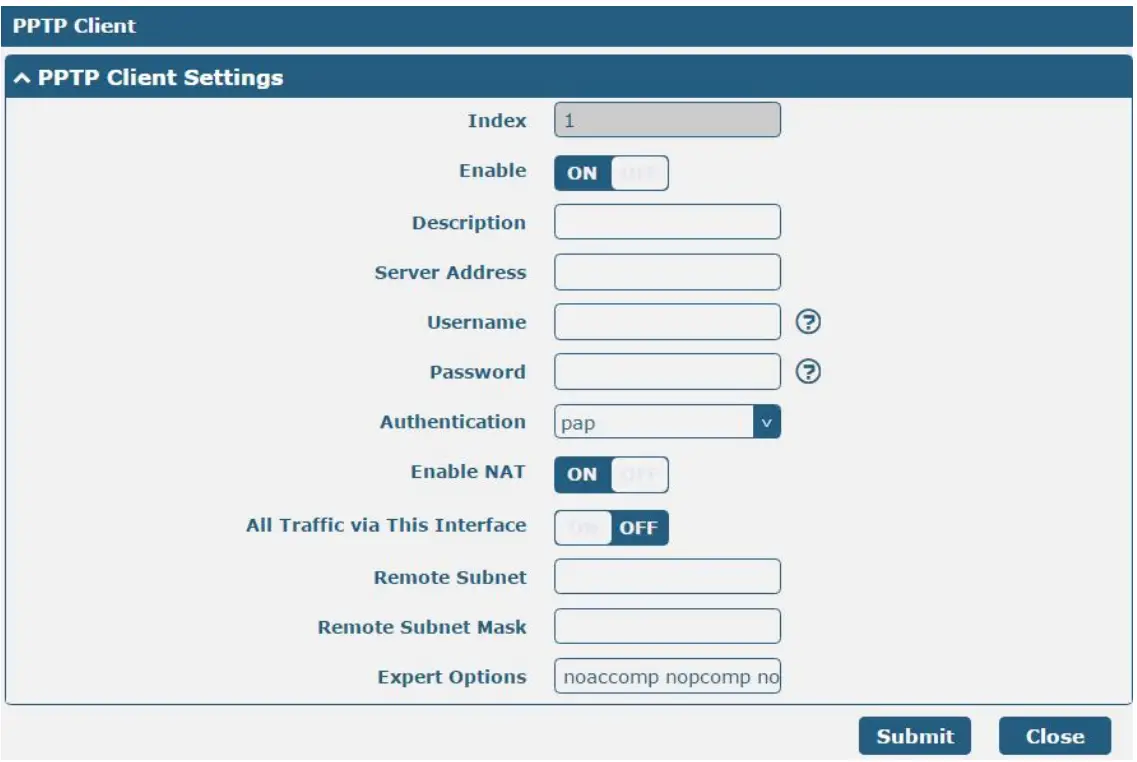
| PPTP Client | ||
| Item | Description | Default |
| Enable | Enable PPTP Client. | Null |
| Server Address | Enter your PPTP server’s public IP or domain name. | Null |
| Username | Enter the username which was provided by your PPTP server. | Null |
| Password | Enter the password which was provided by your PPTP server. | Null |
| Authentication | Select from “Auto”, “PAP”, “CHAP”, “MS-CHAP vl.”, and “MS-CHAP v2”. You need to select the corresponding authentication method based on the server’s authentication method. When you select “Auto”, the router will auto-select the correct method based on the server’s method. | Auto |
| Enable NAT | Click to enable the NAT feature of PPTP. The source IP address of the host Behind R3000 will be disguised before accessing the remote PPTP server. | OFF |
| All traffic via this interface | After clicking to enable this feature, all data traffic will be sent via the PPTP tunnel. | OFF |
| Remote Subnet | Enter the remote peer’s private IP address or remote subnet’s gateways address. | Null |
| Remote Subnet Mask | Enter the remote peer’s subnet mask. | Null |
| Expert Options | You can enter some other PPP initialization strings in this field. Each string can be separated by a space. | not nobsdcomp |
Go to Status to check the PPTP connection status.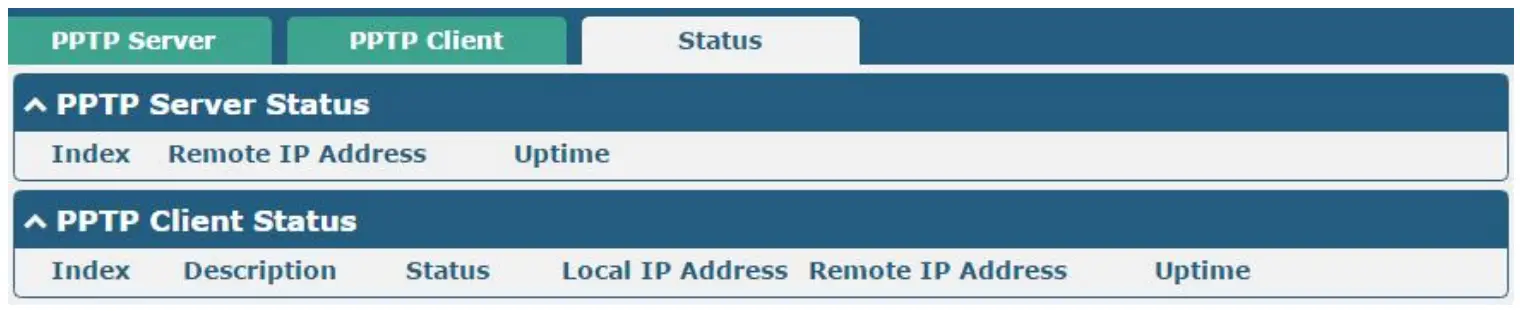
Guangzhou Robustel Co., Ltd.
Add: 501, Building 2, No. 63, Yong’an Avenue,
Huangpu District, Guangzhou, China 510660
Tel: 86-20-82321505
Email: [email protected]
Web: www.robustel.com
 4G/LTE/5G/Cellular Routers, Gateways and Modems for Industrial IoT - Robustel