MOUNT-PC07G Deskside and Wall Gaming PC Mount
Product Information: Deskside and Wall Gaming PC Mount
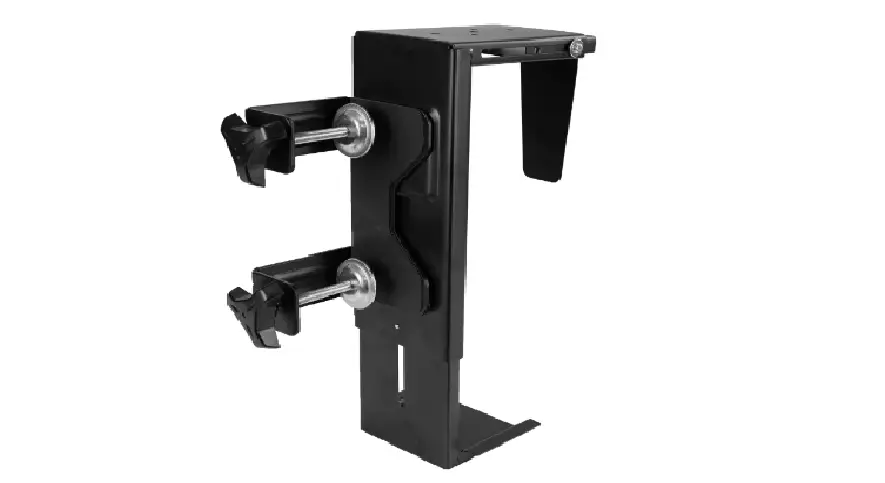
The Deskside and Wall Gaming PC Mount is a versatile product
that allows you to securely mount your gaming PC to your desk or
wall. The package includes an inner shelf, outer shelf, left and
right support brackets, clamps, locking bracket, wing nuts, screws,
and other necessary hardware to assemble the mount. The product has
a weight capacity of 66 lbs (30 kg) and can be used on
clamp/wood/concrete/brick surfaces up to 66 lbs and drywall up to
22 lbs (10 kg).
Product Usage Instructions:
- Remove adhesive backing from Thin Pads (G) and place them onto
Inner and Outer Shelves (A,B). - Attach Left and Right Support Brackets (C,D) to Inner Shelf (A)
using M4x6mm Screws (S-B) and a Phillips screwdriver. - Attach Outer Shelf (B) to Inner Shelf (A) using Wing Nuts
(S-A). - Remove adhesive backing from Thick Pads (H) and apply them to
Inner and Outer Shelves (A,B). - Option A: Clamp Installation – Attach Clamps
(E) to Left and Right Support Brackets (C,D) using M6x6mm Screws
(S-C) and 4mm Allen Wrench (T-A), so that the clamps are offset
towards the center of the mount. Attach the mount assembly to a
desktop and adjust the width using Wing Nuts (S-A) and place PC
into the mount. - Option B: Concrete Anchor Installation – Use
ST5.5x38mm Screws (W-A) and Concrete Anchors (W-B) to attach the
mount assembly to a concrete or brick surface. - Option C: Drywall Anchor Installation – Use
Self-Tapping Drywall Anchors (W-C) and ST4.2x35mm Screws (W-D) to
attach the mount assembly to a drywall surface. - Option D: Molly Bolt Installation – Use
M6x60mm Molly Bolts (W-E) to attach the mount assembly to a wood
surface.
Note: Some hardware included may not be used.
Tools needed for installation include a Phillips screwdriver, stud
finder, pencil, drill, and level. Adult supervision is required,
and the product is not suitable for children under 3 years old due
to small parts that can be a choking hazard.
If you need any assistance with installation or have received
damaged or defective parts, please contact our dedicated support
team at [email protected] or call 309-278-5303. Our support team is
available Monday – Friday from 7:00am-7:00pm CST and has an average
response time of 1 hour 8 minutes.
Deskside and Wall Gaming PC Mount
Instruction Manual
SKU: MOUNT-PC07G
Scan the QR code with your mobile device or follow the link for helpful videos and specifications related to this product. https://vivo-us.com/products/mount-pc07g
GET IN TOUCH | Monday-Friday from 7:00am-7:00pm CST
www.vivo-us.com Chat live with an agent!
309-278-5303
WARNING!
If you do not understand these directions, or if you have any doubts about the safety of the installation, please call a qualified technician. Check carefully to make sure there are no missing or defective parts. Improper installation may cause damage or serious injury. Do not use this product for any purpose that is not explicitly specified in this manual. Do not exceed weight capacity. We cannot be liable for damage or injury caused by improper mounting, incorrect assembly or inappropriate use.
WARNING: CHOKING HAZARD
SMALL PARTS – NOT FOR CHILDREN UNDER 3 YEARS. ADULT SUPERVISION IS REQUIRED.
PACKAGE CONTENTS
A (x1) Inner Shelf
G (x6) Thin Pad
B (x1) Outer Shelf
H (x6) Thick Pad
C (x1) Left Support
Bracket
D (x1) Right Support
Bracket
E (x2) Clamp
F (x1) Locking Bracket
S-A (x3) Wing Nut
S-B (x4) M4x6mm Screw
S-C (x4) M6x6mm Screw
W-A (x6) ST5.5x38mm
Screw
W-B (x6) Concrete Anchor
W-C (x2) Self-Tapping Drywall Anchor
W-D (x2) ST4.2x35mm
Screw
TOOLS NEEDED
W-E (x2) M6x60mm Molly Bolt
T-A (x1) 4mm Allen Wrench
NOTE: SOME HARDWARE INCLUDED MAY NOT BE USED
Phillips
Screwdriver
Stud Finder
Pencil
Drill
Level
DO NOT EXCEED WEIGHT CAPACITY. 66 lbs
Failure to do so may result in serious injury.
(30 kg)
Clamp/Wood/
Concrete/Brick
22 lbs (10 kg) Drywall
2
ASSEMBLY STEPS
STEP 1
Remove adhesive backing from Thin Pads (G) and place them onto Inner and Outer Shelves (A,B).
A
G
B
STEP 2
Attach Left and Right Support Brackets (C,D) to Inner Shelf (A) using M4x6mm Screws (S-B) and a Phillips screwdriver.
S-B
A
D C
3
STEP 3
Attach Outer Shelf (B) to Inner Shelf (A) using Wing Nuts (S-A).
B A
S-A
STEP 4
Remove adhesive backing from Thick Pads (H) and apply them to Inner and Outer Shelves (A,B).
H
A
B
STEP 5 (Option A)
Clamp Installation Attach Clamps (E) to Left and Right Support Brackets (C,D) using M6x6mm Screws (S-C) and 4mm Allen Wrench (T-A), so that the clamps are offset towards the center of the mount. Attach the mount assembly to a desktop and adjust the width using Wing Nuts (S-A) and place PC into the mount.
E
D
C
T-A
S-C
S-A 4
STEP 5 (Option B)
Concrete/Brick Wall Installation Hold the assembled mount to the wall and mark hole locations for drilling. Use of a level is highly recommended. Drill 1.8″ (45mm) deep pilot holes using a 5/16″ (8mm) drill bit. Press Concrete Anchors (W-B) into the wall and attach the mount using ST5.5x38mm Screws (W-A) and a Phillips screwdriver. Place PC in mount and hold Locking Bracket (F) to the wall directly above the PC. Mark hole locations and remove the PC from the mount. Drill 1.6″ (40mm) deep pilot holes using a 5/16″ (8mm) drill bit. Place the PC back into the mount and install Locking Bracket (F) using Concrete Anchors (W-B), ST5.5x38mm Screws (W-A), and a Phillips screwdriver.
W-B
W-A F
5
STEP 5 (Option C)
Wood Wall Installation Hold the assembled mount to the wall and mark hole locations for drilling. Use of a level is highly recommended. Drill 1.6″ (40mm) deep pilot holes using a 5/32″ (4mm) drill bit. Attach the mount using ST5.5x38mm Screws (W-A) and a Phillips screwdriver. Place PC in mount and hold Locking Bracket (F) to the wall directly above the PC. Mark hole locations and remove the PC from the mount. Drill 1.6″ (40mm) deep pilot holes using a 5/32″ (4mm) drill bit. Place the PC back into the mount and install Locking Bracket (F) using ST5.5x38mm Screws (W-A) and a Phillips screwdriver.
STEP 5 (Option D)
Drywall Installation WARNING: THIS INSTALLATION METHOD IS ONLY RATED FOR A 22LBS (10KG) MAX LOAD. Hold the assembled mount to the wall and mark hole locations for drilling. Only mark the top hole on each support bracket. Use of a level is highly recommended. Drill completely through the drywall using a 25/64″ (10mm) drill bit. Tap M6x60mm Molly Bolts (W-E) into the drilled holes until flush with the wall. Use a Phillips screwdriver to tighten the screw to expand the anchor in the wall. Tighten until the anchor feels snug and the bolt resists hand-tightening. Remove the bolt and washer from the installed anchor. Install the assembled mount to the anchors using the previously removed bolts and washers. Place PC in the mount and hold Locking Bracket (F) to the wall directly above the PC. Mark hole locations and remove the PC from the mount. Screw Self-Tapping Drywall Anchors (W-C) into the wall at marked locations using a Phillips Screwdriver until the head of the anchor is flush with the wall. Place the PC back into the mount and install Locking Bracket (F) using ST4.2x35mm Screws (W-D) and a Phillips screwdriver.
W-E
W-A
F F
W-C
W-D
6
7
Love your new VIVO setup and want to share? Tag us in your photo! @vivo_us
LAST UPDATED: 03/10/2023 REV1
Open Monday – Friday 7:00am – 7:00pm CST, our dedicated support team can offer immediate assistance with rapid response times. If any parts are received damaged or defective, please contact us. We are happy to replace parts to ensure you have a fully functioning product.
309-278-5303
AVG. RESOLUTION TIME (within office hrs): 5M 4S
www.vivo-us.com
Chat live with an agent!
AVG. RESOLUTION TIME (within office hrs): < 15 M
AVG. RESPONSE TIME (within office hrs): 1HR 8M – 23% within < 15m – 38% within < 30m – 61% within < 1hr – 83% within < 2hr – 92% within < 3hr
FOR MORE VIVO PRODUCTS, CHECK OUT OUR WEBSITE AT: www.vivo-us.com
 Register a .US.COM domain today!
 VIVO - Desks, Monitor Mounting, and More Home & Office Solutions – VIVO - desk solutions, screen mounting, and more
 Deskside and Wall Gaming PC Mount – VIVO - desk solutions, screen mounting, and more