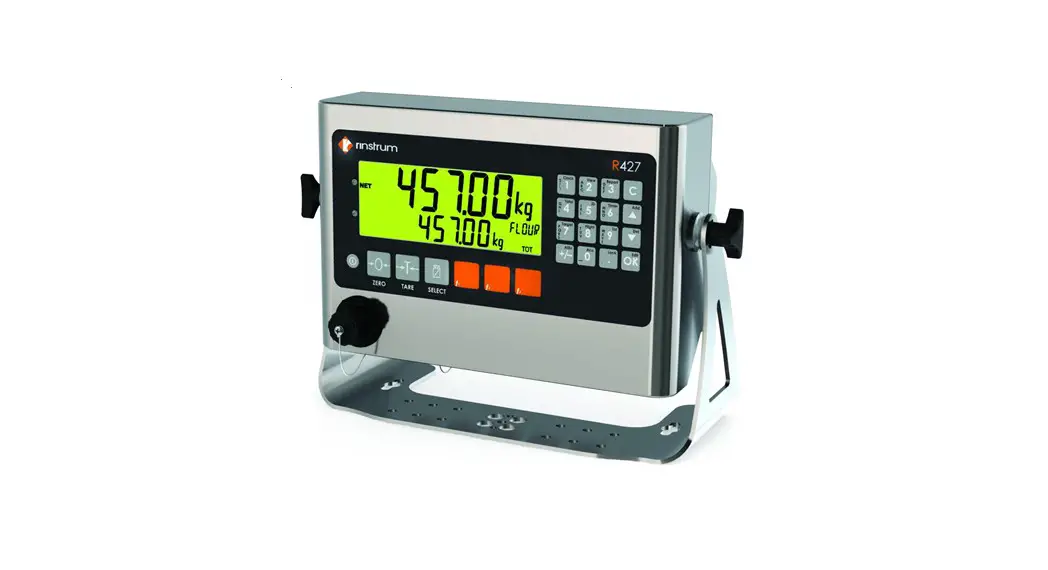
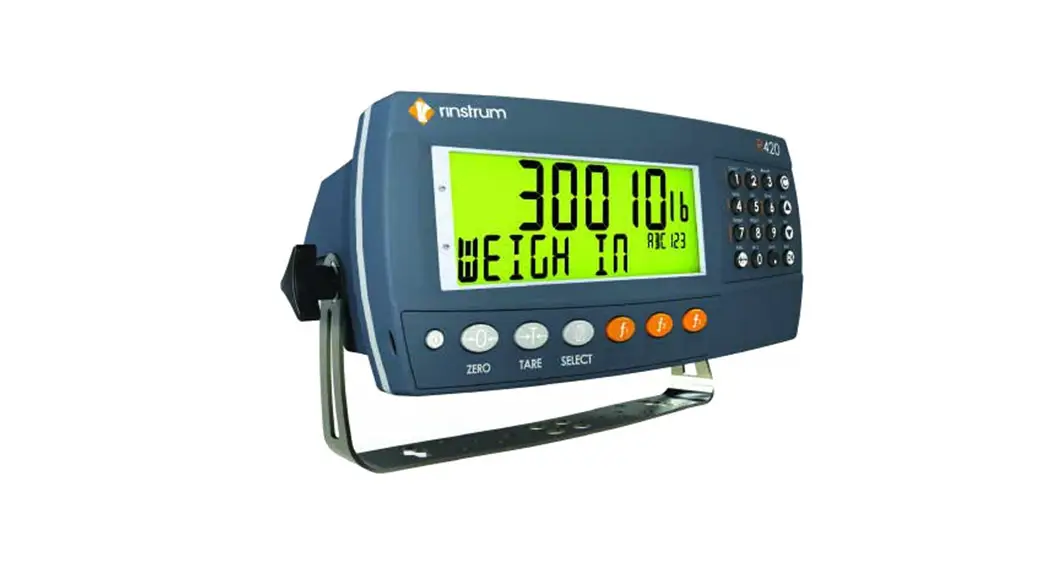
R423 Stainless Steel Weight Indicators
Product Information: Rinstrum R423/R427 Stainless Steel
Indicators
The Rinstrum R423/R427 Stainless Steel Indicators are part of
the R400 series, which is designed to cater to the needs of both
installers and operators across a wide range of applications. These
indicators are built with reliability in mind and are engineered to
last. The modular design allows for easy installation with only the
necessary components, saving time and money. The R423 is a Panel
Mount indicator, while the R427 is a Full Housing indicator.
Features:
- AC and DC options
- LCD with 4 alpha-numeric displays and LED backlighting
- OIML, NMI, and NTEP trade approved
- Built-in RS232/RS485
- IP66-rated Stainless Steel housing
- Ethernet support
- Robust precise analogue output module
- Versatile application software
- Magnetically coupled rinLINK for easy connection to a PC
- Superior diagnostics and support
- User-defined function keys
- Numeric keypad
Primary Display: R423
The R423 indicator offers superior diagnostics and support. It
provides a range of diagnostic tools and features, including a
hardware configuration report that summarizes the setup of the
indicator for maintenance purposes or fault finding. The indicator
also has Force Output and Test Input functions, which allow the
installer to specifically test I/O for site setup. Additionally,
the R423 allows for module swapping without recalibration of the
indicator.
View400: Fast Efficient Indicator Setup via a PC
View400 is a software tool that displays the complete menu
structure of the indicator on a PC. It offers convenient drop-down
menus for easy setting selection. With View400, users can enter
custom print strings, set up the indicator, save configurations and
calibrations for maintenance purposes, or load the RIS file onto
multiple indicators. The software also enables the creation of
real-time graphs from logs, which are ideal for diagnostics.
Save400: Reading and Writing Indicator Setup
Save400 is a software tool that allows for reading and writing
of R400 indicator setup and configuration. It enables exporting
setups for updates and reimporting them later.
Lua Programmability
The Rinstrum R423/R427 indicators support embedded Lua scripting
with an accessory module. This enhances functionality by allowing
the installation of a range of application packages. The indicators
also come with an open-source library and comprehensive API,
enabling users to write their own applications or engage Rinstrum
to write them through the Lua MAX program. Additionally, the
indicators feature an embedded web server for creating
browser-based user interfaces.
R427: Rugged Load Cell Input
The R427 indicator is designed to take 16×350 ohm load cells at
0.25uV/D. This provides flexibility and reduces the need for
summing hardware, simplifying installation and saving money. The
load cell input is protected with onboard transorbs to limit damage
from external voltage surges.
rinLINK: Temporary Connection to a PC
The rinLINK provides an isolated optical serial connection
directly on the front of the indicator. It is magnetically coupled,
allowing for easy access in situ for updates and setup of the
indicator. This feature saves time and effort for installers. The
rinLINK can be used to download new firmware or establish a
connection to a PC running Viewer for indicator configuration.
Accessory Modules:
- RS232/RS232 Module
- RS232/RS485 Module
- RS485/RS485 Module
- AC Module
- Lua Module
- I/O Module
- Button Module
- Analogue Output Module
Product Usage Instructions:
To use the Rinstrum R423/R427 Stainless Steel Indicators, follow
these steps:
- Identify the type of indicator you have – R423 (Panel Mount) or
R427 (Full Housing). - Ensure you have the necessary power supply module – AC power or
DC power, depending on your requirements. - If using load cells, connect them to the rugged load cell input
of the R427 indicator. This input is designed to take 16×350 ohm
load cells at 0.25uV/D. - If required, install any accessory modules, such as
RS232/RS232, RS232/RS485, RS485/RS485, AC, Lua, I/O, Button, or
Analogue Output modules. - If you need to establish a temporary connection to a PC, use
the rinLINK feature located on the front of the indicator. This
feature provides an isolated optical serial connection and can be
magnetically coupled for easy access. - If you prefer to set up the indicator via a PC, install the
View400 software. This software allows for fast and efficient
indicator setup by displaying the complete menu structure on your
PC. Use convenient drop-down menus for setting selection, enter
custom print strings, and save configurations and calibrations for
maintenance purposes. - If you need to read and write indicator setups, use the Save400
software. This tool enables reading and writing of R400 indicator
setup and configuration, allowing for easy export and import of
setups for updates. - If you want to enhance the functionality of the indicators
through scripting, install the Lua module. This module supports
embedded Lua scripting, open-source libraries, and a comprehensive
API for writing your own applications or engaging Rinstrum for
custom applications through the Lua MAX program. - For any additional assistance or support, refer to the user
manual or contact Rinstrum for superior diagnostics and
support.
R423 R427
Rinstrum R423/R427 Stainless Steel Indicators
The R400 series of indicators is designed with both the installer and operator in mind and covers a wide range of applications. The indicators are engineered and built to last with reliability being foremost. The modular design allows for the installation to be commissioned with only the components required, saving time and money. R423 is a Panel Mount indicator and R427 is a Full Housing indicator.
Features
AC and DC options LCD with 4 alpha-numeric displays and LED backlighting OIML, NMI and NTEP trade approved Built-in RS232/RS485 IP66-rated Stainless Steel housing Ethernet support Robust precise analogue output module Versatile application software
Magnetically coupled rinLINK
Primary display
R423
Superior diagnostics and support
Secondary display
Range of diagnostic tools and features Hardware configuration report: summarizes how the indicator hardware is set up, providing a record for maintenance purposes or fault finding Force Output and Test Input functions: allow the installer to specifically test I/O to assist in site setup Ability to swap modules in and out without recalibration of the indicator
User-defined function keys
Numeric keypad
View400 Fast Efficient Indicator setup via a PC
View400 displays the complete menu structure of the indicator on the PC with convenient drop-down menus for setting selection.
Enter custom print strings using the PC Set up the indicator and save the configuration and calibration for maintenance purposes or load the RIS file onto multiple indicators Create a real-time graph from the log that is ideal for diagnostics
Save400 – Reading and writing Indicator setup
Save400 is a software tool that reads and writes R400 indicator setup and configuration. It allows for a setup to be exported for update and then be reimported.
Lua Programmability
Embedded Lua scripting with accessory module Enhance functionality by installing a range of application packages Open-source library and comprehensive API enable you to write your own applications or engage Rinstrum to write them for you through our Lua MAX programme Use the embeded web server to create browser-based user interfaces
Load Cell
Comms
R 427
Power Supply Module
Accessory Module Slots
3 Pin Power Connector
AC power
DC power
R427 with desk stand
Rugged Load Cell Input
Designed to take 16×350 ohm load cells @0.25uV/D; providing flexibility and reducing the need for summing hardware, simplifying the installation and saving money. The load cell input is protected with onboard transorbs to limit damage from external voltage surges.
rinLINK for establishing a temporary connection to a PC
The rinLINK provides an isolated optical serial connection directly on the front of the indicator. It is magnetically coupled for easy access in situ for updates/setup of the indicator, saving the installer time and effort. The rinLINK can be used to download new firmware or to provide the connection to the PC running Viewer for indicator configuration.
RS232/ RS232 Module
RS232/RS485 Module
RS485/RS485 Module
AC Module
Lua Module
I/O Module
Button Module Analogue Output
Data Storage Device Module
Electrically isolated RS232 serial communication
Status LEDs
Electrically isolated serial communication
Status LEDs
Electrically isolated RS485 networking
Status LEDs
110-240 VAC in 12 VDC out
Lua programmability
Ethernet Port
USB Host Port Telnet/SSH remote access
8 I/O Configure as input or output
Electrically isolated
Status LEDs
Outputs high current DC
Active high I/O
4 voltage free inputs
4-20mA or 0-10V analogue output
Electrically isolated
Fast 400Hz update
2 digital I/O
Nonvolatile alibi memory storage (6M bytes)
Compatible with later versions of software
R400-765-112
…now that’s smart weighing.
AUSTRALIA
Rinstrum Pty Ltd Unit 4/31 Henry Street Loganholme QLD 4129 Australia
Ph: +61 7 3216 7166 Email: [email protected]
USA Rinstrum Inc 1349 Piedmont Drive Troy, Michigan 48083 United States
Toll Free 1 877 829 9152 Ph: +1 248 680 0320 Fax: +1 248 499 1331 Email: [email protected]
www.rinstrum.com
EUROPE Rinstrum Europe GmbH Hans-Böckler-Straße 42 D-40764 Langenfeld Germany
Ph: +49 (0)2173 16562-10 Fax: +49 (0)2173 16562-29 Email: [email protected]
R400-765-112
 Home - Rinstrum : Smart Weighing Solutions