HFW-BS-05 Wireless Sounder Base
Product Information: HFW-BS-05 Wireless Sounder Base
The HFW-BS-05 Wireless Sounder Base is a device that provides a
wireless sound alarm in case of an emergency. The device comes with
two battery lodgements, a primary one and a secondary one, which
are used to power the device. The device has a Link-program switch
that is used to initiate communication with the translator module
when it is searching for a new device for linking. The device also
has a visual LED indicator that provides visual indication for
functional conditions.
Technical Specifications
| Operating frequency range | Radiated power | Usable operating frequency channels | Radio signal’s modulation type | Communication range with wire to wireless device or wireless expander device | Main and secondary battery types | Approved battery voltage range | Estimated battery life | Alarm current | Operating temperature range | Maximum tolerated humidity – with no condensing | Maximum volume range @ 1m selectable | Device output tone’s frequency range | Ingress protection rating | Device’s dimensions | Device’s weight |
|---|---|---|---|---|---|---|---|---|---|---|---|---|---|---|---|
| 868 MHz | 5 dBm (3 mW) | 7 | FSK | 200 m in open space | CR123A (3 V & 1.2 Ah) | 2.75V – 3.20V | >3 years; remains operational for up to 60 days from first appearance of the low battery warning | 75 mA | -21°C to 95°C | 95 % RH | between 70 dBa and 95 dBa at max volume depending upon angle and tone selection (refer to volume plots under OUTPUT OPERATIONAL PERFORMANCE SPECIFICATIONS) | 440 Hz to 2900 Hz | Type A for indoor use only | 120 mm x 52 mm | 150 g |
Visual LED Indicator
The wireless sounder base is equipped with a bicolour red-green
LED that provides visual indication for functional conditions as
indicated in table 2.
Device’s Power Supply and Linking
The device comes with two battery lodgements, a primary one and
a secondary one. To use the device, insert the secondary battery
into its housing followed by the primary battery into its housing.
Ensure that both batteries’ polarity are correct. The visual LED
indicator switches on accordingly. The linking operation permits
the configuration of the wireless sounder base on the wireless
system. When the wire to wireless translator is searching for a new
device for linking, move the Link-program switch to position 1 in
order to initiate communication with the translator module. The
visual LED indicator switches on accordingly. The linking operation
described below does not change if made directly from the wire to
wireless translator module’s interface or from the Wirelex PC
configuration program.
HFW-BS-05
WIRELESS SOUNDER BASE
2) Insert the secondary battery into its housing (picture 5).
GENERAL DESCRIPTION
The wireless sounder base is a device that activates its output when ordered so by the control panel in the event of fire alarms. The activation command is sent from the control panel to the base sounder through the wire to wireless translator interface module and other possible wireless expander modules. Communication between the sounder base and the translator / expanders is obtained through the “Sagittarius” wireless, analogue-intelligent bidirectional protocol. Device’s radio communication meets European standard EN 54-25. Wireless sounder base is designed to act as a supporting mean for the installation of Sagittarius wireless detectors.
GENERAL OVERVIEW
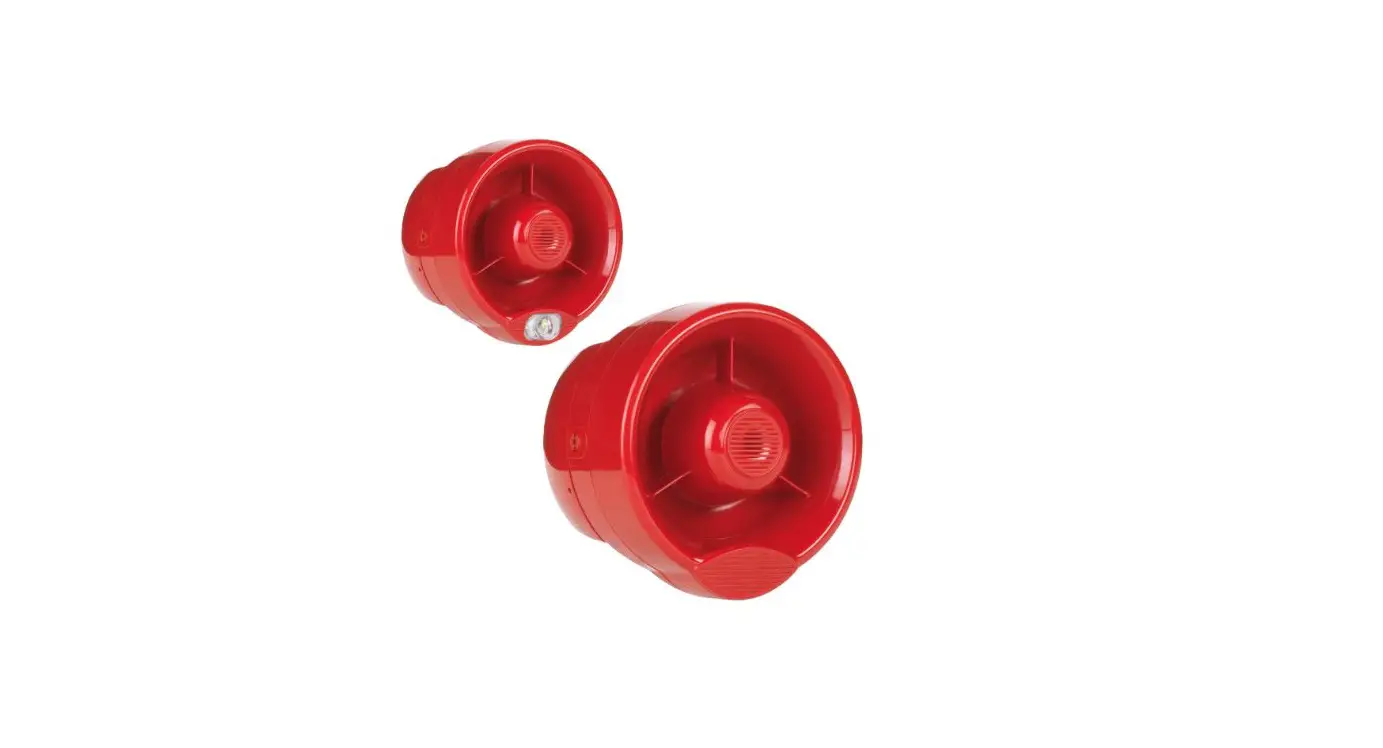
Picture 1 – wireless base sounder
Picture 5 – secondary battery inserted
3) Insert the primary battery into its housing; the visual LED indicator switches on accordingly (see “Power up” in table 2 and picture 6). Ensure that both battery’s polarity are correct!!!
Picture 2 – wireless base sounder top view
Picture 6 – primary and secondary batteries inserted
LINK-PROGRAM SWITCH
PRIMARY BATTERY LODGEMENT
LED INDICATOR SECONDARY BATTERY LODGEMENT
4) When the wire to wireless translator (by itself or piloted by the Wirelex) is searching for a new device for linking, move the “Link-program” switch to position 1 in order to initiate communication with the translator module (picture 7); the visual LED indicator switches on accordingly (see “Programming and linking to the system” in table 2).
Picture 7 – “Link-program” switch: 1 position
Picture 3 – wireless base sounder detailed view of the inner area
TECHNICAL SPECIFICATIONS *****
Operating frequency range
868 MHz
Radiated power
5 dBm (3 mW)
Usable operating frequency channels
7
Radio signal’s modulation type
Communication range with wire to wireless device or wireless expander device
Main and secondary battery types
FSK 200 m in open space * CR123A (3 V & 1.2 Ah)
Approved battery voltage range Estimated battery life **
2.75V – 3.20V >3 years; remains operational for up to 60 days from first appearance of the low battery warning ***
Alarm current
75 mA
Operating temperature range Maximum tolerated humidity – with no condensing
Maximum volume range @ 1m selectable
Device output tone’s frequency range Ingress protection rating Device’s dimensions Device’s weight
from 10 °C to +55 °C
95 % RH
between 70 dBa and 95 dBa at max volume depending upon angle and tone selection (refer to volume plots under OUTPUT OPERATIONAL PERFORMANCE SPECIFICATIONS) 440 Hz to 2900 Hz
21C ****
120 mm x 52 mm 150 g
Table 1
* Ideal operating range: may vary consistently according to environmental conditions. ** When a low battery condition is indicated, both, main and secondary, batteries must be changed altogether. *** This lifespan value refers to the device being set with a message transmission period of 12 seconds; tests are not considered in this estimation. **** Type A for indoor use only. ***** Check latest version of document TDS-SGRBX for further data, obtainable from your supplier.
VISUAL LED INDICATOR
The wireless sounder base is equipped with a bicolour red – green LED (picture 3) that provides visual indication for functional conditions as indicated in table 2.
Power up
Device status
Programming and linking to the system
Program – link failure
Normal condition
Lost link with the wire to wireless translator / wireless expander
Green LED
Red LED
1 second green, then 0.5 second red for 4 times
Blinking until linking and programming is completed
–
Continuously on
–
–
0.5 second on and 1 second off
Table 2
DEVICE’S POWER SUPPLY AND LINKING
The linking operation permits the configuration of the wireless sounder base on the wireless system. The linking operation described below does not change if made directly from the wire to wireless translator module’s interface or from the Wirelex PC configuration program.
1) Move the “Link-program” switch to position ON (picture 4).
Picture 4 – “Link-program” switch: ON position
IMPORTANT NOTE!
Programming is considered to be completed successfully only if there is an indication of programming success on the wire to wireless translator or on the window of the Wirelex program.
If the linking and programming operation fails, check if mistakes were made with the wire to wireless translator or the Wirelex, remove the batteries, change the switch over ON / 1 alternatively a few times in order to discharge the internal capacitor and then start again from point 1) re-performing the linking procedure.
COMMUNICATION QUALITY ASSESSMENT
It is possible to assess the wireless communication quality between the wireless sounder base and the wire to wireless translator / wireless expander by using a testing feature built in the device. After a successful linking operation, by changing over the “Link-programming” switch on the ON position, the device’s LED will start blinking according to table 3.
Always remember to reposition the switch to 1 after the assessment operation: device will NOT work operatively while the switch is changed over the ON position.
No connection
Communication quality
Link margin is less than 10 dB
Robust communication with link margin from 10 dB to 20 dB
Robust communication with link margin over 20 dB
Assessment Fail Poor Good Excellent
Device’s indication Two red blinks One red blink One green blink Two green blinks
Table 3
DEVICE’S PLACEMENT
For specific information regarding detector and device’s spacing, placement and special applications refer to your specific national standards. It is strongly advised to mount the wireless sounder base as far as possible from metal objects, metal doors, metal window openings, etc. as well as cable conductors, cables (especially from computers), otherwise the operating distance may greatly drop. The sounder base should not be installed near electronic devices and computer equipment that can interfere with the reception’s quality.
1) Select the position of the sounder base before installing and fixing it. Verify, from that position, that the communication between the device and the wire to wireless translator / wireless expander is correctly established and working (see the COMMUNICATION QUALITY ASSESSMENT paragraph).
2) Install and fix the sounder base in the selected position with the provided screws (picture 8).
3) Select the sounder’s base output’s tone and volume (see the OUTPUT SETTING paragraph)
4) Insert the wireless sensor onto the sounder base, then secure it by turning it clockwise.
Picture 8 – position of the holes for screw’s insertion
OUTPUT SETTINGS Output’s characteristics when the wireless base sounder is activated (tone and volume) can be selected through the DIP switch selectors located in the inner area of the sounder base (see picture 9). In order to change over the switches use the tip of a pen or a little screwdriver. For the selection of the output settings refer to picture 9, table 4 and table 5.
Picture 9 – tone and volume selection DIP switch selectors
WARNINGS AND LIMITATIONS
Our devices use high quality electronic components and plastic materials that are highly resistant to environmental deterioration. However, after 10 years of continuous operation, it is advisable to replace the devices in order to minimize the risk of reduced performance caused by external factors. Ensure that this device is only used with compatible control panels.
Detection systems must be checked, serviced and maintained on a regular basis to confirm correct operation.
Smoke sensors may respond differently to various kinds of smoke particles, thus application advice should be sought for special risks. Sensors cannot respond correctly if barriers exist between them and the fire location and may be affected by special environmental conditions.
Refer to and follow national codes of practice and other internationally recognized fire engineering standards. Appropriate risk assessment should be carried out initially to determine correct design criteria and updated periodically.
WARRANTY
All devices are supplied with the benefit of a limited 5 years warranty relating to faulty materials or manufacturing defects, effective from the production date indicated on each product.
This warranty is invalidated by mechanical or electrical damage caused in the field by incorrect handling or usage. Product must be returned via your authorized supplier for repair or replacement together with full information on any problem identified.
Full details on our warranty and product’s returns policy can be obtained upon request.
0051 19 HF-20-001CPR
8504 22
HF-20-001UK
Hyfire Wireless Fire Solutions Limited – Unit B12a, Holly Farm Business Park, Honiley, Warwickshire, CV8 1NP – United Kingdom
EN 54-25:2008
EN 54-3: 2001 + A1:2002; + A2:2006 HFW-BS-05
For use in compatible fire detection and alarm system
Type A for indoor use only
Table 4
Volume LOW HIGH
Volume DIP switch setting A + B A + D
BATTERY FAULTS
If a battery fault condition is detected on the wireless base sounder, a fault message is sent to the control panel via the wire to wireless translator / wireless expander.
TESTING
In order to test the functionality of the installed wireless sounder base, the following test must be performed: activate an alarm condition on the control panel (by a call-point or sensor in the installed system): the control panel will transmit an activation message to the device via wire to wireless translator / wireless expander and activate the sounder base. After each test the device must be reset by the specific command on the control panel or on the wire to wireless translator (see the RESET paragraph). If the test fails check whether the batteries are charged, if mistakes were done previously or even if the system is activated. If the wireless sounder base functionality is hopeless, send back the device to your distributor for repair or substitution. All devices must be tested after installation and, successively, on a periodic basis.
Hyfire Wireless Fire Solutions Limited – Unit B12a, Holly Farm Business Park, Honiley, Warwickshire, CV8 1NP – United Kingdom
www.hyfirewireless.com
L20-SGRBSL-1400 (vA.3)
RESET To reset the wireless sounder base from an activated or a fault condition, it is necessary to: 1) solve the cause of the abnormal condition 2) send the reset command from the control panel or from the wire to wireless translator. Performing sequentially those two operations, the device’s output and/or fault condition will deactivate / resolve. INSTALLING A WIRELESS SENSOR ON THE SOUNDER BASE To install a wireless detector on the wireless sounder base apply the following procedure:
1) Insert the detector onto the base. 2) Fix the detector to the base by turning it clockwise until a secure and safe stop is reached.
LOCKING THE WIRELESS SENSOR ONTO THE BASE SOUNDER In order to avoid tampering, the wireless sensor can be locked onto the base sounder; use the supplied locking Allen screw inserted in its side hole, after having installed the sensor and secure it through a suitable Allen key (picture 10).
Picture 10 – locking of the sensor on the base sounder MAINTENANCE 1) Before starting any maintenance work, isolate and disable the system, in order to avoid accidental and unwanted fault detecti on conditions. 2) Remove the wireless sensor from the wireless sounder base. 4) Perform the planned necessary maintenance operations on the wireless sounder base (e.g. batteries substitution). 5) After the base has been serviced, reinstall the wireless sensor correctly onto it, re-apply power to the system and check correct operation as described under the TESTING paragraph. OUTPUT OPERATIONAL PERFORMANCE SPECIFICATIONS Picture 11 – Continuous tone dB(A) output
Picture 12 – Warble tone dB(A) output
Picture 13 – DIN tone dB(A) output
Picture 14 – Slow Whoop (Dutch) dB(A) output
No. Tone
1
Warble Tone *
2
Continuous tone *
3
Slow Whoop (Dutch) *
4
German DIN tone *
5
Alternate HF slow sweep
6
Alternative warble
7
Alternative warble
8
Analogue sweep tone
9
Australian Alert (Intermittent tone)
10 Australian Evac (slow whoop)
11 FP1063.1-Telecom
12 French tone AFNOR
13 HF Back up Interrupted tone
14 HF Back up Interrupted tone fast
15 HF Continuous
16 Interrupted tone
17 Interrupted tone medium
18 ISO 8201 LF BS5839 Pt 1 1988
19 ISO8201 HF
20 LF Back up Alarm
21 LF Buzz
22 LF Continuous tone BS5839
23 LF Sweep
24 Siren 2 way ramp (long)
25 Siren 2 way ramp (short)
26 Swedish all clear signal
27 Swedish Fire signal
28 Sweep tone (1 Hz)
29 Sweep tone (3 Hz)
30 Sweep tone (9 Hz)
31 US Temporal Pattern HF
32 US Temporal Pattern LF
* Tones in bold are LPCB certified
Description 800Hz for 500ms, then 1000Hz for 500ms 970Hz continuous 500Hz-1200Hz swept for 3500ms, then off for 500ms 1200Hz-500Hz swept every 1000ms (1Hz) 2350Hz-2900Hz swept every 333ms (3Hz) 800Hz for 250ms, then 960Hz for 250ms 500Hz for 250ms, then 600Hz for 250ms 500Hz-600Hz swept every 500ms (2Hz) 970Hz for 625ms, then off for 625ms 500Hz-1200Hz for 3750ms, then off for 250ms 800Hz for 250ms, then 970Hz for 250ms 554Hz for 100ms, then 440Hz for 400ms 2800Hz for 1000ms, then off for 1000ms 2800Hz for 150ms, then off for 150ms 2800Hz continuous 800Hz for 500ms, then off for 500ms 1000Hz for 250ms, then off for 250ms 970Hz for 500ms, then off for 500ms 2850Hz for 500ms, then off for 500ms 800Hz for 150ms, then off for 150ms 800Hz-950Hz swept every 9ms (110Hz) 800Hz continuous 800Hz-1000Hz swept every 500ms (2Hz) 500Hz-1200Hz rising for 3000ms, 1200Hz-500Hz falling for 3000ms 500Hz-1200Hz rising for 250ms, 1200Hz-500Hz falling for 250ms 660Hz continuous 660Hz for 150ms, then off for 150ms 800Hz-900Hz swept every 1000ms (1Hz) 800Hz-970Hz swept every 333ms (3Hz) 800Hz-970Hz swept every 111ms (9Hz) 2900Hz for 500ms on, 500ms off (x3), then 1500ms off 950Hz for 500ms on, 500ms off (x3), then 1500ms off
Switch 23456 11101 01011 10101 00111 10010 11110 11100 10100 10001 10110 00001 00101 11011 11001 01001 01111 01101 01110 01100 11010 01010 11000 11111 00000 00010 00100 00110 10111 10011 01000 00011 10000
Table 5
Hyfire Wireless Fire Solutions Limited – Unit B12a, Holly Farm Business Park, Honiley, Warwickshire, CV8 1NP – United Kingdom
www.hyfirewireless.com
L20-SGRBSL-1400 (vA.3)
 Hyfire Wireless Fire Solutions