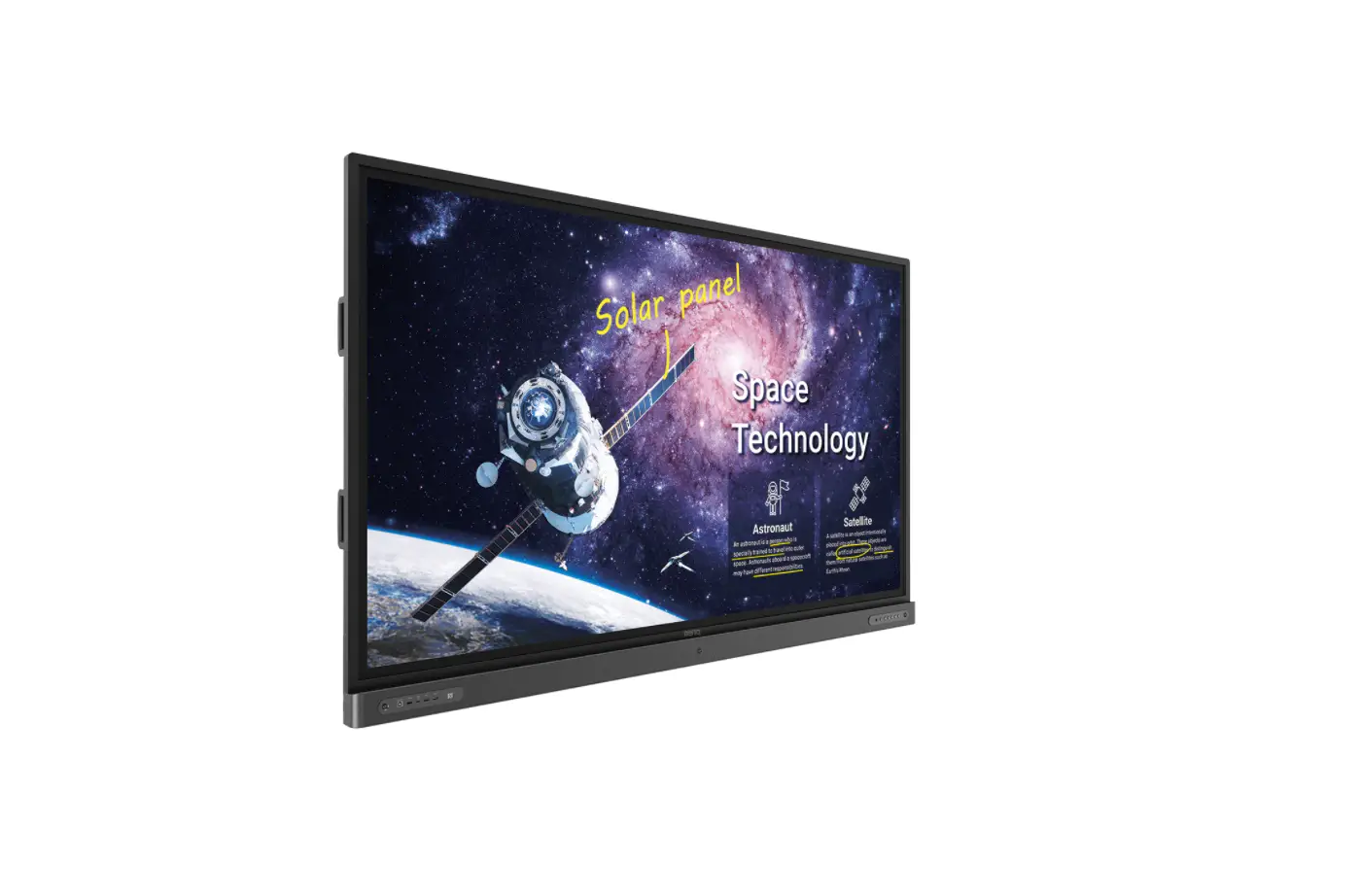

BenQ 55″ Education Interactive Flat Panel Display
Introduction
This document describes the hardware interface spec and software protocols of RS232 interface communication between Commercial Display and PC or another control unit with RS232 protocol. This set protocol allows users to assign the ID in the command to control the specified ID monitor. The set protocol contains two sections command: Set-Function and Get-Function
In this document, “PC” represents all the control units that can send or receive the RS232 protocol command.
Wire arrangement
| Wire Arrangement | ||
| P1 | Color | P2 |
| 1 | Black | 1 |
| 2 | Brown | 3 |
| 3 | Red | 2 |
| 4 | Orange | 4 |
| 5 | Yellow | 5 |
| 6 | Green | 6 |
| 7 | Blue | 7 |
| 8 | Purple | 8 |
| 9 | Gray | 9 |
| Case | Drain wire | Case |
RS232 pin assignment
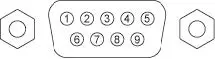
| Pin | Description | Pin | Description |
| 1 | NC | 2 | RXD |
| 3 | TXD | 4 | NC |
| 5 | GND | 6 | NC |
| 7 | RTS | 8 | CTS |
| 9 | NC |
Communication setting
Baud rate select: 38400bps (fixed)/ Data bits: 8 bits (fixed)
Parity: None (fixed)
Stop Bits: 1(fixed)
Command message reference
PC sends to Monitor command packet followed by “CR”. Every time PC sends a control command to the Monitor, the Monitor shall response as follows:
- If the message is received correctly, it will send “+” (02Bh) followed by “CR” (00Dh).
- If the message is received incorrectly, it will send “-” (02Dh) followed by “CR” (00Dh).
Connections and communication settings
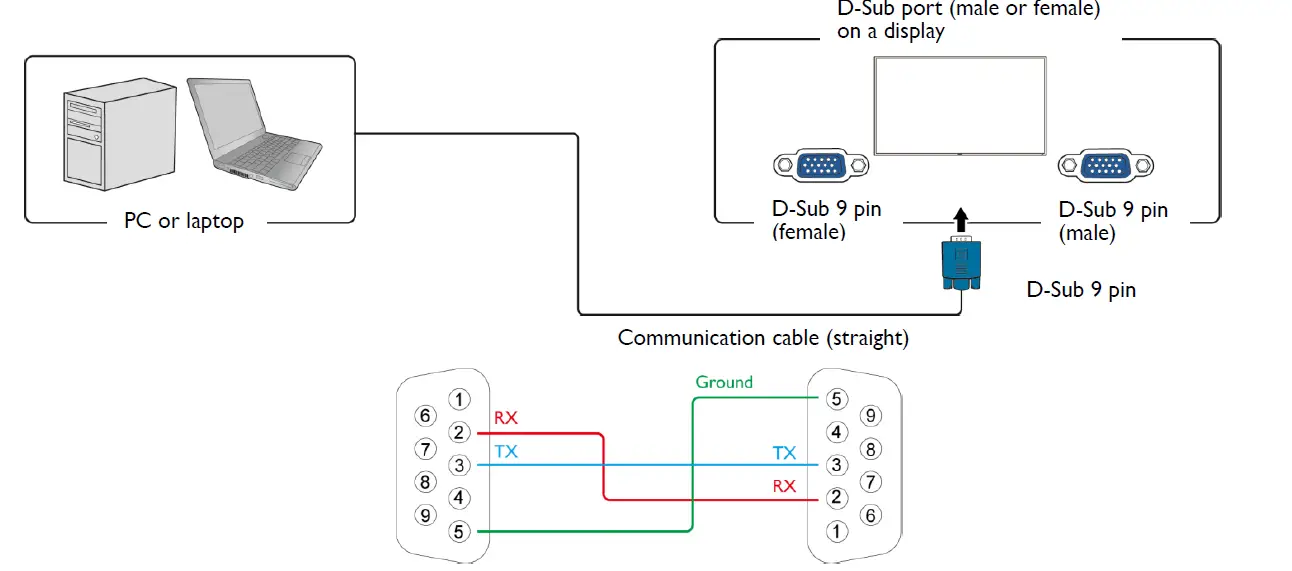
Choose one of the connections and set up properly before RS232 control.
RS232 serial port with a straight cable
RS232 via LAN
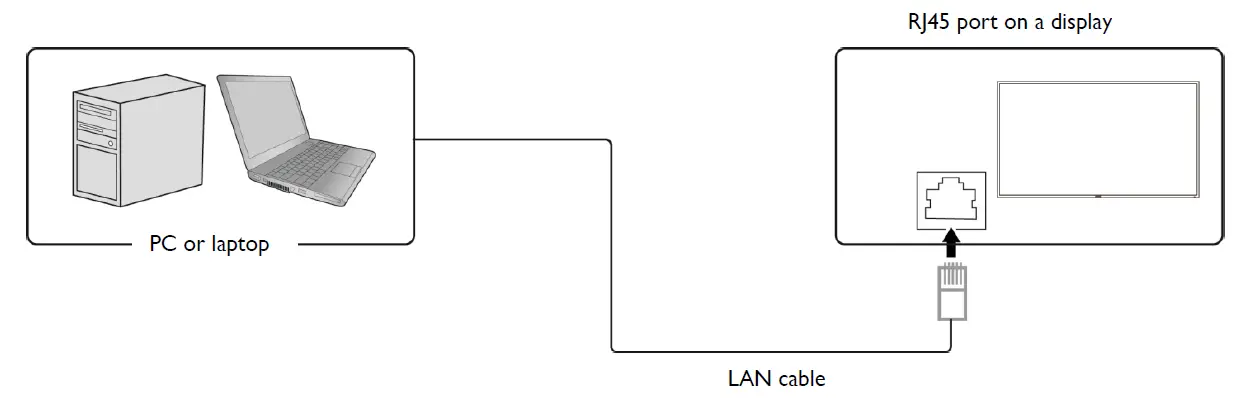
Find the Wired LAN IP address of the connected display from the OSD menu and make sure the display and the computer are within the same network.
RS232 via HDBaseT
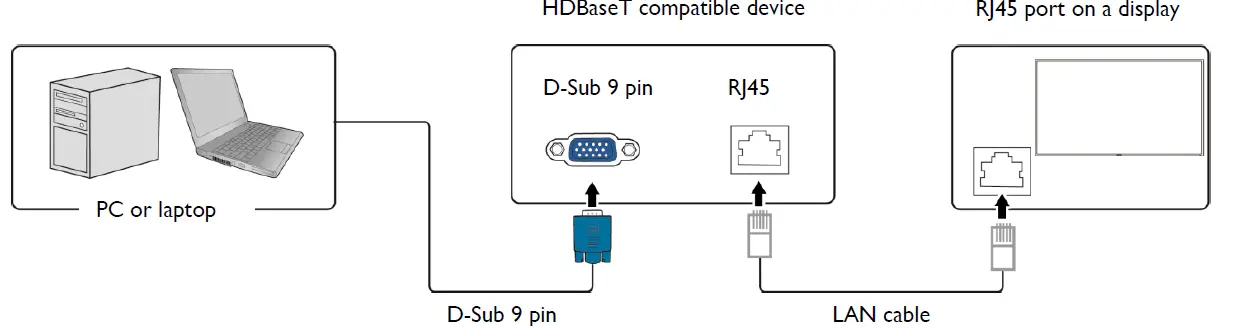
Protocol Command Description
| Item | Description |
| Length | Total Bytes of Message excluding “CR” |
| TV ID | Identification for each of TV |
| Command Type | Identify command type, “s” (0x73h): Set Command “g” (0x67h): Get Command “r” (0x72h): Reply Command “+” (0x2Bh): Valid command Reply “-” (0x2Dh): Invalid command Reply |
| Command | Function command code: One byte ASCII code |
| Value [1~3] | Three bytes ASCII that defines the value |
| CR | 0x0D |
Set-function listing
The PC can control the LCD Monitor for specific actions. The Set-Function command allows you to control the LCD monitor behavior in a remote sit through the RS232 port. The Set-Function packet format consists of 11 bytes.
Set-function description
| Item | Description |
| Length | Total Bytes of Message excluding “CR” |
| TV ID | Identification for each of TV TV ID is “01” for LAN control |
| Command Type | Identify command type, “s” (0x73h): Set Command |
| Command | Function command code: One byte ASCII code |
| Value [1~3] | Three bytes ASCII that defines the value |
| CR | 0x0D |
Set-function format
Send: (Command Type=”s”)
| Name | Length | ID | Command type | Command | Value1 | Value2 | Value3 | CR |
| Byte count | 1 Byte | 2 Byte | 1 Byte | 1 Byte | 1 Byte | 1 Byte | 1 Byte | 1 Byte |
| Bytes order | 1 | 2~3 | 4 | 5 | 6 | 7 | 8 | 9 |
Reply: (Command Type=”+” or “-“)
| Name | Length | ID | Command type | CR |
| Byte count | 1 Byte | 2 Byte | 1 Byte | 1 Byte |
| Bytes order | 1 | 2~3 | 4 | 5 |
Example 1: Set Brightness as 76 for TV-02 and this command is valid. Send (Hex Format)
Reply (Hex Format)
|
Name |
Length |
ID | Command type |
CR |
| Hex | 0x34 | 0x30 0x31 | 0x2B | 0x0D |
Example 2: Set Brightness as 176 for TV-02 and this command is NOT valid. Send (Hex Format)
|
Name |
Length |
ID | Command type |
Command |
Value1 |
Value2 |
Value3 |
CR |
| Hex | 0x38 | 0x30 0x32 | 0x73 | 0x24 | 0x31 | 0x37 | 0x36 | 0x0D |
Reply (Hex Format)
|
Name |
Length |
ID | Command type |
CR |
| Hex | 0x34 | 0x30 0x31 | 0x2D | 0x0D |
Example 3: Set Tint as 32 for TV-03 and this command is valid. Send (Hex Format)
|
Name |
Length |
ID | Command type |
Command |
Value1 |
Value2 |
Value3 |
CR |
| Hex | 0x38 | 0x30 0x33 | 0x73 | 0x27 | 0x30 | 0x33 | 0x32 | 0x0D |
Example 4: Set Tint as 75 for TV-03 and this command is NOT valid. Send (Hex Format)
|
Name |
Length |
ID | Command type |
Command |
Value1 |
Value2 |
Value3 |
CR |
| Hex | 0x38 | 0x30 0x33 | 0x73 | 0x27 | 0x30 | 0x37 | 0x35 | 0x0D |
Reply (Hex Format)
|
Name |
Length |
ID | Command type |
CR |
| Hex | 0x34 | 0x30 0x31 | 0x2D | 0x0D |
Example 5: Set Brightness as 76 for all TV and this command is valid. Send (Hex Format)
|
Name |
Length |
ID | Command type |
Command |
Value1 |
Value2 |
Value3 |
CR |
| Hex | 0x38 | 0x39 0x39 | 0x73 | 0x24 | 0x30 | 0x37 | 0x36 | 0x0D |
Set-function table
| Value Range (ASCII Bytes) | ||||||
| Set Function | Len | ID | Cmd Type | Cmd Code
(Hex) | RS232 Control | LAN Control |
| Power | 8 | s | 21 | 000 : ——- / Monitor
Off | 000 : Monitor Off | |
| 001 : Android On / Monitor On | 001 : Monitor On | |||||
| 002 : Android Off / ——- | ||||||
| Video Source | 8 | s | 22 | 000 : VGA | 000 : VGA | |
| 001 : HDMI1 | 001 : HDMI1 | |||||
| 002: HDMI2 | 002: HDMI2 | |||||
| 021 : HDMI3 | 021 : HDMI3 | |||||
| 022 : HDMI4 | 022 : HDMI4 | |||||
| 101 : android | 101 : android | |||||
| 102 : OPS | 102 : OPS | |||||
| Aspect Ratio | 8 | s | 31 | 000: Default | ||
| 001: 16:9 | ||||||
| 002: 4:3 | ||||||
| 003: Auto | ||||||
| 004 : Panorama Mode | ||||||
| 005 : Just Scan | ||||||
| 006 : 14:9 | ||||||
| 007 : PC Mode | ||||||
| Language | 8 | s | 32 | 000: English | ||
| 001: Français | ||||||
| 002: Español | ||||||
| 003: 繁中 | ||||||
| 004: 简中 | ||||||
| 005: Português | ||||||
| 006: German | ||||||
| 007: Dutch | ||||||
| 008: Polish | ||||||
| 009: Russia | ||||||
| 010:Czech | ||||||
| 011:Danish | ||||||
| 012:Swedish | ||||||
| 013:Italian | ||||||
| 014:Romanian | ||||||
| 015:Norwegian | ||||||
| 016:Finnish | ||||||
| 017:Greek | ||||||
| 019:Arabic | ||||||
| 020: Japanse | ||||||
| 021: Thailand | ||||||
| 023 : Hungarian | ||||||
| 024 : Persian | ||||||
| 025 : Vietnamese | ||||||
| Volume | 8 | s | 35 | 200 Volume – | 200 Volume – | |
| 300 Volume + | 300 Volume + |
| Mute | 8 | s | 36 | 002: turn (State change) | 002: turn (State change) | ||
| Remote control | 8 | s | 40 | 010 : Remote Up | |||
| 011 : Remote Down | |||||||
| 012 : Remote Left | |||||||
| 013 : Remote Right | |||||||
| 014 : Remote OK | |||||||
| 020 : Remote OSD Menu | |||||||
| 021 : Remote Source | |||||||
| 023 : Remote Back (Android Back
key) | |||||||
| 031 : Blank | |||||||
| 032 : Freeze | |||||||
| Button&IR Control | 8 | s | 43 | 000: Disable | |||
| 001: Enable | |||||||
| All Reset | 8 | s | 7E | 000 | |||
Get-function listing
The PC can interrogate the LCD Monitor for specific information. The Get-Function packet format consists of 5 bytes which are similar to the Set-Function packet structure. Note that the “Value” byte is always = 00.
Get-function description
| Item | Description |
| Length | Total Bytes of messages excluding “CR” |
| TV ID | Identification for each of TV |
| Command Type | Identify command type, “g” (0x67h): Get Command |
| Command | Function command code: One byte ASCII code |
| Value [1~3] | Three bytes ASCII that defines the value NOTE: To get backlight senor, thermal sensor, and ambient sensor, you need four bytes ASCII that defines the value and the length is 9. |
| CR | 0x0D |
Get-function format
Send: (Command Type=”g”)
|
Name |
Length |
ID | Command type |
Command |
Value1 |
Value2 |
Value3 |
CR |
| Byte count | 1 Byte | 2 Byte | 1 Byte | 1 Byte | 1 Byte | 1 Byte | 1 Byte | 1 Byte |
| Bytes order | 1 | 2~3 | 4 | 5 | 6 | 7 | 8 | 9 |
Reply: (Command Type=”r” or “-“)
If the Command is valid, Command Type =”r”
|
Name |
Length |
ID | Command type |
Command |
Value1 |
Value2 |
Value3 |
CR |
| Byte count | 1 Byte | 2 Byte | 1 Byte | 1 Byte | 1 Byte | 1 Byte | 1 Byte | 1 Byte |
| Bytes order | 1 | 2~3 | 4 | 5 | 6 | 7 | 8 | 9 |
If the Command is Not valid, Command Type=”-”
|
Name |
Length |
ID | Command type |
CR |
| Byte count | 1 Byte | 2 Byte | 1 Byte | 1 Byte |
| Bytes order | 1 | 2~3 | 4 | 5 |
Example 1: Get Brightness from TV-05 and this command is valid. The Brightness value is 67.
Send (Hex Format)
|
Name |
Length |
ID | Command type |
Command |
Value1 |
Value2 |
Value3 |
CR |
| Hex | 0x38 | 0x30 0x35 | 0x67 | 0x62 | 0x30 | 0x30 | 0x30 | 0x0D |
Example 3: Get Tint from TV-0007 and this command is valid. The Tint value is 32.
Send (Hex Format)
|
Name |
Length |
ID | Command type |
Command |
Value1 |
Value2 |
Value3 |
CR |
| Hex | 0x38 | 0x30 0x37 | 0x67 | 0X65 | 0x30 | 0x30 | 0x30 | 0x0D |
Reply (Hex Format)
|
Name |
Length |
ID | Command type |
Command |
Value1 |
Value2 |
Value3 |
CR |
| Hex | 0x38 | 0x30 0x37 | 0x72 | 0x65 | 0x30 | 0x33 | 0x32 | 0x0D |
Example 4: Get Tint from TV-07, but the Brightness command ID is error and it is NOT in the command table.
Send (Hex Format)
|
Name |
Length |
ID | Command type |
Command |
Value1 |
Value2 |
Value3 |
CR |
| Hex | 0x38 | 0x30 0x37 | 0x67 | 0XD7 | 0x30 | 0x30 | 0x30 | 0x0D |
Example 5: Get backlight sensor from TV-0007 and this command is valid. The lux value is 1786 (ASCII code).
Send (Hex Format)
|
Name |
Length |
ID | Command type |
Command |
Value1 |
Value2 |
Value3 |
Value4 |
CR |
| Hex | 0x39 | 0x30 0x37 | 0x67 | 0X6F | 0x30 | 0x30 | 0x30 | 0x30 | 0x0D |
Reply (Hex Format)
|
Name |
Length |
ID | Command type |
Command |
Value1 |
Value2 |
Value3 |
Value4 |
CR |
| Hex | 0x39 | 0x30 0x37 | 0x72 | 0X6F | 0x31 | 0x37 | 0x38 | 0x36 | 0x0D |
Example 6: Get ambient sensor from TV-0007 and this command is valid. The lux value is 1568 (ASCII code).
Send (Hex Format)
|
Name |
Length |
ID | Command type |
Command |
Value1 |
Value2 |
Value3 |
Value4 |
CR |
| Hex | 0x39 | 0x30 0x37 | 0x67 | 0X70 | 0x30 | 0x30 | 0x30 | 0x30 | 0x0D |
Reply (Hex Format)
|
Name |
Length |
ID | Command type |
Command |
Value1 |
Value2 |
Value3 |
Value4 |
CR |
| Hex | 0x39 | 0x30 0x37 | 0x72 | 0X70 | 0x31 | 0x35 | 0x36 | 0x38 | 0x0D |
PC Get-function command to LCD Monitor
| Value Range (ASCII Bytes) | ||||||
| Get Function | Len | ID | Cmd
Type | Cmd Code
(Hex) | RS232 | LAN |
| Model Info | 20 | g | 20 | (1) Input value: Byte1 – Byte2 – Byte3…Byte15 Byte2~Byte11=0x00 Byte1=0x01: Get Customer Name Byte1=0x02: Get Customer Model Name Byte1=0x04: Get Scaler Firmware Version Byte1=0x06: Get Serial Number
(2) Return value: Byte1 – Byte2 – Byte3…Byte15
The Byte1 value at the return value should be the same as the value of Byte1 at input value. Byte2~Byte15 should be ASCII format.
Ex: If Customer=Generic, Byte1=0x01, Byte2=’G’, Byte3=’e’,…Byte8=’c’, Byte9~Byte11=0x00. Ex: If the Scaler Firmware Version=1.02, Byte1=0x03, Byte2=’1′,
Byte3=’.’, Byte4=’0′, Byte5=’2′, Byte6~Byte11=0x00. | ||
| Signal Status | 8 | g | 22 | 000: Signal unstable | ||
| 001: Signal stable (Active Sync exists) | ||||||
| Volume | 8 | g | 66 | 000 ~ 100 | 000 ~ 100 | |
| Mute | 8 | g | 67 | 000: Off | 000: Off | |
| 001: On | 001: On | |||||
| Button&IR Control | 8 | g | 69 | 000: Disable | ||
| 001: Enable | ||||||
| Video Source | 8 | g | 6A | 000 : VGA | ||
| 001 : HDMI1 | ||||||
| 002: HDMI2 | ||||||
| 021 : HDMI3 | ||||||
| 022 : HDMI4 | ||||||
| 101 : android | ||||||
| 102 : OPS | ||||||
| Power | 8 | g | 6C | 000 : Monitor Off | ||
| 001 :
Android On | 001 : Monitor On | |||||
| 002 : | ||||||
| Android Off | ||||||
| Aspect Ratio | 8 | g | 77 | 000: Default | ||
| 001: 16:9 | ||||||
| 002: 4:3 | ||||||
| 003: Auto | ||||||
| 004 : Panorama Mode | ||||||
| 005 : Just Scan | ||||||
| 006 : 14:9 | ||||||
| 007 : PC Mode | ||||||
| Language | 8 | g | 78 | 000: English | ||
|
Network Setting |
14 |
g |
E1 | 001: Français | ||
| 002: Español | ||||||
| 003: 繁中 | ||||||
| 004: 简中 | ||||||
| 005: Português | ||||||
| 006: German | ||||||
| 007: Dutch | ||||||
| 008: Polish | ||||||
| 009: Russia | ||||||
| 010:Czech | ||||||
| 011:Danish | ||||||
| 012:Swedish | ||||||
| 013:Italian | ||||||
| 014:Romanian | ||||||
| 015:Norwegian | ||||||
| 016:Finnish | ||||||
| 017:Greek | ||||||
| 019:Arabic | ||||||
| 020:Japanse | ||||||
| 021: Thailand | ||||||
| 023 : Hungarian | ||||||
| 024 : Persian | ||||||
| 025 : Vietnamese | ||||||
| Input Value: Byte1 – Byte2 – Byte3…Byte9
(1) Byte1=0x00: IP Setup Mode Byte1=0x01: IP Address Byte1=0x02: Get Subnet Mask Byte1=0x03: Default Gateway Byte1=0x04: Primary DNS |
Monitor ID default : 01 (30 31)
Note: When the monitor is in standby or Android off mode, the only workable RS232 command is “Android On”. LAN commands work only when the monitor is powered on (Android on).