
RP6503/RP7503/RP8603
RS232 & LAN Protocol Installation Guide
Introduction
This document describes the hardware interface spec and software protocols of RS232 interface communication between Commercial Display and PC or other control unit with RS232 protocol. This set protocol allow users to assign the ID in the command to control the specify ID monitor. The set protocol contains two sections command: Set-Function and Get-Function In this document, “PC” represents all the control units that can send or receive the RS232 protocol command.
Wire arrangement
Wire Arrangement | ||
| P1 | Color | P2 |
| 1 | Black | 1 |
| 2 | Brown | 3 |
| 3 | Red | 2 |
| 4 | Orange | 4 |
| 5 | Yellow | 5 |
| 6 | Green | 6 |
| 7 | Blue | 7 |
| 8 | Purple | 8 |
| 9 | Gray | 9 |
| Case | Drain wire | Case |
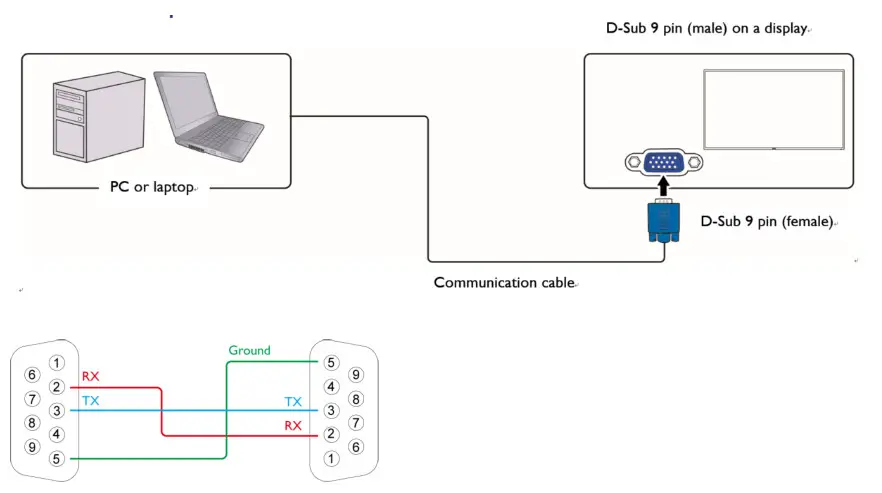
RS232 pin assignment
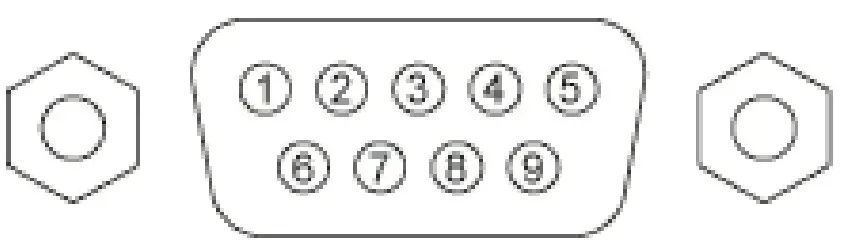
| Pin | Description | Pin | Description |
| 1 | NC | 2 | RXD |
| 3 | TXD | 4 | NC |
| 5 | GND | 6 | NC |
| 7 | RTS | 8 | CTS |
| 9 | NC |
Communication setting
Baud rate select: 9600bps (fixed)/ Data bits: 8 bits (fixed)
Parity: None (fixed)/ Stop Bits: 1(fixed)
Command message reference
PC sends to Monitor command packet followed by “CR”. Every time PC sends control command to the Monitor, the Monitor shall response as follows:
- If the message is received correctly, it will send “+” (02Bh) followed by “CR” (00Dh).
- If the message is received incorrectly, it will send “-” (02Dh) followed by “CR” (00Dh).
Connections and communication settings
Choose one of the connections and set up properly before RS232 control.
RS232 serial port connection
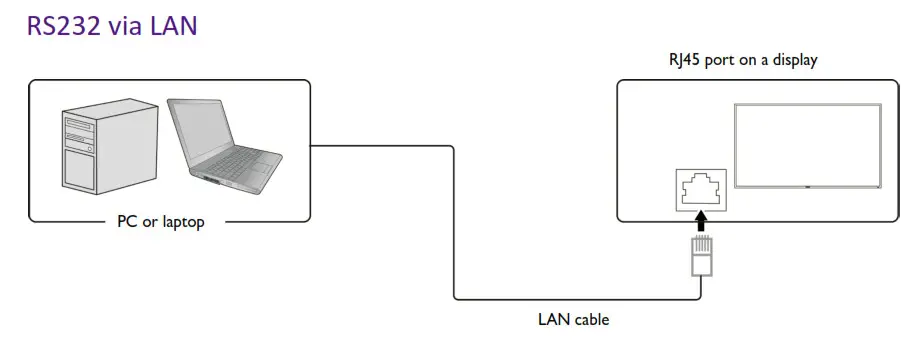 Find the Wired LAN IP address of the connected display from the OSD menu and make sure the display and the computer are within the same network.
IP Protocol Port: 4660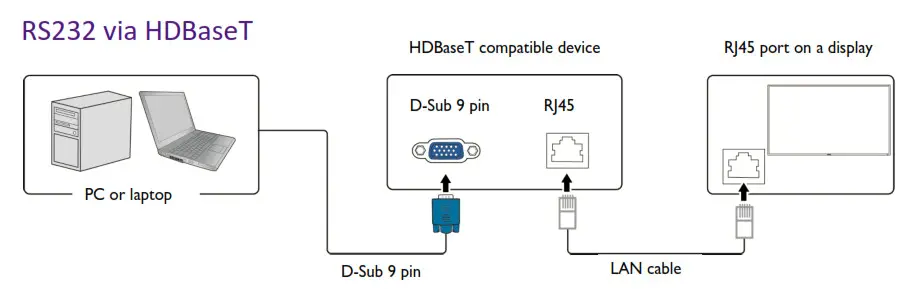
Protocol Command Description
| Item | Description |
| Length | Total Bytes of Message excluding “CR” |
| TV ID | Identification for each of TV TV ID is “01” for LAN control & RS232 control |
| Command Type | Identify command type, “s” (0x73h): Set Command “g” (0x67h): Get Command “r” (0x72h): Reply Command “+” (0x2Bh): Valid command Reply “-” (0x2Dh): Invalid command Reply |
| Command | Function command code: One byte ASCII code |
| Value [1~3] | Three bytes ASCII that defines the value |
| CR | 0x0D |
Set-function listing
The PC can control the LCD Monitor for specific actions. The Set-Function command allows you to control the LCD monitor
behavior in a remote sit through the RS232 port. The Set-Function packet format consists of 11 bytes.
Set-function description
| Item | Description |
| Length | Total Bytes of Message excluding “CR” |
| TV ID | Identification for each of TV TV ID is “01” for LAN control & RS232 control |
| Command Type | Identify command type, “s” (0x73h): Set Command |
| Command | Function command code: One byte ASCII code |
| Value [1~3] | Three bytes ASCII that defines the value |
| CR | 0x0D |
Set-function format
Send: (Command Type=”s”)
| Name | Length | ID | Command type | Command | Value1 | Value2 | Value3 | CR |
| Byte count | 1 Byte | 2 Byte | 1 Byte | 1 Byte | 1 Byte | 1 Byte | 1 Byte | 1 Byte |
| Bytes order | 1 | 2~3 | 4 | 5 | 6 | 7 | 8 | 9 |
Reply: (Command Type=”+” or “-“)
| Name | Length | ID | Command type | CR |
| Byte count | 1 Byte | 2 Byte | 1 Byte | 1 Byte |
| Bytes order | 1 | 2~3 | 4 | 5 |
Example 1: Set Brightness as 76 and this command is valid.
Send (Hex Format)
| Name | Length | ID | Command type | Command | Value1 | Value2 | Value3 | CR |
| Hex | 0x38 | 0x30 0x31 | 0x73 | 0x24 | 0x30 | 0x37 | 0x36 | 0x0D |
Reply (Hex Format)
| Name | Length | ID | Command type | CR |
| Hex | 0x34 | 0x30 0x31 | 0x2B | 0x0D |
Example 2: Set Brightness as 176 and this command is NOT valid.
Send (Hex Format)
| Name | Length | ID | Command type | Command | Value1 | Value2 | Value3 | CR |
| Hex | 0x38 | 0x30 0x31 | 0x73 | 0x24 | 0x31 | 0x37 | 0x36 | 0x0D |
Reply (Hex Format)
| Name | Length | ID | Command type | CR |
| Hex | 0x34 | 0x30 0x31 | 0x2D | 0x0D |
Example 3: Set Balance as 50 this command is valid.
Send (Hex Format)
| Name | Length | ID | Command type | Command | Value1 | Value2 | Value3 | CR |
| Hex | 0x38 | 0x30 0x31 | 0x73 | 0x39 | 0x30 | 0x35 | 0x30 | 0x0D |
Reply (Hex Format)
| Name | Length | ID | Command type | CR |
| Hex | 0x34 | 0x30 0x31 | 0x2D | 0x0D |
Example 4: Set Balance as 115 this command is Not valid.
Send (Hex Format)
| Name | Length | ID | Command type | Command | Value1 | Value2 | Value3 | CR |
| Hex | 0x38 | 0x30 0x31 | 0x73 | 0x39 | 0x31 | 0x31 | 0x35 | 0x0D |
Reply (Hex Format)
| Name | Length | ID | Command type | CR |
| Hex | 0x34 | 0x30 0x31 | 0x2D | 0x0D |
Set-function table
| Set Function | Len | ID | Cmd Type | Cmd Code (Hex) | RS232 (ASCII Bytes) | LAN (ASCII Bytes) |
|
Power |
8 |
s |
21 | 000 :Monitor Off (Blacklight off +mute) | ||
| 001 : On | 001 :Monitor On (Blacklight on + last status) | |||||
| 002 : Standby (or android off) | 002 : Standby (android off) | |||||
| 003 : Reboot | 003 : Reboot | |||||
|
Video Source |
8 |
s |
22 | 000 : VGA | 000 : VGA | |
| 001 : HDMI | 001 : HDMI | |||||
| 002: HDMI1 | 002: HDMI1 | |||||
| 021 : HDMI2 | 021 : HDMI2 | |||||
| 007 : Display Port | 007 : Display Port | |||||
| 051 : Type-C | 051 : Type-C | |||||
| 101 : Android | 101 : android | |||||
| 102 : OPS | 102 : OPS | |||||
| 108 : Wi-Fi Source | 108 : Wi-Fi Source | |||||
| Contrast | 8 | s | 23 | 000 ~ 100 | 000 ~ 100 | |
| Brightness | 8 | s | 24 | 000 ~ 100 | 000 ~ 100 | |
| Sharpness | 8 | s | 25 | 000 ~ 100 | 000 ~ 100 | |
| Picture reset | 8 | s | 26 | 000 : | 000 : | |
| Aspect Ratio | 8 | s | 31 | 000 : 16:9 | 000 : 16:9 | |
| 002 : PTP | 002 : PTP | |||||
|
Language |
8 |
s |
32 | 000: English | 000: English | |
| 001: Français | 001: Français | |||||
| 002: Español | 002: Español | |||||
| 003: 繁中 | 003: 繁中 | |||||
| 004: 简中 | 004: 简中 | |||||
| 005: Português | 005: Português | |||||
| 006: German | 006: German | |||||
| 007: Dutch | 007: Dutch | |||||
| 008: Polish | 008: Polish | |||||
| 009: Russia | 009: Russia | |||||
| 010:Czech | 010:Czech | |||||
| 011:Danish | 011:Danish | |||||
| 012:Swedish | 012:Swedish |
| 013:Italian | 013:Italian | |||||
| 014:Romanian | 014:Romanian | |||||
| 015:Norwegian | 015:Norwegian | |||||
| 016:Finnish | 016:Finnish | |||||
| 017:Greek | 017:Greek | |||||
| 019:Arabic | 019:Arabic | |||||
| 020:Japanse | 020:Japanse | |||||
| 021: Thailand | 021: Thailand | |||||
| 022: Korean | 022: Korean | |||||
| 023 : Hungarian | 023 : Hungarian | |||||
| 024 : Persian | 024 : Persian | |||||
| 025 : Vietnamese | 025 : Vietnamese | |||||
| 026 : Indonesia | 026 : Indonesia | |||||
| 027 : Hebrew | 027 : Hebrew | |||||
|
Sound Mode |
8 |
s |
33 | 000 : Movie | 000 : Movie | |
| 001 : Standard | 001 : Standard | |||||
| 002: Custom (User) | 002: Custom (User) | |||||
| 003 : Music | 003 : Music | |||||
| 005 : News | 005 : News | |||||
| 006 : Sport | 006 : Sport | |||||
| Volume | 8 | s | 35 | 000 ~ 100 | 000 ~ 100 | |
| Mute | 8 | s | 36 | 000: Off | 000: Off | |
| 001: On | 001: On | |||||
| Balance | 8 | s | 39 | 000~100 | 000~100 | |
| Sound reset | 8 | s | 3B | 000 | 000 | |
|
Remote control command |
8 |
s |
40 | 000 : Vol + | 000 : Vol + | |
| 001 : Vol – | 001 : Vol – | |||||
| 010 : Remote Up | 010 : Remote Up | |||||
| 011 : Remote Down | 011 : Remote Down | |||||
| 012 : Remote Left | 012 : Remote Left | |||||
| 013 : Remote Right | 013 : Remote Right | |||||
| 014 : Remote OK | 014 : Remote OK | |||||
| 020 : Remote Menu Key | 020 : Remote Menu Key | |||||
| 022 : Remote Exit | 022 : Remote Exit | |||||
| 031 : Blank | 031 : Blank | |||||
| 032 : Freeze | 032 : Freeze | |||||
| IR Control | 8 | s | 42 | 000: Disable | 000: Disable | |
| 001: Enable | 001: Enable | |||||
| Button & IR Control | 8 | s | 43 | 000: Disable | 000: Disable | |
| 001: Enable | 001: Enable |
| Button Control | 8 | s | 45 | 000: Disable | 000: Disable | |
| 001: Enable | 001: Enable | |||||
| Pixel Shift | 8 | s | 47 | 000: Off | 000: Off | |
| 001: On | 001: On | |||||
| Sound Custom – 120Hz | 8 | s | 51 | 000 ~ 100 | 000 ~ 100 | |
| Sound Custom – 500Hz | 8 | s | 52 | 000 ~ 100 | 000 ~ 100 | |
| Sound Custom – 1.5KHz | 8 | s | 53 | 000 ~ 100 | 000 ~ 100 | |
| Sound Custom – 5KHz | 8 | s | 54 | 000 ~ 100 | 000 ~ 100 | |
| Sound Custom – 10KHz | 8 | s | 55 | 000 ~ 100 | 000 ~ 100 | |
| Screen Reset | 8 | s | 7F | 000 | 000 | |
| All Reset | 8 | s | 7E | 000 | 000 | |
|
Picture Mode |
8 |
s |
81 | 000: Standard | 000: Standard | |
| 001: Bright | 001: Bright | |||||
| 002 : Soft | 002 : Soft | |||||
| 003 : ECO | 003 : ECO | |||||
| 005 : Custom 1 | 005 : Custom 1 | |||||
| 006 : Custom 2 | 006 : Custom 2 | |||||
| 007 : Custom 3 | 007 : Custom 3 | |||||
| Saturation | 8 | s | 82 | 000 ~ 100 | 000 ~ 100 | |
| Hue | 8 | s | 83 | 000 ~ 100 | 000 ~ 100 | |
| Backlight | 8 | s | 84 | 000 ~ 100 | 000 ~ 100 | |
| DCR | 8 | s | 85 | 000: Off | 000: Off | |
| 001: On | 001: On | |||||
|
Color Temp |
8 |
s |
86 | 000 : Cool | 000 : Cool | |
| 001 : Normal | 001 : Normal | |||||
| 002 : Warm | 002 : Warm | |||||
| Eyecare Option | 8 | s | 94 | 001 : Standard | 001 : Standard | |
| 002 : On-body Detection | 002 : On-body Detection | |||||
| Ambient Light Sensor | 8 | s | 95 | 000: Off | 000: Off | |
| 001: On | 001: On | |||||
| RTC Year | 8 | s | 98 | 000 ~ 099 | 000 ~ 099 |
|
RTC Month |
8 |
s |
99 |
001 ~ 012 |
001 ~ 012 | |
|
RTC Day |
8 |
s |
9A |
001 ~ 031 |
001 ~ 031 | |
|
RTC Hour |
8 |
s |
9B |
000 ~ 023 |
000 ~ 023 | |
|
RTC Minute |
8 |
s |
9C |
000 ~ 059 |
000 ~ 059 | |
|
Power Save |
8 |
s |
A9 | 000: Off | 000: Off | |
| 001: Low | 001: Low | |||||
| 002: High | 002: High | |||||
|
Switch on Status |
8 |
s |
AB | 000 : Power Off | 000 : Power Off | |
| 001 : Force On | 001 : Force On | |||||
| 002 : Last Status | 002 : Last Status | |||||
|
On/Off Timer |
14 |
s |
E0 | Input value: Byte1 – Byte2 – Byte3…Byte9 (1) Byte1[3:0]: The Number of the On/Off Timer. There are totally 7 On/Off Timers, and this byte is used to selected which timer is going to be accessed. (2) Byte1[7:4] is reserved, should be 0. (3) Byte2~9 are reserved, should be 0x00. Return value: Byte1 – Byte2 – Byte3…Byte9 (1) Byte1[3:0]: Should retuen the same value as Byte1 at Input value. Byte1[7]: Reserved, should be 0. Byte1[6]: The Timer is enable or not. Byte1[6]=1 means enable. Byte1[5]: The On Timer is enable or not. Byte1[5]=1 means enable. | Input value: Byte1 – Byte2 – Byte3…Byte9 (1) Byte1[3:0]: The Number of the On/Off Timer. There are totally 7 On/Off Timers, and this byte is used to selected which timer is going to be accessed. (2) Byte1[7:4] is reserved, should be 0. (3) Byte2~9 are reserved, should be 0x00. Return value: Byte1 – Byte2 – Byte3…Byte9 (1) Byte1[3:0]: Should retuen the same value as Byte1 at Input value. Byte1[7]: Reserved, should be 0. Byte1[6]: The Timer is enable or not. Byte1[6]=1 means enable. Byte1[5]: The On Timer is enable or not. Byte1[5]=1 means enable. |
| Byte1[4]: The Off Timer is enable or not. Byte1[4]=1 means enable. (2) Byte2: The Day of the On/Off Timer. bit0 for Sunday, bit1 for Monday, bit2 for Tuesday, bit3 for Wednesday, bit4 for Thursday, bit5 for Friday, bit6 for Saturday, bit7 for Everday. (3) Byte3: The Hour of the On Timer. Byte3=0x00~0x17. (4) Byte4: The Minute of the On Timer. Byte4=0x00~0x3B. (5) Byte5: The Hour of the Off Timer. Byte5=0x00~0x17. (6) Byte6: The Minute of the Off Timer. Byte6=0x00~0x3B. (7) Byte7: Select the Video Source. 0x00=VGA, 0x01=HDMI, 0x02=HDMI1, 0x15=HDMI2, 0x07=DP, 0x33=Type-C 0x65=Android, 0x66=OPS, 0xFF=Default (Last Channel) Other values are reserved. 0xFF=Default. Other values are reserved. (8) Byte8~9 are reserved, and should be 0x00. | Byte1[4]: The Off Timer is enable or not. Byte1[4]=1 means enable. (2) Byte2: The Day of the On/Off Timer. bit0 for Sunday, bit1 for Monday, bit2 for Tuesday, bit3 for Wednesday, bit4 for Thursday, bit5 for Friday, bit6 for Saturday, bit7 for Everday. (3) Byte3: The Hour of the On Timer. Byte3=0x00~0x17. (4) Byte4: The Minute of the On Timer. Byte4=0x00~0x3B. (5) Byte5: The Hour of the Off Timer. Byte5=0x00~0x17. (6) Byte6: The Minute of the Off Timer. Byte6=0x00~0x3B. (7) Byte7: Select the Video Source. 0x00=VGA, 0x01=HDMI, 0x02=HDMI1, 0x15=HDMI2,0x07=DP, 0x33=Type-C 0x65=Android, 0x66=OPS, 0xFF=Default (Last Channel) Other values are reserved. 0xFF=Default. Other values are reserved. (8) Byte8~9 are reserved, and should be 0x00. | |||||
| WOL | 8 | s | F0 | 000: Off | 000: Off | |
| 001: On | 001: On | |||||
| Image Noise Reduction | 8 | s | F1 | 000: Off | 000: Off | |
| 001: On | 001: On | |||||
| EDID | 8 | s | F2 | 000 : EDID 1.4 | 000 : EDID 1.4 | |
| 001 : EDID 2.0 | 001 : EDID 2.0 | |||||
| Eyecare | 8 | s | F3 | 000: Off | 000: Off | |
| 001: On | 001: On | |||||
| HDMI out | 8 | s | F4 | 000: Off | 000: Off | |
| 001: On | 001: On | |||||
| air ionizer | 8 | s | F5 | 000: Off | 000: Off | |
| 001: On | 001: On |
Get-function listing
The PC can interrogate the LCD Monitor for specific information. The Get-Function packet format consists of 5 bytes which are similar to the Set-Function packet structure. Note that the “Value” byte is always = 00.
Get-function description
| Item | Description |
| Length | Total Bytes of messages excluding “CR” |
| TV ID | Identification for each of TV TV ID is “01” for LAN control & RS232 control |
| Command Type | Identify command type, “g” (0x67h): Get Command |
| Command | Function command code: One byte ASCII code |
| Value [1~3] | Three bytes ASCII that defines the value NOTE: To get backlight senor, thermal sensor, and ambient sensor, you need four bytes ASCII that defines the value and the length is 9. |
| CR | 0x0D |
Get-function format
Send: (Command Type=”g”)
| Name | Length | ID | Command type | Command | Value1 | Value2 | Value3 | CR |
| Byte count | 1 Byte | 2 Byte | 1 Byte | 1 Byte | 1 Byte | 1 Byte | 1 Byte | 1 Byte |
| Bytes order | 1 | 2~3 | 4 | 5 | 6 | 7 | 8 | 9 |
Reply: (Command Type=”r” or “-“)
If the Command is valid, Command Type =”r”
| Name | Length | ID | Command type | Command | Value1 | Value2 | Value3 | CR |
| Byte count | 1 Byte | 2 Byte | 1 Byte | 1 Byte | 1 Byte | 1 Byte | 1 Byte | 1 Byte |
| Bytes order | 1 | 2~3 | 4 | 5 | 6 | 7 | 8 | 9 |
If the Command is Not valid, Command Type=”-”
| Name | Length | ID | Command type | CR |
| Byte count | 1 Byte | 2 Byte | 1 Byte | 1 Byte |
| Bytes order | 1 | 2~3 | 4 | 5 |
Example 1: Get Brightness and this command is valid.
The Brightness value is 67.
Send (Hex Format)
| Name | Length | ID | Command type | Command | Value1 | Value2 | Value3 | CR |
| Hex | 0x38 | 0x30 0x31 | 0x67 | 0x62 | 0x30 | 0x30 | 0x30 | 0x0D |
Reply (Hex Format)
| Name | Length | ID | Command type | Command | Value1 | Value2 | Value3 | CR |
| Hex | 0x38 | 0x30 0x31 | 0x72 | 0x62 | 0x30 | 0x36 | 0x37 | 0x0D |
Example 3: Get Balance from and this command is valid.
The Balance value is 32.
Send (Hex Format)
| Name | Length | ID | Command type | Command | Value1 | Value2 | Value3 | CR |
| Hex | 0x38 | 0x30 0x31 | 0x67 | 0X39 | 0x30 | 0x30 | 0x30 | 0x0D |
Reply (Hex Format)
| Name | Length | ID | Command type | Command | Value1 | Value2 | Value3 | CR |
| Hex | 0x38 | 0x30 0x31 | 0x72 | 0x39 | 0x30 | 0x33 | 0x32 | 0x0D |
Example 4: Get Balance, but the Balance command ID is error and it is NOT in the command table.
Send (Hex Format)
| Name | Length | ID | Command type | Command | Value1 | Value2 | Value3 | CR |
| Hex | 0x38 | 0x30 0x31 | 0x67 | 0XD7 | 0x30 | 0x30 | 0x30 | 0x0D |
Reply (Hex Format)
| Name | Length | ID | Command type | CR |
| Hex | 0x34 | 0x30 0x31 | 0x2D | 0x0D |
Example 5: Get Operation time from system and this command is valid.
The System Operation time value is 1786 (ASCII code).
Send (Hex Format)
| Name | Length | ID | Command type | Command | Value1 | Value2 | Value3 | Value4 | Value5 | CR |
| Hex | 0x38 | 0x30 0x31 | 0x67 | 0X76 | 0x30 | 0x30 | 0x30 | 0x30 | 0x30 | 0x0D |
Reply (Hex Format)
| Name | Length | ID | Command type | Command | Value1 | Value2 | Value3 | Value4 | Value5 | CR |
| Hex | 0x38 | 0x30 0x31 | 0x72 | 0x76 | 0x30 | 0x31 | 0x37 | 0x38 | 0x36 | 0x0D |
Example 6: Get CO2 Value from System and this command is valid.
The lux value is 786 (ASCII code).
Send (Hex Format)
| Name | Length | ID | Command type | Command | Value1 | Value2 | Value3 | Value4 | Value5 | CR |
| Hex | 0x38 | 0x30 0x31 | 0x67 | 0XAB | 0x30 | 0x30 | 0x30 | 0x30 | 0x30 | 0x0D |
Reply (Hex Format)
| Name | Length | ID | Command type | Command | Value1 | Value2 | Value3 | Value4 | Value5 | CR |
| Hex | 0x38 | 0x30 0x31 | 0x72 | 0xAB | 0x30 | 0x30 | 0x37 | 0x38 | 0x36 | 0x0D |
PC Get-function command to IFP
|
Get Function |
Len |
ID | Cmd Type | Cmd Code (Hex) |
RS232 |
LAN |
|
Model Info |
20 |
1 |
g |
20 | (1) Input value: Byte1 – Byte2 – Byte3…Byte15 Byte2~Byte11=0x00 Byte1=0x01: Get Customer Name Byte1=0x02: Get Customer Model Name Byte1=0x04: Get Scaler Firmware Version Byte1=0x05: Get LAN Firmware Version Byte1=0x06: Get Serial Number
(2) Return value: Byte1 – Byte2 – Byte3…Byte15 The Byte1 value at the return value should be the same as the value of Byte1 at input value. Byte2~Byte15 should be ASCII format. Ex: If Customer=Generic, Byte1=0x01, Byte2=’G’, Byte3=’e’,…Byte8=’c’, Byte9~Byte11=0x00. Ex: If the Scaler Firmware Version=1.02, Byte1=0x03, Byte2=’1′, Byte3=’.’, Byte4=’0′, Byte5=’2′, Byte6~Byte11=0x00. | (1) Input value: Byte1 – Byte2 – Byte3…Byte15 Byte2~Byte11=0x00 Byte1=0x01: Get Customer Name Byte1=0x02: Get Customer Model Name Byte1=0x04: Get Scaler Firmware Version Byte1=0x05: Get LAN Firmware Version Byte1=0x06: Get Serial Number
(2) Return value: Byte1 – Byte2 – Byte3…Byte15 The Byte1 value at the return value should be the same as the value of Byte1 at input value. Byte2~Byte15 should be ASCII format. Ex: If Customer=Generic, Byte1=0x01, Byte2=’G’, Byte3=’e’,…Byte8=’c’, Byte9~Byte11=0x00. Ex: If the Scaler Firmware Version=1.02, Byte1=0x03, Byte2=’1′, Byte3=’.’, Byte4=’0′, Byte5=’2′, Byte6~Byte11=0x00. |
| Signal Status | 8 | 1 | g | 22 | 000: Signal unstable | 000: Signal unstable |
| 001: Signal stable (Active Sync exists) | 001: Signal stable (Active Sync exists) | |||||
| Treble | 8 | 1 | g | 37 | 000~100 | 000~100 |
| Bass | 8 | 1 | g | 38 | 000~100 | 000~100 |
| Balance | 8 | 1 | g | 39 | 000~100 | 000~100 |
| Sound Custon – 120Hz | 8 | 1 | g | 51 | 000 ~ 100 | 000 ~ 100 |
| Sound Custon – 500Hz | 8 | 1 | g | 52 | 000 ~ 100 | 000 ~ 100 |
| Sound Custon – 1.5KHz | 8 | 1 | g | 53 | 000 ~ 100 | 000 ~ 100 |
| Sound Custon – 5KHz | 8 | 1 | g | 54 | 000 ~ 100 | 000 ~ 100 |
| Sound Custon 10KHz | 8 | 1 | g | 55 | 000 ~ 100 | 000 ~ 100 |
| Contrast | 8 | 1 | g | 61 | 000 ~ 100 | 000 ~ 100 |
| Brightness | 8 | 1 | g | 62 | 000 ~ 100 | 000 ~ 100 |
| Sharpness | 8 | 1 | g | 63 | 000 ~ 100 | 000 ~ 100 |
|
Sound Mode |
8 |
1 |
g |
65 | 000 : Movie | 000 : Movie |
| 001 : Standard | 001 : Standard | |||||
| 002: Custom (User) | 002: Custom (User) | |||||
| 003 : Music | 003 : Music | |||||
| 005 : News | 005 : News | |||||
| 006 : Sport | 006 : Sport | |||||
| Volume | 8 | 1 | g | 66 | 000 ~ 100 | 000 ~ 100 |
| Mute | 8 | 1 | g | 67 | 000: Off | 000: Off |
| 001: On | 001: On | |||||
| IR Control | 8 | 1 | g | 68 | 000: Disable | 000: Disable |
| 001: Enable | 001: Enable | |||||
| Button & IR Control | 8 | 1 | g | 69 | 000: Disable | 000: Disable |
| 001: Enable | 001: Enable | |||||
|
Video Source |
8 |
1 |
g |
6A | 000 : VGA | 000 : VGA |
| 001 : HDMI | 001 : HDMI | |||||
| 002: HDMI1 | 002: HDMI1 | |||||
| 021 : HDMI2 | 021 : HDMI2 | |||||
| 007 : Display Port | 007 : Display Port | |||||
| 051 : Type-C | 051 : Type-C | |||||
| 101 : Android | 101 : android | |||||
| 102 : OPS | 102 : OPS | |||||
|
Power |
8 |
1 |
g |
6C | X | 000 :Monitor Off (Blacklight off +mute) |
| 001 : On | 001 :Monitor On (Blacklight on + last status) | |||||
| 002 : Standby (or android off) | X | |||||
| Pixel Shift | 8 | 1 | g | 72 | 000: Off | 000: Off |
| 001: On | 001: On | |||||
| Button Control | 8 | 1 | g | 73 | 000: Disable | 000: Disable |
| 001: Enable | 001: Enable | |||||
| Operation Time | 10 | 1 | g | 76 | 00000 ~ 99999 | 00000 ~ 99999 |
| Aspect Ratio | 8 | 1 | g | 77 | 000 : 16:9 | 000 : 16:9 |
| 002 : PTP | 002 : PTP | |||||
|
Language |
8 |
1 |
g |
78 | 000: English | 000: English |
| 001: Français | 001: Français | |||||
| 002: Español | 002: Español | |||||
| 003: 繁中 | 003: 繁中 | |||||
| 004: 简中 | 004: 简中 | |||||
| 005: Português | 005: Português | |||||
| 006: German | 006: German | |||||
| 007: Dutch | 007: Dutch | |||||
| 008: Polish | 008: Polish | |||||
| 009: Russia | 009: Russia | |||||
| 010:Czech | 010:Czech | |||||
| 011:Danish | 011:Danish | |||||
| 012:Swedish | 012:Swedish | |||||
| 013:Italian | 013:Italian | |||||
| 014:Romanian | 014:Romanian | |||||
| 015:Norwegian | 015:Norwegian | |||||
| 016:Finnish | 016:Finnish | |||||
| 017:Greek | 017:Greek | |||||
| 019:Arabic | 019:Arabic | |||||
| 020:Japanse | 020:Japanse | |||||
| 021: Thailand | 021: Thailand | |||||
| 022: Korean | 022: Korean | |||||
| 023 : Hungarian | 023 : Hungarian | |||||
| 024 : Persian | 024 : Persian | |||||
| 025 : Vietnamese | 025 : Vietnamese | |||||
| 026 : Indonesia | 026 : Indonesia | |||||
| 027 : Hebrew | 027 : Hebrew | |||||
|
Picture Mode |
8 |
1 |
g |
B1 | 000: Standard | 000: Standard |
| 001: Bright | 001: Bright | |||||
| 002 : Soft | 002 : Soft | |||||
| 003 : ECO | 003 : ECO | |||||
| 005 : Custom 1 | 005 : Custom 1 | |||||
| 006 : Custom 2 | 006 : Custom 2 | |||||
| 007 : Custom 3 | 007 : Custom 3 | |||||
| Saturation | 8 | g | B2 | 000 ~ 100 | 000 ~ 100 | |
| Hue | 8 | g | B3 | 000 ~ 100 | 000 ~ 100 | |
| Backlight | 8 | 1 | g | B4 | 000 ~ 100 | 000 ~ 100 |
| DCR | 8 | 1 | g | B5 | 000: Off | 000: Off |
| 001: On | 001: On | |||||
|
Color Temp |
8 |
1 |
g |
B6 | 000 : Cool | 000 : Cool |
| 001 : Normal | 001 : Normal | |||||
| 002 : Warm | 002 : Warm | |||||
| Eyecare Option | 8 | 1 | g | C4 | 001 : Standard | 001 : Standard |
| 002 : On Body Detection | 002 : On Body Detection | |||||
| Ambient Light Sensor | 8 | 1 | g | C5 | 000: Off | 000: Off |
| 001: On | 001: On | |||||
| RTC Year | 8 | 1 | g | C8 | 000 ~ 099 | 000 ~ 099 |
| RTC Month | 8 | 1 | g | C9 | 001 ~ 012 | 001 ~ 012 |
| RTC Day | 8 | 1 | g | CA | 001 ~ 031 | 001 ~ 031 |
| RTC Hour | 8 | 1 | g | CB | 000 ~ 023 | 000 ~ 023 |
| RTC Minute | 8 | 1 | g | CC | 000 ~ 059 | 000 ~ 059 |
|
Power Save |
8 |
1 |
g |
D9 | 000: Off | 000 : Off |
| 001: Low | 001 : Low | |||||
| 002: High | 002 : High | |||||
| Switch on Status |
8 |
1 |
g |
DA | 000 : Power Off | 000 : Power Off |
| 001 : Force On | 001 : Force On | |||||
| 002 : Last Status | 002 : Last Status | |||||
|
On/Off Timer |
14 |
g |
E0 | Input value: Byte1 – Byte2 – Byte3…Byte9 (1) Byte1[3:0]: The Number of the On/Off Timer. There are totally 7 On/Off Timers, and this byte is used to selected which timer is going to be accessed. (2) Byte1[7:4] is reserved, should be 0. (3) Byte2~9 are reserved, should be 0x00. Return value: Byte1 – Byte2 – Byte3…Byte9 (1) Byte1[3:0]: Should retuen the same value as Byte1 at Input value. Byte1[7]: Reserved, should be 0. Byte1[6]: The Timer is enable or not. Byte1[6]=1 means enable. Byte1[5]: The On Timer is enable or not. Byte1[5]=1 means enable. | Input value: Byte1 – Byte2 – Byte3…Byte9 (1) Byte1[3:0]: The Number of the On/Off Timer. There are totally 7 On/Off Timers, and this byte is used to selected which timer is going to be accessed. (2) Byte1[7:4] is reserved, should be 0. (3) Byte2~9 are reserved, should be 0x00. Return value: Byte1 – Byte2 – Byte3…Byte9 (1) Byte1[3:0]: Should retuen the same value as Byte1 at Input value. Byte1[7]: Reserved, should be 0. Byte1[6]: The Timer is enable or not. Byte1[6]=1 means enable. Byte1[5]: The On Timer is enable or not. Byte1[5]=1 means enable. |
| Byte1[4]: The Off Timer is enable or not. Byte1[4]=1 means enable. (2) Byte2: The Day of the On/Off Timer. bit0 for Sunday, bit1 for Monday, bit2 for Tuesday, bit3 for Wednesday, bit4 for Thursday, bit5 for Friday, bit6 for Saturday, bit7 for Everday. (3) Byte3: The Hour of the On Timer. Byte3=0x00~0x17. (4) Byte4: The Minute of the On Timer. Byte4=0x00~0x3B. (5) Byte5: The Hour of the Off Timer. Byte5=0x00~0x17. (6) Byte6: The Minute of the Off Timer. Byte6=0x00~0x3B. (7) Byte7: Select the Video Source. 0x00=VGA, 0x01=HDMI, 0x02=HDMI1, 0x15=HDMI2, 0x07=DP, 0x33=Type-C 0x65=Android, 0x66=OPS, 0xFF=Default (Last Channel) Other values are reserved. 0xFF=Default. Other values are reserved. (8) Byte8~9 are reserved, and should be 0x00. | Byte1[4]: The Off Timer is enable or not. Byte1[4]=1 means enable. (2) Byte2: The Day of the On/Off Timer. bit0 for Sunday, bit1 for Monday, bit2 for Tuesday, bit3 for Wednesday, bit4 for Thursday, bit5 for Friday, bit6 for Saturday, bit7 for Everday. (3) Byte3: The Hour of the On Timer. Byte3=0x00~0x17. (4) Byte4: The Minute of the On Timer. Byte4=0x00~0x3B. (5) Byte5: The Hour of the Off Timer. Byte5=0x00~0x17. (6) Byte6: The Minute of the Off Timer. Byte6=0x00~0x3B. (7) Byte7: Select the Video Source. 0x00=VGA, 0x01=HDMI, 0x02=HDMI1, 0x15=HDMI2, 0x07=DP, 0x33=Type-C 0x65=Android, 0x66=OPS, 0xFF=Default (Last Channel) Other values are reserved. 0xFF=Default. Other values are reserved. (8) Byte8~9 are reserved, and should be 0x00. | |||||
|
Network Setting |
14 |
g |
E1 | Input Value: Byte1 – Byte2 – Byte3…Byte9 (1) Byte1=0x00: IP Setup Mode Byte1=0x01: IP Address Byte1=0x02: Get Subnet Mask Byte1=0x03: Default Gateway Byte1=0x04: Primary DNS Byte1=0x05: Secondary DNS Byte1=0x06: MAC Address (2) Byte2~9 are reserved, should be 0x00.
Return value: Byte1 – Byte2 – Byte3…Byte9 The Byte1 at the return value should | Input Value: Byte1 – Byte2 – Byte3…Byte9 (1) Byte1=0x00: IP Setup Mode Byte1=0x01: IP Address Byte1=0x02: Get Subnet Mask Byte1=0x03: Default Gateway Byte1=0x04: Primary DNS Byte1=0x05: Secondary DNS Byte1=0x06: 當下連線網路 MAC Address Byte1=0x07: Ethernet (RJ45) MAC Address (2) Byte2~9 are reserved, should be 0x00. |
| be the same as the value of Byte1 at Input value. Byte2~Byte15 should be hex value format (1) If Byte1=0x00(IP Setup Mode) at Input value, the return value should be Byte1=0x00 Byte2=0x00: Manual 0x01: DHCP Byte3~9 are reserved, should be 0x00. (2) If Byte1=0x01(IP Address) at Input value, the return value should be Ex: IP address=169.254.81.38 Byte1=0x01 (same as Byte1 at Input value) Byte2=0xA9 (=169), Byte3=0xFE (=254), Byte4=0x51(=81), Byte5=0x26 (=38) Byte6~9 are reserved, should be 0x00. (3) If Byte1=0x02~0x05 at Input value, refer to (2) (4) If Byte1=0x06(MAC Address) at Input value, the return value should be Ex: MAC address=00:22:64:7E:2C:82 Byte1=0x06 (same as Byte1 at Input value) Byte2=0x00, Byte3=0x22, Byte4=0x64, Byte5=0x7E, Byte6=0x2C, Byte7=0x82 Byte8~9 are reserved, should be 0x00. | Return value: Byte1 – Byte2 – Byte3…Byte9 The Byte1 at the return value should be the same as the value of Byte1 at Input value. Byte2~Byte15 should be hex value format (1) If Byte1=0x00(IP Setup Mode) at Input value, the return value should be Byte1=0x00 Byte2=0x00: Manual 0x01: DHCP Byte3~9 are reserved, should be 0x00. (2) If Byte1=0x01(IP Address) at Input value, the return value should be Ex: IP address=169.254.81.38 Byte1=0x01 (same as Byte1 at Input value) Byte2=0xA9 (=169), Byte3=0xFE (=254), Byte4=0x51(=81), Byte5=0x26 (=38) Byte6~9 are reserved, should be 0x00. (3) If Byte1=0x02~0x05 at Input value, refer to (2) (4) If Byte1=0x06(MAC Address) at Input value, the return value should be Ex: MAC address=00:22:64:7E:2C:82 Byte1=0x06 (same as Byte1 at Input value) Byte2=0x00, Byte3=0x22, Byte4=0x64, Byte5=0x7E, Byte6=0x2C, Byte7=0x82 Byte8~9 are reserved, should be 0x00. | |||||
| WOL | 8 | g | F0 | 000: Off | 000: Off | |
| 001: On | 001: On | |||||
| EDID | 8 | g | F2 | 000 : EDID 1.4 | 000 : EDID 1.4 | |
| 001 : EDID 2.0 | 001 : EDID 2.0 | |||||
| Eyecare | 8 | g | F3 | 000: Off | 000: Off |
| 001: On | 001: On | |||||
| HDMI Out | 8 | g | F4 | 000: Off | 000: Off | |
| 001: On | 001: On | |||||
| air ionizer | 8 | g | F5 | 000: Off | 000: Off | |
| 001: On | 001: On |