
User Manual Easy UPS
Dry Contact Card VGLS9901I
Important Safety Information
Read the instructions carefully and look at the equipment to become familiar with the device before trying to install, operate, service or maintain it. The following special messages may appear throughout this document or on the equipment to warn of potential hazards or to call attention to information that clarifies or simplifies a procedure. The addition of this symbol to a Danger or Warning product safety label indicates that an electrical hazard exists that will result in personal injury if the instructions are
not followed. This is the safety alert symbol. It is used to alert you to potential personal injury hazards. Obey all safety messages that follow this symbol to avoid possible injury or
death. DANGER
DANGER indicates a hazardous situation which, if not avoided, will result in death or serious injury. WARNING
WARNING indicates a hazardous situation which, if not avoided, could result in death or serious injury. CAUTION
CAUTION indicates a hazardous situation which, if not avoided, could result in minor or moderate injury.
NOTICE
NOTICE is used to address practices not related to physical injury.
Product Description
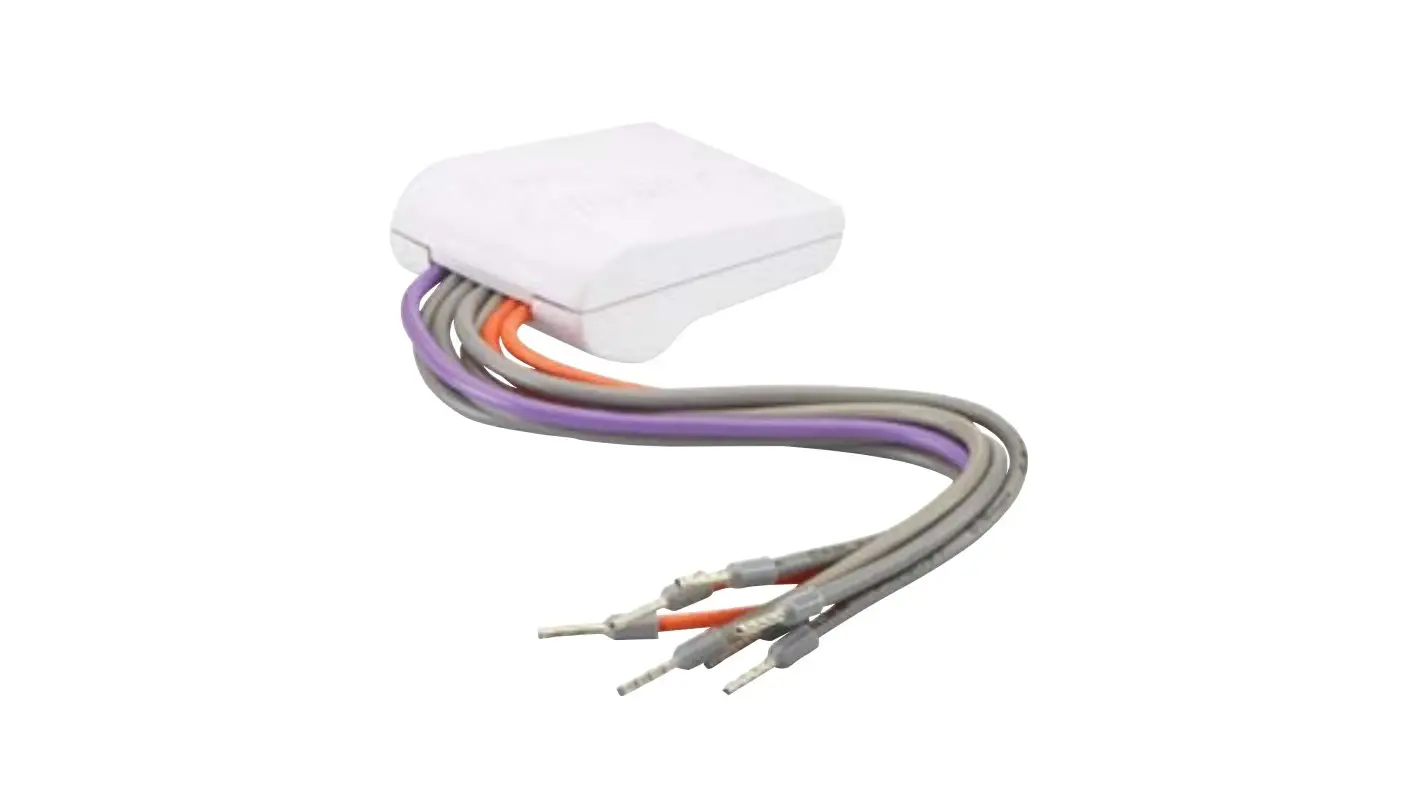
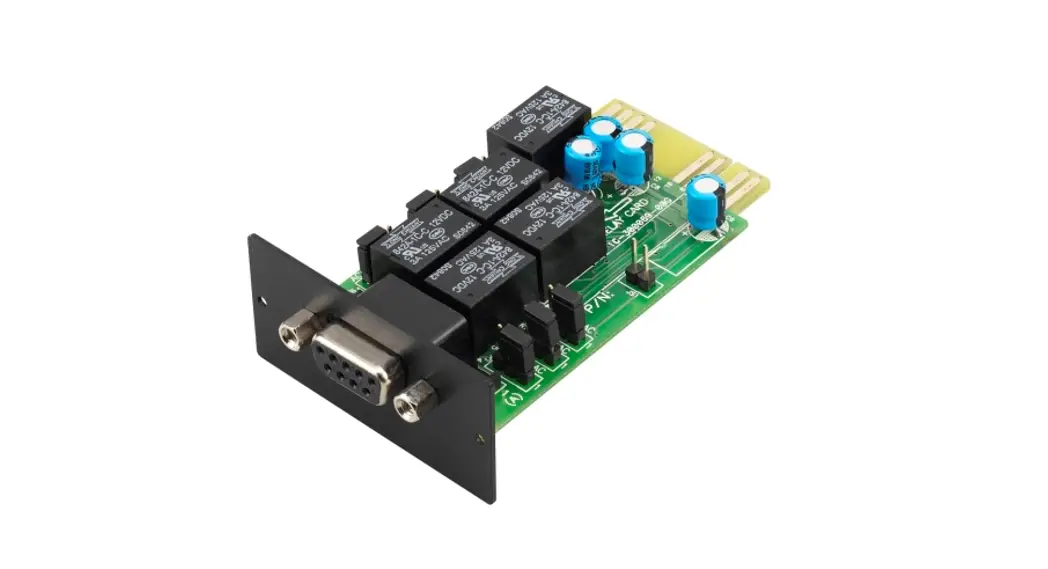
The VGLS9901I dry contact card provides dry contact signals for remotely managing the Easy UPS. To meet different application requirement, you set the signal (active open or active close) status on the card by setting jumper. The card is applicable in the following applications:
- IBM servers, PCs, and workstations equipment.
- Automatic control industry equipment and communications applications.
Package Contents
The packaging is recyclable; save it for reuse or dispose of it properly.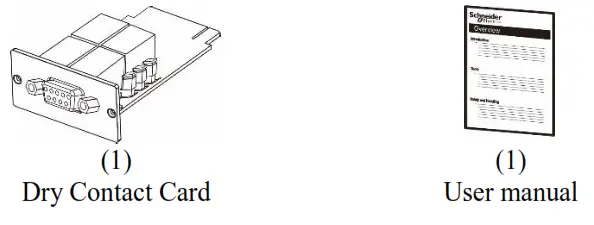
Disclaimer
Schneider Electric is not responsible for damage sustained during reshipment of this product. The Dry Contact Card is sensitive to static electricity. When handling the Dry Contact Card, touch only the end plate while using one or more of these electrostatic-discharge devices (ESDs): wrist straps, heel straps, toe straps, or conductive shoes.
Please recycle  The shipping materials are recyclable. Save them for later use, or dispose of them appropriate.
Product Overview
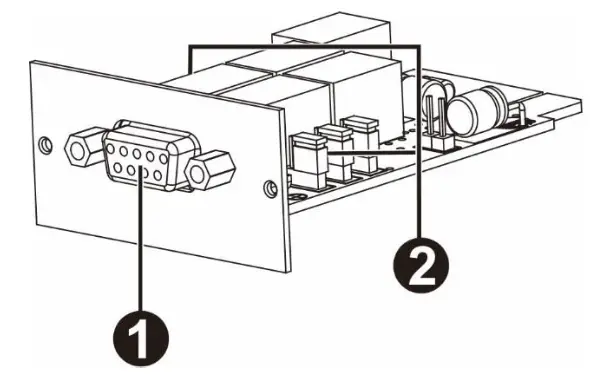
| 1 | DB-9 port | Connects Dry contact card to equipment for remote monitoring and control. See “DB-9 port”. |
| 2 | Jumper | See “Jumper setting”. |
DB-9 Port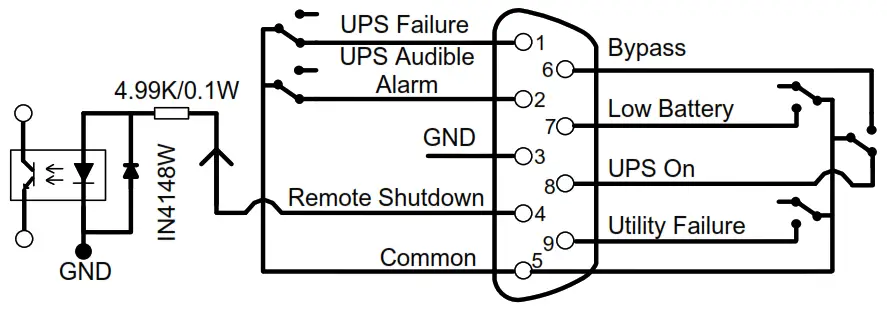
Pin Assignment
| Pin # | Function | I/O |
| 1 | UPS Failure | O/P |
| 2 | UPS Audible Alarm | O/P |
| 3 | GND (Common for Pin 4) | Power Ground |
| 4 | Remote Shutdown | I/P |
| 5 | Common for Relays | Power Supply |
| 6 | Bypass Active | O/P |
| 7 | Low Battery | O/P |
| 8 | UPS On | O/P |
| 9 | Utility Failure | O/P |
P.S. The shutdown pin (pin4 & pin3) only accepts 3-10s high level signal to perform the UPS shutdown actions after shutdown delay (It depends on UPS Setting and default setting is 180 seconds). Remote shutdown is only effective in battery mode, and the UPS will auto-restart at AC recovery.Dry Contact Card VGLS9901I
Function Description
| AC Status | AO Status | Reason |
| Pin 1 & Pin 5 connected | Pin 1 & Pin 5 disconnected | UPS failure |
| Pin 2 & Pin 5 connected | Pin 2 & Pin 5 disconnected | UPS failure, battery mode, low battery, bypass active |
| Pin 6 & Pin 5 connected | Pin 6 & Pin 5 disconnected | Bypass active |
| Pin 7 & Pin 5 connected | Pin 7 & Pin 5 disconnected | Battery voltage is low |
| Pin 8 & Pin 5 connected | Pin 8 & Pin 5 disconnected | UPS is in inverter mode |
| Pin 9 & Pin 5 connected | Pin 9 & Pin 5 disconnected | Utility failure |
Applications
Below shows the circuit of basic application to implement monitoring and control.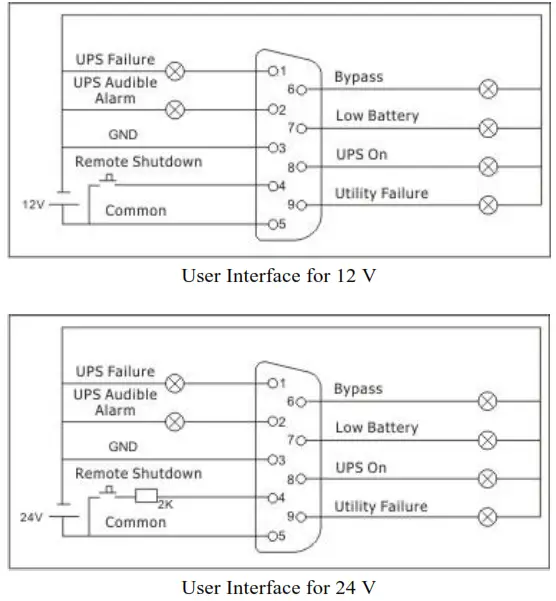
Specifications
| Electric | Rated voltage | 12 VDC |
| Rated current | 200 mA | |
| Input Contact and & Output Relay | See “Rating specifications for input contact and output relays” | |
| Physical | Dimensions with package Width x Height x Depth | 166 mm (6.54in) x 48 mm (1.89in) x 124 mm (4.88in) |
| Dimensions without package Width x Height x Depth | 52 mm (2.05in) x 26 mm (1.02in) x 84 mm (3.31 in) | |
| Weight with package | 0.114 kg (0.25 lb) | |
| Weight without package | 0.05 kg (0.11 lb) | |
| Temperature | Operating | 0 to 40°C (32 to 104°F) |
| Storage | -15 to 50°C (5 to 122°F) | |
| Humidity | Operating | 0 to 95% relative humidity, non-condensing |
Rating Specifications for Input Contact and Output Relays
| Parameter | Symbol | Max. | Min. | Unit | ||
| Input contact | Resistor* | DC Current | IR | 6 | 1 | mA |
| Diode | Reverse Voltage | VR | 6 | – | V | |
| Forward Current | IF | 50 | – | mA | ||
| Peak Forward Current | IF (Peak) | 1 | – | A | ||
| Output relays | Relay | DC Voltage | VDC | 24 | – | V |
| DC Current | IDC | 1.0 | – | A | ||
Note: It’s required to retain the DC current lower than 6mA. Otherwise, it’s necessary to add one resistor within DC current limitation in the serial loop of Remote Shutdown. (e.g. 2K resistor with at least 0.1W rating power). Refer to diagrams in Application.
Installation
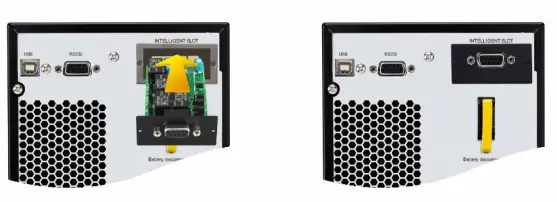
Install the dry contact card You do not need to turn off power to install the dry contact card in a supported Easy UPS. The Dry Contact Card is sensitive to static electricity. When handling the Dry Contact Card, touch only the end plate while using one or more of these electrostatic-discharge devices (ESDs): wrist straps, heel straps, toe straps, or conductive shoes. For the location of the UPS Intelligent Card Slot, see the UPS User Manual.
- Remove the cover of Intelligent Card Slot on the back of the UPS and retain the screws.
- Slide the card into the open slot and secure with the screws from step 1. (See below chart)

- Use one 9-pin cable (not supplied) to connect UPS and equipment to implement the remote monitoring and control.
Settings
Jumper Setup
There are 6 jumpers on this dry contact card. There are AC and AO white silk printings on the top of each jumper to indicate pin1&2 in A.C and pin2&3 in A.O.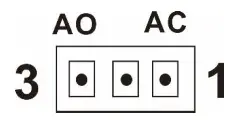
| Dry contact signal | Jumper setup |
| ACTIVE CLOSE | 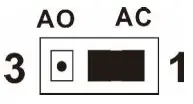 |
| ACTIVE OPEN | 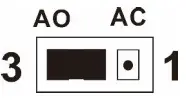 |
Jumper function
| Jumper # | Description |
| JP 1 | UPS alarm (P2 on DB-9) |
| JP 2 | UPS on (P8 on DB-9) |
| JP 3 | Bypass (P6 on DB-9) |
| JP 4 | Low battery (P7 on DB-9) |
| JP 5 | Utility failure (P9 on DB-9) |
| JP 6 | UPS failure (P1 on DB-9) |
Internal Circuit Logic
Internal IC controller controls 5 relays for actions depending on the UPS status. Active-Close (A.C) terminal and Active-Open (A.O) terminal of each relay connect to pin 3 and pin 1 of a 3-pin connector respectively.
The pin 2 of the 3-pin connector connects to the signal pin of the DB9 interface connector. The 2-pin jumper can be plugged to the 3-pin connector to either short-circuit Pin1 & Pin2 (A.C) or short-circuit Pin3 & Pin2 (A.O). 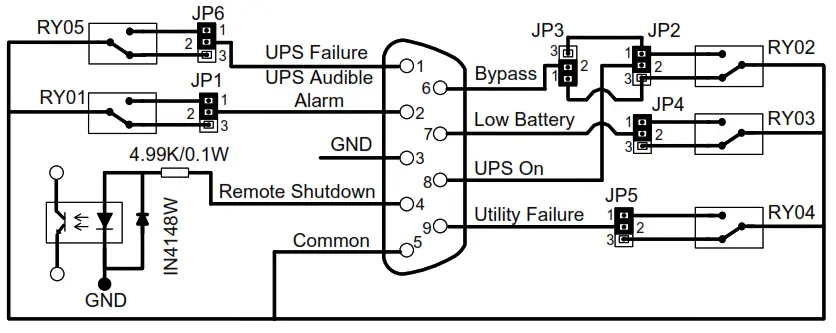
Accordingly, if pin 1 short-circuits with pin 2 via the jumper, the status of dry contact signal will be ACTIVE CLOSE. Refer to below chart. When the signal is active, the signal pin on the DB9 connector will connect with the common pin (pin 5) via the relay. 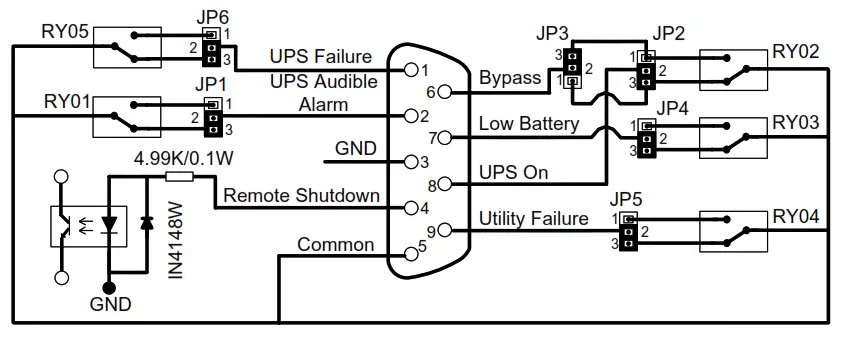
If Pin 3 short-circuits with Pin 2 via the jumper, the status of dry contact signal will be ACTIVE OPEN. Refer to below chart. When the signal is active, the signal pin on the DB9 connector will disconnect with the common pin (pin 5) via the relay. 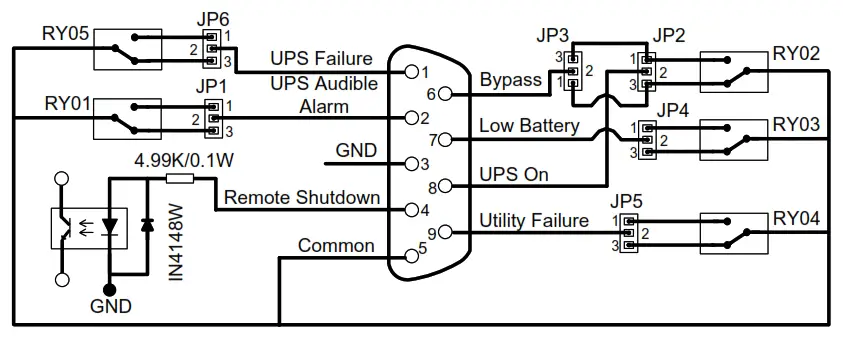
Schneider Electric Worldwide Customer Support
Customer support for this or any other Schneider Electric product is available at no charge in any of the following ways:
- Visit the Schneider Electric website to access documents in the Schneider Electric Knowledge Base and to submit customer support requests.
– www.apc.com (Corporate Headquarters)
Connect to localized Schneider Electric websites for specific countries, each of which provides customer support information.
– www.apc.com/support/
Global support searching Schneider Electric Knowledge Base and using e-support. - Contact the Schneider Electric Customer Support Center by telephone or e-mail.
– Local, country specific centers: go to www.apc.com/support/contact for contact information.
For information on how to obtain local customer support, contact the Schneider Electric representative or other distributor from whom you purchased your Schneider Electric product.
© 2018 Schneider Electric. The Schneider Electric logo is owed by Schneider Electric Industries
S.A.S., or their affiliated companies. All other trademarks are property of their respective owners.
EN 990-91240
08/2018