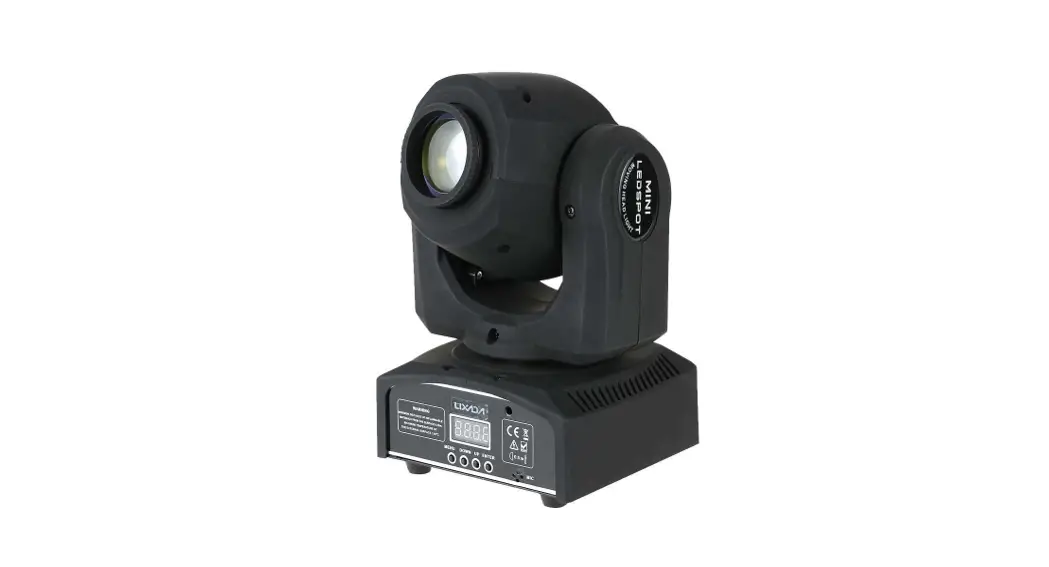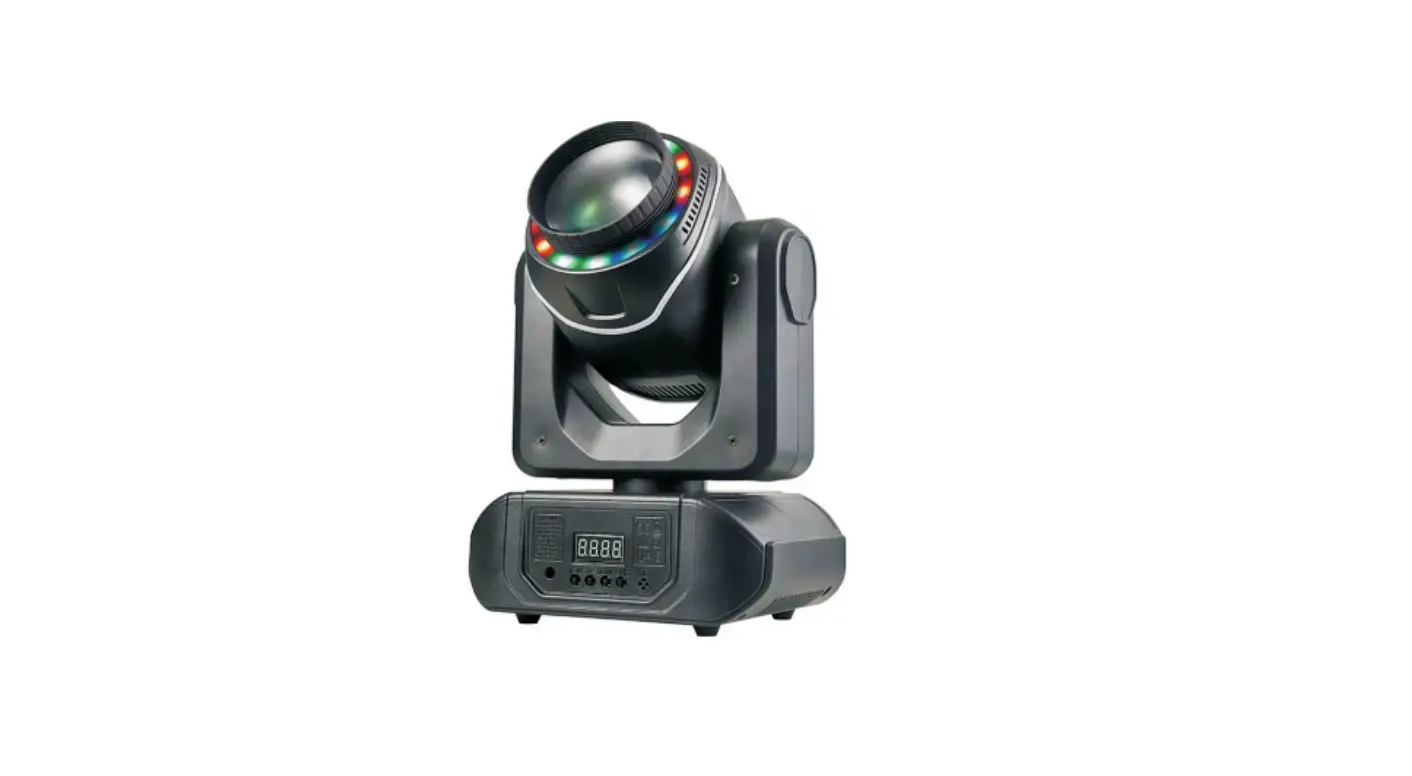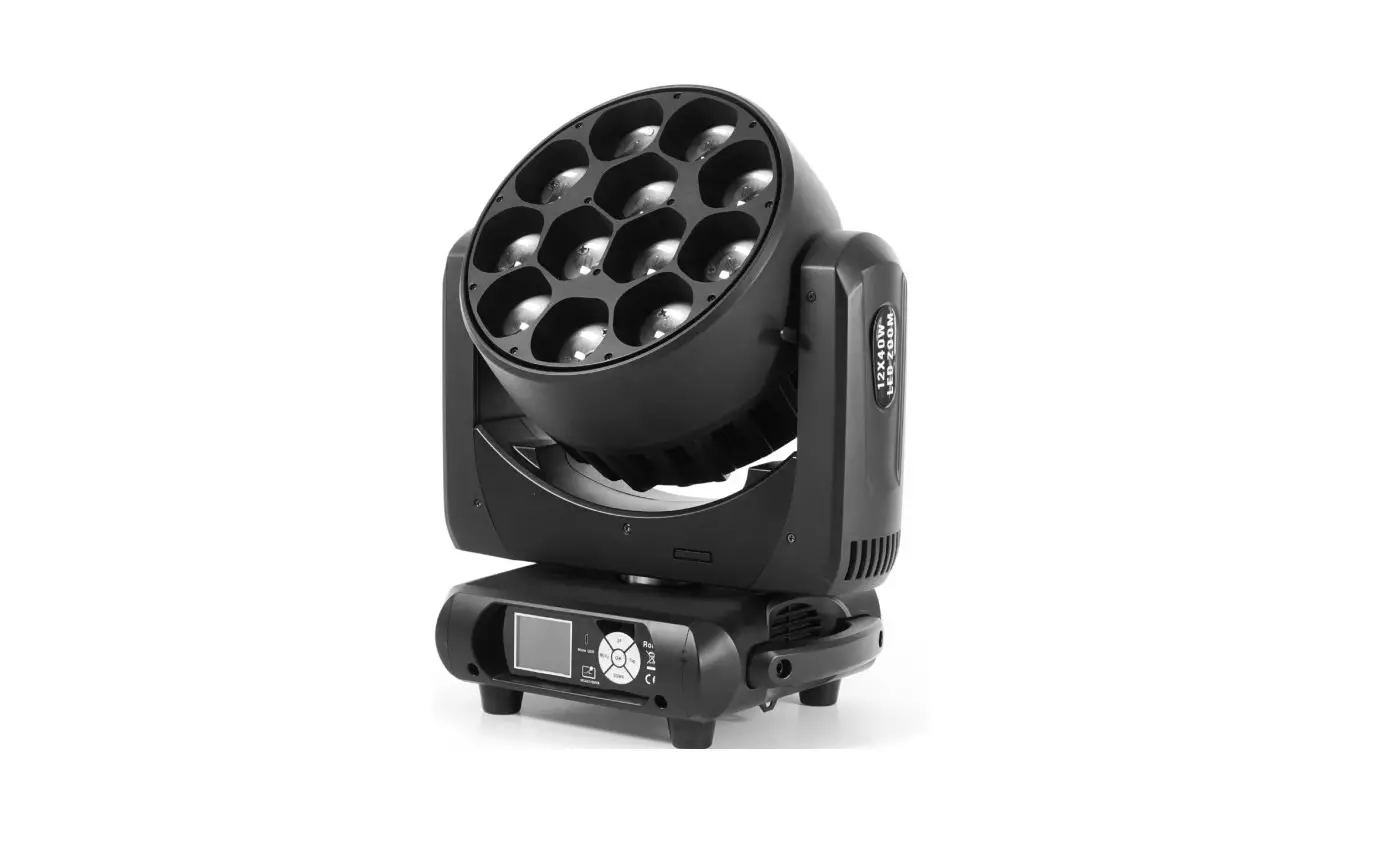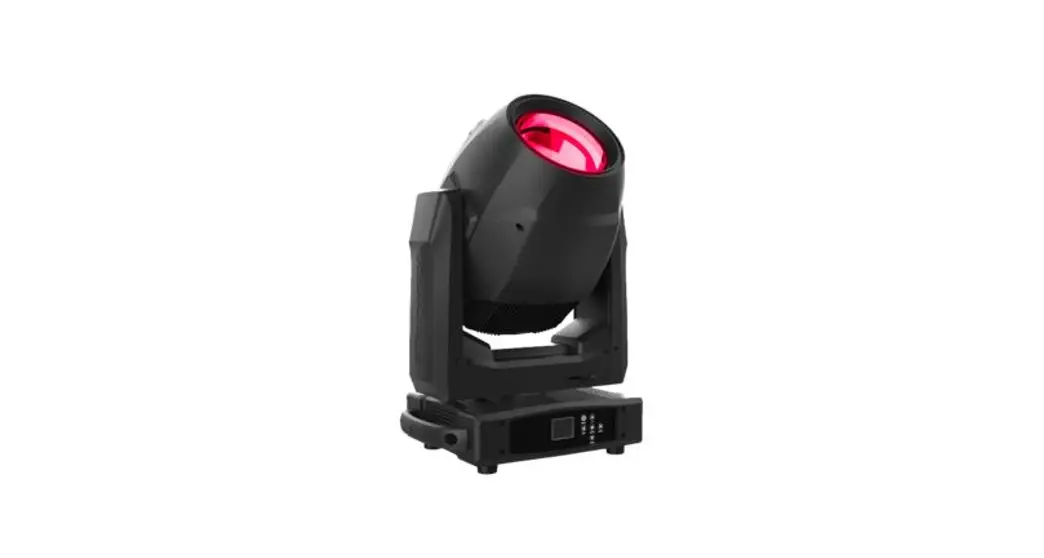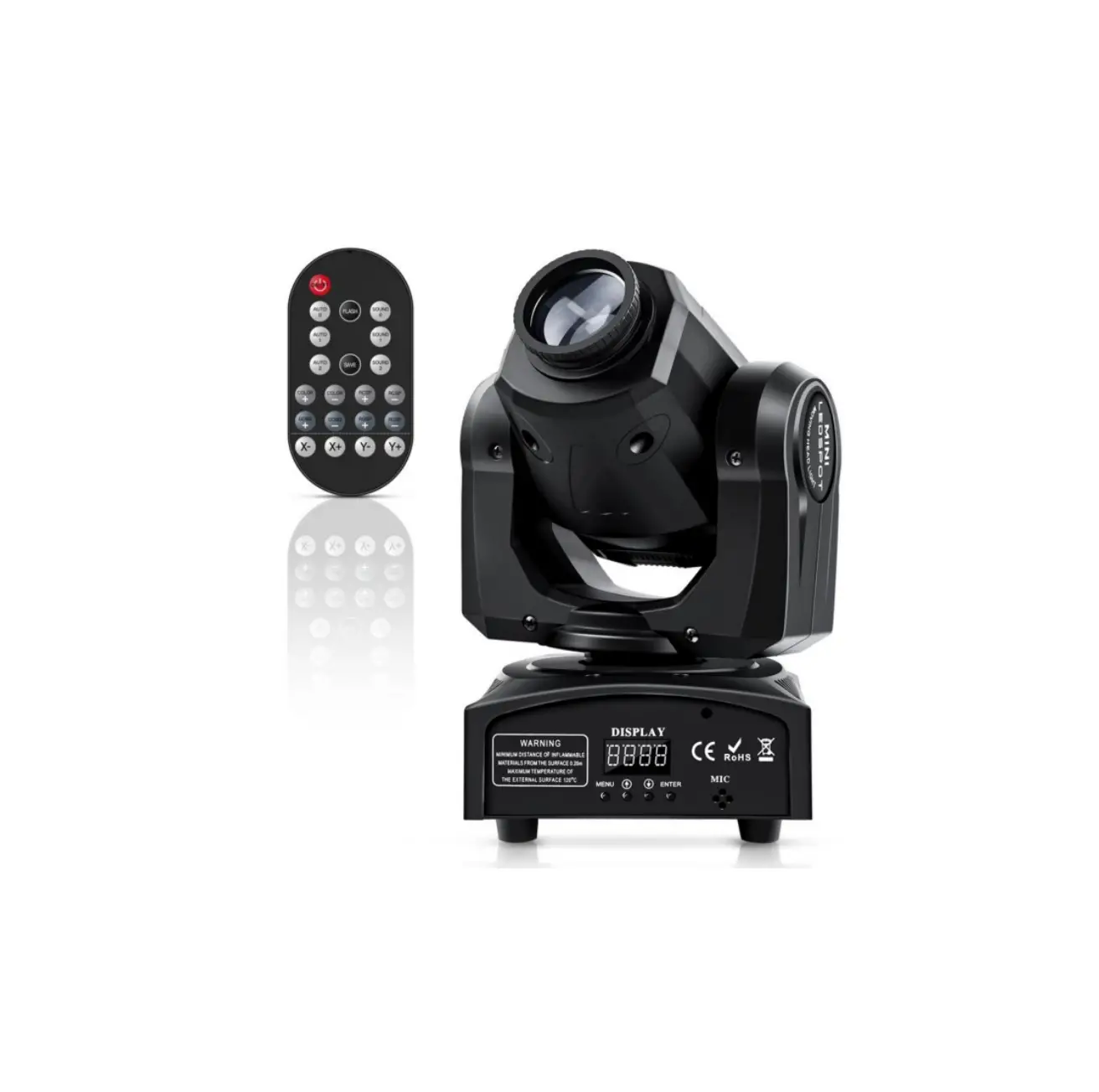

STAIRVILLE Infinite Pixel Mini 90 Moving Head Light
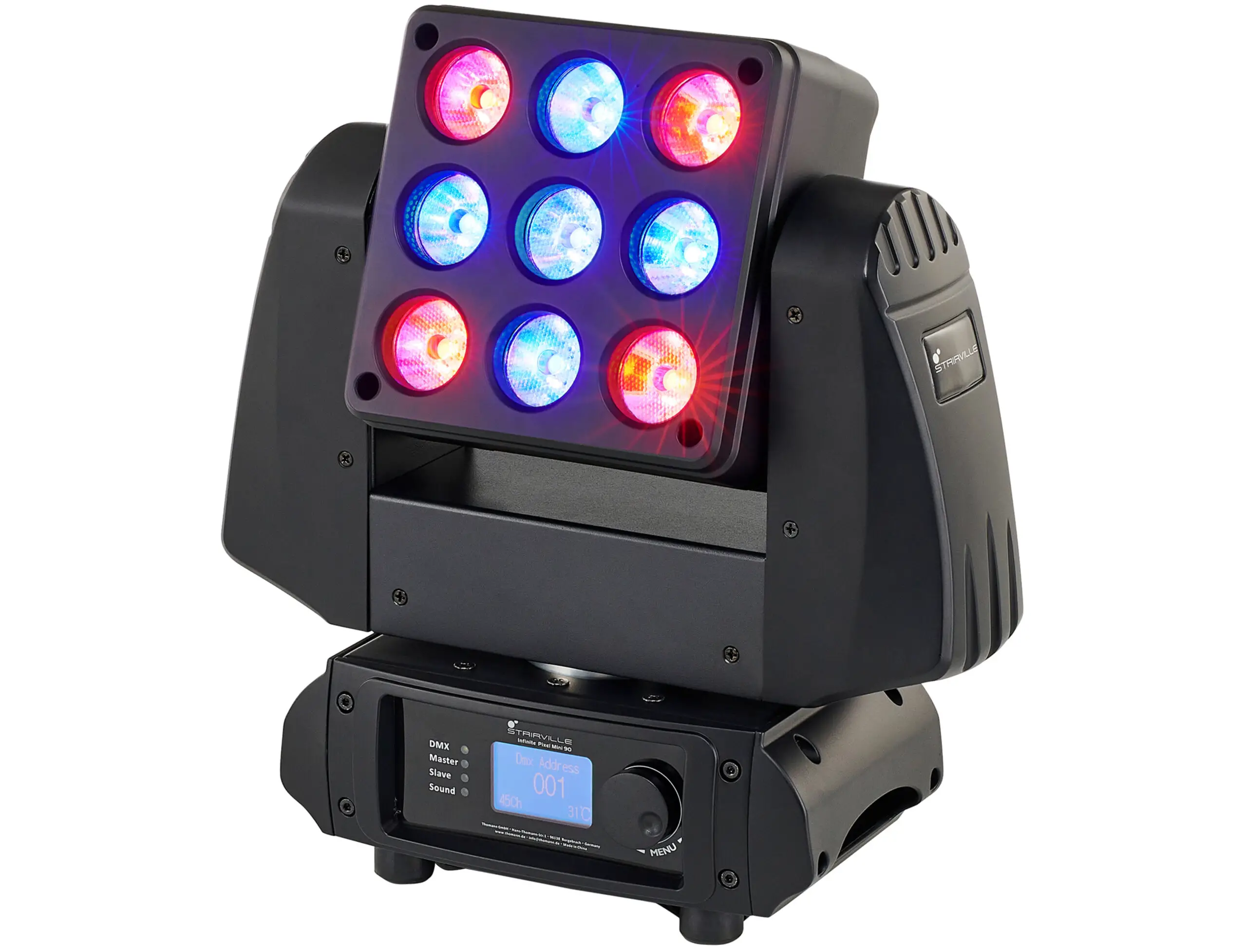
Infinite Pixel Mini 90 Moving Head
General Information
The Infinite Pixel Mini 90 Moving Head is a versatile spotlight designed for professional use. It is not suitable for household use. This user manual provides detailed information on the product’s features and usage instructions.
Further Information
For additional information and details, please visit our website at www.thomann.de. On our website, you can find the following resources:
- Downloadable manuals
- Keyword search function
- Online guides
- Personal consultation service
If you require personal consultation or assistance with any issues, please contact our technical hotline or customer service.
Notational Conventions
This manual uses the following notational conventions:
- Letterings: Connectors and controls are marked by square brackets and italics. Example: [VOLUME] control, [Mono] button.
- Displays: Texts and values displayed on the device are marked by quotation marks and italics. Example: `24ch’, `OFF’.
- Instructions: The individual steps of an instruction are numbered consecutively. The result of a step is indented and highlighted by an arrow. Example: 1. Switch on the device. 2. Press [Auto]. 3. Switch off the device.
Symbols and Signal Words
This manual uses symbols and signal words to indicate different levels of danger or importance:
| Signal Word | Meaning |
|---|---|
| DANGER! | This indicates an immediate dangerous situation that could result in death or serious injury if not avoided. |
| WARNING! | This indicates a possible dangerous situation that could result in death or serious injury if not avoided. |
| CAUTION! | This indicates a possible dangerous situation that could result in minor injury if not avoided. |
| NOTICE | This indicates a possible dangerous situation that could result in material and environmental damage if not avoided. |
Safety Instructions
Intended Use:
The Infinite Pixel Mini 90 Moving Head is intended for use as a freely moving multifunctional spotlight. It is designed for professional use and should not be used in households. Please follow the instructions provided in this user manual for proper usage. Any other use or use under different operating conditions is considered improper and may result in personal injury or property damage. We do not assume liability for damages resulting from improper use.
This device should only be operated by individuals with sufficient physical, sensorial, and intellectual abilities, as well as corresponding knowledge and experience. Other persons may use this device only under supervision or instruction from a responsible person who ensures their safety.
To extend the operating life of the device, take regular breaks and avoid frequent switching on and off. The device is not suitable for continuous operation.
General information
This user manual contains important information on the safe operation of the device. Read and follow all safety notes and all instructions. Save this manual for future refer‐ence. Make sure that it is available to all persons using this device. If you sell the device to another user, be sure that they also receive this manual.
Our products and user manuals are subject to a process of continuous development. We therefore reserve the right to make changes without notice. Please refer to the latest version of the user manual which is ready for download under www.thomann.de.
Further information
On our website (www.thomann.de) you will find lots of further information and details on the following points:
| Download | This manual is also available as PDF file for you to download. |
| Keyword search | Use the search function in the electronic version to find the topics of interest for you quickly. |
| Online guides | Our online guides provide detailed information on technical basics and terms. |
| Personal consultation | For personal consultation please contact our technical hotline. |
| Service | If you have any problems with the device the customer service will gladly assist you. |
Notational conventions
This manual uses the following notational conventions:
Letterings: The letterings for connectors and controls are marked by square brackets and italics. Examples: [VOLUME] control, [Mono] button.
Displays: Texts and values displayed on the device are marked by quotation marks and italics. Examples: ‘24ch’ , ‘OFF’ .
Instructions: The individual steps of an instruction are numbered consecutively. The result of a step is indented and highlighted by an arrow.
Example:
- Switch on the device.
- Press [Auto].
Automatic operation is started. - Switch off the device.
Symbols and signal words
In this section you will find an overview of the meaning of symbols and signal words that are used in this manual.
| Signal word | Meaning |
| DANGER! | This combination of symbol and signal word indicates an immediate dangerous situation that will result in death or serious injury if it is not avoided. |
| WARNING! | This combination of symbol and signal word indicates a possible dangerous situation that can result in death or serious injury if it is not avoided. |
| CAUTION! | This combination of symbol and signal word indicates a possible dangerous situation that can result in minor injury if it is not avoided. |
| NOTICE! | This combination of symbol and signal word indicates a possible dangerous situation that can result in mate‐ rial and environmental damage if it is not avoided. |
| Warning signs | Type of danger |
 | Warning – high-voltage. |
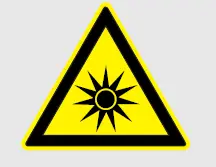 | Warning – dangerous optical radiation. |
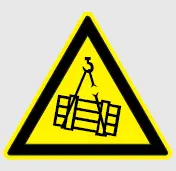 | Warning – suspended load. |
 | Warning – danger zone. |
Product Safety instructions
Intended use
This device is intended for use as a freely moving multifunctional spotlight. The device is designed for professional use and is not suitable for use in households. Use the device only as described in this user manual. Any other use or use under other operating conditions is considered to be improper and may result in personal injury or property damage. No liability will be assumed for damages resulting from improper use.
This device may be used only by persons with sufficient physical, sensorial, and intel‐lectual abilities and having corresponding knowledge and experience. Other persons may use this device only if they are supervised or instructed by a person who is responsible for their safety.
Extend the operating life of the device by regular breaks and by avoiding frequent switching on and off. The device is not suitable for continuous operation.
Safety
- DANGER!
Risk of injury and choking hazard for children!
Children can suffocate on packaging material and small parts. Children can injure themselves when handling the device. Never allow children to play with the packaging material and the device. Always store packaging material out of the reach of babies and small children. Always dispose of packaging material properly when it is not in use. Never allow children to use the device without supervision. Keep small parts away from children and make sure that the device does not shed any small parts (such knobs) that children could play with. - DANGER!
Danger to life due to electric current!
Within the device there are areas where high voltages may be present. Never remove any covers. There are no user-serviceable parts inside. Do not use the device when covers, safety equipment or optical components are missing or damaged. - DANGER!
Danger to life due to electric current!
A short circuit could lead to a fire hazard and risk of death. Always use proper ready-made insulated triple-core mains cable with a safety plug. Do not modify the mains cable or the plug. In case of isolation damage, disconnect immediately the power supply and arrange repair. If in doubt, seek advice from a qualified electrician. - WARNING!
Eye damage caused by high light intensity
Never look directly into the light source. - WARNING!
Risk of epileptic shock
Strobe lighting can trigger seizures in photosensitive epilepsy. Sensitive persons should avoid looking at strobe lights. - WARNING!
Risk of injury caused by falling objects
Make sure that the installation complies with the standards and rules that apply in your country. Always secure the device with a secondary safety attachment, such as a safety cable or a safety chain. The load capacity of trusses or other fixtures must be suffi‐cient for the intended number of devices. Not that the movement of the head places additional loads on the load-bearing parts. - CAUTION!
Risk of injury due to movements of the device
The head of the device can move quickly (pan, tilt) and can produce very bright light. This is also valid immediately after you turn on the device, when the device operates in automatic mode or under remote control and when you turn off a DMX controller that is connected to the device. Persons staying near the device could be injured or frightened. Before you turn on the device and during the operation, always ensure that nobody stays close to the device. If work has to be performed in the area of movement or in the near vicinity of the device, it must remain turned off. - NOTICE!
Risk of fire
Do not block areas of ventilation. Do not install the device near any direct heat source. Keep the device away from naked flames. - NOTICE!
Operating conditions
This device has been designed for indoor use only. To prevent damage, never expose the device to any liquid or moisture. Avoid direct sunlight, heavy dirt, and strong vibrations. Only operate the device within the ambient conditions specified in the chapter ‘Technical specifications’ of this user manual. Avoid heavy temperature fluctuations and do not switch the device on immediately after it was exposed to temperature fluctuations (for example after transport at low outside temperatures). Dust and dirt inside can damage the unit. When operated in harmful ambient conditions (dust, smoke, nicotine, fog, etc.), the unit should be main‐tained by qualified service personnel at regular intervals to prevent overheating and other malfunction. The device must not be moved during use. - NOTICE!
Power supply
Before connecting the device, ensure that the input voltage (AC outlet) matches the voltage rating of the device and that the AC outlet is protected by a residual current circuit breaker. Failure to do so could result in damage to the device and possibly injure the user. Unplug the device before electrical storms occur and when it is unused for long periods of time to reduce the risk of electric shock or fire. - NOTICE!
Fire hazard due to exceedance of the maximum current
The device can power other devices of identical construction. The current consumption of all other devices connected in series must not exceed the values indicated in the technical specifications. Otherwise you risk injuries and irreparable damages to the device. Only connect so many identical devices that the maximum current consumption is not exceeded. Ensure the sufficient dimensioning (wire cross section) of the power cables used for all devices connected in series. - NOTICE!
Risk of overheating
The distance between light output and the illuminated surface must be more than 1.5 m (19.7in). Provide sufficient ventilation. The ambient temperature must always be below 40 °C (104 °F). - NOTICE!
Possible damage due to installation of a wrong fuse
The use of different types of fuses can cause serious damage to the unit. Fire hazard! Only fuses of the same type may be used. - NOTICE!
Possible staining
The plasticiser contained in the rubber feet of this product may possibly react with the coating of your surface and after some time cause permanent dark stains. In case of doubt, do not put the rubber feet directly on the surface and use a suitable underlay if necessary, i.e. felt pads or similar.
Features
- 9 × 4-in-1 RGBW LEDs (10 W each), arranged in a 3×3 matrix
- Continuous Pan and Tilt rotation
- Control via DMX (3 different modes) and via jog wheel and display on the unit
- Preprogrammed automatic shows
- Separately controllable LEDs in the 45 channel DMX mode
- Strobe effect
- Sound control
- Master / Slave mode
- Lockable connectors (Power Twist) for self-supply and for supplying further devices
- Automatic rotation of the display for overhead installation
For technological reasons, the light output of LEDs decreases over their lifetime. This effect increases with higher operating temperature. You can extend the service life of the illuminants by providing adequate ventilation and operating the LEDs with the lowest possible brightness.
Installation
Unpack and check carefully there is no transportation damage before using the unit. Keep the equipment packaging. To fully protect the product against vibration, dust and moisture during transportation or storage use the original packaging or your own packaging material suitable for transport or storage, respectively.
Lift the device only at the base. When lifted at the rotatable mounting, the device may be damaged.
WARNING!
Risk of injury caused by falling objects
Make sure that the installation complies with the standards and rules that apply in your country. Always secure the device with a secondary safety attachment, such as a safety cable or a safety chain.
The load capacity of trusses or other fixtures must be sufficient for the intended number of devices. Not that the movement of the head places additional loads on the load-bearing parts.
CAUTION!
Risk of injury due to movements of the device
The head of the device can move quickly (pan, tilt) and can produce very bright light. This is also valid immediately after you turn on the device, when the device operates in automatic mode or under remote control and when you turn off a DMX controller that is connected to the device. Persons staying near the device could be injured or frightened.
Before you turn on the device and during the operation, always ensure that nobody stays close to the device. If work has to be performed in the area of movement or in the near vicinity of the device, it must remain turned off.
NOTICE!
Risk of overheating
The distance between light output and the illuminated surface must be more than 1.5 m (19.7in).
Provide sufficient ventilation.
The ambient temperature must always be below 40 °C (104 °F).
NOTICE!
Possible damage caused by movements of the device Always ensure that enough space is free around the device for the movements of the head (pan, tilt).
NOTICE!
Possible data transmission errors
For error-free operation make use of dedicated DMX cables and do not use ordinary microphone cables.
Never connect the DMX input or output to audio devices such as mixers or amplifiers.
Mounting options
You can install the unit in hanging or standing position. When in use, the device must always be attached to a solid surface or an approved truss.
Always work from a stable platform whenever installing, moving or servicing the unit. In doing so, the area underneath the unit must be cordoned off.
The Quick Lock openings on the bottom side of the housing allow the secure attachment of Omega brackets. There, you can fasten adapters such as half couplers, trigger clamps, c-hooks etc. The safety cable must be threaded through the cut-outs on the bottom of the housing.
Please note that this device must not be connected to a dimmer.
Starting up
Create all connections while the device is off. Use the shortest possible high-quality cables for all connections. Take care when running the cables to prevent tripping hazards.
Connections in DMX mode
Connect the DMX input of the device to the DMX output of a DMX controller or another DMX device. Connect the output of the first DMX device to the input of the second one, and so on to form a daisy chain. Always ensure that the output of the last DMX device in the daisy chain is terminated with a resistor (110 Ω, ¼ W).
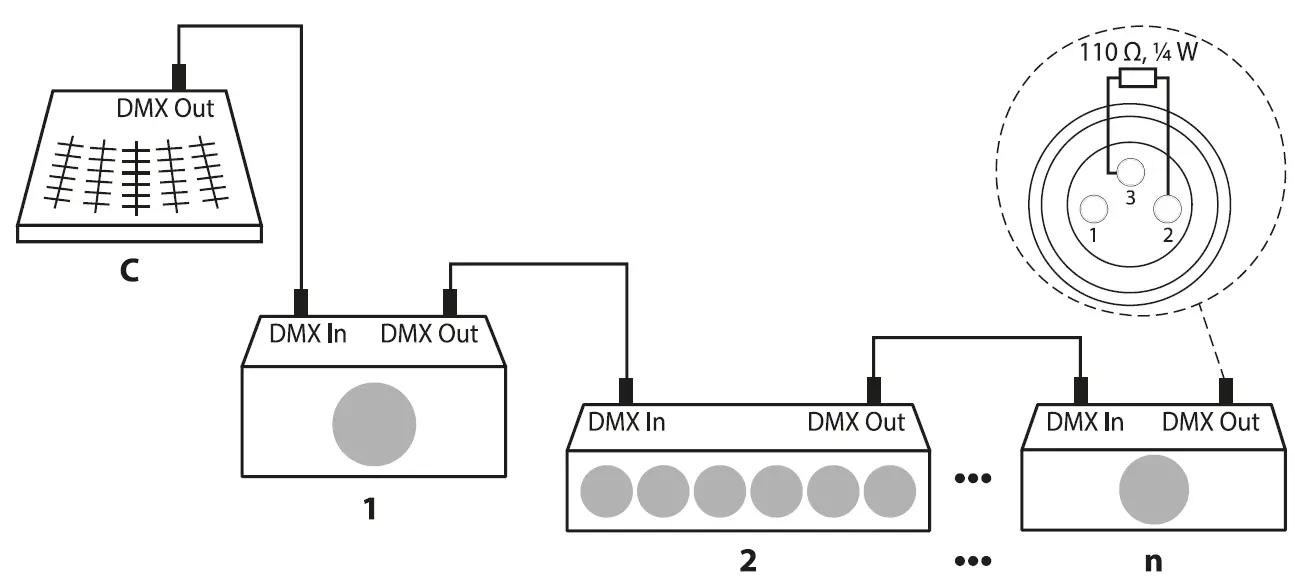
DMX indicator
If the device is correctly connected to a switched-on DMX controller and a DMX signal is being received on the input, the DMX indicator flashes on the front of the device.
Connections in master/slave mode
When you configure a group of devices in master/slave mode, the first unit will con‐trol the other units for an automatic, sound-activated, synchronized show. This func‐tion is ideal when you want to start a show immediately. Connect the DMX output of the master device to the DMX input of the first slave device. Then connect the DMX output of the first slave device to the DMX input of the second slave device and so on.
Connections and controls
Overview
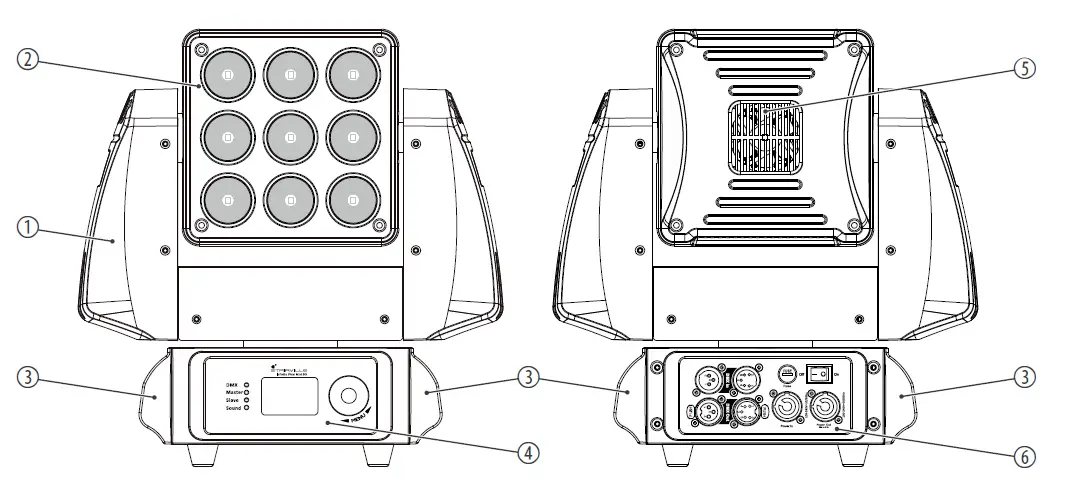
| 1 | Movable head |
| 2 | LEDs |
| 3 | Handles |
| 4 | Operating panel with display |
| 5 | Fan grid |
| 6 | Connection panel with power supply, fuse holder and DMX connections |
Control panel, connection panel
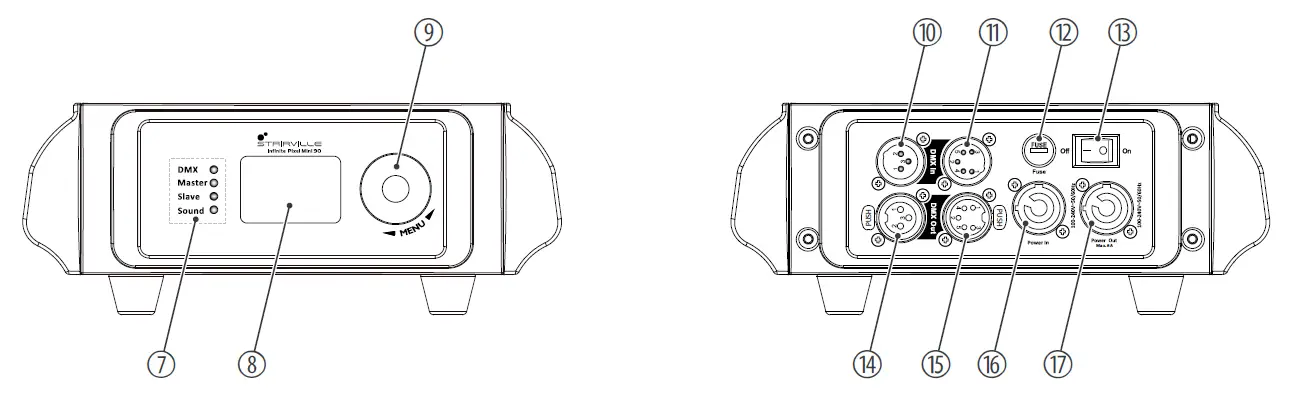
| 7 | Control LEDs |
| [DMX] | The green LED lights up when a DMX controller is connected and flashes when DMX data is transmitted. | |
| [Master] | The green LED lights up when the device is configured as “master”. | |
| [Slave] | The green LED lights up when the device is configured as “slave”. | |
| [Sound] | The green LED lights up when the built-in microphone picks up a signal for the music control. | |
| 8 | Display |
| 9 | [MENU] | jog wheel to select a menu item or value by turning and confirming the selection by pressing |
| 10 | [DMX In] | DMX input, designed as XLR panel plug, 3-pin |
| 11 | [DMX In] | DMX input, designed as XLR panel plug, 5-pin |
| 12 | [Fuse] | fuse holder |
| 13 | [On/Off] | main switch. Turns the device on and off. |
| 14 | [DMX Out] | DMX output, designed as XLR panel socket, 3-pin |
| 15 | [DMX Out] | DMX output, designed as XLR panel socket, 5-pin |
| 16 | [Power In] | lockable input socket (Power Twist) for the power supply of the device |
| 17 | [Power Out] | lockable output socket (Power Twist) for powering a connected device |
Operating
Starting the device
- CAUTION!
Risk of injury due to movements of the device
The head of the device can move quickly (pan, tilt) and can produce very bright light. This is also valid immediately after you turn on the device, when the device operates in automatic mode or under remote control and when you turn off a DMX controller that is connected to the device. Persons staying near the device could be injured or frightened.
Before you turn on the device and during the operation, always ensure that nobody stays close to the device. If work has to be performed in the area of movement or in the near vicinity of the device, it must remain turned off.
Connect the device to the power grid and turn it on with the main switch to start operation. After a few seconds, the fans start to work, the head moves to the home positions for rotation (pan) and inclination (tilt), the screen displays a start message. After a few more seconds, the device operates in the last set mode.
If you don’t use the jog wheel for about 30 seconds, the device returns automatically to the main menu. The set values are retained even when the device is disconnected from the mains power supply.
Main menu
- Press the jog wheel to activate the main menu.
- Turn the jog wheel to select a menu item.
- Press the jog wheel to confirm the selection.
- Turn the jog wheel to change the respectively displayed value.
- Once the display shows the desired value, press the jog wheel to confirm the setting and close the menu.
- To close a menu item without saving changes, select the menu item ‘Exit’ or wait 30 seconds.
As soon as you activate the main menu, the DMX control and a currently running automatic show are being interrupted. The movable head of the unit moves to its home position.
If you close the main menu without making changes, the unit continues to operate with the previous settings.
All previously made settings are retained even when you disconnect the device from the power grid.
DMX address
This setting is only relevant if the device is controlled via a DMX controller.
- Press the jog wheel to activate the main menu.
- Turn the jog wheel repeatedly until the display shows ‘DMX Address’ .
- Press the jog wheel to confirm the selection.
- Select a value between 1 and 512 for the desired DMX address (display ‘001’ … ‘512’ ).
Make sure that this number matches the configuration of your DMX controller. The following table shows the respective highest possible DMX address for the various DMX modes.Mode Highest possible DMX address 9-channel mode 504 17-channel mode 496 45-channel mode 468 - Once the display shows the desired value, press the jog wheel to confirm the setting.
DMX mode
This setting is only relevant if the device is controlled via a DMX controller.
- Press the jog wheel to activate the main menu.
- Turn the jog wheel repeatedly until the display shows ‘Channel Mode’ .
- Press the jog wheel to confirm the selection.
- Turn the jog wheel to select the desired DMX mode.
The following DMX modes are available:Menu level 2 Function ‘9CH’ 9-channel mode ‘17CH’ 17-channel mode ‘45CH’ 45-channel mode - Once the display shows the desired value, press the jog wheel to confirm the setting.
Preprogrammed automatic show
Automatic mode is only relevant if the device is operating alone or is the master in a master/slave configuration and is not controlled via a DMX controller.
- Press the jog wheel to activate the main menu.
- Turn the jog wheel repeatedly until the display shows ‘Show Mode’ .
- Press the jog wheel to confirm the selection.
- Turn the jog wheel repeatedly until the display shows ‘Show1’ .
- Press the jog wheel to confirm the selection.
- The automatic show will start immediately.
Manual control
This setting is only relevant if the device is not controlled via a DMX controller and not working as ‘slave’ in a master / slave configuration. In this operating mode pan, tilt, colours and strobe can be set.
- Press the jog wheel to activate the main menu.
- Turn the jog wheel repeatedly until the display shows ‘Manual Control’ .
- Turn the jog wheel to select the desired submenu or the desired value.
The following sub menus are available:Menu level 2 Menu level 3 Function ‘Pan’ ‘000’ … ‘255’ Adjusts the rotation angle. ‘Tilt’ ‘000’ … ‘255’ Adjusts the tilt angle. ‘Red’ ‘000’ … ‘255’ Adjusts the intensity for red. ‘Green’ ‘000’ … ‘255’ Adjusts the intensity for green. ‘Blue’ ‘000’ … ‘255’ Adjusts the intensity for blue. ‘White’ ‘000’ … ‘255’ Adjusts the intensity for white. ‘Strobe’ ‘000’ … ‘255’ Adjusts the strobe speed. ‘Exit’ Returns to the main menu. - Once the display shows the desired value, press the jog wheel to confirm the setting.
Operating mode ‘Slave’
This setting is only relevant if the device is ‘slave’ in a Master / Slave configuration and is not controlled via a DMX controller.
- Press the jog wheel to activate the main menu.
- Turn the jog wheel repeatedly until the display shows ‘Slave Mode’ .
- Press the jog wheel to confirm the selection.
- Turn the jog wheel repeatedly until the display shows ‘Slave’ .
- Press the jog wheel to confirm the selection.
- The device follows exactly the operation of the Master to which it is connected.
Sound control
This setting is only relevant if the device is not controlled via a DMX controller and not working as slave in a master / slave configuration.
- Press the jog wheel to activate the main menu.
- Turn the jog wheel repeatedly until the display shows ‘Sound Mode’ .
- Press the jog wheel to confirm the selection.
- The device follows the rhythm of the background music or sounds detected by the built-in microphone.
Pan inversion
- Press the jog wheel to activate the main menu.
- Turn the jog wheel repeatedly until the display shows ‘Pan Inverse’ .
- Press the jog wheel to confirm the selection.
- Turn the jog wheel to select between ‘Normal’ (normal rotation direction) and ‘Inverted’ (inverted rotation direction).
- Once the display shows the desired value, press the jog wheel to confirm the setting.
Tilt inversion
- Press the jog wheel to activate the main menu.
- Turn the jog wheel repeatedly until the display shows ‘Tilt Inverse’ .
- Press the jog wheel to confirm the selection.
- Turn the jog wheel to select between ‘Normal’ (normal inclination direction) and ‘Inverted’ (inverted inclination direction).
- Once the display shows the desired value, press the jog wheel to confirm the setting.
Behaviour on DMX control failure
- Press the jog wheel to activate the main menu.
- Turn the jog wheel repeatedly until the display shows ‘DMX Fail’ .
- Press the jog wheel to confirm the selection.
- Turn the jog wheel to select between ‘Off’ (the device is blacked out) and ‘Hold’ (the last setting is retained).
- Once the display shows the desired value, press the jog wheel to confirm the setting.
Dimmer curves
- Press the jog wheel to activate the main menu.
- Turn the jog wheel repeatedly until the display shows ‘Curves Select’ .
- Press the jog wheel to confirm the selection.
- Turn the jog wheel to select the desired dimmer curve. The dimmer curve determines how the brightness increases or decreases depending on the set DMX value.
The following dimmer curves are available:Menu level 2 Function ‘Square Law’ Exponential course (square curve with a flat course at the beginning and a steep course at the end) ‘Linear’ Linear course ‘S Curve’ S-curve shape course (Non-linear curve with a distinctive flat course at the beginning and end) ‘InvSquareLaw’ Logarithmic course (inverted square curve with a steep course at the beginning and a flat course at the end) - Once the display shows the desired value, press the jog wheel to confirm the setting.
Display reversal
- Press the jog wheel to activate the main menu.
- Turn the jog wheel repeatedly until the display shows ‘Display’ .
- Press the jog wheel to confirm the selection.
- Turn the jog wheel to select between ‘Auto’ (automatic rotation of the display for overhead installation), ‘Normal’ (normal display) and ‘Inverted’ (the display is inverted for overhead installation by 180°).
- Once the display shows the desired value, press the jog wheel to confirm the setting.
Display illumination
- Press the jog wheel to activate the main menu.
- Turn the jog wheel repeatedly until the display shows ‘Back Light’ .
- Press the jog wheel to confirm the selection.
- Turn the jog wheel to select between ‘Always on’ (display illumination is permanently on) and ‘60s Off’ (display illumination is switched off after 60 seconds).
- Once the display shows the desired value, press the jog wheel to confirm the setting.
Calibration
- Press the jog wheel to activate the main menu.
- Turn the jog wheel repeatedly until the display shows ‘Calibrations’ .
- Press the jog wheel to confirm the selection.
- Turn the jog wheel to select between ‘Pan’ (calibrate the starting position for the rotation), ‘Tilt’ (calibrate the starting position for the tilt), ‘Default’ (reset to defaults) and ‘Exit’ (no action).
During calibration, the range of values from 0 to 255 (display ‘001’…‘255’ ) allows fine adjustment of the initial positions for pan and tilt. - Once the display shows the desired value, press the jog wheel to confirm the setting.
System reset
- Press the jog wheel to activate the main menu.
- Turn the jog wheel repeatedly until the display shows ‘Reset’ .
- Press the jog wheel to confirm the selection.
- Turn the jog wheel to select between ‘No’ (no action) and ‘Yes’ (reset all moving axes to their starting positions).
- Once the display shows the desired value, press the jog wheel to confirm the setting.
Reset to factory defaults
- Press the jog wheel to activate the main menu.
- Turn the jog wheel repeatedly until the display shows ‘Factory’ .
- Press the jog wheel to confirm the selection.
The device is reset to factory defaults.
Fan settings
- Press the jog wheel to activate the main menu.
- Turn the jog wheel repeatedly until the display shows ‘Fan Mode’ .
- Press the jog wheel to confirm the selection.
- Turn the jog wheel to select between ‘Silent’ (fan off) and ‘Smart’ (maximum speed).
- Once the display shows the desired value, press the jog wheel to confirm the setting.
Auto-correction of pan and tilt
- Press the jog wheel to activate the main menu.
- Turn the jog wheel repeatedly until the display shows ‘P/T Feedback’ .
- Press the jog wheel to confirm the selection.
- Turn the jog wheel to select the desired submenu.
The following sub menus are availableMenu level 2 Function ‘No’ Auto-correction of pan and tilt deactivated (not recommended) ‘Yes’ Auto correction on pan and tilt activated. The device returns to its starting position if the moving head is unintentionally adjusted. - Once the display shows the desired value, press the jog wheel to confirm the setting.
System information
- Press the jog wheel to activate the main menu.
- Turn the jog wheel repeatedly until the display shows ‘Information’ .
- Press the jog wheel to confirm the selection.
- Turn the jog wheel to select the desired submenu.
The following sub menus are available:Menu level 2 Function ‘Version’ Displays the current software version. ‘LED Time’ Displays the total running time of the LEDs. ‘Power Time’ Displays the total running time of the device. - Once the display shows the desired value, press the jog wheel to confirm the setting.
Menu overview
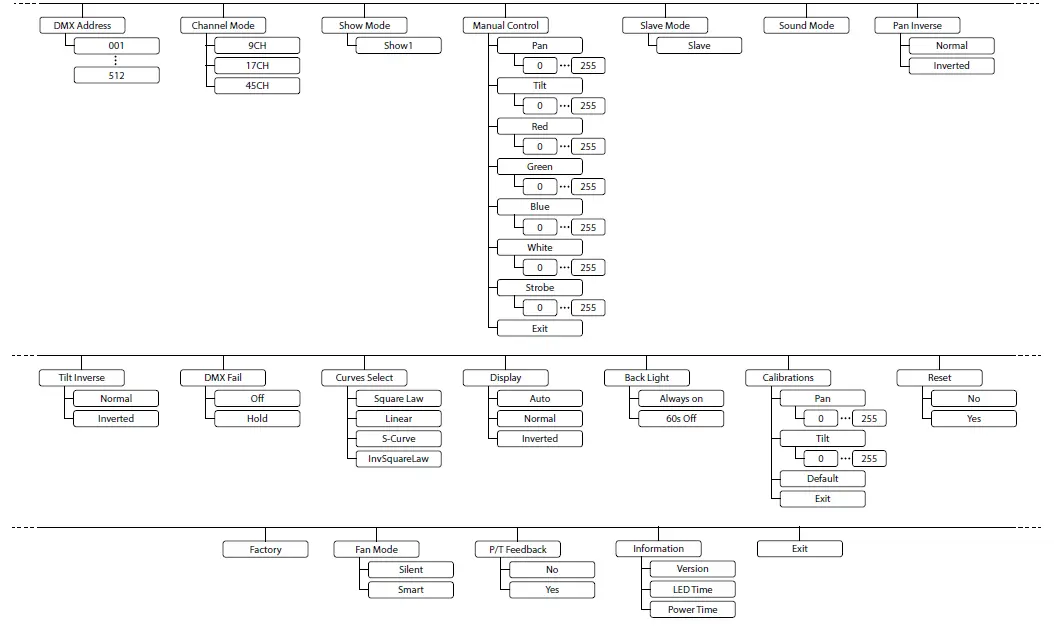
Functions in 9-channel DMX mode
| Channe l | Value | Function | |
| 1 | Rotation (pan) | ||
| 0…127 | Fixed position (0° to 540°) | ||
| 128…191 | Continuous clockwise rotation, speed decreasing | ||
| 192…255 | Continuous anti-clockwise rotation, speed increasing | ||
| 2 | Inclination (tilt) | ||
| 0…127 | Fixed position (0° to 270°) | ||
| 128…191 | Continuous clockwise tilt movement, speed decreasing | ||
| 192…255 | Continuous anti-clockwise tilt movement, speed increasing | ||
| 3 | 0…255 | Dimmer intensity (0 % to 100 %) | |
| 4 | 0…255 | Intensity red (0 % to 100 %), all LEDs together | |
| 5 | 0…255 | Intensity green (0 % to 100 %), all LEDs together | |
| 6 | 0…255 | Intensity blue (0 % to 100 %), all LEDs together | |
| 7 | 0…255 | Intensity blue (0 % to 100 %), all LEDs together | |
| 8 | Stroboscope | ||
| 0…6 | LEDs off | ||
| 7…128 | Impulse effect, increasing speed | ||
| 129…255 | Constant strobe effect, increasing speed | ||
| 9 | Reset | ||
| 0…9 | No function | ||
| 10…50 | Reset, if the value is transmitted for at least 5 seconds | ||
| 51…255 | No function | ||
Functions in 17-channel DMX mode
| Channe l | Value | Function | |
| 1 | Rotation (pan) | ||
| 0…127 | Fixed position (0° to 540°) | ||
| 128…191 | Constant clockwise rotation, speed decreasing | ||
| 192…255 | Constant anti-clockwise rotation, speed increasing | ||
| 2 | 0…255 | Fine adjustment for rotation (pan) | |
| 3 | Inclination (tilt) | ||
| 0…127 | Fixed position (0° to 270°) | ||
| 128…191 | Constant clockwise inclination, speed decreasing | ||
| 192…255 | Constant anti-clockwise inclination, speed increasing | ||
| 4 | 0…255 | Fine adjustment for inclination (tilt) | |
| 5 | 0…255 | Running speed of rotation (pan) and inclination (tilt), increasing speed | |
| 6 | Rotation (pan) | ||
| 0…127 | No movement | ||
| 128…191 | Continuous clockwise rotation, speed decreasing | ||
| 192…255 | Continuous anti-clockwise rotation, speed increasing | ||
| 7 | Inclination (tilt) | ||
| 0…127 | No movement | ||
| 128…191 | Continuous clockwise tilt movement, speed decreasing | ||
| 192…255 | Continuous anti-clockwise tilt movement, speed increasing | ||
| 8 | 0…255 | Dimmer intensity (0 % to 100 %) | |
| 9 | 0…255 | Intensity red (0 % to 100 %), all LEDs together | |
| 10 | 0…255 | Intensity green (0 % to 100 %), all LEDs together | |
| 11 | 0…255 | Intensity blue (0 % to 100 %), all LEDs together | |
| Channe l | Value | Function | |
| 12 | 0…255 | Intensity blue (0 % to 100 %), all LEDs together | |
| 13 | Stroboscope | ||
| 0…6 | LEDs off | ||
| 7…128 | Impulse effect, increasing speed | ||
| 129…255 | Constant strobe effect, increasing speed | ||
| 14 | Color macro/color effect | ||
| 0…7 | No function | ||
| 8…127 | Color macro 1 to 32 | ||
| 128…148 | Color effect 1 | ||
| 149…169 | Color effect 2 | ||
| 170…190 | Color effect 3 | ||
| 191…211 | Color effect 4 | ||
| 212…232 | Color effect 5 | ||
| 233…255 | Color effect 6 | ||
| 15 | Pixel effect | ||
| 0…7 | No function | ||
| 8…37 | Pixel effect 1 | ||
| 38…67 | Pixel effect 2 | ||
| 68…97 | Pixel effect 3 | ||
| 98…127 | Pixel effect 4 | ||
| 128…157 | Pixel effect 5 | ||
| 158…255 | Pixel effect 6 | ||
| 16 | Running speed pixel effect (if channel 18 = 8…255) | ||
| 0…255 | Running speed increasing | ||
| 17 | Reset | ||
| 0…9 | No function | ||
| 10…50 | Reset, if the value is transmitted for at least 5 seconds | ||
| 51…255 | No function | ||
Functions in 45-channel DMX mode
| Channe l | Value | Function | |
| 1 | Rotation (pan) | ||
| 0…127 | Fixed position (0° to 540°) | ||
| 128…191 | Constant clockwise rotation, speed decreasing | ||
| 192…255 | Constant anti-clockwise rotation, speed increasing | ||
| 2 | 0…255 | Fine adjustment for rotation (pan) | |
| 3 | Inclination (tilt) | ||
| 0…127 | Fixed position (0° to 270°) | ||
| 128…191 | Constant clockwise inclination, speed decreasing | ||
| 192…255 | Constant anti-clockwise inclination, speed increasing | ||
| 4 | 0…255 | Fine adjustment for inclination (tilt) | |
| 5 | 0…255 | Running speed of rotation (pan) and inclination (tilt), increasing speed | |
| 6 | Rotation (pan) | ||
| 0…127 | No movement | ||
| 128…191 | Continuous clockwise rotation, speed decreasing | ||
| 192…255 | Continuous anti-clockwise rotation, speed increasing | ||
| 7 | Inclination (tilt) | ||
| 0…127 | No movement | ||
| 128…191 | Continuous clockwise tilt movement, speed decreasing | ||
| 192…255 | Continuous anti-clockwise tilt movement, speed increasing | ||
| 8 | 0…255 | Dimmer intensity (0 % to 100 %) | |
| 9 | Reset | ||
| 0…9 | No function | ||
| 10…50 | Reset, if the value is transmitted for at least 5 seconds | ||
| 51…255 | No function | ||
| 10 | 0…255 | Intensity Red (0 % to 100 %), LED 1 | |
| 11 | 0…255 | Intensity Green (0 % to 100 %), LED 1 | |
| 12 | 0…255 | Intensity Blue (0 % to 100 %), LED 1 | |
| 13 | 0…255 | Intensity White (0 % to 100 %), LED 1 | |
| 14 | 0…255 | Intensity Red (0 % to 100 %), LED 2 | |
| 15 | 0…255 | Intensity Green (0 % to 100 %), LED 2 | |
| 16 | 0…255 | Intensity Blue (0 % to 100 %), LED 2 | |
| 17 | 0…255 | Intensity White (0 % to 100 %), LED 2 | |
| 18 | 0…255 | Intensity Red (0 % to 100 %), LED 3 | |
| 19 | 0…255 | Intensity Green (0 % to 100 %), LED 3 | |
| Channe l | Value | Function |
| 20 | 0…255 | Intensity Blue (0 % to 100 %), LED 3 |
| 21 | 0…255 | Intensity White (0 % to 100 %), LED 3 |
| 42 | 0…255 | Intensity Red (0 % to 100 %), LED 9 |
| 43 | 0…255 | Intensity Green (0 % to 100 %), LED 9 |
| 44 | 0…255 | Intensity Blue (0 % to 100 %), LED 9 |
| 45 | 0…255 | Intensity White (0 % to 100 %), LED 9 |
Numbering of the separately control‐ lable LEDs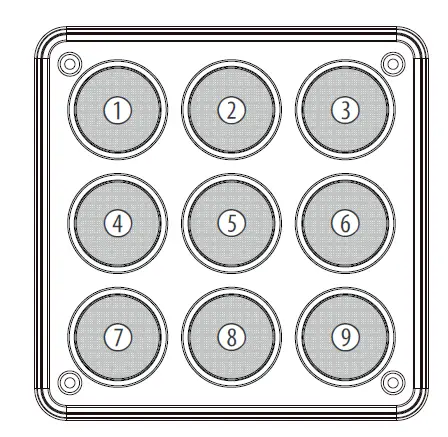
Technical specifications
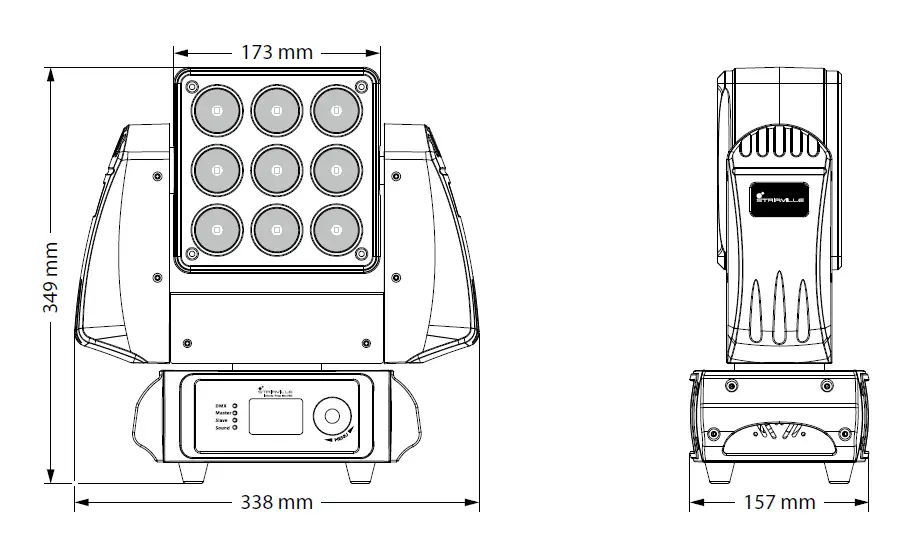
| Light source | 9 × RGBW LED, each 10 W | |||
| Optical properties | Beam angle | 8 ° | ||
| Rotation angle (pan), max. | 540° or endless | |||
| Inclination angle (tilt), max. | 270° or endless | |||
| Dimmer | electronic, 0…100 % | |||
| Control protocols | DMX 512 | |||
| Control | DMX | |||
| Number of DMX channels | 9, 17, 45 | |||
| Input connections | Power supply | Lockable input socket (Power Twist) | ||
| DMX control | XLR chassis socket, 3-pin | |||
| XLR chassis socket, 5-pin | ||||
| Output connections | Power supply | Lockable output socket (Power Twist) | ||
| DMX control | XLR chassis socket, 3-pin | |||
| XLR chassis socket, 5-pin | ||||
| Power consumption | 115 W | |||
| Supply voltage | 100 – 240 V 50/60 Hz | |||
| Fuse | 5 mm × 20 mm, 4 A, 250 V, slow-blow | |||
| Degree of protection | IP20 | |||
| Mounting options | hanging, standing, truss mounting | |||
| Dimensions (W × H × D) | 338 mm × 349 mm × 157 mm | |||
| Weight | 6.4 kg | |||
| Ambient conditions | Temperature range | 0 °C…40 °C | ||
| Relative humidity | 20 %…80 % (non-condensing) | |||
Plug and connection assignment
Introduction
This chapter will help you select the right cables and plugs to connect your valuable equipment so that a perfect light experience is guaranteed.
Please take our tips, because especially in ‘Sound & Light’ caution is indicated: Even if a plug fits into a socket, the result of an incorrect connection may be a destroyed DMX controller, a short circuit or ‘just’ a not working light show!
DMX connections
The unit offers a 3-pin XLR socket for DMX output and a 3-pin XLR plug for DMX input. Please refer to the drawing and table below for the pin assignment of a suit‐able XLR plug.
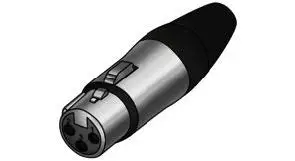
| Pin | Configuration |
| 1 | Ground, shielding |
| 2 | Signal inverted (DMX–, ‘cold signal’) |
| 3 | Signal (DMX+, ‘hot signal’) |
DMX connections
A five-pin XLR socket serves as DMX output, a five-pin XLR plug serves as DMX input. The drawing below and the table show the pin assignment of a matching coupling.
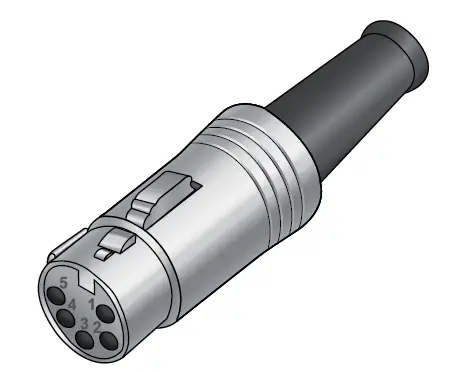
| Pin | Assignment |
| 1 | Ground (shielding) |
| 2 | Signal inverted (DMX–, ‘cold’) |
| 3 | Signal (DMX+, ‘hot’) |
| 4 | unused / second connection (DMX–) |
| 5 | unused / second connection (DMX+) |
Troubleshooting
NOTICE!
Possible data transmission errors
For error-free operation make use of dedicated DMX cables and do not use ordinary microphone cables.
Never connect the DMX input or output to audio devices such as mixers or amplifiers.
In the following we list a few common problems that may occur during operation.
We give you some suggestions for easy troubleshooting:
| Symptom | Remedy |
| The unit does not work, no light | 1. Check the mains connection and the main fuse. |
| 2. Check the settings in manual operation. | |
| No response to the DMX controller | 1. If the DMX indicator on the front of the device is not flashing in DMX mode, then no valid DMX signal is received. Check whether the DMX controller is switched on. Check the DMX connectors and cables for proper connection. |
| 2. If the DMX indicator on the front of the device is flashing in DMX mode, but there is still no response, check the address settings and the DMX polarity. | |
| 3. Check whether the DMX cables run near or parallel to high-voltage cables that may cause damage or interference to a DMX interface circuit. | |
| 4. Try using another DMX controller. |
If the procedures recommended above do not succeed, please contact our Service Center. You can find the contact information at www.thomann.de.
Cleaning
Optical lenses
Clean the optical lenses, that are accessible from the outside, regularly in order to optimize the light output. The frequency of cleaning depends on the operating envi‐ronment: wet, smoky or particularly dirty surroundings can cause more accumulation of dirt on the optics of the device.
- Clean with a soft cloth using our lamp and lens cleaner (item no. 280122).
- Always dry the parts carefully.
Fan grids
The fan grids of the device must be cleaned of any contamination, such as dust, etc. on a regular basis. Before cleaning, switch off the device and disconnect mains-oper‐ated devices from the mains. Only use pH-neutral, solvent-free and non-abrasive cleaning agents. Clean the unit with a slightly damp lint-free cloth.
Protecting the environment
Disposal of the packaging material
For the transport and protective packaging, environmentally friendly materials have been chosen that can be supplied to normal recycling.
Ensure that plastic bags, packaging, etc. are properly disposed of.
Do not just dispose of these materials with your normal household waste, but make sure that they are collected for recycling. Please follow the notes and markings on the packaging.
Disposal of your old device
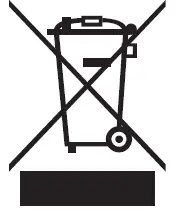
This product is subject to the European Waste Electrical and Electronic Equipment Directive (WEEE) in its currently valid version. Do not dispose with your normal household waste.
Dispose of this device through an approved waste disposal firm or through your local waste facility. When discarding the device, comply with the rules and regulations that apply in your country. If in doubt, consult your local waste disposal facility.Numbering of the separately control‐lable LEDs
 Welcome – Thomann United States