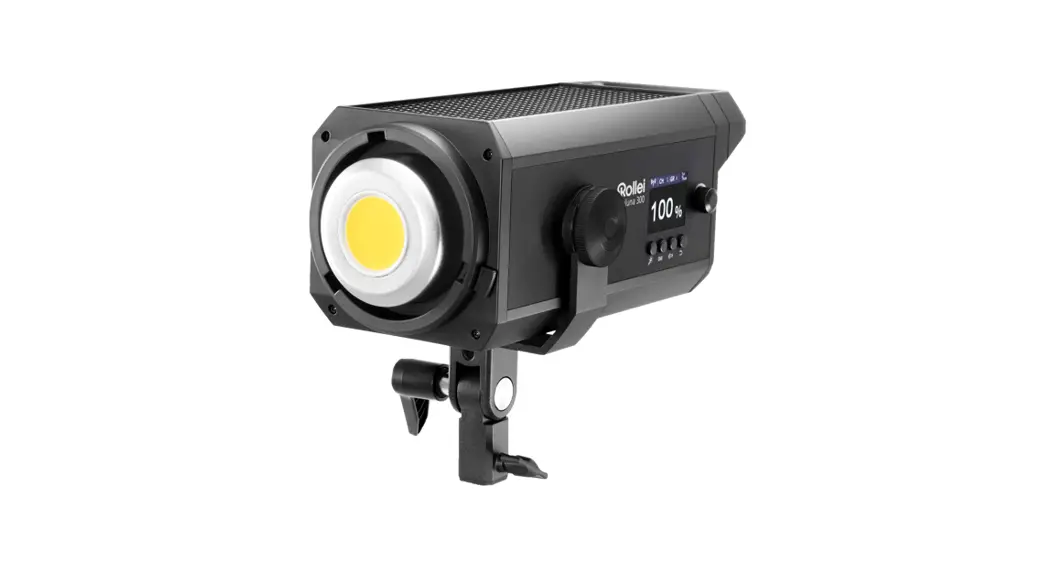
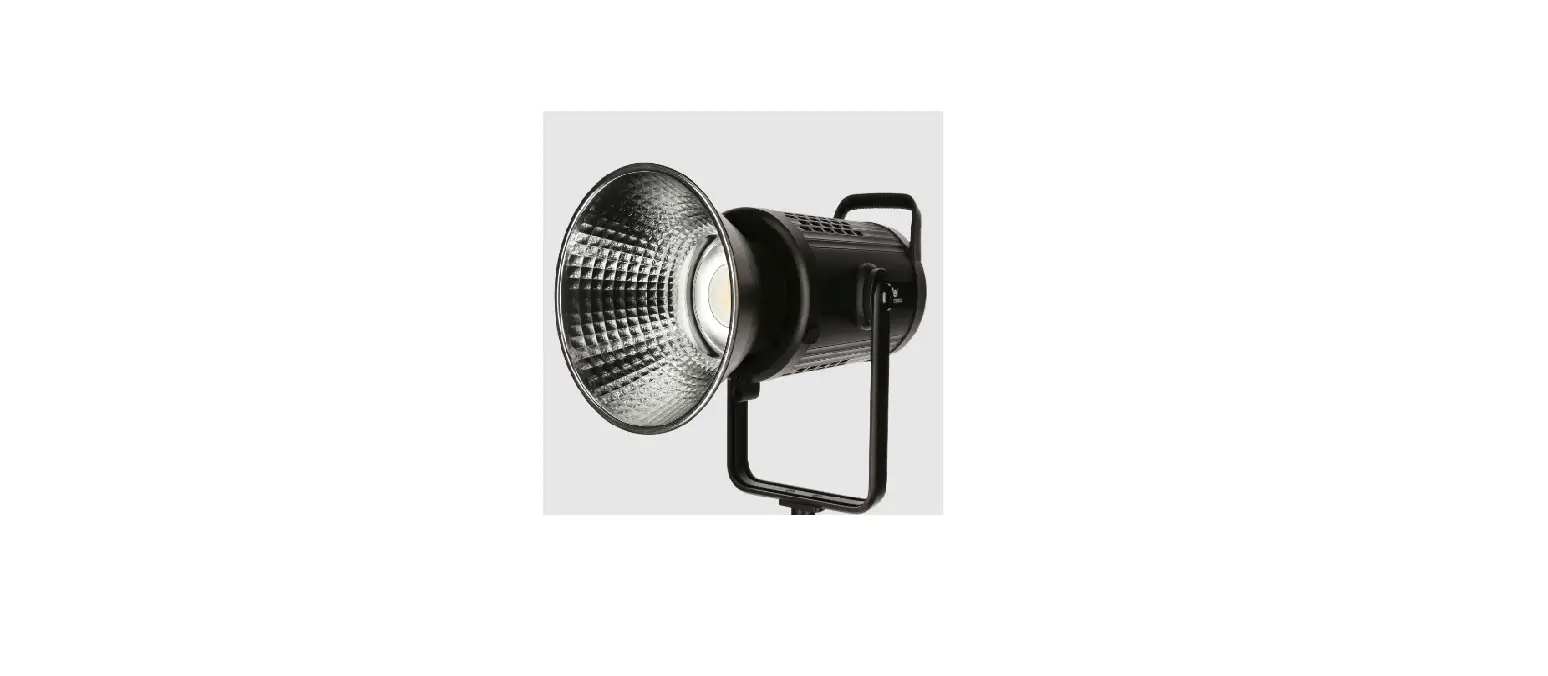
Soluna 80 Bi-Color LED Permanent Light
Product Information: The product is called Soluna
and it comes in four different models: Soluna 80, Soluna 80Bi,
Soluna 120, and Soluna 120Bi. The product is manufactured by Rollei
GmbH & Co. KG. The user manual is available in both German and
English. The product package includes a COB-LED, a lamp stand
locking screw, a Bowens S-Type connector, a power/color temperature
button, a display, a light effect button, a power supply
connection, a tilt locking screw, and an umbrella holder. The
product has various symbols on its surface to indicate power
source, power level, light effect, frequency value, color
temperature, battery status, and more. The Soluna 80/80Bi models
have a power output of 80.0W, while the Soluna 120/120Bi models
have a power output of 120.0W. The energy efficiency class for
Soluna 80/120 models is F and for Soluna 80Bi/120Bi models is G.
The product has a color rendering index (CRI) of over 97 and a
consistency index (TLCI) of over 95. The light effects can be
controlled using the Bowens S-Type bayonet or through an app with a
range of over 45 meters. The product operates on DC 24.0V power
supply and comes with various accessories such as a reflector,
diffuser cloth, safety strap, and quick start guide. The dimensions
of the product are approximately 20.8 x 16.5 x 12.2 cm and it
weighs around 940g. Product Usage Instructions: 1.
Before the first use, read the operating instructions and safety
instructions carefully. 2. Keep the operating instructions for
future reference. 3. If you are sharing the device with others,
make sure to provide them with the operating instructions. 4. If
you plan to sell or pass on the device to someone else, make sure
to include the operating instructions. 5. The Soluna is designed
for photo and video lighting purposes only and should not be used
for domestic room lighting or any other purposes. 6. The product
can be powered by either direct current (DC) or alternating current
(AC) depending on the symbol marked on the product. 7. To assemble
the product, follow these steps: a. Attach the COB-LED to the lamp
stand using the lamp stand locking screw. b. Connect the Bowens
S-Type connector to the COB-LED. c. Connect the power supply to the
power supply connection. d. Adjust the tilt of the COB-LED using
the tilt locking screw. e. Attach an umbrella to the umbrella
holder if desired. 8. Use the power/color temperature button to
adjust the power level and color temperature of the light. 9. Use
the light effect button to select and adjust various light effects.
10. The display shows relevant information such as power level,
light effect number, frequency value, color temperature, battery
status, and more. 11. The Soluna can be controlled using an app
with a range of over 45 meters. Follow the instructions provided
with the app for app-based control. 12. Refer to the technical
specifications for detailed information on power, spectrum, light
output, frequency band, power supply, and other features of the
product. 13. When not in use, disconnect the power supply and store
the product in a safe place. 14. For any issues or problems with
the product, refer to the Rollei Profi-Service or contact customer
support. 15. Follow the safety instructions provided in the manual
to ensure safe usage of the product. 16. Dispose of the product in
accordance with local regulations and guidelines. 17. For more
information, visit the website www.rollei.de and refer to the
specific product pages for Soluna 80, Soluna 80Bi, Soluna 120, and
Soluna 120Bi. 18. Rollei GmbH & Co. KG is the manufacturer of
the product. The company is located at In de Tarpen 42, D-22848
Norderstedt, Germany.
1
Soluna 80 / 80Bi / 120 / 120Bi
ANLEITUNG AUF DEUTSCH MANUAL IN ENGLISH www.rollei.de
Inhalt
Vor dem ersten Gebrauch. . . . . . . . . . . . . . . . . . . . . . 4 Bestimmungsgemäßer Gebrauch. . . . . . . . . . . . . . . . 4 Zeichenerklärung . . . . . . . . . . . . . . . . . . . . . . . . . . . . 5 Lieferumfang . . . . . . . . . . . . . . . . . . . . . . . . . . . . . . . 6 Produktübersicht . . . . . . . . . . . . . . . . . . . . . . . . . . . . 6 Displayübersicht . . . . . . . . . . . . . . . . . . . . . . . . . . . . . 8 Bedienung . . . . . . . . . . . . . . . . . . . . . . . . . . . . . . . . . . 8 Rollei App / Bluethooth®* . . . . . . . . . . . . . . . . . . . . 10 Störungssuche / Fehlerbehebung . . . . . . . . . . . . . . 11 Technische Daten . . . . . . . . . . . . . . . . . . . . . . . . . . . 12 Sicherheitshinweise. . . . . . . . . . . . . . . . . . . . . . . . . . 13 Entsorgung . . . . . . . . . . . . . . . . . . . . . . . . . . . . . . . . 17 Konformität. . . . . . . . . . . . . . . . . . . . . . . . . . . . . . . . 17
CONTENT | INHALT
3
Content
Before the First Use . . . . . . . . . . . . . . . . . . . . . . . . . 18 Intended Use . . . . . . . . . . . . . . . . . . . . . . . . . . . . . . 18 Explanation of Symbols . . . . . . . . . . . . . . . . . . . . . . 19 What`s in the Box . . . . . . . . . . . . . . . . . . . . . . . . . . . 20 Product Overview . . . . . . . . . . . . . . . . . . . . . . . . . . . 21 Display Overview . . . . . . . . . . . . . . . . . . . . . . . . . . . 22 Operation . . . . . . . . . . . . . . . . . . . . . . . . . . . . . . . . . 22 Rollei App / Bluethooth®* . . . . . . . . . . . . . . . . . . . . 24 Troubleshooting / Fault Rectification . . . . . . . . . . . 25 Technical Data . . . . . . . . . . . . . . . . . . . . . . . . . . . . . . 26 Safety Instructions . . . . . . . . . . . . . . . . . . . . . . . . . . 28 Disposal . . . . . . . . . . . . . . . . . . . . . . . . . . . . . . . . . . . 31 Conformity . . . . . . . . . . . . . . . . . . . . . . . . . . . . . . . . 31
4 Vor dem ersten Gebrauch
Lesen Sie vor dem ersten Gebrauch die Bedienungsanleitung und die Sicherheitshinweise aufmerksam durch. Bewahren Sie die Bedienungsanleitung zusammen mit dem Gerät für den späteren Gebrauch auf. Sollten andere Personen dieses Gerät nutzen, so stellen Sie ihnen diese Anleitung zur Verfügung. Wenn Sie das Gerät an Dritte weitergeben, gehört diese Anleitung zum Gerät und muss mitgeliefert werden.
Bestimmungsgemäßer Gebrauch
Dieses Gerät ist nur als Foto- und Videobeleuchtung konzipiert. Es darf nicht zu anderen Zwecken und insbesondere nicht zur häuslichen Raumbeleuchtung verwendet werden.
DEUTSCH
Zeichenerklärung
5
Die folgenden Symbole werden in dieser Bedienungsanleitung, auf dem LED-Licht oder auf der Verpackung verwendet.
Mit diesem Symbol gekennzeichnete Produkte erfüllen alle maßgeblichen Gemeinschaftsvorschriften des Europäischen Wirtschaftsraums.
Mit diesem Zeichen gekennzeichnete Produkte werden mit Gleichstrom betrieben.
Mit diesem Zeichen gekennzeichnete Produkte werden mit Wechselstrom betrieben.
Geräte mit diesem Zeichen haben eine zusätzliche oder verstärkte Isolierung und entsprechen der Schutzklasse II.
Nur für innen. Geräte mit diesem Zeichen dürfen nur im Haus betrieben werden (trockene Umgebung).
6 Lieferumfang
Rollei Soluna 80/80Bi/120/120Bi Netzadapter Schutzkappe Reflektor Diffusor-Tuch Sicherungsband Schnellstartanleitung
DEUTSCH
Produktübersicht
7
1 COB-LED
8 Lampenstativ-Feststellschraube
2 Bowens S-Type-Anschluss
9 Leistungs-/Farbtemperaur-
3 Zubehör-Entriegelungs-Taste
Knopf1)
4 Display
10 Bluetooth®*-Taste
5 Lichteffekt-Knopf
11 Ein-/Ausschalter
6 Strom-Anschluss
12 Neigungs-Feststellschraube
7 Schirmhalterung
1 2
3
4
5
9
10
6
11
7
12
8
1) Nur für Soluna 80Bi/120Bi.
8 Displayübersicht
1 Leistungs-Symbol
2 Lichteffekt-Symbol
3 Lichteffekt-Nummer 4 Frequenzwert-Symbol 5 Frequenzwert
2 3 4
6 Farbtemperatur-Symbol
5
7 Akku-Symbol
8 Strom-Symbol
9 Bluetooth®*-Symbol
1
9 8 7
6
Bedienung
Einschalten Stecken Sie das Netzkabel in die entsprechende Buchse des
Soluna 80 / 80 Bi / 120 / 120 Bi, schalten Sie das Gerät über den Ein-/Ausschalter ein, das LC-Display leuchtet auf.
Einstellung der Helligkeit Drehen Sie den Leistungs-/Farbtemperaur-Knopf [9], um die Hel-
ligkeit einzustellen. Der Dimmbereich ist 0 ~ 100 %, die Genauigkeit ist 1 %. Bei dem Soluna 80/120 können Sie über kurzes Drücken des Leistungs-/Farbtemperatur-Knopfes [9] die Helligkeit in 25-%-Schritten ändern.
DEUTSCH
Bedienung
9
Einstellung der Farbtemperatur (nur für Soluna 80Bi / 120Bi) Drücken Sie den Leistungs-/Farbtemperatur-Knopf [9] kurz, um
von der Helligkeits-Einstellung in den Farbtemperatur-Modus zu wechseln. Drehen Sie den Leistungs-/ Farbtemperatur-Knopf [9], um die Farbtemperatur einzustellen. Die Farbtemperatur kann zwischen 2.700 und 6.500 K in 100-KSchritten eingestellt werden.
Lichteffekte Drehen Sie den Lichteffekt-Knopf [5], stellen Sie den gewünschten Lichteffekt ein und wählen Sie zwischen den Lichteffekten 1 bis 9.
1 = TV 2 = Defekte Glühbirne 3 = Gewitter 4 = Flamme 5 = Pulsieren 6 = Paparazzi 7 = Fern- / Abblendlicht 8 = SOS 9 = Warnlicht
Drücken Sie den Lichteffekt-Knopf [5] zwei Mal kurz, um die Frequenz des jeweiligen Effektes einzustellen.
10 Rollei App / Bluetooth®*
Laden Sie die ,,Rollei Studio” App direkt aus dem App Store oder die ,,Studio” App aus dem Amazon App Store. Verbindung mit dem Smartphone 1. Aktivieren Sie Bluetooth®* an Ihrem Smartphone. 2. Schalten Sie das Rollei Soluna 80 / 80 Bi / 120 / 120 Bi ein und
aktivieren Sie über die Bluetooth®*-Taste [10] Bluetooth®*. 3. Öffnen Sie die ,,Rollei (Studio)” App, die Verbindung mit dem Smart-
phone wird automatisch hergestellt. Falls dies nicht geschehen sollte, fügen Sie das Licht über das ,,+”-Symbol in der App hinzu. Hinweis: Wenn Sie das LED-Licht mit der App auf einem anderen Smartphone verbinden möchten, setzen Sie das Bluetooth®*Signal zurück, indem Sie zwei Mal kurz auf die Bluetooth®*-Taste [10] drücken, bis das Bluetooth®*-Symbol blinkt. Das Zurücksetzen ist damit abgeschlossen. Hinweis: Die Verbindung wird mit Hilfe von ,,Bluetooth®* Low Energy” (BLE) hergestellt. Hierfür ist eine Standort-Freigabe der App notwendig. Die Verbindung zu dem LED-Licht wird direkt in der App hergestellt.
DEUTSCH
Rollei App / Bluetooth®*
11
Erhältlich im
Störungssuche / Fehlerbehebung
Gerät schaltet nicht ein Bitte prüfen Sie bei Netzbetrieb den korrekten Sitz des Netz-
kabels. Bitte prüfen Sie (ggf. mit einem geeigneten Messgerät), ob an der
Steckdose Spannung für das Netzkabel anliegt. Bitte überprüfen Sie die Geräte-/Haussicherung. Wechseln Sie ggf.
die Sicherung(en) aus.
Falls ein Problem weiter besteht, kontaktieren Sie bitte den Rollei Profi-Service.
12 Technische Daten
Soluna 80 | 80Bi | 120 | 120Bi
Leistung
Soluna 80/80Bi: 80,0 W
Soluna 120/120Bi: 120,0 W Energieeffizienzklasse (EU Soluna 80/120: F
2017/1369)
Soluna 80Bi/120Bi: G
EU-Energieeffizienzklasse- A G
Spektrum (EU 2017/1369)
Farbtemperatur
Soluna 80/120: 5.500 K ± 100 K
Color Rendering Index
Soluna 80Bi/120Bi: 2.700 6.500 K > 96
(CRI) Television Lighting
> 97
Consistency Index (TLCI) Leistungsregelung
0 100 %
Beleuchtungsstärke
Soluna 80: 4.900 lx | Soluna 80Bi:
(5.500 K, 1 m)
4.150 lx |
Soluna 120: 6.450 lx | Soluna 120Bi:
Lichteffekte
5.550 lx 9
Bowens S-Type-Bajonett Ja
Bluetooth®*-Funktion
App-Bedienung, Reichweite > 45 m
Bluetooth®*-Version
5.0
Frequenzband
2,402 2,480 GHz
Max. abgestrahlte
6 dBm
Sendeleistung
DEUTSCH
Technische Daten
13
Soluna 80 | 80Bi | 120 | 120Bi
Stromversorgung
Soluna 80/80Bi: DC 24,0 V / 4,0 A /
96,0 W
Soluna 120/120Bi: DC 24,0 V / 5,5 A /
132,0 W
Netzadapter für Soluna 80/80Bi:
Input AC 100 240 V / 50/60 Hz / 2,5 A
max.,
Output DC 24,0 V / 4,0 A / 96,0 W
Netzadapter für Soluna 120/120Bi:
Input AC 100 240 V / 50/60 Hz / 2,0 A
max.,
Weitere Ausstattung
Output DC 24,0 V / 5,5 A / 132,0 W Display, Stativanschluss, Schirm-
Lautstärke Lüfter
halterung, Tragegriff < 30 dB
Maße
20,8 x 16,5 x 12,2 cm
Gewicht
940 g
Lieferumfang
Soluna 80/80Bi/120/120Bi, Netzadap-
ter, Schuzkappe, Reflektor, Diffusor-
Tuch, Sicherungsband, Schnellstart-
anleitung
Wir behalten uns das Recht vor, Funktionen oder Parameter ohne weitere Ankündigung zu aktualisieren. Druckfehler und Irrtümer vorbehalten. Das Reproduzieren dieser Bedienungsanleitung auch auszugsweise ist nicht gestattet. *Die Bluetooth®-Wortmarke und Logos sind eingetragene Warenzeichen der Bluetooth SIG, Inc. und die Verwendung dieser Marken durch Rollei erfolgt unter Lizenz. Andere Warenzeichen und Handelsnamen sind Eigentum ihrer jeweiligen Inhaber.
14 Sicherheitshinweise
Gefahr durch elektrischen Strom! Fehlerhafte elektrische Installationen oder eine übermäßige Netzspannung können Stromschlag verursachen. Schließen Sie das Produkt nur dann an, wenn die Netzspannung
der Steckdose mit den Angaben auf dem Typenschild übereinstimmt. Das Produkt an eine leicht zugängliche Steckdose anschließen, damit Sie es bei Problemen schnell vom Netz trennen können. Nur das mitgelieferte Netzkabel benutzen. Verwenden Sie das Produkt nicht, wenn es sichtbar beschädigt ist oder wenn das Kabel defekt ist. Wenn das Produkt oder das Zubehör beschädigt ist, muss es durch den Hersteller, dessen Kundendienst oder eine ähnlich qualifizierte Person ausgetauscht bzw. repariert werden, um Gefährdungen zu vermeiden. Das Gehäuse darf nicht geöffnet und Reparaturen dürfen ausschließlich von einem Fachmann ausgeführt werden. Wenden Sie sich hierzu an eine Fachwerkstatt. Bei Reparaturen durch den Benutzer, unsachgemäßem Anschluss oder Fehlbedienung werden jegliche Haftung und alle Gewährleistungsansprüche ausgeschlossen. Wenn Sie das Gerät für längere Zeit nicht benutzen, trennen Sie es immer von der Stromquelle. Schützen Sie das Produkt vor Feuchtigkeit. Berühren Sie es nicht mit nassen/feuchten Händen und tauchen Sie es nicht unter Wasser. Dieses Produkt ist nicht wasserdicht! Benutzen Sie dieses Produkt nicht im Regen oder in nassen Umgebungen. Berühren Sie das Produkt niemals bei Gewitter. Bevor Sie die Stromverbindung trennen, schalten Sie das Gerät am Hauptschalter aus.
DEUTSCH
Sicherheitshinweise
15
Verwahren oder verwenden Sie das Gerät nicht an Orten, an denen es starken elektromagnetischen Feldern oder Staub ausgesetzt ist.
Halten Sie das Gerät von weiteren Störquellen fern.
Achtung! Niemals das Netzkabel als Tragegriff benutzen. Produkt und Zubehör von offenen Flammen, heißen Oberflächen
und leicht entflammbaren Materialien fernhalten. Verlegen Sie das Netzkabel so, dass es keine Stolpergefahr dar-
stellt. Knicken Sie das Netzkabel nicht und legen Sie es nicht über schar-
fe Kanten.
Achtung!
Gefahr für Kinder und Personen mit eingeschränkten physischen, sensorischen oder geistigen Fähigkeiten (z. B. teilweise Behinderte, ältere Personen mit eingeschränkten körperlichen und geistigen Fähigkeiten) oder mangelnder Erfahrung und Know-how (z. B. ältere Kinder). Dieses Produkt kann von Personen mit eingeschränkten physi-
schen, sensorischen oder geistigen Fähigkeiten oder mangelnder Erfahrung und Know-how benutzt werden, sofern diese beaufsichtigt werden oder eine Anleitung zur sicheren Verwendung des Produktes erhalten haben und die sich aus dem Gebrauch entstehenden möglichen Gefahren verstehen. Kinder dürfen mit dem Produkt nicht spielen. Das Produkt darf von Kindern nicht gereinigt oder gepflegt werden. Halten Sie Kinder unter acht Jahren vom Produkt und den Zubehörteilen fern. Stecken Sie keine Gegenstände in das Produkt. Das Produkt während des Betriebs nicht unbeaufsichtigt lassen.
16 Sicherheitshinweise
Das Gerät ist kein Spielzeug. Halten Sie das Gerät, Zubehörteile und die Verpackungsmaterialien von Kindern und Haustieren fern, um Unfällen und Erstickung vorzubeugen.
Nur zur Beleuchtung für fotografische Zwecke. Nicht für die dauerhafte Raumbeleuchtung geeignet.
Filmen Sie weder Auto-, Bus-, Fahrrad-, Motorradfahrer noch Zugführer während der Fahrt mit diesem Produkt. Der Fahrer kann geblendet werden und so einen Unfall verursachen. Dieses gilt auch für nicht aufgeführte Personen oder Gruppen, wenn durch eine mögliche Blendung ein Unfall verursacht werden könnte.
Leuchten Sie nicht direkt in die Augen von Personen und Tieren, da dies zu Schädigungen der Netzhaut, Sehstörungen und sogar zur Erblindung führen kann.
Sorgen Sie für ausreichende Belüftung während des Betriebs. Die Belüftungsschlitze des Geräts niemals abdecken.
Nutzen oder lagern Sie das Gerät nicht bei hohen Temperaturen oder in geschlossenen Räumen mit direkter Sonneneinstrahlung. Bei Umgebungstemperaturen von mehr als 40 °C sollte das Produkt nicht mehr genutzt werden.
Bringen Sie das Gerät auf einem Stativ mit ausreichender Tragkraft an und stellen Sie das Stativ kippsicher und rutschfest auf.
Lassen Sie das Gerät abkühlen, bevor Sie es zum Transport oder für die Lagerung verpacken.
DEUTSCH
Entsorgung
17
Entsorgen Sie die Verpackung sortenrein. Nutzen Sie dafür die örtlichen Möglichkeiten zum Sammeln von Papier, Pappe und leichten Verpackungen. (Anwendbar in der Europäischen Union und anderen europäischen Staaten mit Systemen zur getrennten Sammlung von Wertstoffen.)
Geräte, die mit diesem Symbol gekennzeichnet sind, dürfen nicht mit dem Hausmüll entsorgt werden! Sie sind gesetzlich dazu verpflichtet, Altgeräte getrennt vom Hausmüll zu entsorgen. Informationen zu Sammelstellen, die Altgeräte kostenlos entgegennehmen, erhalten Sie bei Ihrer Gemeinde- oder Stadtverwaltung.
Konformität
Hiermit erklärt die Rollei GmbH & Co. KG, dass die Funkanlagentypen ,,Rollei Soluna 80″, ,,Rollei Soluna 80Bi”, ,,Rollei Soluna 120″ und ,,Rollei Soluna 120Bi” der Richtlinie 2014/53/EU entsprechen.
Der vollständige Text der EU-Konformitätserklärung ist unter folgenden Internetadressen verfügbar:
www.rollei.de/egk/soluna80 www.rollei.de/egk/soluna80bi www.rollei.de/egk/soluna120 www.rollei.de/egk/soluna120bi
Rollei GmbH & Co. KG In de Tarpen 42, D-22848 Norderstedt Deutschland
18 Before the First Use
Before using the device for the first time, please read the operating instructions and safety instructions carefully. Keep the operating instructions together with the device for future use. If other people use this device, make this manual available to them. If you pass on the device to a third party, this manual is part of the device and must be supplied with the device.
Intended Use
This device is designed for photo and video lighting only. It may not be used for other purposes, and especially not for domestic room lighting.
ENGLISH
Explanation of Symbols
19
The following symbols are used in this manual, on the LED Light or on the packaging.
Products marked with this symbol comply with all relevant community regulations of the European Economic Area.
Products marked with this symbol are operated with direct current.
Products marked with this symbol are operated with alternating current.
Products with this symbol have additional or reinforced insulation and comply with protection class II.
For indoor use only. Devices with this symbol may only be operated indoors (dry environment).
20 What`s in the Box
Rollei Soluna 80/80Bi/120/120Bi Power adapter Protective cap Reflector Diffuser cloth Safety rope Quick start guide
ENGLISH
Product Overview
21
1 COB LED 2 Bowens S-Type mount 3 Accessories release button 4 Display 5 Light effect knob 6 Power connection 7 Umbrella holder
8 Light stand locking screw 9 Power/color temperature
knob1) 10 Bluetooth®* button 11 On/off switch 12 Tilt locking screw
1 2
3
4
5
9
10
6
11
7
12
8
1) Only for Soluna 80Bi/120Bi.
22 Display Overview
1 Power symbol
2 Light effect symbol
3 Light effect number 4 Frequency value symbol 5 Frequency value
2 3 4
6 Color temperature symbol 5
7 Battery symbol
8 Power symbol
9 Bluetooth®* symbol
1
9 8 7
6
Operation
Switching On Plug the mains cable into the appropriate socket on the Soluna
80 / 80 Bi / 120 / 120 Bi, switch the unit on using the on/off switch, the LC display lights up.
Adjusting the Brightness Turn the power/color temperature knob [9] to adjust the bright-
ness. The dimming range is 0 ~ 100 %, the accuracy is 1 %. With the Soluna 80/120, you can change the brightness in 25 %
steps by briefly pressing the power/color temperature knob [9].
ENGLISH
Operation
23
Light Effects Turn the light effect knob [5], set the desired light effect and choose between light effects 1 to 9.
1 = TV 2 = Defective light bulb 3 = Thunderstorm 4 = Flame 5 = Pulsation 6 = Paparazzi 7 = High / low beam 8 = SOS 9 = Warning light
Press the light effect knob [5] twice briefly to adjust the frequency of the respective effect.
24 Rollei App / Bluetooth®*
Download the “Rollei Studio” app directly from the App Store or the “Studio” app from the Amazon App Store. Connection with the Smartphone 1. Activate Bluetooth®* on your smartphone. 2. Turn on the Rollei Soluna 80 /80 Bi / 120 / 120 Bi and use the Blue-
tooth®* button to activate Bluetooth®*. 3. Open the ,,Rollei (Studio)” app. App, the connection with the
smartphone will be established automatically. If this does not happen, add the light via the ,,+” symbol in the app. Note: If you want to connect the LED light with the app on a different smartphone, reset the Bluetooth®*-. signal by briefly pressing the Bluetooth®* button [10] twice until the Bluetooth®* symbol flashes. The reset is now complete. Note: The connection is established using “Bluetooth®* Low Energy” (BLE). This requires a location release of the app. The connection to the LED light is established directly in the app.
ENGLISH
Rollei App / Bluetooth®*
25
Download on the
Troubleshooting / Fault Rectification
Unit Does Not Switch On Please check that the mains cable is correctly seated during mains
operation. Please check (if necessary with a suitable measuring device)
whether there is voltage for the mains cable at the socket. Please check the appliance/house fuse. Replace the fuse(s) if
necessary.
If a problem persists, please contact your Rollei dealer.
26 Technical Data
Soluna 80 | 80Bi | 120 | 120Bi
Power
Soluna 80/80Bi: 80.0 W
Energy efficiency class
Soluna 120/120Bi: 120.0 W Soluna 80/120: F
(EU 2017/1369)
Soluna 80Bi/120Bi: G
EU energy efficiency class- A G
spectrum (EU 2017/1369)
Color temperature
Soluna 80/120: 5,500 K ± 100 K
Color Rendering Index
Soluna 80Bi/120Bi: 2,700 6,500 K > 96
(CRI) Television Lighting
> 97
Consistency Index (TLCI) Power control
0 100 %
Illuminance
Soluna 80: 4,900 lx | Soluna 80Bi:
(5,500 K, 1 m)
4,150 lx | Soluna 120: 6,450 lx | Soluna
Light effects
120Bi: 5,500 lx 9
Bowens S-Type bayonet Yes
Bluetooth®* function
App operation, range > 45 m
Bluetooth®* version
5.0
Frequency band
2.402 2.480 GHz
Max. transmission power 6 dBm
ENGLISH
Technical Data
27
Soluna 80 | 80Bi | 120 | 120Bi
Power supply
Soluna 80/80Bi: DC 24.0 V / 4.0 A /
96.0 W | Soluna 120/120Bi: DC 24.0 V /
5.5 A / 132.0 W
Power adapter for Soluna 80/80Bi:
Input AC 100 240 V / 50/60 Hz / 2.5
A max, Output DC 24.0 V / 4.0 A /
96.0 W
Power adapter for Soluna 120/120Bi:
Input AC 100 240 V / 50/60 Hz / 2.0
A max., Output DC 24.0 V / 5.5 A /
Additional features
132.0 W Display, light stand connection,
Fan volume
screen holder, carrying handle < 30 dB
Dimensions
20.8 x 16.5 x 12.2 cm
Weight
940 g
What`s in the box
Soluna 80/80Bi/120/120Bi, power
adapter, protective cap, reflector,
diffuser cloth, safety rope, quick start
guide
We reserve the right to update functions or parameters without further notice. Misprints and errors excepted. Reproduction of these operating instructions even in part is not permitted. *The Bluetooth® word mark and logos are registered trademarks owned by Bluetooth SIG, Inc. and any use of such marks by Rollei is under license. Other trademarks and trade names are those of their respective owners.
28 Safety Instructions
Danger from electric current! Faulty electrical installations or excessive mains voltage can cause electric shock. Only connect the product if the mains voltage of the socket corre-
sponds to the specifications on the type plate. Connect the product to an easily accessible power outlet so that
you can quickly disconnect it from the mains in case of problems. Use only the supplied power cord. Do not use the product if it is visibly damaged or if the cable is
defective. If the product or its accessories are damaged, they must be repla-
ced or repaired by the manufacturer, its service department or a similarly qualified person to prevent hazards. The housing must not be opened and repairs must only be carried out by a qualified technician. To do this, contact a specialist workshop. Any liability and all warranty claims are excluded in the event of repairs by the user, improper connection or incorrect operation. If you do not use the product for a long period of time, always disconnect it from the power source. Protect the product from moisture. Do not touch the product with wet/damp hands or immerse it in water. This product is not waterproof! Do not use this product in the rain or in wet environments. Never touch the product during a thunderstorm. Before disconnecting the power, turn off the power at the main switch. Do not store or use the device in locations where it is exposed to strong electromagnetic fields or dust. Keep the unit away from other sources of interference.
ENGLISH
Safety Instructions
29
Attention! Never use the power cord as a carrying handle. Keep the product and accessories away from naked flames, hot
surfaces and highly flammable materials. Lay the power cord so that it does not present a tripping hazard. Do not bend the power cord or lay it over sharp edges.
Attention!
Danger for children and persons with limited physical, sen-
sory or mental abilities (e.g. partially disabled, older persons
with limited physical and mental abilities) or lack of expe-
rience and know-how (e.g. older children). This product may be used by persons with reduced physical, sen-
sory or mental abilities or lack of experience and know-how, provided that they are supervised or have received instructions for the safe use of the product and understand the potential hazards arising from its use. Children must not play with the product. The product must not be cleaned or maintained by children. Keep children under eight years of age away from the product and its accessories. Do not insert any objects into the product. Do not leave the product unattended during operation. The product is not a toy. Keep the product, accessories and packaging materials away from children and pets to prevent accidents and suffocation. For photographic lighting purposes only. Not suitable for permanent room lighting.
30 Safety Instructions
Do not film car, bus, bicycle, motorbike or train drivers while driving with this product. The driver may be blinded and cause an accident. This also applies to unlisted persons or groups if possible glare could cause an accident.
Do not shine directly into the eyes of people or animals as this may cause damage to the retina, visual disturbances and even blindness.
Ensure adequate ventilation during operation. Never cover the ventilation slits of the unit.
Do not use or store the unit in high temperatures or in closed rooms with direct sunlight. The product should not be used in ambient temperatures above 40°C.
Mount the device on a tripod with sufficient load-bearing capacity and set up the tripod so that it cannot tip over or slip.
Allow the device to cool down before packing it for transport or storage.
ENGLISH
Disposal
31
Dispose of the packaging according to its type. Use the local possibilities for collecting paper, cardboard and light packaging. (Applicable in the European Union and other European countries with systems for separate collection of recyclable materials.)
Devices marked with this symbol must not be disposed of with household waste! You are legally obliged to dispose of old appliances separately from household waste. Information on collection points that accept old appliances free of charge is available from your local authority or town council.
Conformity
Rollei GmbH & Co. KG declares that the radio equipment types “Rollei Soluna 80”, “Rollei Soluna 80Bi”, “Rollei Soluna 120” and “Rollei Soluna 120Bi” comply with Directive 2014/53/EU.
The full text of the EU Declaration of Conformity is available at the following Internet addresses:
www.rollei.com/egk/soluna80 www.rollei.com/egk/soluna80bi www.rollei.com/egk/soluna120 www.rollei.com/egk/soluna120bi
Rollei GmbH & Co. KG In de Tarpen 42, D-22848 Norderstedt Germany
Rollei GmbH & Co. KG In de Tarpen 42 D-22848 Norderstedt
Service Hotline: +49 40 270750277
@ rollei_de /rollei.foto.de
Item No.: 28316
Item No.: 28317 Item No.: 28318 Item No.: 28319 www.rollei.com
 cewe - best in print
 Rollei ? Online shop for camera, video and photo equipment
 Rollei: Der Online-Shop für Kamera- Video- und Foto-Equipment