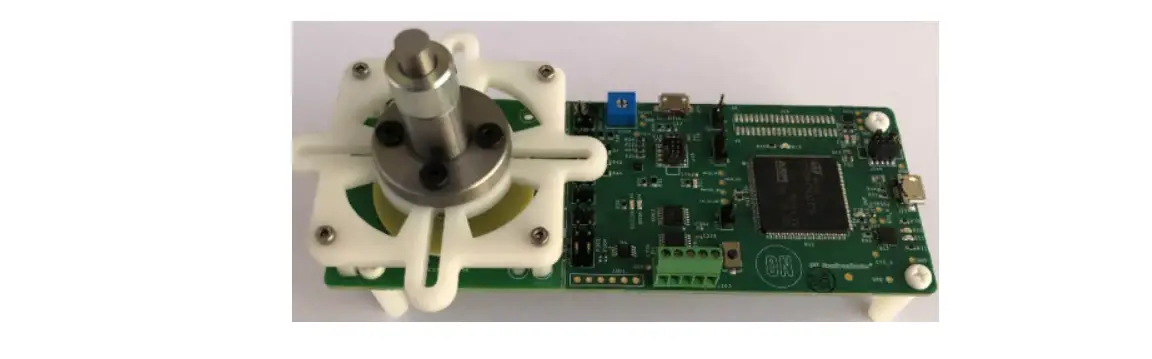
NCS32100 Rotary Inductive Position Sensor Evaluation Board
Product Information
The NCS32100 Evaluation Board is designed to provide full
demonstration of the NCS32100 Rotary Inductive Position Sensor. It
consists of hardware and a PCB rotary sensor, connected to a master
controller. The board is capable of sensing positions with an
accuracy of < +/-50 arcsec. It can be connected to a computer
running the ON Semiconductor Strata Application, which provides a
user interface for accessing position and velocity data, as well as
other auxiliary features.
The evaluation board features the following:
- NCS32100 IC
- RS-485 Interface
- Adjustable regulator for Battery voltage generation
- 40mm PCB inductive position sensor
- STM32 Master Controller
- Pre-Calibrated Removable Master Module
- Acceleration over a 2.5MHz RS485 Bus
The board is primarily used for rotary position encoding
applications.
Product Usage Instructions
- Download the ON Semiconductor Strata Application from www.onsemi.com/support/strata-developer-studio.
- Connect the evaluation board (U17) to a computer running the
Strata Application using the provided USB cable. No additional
power supplies or bench equipment are required. - If the Strata App is not already running, start the
application. - Create a login to access the NCS32100 Board UI.
- In the user interface, you can view the current position and
velocity in the time plots. The current position and velocity
outputs are also displayed near the bottom of the window. The left
side of the window allows you to configure the NCS32100 with
various user inputs, while the right side provides
diagnostics.
NCS32100 Evaluation Board Users Guide
NCS32100 Rotary Inductive Position Sensor Evaluation Board Users Guide
© Semiconductor Component Industries, LLC, 2022 April, 2022 Rev. 1
1
NCS32100 Evaluation Board Users Guide
Table of Contents
Configuration Details …………………………………………………………………………………………………………………… 8 Error Report ……………………………………………………………………………………………………………………………….. 9 Diagnostics ……………………………………………………………………………………………………………………………….. 10 Battery mode evaluation ……………………………………………………………………………………………………………. 12 Stand-alone sensor evaluation ……………………………………………………………………………………………………. 12 Performance Considerations ………………………………………………………………………………………………………. 13 NCS32100 Application Circuit ……………………………………………………………………………………………………… 13 NCS32100 Evaluation Board Master Circuitry ……………………………………………………………………………….. 14 Collateral Viewing ……………………………………………………………………………………………………………………… 16
© Semiconductor Component Industries, LLC, 2022 April, 2022 Rev. 1
2
NCS32100 Evaluation Board Users Guide
Introduction
The STR-NCS32100-GEVK evaluation board
provides hardware and a PCB rotary sensor
for full demonstration of the NCS32100. The
block diagram below shows the signal path
used to communicate with the NCS32100
through a master controller. The NCS32100
is connected to a fully functional PCB rotary
sensor capable of sensing positions with an
accuracy of < +/-50 arcsec. The board can be connected to a computer running the ON
Figure 1: NCS32100 Evaluation Board
Semiconductor Strata Application, which
provides a user interface for accessing position and velocity data, as well as a number of other
auxiliary features that will be explained in this quick start guide.
Master Control Circuitry NCS32100 Application Circuitry
USB J10
5V 5V
JLINK OB
3.3V Regulator
Adjustable Regulator
PCB Stator
USB
J17
FTDI Virtual
RS485
Serial COM
Tranceiver
Master (STM32 MCU)
5V
Level Shifter
RS485 Tranceiver
Module Connector
NCS32100
PCB Rotor
Figure 2: NCS32100 Inductive Rotary Position Sensor Evaluation Board Block Diagram
© Semiconductor Component Industries, LLC, 2022 April, 2022 Rev. 1
3
NCS32100 Evaluation Board Users Guide
The NCS32100 evaluation board houses a full rotary sensor application with a master controller for accessing position, velocity, and acceleration data. Data is displayed through the ON Semiconductor Strata application (available for download from onsemi.com). The evaluation board is programmed, calibrated, and ready for demonstration. This quick start guide will explain how to connect the evaluation board for plug and play evaluation.
Features
NCS32100 IC
RS-485 Interface Adjustable regulator for Battery voltage generation 40mm PCB inductive position sensor
STM32 Master Controller
Pre-Calibrated Removable Master Module
· Interfaces with up to 8 inductive coils · Supports Low Power Battery Mode · Delivers Rotary position, velocity and
acceleration over a 2.5MHz RS485 Bus
· Connection between external master and NCS32100 is implemented with a 2.5MHz RS485 interface.
· Backup battery voltage to the NCS32100 can be adjusted with R350 (potentiometer) from 1V to 5V. Clockwise turn lowers VBAT voltage.
· Sensor portion of board houses a PCB inductive sensor that uses a rotor and a stator. The rotor is mounted above the stator with a fixture designed to mount to standard motors. The rotor can be turned by hand in the absence of a mounted motor.
· Evaluation board houses a master MCU that is programmed to communicate with the NCS32100 over the RS-485 interface. The STM 32 MCU also communicates data to an external computer via a virtual Serial COM port. Application is plug and play with the ON Semiconductor Strata App.
· Evaluation board has been configured and calibrated to work with the attached 40mm PCB rotary sensor.
· NCS32100 IC and PCB sensor portion of the board can be snapped off for application evaluation. The master portion of the board can be replaced with a different system master. Interface protocol details are defined in the NCS32100 Reference Design Manual.
© Semiconductor Component Industries, LLC, 2022 April, 2022 Rev. 1
4
NCS32100 Evaluation Board Users Guide
Applications
Rotary Position Encoding
· Industrial Factory Automation · Robotics Applications · Precision Instrumentation · Packaging · Food and beverage · Printing · Textiles · Mobile vehicle · Aerospace · Material Handling · Lift Industry · Automation · Conveying · Motor Feedback
© Semiconductor Component Industries, LLC, 2022 April, 2022 Rev. 1
5
NCS32100 Evaluation Board Users Guide
Quick Start Procedure
1. Download the ON Semiconductor Strata Application. The latest Strata release is available for download from www.onsemi.com/support/strata-developer-studio
2. Connect computer running the ON Semiconductor Strata Application to the evaluation board (U17) using the provided USB cable. No other power supplies or bench equipment is needed.
PCB Rotor and Stator Fixture
RS-485 External Connection
VBAT Adjustement Potentiometer
USB Connector
Master Controller (STM32)
USB to PC Strata Application
Figure 3: NCS32100 Evaluation Board (Front)
Sensor Module / Master Controller Perferation
NCS32100
Figure 4: NCS32100 Evaluation Board (Back)
© Semiconductor Component Industries, LLC, 2022 April, 2022 Rev. 1
6
NCS32100 Evaluation Board Users Guide
3. If the Strata App is not already running, start the application. 4. Create a login.
Figure 5: Strata Login Window The Strata Application will recognize the evaluation board connected via USB and will bring up the evaluation board specific user interface. (The evaluation board can be connected before or after the Strata App has been launched). Once the board is recognized, the NCS32100 Inductive Rotary Evaluation Board will be selectable in the list of Strata supported boards. The user can update the Strata settings to open the UI automatically upon connecting to the board if desired.
Click here to open the NCS32100 Board UI
5. The user interface, as shown below, allows the user to see the current position and velocity in the time plots. The current position and velocity outputs are also shown near the bottom of the window. The left hand side of the window has a number of user inputs that can be set to configure the NCS32100. The right side of the window has a variety of diagnostics.
© Semiconductor Component Industries, LLC, 2022 April, 2022 Rev. 1
7
NCS32100 Evaluation Board Users Guide
Figure 6: NCS32100 Evaluation Strata UI
Configuration Details
In the upper left side of the NCS32100 Strata UI, device configuration inputs are made available to the user. 3 input boxes allow the user to set the low battery threshold, the over temperature threshold, and the resolutions for the velocity and outputs. Low Battery Threshold The low battery threshold setting allows the user to choose a voltage at which the low battery error will be reported. The battery threshold input range is 1V to 3.3V. If the user types 2.1V in the low battery threshold input box, then the Low Battery Threshold on the right side of the UI will be updated, and the Low Battery LED in the lower left of the GUI will turn red if the battery voltage falls below 2.1V. The user can change the actual backup battery voltage going to the NCS32100 by dialing the blue R350 potentiometer. Turning the potentiometer clockwise will lower the VBAT voltage (see Battery Backup Mode section).
© Semiconductor Component Industries, LLC, 2022 April, 2022 Rev. 1
8
NCS32100 Evaluation Board Users Guide
Over Temperature The over temperature setting allows the user to choose a temperature threshold for the over temperature error. The user can choose a value between 0C and 125C. If the internal temperature of the NCS32100 device rises above the selected temperature threshold, then the Over Temperature LED in the lower left of the GUI will turn red. Velocity Resolution The velocity output from the NCS32100 is a 20 bit value, however, the noise floor for the velocity measurements will occupy some of the least significant bits. The lower bits of the velocity measurement can be ignored by setting the velocity resolution to a value lower than 20. For example, if the user sets the velocity resolution to 16, then the last four LSB of the velocity value will be zeroed out and will not be reflected in the velocity output.
Error Report
The lower left side of the NCS32100 Strata GUI has a number of indicators to signal to the user when certain system errors have occurred. The supported error indicators are: Over speed The `Over speed’ indicator will turn red if the velocity of the rotor exceeds 6,000 rpm. Sensor Error The `Sensor Error’ indicator will turn red if an open circuit in the sensor coils is detected. Open coil detection is continuously monitored. If a coil becomes damaged or is not connected properly, then the system will be notified through the sensor error bit. It is not recommended that the user intentionally attempts to cause this error on the evaluation board because it would involve damaging the PCB sensor. Turn Count Overflow The `Turn Count Overflow’ indicator turns red if the turns count crosses 0. For example, if the current turns count is 4, and the rotor is turned counter clockwise 5 full rotations, then the turns count overflow error will signal. This is an indicator to the system master that a multi turn count rollover needs to be handled properly. Low Battery The `Low Battery’ indicator turns red if the backup battery voltage falls below 2.7V. The low battery error is different than the low battery threshold that is configurable by the user. The recommended battery voltage is 3.3V, and 2.7V is a hard designed indicator that the battery needs to be replaced.
© Semiconductor Component Industries, LLC, 2022 April, 2022 Rev. 1
9
NCS32100 Evaluation Board Users Guide
No Power The `No Power’ indicator turns red if the 5V VCC supply is removed from the NCS32100. The user can exercise this error by simply removing the J300 jumper on the evaluation board, or switching the SW1 switch (revB boards only). This will disconnect the 5V VCC power and put the NCS32100 into battery backup mode. Battery Alarm Threshold The `Battery Alarm Threshold’ indicator will turn red if the backup battery voltage falls below the user defined battery threshold. Over Temperature The `over temperature’ indicator turns red if the user defined temperature threshold is exceeded. Any error indicators that have been tripped can be reset from red to green by pushing the `Reset Error’ button on the right side of the Strata GUI.
Diagnostics
The right side of the NCS32100 Strata GUI displays encoder diagnostics for the user. Turns Count The turns count displays how many full revolutions have occurred since the board was powered up. The turns count can be reset back to 0 by pushing the `Reset Turns’ button. Backup Battery Voltage The `Backup Battery Voltage’ output gives the current backup battery voltage as measured by the NCS32100. This will change if the user dial around the R350 potentiometer between 5V and 1V. The recommended battery voltage is 3.3V. Low Battery Threshold The `Low Battery Threshold’ is the user specified battery threshold as it is read out from the NCS32100. This output will update to a new value if the user changes the battery threshold. Temperature The `Temperature’ output is the internal temperature of the NCS32100. The NCS32100 has an integrated temperature sensor. The NCS32100 evaluation board does not have a standard grounding plane connected to the back paddle of the NCS32100 device, allowing it to be closer to the PCB inductive sensor coils. Because there is not a heat spreader, the internal temperature will be higher than ambient room temperature.
© Semiconductor Component Industries, LLC, 2022 April, 2022 Rev. 1
10
NCS32100 Evaluation Board Users Guide
Max Temp. The `Max Temp’ output is the NCS32100 readout of the user specified over temperature threshold. This will update every time the user changes the over temperature threshold. Version # Indicates the firmware version number currently running on the NCS32100. Calibration The NCS32100 Strata UI allows the user to run the self-calibration routine with 2 different options. The options can be selected using the pull-down menu underneath the “Calibration” button, as shown below.
The “Master” option in the pull down will run the calibration routine via the master (STM32), while the “NCS32100” will run the calibration routine in the NCS32100 internal MCU. Calibration through the master is faster due to the higher capability of the STM32 processor. Calibration through the master is expected to take less than 5 seconds, while calibration through the NCS32100 take around 10 seconds to complete, but has the added advantage that no supporting code is needed from the master for the calibration to run. For the calibration routine to run, the rotor must be turning at a speed less than 500rpm. While the rotor is spinning, click the “Calibrate” button, and the UI will freeze while the calibration routine runs. Once the calibration routine has completed, the UI will return to normal operation. Resetting position The `Reset Position’ button allows the user to set the current rotor position as the 0 index for the encoder. The new position becomes the absolute reference for all subsequent position measurements. Resetting Errors The `Reset Errors’ button allows the user to reset all the error indicators back to green status.
© Semiconductor Component Industries, LLC, 2022 April, 2022 Rev. 1
11
NCS32100 Evaluation Board Users Guide
Battery mode evaluation
The NCS32100 allows the user to evaluate the low power battery mode scenario. In normal operation, the NCS32100 is supplied by 3.3-5V on the VCC pin. If the VCC supply is lost during operation, then the multi-turn count can be maintained through a power outage by using the backup battery pin. On the evaluation board, the backup battery pin is connected to an adjustable regulator. VCC can be disconnected while still leaving the battery voltage supplied. Pulling the J300 jumper will disconnect the VCC supply. (SW1 on revB boards is used to disconnect VCC).
With no VCC, the master will not be able to communicate with the NCS32100 as the RS485 interface will be powered down, however, the NCS32100 will continue to track the turns count even though changes to the turns count will not be updated to the master while VCC is not powered. If the J300 VCC jumper is re-installed, then VCC will be restored, and the master will get the updated turns count number.
VCC Jumper VBAT Adjustment Potentiometer
Stand-alone sensor evaluation
The NCS32100 evaluation board is designed so that a user can use their own master in place of the master controller on the evaluation board. They can also use the evaluation board master to communicate with a separated sensor module that can be connected to a motor or system shaft with a coupler using the provided mounting holes.
The evaluation board is divided into 2 parts, with a perforation between the NCS32100 and PCB sensor module, and the master controller circuitry. There are surface mount pads on the back of the NCS32100 module that can be used to connect to an external master.
The VCC, VBAT, VDDIO, RS485+, RS485-, and GND pins are
VDDIO
available for connection. The complete NCS32100 module can
GND
be separated from the on-board master circuitry by snapping
RS485-
the board along the perforation. Once the sensor module
RS485+
portion has been separated from the master section of the
VCC
board, wires can be soldered on to the back of the module
VBAT
using the provided pads to connect a communication cable.
The RS485 tranceiver for the NCS32100 is local to the module
board portion, and will handle the line drive for an externally connected cable. If an external master is
connected, but the NCS32100 module is not snapped off from the rest of the board, then the following
jumpers must be removed before an external master can be used.
Jumper
Purpose
Designator
J102
VBatt connection from on-board master to NCS32100
© Semiconductor Component Industries, LLC, 2022 April, 2022 Rev. 1
12
NCS32100 Evaluation Board Users Guide
J2
RS485+ connection to on-board master
J3
RS485- connection to on-board master
J1
VDDIO connection from on-board master 5V to NCS32100
J300
VCC connection from on-board master 5V to NCS32100
3mm
29.5mm
15mm Ø 6mm
(Shaft Diameter)
The sensor module fixture provides 4 mounting slots used for interfacing to a motor or shaft for lab evaluation. These slots allow for connection to a variety of standard motor mounts between 15mm and 29mm in radius. A 6mm shaft is connected to the PCB rotor on the evaluation board. This 6mm shaft can be coupled to an external motor for evaluation.
Performance Considerations
Although the NCS32100 evaluation board allows the user to mount the PCB sensor to an external motor, the bearing and rotor fixture are not designed for high speeds. The NCS32100 is capable of maintaining accuracy all the way up to 6,000 rpm, and will still provide position data at reduced accuracy up to 45,000 rpm, but this evaluation board is not built to exceed 2000 rpm. If evaluation at higher speeds is desired, then a fixture designed for higher speeds should be used. Users should also note that the sensor module on the evaluation board is assembled with materials that will expand / contract over temperature. End applications should take thermal expansion into account when considering end use temperature ranges.
NCS32100 Application Circuit
The circuit below show the NCS32100 application used on the NCS32100 evaluation board. This contains all circuitry on the NCS32100 sensor module that can be snapped off using the perforation. The NCS32100 only requires bypass capacitors on its supply pins, an RS485 driver (if RS485 is needed for the application), and the PCB coils that make up the stator portion of the sensor. The RJ1 through RJ6 resistor network is only used for selecting excitation coil inductances, and is not required for an end use application. For more details on the direct application of the NCS32100, please refer to the NCS32100 Reference Design Manual. The reference design manual defines supporting circuitry needs, sensor connection information, configuration details, and interface protocol details.
© Semiconductor Component Industries, LLC, 2022 April, 2022 Rev. 1
13
NCS32100 Evaluation Board Users Guide
NCS32100 Evaluation Board Master Circuitry
The circuit below shows the schematics for the master controller portion of the board. This circuit is used to communicate with the NCS32100 sensor module portion of the board, and to communicate data to the Strata UI. In application, this circuitry would be replaced with the users own master controller, which would communicate with the sensor module through the RS-485 interface. J303 is a terminal block that allows the user to connect the RS485 (with GND, VBAT, and VCC) to an external cable if desired.
© Semiconductor Component Industries, LLC, 2022 April, 2022 Rev. 1
14
NCS32100 Evaluation Board Users Guide
Schematic 1: Master side RS-485 transceiver and level shifters
© Semiconductor Component Industries, LLC, 2022 April, 2022 Rev. 1
15
NCS32100 Evaluation Board Users Guide
Schematic 2: Master controller MCU for Strata UI Interface
Collateral Viewing
Click the “Platform Content” button at the top of Strata to view system content. Collateral will be available here upon release of the NCS32100. This content always pulls from the most current documentation and allows the user to access the following documentation all in one place:
· Evaluation Board Schematic · Evaluation Board Layout · Evaluation Board BOM · Test Report · Evaluation Board Users Guide · Block Diagram · Demo Setup · Part Datasheets · NCS32100 Reference Design Manual
© Semiconductor Component Industries, LLC, 2022 April, 2022 Rev. 1
16
NCS32100 Evaluation Board Users Guide
ON Semiconductor and are trademarks of Semiconductor Components Industries, LLC dba ON Semiconductor or its subsidiaries in the United States and/or other countries. ON Semiconductor owns the rights to a number of patents, trademarks, copyrights, trade secrets, and other intellectual property. A listing of ON Semiconductor’s product/patent coverage may be accessed at https://www.onsemi.com/site/pdf/Patent-Marking.pdf. ON Semiconductor reserves the right to make changes without further notice to any products herein. ON Semiconductor makes no warranty, representation or guarantee regarding the suitability of its products for any particular purpose, nor does ON Semiconductor assume any liability arising out of the application or use of any product or circuit, and specifically disclaims any and all liability, including without limitation special, consequential or incidental damages. Buyer is responsible for its products and applications using ON Semiconductor products, including compliance with all laws, regulations and safety requirements or standards, regardless of any support or applications information provided by ON Semiconductor. “Typical” parameters which may be provided in ON Semiconductor data sheets and/or specifications can and do vary in different applications and actual performance may vary over time. All operating parameters, including “Typicals” must be validated for each customer application by customer’s technical experts. ON Semiconductor does not convey any license under its patent rights nor the rights of others. ON Semiconductor products are not designed, intended, or authorized for use as a critical component in life support systems or any FDA Class 3 medical devices or medical devices with a same or similar classification in a foreign jurisdiction or any devices intended for implantation in the human body. Should Buyer purchase or use ON Semiconductor products for any such unintended or unauthorized application, Buyer shall indemnify and hold ON Semiconductor and its officers, employees, subsidiaries, affiliates, and distributors harmless against all claims, costs, damages, and expenses, and reasonable attorney fees arising out of, directly or indirectly, any claim of personal injury or death associated with such unintended or unauthorized use, even if such claim alleges that ON Semiconductor was negligent regarding the design or manufacture of the part. ON Semiconductor is an Equal Opportunity/Affirmative Action Employer. This literature is subject to all applicable copyright laws and is not for resale in any manner.
PUBLICATION ORDERING INFORMATION
LITERATURE FULLFILLMENT: Literature Distribution Center for ON Semiconductor 19521 E. 32nd Pkwy, Aurora, Colorado 80011 USA
Phone: 303-675-2175 or 800-344-3860 Toll Free USA/Canada Fax: 303-675-2176 or 800-344-3867 Toll Free USA/Canada Email: [email protected]
N. American Technical Support: 800-282-9855 Toll Free USA/Canada
Europe, Middle East and Africa Technical Support: Phone: 421 33 790 2910
ON Semiconductor Website: https://www.onsemi.com/
Order Literature: https://www.onsemi.com/orderlit
For additional information, please contact your local Sales Representative
© Semiconductor Component Industries, LLC, 2022 April, 2022 Rev. 1
17
 Intelligent Power and Sensing Technologies | onsemi
 Strata Developer Studio