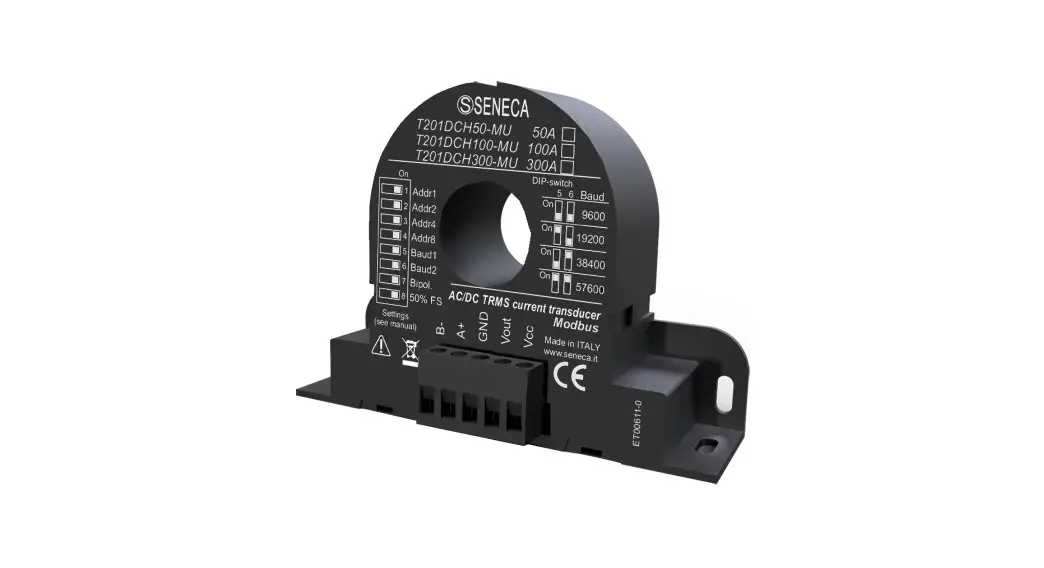

USER MANUAL
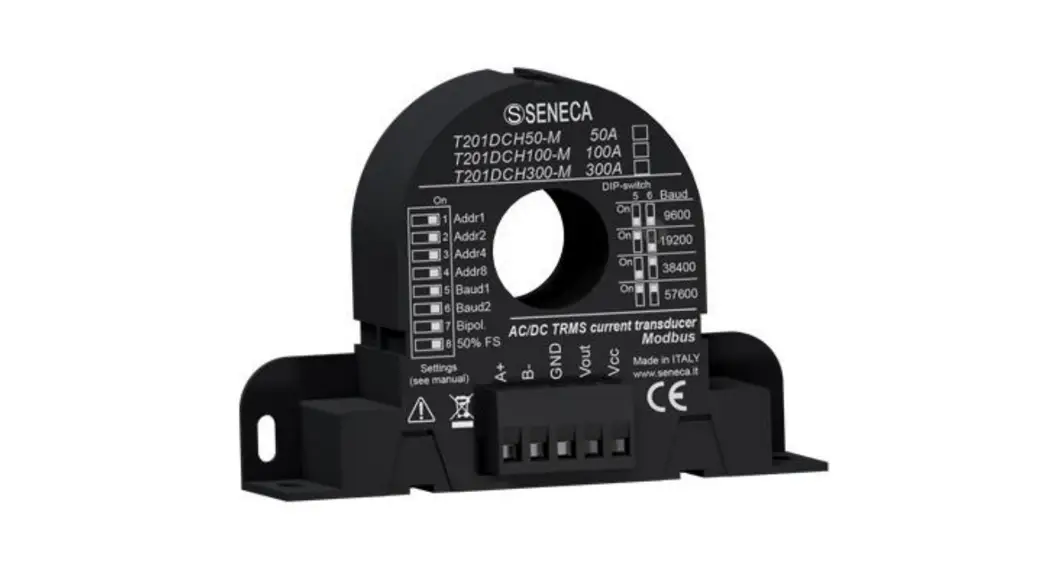
T201DCH50-MU, T201DCH100-MU
T201DCH300-MU, T201DCH600-MU
AC/DC TRUE RMS or DC BIPOLAR CURRENT TRANSFORMER
WITH MODBUS RTU PROTOCOL AND ANALOG/DIGITAL OUTPUT

SENECA S.r.l.
Via Austria 26 – 35127 – Z.I. – PADOVA (PD) – ITALY
Tel. +39.049.8705355 – 8705355 Fax +39 049.8706287
ORIGINAL INSTRUCTIONS
www.seneca.it
Introduction
Contents of the present documentation refer to products and technologies described in it.
All technical data contained in the document may be modified without prior notice.
Content of this documentation is subject to periodical revision.
To use the product safely and effectively, read carefully the following instructions before use.
The product must be used only for the use for which it was designed and built: any other use must be considered with full responsibility of the user. The installation, programming and set-up is allowed only to authorized operators, physically and intellectually suitable.
Set up shall be performed only after a correct installation and the user shall perform every operation described in the installation manual carefully.
Seneca is not considered liable for failure, breakdown, accident caused because of ignorance or failure to apply the indicated requirements.
Seneca is not considered liable for any unauthorized changes.
Seneca reserves the right to modify the device, for any commercial or construction requirements, without the obligation to promptly update the reference manuals.
No liability for the contents of these documents can be accepted.
Use the concepts, examples and other content at your own risk.
There may be errors and inaccuracies in this document that may of course be damaging to your system.
Proceed with caution, and although this is highly unlikely, the author(s) do not take any responsibility for that.
Technical features are subject to change without notice.
CONTACT US
| Technical support | [email protected] |
| Product information | [email protected] |
Document revisions
| DATE | REVISION | NOTES |
| 20/02/2019 | 0 | First Revision |
| 02/10/2020 | 1/2 | Added T201DCH600-MU model |
| 26/05/2021 | 3 | Modiche a paragrafo Ingressi/Uscite digitali |
This document is the property of SENECA srl. Duplication and reproduction are forbidden, if not authorized.
DEVICE DESCRIPTION AND INTENDED USE
 WARNING!
This User Manual extends the information from the Installation Manual about the device configuration.
Use the Installation Manual for more info.
WARNING!
Under any circumstances, SENECA s.r.l. or its suppliers shall not be responsible for loss of recording data/incomes or for consequential or incidental damage due to neglect or reckless mishandling of the device, even though SENECA is well aware of these possible damages.
SENECA, its subsidiaries, affiliates, companies of the group, its suppliers and retailers shall not guarantee that the functions will satisfy completely customer’s expectations or that device, the firmware and the software shall have no errors or work continuously.
Description
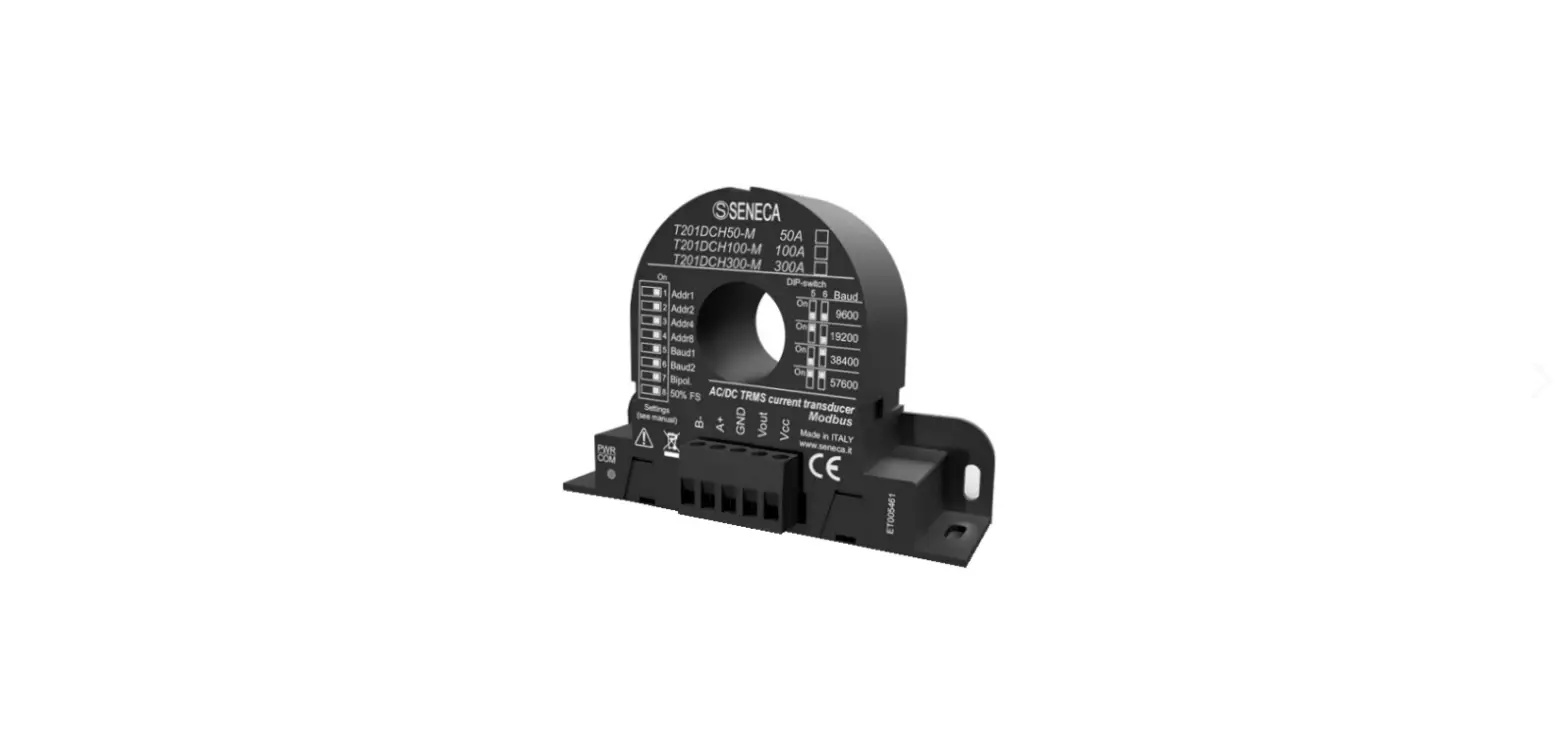
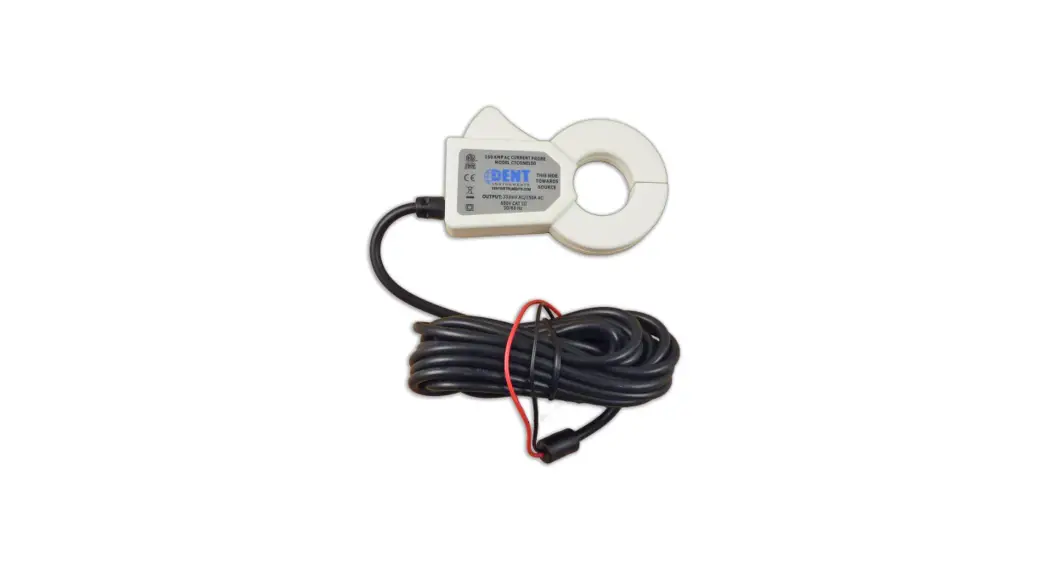
The T201DCH50/100/300/600-MU are isolated contactless loop-powered AC/DC current transducers. The look and device’s function are very similar to those of an active standard Current Transformer, but with the remarkable feature of measuring the DC and AC components. For its electrical endurance, ease of use and compact dimensions, the T201DCH50-MU, T201DCH100-MU and T201DCH300-MU and T201DCH600-MU fit every kind of current measurement: up to 50 Adc/Aac, 100 Adc/Aac and 300 Adc/Aac and 600 Adc/Aac (respectively).
An RS485 port and a USB port with a standard Modus RTU slave protocol are also available. The device can measure a current in 2 different modes (using dip switches or the Easy Setup Software):
- TRUE RMS AC/DC CURRENT MEASURE
- DC BIPOLAR CURRENT MEASURE (used also for obtaining the sign +/- of a DC current)
Features
- Similar usage to a standard alternating current active C.T.
- No shunt, no wasted power from the measuring circuit
- High accuracy rating
- Analog 0/10V dc with configurable start/stop values
- Digital Output configurable Alarm (Max, Min, Window)
- Suitable for use with all Seneca modules that allow to power the device with at least 12 Vdc and having a 0 – 10Vdc input
- Simple configurable with dip switches or with the free Easy Setup software
- Two ranges, dip-switch selectable
- Damping filter availability to improve stable reading
- Modbus RTU protocol by RS485 and USB ports
- Modbus Address/Baud Rate/Range/Mode configurable also from dip switch
- Suitable for batteries, battery chargers, solar panels, power units and generic dc and ac loads.
- Compact size: overall dimensions less than 96,5 x 68 x 26 mm
- Baud rate for Modbus RTU: from 1200 baud up to 115200 baud
- Start/Stop Input/Output Alarm Values configurable with Easy Setup software
- I Max/Min Resettable by Modbus RTU registers
- Quick installation on DIN 46277 rail
Refer to the installation manual for more information.
CONFIGURING THE DEVICE
The Device can be configured in two ways:
- A basic configuration from dip switches
- A full configuration from flash (using Easy Setup Software by the USB port)
WARNING!
Dip switches configurations are active only after a reboot! WARNING!
The Dip Switch setting will overwrite the Flash setting so, if you need to use the flash configuration you MUST set ALL dip switches to “OFF”.
DIP SWITCH CONFIGURATION
Loading configuration from flash
If ALL Dip Switch 1…8 are OFF, the device use the Flash configuration (you must use the Easy software for configure)
| Load Configuration | DIP1 | DIP2 | DIP3 | DIP4 | DIP5 | DIP6 | DIP7 | DIP8 |
| FROM FLASH | OFF | OFF | OFF | OFF | OFF | OFF | OFF | OFF |
Setting the RS485 Modbus RTU Station Address
Dip Switch 1..4 are used for configuring the Modbus RTU Station Address:
| Modbus RTU Address | DIP1 | DIP2 | DIP3 | DIP4 |
| 1 | ON | OFF | OFF | OFF |
| 2 | OFF | ON | OFF | OFF |
| 3 | ON | ON | OFF | OFF |
| 4 | OFF | OFF | ON | OFF |
| 5 | ON | OFF | ON | OFF |
| 6 | OFF | ON | ON | OFF |
| 7 | ON | ON | ON | OFF |
| 8 | OFF | OFF | OFF | ON |
| 9 | ON | OFF | OFF | ON |
| 10 | OFF | ON | OFF | ON |
| 11 | ON | ON | OFF | ON |
| 12 | OFF | OFF | ON | ON |
| 13 | ON | OFF | ON | ON |
| 14 | OFF | ON | ON | ON |
| 15 | ON | ON | ON | ON |
Setting the RS485 Baud rate
Dip Switch 5..6 are used for setting the Baud Rate
| Baud Rate | DIP5 | DIP6 |
| 9600 | OFF | OFF |
| 19200 | ON | OFF |
| 38400 | OFF | ON |
| 57600 | ON | ON |
WARNING!
The Parity bit can not be configured with the dip switches configuration but only from the Easy Setup software. By setting the dip switches the parity is always set to “None” (8,N,1).
Setting the RMS/Bipolar mode and 50% – 100% full scale
Dip Switch 7: Select from True RMS Measure / Bipolar DC Measure
Dip Switch 8: Select 50% of full scale
The following figure is related to RMS measure (“Bipol” dip switch 7 = OFF):
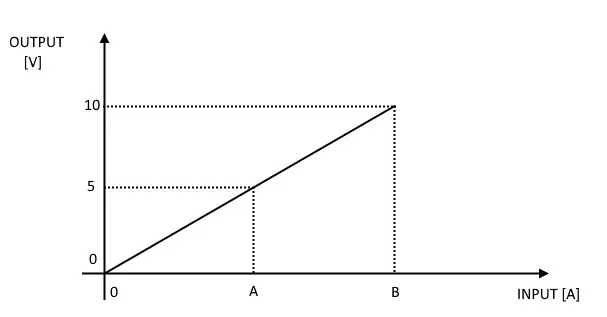
| MODEL | DIP7 BIPOL | DIP8 50% FS | A | B |
| T201DCH50-MU | OFF | OFF | 25 A | 50 A |
| T201DCH50-MU | OFF | ON | 12,5 A | 25 A |
| T201DCH100-MU | OFF | OFF | 50 A | 100 A |
| T201DCH100-MU | OFF | ON | 25 A | 50 A |
| T201DCH300-MU | OFF | OFF | 150 A | 300 A |
| T201DCH300-MU | OFF | ON | 75 A | 150 A |
| T201DCH600-MU | OFF | OFF | 300 A | 600 A |
| T201DCH600-MU | OFF | ON | 150 A | 300 A |
The following figure is related to the Bipolar measure (“Bipol” dip switch 7 = ON):
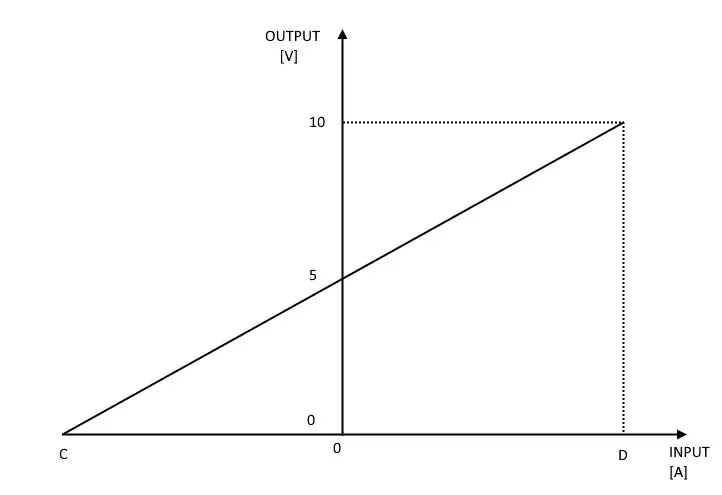
| MODEL | BIPOL DIP7 SWITCH | 50%FS DIP8 SWITCH | C | D |
| T201DCH50-MU | ON | OFF | -50 A | +50 A |
| T201DCH50-MU | ON | ON | -25 A | +25 A |
| T201DCH100-MU | ON | OFF | -100 A | +100 A |
| T201DCH100-MU | ON | ON | -50 A | +50 A |
| T201DCH300-MU | ON | OFF | -300 A | +300 A |
| T201DCH300-MU | ON | ON | -150 A | +150 A |
| T201DCH600-MU | ON | OFF | -600 A | +600 A |
| T201DCH600-MU | ON | ON | -300 A | +300 A |
WARNING!
Dip switches configuration is active only after a reboot!
So, for example, using the RMS measure with 0 A input the Output voltage is 0V but using the Bipolar measure with 0 A input the Output voltage is 5V.
MODBUS RTU PROTOCOL
The Modbus protocol supported by the T201DCH50-100-300-600 MU is:
- Modbus RTU Slave
For more information about these protocols, please refer to the Modbus specification website: http://www.modbus.org/specs.php.
Modbus RTU function code supported
The following Modbus RTU functions are supported:
- Read Holding Register (function 3) Max 5 Registers
- Write Single Register (function 6)
- Write Multiple registers (function 16) Max 2 Registers
WARNING!
All 32 bits values are stored into 2 consecutive registers WARNING!
You can Read a Maximum of 5 Modbus Registers with the Read Holding Register function (function 3) WARNING!
You can Write a Maximum of 2 Modbus Registers with the Write Multiple Register function (function 16) WARNING!
The USB Modbus configuration is fixed to 38400 baud, 8bit, No parity, 1 stop bit When the USB cable is inserted the RS485 will stop communicating until the USB will be unplugged.
MODBUS REGISTER TABLE
The following abbreviations are used in the register tables:
MS = More significant
LS = Less significant
MSW = 16 most significant bits
LSW = 16 least significant bits
MSW* = 16 most significant or least significant bits depending on the configuration (most significant default)
LSW* = 16 less significant or more significant bits depending on the configuration (less significant default)
MSW = 8 most significant bits
LSW = 8 least significant bits
MSBIT = Most significant bit
MSBIT = Least significant bit
RO = Register in read-only
RW = Read/write register
RW** = Reading and writing register contained in flash memory, writable a maximum of 10000 times.
Unsigned 16 bit = unsigned integer register, can take values from 0 to 65535
Signed 16 bit = signed integer register can take values from -32768 to +32767
Float 32 bits = 32-bit single-precision floating point register (IEEE 754) https://en.wikipedia.org/wiki/IEEE_754
BIT = Boolean registry, can be 0 (false) or 1 (true)
“0-BASED” OR “1-BASED” MODBUS ADDRESSES
According to the Modbus standard, the Holding Register registers are addressable from 0 to 65535, there are 2 different conventions for numbering the addresses: “0-BASED” and “1-BASED”.
For greater clarity, Seneca shows its register tables in both conventions.
ATTENTION!
CAREFULLY READ THE DOCUMENTATION OF THE MODBUS MASTER DEVICE IN ORDER TO UNDERSTAND WHICH OF THE TWO CONVENTIONS THE MANUFACTURER HAS DECIDED TO USE
5.1.1. MODBUS ADDRESSES WITH “0-BASED” CONVENTION
The numbering is:
| HOLDING REGISTER MODBUS ADDRESS (OFFSET) | MEANING |
| 0 | FIRST REGISTER |
| 1 | SECOND REGISTER |
| 2 | THIRD REGISTER |
| 3 | FOURTH REGISTER |
| 4 | FIFTH REGISTER |
Therefore the first register is at address 0.
In the following tables, this convention is indicated with “ADDRESS OFFSET”.
5.1.2. MODBUS ADDRESSES WITH “1 BASED” CONVENTION (STANDARD)
The numbering is that established by the Modbus consortium and is of the type:
| HOLDING REGISTER MODBUS ADDRESS 4x | MEANING |
| 40001 | FIRST REGISTER |
| 40002 | SECOND REGISTER |
| 40003 | THIRD REGISTER |
| 40004 | FOURTH REGISTER |
| 40005 | FIFTH REGISTER |
In the following tables, this convention is indicated with “ADDRESS 4x” since a 4 is added to the address so that the first Modbus register is 40001.
A further convention is also possible where the number 4 is omitted in front of the registered address:
| HOLDING MODBUS ADDRESS WITHOUT 4x | MEANING |
| 1 | FIRST REGISTER |
| 2 | SECOND REGISTER |
| 3 | THIRD REGISTER |
| 4 | FOURTH REGISTER |
| 5 | FIFTH REGISTER |
BIT CONVENTION WITHIN A MODBUS HOLDING REGISTER
A Modbus Holding Register consists of 16 bits with the following convention:
| BIT | BIT | BIT | BIT | BIT | BIT | BIT | BIT | BIT | BIT | BIT | BIT | BIT | BIT | BIT | BIT |
| 15 | 14 | 13 | 12 | 11 | 10 | 9 | 8 | 7 | 6 | 5 | 4 | 3 | 2 | 1 | 0 |
For instance, if the value of the register in decimal is 12300
the value 12300 in hexadecimal is: 0x300C
the hexadecimal 0x300C in binary value is: 11 0000 0000 1100
So, using the above convention, we get:
| BIT | BIT | BIT | BIT | BIT | BIT | BIT | BIT | BIT | BIT | BIT | BIT | BIT | BIT | BIT | BIT |
| 15 | 14 | 13 | 12 | 11 | 10 | 9 | 8 | 7 | 6 | 5 | 4 | 3 | 2 | 1 | 0 |
| 0 | 0 | 1 | 1 | 0 | 0 | 0 | 0 | 0 | 0 | 0 | 0 | 1 | 1 | 0 | 0 |
MSB and LSB BYTE CONVENTION WITHIN A MODBUS HOLDING REGISTER
A Modbus Holding Register consists of 16 bits with the following convention:
| BIT | BIT | BIT | BIT | BIT | BIT | BIT | BIT | BIT | BIT | BIT | BIT | BIT | BIT | BIT | BIT |
| 15 | 14 | 13 | 12 | 11 | 10 | 9 | 8 | 7 | 6 | 5 | 4 | 3 | 2 | 1 | 0 |
LSB Byte (Least Significant Byte) defines the 8 bits ranging from Bit 0 to Bit 7 included, we define MSB Byte (Most Significant Byte) the 8 bits ranging from Bit 8 to Bit 15 inclusive:
| BIT | BIT | BIT | BIT | BIT | BIT | BIT | BIT | BIT | BIT | BIT | BIT | BIT | BIT | BIT | BIT |
| 15 | 14 | 13 | 12 | 11 | 10 | 9 | 8 | 7 | 6 | 5 | 4 | 3 | 2 | 1 | 0 |
| BYTE MSB | BYTE LSB | ||||||||||||||
REPRESENTATION OF A 32-BIT VALUE IN TWO CONSECUTIVE MODBUS HOLDING REGISTERS
The representation of a 32-bit value in the Modbus Holding Registers is made using 2 consecutive Holding Registers (a Holding Register is a 16-bit register). To obtain the 32-bit value it is, therefore, necessary to read two consecutive registers:
For example, if register 40064 contains the 16 most significant bits (MSW) while register 40065 contains the least significant 16 bits (LSW), the 32-bit value is obtained by composing the 2 registers:
| BIT | BIT | BIT | BIT | BIT | BIT | BIT | BIT | BIT | BIT | BIT | BIT | BIT | BIT | BIT | BIT |
| 15 | 14 | 13 | 12 | 11 | 10 | 9 | 8 | 7 | 6 | 5 | 4 | 3 | 2 | 1 | 0 |
| 40064 MOST SIGNIFICANT WORD | |||||||||||||||
| BIT | BIT | BIT | BIT | BIT | BIT | BIT | BIT | BIT | BIT | BIT | BIT | BIT | BIT | BIT | BIT |
| 15 | 14 | 13 | 12 | 11 | 10 | 9 | 8 | 7 | 6 | 5 | 4 | 3 | 2 | 1 | 0 |
| 40065 LEAST SIGNIFICANT WORD | |||||||||||||||
32 = + ( ∗ 65536)
In the reading registers it is possible to swap the most significant word with the least significant word, therefore it is possible to obtain 40064 as LSW and 40065 as MSW.
TYPE OF 32-BIT FLOATING POINT DATA (IEEE 754)
The IEEE 754 standard (https://en.wikipedia.org/wiki/IEEE_754) defines the format for representing floating-point numbers.
As already mentioned, since it is a 32-bit data type, its representation occupies two 16-bit holding registers.
To obtain a binary/hexadecimal conversion of a floating-point value it is possible to refer to an online converter at this address: http://www.h-schmidt.net/FloatConverter/IEEE754.html
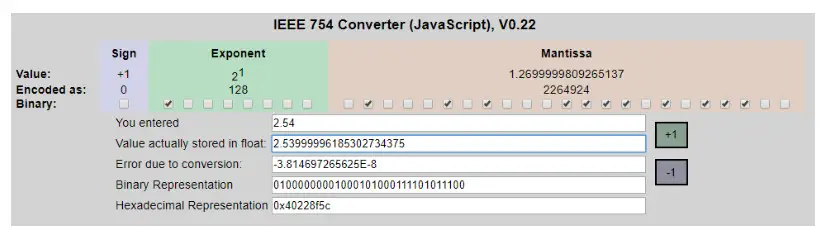
Using the last representation the value 2.54 is represented at 32 bits as: 0x40228F5C
Since we have 16-bit registers available, the value must be divided into MSW and LSW: 0x4022 (16418 decimal) are the 16 most significant bits (MSW) while 0x8F5C (36700 decimal) are the 16 least significant bits (LSW).
T201DCH-MU: MODBUS 4xxxx HOLDING REGISTERS TABLE (FUNCTION CODE 3)
| REGISTER NAME | COMMENT | REGISTE RTYPE | R/W | DEFAULT T VALUE OR START VALUE | ADDRESS (4xxxx) | OFFSET ADDRESS S |
| INTEGER CURRENT VALUE [A X100] [A X10] (T201 DC H600 A) | Current Measure Value in signed integer [A x100] For example: 18534 = 185.34 A -2500 = -25.00 A [A x10] for 600A model For example: 60000 = 600.0 A | Signed 16 Bits | R | – | 40051 | 50 |
| CURRENT MIN [A] | Minimum Current Value (use register Command for reset the value) The value is set to 0 at startup | Float32 | R | – | 40059 (LSW) 40060 (MSW) | 58-59 |
| CURRENT MAX [A] | Maximum Current Value (use register Command for reset the value) The value is set to 0 at startup | Float32 | R | – | 40061 (LSW) 40062 (MSW) | 60-61 |
| OUTPUT VOLTAGE | r Output Voltage | M Float32 40063 | R | – | (LSW) 40064 (MSW) | 62-63 |
| INVERSE FLOAT CURRENT VALUE [A] | Current Measure Value in floating-point MSW- LSW [A] Copy of Float Current Value Registers with Inverse (MSW-LSW) Floating Point | Float32 | R | – | 40065 (MSW) 40066 (LSW) | 64-65 |
| REGISTER NAME | COMMENT | REGISTE R TYPE | 1 | DEFAULT T VALUE OR START VALUE | ADDRESS (4xxxx) | OFFSET ADDRESS |
| INTEGER CURRENT VALUE [A X100] [A X10] (7201 DC H600 A) | Current Measure Value in signed integer [A x100] For example: 18534 = 185.34 A -2500 = -25.00 A [A x10] for 600A model For example: 60000 = 600.0 A | Signed 16 Bits | R | – | 40051 | 50 |
| CURRENT MIN [A] | Minimum Current Value (use register Command for reset the value) The value is set to 0 at startup | Float32 | R | – | 40059 (LSW) 40060 (MSW) | 58-59 |
| CURRENT MAX [A] | Maximum Current Value (use register Command for reset the value) The value is set to 0 at startup | Float32 | R | – | 40061 (LSW) 40062 (MSW) | 60-61 |
| OUTPUT VOLTAGE M | Output Voltage | Float32 40063 | R | – | (LSW) 40064 (MSW) | 62-63 |
| INVERSE FLOAT CURRENT VALUE [A] | Current Measure Value in floating-point MSW- LSW [A] Copy of Float Current Value Registers with Inverse (MSW-LSW) Floating Point | Float32 | R | – | 40065 (MSW) 40066 (LSW) | 64-65 |
| REGISTER NAME | COMMENT | REGISTE R TYPE | 1 | DEFAULT VALUE OR START VALUE | ADDRESS (4xxxx) | OFFSET ADDRESS |
| ALARM STATUS | Alarm status flag: BIT 0 = Max Pre-Alarm BIT 1 = Min Pre-Alarm BIT 2 = Internal Window Pre-Alarm BIT 3 = External Window Pre-Alarm Bit 4..Bit 7 = Not Used BIT 8 = Max Alarm BIT 9 = Min Alarm BIT 10 = Internal Window Alarm BIT 11 = External Window Alarm BIT 12..15 = Not Used | Unsigned 16 bits | R | 0 | 40067 | 66 |
| MODBUS STATION ADDRESS | Modbus RTU station address | Unsigned 16 bits | WV’ | 1 | 40101 | 100 |
| BAUD RATE | RS485 Port Baud rate 0 = 4800 baud 1 = 9600 baud 2 =19200 baud 3 = 38400 baud 4 = 57600 baud 5 = 115200 baud 6 = 1200 baud 7 = 2400 baud | Unsigned 16 bits | MN* | 3 | 40102 | 101 |
| PARITY | Communication Parity Bit 0 = None (8,N,1) 1= Even (8,E,1) 2 = Odd (8,0,1) | Unsigned 16 bits | Rw. | 0 | 40103 | 102 |
| REGISTER NAME | COMMENT | REGISTE R TYPE | 1 | DEFAULT VALUE OR START VALUE | ADDRESS (4xxxx) | OFFSET ADDRESS |
| OUT MODE TRUE RMS/BIPOLAR | MSB (OUT MODE) Select from Digital or Analog output: 0 = Select Analog Output 1 = Select Digital Output (Alarm) LSB (TRUE RMS/BIPOLAR) Select from True RMS or Bipolar DC measurement mode 0 = True RMS 1 = Bipolar DC | Unsigned 16 bits | RW | 0 | , „, | 103 |
| RESERVED | Reserved | Unsigned 16 bits | R | 0 | 4005 | 104 |
| FILTER | Select Filter level 0 = LOW RMS =1400 ms response Time BIPOLAR = 78 ms response Time 1 = HIGH RMS = 2900 ms response Time BIPOLAR = 650 ms response Time | Unsigned 16 bits | Rw. | 0 | :C’ 06 | 105 |
| MODEL | Select the model 0 = T201DCH50-MU 1 = T201DCH100-MU 2 = T201DCH300-MU 3 = T201DCH300-MU HW2 4 = T201DCH600-MU | Unsigned 16 bits | R | According to the model | 40107 | 106 |
| REGISTER NAME | COMMENT | REGISTE R TYPE | RW | OR T VALUE START VALUE | ADDRESS (4xxxx) | OFFSET ADDRESS |
| ALARM TYPE | Select the Alarm linked to the Digital Output: 0 = NONE 1= MAX (Alarm if the Current is above the High Threshold) 2 = MIN (Alarm if the Current is below the Low Threshold) 3 = Window INT (Alarm if the Current > Low Threshold but < High Threshold) 4 – Window EXT (Alarm if the Current is > High Threshold or < Low Threshold) | Unsigned 16 bits | Dim. I’ | 0 | .: : ‘ :5 | |
| DOUT MODE | 0 = Digital Output is normally Low 1 = Digital Output is normally Hiqh | Unsigned 16 bits | Rw. | 0 | 40109 | 108 |
| ALARM DELAY | Alarm delay in x 10ms (for example mite 1000 for obtain 10 seconds of delay) | unsigned 16 bits | RW , R | 0 | 40110 | 109 |
| START INPUT SCALE | Select the Start Input Scale [A] | Float32 | RW’ | According to the “1” model | 40111 (LSW) 40112 (MSW) | 110-111 |
| STOP INPUT SCALE | Select the Stop Input Scale [A] | Float32 | RIN I | According to tha” model | 40113 (LSW) 40114 (MSW) | 112-113 |
| START OUTPUT SCALE | Select the Start output Scale M | Float32 | RW’ | 0.0 V | 40115 (LSW) 40116 (MSW) | 114-115 |
| STOP OUTPUT SCALE | Select the Stop output Scale M | Float32 | RW* | 10.0 V | 40117 (LSW) 40118 (MSW)) | 116-117 |
| ALARM HYSTERESIS | Select the Hysteresis for the Alarm in [A] | Float32 | RW’ | 10.0 A | 40119 (LSW) 40120 (MSW) | 118-119 |
FULL CONFIGURATION WITH EASY SETUP
For configuring all the device parameters you must use the RS485 Port and the Easy T201DCH-MU software included in the Easy Setup Suite.
You can download the Easy Setup software for free from: www.seneca.it

Connect: Use the connect icon for connecting the PC to the Device. Note that you need an RS485 to USB converters like Seneca S117P1 or S107USB for connecting the device to a PC.
New: Load the default parameters in the actual project
Open: Open a stored project
Save: Save the actual project
Read: Read the actual configuration from the device (if the dip switches are not ALL of the configuration is read from dip switches)
WARNING!
If you read a configuration from the device with at least one dip switch to “ON” the software will read the dip switch configuration because of overwriting the flash configuration.
Send: Send the project configuration (if the dip switches are not ALL of the device use the dip switch configuration and NOT the sent configuration)
Test: Start a Registers read, you can also reset the MIN/MAX values and start/stop a Datalogger
Creating a Project Configuration
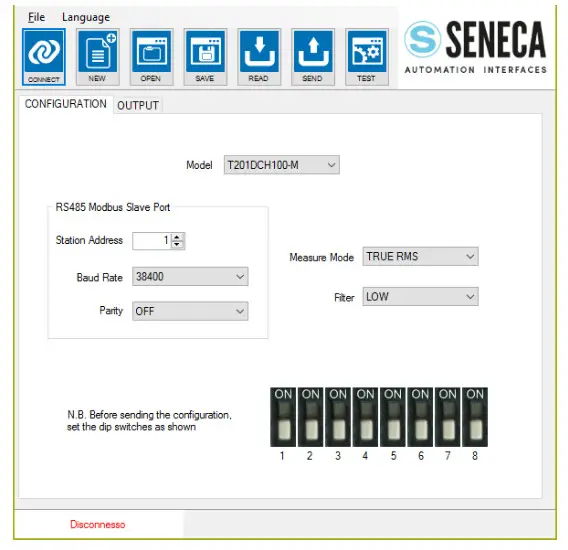 WARNING!
You must set all dip switches to OFF before sending the configuration to the device or the actual configuration will be overwritten from the dip switches configuration!
The parameters in the “Configuration” section that can be configured are:
Model: Select between T201DCH50-MU, T201DCH100-MU, T201DCH300-MU, T201DCH300-MU HW2 or T201DCH600-MU model.
Station Address: Select The Modbus RTU station address
Baud Rate: Select the Baud rate from 1200 to 115200 baud
Parity: Select NONE, ODD or EVEN
Mode: Select the current measure mode: True RMS or DC Bipolar
Filter: Select between LOW or HIGH:
| FILTER | RMS RESPONSE TIME (10%-90% F.S.) | BIPOLAR DC RESPONSE TIME (10%-90% F.S.) |
| LOW | 1400 ms | 78 ms |
| HIGH | 2900 ms | 650 ms |
The parameters in the “OUTPUT” section that can be configured depends by the Output Type if is selected “Analogic” or “Digital” (Only for T201DCH50/100/300-MU models)
If The Output is configured in “Analogic”:
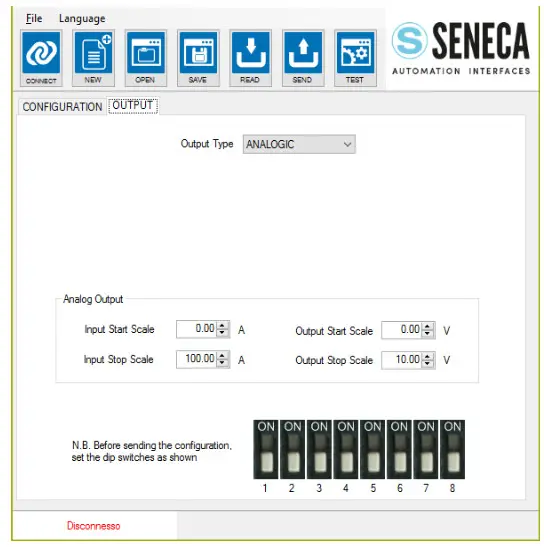
Note: The T201DCH600-MU allows the use of both the analog and digital output simultaneously.
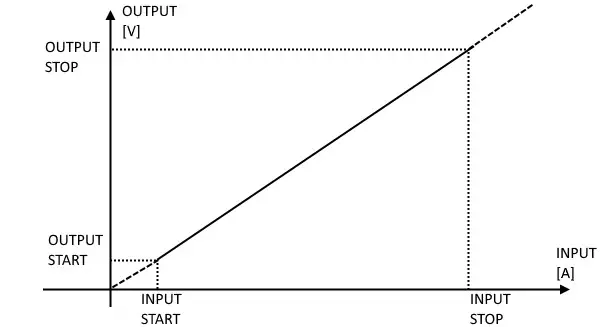
Input Start/Stop Scale and Output Start/Stop Scale: Select the Start/Stop input and Output Start/Stop scale see figure:
For example:
INPUT START = 20 A
INPUT STOP = 80 A
OUTPUT START = 2 V
OUTPUT STOP = 6 V
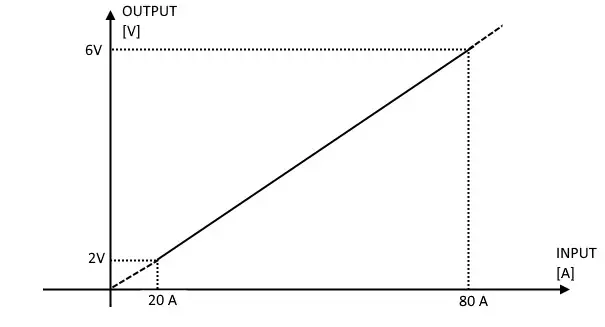
Note that with an input of 0 A the output is 0 V and over 80 A the output is over 6V (6V and 2V are not a limit). WARNING!
The Output Voltage is limited to about 10.8V
If The Output is configured in “Digital”: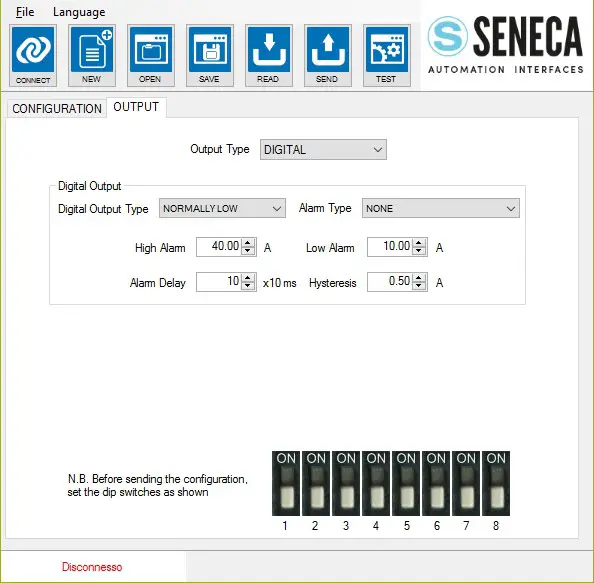
Digital Output Type: Select between Normally Low or Normally High.
Alarm Type: Select Between:
NONE: No Alarm active
MAXIMUM: Alarm if the Current is above the High Threshold
MINIMUM: Alarm if the Current is below the Low Threshold
ACTIVE IF INTO THE WINDOW: (Alarm if the Current > Low Threshold but < High Threshold)
ACTIVE IF OUT THE WINDOW: (Alarm if the Current is > High Threshold or < Low Threshold)
Alarm Delay: Select the Alarm delay in x 10 ms (for example write 100 for 1-second delay)
Hysteresis: Select the Alarm Hysteresis in [A]
High Alarm: Select the High Threshold for the Alarm in [A]
Low Alarm: Select the Low Threshold for the Alarm in [A]
Testing the Device
When the configuration is sent to the device you can test the actual configuration by using the  icon:
icon:
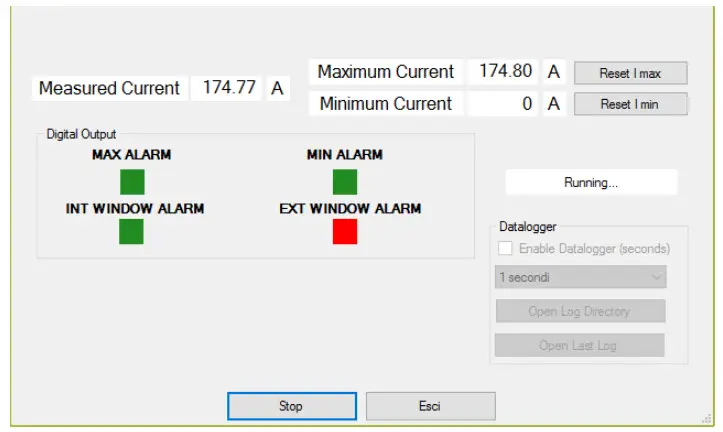
The test configuration will acquire the measure from the Modbus registers, you can also reset the MIN/MAX values.
6.3.1. The datalogger
The datalogger can be used for acquiring data that can be used with external software (for example Microsoft Excel ™). It is possible to set how much time to acquire the samples (minimum 1 second):
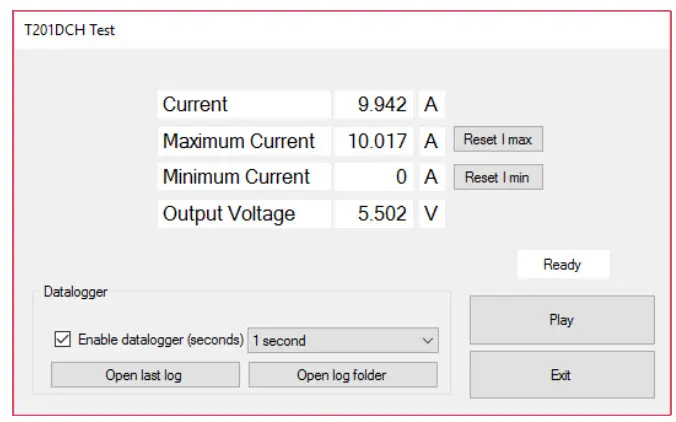
The datalogger will create a file in a standard .csv format that can be open with external tools: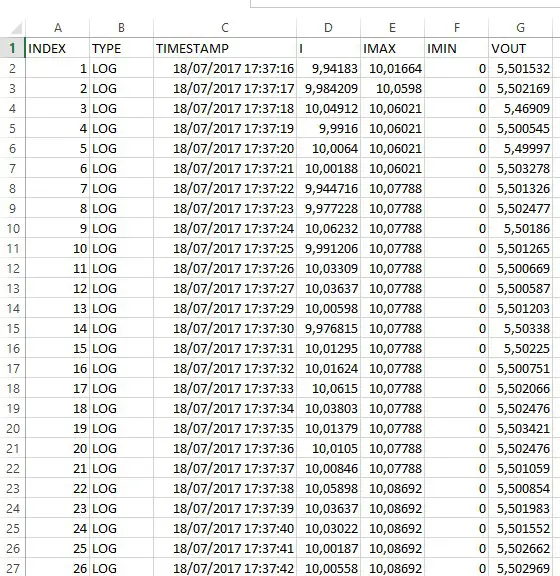 The file can also be open with a text editor:
INDEX;TYPE;TIMESTAMP;I;IMAX;IMIN;VOUT
1;LOG;18/07/2017 17:37:16;9,94182968139648;10,0166397094727;0;5,50153207778931
2;LOG;18/07/2017 17:37:17;9,98420906066895;10,0598001480103;0;5,50216913223267
3;LOG;18/07/2017 17:37:18;10,0491199493408;10,0602102279663;0;5,4690899848938
4;LOG;18/07/2017 17:37:19;9,99160003662109;10,0602102279663;0;5,50054502487183
5;LOG;18/07/2017 17:37:20;10,0064001083374;10,0602102279663;0;5,49996995925903
6;LOG;18/07/2017 17:37:21;10,0018796920776;10,0602102279663;0;5,50327777862549
7;LOG;18/07/2017 17:37:22;9,94471645355225;10,0778799057007;0;5,50132608413696
8;LOG;18/07/2017 17:37:23;9,97722816467285;10,0778799057007;0;5,50247716903687
9;LOG;18/07/2017 17:37:24;10,0623197555542;10,0778799057007;0;5,50186014175415
10;LOG;18/07/2017 17:37:25;9,99120616912842;10,0778799057007;0;5,50126504898071
11;LOG;18/07/2017 17:37:26;10,0330896377563;10,0778799057007;0;5,50066900253296
12;LOG;18/07/2017 17:37:27;10,0363702774048;10,0778799057007;0;5,50058698654175
13;LOG;18/07/2017 17:37:29;10,0059795379639;10,0778799057007;0;5,50120306015015
14;LOG;18/07/2017 17:37:30;9,97681522369385;10,0778799057007;0;5,50337982177734
15;LOG;18/07/2017 17:37:31;10,0129499435425;10,0778799057007;0;5,50225019454956
16;LOG;18/07/2017 17:37:32;10,0162401199341;10,0778799057007;0;5,50075101852417
17;LOG;18/07/2017 17:37:33;10,0614995956421;10,0778799057007;0;5,50206613540649
ALL RIGHTS RESERVED. NO PART OF THIS PUBLICATION MAY
BE REPRODUCED WITHOUT PRIOR PERMISSION.
www.seneca.it