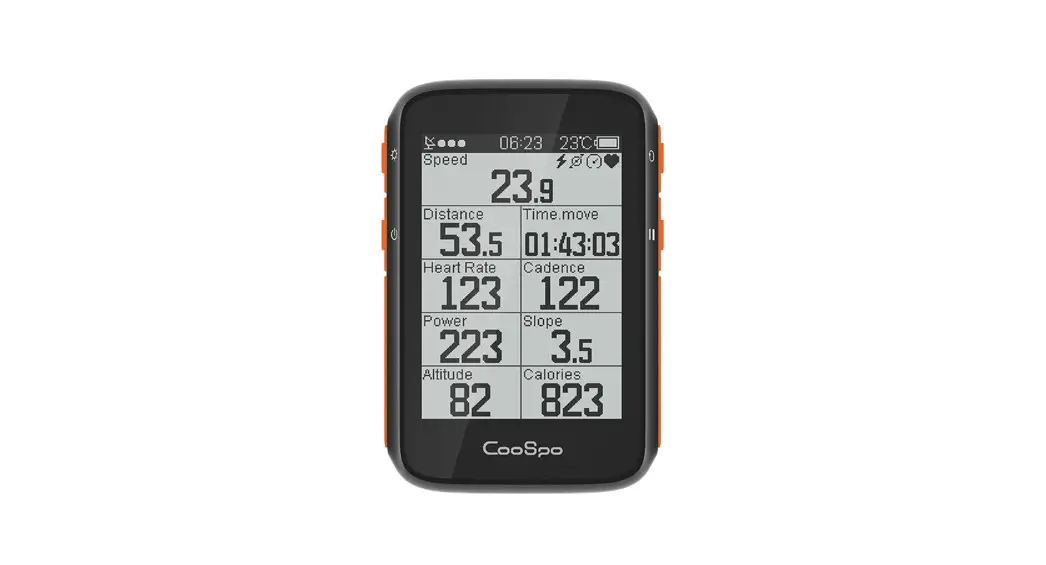
 USER MANUAL
All About Passion
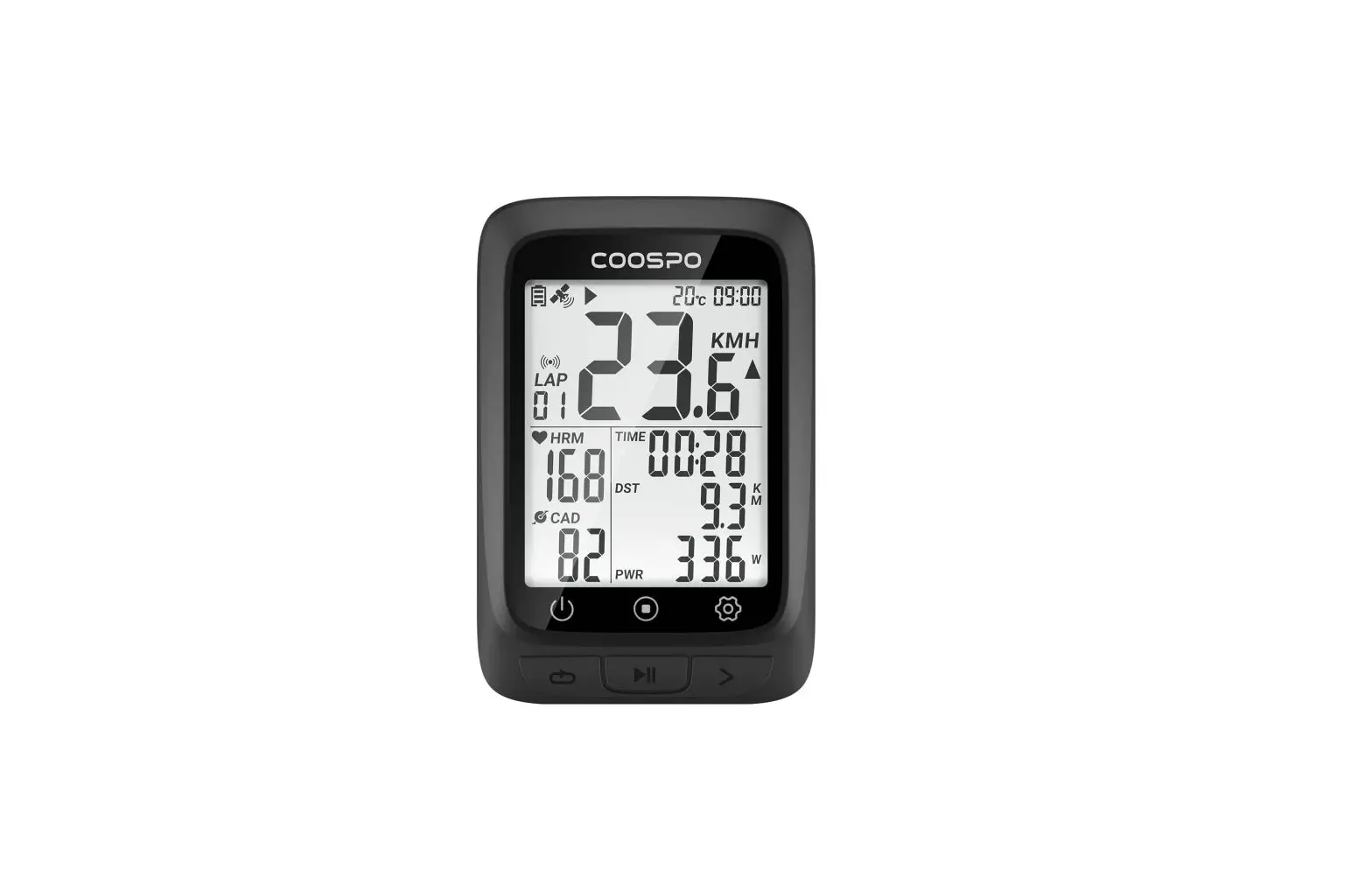
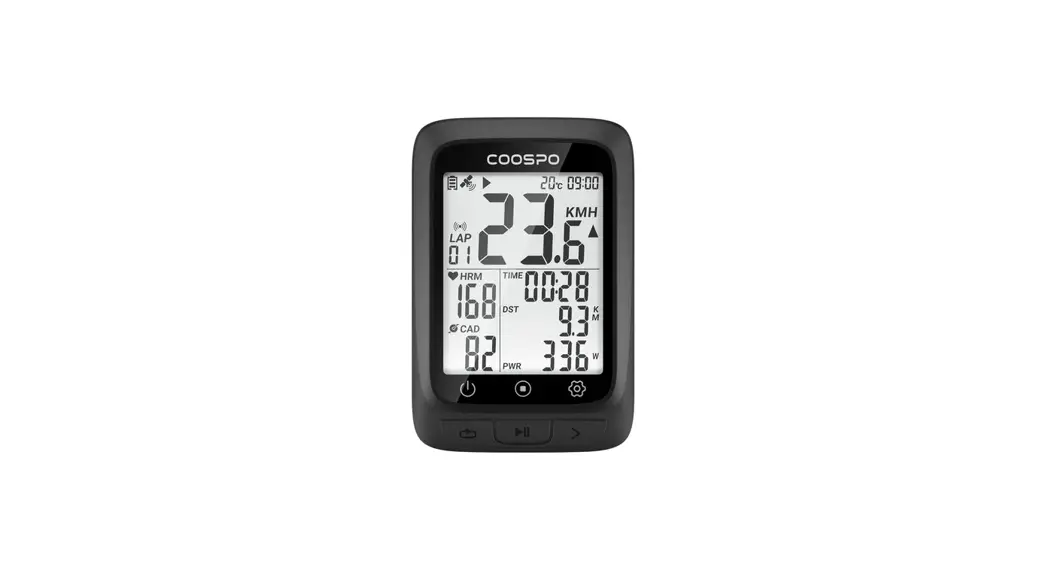
| Icon | Description |
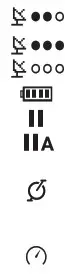
| GPS signal status/Icon flashing means acquiring satellite signals Satellite signals available No satellite signal |
| Battery level | |
| Paused | |
| Auto Pause | |
| Cadence sensor: The icon is on when connected/The icon is flashing when the sensor is disconnected or under searching | |
| Speed sensor: The icon is on when connected/The icon is flashing when the sensor is disconnected or under searching | |
| Power meter: The icon is on when connected / The icon is flashing when the sensor is disconnected or under searching | |
| Heart rate monitor: The icon is on when connected / The icon is flashing when the sensor is disconnected or under searching | |
| It’s available to scroll the page up and down by pressing the button It’s not available to scroll the page up and down by pressing the button | |
| Bluetooth accessory | |
| ANT+ accessory |

Standard Accessories
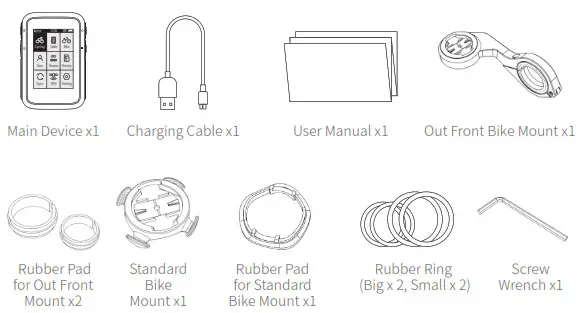
Standard Mount Installation
a.How to Install
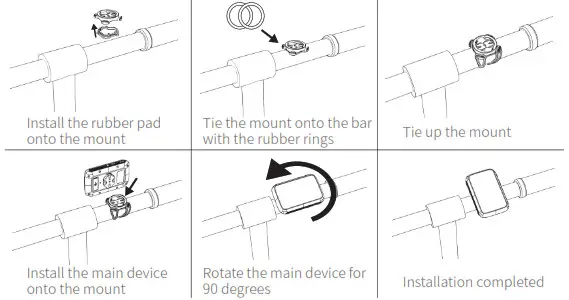
b. Out front mount installation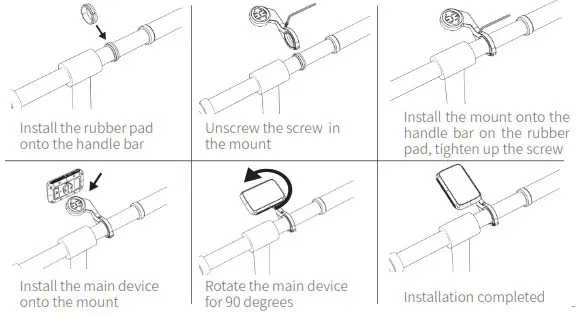
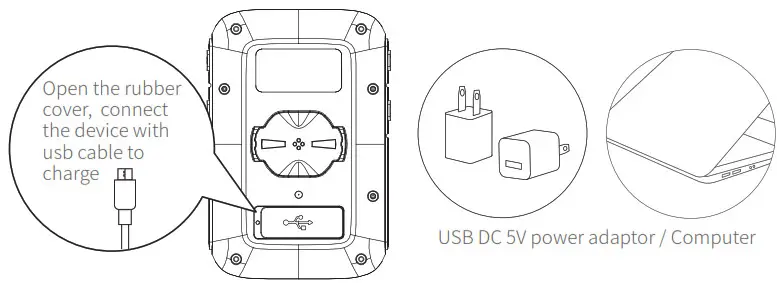
Charging
- Please charge the device before first time use.
- Please use DC 5V power adapter for charging.
- During the charging, the battery icon will flash until fully charged.

Initial Setup
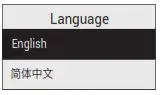
- For the 1st time use, please select the language before use.

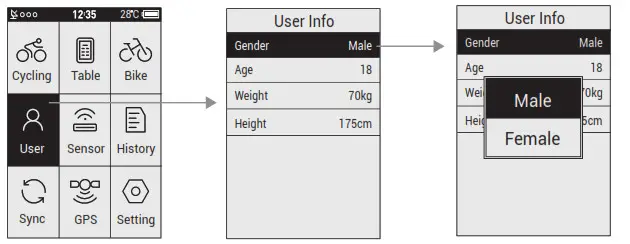
- User Profile Setting (To make the exercise calculation more accurate, please set the user profile correctly)

- Bike Profile Setting.

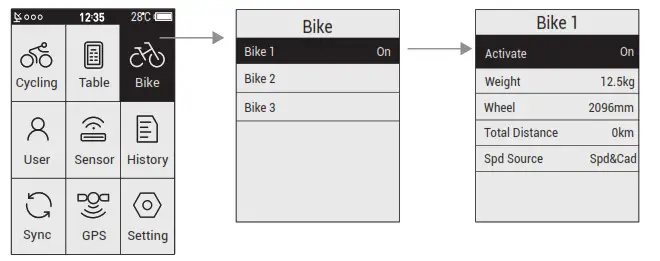
Total Distance: Select and confirm to reset the total distance
Spd Source: Set the priority for the source of the speed
Common wheel size and circumference(Wheel Size L (mm))
| 12 × 1.75 935mm 14 × 1.5 1020mm 14 × 1.75 1055mm 16 × 1.5 1185mm 16 × 1.75 1195mm 18 × 1.5 1340mm 18 × 1.75 1350mm 20 × 1.75 1515mm 20 × 1-3/8 1615mm 22 × 1-3/8 1770mm 22 × 1-1/2 1785mm 24 × 1 1753mm 24×3/4 Tubular 1785mm 24 × 1-1/8 1795mm 24 × 1-1/4 1905mm | 24 × 1.75 1890mm 24 × 2.00 1925mm 24 × 2.125 1965mm 26 × 1.75 2023mm 26 × 1.95 2050mm 26 × 2.00 2055mm 26 × 2.10 2068mm 26 × 2.125 2070mm 26 × 2.35 2083mm 26 × 3.00 2170mm 26 × 7/8 1920mm 26 × 1(59) 1913mm 26 × 1(65) 1952mm 26 × 1.25 1953mm 26 × 1-1/8 1970mm | 26 × 1-3/8 2068mm 26 × 1-1/2 2100mm 26 × 1.40 2005mm 26 × 1.50 2010mm 27 × 1 2145mm 27 × 1-1/8 2155mm 27 × 1-1/4 2161mm 27 × 1-3/8 2169mm 27.5×1.75 2114mm 27.5×2.125 2174mm 27.5×1.5 2074mm 27.5×1.95 2146mm 29×2.1 2288mm 29×2.2 2298mm 29×2.3 2326mm | 650× 35A 2090mm 650 × 38A 2125mm 650 × 38B 2105mm 700 × 18C 2070mm 700 × 19C 2080mm 700 × 20C 2086mm 700 × 23C 2096mm 700 × 25C 2105mm 700 × 28C 2136mm 700 × 30C 2170mm 700 × 32C 2155mm 700C Tubular 2130mm 700 × 35C 2168mm 700 × 38C 2180mm 700 × 40C 2200mm |
Other Settings
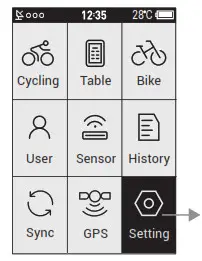
Zone:
Set the value for each heart rate zones, power zones, and cadence
zones
Alarm:
Set the alarm for heart rate, power, and cadence.
The device will beep if it reached to the preset value, and a warning message will pop up during the cycling.
Smart Pause:
When this function is turned on, the cycling recording will be paused automatically when the speed is 0.
It will get resumed when the speed is detected.
Altitude:
Set the numbers here to calibrate the current altitude.
Smart Lap:
Set the location or the distance used for smart lap counting.
Tone:
Set the key tone and the warning tone.
Back Light:
Set the mode of how to turn the backlight off and the brightness.
Unit:
Set the unit to Metric System or Imperial System.
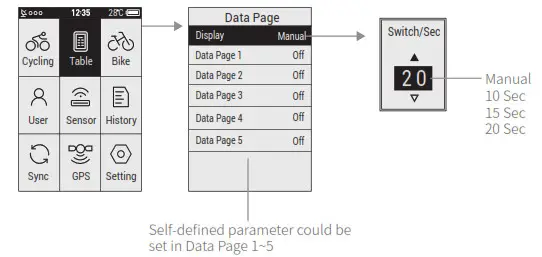
Page Setting
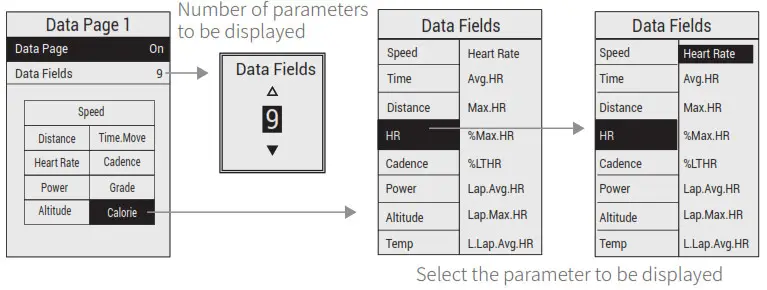
- Set the display content in the page setting.

- The content to be displayed on the self-defined page.

Connecting the Sensors
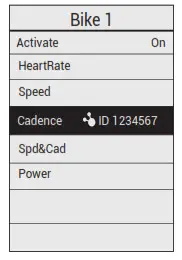
Please make sure the sensors are in wake-up mode( for example the heart rate monitor should be worn properly, for cadence, speed, and power sensor, rotate the crank or the wheel to wake it up).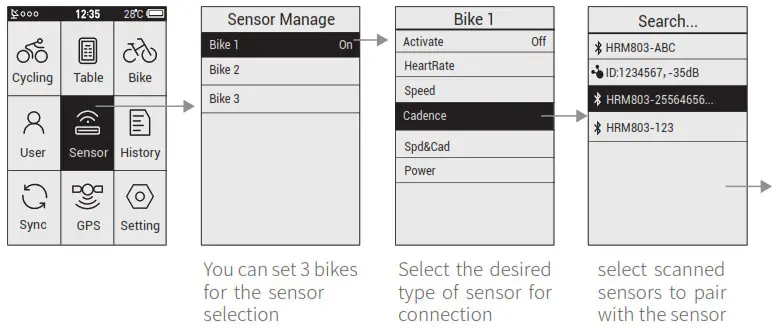 Connection completed
Add New Sensor and Turn off Old Sensor
Select the desired sensor, and then select to connect a sensor or turn off the old sensor in the popped up window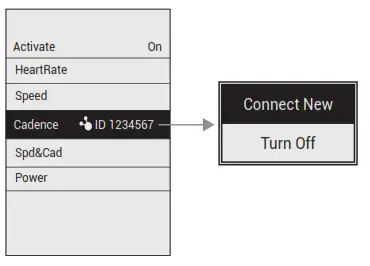
Power Calibration
Select Power, and then select Calibrate in the popped up window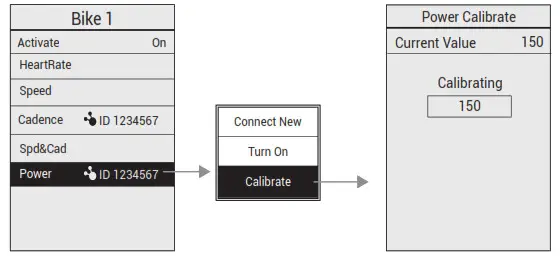
Power calibration only works in ANT+ power meter, the Bluetooth power meter doesn’t support this function
Starting a Ride
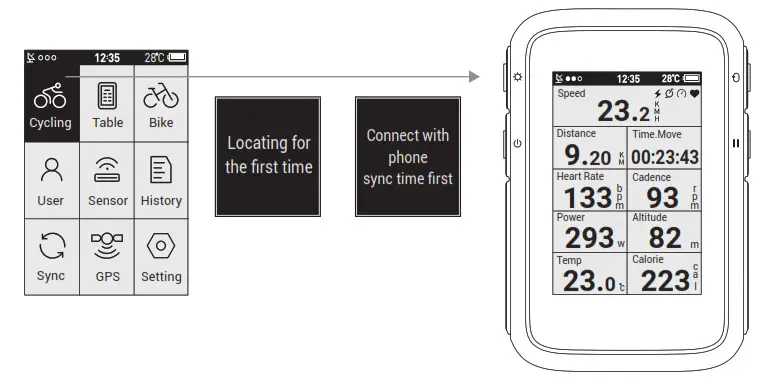
Once the device is turned on, it will automatically search for satellite signals, it may take 15~90 seconds to acquire signals. Please make sure you acquire the satellite signal for the first time use
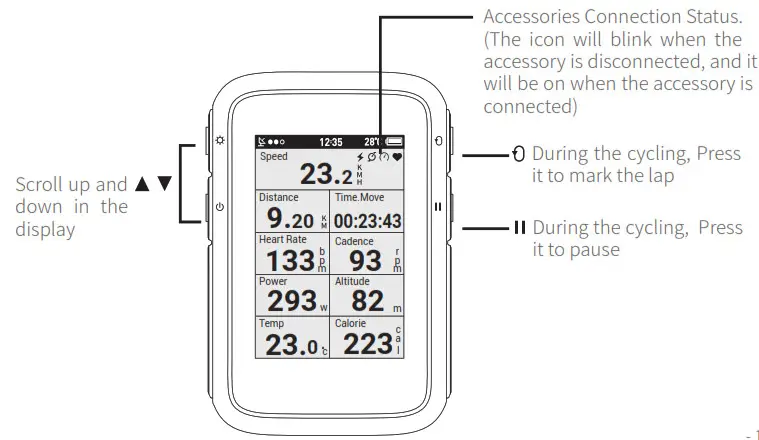
Display and Button
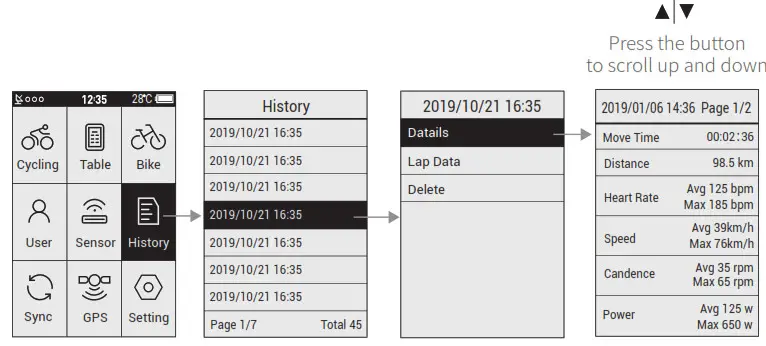
View History
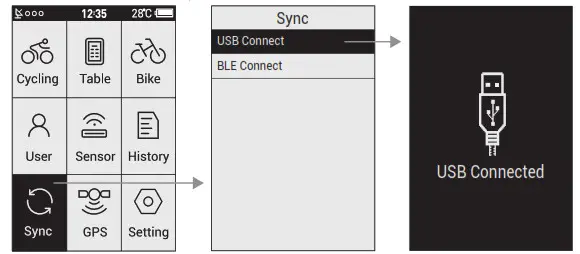
Sync Data
USB connection
- Turn on the device’s sync function “USB connection”.
- Connect the device to the computer with a USB cable.
- The computer will recognize the device as a new disk, find the folder “fit activity” and copy the files in the folder to the computer.
- Upload the activity file(.fit) to www.strava.com to view the data

Bluetooth Connection
- Download CoospoRide in Google Play or App Store

 IOS 7.0 or above, iPhone 4s model or above
 Android 4.3 or above with Bluetooth 4.0
 - Go to ‘Sync’ on-bike computer, select `BLE Connect’ to enable Bluetooth
- Open Coosporide app, turn on phone Bluetooth, go to ‘bind your computer
- Select BC200 to enter the search status
- Click BC200-xxxxxxx to connect


 IOS 7.0 or above, iPhone 4s model or above
 Android 4.3 or above with Bluetooth 4.0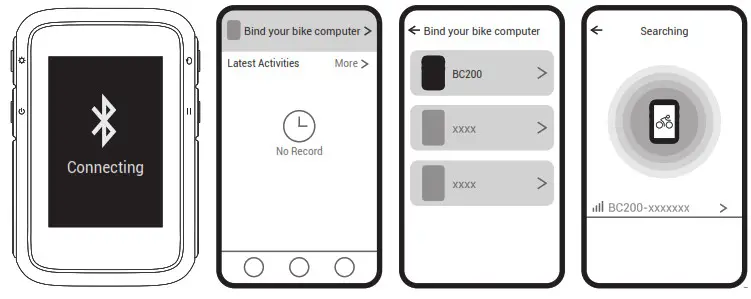
Specifications
| Display | LCD, 2.4 in | Backlight | Yes |
| File Transfer | USB/Bluetooth(APP) | Parameters Displayed Each Page | 2-9 |
| Wireless | Bluetooth &ANT+ | Language | Spanish/Russian German/Portuguese French/Turkish/English |
| Battery Type | 1300 mAh | GPS | GPS & BDS &Glonass |
| Self-Defined Display | 5 pages | Parameter Display | 70+ |
| Size | 60 x 88 x 20 mm | Laps Count | Yes |
| Waterproof | IP67 | Zone Alert | Yes |
| Storage Format | lit File | Battery Life | GPS 36 hours continuous use |
| Supported Devices | ANT+ & BLE: Heart Rate Monitor, Speed Sensor, Cadence Sensor, Speed & Cadence 2 in 1 Sensor, Power Meter | ||
Attentions
The information contained in this manual is for reference only. The product described above may be subject to alteration owing to the manufacturer’s continuing research and development plans without prior notice.
Disclaimer
The information contained in this manual is just for reference. The product described above may be subject to alteration owing to the manufacturer’s continuing research and development plans, without making an announcement in advance.
We shall not bear any legal responsibility for any direct or indirect, accidental or special damages, losses, and expenses arising from or in connection with this manual or the contained product.