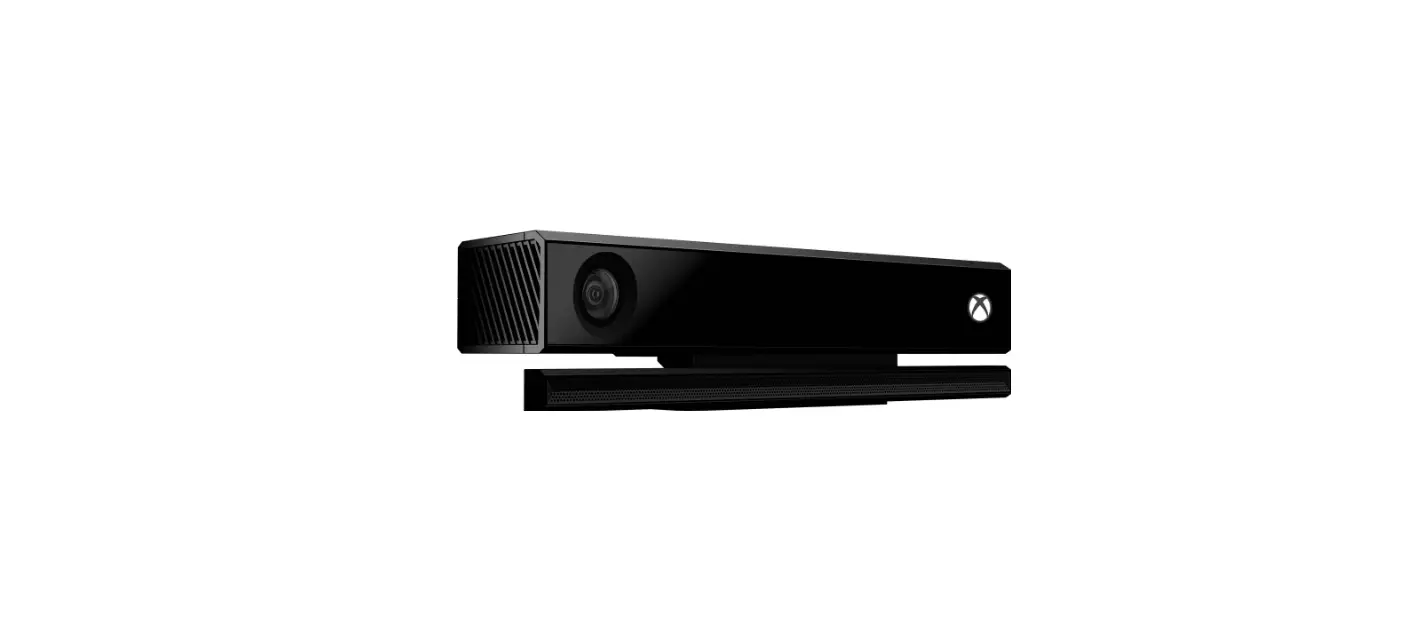

Xbox 6L6-00001 One Kinect Sensor with Dance Central Spotlight
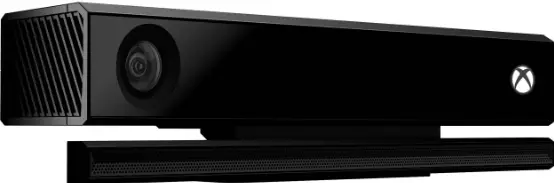
Getting started
- • make sure your entire body is visible in the Helper Frame at the top of the screen. If you are playing with a friend, each player appears in a separate Helper Frame.
• reach your right hand out to the side to select menu items, such as contInUe on the title screen, and then swipe from right to left.
• return to a previous screen by reaching out your left hand to select BacK in the lower-left corner, and then swiping from left to right.
• Switch to navigating the menus using your Xbox 360© controller by pressing any button. to exit controller mode, press the Start button.
- DANCE Practice your moves in BreaK It DoWn, show off your skills in PerForm It, or compete in a Dance Battle.
- CREW CHALLENGE Prove your dancing dominance against the crews of Dance central™ 2. Unlock new crews, dancers, and outfits.
- FITNESS track the calories you burn while dancing. try Fitness Playlists for a continuous workout.
- OPTIONS change settings, sync up audio and video and revisit tutorials.
NEW TO DANCE CENTER 2
- TEAM UP now it’s easy for a second player to jump into the action.
- FREE-4-ALL Dance Battle heats up with new Free-4-all sections.
- CREATE PLAYLISTS make your own playlists for continuous gameplay.
- FULL SONG CHOREOGRAPHY turn Freestyle sections off for a fully choreographed routine (see Game PlaY SettinGS).
WARNING
Before playing this game, read the Xbox 360® console instructions, Kinect™ sensor manual, and any other peripheral manuals for important safety and health information. Keep all manuals for future reference. For replacement hardware manuals, go to www.xbox.com/support or call Xbox Customer Support.
Important Health Warning About Playing Video Games
Photosensitive seizures
A very small percentage of people may experience a seizure when exposed to certain visual images, including flashing lights or patterns that may appear in video games. Even people who have no history of seizures or epilepsy may have an undiagnosed condition that can cause these “photosensitive epileptic seizures” while watching video games.
These seizures may have a variety of symptoms, including lightheadedness, altered vision, eye or face twitching, jerking or shaking of arms or legs, disorientation, confusion, or momentary loss of awareness. Seizures may also cause loss of consciousness or convulsions that can lead to injury from falling down or striking nearby objects.
Immediately stop playing and consult a doctor if you experience any of these symptoms. Parents should watch for or ask their children about the above symptoms—children and teenagers are more likely than adults to experience these seizures. The risk of photosensitive epileptic seizures may be reduced by taking the following precautions: Sit farther from the screen; use a smaller screen; play in a well-lit room; do not play when you are drowsy or fatigued.
If you or any of your relatives have a history of seizures or epilepsy, consult a doctor before playing.
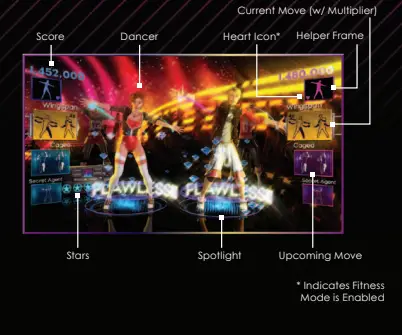
MAIN GAME SCREEEN
This document is provided “as-is.” Information and views expressed in this document, including URL and other Internet Web site references, may change without notice. You bear the risk of using it. Some examples depicted herein are provided for illustration only and are fictitious. No real association or connection is intended or should be inferred.
This document does not provide you with any legal rights to any intellectual property in any Microsoft product. You may copy and use this document for your internal, reference purposes.
© 2011 Microsoft Corporation. All rights reserved. Microsoft, Kinect, Xbox, Xbox 360, Xbox LIVE, and the Xbox logos are trademarks of the Microsoft group of companies.
© 2011 Harmonix Music Systems, Inc. All rights reserved. Dance Central, Dance Central 2, Harmonix, and all related titles and logos are trademarks of Harmonix Music Systems, Inc. Dance Central 2 developed by Harmonix Music Systems, Inc. All other trademarks are property of their respective owners.
www.dancecentral.com
GAME MODES
DANCE
It’s time to strut your stuff!
- To begin, select a song. The Flashcard preview gives you a glimpse of the routine. The difficulty is displayed under the artist’s name.
- Next, choose to PER FORM IT, BREA K IT DOWN or have a DANCE BATTLE .
Tip: For continuous dancing, select MA KE A PLA YLIST from the songlist.
Choose a preset playlist or make your own. You can save up to five custom playlists with up to 20 songs in each.
PERFORM IT
Show off your moves!
- To begin, select a skill level. You can then change the on-screen dancer and venue.
- Next, select REA DY to start the song. If you’re playing with a friend, you both select REA DY. You can also select PLA Y SOLO to start playing without your friend.
Tip: To join a friend who is dancing solo, simply step in and raise your hand.
You’ll join the routine at the same skill level as your friend.
BREAK IT DOWN
Learn the skills you’ll need to impress an audience!
FULL SONG SESSION Practice every move in a routine.
FOCUS ON SELECT MOVES Make a list of moves, and then select DANCE .
You can work on a move until you’ve got it down.
DANCE BATTLE
Go head-to-head with a friend!
- First, select a skill level.
- Next, select a crew to represent. You and your friend must rep for different crews in DANCE BATTLE . Some crews may be locked until you earn the right to rep for them in CRE W CHALLENGE.
- Finally, you both select READY, and the battle begins!
Tip: Get major points during FREE -4-ALL sections by performing moves better than your friend. You know it’s time to dance a move when the figure in one of the Flashcards in the top row starts dancing.
CREW CHALLENGE
Reach for the top in this all-new story mode!
- To begin, select a skill level.
- Next, impress the Riptide crew by earning enough stars on their favourite songs. If you can earn the right to rep for them, your status will increase, and other crews will want to see your skills.
Tip: In this mode, you can unlock new dancers, outfits, and crews to represent.
FITNESS
Have fun while getting a serious workout!
- To begin tracking how many calories you burn while playing, toggle FITNESS MODE ENABLE D on.
- For a continuous workout, select one of the Fitness Playlists based on the kind of workout you want.
Tip: FITNE SS mode tracks activity through all game modes. For a more complete workout, disable Freestyle sections (see GAME PLA Y SETT INGS).
OPTIONS
A/V SETTINGS
- A/V CALIBRATION Calibrate the audio/video if the music and moves seem out of sync. Adjust the amount of offset by scrolling up and down until the audio cue occurs at the same time the two bars meet. Visit www.dancecentral.com for more information.
- KINECT TUNER Solve common lighting, audio, and play space problems.
- VIDEO OVERSCAN Toggle on/off to adjust the amount of screen space taken up by Dance Central 2.
- SURROUND SOUND Toggle surround sound on/off.
- CROWD VOLUME & EFFECTS VOLUME Adjust volume levels for the crowd and sound effects.
GAMEPLAY SETTINGS
- PHOTOS ENABLED Toggle photo-taking on/off during gameplay.
- FREESTYLE ENABLED Toggle Freestyle sections on/off in PER FORM IT.
When Freestyle is off, additional choreography fills in during routines.
This option does not affect songs imported from Dance Central. - AUTOSAVE ENABLED Toggle auto-saving on/off.
Limited Warranty For Your Copy of Xbox Game Software (“Game”) Warranty.
Microsoft Corporation (“Microsoft”) warrants that this Game will perform substantially as described in the accompanying manual for a period of 90 days from the date of first purchase. This limited warranty is void if any difficulties with the Game are related to accident, abuse, virus or misapplication. Microsoft does not make any other warranty or promise about the Game.
Your remedies.
If you discover a problem with the Game covered by this warranty within the 90 day period, return it to your retailer along with a copy of the original sales receipt. Your retailer will, at its option, (a) repair or replace the Game, free of charge, or (b) return the price paid. Any replacement Game will be warranted for the remainder of the original warranty period or 30 days from receipt, whichever is longer. To the extent that you could have avoided damages by taking reasonable care, Microsoft will not be liable for such damages.
Statutory rights.
You may have statutory rights against your retailer which are not affected by Microsoft’s limited warranty.
IF YOU DID NOT PURCHASE THE GAME FOR YOUR PERSONAL USE (THAT IS, IF YOU ARE NOT DEALING AS A CONSUMER)
The following terms apply to the maximum extent permitted by applicable law.
No other warranties.
Microsoft and its suppliers disclaim all other warranties and conditions, either express or implied, with respect to the Game and the accompanying manual.
Limitation of liability.
Neither Microsoft nor its suppliers shall be liable for any damages howsoever caused arising out of or in any way related to the use of or inability to use the Game, even if Microsoft or any supplier has been advised of the possibility of such damages. In any case, Microsoft’s and its suppliers’ entire liability is limited to the amount actually paid by you for the Game.
For questions regarding this warranty contact your retailer or Microsoft at:
Microsoft Ireland Operations Limited Sandyford Industrial Estate Blackthorn Road Dublin 18 Ireland
Customer Service Numbers
- Australia 1 800 555 741 1 800 555 743
- Österreich 0800 281 360 0800 281 361
- Belgique/België/Belgien 0800 7 9790 0800 7 9791
- Česká Republika 800 142365
- Danmark 80 88 40 97 80 88 40 98
- Suomi/Finland 0800 1 19424 0800 1 19425
- France 0800 91 52 74 0800 91 54 10
- Deutschland 0800 181 2968 0800 181 2975
- Eλλáδa 00800 44 12 8732 00800 44 12 8733
- Magyarország 06 80 018590
- Ireland 1 800 509 186 1 800 509 197
- Italia 800 787614 800 787615
- Nederland 0800 023 3894 0800 023 3895
- New Zealand 0508 555 592 0508 555 594
- Norge 800 14174 800 14175
- Polska 00 800 4411796
- Portugal 800 844 059 800 844 060
- Россия 8 (800) 200-8001
- España 900 94 8952 900 94 8953
- Saudi 800 8443 784
- Slovensko 0800 004 557
- Sverige 020 79 1133 020 79 1134
- Schweiz/Suisse/Svizzera 0800 83 6667 0800 83 6668
- South Africa 0800 991550
- UAE 800 0 441 1942
- UK 0800 587 1102 0800 587 1103
*PSS – Product Support Services
For more information, visit us on the Web at www.xbox.com
Information in this document, including URL and other Internet Web site references, is subject to change without notice. Unless otherwise noted, the example companies, organisations, products, domain names, e-mail addresses, logos, people, places, and events depicted herein are fictitious, and no association with any real company, organisation, product, domain name, e-mail address, logo, person, place, or event is intended or should be inferred. Complying with all applicable copyright laws is the responsibility of the user. Without limiting the rights under copyright, no part of this document may be reproduced, stored in or introduced into a retrieval system, or transmitted in any form or by any means (electronic, mechanical, photocopying, recording, or otherwise), or for any purpose, without the express written permission of Microsoft Corporation. Microsoft may have patents, patent applications, trademarks, copyrights, or other intellectual property rights covering subject matter in this document. Except as expressly provided in any written license agreement from Microsoft, the furnishing of this document does not give you any license to these patents, trademarks, copyrights, or other intellectual property. The names of actual companies and products mentioned herein may be the trademarks of their respective owners. Unauthorised copying, reverse engineering, transmission, public performance, rental, pay for play, or circumvention of copy protection is strictly prohibited.
This game contains some product brands that are provided by their respective sponsors.
© 2011 Microsoft Corporation. All rights reserved.
Dance Central, Dance Central 2, Harmonix and all related titles and logos are trademarks of Harmonix Music Systems, Inc. © 2011 Harmonix Music Systems, Inc. All rights reserved.
Dance Central 2 developed by Harmonix Music Systems, Inc.
Dolby and the double-D symbol are trademarks of Dolby Laboratories.
FAQS
What is the length of the cable, i.e., for connetion to from Kinect to xbox? Cable attached to the Kinect length.
first answer when you google kinect cable length……http://support.xbox.com/en-US/xbox one/kinect/connect-sensor
Comes with a code for dance central..something like just dance but no the same…Less songs
The cable is approximately 9 Feet 3 inches long 111 inches.
Yes everything is included, once you buy this just plug into your Xbox one and play!
It doesn’t have central dance spotlight. Just kinect itself. Refer to the picture on the listing.
No. It will plus into the Xbox and it pretty much is self explanatory after that as your Xbox will try to sync right away
Yes you can still purchase the game online..it’s just sold with this item
Yes it will.
You just plug it straight into the xbox. No batteries are required.
Yes, all kinect plugs are the same world wide.
It will be able to later on. Coming this winter. Via e3.
Some xbox 360 games will become backwards compatible with the xbox one
Yes, this is also known as Kinect V2 to developers (I verified with Xbox support). The Kinect that sells for Xbox 360 is Kinect V1.