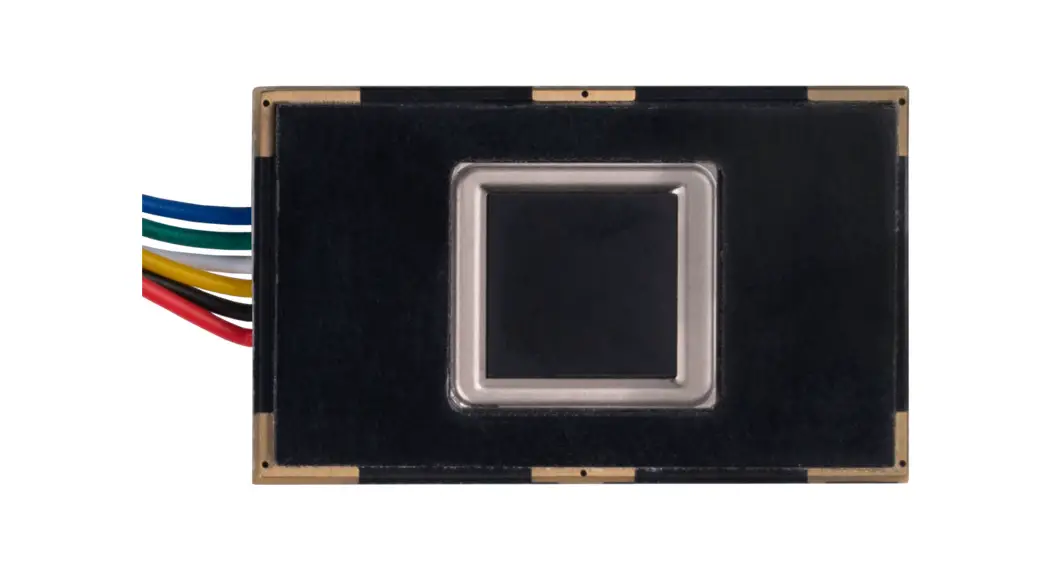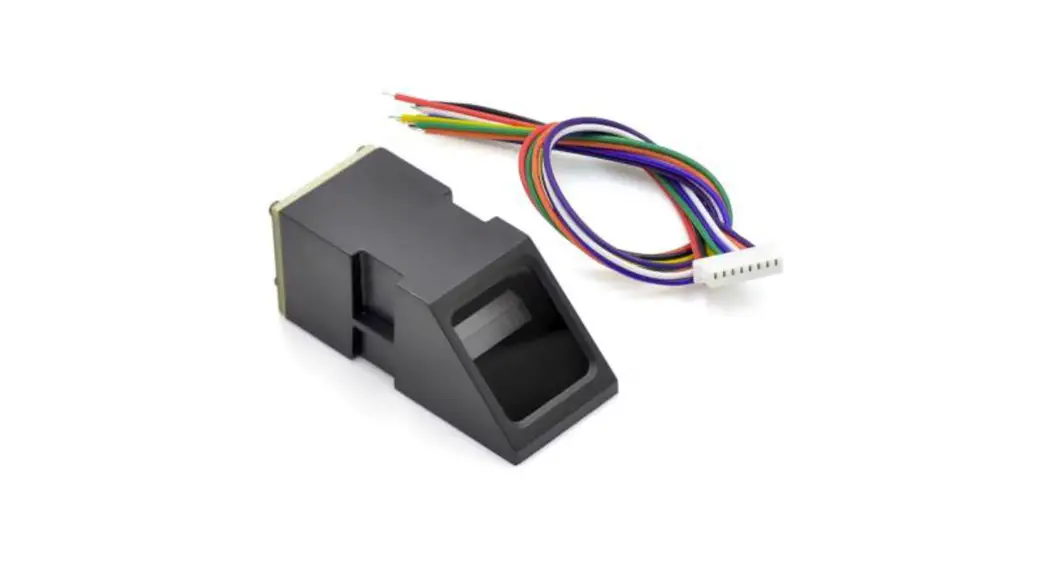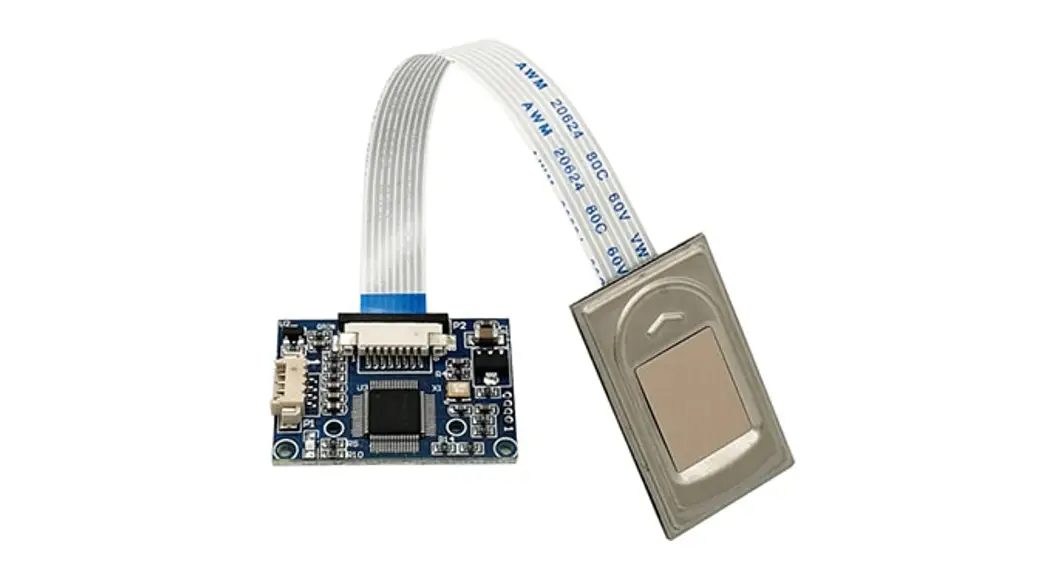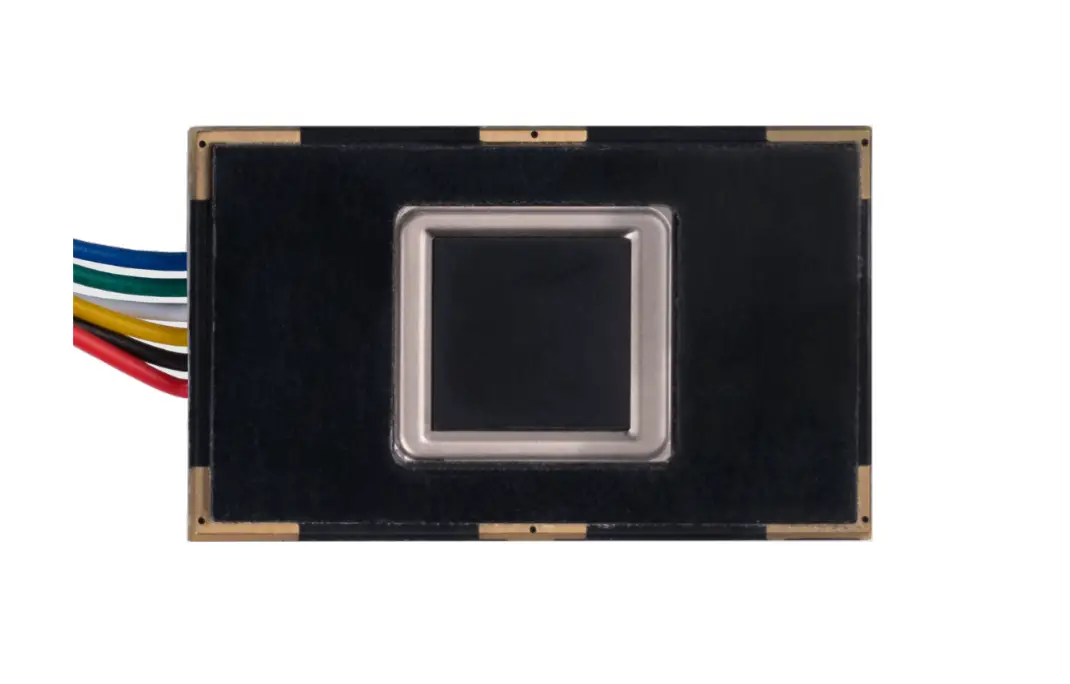
Joy-IT R301T Fingerprint Sensor User Guide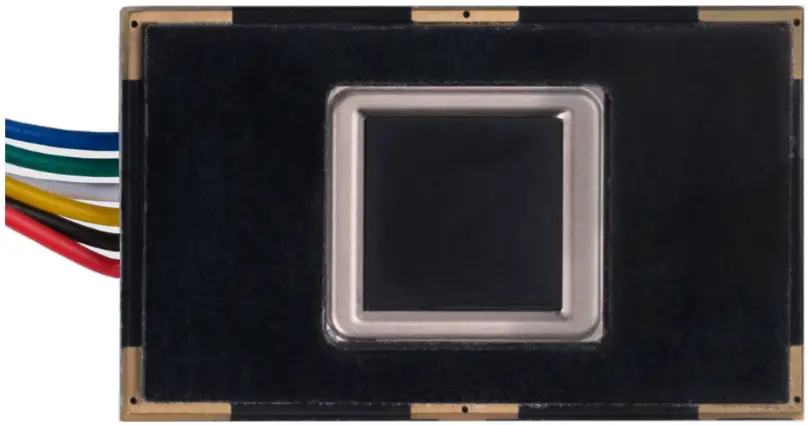
GENERAL INFORMATION
Dear customer,
thank you for choosing our product. In the following, we will show you how to use this device.
Should you encounter any unexpected problems during use, please do not hesitate to contact us.
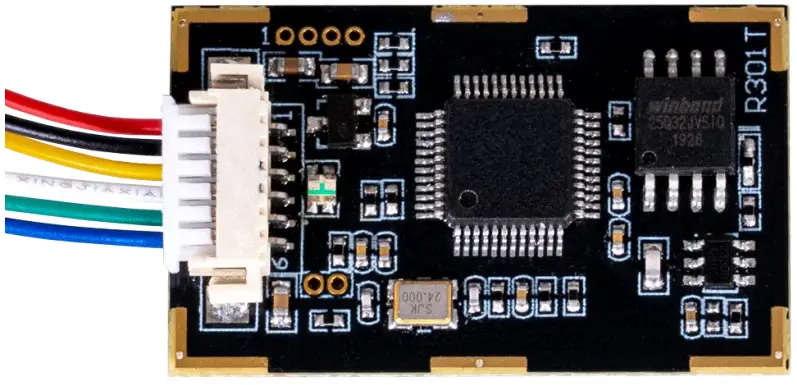
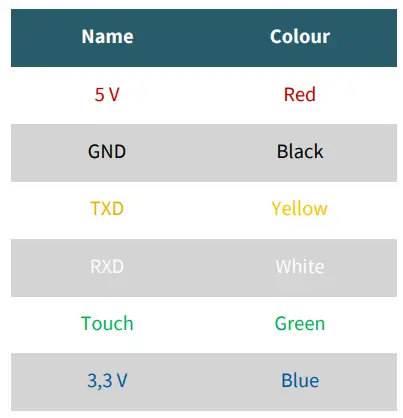
PINOUT
USAGE WITH RASPBERRY PI
Connection
For the Raspberry Pi, we use a USB to TTL module. In our application example, we use our SBC-TTL item for this.
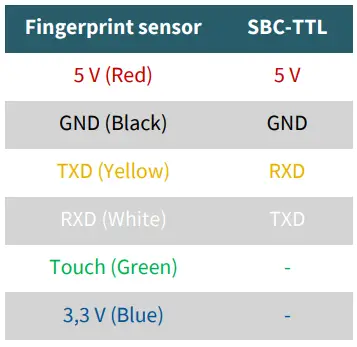
Therefore, we connect the fingerprint sensor to the adapter as shown below..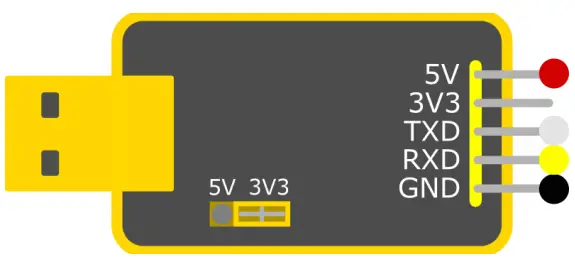
Make sure that the jumper is set to 3.3 V.
Now connect the SBC-TTL to one of your Raspberry Pi’s USB ports.
The pin Touch is an output pin, which sends a signal, if a finger has been placed on the sensor.
The sensor can be operated with the 3.3 V pin, but is then only able to detect whether a finger has been placed on it via the touch pin and cannot read the fingerprint.
Installation
We use the pyfingerprint library by bastianraschke, released under the German Free Software License, to control the fingerprint sensor.
To install the library and all its dependencies, run the following commands: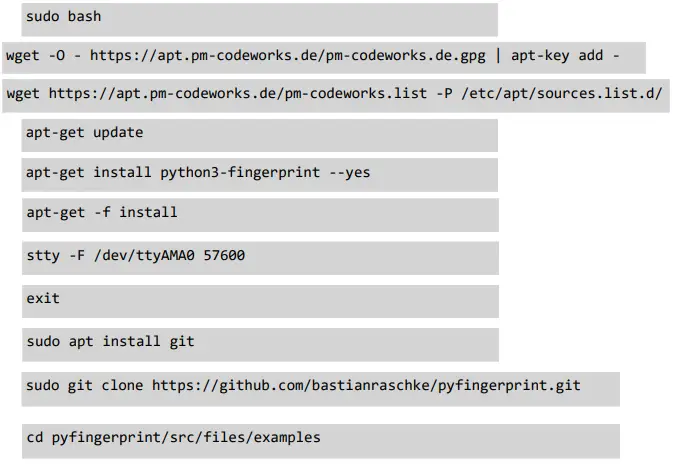
Usage with the library
If you now execute the following command, you can store a fingerprint.
You can use the following command to query your fingerprint to see if it is found in your data.
You can see how many fingerprints are currently stored by using the following command to see:
USAGE WITH ARDUINO
Connection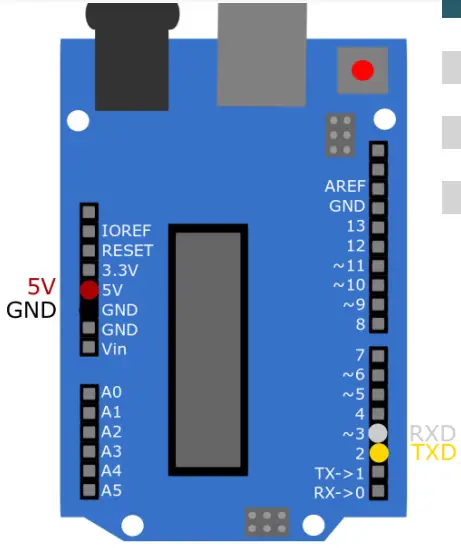
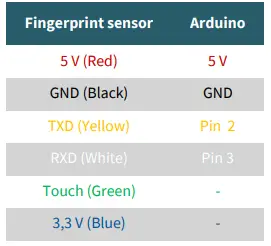
The pin Touch is an output pin, which sends a signal, if a finger has been placed on the sensor.
The sensor can be operated with the 3.3 V pin, but is then only able to detect whether a finger has been placed on it via the touch pin and cannot read the fingerprint.
Installation
We use the library Adafruit-Fingerprint-Sensor-Library from Adafruit, which is released under the BSD License.
You can install the library in the Arduino IDE under Tools → Manage Libraries… .
Usage with the library
You can run sample codes under File → Examples → Adafruit Fingerprint Sensor Library .
You can use the enroll script to add fingerprints and fingerprint to compare a fingerprint to the stored data.
When executing this, make sure that you have selected the correct Board and Port in Tools.
USB/UART KOMMUNIKATIONSPROTOKOLL
The communication protocol defines how the data is exchanged when the R301 series modules communicate with a control unit (Raspberry Pi, Arduino or a PC).
The protocol and command sets apply to both UART and USB communication modes.
For use on a PC, the USB interface is highly recommended to increase the exchange speed, especially for fingerprint scanners.
Therefore, we have collected all system instructions of the R301T for self-development below.
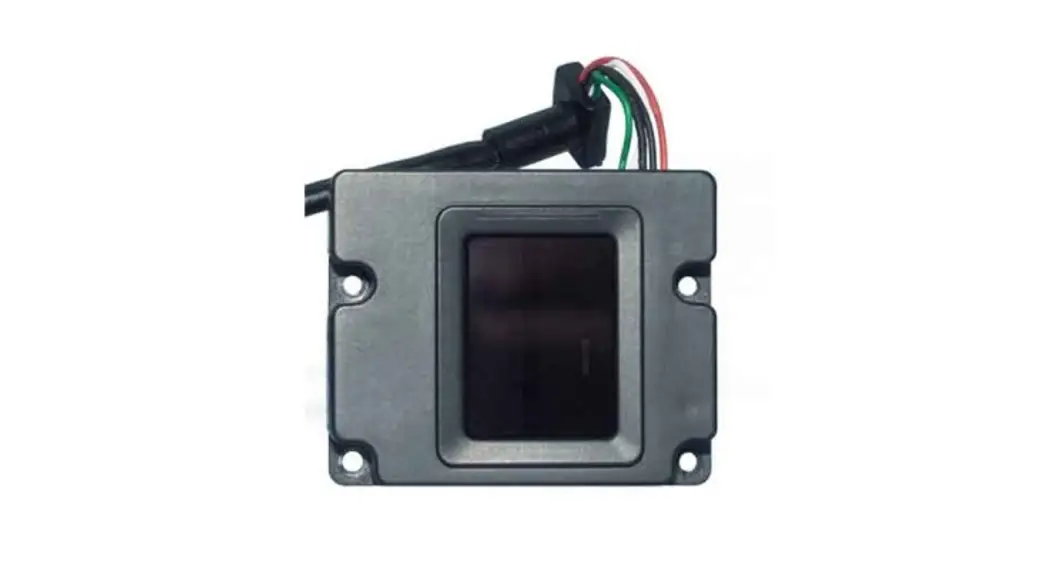
In the picture on the right you can see where the USB interface is located on the sensor.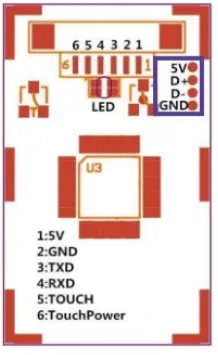
Format of the data packets
During communication, the transmission and reception of commands/ data/results are wrapped in a data packet format.
Format of the data packet
| Header | Address | Package identifier | Package length | Contents of the package (Instructions/Data/Parameters) | Checksum |
Definition of the data package
| Definition of the data package | |||
| Name | Symbol | Length | Description |
| Header | Start | 2 Bytes | Has a fixed value of 0xEF01; high byte is transmit- ted first. |
| Address | ADDER | 4 Bytes | Default value is 0xFFFFFFFF, which can be modified by command. High byte transferred first and at wrong address value, module will reject to transfer. |
| Package identifier | PID | 1 Byte | 01H Command package; 02H Data packet; The data packet must not appear alone in the execution, but must follow the command or acknowledgement packet. 07H Acknowledge package 08H End of the data package |
| Package length | LENGTH | 2 Bytes | Refers to the length of the packet contents (command packets and data packets) plus the length of the checksum (2 bytes). Unit is bytes. The maximum length is 256 bytes. And the topmost byte is transmitted first. |
| Contents of the package | DATA | — | It can be commands, data, command parameters, acknowledgement results, etc. (the value of fingerprint characters and the template are also considered as data). |
| Checksum | SUM | 2 Bytes | The arithmetic sum of the packet identifier, the packet length, and all packet contents. Overflowing bits are omitted. High byte is transmitted first. |
Checking and confirming the data package
Note: Commands may only be sent to the module from a control unit (Raspberry Pi, Arduino or a PC) and the module must acknowledge the commands.
After receiving commands, the module sends the status of command execution and results to the control unit via an acknowledgement packet.
The confirmation packet contains parameters and may also contain a subsequent data packet. The control unit can determine the reception status of the module or the results of command execution only through the acknowledgement packet sent by the module. The confirmation packet contains a 1-byte Confirmation code and possibly also the returned parameters.
The definition of the Confirmation code is :
- 00h: Command execution completed;
- 01h: error receiving data packets;
- 02h: no finger on the sensor;
- 03h: the finger cannot be read;
- 06h: character file creation fails because the fingerprint image is too disordered;
- 07h: Error in creating the character file due to a missing character point or too small size of the fingerprint image;
- 08h: Finger does not match;
- 09h: The matching finger was not found;
- 0Ah: The character files cannot be combined;
- 0Bh: PageID addressing is outside the finger library;
- 0Ch: Error reading template from library or template is invalid;
- 0Dh: Error uploading the template;
- 0Eh: The module cannot receive the following data packets;
- 0Fh: Error uploading the image;
- 10h: The template cannot be deleted;
- 13h: Wrong password;
- 15h: The image cannot be created because there is no valid primary image;
- 18h: Error while writing the flash;
- 19h: Missing definition;
- 1Ah: invalid register number;
- 1Bh: wrong configuration of the register;
- 1Ch: wrong page number in the notebook;
- 1Dh: communication port cannot be operated;
- Other: system reserved;
Module command system
The R30X series provides 23 commands. By combining different commands, the application program can realize several finger authentication functions. All commands/data are transmitted in packet format. Detailed information on the packages can be found under 5.1.
Password verification (VfyPwd)
- Description: Checks the handshaking password of the module.
- Input parameter: Password (4 bytes)
- Return parameter: Confirmation code (1 byte)
- Command code: 13H Command (or instruction) packet format:
| 2 Bytes | 4 Bytes | 1 Byte | 2 Bytes | 1 Byte | 4 Bytes | 2 Bytes |
| Header | Module address | Package identifier | Package length | Command code | Password | Checksum |
| 0xEF01 | xxxx | 01H | 07H | 13H | PassWord | Sum |
Format of the confirmation package:
| 2 Bytes | 4 Bytes | 1 Byte | 2 Bytes | 1 Byte | 2 Bytes |
| Header | Module address | Package identifier | Package length | Confirmation code | Checksum |
| 0xEF01 | xxxx | 07H | 03H | xxH | Sum |
Note:
Confirmation code = 00H: Correct password;
Confirmation code = 01H: Error receiving the packet;
Confirmation code = 13H: Incorrect password;
Set password (SetPwd)
- Description: set handshaking password for the module.
- Input parameter: PassWord (4 bytes)
- Return parameter: Confirmation code (1 byte)
- Command code: 12H Command (or instruction) packet format:
| 2 Bytes | 4 Bytes | 1 Byte | 2 Bytes | 1 Byte | 4 Bytes | 2 Bytes |
| Header | Module address | Package identifier | Package length | Command code | Password | Checksum |
| 0xEF01 | xxxx | 01H | 07H | 12H | PassWord | Sum |
Format of the confirmation packet:
| 2 Bytes | 4 Bytes | 2 Bytes | 1 Byte | 2 Bytes |
| Header | Module address | Package length | Confirmati- on code | Checksum |
| 0xEF01 | xxxx | 03H | xxH | Sum |
Note:
Confirmation code = 00H: Setting password completed;
Confirmation code = 01H: error receiving the packet;
Set module address (SetAdder)
- Description: Set module address.
- Input parameter: /
- Return parameter: Confirmation code (1 byte)
- Command code: 15H Command (or instruction) packet format:
| 2 Bytes | 4 Bytes | 1 Byte | 2 Bytes | 1 Byte | 4 Bytes | 2 Bytes |
| Header | Module address | Package identifier | Package length | Command code | New module address | Checksum |
| 0xEF01 | xxxx | 01H | 07H | 15H | xxxx | Sum |
Format of the acknowledgement packet:
| 2 Bytes | 4 Bytes | 1 Byte | 2 Bytes | 1 Byte | 2 Bytes |
| Header | Module address | Package identifier | Package length | Confirmation code | Checksum |
| 0xEF01 | xxxx | 07H | 07H | xxH | Sum |
Note:
Confirmation code = 00H: Address setting completed;
Confirmation code = 01H: error receiving the packet;
Set the basic parameters of the module systems (SetSysPara).
- Description: Settings of the operating parameters.
- Input parameter: Parameter number (1 byte)
- Return parameter: Confirmation code (1 byte)
- Command code: 0eH
- Command (or instruction) packet format:
| 2 Bytes | 4 Bytes | 1 Byte | 2 Bytes | 1 Byte | 1 Byte | 1 Byte | 2 Bytes |
| Header | Module address | Package identifier | Package length | Command code | Parameter number | Content | Checksum |
| 0xEF01 | xxxx | 01H | 05H | 0eH | 4/5/6 | xx | Sum |
Format of the acknowledgement packet:
| 2 Bytes | 4 Bytes | 1 Byte | 2 Bytes | 1 Byte | 2 Bytes |
| Header | Module address | Package identifier | Package length | Confirmation code | Checksum |
| 0xEF01 | xxxx | 07H | 03H | xxH | Sum |
Note:
Confirmation code=00H: Parameter setting completed;
Confirmation code=01H: error in receiving the packet;
Confirmation code=1aH: wrong register number;
Port Control (Control)
- Description:
For the UART protocol, it controls the “on/off” of the USB ports;
For USB protocol, it controls the “on/off” of the UART ports; - Input parameters: Control code (1 byte)
Control code “0” means that the port is turned off;
Control code “1” means that the port is turned on; - Return parameter: Confirmation code (1 byte)
Command code: 17H
Command (or instruction) packet format:
| 2 Bytes | 4 Bytes | 1 Byte | 2 Bytes | 1 Byte | 1 Byte | 2 Bytes |
| Header | Module address | Package identifier | Package length | Command code | Control code | Checksum |
| 0xEF01 | xxxx | 01H | 04H | 17H | 0/1 | Sum |
Format of the confirmation packet:
| 2 Bytes | 4 Bytes | 1 Byte | 2 Bytes | 1 Byte | 2 Bytes |
| Header | Module address | Package identifier | Package length | Confirmati- on code | Checksum |
| 0xEF01 | xxxx | 07H | 03H | xxH | Sum |
Note:
Confirmation code=00H: Port control completed;
Confirmation code=01H: Error receiving the packet;
Confirmation code=1dH: communication port operation not possible;
Read system parameters (ReadSysPara)
- Description: Read the status register of the module and the basic configration parameters of the system.
- Input parameter: /
- Return parameter: Confirmation code (1 byte) + Basic parameters (16bytes).
- Command code: 0fH
- Command (or instruction) packet format:
| 2 Bytes | 4 Bytes | 1 Byte | 2 Bytes | 1 Byte | 2 Bytes |
| Header | Module address | Package identifier | Package length | Command code | Checksum |
| 0xEF01 | xxxx | 01H | 03H | 0fH | Sum |
Format of the acknowledgement packet:
| 2 Bytes | 4 Bytes | 1 Byte | 2 Bytes | 1 Byte | 16 Bytes | 2 Bytes |
| Header | Module address | Package identifier | Package length | Confirmation code | Basic parameters list | Checksum |
| 0xEF01 | xxxx | 07H | 3 + 16 | xxH | See the following table | Sum |
Note:
Confirmation code=00H: Read completed;
Confirmation code=01H: Error receiving the packet;
| Name | Description | Offset (Word) | Größe (Word) |
| Status register | Contents of the system status register | 0 | 1 |
| System identification code | Fixed value: 0x0009 | 1 | 1 |
| Finger library size | Finger library size | 2 | 1 |
| Security level | Safety level (1, 2, 3, 4, 5) | 3 | 1 |
| Address of the device | 32-bit device address | 4 | 2 |
| Data package size | Size code (0, 1, 2, 3) | 6 | 1 |
| Baud settings | N (Baud = 9600*N bps) | 7 | 1 |
Read valid template number (TemplateNum)
- Description: read the currently valid template number of the module read
- Input parameter: /
- Return parameter: Confirmation code (1 byte), Template number: N
- Command code: 1dH
- Command (or instruction) packet format:
| 2 Bytes | 4 Bytes | 1 Byte | 2 Bytes | 1 Byte | 2 Bytes |
| Header | Module address | Package identifier | Package length | Command code | Check Sum |
| 0xEF01 | xxxx | 01H | 04H | 1dH | 0021H |
Format of the acknowledgement packet:
| 2 Bytes | 4 Bytes | 1 Byte | 2 Bytes | 1 Byte | 2 Bytes | 2 Bytes |
| Header | Module address | Package identifier | Package length | Confirmation code | Vorlagen nummer | Check Sum |
| 0xEF01 | xxxx | 07H | 5 | xxH | N | Sum |
Note:
Confirmation code=00H: Read completed;
Confirmation code=01H: Error receiving the packet;
Instructions for processing fingerprints
Capture the finger image (GenImg)
- Description: Detect the finger and store the detected finger image in the
Image Buffer while returning a successful Confirmation code; if no finger is present, the returned Confirmation code is “can’t detect finger”. - Input parameter: /
- Return parameter: Confirmation code (1 byte)
- Command code: 01H
- Command (or instruction) packet format:
- Format of the confirmation packet:
| 2 Bytes | 4 Bytes | 1 Byte | 2 Bytes | 1 Byte | 2 Bytes |
| Header | Module address | Package identifier | Package length | Command code | Check Sum |
| 0xEF01 | xxxx | 01H | 03H | 01H | 05H |
Note:
| 2 Bytes | 4 Bytes | 1 Byte | 2 Bytes | 1 Byte | 2 Bytes |
| Header | Module address | Package identifier | Package length | Confirmation code | Check Sum |
| 0xEF01 | xxxx | 07H | 03H | xxH | Sum |
Confirmation code=00H: Finger scan successful;
Confirmation code=01H: Error receiving the packet;
Confirmation code=02H: Finger was not recognized;
Confirmation code=03H: Finger scanning not successful;
Upload image (Up Image)
- Description: Upload an image from the Images Buffer to the control unit.
- Input parameter: /
- Return parameter: Confirmation code (1 byte) + Basic parameters (16 bytes)
- Command code: 0aH
Command (or instruction) packet format:
| 2 Bytes | 4 Bytes | 1 Byte | 2 Bytes | 1 Byte | 2 Bytes |
| Header | Module address | Package identifier | Package length | Command code | Check Sum |
| 0xEF01 | xxxx | 01H | 03H | 0aH | 000eH |
Format of the confirmation packet:
| 2 Bytes | 4 Bytes | 1 Byte | 2 Bytes | 1 Byte | 2 Bytes |
| Header | Module address | Package identifier | Package length | Confirmati- on code | CheckSum |
| 0xEF01 | xxxx | 07H | 03H | xxH | Sum |
Note 1:
Confirmation code=00H: ready to transmit the following data pcket;
Confirmation code=01H: error receiving the packet;
Confirmation code=0fH: failed to transmit the following data packet;
Note 2:
The module must transmit the following data packet after responding to the control unit.
Download image (Down Image)
- Description: Upload an image from the control unit to the Img_Buffer.
- Input parameter: /
- Return parameter: Confirmation code (1 byte)
- Command code: 0bH
Command (or instruction) packet format:
| 2 Bytes | 4 Bytes | 1 Byte | 2 Bytes | 1 Byte | 2 Bytes |
| Header | Chip Address | Package identifier | Package length | Command code | Check Sum |
| 0xEF01 | xxxx | 01H | 04H | 0bH | 000fH |
Format of the confirmation packet:
| 2 Bytes | 4 Bytes | 1 Byte | 2 Bytes | 1 Byte | 2 Bytes |
| Header | Chip Address | Package identifier | Package length | Confirmati- on code | CheckSum |
| 0xEF01 | xxxx | 07H | 03H | xxH | Sum |
Note 1:
Confirmation code=00H: ready to transmit the following data packet;
Confirmation code=01H: error receiving the packet;
Confirmation code=0eH: failed to transmit the following data packet;
Note2:
The module must transmit the following data packet after responding to the control unit. The length of the data packets must be either 64, 128 or 256.
Create a character file from an image (Img2Tz)
- Description: create a character file from the original finger image in Image Buffer and save the file in CharBuffer1 or CharBuffer2.
- Input parameters: Buffer ID (number of the character buffer) (1 byte).
- Return parameter: Confirmation code (1 byte
- Command code: 02H
- Command (or instruction) packet format:
| 2 Bytes | 4 Bytes | 1 Byte | 2 Bytes | 1 Byte | 1 Byte | 2 Bytes |
| Header | Module address | Package identifier | Package length | Command code | Buffer number | Check Sum |
| 0xEF01 | xxxx | 01H | 04H | 02H | Buffer ID | Sum |
Format of the confirmation packet:
| 2 Bytes | 4 Bytes | 1 Byte | 2 Bytes | 1 Byte | 2 Bytes |
| Header | Module address | Package identifier | Package length | Confirmation code | Check Sum |
| 0xEF01 | xxxx | 07H | 03H | xxH | Sum |
Note:
Confirmation code=00H: character file generation completed;
Confirmation code=01H: Error receiving the packet;
Confirmation code=06H: character file generation failed because the fingerprint image is too disordered;
Confirmation code=07H: Error generating the character file due to a missing character dot or a fingerprint image that is too small;
Confirmation code=15H: The image cannot be created because there is
no valid primary image;
Create a template (Reg Model)
- Description: Combine the information of character files from CharBuffer1 and CharBuffer2 and create a template that is written back to both CharBuffer1 and CharBuffer2.
- Input parameter: /
- Return parameter: Confirmation code (1 byte)
- Command code: 05H
Command (or instruction) packet format:
| 2 Bytes | 4 Bytes | 1 Byte | 2 Bytes | 1 Byte | 2 Bytes |
| Header | Module address | Package identifier | Package length | Command code | Check Sum |
| 0xEF01 | xxxx | 01H | 03H | 05H | 09H |
Format of the confirmation packet:
| 2 Bytes | 4 Bytes | 1 Byte | 2 Bytes | 1 Byte | 2 Bytes |
| Header | Module address | Package identifier | Package length | Confirmati- on code | CheckSum |
| 0xEF01 | xxxx | 07H | 03H | xxH | Sum |
Note:
Confirmation code=00H: operation successful;
Confirmation code=01H: Error receiving the packet;
Confirmation code=0aH: The character files cannot be combined. That is, the character files do not belong to one finger.
Upload a character or template (Up Char).
- Description: upload a character file or template from CharBuffer1/ CharBuffer2 to the control unit.
- Input parameter: BufferID (Buffer number) (1 byte).
- Return parameter: Confirmation code (1 byte)
- Command code: 08H
Command (or instruction) packet format:
| 2 Bytes | 4 Bytes | 1 Byte | 2 Bytes | 1 Byte | 1 Byte | 2 Bytes |
| Header | Module address | Package identifier | Package length | Command code | Buffer number | CheckSum |
| 0xEF01 | xxxx | 01H | 04H | 08H | BufferID | Sum |
Note: Buffer ID of CharBuffer1 and CharBuffer2 are 1h and 2h, respectively. Other values (except 1h, 2h) would be processed as CharBuffer2.
Acknowledgement packet format:
| 2 Bytes | 4 Bytes | 1 Byte | 2 Bytes | 1 Byte | 2 Bytes |
| Header | Module address | Package identifier | Package length | Confirmation code | Check Sum |
| 0xEF01 | xxxx | 07H | 03H | xxH | Sum |
Note1:
Confirmation code=00H: ready for transmission of the following data packet;
Confirmation code=01H: error receiving the packet;
Confirmation code=0dH: error uploading the template;
Note 2: The module transmits the following data packets after respo ding to the control unit.
Note 3: The instruction does not affect the buffer content.
Store a template (Store)
- Description: to store a template of the specified buffer (Buffer1/Buffer2)v at the specified location of the Flash library.
- Input parameters: BufferID (buffer number) (1 byte), PageID (flash location of the template, two bytes with high byte in front and low byte in back) (2 bytes).
- Return parameter: Confirmation code (1 byte)
- Command code: 06H
Command (or instruction) packet format:
| 2 Bytes | 4 Bytes | 1 Byte | 2 Bytes | 1 Byte | 1 Byte | 2 Bytes | 2 Bytes |
| Header | Module address | Package identifier | Package length | Command code | Buffer number | Location number | Check Sum |
| 0xEF01 | xxxx | 01H | 06H | 06H | Buffer ID | Page ID | 09H |
Note: BufferID of CharBuffer1 and CharBuffer2 are 1h and 2h respectively.
Other values (except 1h, 2h) would be processed as CharBuffer2
Acknowledgement packet format:
| 2 Bytes | 4 Bytes | 1 Byte | 2 Bytes | 1 Byte | 2 Bytes |
| Header | Module address | Package identifier | Package length | Confirmation code | Check Sum |
| 0xEF01 | xxxx | 07H | 03H | xxH | Sum |
Note:
Confirmation code=00H: operation successful;
Confirmation code=01H: Error receiving the packet;
Confirmation code=0bH: Addressing PageID is outside the finger library;
Confirmation code=18H: error writing flash.
Read a template from the Flash library (LoadChar)
- Description: load a template at the specified location (PageID) of the Flash library into the template buffer of CharBuffer1/CharBuffer2.
- Input parameter: BufferID (buffer number) (1 byte), PageID (flash location of template, two bytes with high byte in front and low byte in back) (2 bytes).
- Return parameter: Confirmation code (1 byte)
- Command code: 07H
Command (or instruction) packet format:
| 2 Bytes | 4 Bytes | 1 Byte | 2 Bytes | 1 Byte | 1 Byte | 2 Bytes | 2 Bytes |
| Header | Module address | Package identifier | Package length | Command code | Buffer number | Location number | Check Sum |
| 0xEF01 | xxxx | 01H | 06H | 07H | Buffer ID | Page ID | Sum |
Note: BufferID of CharBuffer1 and CharBuffer2 are 1h and 2h, respectively. Other values (except 1h, 2h) would be processed as CharBuffer2.
Acknowledgement packet format:
| 2 Bytes | 4 Bytes | 1 Byte | 2 Bytes | 1 Byte | 2 Bytes |
| Header | Module address | Package identifier | Package length | Confirmation code | Check Sum |
| 0xEF01 | xxxx | 07H | 03H | xxH | Sum |
Note :
Confirmation code=00H: ready to transmit the following data packet;
Confirmation code=01H: Error while receiving the package;
Confirmation code=0cH: Error reading template from library or the read template is invalid;
Confirmation code=0BH: Addressing Page ID is outside the finger library;
Delete a template (DeletChar)
- Description: delete a segment (N) of Flash library templates started at the specified position (or PageID).
- Input parameters: PageID (number of template in Flash), N (number of templates to delete);
- Return parameter: Confirmation code (1 byte)
- Command code: 0cH
Command (or instruction) packet format:
| 2 Bytes | 4 Bytes | 1 Byte | 2 Bytes | 1 Byte | 2 Bytes | 2 Byte | 2 Bytes |
| Header | Module address | Package identifier | Package length | Command code | Location number | Number of templates to be deleted | Check Sum |
| 0xEF01 | xxxx | 01H | 07H | 0cH | Page ID | N | Sum |
Format of the confirmation packet:
| 2 Bytes | 4 Bytes | 1 Byte | 2 Bytes | 1 Byte | 2 Bytes |
| Header | Module address | Package identifier | Package length | Confirmation code | Check Sum |
| 0xEF01 | xxxx | 07H | 03H | xxH | Sum |
Note:
Confirmation code=00H: Deletion successful;
Confirmation code=01H: error receiving the packet;
Confirmation code=10H: templates cannot be deleted;
Empty the finger library (Empty)
- Description: To clear all templates in the Flash library.
- Input parameter: /
- Return parameter: Confirmation code (1 byte)
- Command code: 0dH
Command (or instruction) packet format:
| 2 Bytes | 4 Bytes | 1 Byte | 2 Bytes | 1 Byte | 2 Bytes |
| Header | Module address | Package identifier | Package length | Command code | Check Sum |
| 0xEF01 | xxxx | 01H | 03H | 0dH | 0011H |
Format of the confirmation packet:
| 2 Bytes | 4 Bytes | 1 Byte | 2 Bytes | 1 Byte | 2 Bytes |
| Header | Module address | Package identifier | Package length | Confirmation code | Check Sum |
| 0xEF01 | xxxx | 07H | 03H | xxH | Sum |
Note:
Confirmation code=00H: Deletion successful;
Confirmation code=01H: Error receiving the packet;
Confirmation code=11H: finger library could not be deleted;
Perform precise matching of two finger templates (Match)
- Description: Perform a precise matching of templates from CharBuffer1 and CharBuffer2 to provide corresponding results.
- Input parameter: /
- Return parameter: Confirmation code (1 byte), matching number (1 byte).
- Command code: 03H
Command (or instruction) packet format:
| 2 Bytes | 4 Bytes | 1 Byte | 2 Bytes | 1 Byte | 2 Bytes |
| Header | Module address | Package identifier | Package length | Command code | Check Sum |
| 0xEF01 | xxxx | 01H | 03H | 03H | 07H |
Format of the confirmation packet:
| 2 Bytes | 4 Bytes | 1 Byte | 2 Bytes | 1 Byte | 2 Bytes |
| Header | Module address | Package identifier | Package length | Confirmation code | Check Sum |
| 0xEF01 | xxxx | 07H | 05H | xxH | Sum |
Note 1:
Confirmation code=00H: Operation successful;
Confirmation code=01H: Error receiving the packet;
Confirmation code=08H: The templates of the two buffers do not match;
Note 2: The instruction does not affect the contents of the buffers.
Searching the finger library (Search)
- Description: Search the entire finger library for the template that matches the template in CharBuffer1 or CharBuffer2. If it is found, the Page ID is returned.
- Input parameter: Buffer ID (1 byte), Start Page (search start address) (2 bytes), Page Num (search numbers) (2 bytes);
- Return parameters: Confirmation code (1 byte), Page ID (matching template location) (2 bytes);
- Command code: 04H
Command (or instruction) packet format
| 2 Bytes | 4 Bytes | 1 Byte | 2 Bytes | 1 Byte | 1 Byte | 2 Bytes | 2 Bytes | 2 Bytes |
| Header | Module address | Package identifier | Package length | Command code | Buffer Zahl | Parameter | Parameter | Check Sum |
| 0xEF01 | xxxx | 01H | 08H | 04H | Buffer ID | Start Page | Page Num | Sum |
Note: BufferID of CharBuffer1 and CharBuffer2 are 1h and 2h, respectively. Other values (except 1h, 2h) would be processed as CharBuffer2.
Acknowledgement packet format:
| 2 Bytes | 4 Bytes | 1 Byte | 2 Bytes | 1 Byte | 2 Bytes | 2 Bytes | 2 Bytes |
| Header | Module address | Package identifier | Package length | Confirmation code | Page | Number | Check Sum |
| 0xEF01 | xxxx | 07H | 7 | xxH | Page ID | Match Score | Sum |
Note:
Confirmation code=00H: found the matching finder;
Confirmation code=01H: error receiving the packet;
Confirmation code=09H: no match in the library (both the Page ID and the match score are 0);
Other instructions
Generate a random code (GetRandomCode)
- Description: command the module to generate a random number and return it to the control unit;
- Input parameter: /
- Return parameter: Confirmation code (1 byte)
- Command code: 14H
Command (or instruction) packet format:
| 2 Bytes | 4 Bytes | 1 Byte | 2 Bytes | 1 Byte | 2 Bytes |
| Header | Module address | Package identifier | Package length | Command code | Check Sum |
| 0xEF01 | xxxx | 01H | 03H | 14H | 18H |
Format of the confirmation packet:
| 2 Bytes | 4 Bytes | 1 Byte | 2 Bytes | 1 Byte | 4 Bytes | 2 Bytes |
| Header | Module address | Package identifier | Package length | Confirmation code | Random number | Check Sum |
| 0xEF01 | xxxx | 07H | 07H | xxH | xxxx | Sum |
Note:
Confirmation code=00H: Generation was successful;
Confirmation code=01H: Error receiving the packet;
Writing notes (Write Notepad)
- Description: Allows the control unit to write data to the specified flash page.
- Input parameters: Note Page Num, user content (or data content) (32 bytes);
- Return parameter: Confirmation code (1 byte);
- Command code: 18H
Command (or instruction) packet format:
| 2 Bytes | 4 Bytes | 1 Byte | 2 Bytes | 1 Byte | 1 Byte | 32 Bytes | 2 Bytes |
| Header | Module address | Package identifier | Package length | Command code | Page number | Data con- tent | Check Sum |
| 0xEF01 | xxxx | 01H | 36 | 18H | 0-15 | Content | Sum |
Confirmation packet format:
| 2 Bytes | 4 Bytes | 1 Byte | 2 Bytes | 1 Byte | 2 Bytes |
| Header | Module address | Package identifier | Package length | Confirmation code | Check Sum |
| 0xEF01 | xxxx | 07H | 03H | xxH | Sum |
Note :
Confirmation code=00H: Successful write;
Confirmation code=01H: Error receiving the packet;
Reading notes (Read Notepad)
- Description: Allows the control unit to read data from the specified Flash page.
- Input parameter: /
- Return parameter: Confirmation code (1 byte), data content (32 bytes).
- Command code: 19H
Command (or instruction) packet format:
| 2 Bytes | 4 Bytes | 1 Byte | 2 Bytes | 1 Byte | 1 Bytes | 2 Bytes |
| Header | Module address | Package identifier | Package length | Command code | Page num- ber | Check Sum |
| 0xEF01 | xxxx | 01H | 04H | 19H | 0-15 | 18H |
Format of the confirmation packet:
| 2 Bytes | 4 Bytes | 1 Byte | 2 Bytes | 1 Byte | 32 Bytes | 2 Bytes |
| Header | Module address | Package identifier | Package length | Confirmation code | User content | Check Sum |
| 0xEF01 | xxxx | 07H | 3+32 | xxH | User content | Sum |
Note:
Confirmation code=00H: Successful read;
Confirmation code=01H: Error receiving the packet;
Instruction table
Classified by functions
| Type | Number | Code | Description |
| System-related | 1 | 13H | Verify the password |
| 2 | 12H | Set password | |
| 3 | 15H | Set system | |
| 4 | 0EH | Setting the system parameters | |
| 5 | 17H | Port control | |
| 6 | 0FH | Reading the system parameters | |
| 7 | 1DH | Read finger template numbers | |
| Fingerprint processing | 8 | 01H | Collect finger picture |
| 9 | 0AH | Upload image | |
| 10 | 0BH | Download image | |
| 11 | 02H | Generate characters from the image | |
| 12 | 05H | Combine drawing files and creating templates. | |
| 13 | 08H | Upload the template | |
| 14 | 09H | Download template | |
| 15 | 06H | Save the Template | |
| 16 | 07H | Reading/loading templates | |
| 17 | 0CH | Delete templates | |
| 18 | 0DH | Empty library completely | |
| 19 | 03H | Perform exact matching of two templates. | |
| 20 | 04H | Browsing the finger library | |
| Other | 21 | 14H | Generate a random code |
| 22 | 18H | Write notes | |
| 23 | 19H | Read notes | |
Classified according to Command code
| Code | Identifier | Description |
| 01H | GenImg | Capture the finger image |
| 02H | Img2Tz | Creating a template file from an image |
| 03H | Match | Perform precise matching of two finger templates |
| 04H | Search | Browsing the finger library |
| 05H | Reg Model | Create a template |
| 06H | Store | Saving a template |
| 07H | Load Char | Reading a template from the Flash library |
| 08H | Up Char | Upload a character or template |
| 09H | Down Char | Download template |
| 0AH | Up Image | Upload image |
| 0BH | Down Image | Download image |
| 0CH | Delete Char | Delete a template |
| 0DH | Empty | Emptying the finger library |
| 0EH | Set SysPara | Set the basic parameters of the module systems |
| 0FH | Read SysPara | Read system parameters |
| 12H | Set Pwd | Set password |
| 13H | VfyPwd | Password verification |
| 14H | Get Random Code | Generate a random code |
| 15H | Set Adder | Set module address |
| 17H | Control | Port control |
| 18H | Write Notepad | Note writing |
| 19H | Read Notepad | Reading notes |
| 1BH | Hi Speed Search | Quickly browse the library |
| 1DH | Templet Num | Reading the finger template numbers |
OTHER INFORMATION
 Our information and redemption obligation according to the Electrical and Electronic Equipment Act (ElektroG)
Symbol on electrial and electronic products:
This crossed-out bin means that electrical and electronic products do not belong into the household waste. You must hand over your old appliance to a registration office. Before you can hand over the old appliance, you must remove used batteries and accumulators which are not enclosed by the device.
Return options:
As the end user, you can hand over with the purchase of a new device your old appliance (which has essentially the same functions as the new one) free of charge for disposal. Small devices which do not have outer dimensions greater than 25 cm can be submitted independently of the purchase of a new product in normal household quantities.
Possibility of restitution at our company location during our opening hours:
Simac GmbH, Pascalstr. 8, D-47506 Neukirchen-Vluyn
Possibility of restitution nearby:
We send you a parcel stamp with which you can send us your old appliance free of charge. For this possibility, you must contact us via e-mail at [email protected] or via telephone.
Information about packaging:
Please package your old appliance safe during transport. Should you not have a suitable packaging material or you do not want to use your own material, you can contact us and we will send you an appropriate package.
CUSTOMER SUPPORT
If any questions remain open or problems arise after your purchase, we are available by email, telephone and ticket support system to answer these.
E-Mail: [email protected]
Ticket-System: http://support.joy-it.net
Telephone: +49 (0)2845 98469 – 66 (10 – 17 o‘clock)
For more information visit our website:
www.joy-it.net

References
 ITnet | Servizi di Colocation e Cloud
 Joy-IT Helpdesk
-
For Makers and Professionals | Joy-IT
 apt.pm-codeworks.de/pm-codeworks.de.gpg
-
apt.pm-codeworks.de/pm-codeworks.list
-
GitHub - adafruit/Adafruit-Fingerprint-Sensor-Library: Arduino library for interfacing to the fingerprint sensor in the Adafruit shop
-
Adafruit-Fingerprint-Sensor-Library/license.txt at master · adafruit/Adafruit-Fingerprint-Sensor-Library · GitHub
-
bastianraschke (Bastian Raschke) · GitHub
-
GitHub - bastianraschke/pyfingerprint: Python library for ZhianTec fingerprint sensors (e.g. ZFM-20, ZFM-60)
-
GitHub - bastianraschke/pyfingerprint: Python library for ZhianTec fingerprint sensors (e.g. ZFM-20, ZFM-60)
-
pyfingerprint/LICENSE at Development · bastianraschke/pyfingerprint · GitHub
-
USB interface converter | Joy-IT
 ITnet | Servizi di Colocation e Cloud
 Joy-IT Helpdesk
 For Makers and Professionals | Joy-IT
 apt.pm-codeworks.de/pm-codeworks.de.gpg
 GitHub - adafruit/Adafruit-Fingerprint-Sensor-Library: Arduino library for interfacing to the fingerprint sensor in the Adafruit shop
 USB interface converter | Joy-IT