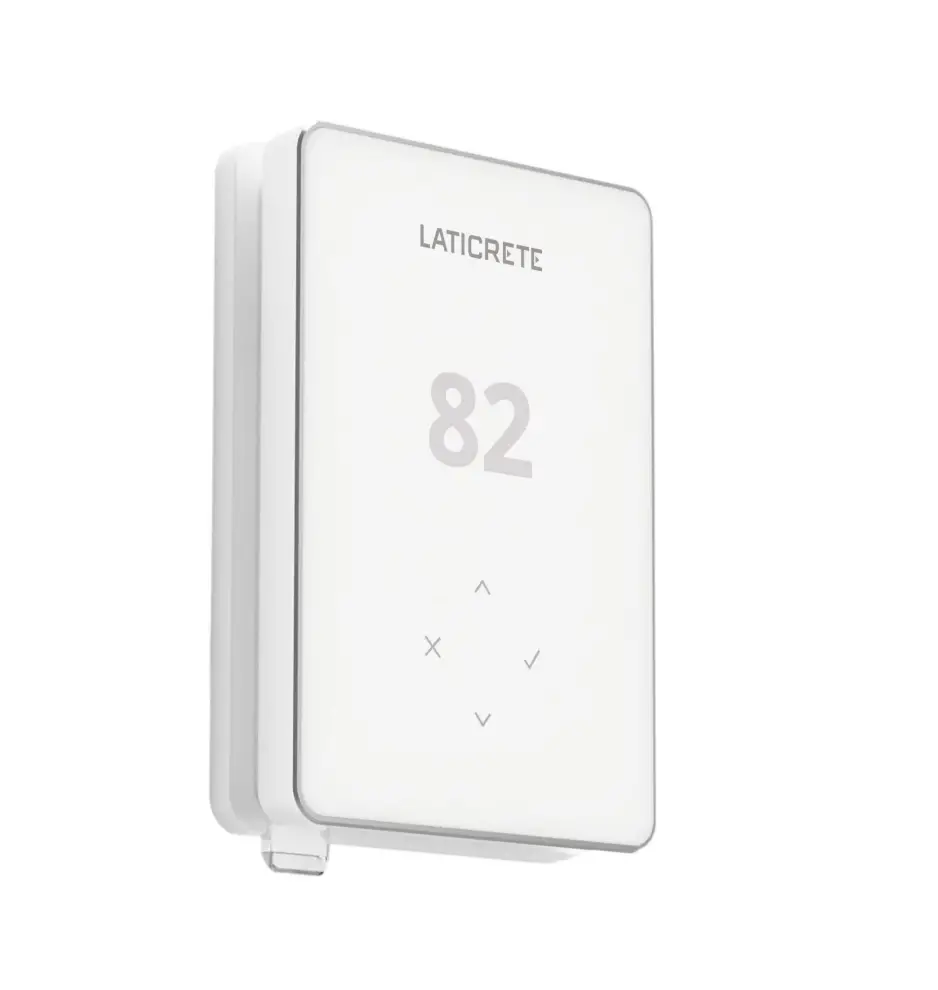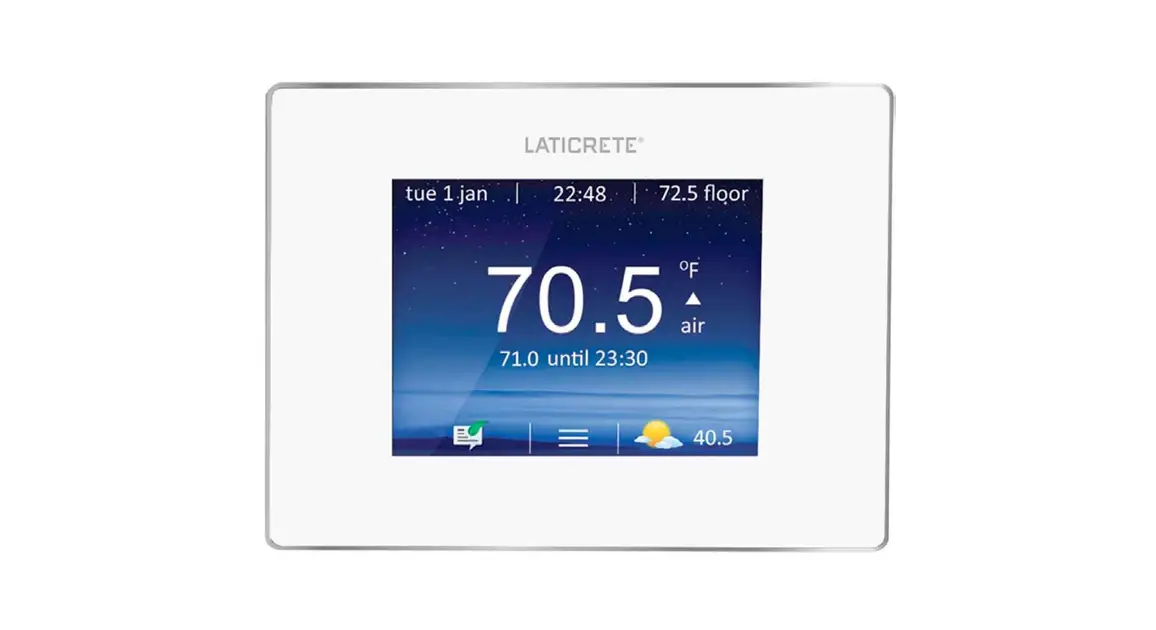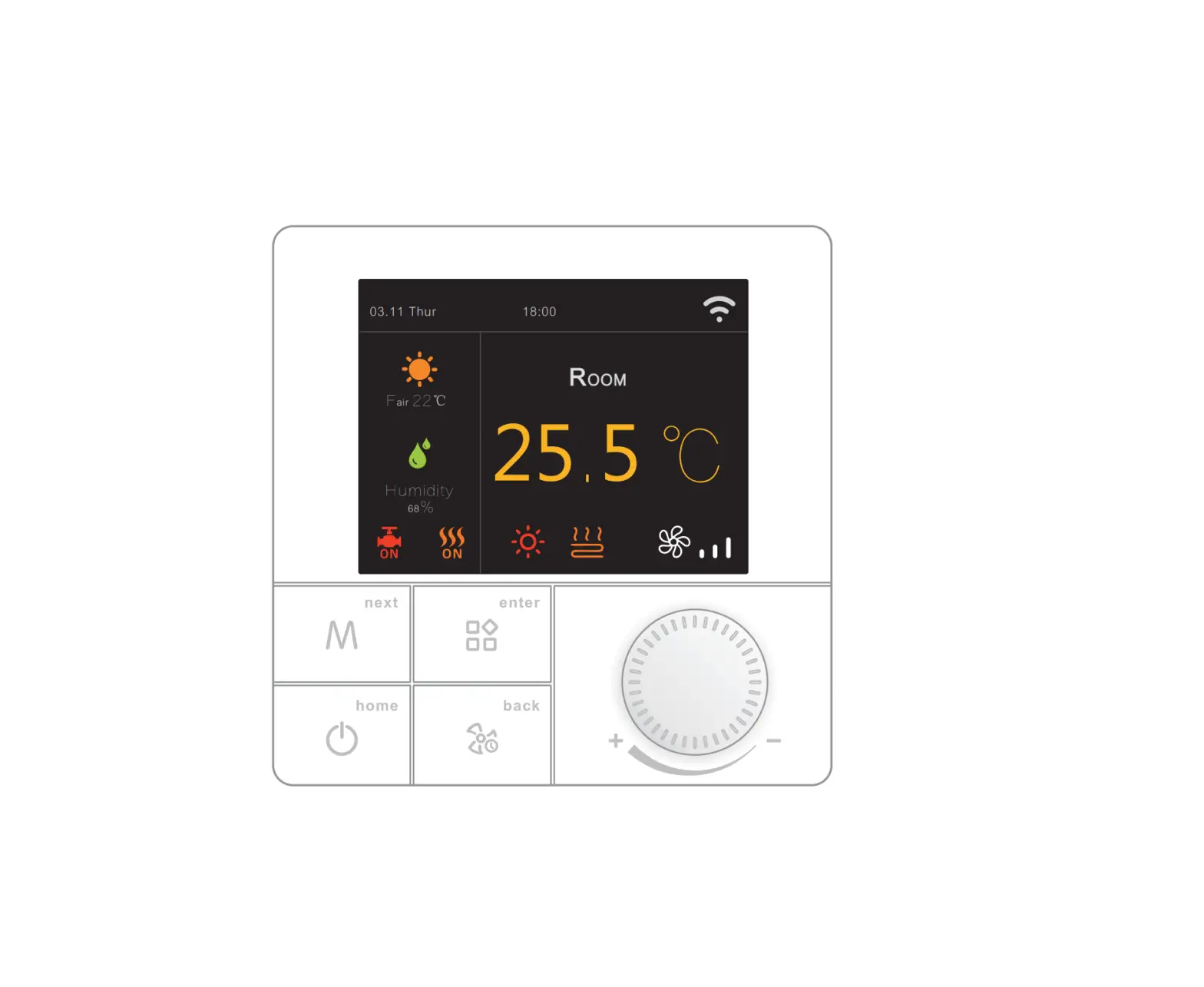
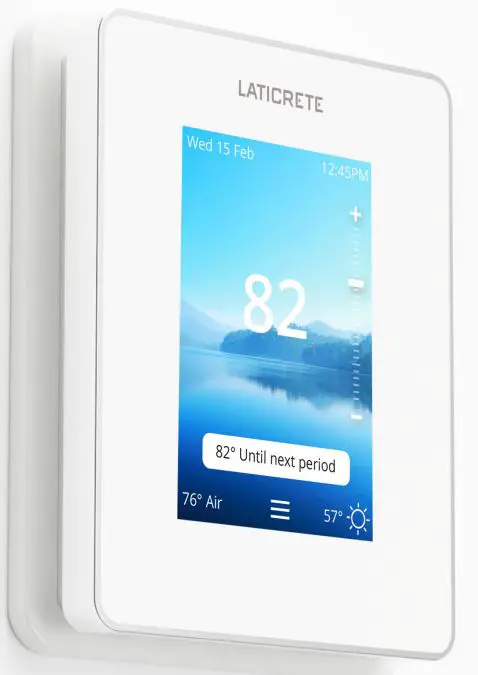
 LATICRETE Strata Heat Smart LCD Thermostat
 Pack Contents

 Pack Contents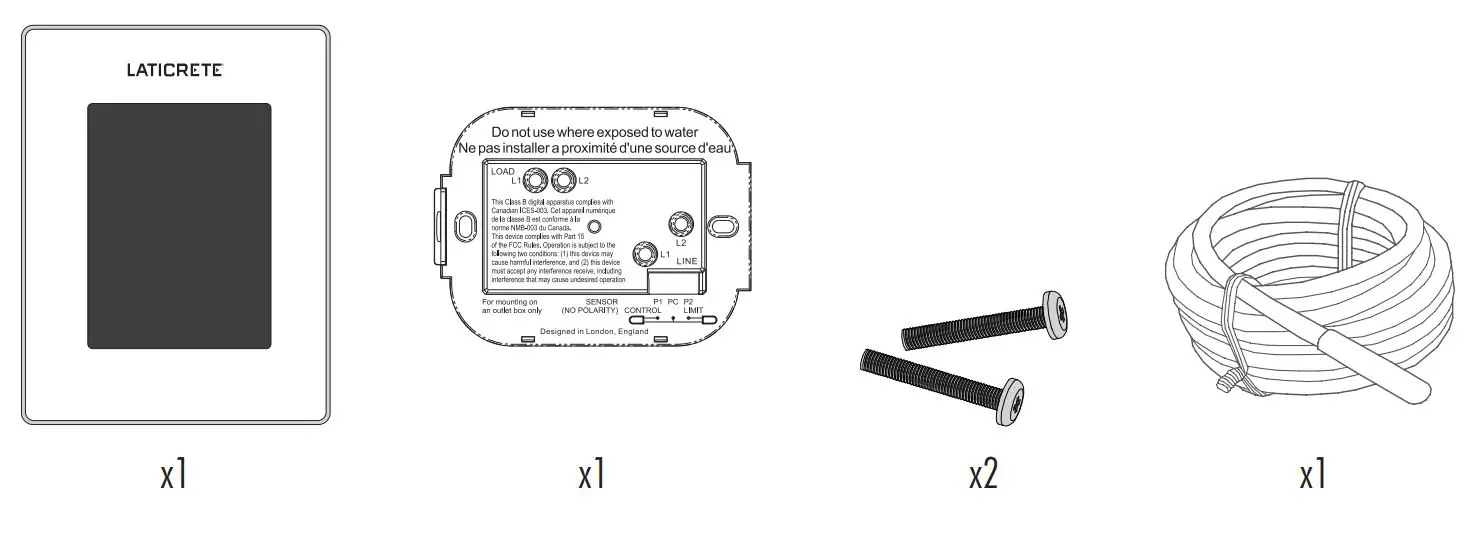
Safety Information
- The STRATA_HEAT™ Smart LCD Thermostat must be installed by a qualified electrician. It requires a permanent 110V – 240V AC, 60Hz supply. The STRATA_HEAT Smart LCD Thermostat contains a Class A GFCI with 5mA trip level and the wiring must conform to the local electrical code.
- Isolate the STRATA_HEAT Smart LCD Thermostat from the main supply throughout the installation process.
- Conduits are only required where it is mandated by state or provincial code. Please refer to local electrical code for compliant applications.
- The STRATA_HEAT Smart LCD Thermostat and its packaging are not toys; do not allow children to play with them. Small components and packaging present a risk of choking or suffocation.
- The STRATA_HEAT Smart LCD Thermostat is suitable for indoor use only. It must not be exposed to moisture, vibrations, mechanical loads or temperatures outside of its rated values.
- For safety and licensing reasons, unauthorized change and/or modification of the STRATA_HEAT Smart LCD Thermostat is not permitted.
- Ensure the distance from your router to the STRATA_HEAT Smart LCD Thermostat is not excessive. This will ensure the wireless connection is not subject to range or interference issues once installed.
- Install the STRATA_HEAT Smart LCD Thermostat in an area with good ventilation. It should not be beside a window/door, in direct sunlight or above another heat generating device (e.g. radiator or TV).
Installation
- Isolate the STRATA_HEAT Smart LCD Thermostat and supply from the mains supply.

- Unclip the display from the power base and remove the
 display Install a 3–1/2” (89 mm) deep single gang or 2–gang box with mud ring in your preferred thermostat location. Pull wires (heater, supply and sensor) through gang box and complete terminal wiring.
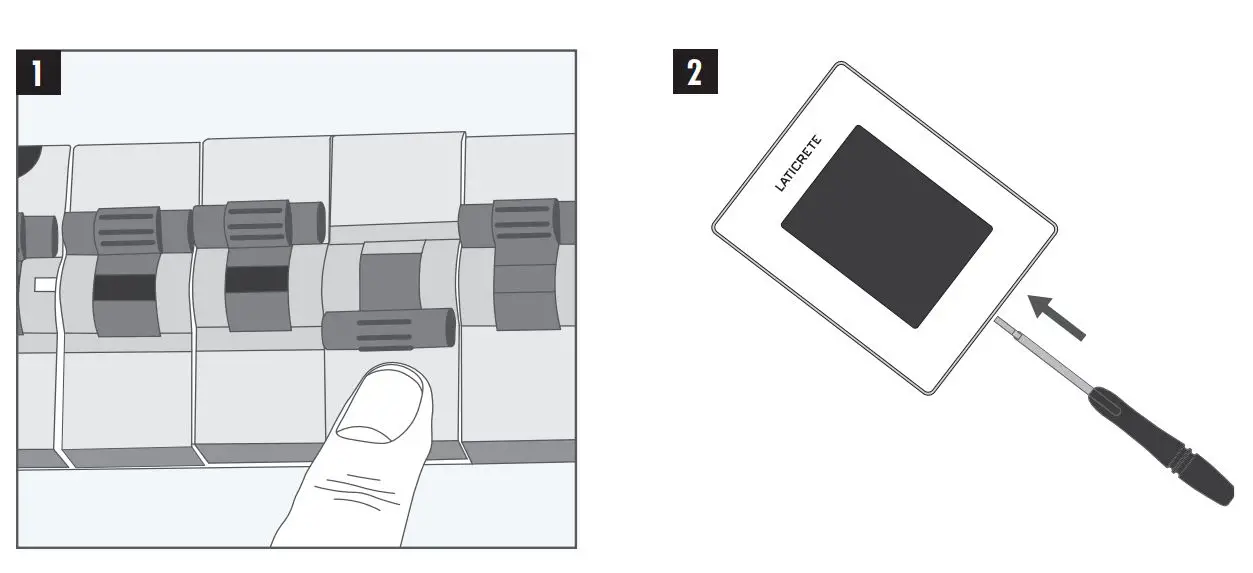
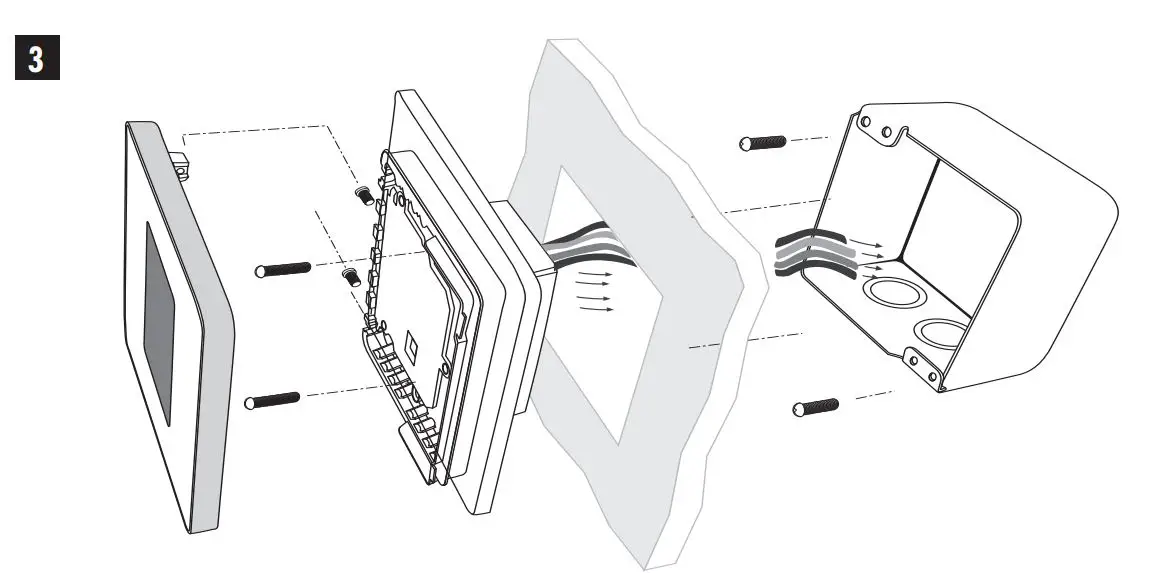 display Install a 3–1/2” (89 mm) deep single gang or 2–gang box with mud ring in your preferred thermostat location. Pull wires (heater, supply and sensor) through gang box and complete terminal wiring.
Wiring Connections
- WARNING!
The STRATA_HEAT™ Smart LCD Thermostat must be installed by a qualified electrician in accordance with National Electrical Code.
Wiring Connections LOAD L1 & L2
Heater Load Max.15A (1800W/120V, 3600W/240V) LINE L1 Supply Live (120 V) LINE L2
Supply Neutral (120 V) / Supply Live (240 V) P1 & PC Probe 1 – Floor/Air Control Sensor (No Polarity) Floor or air temperature reading for scheduled control P2 & PC Probe 2 – Limit Sensor (No Polarity) See Table 1.0 for thermostat use cases
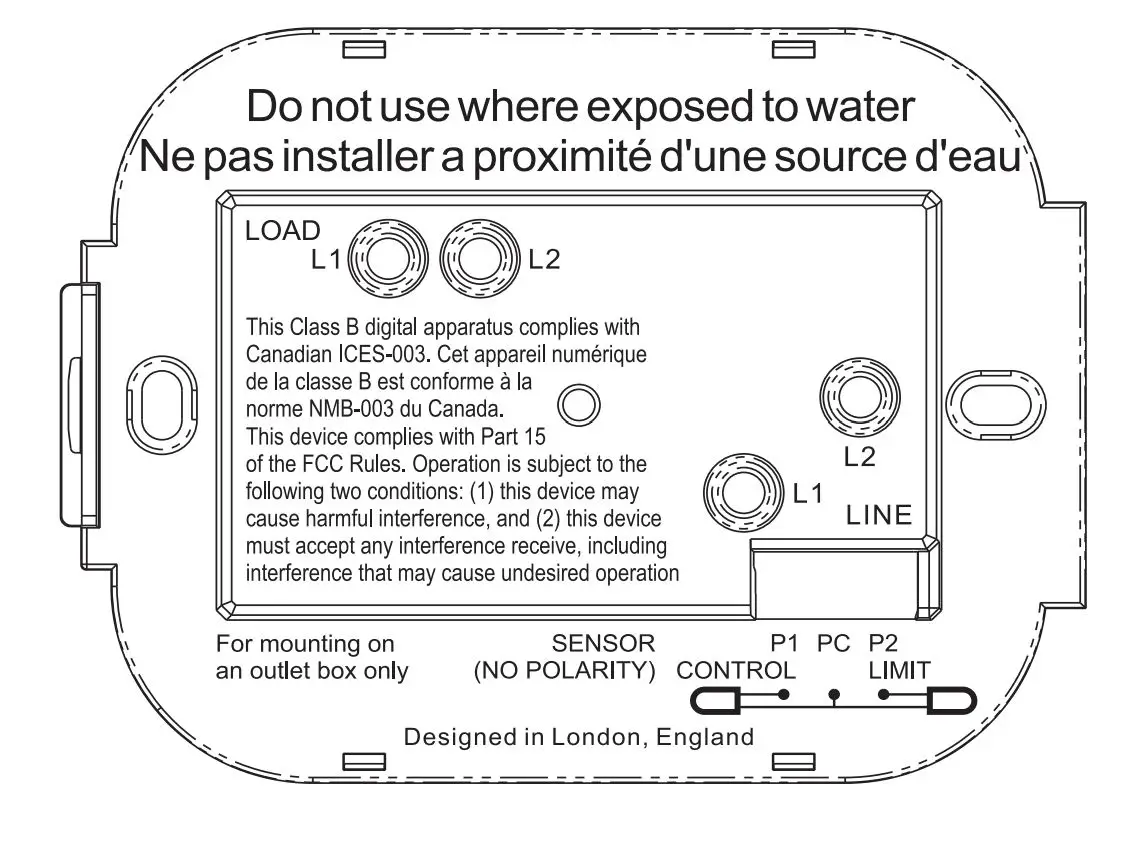
NOTE: The function of Probe 1, Probe 2 from Control/Limit Sensor can be swapped in Advanced Settings; Sensors & Application.
Thermostat use cases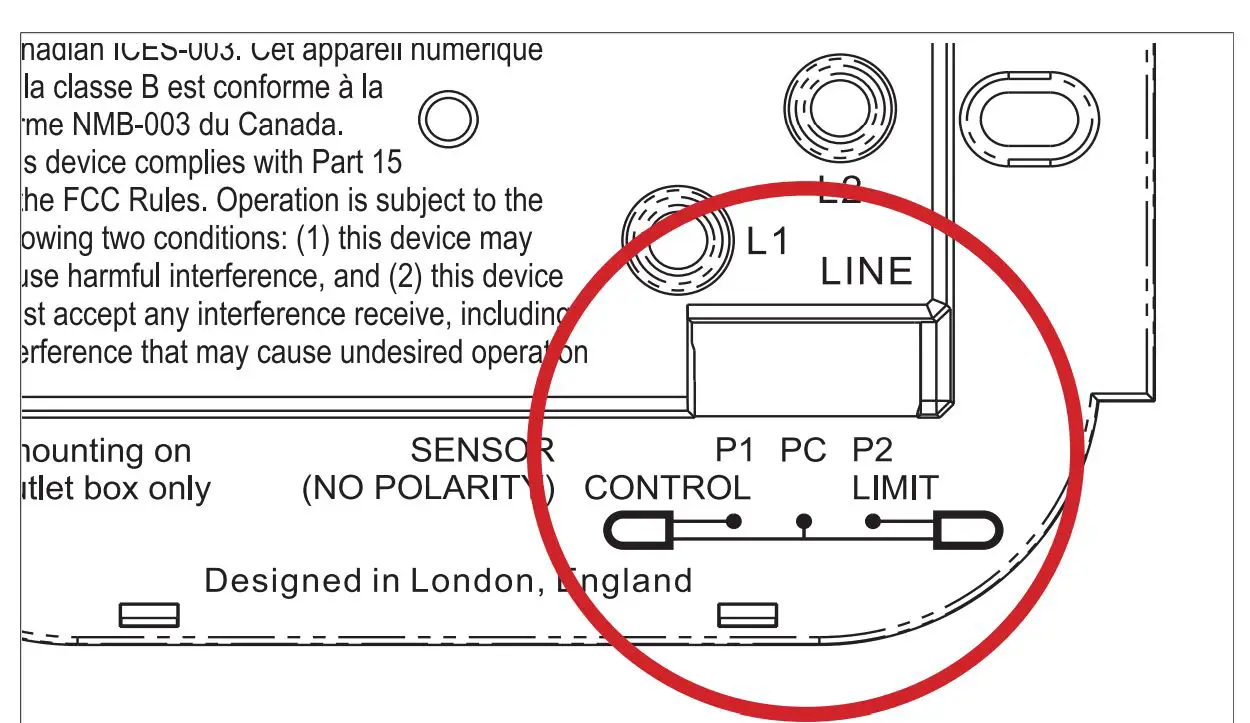
| # | Use Case | Control | Limit Sensor |
| 1 | Thermostat IN room Air temperature schedule No floor limit | Internal Air Sensor | None |
| 2* | Thermostat IN/OUT of room Floor temperature schedule Floor limit | P1 & PC Floor Sensor | None |
| 3 | Thermostat IN room Floor temperature schedule Air limit | P1 & PC Floor Sensor | Internal Air Sensor |
| 4 | Thermostat OUT of room Air temperature schedule No floor limit | P1 & PC Air Sensor | None |
| 5** | Thermostat IN room Air temperature schedule Floor limit | Internal Air Sensor | P2 & PC Floor Limit |
| 6 | Thermostat IN/OUT of room Floor temperature schedule Floor limit | P1 & PC Floor Sensor | P2 & PC Floor Limit |
| 7 | Thermostat OUT of room Air temperature schedule Floor limit | P1 & PC Air Sensor | P2 & PC Floor Limit |
| 8 | Thermostat IN/OUT of room Regulator schedule No limit | Reg. | None |
| 9 | Thermostat IN room Regulator schedule Air limit | Reg. | Internal Air Sensor |
| 10 | Thermostat IN/OUT of room Regulator schedule No limit | Reg. | None |
| 11 | Thermostat IN/OUT of room Regulator schedule Floor limit | Reg. | P2 & PC Floor Limit |
| 12 | Thermostat IN/OUT of room Regulator schedule Floor limit | Reg. | P2 & PC Floor Limit |
2* Recommended when thermostat is OUT of the heated room
5** Recommended when thermostat is IN the heated room
NOTE: For thermostat use cases 6 & 7 an additional sensor will be required.
Wiring Diagrams
Heating Load connected to STRATA_HEAT™ Smart LCD Thermostat and Relay 25 – Max. 40 Amps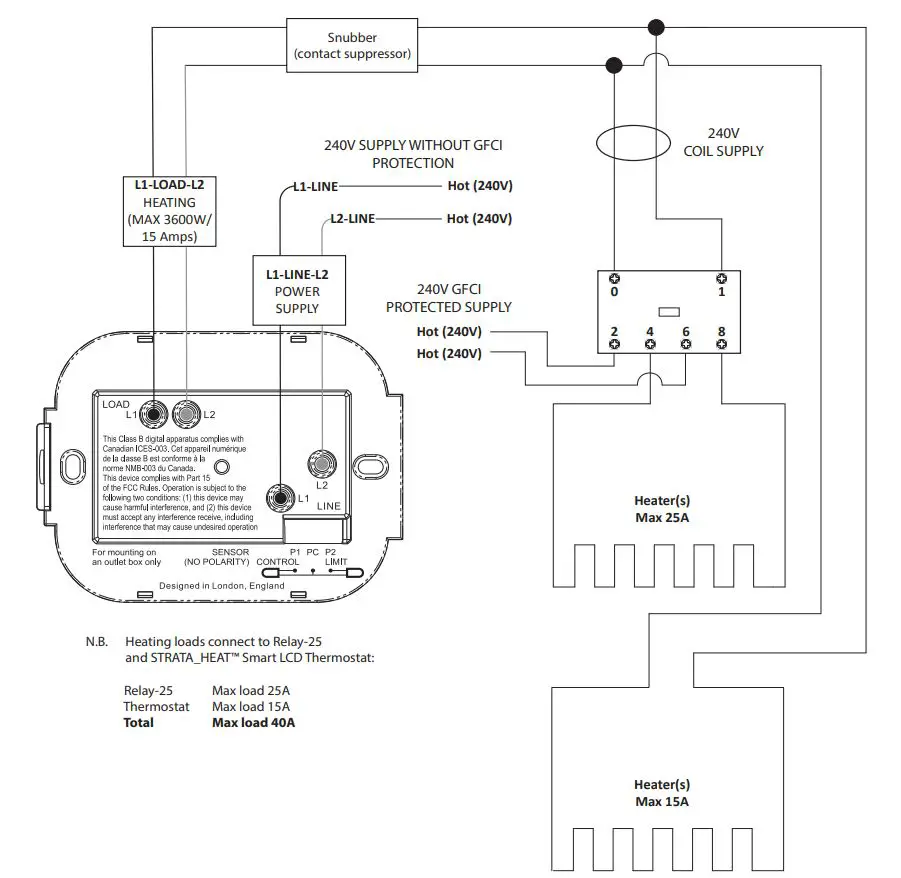 Heating Load connected to Relay 25 – Max. 25 Amps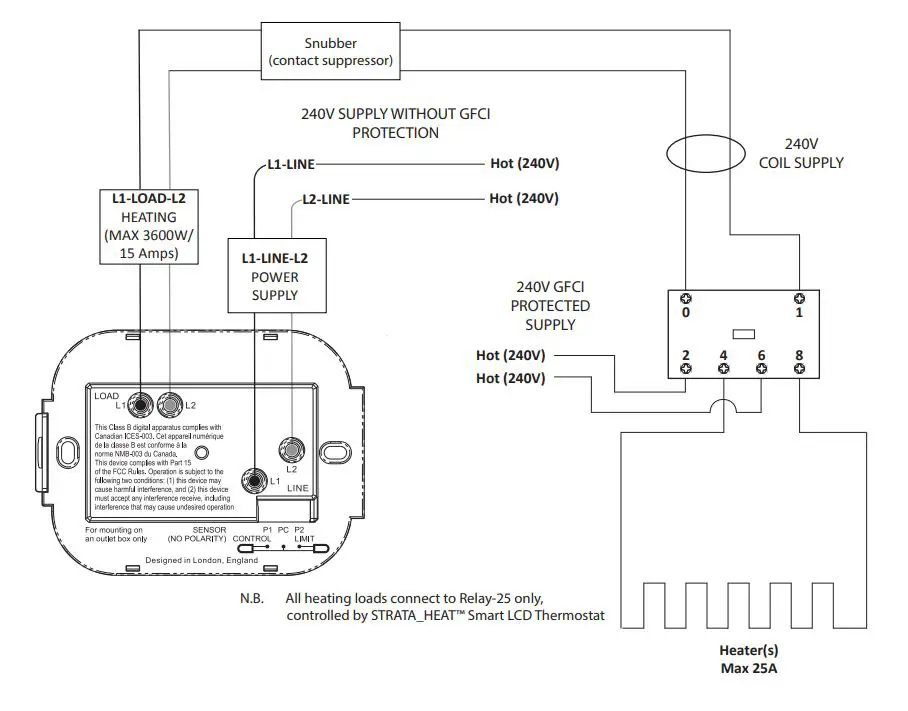
Thermostat Mounting
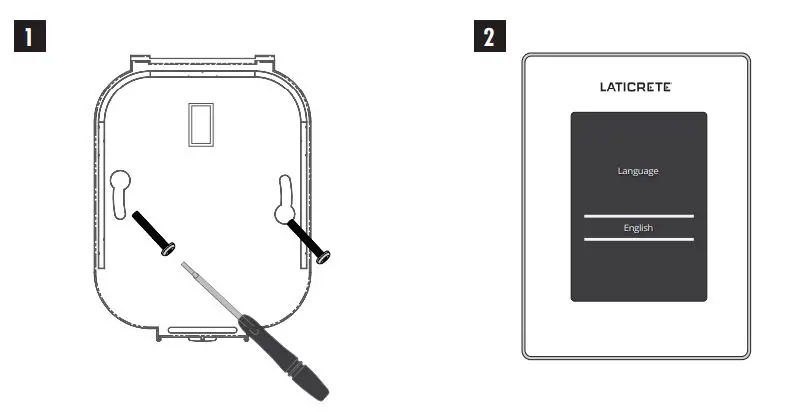
- Insert fixing screws through mounting holes of the power base and tighten.

- Re-attach the display to the power base. You can now restore power to the circuit and power up the STRATA_HEAT™ Smart LCD Thermostat. Follow the on screen instructions to set up the system. Once set up, a QR Code will appear.
Initial Setup
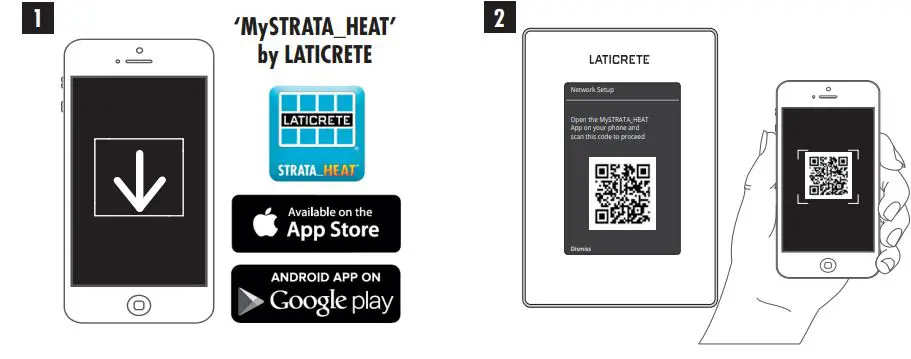
- Download the MySTRATA_HEAT App.

- Open the MySTRATA_HEAT App and scan the QR Code on the STRATA_HEAT Smart LCD Thermostat screen. Follow the instructions in the App to complete setup.
Step 5 – Add Location and Room
The MySTRATA_HEAT App will guide you through the setup of your STRATA_HEAT Smart LCD Thermostat. You will have to set up your house location and then the room within which your new STRATA_HEAT Smart LCD Thermostat is located.
Location
A location needs to be setup before a room can be configured and the STRATA_HEAT Smart LCD Thermostat device registered. Creating a location is user friendly and easy to follow, it is advised to have details of your current energy tariff and pricing to hand, as these will be required if you wish to use the energy monitoring features.
Room Setup
With a location now setup, the next step is to register a room in which your STRATA_HEAT Smart LCD Thermostat is located. This is the heating zone your thermostat will control. Ensure you set the correct System Type and Wattage of heaters connected.
NOTE: If an external relay or contactor relay has been installed please set System Type as Electric + Relay.
Welcome to the STRATA_HEAT™ Smart LCD Thermostat
Getting Started
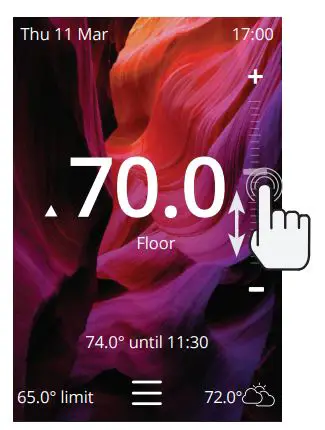
How to quickly change the temperature
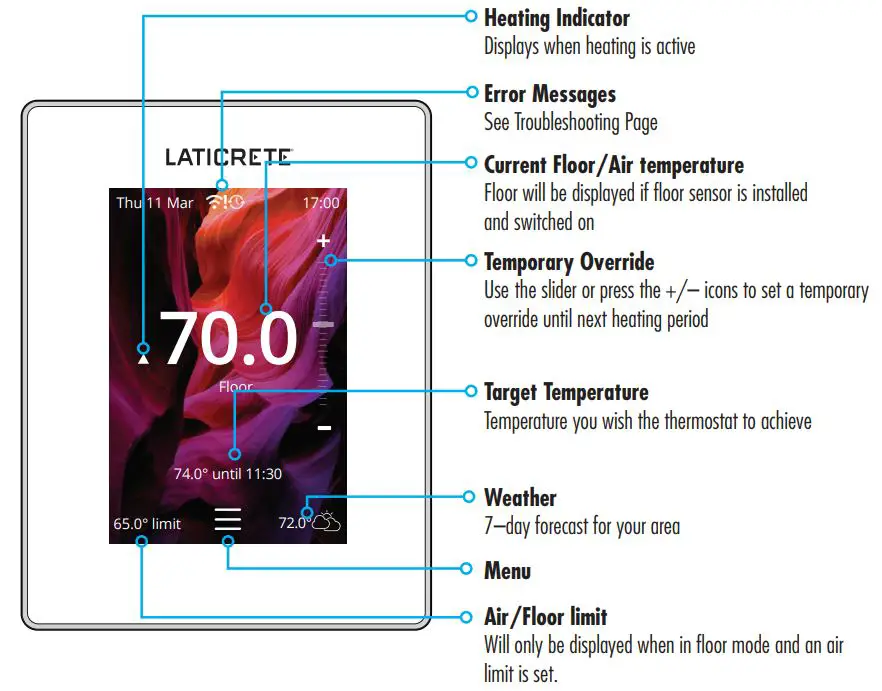
Use the slider or press the +/– icons to change your target temperature.
If in “Program” mode this will set a temporary override until your next heating period.
If in “Manual” mode this will set a fixed target temperature.
Once the target temperature is set above the current floor/air temperature the heating indicator will appear.
How to quickly change mode
Mode select allows you to quickly change from program, manual or vacation modes. You can also switch “Frost Protection” on or simply switch the “Heating Off” from here. Frost protection will ensure that the floor/air temperature does not drop below 44.0°F (6.5°C).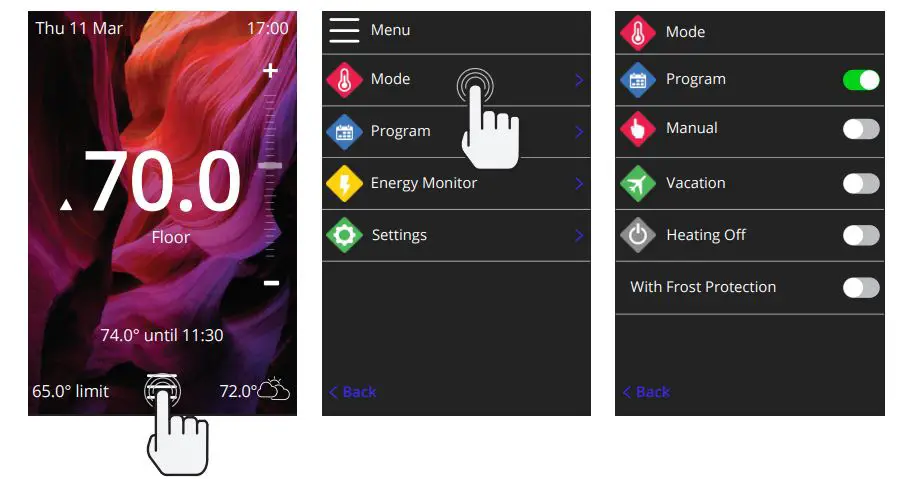
Heating
How to set a program
Setting a “Program” allows you to set comfort temperatures at set times throughout the day. Days can programmed individually, all days the same or weekdays as a block and weekends as a block. The choice is yours. 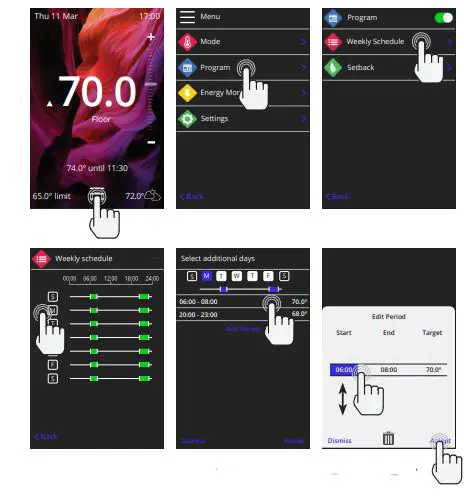 To “Select additional days” press the days of the week and the squares will be highlighted in white as shown and will follow the programmed heating schedule. Once you are happy press “Accept” to save the heating schedule. This will return you to the previous screen to repeat as necessary.
NOTE: For tailor–made preset heating schedules for different room types press the three dots “…” on the weekly schedule page.
Setback Temperature
The “Setback” temperature is a lower energy efficient temperature when outside of a heating period.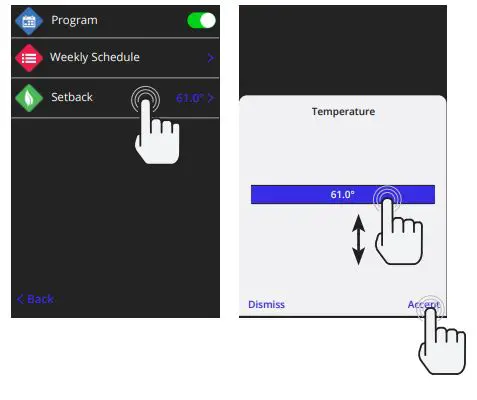
How to set into Manual Mode
Setting into “Manual” mode allows you to set a fixed target temperature for the thermostat to achieve. The thermostat will continue to maintain this temperature until another operating mode or temperature is selected.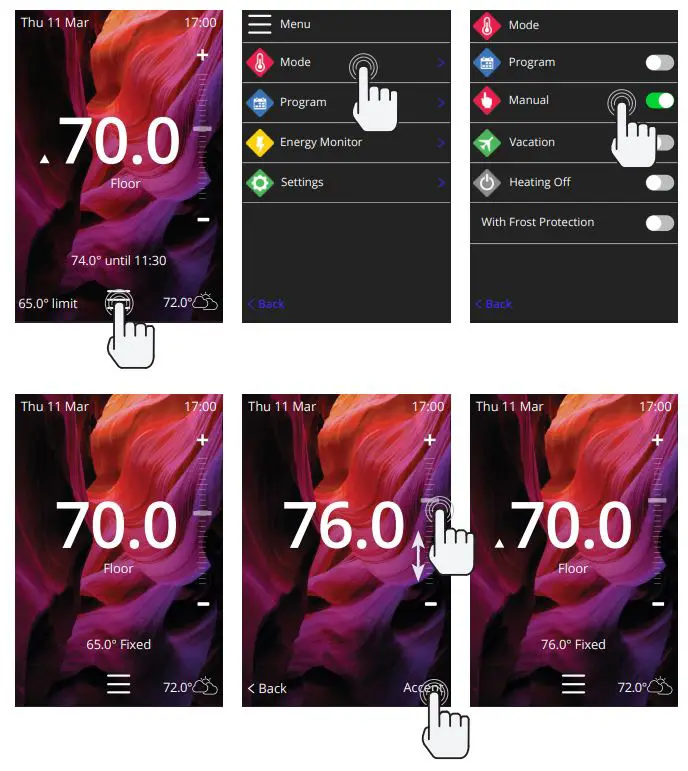
How to set into Vacation Mode
“Vacation Mode” allows you to override regular scheduling with a lower fixed temperature over a set time to save energy and avoid thermostat reprogramming.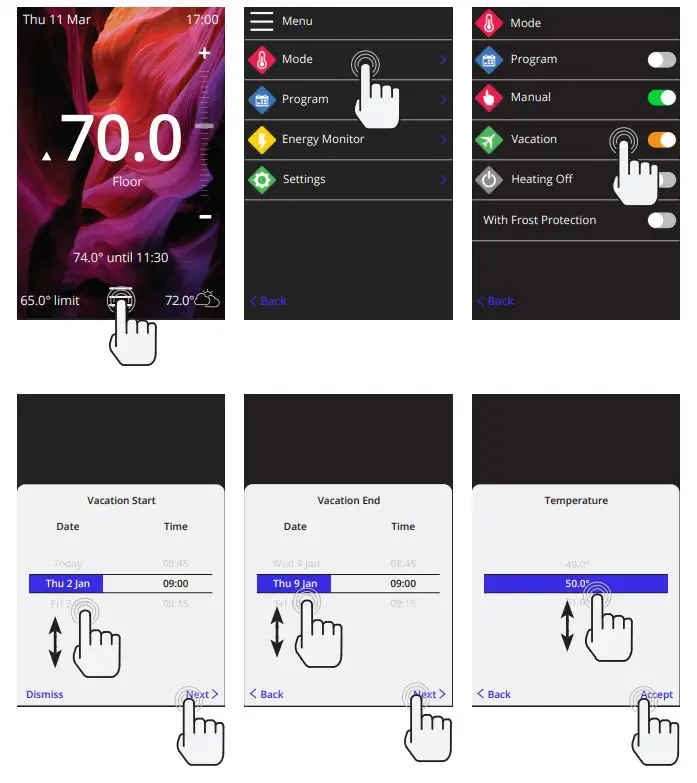
How to switch “Heating Off”
The below will switch the heating off until you cancel it by pressing “Heating Off” on the homescreen or going into mode select and pressing the “Heating Off” slider.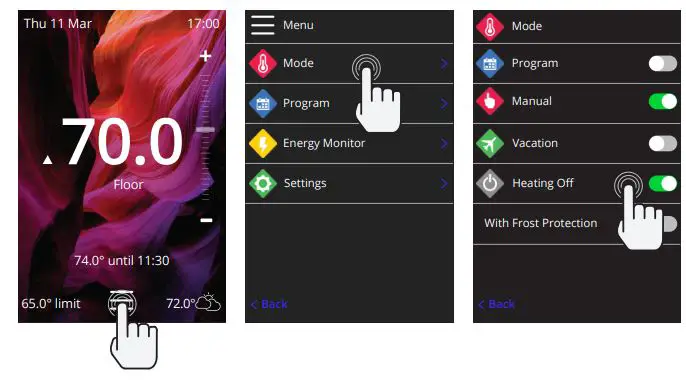
Energy Monitor
How Energy Monitor works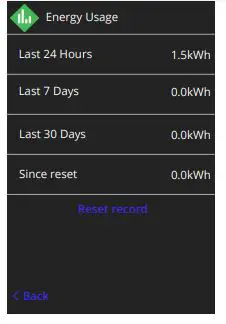
The STRATA_HEAT™ Smart LCD Thermostat learns how you use your system and how your house reacts to heating and weather. Energy monitoring will show the amount of energy consumed over a certain time period. This will be calculated through system power (total system wattage) multiplied by efficiency and total run time. You will need to enter the power of your system, and in some cases, the efficiency. If you do not know these, speak to your installer or system manufacturer.
Changing the Power Settings
If you have entered the wrong system power during setup it can be changed in Energy Monitor; Power Settings.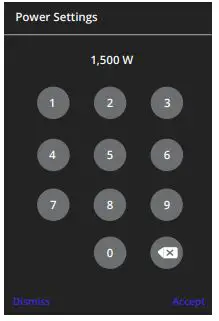
Geo Location Settings
How Geo works
Geo is a unique technology developed by LATICRETE and built into the MySTRATA_HEAT App that uses an advanced algorithm to understand the most efficient heat settings for your home.
Working automatically; it learns your routines and location through background communication with your smartphone and lowers temperatures when you are away, only rising them up to your ideal comfort temperature in time for your arrival home.
Geo will operate when the thermostat is in the program or manual run modes. It is turned off by default. Use the MySTRATA_HEAT App to switch Geo on.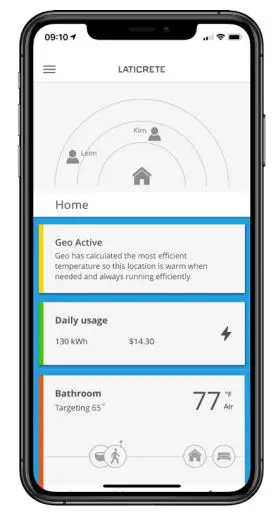
Settings
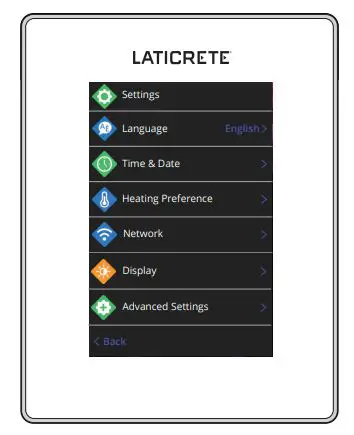
| Language Settings | Change the STRATA_HEAT™ Smart LCD Thermostat language | |
| Time & Date | Change the Time and Date | |
| Daylight savings | On/Off | |
| 24–hour time | On/Off | |
| Heating Preference | Temperature unit | °C/°F |
| Open window detection | On/Off | |
| The windows open detection feature is designed to switch off heating to save energy when the thermostat detects that a window or door has been opened and, the outside air temperature is significantly below the indoor temperature. | ||
| Adaptive Learning (Early Start) | On/Off | |
| Adaptive learning will use the historic heating/cooling rates for the time of day, historic external temperatures and the forecast external temperatures, to work out the heating start time in order to reach the comfort time at the start of the comfort period. It will only work in Program Mode. | ||
| Network | Wi-Fi Connection | On/Off |
| It is possible to set a new Wi-Fi connection from here. The current network connection can also be viewed from this menu, including the signal strength. | ||
| Display | Background | Light Dark Random |
| Choose the background image of the STRATA_HEAT™ Smart LCD Thermostat. Random is an image selected from the LATICRETE collection. | ||
| Standby style | Temperature Time Minimalist | |
| Choose what will be displayed when the STRATA_HEAT Smart LCD Thermostat goes into standby. Temperature will display current temperature; Time will display the current time; Minimalist will show neither. | ||
| Brightness | Active Standby Night | |
| Adjust the brightness of the STRATA_HEAT™ Smart LCD Thermostat screen when in Active, Standby or Night Mode. | ||
| Display, cont’d | Night period | Set the Start and End period |
| This is the time when you usually go to bed at night and wake up in the morning. The brightness of “Night” mode will begin and end using this time. | ||
| Screen lock | On/Off | |
| Locks the STRATA_HEAT™ Smart LCD Thermostat screen to prevent any unauthorised changes to the STRATA_HEAT Smart LCD Thermostat. Requires a 4 digit code to access the menu or make changes. | ||
Advanced Settings
| Advanced settings | Sensors & Application | Internal Air Sensor | Offset +/– 10° |
| Probe 1 Connected | On/Off | ||
| Type 5, 10, 15, 100K Offset +/– 10° | |||
| The STRATA_HEAT Smart LCD Thermostat uses a 10K sensor. However, if using a STRATA_HEAT Smart LCD Thermostat to replace an existing thermostat you must change to the correct sensor type. | |||
| Probe 2 Connected | On/Off | ||
| Type 5, 10, 15, 100K Offset +/– 10° | |||
| Swap Probe Usage | |||
| The function of Probe 1, Probe 2 from Control/ Limit Sensor can be swapped here. | |||
| Floor thermostat (Probe 1 On, Probe 2 Off. See Table 1.0 for alternative thermostat use cases) | Control Floor Remote Air Regulator Limit None/Air | ||
| Choose to switch the method of control for the sensor; floor sensor, remote air sensor if not installed underneath the floor or regulator mode. | |||
| Regulator Mode; Heating is on for X% out of control cycle (default 10 mins). Heating is off for remaining time. | |||
| Floor type* | Tile/Stone Laminate Carpet Wood Vinyl Other | ||
| Choose the floor type of your installation. This will apply different temperature and overheat limits to the STRATA_HEAT Smart LCD Thermostat. * Not applicable if conventional heating system was selected. | |||
| Advanced settings, cont’d | Temperature limits | Set Min./Max. settable temperature limits |
| Overheat limit | Set Overheat air limit if floor sensor has been installed | |
| Control Period | Set between 10 – 60 mins. | |
| Control period checks the difference in the current measured temperature and the set temperature in a proportional integral algorithm to maintain a steady temperature. | ||
| About | Details about the STRATA_HEAT™ Smart LCD Thermostat’s current firmware, MAC address and Wi-Fi connection information. | |
Troubleshooting
| Display is blank | Brightness | 1. Check that the standby brightness is not set to Off. |
| Power | 2. (Electrician Required) Electrician required to verify power is going to the STRATA_HEAT Smart LCD Thermostat and that it is correctly wired. | |
| ER1/ER2 | Sensor Error | (Electrician Required) Electrician required to verify that the floor sensor has been wired correctly. If it is correctly wired the electrician will need to check the resistance of the floor sensor using a multi meter. For temperatures between 68°F – 86°F (20°C – 30°C) the resistance of the floor sensor should measure between 8K ohms and 12K ohms.
If the electrician finds a fault, and the STRATA_HEAT Smart LCD Thermostat is in the room to be heated then it can be set into “Air Mode”.
To set into “Air Mode”, go to Sensors & Application in Advanced Settings and switch the probe off. |
| Heating is coming on earlier than programmed times | Adaptive learning (Early Start) On | Adaptive learning will use the historic heating/cooling rates for the time of day, historic external temperatures and the forecast external temperatures, to work out the heating start time in order to reach the comfort time at the start of the comfort period. It will only work in Program Mode. |
| Cannot to set above a certain temperature | Floor Type Temperature Limits | Delicate floor coverings need to have their temperatures limited. If the finished floor is set for wood, laminate, vinyl etc. you are unable to set the temperature above 81°F (27°C). |
| Wi-Fi Error Symbol | Wi-Fi not setup | If you have not done so, download the MySTRATA_HEAT App, go to Settings and Network setup and follow the on screen instructions to connect to a Wi-Fi Network. |
| Wi-Fi disconnected | Follow the step above to try and to re–connect to the Wi-Fi Network.
If the STRATA_HEAT Smart LCD Thermostat still fails to connect, see Wi-Fi Troubleshooting. | |
| Clock Sync Icon | Time and Date not set | Connect the STRATA_HEAT Smart LCD Thermostat to a Wi-Fi network or alternatively set the time and date from the settings menu. |
Wi-Fi Troubleshooting
Before following the troubleshooting guide below please check the following:
- The password is WPA2 protected.
- The router is set to a 2.4 GHz band. (802.11 b, g, n, b/g mixed, b/g/n mixed)
NOTE: If you need to change any of the items listed above, please refer to your router manual.
Technical Specifications
| Model | 0804-0404-TW/TB |
| Voltage | 110V – 240V AC +/–15% 50Hz/60Hz |
| Protection | II |
| Max. Load | 15A resistive (120 V/1800W, 240 V/3600W) |
| GFCI | Class A GFCI with 5mA trip level |
| Rated impulse voltage | 4000V |
| Automatic action | 100,000 |
| Disconnection means | 1B |
| Pollution degree | 2 |
| Max. Ambient Temperature | 40°C / 104°F (T40) |
| Relative Humidity | 80% |
| IP Rating | IP30 |
| Sensors | Floor/Air |
| Sensor Type | NTC10K @ 25°C |
| Operating Frequency | 2401 – 2484MHz |
| Max. Radio–Frequency Power Transmitted | 20dBm |
| Compatibility | Electric Underfloor Heating |
|
Standards | UL–60730–1 UL–60730–2–9 UL–943 CAN/CSA–E60730–1 CAN/CSA–E60730–2–9 CAN/CSA–C22.2 No. 144.1 FCC 47 CFR Part 15, ICES–003 |
| Warranty | 1 year |
| Approvals | ETL Intertek |
Warranty
LATICRETE warrants this product, to be free from defects in the workmanship or materials, under normal use and service, for 1 year from the date of purchase by the consumer.
If at any time during the warranty period the product is determined to be defective, LATICRETE shall repair or replace it, at LATICRETE’s option.
If the product is defective, please either;
Return it, with a bill of sale or other dated proof of purchase, to the place from which you purchased it, or Contact LATICRETE. LATICRETE will determine whether the product should be returned or replaced.
The 1 year warranty only applies if the product is registered with LATICRETE within 30 days after purchase. Registration can be completed online at www.laticrete.com
This warranty does not cover removal or re-installation costs and shall not apply if it is shown by LATICRETE that the defect or malfunction was caused by failure to follow the instruction manuals, incorrect installation or damage which occurred while the product was in the possession of a consumer. The sole responsibility of LATICRETE shall be to repair or replace the product within the terms stated above. This warranty does not extend to any associated software such as apps or portals.
LATICRETE SHALL NOT BE LIABLE FOR ANY LOSS OR DAMAGE OF ANY KIND, INCLUDING ANY INCIDENTAL OR CONSEQUENTIAL DAMAGES RESULTING, DIRECTLY OR INDIRECTLY, FROM ANY BREACH OF ANY WARRANTY, EXPRESS OR IMPLIED, OR ANY OTHER FAILURE OF THIS PRODUCT. THIS WARRANTY IS THE ONLY EXPRESS WARRANTY LATICRETE MAKES ON THIS PRODUCT. THE DURATION OF ANY IMPLIED WARRANTIES, INCLUDING THE WARRANTIES OF MERCHANTABILITY AND FITNESS FOR A PARTICULAR PURPOSE, IS HEREBY LIMITED TO THE ONE-YEAR DURATION OF THIS WARRANTY.
This Warranty does not affect your statutory rights.
LATICRETE International, Inc.One LATICRETE Park North, Bethany, CT 06524-3423 USA 1.800.243.4788 +1.203.393.0010 www.laticrete.com
DS-10031-1021 ©2021 LATICRETE International, Inc. All trademarks shown are the intellectual properties of their respective owners.
 LATICRETE | International Construction Solutions Manufacturer