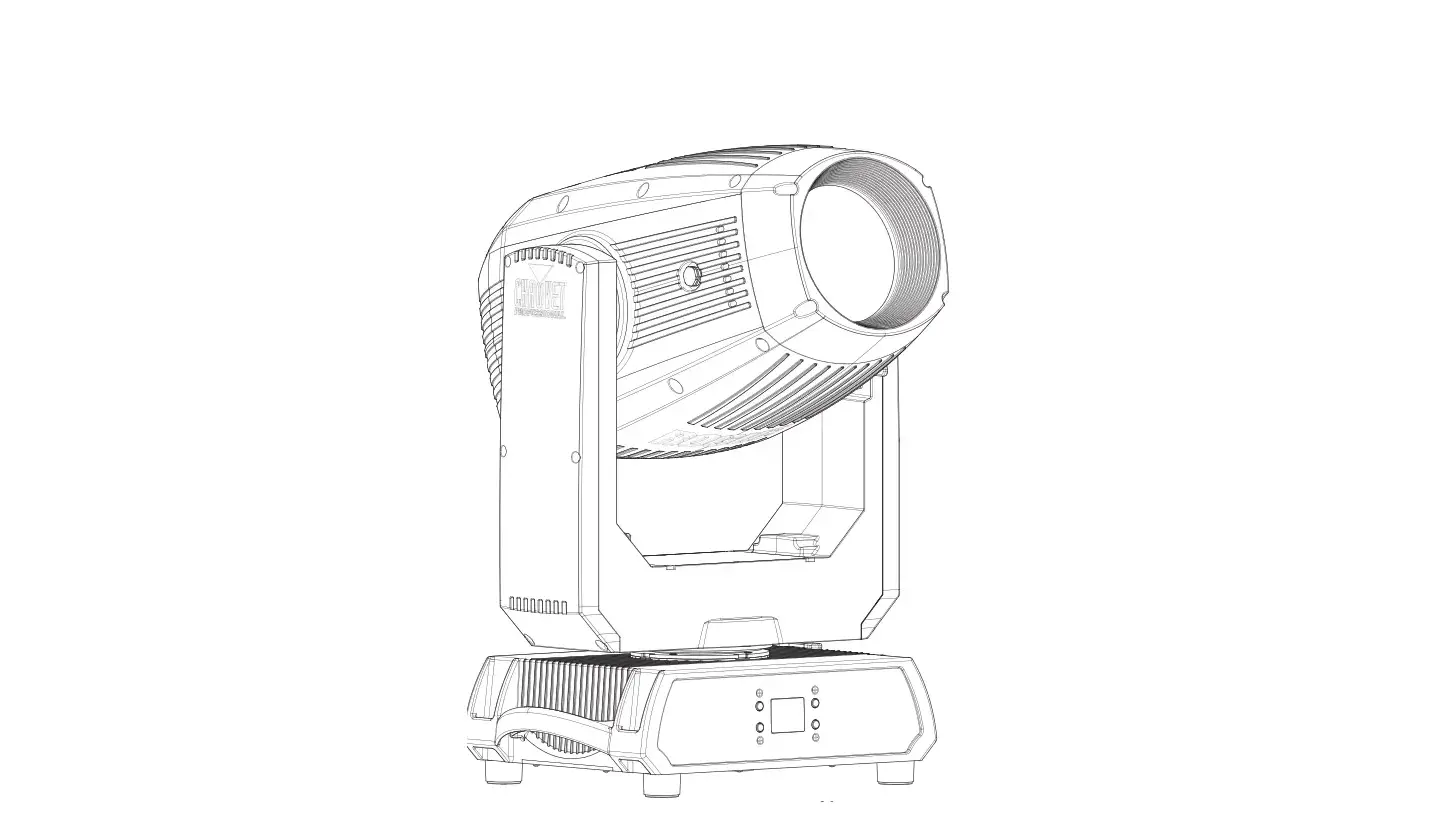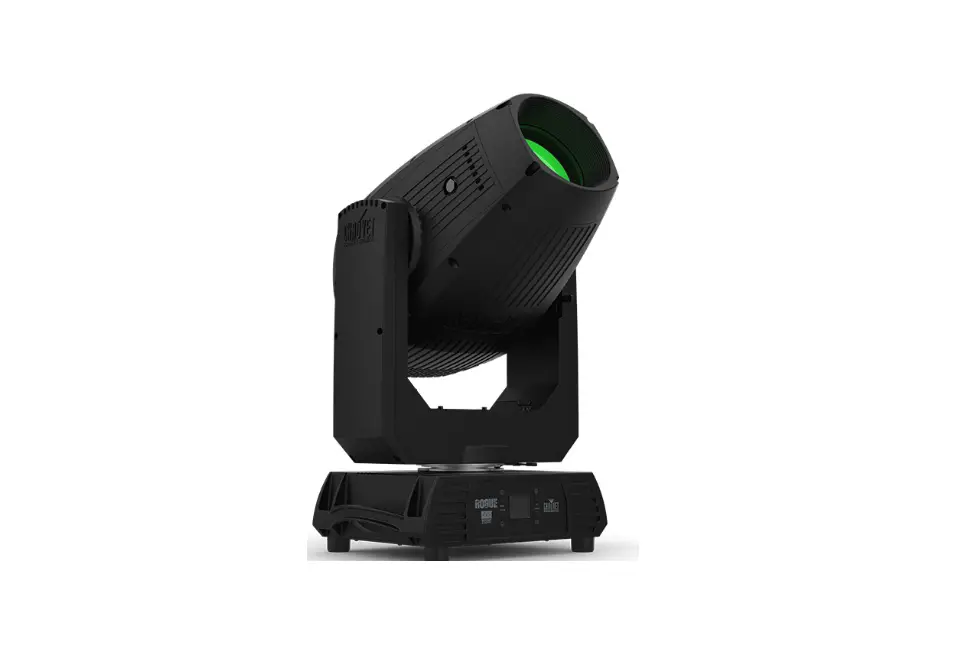

CHAUVET Professional ROGUE Outcast 3 Spot
Edition Notes
The Rogue Outcast 3 Spot User Manual includes a description, safety precautions, installation, programming, operation and maintenance instructions for the Rogue Outcast 3 Spot as of the release date of this edition.
Trademarks
Chauvet, Chauvet Professional, the Chauvet logo, Rogue, Outcast, and Rogue Outcast are registered trademarks or trademarks of Chauvet & Sons, LLC (d/b/a Chauvet and Chauvet Lighting) in the United States and other countries. Other company and product names and logos referred to herein may be trademarks of their respective companies.
Copyright Notice
The works of authorship contained in this manual, including, but not limited to, all design, text and images are owned by Chauvet.
© Copyright 2022 Chauvet & Sons, LLC. All rights reserved. Electronically published by Chauvet in the United States of America.
Manual Use
Chauvet authorizes its customers to download and print this manual for professional information purposes only. Chauvet expressly prohibits the usage, copy, storage, distribution, modification, or printing of this manual or its content for any other purpose without written consent from Chauvet.
Document Printing
For best results, print this document in color, on letter size paper (8.5 x 11 in), double-sided. If using A4 paper (210 x 297 mm), configure the printer to scale the content accordingly.
Intended Audience
Any person installing, operating, and/or maintaining this product should completely read through the guide that shipped with the product, as well as this manual, before installing, operating, or maintaining this product.
Disclaimer
Chauvet believes that the information contained in this manual is accurate in all respects. However, Chauvet assumes no responsibility and specifically disclaims any and all liability to any party for any loss, damage or disruption caused by any errors or omissions in this document, whether such errors or omissions result from negligence, accident or any other cause. Chauvet reserves the right to revise the content of this document without any obligation to notify any person or company of such revision, however, Chauvet has no obligation to make, and does not commit to make, any such revisions. Download the latest version from www.chauvetprofessional.com.
Document Revision
This Rogue Outcast 3 Spot User Manual is the 1st edition of this document. Go to www.chauvetprofessional.com for the latest version.
Before You Begin
What Is Included
- Rogue Outcast 3 Spot
- Seetronic Powerkon IP65 power cable
- 2 Omega brackets with mounting hardware
- Quick Reference Guide
Claims
Carefully unpack the product immediately and check the container to make sure all the parts are in the package and are in good condition. If the box or the contents (the product and included accessories) appear damaged from shipping, or show signs of mishandling, notify the carrier immediately, not Chauvet. Failure to report damage to the carrier immediately may invalidate your claim. In addition, keep the box and contents for inspection. For other issues, such as missing components or parts, damage not related to shipping, or concealed damage, file a claim with Chauvet within 7 days of delivery.
Text Conventions
| Convention | Meaning |
| 1–512 | A range of values |
| 50/60 | A set of values of which only one can be chosen |
| Settings | A menu option not to be modified |
| <ENTER> | A key to be pressed on the product’s control panel |
Symbols
- Any reference to data or power connections in this manual assumes the use of Seetronic IP rated cables.
- The term “DMX” used throughout this manual refers to the USITT DMX512-A digital data transmission protocol.
FCC Compliance
This device complies with Part 15 Part B of the FCC Rules. Operation is subject to the following two conditions:
- This device may not cause harmful interference, and
- This device must accept any interference received, including interference that may cause undesired operation.
Any changes or modifications not expressly approved by the party responsible for compliance could void the user’s authority to operate the equipment.
Safety Notes
Read all the following safety notes before working with this product. These notes contain important information about the installation, usage, and maintenance of this product.
This product contains no user-serviceable parts. Any reference to servicing in this User Manual will only apply to properly trained, certified technicians. Do not open the housing or attempt any repairs.
All applicable local codes and regulations apply to proper installation of this product.
Personal Safety
- The luminaire should be positioned so that prolonged staring into the luminaire at a distance closer than 16.4 ft (5 m) is not expected.
- If the external flexible cable or cord of this luminaire is damaged, it shall be replaced by a special cord or cord exclusively available from the manufacturer or his service agent.
- The light source contained in this luminaire shall only be replaced by the manufacturer or his service agent or a similar qualified person.
- The luminaire is intended for professional use only.
- Always disconnect the product from the power source before cleaning or replacing the fuse.
- Always connect the product to a grounded circuit to avoid the risk of electrocution.
- Do not touch the product’s housing when operating because it may be very hot.
Mounting and Rigging
- Do not submerge this product (IP65). Temporary outdoor operation is fine.
- When using this product in an outdoor environment, use IP65 (or higher) rated power and data cables. Secure unused power and data ports with attached IP65 covers.
- CAUTION: When transferring product from extreme temperature environments, (e.g., cold truck to warm, humid ballroom) condensation may form on the internal electronics of the product. To avoid causing a failure, allow product to fully acclimate to the surrounding environment before connecting it to power.
- Not for permanent outdoor installation in locations with extreme environmental conditions. This includes, but is not limited to:
- Exposure to a marine/saline environment (within 3 miles of a saltwater body of water).
- Locations where the normal high or low temperatures exceed the temperature ranges in this manual.
- Locations that are prone to flooding or being buried in snow.
- Areas where the product will be subjected to extreme radiation or caustic substances.
- Mount this product in a location with adequate ventilation, at least 20 in (50 cm) from adjacent surfaces.
- Make sure there are no flammable materials within 20 cm of this product while it is operating.
- When hanging this product, always secure to a fastening device using a safety cable.
- Never carry the product by the power cable.
Power and Wiring
- Make sure the power cable is not crimped or damaged.
- Always make sure you are connecting this product to the proper voltage in accordance with the specifications in this manual or on the product’s specification label.
- To eliminate unnecessary wear and improve its lifespan, during periods of non-use completely disconnect the product from power via breaker or by unplugging it.
- Never connect this product to a dimmer pack or rheostat.
- Make sure to replace the fuse with another of the same type and rating.
- Never disconnect this product by pulling or tugging on the power cable.
Operation
- Do not operate this product if there is damage on the housing, lenses, or cables. Have the damaged parts replaced by an authorized technician at once.
- Do not cover the ventilation slots when operating to avoid internal overheating.
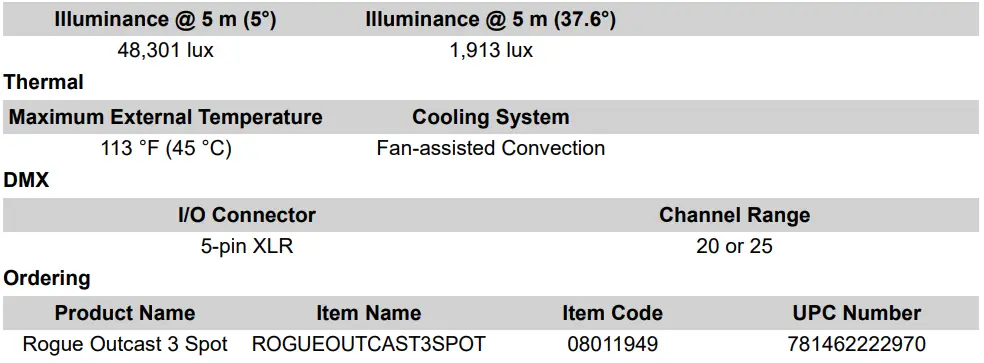
- The maximum ambient temperature is 113 °F (45 °C). Do not operate the product at higher temperatures.
- The minimum startup temperature is -4°F (-20°C). Do not start the product at lower temperatures.
- The minimum ambient temperature is -22°F (-30°C). Do not operate the product at lower temperatures.
- In the event of a serious operation problem, stop using this product immediately!
If your Chauvet product requires service, contact Chauvet Technical Support.
Expected LED Lifespan
Over time, use and heat will gradually reduce LED brightness. Clustered LEDs produce more heat than single LEDs, contributing to shorter lifespans if always used at full intensity. The average LED lifespan is 40,000 to 50,000 hours. To extend LED lifespan, maintain proper ventilation around the product, and limit the overall intensity.
Introduction
Description
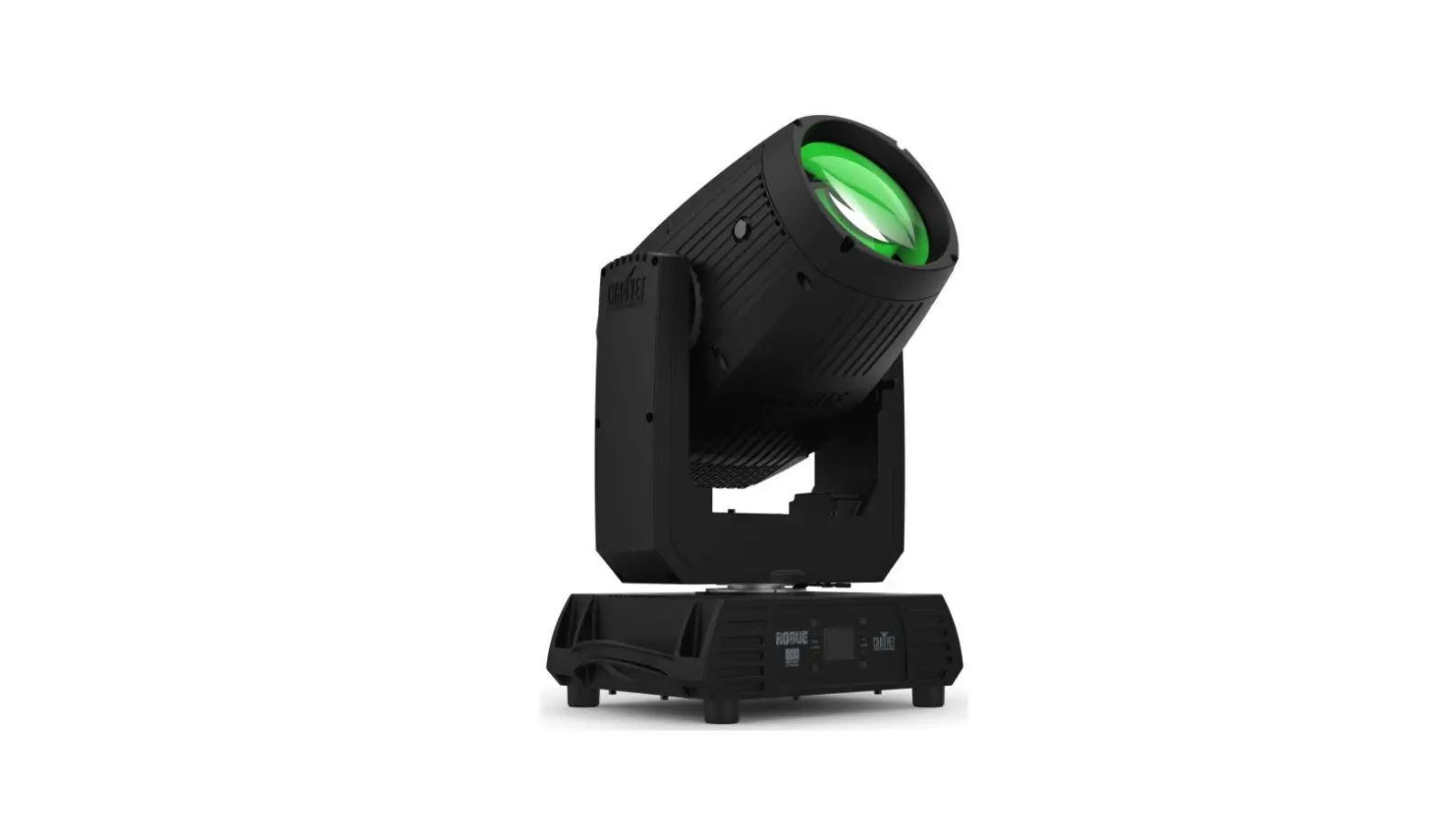
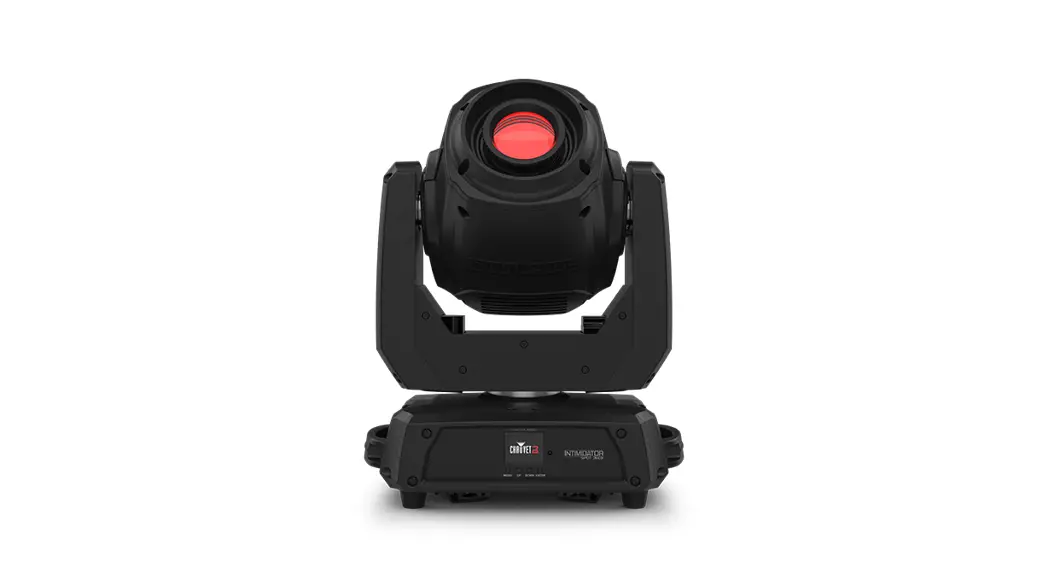
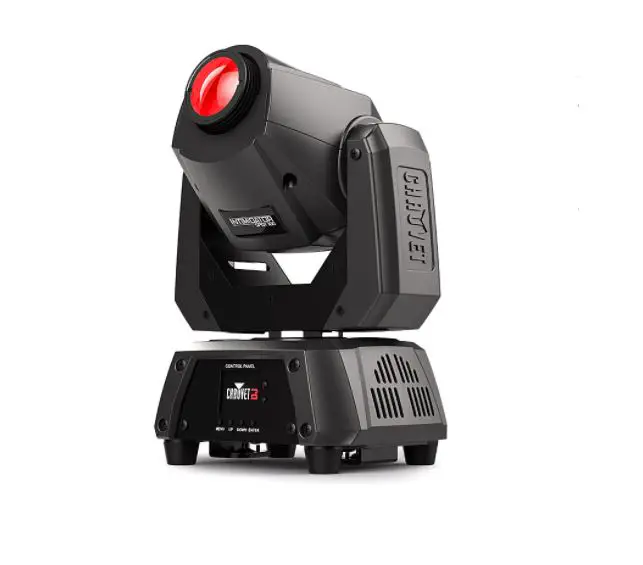
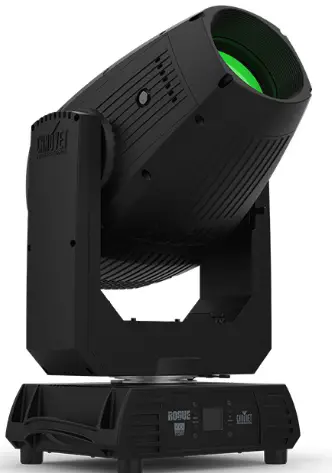
The Rogue Outcast 3 Spot is an outdoor-ready, IP65 moving head spot ideal for medium to large festivals and events. This feature-packed moving spot has a bright 300 W LED light engine that produces an even field of light, as well as rotating and static gobos, two 7-position and split-color enabled color wheels, and five facet prism to create stunning looks. A zoom range of 4.5 – 38.1° allows the Rogue Outcast 3 Spot to easily cover stages and large surfaces from a distance.
Features
- IP65 rated LED Spot with (2) color wheels, a static and rotating gobo wheel, motorized zoom, Iris, 5 facet prism, encased in a lightweight aluminum and magnesium alloy
- Zoom range of 4.5° to 38.1 to easily cover stages and surfaces from a distance
- Perfect gobo morphing between gobo wheels
- Two color wheels with 7 colors, split color ability, and continuous variable speed scrolling
- Two gobo wheels: one fixed scrolling wheel and one rotating, interchangeable, scrolling wheel
- Iris, 5-facet prism, and frost for beam control
- Beautiful 16-bit LED dimming for ultimate fade control
- IP65 rated power input/output connections for power linking
- 5-pin DMX input/output connections
- RDM enabled for remote addressing and trouble shooting
- Selectable PWM settings to maintain flicker free operation on camera
- Simple and complex DMX channel profiles for programming versatility
- USB-C port for uploading software
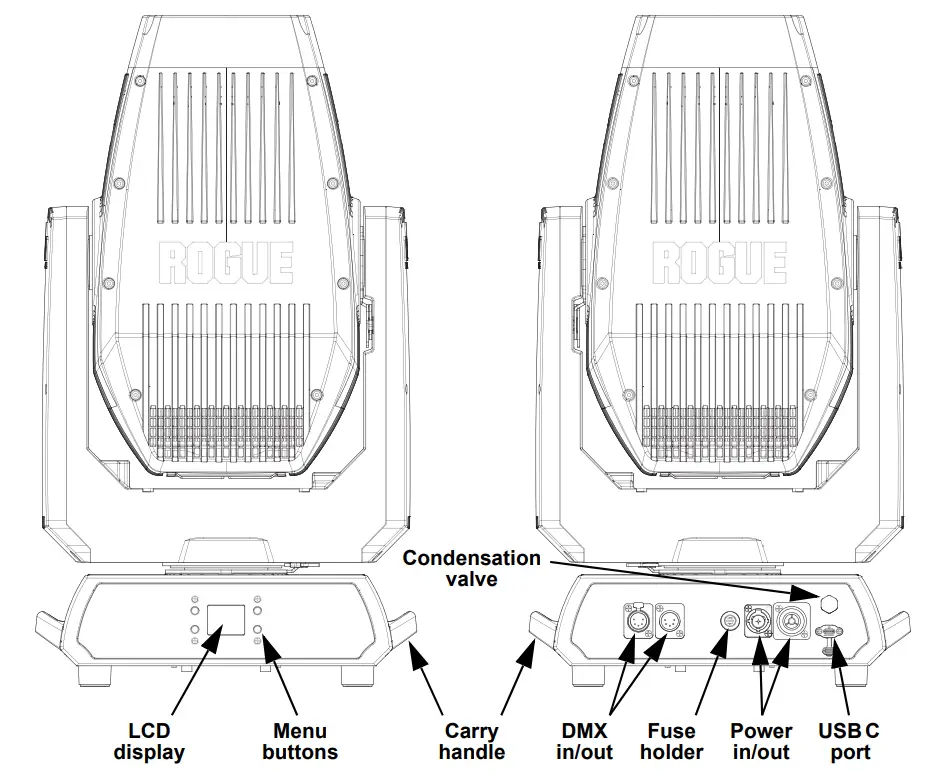
Product Overview
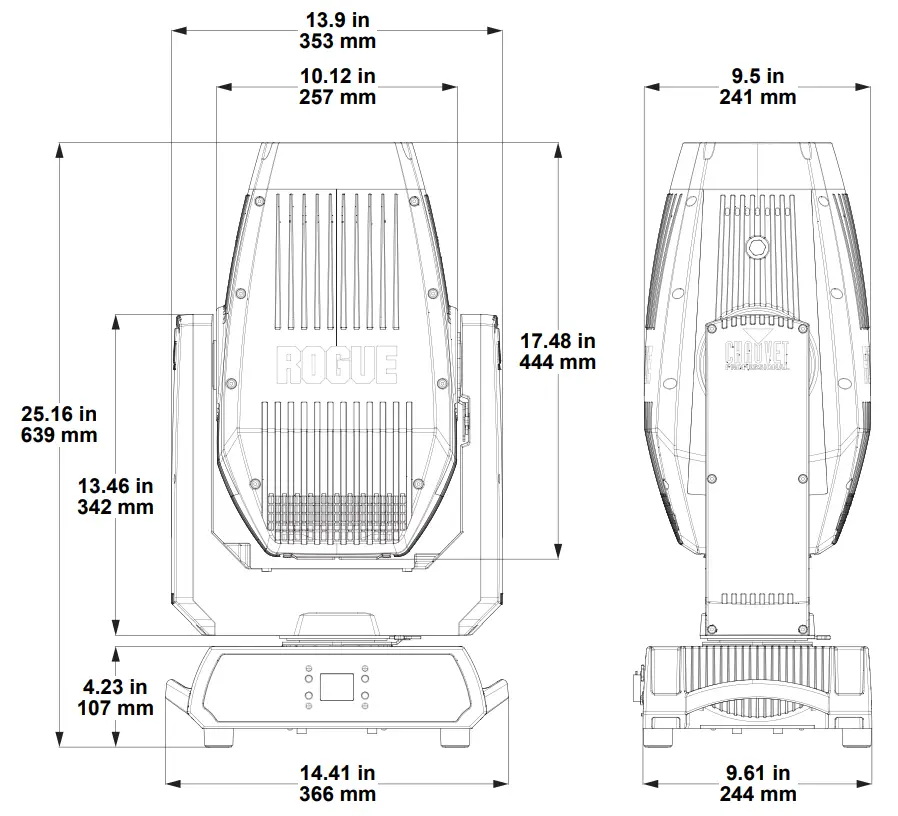
Product Dimensions
Setup
AC Power
The Rogue Outcast 3 Spot has an auto-ranging power supply and it can work with an input voltage range of 100 to 240 VAC, 50/60 Hz. To determine the product’s power requirements (circuit breaker, power outlet, and wiring), use the current value listed on the label affixed to the product’s back panel, or refer to the product’s specifications chart. The listed current rating indicates the product’s average current draw under normal conditions.
- Always connect the product to a protected circuit (a circuit breaker or fuse). Make sure the product has an appropriate electrical ground to avoid the risk of electrocution or fire.
- To eliminate unnecessary wear and improve its lifespan, during periods of non-use completely disconnect the product from power via breaker or by unplugging it.
- Never connect the product to a rheostat (variable resistor) or dimmer circuit, even if the rheostat or dimmer channel serves only as a 0 to 100% switch.
AC Plug
The Rogue Outcast 3 Spot comes with a power input cable terminated with a Seetronic Powerkon A connector on one end and bare wire on the other end (U.S. market). Use the table below to wire a plug.
| Connection | Wire (U.S.) | Wire (Europe) | Screw Color |
| AC Live | Black | Brown | Yellow or Brass |
| AC Neutral | White | Blue | Silver |
| AC Ground | Green/Yellow | Green/Yellow | Green |
Power Linking
The product supports power linking. It is possible to power link up to 2 Rogue Outcast 3 Spot products at 100 V or 120 V, 4 products at 208 V, or up to 5 products at 230 V or 240 V. Never exceed this number. This product comes with a power input cable. Power linking cables are available from Chauvet for purchase.
Fuse Replacement
- Disconnect this product from the power outlet.
- Using a flat-head screwdriver, unscrew the fuse holder cap from the housing.
- Remove the blown fuse and replace with another fuse of the same type and rating (F 8 A, 250 V).
- Screw the fuse holder cap back in place and reconnect power.
DMX Linking
The Rogue Outcast 3 Spot will work with a DMX controller using a 5-pin DMX serial connection. A DMX Primer is available from www.chauvetprofessional.com.
Remote Device Management (RDM)
Remote Device Management, or RDM, is a standard for allowing DMX-enabled devices to communicate bi-directionally along existing DMX cabling. Check the DMX controller’s User Manual or with the manufacturer as not all DMX controllers have this capability. The Rogue Outcast 3 Spot supports RDM protocol that allows feedback to make changes to menu map options.
USB Software Update
The Rogue Outcast 3 Spot allows for software update through USB using the built-in USB port. The product’s USB port supports up to 32GB capacity and only works with FAT32 file format. To update the software using a USB flash drive, do the following:
- Power on the product and plug the flash drive into the USB port.
- Once the flash drive has been detected, the message “Upgrade Firmware” will be displayed. Press. If a different message appears on the display, search for the updated software in the Menu (Updated Firmware). A list of the updated software files will be displayed.
- Select the file that needs to be uploaded. The message “Are you sure?” will be displayed. Press.
- If the selected file is correct, the update will be completed. Restart the product. If the selected file is incorrect, the update will fail, and the display will go back to the main interface. Repeat steps 1–3 using the correct file.
Mounting
Before mounting the product, read and follow the safety recommendations indicated in the Safety Notes. For our Chauvet Professional line of mounting clamps, go to http://trusst.com/products/.
Orientation
Always mount this product in a safe position, making sure there is adequate room for ventilation, configuration, and maintenance.
Rigging
Chauvet recommends using the following general guidelines when mounting this product.
- Before deciding on a location for the product, make sure there is easy access to the product for maintenance and programming purposes.
- Make sure that the structure onto which you are mounting the product can support the product’s weight. See the Technical Specifications for weight information.
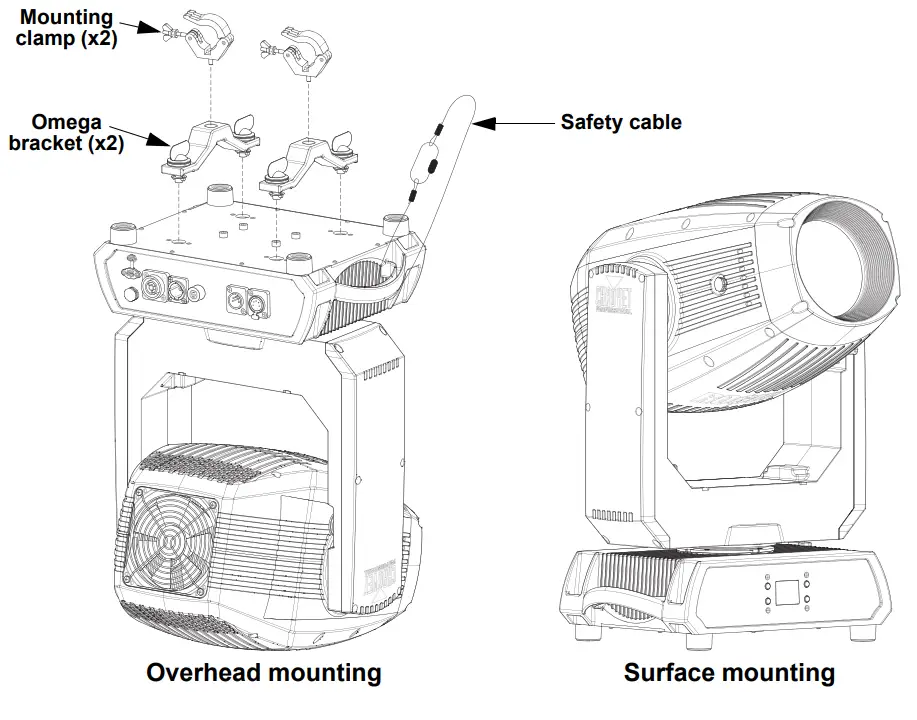
- When mounting the product overhead, always use a safety cable. Mount the product securely to a rigging point, whether an elevated platform or a truss.
- When rigging the product onto a truss, use a mounting clamp of appropriate weight capacity
Procedure
The Rogue Outcast 3 Spot comes with 2 omega brackets to which you can directly attach mounting clamps (sold separately). Make sure the clamps are capable of supporting the weight of this product. Use at least two mounting points per product. For the Chauvet Professional line of mounting clamps, go to http://www.trusst.com/products.
Mounting Diagram
Operation
Control Panel Description
| Button | Function |
| <MENU> | Exits from the current menu or function |
| <ENTER> | Enables the currently displayed menu or sets the selected value into the selected function |
| <UP> | Navigates upwards through the menu list or increases the value when in a function |
| <DOWN> | Navigates downwards through the menu list or decreases the value when in a function |
Menu Map
Refer to the Rogue Outcast 3 Spot product page on www.chauvetprofessional.com for the latest menu map.
| Main Level | Programming Levels | Description | ||
| Address | 001–512 | Sets the starting address | ||
|
Run Mode | DMX | 20CH | Selects the DMX personality | |
| 25CH | ||||
| Auto Test | Auto test all functions | |||
|
Manual Test | Pan |
0–255 | Manually control and test all settings through the control panel | |
| Pan Fine | ||||
| Tilt | ||||
| Tilt Fine | ||||
| P/T Speed | ||||
| Dimmer | ||||
| Dimmer Fine | ||||
| Shutter | ||||
| Virtual Shaking | ||||
| Color1 | ||||
| Color2 | ||||
| Gobo2 | ||||
| Gobo | ||||
| Gobo Rotate | ||||
| Gobo Index | ||||
| Gobo2 | ||||
| Focus | ||||
| Focus Fine | ||||
| Auto Focus | ||||
| Zoom | ||||
| Zoom Fine | ||||
| Prism | ||||
| Prism Rotate | ||||
| Iris | ||||
| Frost | ||||
| Special Function | ||||
| Setup | Pan Reverse | NO | Normal pan | |
| YES | Reversed pan | |||
| Tilt Reverse | NO | Normal tilt | ||
| YES | Reversed tilt | |||
| Main Level | Programming Levels | Description | ||
|
Setup (cont.) | Screen Reverse | NO | Normal screen display | |
| YES | Inverted screen display | |||
| AUTO | Automatic screen orientation | |||
| Pan Angle | 540 | 540° pan range | ||
| 360 | 360° pan range | |||
| 180 | 180° pan range | |||
| Tilt Angle | 270 | 270° tilt range | ||
| 180 | 180° tilt range | |||
| 090 | 90° tilt range | |||
| BL.O.P/T Move | NO | Enable/disable blackout while panning/tilting | ||
| YES | ||||
| BL.O. ColorMove | NO | Enable/disable blackout while color wheel is moving | ||
| YES | ||||
| BL.O. GoboMove | NO | Enable/disable blackout while gobo wheels are moving | ||
| YES | ||||
| Backlight Timer | 30S | Display turns off after 30 seconds | ||
| 1M | Display turns off after 1 minute | |||
| 5M | Display turns off after 5 minutes | |||
| ON | Display stays on | |||
| Swap XY | NO | Do not swap pan and tilt | ||
| YES | Pan controls tilt, tilt controls pan | |||
| Loss of Data | Hold | Holds last signal received | ||
| Close | Blacks out fixture | |||
| Fan Mode | Auto | Fan set by product temperature | ||
| Full | Fan speed set on high | |||
| ECO | Quiet mode | |||
|
Dimmer Curve | Linear |
Set the dimmer curve | ||
| Square | ||||
| I Squa | ||||
| SCurve | ||||
| Linear2 | ||||
|
PWM Option | 600Hz |
Sets the PWM frequency | ||
| 1200Hz | ||||
| 2000Hz | ||||
| 4000Hz | ||||
| 6000Hz | ||||
| 15000Hz | ||||
| USB Update | NO | Update firmware via USB C | ||
| YES | ||||
| Reset | Pan/Tilt |
NO YES |
Reset individual functions or all functions from start-up | |
| Prism | ||||
| Color/Iris | ||||
| Gobo/Gobo2 | ||||
| Frost | ||||
| All | ||||
| Factory Set | NO | Reset to factory default settings | ||
| YES | ||||
| Main Level | Programming Levels | Description | |
|
Sys Info | Ver | V_._ _ _ _ _ _ | Shows firmware version |
| Running Mode | _ _ _ | Shows current running mode | |
| Dmx Address | _ _ _ | Shows current DMX address | |
| Temperature | _ _ _ | Shows the product temperature in °C | |
| Fixture Hours | _ _ _ _ _ | Shows time product has been on | |
| LED Hours | _ _ _ _ _ | Shows time LED has been on | |
| UID | _ _ _ _ _ _ _ _ _ _ _ _ | Shows UID information | |
| _Fan______ (x3) | _ _ _ _ _ | Shows speeds of fans | |
| Base Fan1 | _ _ _ _ _ | Shows speed of base fan | |
Configuration (DMX)
Use control configurations to operate the product with a DMX controller.
Control Personalities
To set the control personality:
- Go to the Run Mode main level.
- Select the DMX option.
- Select the desired personality from 20CH or 25CH.
- See the Starting Address section for the highest starting address you can select for each personality.
- Make sure that the starting addresses on the various products do not overlap due to the new personality setting.
Starting Address
Each product will respond to a unique starting address from the controller. All products with the same starting address will respond in unison. To set the starting address:
- Go to the Address main level.
- Select the starting address (001–512).
- The highest recommended starting address for 20CH is 493.
- The highest recommended starting address for 25CH is 48.
Control Channel Assignments and Values
| 20CH | 25CH | Function | Value | Percent/Setting |
| 1 | 1 | Pan | 000 ó 255 | 0–100% |
| 2 | 2 | Fine pan | 000 ó 255 | Fine control (16-bit) |
| 3 | 3 | Tilt | 000 ó 255 | 0–100% |
| 4 | 4 | Fine tilt | 000 ó 255 | Fine control (16-bit) |
| 5 | 5 | Pan/tilt speed | 000 ó 255 | Fast to slow |
| 6 | 6 | Dimmer | 000 ó 255 | 0–100% |
| – | 7 | Fine dimmer | 000 ó 255 | Fine control (16-bit) |
| 000 ó 003 | Off | |||
| 004 ó 007 | On | |||
| 7 | 8 | Strobe | 008 ó 076 077 ó 145 | Synchronized strobe, slow to fast Pulse strobe, slow to fast |
| 146 ó 215 | Random strobe, slow to fast | |||
| 216 ó 255 | On | |||
| 000 ó 001 | No function | |||
| 8 | 9 | Virtual shaking | 002 ó 128 | Shaking effect, slow to fast |
| 129 ó 255 | Fade effect, slow to fast |
| 20CH | 25CH | Function | Value | Percent/Setting |
|
9 |
10 |
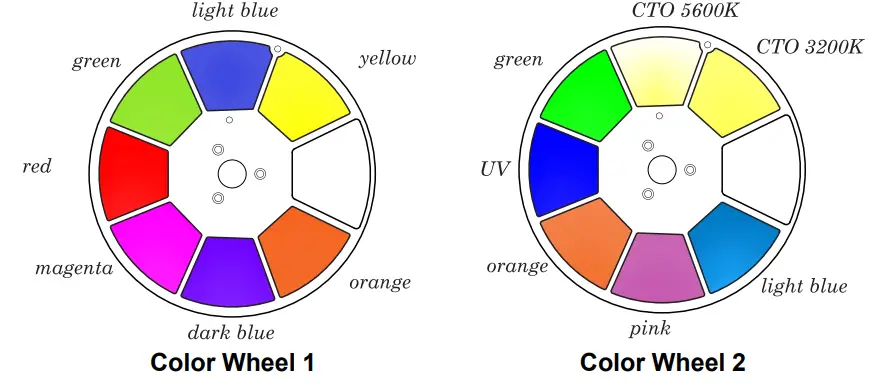
Color wheel 1 | 000 ó 006 007 ó 013 014 ó 020 021 ó 027 028 ó 034 035 ó 041 042 ó 048 049 ó 059 060 ó 187 188 ó 219 220 ó 223 224 ó 255 | Open Yellow Light blue Green Red Magenta Dark blue Orange Color wheel indexing Color scroll, fast to slow Stop Reverse color scroll, slow to fast |
|
10 |
11 |
Color wheel 2 | 000 ó 006 007 ó 013 014 ó 020 021 ó 027 028 ó 034 035 ó 041 042 ó 048 049 ó 059 060 ó 187 188 ó 219 220 ó 223 224 ó 255 | Open CTO 3200K CTO 5600K Green UV Orange Pink Light blue Color wheel indexing Color scroll, fast to slow Stop Reverse color scroll, slow to fast |
|
11 |
12 |
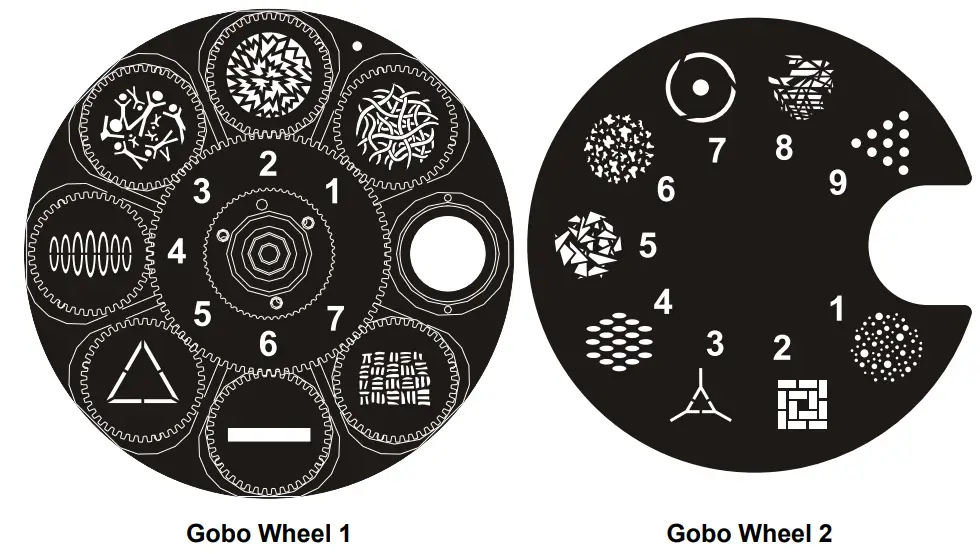
Gobo wheel 1 (see Gobo Wheels) | 000 ó 007 008 ó 015 016 ó 023 024 ó 031 032 ó 039 040 ó 047 048 ó 055 056 ó 063 064 ó 071 072 ó 079 080 ó 087 088 ó 095 096 ó 103 104 ó 111 112 ó 119 120 ó 127 128 ó 191 192 ó 255 | Open Gobo 1 Gobo 2 Gobo 3 Gobo 4 Gobo 5 Gobo 6 Gobo 7 Gobo 7 shaking, slow to fast Gobo 6 shaking, slow to fast Gobo 5 shaking, slow to fast Gobo 4 shaking, slow to fast Gobo 3 shaking, slow to fast Gobo 2 shaking, slow to fast Gobo 1 shaking, slow to fast Open Gobo scroll, slow to fast Reverse gobo scroll, slow to fast |
| 20CH | 25CH | Function | Value | Percent/Setting |
|
12 |
13 |
Gobo wheel 1 rotate | 000 ó 063 064 ó 145 146 ó 149 150 ó 231 232 ó 255 | Gobo index Rotation, fast to slow Stop Reverse rotation, slow to fast Alternating clockwise/counterclockwise rotation, short to long |
| – | 14 | Fine gobo rotation | 000 ó 255 | Fine control (16-bit) |
|
13 |
15 |
Gobo wheel 2 (see Gobo Wheels) | 000 ó 005 006 ó 011 012 ó 017 018 ó 023 024 ó 029 030 ó 035 036 ó 041 042 ó 047 048 ó 053 054 ó 063 064 ó 069 070 ó 075 076 ó 081 082 ó 087 088 ó 093 094 ó 099 100 ó 105 106 ó 111 112 ó 117 118 ó 127 128 ó 191 192 ó 255 | Open Gobo 1 Gobo 2 Gobo 3 Gobo 4 Gobo 5 Gobo 6 Gobo 7 Gobo 8 Gobo 9 Gobo 9 shaking, slow to fast Gobo 8 shaking, slow to fast Gobo 7 shaking, slow to fast Gobo 6 shaking, slow to fast Gobo 5 shaking, slow to fast Gobo 4 shaking, slow to fast Gobo 3 shaking, slow to fast Gobo 2 shaking, slow to fast Gobo 1 shaking, slow to fast Open Gobo scroll, slow to fast Reverse gobo scroll, slow to fast |
| 14 | 16 | Focus | 000 ó 255 | 0–100% |
| – | 17 | Fine focus | 000 ó 255 | Fine control (16-bit) |
|
– |
18 |
Auto focus | 000 ó 010 011 ó 030 031 ó 050 051 ó 070 071 ó 090 091 ó 110 111 ó 130 131 ó 150 151 ó 170 171 ó 190 191 ó 210 211 ó 255 | No function 0-5 meters 6 meters 7 meters 8 meters 9 meters 10 meters 12.5 meters 15 meters 17.5 meters 20-60 meters Auto detect distance |
| 15 | 19 | Zoom | 000 ó 255 | 0–100% |
| – | 20 | Zoom fine | 000 ó 255 | Fine control (16-bit) |
| 16 | 21 | Prism | 000 ó 004 005 ó 255 | No function Prism insert |
| 20CH | 25CH | Function | Value | Percent/Setting |
| 17 | 22 | Prism rotate | 000 ó 127 128 ó 189 190 ó 193 194 ó 255 | Prism index Clockwise rotation, fast to slow Stop Counterclockwise rotation, slow to fast |
| 18 | 23 | Iris | 000 ó 063 064 ó 127 128 ó 191 192 ó 255 | Big to small Auto change, slow to fast Slow open, fast close, slow to fast Fast open, slow close, slow to fast |
| 19 | 24 | Frost | 000 ó 255 | 0–100% |
|
20 |
25 |
Control (3 second hold) | 000 ó 007 008 ó 015 016 ó 023 024 ó 031 032 ó 039 040 ó 047 048 ó 055 056 ó 095 096 ó 103 104 ó 111 112 ó 119 120 ó 127 128 ó 135 136 ó 143 144 ó 151 152 ó 159 160 ó 167 168 ó 175 176 ó 183 184 ó 191 192 ó 199 200 ó 215 216 ó 255 | No function Blackout during pan/tilt Blackout while color wheels are moving Blackout while gobo wheels are moving Blackout during pan/tilt/color wheel Blackout during pan/tilt/gobo wheels Blackout during pan/tilt/color wheel/gobo wheels No function Pan reset Tilt reset Color wheels reset Gobo wheels reset No function Prism reset No function All reset Iris reset Frost reset Zoom reset Fan ECO Fan Full Fan Auto No function |
Color Wheels
Gobo Wheels
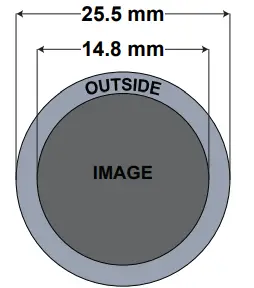
Rotating Gobo Dimensions
Configuration (Settings)
- Pan Reverse
To set the orientation of the pan:- Go to the Setup main level.
- Select the Pan Reverse option.
- Select from NO (normal pan motion), or YES (reversed pan motion).
- Tilt Reverse
To set the orientation of the tilt:- Go to the Setup main level.
- Select the Tilt Reverse option.
- Select from NO (normal tilt motion), or YES (reversed tilt motion)
- Screen Reverse
To set the orientation of the display:- Go to the Setup main level.
- Select the Screen Reverse option.
- Select from NO (right-side up), YES (upside-down), or AUTO (automatic orientation).
- Pan Angle
To set the maximum angle of the pan:- Go to the Setup main level.
- Select the Pan Angle option.
- Select from 540 (540°), 360 (360°), or 180 (180°).
- Tilt Angle
To set the maximum angle of the tilt:- Go to the Setup main level.
- Select the Tilt Angle option.
- Select from 270 (270°), 180 (180°), or 90 (90°).
- Black Out on Movement
To set the product to black out on movement of the pan/tilt, color wheels, and/or gobo wheels.- Go to the Setup main level.
- Select from BL.O.P/T Move (pan/tilt), BL.O. ColorMove (color wheels), or BL.O. GoboMove (gobo wheels).
- Select from NO (do not black out during the selected movement), or YES (black out during the selected movement).
- Display Backlight Timer
To set how long before an inactive display will turn off:- Go to the Setup main level.
- Select the Backlight Timer option.
- Select the length of the backlight timer, from 30S (30 seconds), 1M (1 minute), 5M (5 minutes), or ON (always on)
- Swap Pan and Tilt
To swap the controls for pan and tilt with each other:- Go to the Setup main level.
- Select the Swap XY option.
- Select from NO (pan controls pan, tilt controls tilt), or YES (pan controls tilt, tilt controls pan).
- DMX Loss
To set how the product responds when the DMX signal is lost:- Go to the Setup main level.
- Select the Loss of Data option.
- Select from Hold (holds the last signal received), or Close (blacks out the product).
- Fan Mode
To set the fan speed mode:- Go to the Settings main level.
- Select the Fan Mode option.
- Select the fan mode, from Auto (fan speed adjusts to product temperature), Full (fan speed at maximum), or ECO (quiet mode).
- Dimmer Curve
To set the dimmer curve:- Go to the Setup main level.
- Select the Dimmer Curve option.
- Select the dimmer curve, from Linear, Square, I Squa, SCurve, or Linear2.
- Pulse Width Modulation
To adjust the frequency of the pulse width modulation:- Go to the Setup main level.
- Select the PWM Option option.
- Select the frequency, from 600Hz, 1200Hz, 2000Hz, 4000Hz, 6000Hz, or 15000Hz.
- USB Update
To enable or disable software update using USB:- Go to the Setup main level.
- Select the USB Update option.
- Select NO (disables software update through USB) or YES (enables software update through USB).
- Reset Function
To reset specific functions or the entire product:
1. Go to the Setup main level.
2. Select the Reset Function option.
3. Select the functions to reset, from Pan/Tilt, Prism, Color/Iris, Gobo/Gobo2, Frost, or All.
4. Select NO (to cancel) or YES (to reset the selected functions). - Factory Reset
To reset the product to factory settings:
1. Go to the Setup main level.
2. Select the Factory Set option.
3. Select NO (to cancel) or YES (to reset the product configuration).
Test Mode
- Auto Test
To have the Rogue Outcast 3 Spot automatically test all functions one after the other:- Go to the Run Mode main level.
- Select the Auto Test option.
- Manual Test
To manually test an individual function of the Rogue Outcast 3 Spot:- Go to the Run Mode main level.
- Select the Manual Test option.
- Select a function to test, from Pan, Pan Fine, Tilt, Tilt Fine, P/T Speed, Dimmer, Dimmer Fine, Shutter, Virtual Shaking, Color1, Color2, Gobo2, Gobo, Gobo Rotate, Gobo Index, Gobo2, Focus, Focus Fine, Auto Focus, Zoom, Zoom Fine, Prism, Prism Rotate, Iris, Frost, or Special Function.
- Increase or decrease the value of the selected function from 000–255 to test it.
- System Information The information section of the menu displays statistics and the current status of the product’s various functions. To view this information:
- Go to the Sys Info main level.
- Use and to view all information.
- Offset Mode (Zero Adjust) The Offset mode provides fine adjustments for the home position of the pan, tilt, and zoom movements. To adjust these options:
- From the main level screen, press and hold until the passcode screen appears.
- Use (increase value) and (next value) to enter the passcode: 2323 and press .
- Select the “zero” position to adjust, from PAN, TILT, COLOR1, COLOR2, GOBO, GOBO ROTATE, GOBO2, FOCUS–GOBO, FOCUS–GOBO2, ZOOM, PRISM, IRIS, FROST, Light Block, DIMMER1, DIMMER2, RDM4, RDM5, or RDM6.
- Adjust the “zero” position for the selected function from 000–255.
Gobo Replacement
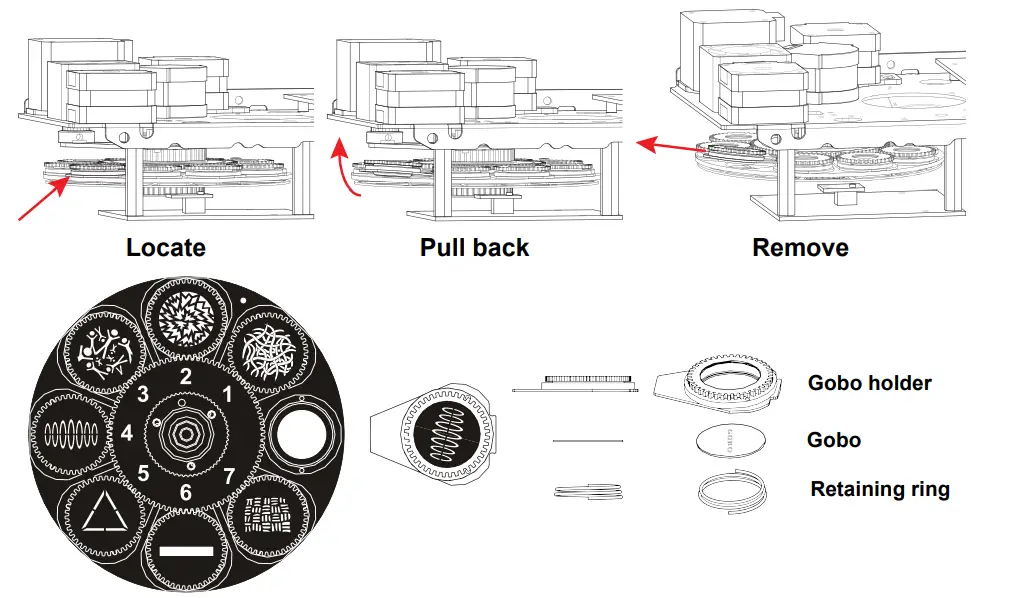
The gobos in gobo wheel 1 are removable from their gobo holders. This operation requires a technician to carefully follow the recommended procedure.
- Make sure to disconnect the product’s power cord before replacing a gobo.
- Always replace a gobo with a gobo of the same dimensions.
- When inserting a glass gobo, always make sure that the shiny side of the gobo (glass base) faces the LED. This provides a layer of protection against the high temperature from the light source.
Procedure
- Turn the product off and disconnect it from the power outlet.
- Open the head cover by loosening the screws on the top cover.
- Separate the gobo holder away from the gobo wheel by pushing it toward the front of the moving head. Be careful not to push the gobo out of the gobo holder.
- Extract the gobo holder by pulling it outward.
- On a flat surface, remove the expansion ring that holds the gobo in place and remove the gobo from the gobo holder.
- Insert a new gobo and hold it in place with the expansion ring.
- Slide the tip of the gobo holder under the pressure plate near the center of the gobo wheel.
- Push the gobo holder inwards. DO NOT force the gobo holder into the gobo wheel slot. If correctly installed, the gobo holder should easily slide into the gobo wheel slot.
Diagram
Maintenance
Product Maintenance
Dust build-up reduces light output performance and can cause overheating. This can lead to reduction of the light source’s life and/or mechanical wear. To maintain optimum performance and minimize wear, clean your lighting products at least twice a month. However, be aware that usage and environmental conditions could be contributing factors to increase the cleaning frequency. To clean the product, follow the instructions below:
- Unplug the product from power.
- Wait until the product is at room temperature.
- Use a vacuum (or dry compressed air) and a soft brush to remove dust collected on the external surface/vents.
- Clean all transparent surfaces with a mild soap solution, ammonia-free glass cleaner, or isopropyl alcohol.
- Apply the solution directly to a soft, lint free cotton cloth or a lens cleaning tissue.
- Softly drag any dirt or grime to the outside of the transparent surface.
- Gently polish the transparent surfaces until they are free of haze and lint.
Always dry the transparent surfaces carefully after cleaning them.
Do not spin the cooling fans with compressed air. Damage may result.
Technical Specifications
| Dimensions and Weight | |||||||
| Length | Width | Height | Weight | ||||
| 14.41 in (366 mm) | 9.61 in (244 mm) | 25.16 in (639 mm) | 47.2 lb (21.2 kg) | ||||
| Note: Dimensions in inches are rounded. Power | |||||||
| Power Supply Type | Range | Voltage Selection | |||||
| Switching (internal) | 100 to 240 VAC, 50/60 Hz | Auto-ranging | |||||
| Parameter | 100 V, 60 Hz | 120 V, 60 Hz | 208 V, 60 Hz | 230 V, 50 Hz | 240 V, 50 Hz | ||
| Consumption | 510 W | 509 W | 496 W | 494 W | 492 W | ||
| Operating Current | 5.13 A | 4.33 A | 2.43 A | 2.28 A | 2.10 A | ||
| Power linking | 12 A | 12 A | 12 A | 12 A | 12 A | ||
| current (products) | (2 products) | (2 products) | (4 products) | (5 products) | (5 products) | ||
| Fuse/Breaker | F 8 A, 250 V | F 8 A, 250 V | F 8 A, 250 V | F 8 A, 250 V | F 8 A, 250 V | ||
| Power I/O | U.S./Worldwide | UK/Europe | |||||
| Power Input Connector | Seetronic Powerkon IP65 | Seetronic Powerkon IP65 | |||||
| Power Output Connector | Seetronic Powerkon IP65 | Seetronic Powerkon IP65 | |||||
| Power Cable plug | Edison | Local plug | |||||
| Light Source | |||||||
| Type | Color | Quantity | Power | Current | Lifespan | ||
| LED Photometrics | Cool-White | 1 | 300 W | 5 A | 50,000 hours | ||
| Beam Angle | Field Angle | Cutoff Angle | Zoom Angle | ||||
| 4.5° to 34.7° | 5° to 37.6° | 5.7° to 38.1° | 4.5° to 38.1° | ||||
Returns
Send the product prepaid, in the original box, and with the original packing and accessories. Chauvet will not issue call tags. Call Chauvet and request a Return Merchandise Authorization (RMA) number before shipping the product. Be prepared to provide the model number, serial number, and a brief description of the cause(s) for the return. To submit a service request online, go to www.chauvetprofessional.com/service-request. Clearly label the package with an RMA number. Chauvet will refuse any product returned without an RMA number
Write the RMA number on a properly affixed label. DO NOT write the RMA number directly on the box.
Before sending the product, clearly write the following information on a piece of paper and place it inside the box:
- Your name
- Your address
- Your phone number
- RMA number
- A brief description of the problem
Be sure to pack the product properly. Any shipping damage resulting from inadequate packaging will be your responsibility. FedEx packing or double-boxing are recommended.
Chauvet reserves the right to use its own discretion to repair or replace returned product(s).
Contact Us
Chauvet World Headquarters
- Address: 5200 NW 108th Ave. Sunrise, FL 33351
- Voice: (844) 393-7575
- Fax: (954) 756-8015
- Voice: (954) 577-4455
- Email: [email protected]
- Fax: (954) 929-5560
- Toll Free: (800) 762-1084
- Website: www.chauvetprofessional.com
Chauvet U.K.
- Address: Unit 1C Brookhill Road Industrial Estate Pinxton, Nottingham, UK NG16 6NT
- Voice: +44 (0) 1773 511115
- Fax: +44 (0) 1773 511110
- Email: [email protected]
- Website: www.chauvetprofessional.eu
Chauvet Benelux
- Address: Stokstraat 18 9770 Kruishoutem Belgium
- Voice: +32 9 388 93 97
- Email: [email protected]
- Website: www.chauvetprofessional.eu
Chauvet France
- Address: 3, Rue Ampère 91380 Chilly-Mazarin France
- Voice: +33 1 78 85 33 59
- Email: [email protected]
- Website: www.chauvetprofessional.eu
Chauvet Germany
- Address: Bruno-Bürgel-Str. 11 28759 Bremen Germany
- Voice: +49 421 62 60 20
- Email: [email protected]
- Website: www.chauvetprofessional.eu
Chauvet Mexico
- Address: Av. de las Partidas 34 – 3B (Entrance by Calle 2) Zona Industrial Lerma Lerma, Edo. de México, CP 52000
- Voice: +52 (728) 690-2010
- Email: [email protected]
- Website: www.chauvetprofessional.mx
Visit the applicable website above to verify our contact information and instructions to request support. Outside the U.S., U.K., Ireland, Benelux, France, Germany, or Mexico, contact the dealer of record.