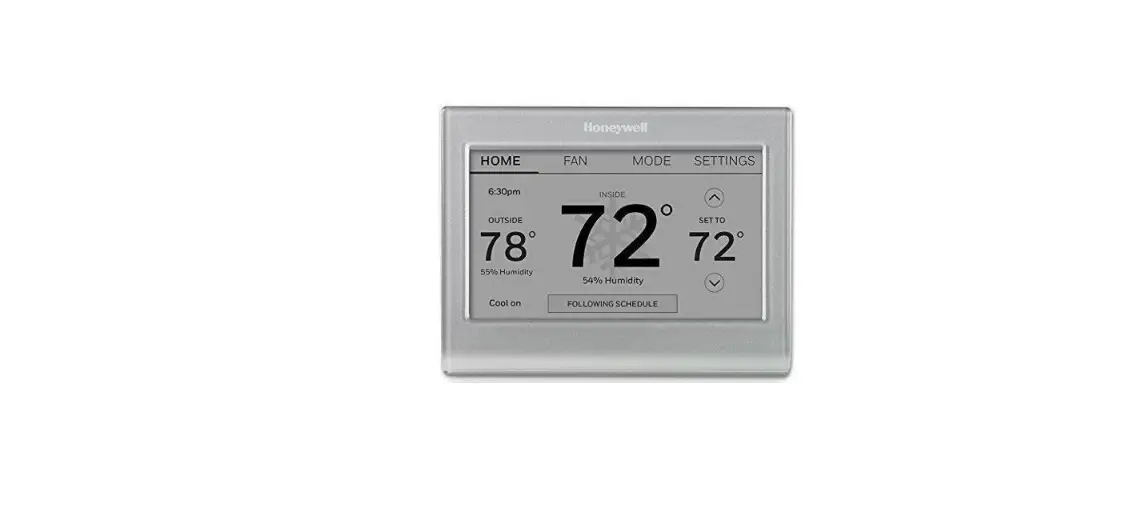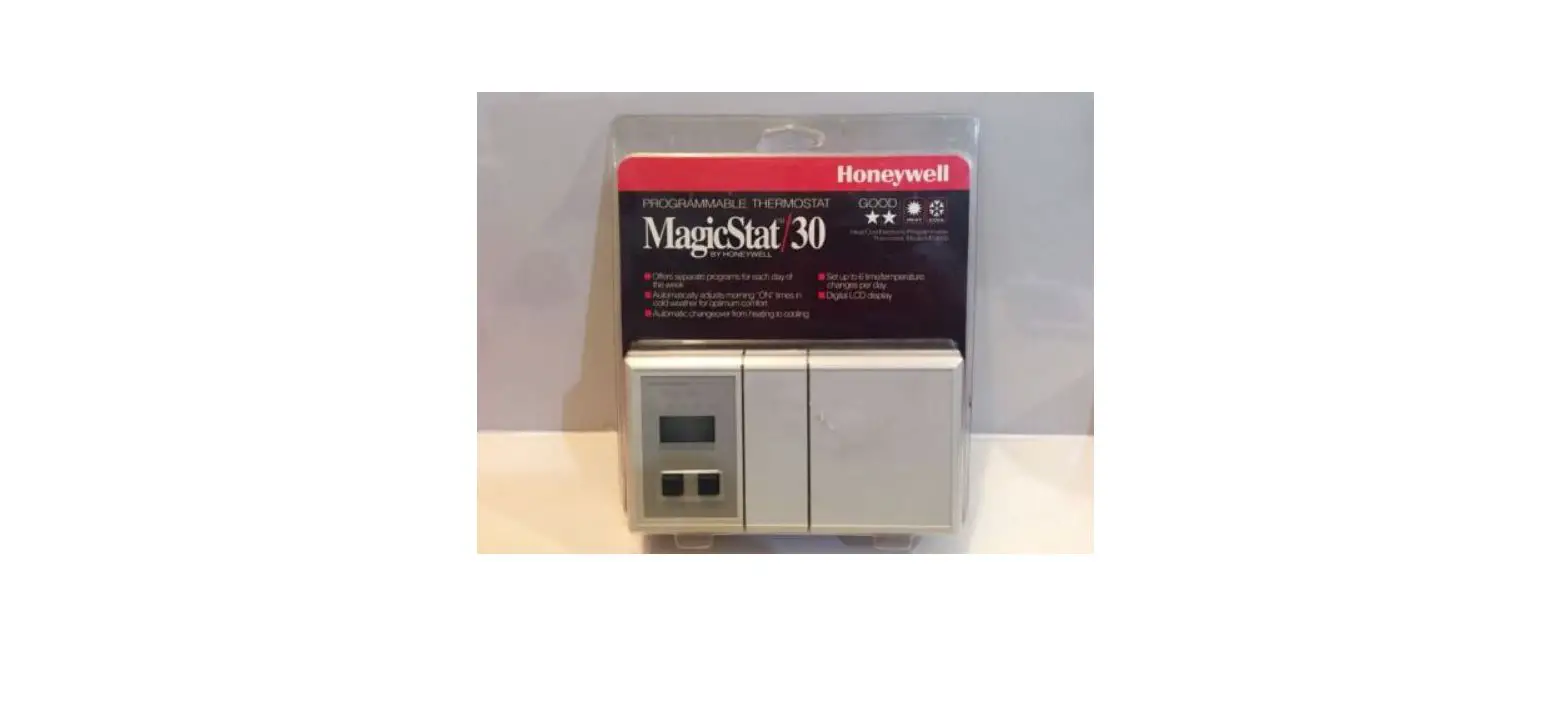

Honeywell MS3000 MAGIC STAT User Manual
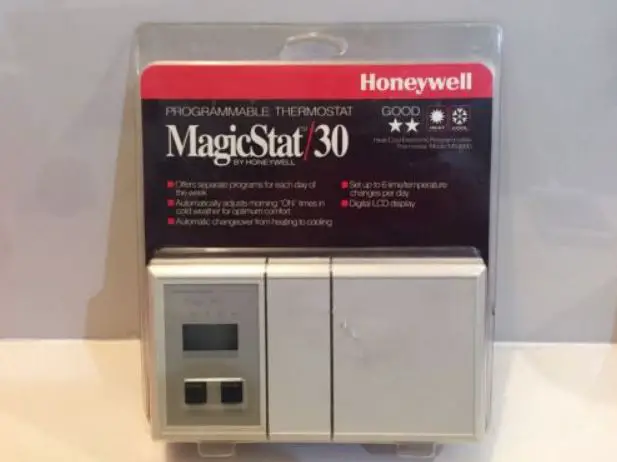
Features
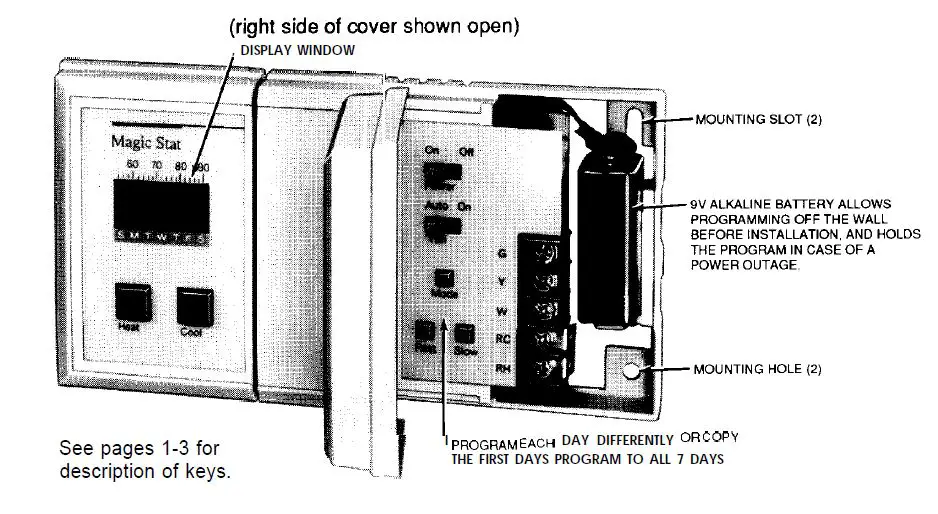
SIMPLE PROGRAMMING
It’s easy to program the thermostat to fit your lifestyle.
- Move the power switch to ON.
- Hold the MODE key until 12:00 AM shows in the display.
- Use the SLOW key to set the time of your first program. Hold to go forward; tap to go back.
- Use the HEAT and COOL keys to set temperatures for your first program. For heat, hold the HEAT key to go higher, and tap to go lower. For air conditioning, hold COOL to go lower, and tap to go higher.
- Set all other programs by repeating steps 3 & 4. Press MODE to lock in for all 7 days.
- Hold MODE until SET CLOCK shows in the display. Use FAST, then SLOW to move to the current time and day. (Clock only accurate to within 10 minutes. ) Tap MODE to lock in (temperature and set point indicators will appear).
- To review programs, hold the FAST or SLOW key.
Welcome to the world of comfort and energy savings with your new Honeywell Magic electronic thermostat. The Magic name is synonymous with innovation and state-of-the-art electronic controls. Your new thermostat will automatically control the temperature in your home, keeping you comfortable while saving energy when programmed according to the instructions in this manual. This thermostat includes the Weather feature. The operation of your furnace or air conditioner is started early enough to reach the desired temperature at the times you set. There is no need for you to guess when the system should turn on to reach the desired temperature. When the outside temperature drops or rises dramatically, the thermostat activates earlier or later to meet the next programmed setting,
QUICK REFERENCE TO THE KEYS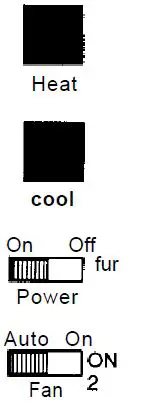 Use to program heating temperatures. To raise the temperature by 2° increments, press and hold the key. To lower the temperature, tap the key. Use to program air conditioning temperatures. To lower the temperature by 2°increments, press and hold the key. To raise the temperature, tap the key. ON allows for thermostat operation. OFF erases any program and disables the furnace and air conditioner. AUTO sets the fan to turn on and off with the heating or air conditioning system. the fan to run continuously. (Applicable only to systems with more than 2 wires.
- Before the thermostat is programmed, hold these key sequences through PROGRAM and SET CLOCK. After the thermostat is programmed, holding this key sequences through the 4 functions; release when the desired function is reached. The four functions include:
- PROGRAM—allows you to program the heating and cooling temperature points, at 2 to 6 different times per day, for each day of the week. SET CLOCK—allows you to enter the current time within 10 minutes.
- HOLD—allows you to set and hold one temperature until you choose to change it. This feature can be used only after the thermostat has been programmed. See page 20.
- HOLD UNTIL—allows you to set and hold one temperature for up to a week; it will return to your normal schedule at a time and day you set. This feature can be used only after the thermostat has been programmed. See page 22. Tapping the Mode key interrupts function sequencing, and returns to display of the present room temperature.
- When in SET CLOCK mode, hold key to advance clock time in 4-hour menus. To stop the clock backward by 4-hour increments, tap the key.
- When in PROGRAM mode, use to review entered programs. Hold key to advance to the next programmed temperature range; tap to back up.
- When in SET CLOCK mode, hold key to advance clock time in 10-minute increments. To stop the clock backward by 10-minute increments, tap the key.
- When in PROGRAM mode, hold key to advance program time in 30-minute increments. To step the time backward by 30-minute increments, tap the key.
INSTALLING AH3.LV83H1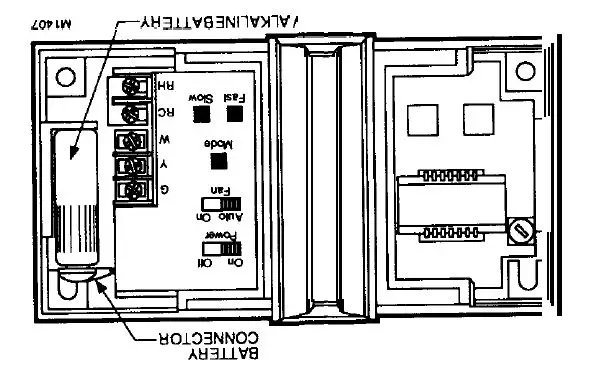
A 9 V alkaline battery (purchased separately) must be installed to save the program in case OT has a power outage, and if programming the thermostat before installing it. For best results, replace the battery once a year to prevent the loss of the program.
 When in SET CLOCK mode, hold key to advance clock time in 4-hour menus. To stop the clock backward by 4-hour increments, tap the key.
- When in PROGRAM mode, use to review entered programs. Hold key to advance to the next programmed temperature range; tap to back up.
- When in SET CLOCK mode, hold key to advance clock time in 10-minute increments. To stop the clock backward by 10-minute increments, tap the key.
- When in PROGRAM mode, hold key to advance program time in 30-minute increments. To step the time backward by 30-minute increments, tap the key.
- HOLD—allows you to set and hold one temperature until you choose to change it. This feature can be used only after the thermostat has been programmed. See page 20.
- HOLD UNTIL—allows you to set and hold one temperature for up to a week; it will return to your normal schedule at a time and day you set. This feature can be used only after the thermostat has been programmed. See page 22.
- Tapping the Mode key interrupts function sequencing, and returns to display of the present room temperature.
- SET CLOCK—allows you to enter the current time to within 10 minutes. four functions include:
- Before the thermostat is programmed, holding this key sequences through
- PROGRAM and SET CLOCK. After the thermostat is programmed, holding this key sequences through the 4 functions; release when the desired function is reached. The PROGRAM—allows you to program the heating and cooling temperature points, at 2 to 6 different times per day, for each day of the week.
 When in SET CLOCK mode, hold key to advance clock time in 4-hour menus. To stop the clock backward by 4-hour increments, tap the key.
PROGRAMMING YOUR THERMOSTAT
You may program this thermostat either before or after installation. See installation manual form number 69-8025 for installation instructions. If you are programming the thermostat before installation, be sure the battery is installed (see page 4). During programming, if you leave the thermostat for a few minutes, it will go blank to save battery power. This does not affect your program; hold the HEAT key to relight the
STEP 1
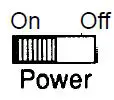
SET THE PROGRAM SCHEDULE AND TEMPERATURES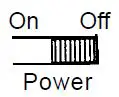 Before you begin… The schedule form on page 31 provides an opportunity to plan your schedule. Please fill it out before you begin. They open the right-hand door of the thermostat. Switch to OFF to clear the thermostat. Switch ON. The display shows this test position. A few seconds later, the display looks like this.
- To begin programming, press and hold until the display looks like this. If you pass this display, ‘ode continue to hold the key until this display comes back.
NOTE: All seven-day indicators are to tell you that you are programming every day of the week the same. You will be able to change individual days later.  To set the first-time program, press and hold until the display shows the time you want to wake up “ow AM shown). The time advances in 30-minute intervals. You can back up by tapping the key; go forward by holding the key.
- To set the first temperature program, press and hold until the display shows the temperature you want when you wake up during the heating season (72° Heat shown). You can back up by tapping the key. The LEFT temperature set point indicator should be stopped under the heating temperature you desire when you wake up, with ‘M at a maximum of 80°

- If you have air conditioning, press and hold until the display shows the temperature you want when you wake up during the cooling season (76° shown). You can back up by tapping the key. You must have a 6°or greater difference between heat and cool temperature settings.
 To set the first-time program, press and hold until the display shows the time you want to wake up “ow AM shown). The time advances in 30-minute intervals. You can back up by tapping the key; go forward by holding the key.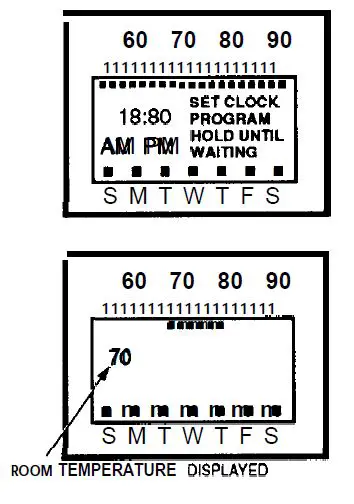
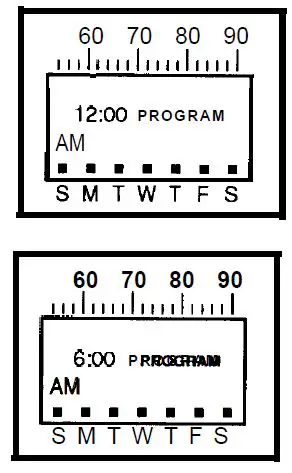
The RIGHT temperature set point indicator should be stopped under the cooling temperature you desire when you wake up, with a minimum of 62° F. 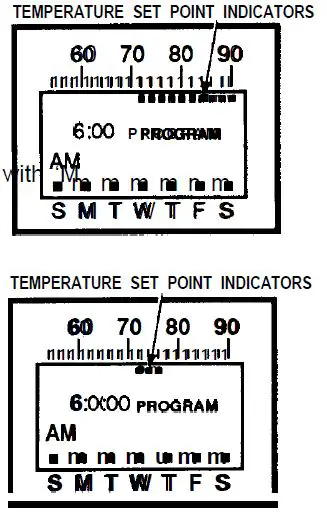 To set additional program times and temperatures, repeat steps starting on the lower half of page 7 through here. First set a time, then enter the heating and cooling temperatures desired at that time. You must set at least one more time/temperature schedule, and may set up to a total of 6 per day. They must be at at least 30 minutes apart. After programming is complete, hold to lock in place. It is now copied into all 7 days of the. week. If Mode programs for different days, see page 15.
STEP 2 SET THE CURRENT DAY AND TfME
 Now you will set the current day and time of day.
- Press until the display looks like this.
- Press until you reach the correct day (Wednesday shown) and approximately the correct time, within 4 hours. (Hold the key to advance the time in 4-hour increments, and tap the key to back up. )To set additional program times and temperatures, repeat steps starting on the lower half of page 7 through here.
 First set a time, then enter the heating and cooling temperatures desired at that time. You must set at least one more time/temperature schedule, and may set up a total of 6 per day. They must be at least 30 minutes apart.
- After programming is complete, hold to lock in place. It is now copied into all 7 days of the. week. If Mode programs for different days, page 15.
 Now you will set the current day and time of day.
 First set a time, then enter the heating and cooling temperatures desired at that time. You must set at least one more time/temperature schedule, and may set up a total of 6 per day. They must be at least 30 minutes apart.
STEP 2
SET THE CURRENT DAY AND TfME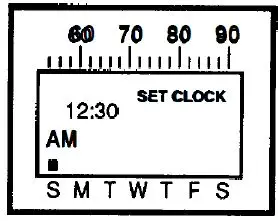
Now you will set the current day and time of day.
Press until the display looks like this.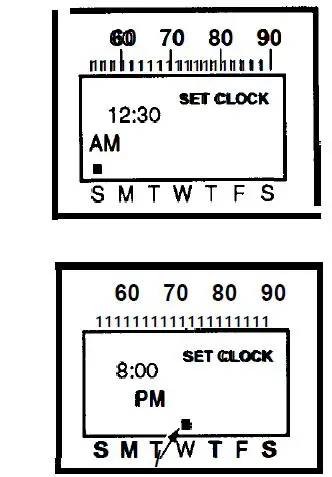
Press until you reach the correct day (Wednesday shown) and approximately the correct time, within 4 hours. (Hold the key to advance the time in 4 hour
- Press until you reach the exact time, within 10 minutes. (Hold the key to advance the time in 10- “ow minute increments, and tap the key to back up. )
- Tap to store the time and date in the thermostat’s memory. The normal room temperature display return.

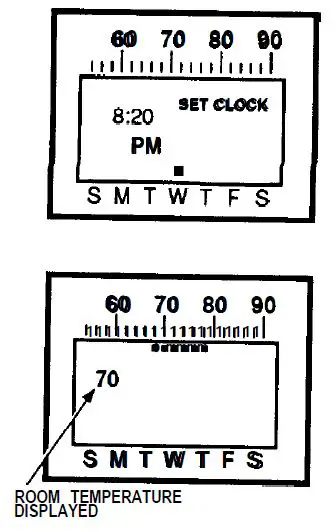
STEP 3 CHECK YOUR Press until PROGRAM shows in the display.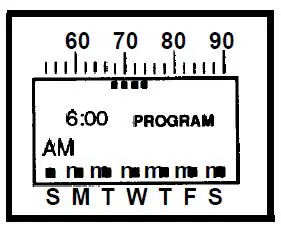
 Press to review each program you have set.
Press until the normal temperature display returns.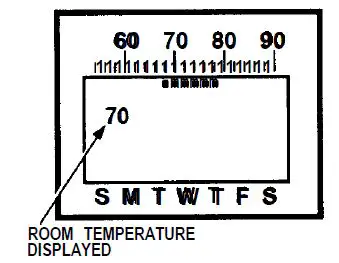
STEP 4
OPTION-ADDING AN EXTRA SET POINT
If you have not used all 6 set points in any given day, consider programming a second nighttime set point. For example, if your regular bedtime is 10:30 p.m., put in a 1:00 a.m. set point that is the same temperature as the 10:30 p.m. set point. The entry of the second set point ensures that even if you stay up past your bedtime and override your program, you won’t have to remember to set the thermostat back when you go to bed.
STEP 5
SET THE FAN SWITCH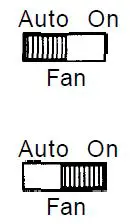 Auto On FAN AUTO: Normal or energy-saving setting for most homes. The fan goes on and off with the air conditioner in summer. In winter, the fan on most systems starts Fan a few minutes after the furnace comes on. stops a few minutes after the furnace goes off. The fan starts and stops with the furnace in some electric heat systems. FAN ON: The fan runs continuously. Use for improved air circulation during Ia occasions or for more efficient electronic air cleaning.
CHANGING YOUR PROGRAM
MAKING PERMANENT PROGRAM CHANGES Press until the display shows PROGRAM.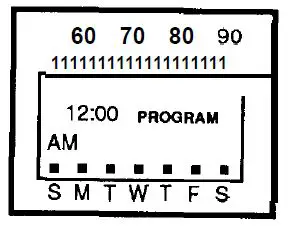
Press to review programs; notice the day of the week indicator position change as you review the programs. When the day and time you want to change are displayed, release.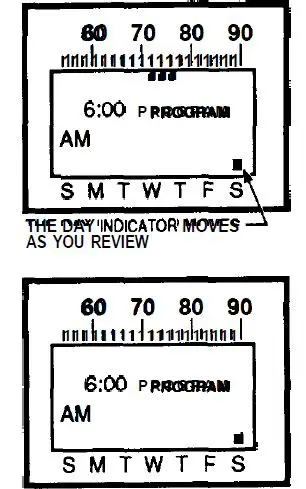
 Until set point indicators disappear. To erase a program, hold both buttons Display new time by holding (to advance) or tapping (to back up). Hold to set heating and cooling set points Verify change by holding (to advance) or tapping (to back up). Repeat steps on pages 15-17 all changes you want are made. Tap to store the changes in the thermostat’s memory.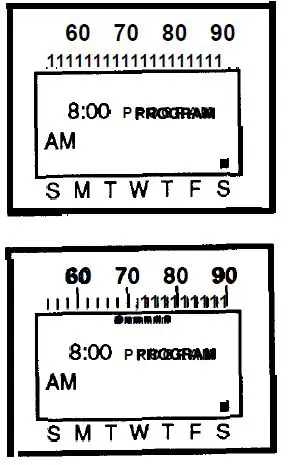
ERASING THE ENTIRE PROGRAM
To erase the existing program completely, turn the power switch OFF… . ON. Until you reprogram (see page 5), a factory-installed program will operate the heating system at 68° F, and the cooling system at 78° F.
MAKING TEMPORARY PROGRAM CHANGESThe term hold” feature lets you custom-tailor the program for those times when someone comes home early, or you’re staying up late, or you plan to be out for the evening. To temporarily raise or lower the temperature for the current period only: Press to change the heating or cooling set point (shown with heat setting holding at change will stay in only 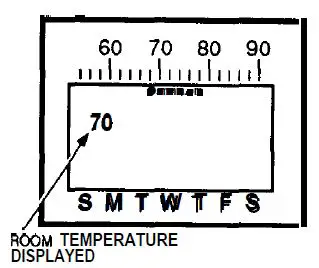
The term hold” feature is particularly useful when you go on vacation or other extended absences. It does not cancel your program. Press and hold until the display shows HOLD. Tap or hold until temperature indicators show the range at which you want the thermostat to maintain the heating and cooling temperatures.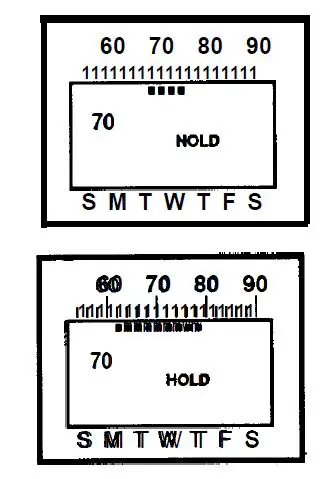
To cancel HOLD, press and hold until HOLD disappears from the display. Continue to hold until you see the normal room temperature display. Your regular program will resume at the next programmed time. The “HOLD UNTIL” feature holds the temperature range for up to a week, and then cancels it, returning control to your program so your home is at the comfort level you want when you return. Press until HOLD UNTIL is displayed. Use to change heating and cooling set points as (shown with the heat setting )
Press and hold to step through your weekly program until you reach the day and time at which you want the thermostat to resume normal program operation (shown holding until PM 011 Sunday).To cancel HOLD UNTIL early, hold the key until the display cycles through the various displays. Release Mode the key when it cycles to the normal display of the room temperature. Your regular program will resume at the programmed time.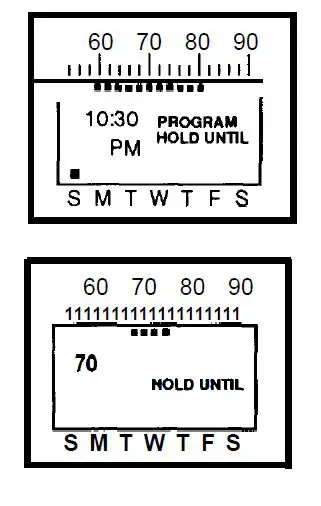
Press once, To cancel HOLD UNTIL early, hold the key until the display cycles through the various displays. Release Mode the key when it cycles to the normal display of room temperature. Your regular program will resume at the programmed time.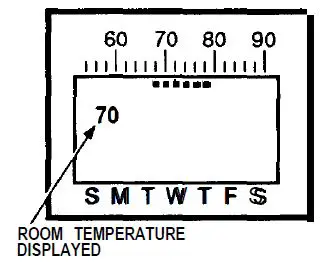
CHANGING FOR DAYLIGHT-SAVING OR STANDARD TIME
To move the clock ahead an hour in spring, hold the key until SET CLOCK shows.
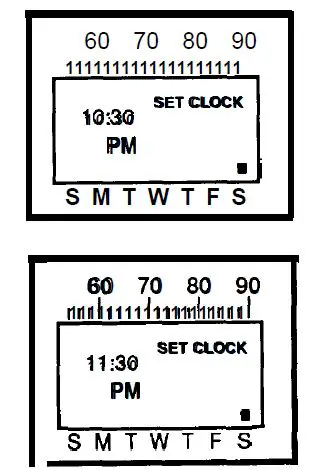
Press and hold until the clock advances for 1 hour.
- Tap to lock in change.

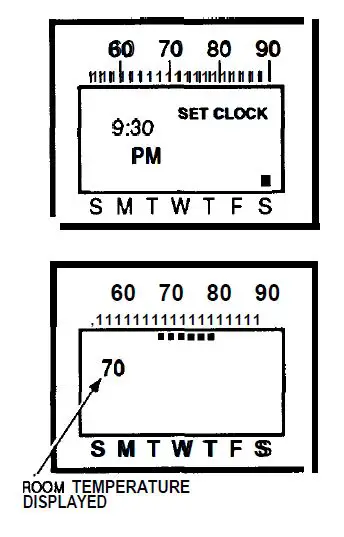
- To move the clock back one hour fall, hold the key SET CLOCK shows.
- Tap 6 times to back up the clock by one hour.

- Tap to lock in change,
MAINTAINING YOUR THERMOSTAT
REPLACING THE BATTERY
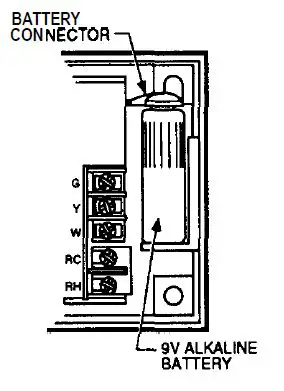
Your thermostat uses a 9 V alkaline battery as a backup to hold the program in case of a power outage. For best results, replace the battery every 5 years.
To replace:
- Open the right-hand thermostat door.
- Remove the battery from the battery holder and battery connector.
- Press the battery connector onto a fresh 9 V alkaline battery. Place the battery in the battery holder as shown.
- Close the door.

RECALIBRATING THE THERMOSTAT
Your thermostat should normally display the correct room temperature. display, a stat can be as follows:
- Make sure the thermostat has been on for at least 2 hours.
- Place an accurate room thermometer near the left side of the thermostat. Be careful not to touch the thermometer or breathe on it.
- Open the left door of the thermostat.

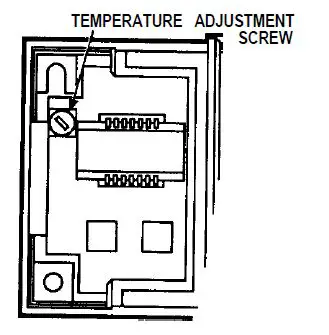
Locate the temperature adjustment screw.
- Use a flat-blade screwdriver to turn the screw slightly
 clockwise to
  increase, or counterclockwise to decrease the indicated temperature.
 - After each turn, allow the thermostat to stabilize for about 30 seconds.
- Continue this procedure until the thermostat has the same temperature reading as the room thermometer.
 clockwise to
  increase, or counterclockwise to decrease the indicated temperature.
THE “WAITING” INDICATOR DURING AIR CONDITIONING
To prevent possible damage to your compressor, and to maximize the efficiency of your air conditioning system, no controls can be activated for approximately 6 minutes after the compressor shuts off. If you try to override the temperature during this time, the display will show WAITING until the 6 minutes pass.
YOUR PERSONAL PROGRAM
Use the table below to plan your schedule before you begin programming. If you are programming a different schedule for each day of the week, fill an out-a different table for each day.
| Typical Activitya | Your Start Time | Desired Temperatureb | |
| Heating | Cooling | ||
| Wake up | |||
| Leave home |
| ||
| Arrive home | |||
| After dinner | |||
| Retire | |||
| Extra Nighttime Set Point (see page 13) | |||
- You may program between 2 and 6 typical activity times.
- you may program up to 8 different heating/cooling temperature combinations over the duration of a week.
TROUBLESHOOTING GUIDE

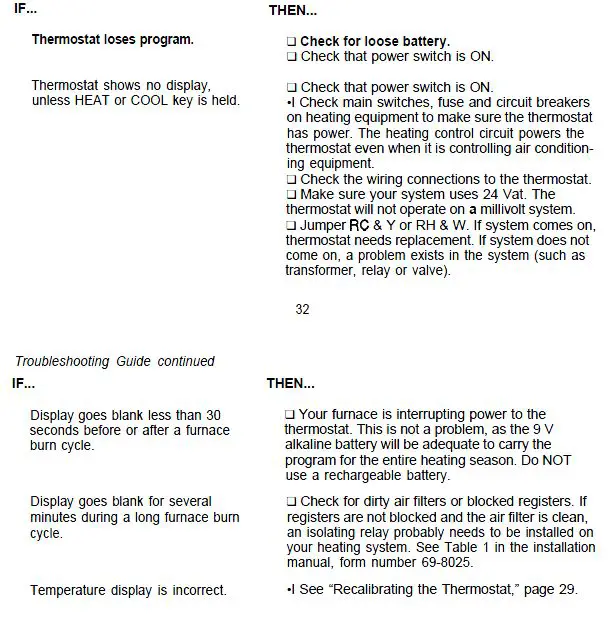
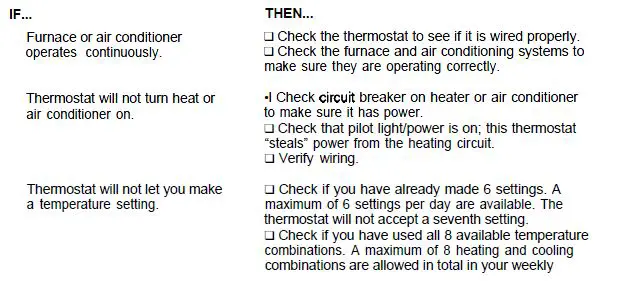
| Troubleshooting Guide continued | |
| IF… | THEN… |
| Thermostat will not let you make a | program. The thermostat will not accept a ninth |
| temperature setting. (continued) | combination. (Use the programming chart on page 31 to make sure you do not use any more settings or combina- tions than allowed.). |
| Thermostat is not following your | •l Your program has probably been lost. The thermostat will maintain the factory-set program |
| program, but is maintaining a | (68° heat, 78° cool) until you reenter a new |
| constant temperature. | program. |
RELAY ORDERING INFORMATION
Send orders to: Honeywell Inc., Consumer Affairs MNIW1 462, 1885 Douglas Dr. N., Golden Valley, MN 55422-3992.
| Parl No. | Price Ea. | Shipping/ Handling | Quantity | Total 1 Price | |
| Kit | $10 | $3.00 | |||
| MS101Q | Isolating Relay V Transformer Kit | $20 | |||
| Subtotal | |||||
| Your sales tax | |||||
| Total | |||||
Toll-free Installation and Programming Assistance
For all questions concerning this thermostat, please read and follow the instructions. If additional assistance is needed, call our toll-free Consumer Affairs group number at 1-800-468-1502, Monday-Friday, a.m. -4:00 p.m., Central time.
NOTICE
This equipment is a Class B digital apparatus that complies with Canadian Radio Interference Regulations, CRC c.1374.
LIMITED ONE-YEAR WARRANTY
Honeywell warrants all products fisted in this book to be free from defects in workmanship or materials, under normal use and service, for a period of one (1) year from the date of purchase by the consumer. If, at any time during the warranty period, the product is defective or malfunctions, Honeywell shall repair or replace it (at Honeywell’s option) within a reasonable period of time. If the product is defective,
- return with a receipt or other dated proof of purchase, to the retailer from whom you purchased it, or
- package it with a receipt or other dated proof of purchase and a short description of the malfunction, and mail it, postage prepaid, to the following address: Honeywell Inc.
Return Goods
1050 Berkshire Lane
Plymouth, MN 55441-4437
This warranty does not cover removal or reinstallation costs. This warranty shall not apply if it is shown by Honeywell that the defect or malfunction was caused by damage that occurred while the product was in the possession of a consumer. Honeywell’s sole responsibility shall be to repair or replace the product within the terms stated above. HONEYWELL SHALL NOT BE LIABLE FOR ANY LOSS OR DAMAGE Of ANY KIND, INCLUDING ANY INCIDENTAL OR CONSEQUENTIAL DAMAGES RESULTING, DIRECTLY OR INDIRECTLY FROM ANY BREACH OF ANY WARRANTY, EXPRESS OR IMPLIED, OR ANY OTHER FAILURE OF THIS PRODUCT. Some states do not allow the exclusion or limitation of incidental or consequential damages, so this limitation may not apply to you.
THIS WARRANTY IS THE ONLY EXPRESS WARRANTY HONEYWELL MAKES ON THIS PRODUCT. THE DURATION OF ANY IMPLIED WARRANTIES, INCLUDING THE WARRANTIES OF MERCHANTABILITY AND FITNESS FOR A PARTICULAR PURPOSE, IS HEREBY LIMITED TO THE ONE-YEAR DURATION OF THIS WARRANTY. Some states do not allow limitations on how long an implied warranty lasts, so the above may not apply to you.
This warranty gives you specific legal rights, and you may have other rights which vary from state to state. If you have any questions about this warranty, please write our Consumer Affairs Department, Honeywell Inc. 18S5 Douglas Drive North, Golden Valley, MN 55422-3992, or call 1 -S00-468-1 502, Monday-Friday, to Central time. TYPICAL ENERGY SAVINGS FOR REPRESENTATIVE CITIES IN THE U.S.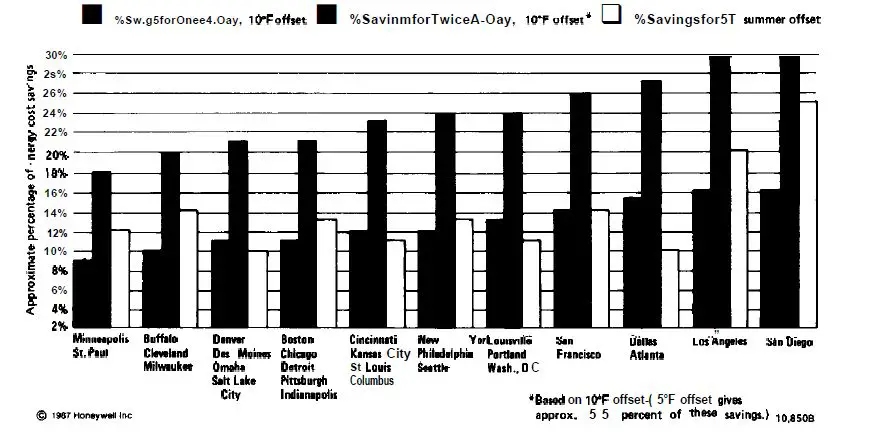
Form Number 69-8026—2 Inc. 1990