SSH-710, SSH-1014 SnapTak Adjustable Cable Hanger
Product Information
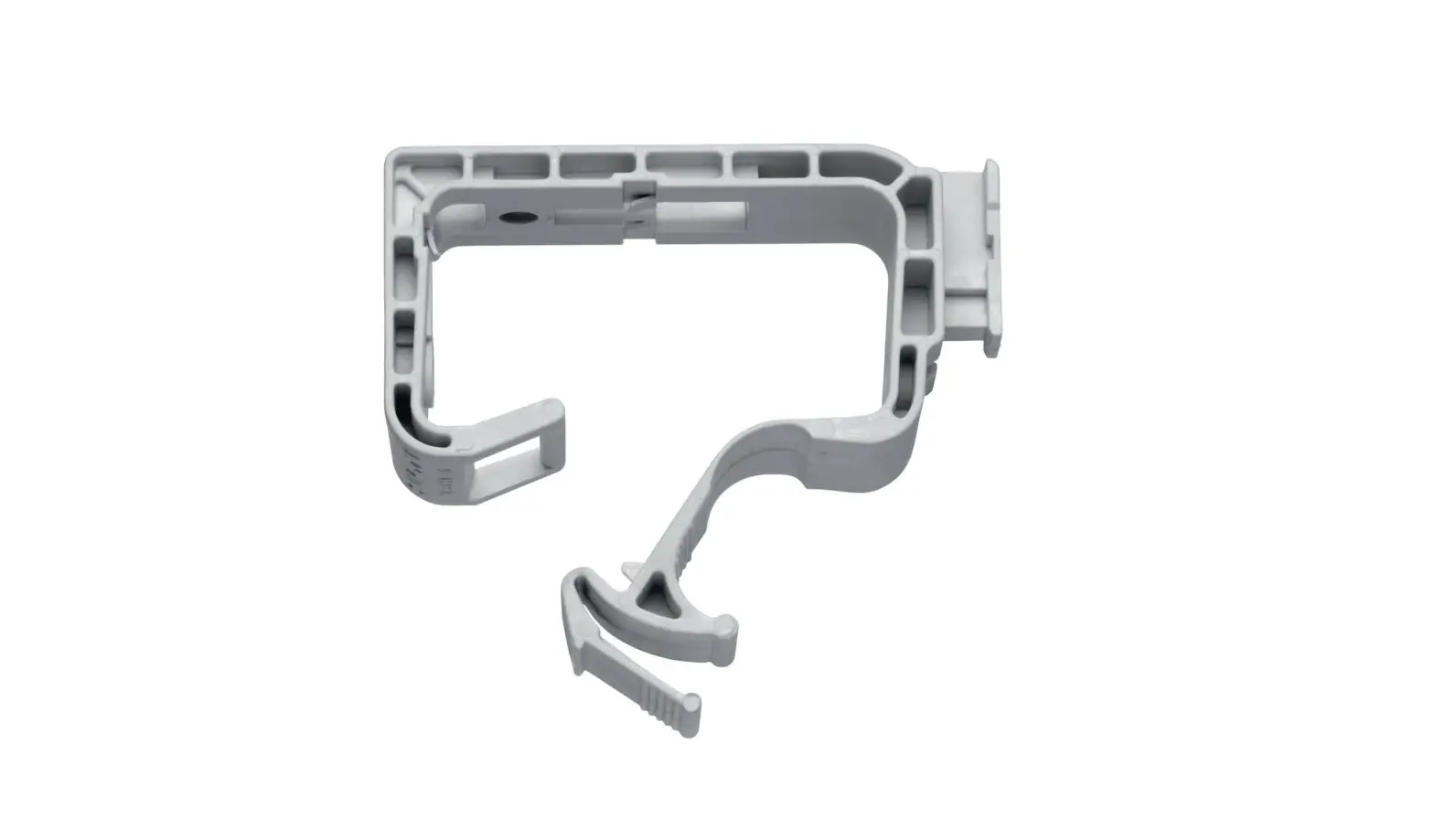
The SnapTak hanger is a cable management tool offered by
CommScope Infrastructure Academy. It is designed to securely hold
cables in place and ensure proper installation.
The hanger features two main support members and six guide pins.
The main support members engage the cable, while the guide pins
help center the cable.
It is compatible with both metal and polymer SnapTak hangers
from CommScope.
CommScope provides a hanger selection calculator and a hanger
spacing guide for convenience. These resources can be accessed on
their website at https://www.commscope.com/SnapStak/.
Part Information for Available Hangers:
| Part Number | Stackability | Cable Diameter Range (mm) |
|---|---|---|
| SSH-47 | 3 | 4.00 min to 7.00 max |
| SSH-710 | 3 | 7.10 min to 10.00 max |
| SSH-1014 | 3 | 10.10 min to 14.00 max |
| SSH-1416 | 3 | 14.10 min to 16.00 max |
Product Usage Instructions
- Ensure that you have received the correct SnapTak hanger for
your cable diameter. Refer to the part information table for the
appropriate part number. - Position the SnapTak hanger near the desired installation
location. - Place the cable in the channel area of the hanger.
- Press the hanger onto the cable until it centers in the
channel. - If using larger cables, the guide pins may snap off. This is
normal and does not affect the functionality of the hanger. - For polymer SnapTak hangers, they can be snapped into any other
CommScope metal or polymer SnapTak hanger size.
For additional assistance or support, you can contact
CommScope’s customer service through the following channels:
- Customer Service Hotline (North America): +1-800-255-1479 (toll
free) - Customer Service Hotline (International): +1-779-435-6500
- Email: [email protected]
Installation Instructions
SSH-710, SSH-1014 CommScope® SnapTak Adjustable Cable Hanger
Bulletin 7819892 Rev. C | Page 1 of 1
CommScope Infrastructure Academy offers installation training.
1
main support 2
members (2)
guide pins (6)
channel
4
3
2
1
Millimeters 20 30 40 50 60 70 80 90 100 Inches
latches
The SnapTak hanger has two main support members to engage the cable and six guide pins to help center the cable.
Press hanger onto cable until cable centers in channel. Guide pins are designed to snap off on larger cables.
3
4
5
cable Cable should be centered in channel area and pressed in place.
Push SnapTak hanger in tower member or mounting adapter with ¾” hole. Snap the latches in place.
Polymer SnapTak hangers may be snapped into any other CommScope metal or polymer SnapTak hanger size.
Note:
Visit commscope.com or click QR codes above for hanger selection and hanger spacing resources. Hanger selection calculator: https://www.commscope.com/SnapStak/
Hanger specification and hanger spacing guide: https://www.commscope.com/Product-Catalog/Tools-and-Accessories/Product/CoaxialTools,Consumables-and-Accessories/
Part Information for Available Hangers
Part Number Stackability
Cable Diameter Range (mm)
SSH-47
3
4.00 min to 7.00 max
SSH-710
3
7.10 min to 10.00 max
SSH-1014
3
10.10 min to 14.00 max
SSH-1416
3
14.10 min to 16.00 max
Acceptable stack combinations
CommScope 1100 CommScope Place SE P.O. Box 339, Hickory, NC 28603-0339 (828) 324-2200 (800) 982-1708 www.commscope.com
Customer Service 24 hours North America: +1-800-255-1479 (toll free) Any country: +1-779-435-6500 email: [email protected]
Notice: CommScope disclaims any liability or responsibility for the results of improper or unsafe installation, inspection, maintenance, or removal practices. Aviso: CommScope no acepta ninguna obligación ni responsabilidad como resultado de prácticas incorrectas o peligrosas de instalación, inspección, mantenimiento o retiro. Avis : CommScope décline toute responsabilité pour les conséquences de procédures d’installation, d’inspection, d’entretien ou de retrait incorrectes ou dangereuses. Hinweis: CommScope lehnt jede Haftung oder Verantwortung für Schäden ab, die aufgrund unsachgemäßer Installation, Überprüfung, Wartung oder Demontage auftreten. Atenção: A CommScope abdica do direito de toda responsabilidade pelos resultados de práticas inadequadas e sem segurança de instalação, inspeção, manutenção ou remoção. Avvertenza: CommScope declina eventuali responsabilità derivanti dell’esecuzione di procedure di installazione, ispezione, manutenzione e smontaggio improprie o poco sicure.
© 2018 CommScope Bulletin 7819892 Rev. C
 CommScope | now meets next
 CommScope | now meets next