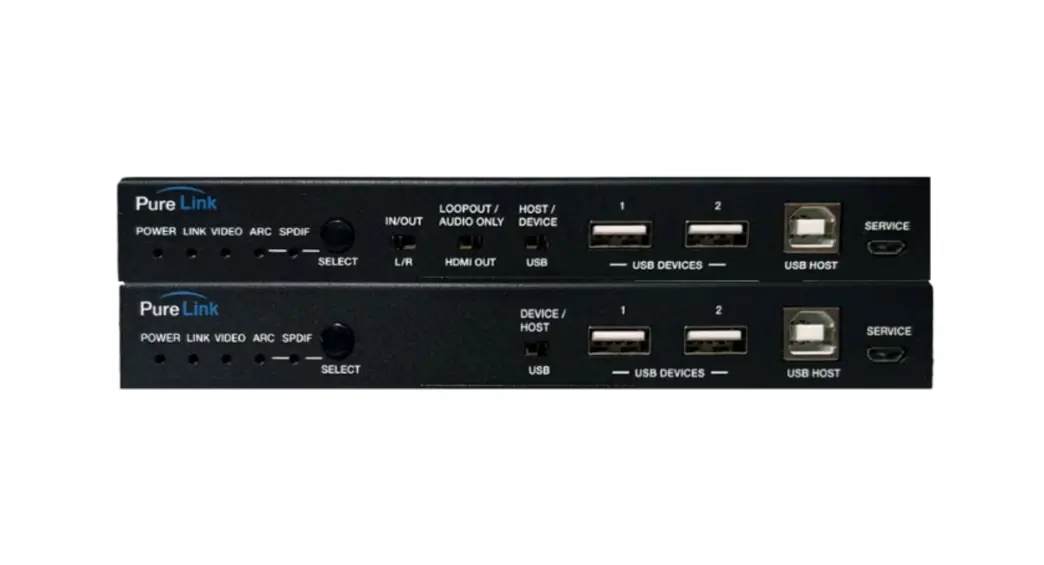
 H3C-100-ARC V1.3
H3C-100-ARC
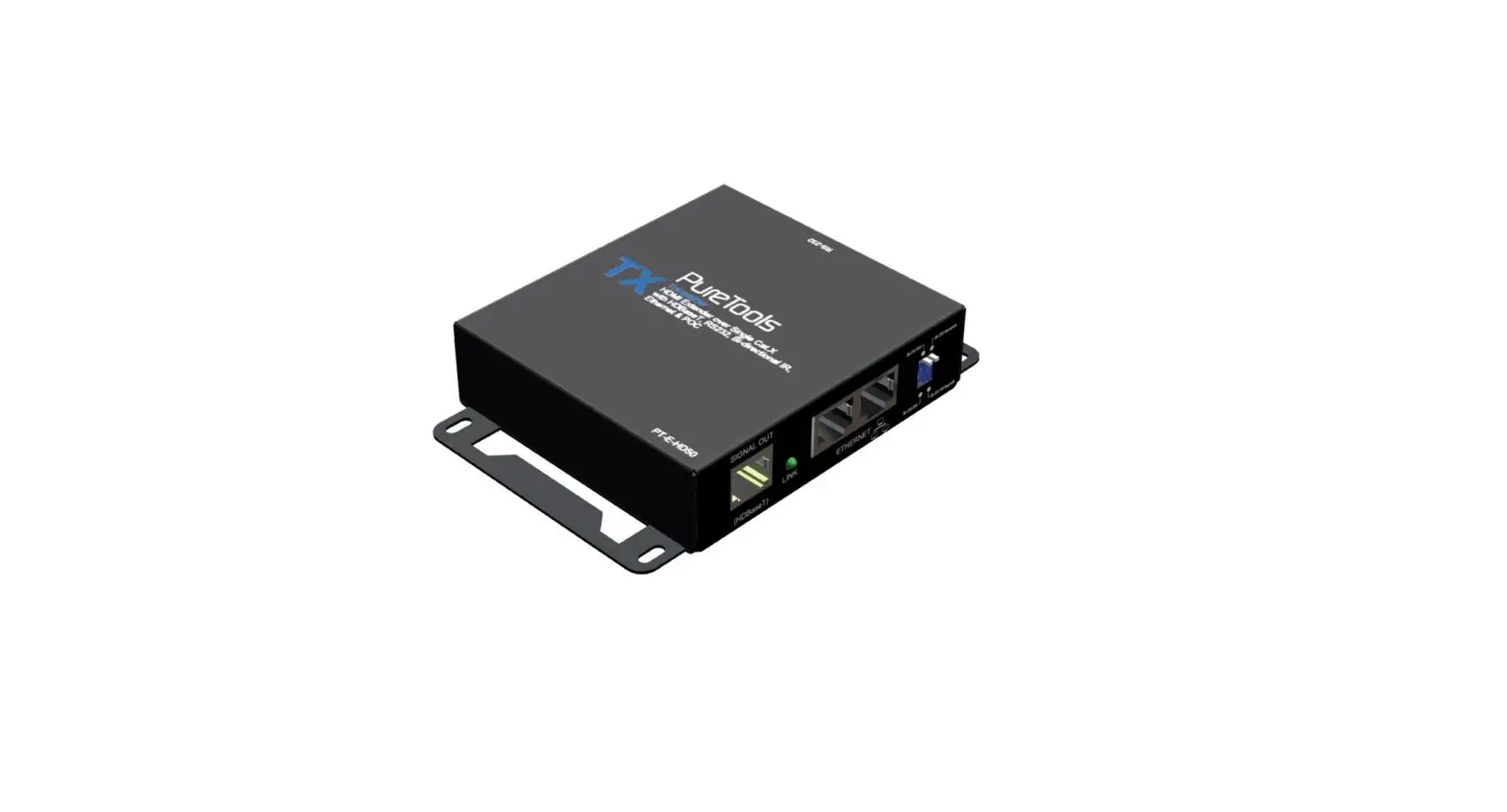
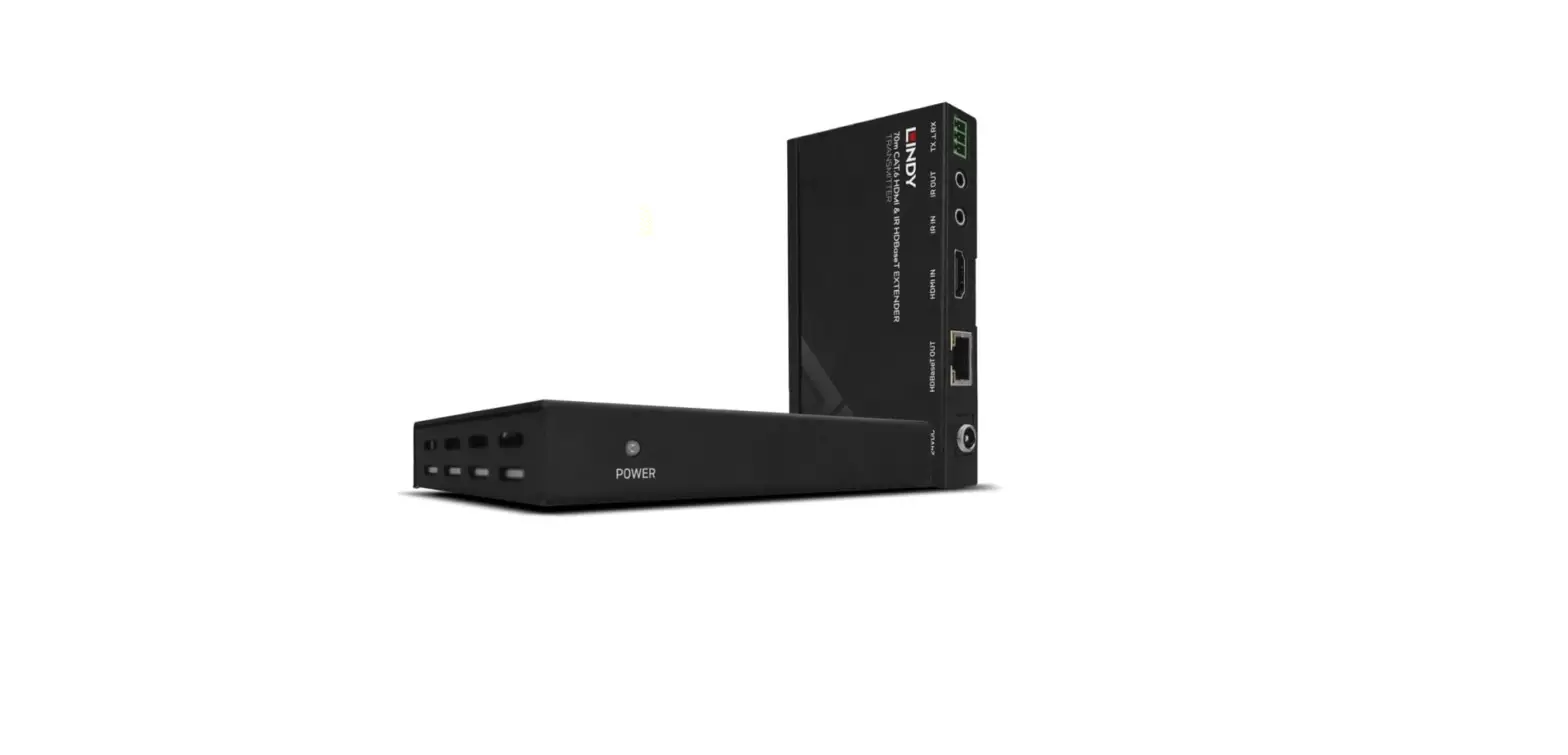
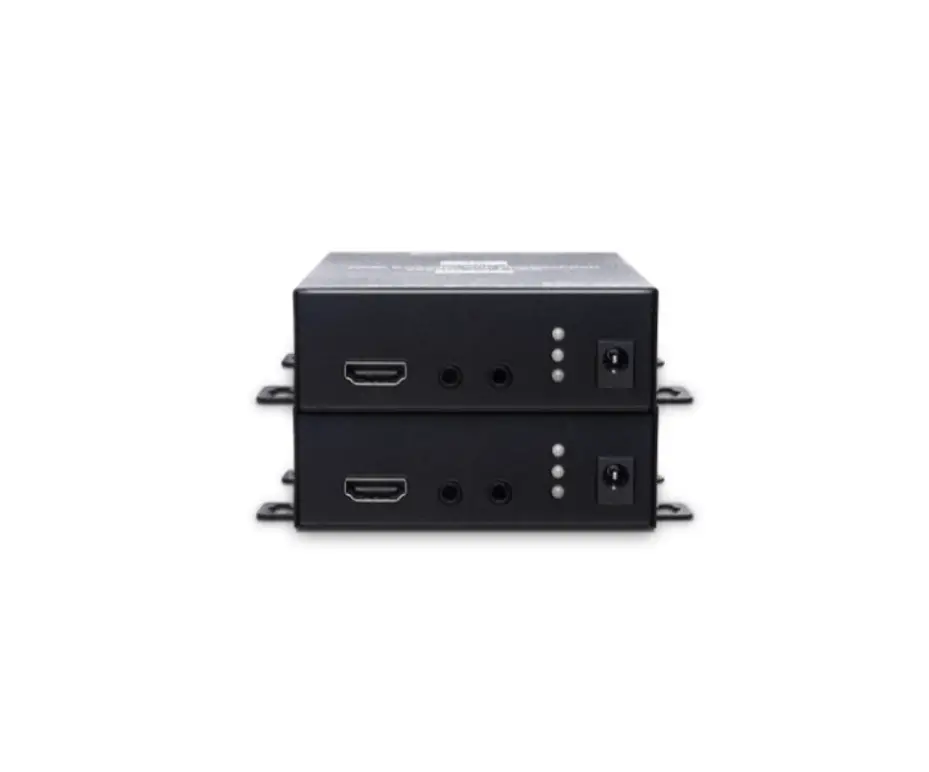
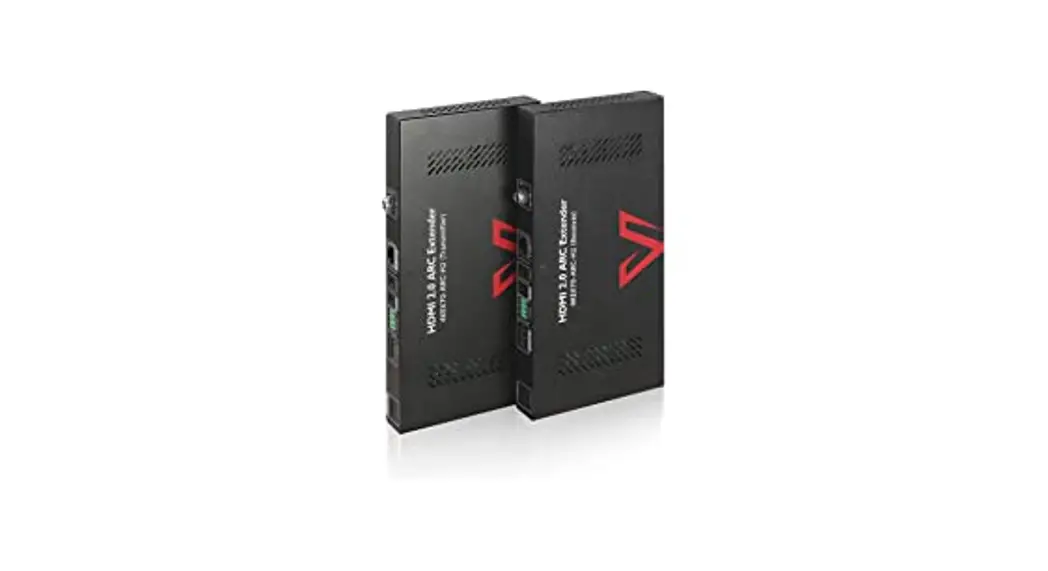
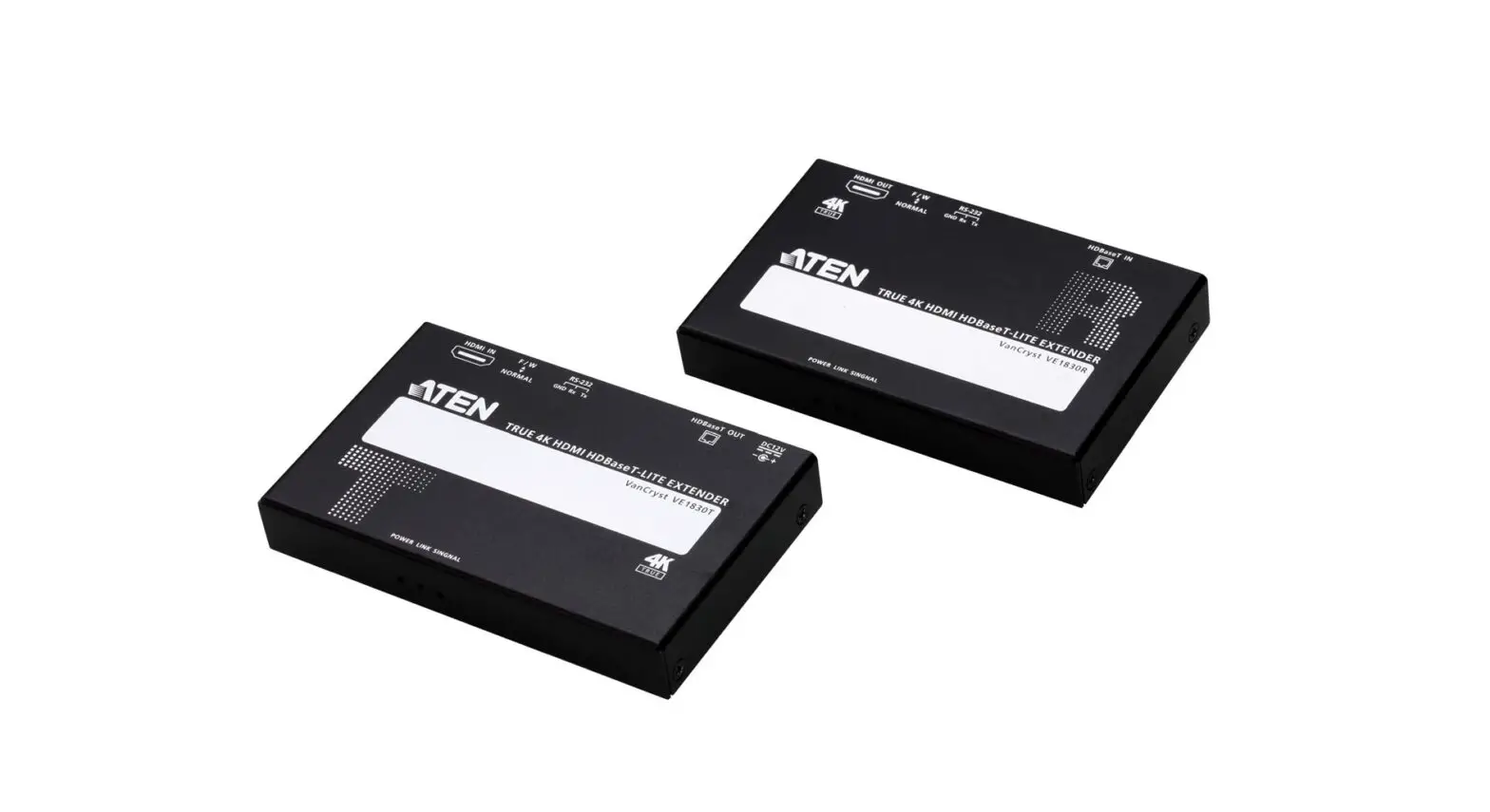
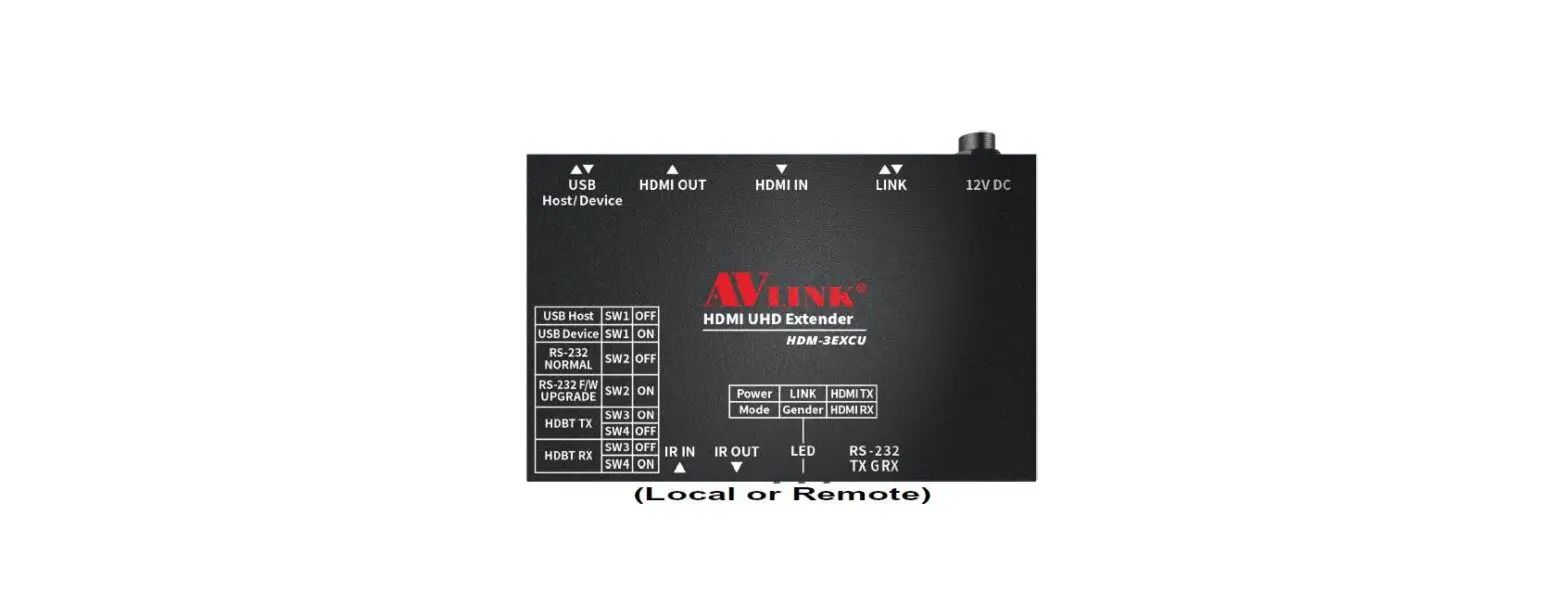
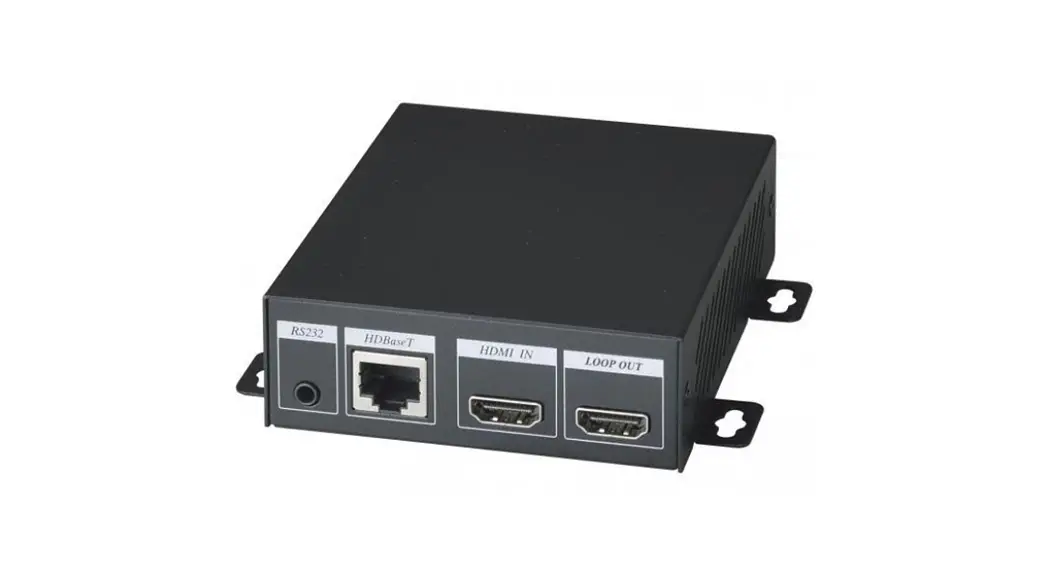
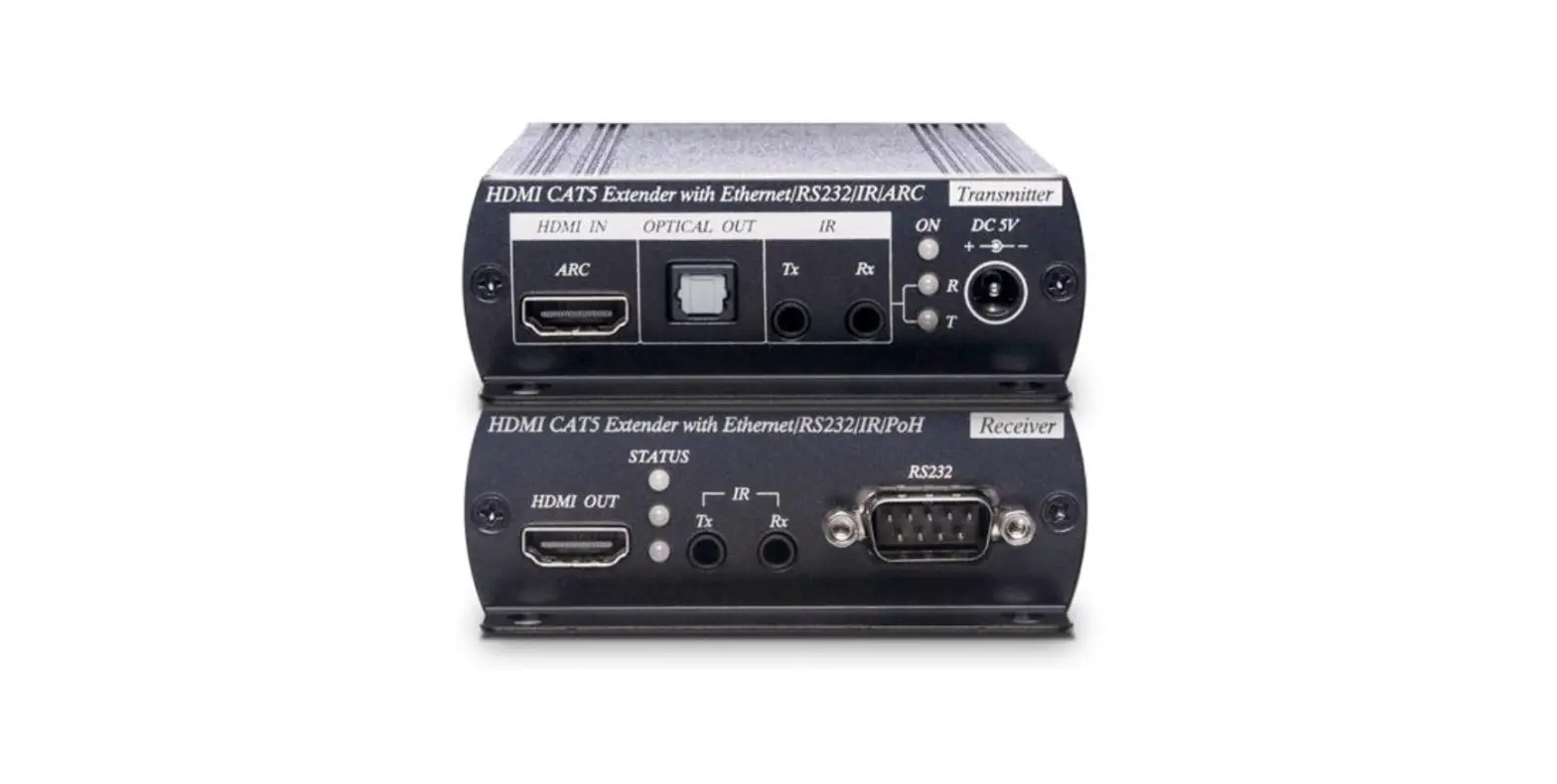
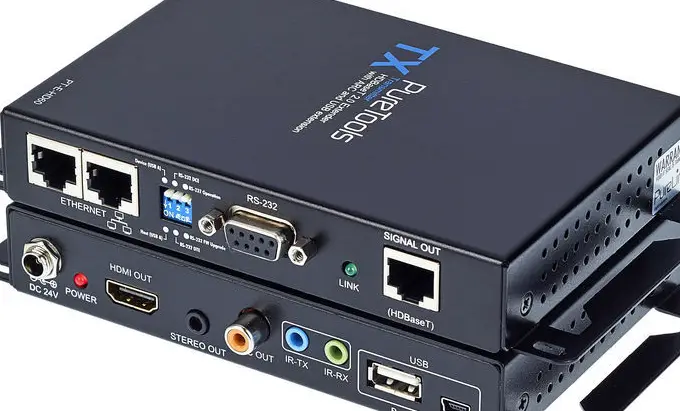
HDBaseT 3.0 4K60 CAT HDMI Extender with ARC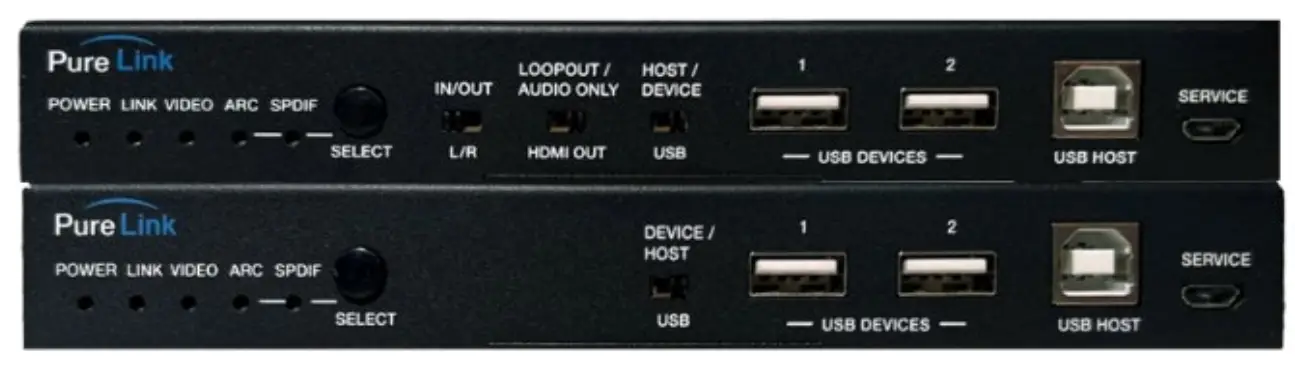
Introduction
HDBaseT 3.0 Extender can extend uncompressed UHD video and audio signals, eARC/ARC, RS-232, bi-directional IR, 1GbE Ethernet and USB 2.0 signals up to 100m (328ft) via a single CAT6A/7
Features
- HDMI 2.0b, HDCP 2.2 and HDBaseT 3.0 compliant
- Uncompressed 4K@60Hz 4:4:4 up to 18Gbps video bandwidth
- HDR, HDR10, HDR10+, Dolby Vision and HLG pass-through
- LPCM, Dolby Digital/Plus/EX, Dolby True HD, DTS, DTS-EX, ors-96/24, DTS High Res, DTS-HD Master Audio, DSD pass through
- Transmission distance up to 328ft/100 meters via a single CAT 6A/7 cable
- eARC/ARC function (the audio is returned to the HDMI IN port, HDMI OUT (AUDIO ONLY) port and SPDIF OUT port of the transmitter.)
- SPDIF audio reverse transmission
- 8i-directional IR, RS-232 and 1G Ethernet signal pass through
- USB2.0 transmission, Host/Device is configurable
- 8i-directional 24V POC function
Package Contents
1 x IR Blaster Cable (1.5 meters)
1 x IR Receiver Cable (1.5 meters)
2 x 3pin-3.81mm Phoenix Connectors
4 x Mounting Ears
8 x Machine Screws (KM3*4)
1 x 24V/1A Locking Power Supply
Specifications
| Technical | |
| HDMI Compliance | HDMI 2.0b |
| HDCP Compliance | HDCP 2.2 |
| Video Bandwidth | 18Gbps |
| Video Resolution | Up to 4K@60Hz 4:4:4 |
| HDBaseT Bandwidth | 16Gbps on main and 2Gbps on return link |
| HDR | HDR, HDR10, HDR10+, Dolby Vision, HLG |
| Color Space | RGB, YCbCr 4:4:4, YCbCr 4:2:2, YCbCr 4:2:0 |
| Color Depth | 8/10/12-bit |
| Audio Formats | LPCM, Dolby Digital/Plus/EX, Dolby True HD, DTS, DTS-EX, DTS-96/24, DTS High Res, DTS-HD Master Audio, DSD |
| L/R Audio Formats | PCM 2.0 |
| SPDIF Audio Formats | LPCM2.0, AC3 5.1, DTS 5.1 |
| IR Level | 12Vp-p |
| IR Bandwidth | 20K – 60KHz |
| USB Bandwidth | Up to 350Mbps |
| Ethernet | 1000Mbps |
| RS-232 | Up to 921600bps |
| Transmission Distance | 100m (via a single CAT 6A/7 cable) |
| ESD Protection | Human body model — ±8kV (Air-gap discharge) & ±4kV (Contact discharge) |
| Connection | |
| Transmiter | Input: 1 x HDMI IN [Type A, 19-pin female] Output: 1 x HDMI OUT [Type A, 19-pin female] 1 x HDBT OUT [RJ45, 8-pin female] 1 x SPDIF OUT [S/PDIF] 1 x L/R OUT [3.5mm Stereo Mini-jack] Control: 1 x IR IN [3.5mm Stereo Mini-jack] 1 x IR OUT [3.5mm Stereo Mini-jack] 1 x RS-232 [3pin-3.81mm Phoenix jack] 1 x SERVICE [Mini-USB, Update port] 1 x USB HOST [USB Type B] 2 x USB DEVICES [USB Type A] 1 x LAN [RJ45] |
| Receiver | Input: 1 x HDBT IN [RJ45, 8-pin female] 1 x SPDIF IN [S/PDIF] Output: 1 x HDMI OUT [Type A, 19-pin female] 1 x L/R OUT [3.5mm Stereo Mini-jack] Control: 1 x IR IN [3.5mm Stereo Mini-jack] 1 x IR OUT [3.5mm Stereo Mini-jack] 1 x RS-232 [3pin-3.81mm Phoenix jack] 1 x SERVICE [Mini-USB, Update port] 1 x USB HOST [USB Type B] 2 x USB DEVICES [USB Type A] 1 x LAN [RJ45] |
| Mechanical | |||
| Housing | Metal Enclosure | ||
| Color | Black | ||
| Dimensions | Transmitter / Receiver: 170mm [W] x 102mm [D] x 22mm [H] | ||
| Weight | Transmitter: 425g, Receiver: 437g | ||
| Power Supply | Input: AC 100 – 240V 50/60Hz Output: DC 24V/1A (US/EU standard, CE/FCC/UL certified) | ||
| Power Consumption | 15.36W (POC) | ||
| Operating Temperature | 32 – 104°F / 0 – 40°C | ||
| Storage Temperature | -4 – 140°F / -20 – 60°C | ||
| Relative Humidity | 20 – 90% RH (no condensation) | ||
| Resolution / Cable Length | 4K60 – Feet / Meters | 4K30 – Feet / Meters | 1080P60 – Feet / Meters |
| HDMI IN / OUT | 16ft / 5M | 32ft / 10M | 50ft / 15M |
| The use of “Premium High Speed HDMI” cable is highly recommended. | |||
Operation Controls and Functions
Transmiter Panel
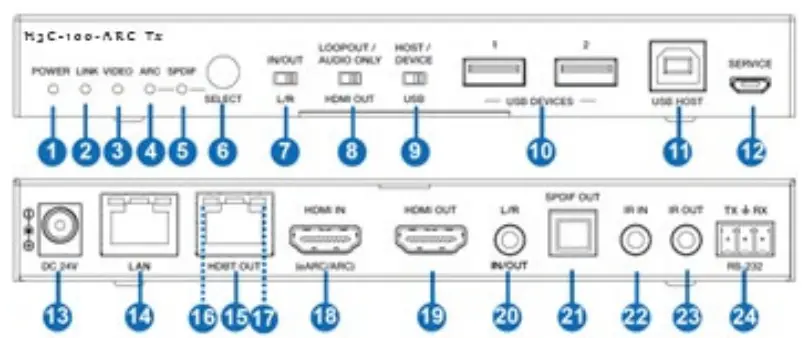
| No. | Name | Function Description |
| 1 | Power LED | Red LED indicates that the Transmitter is powered on. |
| 2 | LINK LED | ▪ Light on: Transmitter and Receiver are in good connection status. ▪ Light flashing: Transmitter and Receiver are in Low Power Mode. ▪ Light off: Transmitter and Receiver are not connected. |
| 3 | VIDEO LED | ▪ Light on: The video is encrypted. ▪ Light flashing: The video is not encrypted. ▪ Light off: No HDMI input. |
| 4 | ARC LED | ▪ Light on: The device is switched to the ARC mode. ▪ Light off: The device is switched to the SPDIF mode. |
| 5 | SPDIF LED | ▪ Light on: The device is switched to the SPDIF mode. ▪ Light off: The device is switched to the ARC mode. |
| 6 | SELECT button | Used for switching the ARC mode and SPDIF mode. |
| 7 | L/R IN/OUT switch | Switch to left, the L/R IN/OUT port is the audio embedding port; Switch to right, the L/R IN/OUT port is the audio de-embedding port. |
|
8 | LOOP OUT/ AUDIO ONLY Switch | Switch to left (LOOPOUT), the HDMI OUT port is the loopout port for the HDMI IN port; Switch to right (AUDIO ONLY), the HDMI OUT port outputs 720P black screen image, and the audio is from ARC or SPDIF. |
| 9 | HOST/ DEVICE USB switch | Switch to left (HOST), the USB HOST mode is enabled; Switch to right (DEVICE), the USB DEVICE mode is enabled. |
| 10 | USB DEVICES | Two USB device ports, connected to U disk, mouse or keyboard. |
| 11 | USB HOST | USB extension host port, connected to PC. |
| 12 | SERVICE | Firmware update port. |
| 13 | DC 24V | DC 24V/1A power supply input port. Note that the extender supports POC function, it means that either transmitter or receiver is powered on by 24V/1A power adapter, the other one doesn’t need power supply. |
| 14 | LAN | 1G Network port. When it switches to Gigabit Ethernet, the green indicator lights on; When it switches to 100M Ethernet, the yellow indicator lights on. |
| 15 | HDBT OUT | 10G Network port, connected to the HDBT IN port of Receiver with a CAT 6A/7 cable. It is used for various signals pass-through. |
| 16 | Data Signal Indicator (Yellow) | ▪ Illuminating: HDMI signal with HDCP. ▪ Flashing: HDMI signal without HDCP. ▪ Dark: No HDMI signal. |
| 17 | Link Signal Indicator (Green) | ▪ Illuminating: Transmitter and Receiver are in good connection status. ▪ Flashing: Transmitter and Receiver are in poor connection status. ▪ Dark: Transmitter and Receiver are not connected. |
| 18 | HDMI IN | HDMI signal input port, connected to signal source device, supporting eARC/ARC amplifier. |
| 19 | HDMI OUT | HDMI signal loopout port. It can choose to be a LOOP OUT or AUDIO ONLY port through the LOOP OUT/AUDIO ONLY switch. |
| 20 | L/R IN/OUT | Audio embedding/de-embedding port. It can be used for audio embedding/de-embedding through the L/R IN/OUT switch. |
| 21 | SPDIF OUT | Optical output port. |
| 22 | IR IN | IR signal input port, connected to IR Receiver cable. |
| 23 | IR OUT | IR signal output port, connected to IR Blaster cable. |
| 24 | RS-232 | RS-232 serial port, used for serial port command transmission. |
Receiver Panel
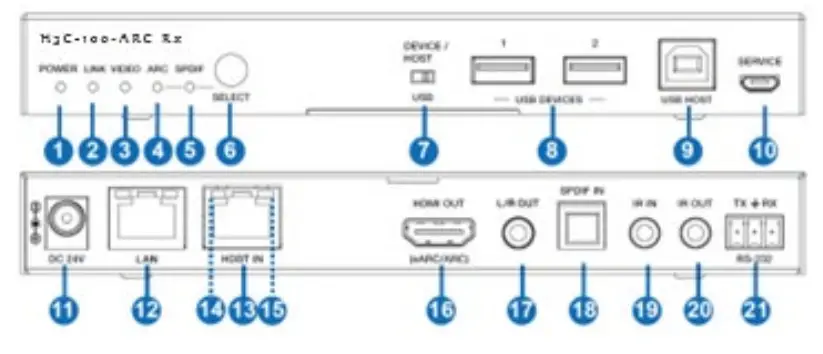
| No. | Name | Function Description |
| 1 | Power LED | Red LED indicates that the Receiver is powered on. |
| 2 | LINK LED | ▪ Light on: Transmitter and Receiver are in good connection status. ▪ Light flashing: Transmitter and Receiver are in Low Power Mode. ▪ Light off: Transmitter and Receiver are not connected. |
| 3 | VIDEO LED | ▪ Light on: The video is encrypted. ▪ Light flashing: The video is not encrypted. ▪ Light off: No HDMI input. |
| 4 | ARC LED | ▪ Light on: The device is switched to the ARC mode. ▪ Light off: The device is switched to the SPDIF mode. |
| 5 | SPDIF LED | ▪ Light on: The device is switched to the SPDIF mode. ▪ Light off: The device is switched to the ARC mode. |
| 6 | SELECT button | Used for switching the ARC mode and SPDIF mode. |
| 7 | DEVICE/ HOST USB switch | Switch to right (HOST), the USB HOST mode is enabled; Switch to left (DEVICE), the USB DEVICE mode is enabled. |
| 8 | USB DEVICES | Two USB device ports, connected to U disk, mouse or keyboard. |
| 9 | USB HOST | USB extension host port, connected to PC. |
| 10 | SERVICE | Firmware update port. |
| 11 | DC 24V | DC 24V/1A power supply input port. Note that the extender supports POC function, it means that either transmitter or receiver is powered on by 24V/1A power adapter, the other one doesn’t need power supply. |
| 12 | LAN | 1G Network port. When it switches to Gigabit Ethernet, the green indicator lights on; When it switches to 100M Ethernet, the yellow indicator lights on. |
| 13 | HDBT IN | 10G Network port, connected to the HDBT OUT port of Transmitterwith a CAT 6A/7 cable. It is used for various signals pass- through. |
| 14 | Data Signal Indicator (Yellow) | ▪ Illuminati n g: HDMI signal with HDCP. ▪ F lashing: HDMI signal without HDCP. ▪ Dark: No HDMI signal. |
| 15 | Link Signal Indicator (Green) | ▪ Illuminati n g: Trans mit t e r and Receive r are in good connecti o n status. ▪ Flashing: Transmitter and Receiver are in poor connection status. ▪ Dark: Transmitter and Receiver are not connected. |
| 16 | HDMI OUT | HDMI signal output port, supporting eARC/ARC TV. |
| 17 | L/R OUT | Audio de-embedding output port. |
| 18 | SPDIF IN | Optical input port. |
| 19 | IR IN | IR signal input port, connected to IR Receiver cable. |
| 20 | IR OUT | IR signal output port, connected to IR Blaster cable. |
| 21 | RS-232 | RS-232 serial port, used for serial port command transmission. |
Input and Output Switching
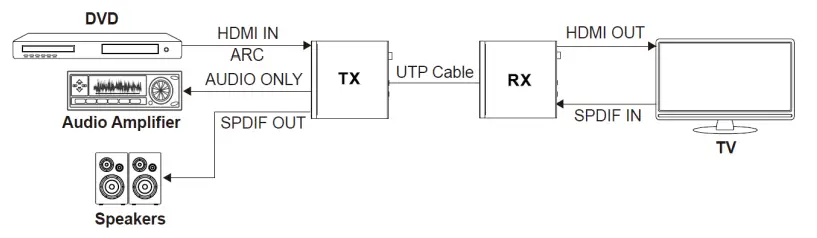
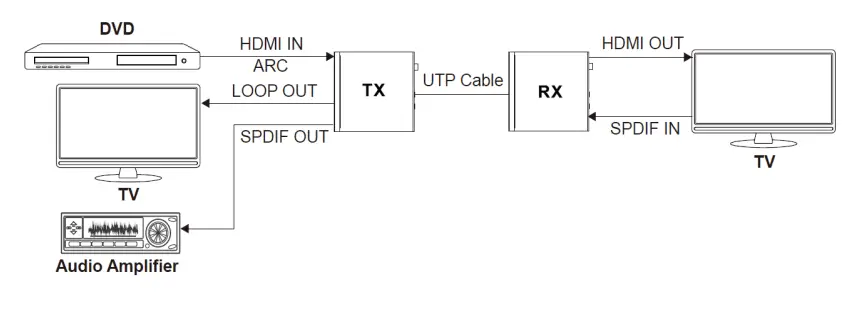
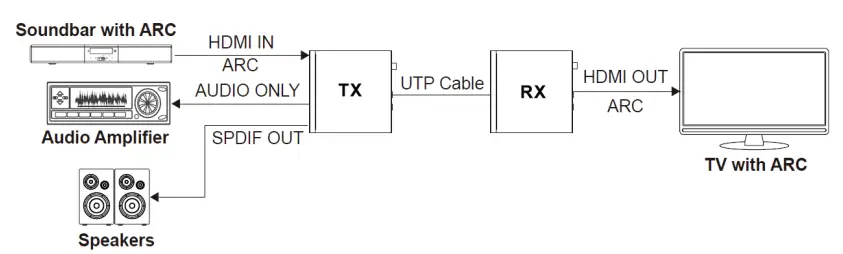
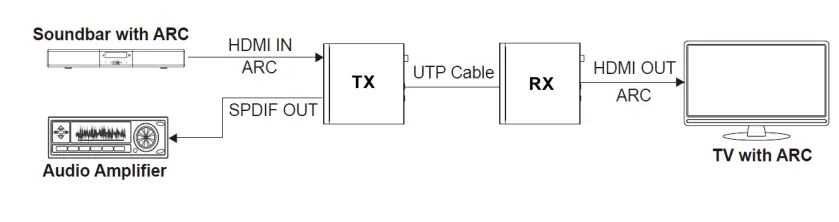
The extender can switch to ARC/SPDIF mode by pressing the SELECT buton on the front of the panel of both the transmiter and receiver. The HDMI OUT port of the transmiter can turn to LOOP OUT or AUDIO ONLY through the LOOP OUT/AUDIO ONLY switch. The input and output routing are different for different use case scenarios, as shown in the diagrams below.
Scene 1:
Set the extender to SPDIF Mode. Then switch the LOOP OUT/AUDIO ONLY switch to the right, the HDMI OUT port of the transmiter is now set to AUDIO ONLY.
Scene 2:
Set the extender to SPDIF mode. Then switch the LOOP OUT/AUDIO ONLY switch to the left, the HDMI OUT port of the transmiter is now set to LOOP OUT.
Scene 3:
Set the extender to ARC mode. Then switch the LOOP OUT/AUDIO ONLY switch to the right, the HDMI OUT port of the transmiter is now set to AU DI O ON LY.
Scene 4:
Set the Extender to ARC Mode. Then switch the LOOP OUT/ AUDIO ONLY switch to left, the HDMI OUT port of the transmiter is set to LOOP OUT.
Scene 5:
Set the Extender to eARC Mode. Then switch the LOOP OUT/ AUDIO ONLY switch to right, the HDMI OUT port of the transmiter is set to AU DI O ON LY.
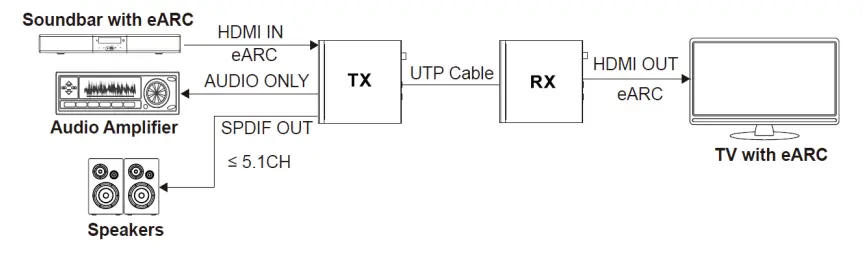
Scene 6:
Set the Extender to eARC Mode. Then switch the LOOP OUT/ AUDIO ONLY switch to left, the HDMI OUT port of the transmiter is set to LOOP OUT.
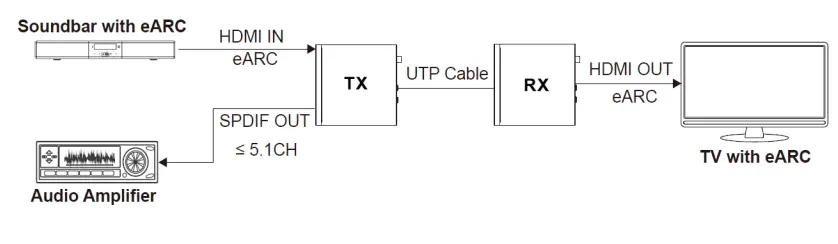
Note: In eARC mode, the SPDIF OUT port can only output the audio up to 5.1CH.
Audio Embedding and De-Embedding
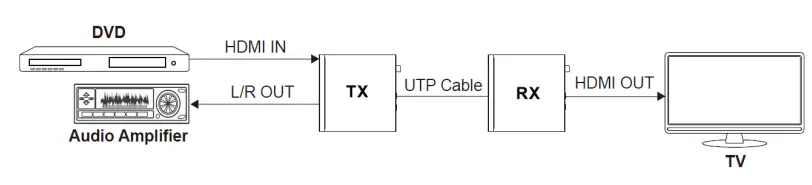
The transmiter supports both audio embedding and de-embedding. The L/R IN/OUT PORT can be used for audio embedding or de-embedding via the L/R IN/OUT switch.
- TX Audio Embedding
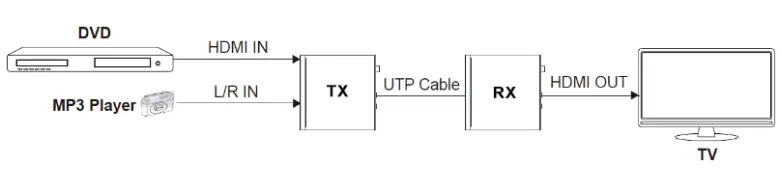
When the L/R IN/OUT switch is switched to left, the audio from external audio device will be embedded to the L/R IN/OUT port.
- TX Audio De-embedding
When the L/R IN/OUT switch is switched to right, The L/R IN/OUT port will output the audio deembedded from the HDMI IN port.
USB Mode Applicatuons
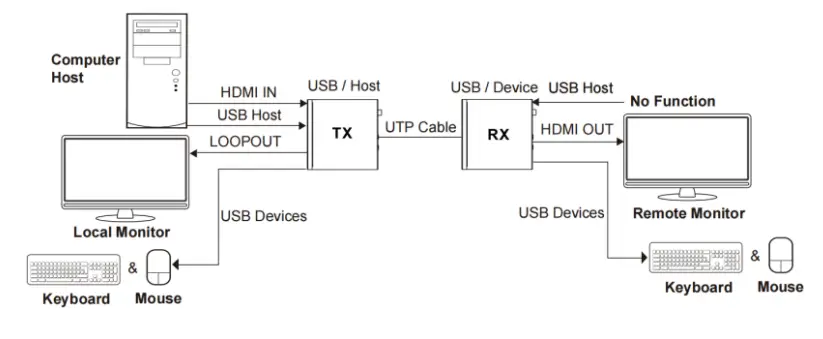
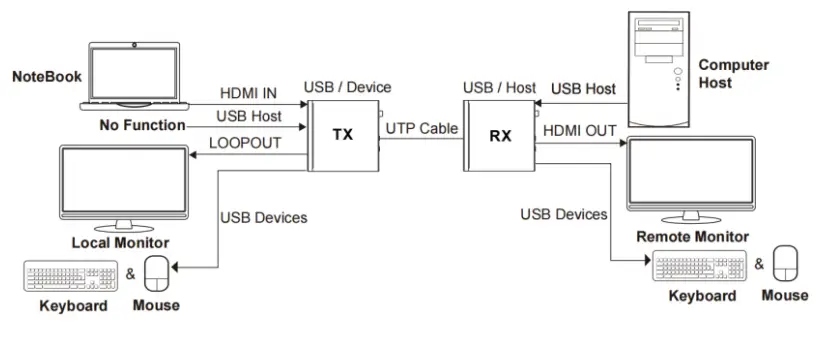
The Extender supports USB2.0 transmission, and Host/Device is configurable.
Mode 1: USB forward from TX to RX
Switch the HOST/DEVICE USB switch to left, then power off and reboot the transmiter to set to USB Host mode. Meanwhile, switch the DEVICE/HOST USB switch to left, then power off and reboot the receiver to set to USB Device mode.
Mode 2: USB reverse from RX to TX
Switch the HOST/DEVICE USB switch to right, then power off and reboot the transmiter to set to USB Device mode. Meanwhile, switch the DEVICE/HOST USB switch to right, then power off and reboot the receiver to set to USB Host mode.
IR Pin Definition
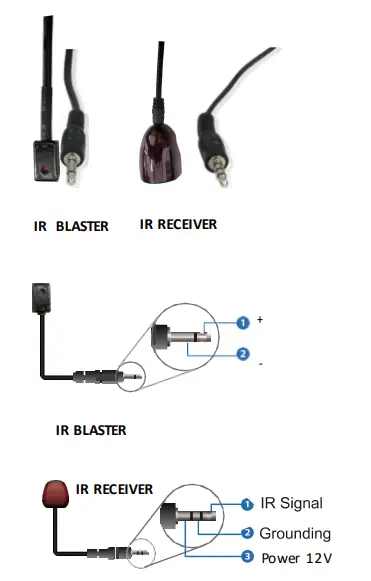
Note: When the angle between the IR receiver and the remote control is ± 45 °, the transmission distance is 0-5 meters; when the angle between the IR receiver and the remote control is ± 90 °, the transmission distance is 0-8 meters.
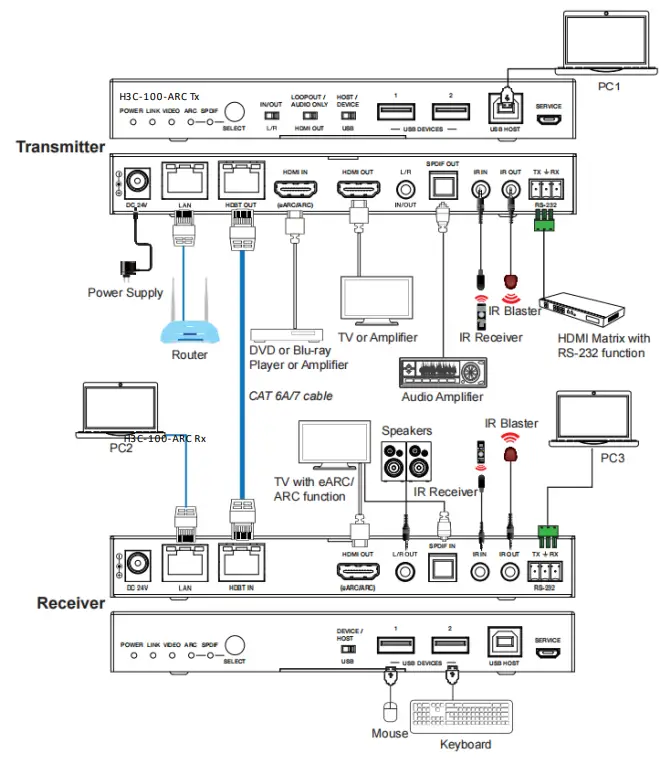
Application Example
Warranty
PureLink Three (3) Year Limited Warranty for PureStream™ Branded Products Only
Dtrovision, LLC. (hereinafter “PureLink”) warrants its HDTools and PureStream™ branded products (hereinafter “Product”) purchased directly from PureLink or Dealer shall be free from defects in workmanship and materials, under normal use and service, for a period of three (3) years on parts and three (3) years on labor. Any repaired or replaced equipment related to Product shall be covered only under the remaining portion of the warranty. This warranty has no relationship to and exists independently of any warranty offered by Dealer. This warranty is a limited warranty and gives you specific legal rights. You may also have other rights which vary from state to state.
TERMS & CONDITIONS
PureLink shall repair or replace the Product if it develops a material fault during the period of warranty, on condition that i) the Product has only been subject to normal use in a domestic or commercial environment in a manner consistent with its specification and functionality, ii) the Product has been cared for reasonably and only subjected to reasonable wear and tear, iii) the defect has not been caused by willful or negligent abuse or neglect, or any accident or improper installation procedure, iv) the serial number of the Product has not been altered or removed.
This warranty only applies to the original purchaser, and shall be the exclusive remedy to the original purchaser. PureLink shall not be liable for any damages whatsoever caused by Product or the failure of Product to perform, including incidental or consequential damages. PureLink shall not be liable for any claim made by a third party or made by the purchaser for a third party.
Except as expressly set forth in this warranty, PureLink makes no other warranties, expressed or implied, including any implied warranties of merchantability and fitness for a particular purpose. PureLink expressly disclaims all warranties not satisfied in this limited warranty. Any implied warranties that may be imposed by law are limited to the terms of this limited warranty. This warranty statement supersedes all previous warranties.
WARRANTY RETURNS/REPAIRS/EXCHANGES
No merchandise may be returned without prior authorization from PureLink, and a Return Materials Authorization (RMA) number. Failure to comply with these conditions will result in rejection of the returned merchandise.
Any warranty service on Products must be arranged through Dealer. Authorized returns must be shipped freight prepaid and fully insured to PureLink, Ramsey, NJ USA, with the RMA number clearly marked on the outside of all shipping boxes and containers. PureLink reserves the right at its sole discretion to refuse any shipments arriving freight collect or without an RMA number. Any authorized returned merchandise must be accompanied by a note describing the reason for return, along with contact information including name, phone number, return mailing and shipping addresses, e-mail address, and RMA number.
On any products returned and accepted with an RMA number, return freight charges following repair of items under warranty shall be paid by PureLink, shipping by the standard ground carrier of its choice.
ADVANCE WARRANTY REPLACEMENTS
PureLink’s advance replacement service offers a Replacement Unit upon request – free of charge for eligible products purchased less than one (1) year of the warranty claim. Products purchased more than one (1) year prior to the warranty claim do not qualify for advance replacement services.
Advance replacement requests must be validated by a member of PureLink’s Technical Support Team. Replacement units may be new or refurbished and is subject to availability. PureLink is responsible for shipping the Replacement Unit to your designated location by standard ground service. All other shipping methods will be responsibility of the Dealer.
Original Unit Return – the Original Unit must be returned within thirty (30) calendar days of the return authorization date. Failure to return the Original Unit within this period will be subject to a minimum 15% re-stocking fee. Dealer is solely responsible for the shipping of the Original Unit to PureLink.
TO MAKE A WARRANTY CLAIM
To make a warranty claim, promptly notify PureLink within the warranty periods described above by calling PureLink’s Technical Support Department at 1-201-488-3232. PureLink, in its sole discretion, will determine what action, if any, is required under this warranty.
Most problems can be corrected over the phone through close cooperation between Customer and a PureLink technician. To better enable PureLink to address a warranty claim, please have the Product’s serial and model numbers. If PureLink, in its sole discretion, determines that an on-site visit or other remedial action is necessary, PureLink may send a representative to Customer’s site.
CUSTOMER SERVICE
Technical support inquiries can be submitted electronically through the PureLink website at www.purelinkav.com. For immediate assistance please contact PureLink’s Customer Care Team at+1 (201) 488-3232
 Beyond 4K - PureLink AV