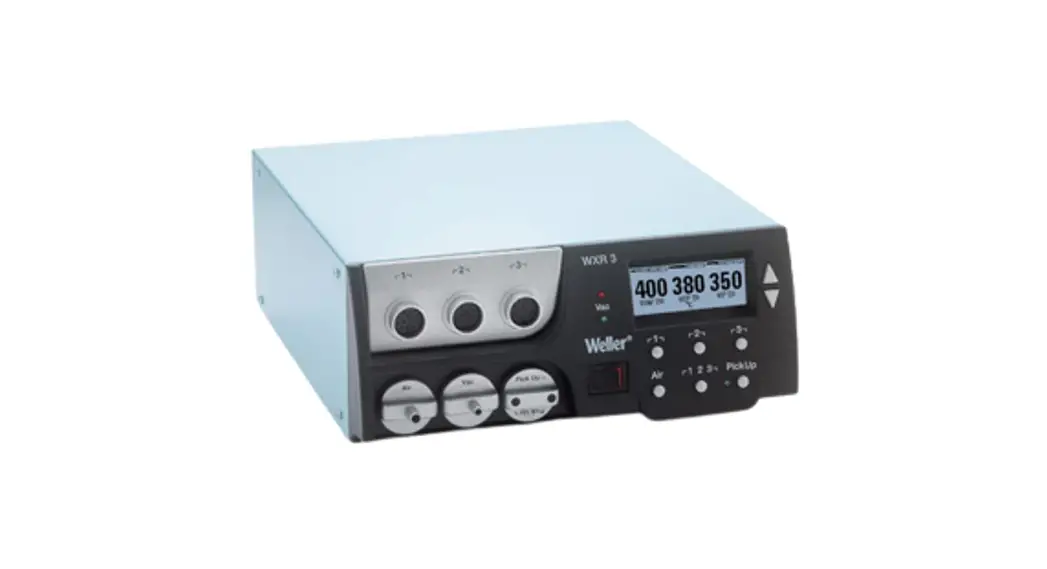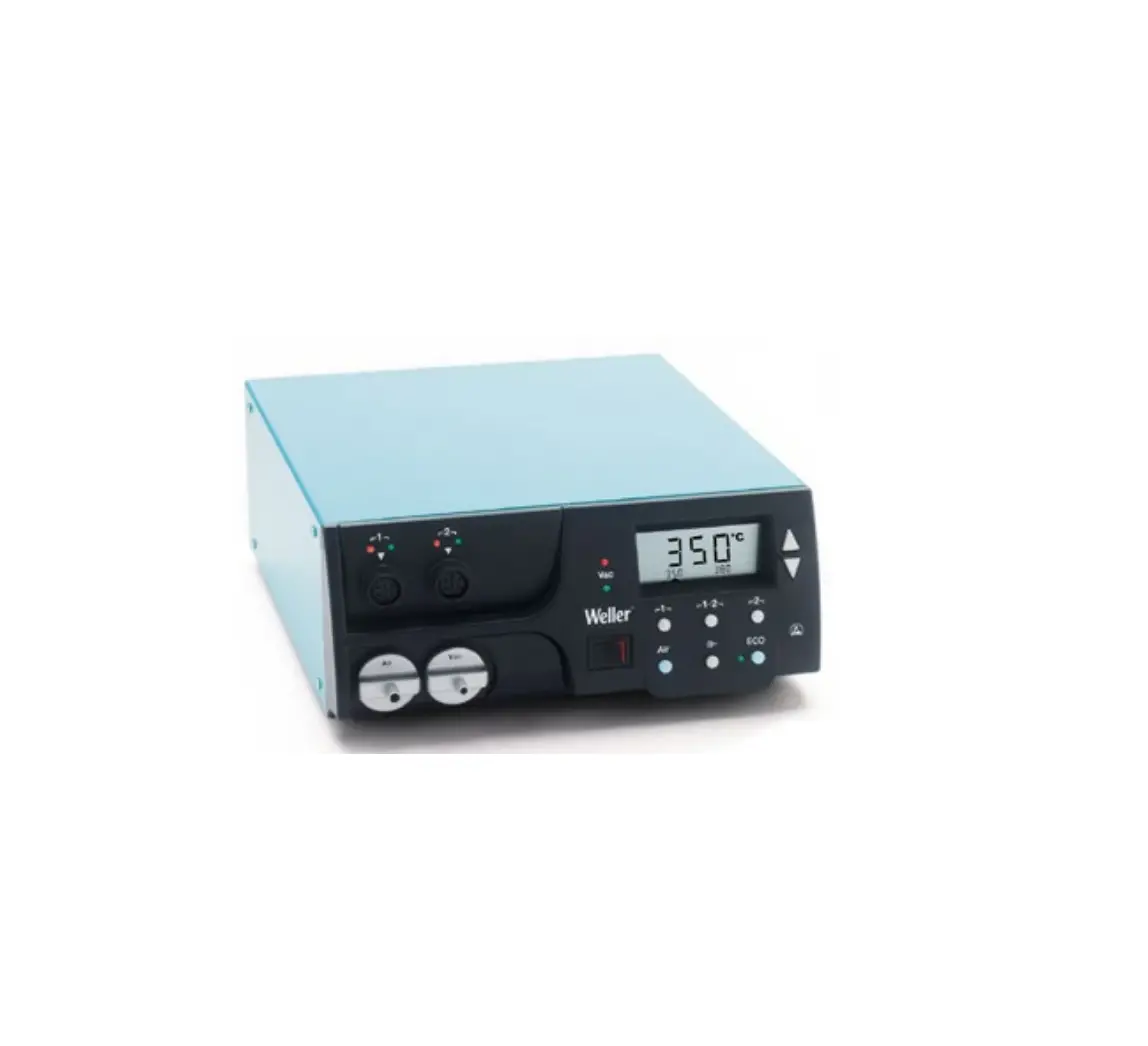
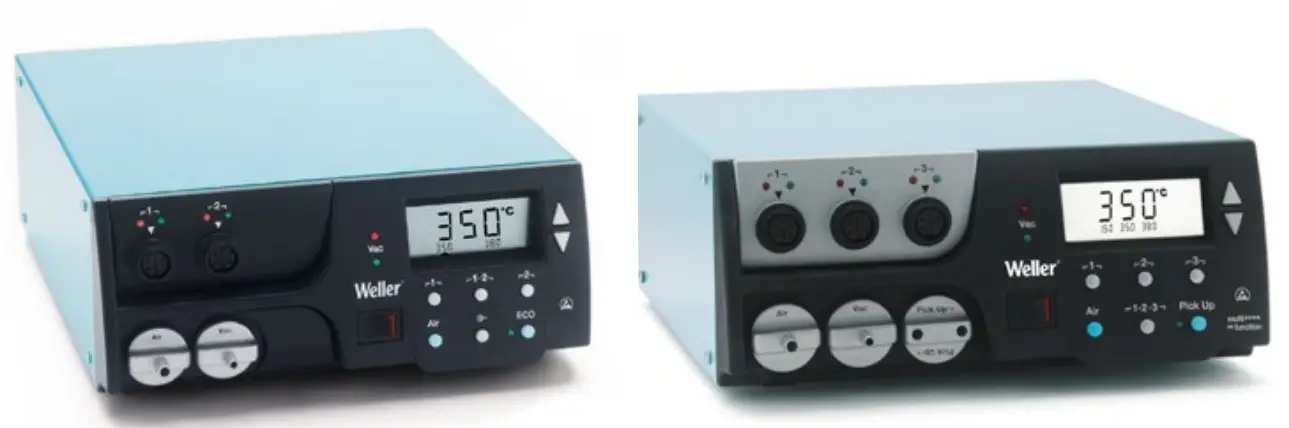
Weller WR 3M 3 Channel Power Unit
For your safety
Thank you for the confidence you have shown in buying this device.
The device has been manufactured in accordance with the most rigorous quality standards which ensure that it operates perfectly.
Read these instructions and the accompanying safety information carefully before starting up the device and starting work with the device.
 Keep these instructions in a place that is accessible to all users.
These instructions contain important information which will help you to start up, operate and service the device safely and correctly as well as to eliminate simple faults and malfunctions yourselves.
The device has been manufactured in accordance with state-of-the-art technology and acknowledged regulations concerning safety.
There is nevertheless the risk of personal injury and damage to property if you fail to observe the safety information set out in the accompanying booklet and the warnings given in these instructions.
Safety information
For safety reasons, children and youths under the age of 16, as well as persons who are not familiar with these operating instructions, may not use the device. Children should be supervised in order to ensure that they do not play with the tool. This device is not intended for use by persons (including children) with limited physical, sensory or mental aptitude, or by persons who lack knowledge or experience in handling the device.
 Warning! Electrical shock
Connecting the control unit incorrectly poses a risk of injury due to electric shock and can damage the device.
- Carefully read the attached safety information, the safety information accompanying these operating instructions as well as the operating instructions for your control unit before putting the control unit into operation and observe the safety precautions specified therein.
- Only connect WELLER tools.
If the device is faulty, active electrical conductors may be bare or the PE conductor may not be functional.
- Repairs must always be referred to a Weller-trained specialist.
- If the electrical tool‘s power supply cord is damaged, it must be replaced with a specially prefabricated power supply cord available through the customer service organization.
 Warning! Risk of burns
Risk of burns from the soldering tool while the control unit is operating. Tools may still be hot long after they have been switched off.
- Always place the soldering tool in the safety rest while not in use.
- Only connect the vacuum and hot air at the designated points.
- Do not direct hot air soldering tools at people or inflammable objects.
Warning! Fire and explosion hazard!
Hot tools represent a fire hazard
- Always place the soldering tool in the safety rest while not in use.
- Do not direct hot air soldering tools at people or inflammable objects.
- Keep explosive and flammable objects well away from the device.
- Do not cover the device.
Warning! Danger of injury
The device or parts of the device may fall off during transportation.
Specified Conditions Of Use
Supply unit for WELLER soldering tools.
Use the repair station only for the purpose indicated in the operating instructions of soldering and desoldering under the conditions specified herein.
Flammable gases and liquids may notbe extracted.
The device may only be used with correctly fitted and suitable filtercartridges. Replace filter cartridges when full.
Only use the device indoors. Protect against moisture and direct sunlight.
Intended use of the soldering station/ desoldering station also includes the requirement that you
- adhere to these instructions,
- observe all other accompanying documents,
- comply with national accident prevention guidelines applicable at the place of use.
The manufacturer will not be liable for unauthorized modifications to the device.
User groups
Due to differing degrees of risk and potential hazards, several work steps may only be performed by trained experts.
| Work step | User groups |
| Default soldering parameters | Specialist personnel with technical training |
| Replacing electrical replacement parts | Electricians |
| Default maintenance intervals | Safety expert |
| Operation Filter change | Non-specialists |
| Operation Filter change Replacing electrical replacement parts | Technical trainees under the guidance and supervision of a trained expert |
Starting up the device
Caution!
Please adhere to the operating instructions of the connected devices.
Put the tool into operation as described in the chapter „Placing into operation“.
Check to see if the mains voltage matches the ratings on the nameplate.
Make sure the machine is switched off before plugging in.
After the device has been switched on, the microprocessor carries out a self-test in which all the segments are briefly in operation.
Soldering and disordering
Carry out soldering work as directed in the operating instructions of your connected soldering tool.
Handling the soldering tips
- Coat the selective and tinnable soldering tip with solder when heating it up for the first time. This removes oxide coatings which have formed during storage and impurities from the soldering tip.
- Make sure that the soldering tip is well coated with solder during breaks between soldering work and prior to storage of the device.
- Do not use aggressive fluxing agents.
- Always make sure that the soldering tips are fitted properly.
- Select as low a working temperature as possible.
- Select the largest possible soldering tip shape for the application.
- Rule of thumb: the soldering tip should be roughly as large as the soldering pad.
- Coat the soldering tip well with solder to ensure that there is efficient heat transfer between the soldering tip and the soldering area.
- Prior to extended breaks between soldering work, switch off the soldering system or use the Weller function to reduce the temperature when the soldering equipment is not in use.
- Coat the tip with solder prior to storage if you do not intend to use the soldering iron for an extended period of time.
- Apply solder directly to the soldering area, not to the soldering tip.
- Change the soldering tips using the designated tool.
- Do not apply mechanical force to the soldering tip.
Notice
The control units have been adapted to hold a medium-sized soldering tip. Discrepancies may occur if the tip is changed or a different shaped tip is used.
Overload cut-out
To avoid overloading the station, power output is automatically reduced in the event of an overload.
Equipotential bonding
Four variants are possible by connecting the 3.5 mm jack socket differently
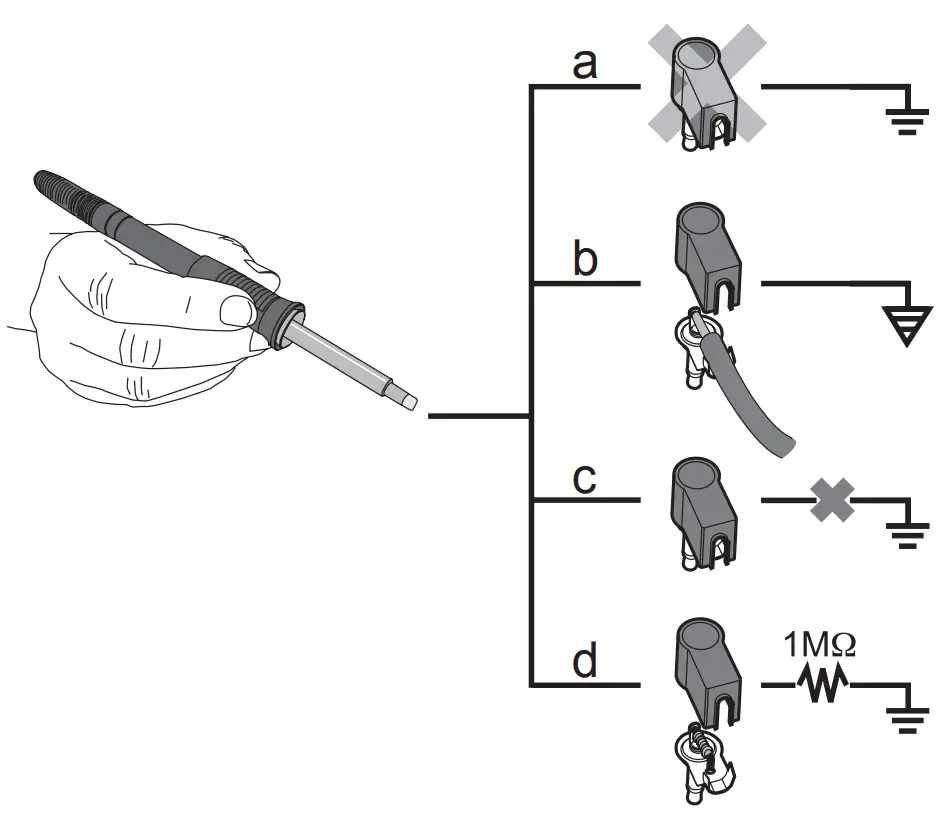
| a | Hard-grounded | supplied without plug. |
| b | Equipotential bonding | with plug, equalizer at center contact. |
| c | Floating | with plug |
| d | Soft-grounded | with plug and soldered resistor. Ground- ed through selected resistor. |
Carrying out a firmware update (WR 3M)
Notice
The control unit is equipped with a Mini USB port. To use the USB port, Weller provides software on so you can carry out a software update („Firmware Updater“) on your control unit.
Care and maintenance
Warning!
<Before doing any work on the machine, pull the plug out of the socket.
 Warning!
Use original replacement parts only.
Warning! Risk of burns
- Only replace solder tips when cold
- Replace and clean suction nozzles only when hot and using the suitable tool
- Only replace hot air nozzles using the suitable tool
- Only clean or replace solder collection tubes when cold
Clean the operator panel, if dirty, using a suitable cleaning cloth
Filter change
Check the filter regularly for contamination, and replace it if necessary.
Warning!
Failure to use a filter will cause irreparable damage to the vacuum pump.
- Check before starting soldering whether a main filter is inserted.
Contaminated filters must be treated as special waste.
Dispose of replaced equipment parts, filters or old devices in accordance with the rules and regulations applicable in your country. Wear suitable protective gear
Standby Temp. (STANDBY)
After activating the Setback function or after pushing the ECO button (WR 2), the temperature is automatically reduced to Standby temperature. The display flashes the actual temperature. <STANDBY appears on the display.
Setback time (SETBACK)
If the soldering tool is not in use, the temperature is reduced to Standby temperature on expiration of the preset Setback time.
SETBACK appears on the display.
To exit Standby mode, push the „UP / DOWN“ buttons or ECO (WR 2).
Depending on the tool in use, the finger switch or the safety rest deactivates Standby mode.
| Option | Description |
| 0 min | Deactivated (Default setting) |
| ON | After placing the soldering iron into the safety rest, the temperature is immediately reduced to standby level. |
| 1-999 min | Setback time Individually adjustable |
AUTO OFF time (automatic switch-off time)
If the soldering tool is not in use, the soldering tool is switched off on expiration of the AUTO-OFF time.
The actual temperature flashes on the display and serves as residual-heat indicator. „OFF“ appears on the display. A flashing dash appears on the display below 50 °C (122 °F
| Option | Description |
| 0 min | Deactivated (Default setting) |
| 1-999 min | AUTO-OFF time, can be set indivi- dually. |
Temperature-Offset (Offset)
The actual soldering-tip temperature can be adapted by entering a temperature offset around ± 40 °C (± 72 °F).
Temperature window (WINDOW)
Starting from a set, locked temperature, it is possible to set a temperature window of ± 1-99 °C (±1 180 °F) using the WINDOW function. To use the WINDOW function, the repair station must be interlocked
Temperature units (°C/°F)
| Option | Description |
| ° C | Celsius |
| ° F | Fahrenheit |
Max. hot air duration (HAP On)
The on-time of the hot air flow of the HAP 200 can be limited in increments of 1 to between 0 and 60 sec. The set time is then identical for all 3 channels
The factory default is s („OFF“), i.e. air flows only as long as the button on the hot air tool or the optional footswitch is pressed
| Option | Description |
| OFF | No duration defined(Default setting) |
| 1-60 s | Individually adjustable |
Vacuum pre-feed (VAC On)
In order to prevent the pump from starting prematurely or to ensure a defined soldering-joint preheating time, it is possible to set an ON delay.
| Option | Description |
| 0 sec | OFF: vacuum pre-feed function is OFF (Default setting) |
| 1- 9 sec | ON: vacuum pre-feed time, individually |
Vacuum run-on (VAC Off)
| Option | Description |
| 0 sec | OFF: vacuum run-on function is OFF (Default setting) |
| 1- 5 sec | ON: vacuum run-on time, individually adjustable |
lock function
After the lock has been activated, only the following buttons on the soldering station are enabled:
WR 2: ┌ 1 ┐, ┌1·2┐,┌ 2 ┐, ECO , AIR
WR 3M: ┌ 1 ┐, ┌ 2 ┐, ┌ 3 ┐ ┌1·2·3┐, Pick Up , AIR
All other settings are disabled until the repair station is unlocked again.
| Notice If you want only one temperature value to be selectable, the control keys fixed temperature keys) must be set to the same temperature value |
Locking the soldering station
Select menu option. „OFF“ appears on the display.
The key symbol is flashing.
Set the desired three-digit locking code (between 001 and 999) using the UP / DOWN buttons.
WR 2: Press button ┌ 2 ┐ for 5 seconds.
WR 3M: Press button ┌ 3 ┐ for 5 seconds.
The code is stored.
The key symbol is displayed.
Unlocking the soldering station
- Select menu option. „ON“ appears on the display.
- Set the three-digit locking code using the UP / DOWN buttons.
- WR 2: Press button ┌ 2 ┐ .
WR 3M: Press button ┌ 3 ┐ . - The station is now unlocked. The display switches to the main menu.
Pressure gauge threshold (LEVEL)
This function can be used to define the maintenance interval of the disordering tool. This is done by setting the value in mbar at which the electric pressure gauge issues a warning signal when the intake system is contaminated (LED of the vacuum pump switches from green to red). The set value is dependent on the suction nozzles used. Adjustable -400 mbar to -800 mbar factory setting -600 mbar
- The system (tips and filter) must be free.
- Select the menu item „Pressure gauge threshold“ in the menu.
- Set the „Pressure gauge threshold“ pressure value with the UP or DOWN button. The status LED switches back and forth between red and green. Use the UP button to increase vacuum by 50 to 80 mbar, then pinch the vacuum tube and check whether the LED switches from green to red.
Station code (Remote ID)
WR 3M
A station code (Remote ID) can be assigned to each station, allowing the station to be clearly identified via the USB port.
| Option | Description |
| 0-999 | Individually adjustable |
Calibration (Factory Calibration Check FCC)
You can use the FCC function to check the temperature precision of the repair station and even out possible deviations. For this purpose, the soldering-tip temperature must be measured with an external temperature meter and a temperature measuring tip assigned to the soldering tool. The corresponding channel must be selected prior to calibration.
- Insert the temperature sensor (0.5 mm) of the external temperature meter into the temperature measuring tip.
- Select the menu item FCC in Menu 2.
- a) Press the DOWN button. -> Calibration point 100 °C / 210 °F is selected. b) Press the UP button. -> Calibration point 450 °C / 840 °F is selected.
The soldering tip is now heated up. The control indicator flashes as soon as the temperature is constant. - Compare the temperatures indicated by the meter with the readings on the display.
- WR 2: Push the┌1·2 ┐ (Set) button to confirm the adjusted value.
WR 3M: Push the┌1·2 3 ┐ (Set) button to confirm the adjusted value. The temperature deviation is now reset to 0. Calibration at 100 °C / 210 °F / 450 °C / 840 °F is now complete. - Use the UP or DOWN button to set the difference between the value indicated on the external meter and the value indicated on the repair station.
Maximum possible temperature adjustment ± 40 °C (± 70 °F).
WR 2: Push button ┌ 2 ┐ to exit the menu option (EXIT).
WR 3M: Push button ┌ 3 ┐ to exit the menu option (EXIT). - WR 2: Exit Menu 2 with button ┌ 2 ┐.
WR 3M: Exit Menu 3 with button ┌ 2 ┐.
Resetting calibration to factory settings
- Select the menu item FCC in Menu 2.
- WR 2: Press and hold down button ┌ 2 ┐. WR 3M: Press and hold down button ┌ 3 ┐.
- Then press the UP and DOWN buttons simultaneously. „FSE“ (Factory Setting Enabled) appears on the display.
The repair station is now reset to the factory calibration.
WR 2
After activating the special button, it can be used as a shortcut back to Menu 1. The function previously selected is saved when the menu is exited with the special button.
| Option | Description |
| OFF | Deactivated (Default setting) |
| ON | Special button activated |
WR 2
After activating the ECO button, it can be used to set all channels to Standby mode. The green LED lights up and the channels are set to the set standby temperature. If a safety rest is in use, the function is reset when the tool is removed from the holder.
| Option | Description |
| OFF | Deactivated (Default setting) |
| ON | ECO button activated |
WR 3M
This function can be used to adjust the factory button presets of the WXAHP tool. The HAP 200 is switched on the first time the button is pressed and switched off the next time the button is pressed.
| Option | Description |
| OFF | Deactivated (Default setting) |
| ON | HAP LOC activated |
Perform. Mode
The function determines the heating characteristics of the soldering tool to achieve the set tool temperature.
| Option | Description |
| LO | Slow heating |
| HI | rapid heating |
Technical Data
Resetting to factory settings (FSE)
Select the menu option FSE in menu 1.
WR 2:Press and hold down button ┌ 2 ┐.
- Open special functions menu „1“ (push UP & DOWN buttons simultaneously for 2sec.)
- Press and hold down button ┌ 2 ┐.
- Then press the UP and DOWN buttons simultaneously. FSE appears on the display.
(Factory Setting Enabled). The repair station is now reset to the factory settings.
Reset the calibration values to the factory settings
- Open special functions menu „2“ (push UP & DOWN buttons simultaneously for 4sec.)
- Select menu option „FCC“.
- Press and hold down button ┌ 2 ┐.
- Then press the UP and DOWN buttons simultaneously. FSE appears on the display. (Factory Setting Enabled).
The repair station is now reset to the factory settings.
WR 3M: Press and hold down button ┌ 3 ┐.
- Open special functions menu „1“ (push UP & DOWN buttons simultaneously for 2sec.)
- Push button ┌ 3 ┐and hold it down.
- Then press the UP and DOWN buttons simultaneously. FSE appears on the display. (Factory Setting Enabled).
The repair station is now reset to the factory settings.
Reset the calibration values to the factory settings
- Open special functions menu „2“ (push UP & DOWN buttons simultaneously for 4sec.)
- Select menu option „FCC“.
- Push button ┌ 3 ┐and hold it down.
- Then press the UP and DOWN buttons simultaneously. FSE appears on the display. (Factory Setting Enabled).
The repair station is now reset to the factory settings.
| Dimensions L x W x H (mm) | 273 x 235 x 102 | ||
| Dimensions L x W x H (Inch) | 10.75 x 9.25 x 4.02 | ||
| Mains supply voltage | 230 V ~ 50/60 Hz | 240/120 V ~ 50/60 Hz 120 V ~ 60 Hz | 100V ~ 50/60 Hz | ||
| Power consumption | 400 W | 300 W | |
| Safety class | I, antistatic housing III, Soldering tool | ||
| Fuse | Overcurrent release 230 V; 2,0 A 120 V; 4,0 A | 1,6 A | |
| Temperature (Tool dependent) °C | 50 – 450 | (550) | |
| Temperature (Tool dependent) °F | 150 – 850 | (999) | |
| Temperature accuracy °C | ± 9 | ||
| Temperature accuracy °F | ± 17 | ||
| Temperature accuracy Hot air °C | ± 30 | ||
| Temperature accuracy Hot air °F | ± 54 | ||
| Temperature stability °C | ± 2 | ||
| Temperature stability °F | ± 4 | ||
| Equipotential bonding | Via 3.5 mm pawl socket on back of unit (delivery form: hard grounded without jack plug) | ||
| Display | LCD | ||
| USB port | The control unit comes with a front-side USB port for installing firmware updates, configuration and monitoring. | – | |
| Pump (Intermittent mode (30/30) s) | Max. vacuum 0,7 bar Maximum quantity supplied 18 l/min Max. hot air 15 l/min | ||
| Additional vacuum pump | Max. vacuum 0,5 bar Maximum quantity supplied 1,7 l/min | – | |
Error messages and error clearance
| Message/symptom | Possible cause | Remedial measures |
| Display: „- – – |
|
|
| No display function (display OFF) |
|
|
| No vacuum at disordering tool |
|
|
| Insufficient vacuum at disoldering tool |
|
|
| Hot air tool has no air |
|
|
Symbols
| Caution! |
 | Read the operating instructions! |
 | Before performing work of any kind on the unit, always disconnect the power plug from the socket. |
 | ESD-compatible design and ESDcompatible workstation |
 | Equipotential bonding |
 | CE mark of conformity |
| British Conformity Mark |
 | Fuse |
 | Safety transformer |
 | Soldering |
 | Desoldering |
 | Hot air |
 | Disposal Do not dispose of electric tools together with household waste material! In observance of European Directive 2012/19/ EU on waste electrical and electronic equipment and its implementation in accordance with national law, electric tools that have reached the end of their life must be collected separately and returned to an environmentally compatible recycling facility. Dispose of replaced equipment parts, filters or old devices in accordance with the rules and regulations applicable in your country. |
| Disposal- UK Do not dispose of electric tools together with household waste material! In observance of British Directive 2013 No. 3113 on waste electrical and electronic equipment and its implementation in accordance with national law, electric tools that have reached the end of their life must be collected separately and returned to an environmentally compatible recycling facility |

Warranty
Claims by the buyer for physical defects are timebarred after a period of one year from delivery to the buyer. This does not apply to claims by the buyer for indemnification in accordance with §§ 478, 479 BGB (German Federal Law Gazette).
We shall only be liable for claims arising from a warranty furnished by us if the quality or durability warranty has been furnished by use in writing and using the term „Warranty“.
The warranty shall be void if damage is due to improper use and if the device has been tampered with by unauthorized persons.
Subject to technical alterations and amendments.
For more information please visit www.weller-tools.com.
EC declaration of conformity
We hereby declare that the products described herein comply with the following guidelines:
2004/108/EG, 2011/65/EU (RoHS), 2006/42/EG
Besigheim, 2022-04-11
Philippe Buidin
Managing director
UK declaration of conformity
We hereby declare that the products described herein comply with the following guidelines:
2008 No.1597, SI 2012 No.3032, SI 2016 No.1091
Besigheim, 2022-04-11
Philippe Buidin
Managing director
Authorised to compile technical documentation.
Apex tool Group (UK Operations) Limited
Piccadilly, Tamworth
Staffordshire B78 2ER
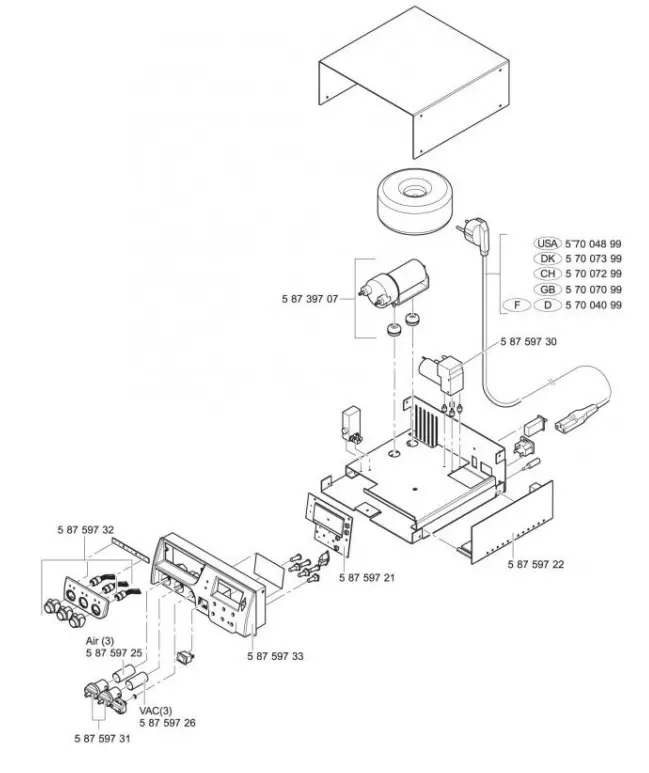
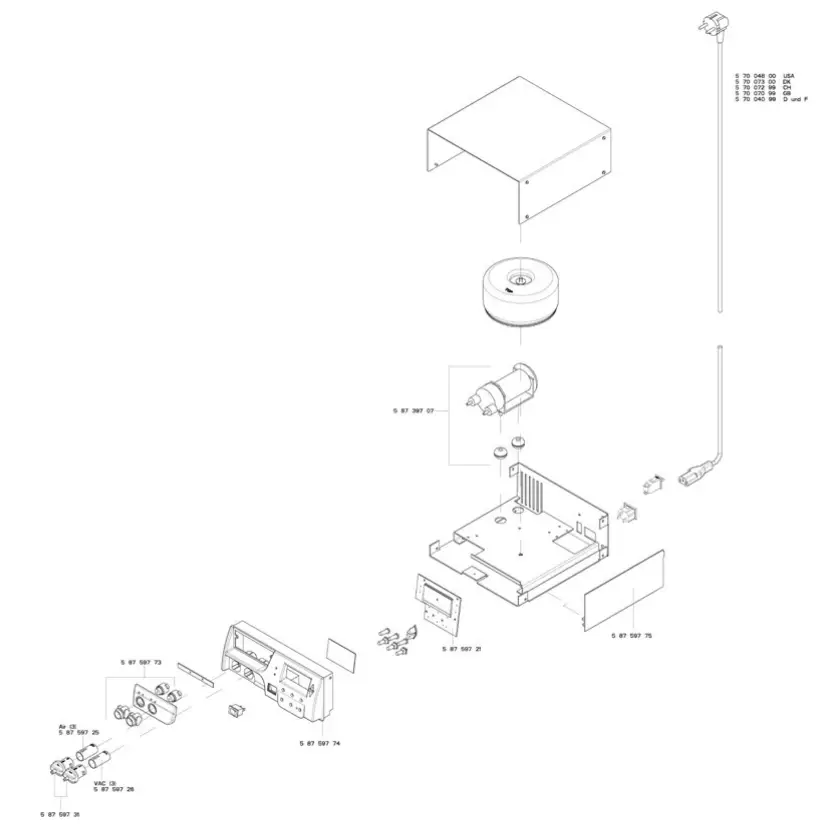
EXPLODED VIEW
WR 2
WR 3M
 |  |
 |  |
 |  |
Product Registration
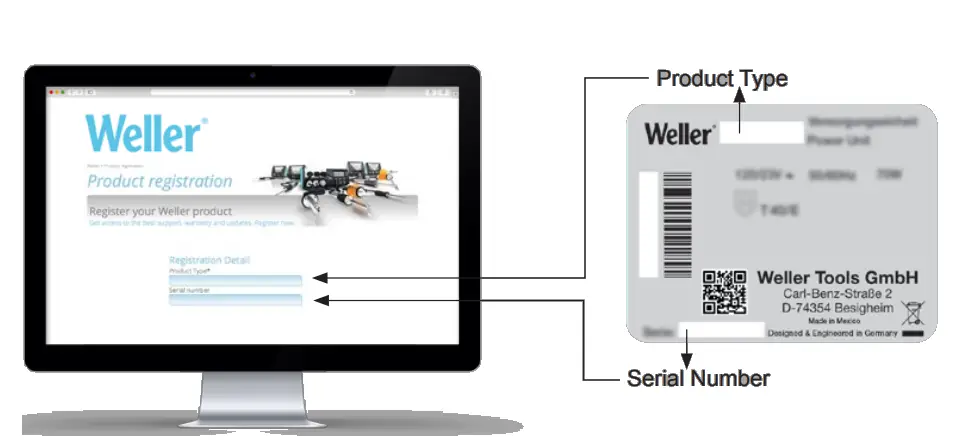
www.weller-tools.com/registration

USA
Apex Tool Group, LLC.
Weller Professional Tools Division
1000 Lufkin Road
Apex, NC 27539
+1 919-362-8381
[email protected]
www.weller-tools.com
© 2022, Apex Tool Group, LLC.
Weller® is a registered Trademark and registered Design of Apex Tool Group, LLC.

 tools.com | Buy Power Tools and Automotive Parts online and save with tools.com
 Language Redirect
 Language Redirect