 Dayton 300, 600
User Manual
Front panel instructions
Please read the manual before using the product.
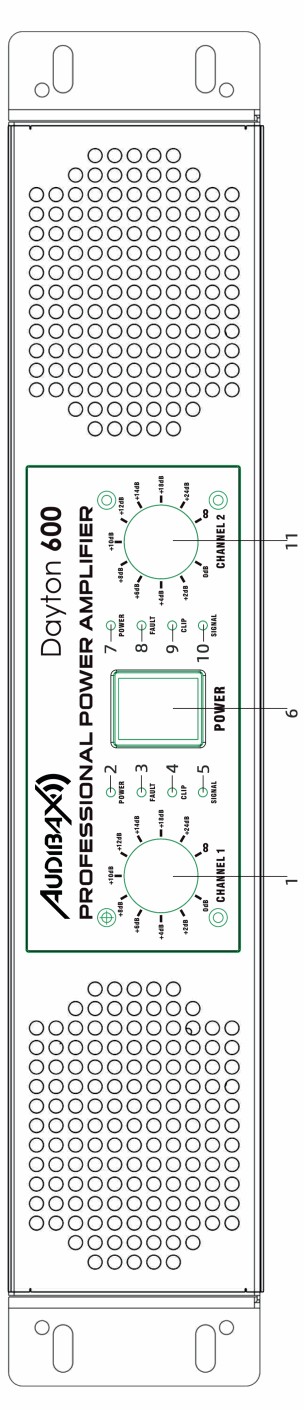
1 & 11 Volume controls.Adjust the volume to control the signal output of channels.
2 & 7 Power indicator LEDs .
3 & 8 Fault LEDs .The LEDs light up when the amplifier does not receive enough power or it is overheating.
4 & 9 Clipping indicator LEDs. The LEDs light up when the amplifier cuts the sound due to distortion.
5 & 10 Audio signal input indicator LEDs. The intensity of the LEDs will change indicating the strength of the channels’ input signal.
6 Power switch. Press the power switch to turn on the amplifier.
Back panel instructions
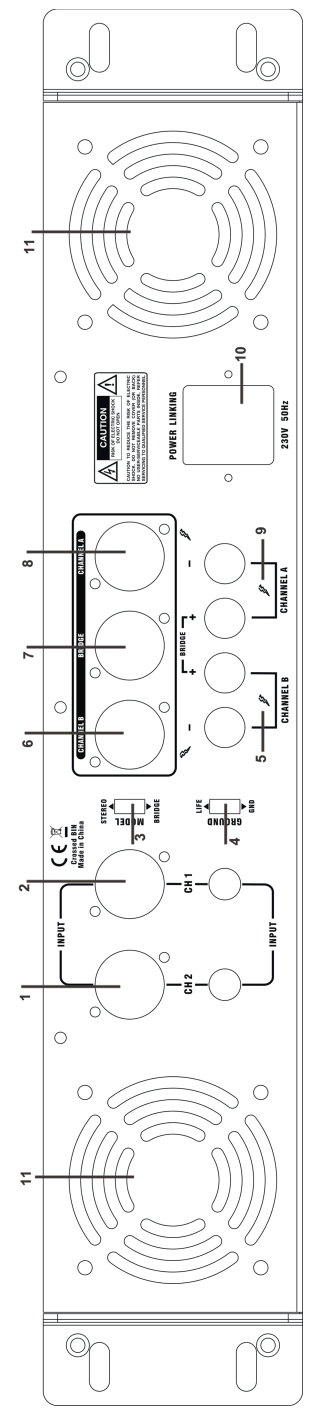
1 & 2 Audio signal inputs .
3Ground switch.
4 Stereo and bridging switch.
5 & 9 Speaker output terminals.
6 & 8 Speakon output sockets.
7 Speakon bridging output socket. Bridging output A & B channels for connecting an.
8 Ohm speaker.
10AC power socket.
11Ventialion fan.
Connection
Please connect the amplifier only when the power switched off.
Notice when using bridging output
- When using the amplifier in bridging mode, please make sure that your speaker impedance is greater than or equal to 8 Ohm.
- The power (Watt) of the speaker is corresponding to the power (Watt) of the amplifier.