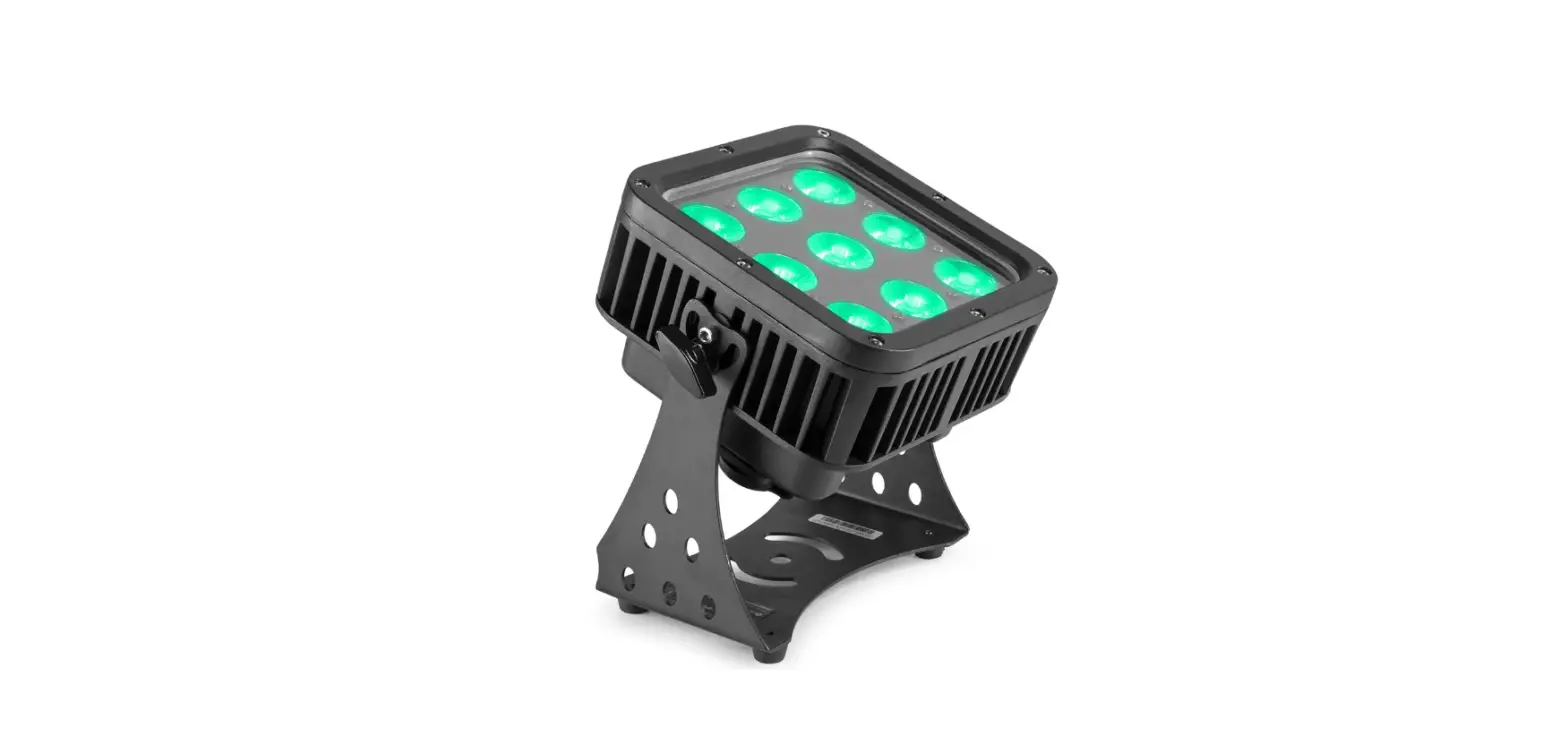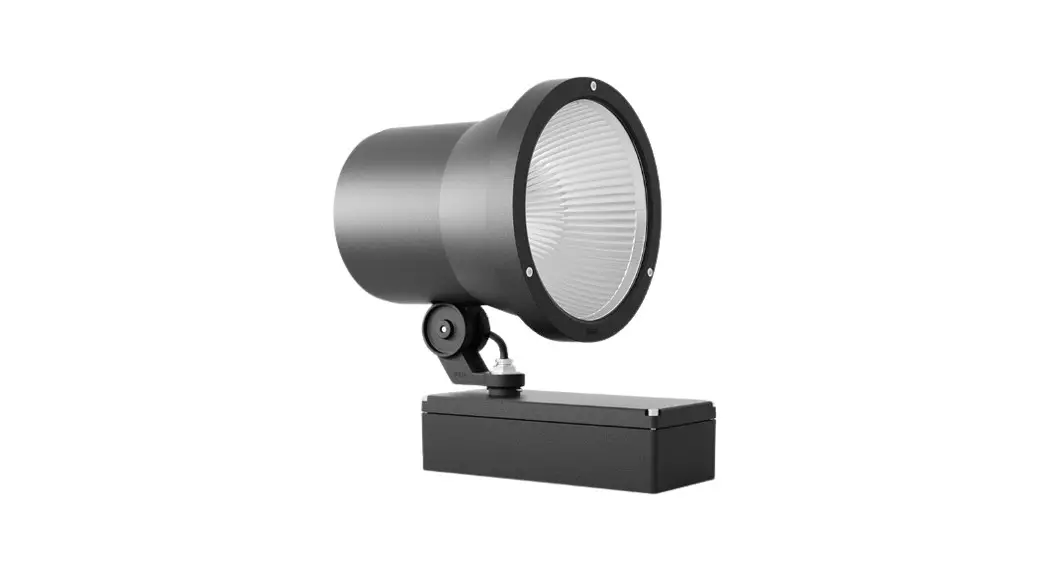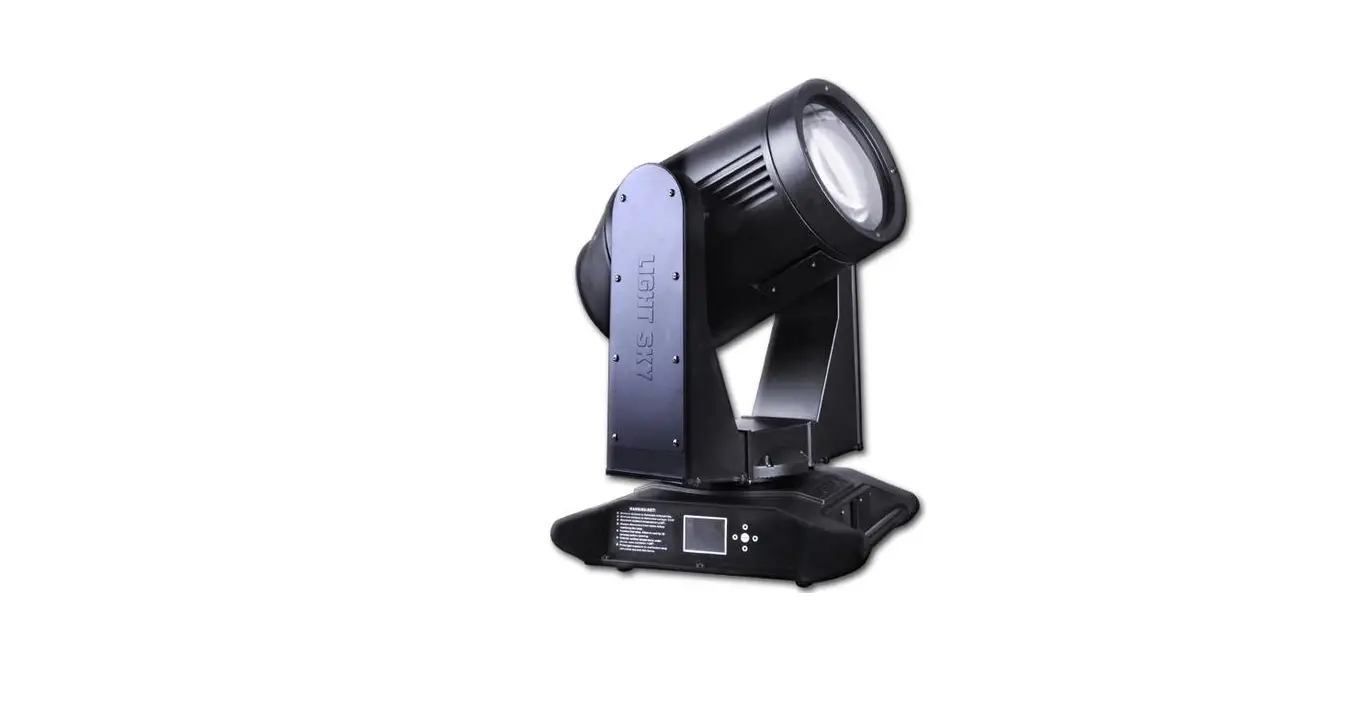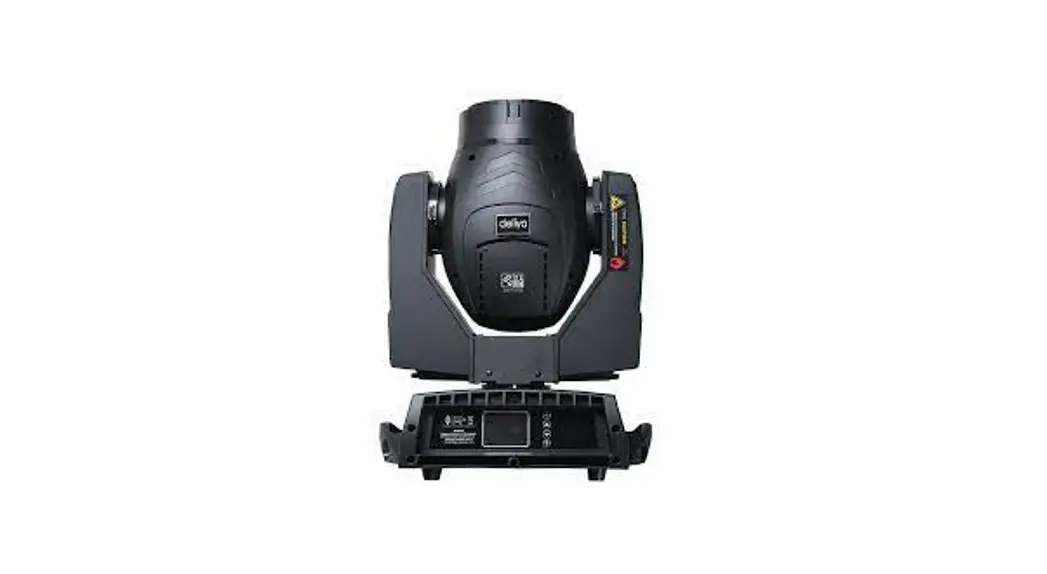
 GTR BEAM 330 IP54
USER MANUAL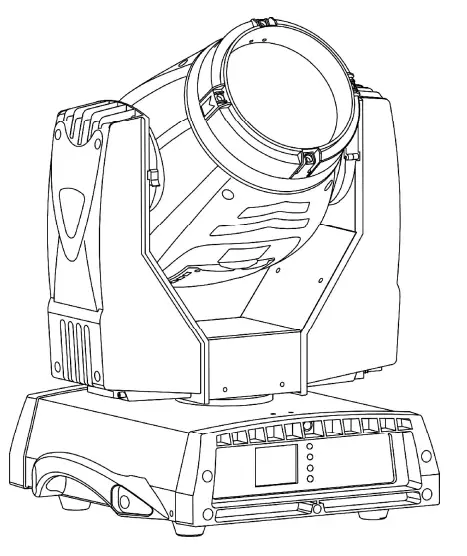
| Weight | 20KG |
| Color Temperature | 8000K |
| Power Consumption | 470W |
Statement :
The device is well packed and function well before delivery .Any user should follow the manual instructions and avoid the warnings detailed in the manual.Damages and problems caused by overlooking and incorrect operation are beyond the dealer and factory responsibilities .Users will not be further noticed if the manual is updated in the future possibly .Thanks for understanding .
Brief Introduction
Thanks for choosing GTR BEAM 330 IP54 which is our patent brand new high tech products with international advanced electronic control technology and excellent user-friendly industrial design , fully complying with CE standard, accepted international standard DMX512 signal mode.
Equipped with the Phoenix MSD 330 15R short focus lamp and multi-layer lens ,it can cast bright beam and clear gobos as well as fresh colors thanks to the high brand color wheel .Two DMX channels mode and Chinese and English language versions for you to choose .And the digits can cast upside-down ,convenient to hang them on the truss .Pan scans 540°and Tilt runs 270°.There are 14 different colors plus open and 16 gobos plus open too .There are two prisms,one 16facet and one 6facet column which can controlled separately or synchronously .Aside of the linear dimmer and adjustable strobe functions ,the light is also equipped with the software fan speed cooling monitoring system.With these super features , GTR BEAM 330 IP54 are widely welcomed by TV ,DISCO ,Ballroom ,Nightclub ,and other indoor and outdoor big events .
Dimension
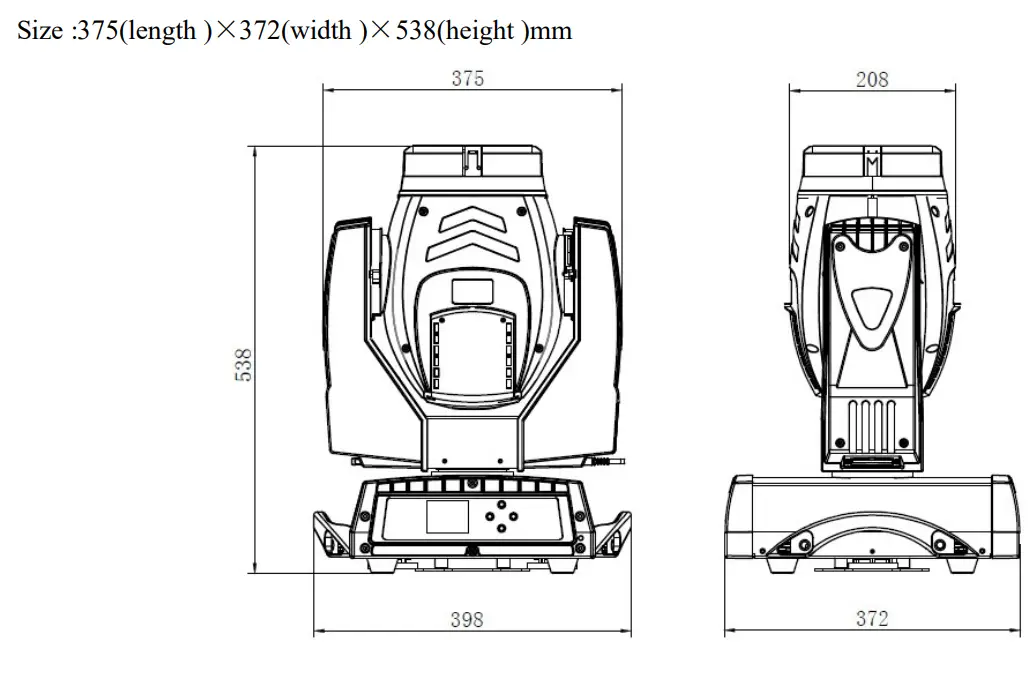
Components Info
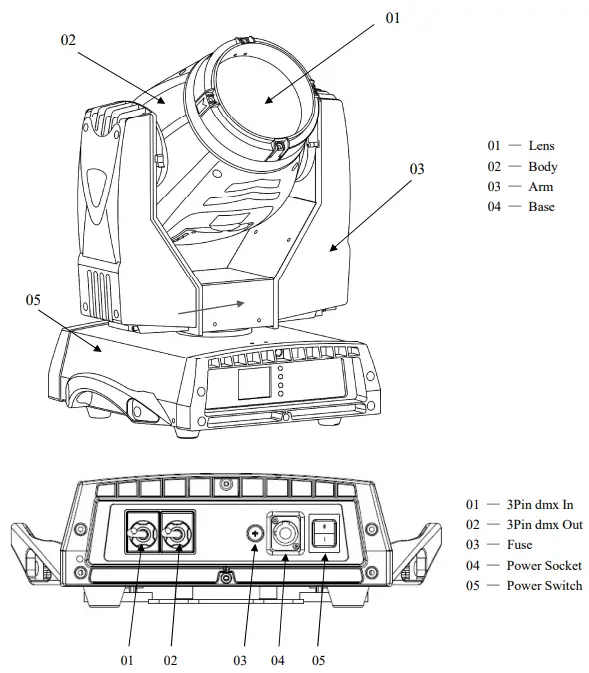
Attached components info above for your better understanding of the GTR BEAM 330 IP54
Safety and Warning Info
This device is only suitable for professional purpose .When you receive the light, Check if it is broken caused by delivery .If it’s broken ,contact the local dealer or factory as soon as possible .
The IP rate is 54,suitable for indoor and outdoor performance .The devices should be kept dry and avoid using it in moist ,overheating,dusty environment .To steer clear of the damages caused by electric shock ,fire ,UV ,lamp burst and device falling etc ,please read the manual through before charging and installation.Be aware of all the danger notices and abide by the instructions are necessary during the operation .More questions ,contact the local agency or the factory .
4.1 Anti-overheating ta =40°C
Switch off the device immediately once the surrounding temperature is over 40℃.
4.2 Prevention of burst
Change the lens if there are cracks or dent on it .
Only the original brand lens is suitable to change .
Lens Dimension :¢156×28 mm
4.3 Prevention of falling accidents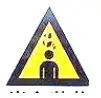
Do not carry the device alone .
Make sure the facility can withstand ten times of the light before hanging .
Please make sure the mounting hardware is strong enough without any damage, and using the safety chain together for secure .Let the pulley below the working place when installing or removing the device .
4.4 Anti UV
Staring at the casting beam is definitely forbidden .
Do not use the device without lens or covers .
Change the lens and covers if them broken .
4.5Prevention of electric shock
Only qualified electricians can connect the electric power .
Before connecting ,make sure all the voltage comply with the specified type and equipped with overload and leakage protection .
Each device must be grounded correctly .
Switch off the power before replacing and installing the lamp .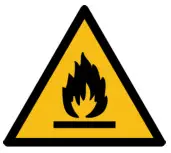
4.6Prevention of fire and burning
Do not install the device on flammable material surface directly .
Do not short circuit the temperature protection terminal or fuse .Use the standard fuse  .
.
Stay away of the inflammable material .
Do not project the light within 12 M and the material projected temperature should not be over projected range of 3 meters away objects and60℃.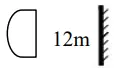
There should not be stuffs within 0.5m from the fan or ventilation .
Do not put stuff over the lens .
Cooling the device at least 20minutes before package and delivery .
Do not change with the unoriginal brand spare parts .
Attention 
In order to fix the device securely ,using 2 omega holders and 4 quick lock fasteners correctly into the quick lock hole turned 90 clockwise is necessary .Adding a safety chain to the base hole not the handle is extra and necessary safety method . 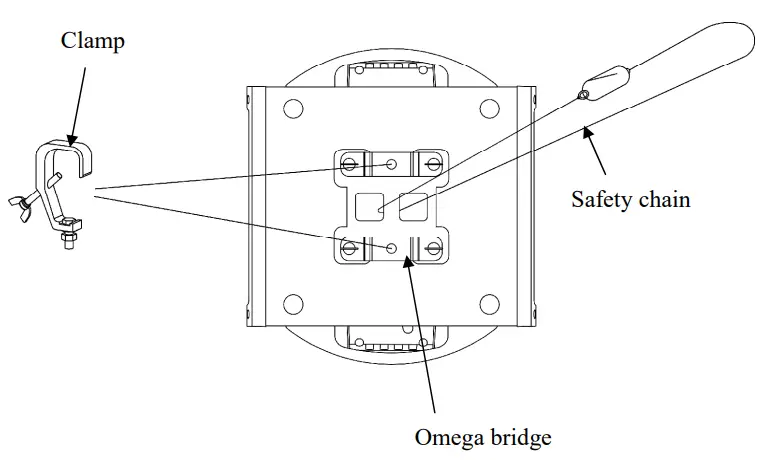
DMX512 Connection
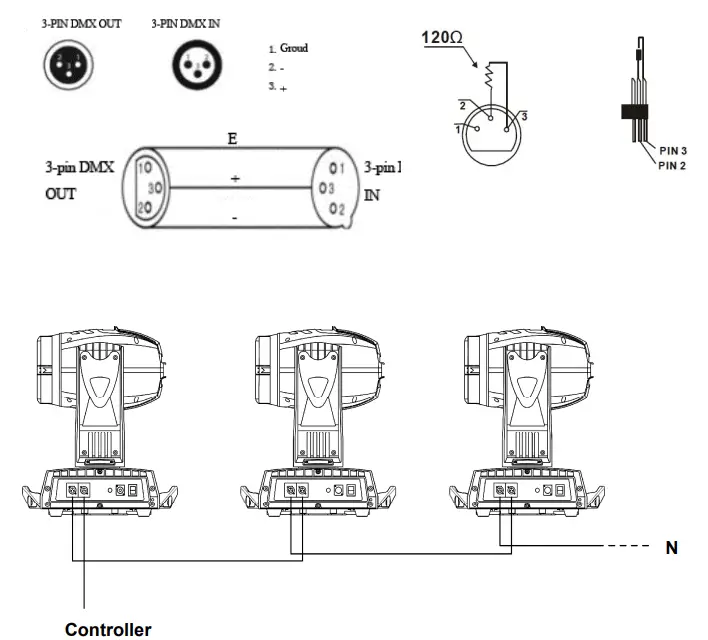
DMX512 cable must use the professional shielded twisted pair cable.The standard loudspeaker cable is not reliable to control the long-range data. 24AWG cable is suitable for more than 300 meters long-distance signal transmission and must add the DMX 512 signal amplifier.
Do not use two outputs to separate the connection. if separate ,a DMX512 splitter is necessary.
If use the DMX512 splitter ,at first connect DMX512 Splitter input terminal to controller and then connected from the splitter output terminal to next device.
Do as above to connect other devices, and finally coupled with a 120 Ω loop resistance terminal insertion.
DMX-512 loop resistance terminal
If the dmx line is too long or placed in some noisy electric signals places like disco ,nightclub ,ballroom etc ,using dmx loop resistance terminal is necessary .Welding a 120Ω resistor terminal between the pin 2 and pin 3 as below and plug it into the last light XLR output terminal .
Package Info
GTR BEAM 330 IP54 are packed in 1in1 or 2in1 flight case or carton with accessories inside .
Accessories accompanied with one light
| Item | Quantity |
| Manual | 1 |
| Safety chain | 1 |
| Omega clamp | 2 |
| DMX cable | 1 |
| Power wire | 1 |
AC Input Power
GTR BEAM330 IP54 input voltage ,power consumption ,and fuse standard
| Input Voltage | Power Consumption | Frequency |
| 110~240V | 550W | 50/60HZ |
| Fuse Voltage | Fuse Current | Size |
| 250V | 5A | 5×20 |
Attention :Only qualified electrician can operate the power related work .Make sure the voltage input comply with the specified standard as well as grounded and equipped with overload and leakage protection .
| Live | Neutral | Earth | |
| Red | Blue | Yellow-green |
Lamp Info
GTR BEAM330 IP54 Lamp Info
| Brand | Power Consumption | Lifespan | Color Temperature |
| Phoenix MSD 330 15R | 330w | 1800hrs | 7200K |
Warning ! In case of the extra potential damages caused by lamp burst ,change the lamp before it’s over 125% specified lifespan.
Color and Gobo Wheels Info
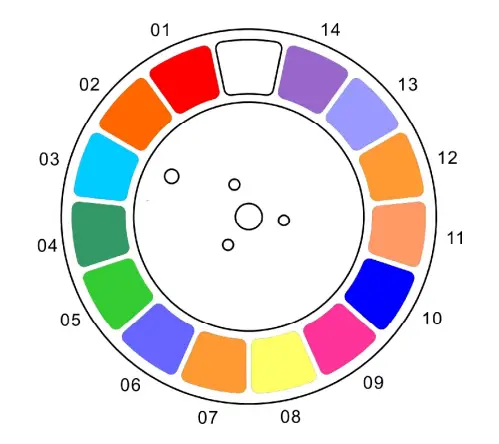
GTR BEAM 330 IP54 is equipped with 14 colors plus open ,pure color ,excellent effect .
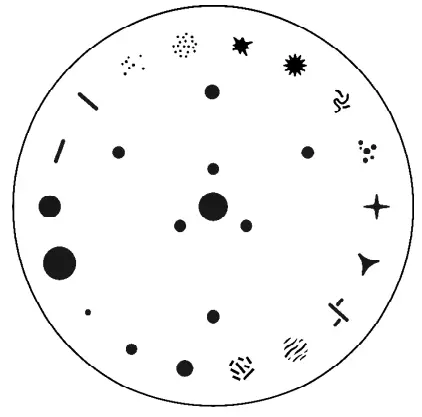
GTR BEAM 330 IP54 is equipped with 16fixed gobos plus open .Better effects with 16 facet prism .
Display Panel
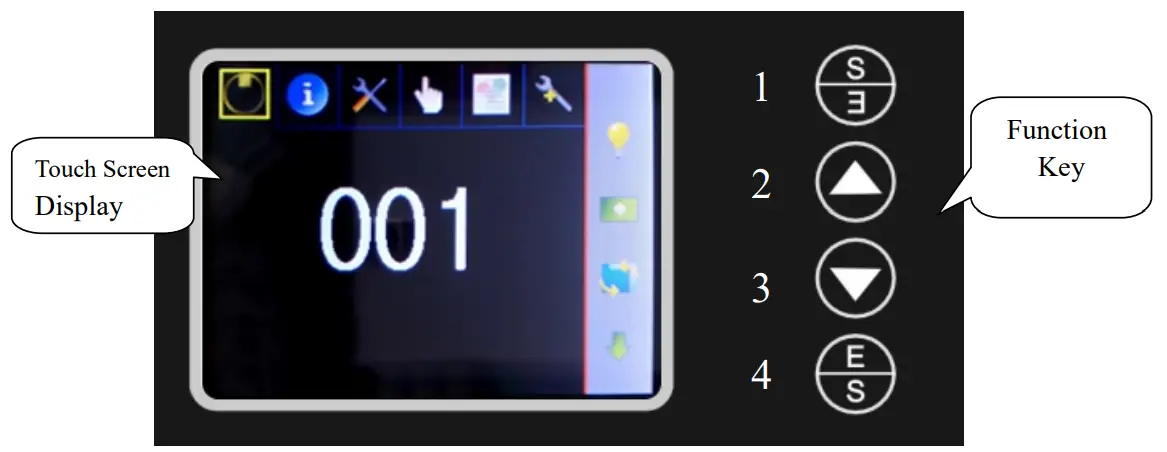
Touch screen display:Display the data information and control operation
 | DMX Address |
 | MANUAL |
 | LAMP SETTING |
 | SYSTEM INFO |
 | AUTOMATIC MODE |
 | LANGUAGE SETTING |
 | FEATURES SETTING |
 | CALIBRATIONS |
 | 180°REVERSE DISPLAY AVAILABLE |
Function Key :
- Return function
- Up/Digit increase/Next function
- Down/Digit decrease/Last function
- Mode choosing/Confirm function
| Main Menu | Submenu 1 | Submenu2 | Function SET | Function description |
| ||||
| << | 1-512 | to address 1 | ||
| < | address up | |||
| > | address down | |||
| >> | to address 512 | |||
| √ | save and back | |||
| × | back | |||
| Fixture times | Power On Times | xxh | |
| Power On Number | xx | |||
| Lamp On Times | xxh | |||
| Lamp On Number | xx | |||
| Versions | Holder Control | xx | ||
| Pan/Tilt Control | xx | |||
| Display System | xx | |||
| View Logs | 1/5 | ZOOM Status | OK/Er | |
| Focus Status | OK/Er | |||
| Prism1 Status | OK/Er | |||
| 2/5 | Prism1R Status | OK/Er | ||
| Prism2 Status | OK/Er | |||
| Prism2R Status | OK/Er | |||
| 3/5 | Color Status | OK/Er | ||
| Sta Gobo Status | OK/Er | |||
| Rot Gobo Status | OK/Er | |||
| 4/5 | Rot.R Status | OK/Er | ||
| Pan Status | OK/Er | |||
| Tilt Status | OK/Er | |||
| 5/5 | Fan1 Speed | Light body cooling fan | ||
| Fan2 Speed | Blower | |||
 | Page up | |||
 | Page down | |||
| × | back | |||
| Control mode | DMX | Console mode | |
| Auto | Built-in program mode | |||
| Sound | Reserved | |||
| Display intensity | << | 0-500 | to address 0 | |
| < | address up | |||
| > | address down | |||
| >> | to address 500 | |||
| √ | save and back | |||
| × | back | |||
| Display Saver Delay | << | 0-600 | to address 0 | |
| < | address up | |||
| > | address down | |||
| >> | to address 600 | |||
| √ | save and back | |||
| × | back | |||
| Pan Reverse | Off | |||
| On | ||||
| √ | save and back | |||
| × | back | |||
| Tilt Reverse | Off | |||
| On | ||||
| √ | save and back | |||
| × | back | |||
| Default Settings | Load Default Set? | √ | save and back | |
| × | back | |||
| Channel Mode | 16 CH Mode | |||
| 17 CH Mode | ||||
| 18 CH Mode | ||||
| 20 CH Mode | ||||
| Reset | Total System Reset | ||
| Pan/Tilt Reset | ||||
| Color System Reset | ||||
| Gobo System Reset | ||||
| Strobe Reset | ||||
| Optics Reset | ||||
| √ | save and back | |||
| × | back | |||
| Manual Control | Focus | < < < > > > | to address 0 address up address down to address 255 save and back back | |
| Pan | ||||
| Pan Fine | ||||
| Tilt | ||||
| Prism |
| Manual Control | Prism Rotation | < < < > > > | to address 0 address up address down to address 255 save and back back |
| Prism ZOOM | ||||
| Frost | ||||
| Color | ||||
| Shutter | ||||
| Dimmer | ||||
| Static Gobo | ||||
| Tilt Fine | ||||
| Functions | ||||
| RESET | ||||
| Lamp | ||||
| Pan/Tilt Speed | ||||
| Color Functions | ||||
| Prism 2 | ||||
| Prism 2 Rotations | ||||
| Page up | ||||
| Page down | ||||
| √ | save and back | |||
| × | back | |||
| Auto Mode 1 | Built-in program | ||
| Auto Mode 2 | NULL | |||
| Auto Mode 3 | NULL | |||
| Auto Mode 4 | NULL | |||
| √ | save and back | |||
| × | back | |||
| Used in factory | |||
| Lamp status | Off | ||
| On | ||||
| √ | save and back | |||
| × | back | |||
| Settings | Lamp On Power | Off | ||
| On | ||||
| √ | save and back | |||
| × | back | |||
| English | |||
| Chinese | ||||
| Forward side | |||
| Reverse side |
Chanel function description
Chanel | Channel function description | |||
| Mode 1 | Mode 2 | Mode 3 | Mode 4 | |
| Language | English | English | English | English |
| 1 | Color | Color | Color | Color |
| 2 | Shutter | Shutter | Shutter | Shutter |
| 3 | Dimmer | Dimmer | Dimmer | Dimmer |
| 4 | Static Gobo | Static Gobo | Static Gobo | Static Gobo |
| 5 | Prism 1 | Prism 1 | Prism 1 | Prism 1 |
| 6 | Prism 1 Rotation | Prism 1 Rotation | Prism 1 Rotation | Prism 1 Rotation |
| 7 | Prism 1 ZOOM | Prism 1 ZOOM | Prism 1 ZOOM | Prism 1 ZOOM |
| 8 | Frost | Frost | Frost | Prism 2 |
| 9 | Focus | Focus | Focus | Prism 2 Rotation |
| 10 | Pan | Pan | Pan | Frost |
| 11 | Pan Fine | Pan Fine | Pan Fine | Focus |
| 12 | Tilt | Tilt | Tilt | Pan |
| 13 | Tilt Fine | Tilt Fine | Tilt Fine | Pan Fine |
| 14 | Function | Function | Function | Tilt |
| 15 | RESET | RESET | RESET | Tilt Fine |
| 16 | Lamp control | Lamp control | Lamp control | Function |
| 17 | Pan/Tilt Speed | Pan/Tilt Speed | RESET | |
| 18 | Color Functions | Lamp control | ||
| 19 | Pan/Tilt Speed | |||
| 20 | Color Functions | |||
Channel Data
| Mode 1 | Mode 2 | Mode 3 | Mode 4 | DMX Value | Details Description |
| 1 | 1 | 1 | 1 | 0 – 4 | Open |
| 5 – 8 | Open + Color 1 | ||||
| 9 – 12 | Color 1 | ||||
| 13 – 17 | Color 1 + Color 2 | ||||
| 18 – 21 | Color 2 | ||||
| 22 – 25 | Color 2 + Color 3 | ||||
| 26 – 29 | Color 3 | ||||
| 30 – 34 | Color 3 + Color 4 | ||||
| 35 – 38 | Color 4 | ||||
| 39 – 42 | Color 4 + Color 5 | ||||
| 43 – 46 | Color 5 | ||||
| 47 – 51 | Color 5 + Color 6 | ||||
| 52 – 55 | Color 6 | ||||
| 56 – 59 | Color 6 + Color 7 | ||||
| 60 – 63 | Color 7 | ||||
| 64 – 68 | Color 7 + Color 8 | ||||
| 69 – 72 | Color 8 | ||||
| 73 – 76 | Color 8 + Color 9 | ||||
| 77 – 81 | Color 9 | ||||
| 82 – 85 | Color 9 + Color 10 | ||||
| 86 – 89 | Color 10 |
| 1 | 1 | 1 | 1 | 90 – 93 | Color 10 + Color 11 |
| 94 – 98 | Color 11 | ||||
| 99 – 102 | Color 11 + Color 12 | ||||
| 103 – 106 | Color 12 | ||||
| 107 – 110 | Color 12 + Color 13 | ||||
| 111 – 115 | Color 13 | ||||
| 116 – 119 | Color 13 + Color 14 | ||||
| 120 – 123 | Color 14 | ||||
| 124 – 127 | Color 14+ Open | ||||
| 128 – 187 | Color rotation (clockwise) fast ->slow | ||||
| 188 – 195 | Rotation Halt | ||||
| 196 – 255 | Color rotation (anticlockwise) slow ->fast | ||||
| 2 | 2 | 2 | 2 | 0 – 1 | Close |
| 2 – 7 | Open | ||||
| 8 – 63 | Strobe ,Slow ->Fast | ||||
| 64 – 71 | Open | ||||
| 72 – 127 | Pulse strobe ,Slow ->Fast | ||||
| 128 – 135 | Open | ||||
| 136 – 160 | Fade strobe ,Slow ->Fast | ||||
| 161 – 166 | Open | ||||
| 167 – 191 | Lightening strobe , Slow ->Fast | ||||
| 192 – 199 | Open | ||||
| 200 – 209 | Strobe mode 1 | ||||
| 210 – 219 | Strobe mode 2 | ||||
| 220 – 229 | Random slow strobe | ||||
| 230 – 239 | Random medium speed strobe | ||||
| 240 – 249 | Random fast peed | ||||
| 250 – 255 | Open | ||||
| 3 | 3 | 3 | 3 | 0 – 255 | Brightness ,Dark ->Bright |
| 4 | 4 | 4 | 4 | 0 – 3 | Open |
| 4 – 7 | Gobo1 | ||||
| 8 – 11 | Gobo2 | ||||
| 12 – 15 | Gobo3 | ||||
| 16 – 19 | Gobo4 | ||||
| 20 – 23 | Gobo5 | ||||
| 24 – 27 | Gobo6 | ||||
| 28 – 31 | Gobo7 | ||||
| 32 – 35 | Gobo8 |
| 4 | 4 | 4 | 4 | 36 – 39 | Gobo9 |
| 40 – 43 | Gobo10 | ||||
| 44 – 47 | Gobo11 | ||||
| 48 – 51 | Gobo12 | ||||
| 52 – 55 | Gobo13 | ||||
| 56 – 59 | Gobo14 | ||||
| 60 – 63 | Gobo15 | ||||
| 64 – 67 | Gobo16 | ||||
| 68 – 112 | Clockwise rotation Fast ->Slow | ||||
| 113 – 114 | Halt | ||||
| 115 – 159 | Anticlockwise Slow ->Fast | ||||
| 160 – 166 | Gobo2 shake ,Slow ->Fast | ||||
| 167 – 172 | Gobo3 shake ,Slow ->Fast | ||||
| 173 – 179 | Gobo4 shake ,Slow ->Fast | ||||
| 180 – 185 | Gobo5 shake ,Slow ->Fast | ||||
| 186 – 191 | Gobo6 shake ,Slow ->Fast | ||||
| 192 – 198 | Gobo7 shake ,Slow ->Fast | ||||
| 199 – 204 | Gobo8 shake ,Slow ->Fast | ||||
| 205 – 211 | Gobo9 shake ,Slow ->Fast | ||||
| 212 – 217 | Gobo10 shake ,Slow ->Fast | ||||
| 218 – 223 | Gobo11 shake ,Slow ->Fast | ||||
| 224 – 230 | Gobo12 shake ,Slow ->Fast | ||||
| 231 – 236 | Gobo13 shake ,Slow ->Fast | ||||
| 237 – 243 | Gobo14 shake ,Slow ->Fast | ||||
| 244 – 349 | Gobo15 shake ,Slow ->Fast | ||||
| 250 – 255 | Gobo16 shake ,Slow ->Fast | ||||
| 5 | 5 | 5 | 5 | 0 – 127 | Prism 1 Out |
| 128 – 255 | Prism 1 In | ||||
| 6 | 6 | 6 | 6 | 0 – 127 | 0°-> 360° |
| 128 – 187 | Clockwise rotation, Fast ->Slow | ||||
| 188 – 197 | Halt | ||||
| 198 – 255 | Anticlockwise rotation slow ->fast | ||||
| 7 | 7 | 7 | 7 | 0 – 255 | Prism zoom out |
| 0 – 255 | Prism zoom in | ||||
| 8 | 0 – 127 | Prism 2 Out | |||
| 128 – 255 | Prism 2 In | ||||
| 9 | 0 – 127 | 0°-> 360° | |||
| 128 – 187 | Clockwise rotation, |
| 9 | Fast ->Slow | ||||
| 189 – 197 | Halt | ||||
| 198 – 255 | Anticlockwise rotation slow ->fast | ||||
| 8 | 8 | 8 | 10 | 0 – 255 | Linear dimmer 0-100% |
| 9 | 9 | 9 | 11 | 0 – 255 | Linear focus 0-100% |
| 10 | 10 | 10 | 12 | 0 – 255 | X 0°-> 540° |
| 11 | 11 | 11 | 13 | 0 – 255 | X Fine tune 2° >117° |
| 12 | 12 | 12 | 14 | 0 – 255 | Y 0°-> 270° |
| 13 | 13 | 13 | 15 | 0 – 255 | Y Fine tune 2° >117° |
| 14 | 14 | 14 | 16 | 0 – 149 | Empty |
| 150 – 159 | Built-in program 1 | ||||
| 160 – 169 | Built-in program2 | ||||
| 170 – 179 | Testing program | ||||
| 180 – 255 | Empty | ||||
| 15 | 15 | 15 | 17 | 0 – 69 | Empty |
| 70 – 79 | Effect motors reset (wait 5 s) | ||||
| 80 – 89 | XY motors reset (wait 5 s) | ||||
| 90 – 99 | All motors reset (wait 5 s) | ||||
| 100 – 255 | Empty | ||||
| 16 | 16 | 16 | 18 | 0 – 49 | Empty |
| 50 – 59 | Turn on the lamp (wait 5 s) | ||||
| 60 – 69 | Turn off the lamp (wait 5 s) | ||||
| 70 – 255 | Empty | ||||
| 17 | 17 | 19 | 0-255 | X Y speed | |
| 18 | 20 | 0 – 63 | half color function on | ||
| 64 – 127 | Half color function off | ||||
| 128 – 191 | Color wheel slide mode (linear slide ) | ||||
| 192 – 255 | Block light mode (Blocking the light during changing color) |
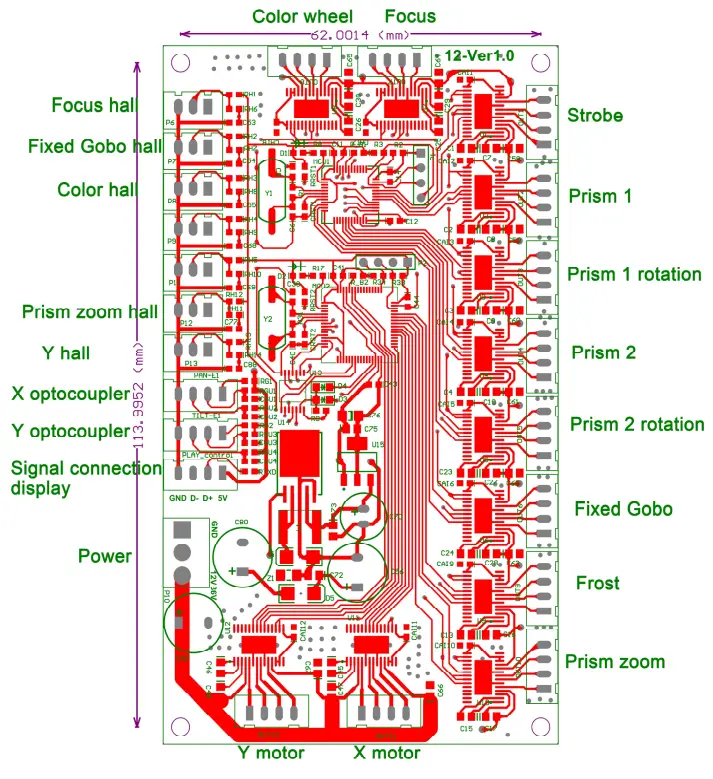
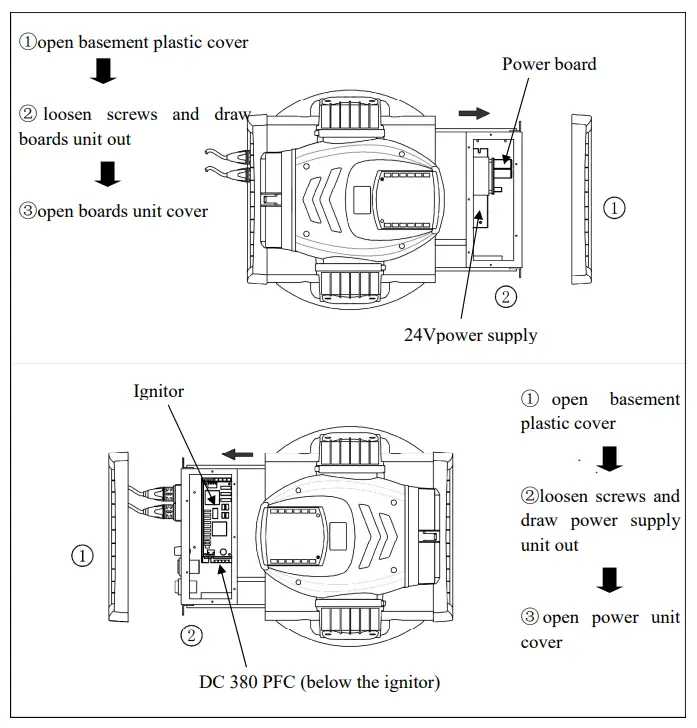
Drive Board Illustration
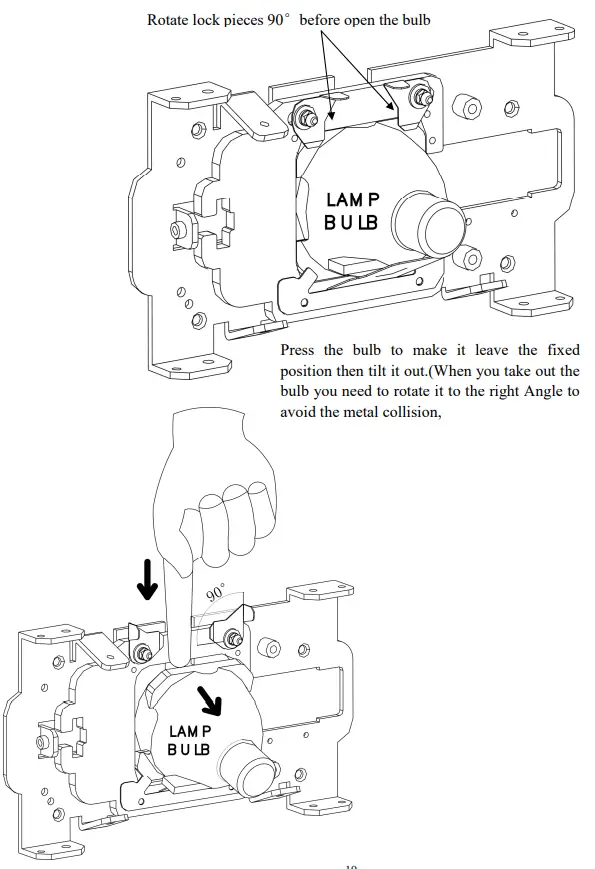
Lamp Changing Method
- Theory
 Press the bulb to make it leave the fixed position then tilt it out.(When you take out the bulb you need to rotate it to the right Angle to avoid the metal collision,
 - Changing method

 Press the bulb to make it leave the fixed position then tilt it out.(When you take out the bulb you need to rotate it to the right Angle to avoid the metal collision,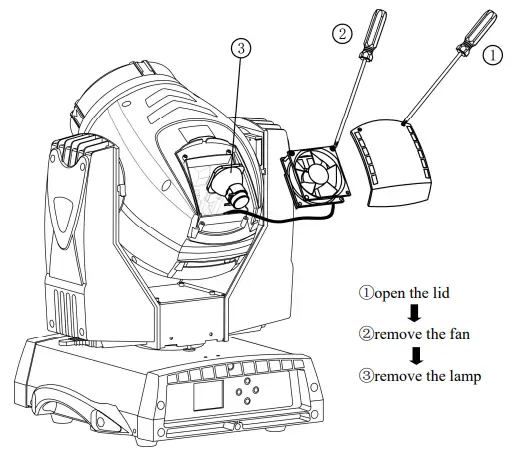
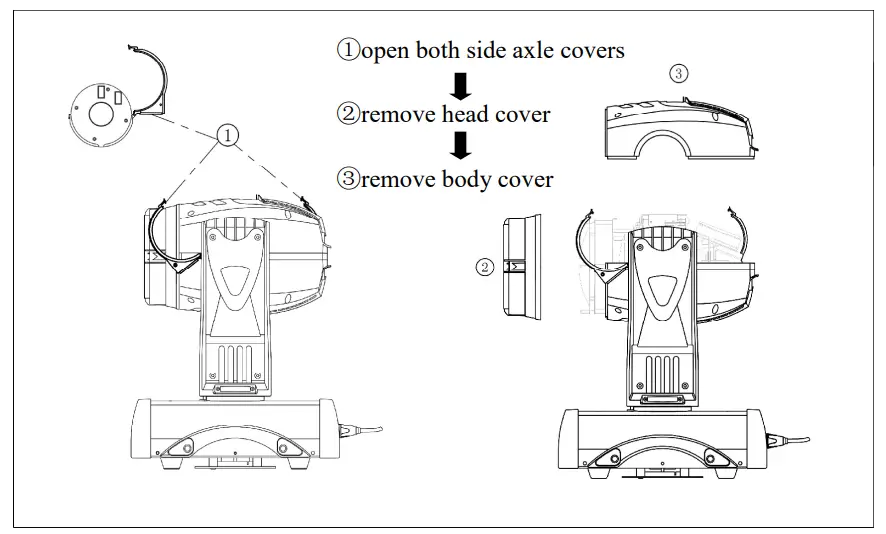
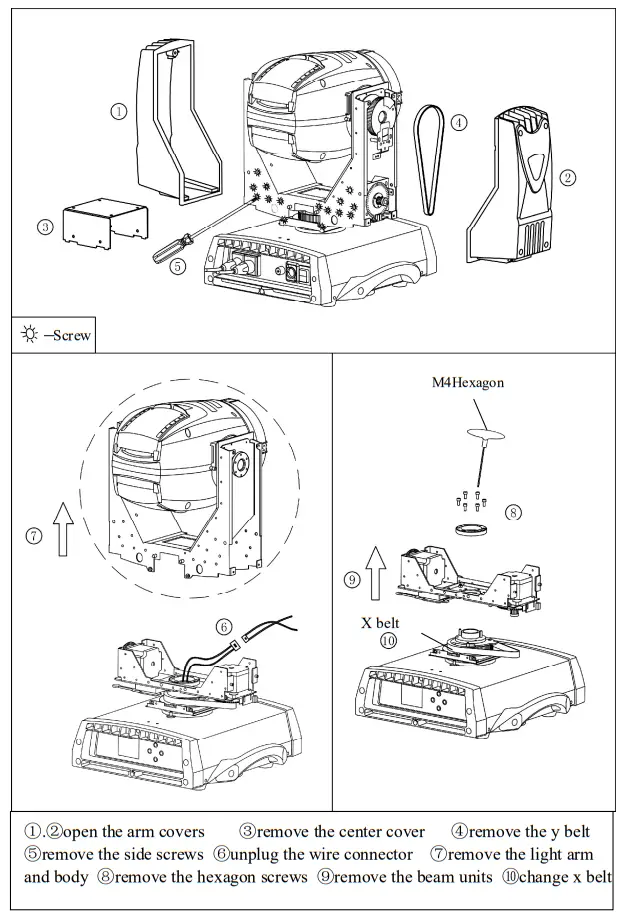
Body Covers Disassembling Method
Base part Info and Installation
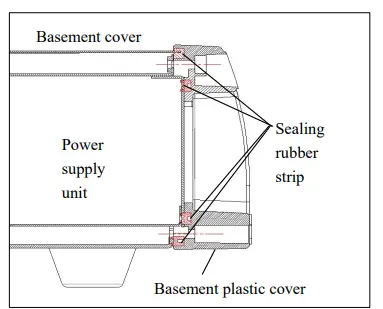
▲ After repairing the base part ,put the cabinet cover and push it back and fix it with the four corner screws .
Fix the base steel right into the rubber seal strip before pushing back the plastic base cover ,then tighten the screws of the plastic cover.
X Belt Changing Method
Attention Items
- Check the light seal situation and make sure it’s not damaged before operating it .
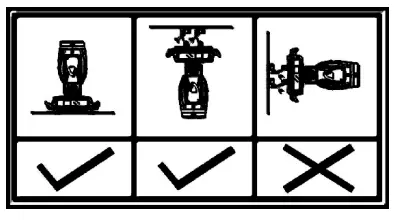
- The device can be installed normally and upside-down,

- The device is only up to IP 54 waterproof standard without fully sealing structure ,therefore do not immerse it into water .Any damage caused by the incorrect operation won’t be covered by warranty .
- Do not touch the device when using it in rain .Make sure there’s not electric leakage or touch it with insulating gloves in case of electric shock .
Common Faults
- The lamp cannot be ignited or intermittent off
A、Check the input 220V is ok or not .
B、Check the strobe channel is open or not .
C、Check the fan speed by entering into the main menu INFO .(Fan 2 speed should be 4500.Fan 1 speed should be over 2200 )
D、Check the PFC which should be with 220V in and DC380V out .
E、Check the basement fans running or not . - Beam turns dim
A.The bulb may expire,change a new one.
B.Make sure the lens is clear.
C.Clean the dust off the bulb and maintain the device clean regularly. - Motors do not work
A.Check and make sure the power supply is suitable and fuse is not burnt.
B.Check if the motor wires has been worn out.
C.Check if the motor gets stuck or the fix screws loosen.
D.Check if the IC on the PCB get loosen ,poor connection ,or burnt.
E.Check if the motor or the PCB get burnt. - Device can not be controlled with DMX value blinking
A.DMX setting incorrect or without receiving signal.
B.DMX signal cable is not connected well.
C.DMX cable signal + and signal – are inversely weld.
D.Serial connection is too long and the signal get attenuated.
E.Surrounding signal interference or the controller damaged or the signals incompatible.
F.Running the built-in program mode. - Casting halo light
Check and make sure the focus value suitable for the cast distance. - Device intermittent work
Check the fan if running normal or get dusty. - The light can not be started
Check if power supply is normal and make sure switch on the device.