 Avalue SID-21WR2 21.5 Inch Panel PC with Rockchip
 Avalue SID-21WR2 21.5 Inch Panel PC with Rockchip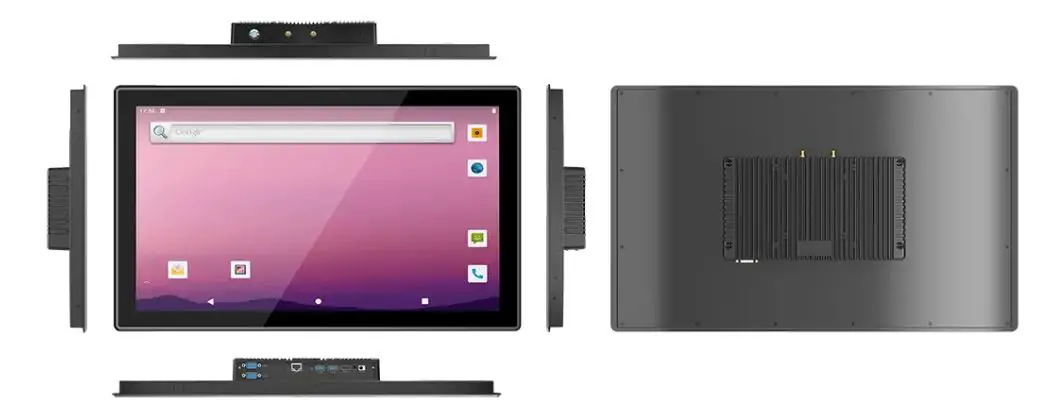
Product Information
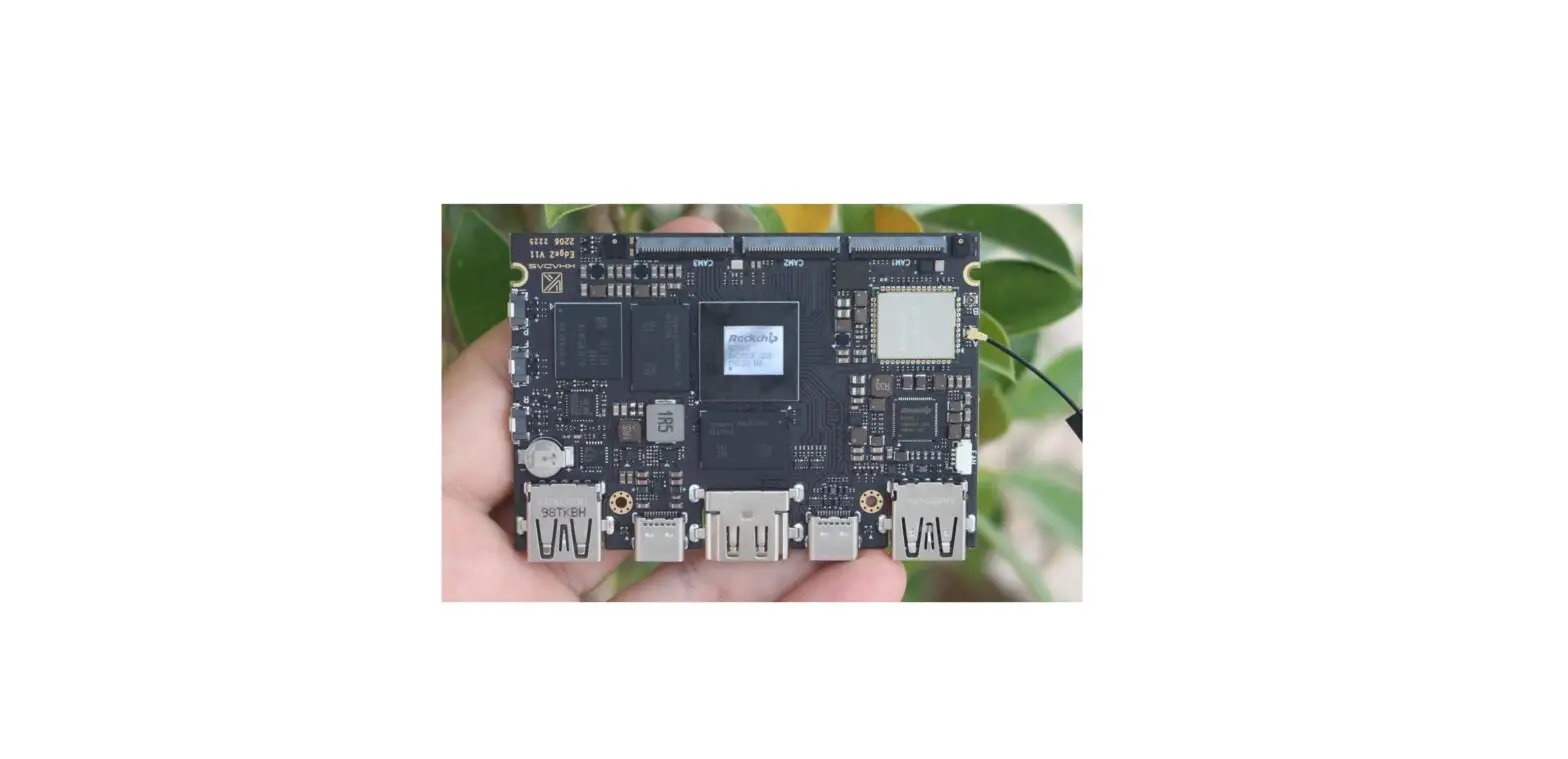
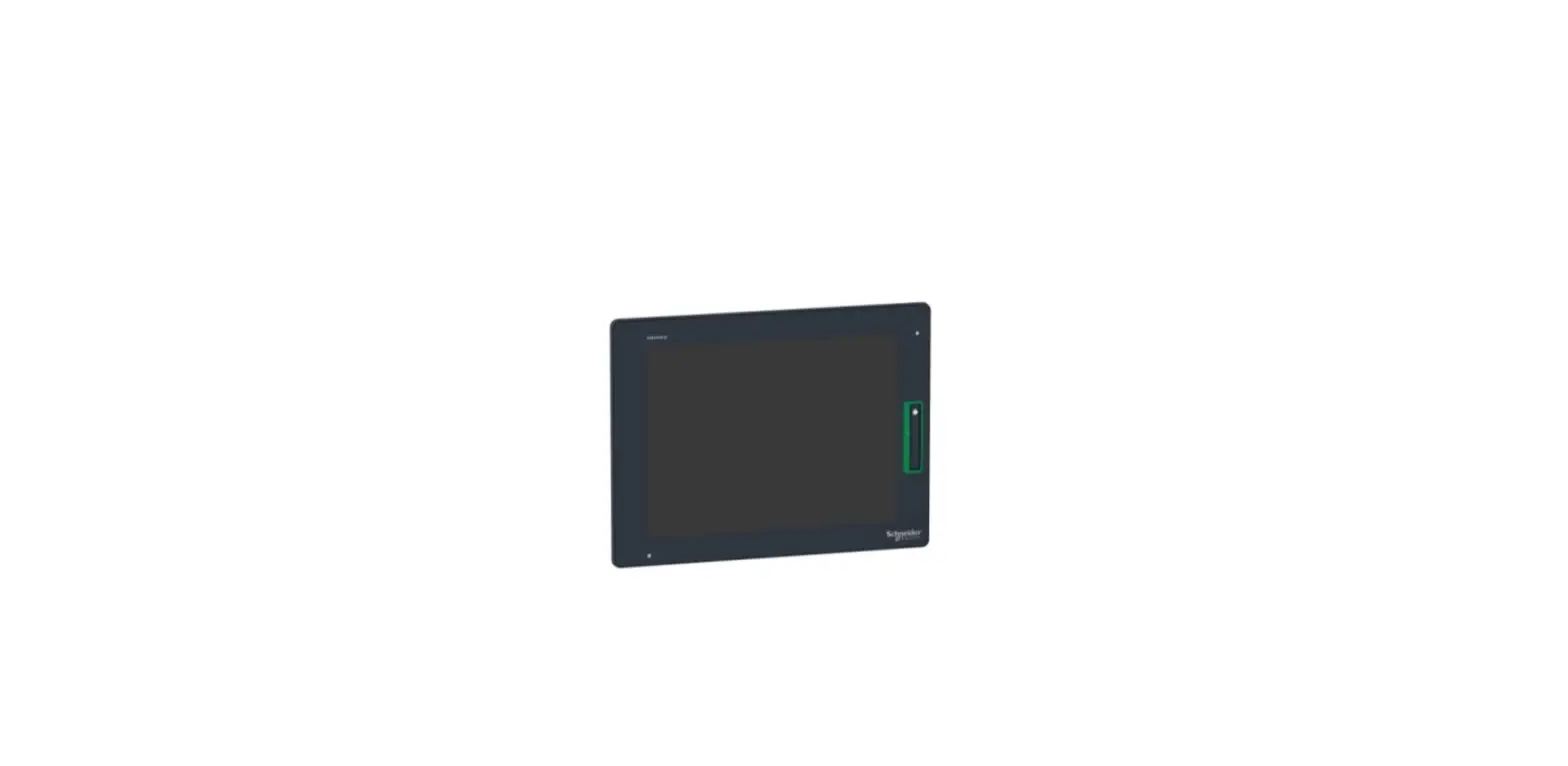
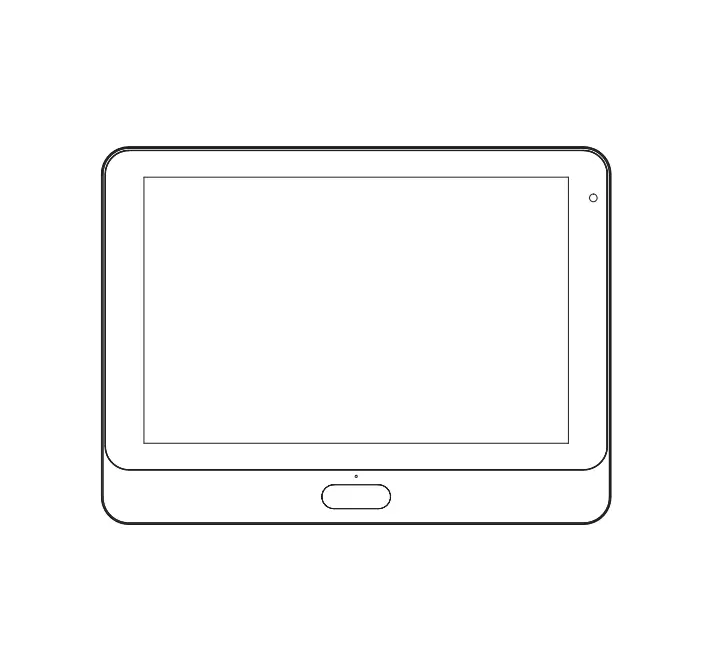
The SID-21WR2 is a 21.5 Panel PC with Rockchip RK3568. It is designed and manufactured by Avalue Technology Inc. The device is compliant with Part 15 of the FCC Rules, which means it does not cause harmful interference and must accept any interference received, including interference that may cause undesired operation. The device requires an unshielded-type power cord to meet FCC emission limits and to prevent interference to the nearby radio and television reception. It is essential to use only the supplied power cord to operate the device.
Product Usage Instructions
The SID-21WR2 is designed for experienced users to set up the system within the shortest time. For detailed information, always refer to the electronic user manual. To use the device, follow these steps:
- Connect the device to an outlet on a circuit different from that to which the receiver is connected.
- Use only shielded cables to connect I/O devices to this equipment.
- Ensure that the power cord matches the voltage of the power outlet, which has been approved and complies with the safety standard of your particular country.
- If you face any difficulties, consult the dealer or an experienced radio/TV technician for help.
Note: that changes or modifications not expressly approved by the party responsible for compliance could void the user’s authority to operate the equipment. Also, Avalue Technology Inc. assumes no responsibility or liability for the use of the described product(s), conveys no license or title under any patent, copyright, or masks work rights to these products, and makes no representations or warranties that these products are free from patent, copyright, or mask work right infringement unless otherwise specified. Finally, Avalue Technology’s PRODUCTS ARE NOT FOR USE AS CRITICAL COMPONENTS IN LIFE SUPPORT DEVICES OR SYSTEMS WITHOUT THE PRIOR WRITTEN APPROVAL OF Avalue Technology Inc.
Federal Communication Commission Interference Statement
THIS DEVICE COMPLIES WITH PART 15 OF THE FCC RULES. OPERATION IS SUBJECT TO THE FOLLOWING TWO CONDITIONS: (1) THIS DEVICE MAY NOT CAUSE HARMFUL INTERFERENCE AND (2) THIS DEVICE MUST ACCEPT ANY INTERFERENCE RECEIVED, INCLUDING INTERFERENCE THAT MAY CAUSE UNDESIRED OPERATION.
Note: This equipment has been tested and found to comply with the limits for a Class B digital device, pursuant to Part 15 of FCC Rules. These limits are designed to provide reasonable protection against harmful interference in a residential installation. This equipment generates, uses, and can radiate radio frequency energy and, if not installed and used in accordance with the instruction, may cause harmful interference to radio communications. However, there is no guarantee that interference will not occur in a particular installation. If this equipment does cause harmful interference to radio or television reception, which can be determined by turning the equipment off and on, the user is encouraged to try to correct the interference by one or more of the following measures:
- Reorient or relocate the receiving antenna.
- Increase the separation between the equipment and the receiver.
- Connect the equipment to an outlet on a circuit different from that to which the receiver is connected.
- Consult the dealer or an experienced radio/TV technician for help.
Notice:
- An Unshielded-type power cord is required in order to meet FCC emission limits and also to prevent interference to the nearby radio and television reception. It is essential that only the supplied power cord be used.
- Use only shielded cables to connect I/O devices to this equipment.
- Changes or modifications not expressly approved by the party responsible for compliance could void the user’s authority to operate the equipment.
SID-21WR2 Quick Reference Guide
FCC RF Radiation Exposure Statement
This Wireless LAN radio device has been evaluated under FCC Bulletin OET 65 and found compliant to the requirements as set forth in CFR 47 Sections 2.1091, 2.1093, and 15.247 (b) (4) addressing RF Exposure from radio frequency devices. The radiated output power of this Wireless LAN device is far below the FCC radio frequency exposure limits. Nevertheless, this device shall be used in such a manner that the potential for human contact during normal operation is minimized. When nearby persons have to be kept to ensure RF exposure compliance, in order to comply with RF exposure limits established in the ANSI C95.1 standards, the distance between the antennas and the user should not be less than 20 cm.
WARNING
- “CAUTION – Use suitable mounting apparatus to avoid risk of injury.”
- “CAUTION – Use a power cord that matches the voltage of the power outlet, which has been approved and complies with the safety standard of your particular country.”
- “WARNING – To avoid risk of electric shock, this equipment must only be connected to a supply main with protective earth.”
Notice: This guide is designed for experienced users to setup the system within the shortest time. For detailed information, please always refer to the electronic user’s manual.
Copyright Notice: Copyright 2023 Avalue Technology Inc., ALL RIGHTS RESERVED. No part of this document may be reproduced, copied, translated, or transmitted in any form or by any means, electronic or mechanical, for any purpose, without the prior written permission of the original manufacturer.
Trademark Acknowledgement: Brand and product names are trademarks or registered trademarks of their respective owners.
Disclaimer: Avalue Technology Inc. reserves the right to make changes, without notice, to any product, including circuits and/or software described or contained in this manual in order to improve design and/or performance. Avalue Technology assumes no responsibility or liability for the use of the described product(s), conveys no license or title under any patent, copyright, or masks work rights to these products, and makes no representations or warranties that SID-21WR2 these products are free from patent, copyright, or mask work right infringement unless otherwise specified. Applications that are described in this manual are for illustration purposes only. Avalue Technology Inc. makes no representation or warranty that such an application will be suitable for the specified use without further testing or modification.
Life Support Policy: Avalue Technology’s PRODUCTS ARE NOT FOR USE AS CRITICAL COMPONENTS IN LIFE SUPPORT DEVICES OR SYSTEMS WITHOUT THE PRIOR WRITTEN APPROVAL OF Avalue Technology Inc.
As used herein:
- Life support devices or systems are devices or systems which, (a) are intended for surgical implant into body, or (b) support or sustain life and whose failure to perform, when properly used in accordance with instructions for use provided in the labeling, can be reasonably expected to result in significant injury to the user.
- A critical component is any component of a life support device or system whose failure to perform can be reasonably expected to cause the failure of the life support device or system or to affect its safety or effectiveness.
A Message to the Customer
Avalue Customer Services
Each and every Avalue product is built to the most exacting specifications to ensure reliable performance in the harsh and demanding conditions typical of industrial environments. Whether your new Avalue device is destined for the laboratory or the factory floor, you can be assured that your product will provide the reliability and ease of operation for which the name Avalue has come to be known.
Your satisfaction is our primary concern. Here is a guide to Avalue’s customer services. To ensure you get the full benefit of our services, please follow the instructions below carefully.
Technical Support
We want you to get the maximum performance from your products. So if you run into technical difficulties, we are here to help. For the most frequently asked questions, you can easily find answers in your product documentation. These answers are normally a lot more detailed than the ones we can give over the phone. So please consult the user’s manual first.
To receive the latest version of the user’s manual; please visit our Web site at: http://www.avalue.com.tw/. 4 SID-21WR2 Quick Reference Guide
Getting Started
Safety Precautions
Warning: Always completely disconnect the power cord from your chassis whenever you work with the hardware. Do not make connections while the power is on. Sensitive electronic components can be damaged by sudden power surges. Only experienced electronics personnel should open the PC chassis.
Caution: Always ground yourself to remove any static charge before touching the CPU card. Modern electronic devices are very sensitive to static electric charges. As a safety precaution, use a grounding wrist strap at all times. Place all electronic components in a static-dissipative surface or static-shielded bag when they are not in the chassis.
Packing List
- 1 x SID-21WR2 Panel PC
- 1 x AC 60W Adapter
- 1 x Power cord
- 2 x WiFi Antenna
- 4 x Screw-Flat M4* 4mm
System Specifications
| Component | |
| Mother Board | ACP-RK3568 |
| CPU | RK3568_Quad-core Cortex-A55 up to 2.0GHz_ Mali-G52 GPU |
| Memory | 2GB DDR4 on board |
| Power Supply | DC in |
| Adapter | FSP AC/DC adapter 12V/5A 90 Screw Type |
| Wireless LAN | AW-CM276NF_ac/a/b/g/n_2x2 |
| Bluetooth | 5.0 |
| Speaker | 4ohm / 2W (Optional) speaker: E175X203700R*2 cable: E170X080050R*1 |
| Out-Of-Band Service Enabler | 1x OOB Module (Optional) |
| Operating System | Android 11, Debian 10 |
| Storage | |
| Other Storage Device | 32GB eMMC |
| Panel | |
| LCD Panel | M215HJJ-L30 (LVDS) |
| Resolution | 1920 x 1080 |
| Touch Screen | 21.5” Sense ST-215C16D-N-AD |
| Touch Controller | EETI 84H5680 |
| External I/O | |
| DC in Power jack | JDCIN1: Power Jack_90D Pwr-in 12V~24V |
| HDMI Port | JHDMI1: HDMI Port_90D |
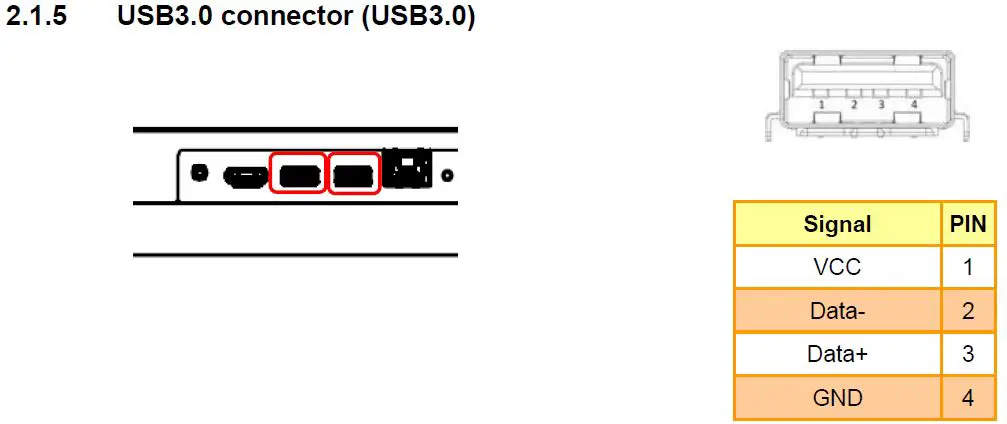
| USB Port | JUSB1: USB Type A Host (3.0)_90D JUSB2: USB Type A Host (3.0)_90D |
| Lan Port | JLAN1: 10/100/1000 Lan port_90D |
| Audio Port | JHP1: Headphone Jack_90D |
| Reset button | Reset button_90D |
| COM Port | 1 x DB9 for RS-232 1 x DB9 for RS-485 |
| Mechanical | |
| Power Type | 12V~24V wide voltage DC input |
| Power Connector | DC jack |
| Type | |
| Dimension | 535.34×329.31×48.1 mm |
| Weight | 9.2 kg |
| Color | Metallic |
| Fanless | Yes |
| OS Support | Android 11 / Debian 10 |
| Reliability | |
| EMI Test | CE FCC Class B RED |
| Safety | 2014/35/EU EN 62368-1: 2014+A11: 2017 (Second Edition) Low Voltage Directive |
|
Dust and Rain Test | 1. PSD: 0.00454G²/Hz, 1.5 Grms 2. Operation mode 3. Test Frequency: 5-500Hz 4. Test Axis: X, Y and Z axis 5. 30 minutes per axis 6. IEC 60068-2-64 Test: Fh 7. Storage: CF or SSD |
|
Random Vibration Test | Test Standard: Reference IEC60068-2-64 Testing procedures 1. System condition: Operation mode 2. PSD: 0.00454G²/Hz , 1.5 Grms 3. Test Frequency: 5-500Hz 4. Test Axis: X, Y and Z axis 5. Test time: 30 minutes per each axis Storage: eMMC |
|
Sine Vibration Test (Non-operation) | 1. Test Standard: Reference IEC60068-2-6 Testing procedures 2. System condition: Non-Operating mode 3. Test Acceleration: 2G 4. Test frequency: 5~500 Hz 5. Sweep:1 Oct/ per minute. (logarithmic) 6. Test Axis: X, Y, and Z axis Test time:30 min. each axis |
|
Package vibration test | 1. PSD: 0.026G²/Hz, 2.16 Grms 2. Non-operation mode 3. Test Frequency: 5-500Hz 4. Test Axis: X,Y, and Z axis 5. 30 min. per each axis 6. IEC 60068-2-64 Test: Fh |
| Mechanical Shock | 1. PSD: 0.026G²/Hz, 2.16 Grms |
| Test | 2. Non-operation mode 3. Test Frequency: 5-500Hz 4. Test Axis: X,Y and Z axis 5. 30 min. per each axis 6. IEC 60068-2-64 Test:Fh |
|
Drop Test | 1. Waveform: Half Sine wave 2. Acceleration Rate:10g for operation mode 3. Duration Time:11ms 4. No. of Shock:Z axis 300 times 5. Test Axis: Z axis 6. Operation mode 7. Reference IEC 60068-2-29 Testing procedures Test Eb : Bump Test |
| Operating Temperature | 0°C ~ 40°C (32°F ~ 104°F) |
| Storage Temperature | -20°C ~ 60°C (-4°F ~ 140°F) |
| Operating Humidity | 40°C @ 95% Relative Humidity, Non-condensing |
System Overview 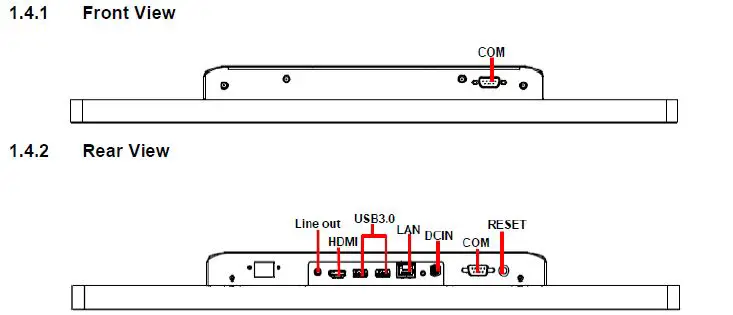
| Connectors | ||
| Label | Function | Note |
| Line out | Audio line-out connector | Head phone jack |
| HDMI | HDMI connector | |
| USB3.0 | 2 x USB3.0 connector | USB type A |
| DCIN | DC power-in connector | DC jack |
| LAN | RJ-45 Ethernet connector | |
| COM | 2 x Serial port connector | 1 x DB9 for RS-232 1 x DB9 for RS-485 |
| RESET | Reset button |
System Dimensions 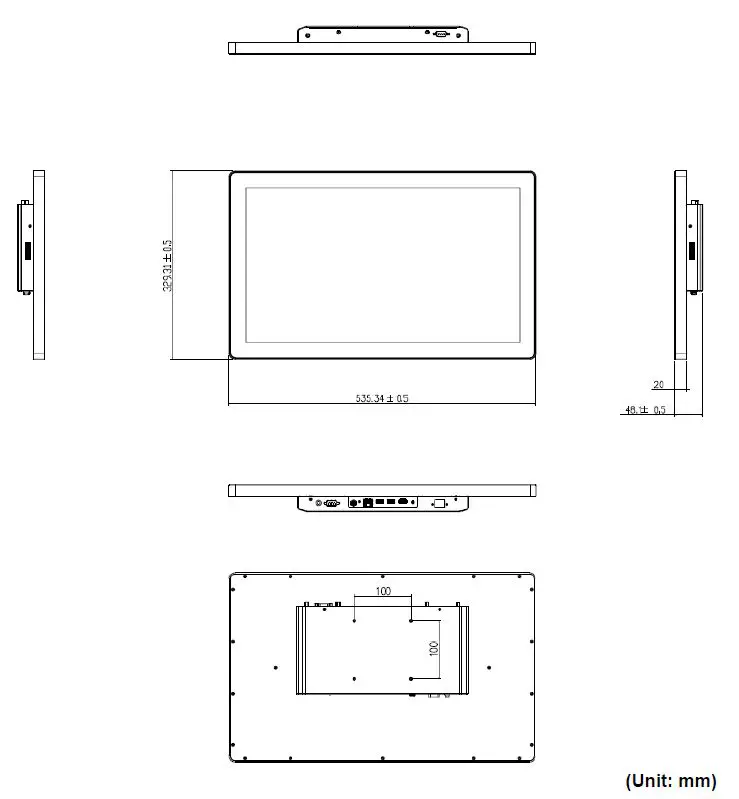
Hardware Configuration
SID-21WR2 connector mapping 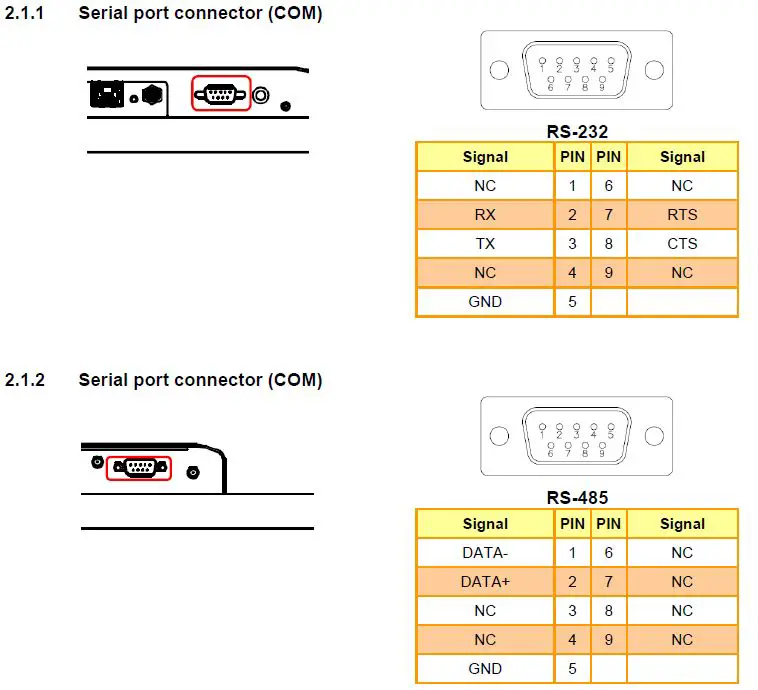
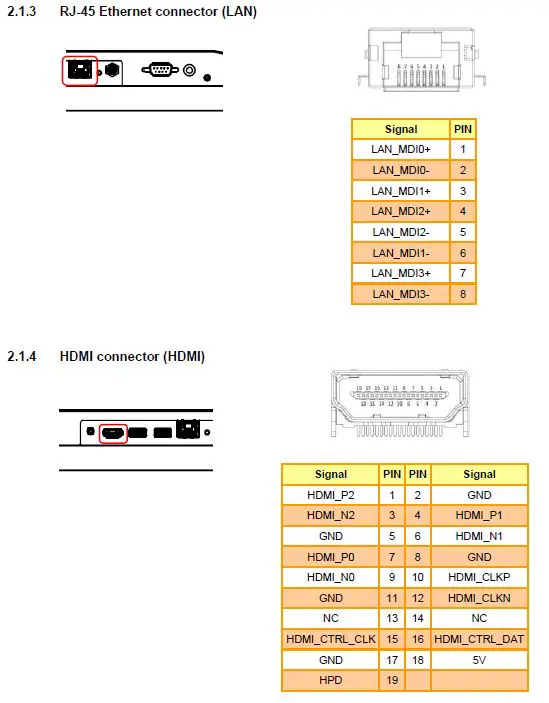
Note: If you need more information, please visit our website. http://www.avalue.com.tw.
Copyright Notice
Copyright 2023 Avalue Technology Inc., ALL RIGHTS RESERVED.
 single board computer,embedded industrial pc,embedded computer boards,embedded pc,industrial motherboard,embedded computer