KRAMER KIT-401 Auto Switcher 
Quick Start Guide
This guide helps you install and use your KIT-401 for the first time. Go to www.kramerav.com/downloads/KIT-401 to download THE latest user manual and check if firmware upgrades are available.
Check what’s in the box
KIT-401, including:
KIT-401T 4K HDMI/PC Auto Switcher Transmitter and KIT-400R 4K HDBT/HDMI Receiver/Scaler 1 Power adapter, cable adapter and cord 4 Rubber feet 1 Quick start guide Installation accessories 2 Bracket sets (KIT-400R) 1 Frame or frame kit (KIT-401T)
Get to know your KIT-401
KIT-401T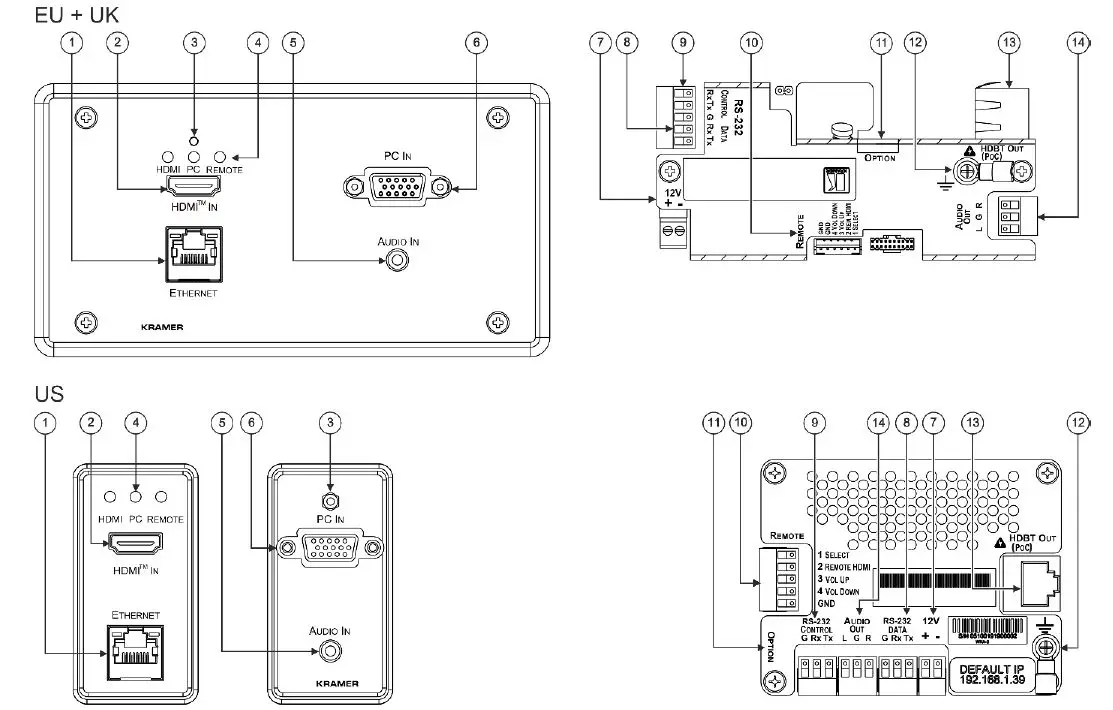
| # | Feature | Function | |
| 1 | ETHERNET LAN RJ-45 Connector | Connect to the LAN (Ethernet traffic or PC controller). | |
| 2 | HDMI™ IN Connector | Connect to an HDMI source. | |
| 3 | RESET Button | Sends a reset command to KIT-400R and then reboots KIT-401T. | |
| 4 | HDMI | LED Indicator | Lights green when the HDMI source is selected as the input. Lights red when analog audio is selected. |
| PC | Lights green when the PC source is selected as the input. Lights red when analog audio is selected. | ||
| REMOTE | Lights green when the HDMI INPUT source on KIT-400R is selected as the input. | ||
| 5 | AUDIO IN 3.5mm Mini Jack | Connect to an unbalanced, stereo audio source (for example, the audio output of the laptop). | |
| 6 | PC 15-pin HD Connector | Connect to a PC graphics source. | |
| # | Feature | Function | |
| 7 | 12V Power Supply 2-pin Terminal Block Connector | Connect to the supplied power adapter (if required). Connect + to +, – to -. Follow powering instructions in Step 5: Connect power. | |
| Connect power to either this terminal block or to the KIT-400R 12V power connector (item 34). Do not connect to both! | |||
| 8 | RS-232 | DATA 3-pin Terminal Block Connector | Connect to a serial data source or acceptor. |
| 9 | CONTROL 3-pin Terminal Block Connector | Connect to a serial controller or PC. | |
| 10 | Remote Contact-closure 4-pin Terminal Block Connector | Connect to contact closure switches (by momentary contact between the desired pin and GND pin) to select an input, the remote HDMI IN and audio volume (up or down), see Step 6: Operate KIT-401. | |
| 11 | SETUP 4-way DIP-switch | Set the device behavior, see Step 4: Connect inputs and outputs. | |
| 12 | Ring Tongue Terminal Grounding Screw | Connect to grounding wire (optional). | |
| 13 | HDBT OUT (PoC) RJ-45 Connector | Connect to KIT-400R. | |
| 14 | AUDIO OUT 3.5mm Mini Jack | Connect to the unbalanced, stereo audio acceptor (for example, active speakers). | |
The terms HDMI, HDMI High-Definition Multimedia Interface, and the HDMI Logo are trademarks or registered trademarks of HDMI Licensing Administrator, Inc.
KIT-400R
| # | Feature | Function | |
| 15 | PROG USB Connector | Connect to a USB stick to perform firmware upgrades. | |
| 16 | INPUTS | SELECT Button | Press to select the input (HDBT or HDMI). |
| 17 | HDBT LED | Lights blue when the HDBT input is selected. | |
| 18 | HDMI LED | Lights blue when the HDMI input is selected. | |
| 19 | MENU Button | Press to enter/exit the on-screen display (OSD) menu. Press together with the – button to reset to 1080p. | |
| 20 | ENTER Button | In OSD, press to choose the highlighted menu item. Press together with the FREEZE/+ button to reset to XGA. | |
| 21 | – | In OSD, press to move back through menus or decrement parameter values. | |
| 22 | FREEZE/+ Button | In OSD, press to move forward through menus or increment parameter values. When not in OSD, press to freeze the display. | |
| 23 | LINK LED | Lights blue when a link is established with the transmitter. | |
| 24 | ON LED | Lights green when device is powered. | |
| 25 | INPUTS | HDBT RJ-45 Connector | Connect to KIT-401T. |
| 26 | HDMI™ Connector | Connect to an HDMI source. | |
| 27 | OUTPUT | HDMI Connector | Connect to an HDMI acceptor. |
| 28 | AUDIO 5-pin Terminal Block Connector | Connect to a balanced stereo audio acceptor. | |
| 29 | REMOTE Contact-Closure 5-pin Terminal Block Connector | Connect to contact closure switches (by momentary contact between the desired pin and GND pin). To turn display on or off, see Step 6: Operate KIT-401. | |
| 30 | RS-232 | CONTROL 3-pin Terminal Block Connector | Connect to a serial controller or PC. |
| 31 | DATA 3-pin Terminal Block Connector | Connect to a serial data source or acceptor. | |
| 32 | RELAY 3-pin Terminal Block Connector | Connections to the internal relay: normally open (NO), normally closed (NC) and common (C). Connect to devices to be controlled by relay (for example, a motorized projection screen). | |
| 33 | PoC (Power Over Cable) Switch | Set to on. | |
| 34 | 12V DC Connector | Connect to the supplied power adapter (if required). Follow powering instructions in Step 5: Connect power. | |
| Connect power to either this 12V power connector or to the KIT-401T terminal block (item 7). Do not connect to both! | |||
Install KIT-401T and Mount KIT-400R
Install KIT-401T
Insert the device into the in-wall box. Note that first you need to connect the HDBT cable (and power – if powering via the transmitter) and connect the parts as shown in the illustrations below:
EU/UK Version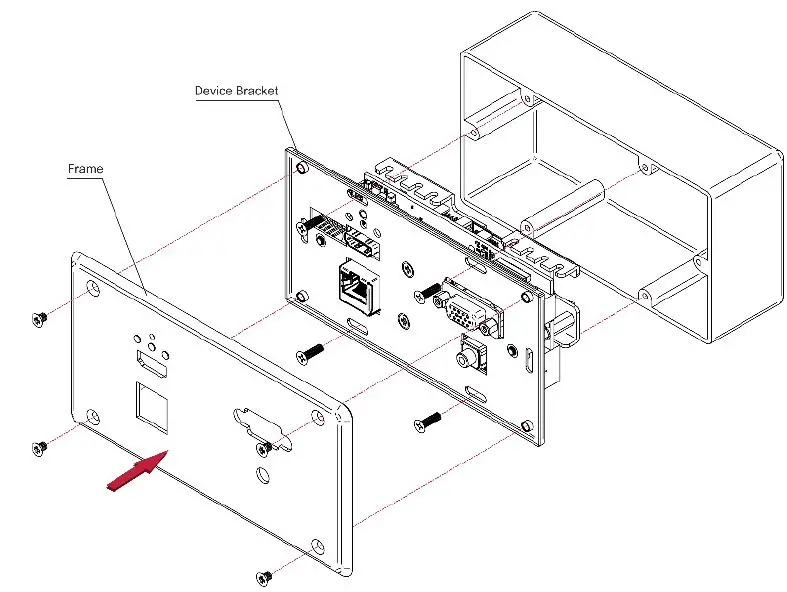
US-D Version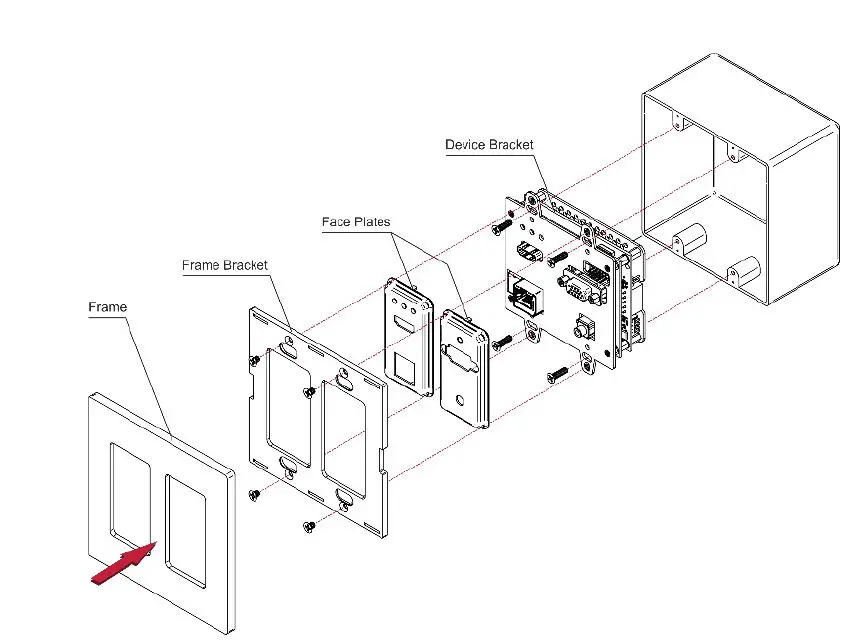
DECORA® design frames are included in US-D models. DECORA® is a registered trademark of Leviton Manufacturing Co., Inc. We recommend that you use any of the following standard 2 gang in-wall junction boxes (or their equivalent):
- US-D: 2 gang US electrical junction boxes.
- EU: 2 gang in-wall junction box, with a cut-hole diameter of 2x68mm and depth that can fit in both the device and the connected cables (DIN 49073).
- UK: 2 gang in-wall junction box (BS 4662), 135x75mm (W, H) and depth that can fit in both the device and the connected cables.
- EU/UK: 2 gang on-wall junction box (use the recommended Kramer on-wall box available at www.kramerav.com/product/KIT-401T).
Mount KIT-400R
Install KIT-400R using one of the following methods:
- Attach the rubber feet and place the unit on a flat surface.
- Fasten 2 brackets (included) on each side of the unit and attach them to a flat surface (see www.kramerav.com/downloads/KIT-401).
- Mount the unit in a rack using the recommended rack adapter (see www.kramerav.com/product/KIT-401).
Warning: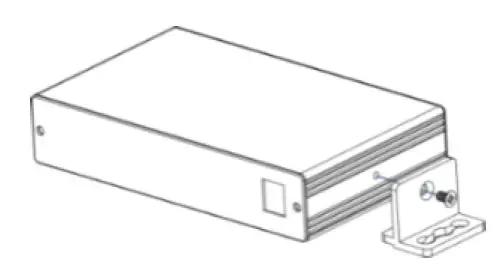
- Ensure that the environment (e.g., maximum ambient temperature & air flow) is compatible for the device.
- Avoid uneven mechanical loading.
- Appropriate consideration of equipment nameplate ratings should be used for avoiding the overloading of the circuits.
- Reliable earthing of rack-mounted equipment should be maintained.
- The maximum mounting height for the device is 2 meters.
Connect inputs and outputs
Always switch OFF the power before connecting to your KIT-401.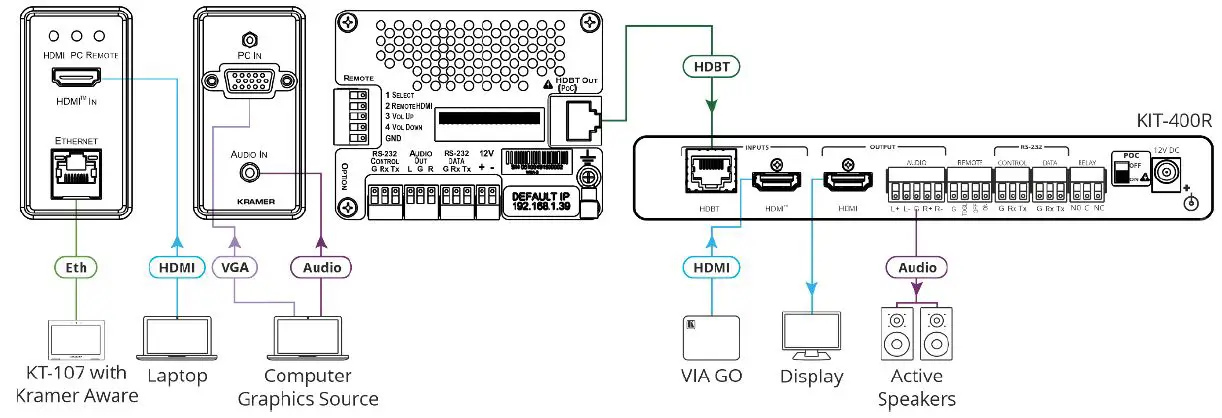
Connect the audio output: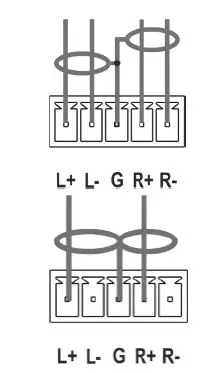
To achieve specified extension distances, use the recommended Kramer cables available at www.kramerav.com/product/KIT-401. Using third-party cables may cause damage!
Wiring the RJ-45 connectors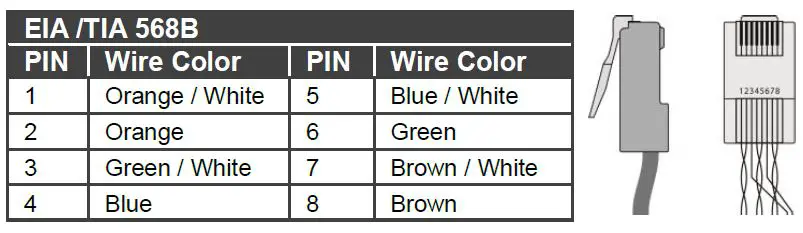
This section defines the TP pinout, using a straight pin-to-pin cable with RJ-45 connectors. For HDBT cables, it is recommended that the cable ground shielding be connected/soldered to the connector shield.
Setting the KIT-401T OPTION DIP-switches
A switch that is down is on; a switch that is up is off. By default, all the switches are up (off). After changing a DIP switch you must power cycle the device to implement the change.
- DIP-switch 1 set to off (up).
- DIP-switch 2 set to off (up).
Audio Switching Selection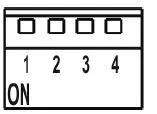
| DIP-switch 3 | DIP-switch 4 | Audio Input Selection | |
| Off (up) | Off (up) | Automatic – Priority selection: Embedded HDMI ” analog Audio In (high to low priority). | |
| Off (up) | On (down) | Automatic – Priority selection: Analog Audio In ” embedded HDMI (high to low priority). | |
| On (down) | Off (up) | Embedded HDMI. | |
| On (down) | On (down) | Analog Audio In. |
Connect power
KIT-401 uses a PoC (Power over Cable) system, meaning that the system is powered by connecting the 12V adapter to either KIT-401T or to KIT-400R. Do not connect power to both devices. Safety Instructions (See www.kramerav.com for updated safety information) Caution:
- For products with relay terminals and GPI\O ports, please refer to the permitted rating for an external connection, located next to the terminal or in the User Manual.
- There are no operator serviceable parts inside the unit.
Warning:
- Failure to use PoC and power connector correctly may destroy the devices!
- Use only the power cord that is supplied with the unit.
- Disconnect the power and unplug the unit from the wall before installing.
Operate KIT-401
Operate KIT-401 via:
- Remotely, by RS-232 serial commands transmitted by a touch screen system, PC, or other serial controller.
- Embedded web pages via the Ethernet.
- Remote control switches.
| RS-232 Control / Protocol 3000 | ||||||||
| Baud Rate: | 115,200 | Parity: | None | Stop Bits: | 1 | |||
| Data Bits: | 8 | Command Format: | ASCII | |||||
| Example: (Set the Audio out volume level to 75): #AUD-LVL 1,1,75 | ||||||||
| Default Ethernet Parameters | ||||||||
| IP Address: | 192.168.1.39 | UDP Port #: | 50000 | |||||
| Subnet mask: | 255.255.0.0 | TCP Port #: | 5000 | |||||
| Gateway: | 0.0.0.0. | |||||||
Operating via the remote control switches
Momentarily connect the desired pin to the GND pin to select an input:
| Pin Name | Function | |
| KIT-401T | ||
| SELECT | Short press – Select the input. | Long press – Adjust the VGA phase shift. |
| REMOTE | Select the HDMI input on KIT-400R. | |
| VOL UP | Press to increase the analog audio output level. | |
| VOL DN | Press to decrease the analog audio output level. | |
| KIT-400R | ||
| TOGL | One button toggles between display on and display off (instead of using two separate buttons for on and off). Alternatively, using the KIT-400R OSD, configure toggling display on and off according to whether a switch is open or closed, for example, using an occupancy sensor. | |
| OFF | Turn off the display. | |
| ON | Turn on the display. | |
KIT-401T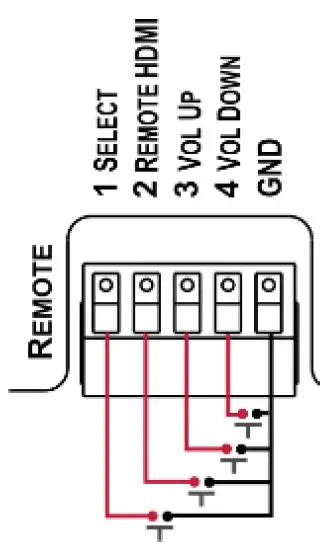
KIT-400R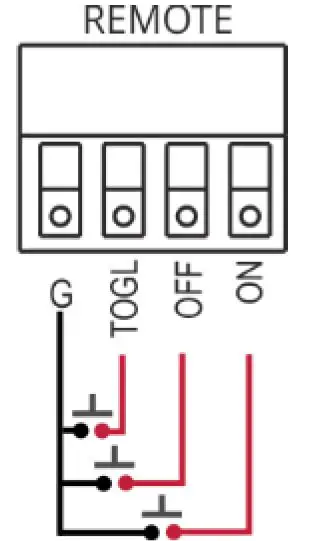
 Kramer | Audio Visual Solutions - Kramer