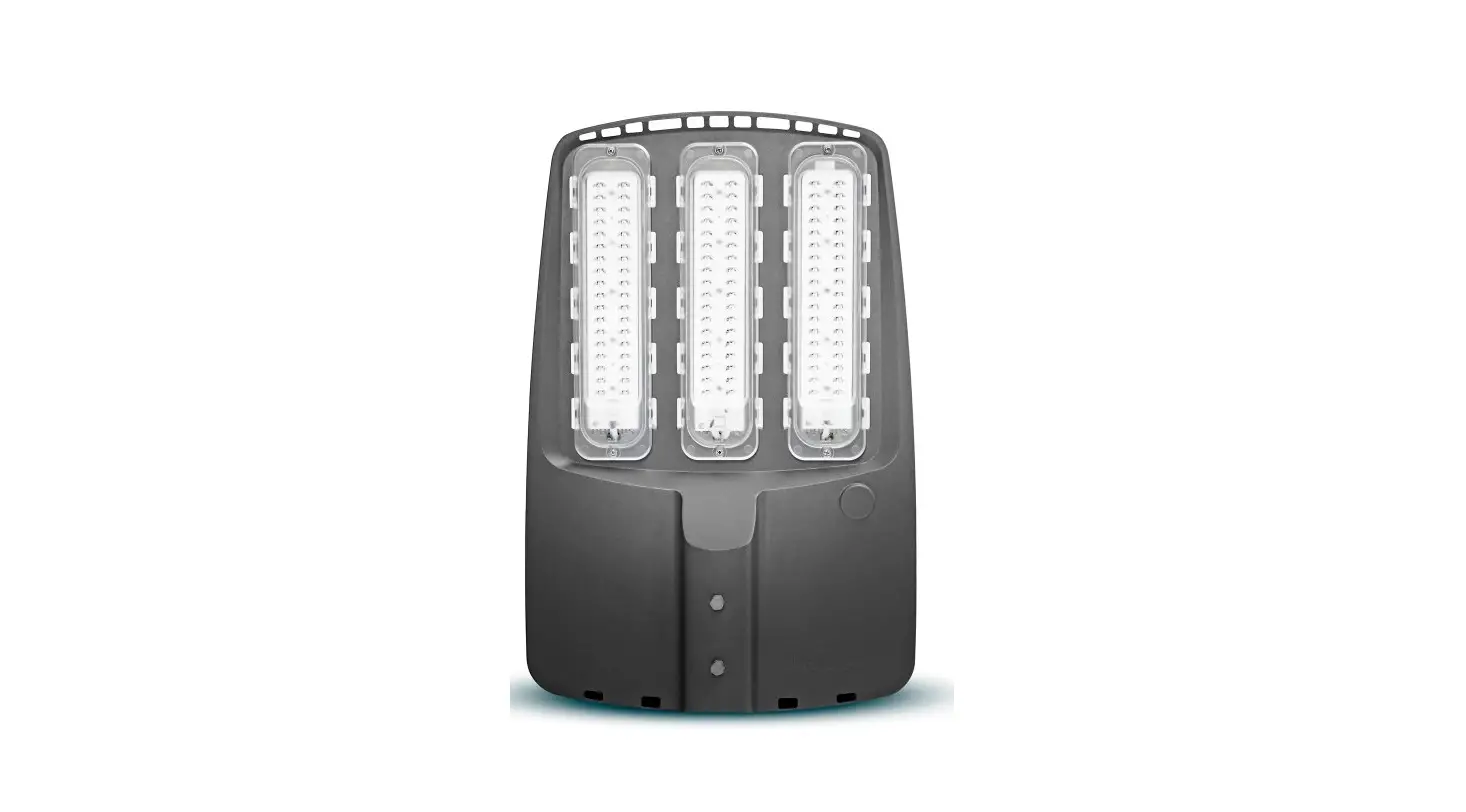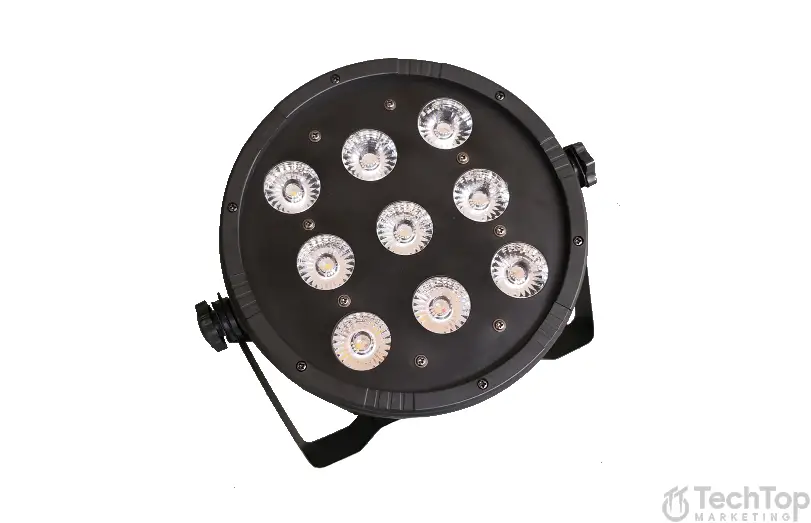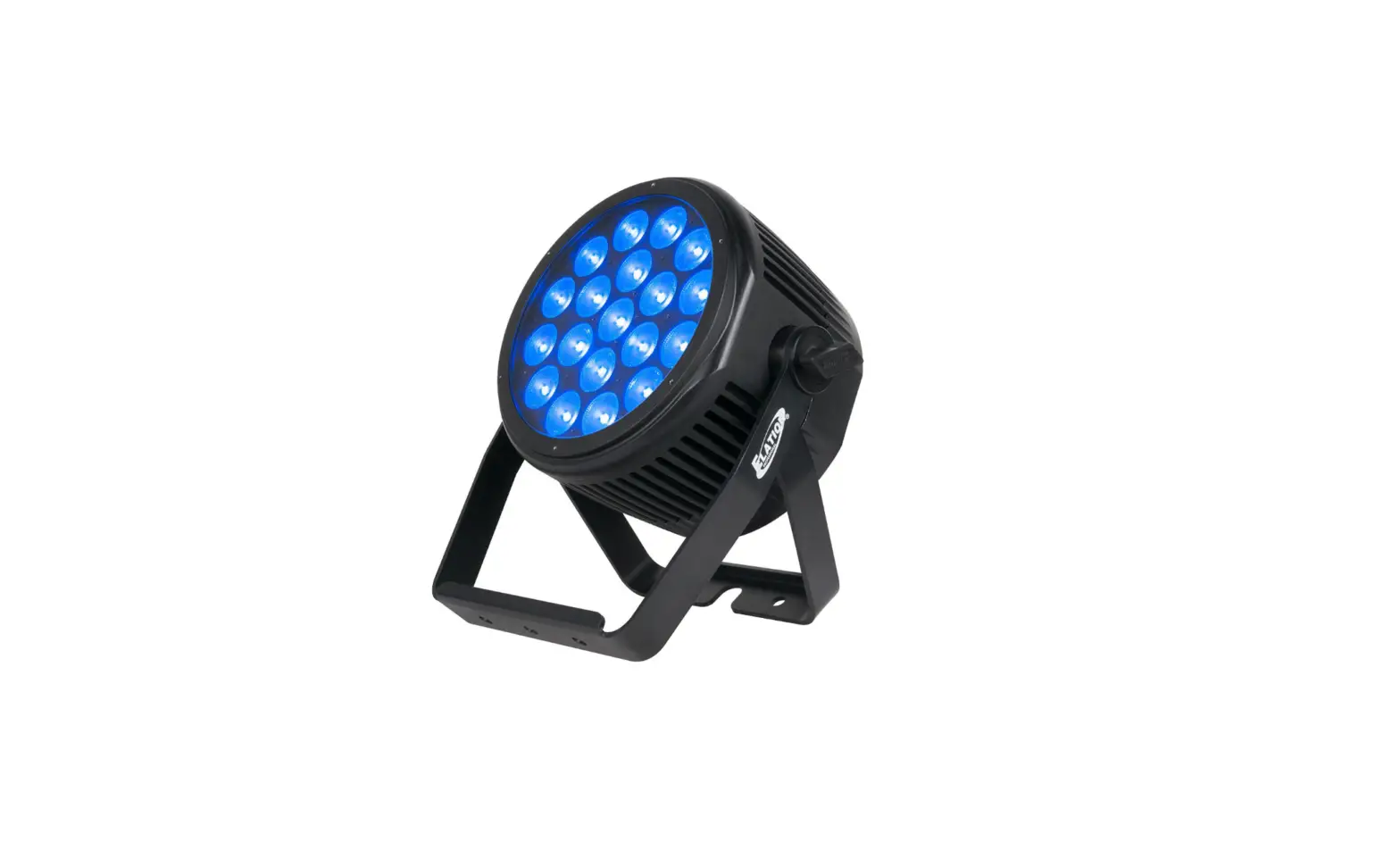

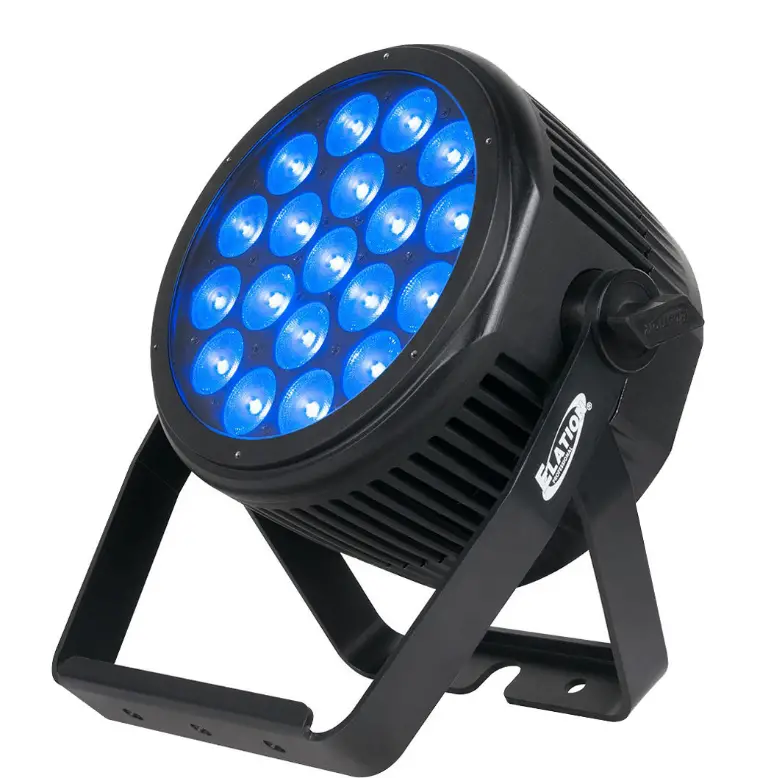
ELATION 19IP SEVEN PAR Lighting 
©2020 ELATION PROFESSIONAL all rights reserved. Information, specifications, diagrams, images, and instructions herein are subject to change without notice. ELATION PROFESSIONAL logo and identifying product names and numbers herein are trademarks of ELATION PROFESSIONAL. Copyright protection claimed includes all forms and matters of copyrightable materials and information now allowed by statutory or judicial law or hereinafter granted. Product names used in this document may be trademarks or registered trademarks of their respective companies and are hereby acknowledged. All non-ELATION brands and product names are trademarks or registered trademarks of their respective companies.
ELATION PROFESSIONAL and all affiliated companies hereby disclaim any and all liabilities for property, equipment, building, and electrical damages, injuries to any persons, and direct or indirect economic loss associated with the use or reliance of any information contained within this document, and/or as a result of the improper, unsafe, insufficient and negligent assembly, installation, rigging, and operation of this product.
Elation Professional USA | 6122 S. Eastern Ave. | Los Angeles, CA. 90040
323-582-3322 | 323-832-9142 fax | www.elationlighting.com | [email protected]
Elation Professional B.V. | Junostraat 2 | 6468 EW Kerkrade, The Netherlands
+ 31 45 546 85 66 | +31 45 546 85 96 fax | www.elationlighting.eu | [email protected] Elation Professional Mexico | AV Santa Ana 30 | Parque Industrial Lerma, Lerma, Mexico 52000 + 52 (728) 282-7070
DOCUMENT VERSION

Due to additional product features and/or enhancements, an updated version of this document may be available online. Please scan the QR Code with your mobile device or visit www.elationlighting.com for the latest revision/update of this manual, before installation and/or programming.
| Date | Document Version | Software Version ≥ | DMX Channel Modes | Notes |
| 05/11/18 | 1 | 1.04 | CH:03 RGB, CH:07 8Bit, CH:14 16Bit, CH:15 Master, CH:04 H S I, CH:10 H S I+ | Initial release. |
| 05/14/18 | 1.2 | N/C | NO CHANGE | Updated release. |
| 06/19/18 | 1.4 | 1.05 | RGB 3CH, RGBSeven 3CH, 8bit 7CH, 16bit 14CH, Master 15CH, HSI 4CH, HSI Mast 10CH | Updated System Menu / DMX modes. |
| 02/26/19 | 1.6 | N/C | NO CHANGE | Manual format update. |
| 08/24/20 | 1.8 | 1.08 | NO CHANGE | Updated primary / secondary |
| 09/15/20 | 2.0 | N/C | NO CHANGE | Updated photometric data |
GENERAL INFORMATION
INTRODUCTION
Please read and understand the instructions in this manual carefully and thoroughly before attempting to operate this device. These instructions contain important safety and use information.
UNPACKING
Every device has been thoroughly tested and has been shipped in perfect operating condition. Carefully check the shipping carton for damage that may have occurred during shipping. If the carton is damaged, carefully inspect the device for damage, and be sure all accessories necessary to install and operate the device have arrived intact. In the event damage has been found or parts are missing, please contact our customer support team for further instructions. Please do not return this device to your dealer without first contacting customer support. Please do not discard the shipping carton in the trash. Please recycle whenever possible.
BOX CONTENTS
Gel Frame
Gel Frame Holder / Screw Kit
IP65 Power Cable
CUSTOMER SUPPORT
Contact ELATION Service for any product related service and support needs.
Also visit forums.elationlighting.com with questions, comments or suggestions.
ELATION SERVICE USA – Monday – Friday 8:00am to 4:30pm PST
323-582-3322 | Fax 323-832-9142 | [email protected]
ELATION SERVICE EUROPE – Monday – Friday 08:30 to 17:00 CET
+31 45 546 85 63 | Fax +31 45 546 85 96 | [email protected]
REPLACEMENT PARTS please visit parts.elationlighting.com
IMPORTANT NOTICE !
THERE ARE NO USER SERVICEABLE PARTS INSIDE THIS UNIT.
DO NOT ATTEMPT ANY REPAIRS YOURSELF; DOING SO WILL VOID YOUR MANUFACTURES WARRANTY. DAMAGES RESULTING FROM MODIFICATIONS TO THIS FIXTURE AND/OR THE DISREGARD OF SAFETY INSTRUCTIONS AND GUIDELINES IN THIS MANUAL VOID THE MANUFACTURES WARRANTY AND ARE NOT SUBJECT TO ANY WARRANTY CLAIMS AND/OR REPAIRS.
LIMITED WARRANTY (USA ONLY)
A. Elation Professional hereby warrants, to the original purchaser, Elation Professional products to be free of manufacturing defects in material and workmanship for a period of two years (730 days), and Elation Professional product rechargeable batteries to be free of manufacturing defects in material and workmanship for a period of six months (180 days), from the original date of purchase. This warranty excludes discharge lamps and all product accessories. This warranty shall be valid only if the product is purchased within the United States of America, including possessions and territories. It is the owner’s responsibility to establish the date and place of purchase by acceptable evidence, at the time service is sought. B. For warranty service, send the product only to the Elation Professional factory. All shipping charges must be pre-paid. If the requested repairs or service (including parts replacement) are within the terms of this warranty, Elation Professional will pay return shipping charges only to a designated point within the United States. If any product is sent, it must be shipped in its original package and packaging material. No accessories should be shipped with the product. If any accessories are shipped with the product, Elation Professional shall have no liability what so ever for loss and/or or damage to any such accessories, nor for the safe return thereof. C. This warranty is void if the product serial number and/or labels are altered or removed; if the product is modified in any manner which Elation Professional concludes, after inspection, affects the reliability of the product; if the product has been repaired or serviced by anyone other than the Elation Professional factory unless prior written authorization was issued to purchaser by Elation Professional; if the product is damaged because not properly maintained as set forth in the product instructions, guidelines and/or user manual. D. This is not a service contract, and this warranty does not include any maintenance, cleaning or periodic check-up. During the periods as specified above, Elation Professional will replace defective parts at its expense, and will absorb all expenses for warranty service and repair labor by reason of defects in material or workmanship. The sole responsibility of Elation Professional under this warranty shall be limited to the repair of the product, or replacement thereof, including parts, at the sole discretion of Elation Professional. All products covered by this warranty were manufactured after January 1, 1990, and bare identifying marks to that effect. E. Elation Professional reserves the right to make changes in design and/or performance improvements upon its products without any obligation to include these changes in any products theretofore manufactured. F. No warranty, whether expressed or implied, is given or made with respect to any accessory supplied with the products described above. Except to the extent prohibited by applicable law, all implied warranties made by Elation Professional in connection with this product, including warranties of merchantability or fitness, are limited in duration to the warranty periods set forth above. And no warranties, whether expressed or implied, including warranties of merchantability or fitness, shall apply to this product after said periods have expired. The consumer’s and/or dealer’s sole remedy shall be such repair or replacement as is expressly provided above; and under no circumstances shall Elation Professional be liable for any loss and/or damage, direct and/or consequential, arising out of the use of, and/or the inability to use, this product. G. This warranty is the only written warranty applicable to Elation Professional products and supersedes all prior warranties and written descriptions of warranty terms and conditions heretofore published.
WARRANTY RETURNS
All returned service items whether under warranty or not, must be freight pre-paid and accompany a return authorization (R.A.) number. The R.A. number must be clearly written on the outside of the return package. A brief description of the problem, as well as the R.A. number, must also be written down on a piece of paper and included in the shipping container. If the unit is under warranty, you must provide a copy of your proof of purchase invoice. Items returned without an R.A. number clearly marked on the outside of the package will be refused and returned at the customer’s expense. You may obtain an R.A. number by contacting customer support.
SAFETY GUIDELINES
This fixture is a sophisticated piece of electronic equipment. To guarantee a smooth operation, it is important to follow all instructions and guidelines in this manual. Elation Professional is not responsible for injury and/or damages resulting from the misuse of this fixture due to the disregard of the information printed in this manual. Only qualified and/or certified personnel should perform installation of this fixture and only the original rigging parts (omega brackets) included with this fixture should be used for installation. Any modifications to the fixture and/or the included mounting hardware will void the original manufactures warranty and increase the risk of damage and/or personal injury.
 PROTECTION CLASS 1 – FIXTURE MUST BE PROPERLY GROUNDED
 THERE ARE NO USER SERVICEABLE PARTS INSIDE THIS UNIT.
DO NOT ATTEMPT ANY REPAIRS YOURSELF; DOING SO WILL VOID YOUR MANUFACTURES WARRANTY. DAMAGES RESULTING FROM MODIFICATIONS TO THIS FIXTURE AND/OR THE DISREGARD OF SAFETY INSTRUCTIONS AND GUIDELINES IN THIS MANUAL VOID THE MANUFACTURES WARRANTY AND ARE NOT SUBJECT TO ANY WARRANTY CLAIMS AND/OR REPAIRS.DO NOT PLUG FIXTURE INTO A DIMMER PACK!
NEVER OPEN THIS FIXTURE WHILE IN USE!
UNPLUG POWER BEFORE SERVICING FIXTURE!
NEVER TOUCH FIXTURE DURING OPERATION, AS IT MAY BE HOT! KEEP FLAMMABLE MATERIALS AWAY FROM FIXTURE!ENSURE ALL CONNECTIONS AND END CAPS ARE PROPERLY SEALED WITH A DIELECTRIC GREASE (AVAILABLE AT MOST ELECTRICAL SUPPLIERS) TO PREVENT WATER CORROSION AND/OR ELECTRICAL SHORT CIRCUIT. NEVER LOOK DIRECTLY INTO THE LIGHT SOURCE!
RETINA INJURY RISK – MAY INDUCE BLINDNESS!
SENSITIVE PERSONS MAY SUFFER AN EPILEPTIC SHOCK!
SAFETY GUIDELINES
RISK GROUP 3 – RISK OF EXPOSURE TO ULTRAVIOLET UV RADIATION! FIXTURE EMITS HIGH INTENSITY WAVELENGTH OF ULTRAVIOLET UV LIGHT FROM THE UV LED. WEAR PROPER EYE AND SKIN PROTECTION. AVOID PROLONGED PERIODS OF EXPOSURE TO UV LED. AVOID WEARING WHITE COLOR CLOTHING AND/OR USING UV PAINTS ON SKIN.
AVOID DIRECT EYE AND/OR SKIN EXPOSURE AT DISTANCES LESS THAN 11 feet (3.3m). DO NOT OPERATE FIXTURE WITH DAMAGED/MISSING EXTERNAL COVERS. DO NOT LOOK DIRECTLY INTO THE UV LIGHT AND/OR VIEW UV LIGHT DIRECTLY WITH OPTICAL INSTRUMENTS THAT MAY CONCENTRATE THE LIGHT/RADIATION
OUTPUT. INDIVIDUALS SUFFERING FROM A RANGE OF EYE CONDITIONS, SUNLIGHT EXPOSURE DIS-ORDERS, OR INDIVIDUALS USING PHOTOSENSITIVE MEDICATION, MAY RECEIVE DISCOMFORT IF EXPOSED TO THE ULTRAVIOLET UV LIGHT EMITTED FROM THE UV LED.
- DO NOT TOUCH the fixture housing during operation. Turn OFF the power and allow approximately 15 minutes for the fixture to cool down before serving.
- DO NOT shake fixture, avoid brute force when installing and/or operating fixture.
- DO NOT operate fixture if the power cord is frayed, crimped, damaged and/or if any of the power cord connectors are damaged and do not insert into the fixture securely with ease. NEVER force a power cord connector into the fixture. If the power cord or any of its connectors are damaged, replace it immediately with a new one of similar power rating.
- DO NOT block any air ventilation slots.
- All fan and air inlets must remain clean and never blocked.
- Allow approx. 6” (15cm) between fixture and other devices or a wall for proper cooling.
- When installing fixture in a suspended environment, always use mounting hardware that is no less than M10 x 25 mm, and always install fixture with an appropriately rated safety cable.
- Always disconnect fixture from the main power source before performing any type of service and/or cleaning procedure. Only handle the power cord by the plug end, never pull out the plug by tugging the wire portion of the cord.
- During the initial operation of this fixture, light smoke or smell may emit from the interior of the fixture. This is a normal process and is caused by excess paint in the interior of the casing burning off from the heat associated with the lamp and will decrease gradually over time.
Consistent operational breaks will ensure fixtures will function properly for many years. ONLY use the original packaging and materials to transport the fixture in for service.
MAINTENANCE GUIDELINES
DISCONNECT POWER BEFORE PERFORMING ANY MAINTENANCE!
CLEANING
Frequent cleaning is recommended to insure proper function, optimized light output, and an extended life. The frequency of cleaning depends on the environment in which the fixture operates: damp, smoky or particularly dirty environments can cause greater accumulation of dirt on the fixture’s optics. Clean the external lens surface at least every 20 days with a soft cloth to avoid dirt/debris accumulation.
NEVER use alcohol, solvents, or ammonia-based cleaners.
MAINTENANCE
- Regular inspections are recommended to insure proper function and extended life. There are no user serviceable parts inside this fixture, please refer all other service issues to an authorized Elation service technician. Should you need any spare parts, please order genuine parts from your local Elation dealer.
- Please refer to the following points during routine inspections:
- A detailed electric check by an approved electrical engineer every three months, to make sure the circuit contacts are in good condition and prevent overheating.
- Be sure all screws and fasteners are securely tightened at all times. Lose screws may fall out during normal operation resulting in damage or injury as larger parts could fall.
- Check for any deformations on the housing, color lenses, rigging hardware and rigging points (ceiling, suspension, trussing). Deformations in the housing could allow for dust to enter into the fixture. Damaged rigging points or unsecured rigging could cause the fixture to fall and seriously injure a person(s).
- Electric power supply cables must not show any damage, material fatigue or sediments.
- NEVER remove the ground prong from the power cable.
FIXTURE OVERVIEW
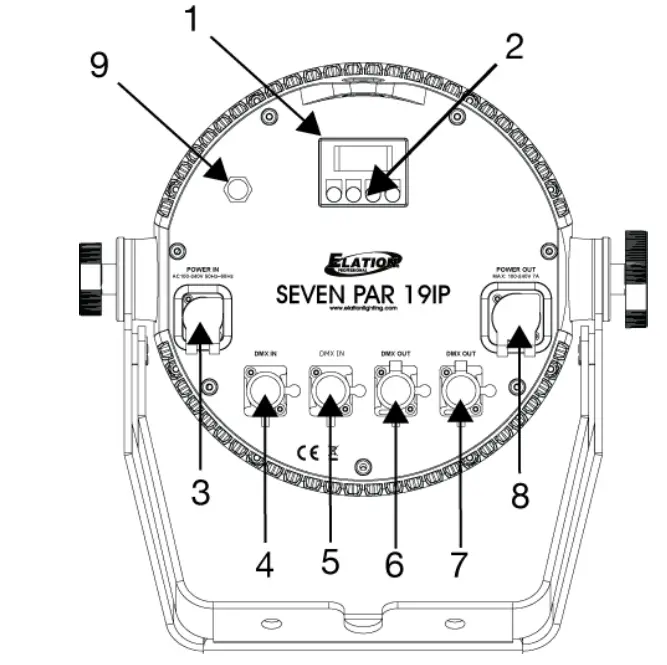
- OLED Menu Control Display
- Mode/Up/Down/Enter Buttons
- Power IN
- IP Rated 3pin DMX IN
- IP Rated 5pin DMX IN
- IP Rated 3pin DMX OUT
- IP Rated 5pin DMX OUT
- Power OUT
- Air Valve
INSTALLATION INSTRUCTIONS
IP65 RATED
An IP rated lighting fixture is one, which is commonly installed in outdoor environments and has been designed with an enclosure that effectively protects the ingress (entry) of external foreign objects such as dust and water. The International Protection (IP) rating system is commonly expressed as “IP” (Ingress Protection) followed by two numbers (i.e. IP65) where the numbers define the degree of protection. The first digit (Foreign Bodies Protection) indicates the extent of protection against particles entering the fixture and the second digit (Water Protection) indicates the extent of protection against water entering the fixture. An IP65 rated lighting fixture is one, which has been designed and tested to protect against the ingress of dust (6) and low-pressure water jets from any direction (5).
MARINE/COASTAL ENVIRONMENT INSTALLATIONS
Please note although this fixture is IP rated, the fixture is NOT suitable for marine and/or coastal environment installations. Installing this fixture in a marine and/or coastal environment may cause corrosion and/or excessive wear to the interior and/or exterior components of the fixture. Damages and/or performance issues resulting from installation in a marine and/or coastal environment will void the manufactures warranty and will NOT be subject to any warranty claims and/or repairs.
OPTIONAL CORROSION-RESISTANT COATING
Optional Corrosion-Resistant Coatings may be available for this fixture.
Please contact Elation Professional for more details.
Warning:
- FLAMMABLE MATERIAL WARNING
Keep fixture minimum 5.0 feet (1.5m) away from flammable materials and/or pyrotechnics. - ELECTRICAL CONNECTIONS
A qualified electrician should be used for all electrical connections and/or installations. - ENSURE ALL CONNECTIONS AND END CAPS ARE PROPERLY SEALED WITH A NON-CONDUCTIVE DIELECTRIC GREASE (AVAILABLE AT MOST ELECTRICAL SUPPLIERS) TO PREVENT WATER INGRESS/CONDENSATION AND/OR CORROSION.
- USE CAUTION WHEN POWER LINKING OTHER MODEL FIXTURES AS THE POWER CONSUMPTION OF OTHER MODEL FIXTURES MAY EXCEED THE MAX POWER OUTPUT ON THIS FIXTURE. CHECK SILK SCREEN FOR MAX AMPS.
DO NOT INSTALL THE FIXTURE IF YOU ARE NOT QUALIFIED TO DO SO!
Fixture MUST be installed following all local, national, and country commercial electrical and construction codes and regulations.
Before rigging/mounting a single fixture or multiple interconnected fixtures for custom matrix designs to any metal truss/structure or placing the fixture(s) on any surface, a professional equipment installer MUST be consulted to determine if the metal truss/structure or surface is properly certified to safely hold the combined weight of the fixture(s), clamps, cables, and accessories.
Fixture ambient operating temperature range is 14° to 113°F. (-10° to 45°C)
Do not use the fixture under or above this temperature.
Fixture(s) should be installed in areas outside walking paths, seating areas, or away from areas were unauthorized personnel might reach the fixture by hand.
NEVER stand directly below the fixture(s) when rigging, removing or servicing.
Overhead fixture installation must always be secured with a secondary safety attachment, such as an appropriately rated safety cable that can hold 10 times the weight of the fixture. Allow approximately 15 minutes for the fixture to cool down before serving.
Note: TO MAINTAIN IP65 RATING INTEGRITY AND PREVENT WATER FROM ENTERING FIXTURE, ALL UNUSED CONNECTION RUBBER CAPS MUST BE SEALED. 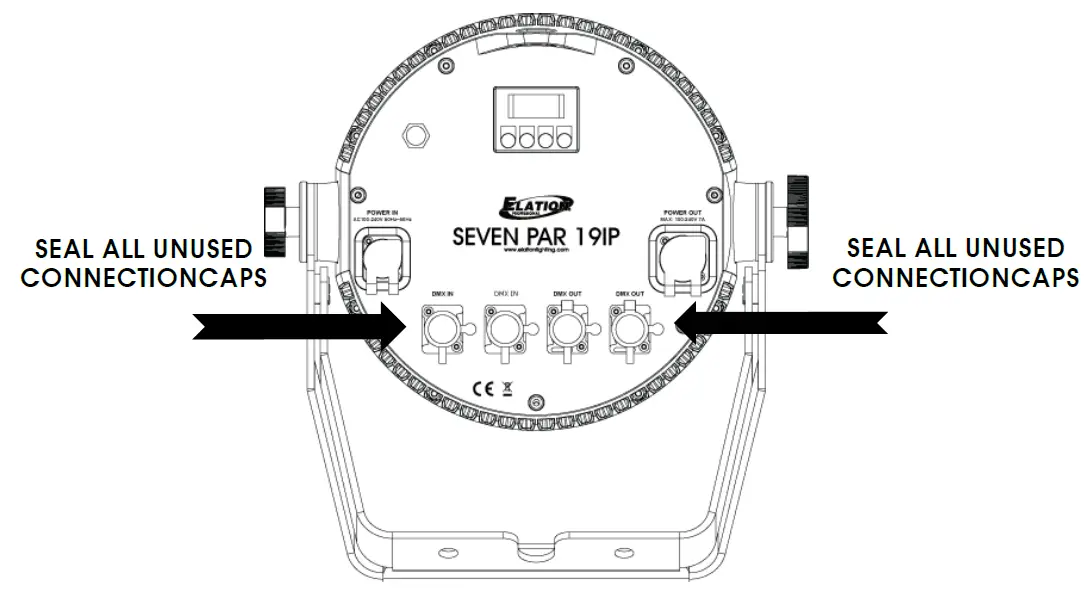
GEL FRAME AND BARN DOORS INSTALLATION
The included Gel Frame Holder / Screw Kit must be attached to the fixture in order to attach the included Gel Frame and optional Barn Doors (sold separately).
The spring-loaded Gel Frame Holder lock secures both the Gel Frame and Barn Doors. 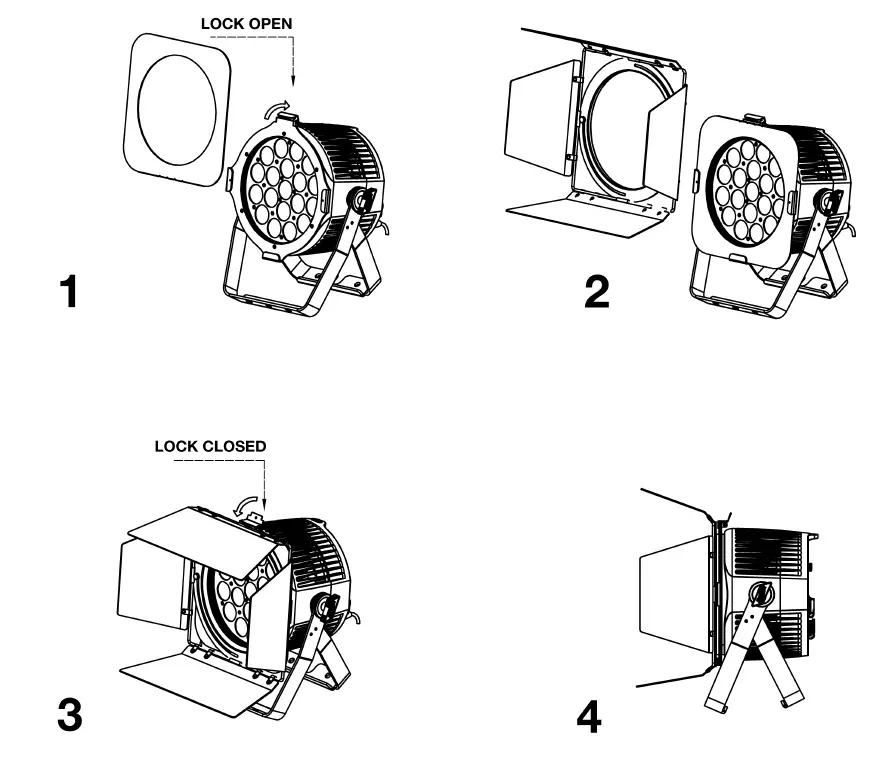
- Attach Gel Frame Holder / Screw Kit to fixture, tightening each screw by hand.
DO NOT OVER TIGHTEN SCREWS!
Insert Gel Frame into Gel Frame Holder by pushing the lock back and sliding into place. - Insert Barn Doors into Gel Frame Holder by pushing lock back and sliding into place. Gel Frame (even if not used) must be in Gel Frame Holder when using the Barn Doors.
- Secure Gel Frame Holder lock to secure both Gel Frame and Barn Doors to fixture.
- Position Barn Doors as desired.
CLAMP MOUNTING
This fixture includes an adjustable dual mounting yoke and safety cable rigging point attached to the fixture (see the illustration below). When mounting this fixture to truss, be sure to secure an appropriately rated clamp (not included) to the yoke using an M10 screw and attach a SAFETY CABLE to the safety cable rigging point. 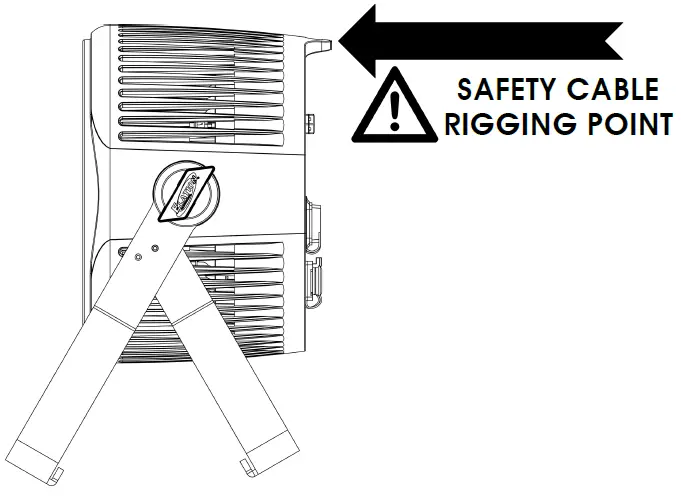
OVERHEAD RIGGING
Overhead rigging requires extensive experience, including amongst others calculating working load limits, installation material being used, and periodic safety inspection of all installation material and the fixture. If you lack these qualifications, do not attempt the installation yourself. Improper installation can result in bodily injury and property damage.
POWER LINKING
Note: USE CAUTION WHEN POWER LINKING OTHER MODEL FIXTURES AS THE POWER CONSUMPTION OF OTHER MODEL FIXTURES MAY EXCEED THE MAX POWER OUTPUT ON THIS FIXTURE. CHECK SILK SCREEN FOR AMX AMPS.
The fixture includes an easy to navigate system menu. The OLED control panel display (see image below) located on the back of the fixture, provides access to the main system menu and is where all necessary system adjustments are made to the fixture. During normal operation, pressing MENU button once will access the fixture’s main menu. Once in the main menu you can navigate through the different functions and access the sub-menus with the UP and DOWN buttons. Once you reach a field that requires adjusting, press the ENTER button to activate that field and use the UP and DOWN buttons to adjust the field. Pressing the ENTER button once more will confirm your setting. You may exit the main menu at any time without making any adjustments by pressing the MENU button. 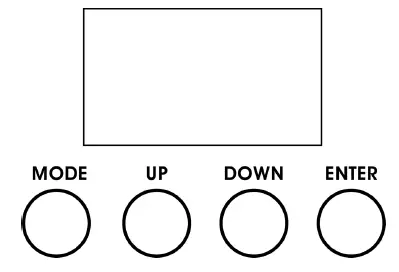
LCD CONTROL PANEL LOCKOUT
When Display menu is set to ON, the LCD display backlight will turn OFF after 30 seconds and the Control Panel will lock and the display will show LOCKED*****.
Press and hold the MODE button for 5 seconds to unlock.
When Display menu is set to ON1, the LCD display backlight will turn OFF after 30 seconds and the Control Panel will lock and the display will show LOCKED*****.
To unlock the Control Panel follow these steps:
- When locked, the display will show: LOCKED*****
- Press UP, then the display will change to: LOCKED**** (one * disappears)
- Press DOWN, then the display will change to: LOCKED*** (two * disappear)
- Press UP, then the display will change to: LOCKED** (three * disappear)
- Press DOWN, then the display will change to: LOCKED* (4 * disappear)
- Press ENTER, then the display will change to LOCKED and then become unlocked.
| S Y S T E M M E N U | ||||
| Supports Software Versions: ≥ 1.05 | ||||
| Features are subject to change without any prior written notice. | ||||
| MENU | SUB MENU | OPTIONS / VALUES (Default Settings in BOLD) | DESCRIPTION | |
| Address | Set ADDR | 001 ~ xxx | DMX Address Setting | |
| Mode | RGB 3CH, RGBSeven 3CH, 8bit 7CH, 16bit 14CH, Master 15CH, HSI 4CH, HSI Mast 10CH | DMX Channel / User Mode | ||
|
Function | No DMX | Hold / Black / Program | Function If NO DMX Detected | |
| LCD.Set | Display | On / Off | LCD Backlight Shut Off Time | |
| Key Lock | On / On1 / Off | LCD Buttons Key Lock (see page 13 for details) | ||
| Flash | On / Off | Display flashes when NO DMX | ||
| Inverse | On / Off | Flips LCD Display 180 Degrees | ||
| Temp. C/F | F / C | Temperature Switch Between F˚/ C˚ | ||
| DimCurve | Standard, Stage, TV, Architec, Theatre, Stage2 | Set Dimmer Curve Mode | ||
| Disp.Set | ADDR, Disp.CH | Select Default Display | ||
| Gamma | 2.0, 2.2, 2.4, 2.8 | Set Gamma Brightness | ||
| Frequen | 900Hz, 1000Hz, 1100Hz, 1200Hz, 1300Hz, 1400Hz, 1500Hz, 2500Hz, 4000Hz, 5000Hz, 10kHz, 15kHz, 20kHz, 25kHz | Set LED Refresh Frequency | ||
| Defaults | Reset? / Cancel | Restore Factory Settings | ||
|
Program | Speed | 1-99 | Set Program Speed from Slow (1) to Fast (99) | |
|
Color | STATIC | Strobe 000-255 R, G, B, RG, GB, RB, RGB, BLACK | Select Static Color and Shutter/Strobe Value | |
| CHANG15 | Strobe 000-255 | Select 15 Color Program + Shutter/Strobe Value | ||
| CHANG30 | Strobe 000-255 | Select 30 Color Program + Shutter/Strobe Value | ||
| FADE | Strobe 000-255 | Select Fade Color Program + Shutter/Strobe Value | ||
| Macros | 0-63 | Select Color Macro | ||
| Secondry | OFF, SECONDRY | Enable Secondary Mode | ||
|
Info |
TimeInfo | Current | XXXX (Hours) | Fixture Run Time from Power ON |
| Total | XXXX (Hours) | Fixture Total Run Time | ||
| Last | XXXX (Hours) | Fixture Last Run Time | ||
| PassWord | PIN= 050 | Enter PIN to Access Clear Last. Menu | ||
| Clear | Off / On | Clear Fixture Last Run Time | ||
| TempInfo | XXX F° / C° | Temperature in Fixture Head | ||
| ModelInf | Seven Par 19IP | Display Model Name | ||
| SoftWare | ≥ V1.05 | Software Versions (greater than or equal to) | ||
| Err.Info | Error Record 1 ~ Error Record 10 | Display 10 Recent Error Messages | ||
| Supports Software Versions: ≥ 1.05 | ||||
| Features are subject to change without any prior written notice. | ||||
| MENU | SUB MENU | OPTIONS / VALUES (Default Settings in BOLD) | DESCRIPTION | |
|
Manual | Strobe | 000 – 255 |
Set DMX Values Manually | |
| Dimmer | 000 – 255 | |||
| Red | 000 – 255 | |||
| Green | 000 – 255 | |||
| Blue | 000 – 255 | |||
| Amber | 000 – 255 | |||
| White | 000 – 255 | |||
| Lime | 000 – 255 | |||
| UV | 000 – 255 | |||
| Calibrat | Password | 050 | Enter Password to Access Calibration Menu NOTE: ONLY QUALIFIED TECHNICIANS SHOULD PERFORM THIS FUNCTION! | |
DMX CHANNEL FUNCTIONS AND VALUES
| ELATION SEVEN PAR 19IP | DMX Channel Values / Functions (15 DMX Channels) | ||||||||
| Supports Software Versions: ≥ 1.05 | ||||||||
| Features subject to change without any prior written notice. | ||||||||
| NOTE: ALL SEVEN COLORS USED IN RGBSeven 3CH Mode | ||||||||
| MODE / CHANNEL | VALUE | FUNCTION | ||||||
| RGB 3CH | RGBSeven 3CH | 8Bit 7CH | 16Bit 14CH | Master 15CH | HSI 4CH | HIS Mast 10CH | ||
|
1 |
1 | SHUTTER / STROBE | ||||||
| 0-31 | LED OFF | |||||||
| 32-63 | LED ON | |||||||
| 64-95 | Strobe Effect SLOW to FAST | |||||||
| 96-127 | LED ON | |||||||
| 128-159 | Strobe Pulse Effect In Sequences SLOW to FAST | |||||||
| 160-191 | LED ON | |||||||
| 192-223 | Random Strobe Effect SLOW to FAST | |||||||
| 224-255 | LED ON | |||||||
| 2 | 1 | 2 | MASTER DIMMER / INTENSITY | |||||
| 0-255 | 0-100% | |||||||
| 3 | 2 | 3 | MASTER DIMMER / INTENSITY FINE | |||||
| 0-255 | 0-100% | |||||||
|
4 |
4 | DIMMING MODES | ||||||
| 0-20 | STANDARD | |||||||
| 21-40 | STAGE | |||||||
| 41-60 | TV | |||||||
| 61-80 | ARCHITECTURAL | |||||||
| 81-100 | THEATER | |||||||
| 101-120 | STAGE 2 | |||||||
| 121-255 | DEFAULT TO UNIT SETTING | |||||||
|
5 |
5 | PROGRAM MACROS | ||||||
| 0-19 | NO FUNCTION | |||||||
| 20-39 | PROGRAM 01 | |||||||
| 40-59 | PROGRAM 02 | |||||||
| 60-79 | PROGRAM 03 | |||||||
| 80-99 | PROGRAM 04 | |||||||
| 100-119 | PROGRAM 05 | |||||||
| 120-139 | PROGRAM 06 | |||||||
| 140-159 | PROGRAM 07 | |||||||
| 160-179 | PROGRAM 08 | |||||||
| 180-199 | PROGRAM 09 | |||||||
| 200-219 | PROGRAM 10 | |||||||
| 220-239 | PROGRAM 11 | |||||||
| 240-255 | PROGRAM 12 | |||||||
| 6 | 6 | PROGRAM MACRO SPEED | ||||||
| 0-255 | Program Macro SPEED SLOW to FAST | |||||||
| 7 | 7 | PROGRAM MACRO FADE | ||||||
| 0-255 | Program Macro FADE SLOW to FAST | |||||||
| Supports Software Versions: ≥ 1.05 | ||||||||
| Features subject to change without any prior written notice. | ||||||||
| NOTE: ALL SEVEN COLORS USED IN RGBSeven 3CH Mode | ||||||||
| MODE / CHANNEL | VALUE | FUNCTION | ||||||
| RGB 3CH | RGBSeven 3CH | 8Bit 7CH | 16Bit 14CH | Master 15CH | HSI 4CH | HIS Mast 10CH | ||
|
8 |
8 | COLOR MACROS | ||||||
| 1-4 | Color Macro 01 | |||||||
| 5-8 | Color Macro 02 | |||||||
| 9-12 | Color Macro 03 | |||||||
| 13-16 | Color Macro 04 | |||||||
| 17-20 | Color Macro 05 | |||||||
| 21-24 | Color Macro 06 | |||||||
| 25-28 | Color Macro 07 | |||||||
| 29-32 | Color Macro 08 | |||||||
| 33-36 | Color Macro 09 | |||||||
| 37-40 | Color Macro 10 | |||||||
| 41-44 | Color Macro 11 | |||||||
| 45-48 | Color Macro 12 | |||||||
| 49-52 | Color Macro 13 | |||||||
| 53-56 | Color Macro 14 | |||||||
| 57-60 | Color Macro 15 | |||||||
| 61-64 | Color Macro 16 | |||||||
| 65-68 | Color Macro 17 | |||||||
| 69-72 | Color Macro 18 | |||||||
| 73-76 | Color Macro 19 | |||||||
| 77-80 | Color Macro 20 | |||||||
| 81-84 | Color Macro 21 | |||||||
| 85-88 | Color Macro 22 | |||||||
| 89-92 | Color Macro 23 | |||||||
| 93-96 | Color Macro 24 | |||||||
| 97-100 | Color Macro 25 | |||||||
| 101-104 | Color Macro 26 | |||||||
| 105-108 | Color Macro 27 | |||||||
| 109-112 | Color Macro 28 | |||||||
| 113-116 | Color Macro 29 | |||||||
| 117-120 | Color Macro 30 | |||||||
| 121-124 | Color Macro 31 | |||||||
| 125-128 | Color Macro 32 | |||||||
| Supports Software Versions: ≥ 1.05 | ||||||||
| Features subject to change without any prior written notice. | ||||||||
| NOTE: ALL SEVEN COLORS USED IN RGBSeven 3CH Mode | ||||||||
| MODE / CHANNEL | VALUE | FUNCTION | ||||||
| RGB 3CH | RGBSeven 3CH | 8Bit 7CH | 16Bit 14CH | Master 15CH | HSI 4CH | HIS Mast 10CH | ||
|
8 |
8 | 129-132 | Color Macro 33 | |||||
| 133-136 | Color Macro 34 | |||||||
| 137-140 | Color Macro 35 | |||||||
| 141-144 | Color Macro 36 | |||||||
| 145-148 | Color Macro 37 | |||||||
| 149-152 | Color Macro 38 | |||||||
| 153-156 | Color Macro 39 | |||||||
| 157-160 | Color Macro 40 | |||||||
| 161-164 | Color Macro 41 | |||||||
| 165-168 | Color Macro 42 | |||||||
| 169-172 | Color Macro 43 | |||||||
| 173-176 | Color Macro 44 | |||||||
| 177-180 | Color Macro 45 | |||||||
| 181-184 | Color Macro 46 | |||||||
| 185-188 | Color Macro 47 | |||||||
| 189-192 | Color Macro 48 | |||||||
| 193-196 | Color Macro 49 | |||||||
| 197-200 | Color Macro 50 | |||||||
| 201-204 | Color Macro 51 | |||||||
| 205-208 | Color Macro 52 | |||||||
| 209-212 | Color Macro 53 | |||||||
| 213-216 | Color Macro 54 | |||||||
| 217-220 | Color Macro 55 | |||||||
| 221-224 | Color Macro 56 | |||||||
| 225-228 | Color Macro 57 | |||||||
| 229-232 | Color Macro 58 | |||||||
| 233-236 | Color Macro 59 | |||||||
| 237-240 | Color Macro 60 | |||||||
| 241-244 | Color Macro 61 | |||||||
| 245-248 | Color Macro 62 | |||||||
| 249-252 | Color Macro 63 | |||||||
| 253-255 | Color Macro 64 | |||||||
| Supports Software Versions: ≥ 1.05 | ||||||||
| Features subject to change without any prior written notice. | ||||||||
| NOTE: ALL SEVEN COLORS USED IN RGBSeven 3CH Mode | ||||||||
| MODE / CHANNEL | VALUE | FUNCTION | ||||||
| RGB 3CH | RGBSeven 3CH | 8Bit 7CH | 16Bit 14CH | Master 15CH | HSI 4CH | HIS Mast 10CH | ||
| 3 | 9 | HUE – ALL PIXELS | ||||||
| 0-255 | 0-100% | |||||||
| 4 | 10 | SATURATION – ALL PIXELS | ||||||
| 0-255 | 0-100% | |||||||
| 1 | 1 | 1 | 1 | 9 | RED – ALL PIXELS | |||
| 0-255 | 0-100% | |||||||
| 2 | RED FINE – ALL PIXELS | |||||||
| 0-255 | 16-bit FINE Adjustment | |||||||
| 2 | 2 | 2 | 3 | 10 | GREEN – ALL PIXELS | |||
| 0-255 | 0-100% | |||||||
| 4 | GREEN FINE – ALL PIXELS | |||||||
| 0-255 | 16-bit FINE Adjustment | |||||||
| 3 | 3 | 3 | 5 | 11 | BLUE – ALL PIXELS | |||
| 0-255 | 0-100% | |||||||
| 6 | BLUE FINE – ALL PIXELS | |||||||
| 0-255 | 16-bit FINE Adjustment | |||||||
| 4 | 7 | 12 | WHITE – ALL PIXELS | |||||
| 0-255 | 0-100% | |||||||
| 8 | WHITE FINE – ALL PIXELS | |||||||
| 0-255 | 16-bit FINE Adjustment | |||||||
| 5 | 9 | 13 | AMBER – ALL PIXELS | |||||
| 0-255 | 0-100% | |||||||
| 10 | AMBER FINE – ALL PIXELS | |||||||
| 0-255 | 16-bit FINE Adjustment | |||||||
| 6 | 11 | 14 | LIME – ALL PIXELS | |||||
| 0-255 | 0-100% | |||||||
| 12 | LIME FINE – ALL PIXELS | |||||||
| 0-255 | 16-bit FINE Adjustment | |||||||
| 7 | 13 | 15 | UV – ALL PIXELS | |||||
| 0-255 | 0-100% | |||||||
| 14 | UV FINE – ALL PIXELS | |||||||
| 0-255 | 16-bit FINE Adjustment | |||||||
SPECIFICATIONS
SOURCE
19x 25W 7-IN-1 RGBAW + Lime + UV LEDs
50,000 Hour Average LED Life*
*May vary depending on several factors including but not limited to:
Environmental Conditions, Power/Voltage, Usage Patterns (On-Off Cycling), Control, and Dimming.
PHOTOMETRIC DATA
9,300 Total Output Lumens | 90CRI
10,551 LUX 981 FC @6.6’ (2m) (Full ON)
EFFECTS
Seven Color RGB 3 Channel DMX Mode
Hue, Saturation, and Intensity DMX Modes
Internal Programs and Color Macros with Variable Effect Control Variable Electronic Strobe Effects and Dimming Curve Modes
COLOR
RGBAW + Lime + UV (395nm)
CONTROL / CONNECTIONS
- (7) DMX Channel Modes (15 total channels)
- DMX and Manual Control
- 4 Button OLED Menu Control Display
- Adjustable Refresh Rate (900-25,000 (Hz)
- Adjustable Gamma Brightness (2.0, 2.2, 2.4, 2.8)
- RDM (Remote Device Management) Protocol Support
- IP Rated 3/5pin DMX In/Out
- IP65 Power In/Out
SIZE / WEIGHT
- Length: 14.0” (357mm)
- Width: 14.6” (371mm)
- Vertical Height: 11.2” (284mm)
- Weight: 25.0 lbs. (11.3kg)
ELECTRICAL / THERMAL
AC 100-240V – 50/60Hz
500W Max Power Consumption
5°F to 113°F (-15°C to 45°C)
APPROVALS / RATINGS
CE | cETLus | IP65
Specifications and improvements in the design of this unit and this manual are subject to change without any prior written notice.
FCC STATEMENT
This device complies with Part 15 of the FCC Rules. Operation is subject to the following two conditions: (1) this device may not cause harmful interference, and (2) this device must accept any interference received, including interference that may cause undesired operation.
FCC RADIO FREQUENCY INTERFERENCE WARNINGS & INSTRUCTIONS
This product has been tested and found to comply with the limits as per Part 15 of the FCC Rules. These limits are designed to provide reasonable protection against harmful interference in a residential installation. This device uses and can radiate radio frequency energy and, if not installed and used in accordance with the included instructions, may cause harmful interference to radio communications. However, there is no guarantee that interference will not occur in a particular installation. If this device does cause harmful interference to radio or television reception, which can be determined by turning the device off and on, the user is encouraged to try to correct the interference by one or more of the following methods:
- Reorient or relocate the device.
- Increase the separation between the device and the receiver.
- Connect the device to an electrical outlet on a circuit different from which the radio receiver is connected.
- Consult the dealer or an experienced radio/TV technician for help.
DIMENSIONAL DRAWINGS 
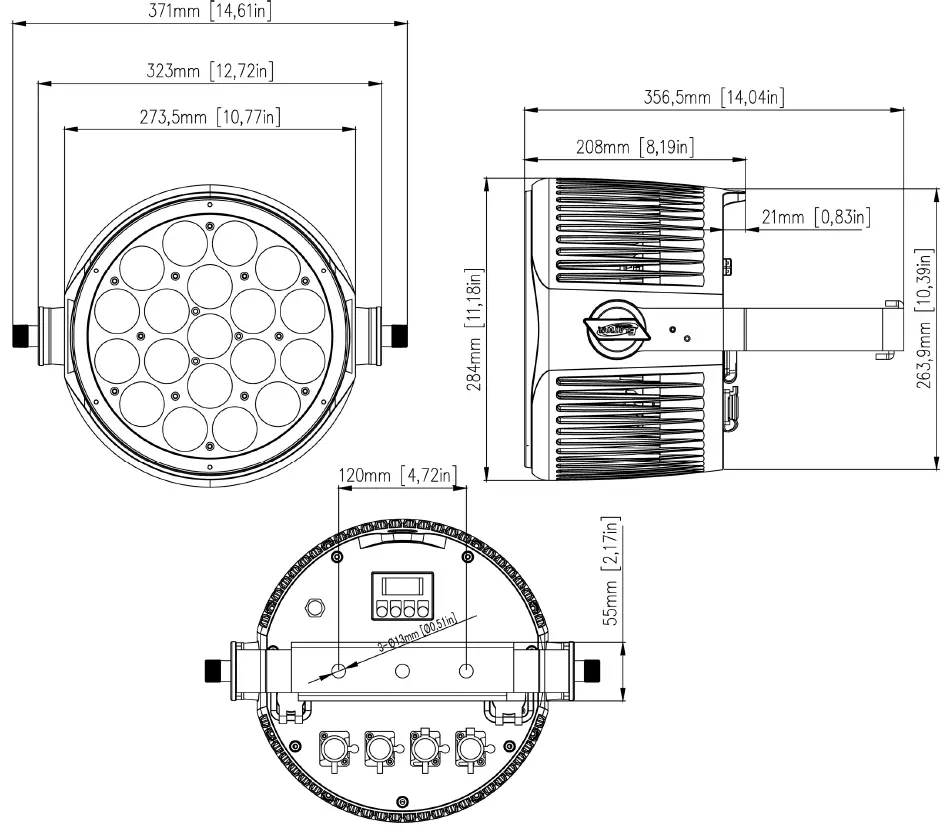
Specifications and improvements in the design of this unit and this manual are subject to change without any prior written notice.
OPTIONAL ACCESSORIES
| ORDER CODE | ITEM |
| QUICK RIG CLAMP | Low Profile Quick Release Clamp |
| SIXPAR/BD300 | Barn Door for SEVEN PAR 19IP |
| STR514 | 3 ft. (1m) IP65 5pin XLR Cable |
| NEU088 | 3 ft. (1m) Power Link Cable |
| Additional Cable Lengths Available |
 Topics | Elation Lighting Forums
 Home page
 Elation Professional - Professional Lighting Products
 Elation Professional EUROPE - Professional Lighting Products