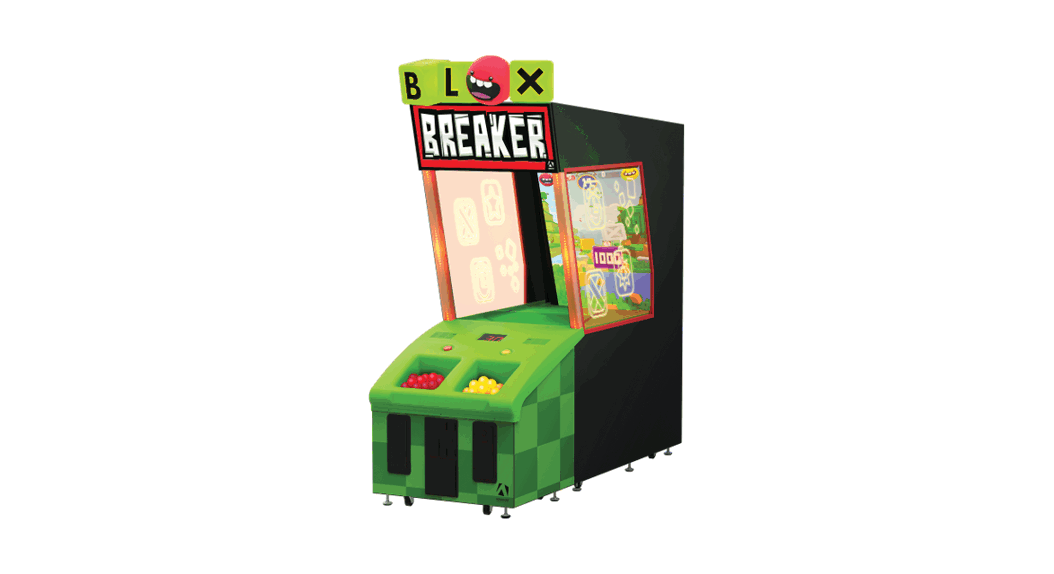
 Blox Breaker
BLX-65-1001
Operation & Service Manual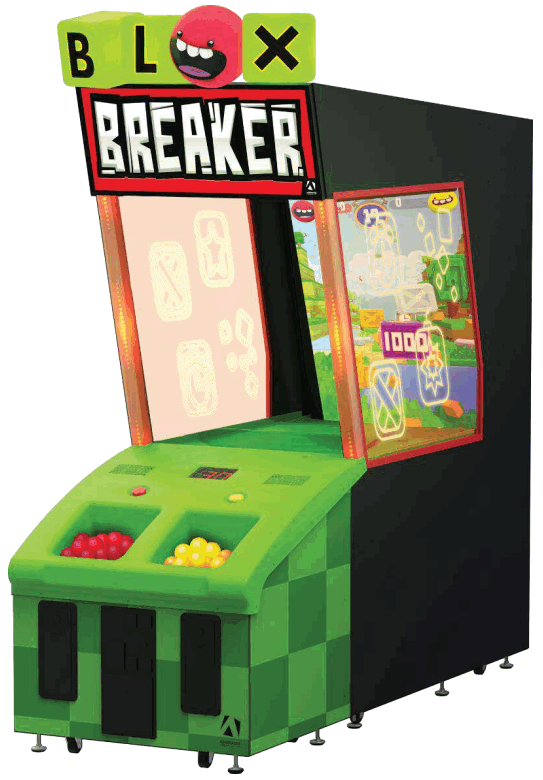 Version 4.2
aagames.com
BLX-65-1001 Blox Breaker
* Read this manual before use
General Remark
If you encounter any difficulties or if you need support on how to update and/ or install your Blox Breaker product, we invite you to contact your local distributor or reach us at [email protected] or by calling our support line +1-450-824-1671
Adrenaline Amusements Team
Adrenaline Amusements
2273 Antonio-Héroux street
Terrebonne, QC
Canada
J6X 4R3
Chapter 01 – Preface
Please read this page before preparing your Blox Breaker Arcade product for game play.
The following safety instructions apply to all game operators and service personnel. Specific warnings and cautions will be included throughout this manual.
Use the following safety guidelines to help protect the system from potential damage and to ensure your personal safety:
- Electronic components in the game cabinet run on 110V AC 60Hz (220V/ 50Hz in most of Europe, the Middle East and the Far East delivered units).
- To help prevent electric shock, plug the system into a properly grounded power source. These cables are equipped with 3-prong plugs to help ensure proper grounding. Do not use adapter plugs or remove the grounding prong from a cable. If you must use an extension cable, use a 3-wire cable with properly grounded plugs. We do recommend a 15A rated current or higher power cord.
- To help protect your system from sudden increases and decreases in electrical power, use a surge suppressor, line conditioner or Uninterruptible Power Supply (UPS).
- Be sure nothing rests on the system’s cables and that the cables are not located where they can be stepped on or tripped over.
- Keep your system far away from radiators and other heat sources.
- Do not block cooling vents.
Precaution for Game Operation
Adrenaline Amusements Inc. assumes no liability for injuries incurred while playing our games.
Operators should be aware that certain health and physical conditions may make people susceptible to injury when playing video games.
Safety To avoid electrical shock, unplug the cabinet before performing installation or service procedures.
If a power cord is damaged, it must be replaced by the equivalent power cord available from your distributor. Adrenaline Amusement Inc. assumes no liability for any damages or injuries incurred while setting up or servicing the cabinet. Only qualified service personnel should perform installation or service procedures.
Environmental Conditions
Cabinet is intended for indoor use only. Be sure to keep the cabinet dry and maintain operating temperatures of 59° – 86°F (15° – 30°C).
Operating & Voltage
| Voltage | Operating |
| 110V AC | 4.0 AMP |
| 220V AC | 2.0 AMP |
Chapter 02 – Game Features
Are you a sharp shooter?
Then feast your eyes and take aim into the virtual world of Blox Breaker.
How to Play
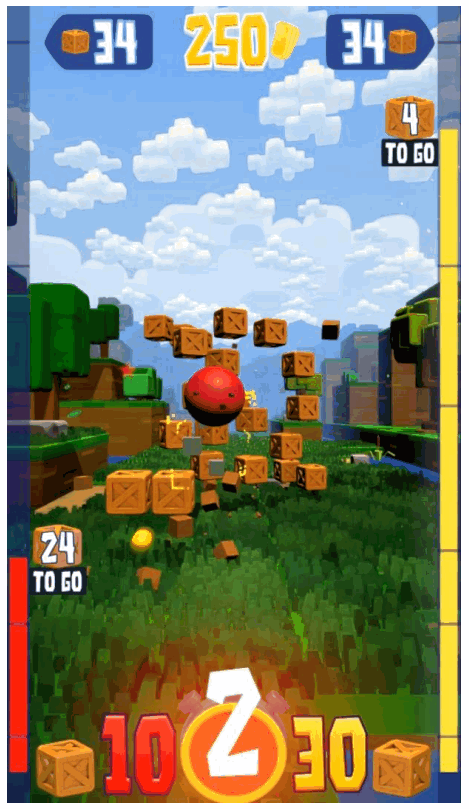
- Throw the balls on the screen to destroy boxes
- The ball’s trajectory goes into the digital realm
- Destroy as many boxes as you can
Chapter 03 – Unit Features
Hardware Features
- 2 Players Game
- 65 inches LCD Screen
- Unique Ball Trajectory through screen Technology
Cabinet Facts
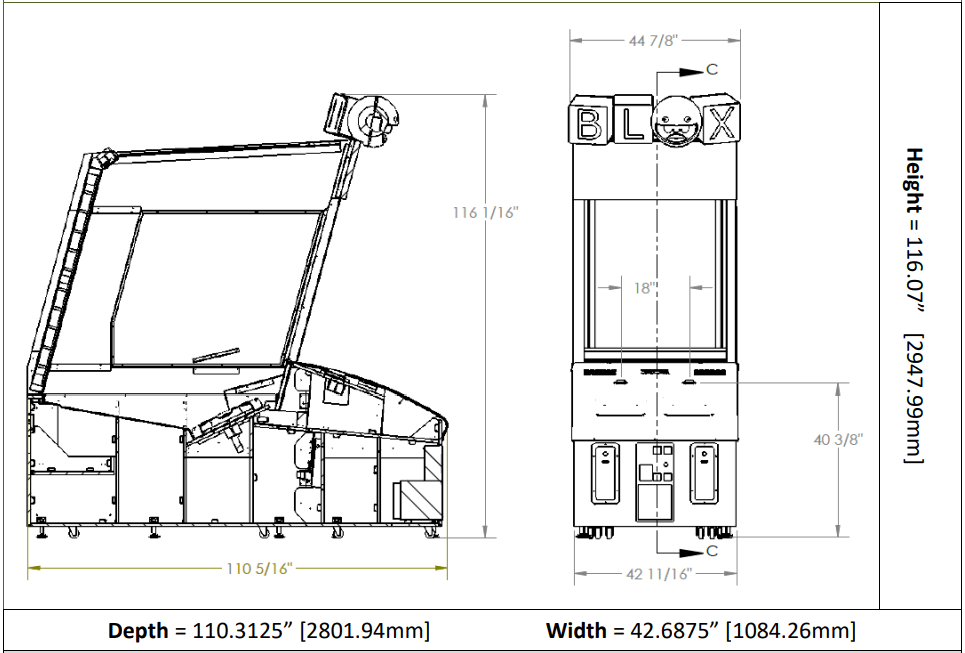
Cabinet Dimensions
Shipping Dimensions
| Width = 44” | Depth = 80” | Height = 45” |
| Width = 44” | Depth = 50” | Height = 45” |
| Weight = 1500 lbs |
Chapter 04 – Unit Installation
Assembling your Blox Breaker
Mechanical Parts
- Lift and straighten the screen assembly
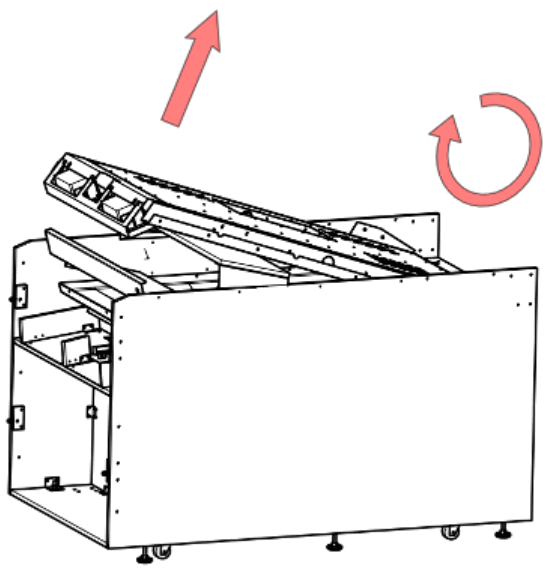
- Secure the screen into a lifted position using #10-24 x 1¼ philipps bolts.
Repeat for the opposite side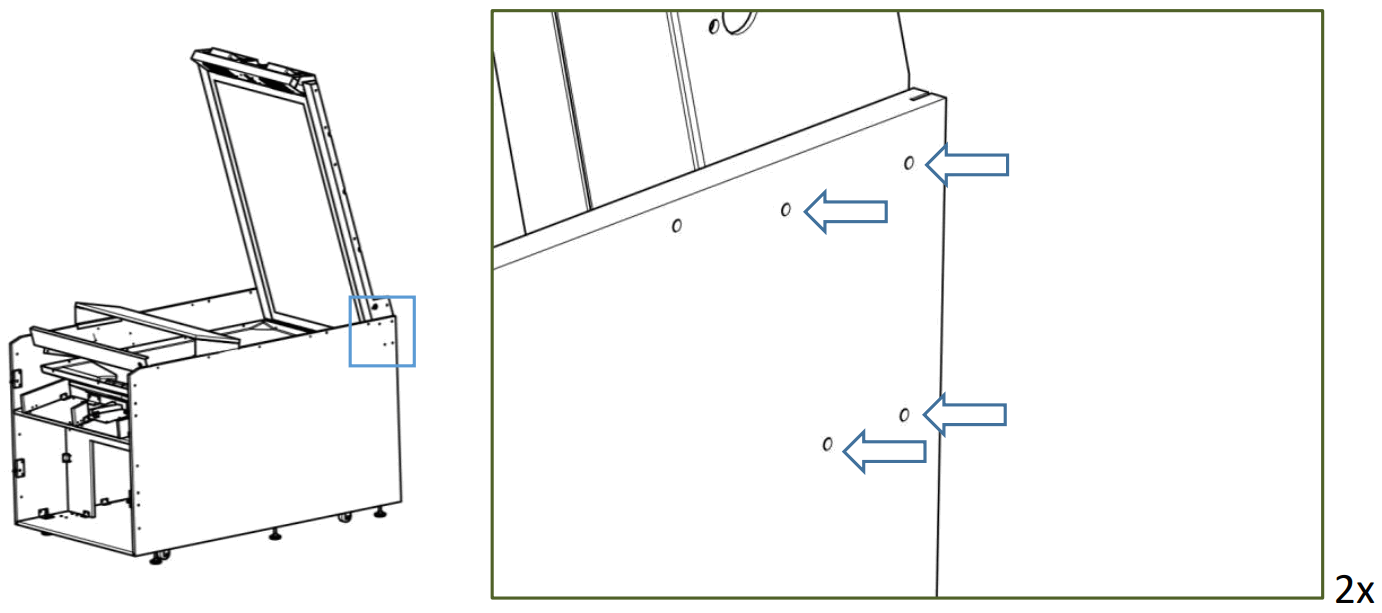
- Remove fasteners from the screen support and remove the support assembly
Repeat for the opposite side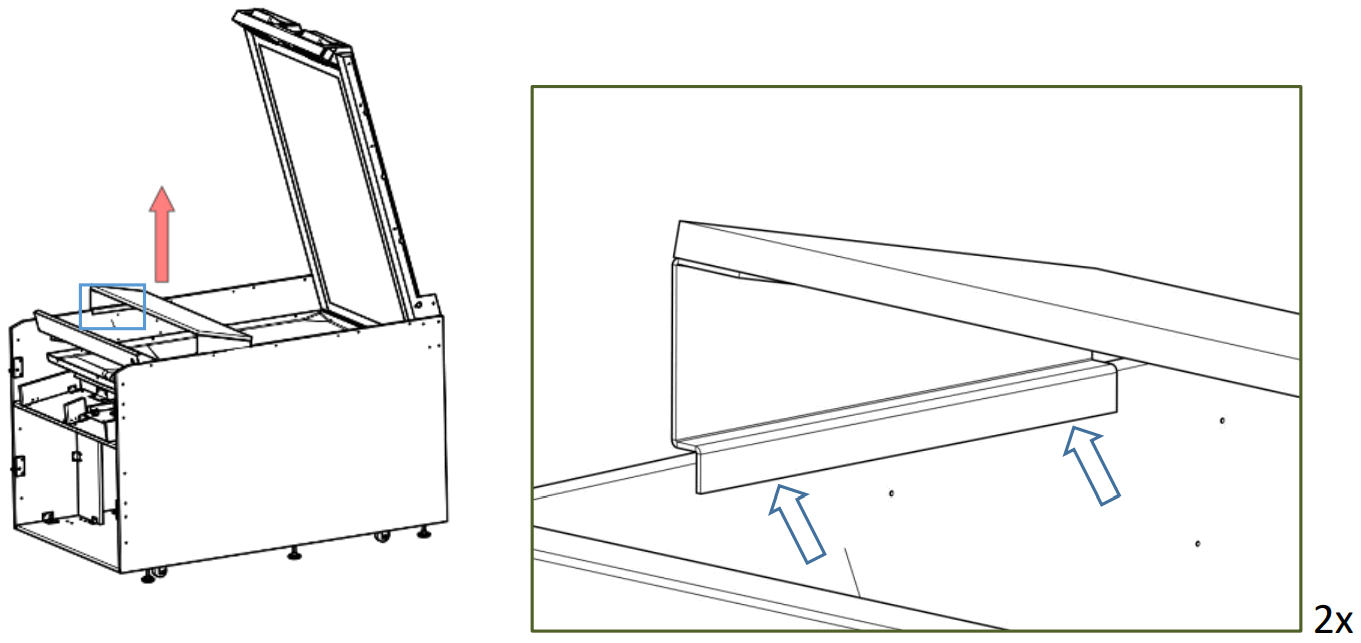
- Install lateral posts and secure the window assembly with #10-24 x 1¼ philips bolts
Repeat for the opposite side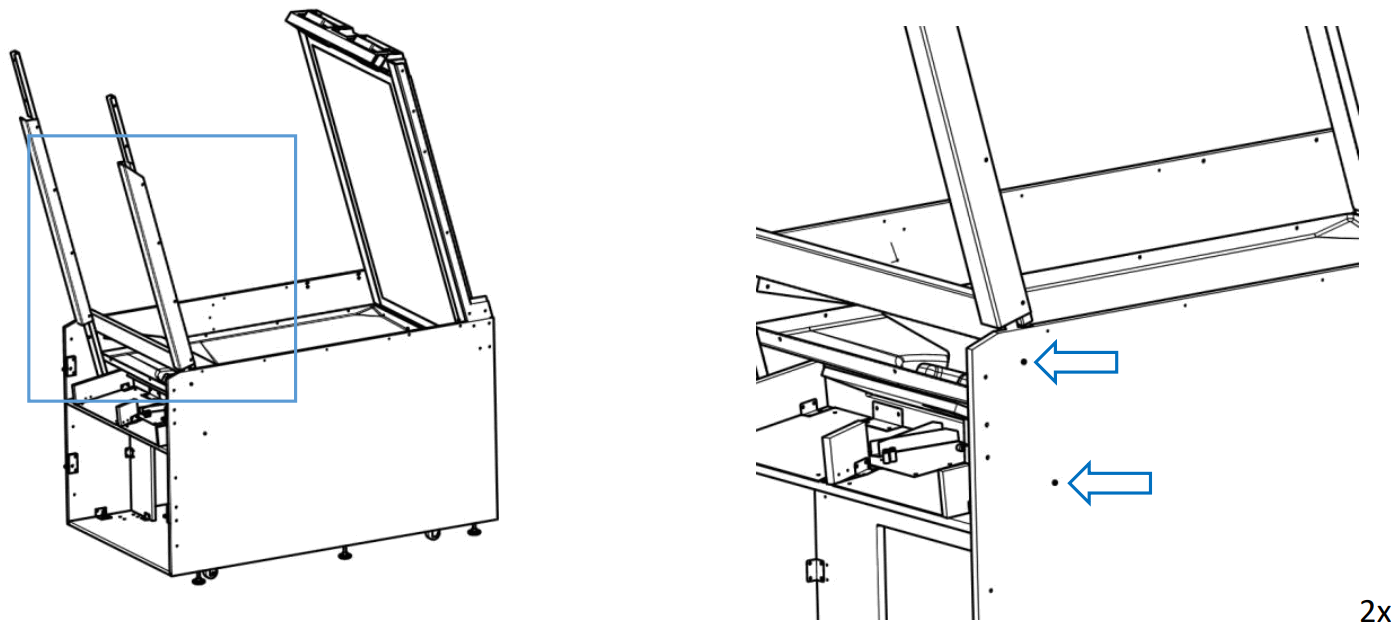
- Install the window assembly using Philipps pan ¾-8 screws
Repeat for the opposite side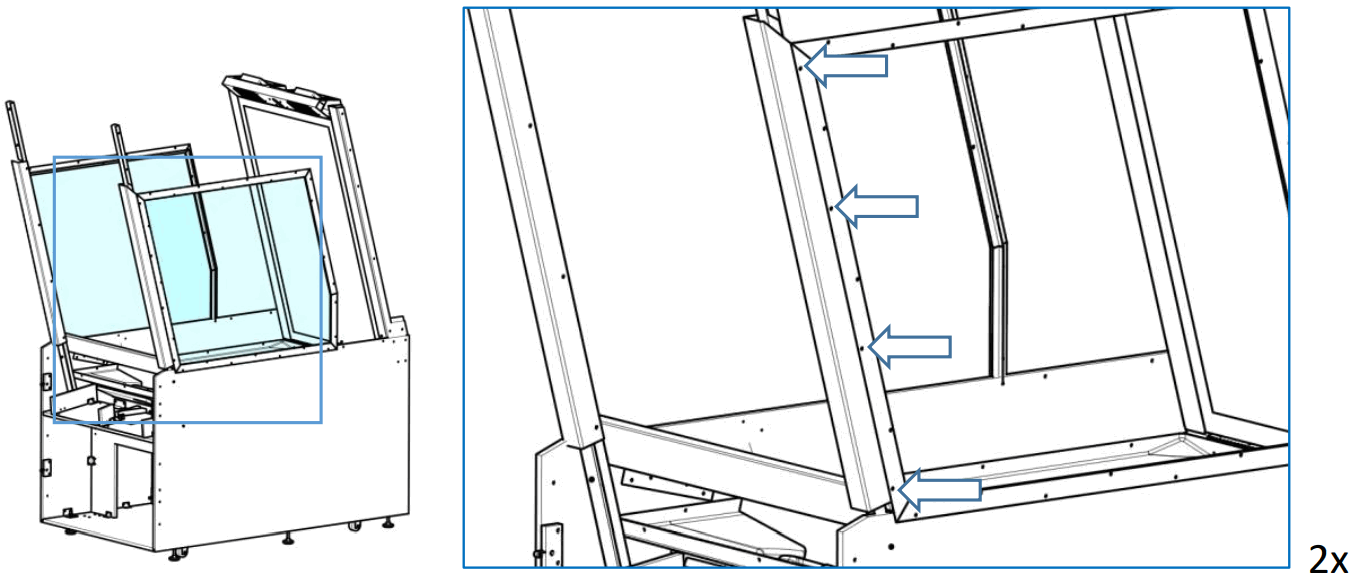
- Install the side panels
- First, install the bolts window assembly with Philipps pan #8 x ¾ screws
- Then, install the screen assembly with Phillips pan 10-24 x 1¼ bolts
Repeat for the opposite side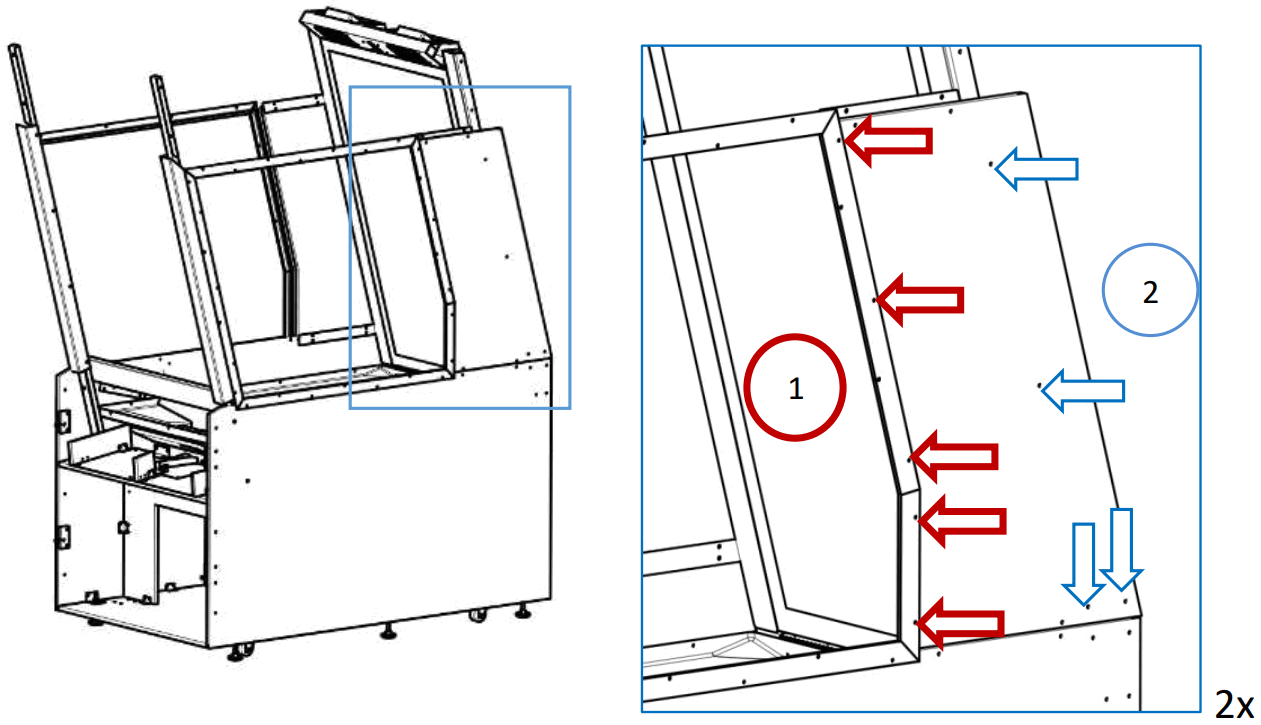
- Install upper side panels
- Secure the metal brackets with Philipps pan 10-24 x 1¼ bolts
- Secure the window assembly with Philipps pan #8-¾ screws.
Repeat for the opposite side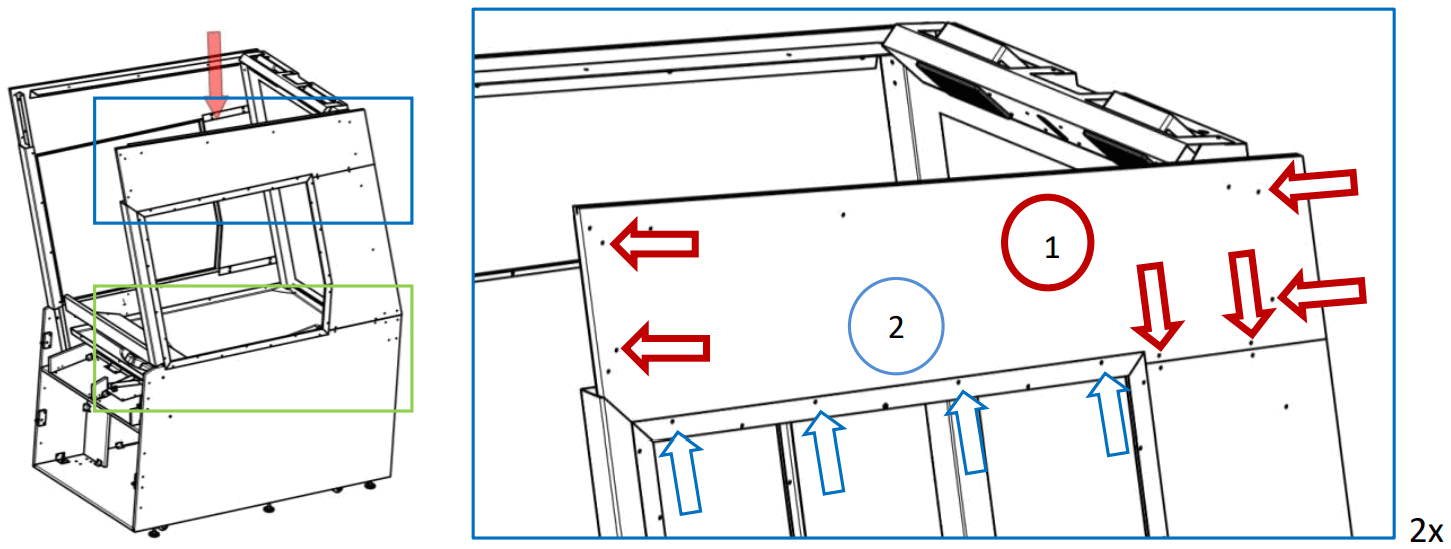
- Install the lower bolts for the window assembly
Repeat for the opposite side.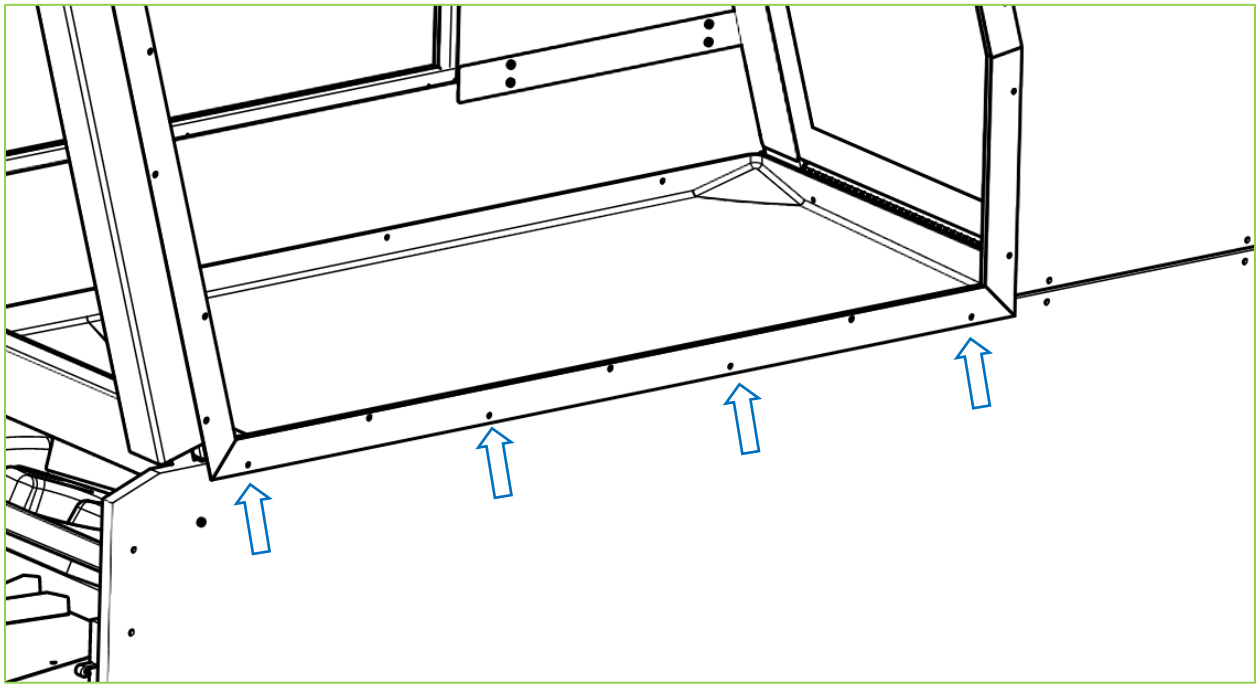
- Assemble the header assembly and top display using Philipps 10-24 x 1¼ bolts for each side
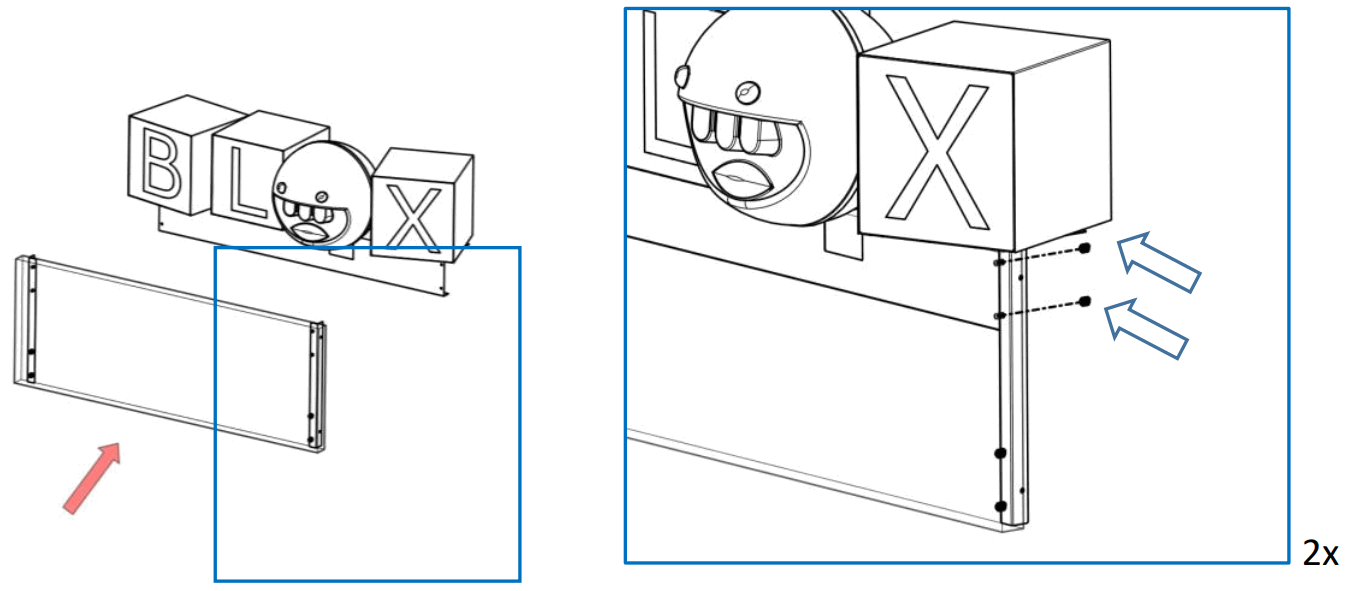
- Install the header assembly with the upper side panels and Philipps 10-24 x 1¼ bolts
Repeat for the opposite side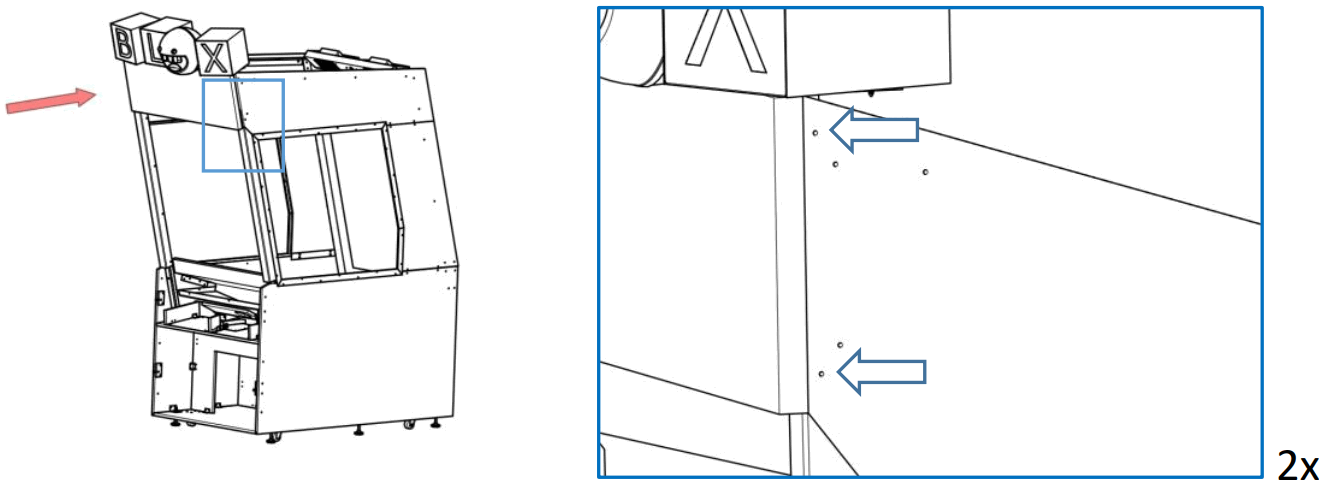
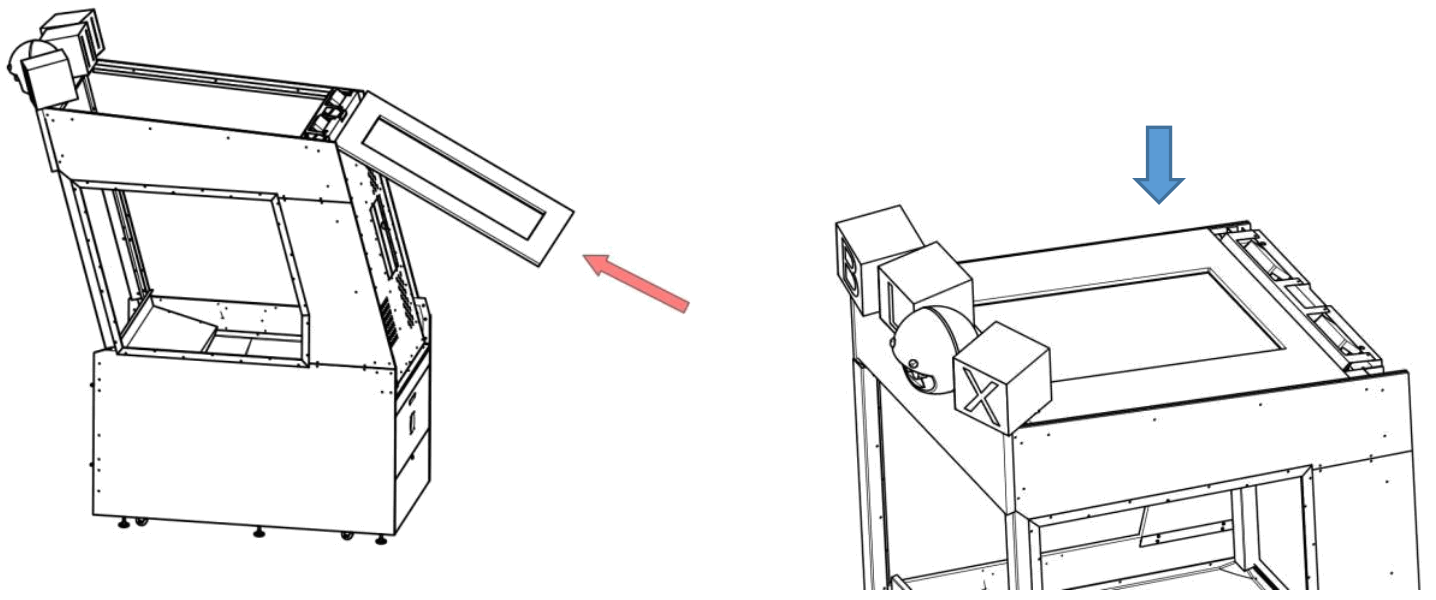
- Install the ceiling light platform by sliding it from the back of the machine
 Electronic parts
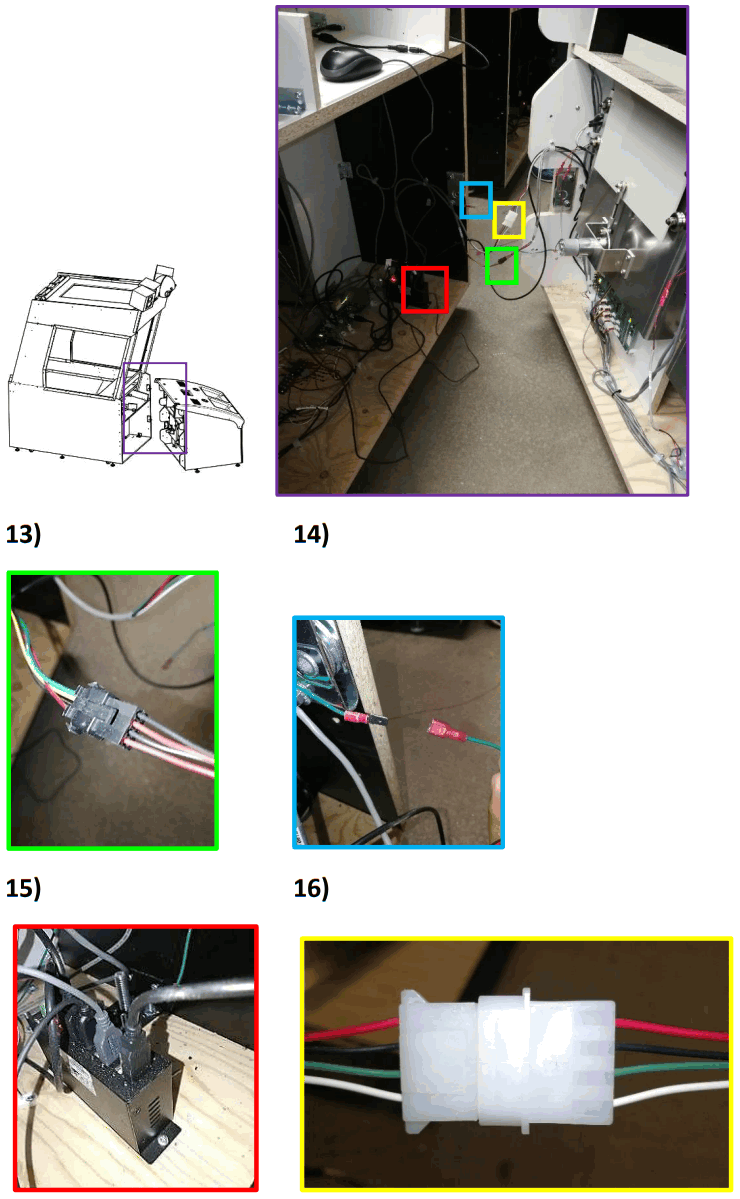
11) R/H: Plug the 2 power cables into their inputs and the LED Controllers together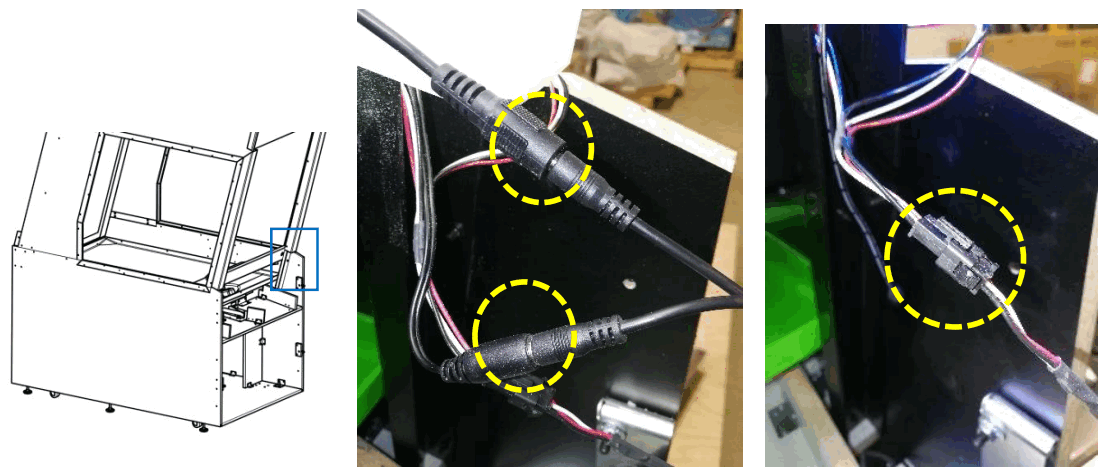
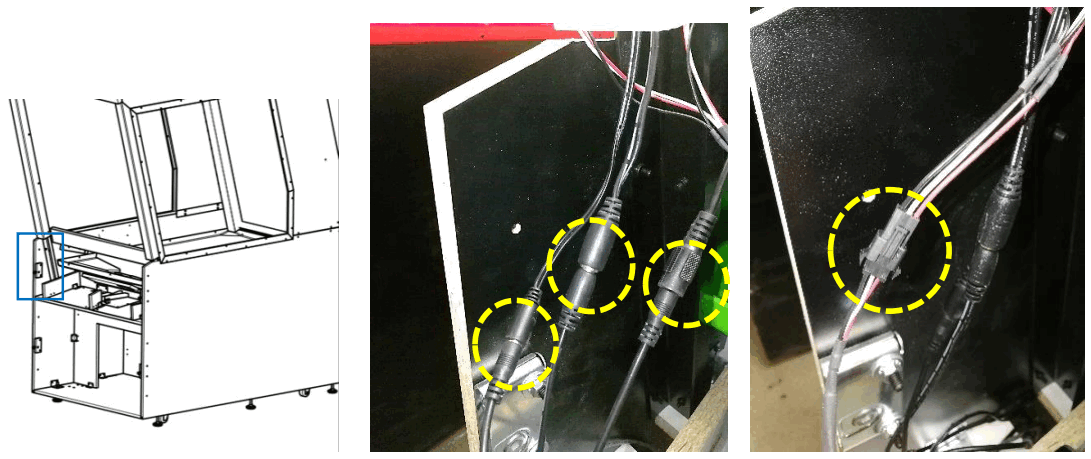
- L/H: Plug the 3 power cables into their inputs and the LED Controllers together
- Connect the 2 ends of the speaker’s connector
- Connect the 2 ends of the ground wire connector
- Connect the USB cable from the dash assembly to the USB hub in the rear cabinet
- Connect the 2 Molex connectors
Closing and opening the cabinet
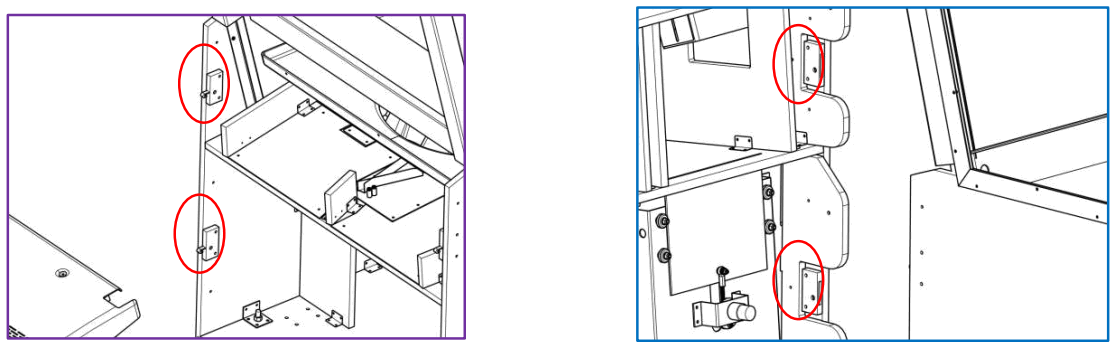
- Make sure all 4 draw latches are aligned
- Use the large Allen key to open or close the cabinet
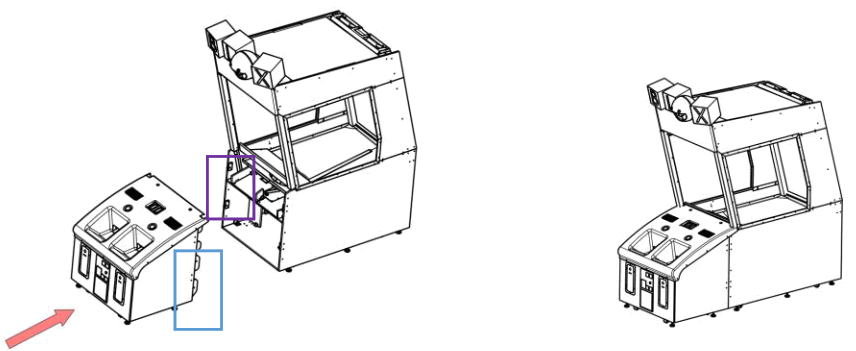
- Draw latches to be aligned while assembling the two assemblies
- Turning motion for closing
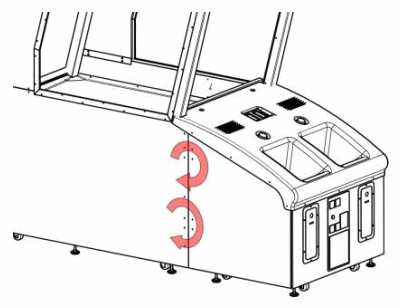 Turning motion for opening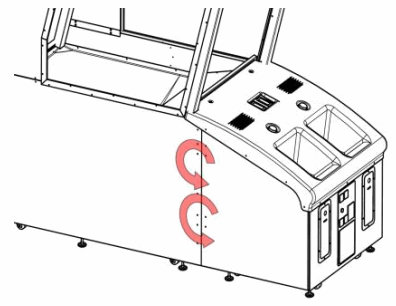
Operator Menu
Access the Operator Menu by pressing the white operator menu button on inside the dash behind the middle door
Navigate through the menu using the 2 main dash buttons as shown on the screen capture below.
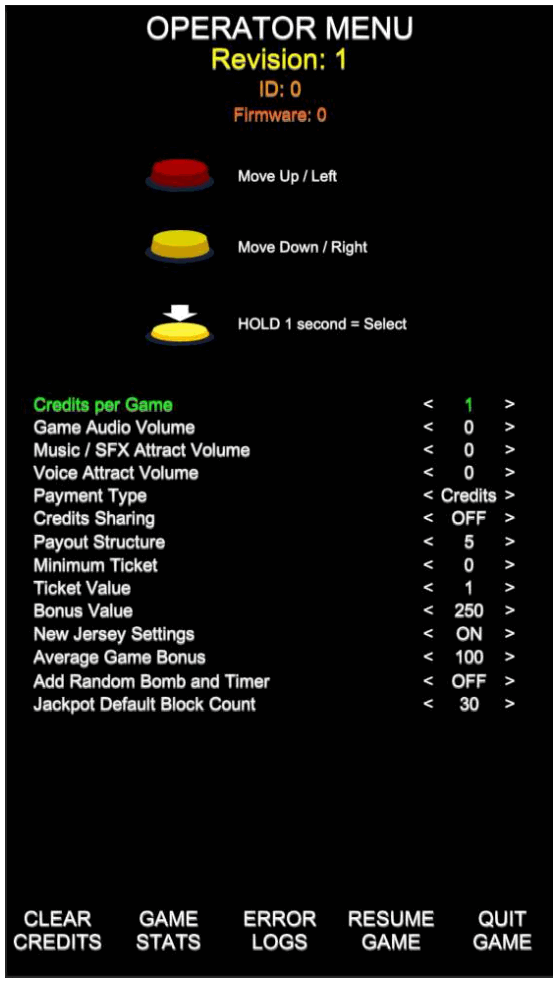
| Operator Menu | Values | What It Does |
| Credits Per Game | 1-20 | Adjusts the number of credits required to play. “0” sets the unit in free play mode. |
| Game Audio Volume | 0-20 | Adjusts the in-game audio volume. “0” will mute the game. |
| Music/SFX Attract Audio Volume | 0-20 | Adjusts the audio volume of the attract loop. “0” will mute the attract loop. |
| Voice Attract Audio Volume | 0-20 | Adjusts the volume of the voice attract loop. “0” will mute the voice |
| Payment Type | Credit / Card | Changes the credit type. “Credits” = Coins and “Card” = Card Reader. This will change the in-game text accordingly. |
| Credit Sharing 1_2 | On / Off | Adjusts the credit sharing option between each player. (Off: Sharing Disabled // On: Sharing Enabled) If you have Card Readers (2X) please use OFF. |
| Payout Structure | 1-10 | Adjusts the ticket payout. Please see the payout structure on the next page. |
| Minimum Ticket | 0-20 | Adjusts the minimum number of tickets dispensed per play. |
| Ticket Value | 1-2 | Adjusts the value of physical tickets. Physical tickets are either worth “1” ticket or “2” tickets. |
| Bonus Value | 100-2000 | Number of tickets given by the machine when the jackpot block count is reached |
| New Jersey Settings | On/Off | If set to On, a message will be displayed if more than 40 credits are inserted. |
| Average Game Bonus | 50-1000 | Average number of games needed to win the bonus. This setting adjusts the difficulty and is calculated with the last 1000 games. |
| Add Random Bomb and Timer | On/Off | Timer: Adds extra time when hit by a ball Bomb: Destroys the surrounding blocks when hit by a ball |
| Jackpot Default Block Count | 25-50 | Number of broken blocks needed to win the jackpot. This number is then auto adjusted by the “average game bonus” |
| Clear Credits | Resets the Inserted credits to 0 if more than 40 credits are entered. | |
| Game Stats | Shows the Stats Screen. | |
| Error Logs | Displays the previous errors | |
| Resume Game | Exits the Operator Menu and returns to the game. | |
| Quit Game | Exits the game and returns to the Windows desktop. |
Payout Structure
Tickets are awarded to the player depending on the number of blocs that they successfully break.
There are 10 different payout structures. They can be selected in the operator menu.
| Number of Broken Blocks | Payout Structure Setting 1 | Payout Structure Setting 2 | Payout Structure Setting 3 | Payout Structure Setting 4 | Payout Structure Setting 5 |
| 5-6 blocks | 2 | 2 | 5 | 10 | 10 |
| 7-10 blocks | 3 | 5 | 10 | 15 | 15 |
| 11-18 blocks | 5 | 10 | 15 | 20 | 20 |
| 19-22 blocks | 10 | 15 | 20 | 25 | 40 |
| 23- Jackpot | 15 | 40 | 50 | 80 | 90 |
| Jackpot (25-50) | Bonus Value | ||||
| Number of Broken Blocks | Payout Structure Setting 6 | Payout Structure Setting 7 | Payout Structure Setting 8 | Payout Structure Setting 9 | Payout Structure Setting 10 |
| 5-6 blocks | 10 | 15 | 15 | 25 | 30 |
| 7-10 blocks | 20 | 25 | 25 | 30 | 40 |
| 11-18 blocks | 30 | 30 | 40 | 50 | 80 |
| 19-22 blocks | 50 | 75 | 75 | 100 | 100 |
| 23- Jackpot | 100 | 100 | 150 | 175 | 200 |
| Jackpot (25-50) | Bonus Value | ||||
Chapter 06 – Service & Repair
Computer Connections
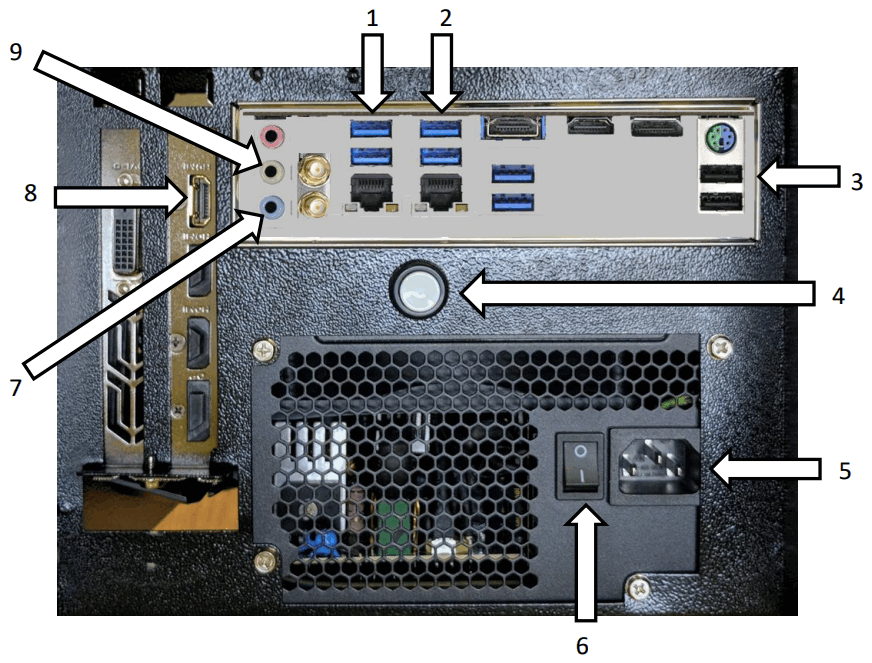
| No. | Description |
| 1 | USB Port to Windows License Dongle |
| 2 | USB Port to Camera |
| 3 | USB Port to USB Hub Inlet |
| 4 | Power Button |
| 5 | AC Inlet Power Supply |
| 6 | AC Power Switch |
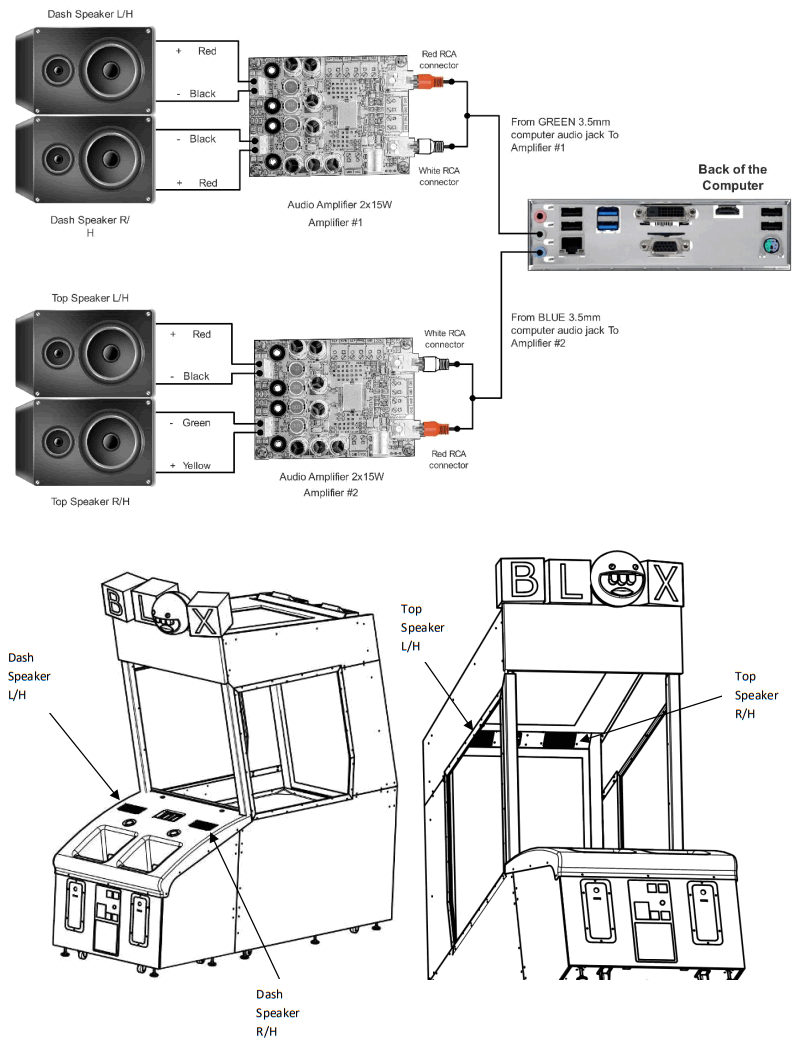
| 7 | Blue Audio Jack 3.5 mm for Top Speakers |
| 8 | HDMI port to monitor |
| 9 | Green Audio Jack 3.5 mm for Dash Speakers |
Troubleshooting
* NOTE: When requesting a warranty replacement, you will be asked to give the unit’s serial number from the back of the unit.
| Video Troubleshooting | |
| No Picture or Display Problem | There might have loose or faulty connections between the monitor and the computer. Make sure the HDMI cable is connected properly in the computer connector and in the monitor connector. |
| Verify that the Computer is powered on. The fan on the side of the computer case should be spinning as a reference, if it’s not spinning press the Power Button on the front of the computer. | |
| Audio Troubleshooting | |
| Low Volume / No Sound | Increase the volume in the game by pressing the Operator Button and adjusting the volume options in the Operator Menu. You might also Quit the game to Windows desktop and increase the volume via the Speaker icon on the bottom right of your screen. Speaker icon on the bottom right of your screen. |
| Verify the wirings behind the speakers and the amplifiers. Verify that the 1/8’’ audio jack is plugged in the computer’s sound input jack and that the other end RCA’s are plugged in the sound amplifier. | |
RGB Led Troubleshooting
If the RGB LEDs are not working properly verify that the RGB LED Controller is connected on a valid COM Port.
Press the Operator Button and Quit/Exit the game to Windows Desktop.
Connect a USB mouse.
Right-click on the windows flag on the bottom left corner and select Device Manager.
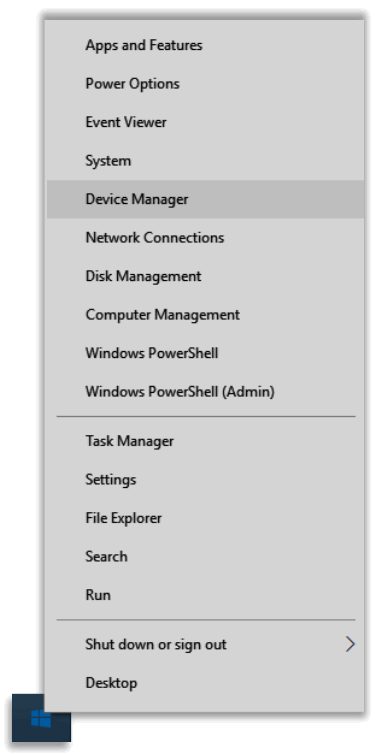
Expand the “Ports (COM & LPT)” line by clicking on the >.
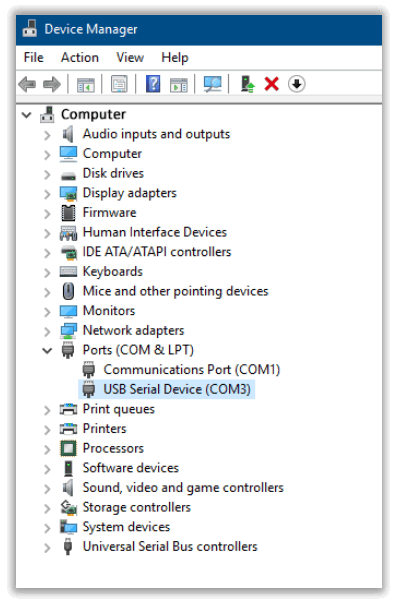
Verify that the “USB Serial Device” is set between COM2 to COM9.
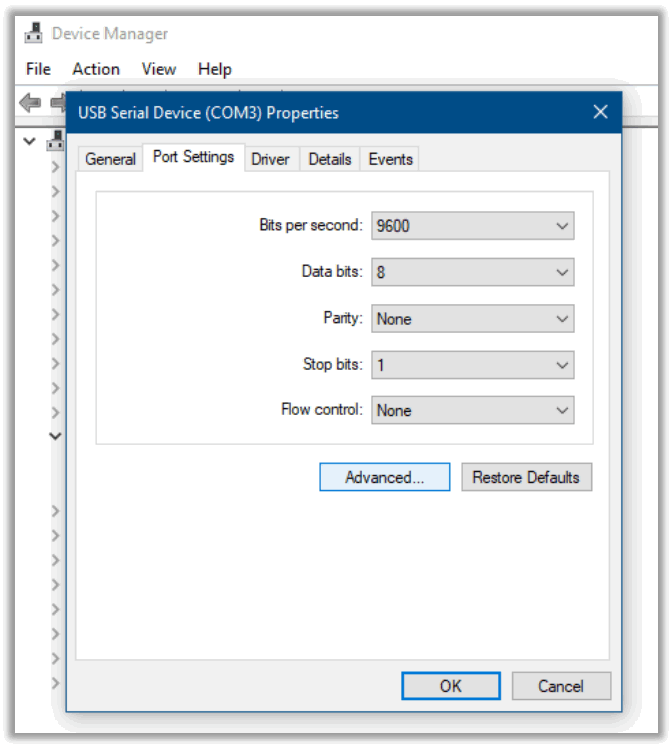
If it’s outside this range, double-click on it to open its properties.
Select the “Port Settings” Tab.
Click on “Advanced…”
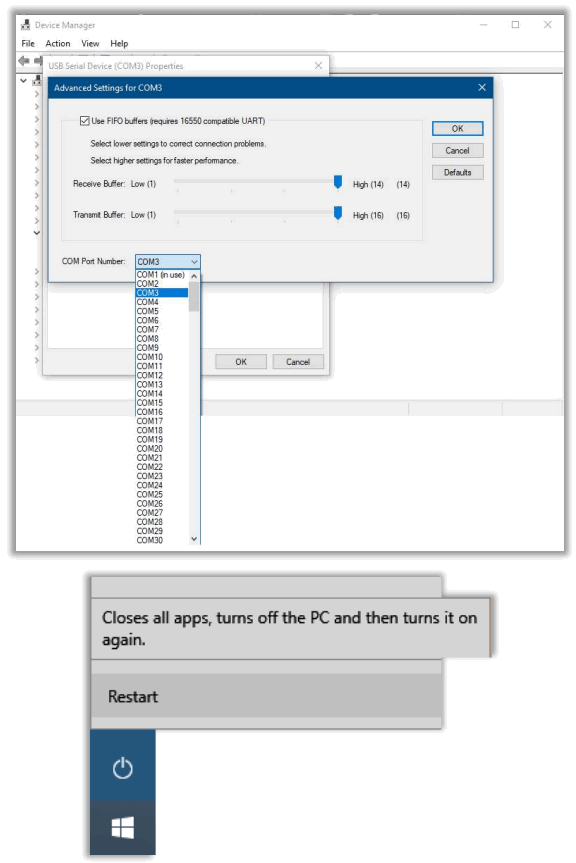
Click on the COM Port Number scrolling menu and select COM9.
Click on OK.
Click on OK again.
Close the Device Manager window and restart Windows.
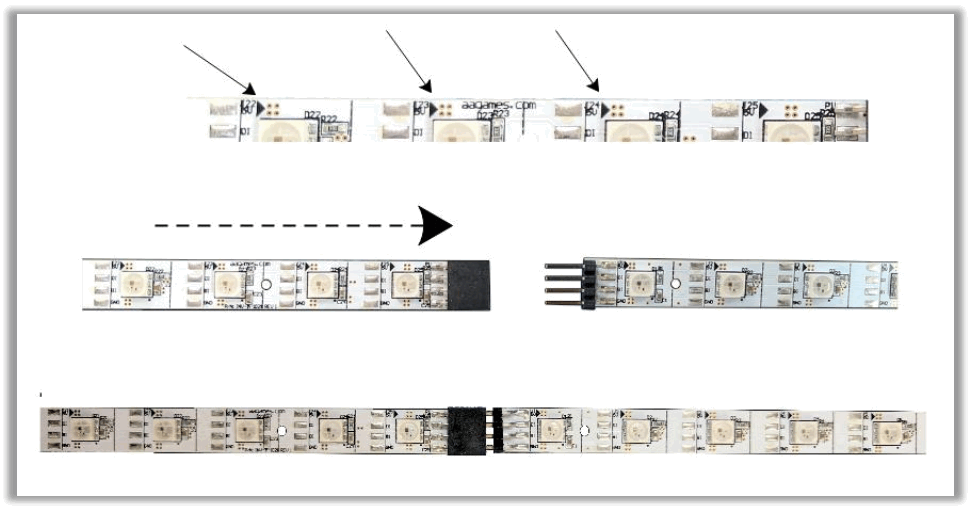
Replacing RGB LED PCBs
If you need to replace the building RGB LED PCBs, verify the connections so that the arrows point always in the same direction.
Wireless Internet Configuration
Your network can be configured via Ethernet cable or Wireless.
If you have an Ethernet cable available to be plugged in, insert it into the motherboard LAN RJ45 connector.
If not, here’s how to configure your wireless network with your own existing Wi-Fi network.
-Start the unit.
-There will be Adrenaline Amusements wallpaper with a 150 seconds delay before the attract mode shows up. It gives enough time for a wireless network to connect.
(This delay will be present on each reboot if you don’t connect your unit to the Internet)*.
-Open the service door and press the Operator button.
-Choose Exit/Quit to Windows.
-Connect the provided USB hub and into it the USB keyboard and mouse.
– Open Connect to a Network by clicking the network icon ( ) in the lower right corner of the screen.
-In the list of networks, click the network you want to connect to and click connect.
-Enter your security key.
-Once connected, double-click the GameLauncher shortcut on the desktop.
Having your unit connected to the Internet includes free software live update!
*If you do not connect your unit to the Internet, you can double-click the Disable_Network shortcut on the Windows desktop to bypass the 150seconds Internet lookup delay.
Operator Settings keeps resetting
Operator Settings keeps resetting back to default values after powering off the breakers.
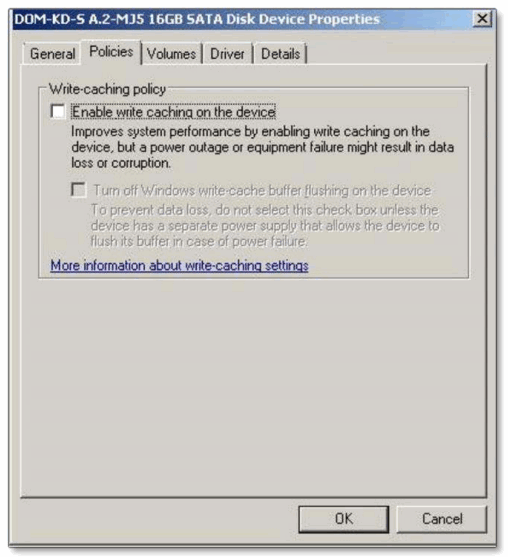
The Windows & SSD Device write cache needs to be disabled:
-Exit the game to Windows.
-Press on Start
-Right click on My Computer
-Choose Properties
-Click on Device Manager
-Expand Disk Drives
-Double click the SSD Hard Drive 60Gb or 120Gb Device (Not the USB drive if there is one)
-Go to Policies
-Remove the check in front of “Enable Write caching on the device” as seen below, press OK and then YES to reboot the computer. If it doesn’t ask to reboot the computer you need to do it by pressing Start, Restart.
Computer not powering at boot
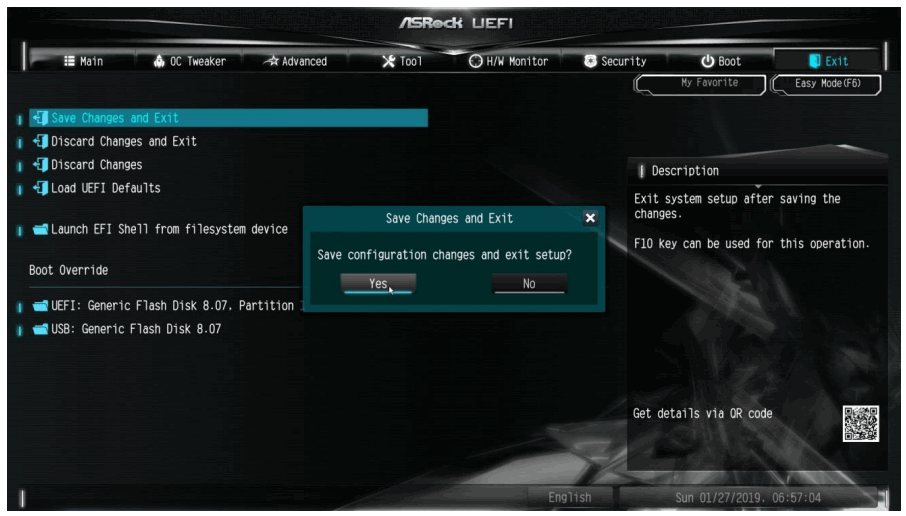
If your computer is not powering on by itself at boot you’ll need to verify the Bios Setting.
-Power off the computer.
-Plug a USB keyboard and a USB mouse.
-Press the power button on the computer.
Press and hold on the keyboard until you see the Bios screen.
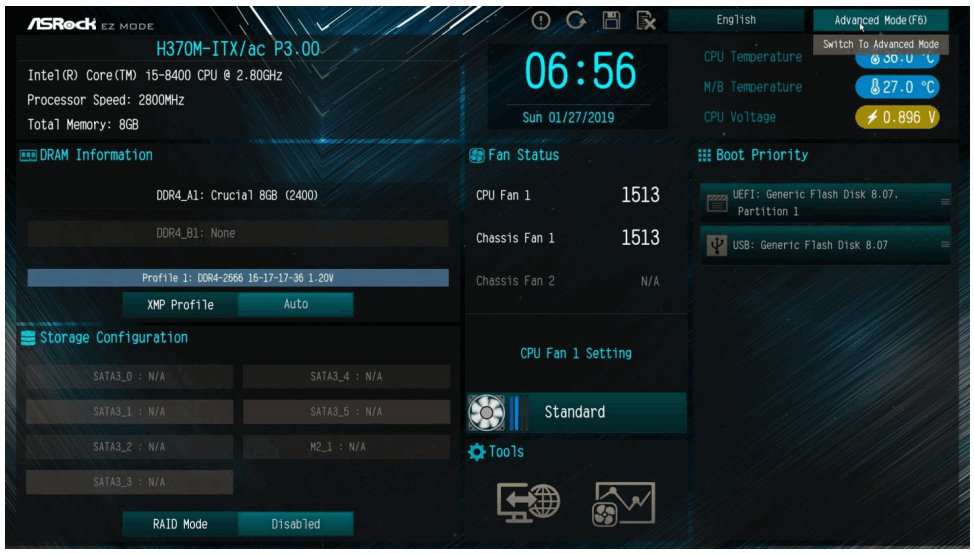
-Press on F6 or using a mouse click on advanced on the top right corner.
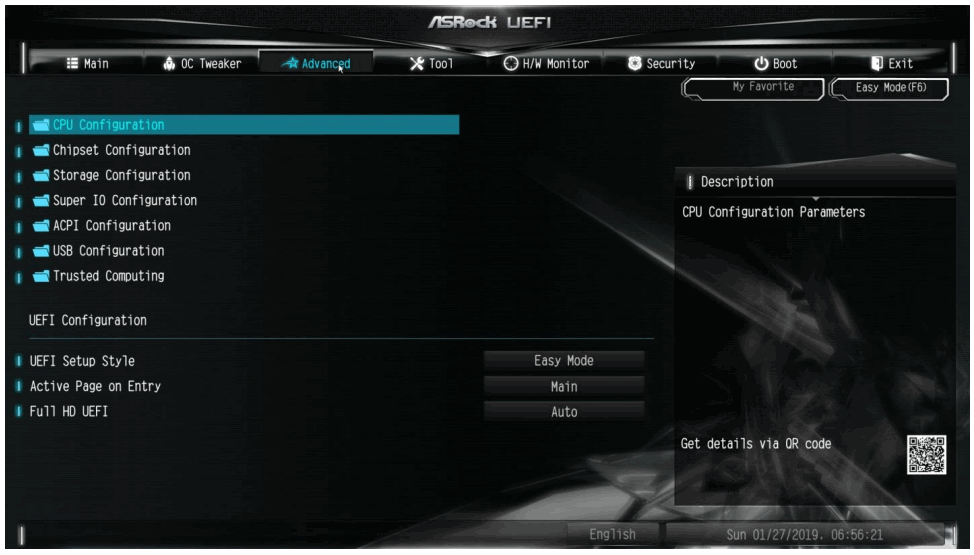
-Click on Advanced tab and then click on Chipset Configuration.
-Go to the bottom of that page, click/select the line Restore AC Power Loss , click on the drop box where it displays “Power Off” and select Power On.
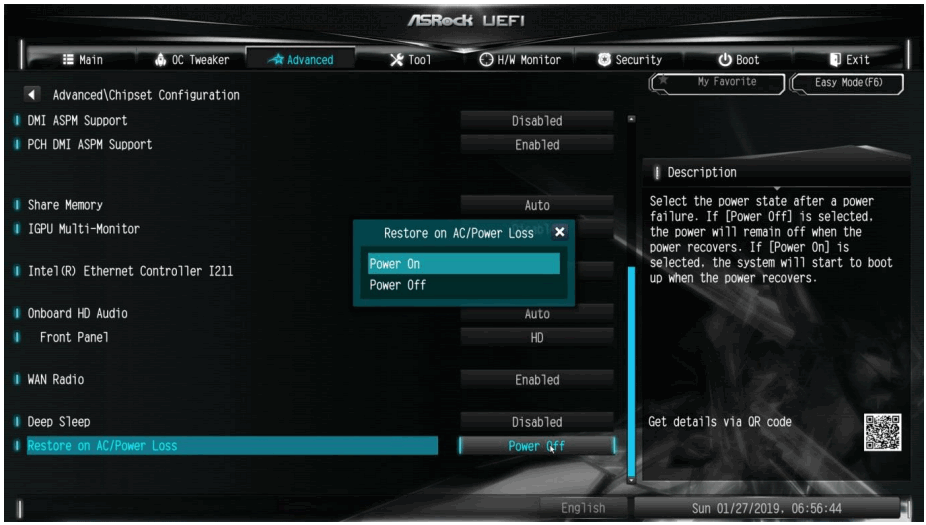
-On your keyboard press on and then click on OK to confirm and save the settings.
Or go to the Exit tab, click save and Exit.
Chapter 07 – Parts
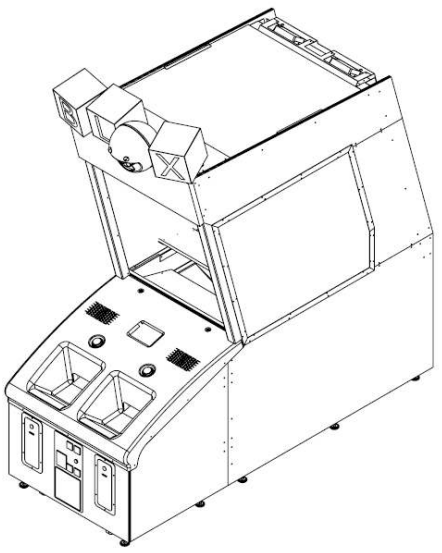
Cabinet Parts
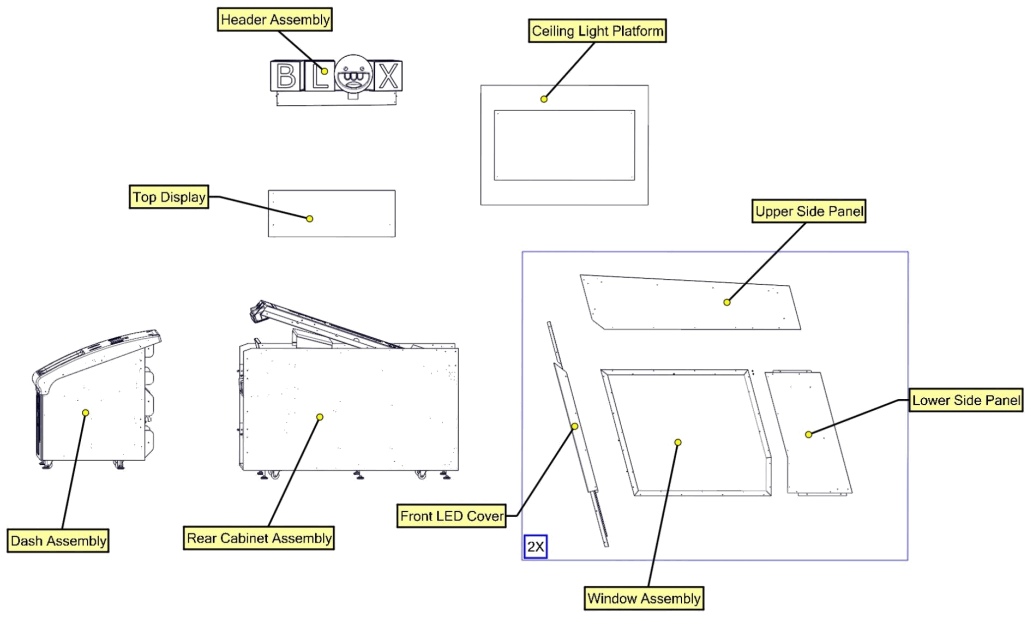
| Part Description | Part # |
| Dash Assembly | BLX-02-0002 |
| Rear Cabinet Assembly | BLX-02-2000 |
| Front LED Cover | BLX-08-1005 |
| Window Assembly | BLX-08-1002 |
| Lower Joint | BLX-01-1043 |
| Screen Support | BLX-01-1005 |
| Lower Side Panel | BLX-02-8000-01 |
| Upper Joint | BLX-01-1042 |
| Upper Side Panel | BLX-02-8000-02 |
| Ceiling Light Platform | BLX-02-1010 |
| Header Assembly | BLX-01-4000 |
| Top Display | BLX-08-5000 |
Major Structural Parts
Other Cabinet Parts
| Part Description | Part # |
| Monitor 65” with Safety Glass and Cases | RAM-10-0001 |
| Coin Door Assembly with 2 Upper Mech Holder & Blank Bottom Door | ADR-40-3000-06 |
| 7-Digits Meter with bracket | ADR-42-08012-072 |
| Speakers 4” | ADR-50-9986-00 |
| Red Large Button with microswitch /LED | ADR-75-L012-600 |
| Yellow Large Button with microswitch /LED | ADR-75-L012-155 |
| Wheel General Duty Rubber Caster | INV-F25083 |
| Leveling Mount | INV-62805K-39 |
| Fan 120mm | ADR-FAN-120mm |
| Fan 80mm | ADR-FAN-80MM-01 |
| Grill 120mm | ADR-GRILLE- `120MM |
| Grille, 80mm | ADR-GRILLE-80MM |
| Multi-Stage Filter 6A | ADR-817-1321-ND |
| Male R2/R5 Concealed Butt-Joint Panel Fastening Latches, Part : R5-0074-07 | INV-R5-0074-07 |
| Female R2/R5 Concealed Butt-Joint Panel Fastening Latches, Part : R5-0079-07 | INV-R5-0079-07 |
| Door Assembly With 2 Upper Mech Holder, 1 Validator Cut Out, Blank Bottom Door | ADR-40-3000-06 |
| Cam Lock for Panel Thickness up to 23 mm | ADR-14-2010 |
Computer & Electronics
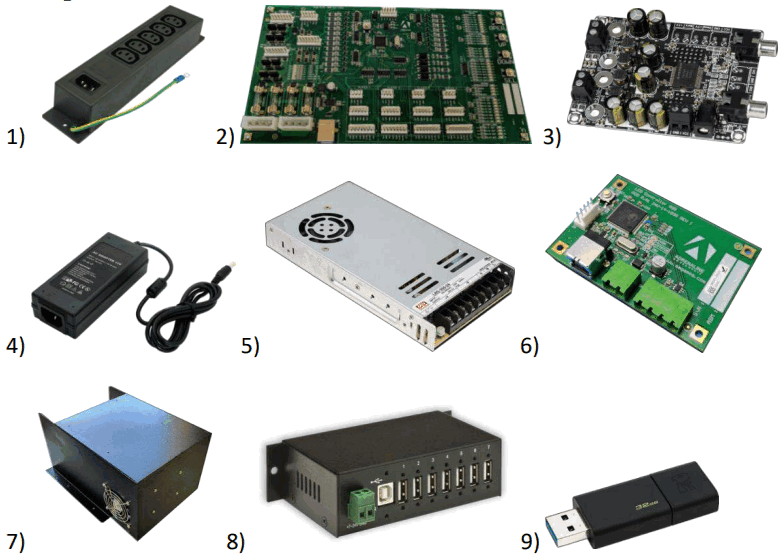
| Ref | Part Description | Part Number |
| 1 | Power Bar IEC5GLM | INV-05-1242 |
| 2 | I/O Board – 4 Players/Motors – Ver. 5.0 | ADR-04-1003-BLX |
| 3 | 2X15 Watt Class D Audio Amplifier Board | INV-14-0005 |
| 4 | +12V / 5A Power Supply for Sound Amplifiers | INV-14-0006 |
| 5 | +5V/300W Power Supply | SF-14-0010 |
| +12V/320W Power Supply | INV-05-1248 | |
| 6 | RGB LEDs Controller | INV-14-1030 |
| 7 | PC Box For Blox Breaker | ADR-11-1018 |
| 8 | 7-Ports USB Hub Powered | INV-11-1021 |
| 9 | Restore Usb Key Blox Breaker, 16 Go, 3.0. | ADR-11-2013-BLX |
| Terminal Cover For Power Supply RSP-320-5 And RSP-320-12 | ADR-TBC-09 | |
| Yellow Dongle | TF-04-1212 | |
| Hard Drive For Blox Breaker | INV-11-1027-BLX | |
| Green Terminal Block, 4 Positions, Part : ED1719- ND | ADR-ED1719-ND | |
| Yellow Large Round Button with Led White Lamp | ADR-75-L012-155 | |
| Red Large Round Button with Led White Lamp | ADR-75-L012-600 | |
| Entropy 2000 Ticket Dispenser | ADR-42-1337-00 | |
| Kit For Motor 12V and Harness Assembly | INV-15-0005-Kit |
Header & LEDs

| Part Description | Part Number |
| Header ‘Breaker’ Kit, Blox Breaker | BLX-08-5000-Kit |
| PCB Assembly with 6x LEDs, include WS2813A, Modify For Blox Breaker | INV-14-1028-03 |
| PCB Assembly with LEDs For Corner, include WS2813A, Crazy Tower | INV-14-1028 |
| Orange LED Strip, 1 Meter, 6mm, Blox Breaker, Part : YGL-LB5730OC-12V | BLX-14-0001 |
| White LEDs Cable For Cubes And Sphere, Blox Breaker, Part : RL-3528D120W08-12V | BLX-14-0002 |
| White LEDs Cable For ‘Breaker’ Header, Blox Breaker, Part : RL-3528D129W08-12V | BLX-14-0003 |
| LED Controller RGB | INV-14-1030 |
| Front Right LED Polycarbonate Cover, Blox Breaker, Part : BLX-08-1005-R | BLX-08-1005-R |
Cabling
| Part Description | Part Number |
| Straight Barrel Power Cable, 2.1mm, 6′, 18AWG | ADR-839-1163-ND |
| Power Cord, IEC-C14 to IEC-C7 (2-Prong) SPT-2, 18AWG, 3′ | INV-PW-117-03 |
| Molded Audio Cable, 3.5mm Male To 2x RCA Male, 6′ | INV-35MM-RCAE-06 |
| HDMI Cable, 8′ | INV-HDMI-140-08K |
| Power Cord, PDU to CPU, IEC-C13 To IEC-C14, 18AWG, 3′ | INV-PW-100-03 |
| Power Cord, PDU To CPU, IEC-C13 To IEC-C14, 18AWG, 8′,TFX | INV-PW-100-08 |
| Power Cord, Wall To Unit, 14AWG, 6′ | INV-PW-105C-06 |
| Cable Power Splitter, C14 to 2x C13, 1′ | INV-PW-200B-01 |
| Cable USB 3.1, Type C Male To A Male | INV-USB-323-10 |
| Cable Usb 2.0 ‘AB’, 2′ | INV-USB-AB1-02BK |
| Cable Usb 2.0 ‘AB’, White, 3′ | INV-USB-AB1-03 |
| Cable Usb 2.0 ‘AB’, Black, 10′, TFX | INV-USB-AB1-10BK |
| Barrel Power Cable, Male-Female, 4′, Blox Breaker | BLX-03-0023 |
| Main Power Cable, Blox Breaker | BLX-03-0027 |
Misc. Parts
| Part Description | Part Number |
| Power Entry EMI Filter | ADR-05-1241 |
| Windows 10 Licence, Part : 6EU-00035 | ADR-6EU-00035 |
| Red Ball, Blox Breaker | BLX-05-0001 |
| Yellow Ball, Blox Breaker | BLX-05-0002 |
| Intel Depth Camera, Blox Breaker | BLX-10-0001-PROG |
| PCB For Step Motor Drive, Blox Breaker | BLX-04-0002 |
| PCB For Color Sensor, Blox Breaker | BLX-04-0003 |
| PCB For 2 Digits Display, Blox Breaker | BLX-04-0004 |
Wiring Harness
| Part Description | Part Number |
| Connector For LEDs Spinner, Part : S1143E-04- ND | SF-05-0014 |
| Barrel Connector Wire ”Y”, 2.1mm Female to 2 x 2.1mm Male, 300mm, LED Header, Fruit Ninja Part : CN-DCF-2M | TF-05-1223 |
| Harness IO Board To Buttons | BLX-03-0001 |
| Harness Controller RGB To LED RGB | BLX-03-0002 |
| Harness Power Supply 5V To Fuse Holder | BLX-03-0003 |
| Harness Power Supply 12V To Fuse Holder | BLX-03-0004 |
| Harness Fuse Holder To Power Controller LEDs | BLX-03-0005 |
| Harness Fuse Holder To PCB Drive | BLX-03-0006 |
| Harness For Power Motor 12V | INV-15-0005-Mod |
| Harness Pc Box Power To Front Cabinet | BLX-03-0008 |
| Harness IO Board To Motor Sensor | BLX-03-0010 |
| Harness For Monitor Speakers | BLX-03-0011 |
| Harness For Audio Ampli To Front Cabinet | BLX-03-0012 |
| Harness For Front Speaker To Rear Cabinet | BLX-03-0013 |
| Harness For PSU Power | BLX-03-0014 |
| Harness For IO Board To Digit Display | BLX-03-0015 |
| Harness For IO Board Power To Rear Cabinet | BLX-03-0016 |
| Harness For Header To Fuse Holder | BLX-03-0017 |
| Harness For Power Audio Ampli | BLX-03-0018 |
| Harness For Fuse Holder To Orange LEDs | BLX-03-0019 |
| Harness For Solenoid To Motor Drive | BLX-03-0020 |
| Harness For Stepper Motor To Motor Drive | BLX-03-0021 |
| Harness For RGB Splitter | BLX-03-0022 |
| Harness For Coin MEC | BLX-03-0024 |
| Harness For Operator Menu | BLX-03-0025 |
| Harness Ground For Front Cabinet | BLX-03-0026 |
| Harness For Color Sensor To Drive | BLX-03-0028 |
| Harness For Ticket Dispenser, (J2)&(J6) | FT-03-4030 |
| Harness For PC Box | INV-03-4080 |
Chapter 08 – Diagrams & Schematics
I/0 Board ADR-04-1003
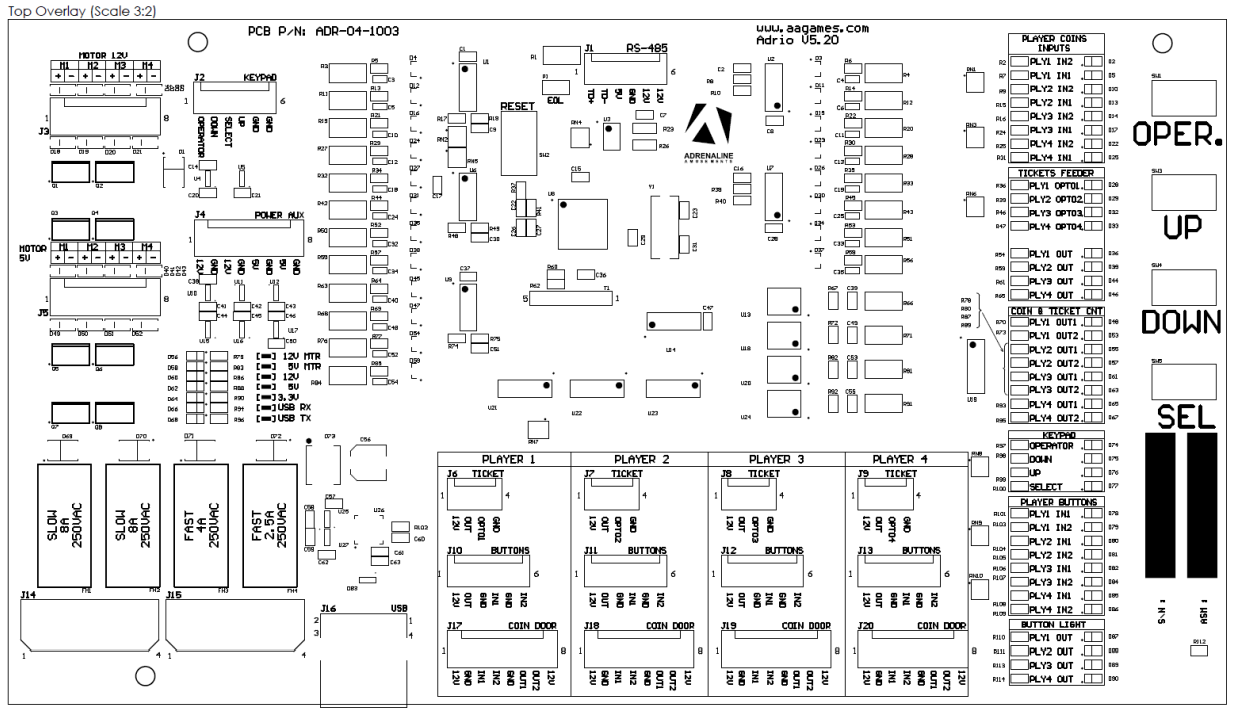
| J1 | J2 | J3 | J4 |
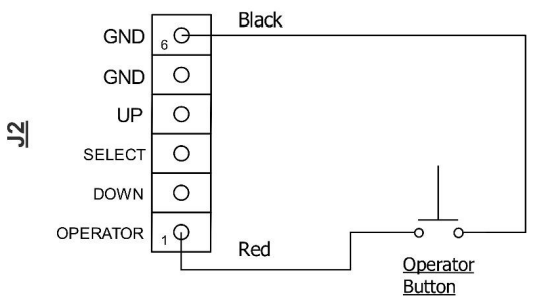
| Display 1. (White) TD+ 2. (Blue) TD- 3. (Red) 5V 4. (Black) GND 5. (Yellow) 12V 6. Not connected | Keypad 1. (Red) Operator 2. Not Connected 3. Not Connected 4. Not Connected 5. Not Connected 6. (Black) GND | No Use | No Use |
| J5 | J6 | J7 | J8 |
| No Use | Ticket Dispenser Player 1 1. (Red) +12V 2. (Blue) OUT 3. (Green) OPTO1 4. (Brown) GND | Ticket Dispenser Player 2 1. (White) +12V 2. (Yellow) OUT 3. (Orange) OPTO1 4. (Black) GND | No Use |
| J9 | J10 | J11 | J12 |
| No Use | Player 1- Buttons 1. (Red) +12V 2. (Black) OUT 3. (White) GND 4. (Blue) IN1 5. Not Connected 6. Not Connected | Player 2- Buttons 1. (Yellow) +12V 2. (Green) OUT 3. (Brown) GND 4. (Orange) IN1 5. Not Connected 6. Not Connected | No Use |
| J13 | J14 | J15 | J16 |
| No Use | No Use | 5V/12V Input DC 1. (White) +12V 1. (Green) GND 2. (Black) GND 3. (Red) +5V | USB To Computer |
| J17 | J18 | J19 | J20 |
| Coin Door Player-1 1. (Red) +12V 2. (Green) GND 3. (Yellow) IN1 4. (White) IN2 5. (Blue) GND 6. (Black) OUT1 7. Not Connected 8. Not Connected | Coin Door Player-2 1. (Red) +12V 2. (Green) GND 3. (Yellow) IN1 4. (White) IN2 5. (Blue) GND 6. (Black) OUT1 7. Not Connected 8. Not Connected | Coin Door Player-3 1. (White) +12V 2. (Black) GND 3. (Red) IN1 4. (Yellow) IN2 5. (Blue) GND 6. (Brown) OUT1 7. (Orange) OUT2 8. (Green) +12V | No Use |
I/O Board – Detailed Wiring
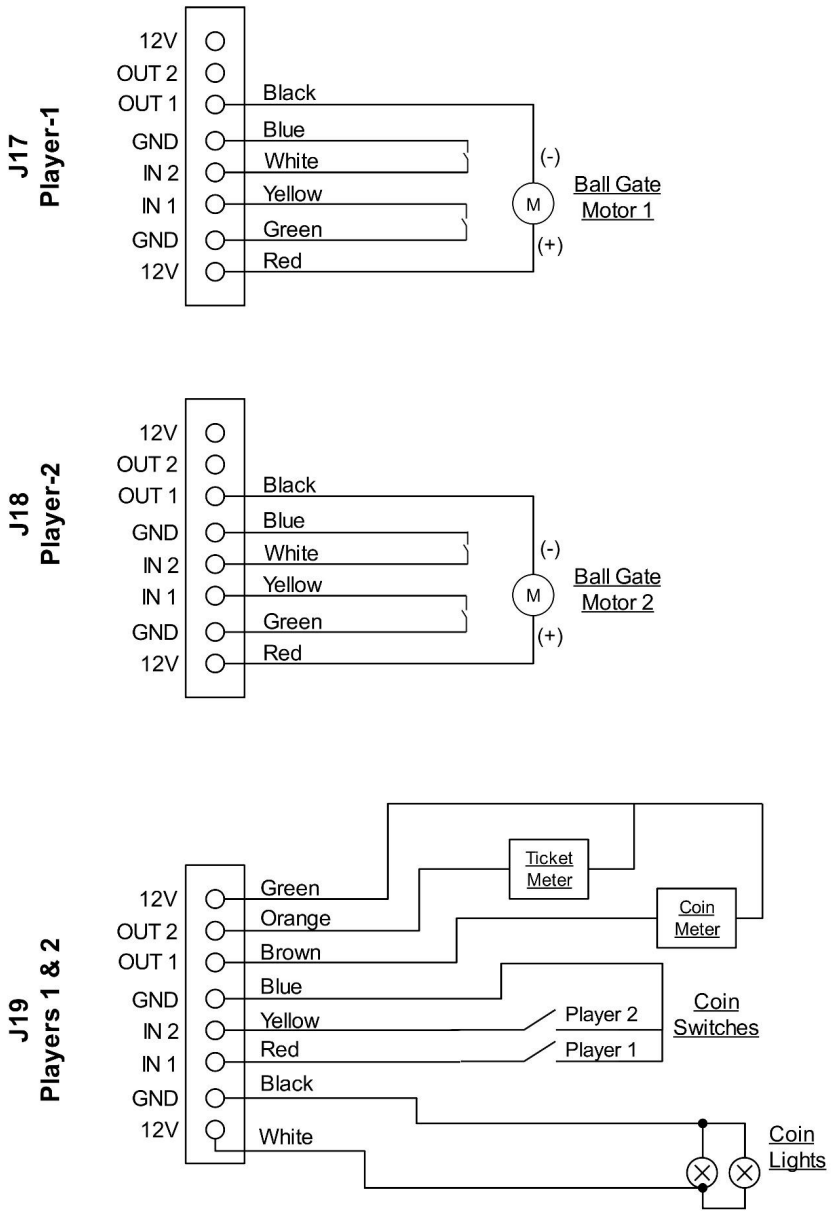 | 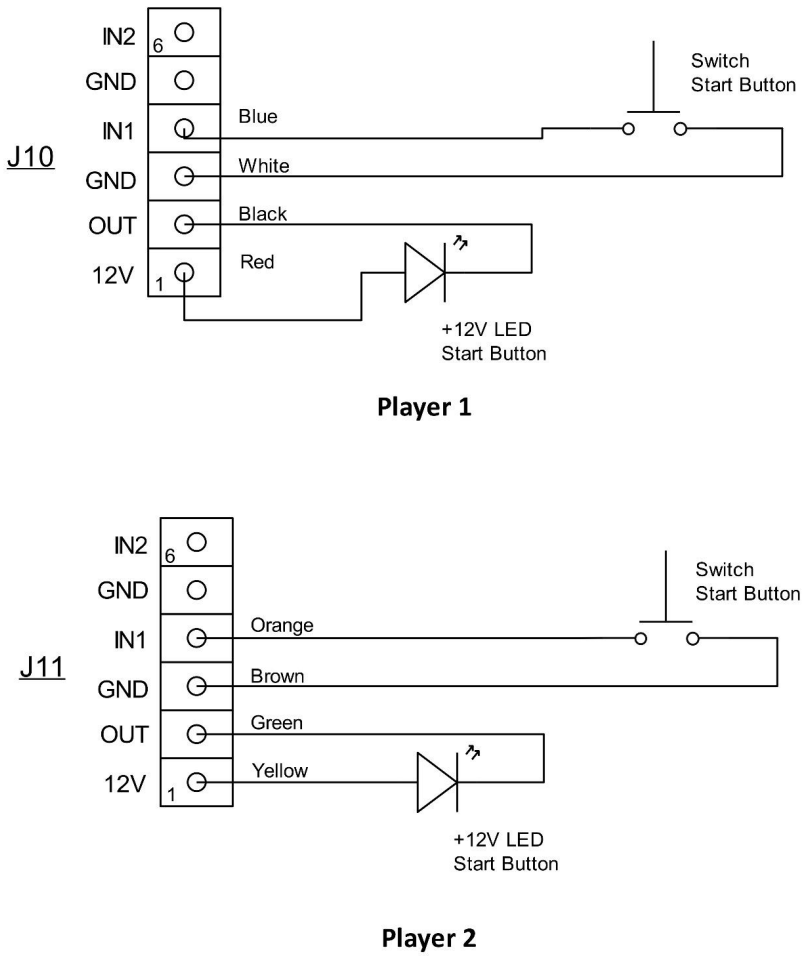 |
Tickets Wiring
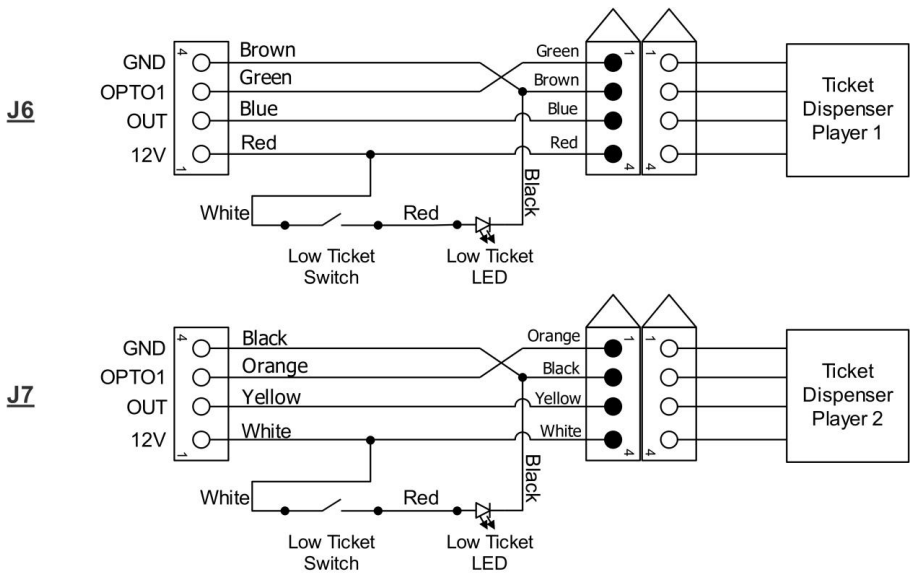
Operator Menu Button Wiring
Speakers Wiring Colors
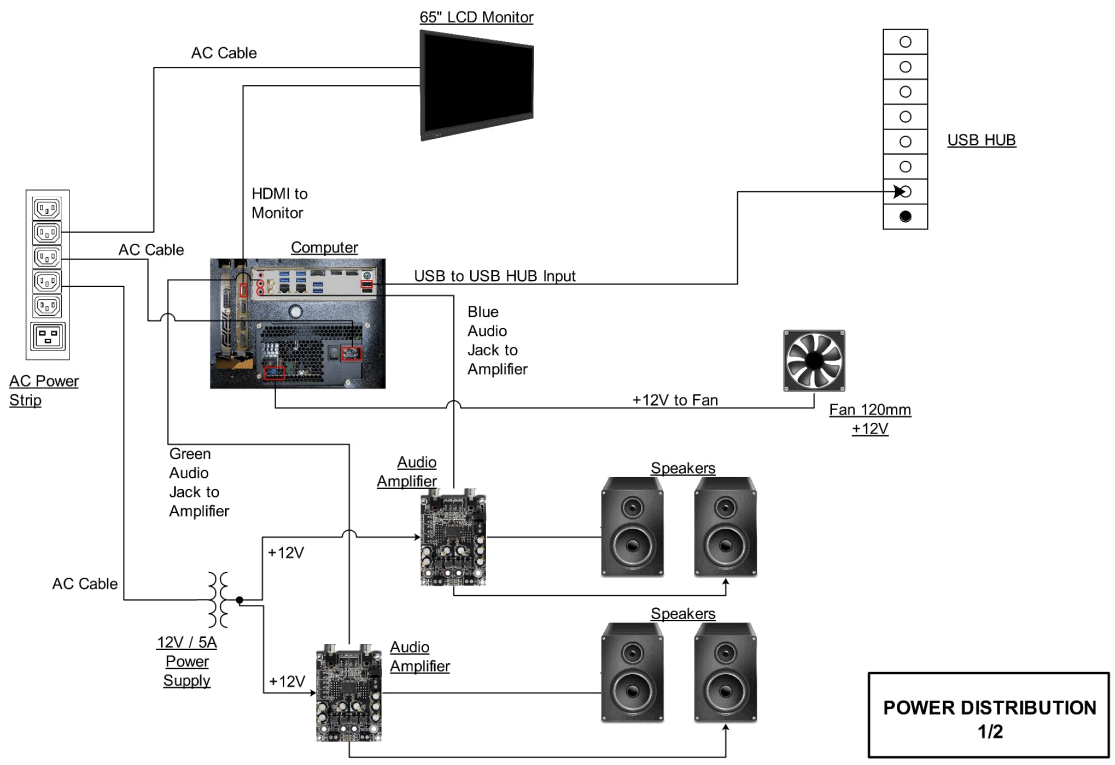
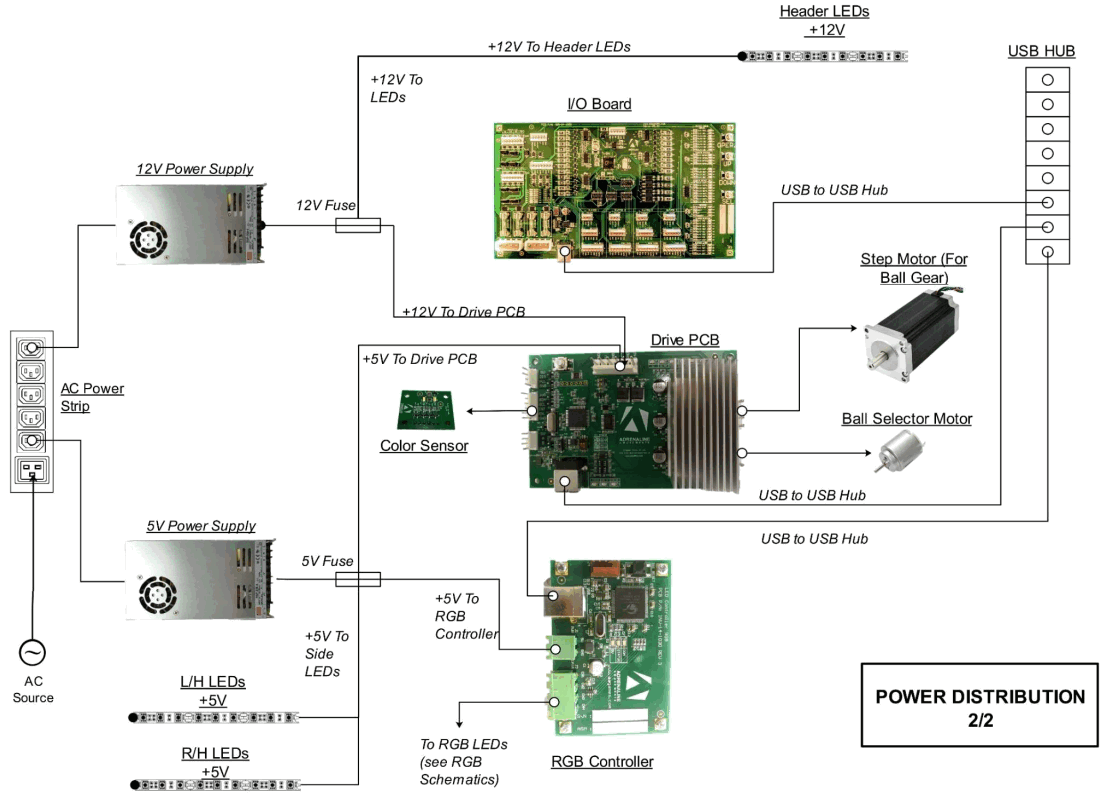
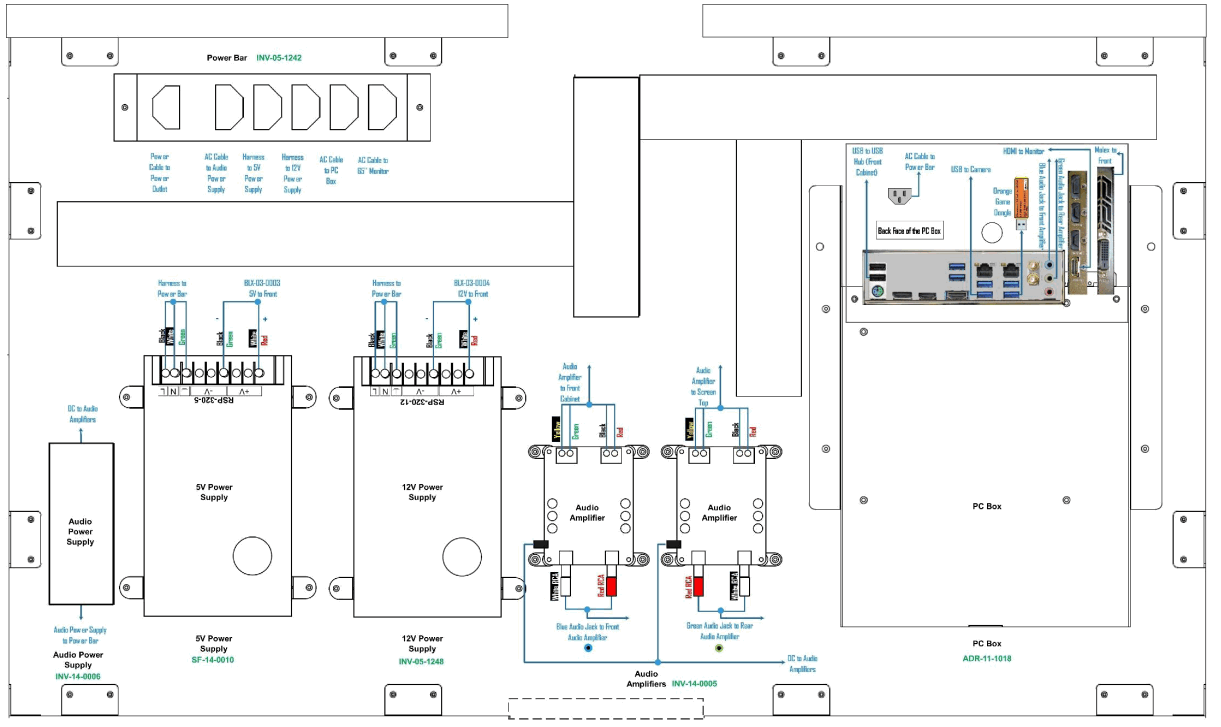
Power Distribution Schematics
 |  |
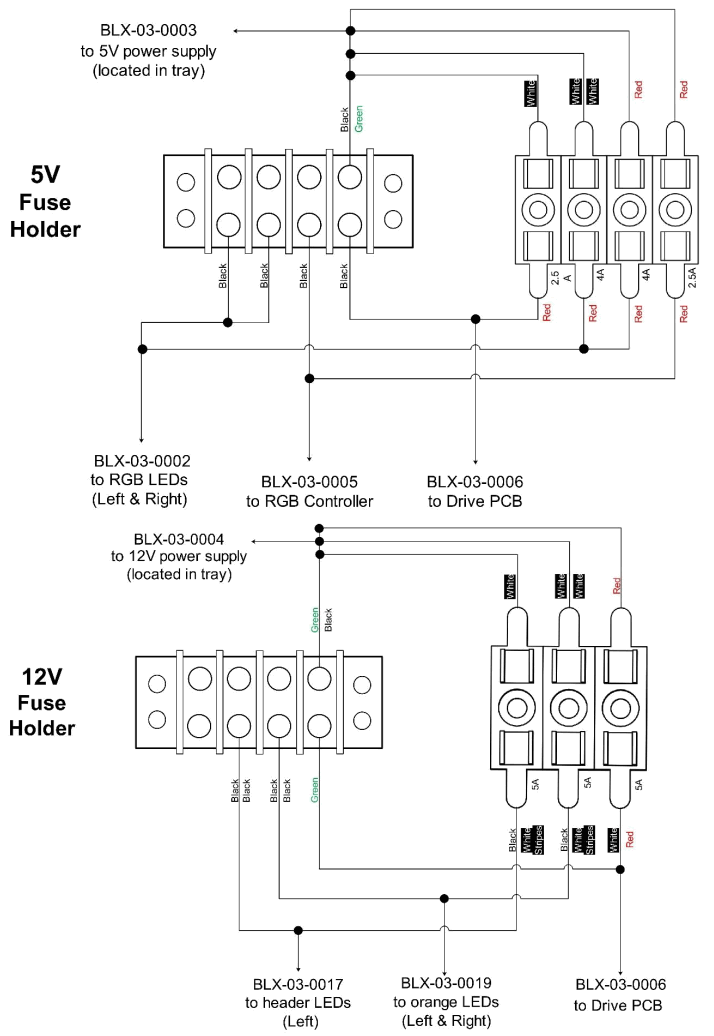
Tray Assembly Schematics
Fuse Holders Schematics
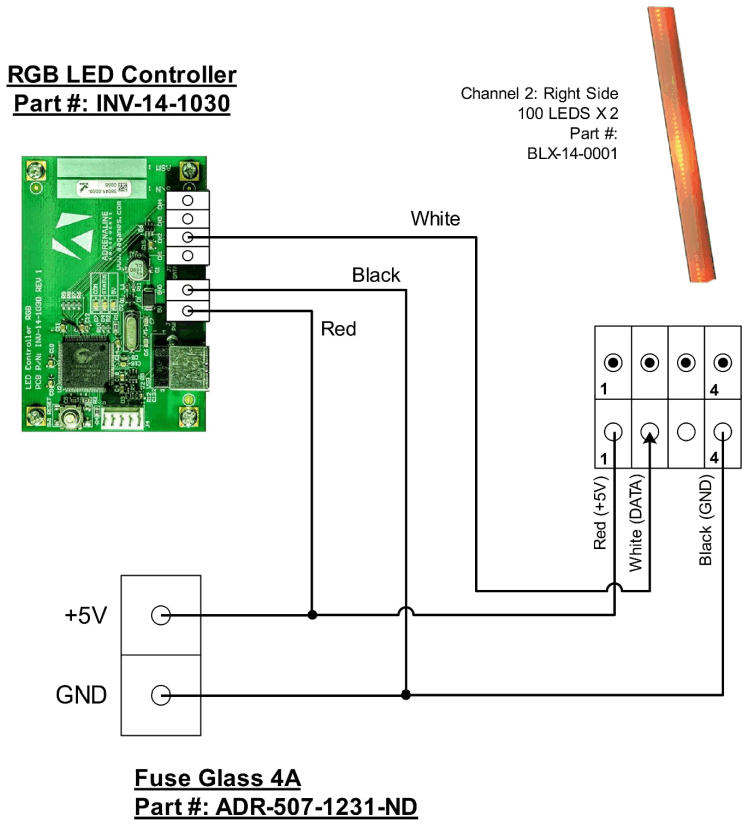
RGB LED Schematics
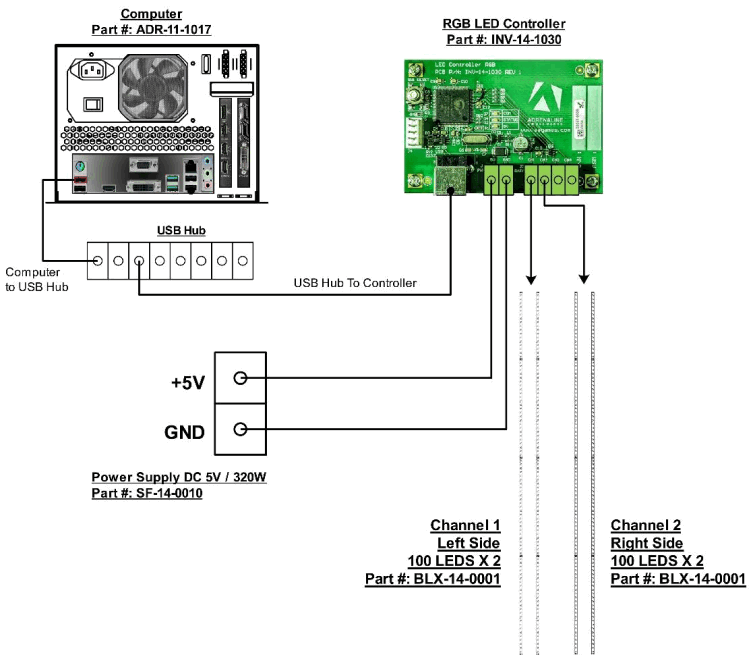
Each side has 2 strips of RGB PCB LED assembly
Each strip has 100 LEDs BLX-14-0001
| Channel 1 | Channel 2 |
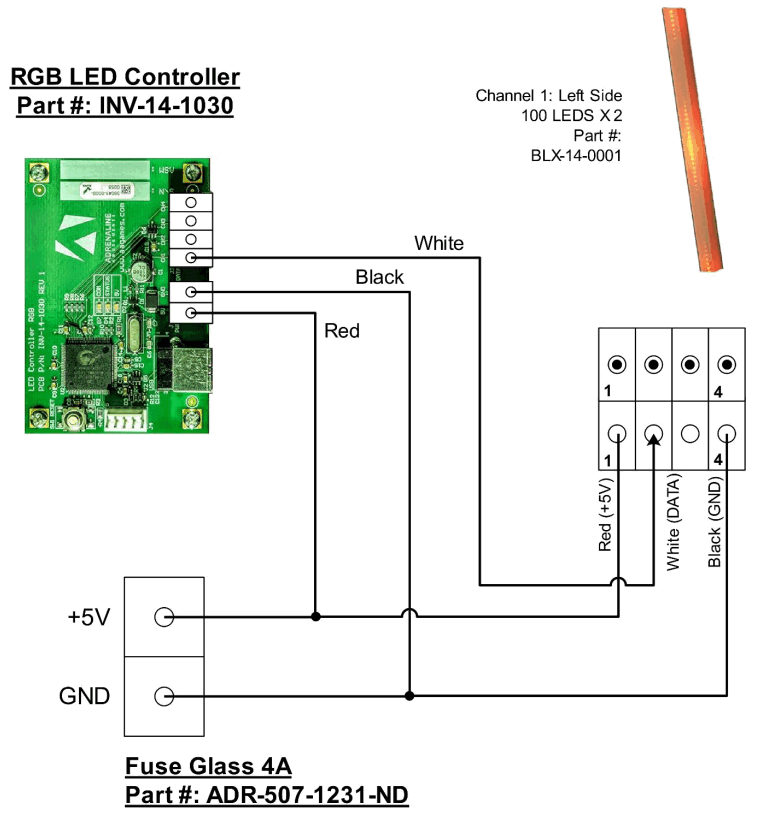 |  |
Chapter 09 – Software Recovery
If your unit’s software needs to be restored, please follow those instructions.
- Connect a USB keyboard to the motherboard.
- Connect the provided USB Recovery flash disk is in a Blue USB port.
- Power on the unit and press F11 on the keyboard to display the boot menu.
- Choose the UEFI: USB device ~16GB
The process takes 25-30 minutes and the unit will reboot back in the game at the end.
The Wireless credentials will need to be re-entered and Operator settings will be back to the default ones.
Chapter 10 – Card Reader
Configure your Operator settings as seen in Chapter 5 – Operator Menu.
Embed System
If you are using an Embed system, you need to connect your harnesses to Adrenaline Amusements I/O board & harnesses. You should refer to the Embed instructions manual for wiring pin-out.
The typical Embed settings are Standard except:
-Ticket Mech Type: Dumb DC
-Drive Polarity: Positive
-Notch Polarity: Negative
-Game ticket notch width = 6 (60ms)
-Game ticket notch spacing = 24 (240ms)
-Game Drive Threshold = 15 (1.5V or 1500mV)
-Drive Debounce = 40ms
Limited Warranty Policies
Customers must provide the unit serial number when claiming any warranty request.
Adrenaline Amusements (AAGames) warrants this Arcade unit (Including accessories) against defects in material or workmanship as follows: This unit has 1 year warranty against defective hardware from date of delivery.
Other than abuse or improper servicing, Adrenaline Amusements covers at no charge the replacement parts including standard shipping.
We offer an advanced replacement program and the customers have 30 days from delivery date to return back the defective equipment at their fees or they will be charged automatically for the replacement parts.
Improper servicing or abuse will VOID existing warranties.
All warranty request needs to be validate with our technical support department.
After the 1 year warranty, Adrenaline Amusements offers repairs & sales services options. Please contact the technical support department for information.
Adrenaline Amusements
2273 Antonio-Héroux street
Terrebonne, QC
J6X 4R3 Canada
+1.450.824.1671