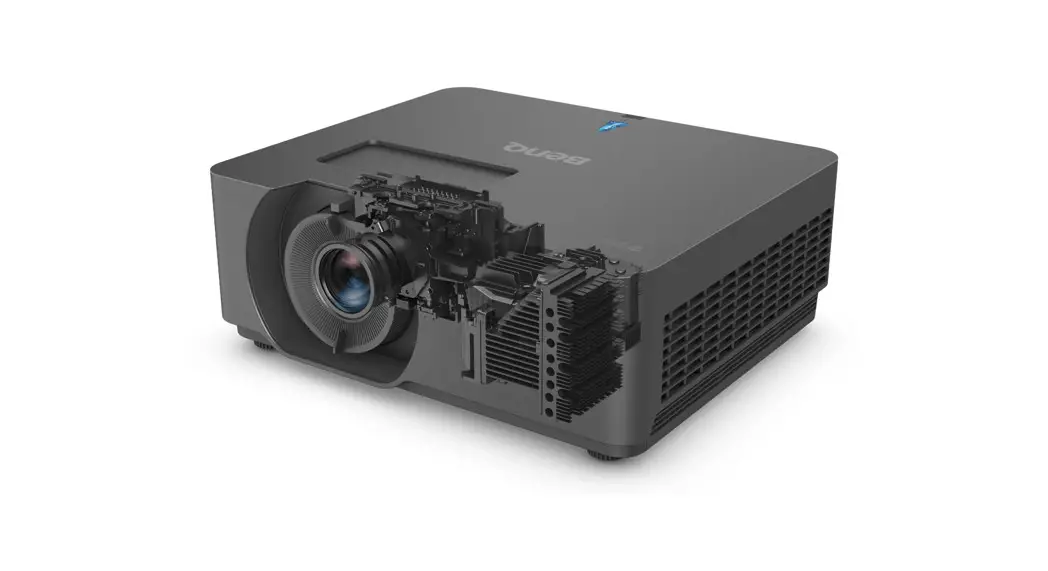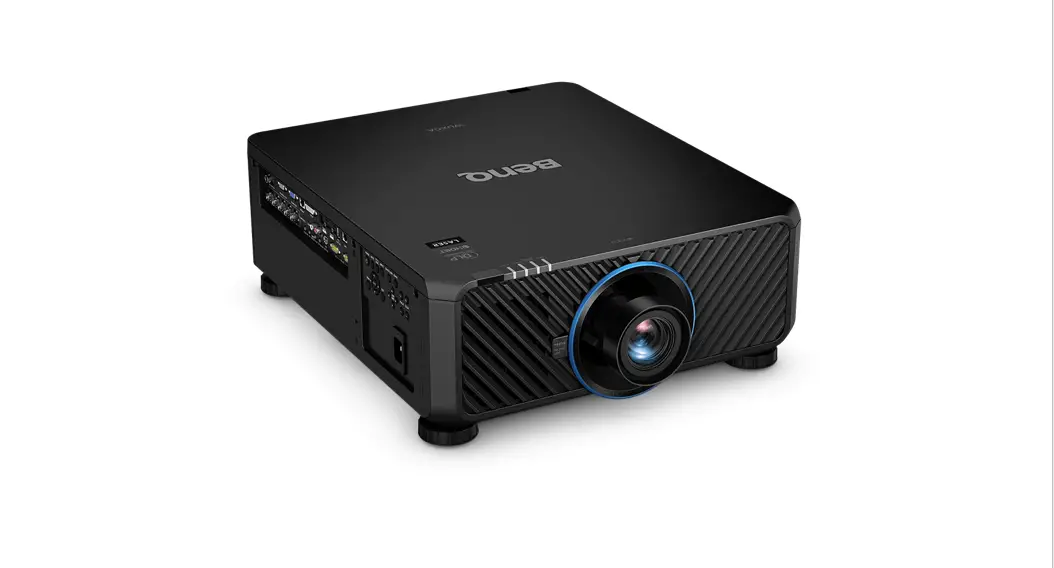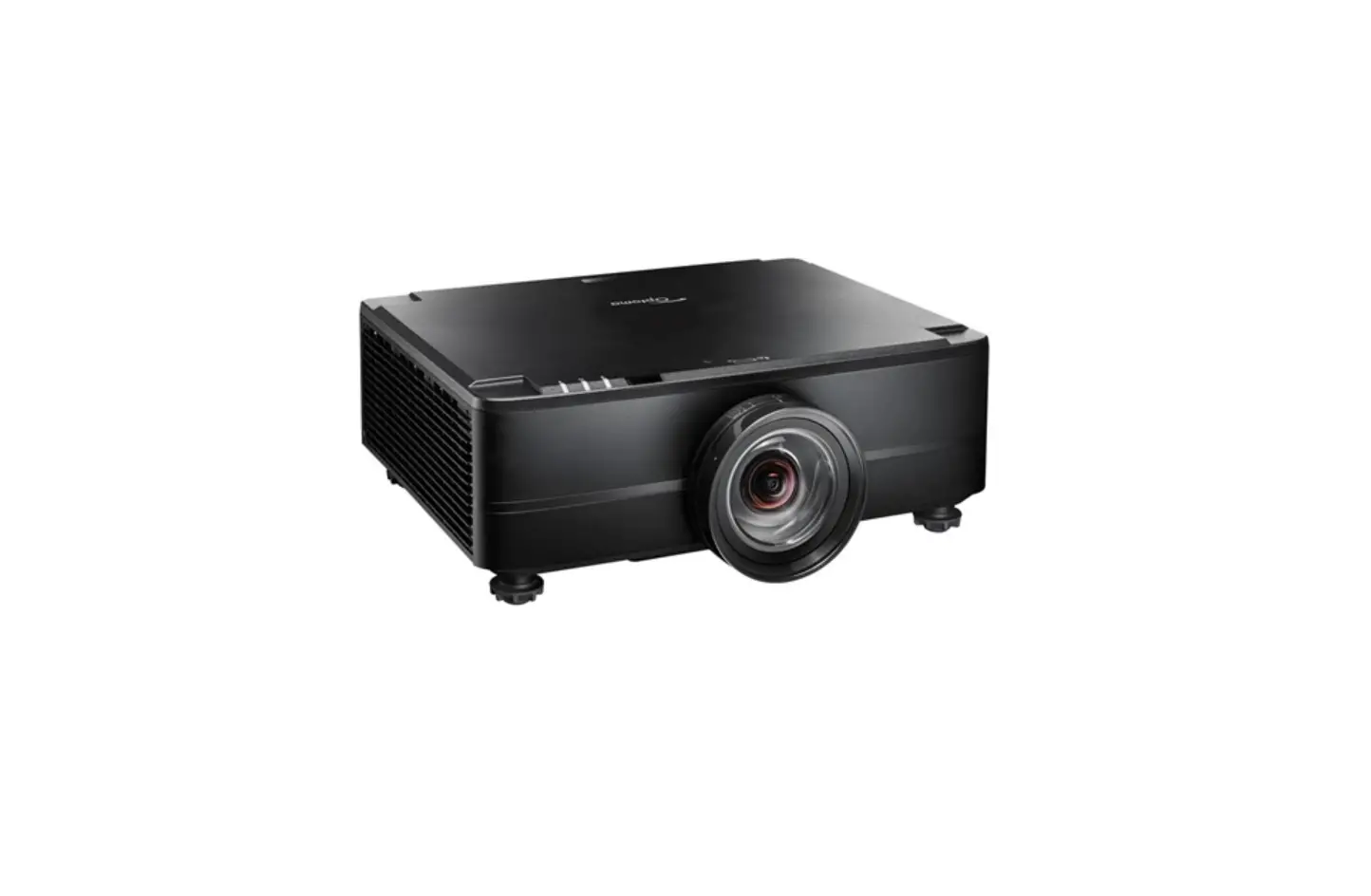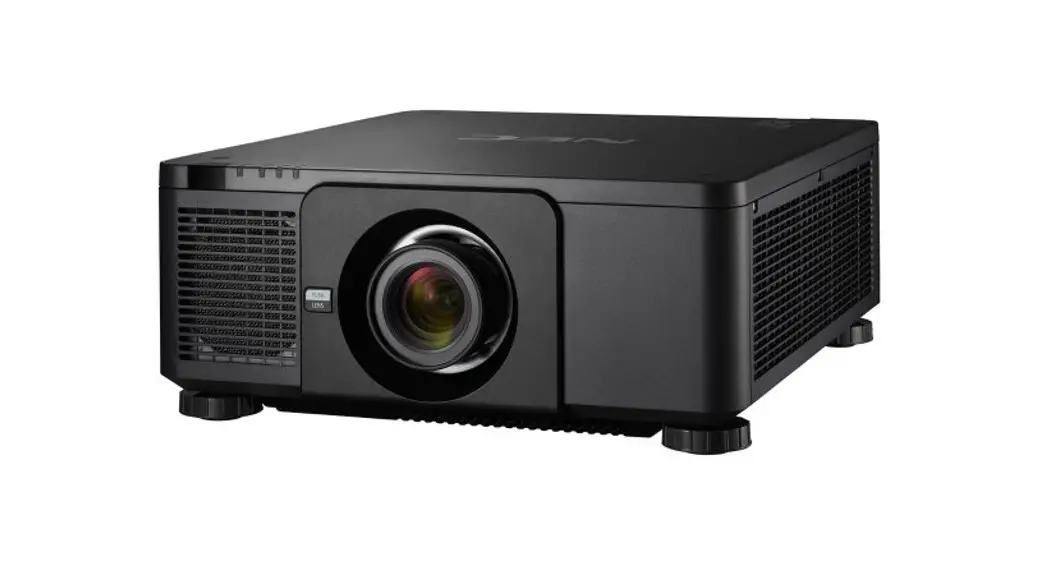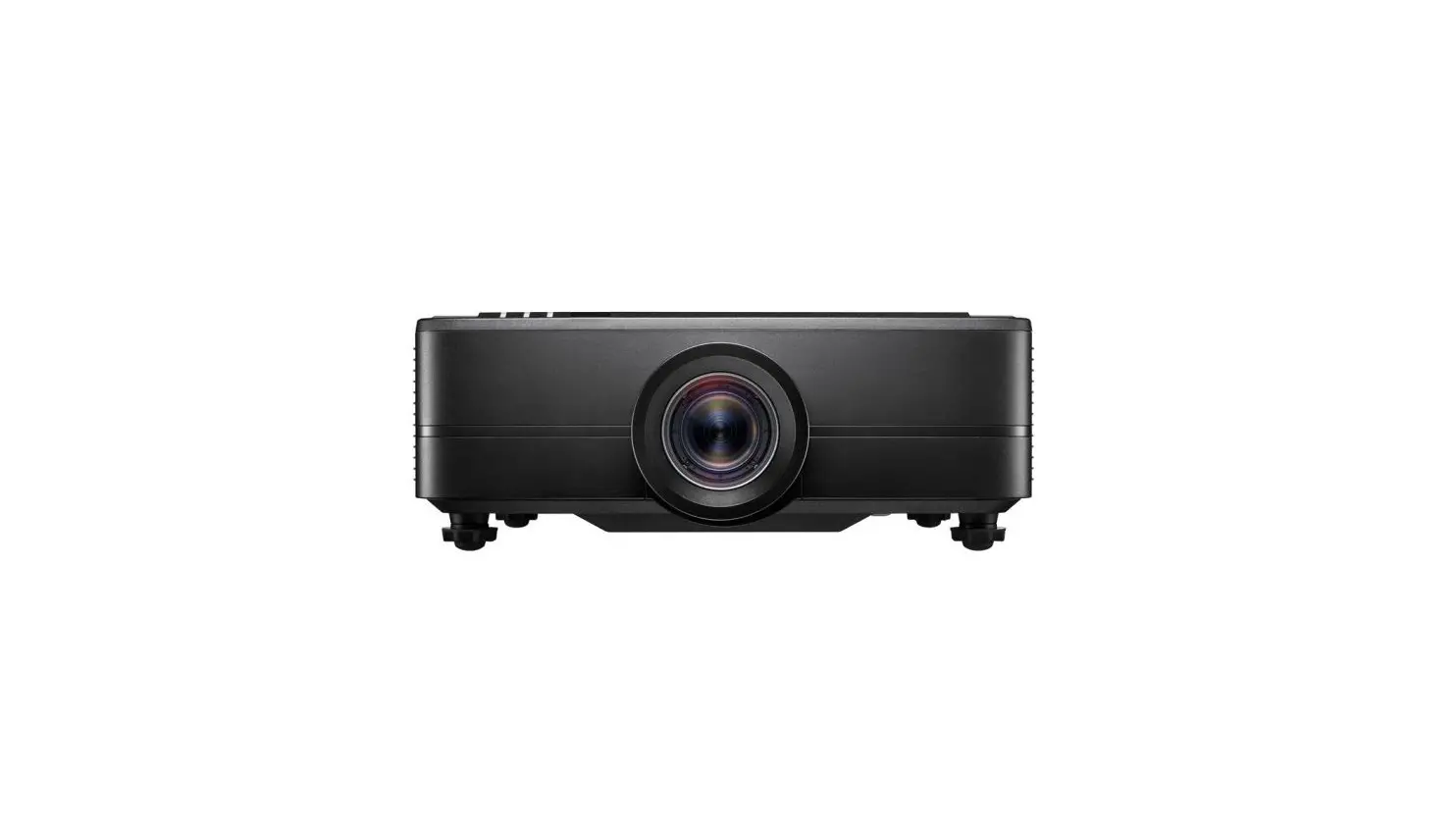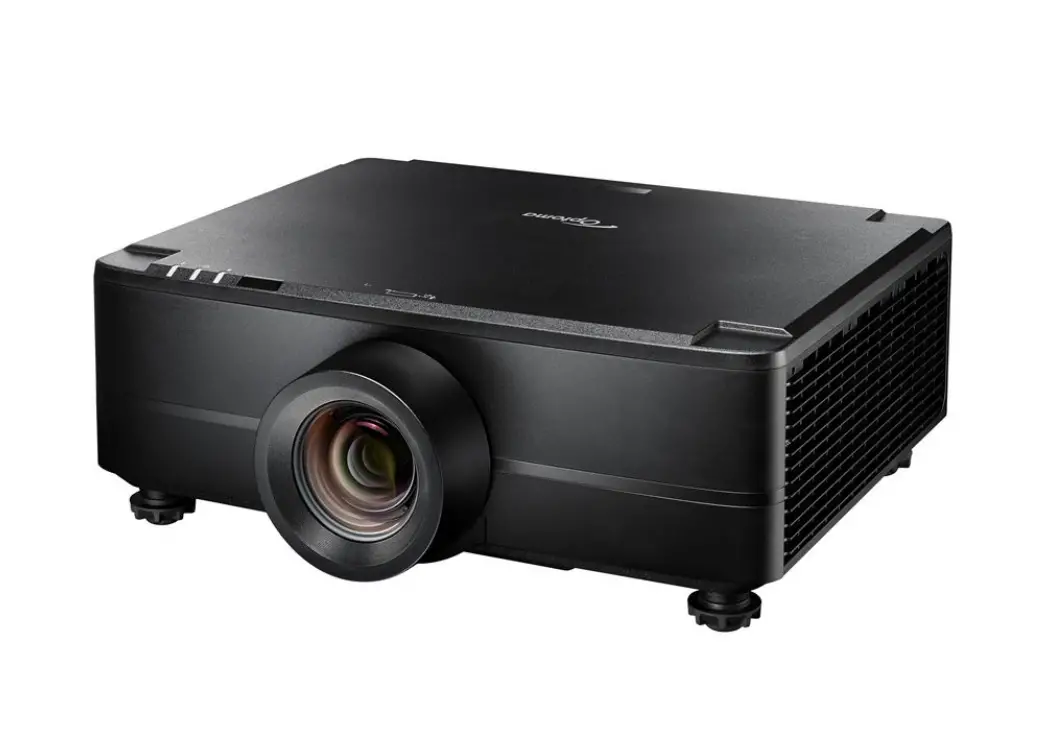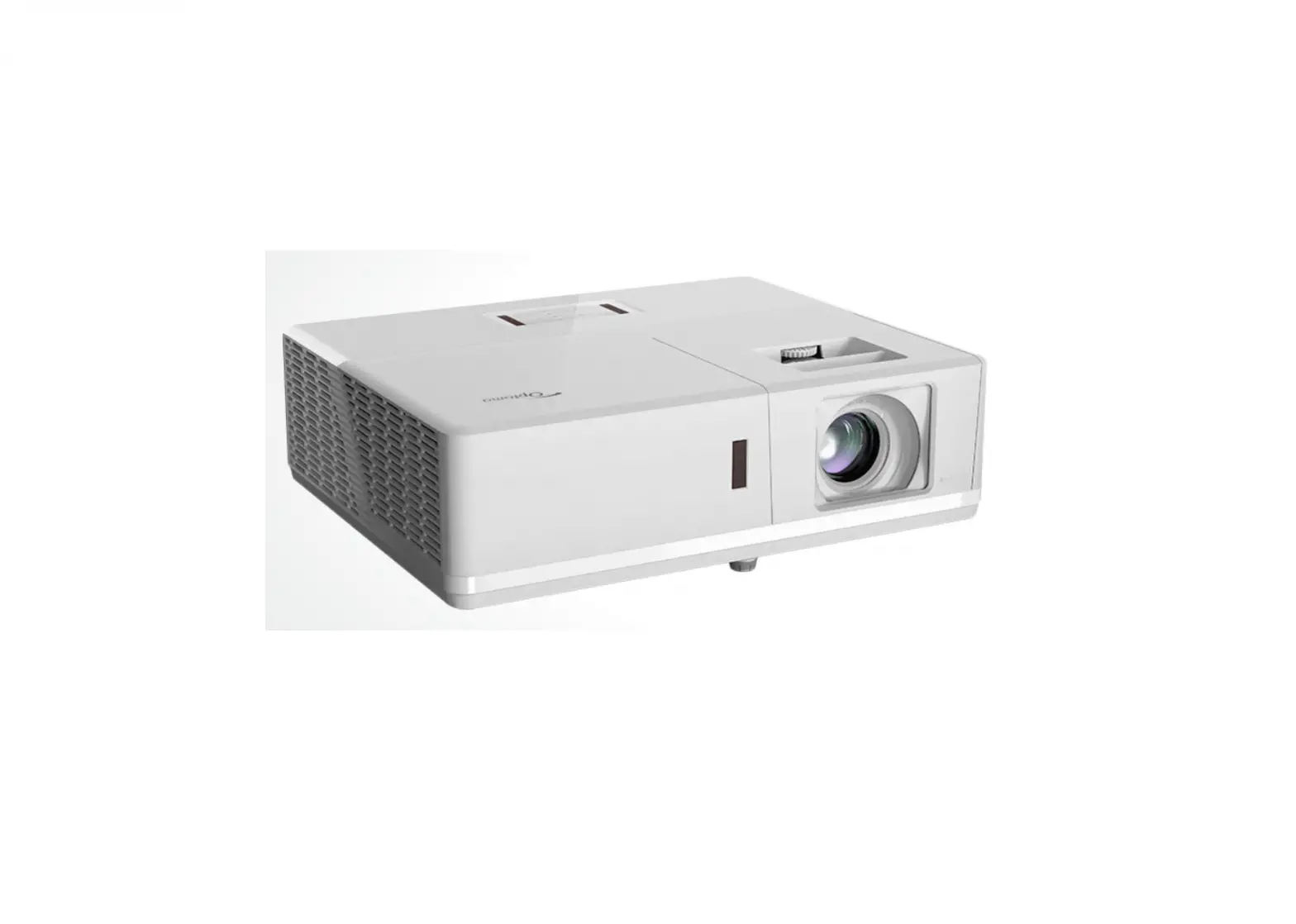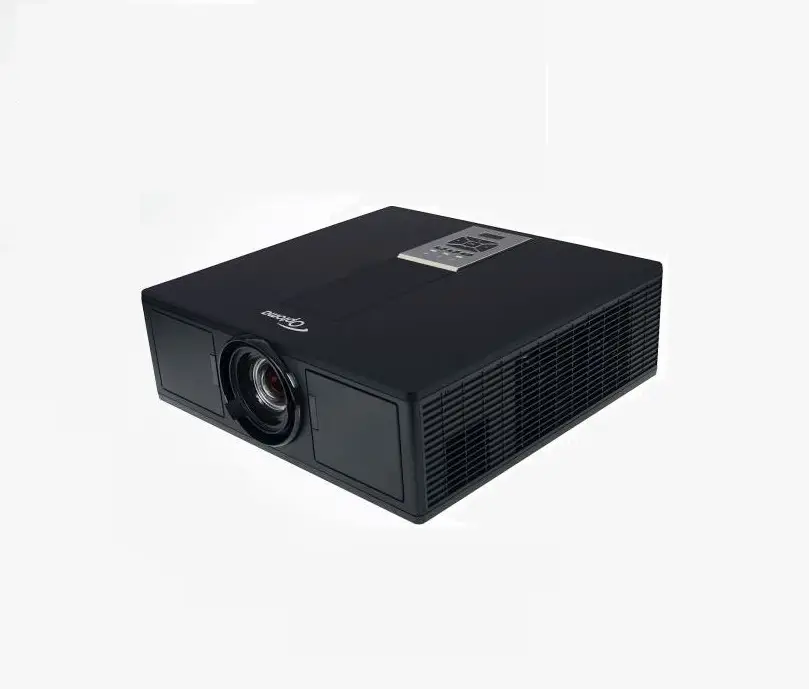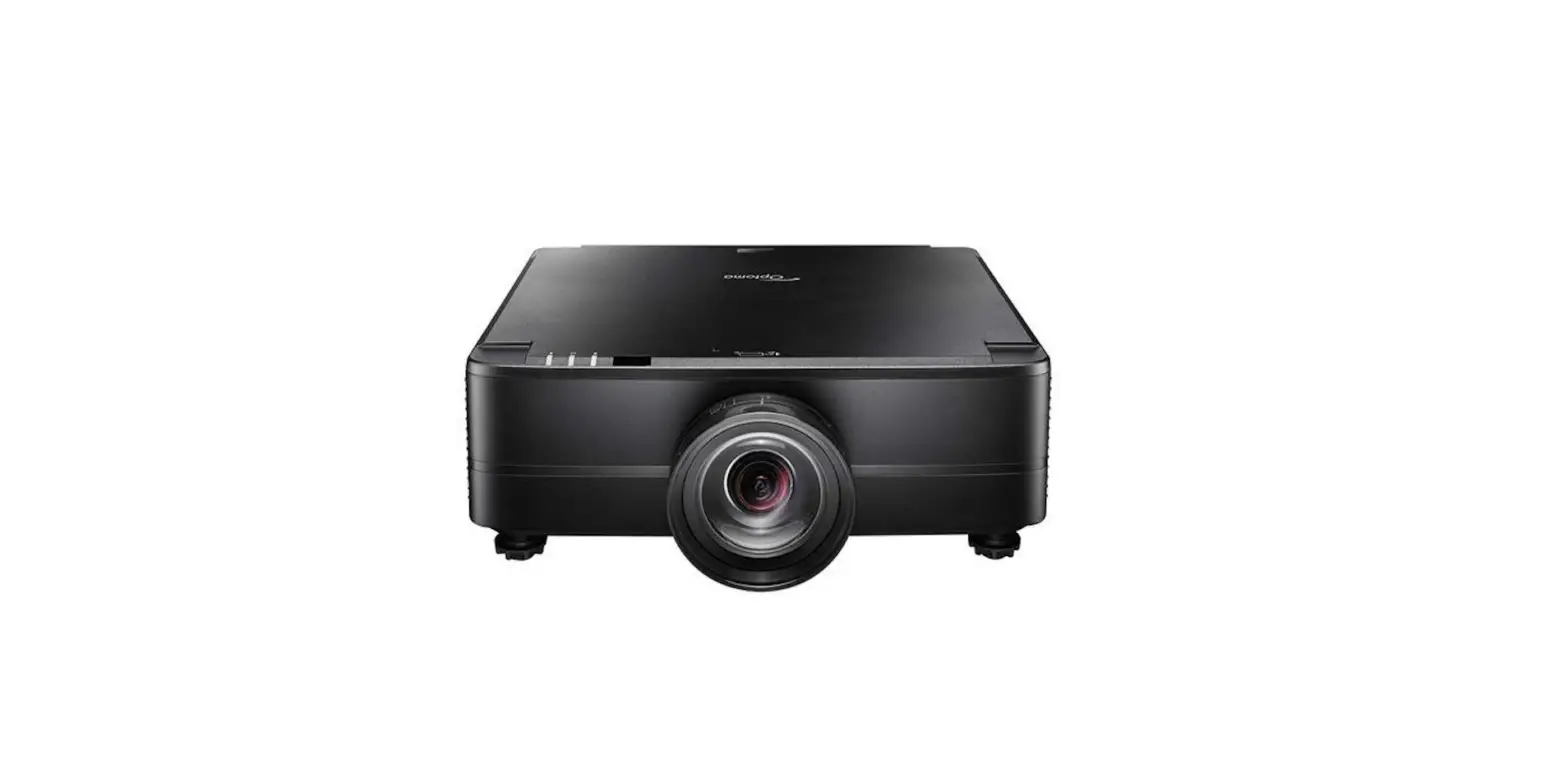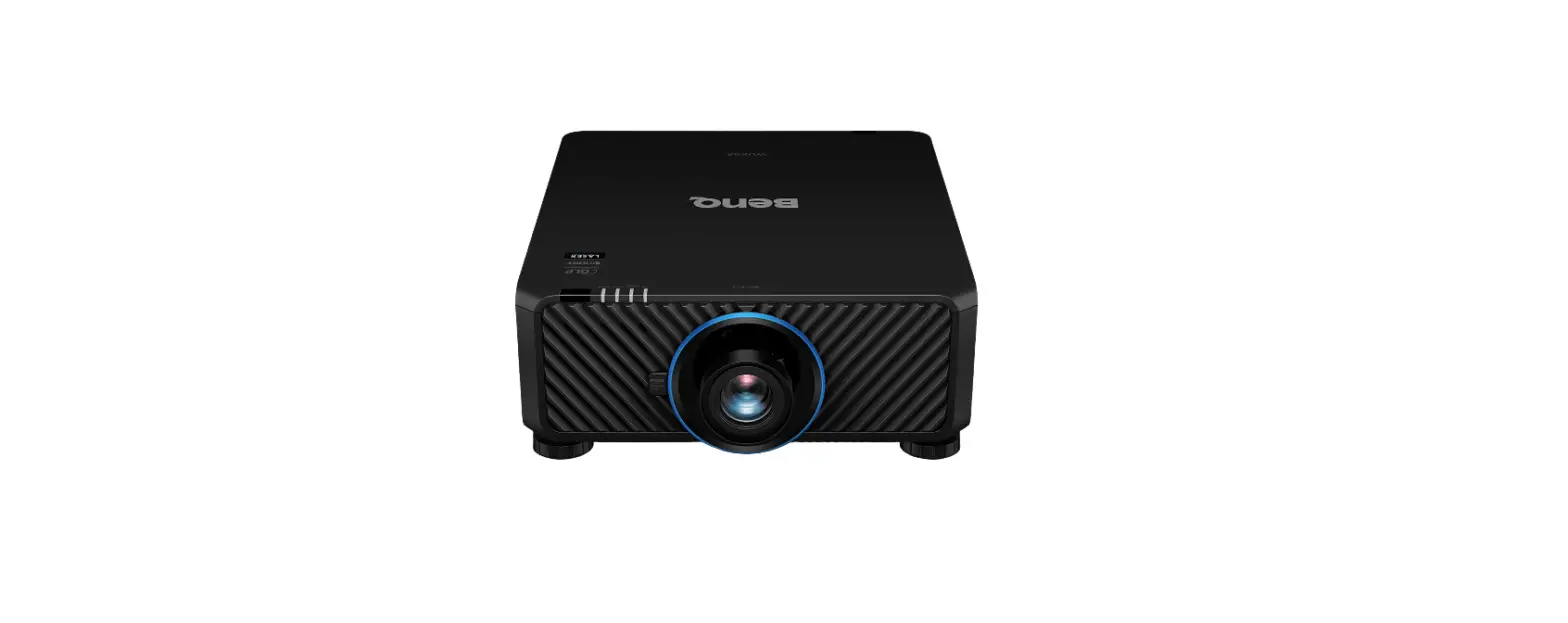

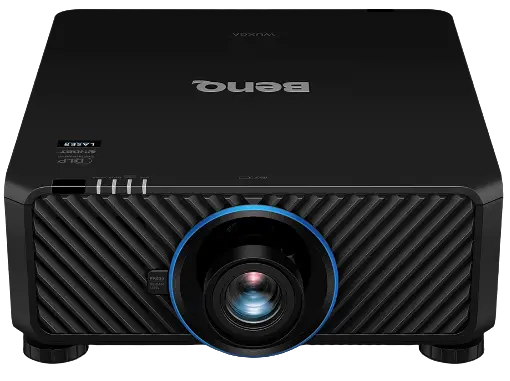
BenQ LU9800 Laser Projector
Notice
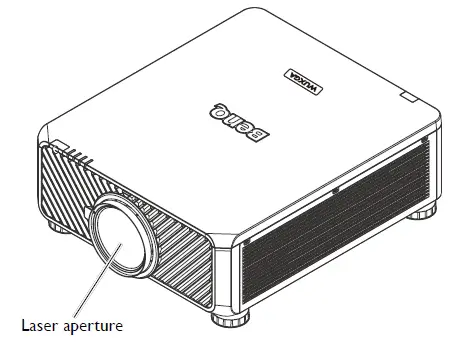
Notice on laser
This symbol indicates that there is a potential hazard of eye exposure to laser radiation unless the instructions are closely followed.
Laser class
(for USA) This Laser Product is designated as Class 3R during all procedures of operation and complies with IEC/EN 60825-1:2007. (for WW) This Laser Product is designated as Class 1 during all procedures of operation and complies with IEC/EN 60825-1:2014. LASER LIGHT – AVOID DIRECT EYE EXPOSURE. Do not point laser or allow laser light to be directed or reflected toward other people or reflective objects. Direct or scattered light can be hazardous to eyes and skin. There is a potential hazard of eye exposure to laser radiation if the included instructions are not followed. Caution – use of controls or adjustments or performance of procedures other than those specified herein may result in hazardous radiation exposure.
Laser parameters
- Wavelength 449nm – 461nm (Blue)
- Mode of operation Pulsed, due to frame rate
- Pulse width 1.34ms
- Pulse repetition rate 120Hz
- Maximum laser energy 0.698mJ
- Total internal power >100w
- Apparent source size >10mm, at lens stop
- Divergence >100 mili Radian
Laser light instruction
Risk Group 3 Information
Light hazard warning
Failure to comply with the following may result in serious injury:
- No direct exposure to the beam is permitted, RG3 IEC 62471-5:2015.
- Operators control access to the beam within the hazard distance or install the projector at sufficient height to prevent exposures of spectators’ eyes within the hazard distance.
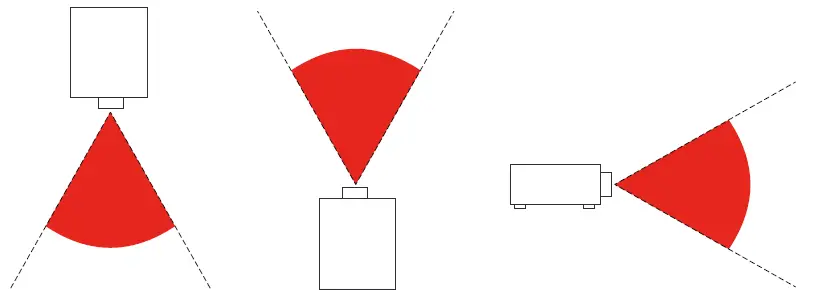
The hazard distance is the distance measured from the projection lens at which the intensity or energy per unit of surface is lower than the applicable exposure limit on the cornea or skin. If the person is within the hazard distance, the beam is considered unsafe for exposure.
The hazard distance for this projector is 0-150 cm.
Note
This projector is an RG3 product, which must be installed in a safe place and must be handled by qualified and professionally skill trained personnel For the installation and removal of the lens, please consult your dealer with qualified profession-als to install it. Do not try to install the projector yourself, otherwise your eyesight may be dam-aged In case to install the projector over head, keep over 3m distance at least between the floor surface and the RG3 area. Operators shall control access to the beam within the hazard distance or install the product at the height that will prevent exposures of spectators’ eyes within the hazard distance.
Caution:
Use of controls, adjustments or performance of procedures other than those specified herein may result in hazardous laser light exposure
Cooling notice
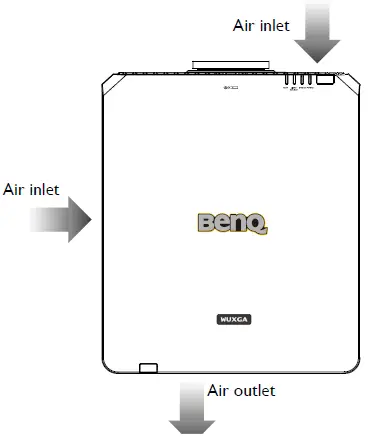
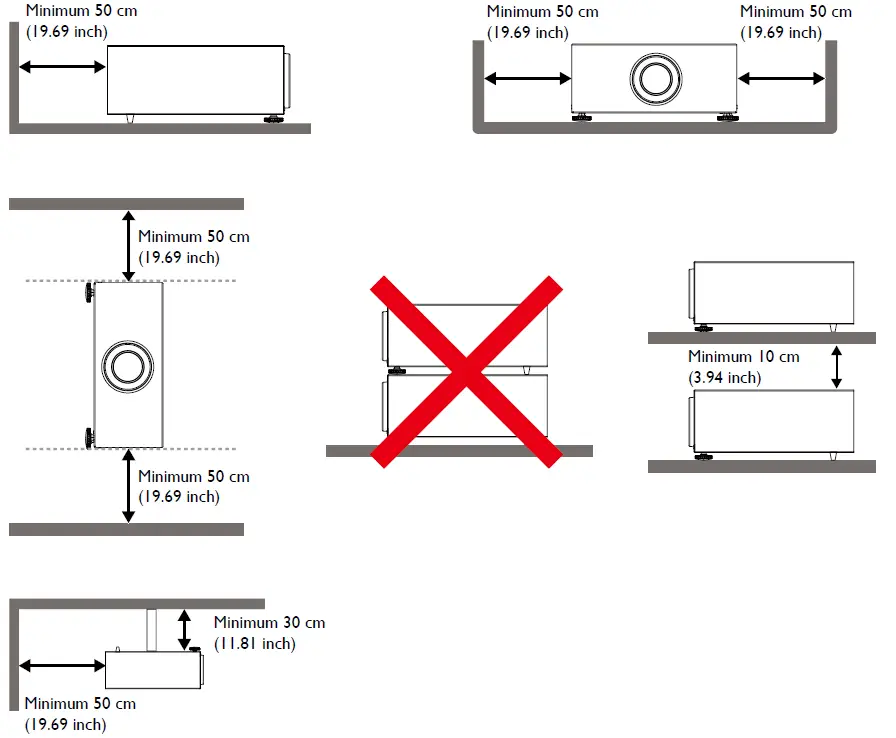
Allow at least 50 cm (19.7 inch) for clearance around the exhaust vent. Make sure no objects block air input within 30 cm (11.8 inch). Keep the outlet at least 1 m away from the inlets of other projectors.
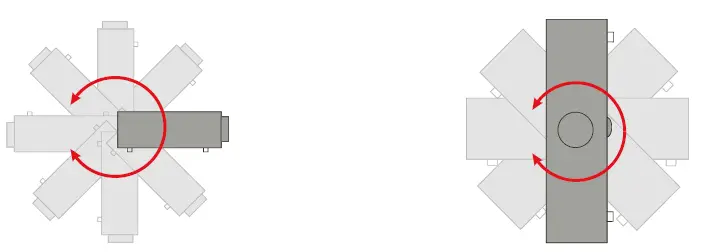
- The projector can be installed at any angle

- Allow at least 50 cm of clearance around the exhaust vent.

- Ensure that the air intake vents do not recycle hot air from the exhaust vent.
- When operating in an enclosed space, make sure that the surrounding air temperature does not exceed the projector’s operating temperature and that the air intake and exhaust vents are unobstructed.
- All enclosures should pass a certified thermal evaluation to ensure that the projector does not recycle exhaust air. Recycling exhaust air may cause the projector to shutdown even if the ambient temperature is within the acceptable operating temperature range.
Product information
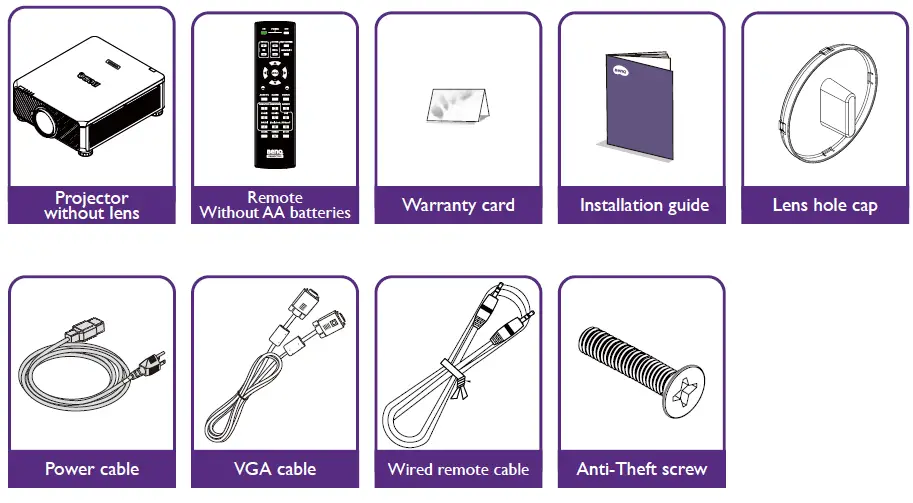
Packing content
Specification
| LU9750 | LU9800 | |
| Projection system | DLP Single 0.67 WUXGA DMD Chip | |
| Native resolution | 1920*1200 pixels, 16:10 | |
| Light source | Laser Package | |
| Power consumption | 792W(typ);0.5W(standby) | 893W(typ);0.5W(standby) |
| Dimension | 470 x 220.5 x 519.5 mm | |
| Weight | 26.4 kg (without lens) | 26.8 kg (without lens) |
Note:
- The brightness is supplied by standard lens, the value will depends on lenses.
- The brightness output will vary depending on each units and actual usage.
- Please find the latest user’s manual on the local website.
Terminals
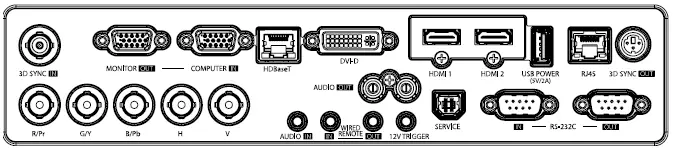
3D SYNC IN
Connect 3D-sync in cable from a computer or an enabled device.
MONITOR OUT
Connection to other display equipment for concurrent playback display.
COMPUTER IN
15-pin VGA port for connection to RGB, component HD source, or PC.
HDBaseT
Connect an Ethernet cable (Cat5/Cat6) from HDBaseT transmitter with high-definition video (HD), RS232 control and LAN control.
DVI-D
Connection to DVI source.
HDMI 1
Connection to HDMI source.
HDMI 2
Connection to HDMI source.
USB POWER 2A
Support 5V/2A output.
RJ45
For connection to RJ45 Cat5/Cat6 Ethernet cable to control the projector through a network.
3D SYNC OUT
Connection to 3D IR sync signal transmitter
RS-232 IN
Standard 9-pin D-sub interface for connection to PC control system and projector maintenance.
RS-232 OUT
Connects to another projector (same model) for RS-232 control.
SERVICE
Maintenance exclusive port for authorized maintenance personnel only.
AUDIO OUT (L/R)
Connection to a speaker or headset.
12V TRIGGER
3.5mm mini earphone jack, employs 200mA display relay to provide 12(+/-1.5)V output and short circuit protection.
WIRED REMOTE IN
Connection to remote control for wire remote control.
WIRED REMOTE OUT
Connection to another projector.
AUDIO IN
Connection to an audio input source via an audio cable. R/Pr, G/Y, B/Pb, H, V Connection to RGB or YPbPr/YCbCr output signal with BNC type input terminal.
Caution:
Make sure the port is valid before inserting a wired remote controller. The remote controller may be damaged in case of an invalid port, e.g. a wired remote controller is connected to trigger output. For more information about upgrading firmware via Lan, please contact BenQ service
Remote control
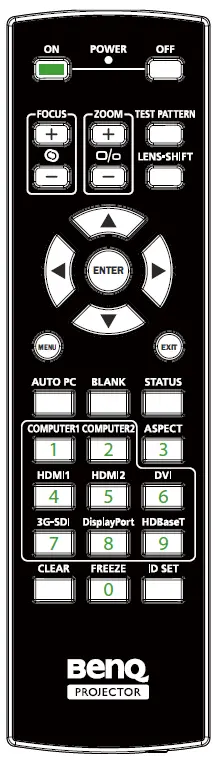
- ON
Press to power on projector. - OFF
Press to power off projector. - FOCUS +/-
Press to adjust focus of projection image. - ZOOM +/-
Press to zoom in and out on projection image. - TEST PATTERN
Press to display embedded test pattern. Press continuously to scroll through available ones. Press MENU key to exit to projection image. - LENS SHIFT
Press to move lens up, down, left and right. - ENTER
Press to select or accept settings. - MENU
Press to display OSD menu or return to the upper menu level. - EXIT
Press to exit OSD menu. - AUTO PC
Press to execute auto signal sync. - BLANK
Press the button to temporarily interrupt the projection. - STATUS
Show OSD MENU – Information. - COMPUTER 1
Select COMPUTER 1 input source. - COMPUTER 2
Select COMPUTER 2 input source. - ASPECT
Press continuously to scroll through individual aspect ratio. - HDMI 1
Select HDMI 1 input source. - HDMI 2
Function same as HDMI 1. - DVI
Select DVI input source. - 3G-SDI
Select 3G-SDI input source. - DisplayPort
Select DisplayPort input source. - HDBaseT
Select HDBaseT input source. - CLEAR
Not available with this model. - FREEZE
Press to toggle switch between freeze and unfreeze. - ID SET:
Not available for this model.
Installation
Caution:
To avoid damaging the DLP chips, never aim a high-power laser beam into the projection lens.
Installing removing the optional lens
Caution:
- Do not shake or place excessive pressure on the projector or the lens components as the projector and lens components contain precision parts.
- Before removing or installing the lens, be sure to turn off the projector, wait until the cooling fans stop, and turn off the main power switch.
- Do not touch the lens surface when removing or installing the lens.
- Keep fingerprints, dust or oil off the lens surface. Do not scratch the lens surface.
- Work on a level surface with a soft cloth under it to avoid scratching.
- If you remove and store the lens, attach the lens cap to the projector to keep off dust and dirt.
Installing the new lens
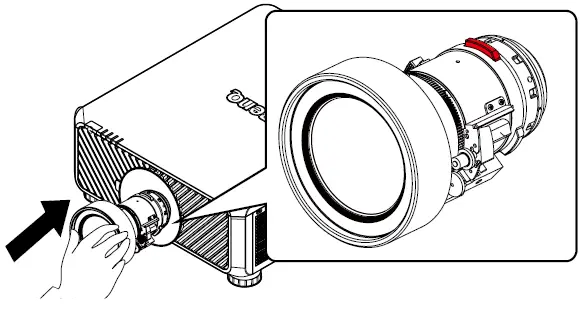
Remove both end caps from the lens.
Note:
Removal of the plastic body cap before inserting a lens for the first time.
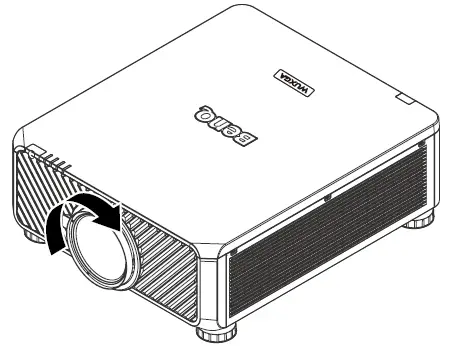
- Orient the lens so that the arrow on the label pasted on its side is facing upward and push the lens into the lens mount of the unit as far as it will go.

- Rotate the lens clockwise until you feel it click into place.

Removing the existing lens from the projector
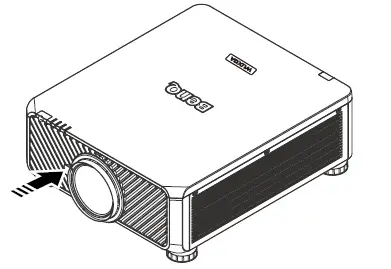
- Push the LENSE RELEASE button to the unlock position.

- Grasp the lens.
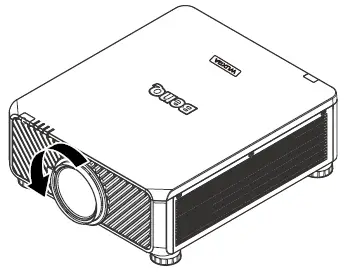
- Rotate the lens counterclockwise. The existing lens will be disengaged.

- Pull out the existing lens slowly.

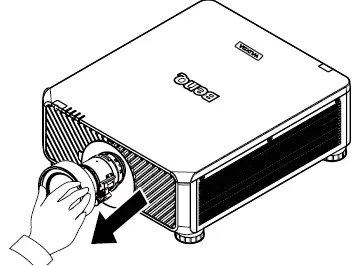
Lens
| Model | Lens Type | Part Number | Throw Ratio | Lens Shift |
| LS1ST3A | Short throw | 5J.JPN37.001 | WUXGA: 0.77-1.1 | Vertical: -15%-55% Horizontal: -5%-5% |
| LS1ST2A | Wide zoom 2 | 5J.JPN37.002 | WUXGA: 1.1-1.3 | Vertical: -15%-55% Horizontal: -5%-5% |
| LS1ST1A | Wide zoom 1 | 5J.JPN37.003 | WUXGA: 1.25-1.6 | Vertical: -15%-55% Horizontal: -5%-5% |
| LS1SDA | Standard | 5J.JPN37.004 | WUXGA: 1.54-1.93 | Vertical: -15%-55% Horizontal: -5%-5% |
| LS1LT0 | Semi long | 5J.JPN37.005 | WUXGA: 1.93-2.9 | Vertical: -15%-55% Horizontal: -5%-5% |
| LS1LT1 | Semi Long 2 | 5J.JAM37.051 | WUXGA: 2.22-3.67 | Vertical: -15%-55% Horizontal: -5%-5% |
| LS1LT2 | Long Zoom 1 | 5J.JAM37.031 | WUXGA: 3.58-5.38 | Vertical: -15%-55% Horizontal: -5%-5% |
| LS1LT3 | Long Zoom 2 | 5J.JAM37.041 | WUXGA: 5.31~8.26 | Vertical: -15%-55% Horizontal: -5%-5% |
| LS1ST4 | Ultra Short throw | 5J.JCY37.001 | WUXGA: 0.377 | Vertical: -0%-0% Hor- izontal: -0%-0% |
Projection table
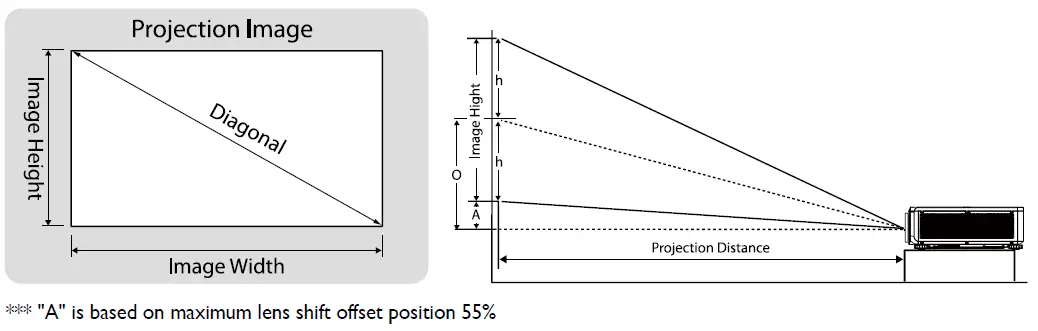
LU9750/LU9800
The screen aspect ratio is 16:10 and the projected picture is 16:10.
Note:
To optimize the projection quality, we suggest to project images in an area without grayscale.
| Lens | Wide Zoom 2 (LS2ST2A) | Standard (LS1SDA) | |||||||||||||||
| Throw ratio | 1.1~1.3 | 1.54~1.93 | |||||||||||||||
| Diagonal | Image Width | Image Height | Offset (A) | O | Distance | Distance | |||||||||||
| Wide/Tele | Wide/Tele | Wide | Tele | Wide | Tele | ||||||||||||
| (Inch) | (m) | (Inch) | (m) | (Inch) | (m) | (Inch) | (m) | (Inch) | (m) | (Inch) | (m) | (Inch) | (m) | (Inch) | (m) | (Inch) | (m) |
| 50 | 1.27 | 42 | 1.08 | 26 | 0.67 | 1.3 | 0.034 | 14.6 | 0.370 | 47 | 1.18 | 55 | 1.40 | 65 | 1.66 | 82 | 2.08 |
| 60 | 1.52 | 51 | 1.29 | 32 | 0.81 | 1.6 | 0.040 | 17.5 | 0.444 | 56 | 1.42 | 66 | 1.68 | 78 | 1.99 | 98 | 2.49 |
| 80 | 2.03 | 68 | 1.72 | 42 | 1.08 | 2.1 | 0.054 | 23.3 | 0.592 | 75 | 1.90 | 88 | 2.24 | 104 | 2.65 | 131 | 3.33 |
| 100 | 2.54 | 85 | 2.15 | 53 | 1.35 | 2.6 | 0.067 | 29.1 | 0.740 | 93 | 2.37 | 110 | 2.80 | 131 | 3.32 | 164 | 4.16 |
| 120 | 3.05 | 102 | 2.58 | 64 | 1.62 | 3.2 | 0.081 | 35.0 | 0.888 | 112 | 2.84 | 132 | 3.36 | 157 | 3.98 | 196 | 4.99 |
| 150 | 3.81 | 127 | 3.23 | 79 | 2.02 | 4.0 | 0.101 | 43.7 | 1.111 | 140 | 3.55 | 165 | 4.20 | 196 | 4.98 | 245 | 6.24 |
| 180 | 4.57 | 153 | 3.88 | 95 | 2.42 | 4.8 | 0.121 | 52.5 | 1.333 | 168 | 4.26 | 198 | 5.04 | 235 | 5.97 | 295 | 7.48 |
| 200 | 5.08 | 170 | 4.31 | 106 | 2.69 | 5.3 | 0.135 | 58.3 | 1.481 | 187 | 4.74 | 220 | 5.60 | 261 | 6.63 | 327 | 8.31 |
| 250 | 6.35 | 212 | 5.38 | 132 | 3.37 | 6.6 | 0.168 | 72.9 | 1.851 | 233 | 5.92 | 276 | 7.00 | 326 | 8.29 | 409 | 10.39 |
| 300 | 7.62 | 254 | 6.46 | 159 | 4.04 | 7.9 | 0.202 | 87.4 | 2.221 | 280 | 7.11 | 331 | 8.40 | 392 | 9.95 | 491 | 12.47 |
| 350 | 8.89 | 297 | 7.54 | 185 | 4.71 | 9.3 | 0.236 | 102.0 | 2.591 | 326 | 8.29 | 386 | 9.80 | 457 | 11.61 | 573 | 14.55 |
| 400 | 10.16 | 339 | 8.62 | 212 | 5.38 | 10.6 | 0.269 | 116.6 | 2.962 | 373 | 9.48 | 441 | 11.20 | 522 | 13.27 | 655 | 16.63 |
| 500 | 12.70 | 424 | 10.77 | 265 | 6.73 | 13.2 | 0.337 | 145.7 | 3.702 | 466 | 11.85 | 551 | 14.00 | 653 | 16.59 | 818 | 20.79 |
| Lens | Short Throw (LS1ST3A) | Semi Throw (LS2ST4) | |||||||||||||||
| Throw ratio | 0.77~1.1 | 1.25~1.60 | |||||||||||||||
| Diagonal | Image Width | Image Height | Offset (A) | O | Distance | Distance | |||||||||||
| Wide/Tele | Wide/Tele | Wide | Tele | Wide | Tele | ||||||||||||
| (Inch) | (m) | (Inch) | (m) | (Inch) | (m) | (Inch) | (m) | (Inch) | (m) | (Inch) | (m) | (Inch) | (m) | (Inch) | (m) | (Inch) | (m) |
| 50 | 1.27 | 42 | 1.08 | 26 | 0.67 | 1.3 | 0.034 | 14.6 | 0.370 | 33 | 0.83 | 47 | 1.18 | 53 | 1.35 | 68 | 1.72 |
| 60 | 1.52 | 51 | 1.29 | 32 | 0.81 | 1.6 | 0.040 | 17.5 | 0.444 | 39 | 1.00 | 56 | 1.42 | 64 | 1.62 | 81 | 2.07 |
| 80 | 2.03 | 68 | 1.72 | 42 | 1.08 | 2.1 | 0.054 | 23.3 | 0.592 | 52 | 1.33 | 75 | 1.90 | 85 | 2.15 | 109 | 2.76 |
| 100 | 2.54 | 85 | 2.15 | 53 | 1.35 | 2.6 | 0.067 | 29.1 | 0.740 | 65 | 1.66 | 93 | 2.37 | 106 | 2.69 | 136 | 3.45 |
| 120 | 3.05 | 102 | 2.58 | 64 | 1.62 | 3.2 | 0.081 | 35.0 | 0.888 | 78 | 1.99 | 112 | 2.84 | 127 | 3.23 | 163 | 4.14 |
| 150 | 3.81 | 127 | 3.23 | 79 | 2.02 | 4.0 | 0.101 | 43.7 | 1.111 | 98 | 2.49 | 140 | 3.55 | 159 | 4.04 | 204 | 5.17 |
| 180 | 4.57 | 153 | 3.88 | 95 | 2.42 | 4.8 | 0.121 | 52.5 | 1.333 | 118 | 2.99 | 168 | 4.26 | 191 | 4.85 | 244 | 6.20 |
| 200 | 5.08 | 170 | 4.31 | 106 | 2.69 | 5.3 | 0.135 | 58.3 | 1.481 | 131 | 3.32 | 187 | 4.74 | 212 | 5.38 | 271 | 6.89 |
| 250 | 6.35 | 212 | 5.38 | 132 | 3.37 | 6.6 | 0.168 | 72.9 | 1.851 | 163 | 4.15 | 233 | 5.92 | 265 | 6.73 | 339 | 8.62 |
| 300 | 7.62 | 254 | 6.46 | 159 | 4.04 | 7.9 | 0.202 | 87.4 | 2.221 | 196 | 4.98 | 280 | 7.11 | 318 | 8.08 | 407 | 10.34 |
| 350 | 8.89 | 297 | 7.54 | 185 | 4.71 | 9.3 | 0.236 | 102.0 | 2.591 | 229 | 5.80 | 326 | 8.29 | 371 | 9.42 | 475 | 12.06 |
| 400 | 10.16 | 339 | 8.62 | 212 | 5.38 | 10.6 | 0.269 | 116.6 | 2.962 | 261 | 6.63 | 373 | 9.48 | 424 | 10.77 | 543 | 13.79 |
| 500 | 12.70 | 424 | 10.77 | 265 | 6.73 | 13.2 | 0.337 | 145.7 | 3.702 | 326 | 8.29 | 466 | 11.85 | 530 | 13.46 | 678 | 17.23 |
| Lens | Semi Long (LS1LT0) | ||||||||||||
| Throw ratio | 1.93~2.9 | ||||||||||||
| Diagonal | Image Width | Image Height | Offset (A) | O | Distance | ||||||||
| Wide/Tele | Wide/Tele | Wide | Tele | ||||||||||
| (Inch) | (m) | (Inch) | (m) | (Inch) | (m) | (Inch) | (m) | (Inch) | (m) | (Inch) | (m) | (Inch) | (m) |
| 50 | 1.27 | 42 | 1.08 | 26 | 0.67 | 1.3 | 0.034 | 14.6 | 0.370 | 82 | 2.08 | 123 | 3.12 |
| 60 | 1.52 | 51 | 1.29 | 32 | 0.81 | 1.6 | 0.040 | 17.5 | 0.444 | 98 | 2.49 | 148 | 3.75 |
| 80 | 2.03 | 68 | 1.72 | 42 | 1.08 | 2.1 | 0.054 | 23.3 | 0.592 | 131 | 3.33 | 197 | 5.00 |
| 100 | 2.54 | 85 | 2.15 | 53 | 1.35 | 2.6 | 0.067 | 29.1 | 0.740 | 164 | 4.16 | 246 | 6.25 |
| 120 | 3.05 | 102 | 2.58 | 64 | 1.62 | 3.2 | 0.081 | 35.0 | 0.888 | 196 | 4.99 | 295 | 7.50 |
| 150 | 3.81 | 127 | 3.23 | 79 | 2.02 | 4.0 | 0.101 | 43.7 | 1.111 | 245 | 6.24 | 369 | 9.37 |
| 180 | 4.57 | 153 | 3.88 | 95 | 2.42 | 4.8 | 0.121 | 52.5 | 1.333 | 295 | 7.48 | 443 | 11.24 |
| 200 | 5.08 | 170 | 4.31 | 106 | 2.69 | 5.3 | 0.135 | 58.3 | 1.481 | 327 | 8.31 | 492 | 12.49 |
| 250 | 6.35 | 212 | 5.38 | 132 | 3.37 | 6.6 | 0.168 | 72.9 | 1.851 | 409 | 10.39 | 615 | 15.62 |
| 300 | 7.62 | 254 | 6.46 | 159 | 4.04 | 7.9 | 0.202 | 87.4 | 2.221 | 491 | 12.47 | 738 | 18.74 |
| 350 | 8.89 | 297 | 7.54 | 185 | 4.71 | 9.3 | 0.236 | 102.0 | 2.591 | 573 | 14.55 | 861 | 21.86 |
| 400 | 10.16 | 339 | 8.62 | 212 | 5.38 | 10.6 | 0.269 | 116.6 | 2.962 | 655 | 16.63 | 984 | 24.99 |
| 500 | 12.70 | 424 | 10.77 | 265 | 6.73 | 13.2 | 0.337 | 145.7 | 3.702 | 818 | 20.79 | 1230 | 31.23 |
| Lens | Semi Long 2 (LS1LT1) | Long Zoom 1 (LS1LT2) | |||||||||||||||
| Throw ratio | 2.22~3.67 | 3.58-5.38 | |||||||||||||||
| Diagonal | Image Width | Image Height | Offset (A) | O | Distance | Distance | |||||||||||
| Wide/Tele | Wide/Tele | Wide | Tele | Wide | Tele | ||||||||||||
| (Inch) | (m) | (Inch) | (m) | (Inch) | (m) | (Inch) | (m) | (Inch) | (m) | (Inch) | (m) | (Inch) | (m) | (Inch) | (m) | (Inch) | (m) |
| 50 | 1.27 | 42 | 1.08 | 26 | 0.67 | 0.0 | 0.000 | 13.2 | 0.337 | 94 | 2.39 | 156 | 3.95 | 152 | 3.86 | 228 | 5.79 |
| 60 | 1.52 | 51 | 1.29 | 32 | 0.81 | 0.0 | 0.000 | 15.9 | 0.404 | 113 | 2.87 | 187 | 4.74 | 182 | 4.63 | 274 | 6.95 |
| 80 | 2.03 | 68 | 1.72 | 42 | 1.08 | 0.0 | 0.000 | 21.2 | 0.538 | 151 | 3.83 | 249 | 6.32 | 243 | 6.17 | 365 | 9.27 |
| 100 | 2.54 | 85 | 2.15 | 53 | 1.35 | 0.0 | 0.000 | 26.5 | 0.673 | 188 | 4.78 | 311 | 7.90 | 304 | 7.71 | 456 | 11.59 |
| 120 | 3.05 | 102 | 2.58 | 64 | 1.62 | 0.0 | 0.000 | 31.8 | 0.808 | 226 | 5.74 | 373 | 9.49 | 364 | 9.25 | 547 | 13.91 |
| 150 | 3.81 | 127 | 3.23 | 79 | 2.02 | 0.0 | 0.000 | 39.7 | 1.010 | 282 | 7.17 | 467 | 11.86 | 455 | 11.57 | 684 | 17.38 |
| 180 | 4.57 | 153 | 3.88 | 95 | 2.42 | 0.0 | 0.000 | 47.7 | 1.212 | 339 | 8.61 | 560 | 14.23 | 546 | 13.88 | 821 | 20.86 |
| 200 | 5.08 | 170 | 4.31 | 106 | 2.69 | 0.0 | 0.000 | 53.0 | 1.346 | 377 | 9.56 | 622 | 15.81 | 607 | 15.42 | 912 | 23.18 |
| 250 | 6.35 | 212 | 5.38 | 132 | 3.37 | 0.0 | 0.000 | 66.2 | 1.683 | 471 | 11.95 | 778 | 19.76 | 759 | 19.28 | 1141 | 28.97 |
| 300 | 7.62 | 254 | 6.46 | 159 | 4.04 | 0.0 | 0.000 | 79.5 | 2.019 | 565 | 14.35 | 934 | 23.71 | 911 | 23.13 | 1369 | 34.76 |
| 350 | 8.89 | 297 | 7.54 | 185 | 4.71 | 0.0 | 0.000 | 92.7 | 2.356 | 659 | 16.74 | 1089 | 27.67 | 1063 | 26.99 | 1597 | 40.56 |
| 400 | 10.16 | 339 | 8.62 | 212 | 5.38 | 0.0 | 0.000 | 106.0 | 2.692 | 753 | 19.13 | 1245 | 31.62 | 1214 | 30.84 | 1825 | 46.35 |
| 500 | 12.70 | 424 | 10.77 | 265 | 6.73 | 0.0 | 0.000 | 132.5 | 3.365 | 941 | 23.91 | 1556 | 39.52 | 1518 | 38.56 | 2281 | 57.94 |
| Lens | Long Zoom 2 (LS1LT3) | ||||||||||||
| Throw ratio | 5.31~8.26 | ||||||||||||
| Diagonal | Image Width | Image Height | Offset (A) | O | Distance | ||||||||
| Wide/Tele | Wide/Tele | Wide | Tele | ||||||||||
| (Inch) | (m) | (Inch) | (m) | (Inch) | (m) | (Inch) | (m) | (Inch) | (m) | (Inch) | (m) | (Inch) | (m) |
| 50 | 1.27 | 42 | 1.08 | 26 | 0.67 | 0.0 | 0.000 | 13.2 | 0.337 | 225 | 5.72 | 350 | 8.90 |
| 60 | 1.52 | 51 | 1.29 | 32 | 0.81 | 0.0 | 0.000 | 15.9 | 0.404 | 270 | 6.86 | 420 | 10.67 |
| 80 | 2.03 | 68 | 1.72 | 42 | 1.08 | 0.0 | 0.000 | 21.2 | 0.538 | 360 | 9.15 | 560 | 14.23 |
| 100 | 2.54 | 85 | 2.15 | 53 | 1.35 | 0.0 | 0.000 | 26.5 | 0.673 | 450 | 11.44 | 700 | 17.79 |
| 120 | 3.05 | 102 | 2.58 | 64 | 1.62 | 0.0 | 0.000 | 31.8 | 0.808 | 540 | 13.72 | 841 | 21.35 |
| 150 | 3.81 | 127 | 3.23 | 79 | 2.02 | 0.0 | 0.000 | 39.7 | 1.010 | 675 | 17.16 | 1051 | 26.69 |
| 180 | 4.57 | 153 | 3.88 | 95 | 2.42 | 0.0 | 0.000 | 47.7 | 1.212 | 811 | 20.59 | 1261 | 32.02 |
| 200 | 5.08 | 170 | 4.31 | 106 | 2.69 | 0.0 | 0.000 | 53.0 | 1.346 | 901 | 22.87 | 1401 | 35.58 |
| 250 | 6.35 | 212 | 5.38 | 132 | 3.37 | 0.0 | 0.000 | 66.2 | 1.683 | 1126 | 28.59 | 1751 | 44.48 |
| 300 | 7.62 | 254 | 6.46 | 159 | 4.04 | 0.0 | 0.000 | 79.5 | 2.019 | 1351 | 34.31 | 2101 | 53.37 |
| 350 | 8.89 | 297 | 7.54 | 185 | 4.71 | 0.0 | 0.000 | 92.7 | 2.356 | 1576 | 40.03 | 2452 | 62.27 |
| 400 | 10.16 | 339 | 8.62 | 212 | 5.38 | 0.0 | 0.000 | 106.0 | 2.692 | 1801 | 45.75 | 2802 | 71.17 |
| 500 | 12.70 | 424 | 10.77 | 265 | 6.73 | 0.0 | 0.000 | 132.5 | 3.365 | 2251 | 57.19 | 3502 | 88.96 |
| Lens | Ultra Short Throw (LS1ST4) | ||||||||||
| Throw ratio | 0.377 | ||||||||||
| Diagonal | Image Width | Image Height | Offset (A) | O | Distance | ||||||
| Wide/Tele | Wide/Tele | Wide | |||||||||
| (Inch) | (m) | (Inch) | (m) | (Inch) | (m) | (Inch) | (m) | (Inch) | (m) | (Inch) | (m) |
| 50 | 1.27 | 42 | 1.08 | 26 | 0.67 | 12.1 | 0.306 | 25.3 | 0.643 | 16 | 0.41 |
| 60 | 1.52 | 51 | 1.29 | 32 | 0.81 | 14.5 | 0.368 | 30.4 | 0.771 | 19 | 0.49 |
| 80 | 2.03 | 68 | 1.72 | 42 | 1.08 | 19.3 | 0.490 | 40.5 | 1.028 | 26 | 0.65 |
| 100 | 2.54 | 85 | 2.15 | 53 | 1.35 | 24.1 | 0.613 | 50.6 | 1.286 | 32 | 0.81 |
| 120 | 3.05 | 102 | 2.58 | 64 | 1.62 | 28.9 | 0.735 | 60.7 | 1.543 | 38 | 0.97 |
| 150 | 3.81 | 127 | 3.23 | 79 | 2.02 | 36.2 | 0.919 | 75.9 | 1.928 | 48 | 1.22 |
| 180 | 4.57 | 153 | 3.88 | 95 | 2.42 | 43.4 | 1.103 | 91.1 | 2.314 | 58 | 1.46 |
| 200 | 5.08 | 170 | 4.31 | 106 | 2.69 | 48.2 | 1.225 | 101.2 | 2.571 | 64 | 1.62 |
| 250 | 6.35 | 212 | 5.38 | 132 | 3.37 | 60.3 | 1.531 | 126.5 | 3.214 | 80 | 2.03 |
| 300 | 7.62 | 254 | 6.46 | 159 | 4.04 | 72.3 | 1.838 | 151.8 | 3.857 | 96 | 2.44 |
| 350 | 8.89 | 297 | 7.54 | 185 | 4.71 | 84.4 | 2.144 | 177.2 | 4.500 | 112 | 2.84 |
| 400 | 10.16 | 339 | 8.62 | 212 | 5.38 | 96.5 | 2.450 | 202.5 | 5.142 | 128 | 3.25 |
| 500 | 12.70 | 424 | 10.77 | 265 | 6.73 | 120.6 | 3.063 | 253.1 | 6.428 | 160 | 4.06 |
Note:
There is 5% tolerance among these numbers due to optical component variations. BenQ recommends that if you intend to permanently install the projector, you should physically test the projection size and distance using the actual projector before you permanently install it, so as to make allowance for this projector’s optical characteristics. This will help you determine the exact mounting position so that it best suits your installation location.This will help you determine the exact mounting position so that it best suits your installation location.
Lens shift range
Lens shift adjustable range
The adjustable range for lens shift is tabulated below and subject to the conditions listed.
LU9750/LU9800
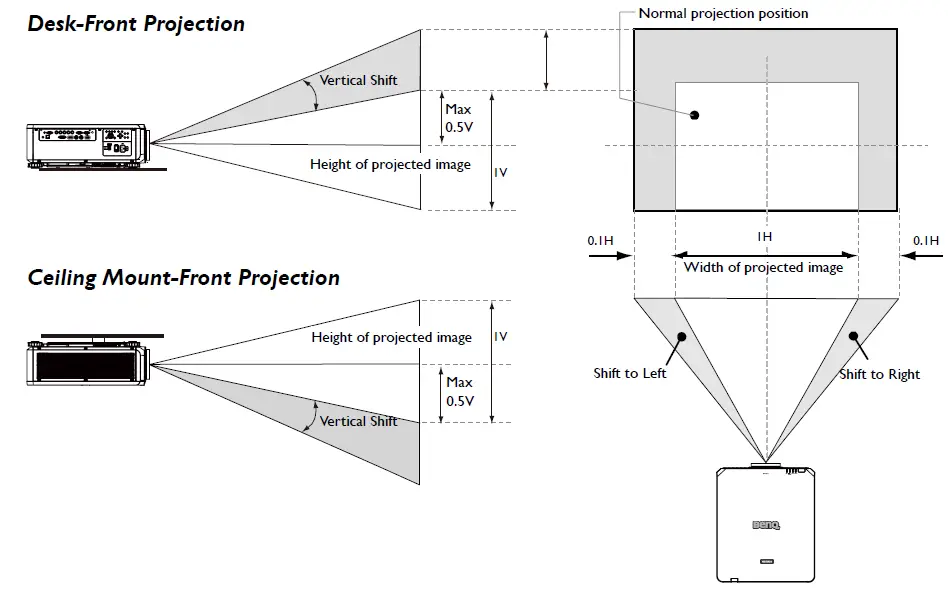
Desktop Installation
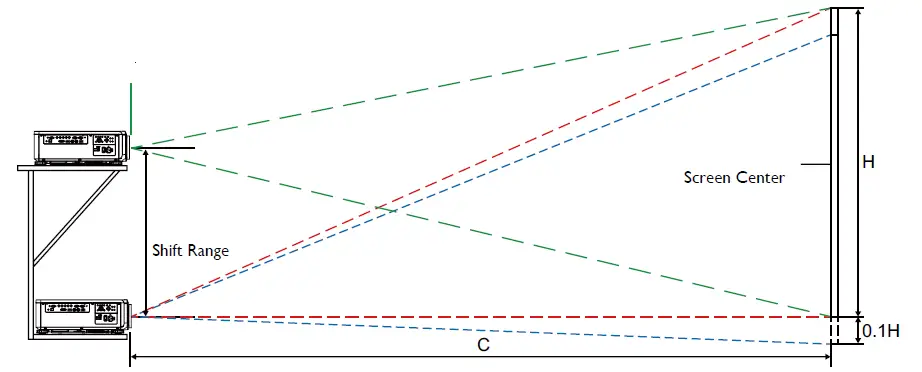
Note:
The drawings apply to the standard lens only.
LED indicator
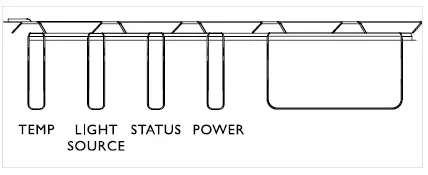
System message
| SYSTEM STATUS | POWER LED | STATUS LED | LIGHT SOURCE LED | TEMP LED |
| Lamp Ready | ON | OFF | OFF | OFF |
| Start | Flashing | OFF | OFF | OFF |
| Cooling | Flashing | OFF | OFF | OFF |
| Over Temperature T1 | OFF | OFF | 1 blinks | ON |
| Over Temperature T2 | OFF | OFF | 2 blinks | ON |
| Over Temperature T3 | OFF | OFF | 3 blinks | ON |
| Over Temperature T4 | OFF | OFF | 4 blinks | ON |
| Over Temperature T5 | OFF | OFF | 5 blinks | ON |
| Thermal Break Sensor error | OFF | 4 blinks | OFF | OFF |
| Air Filter Warning | ON | ON | OFF | OFF |
| FAN1 error | OFF | 6 blinks | 1 blinks | OFF |
| FAN2 error | OFF | 6 blinks | 2 blinks | OFF |
| FAN3 error | OFF | 6 blinks | 3 blinks | OFF |
| FAN4 error | OFF | 6 blinks | 4 blinks | OFF |
| FAN5 error | OFF | 6 blinks | 5 blinks | OFF |
| FAN6 error | OFF | 6 blinks | 6 blinks | OFF |
| FAN7 error | OFF | 6 blinks | 7 blinks | OFF |
| FAN8 error | OFF | 6 blinks | 8 blinks | OFF |
| FAN9 error | OFF | 6 blinks | 9 blinks | OFF |
| FAN10 error | OFF | 6 blinks | 10 blinks | OFF |
| FAN11 error | OFF | 6 blinks | 11 blinks | OFF |
| FAN12 error | OFF | 6 blinks | 12 blinks | OFF |
| FAN13 error | OFF | 6 blinks | 13 blinks | OFF |
| 1W MCU detects scaler stops working | OFF | 2 blinks | OFF | OFF |
| Case Open | OFF | 7 blinks | OFF | OFF |
| Lens Open | OFF | 7 blinks | 1 blinks | OFF |
| DMD error | OFF | 8 blinks | OFF | OFF |
| Color wheel error | OFF | 9 blinks | OFF | OFF |
| Phosphor wheel error | OFF | 9 blinks | 1 blinks | OFF |
| Laser Driver board Color wheel speed too low | OFF | 4 blinks | 2 blinks | OFF |
| Laser Driver board Phosphor wheel speed too low | OFF | 4 blinks | 3 blinks | OFF |
| SYSTEM STATUS | POWER LED | STATUS LED | LIGHT SOURCE LED | TEMP LED |
| Laser Driver board 54V error | OFF | 4 blinks | 4 blinks | OFF |
| Laser Driver board over temp | OFF | 4 blinks | 5 blinks | OFF |
| Laser Driver board SCI error | OFF | 4 blinks | 6 blinks | OFF |
| Laser Driver board initial fail | OFF | 4 blinks | 7 blinks | OFF |
| Laser Driver board lit fail | OFF | 4 blinks | 8 blinks | OFF |
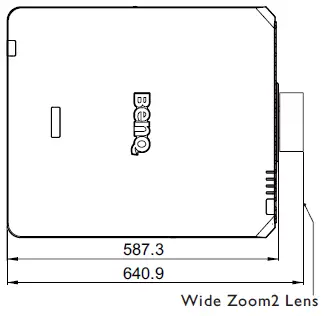
Projector dimension
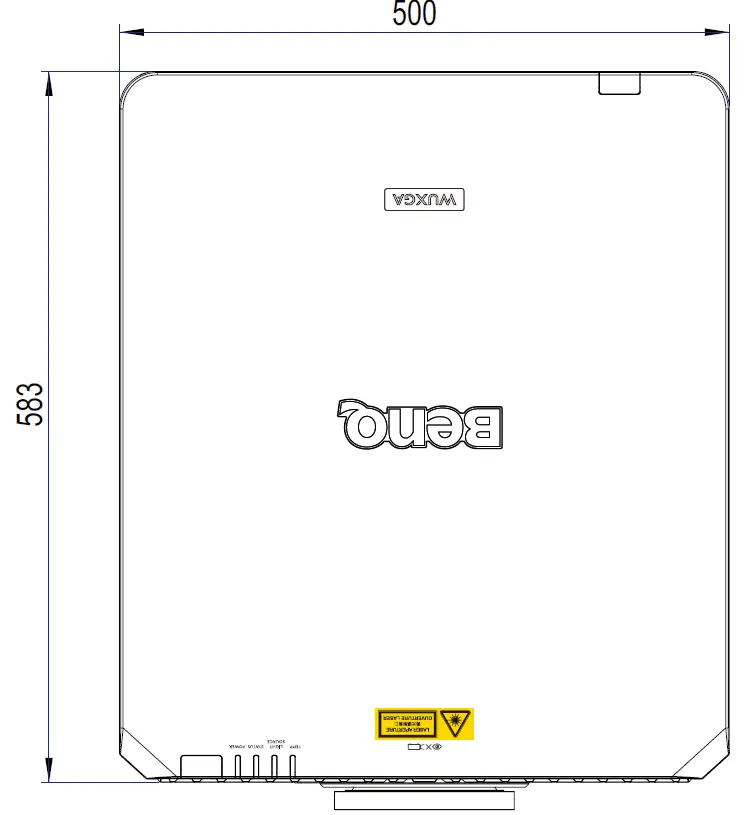
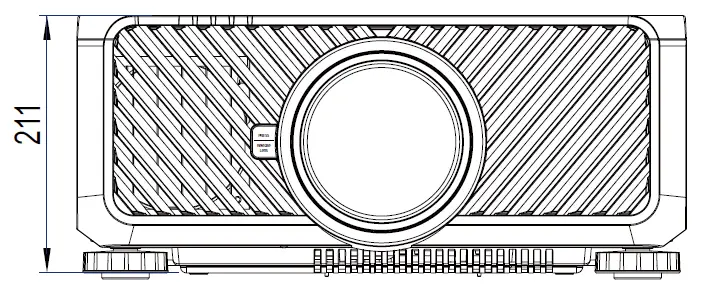
Lens dimension
Optional Lens (Standard: LS1SDA)
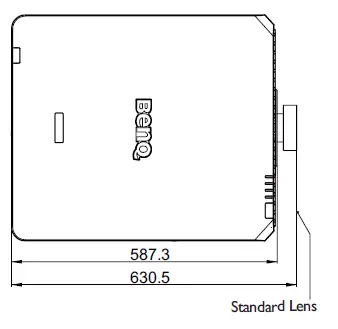
Optional Lens (Semi Long 2: LS1LT1)
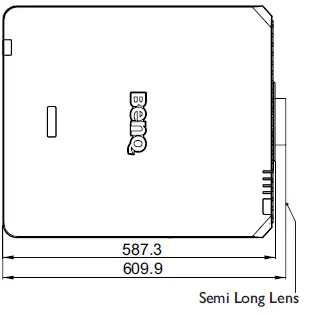
Optional Lens (Short Throw: LS1ST3A)
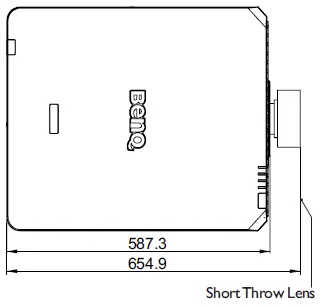
Optional Lens (Long 1: LS1LT2)
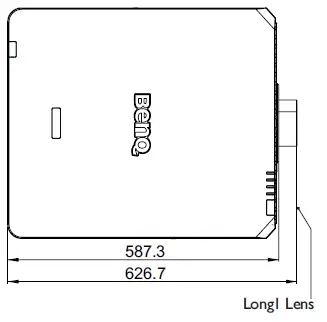
Optional Lens (Wide Zoom 1: LS1ST1A) Optional Lens (Long 2: LS1LT3)
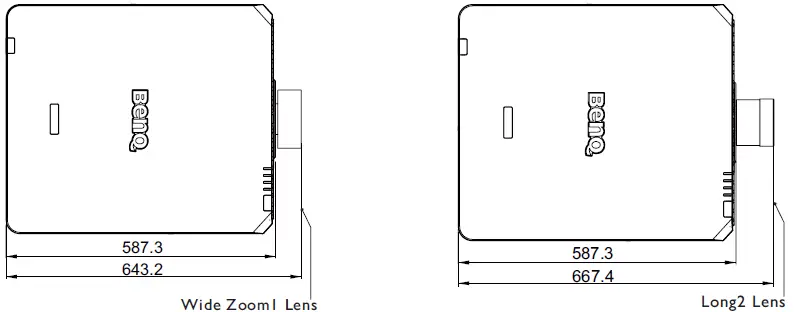
Optional Lens (Wide Zoom 2: LS1ST2A).
RS232 command control
RS232 pin assignment
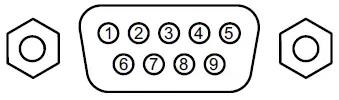
| No. | Serial | No. | Serial | |
| 1 | N.C | 6 | N.C | |
| 2 | RXD | 7 | Short with pin8 | |
| 3 | TXD | 8 | Short with pin7 | |
| 4 | N.C | 9 | N.C | |
| 5 | Ground |
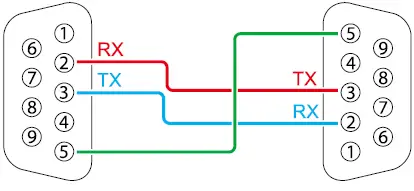
RS232 serial port with a crossover cable
| Function | Type | Operation | ASCII |
| Power | Write | Power On | <CR>*pow=on#<CR> |
| Write | Power Off | <CR>*pow=off#<CR> | |
| Read | Power Status | <CR>*pow=?#<CR> | |
|
Source Selection | Write | COMPUTER/YPbPr | <CR>*sour=RGB#<CR> |
| Write | COMPUTER 2/YPbPr2 | <CR>*sour=RGB2#<CR> | |
| Write | DVI-D | <CR>*sour=dvid#<CR> | |
| Write | HDMI(MHL) | <CR>*sour=hdmi#<CR> | |
| Write | HDMI 2(MHL2) | <CR>*sour=hdmi2#<CR> | |
| Write | HDBaseT | <CR>*sour=hdbaset#<CR> | |
| Read | Current source | <CR>*sour=?#<CR> | |
|
Audio Control | Write | Mute On | <CR>*mute=on#<CR> |
| Write | Mute Off | <CR>*mute=off#<CR> | |
| Read | Mute Status | <CR>*mute=?#<CR> | |
| Write | Volume + | <CR>*vol=+#<CR> | |
| Write | Volume – | <CR>*vol=-#<CR> | |
| Write | Volume level for customer | <CR>*vol=value#<CR> | |
| Read | Volume Status | <CR>*vol=?#<CR> |
| Function | Type | Operation | ASCII |
|
Audio source select | Write | Audio pass Through off | <CR>*audiosour=off#<CR> |
| Write | Audio-Computer1 | <CR>*audiosour=RGB#<CR> | |
| Write | Audio-HDMI | <CR>*audiosour=hdmi#<CR> | |
| Write | Audio-HDMI2 | <CR>*audiosour=hdmi2#<CR> | |
| Write | HDBaseT | <CR>*audiosour=hdbaset#<CR> | |
| Read | Audio pass Status | <CR>*audiosour=?#<CR> | |
|
Picture Mode | Write | Presentation | <CR>*appmod=preset#<CR> |
| Write | sRGB | <CR>*appmod=srgb#<CR> | |
| Write | Bright | <CR>*appmod=bright#<CR> | |
| Write | DICOM | <CR>*appmod=dicom#<CR> | |
| Write | Video | <CR>*appmod=video#<CR> | |
| Write | Infographic | <CR>*appmod=infographic#<CR> | |
| Write | User1 | <CR>*appmod=user1#<CR> | |
| Write | User2 | <CR>*appmod=user2#<CR> | |
| Write | 3D | <CR>*appmod=threed#<CR> | |
| Write | HDR10 | <CR>*appmod=hdr#<CR> | |
| Write | HLG | <CR>*appmod=hlg#<CR> | |
| Read | Picture Mode | <CR>*appmod=?#<CR> | |
| Write | Contrast + | <CR>*con=+#<CR> | |
| Write | Contrast – | <CR>*con=-#<CR> | |
|
Picture Setting | Write | Set Contrast value | <CR>*con=value#<CR> |
| Read | Contrast value | <CR>*con=?#<CR> | |
| Write | Brightness + | <CR>*bri=+#<CR> | |
| Write | Brightness – | <CR>*bri=-#<CR> | |
| Write | Set Brightness value | <CR>*bri=value#<CR> | |
| Read | Brightness value | <CR>*bri=?#<CR> | |
| Write | Color + | <CR>*color=+#<CR> | |
| Write | Color – | <CR>*color=-#<CR> | |
| Write | Set Color value | <CR>*color=value#<CR> | |
| Read | Color value | <CR>*color=?#<CR> | |
| Write | Sharpness + | <CR>*sharp=+#<CR> | |
| Write | Sharpness – | <CR>*sharp=-#<CR> | |
| Write | Set Sharpness value | <CR>*sharp=value#<CR> | |
| Read | Sharpness value | <CR>*sharp=?#<CR> | |
| Write | Color Temperature-Warm | <CR>*ct=warm#<CR> | |
| Write | Color Temperature-Normal | <CR>*ct=normal#<CR> | |
| Write | Color Temperature-Cool | <CR>*ct=cool#<CR> | |
| Read | Color Temperature Status | <CR>*ct=?#<CR> | |
| Write | Aspect 4:3 | <CR>*asp=4:3#<CR> | |
| Write | Aspect 16:9 | <CR>*asp=16:9#<CR> | |
| Write | Aspect 16:10 | <CR>*asp=16:10#<CR> | |
| Write | Aspect 2.35:1 | <CR>*asp=2.35#<CR> |
| Function | Type | Operation | ASCII |
|
Picture Setting | Write | Aspect Auto | <CR>*asp=AUTO#<CR> |
| Write | Aspect Real | <CR>*asp=REAL#<CR> | |
| Read | Aspect Status | <CR>*asp=?#<CR> | |
| Write | Vertical Keystone + | <CR>*vkeystone=+#<CR> | |
| Write | Vertical Keystone – | <CR>*vkeystone=-#<CR> | |
| Write | Set Vertical Keystone value | <CR>*vkeystone=value#<CR> | |
| Read | Vertical Keystone value | <CR>*vkeystone=?#<CR> | |
| Write | Horizontal Keystone + | <CR>*hkeystone=+#<CR> | |
| Write | Horizontal Keystone – | <CR>*hkeystone=-#<CR> | |
| Write | Set Horizontal Keystone value | <CR>*hkeystone=value#<CR> | |
| Read | Horizontal Keystone value | <CR>*hkeystone=?#<CR> | |
| Write | Overscan Adjustment + | <CR>*overscan=+#<CR> | |
| Write | Overscan Adjustment – | <CR>*overscan=-#<CR> | |
| Read | Overscan Adjustment value | <CR>*overscan=?#<CR> | |
| Write | 4 Corners Top-Left-X Decrease | <CR>*cornerfittlx=-#<CR> | |
| Write | 4 Corners Top-Left-X Increase | <CR>*cornerfittlx=+#<CR> | |
| Read | 4 Corners Top-Left-X Status | <CR>*cornerfittlx=?#<CR> | |
| Write | 4 Corners Top-Left-Y Decrease | <CR>*cornerfittly=-#<CR> | |
| Write | 4 Corners Top-Left-Y Increase | <CR>*cornerfittly=+#<CR> | |
| Read | 4 Corners Top-Left-Y Status | <CR>*cornerfittly=?#<CR> | |
| Write | 4 Corners Top-Right-X Decrease | <CR>*cornerfittrx=-#<CR> | |
| Write | 4 Corners Top-Right-X Increase | <CR>*cornerfittrx=+#<CR> | |
| Read | 4 Corners Top-Right-X Status | <CR>*cornerfittrx=?#<CR> | |
| Write | 4 Corners Top-Right-Y Decrease | <CR>*cornerfittry=-#<CR> | |
| Write | 4 Corners Top-Right-Y Increase | <CR>*cornerfittry=+#<CR> | |
| Read | 4 Corners Top-Right-Y Status | <CR>*cornerfittry=?#<CR> | |
| Write | 4 Corners Bottom-Left-X Decrease | <CR>*cornerfitblx=-#<CR> | |
| Write | 4 Corners Bottom-Left-X Increase | <CR>*cornerfitblx=+#<CR> | |
| Read | 4 Corners Bottom-Left-X Status | <CR>*cornerfitblx=?#<CR> | |
| Write | 4 Corners Bottom-Left-Y Decrease | <CR>*cornerfitbly=-#<CR> | |
| Write | 4 Corners Bottom-Left-Y Increase | <CR>*cornerfitbly=+#<CR> | |
| Read | 4 Corners Bottom-Left-Y Status | <CR>*cornerfitbly=?#<CR> | |
| Write | 4 Corners Bottom-Right-X Decrease | <CR>*cornerfitbrx=-#<CR> | |
| Write | 4 Corners Bottom-Right-X Increase | <CR>*cornerfitbrx=+#<CR> | |
| Read | 4 Corners Bottom-Right-X Status | <CR>*cornerfitbrx=?#<CR> | |
| Write | 4 Corners Bottom-Right-Y Decrease | <CR>*cornerfitbry=-#<CR> | |
| Write | 4 Corners Bottom-Right-Y Increase | <CR>*cornerfitbry=+#<CR> | |
| Read | 4 Corners Bottom-Right-Y Status | <CR>*cornerfitbry=?#<CR> | |
| Write | Digital Zoom In | <CR>*zoomI#<CR> | |
| Write | Digital Zoom out | <CR>*zoomO#<CR> | |
| Write | Auto | <CR>*auto#<CR> | |
| Write | Brilliant color + | <CR>*BC=+#<CR> |
| Function | Type | Operation | ASCII |
|
Picture Setting | Write | Brilliant color – | <CR>*BC=-#<CR> |
| Write | Brilliant color set value | <CR>*BC=value#<CR> | |
| Read | Brilliant color status | <CR>*BC=?#<CR> | |
| Write | Auto(HDR) | <CR>*hdr=auto#<CR> | |
| Write | SDR | <CR>*hdr=sdr#<CR> | |
| Write | HDR10 | <CR>*hdr=hdr#<CR> | |
| Write | HLG | <CR>*hdr=hlg#<CR> | |
| Read | HDR status | <CR>*hdr=?#<CR> | |
| Write | Reset current picture settings | <CR>*rstcurpicsetting#<CR> | |
| Write | Reset all picture settings | <CR>*rstallpicsetting#<CR> | |
|
Operation Settings | Write | Projector Position-Front Table | <CR>*pp=FT#<CR> |
| Write | Projector Position-Rear Table | <CR>*pp=RE#<CR> | |
| Write | Projector Position-Rear Ceiling | <CR>*pp=RC#<CR> | |
| Write | Projector Position-Front Ceiling | <CR>*pp=FC#<CR> | |
| Read | Projector Position Status | <CR>*pp=?#<CR> | |
| Write | Quick auto search | <CR>*QAS=on#<CR> | |
| Write | Quick auto search | <CR>*QAS=off#<CR> | |
| Read | Quick auto search status | <CR>*QAS=?#<CR> | |
| Write | Menu Position – Center | <CR>*menuposition=center#<CR> | |
| Write | Menu Position – Top-Left | <CR>*menuposition=tl#<CR> | |
| Write | Menu Position – Top-Right | <CR>*menuposition=tr#<CR> | |
| Write | Menu Position – Bottom-Right | <CR>*menuposition=br#<CR> | |
| Write | Menu Position – Bottom-Left | <CR>*menuposition=bl#<CR> | |
| Read | Menu Position Status | <CR>*menuposition=?#<CR> | |
| Write | Direct Power On-on | <CR>*directpower=on#<CR> | |
| Write | Direct Power On-off | <CR>*directpower=off#<CR> | |
| Read | Direct Power On-Status | <CR>*directpower=?#<CR> | |
| Write | Signal Power On-on | <CR>*autopower=on#<CR> | |
| Write | Signal Power On-off | <CR>*autopower=off#<CR> | |
| Read | Signal Power On-Status | <CR>*autopower=?#<CR> | |
|
Baud Rate | Write | 2400 | <CR>*baud=2400#<CR> |
| Write | 4800 | <CR>*baud=4800#<CR> | |
| Write | 9600 | <CR>*baud=9600#<CR> | |
| Write | 14400 | <CR>*baud=14400#<CR> | |
| Write | 19200 | <CR>*baud=19200#<CR> | |
| Write | 38400 | <CR>*baud=38400#<CR> | |
| Write | 57600 | <CR>*baud=57600#<CR> | |
| Write | 115200 | <CR>*baud=115200#<CR> | |
| Read | Current Baud Rate | <CR>*baud=?#<CR> |
| Function | Type | Operation | ASCII |
|
Lamp Control | Read | Lamp Hour | <CR>*ltim=?#<CR> |
| Write | Normal mode | <CR>*lampm=lnor#<CR> | |
| Write | Eco mode | <CR>*lampm=eco#<CR> | |
| Write | Dimming mode | <CR>*lampm=dimming#<CR> | |
| Write | Custom mode | <CR>*lampm=custom#<CR> | |
| Write | Light level for custom mode | <CR>*lampcustom=value#<CR> | |
| Read | Light level status for custom mode | <CR>*lampcustom=?#<CR> | |
| Read | Lamp Mode Status | <CR>*lampm=?#<CR> | |
|
Miscellaneous | Read | Model Name | <CR>*modelname=?#<CR> |
| Read | System F/W Version | <CR>*sysfwversion=?#<CR> | |
| Read | Scaler F/W Version | <CR>*scalerfwversion=?#<CR> | |
| Read | Lan F/W Version | <CR>*lanfwversion=?#<CR> | |
| Read | MCU F/W Version | <CR>*mcufwversion=?#<CR> | |
| Write | Blank On | <CR>*blank=on#<CR> | |
| Write | Blank Off | <CR>*blank=off#<CR> | |
| Read | Blank Status | <CR>*blank=?#<CR> | |
| Write | Freeze On | <CR>*freeze=on#<CR> | |
| Write | Freeze Off | <CR>*freeze=off#<CR> | |
| Read | Freeze Status | <CR>*freeze=?#<CR> | |
| Write | Menu On | <CR>*menu=on#<CR> | |
| Write | Menu Off | <CR>*menu=off#<CR> | |
| Read | Menu Status | <CR>*menu=?#<CR> | |
| Write | Up | <CR>*up#<CR> | |
| Write | Down | <CR>*down#<CR> | |
| Write | Right | <CR>*right#<CR> | |
| Write | Left | <CR>*left#<CR> | |
| Write | Enter | <CR>*enter#<CR> | |
| Write | Back | <CR>*back#<CR> | |
| Write | Source Menu On | <CR>*sourmenu=on#<CR> | |
| Write | Source Menu Off | <CR>*sourmenu=off#<CR> | |
| Read | Source Menu Status | <CR>*sourmenu=?#<CR> | |
| Write | 3D Sync Off | <CR>*3d=off#<CR> | |
| Write | 3D Auto | <CR>*3d=auto#<CR> | |
| Write | 3D Sync Top Bottom | <CR>*3d=tb#<CR> | |
| Write | 3D Sync Frame Sequential | <CR>*3d=fs#<CR> | |
| Write | 3D Frame packing | <CR>*3d=fp#<CR> | |
| Write | 3D Side by side | <CR>*3d=sbs#<CR> | |
| Write | 3D inverter disable | <CR>*3d=da#<CR> | |
| Write | 3D inverter | <CR>*3d=iv#<CR> | |
| Write | 3D nVIDIA | <CR>*3d=nvidia#<CR> | |
| Read | 3D Sync Status | <CR>*3d=?#<CR> | |
| Write | Remote Receiver-front+rear | <CR>*rr=fr#<CR> |
| Function | Type | Operation | ASCII |
|
Miscellaneous | Write | Remote Receiver-front | <CR>*rr=f#<CR> |
| Write | Remote Receiver-rear | <CR>*rr=r#<CR> | |
| Read | Remote Receiver Status | <CR>*rr=?#<CR> | |
| Write | AMX Device Discovery-on | <CR>*amxdd=on#<CR> | |
| Write | AMX Device Discovery-off | <CR>*amxdd=off#<CR> | |
| Read | AMX Device Discovery Status | <CR>*amxdd=?#<CR> | |
| Read | Mac Address | <CR>*macaddr=?#<CR> | |
| Read | Serial Number | <CR>*serialnumber=?#<CR> | |
| Write | High Altitude mode on | <CR>*Highaltitude=on#<CR> | |
| Write | High Altitude mode off | <CR>*Highaltitude=off#<CR> | |
| Read | High Altitude mode status | <CR>*Highaltitude=?#<CR> | |
|
Installation | Write | Load Lens memory 1 | <CR>*lensload=m1#<CR> |
| Write | Load Lens memory 2 | <CR>*lensload=m2#<CR> | |
| Write | Load Lens memory 3 | <CR>*lensload=m3#<CR> | |
| Write | Load Lens memory 4 | <CR>*lensload=m4#<CR> | |
| Write | Load Lens memory 5 | <CR>*lensload=m5#<CR> | |
| Write | Load Lens memory 6 | <CR>*lensload=m6#<CR> | |
| Write | Load Lens memory 7 | <CR>*lensload=m7#<CR> | |
| Write | Load Lens memory 8 | <CR>*lensload=m8#<CR> | |
| Write | Load Lens memory 9 | <CR>*lensload=m9#<CR> | |
| Write | Load Lens memory 10 | <CR>*lensload=m10#<CR> | |
| Read | Read Lens memory status | <CR>*lensload=?#<CR> | |
| Write | save Lens memory 1 | <CR>*lenssave=m1#<CR> | |
| Write | save Lens memory 2 | <CR>*lenssave=m2#<CR> | |
| Write | save Lens memory 3 | <CR>*lenssave=m3#<CR> | |
| Write | save Lens memory 4 | <CR>*lenssave=m4#<CR> | |
| Write | save Lens memory 5 | <CR>*lenssave=m5#<CR> | |
| Write | save Lens memory 6 | <CR>*lenssave=m6#<CR> | |
| Write | save Lens memory 7 | <CR>*lenssave=m7#<CR> | |
| Write | save Lens memory 8 | <CR>*lenssave=m8#<CR> | |
| Write | save Lens memory 9 | <CR>*lenssave=m9#<CR> | |
| Write | save Lens memory 10 | <CR>*lenssave=m10#<CR> | |
| Write | Reset Lens to center | <CR>*lensreset=center#<CR> | |
|
Color Calibration | Write | Tint + | <CR>*tint=+#<CR> |
| Write | Tint – | <CR>*tint=-#<CR> | |
| Write | Set Tint value | <CR>*tint=value#<CR> | |
| Read | Get Tint value | <CR>*tint=?#<CR> | |
| Write | Set gamma value | <CR>*gamma=value#<CR> | |
| Read | Gamma value status | <CR>*gamma=?#<CR> | |
| Write | Set HDR Brightness value | <CR>*hdrbri=value#<CR> | |
| Read | Get HDR Brightness value | <CR>*hdrbri=?#<CR> | |
| Write | Red Gain + | <CR>*RGain=+#<CR> |
| Function | Type | Operation | ASCII |
|
Color Calibration | Write | Red Gain – | <CR>*RGain=-#<CR> |
| Write | Set Red Gain value | <CR>*RGain=value#<CR> | |
| Read | Get Red Gain value | <CR>*RGain=?#<CR> | |
| Write | Green Gain + | <CR>*GGain=+#<CR> | |
| Write | Green Gain – | <CR>*GGain=-#<CR> | |
| Write | Set Green Gain value | <CR>*GGain=value#<CR> | |
| Read | Get Green Gain value | <CR>*GGain=?#<CR> | |
| Write | Blue Gain + | <CR>*BGain=+#<CR> | |
| Write | Blue Gain – | <CR>*BGain=-#<CR> | |
| Write | Set Blue Gain value | <CR>*BGain=value#<CR> | |
| Read | Get Blue Gain value | <CR>*BGain=?#<CR> | |
| Write | Red Offset + | <CR>*ROffset=+#<CR> | |
| Write | Red Offset – | <CR>*ROffset=-#<CR> | |
| Write | Set Red Offset value | <CR>*ROffset=value#<CR> | |
| Read | Get Red Offset value | <CR>*ROffset=?#<CR> | |
| Write | Green Offset + | <CR>*GOffset=+#<CR> | |
| Write | Green Offset – | <CR>*GOffset=-#<CR> | |
| Write | Set Green Offset value | <CR>*GOffset=value#<CR> | |
| Read | Get Green Offset value | <CR>*GOffset=?#<CR> | |
| Write | Blue Offset + | <CR>*BOffset=+#<CR> | |
| Write | Blue Offset – | <CR>*BOffset=-#<CR> | |
| Write | Set Blue Offset value | <CR>*BOffset=value#<CR> | |
| Read | Get Blue Offset value | <CR>*BOffset=?#<CR> | |
| Write | Primary Color | <CR>*primcr=value#<CR> | |
| Read | Primary Color Status | <CR>*primcr=?#<CR> | |
| Write | Hue + | <CR>*hue=+#<CR> | |
| Write | Hue – | <CR>*hue=-#<CR> | |
| Write | Set Hue value | <CR>*hue=value#<CR> | |
| Read | Get Hue value | <CR>*hue=?#<CR> | |
| Write | Saturation + | <CR>*saturation=+#<CR> | |
| Write | Saturation – | <CR>*saturation=-#<CR> | |
| Write | Set Saturation value | <CR>*saturation=value#<CR> | |
| Read | Get Saturation value | <CR>*saturation=?#<CR> | |
| Write | Gain + | <CR>*gain=+#<CR> | |
| Write | Gain – | <CR>*gain=-#<CR> | |
| Write | Set Gain value | <CR>*gain=value#<CR> | |
| Read | Get Gain value | <CR>*gain=?#<CR> |
| Function | Type | Operation | ASCII |
|
Service | Read | Error Code report | <CR>*error=report#<CR> |
| Read | FAN 1 speed | <CR>*fan1=?#<CR> | |
| Read | FAN 2 speed | <CR>*fan2=?#<CR> | |
| Read | FAN 3 speed | <CR>*fan3=?#<CR> | |
| Read | FAN 4 speed | <CR>*fan4=?#<CR> | |
| Read | FAN 5 speed | <CR>*fan5=?#<CR> | |
| Read | FAN 6 speed | <CR>*fan6=?#<CR> | |
| Read | FAN 7 speed | <CR>*fan7=?#<CR> | |
| Read | FAN 8 speed | <CR>*fan8=?#<CR> | |
| Read | FAN 9 speed | <CR>*fan9=?#<CR> | |
| Read | FAN 10 speed | <CR>*fan10=?#<CR> | |
| Read | FAN 11 speed | <CR>*fan11=?#<CR> | |
| Read | FAN 12 speed | <CR>*fan12=?#<CR> | |
| Read | FAN 13 speed | <CR>*fan13=?#<CR> | |
| Read | Temperature 1 | <CR>*tmp1=?#<CR> | |
| Read | Temperature 2 | <CR>*tmp2=?#<CR> | |
| Read | Temperature 3 | <CR>*tmp3=?#<CR> | |
| Read | Temperature 4 | <CR>*tmp4=?#<CR> | |
| Read | Temperature 5 | <CR>*tmp5=?#<CR> | |
| Read | LED indicator | <CR>*led=?#<CR> |
PJLink
PJLink protocal
The network function of this projector support the PJLink class 1, and the PJLink protocal can be used to perform projector setting and projector status query operations from a computer.
Control commands
The following table lists the PJLink protocal commands that can be used to control the projector. x characters in table are non-specific characters.
| Command | Control Details | Parameter/ Return String | Remark | ||
| POWR | Power supply control | 0 | Standby | ||
| 1 | Power on | ||||
| POWR? | Power supply status query | 0 | Standby | ||
| 1 | Power on | ||||
| INPT | Input selection | 11 | PC1 / YPbPr1 | ||
|
INPT? |
Input status que- ry | 12 | PC2 / YPbPr2 | ||
| 21 | VIDEO | ||||
| 31 | HDMI1 | ||||
| 32 | HDMI2 | ||||
| 33 | DVI-D | ||||
| 34 | HDBaseT | ||||
| AVMT | Mute | 11 | Video mute On | ||
|
AVMT? |
Mute query | 10 | Video mute Off | ||
| 21 | Audio mute On | ||||
| 20 | Audio mute Off | ||||
| 31 | Video & Audio mute On | ||||
| 30 | Video & Audio mute Off | ||||
|
ERST? |
Error status que- ry |
xxxxxx | 1st byte | Indicates fan errors, and returns 0 – 2 |
0 = No error is detected 1 = Warning 2 = Error |
| 2nd byte | Indicates light source er- rors, and returns 0 – 2 | ||||
| 3rd byte | Indicates temperature errors, and returns 0 – 2 | ||||
| 4th byte | Return 0 | ||||
| 5th byte | Return 0 | ||||
| 6th byte | Indicates other errors, and returns 0 – 2 | ||||
| LAMP? | Light source sta- tus query | xxxxxxxxxxxx | 1st number (1-5 digitals): Light source 1 runtime | ||
| INST? | Input selection list query | 11 12 21 31 32 33 34 | LU9750/LU9800 | ||
| NAME? | Projector name query | xxxxx | Returns the name set in [PROJECTOR NAME] of [NET- WORK SETUP] | ||
| Command | Control Details | Parameter/ Return String | Remark |
| INF1? | Manufacturer name query | BenQ | Returns manufacturer name |
| INF2? | Model name que- ry | LU9750/LU9800 | Returns moder name |
| INF0? | Other informa- tion queries | xxxxx | Returns information such as version number |
| CLASS? | Class information query | 1 | Returns class for PJLink |
Note:
RS-232 baud rate options are 2400, 4800, 9600, 14400, 19200, 38400, 57600 and 115200 (Default : 115200).
ecoFACTS
csr.BenQ.com
- Arsenic-free optical glass
- BFR/PVC-free casing plastics
- PVC-free plastic packaging
2019 BenQ Corporation. All rights reserved. Rights of modification reserved. P/N:4JPNOI.00I
 BenQ Display Solutions