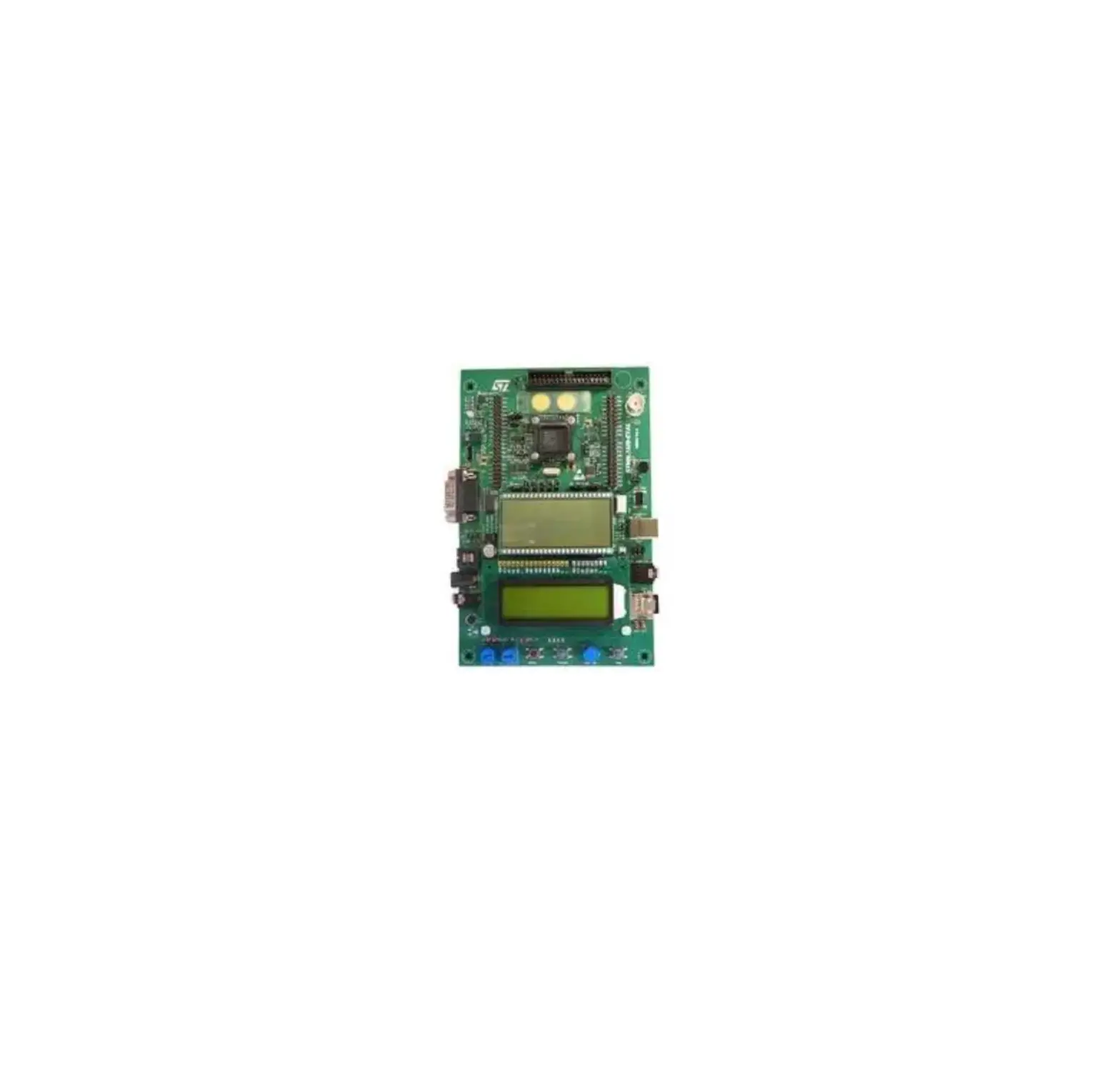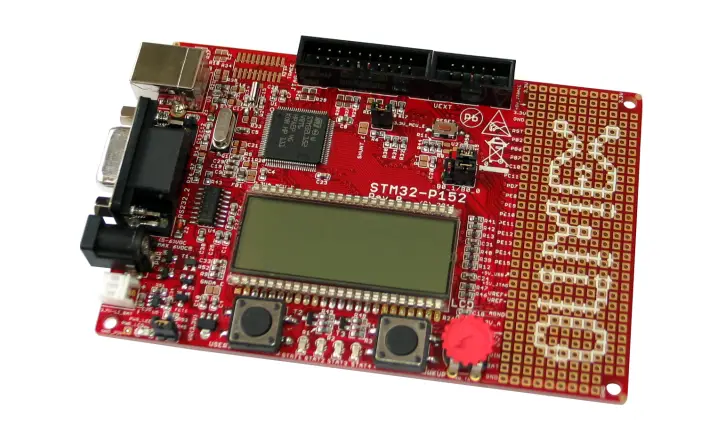

OUMEX STM32-P152 Development Board
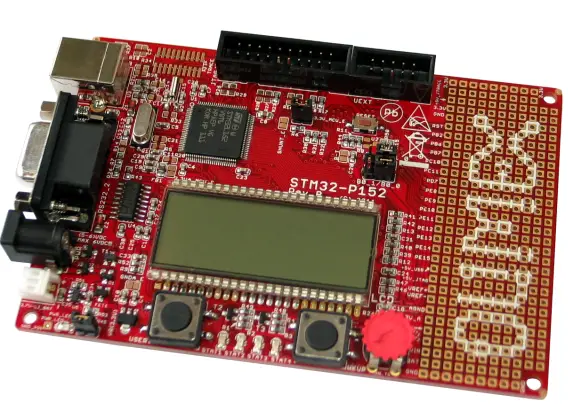
All boards produced by Olimex are ROHS compliant
Revision C, April 2012
Copyright(c) 2011, OLIMEX Ltd, All rights reserved
INTRODUCTION:
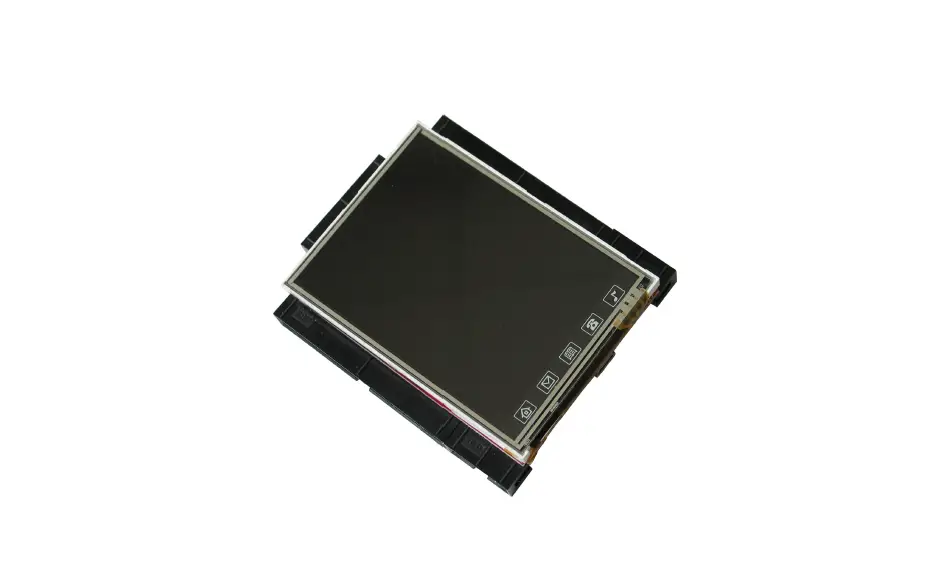
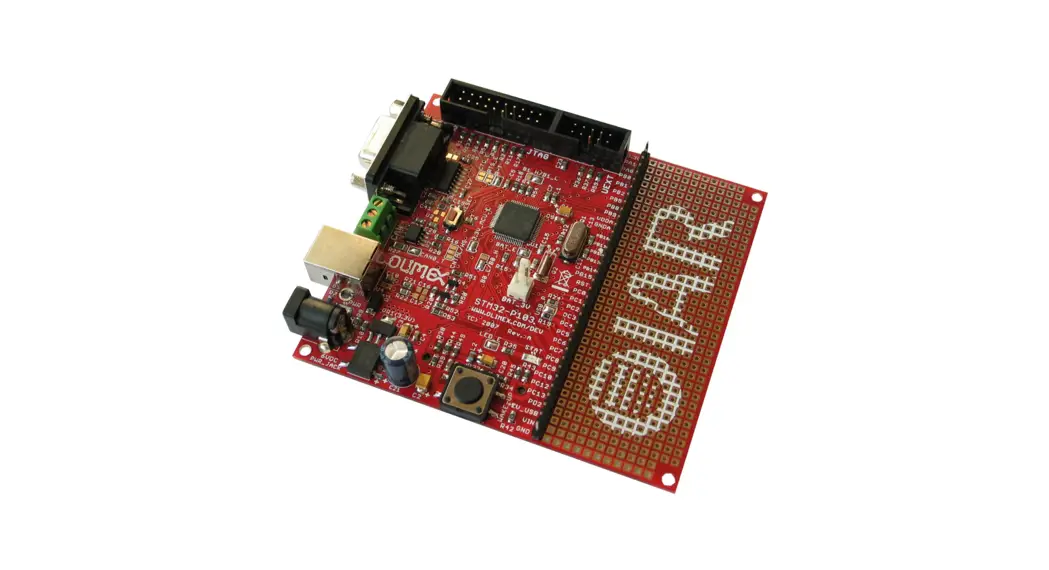
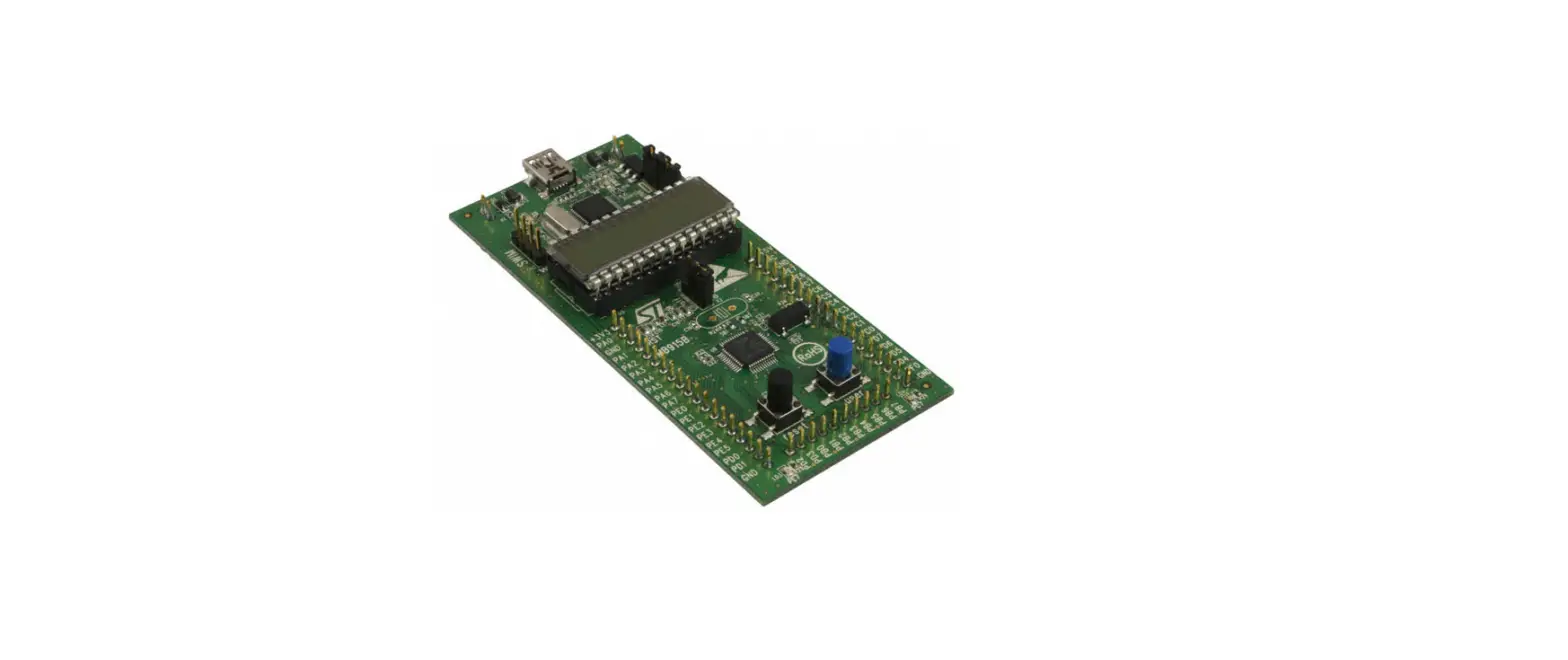
STM32-P152 is a development board with STM32L152VBT6 ARM Cortex M3 mi-crocontroller made by STMicroelectronics. This microcontroller supports various communication interfaces such as USB, three USARTs, two SPIs, two I2Cs. There are USB, JTAG and UEXT connectors, three buttons – WKUP, USER and RESET, four status LEDs, potentiometer and pin holes for most of the microcontroller’s pins. The board features low power segment LCD that uses the built in LCD controller in this specialized microcontroller. Due to its low power capabilities the board can run bat-tery powered applications via the battery connector. All this allows you to build dif-ferent projects for a wide range of applications.
BOARD FEATURES:
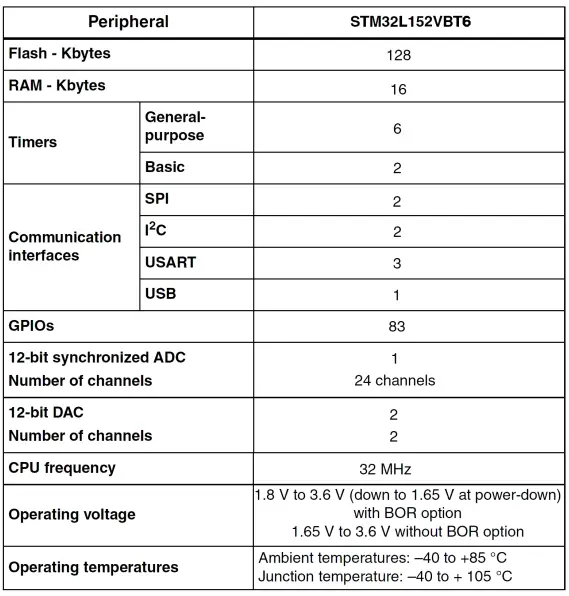
- MCU: STM32L152VBT6 – 128 KB Flash, 16 KB Data RAM
- USB
- 3.7V-LI_BAT connector
- Battery charger
- JTAG/SWD connector
- UEXT connector
- RS232 connector
- LCD
- Four status LEDs
- Reset circuit
- RESET button
- WKUP button
- USER button
- Potentiometer
- Power jack
- Power-on LED
- Pin holes for most of the microcontroller pins
- FR-4, 1.5 mm, soldermask, component print
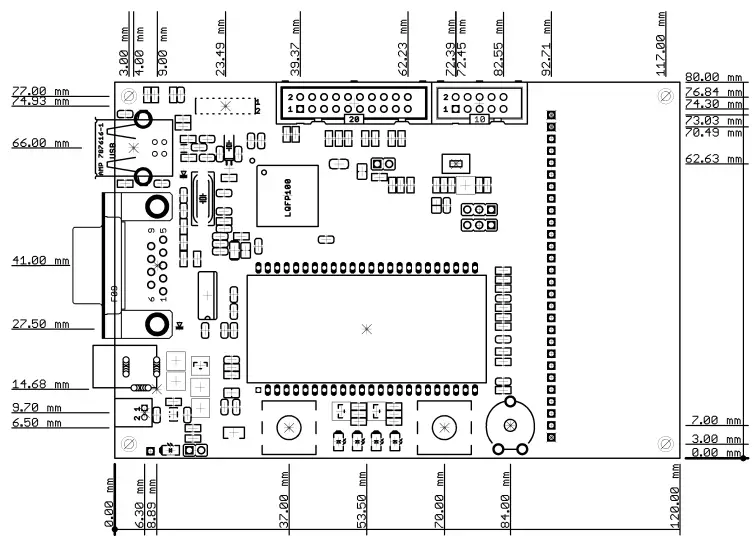
- Dimensions: 120.00 x 80.00 mm (4.72 x 3.15″)
ELECTROSTATIC WARNING:
The STM32-P152 board is shipped in protective anti-static packaging. The board must not be subject to high electrostatic potentials. General practice for working with static sensitive devices should be applied when working with this board.
BOARD USE REQUIREMENTS:
- Cables: The cable you will need depends on the programmer/debugger you use. If you use ARM-JTAG-EW, ARM-USB-TINY or ARM-USB-TINY-H, you will need USB A-B cable, if you use ARM-USB-OCD or ARM-USB-OCD-H, you will need USB A-B cable and RS232 cable.
- Hardware: Programmer/Debugger ARM-USB-OCD, ARM-USB-OCD-H, ARM-USB-TINY, ARM-USB-TINY-H, ARM-JTAG-COOCOX or other compatible programming/debugging tool if you work with EW-ARM. It is a good practice to first consider the software tools you are going to use and check if they support the debuggers.
- It is good idea to use SWD interface for debugging/programming because of the multiplexing of the JTAG signal lines with the display lines. If using a debugger that supports only JTAG layout you might need to disable display or write a routine that disables it.
PROCESSOR FEATURES:
STM32-P152 board uses ARM 32-bit Cortex™-M3 microcontroller STM32L152VBT6 from STMicroelectronics has these features:
- Operating conditions
Operating power supply range: 1.65 V to 3.6 V (without BOR) or 1.8 V to
3.6 V (with BOR option)
Temperature range: –40 to 85 °C - Low power features
- 4 modes: Sleep, Low-power run (9 μA at 32 kHz), Low-power sleep (4.4 μA), Stop with RTC (1.45 μA), Stop (570 nA), Standby (300 nA)
- Dynamic core voltage scaling down to 233 μA/MHz
- Ultra low leakage per I/O: 50 nA
- Fast wakeup from Stop: 8 μs
- Three wakeup pins
- Core: ARM 32-bit Cortex™-M3 CPU
- 32 MHz maximum frequency, 33.3 DMIPS peak (Dhrystone 2.1)
- Memory protection unit
- Reset and supply management
- Low power, ultrasafe BOR (brownout reset) with 5 selectable thresholds
- Ultralow power POR/PDR
- Programmable voltage detector (PVD)
- Clock management
- 1 to 24 MHz crystal oscillator
- 32 kHz oscillator for RTC with calibration
- Internal 16 MHz factory-trimmed RC
- Internal 37 kHz low consumption RC
- Internal multispeed low power RC, 64 kHz to 4 MHz with a consumption
down to 1.5 μA - PLL for CPU clock and USB (48 MHz)
- Low power calendar RTC
Alarm, periodic wakeup from Stop/Standby - Memories
- 128 Kbyte of Flash memory with ECC
- 4 Kbyte of data EEPROM with ECC
- 16 Kbyte of RAM
- 83 fast I/Os (73 of which are 5 V-tolerant) all mappable on 16 external interrupt
vectors - Development support
Serial wire debug, JTAG and trace - DMA: 7-channel DMA controller, supporting timers, ADC, SPIs, I2Cs and USARTs
- LCD 8 × 40 or 4 × 44 with step-up converter
- 12-bit ADC up to 1 Msps/24 channels
- Temperature sensor and internal voltage reference
- Operates down to 1.8 V
- 2× 12-bit DACs with output buffers
- 2 ultralow power comparators
Window mode and wakeup capability - 10 timers:
- 6 × 16-bit general-purpose timers, each with up to 4 IC/OC/PWM channels
- 2 × 16-bit basic timers
- 2 × watchdog timers (independent and window)
- 8 communication interfaces:
- 2 × I2C interfaces (SMBus/PMBus)
- 3 × USARTs (ISO 7816 interface, LIN, IrDA capability, modem control)
- 2 × SPIs (16 Mbit/s)
- USB 2.0 full speed interface
- CRC calculation unit, 96-bit unique ID

BLOCK DIAGRAM:
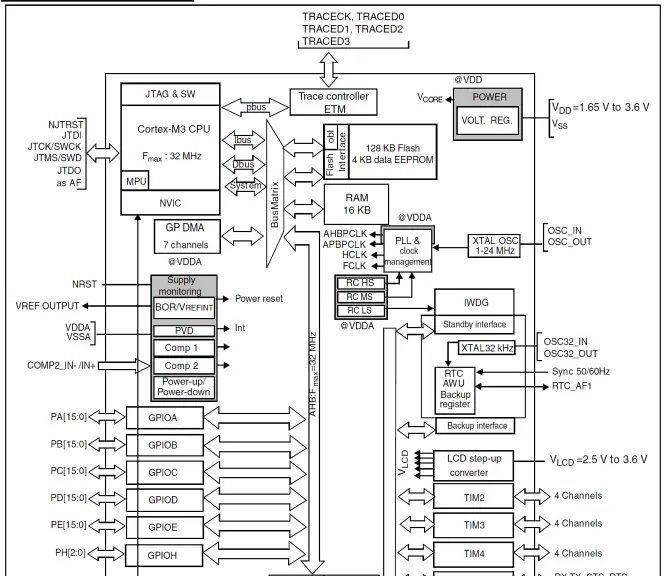
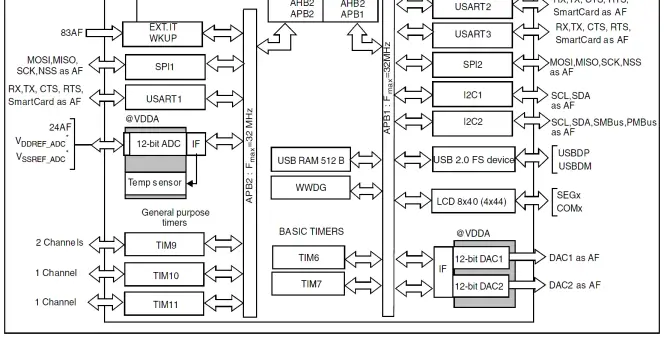
AF = Alternate Function function on I/O port pin.
MEMORY MAP:
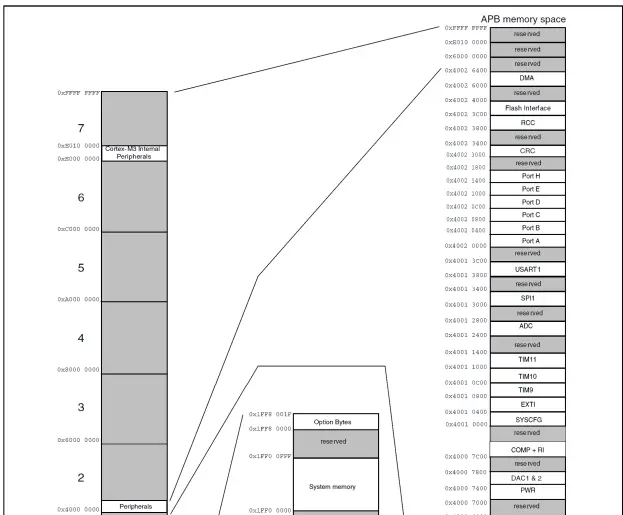
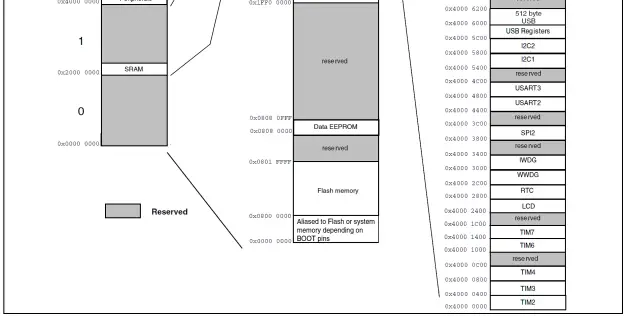
SCHEMATIC:
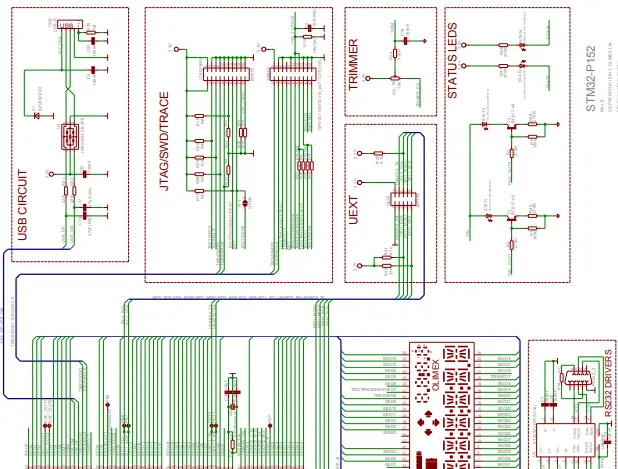
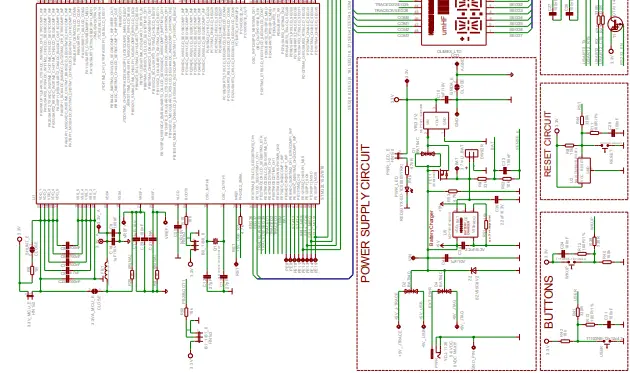
BOARD LAYOUT:
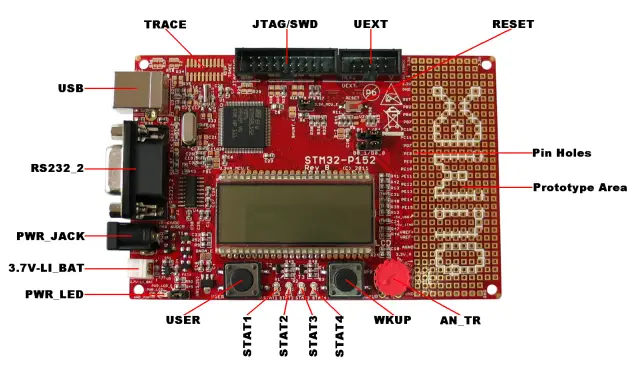
POWER SUPPLY CIRCUIT:
STM32-P152 can take power from:
- PWR_JACK (5-6) VDC
- USB – +5V_USB.
- JTAG – +5V_JTAG.
- TRACE – +5V_J-TRACE
- Battery connector – +3.7V lithium battery.
- Pin Hole VIN – (5÷6) VDC.
The programmed board power consumption is about 50 mA with all peripherals enabled. The minimal current consumption is a few uA(up to 10)
Note that if the battery is connected to 3,7V-Li BAT connector and some of other power sources(USB, JTAG, TRACE, PWR_JACK) are present and the battery is discharged then the battery will be charge until the charge complete.
RESET CIRCUIT:
STM32-P152 reset circuit includes R8 (10k), R44 (330Ω), R11 (100Ω/1%), C28 (100nF), STM32L152VBT6 pin 14 (NRST) and RESET button.
CLOCK CIRCUIT:
Quartz crystal (Q1) 8 MHz is connected to STM32L152VBT6 pin 12 (OSC_IN/PH0) and pin 13 (OSC_OUT/PH1).
Quartz crystal (Q2) 32.768 kHz is connected to STM32L152VBT6 pin 8 (PC14/OSC32_IN) and pin 9 (PC15/OSC32_OUT).
JUMPER DESCRIPTION:
 R-T
R-T
When this jumper is closed, RST and TRST/SEG8 are connected. When this jumper is opened, RST and TRST/SEG8 are separated. Default state is opened . SHUNT_E
When this jumper is closed, 1 Ohm shunt is enabled. When this jumper is opened, 1 Ohm shunt is disabled. Default state is closed.- GNDA_E
When this jumper is closed, the board analog ground is enabled. When this jumper is opened, the board analog ground is disabled.
Default state is closed. - 3.3VA_MCU_E
When this jumper is closed, the microcontroller analog power is enabled. When this jumper is opened, the microcontroller analog power is not enabled. Default state is closed.  3.3V_MCU_E
When this jumper is closed, STM32L152VBT6 power supply is enabled. When this jumper is opened, STM32L152VBT6 power supply is disabled. Default state is closed.- PWR_LED_E
When this jumper is closed, the PWR_LED is enabled. When this jumper is opened, the PWR_LED is disabled. Default state is closed.  B0_1/B0_0
This jumper, when is in position B0_1 – connects STM32L152VBT6 pin 94 (BOOT0) via R15 (10k) to 3.3V, when the jumper is in position B0_0 – connects STM32L152VBT6 pin 94 (BOOT0) via R15 (10k) to GND. Default state is closed in position B0_0 .- B1_1/B1_0
This jumper, when is in position B1_1 – connects STM32L152VBT6 pin 37
(PB2/BOOT1) via R7 (10k) to 3.3V, when the jumper is in position B1_0 – connects STM32L152VBT6 pin 37 (PB2/BOOT1) via R7 (10k) to GND.
Default state is closed in position B1_0 .
The boot mode is selected depending on jumpers B0_1/B0_0 and B1_1/B1_0 configuration:- When B0_1/B0_0 is closed in position B0_0 and B1_1/B1_0 position doesn’t matter -the boot mode is Main Flash Memory.
- When B0_1/B0_0 is closed in position B0_1 and B1_1/B1_0 is closed in position B1_0
- the boot mode is System Memory.
- When B0_1/B0_0 is closed in position B0_1 and B1_1/B1_0 is closed in position B1_1 – the boot mode is Embedded SRAM.
 R-T
R-T SHUNT_E
 3.3V_MCU_E
 B0_1/B0_0
INPUT/OUTPUT:
- Status led (green), with name STAT1 is connected to STM32L152VBT6 pin 29
- (PA4/DAC_OUT1), allowing current through it to be adjusted smoothly.
- Status led (yellow), with name STAT2 is connected to STM32L152VBT6 pin 30
- (PA5/DAC_OUT2), allowing current through it to be adjusted smoothly.
- Status led (red), with name STAT3 is connected to STM32L152VBT6 pin 41 (PE10).
- Status led (green), with name STAT4 is connected to STM32L152VBT6 pin 42 (PE11).
- Power-on led, with name PWR_LED – this led shows that the board is power supplied.
- User button with name WKUP is connected to STM32L152VBT6 pin 23 (PA0/WKUP1).
- User button with name USER is connected to STM32L152VBT6 pin 7 (PC13/WKUP2).
- User button with name RESET is connected to STM32L152VBT6 pin 14 (NRST).
- Trimmer with name AN_TR is connected to STM32L152VBT6 pin 82 (PD1/SPI2_SCK) – signal “TRIMER_EN”.
EXTERNAL CONNECTORS DESCRIPTION:
UEXT:
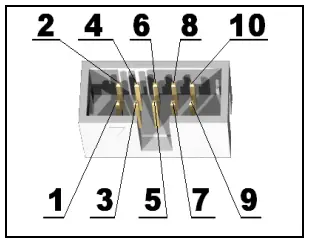
| Pin # | Signal Name |
| 1 | VCC (3.3V) |
| 2 | GND |
| 3 | USART3_TX |
| 4 | USART3_RX |
| 5 | I2C1_SCL |
| 6 | I2C1_SDA |
| 7 | SPI1_MISO |
| 8 | SPI1_MOSI |
| 9 | SPI1_SCK |
| 10 | SPI1_NSS |
USB:
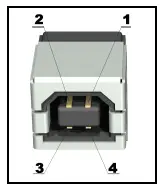
| Pin # | Signal Name |
| 1 | +5V_USB |
| 2 | USB_DM |
| 3 | USB_DP |
| 4 | GND |
3.7V-LI_BAT:
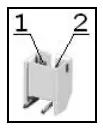
| Pin # | Signal Name |
| 1 | VBAT |
| 2 | GND |
JTAG/SWD:
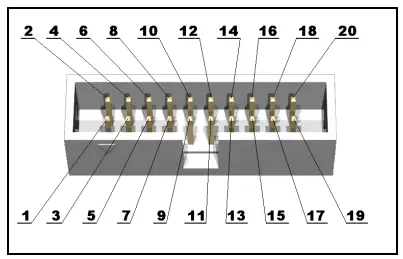
| Pin # | Signal Name | Pin # | Signal Name |
| 1 | VCC (3.3V) | 2 | VCC (3.3V) |
| 3 | TRST/SEG8 | 4 | GND |
| 5 | TDI/SEG17 | 6 | GND |
| 7 | TMS/SWDIO | 8 | GND |
| 9 | TCK/SWCLK | 10 | GND |
| 11 | Via 10k to GND | 12 | GND |
| 13 | TDO/TRACESWO/SEG7 | 14 | GND |
| 15 | RST | 16 | GND |
| 17 | Via 10k to GND | 18 | GND |
| 19 | +5V_JTAG | 20 | GND |
Important: The default demo software blocks the JTAG communication. A workaround is to press and hold button B2, then press RST, then release B2. This will shut down the display allowing you to erase the demo via JTAG and after that the JTAG should be available.
SWD debuggers/programmers would not have such a problem.
PWR_JACK:
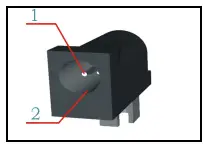
| Pin # | Signal Name |
| 1 | EXT_PWR |
| 2 | GND |
RS232_2:
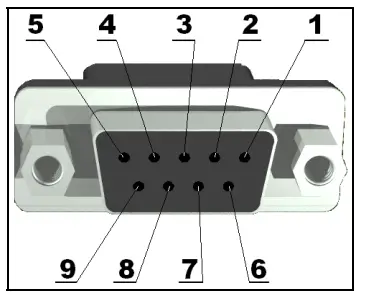
| Pin # | Signal Name |
| 1 | Not Connected |
| 2 | T1OUT (U4 pin 14) |
| 3 | R1IN (U4 pin 13) |
| 4 | Not Connected |
| 5 | GND |
| 6 | Not Connected |
| 7 | CTS |
| 8 | RTS |
| 9 | Not Connected |
TRACE:
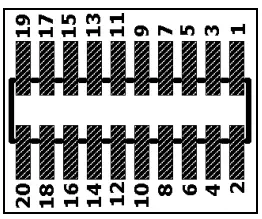
| Pin # | Signal Name | Pin # | Signal Name |
| 1 | VCC (3.3V) | 2 | TMS/SWDIO |
| 3 | GND | 4 | TCK/SWCLK |
| 5 | GND | 6 | TDO/TRACESWO/SEG7 |
| 7 | Not Connected | 8 | TDI/SEG17 |
| 9 | GND | 10 | RST |
| 11 | +5V_J-TRACE | 12 | TRACECK/SEG38 |
| 13 | +5V_J-TRACE | 14 | TRACED0/SEG39 |
| 15 | GND | 16 | TRACED1 |
| 17 | GND | 18 | TRACED2 |
| 19 | GND | 20 | TRACED3 |
PIN HOLES:

MECHANICAL DIMENSIONS:
AVAILABLE DEMO SOFTWARE:
- Demo software USB mouse and Blinking LED for EW-ARM
- Setup GCC+Eclispse for STM32 on MAC
ORDER CODE:
STM32-P152 – assembled and tested board
How to order?
You can order to us directly or by any of our distributors. Check our web https://www.olimex.com/ or more info.
Revision history:
- Board’s revision: Rev. B, June 2011
- Manual’s revision: Rev. Initial, September 2011
- Manual’s revision: Rev. B, March 2013
- Manual’s revision: Rev. C, April 2013
Disclaimer:
- © 2013 Olimex Ltd. Olimex®, logo and combinations thereof, are registered trademarks of Olimex Ltd. Other product names may be trademarks of others and the rights belong to their respective owners. The information in this document is provided in connection with Olimex products. No license, express or implied or otherwise, to any intellectual property right is granted by this document or in connection with the sale of Olimex products.
- The Hardware project is not released under the Creative Commons Attribution-Share Alike 3.0 United States License.
- The software is released under GPL.
- It is possible that the pictures in this manual differ from the latest revision of the board.
- The product described in this document is subject to continuous development and improvements. All particulars of the product and its use contained in this document are given by OLIMEX in good faith. However all warranties implied or expressed including but not limited to implied warranties of merchantability or fitness for purpose are excluded. This document is intended only to assist the reader in the use of the product. OLIMEX Ltd. shall not be liable for any loss or damage arising from the use of any information in this document or any error or omission in such information or any incorrect use of the product.
- This evaluation board/kit is intended for use for engineering development, demonstration, or evaluation purposes only and is not considered by OLIMEX to be a finished end-product fit for general consumer use. Persons handling the product must have electronics training and observe good engineering practice standards. As such, the goods being provided are not intended to be complete in terms of required design-, marketing-, and/or manufacturing-related protective considerations, including product safety and environmental measures typically found in end products that incorporate such semiconductor components or circuit boards.
- Olimex currently deals with a variety of customers for products, and therefore our arrangement with the user is not exclusive. Olimex assumes no liability for applications assistance, customer product design, software performance, or infringement of patents or services described herein.
- THERE IS NO WARRANTY FOR THE DESIGN MATERIALS AND THE COMPONENTS USED TO CREATE STM32-P152. THEY ARE CONSIDERED SUITABLE ONLY FOR STM32-P152.
 Light of the World: Part 1: Mac OS + Eclipse + OpenOCD + STM32 (ARM Cortex M3)
 OLIMEX LTD - OLinuXino Arduino Maple Pinguino ARM Open Source Hardware Development Boards