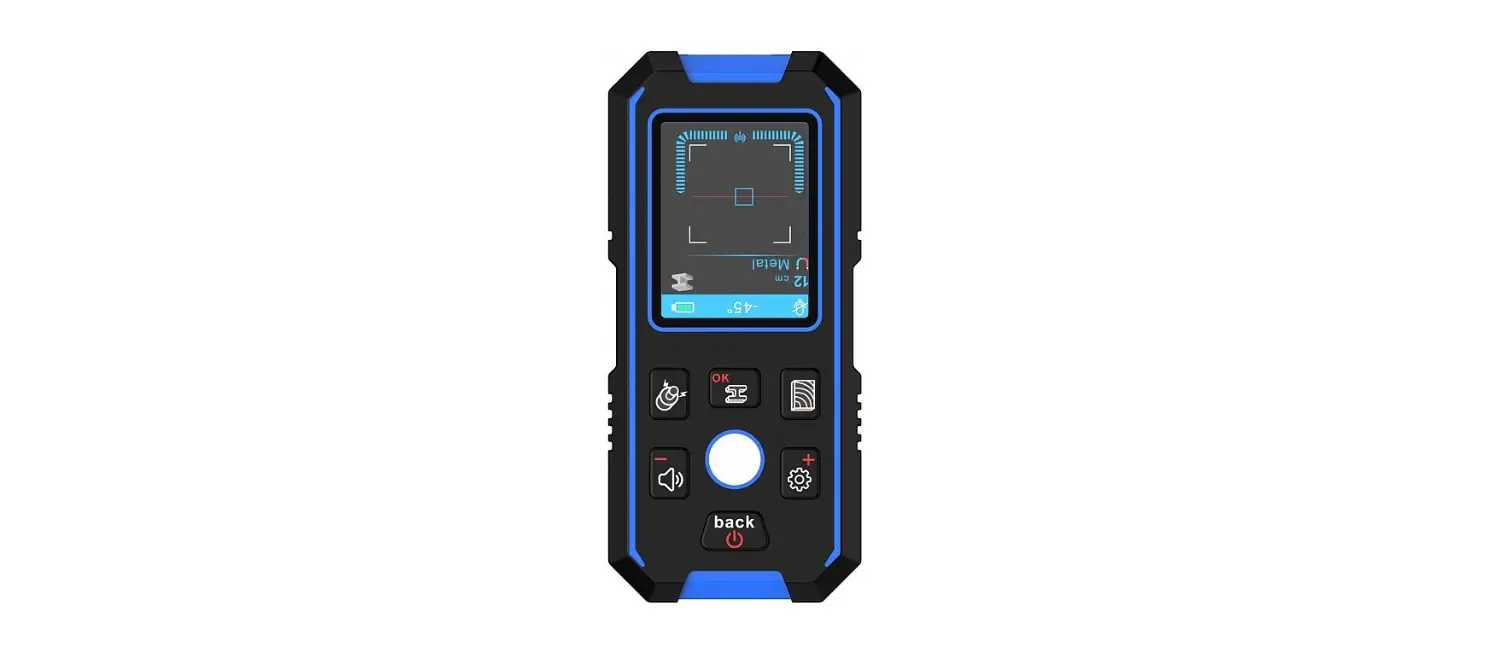

NOYAFA NF-518S Multifunctional Digital Detector
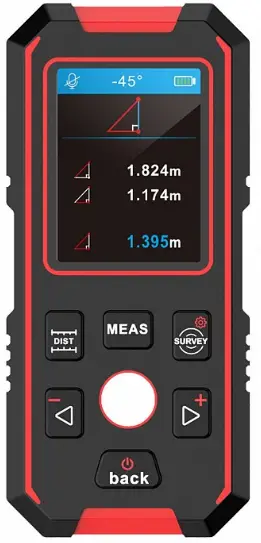
Welcome to use multi-function Measuring Instrument. To ensure the best usage for the device function, Pis read our user manual carefully and follow our operation guidance.
- NF-518S can detect metal(Stainless steel , copper pipe), power cable, the wooden product behind wall, ceilings, and ground floor.
- This device can do the job with laser meter function, it can measure length, scale, volume, carry calculation for plus&minus,times for volume.
Safety warning
- To ensure safe usage and prevent any potential injury such like laser flection, shock,or any injury by incorrect operation and mis usage Pis read the safety warning and user guidance in the user manual.
- Pis DO NOT change the performance for the laser by any means, which will bring risk for explosion of laser. Laser will be on only when in usage and DO NOT look at the laser DIRECTLY. The instrument will be only used by relevant users.
- DO NOT use laser to point at anyone when using in dark environment. 0 DO NOT point the laser to high reflection object.
- DO NOT leave the instrument within kid’s reach.
- Pis contact with local distributors when any damage occurs, don’t try to repair it yourself.
- Electric-magnet reflection may cause some interference to some other equipment (such like pacer,hearing-aid,medical instrument ).
- DO NOT use the instrument in the flammable, explosive environment. 0 DO NOT use the instrument close the medical equipment.
- DO NOT use the instrument in an airplane.
- Pis deal with the instrument according to the local law, when you decide to abandon it.
Illustration for Keys & Functions
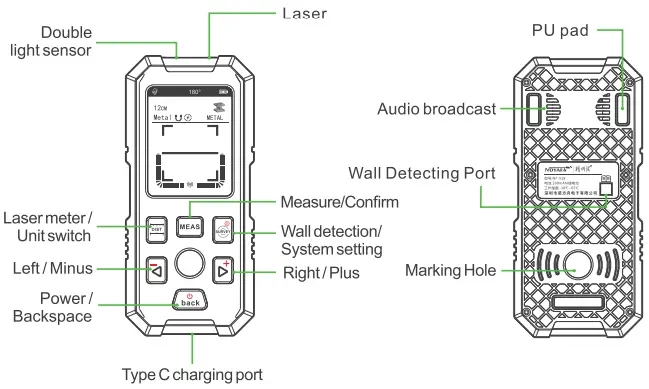
- Turn the instrument ON/ OFF
Turn ON, Long press the power button to turn it on/off.
 - Laser distance meter and wall detecting functions switch
Default set to laser meter function, short press su rvey bu tton to enter wall detecting mode;Short press button to switch to laser meter function.
 button to switch to laser meter function.
CD Enter Menu Setting
Long press button when the instrument is ON, there are 7 lines in the system menu; History Data, Unit setting, Audio switch.Variation setting, Sensitive setting, Metal detection collaboration , About the instrument.
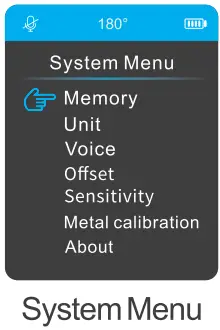
Menu setting
Press button on the system menu page to step forward. Press
  to step backward, Press
  to confirm the choice, Press
  to move between choices.Press to sa ve the setting, Press
 to step backwards or Exit the setting
Wall Detecting Function
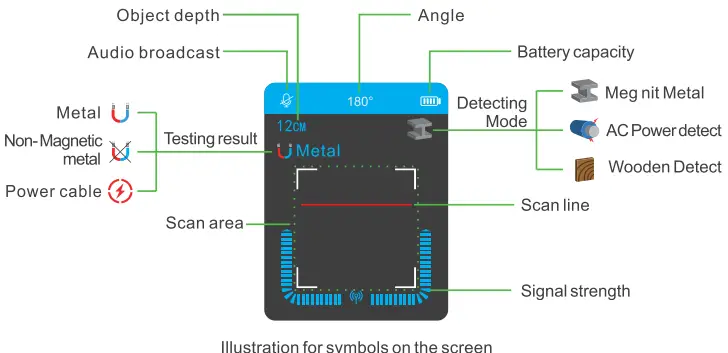
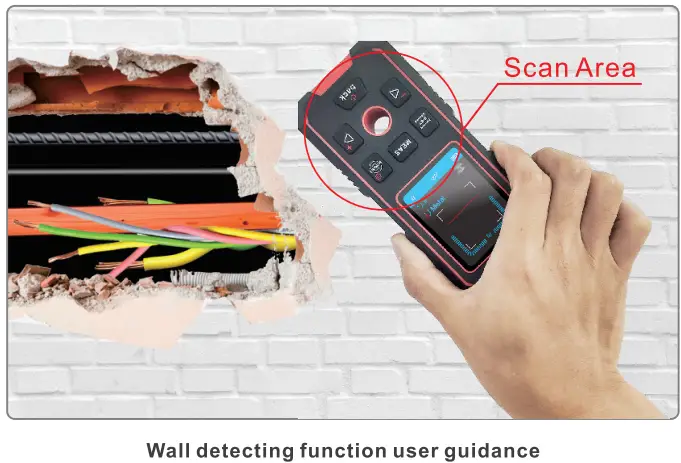
Note,human body is conductive.to ensure the best detecting result and guarantee the right depth, Pis follow the guidance when use the instrument.
Detecting model switch diagram
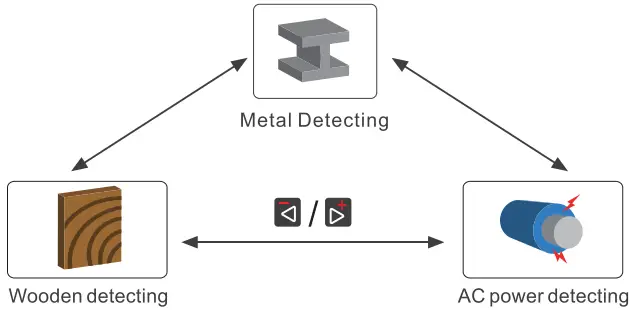
Applicability
NF-518S wall detecting function can detect metal (magnetic or non-magnetic), wooden power cables etc behind wall, ceilings, floors etc.
Metal detection
- Short press on
 to enter wall detecting model, Instrument default setting at metal testing model.
  symbol shows metal detection model, Customers can start to scan when the text disappeared from the screen and the red scan line appears.
- When the
 symbol comes out at the top left corner, with the audio broadcast “Metal” and the depth figure showed on the screen with the signal strength it means the instrument has found magnetic metal, if the symbol shows
  others are the same as the metal it means the instrument has found some non-magnetic metal; when the (t) symbol shows on the screen, it means the instrument has found AC power cable with 50/60HZ frequency.
 Central Mark hole
The display will show the central marking hole together with the depth figure when ii moves to the top of some tested objections (Magnetic metal I non magnetic metal I wooden/ AC power cable).
 symbol shows metal detection model, Customers can start to scan when the text disappeared from the screen and the red scan line appears.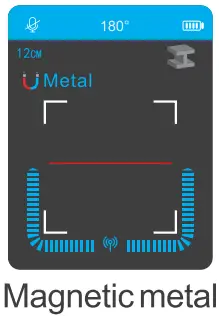
 symbol comes out at the top left corner, with the audio broadcast “Metal” and the depth figure showed on the screen with the signal strength it means the instrument has found magnetic metal, if the symbol shows
  others are the same as the metal it means the instrument has found some non-magnetic metal; when the (t) symbol shows on the screen, it means the instrument has found AC power cable with 50/60HZ frequency.
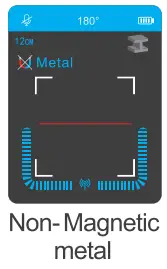 Central Mark hole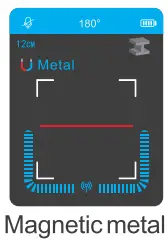
Metal detecting self collaboration
The temperature or humidity changes will result in wrong testing result on metal detection or shorten the depth testing, the collaboration method is : First, Long press on  button to enter the system menu, Secondly, by using m buttons to choose “Metal detection collaboration” option, Thirdly operate the instrument to carry on the collaboration process according to the notice ; Pis hold the instrument in the air quickly press & releas the button in a non-metal, non-magnetic environment.
Wooden Detection
 symbol is the indicator for wooden detection, in wooden detection mode, the instrument has to be close attached to the targeted surface to process the collaboration process, customers allowed to move the device only when the collaboration finishes.
- Both self / Manual collaboration are available for wooden detection mode, default set to self collaboration.

- Self collaboration method
Attach the device on the targeted surface, the device will auto recognize and self collaboration, when the process finishes, the text on the scan area will disappear and scan line will come up, users were suggested move the device slowly, once been lifted above the surface detection stops, the device needed been re-collaboration before use. - Manual collaboration method
During usage, if the detected surface is too dark to collaboration, users can do a quick short press on to getthe device been collaborated, move the device to do the detection when scan line appears after the text in the scan area disappears it means the collaboration finishes. Short press on to exit the manual collaboration mode, or use
  to switch the mode, otherwise, the device will still be detecting.
 - When the device detect any “eye winker”, it will show
 to show Rib place and
  to show slot place, and will show the signal strength together.
 - If any Rib or metal found under wooden plate, the device will show , when 50/60HZAC power cable was found ii will show
 symbol.
 symbol is the indicator for wooden detection, in wooden detection mode, the instrument has to be close attached to the targeted surface to process the collaboration process, customers allowed to move the device only when the collaboration finishes.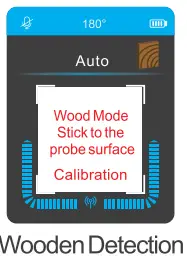
 to show Rib place and
  to show slot place, and will show the signal strength together.
 symbol.
AC power detection
 is the symbol for AC power detection mode, once the red line appears after text in the scan area, Users can start the AC power detection.
- The screen will display the signal strength together with symbol when it detects 50/60HZAC power.

 is the symbol for AC power detection mode, once the red line appears after text in the scan area, Users can start the AC power detection.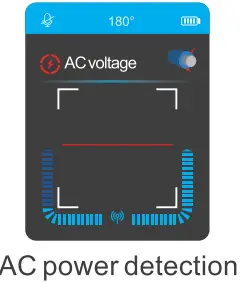
Laser Distance Meter Function
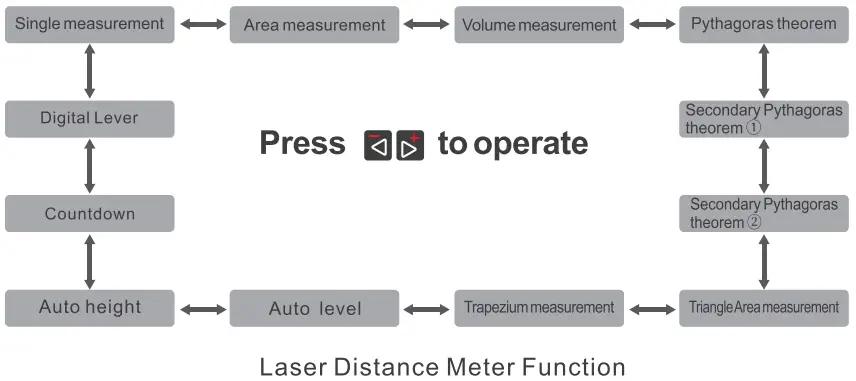
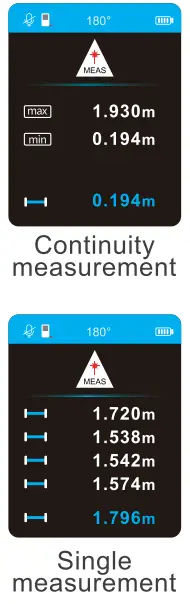
Continuity measurement
Long press for 1s, to enter continuity measurement,the screen will display MAX.MIN length, under continuity
measurement mode, short press on or to exit the mode, Press or again to back to single measurement.
Single measurement
Short press to enter laser distance measurement, short press to take measurement, the result will be displayed on the screen .
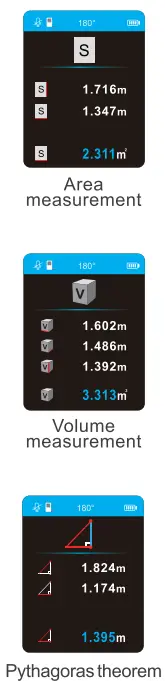
Area measurement
Short press on in Single measurement I Digital level mode to enter area measurement. Short press button to measure length and width, area figure will display on the screen.
Volume measurement
Short press to choose the volume measurement function, take measurements for length, width,and height by short press button, final figure will show on the screen.
Pythagoras theorem
To enter the Pythagoras theorem function users need to press to choose it ,by short press on users can measure the length for horizon/vertical and hypotenuse then the other direction figure will auto-show on the screen.
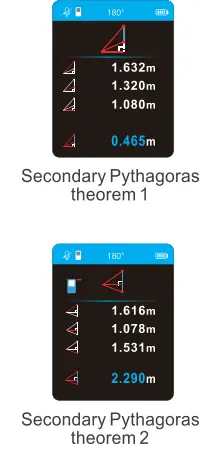
Secondary Pythagoras theorem 1
Use to choose the function. by pressing to measure the length figures for 2 hypotenuses and horizon the screen will show the height between the 2 hypotenuses.
Secondary Pythagoras theorem 2
Select the function by short press , short press to measure the 2 lengths for hypotenuses and horizon length, the screen will display the height between the 2 hypotenuses.
Triangle area measurement
Select the function by pressing buttons, press take measure the length for the 3 lines, the device will show the area figure on the screen.
Triangle area measurement
Select the function by pressing buttons, take measurements for 2 vertical length and one for horizon length, the device will calculate the length for hypotenuses and display the figure on the screen.
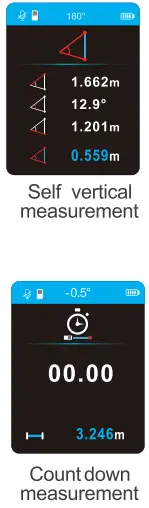
Self level measurement
Select the function by pressing buttons, measure the length for hypotenuses, the device will auto-calculate the leaning angle, length for the horizon and vertical direction.
Self level measurement
Select the function by pressing buttons. measure the lengths of the hypotenuse for 2 lines by pressingbutton.The device will auto-calculate the distance between the 2 ends and also the angle between the 2 hypotenuse lines, and display the result on the screen.
Count down measurement
Select the function by pressing buttons, adjust the countdown time by short press on button, Press the button to start the function, when the countdown ends, the device will display the length figure on the screen.

Plus & Minus measurement
Only works in single measurement, area measurement, and volume measurement model.Long press the button after getting a result.
Length plus / minus: short pressbutton to take different measurement figures and display the final result on the screen after continuously plus/ minus calculation.
Area / Volume plus/ minus:short press button to take different measurement figures ,short press again , the final result will be displayed on the screen after plus/ minus calculation.
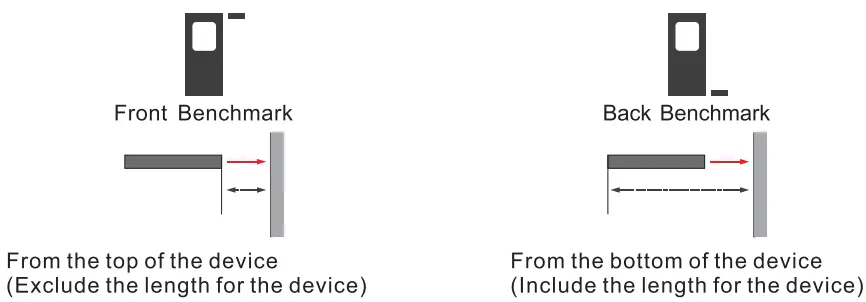
Bench mark switch: Long press on to switch bench mark between include/exclude the length of the device.
Record Storage
Short press on to record the result after calculating, The max record can store 50 records, and it will auto refresh when new ones coming in, Users can look through the record by logging in the system menu and delete all the record data by pressing at the same time.
Product Parameter
| Product number | NF-518S | ||
| Function | Laser distance+ Wall Detection+ Digital level | ||
| Appearance | 2 colors, solid shape | ||
| Screen Type | 2.4 HD screen, 240*320 resolution | ||
| Charging | Tvoe-C charaina | ||
| Battery Type | Lithium Battery (390mAh) | ||
| Protect Lever | IP54 | ||
| Audio Broadcast | Live Broadcast | ||
| Dimension (mm) | 63’25’139 ( mm) | ||
| Net. Weight(g) | 200 ( g) | ||
| Laser Meter Function | Wall Detection Function | ||
| Distance | 0 2-40/06 m | Depth Measurement | Mannetic Metal: 12cm |
| Accuracy Laser Type | ±1.5mm + D*5outof hundred thousand | Non-Magnetic Metal: 10cm AC power cable :5cm | |
| 630-670nm,<1mW | |||
| Laser Cat | Cat2 | Wood:3.Bcm | |
| Auto OFF | 3minutes | MetalDetection | Testing figures provided with 4t20 mm stainless pipe as tested object |
| Unit Switch | m/ft/in/ft+in | Non Metal Detection | “ |
| Berchmark Switd1 | Front/ Bottom | AC power Detection | “ |
| Continun.l!W Measurement | Max/ Min value “ | Auto OFF | 5 minutes |
| Single Measurement | “ | Operation Temperature I o-so·c | |
| Area Measurement | “ | Storage Temperature I -10-60’C | |
| Volume Measurement | “ | Digita l level Function | |
| Pvthaooras theorem | “ | Digital level I ± 90’C | |
| Secondary Pythagoras theorem1 Secondary Pythagoras theorem2 “ | |||
| Trianole area measurement “ | |||
| Trapezoid measurement “ | |||
| Auto Horizon measurement “ | |||
| Auto Vertical measurement “ | |||
| Countdown measurement “ | |||
| Digital level measurement “ | |||
| Plus/ Minus | |||
| History Record Storage 50 | |||
| Self collaboration | |||
| Operation Temperature 0–40’C | |||
| Storaoe Temoerature -10-60’C | |||
Fault Code Illustration
| FaultCode | Reason | Solution |
| 203 | Temperature Outrage | Usethe device at propertemperature |
| 220 | Battery Shortage | Pis recharge the battery |
| 254 | Calculation mistake | Pis remeasure the figure/recalculate the result |
| 255 | Weak reflect light Overtime measure | Pis remeasure or improve the reflect side |
| 25 6 | Strong reflect light | Pis remeasure or improve the reflect side |
| 257 | Measure Distance Outrage | Pis use the device within the setting range |
| 300 | Hardware fault | Pis contact the distributor if it happens again |