P6300 Trac Adapter
Product Information:
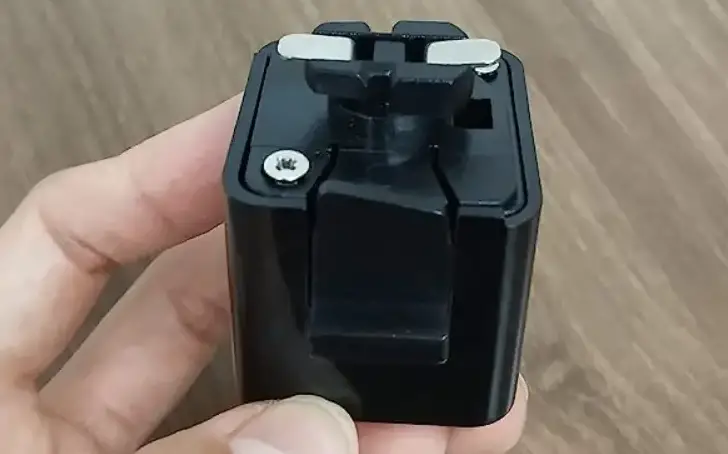
The Juno Trac Adapter is a component used for installing
fixtures on Juno Trac tracks. It allows for easy and secure
attachment of fixtures to the track system. The adapter comes in
different sizes and styles, and it is important to select the
appropriate one for your specific track.
Product Usage Instructions:
Fixture Installation:
- Step 1: Find the latch and the polarity line. Align the parts
as shown in Figure 1.
- Step 2: Pull down the latch while rotating the adapter box 90
degrees clockwise, as shown in Figure 2.
- Step 3: The final position is when the latch snaps into place
between the extrusion rails, with the arrows on the latch pointing
towards the polarity line, as shown in Figure 3.


Second Circuit Positioning:
- Step 1: Raise the contact marked P (on switch side) by
inserting a thin screwdriver blade under the contact. Pull it up
into position as shown in Figure 4.
- Step 2: Insert the contact support (supplied with the 2-circuit
Trac section) by tilting and snapping it into position under the P
contact, as shown in Figure 5.
- Step 3: Ensure the contact support is snapped and locked into
position, as shown in Figure 6. Follow the instructions for
inserting into the track.


Troubleshooting:
If you encounter any issues with the fixture, refer to the
following troubleshooting steps:
| Problem | Cause | Remedy |
|---|---|---|
| Fixture doesn’t turn on | – Track not energized – Adapter switch is in the Off position – Fixture installed incorrectly | – Ensure track has power – Ensure the power switch on the track fixture adapter is in the On position – Ensure fixture is installed correctly with the arrows on the latch pointing towards the polarity line (refer to Figure 3) – Ensure contacts aren’t bent from installing the fixture incorrectly (refer to Figure 7) |

If the problem persists:
- Ensure P contact isn’t bent from adjusting incorrectly (refer
to Figure 8). - Check for any bent contact from adjusting the wrong contact
(refer to Figures 4, 5, & 6 for proper adjustment method).

For single circuit positioning, use the T, TU, and R Series
Track. For two circuit positioning, use the TU Series Track (refer
to Figure 9).

Remember to move the switch on the adapter to the On position to
ensure proper functionality.

INSTALLATION INSTRUCTIONS
For Juno Trac Adapter*
WARNING Read all of these installation instructions before installing.
SAVE THESE INSTRUCTIONS
FIXTURE INSTALLATION Step 1 Find the latch and the polarity line. Align parts as shown and insert the adapter box into the track. (Fig. 1)
Fig. 1
LATCH
POLARITY LINE
Fig. 2
Coming Soon
Step 2 Pull down the latch while rotating the adapter box 90 degrees clockwise. (Fig. 2)
Step 3 Final Position: Latch snaps into place between extrusion rails. Arrows on latch point toward the polarity line. (Fig. 3)
Fig. 3
SECOND CIRCUIT POSITIONING
Step 1 Raise the contact marked “P” (on switch side) by inserting a thin screwdriver blade under contact. Pull up into position as shown. (Fig. 4)
(INSERT)
(PULL)
(ROTATE)
Fig. 4
“P” CONTACT
(LIFT)
Step 2 Insert contact support (supplied with 2-circuit Trac section) by tilting and snapping into position under the “P” contact as shown. (Fig. 5)
Fig. 5
Step 3 Ensure contact support is snapped and locked into position. (Fig. 6) Follow instructions for inserting into track.
CONTACT SUPPORT
Fig. 6
FINAL POSITION OF CONTACT SUPPORT
*Juno Trac adapter size and style may vary.
One Lithonia Way · Conyers, GA 30012 · 1-800-705-SERV (7378) · www.acuitybrands.com
©2020 Acuity Brands Lighting, Inc.
P6300 Rev 10/2022
1 of 2
Coming Soon
INSTALLATION INSTRUCTIONS
For Juno Trac Adapter*
TROUBLESHOOTING
Problem
Fixture doesn’t turn on
Cause Track not energized Adapter switch is in the
“Off” position
Fixture installed incorrectly
Remedy Ensure track has power
Ensure the power switch on the track fixture adapter is in the “On” position, see Fig. 9
Ensure fixture is installed correctly, with the arrows on the latch pointing towards the polarity line as shown in Fig. 3
Ensure contacts aren’t bent from installing the fixture incorrectly, see Fig. 7
Fig. 7
“P” Contact adjusted incorrectly
Ensure “P” contact isn’t bent from adjusting incorrectly, see Fig. 8
Bent contact from adjusting the wrong contact, see Fig. 4, 5, & 6 for proper adjustment method
Correct
Single Circuit Position
Used with T, TU, and R Series Track
Incorrect
Bent Contact
Raised Contact
Fig. 8
Correct
Two Circuit Position
Used with TU Series Track
Incorrect
Bent Contact
Raised Contact
Fig. 9
Move Switch To “On” Position
Off
On
One Lithonia Way · Conyers, GA 30012 · 1-800-705-SERV (7378) · www.acuitybrands.com
©2020 Acuity Brands Lighting, Inc.
P6300 Rev 10/2022
2 of 2
 Acuity Brands | Lighting, Controls, and Building Management Solutions