
FOLDING PIANO 49
SERIES
USER
Introduction
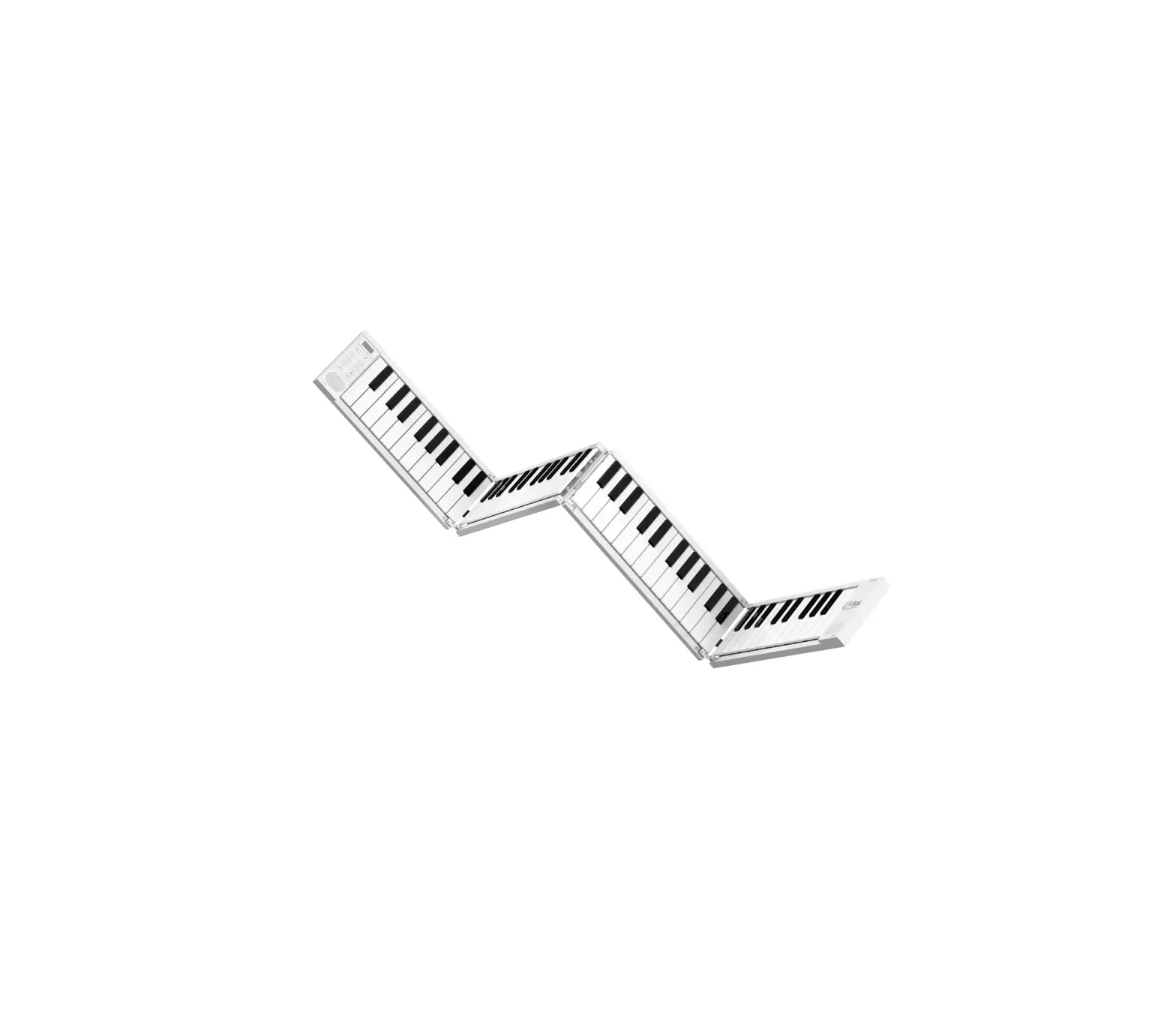
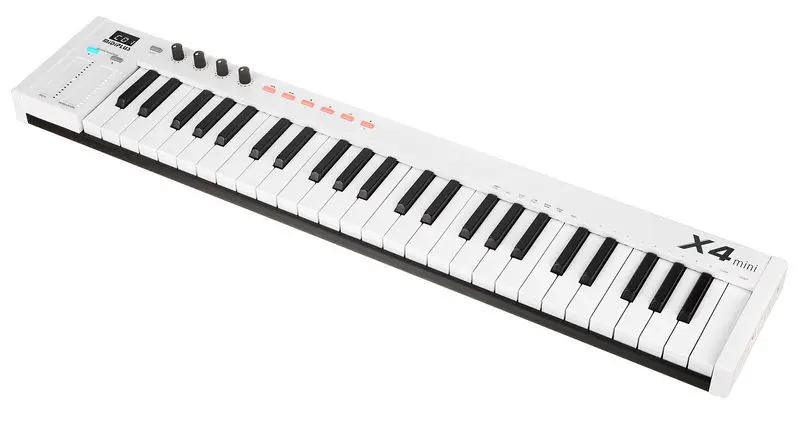
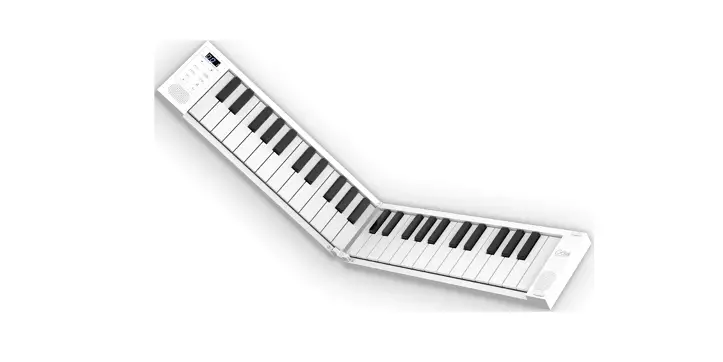
Thank you for purchasing Folding Piano. This is a folding electronic piano, compact and portable with rich functions. Features 128 voices, 128 rhythms, 30 demo songs, and metronome, you can also use Folding Piano as a MIDI input device by connecting to the computer. A folding piano is an ideal tool for beginners, music educators, and traveling musicians.ln order to utilize the many functions of the Folding Piano, please read this manual carefully before use and keep it safe for future reference. This manual refers to both Folding Piano 49 and Folding Piano 49 Air. There is no other difference between the two instruments, apart from the BLE MIDI and the keyboard velocity sensitivity features.
Unfolding and folding instructions
How to unfold your Folding Piano :
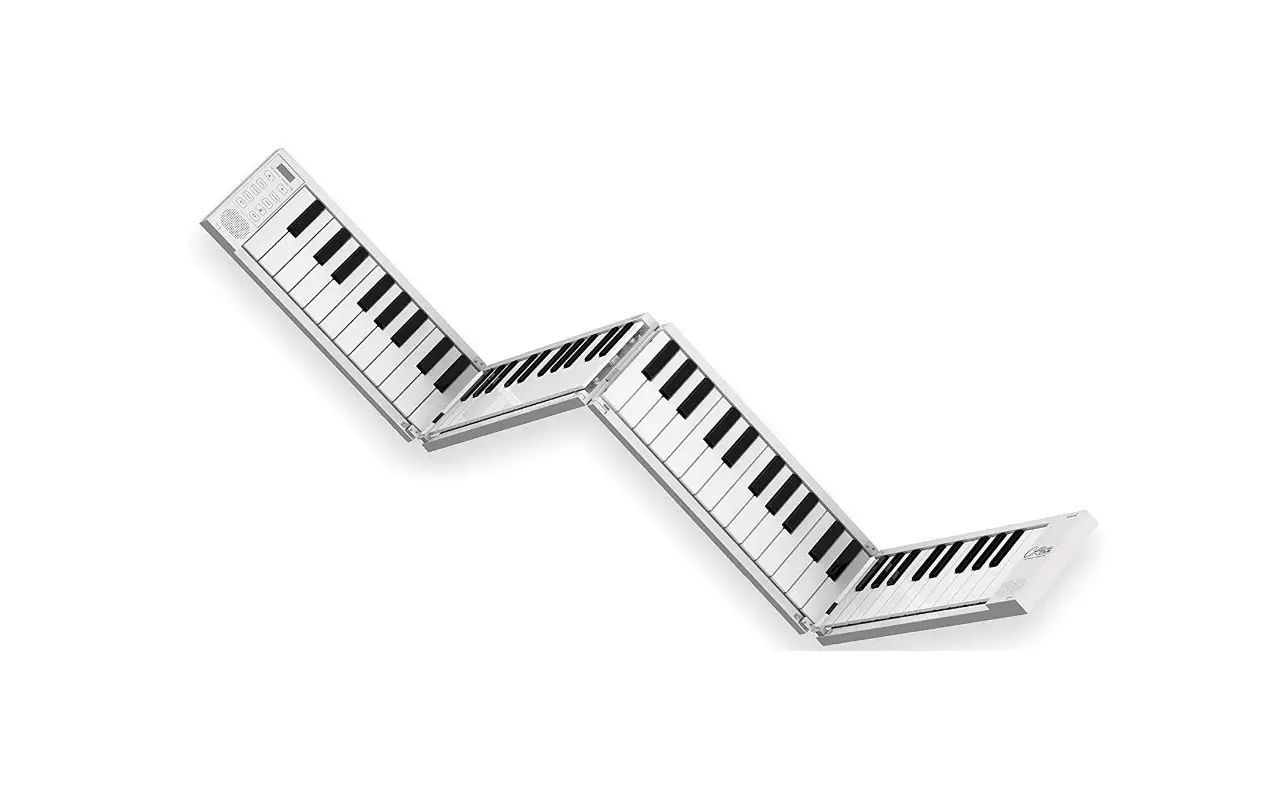
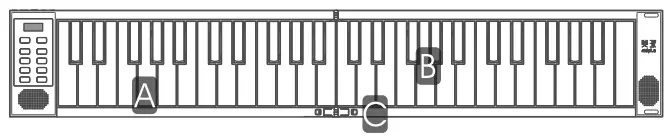
Important: Lay the piano on a flat surface before unfolding. To prevent damage, do not unfold the Piano on an uneven surface. To get understand better, 2 parts of Folding Piano express in A, B, and one hinge locks express in C below.
STEP 1:
Place the Folding Piano to the left of your flat playing surface, with the keys facing towards you and the wiring connector on the right side.

STEP 2:
Lift up part B and move it towards the right and lay it flat as shown below.
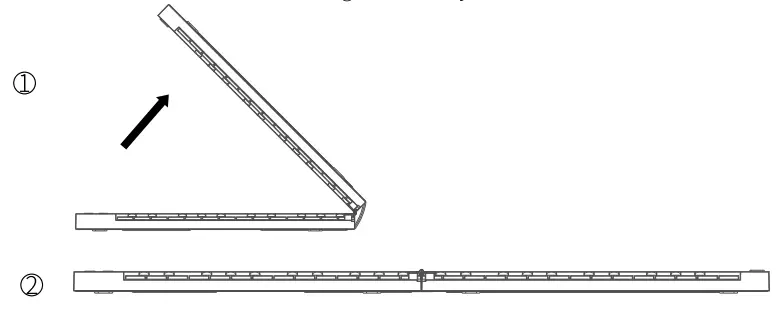
STEP 3:
After unfolding the piano, to secure the Folding Piano fully, you will need to lock the hinges down in place. Locate the two small white switches on each side of the hinge. Pull both switches outwards at the same time, push the hinge down into place and release the switches.

Your piano is now ready for use.
How to fold your Folding Piano
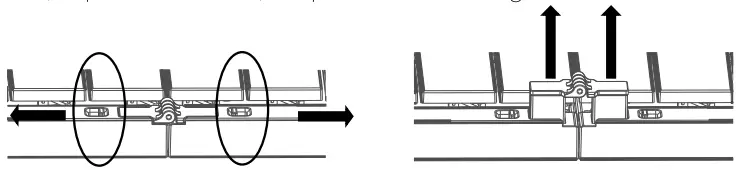
STEP 1: Before folding the piano, pull the locks on both sides of the hinge outwards at the same time to release it (as pictured below). Repeat for each hinge.
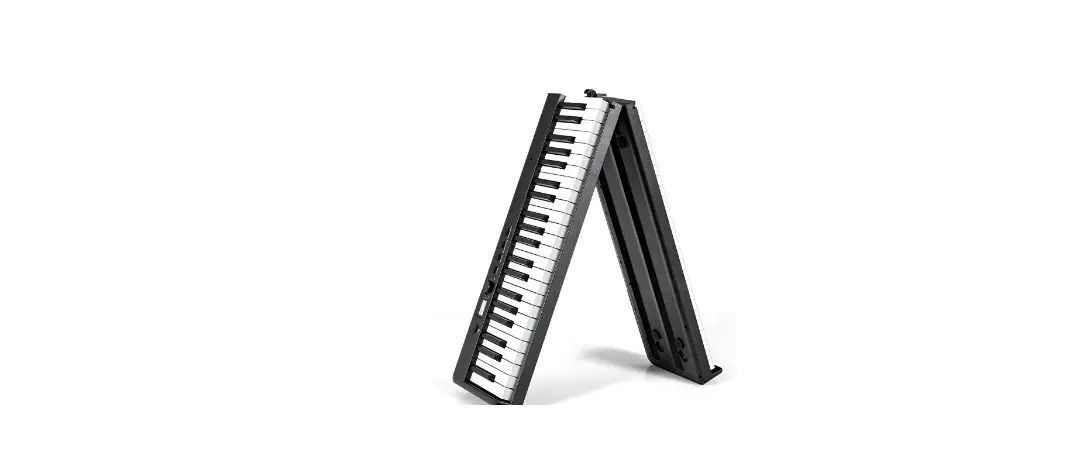
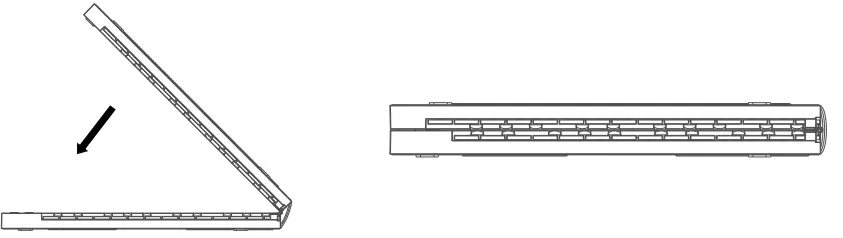
STEP 2: Lift up part B and fold over to part A. Your piano is now safely folded for transport or storage.
Front panel buttons
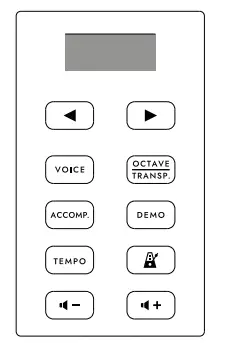 |  | Previous select |
 | Next select | |
 | Voice select | |
 | Octave and Transpose setting | |
 | Accompaniment On/Off | |
 | Demo On/Off | |
 | Tempo setting | |
 | Metronome On/Off | |
 | Volume decrease | |
 | Volume increase |
Rear panel
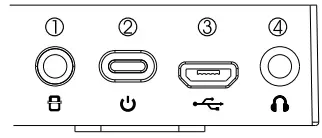
- Sustain pedal socket: Used for connecting the sustain pedal(not supplied)
- Power switch: Turn the piano on/off.
- Micro USB port: Use the supplied USB cable to connect to a USB power adapter (not supplied ) to power and charge the device, or connect to a computer to transmit MIDI data.
- Headphone: Connect to the headphone or active speaker
Instructions
- Power On/Off
Long press [ ] button for 0.5s to turn on the power, long press [] button for 1.5s to turn off the power.
 - Voice selection
Press the button to enter the Voice selection menu. Use the arrow buttons
 and
and  to select the voice (see Voice table at end of Manual).
 - Octave setting
Press thea button to switch between Octave and Transpose setting menu, when the display shows  use the arrow buttong and ia to an octave down or up the keyboard. Range: -2, +2 octave, default: 0.
 ] button for 0.5s to turn on the power, long press [
 use the arrow buttong
- Transpose
Press the button to switch between Octave and Transpose setting menu, when the display show  Use the arrow buttons and to transpose up or down. Range: -6, +6 semitones, default: 0.
 - Play Accompaniment (automatic accompaniment)
Press the button to play the currently selected rhythm. Use the arrow buttons and to select the rhythm, then press any piano key from C2 – F#3 (the first to 19th keys on the left) to play the automatic accompaniment. Press the button again to stop the rhythm from playing. Range: 1-128, default: 1.
 - Play chords with the Accompaniment
Press the keys between C2 – FI43 (the first to 19th keys on the left) when an Accompaniment is playing and the chord will be synchronous to the accompaniment. To hear a major chord, press the root key, to hear a minor chord, press the root key and a black key to its left. For a seventh chord, press the root key and a white key to its left. For a minor-seventh chord, press the root key and a white and black key to its left. - Play the demo
Press the button to play the currently selected demo song. Use the arrow buttons and to seta–the demo song. Press the button again to stop the demo song playing. Range: 1-30, default: 1.
 - Adjust the tempo of Accompaniment (auto accompaniment), Demo song, and Metronome Press the
 button to enter the tempo adjustment menu. Use the arrow buttons and to a just the tempo of the automatic accompaniment, Demo songs, and Metronome. ange: 1-16 (30-180 BPM).
 - Metronome
Press the button to turn on the metronome. Use the arrow buttons and to adjust the accent of the Metronome. Press the button again to turn off the metronome.
 - Adjust volume
Press thebutton to turn down the volume. Press the button to turn up the volume. Range: 0-10. - Use as a MIDI input device
Use the supplied USB cable to connect the Folding Piano 49 to a computer, the driver will be installed automatically while you turn on the Piano, then you can select the “FOLDING PIANO’ as a MIDI input device from the MIDI Input port of DAWs. - Connect to your iOS devices via BLE MIDI (Only Folding Piano 49 Air)
The BLE MIDI will always be visible after you turn on the power. iOS devices can be connected through the Settings in the APP. Here is an example for the GarageBand APP, just simply go to the Settings – Advanced – Bluetooth MIDI Devices, find the “FOLDING PIANO” and connect.
Reset to factory settings
Press the []button when the power is on, while the display flashes “rE5”, press []button again to reset.
 Use the arrow buttons
 Charging instructions
- The Folding Piano is a built-in rechargeable lithium battery, which can provide up to 2.5-3 hours of normal performance when it is fully charged.
- The Folding Piano is powered and charged via the Micro USB port and a suitable 5V connected power supply.
- When the battery power is low, the screen will blink once per second and will turn off after 3 minutes (unless a power supply is connected).
- Continual use of the Folding Piano while the battery power is low may impair its performance and can decrease the life- span of the battery. Please connect and charge the piano with a suitable power supply immediately.
- While the Folding Piano is charging, three flashing indicators will appear at the bottom of the screen. The three indicators will stop flashing once the piano is fully charged.
- To save power, the Folding Piano will automatically turn off after 30 minutes of no
- Unplug the charging cable when the Folding Piano will not be used for a long period of time or during a thunderstorm.
Warning
In order to avoid possible injury to the user or others when using the product, as well as damage to the Folding Piano or other external equipment. Precautions include but are not limited to:
- Please use dry and soft rag to wipe the Folding Piano when cleaning. Do not use paint thinners, organic solvents, detergents or other wipes soaked in aggressive chemicals so as not to discolor the panel or keyboard.
- Do not place the Folding Piano near other electrical appliances, such as TV, radio, etc., to avoid mutual interference between electrical appliances.
- Do not place the Folding Piano in a dusty, vibrating, cold or high-temperature environment, so as not to damage the surface and internal components of the Folding Piano.
- Please avoid strong collision of the Folding Piano, or it may cause damage to the Folding Piano and personal injury.
- Do not place the Folding Piano on an unstable place, so as to avoid falling damage to the Folding Piano.
- Do not place heavy objects on the Folding Piano, also do not use excessive force to press the keys.
- When using the power adapter, please select the power adapter that is FCC/CE certified and contains the standard requirements.
- Do not disassemble, impact, squeeze or throw the battery. If there is serious expansion, please do not continue to use it.
- Do not place the equipment at high temperature, also if the battery leak, do not continue to use
- Use the wrong type of battery will cause a risk of explosion. Be sure to dispose of the battery according to the instructions.
- Please avoid using this product for children under three years old.
Specifications
| Mode: Folding Piano 49 / Folding Piano 49 Air | ||
| Keyboard:49 note standard keyboard | Display: digital display | Battery capacity: 1000mAh |
| Voice: 128 | Accompaniments: 128 | Demo songs:30 |
| Metronome:1-6 | Speaker 2 x 2W Stereo | Transpose:-6, +6semitones Octave:-2, +2 octaves |
| Tempo adjustment 1-16 | Volume adjustment 0-10 | Connections: Micro USB, 3.5mrn Headphone output, sustain pedal input |
| Folded dimensions: 390x126x48mm | Unfold dimensions: 776×126,24mm | Net weight 1.01kg |
Voice List
| No. | Name | No. | Name | No. | Name | No. | Name |
| 1 | Acoustic Grand Piano | 33 | Acoustic Bass | 65 | Soprano Sax | 97 | FX I (rain) |
| 2 | Bright Acoustic Piano | 34 | Electric Bass(finger) | 66 | Alto Sax | 98 | FX2 (soundtrack) |
| 3 | Eleatic Grand Piano | 35 | Electric Bass (pick) | 67 | TenorSax | 99 | FX 3 (crystal) |
| 4 | Honky-tonk Piano | 36 | Fretless Bass | 68 | Baritone Sax | 100 | FX4 (atmosphere) |
| 5 | Rhodes Piano | 37 | Slap Bass 1 | 69 | Oboe | 101 | FX 5 (Brienne) |
| 6 | Chorused Piano | 38 | Slap Bass 2 | 70 | English Nom | 102 | FX6(goblins) |
| 7 | Harpsichord | 39 | Synth Bass 1 | 71 | Bassoon | 103 | FX7(echoes) |
| 8 | Clavichord | 40 | Synth Bass 2 | 72 | Clarinet | 104 | FX8(sci-fi) |
| 9 | Celesta | 41 | Violin | 73 | Piccolo | 105 | Sitar |
| 10 | Glockenspiel | 42 | Viola | 74 | Flute | 106 | Banjo |
| 11 | Music box | 43 | Cello | 75 | Recorder | 107 | Shamisen |
| 12 | Vibraphone | 44 | Contrabass | 76 | Pan Flute | 108 | Koto |
| 13 | Marimba | 45 | Tremolo Strings | 77 | Bottle Blow | 109 | Kalimba |
| 14 | Xylophone | 46 | Pizzicato Strings | 78 | Shakuhachi | 110 | Bagpipe |
| 15 | TubularBell | 47 | Orchestral Harp | T9 | Whistle | 111 | Fiddle |
| 16 | Dulcimer | 48 | Timpani | 80 | Ocarina | 112 | Shona’ |
| 17 | Drawbar Organ | 49 | String Ensemble 1 | 81 | Lead I (square) | 113 | Tinkle Ben |
| 18 | Percussive Organ | 50 | String Ensemble 2 | 82 | Lead 2 Isawtoothl | 114 | Agogo |
| 19 | Rock Organ | SI | Synth Strings 1 | 83 | Lead 3 (calliope lead) | 115 | Steel Drums |
| 20 | Church Organ | 52 | Synth Strings 2 | 84 | Lead 41chiff lead) | 116 | Woodblock |
| 21 | Reed Organ | 53 | ChoirAahs | 85 | Lead 5 (chatting) | 117 | Taiko Drum |
| 22 | Accordion | 54 | Voice Oohs | 86 | Lead 6 (voice) | 118 | Melodic Tom |
| 23 | Harmonica | 55 | Synth Voice | 87 | Lead 7 (fifths) | 119 | Synth Drum |
| 24 | Tango Accordion | 56 | Orchestra Hit | 88 | Lead 8 (bass lead) | 120 | Reverse Cymbal |
| 25 | Acoustic Guitar (nylon) | 57 | Trumpet | 89 | Pad 1 (new age) | 121 | Guitar Fret Noise |
| 26 | Acoustic Guitar (steel) | S8 | Trombone | 90 | Pad 2 (warm) | 122 | Breath Noise |
| 27 | Electric Guitar (jazz) | 59 | Tuba | 91 | Pad 3 (PolYsYnth) | 123 | Seashore |
| 28 | Electric Guitar(clean) | 60 | Muted Trumpet | 92 | Pad 4 (choir | 124 | Bird Tweet |
| 29 | Electric Guitar (muted) | 61 | French Hom | 93 | Pad S (bowed) | 125 | Telephone Ring |
| 30 | Overdriven Guitar | 62 | Brass Section | 94 | Pad Metallic) | 126 | Helicopter |
| 31 | Distortion Guitar | 63 | Synth Brass 1 | 95 | Pad 7 (halo) | 127 | Applause |
| 32 | Guitar Harmonics | 64 | Synth Brass 2 | 96 | Pad 8 (sweep) | 128 | Gunshot |
Demo Song List
| No. | Name | No. | Name | No. | Name | No. | Name |
| 1 | Back To My Heart | 9 | Thank You For The Flowers | 17 | Step It Up | 25 | Iron Dragonfly |
| 2 | Dusty | 10 | Afternoon Drive | 18 | Blue | 26 | Wind Tether |
| 3 | Ripples | 11 | Cafe Unknown | 19 | Sky Lullaby | 27 | Twilight Courtyard |
| 4 | Adrift | 12 | I’m With You | 20 | In The Study | 28 | Spirals |
| 5 | Water Steel | 13 | Coco Island | 21 | Village Of The Sun | 29 | My Song |
| 6 | Lead The Way | 14 | Rainy Colours | 22 | Through The Ages | 30 | Your Song |
| 7 | Between Sea And Sky | 15 | Rolling Thunder | 23 | Pink Cyan | ||
| 8 | Ode To Dusk | 16 | la mais Vu | 24 | Time |
Accompaniment List
| No. | Na me | No. | Name | No. | Na me | No. | Na me |
| 1 | 50’s Pop | 33 | Classic 8Beat | 65 | Mambo 2 | 97 | Slow Rock 1 |
| 2 | Cool Pop | 34 | Vintage Gtr Pop | 66 | Bolero | 98 | Slow Rock 2 |
| 3 | Groovy Pop | 35 | Schlager Italia | 67 | Cumbia | 99 | Slow Rock 3 |
| 4 | 60’sVintage Pop | 36 | 60’s RockN | 68 | Latin Rock | 100 | Slow Soul |
| 5 | 80’s Pop | 37 | Standard Rock | 69 | Disco Latin | 101 | 8 Beat Ad ria |
| 6 | Rap Pop | 38 | Brit Rock Pop | 70 | Tijuana | 102 | Classic Piano |
| 7 | Pop Rock | 39 | 60’sVintage Rock | 71 | Reggae | 103 | 80’s EP Ballad |
| 8 | 60’s Soul | 40 | Chart Rock Shfl | 72 | Salsa | 104 | 80’s Boy Band |
| 9 | 70’s Soul | 41 | 60’s Pop Rock | 73 | Calypso | 105 | 70’s Disco l |
| 10 | Funk | 42 | Rock Billy | 74 | Guad Dance | 106 | 70’s Disco2 |
| 11 | 16 Beat Shuffle | 43 | Rock Boogie | 75 | Reggae 12Beat | 107 | Funky Disco |
| 12 | Twist | 44 | Rock Cha Cha | 76 | Reggae 16Beat | 108 | Saturday Night |
| 13 | British Pop l | 45 | Rock Classical | 77 | 70’s Chart Ballad | 109 | Club Latin |
| 14 | British Pop2 | 46 | Rock Shuffle | 78 | Romantic Ballad | 110 | Disco Chocolate |
| 15 | Hard Rock l | 47 | Rock Pop | 79 | 90’s Cool Ballad | 111 | Disco Fox |
| 16 | Hard Rock2 | 48 | Rock’s Roll 1 | 80 | Alp Ballad l | 112 | Disco Funk |
| 17 | Fusion l | 49 | Rock’s Roll 2 | 81 | Alp Ballad2 | 113 | Disco Hands |
| 18 | Fusion2 | 50 | Straight Rock | 82 | E_Ballad | 114 | Disco Party |
| 19 | FunkShuffl 1 | 51 | Jazz-Rock | 83 | Unplugged | 115 | Disco Samba |
| 20 | FunkShuff12 | 52 | Fast Gospel | 84 | Pop Ballad | 116 | UK Pop |
| 21 | Fusion Shuffle 1 | 53 | Folk Rock | 85 | Pop New Age | 117 | Club Dance |
| 22 | Fusion Shuff12 | 54 | Skiff le | 86 | 8 Beat Modem | 118 | Modem R&B |
| 23 | Club Pop l | 55 | Funk Pop Rock | 87 | Country Ballad | 119 | Hip Shuffle |
| 24 | Club Pop2 | 56 | Contemp Rock | 88 | Love Song | 120 | Charleston |
| 25 | 16 Beat Pop l | 57 | Acoustic Rock | 89 | Modem Country Pop | 121 | Disco Pop |
| 26 | 16 Beat Pop2 | 58 | Pop Mambo | 90 | Electro-Pop | 122 | Disco Soul |
| 27 | 8 Beat Pop l | 59 | Latin Party Pop | 91 | Acoustic Ballad | 123 | Disco Trot |
| 28 | 8 Beat Pop2 | 60 | Cumbia | 92 | Piano Ballad | 124 | Euro Beat |
| 29 | 8 Beat Soul | 61 | Parranda | 93 | R&B Ballad | 125 | Rap |
| 30 | 8 Beat Soul2 | 62 | Carnival | 94 | Rock Ballad | 126 | Rave |
| 31 | 8 Beat Rock l | 63 | Bossanova | 95 | Slow &Easy | 127 | Techno 1 |
| 32 | 8 Beat Rock2 | 64 | Mambo 1 | 96 | Analog Ballad | 128 | Techno 2 |