KAWAI AR2-ATX4 MIDI Aures2 Hybrid Pianos User Manual
MIDI Settings
MIDI Overview
The term MIDI is an acronym for Musical Instrument Digital Interface, an international standard for connecting musical instruments, computers, and other devices to allow the exchange of performance data.
MIDI Terminals
| MIDI terminal | Function |
| MIDI IN | Receiving note, program change, and other data. |
| MIDI OUT | Sending note, program change, and other data. |
MIDI channels
MIDI uses channels to exchange data back and forth between MIDI devices. There are receive (MIDI IN) and transmit (MIDI OUT) channels. Most musical instruments or devices with MIDI functions are equipped with both MIDI IN and OUT jacks and are capable of transmitting and receiving data via MIDI. The receive channels are used to receive data from another MIDI device, and the transmit channels are used to transmit data to another MIDI device.
The illustration below shows three musical instruments, connected together using MIDI.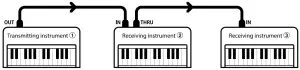
Transmitting instrument a sends transmit channel and keyboard information to receiving instruments b/c.
The information arrives at the receiving instruments b/c.
Receiving instruments b/c will respond to MIDI data that is sent if their receive channel is the same as the transmit channel of the transmitting instrument a. If the channels do not match, the receiving instruments b/c will not respond to any data that is sent.
For both receiving and transmitting, channels 1-16 can be used.
Recording/playing with a sequencer
When connected to a sequencer (or a computer running MIDI sequencing software), the AR2/ATX4 hybrid piano can be used to record and playback multi-track songs, with separate sounds playing simultaneously on each channel.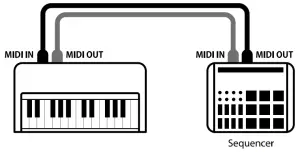
MIDI Functions
The AR2/ATX4 hybrid piano supports the following MIDI functions:
- Transmit/receive note information
Transmit/receive note information to/from a MIDI-connected musical instrument or device. - Transmit/receive program change information
Transmit/receive program change data to/from a MIDIconnected musical instrument or device. - Transmit/receive channel settings
Specify transmit/receive channels within the range of 1 to 16. - Transmit/receive pedal data
Transmit/receive sustain, sostenuto, and soft pedal data to/ from a MIDI-connected musical instrument or device. - Receive volume data
Receive MIDI volume data sent from a MIDI-connected musical instrument or device. - Multi-timbral mode setting
Receive multiple channel MIDI data from a MIDI-connected musical instrument or device.
 Please refer to the “MIDI Implementation Chart” on page 15 for further information regarding the MIDI capabilities of the AR2/ATX4 hybrid piano.
Entering the MIDI Settings menu
Tap the button in the top right corner of the screen to open the Menu.
Tap MIDI to enter the MIDI category.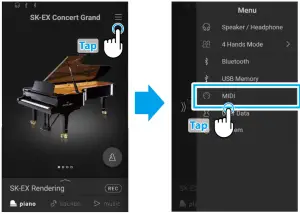
MIDI Channel
The MIDI Channel setting allows the transmit/receive channel to be specified. The selected channel will function as both the transmit and receive channel (separate transmit/receive channels cannot be specified).
Changing the MIDI Channel
In the Play MIDI Channel area, tap the number buttons to select the transmit/receive MIDI channel.
The MIDI channel can be set from 1 to 16.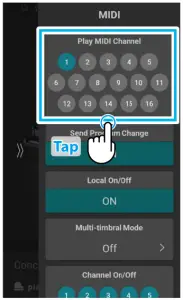
Omni mode
When the AR2/ATX4 hybrid piano is turned on, the instrument is automatically set to “omni mode on”, allowing MIDI information to be received on all MIDI channels (1-16). When the MIDI Channel setting is used to specify a transmit/receive channel, the instrument will be set to “omni mode off ”.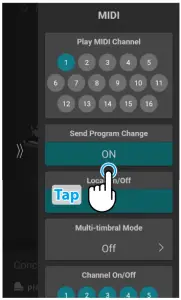
Multi-timbral mode and Split/Dual modes
- Using Split mode with Multi-timbral mode enabled
Notes played in the lower section of the keyboard will be transmitted on the channel that is 1 channel higher than the specified channel. For example, if the MIDI channel is set to 3, notes played in the lower section of the keyboard will be transmitted on channel 4. - Using Dual mode with Multi-timbral mode enabled
Notes played will be transmitted on two channels: the specified channel and the channel that is 1 channel higher.
For example, if the MIDI channel is set to 3, notes played on the keyboard will be transmitted on channels 3 and 4.
If the specified MIDI channel is 16, the lower section / layered part will be transmitted on channel 1.
Transmit Program Change Numbers
The Transmit Program Change Numbers setting determines whether the AR2/ATX4 hybrid piano will transmit program change information via MIDI when sounds are selected.
Transmit Program Change Numbers setting
| Transmit PGM# | Multi-timbral setting | Effect of selecting sounds |
| On (default) | Off, On1 | Sound tab selections will send PGM# shown in the left column*. |
| On | On2 | Sound tab selections will send PGM# shown in the right column*. |
| Off | Off | Program Change information will not be transmitted via MIDI. |
Program Change Number List” P. 7.
Changing the Transmit Program Change Numbers setting
In the Send Program Change area, tap the [On/Off ] button to turn the function on/off .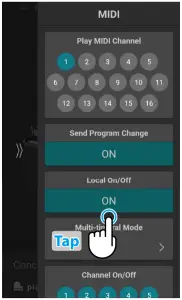
Local Control
The Local Control setting determines whether the instrument will play an internal sound when the keys are pressed.
This setting may be useful when using the AR2/ATX4 hybrid piano to control an external MIDI device that is connected to the instrument’s amplifier/speakers.
Local Control setting
| Local Control | Description |
| Off | The instrument will transmit information to an external MIDI device only. |
| On (default) | The instrument will play an internal sound and transmit information to an external MIDI device. |
Changing the Local Control setting
In the Local On/Off area, tap the [On/Off ] button to turn the function on/off .
Multi-timbral Mode
The Multi-timbral Mode setting determines whether or not the AR2/ATX4 hybrid piano is able to receive MIDI information on more than one MIDI channel simultaneously. This allows the instrument to play back multi-track, multi-timbral performance data sent from an external MIDI device.
Multi-timbral Mode setting
| Multi-timbral Mode | Selected sound |
| Off (default) | The sound shown in the left column is selected*. |
| On1 | The sound shown in the left column is selected*. |
| On2 | The sound shown in the right column is selected*. |
“Program Change Number List” P. 7.
Changing the Multi-timbral Mode setting
In the Multi Timbral Mode area, tap the  buttons to select On1, On2, or Off .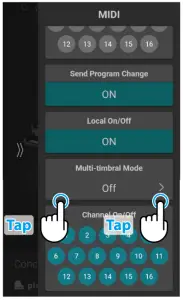
CHECK
Multi Timbral Mode will not be displayed when the “SK-EX Rendering” piano sound variation is selected.
Channel On/Of
The Channel On/Off setting determines which MIDI channels (1~16) are activated to receive MIDI information when Multi-timbral mode is enabled.
Changing the Channel On/Off setting
In the Channel On/Off area, tap the number buttons to turn the MIDI channel on/off .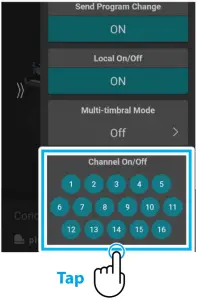
Program Change Number List
| Piano | ||||
| SK-EX Rendering | 1 | 1 | 95 | 112 |
| SK-EX | Concert | 2 | 1 | 121 | 0 |
| SK-EX | Jazz Clean | 3 | 1 | 121 | 1 |
| SK-EX | Warm | 4 | 1 | 121 | 2 |
| EX | Concert | 5 | 1 | 95 | 27 |
| EX | Warm | 6 | 1 | 95 | 29 |
| EX | Standard | 7 | 1 | 95 | 16 |
| EX | Pop Grand | 8 | 1 | 95 | 28 |
| EX | Pop Piano | 9 | 2 | 95 | 10 |
| EX | New Age | 10 | 1 | 95 | 17 |
| EX | Modern | 11 | 2 | 121 | 0 |
| SK-5 | Clasical | 12 | 1 | 95 | 30 |
| SK-5 | Jazz Old School | 13 | 1 | 95 | 32 |
| SK-5 | Pop | 14 | 1 | 95 | 31 |
| UprightPiano | Clasical | 15 | 1 | 95 | 25 |
| UprightPiano | Boogie | 16 | 1 | 95 | 33 |
| UprightPiano | Honky Tonk | 17 | 4 | 121 | 0 |
| Electric Piano | ||||
| Classic Electric Piano | 18 | 5 | 121 | 0 |
| 60’s Electric Piano | 19 | 5 | 121 | 3 |
| Modern Electric Piano | 20 | 6 | 121 | 0 |
| Electric Grand | 21 | 3 | 121 | 0 |
| Classic Electric Piano 2 | 22 | 5 | 121 | 1 |
| Classic Electric Piano 3 | 23 | 5 | 95 | 5 |
| Classic Electric Piano 4 | 24 | 5 | 95 | 8 |
| Crystal Electric Piano | 25 | 6 | 95 | 1 |
| Modern Electric Piano 2 | 26 | 6 | 121 | 1 |
| Modern Electric Piano 3 | 27 | 6 | 121 | 2 |
| Organ | ||||
| Jazz Organ | 28 | 18 | 121 | 0 |
| Blues Organ | 29 | 17 | 121 | 0 |
| Ballad Organ | 30 | 17 | 95 | 5 |
| Gospel Organ | 31 | 17 | 95 | 3 |
| Drawbar Organ | 32 | 17 | 95 | 1 |
| Drawbar Organ 2 | 33 | 17 | 95 | 2 |
| Drawbar Organ 3 | 34 | 18 | 121 | 2 |
| Drawbar Organ 4 | 35 | 17 | 121 | 3 |
| Church Organ | ||||
| Church Organ | 36 | 20 | 121 | 0 |
| Diapason | 37 | 20 | 95 | 7 |
| Full Ensemble | 38 | 21 | 95 | 1 |
| Diapason Octave | 39 | 20 | 95 | 6 |
| Chiffy Tibia | 40 | 20 | 95 | 17 |
| Sound Name | Multi-timbral mode = off/on1 | Multi-timbral mode = on2 | ||
| Program Number | Program Number | Bank | ||
| MSB | LSB | |||
| Principal Octave | 41 | 20 | 95 | 24 |
| Principal Choir | 42 | 20 | 95 | 23 |
| Baroque | 43 | 20 | 95 | 19 |
| Soft Diapason | 44 | 20 | 95 | 45 |
| Soft Strings | 45 | 20 | 95 | 41 |
| Mellow Flutes | 46 | 20 | 95 | 48 |
| Medium Ensemble | 47 | 20 | 95 | 42 |
| Loud Ensembe | 48 | 20 | 95 | 43 |
| Bright Ensemble | 49 | 20 | 95 | 47 |
| Full Organ | 50 | 20 | 95 | 44 |
| Reed Ensembe | 51 | 20 | 95 | 46 |
| Harpsichord | ||||
| Harpsichord | 52 | 7 | 121 | 0 |
| Harpsichord Octave | 53 | 7 | 121 | 1 |
| Harpsichord 2 | 54 | 12 | 121 | 0 |
| Mallets | ||||
| Vibraphone | 55 | 8 | 121 | 0 |
| Clavi | 56 | 13 | 121 | 0 |
| Marimba | 57 | 9 | 95 | 1 |
| Celesta | 58 | 7 | 121 | 3 |
| Bell Split | 59 | 15 | 95 | 5 |
| Strings | ||||
| Slow Strings | 60 | 45 | 95 | 1 |
| String Pad | 61 | 49 | 95 | 8 |
| Warm Strings | 62 | 49 | 95 | 1 |
| String Ensemble | 63 | 49 | 121 | 0 |
| Soft Orchestra | 64 | 50 | 95 | 1 |
| Chamber Strings | 65 | 49 | 95 | 14 |
| Harp | 66 | 47 | 121 | 0 |
| Pizzicato Strings | 67 | 46 | 121 | 0 |
| Vocal | ||||
| Choir | 68 | 53 | 121 | 0 |
| Pop Ooh | 69 | 54 | 95 | 39 |
| Pop Aah | 70 | 54 | 95 | 40 |
| Choir 2 | 71 | 54 | 95 | 53 |
| Jazz Ensemble | 72 | 54 | 95 | 2 |
| Pop Ensemble | 73 | 54 | 95 | 7 |
| Slow Choir | 74 | 53 | 95 | 2 |
| Breathy Choir | 75 | 53 | 95 | 1 |
| Pad | ||||
| New Age Pad | 76 | 89 | 121 | 0 |
| Square Pad | 77 | 90 | 95 | 5 |
| Itopia | 78 | 92 | 121 | 1 |
| Brightness | 79 | 101 | 95 | 1 |
| Sound Name | Multi-timbral mode = off/on1 | Multi-timbral mode = on2 | ||
| Program Number | Program Number | Bank | ||
| MSB | LSB | |||
| New Age Pad 2 | 80 | 89 | 95 | 2 |
| Brass Pad | 81 | 62 | 95 | 2 |
| Bowed Pad | 82 | 93 | 121 | 0 |
| Bright Warm Pad | 83 | 90 | 95 | 1 |
| Bass | ||||
| Wood Bass | 84 | 33 | 121 | 0 |
| Electric Bass | 85 | 34 | 121 | 0 |
| Electric Bass 2 | 86 | 36 | 121 | 0 |
| Wood Bass & Ride | 87 | 33 | 95 | 1 |
| Electric Bass & Ride | 88 | 34 | 95 | 2 |
| Guitar | ||||
| Ballad Guitar | 89 | 26 | 95 | 6 |
| Pick Nylon Guitar | 90 | 25 | 95 | 3 |
| Finger Nylon Guitar | 91 | 25 | 95 | 4 |
| MIDI | ||||
| Rock Piano | – | 2 | 121 | 1 |
| Electric Grand2 | – | 3 | 121 | 1 |
| Wide Honky Tonk | – | 4 | 121 | 1 |
| Classic E.P. 5 | – | 5 | 121 | 2 |
| Legend E.P. | – | 6 | 121 | 3 |
| Phase E.P. | – | 6 | 121 | 4 |
| WideHarpsichord | – | 7 | 121 | 2 |
| Synth Clavi | – | 8 | 121 | 1 |
| Celesta | – | 9 | 121 | 0 |
| Glockenspiel | – | 10 | 121 | 0 |
| Music Box | – | 11 | 121 | 0 |
| Wide Vibraphone | – | 12 | 121 | 1 |
| Wide Marimba | – | 13 | 121 | 1 |
| Xylophone | – | 14 | 121 | 0 |
| Tubular Bells | – | 15 | 121 | 0 |
| Church Bells | – | 15 | 121 | 1 |
| Carillon | – | 15 | 121 | 2 |
| Dulcimer | – | 16 | 121 | 0 |
| Drawbar Organ 5 | – | 17 | 121 | 1 |
| 60’s Organ | – | 17 | 121 | 2 |
| Perc. Organ | – | 18 | 121 | 1 |
| Rock Organ | – | 19 | 121 | 0 |
| Church Organ 2 | – | 20 | 121 | 1 |
| Church Organ 3 | – | 20 | 121 | 2 |
| Reed Organ | – | 21 | 121 | 0 |
| Puff Organ | – | 21 | 121 | 1 |
| FrenchAccordion | – | 22 | 121 | 0 |
| Accordion | – | 22 | 121 | 1 |
| Harmonica | – | 23 | 121 | 0 |
| Sound Name | Multi-timbral mode = off/on1 | Multi-timbral mode = on2 | ||
| Program Number | Program Number | Bank | ||
| MSB | LSB | |||
| Tango Accordion | – | 24 | 121 | 0 |
| Nylon Acoustic | – | 25 | 121 | 0 |
| Ukulele | – | 25 | 121 | 1 |
| Nylon Acoustic2 | – | 25 | 121 | 2 |
| Nylon Acoustic3 | – | 25 | 121 | 3 |
| Steel Guitar | – | 26 | 121 | 0 |
| 12 String | – | 26 | 121 | 1 |
| Mandolin | – | 26 | 121 | 2 |
| Steel Guitar 2 | – | 26 | 121 | 3 |
| Jazz Guitar | – | 27 | 121 | 0 |
| Pedal Steel | – | 27 | 121 | 1 |
| Electric Guitar | – | 28 | 121 | 0 |
| E. Guitar 2 | – | 28 | 121 | 1 |
| Rhythm Guitar | – | 28 | 121 | 2 |
| Muted Electric | – | 29 | 121 | 0 |
| Cutting Guitar2 | – | 29 | 121 | 1 |
| E. Guitar 3 | – | 29 | 121 | 2 |
| Country Lead | – | 29 | 121 | 3 |
| OverdriveGuitar | – | 30 | 121 | 0 |
| Dynmic Ov.drive | – | 30 | 121 | 1 |
| Distortion | – | 31 | 121 | 0 |
| Dist Feedback | – | 31 | 121 | 1 |
| Dist Rhythm | – | 31 | 121 | 2 |
| E.Gtr Harmonics | – | 32 | 121 | 0 |
| Guitar Feedback | – | 32 | 121 | 1 |
| FingerSlap Bass | – | 34 | 121 | 1 |
| Pick Bass | – | 35 | 121 | 0 |
| Slap Bass | – | 37 | 121 | 0 |
| Slap Bass 2 | – | 38 | 121 | 0 |
| Synth Bass | – | 39 | 121 | 0 |
| Warm Synth Bass | – | 39 | 121 | 1 |
| Synth Bass 3 | – | 39 | 121 | 2 |
| Clavi Bass | – | 39 | 121 | 3 |
| Hammer Bass | – | 39 | 121 | 4 |
| Synth Bass 2 | – | 40 | 121 | 0 |
| Synth Bass 4 | – | 40 | 121 | 1 |
| Rubber Bass | – | 40 | 121 | 2 |
| Attack Bass | – | 40 | 121 | 3 |
| Violin | – | 41 | 121 | 0 |
| Slow Violin | – | 41 | 121 | 1 |
| Viola | – | 42 | 121 | 0 |
| Cello | – | 43 | 121 | 0 |
| Contrabass | – | 44 | 121 | 0 |
| Tremolo Strings | – | 45 | 121 | 0 |
| Sound Name | Multi-timbral mode = off/on1 | Multi-timbral mode = on2 | ||
| Program Number | Program Number | Bank | ||
| MSB | LSB | |||
| Celtic Harp | – | 47 | 121 | 1 |
| Timpani | – | 48 | 121 | 0 |
| Strings & Brass | – | 49 | 121 | 1 |
| 60’s Strings | – | 49 | 121 | 2 |
| StringEnsemble2 | – | 50 | 121 | 0 |
| Synth Strings | – | 51 | 121 | 0 |
| Synth Strings 3 | – | 51 | 121 | 1 |
| Synth Strings 2 | – | 52 | 121 | 0 |
| Choir 3 | – | 53 | 121 | 1 |
| Voice Oohs | – | 54 | 121 | 0 |
| Humming | – | 54 | 121 | 1 |
| Synth Vocal | – | 55 | 121 | 0 |
| Analog Voice | – | 55 | 121 | 1 |
| Orchestra Hit | – | 56 | 121 | 0 |
| Bass Hit Plus | – | 56 | 121 | 1 |
| 6th Hit | – | 56 | 121 | 2 |
| Euro Hit | – | 56 | 121 | 3 |
| Trumpet | – | 57 | 121 | 0 |
| Solo Trumpet | – | 57 | 121 | 1 |
| Trombone | – | 58 | 121 | 0 |
| Trombone 2 | – | 58 | 121 | 1 |
| Bright Trombone | – | 58 | 121 | 2 |
| Tuba | – | 59 | 121 | 0 |
| Muted Trumpet | – | 60 | 121 | 0 |
| Muted Trumpet 2 | – | 60 | 121 | 1 |
| French Horns | – | 61 | 121 | 0 |
| Warm FrenchHorn | – | 61 | 121 | 1 |
| Brass Section | – | 62 | 121 | 0 |
| Brass Section 2 | – | 62 | 121 | 1 |
| Synth Brass | – | 63 | 121 | 0 |
| Synth Brass 3 | – | 63 | 121 | 1 |
| Analog Brass | – | 63 | 121 | 2 |
| Jump Brass | – | 63 | 121 | 3 |
| Synth Brass 2 | – | 64 | 121 | 0 |
| Synth Brass 4 | – | 64 | 121 | 1 |
| Analog Brass 2 | – | 64 | 121 | 2 |
| Soprano Sax | – | 65 | 121 | 0 |
| Alto Sax | – | 66 | 121 | 0 |
| Tenor Sax | – | 67 | 121 | 0 |
| Baritone Sax | – | 68 | 121 | 0 |
| Oboe | – | 69 | 121 | 0 |
| English Horn | – | 70 | 121 | 0 |
| Bassoon | – | 71 | 121 | 0 |
| Clarinet | – | 72 | 121 | 0 |
| Sound Name | Multi-timbral mode = off/on1 | Multi-timbral mode = on2 | ||
| Program Number | Program Number | Bank | ||
| MSB | LSB | |||
| Piccolo | – | 73 | 121 | 0 |
| Flute | – | 74 | 121 | 0 |
| Recorder | – | 75 | 121 | 0 |
| Pan Flute | – | 76 | 121 | 0 |
| Blown Bottle | – | 77 | 121 | 0 |
| Shakuhachi | – | 78 | 121 | 0 |
| Whistle | – | 79 | 121 | 0 |
| Ocarina | – | 80 | 121 | 0 |
| Square | – | 81 | 121 | 0 |
| Square 2 | – | 81 | 121 | 1 |
| Sine | – | 81 | 121 | 2 |
| Classic Synth | – | 82 | 121 | 0 |
| Classic Synth 2 | – | 82 | 121 | 1 |
| Lead | – | 82 | 121 | 2 |
| Classic Synth 3 | – | 82 | 121 | 3 |
| SequencedAnalog | – | 82 | 121 | 4 |
| Caliope | – | 83 | 121 | 0 |
| Chiff | – | 84 | 121 | 0 |
| Charang | – | 85 | 121 | 0 |
| Wire Lead | – | 85 | 121 | 1 |
| Voice | – | 86 | 121 | 0 |
| Fifth | – | 87 | 121 | 0 |
| Bass & Lead | – | 88 | 121 | 0 |
| Soft Wire Lead | – | 88 | 121 | 1 |
| Warm Pad | – | 90 | 121 | 0 |
| Sine Pad | – | 90 | 121 | 1 |
| Polysynth | – | 91 | 121 | 0 |
| Choir Pad | – | 92 | 121 | 0 |
| Metallic Pad | – | 94 | 121 | 0 |
| Halo Pad | – | 95 | 121 | 0 |
| Sweep Pad | – | 96 | 121 | 0 |
| Rain Pad | – | 97 | 121 | 0 |
| Soundtrack | – | 98 | 121 | 0 |
| Crystal | – | 99 | 121 | 0 |
| Synth Mallet | – | 99 | 121 | 1 |
| Atmosphere | – | 100 | 121 | 0 |
| Brightness | – | 101 | 121 | 0 |
| Goblin | – | 102 | 121 | 0 |
| Echoes | – | 103 | 121 | 0 |
| Echo Bell | – | 103 | 121 | 1 |
| Echo Pan | – | 103 | 121 | 2 |
| Sci-Fi | – | 104 | 121 | 0 |
| Sitar | – | 105 | 121 | 0 |
| Sitar 2 | – | 105 | 121 | 1 |
| Sound Name | Multi-timbral mode = off/on1 | Multi-timbral mode = on2 | ||
| Program Number | Program Number | Bank | ||
| MSB | LSB | |||
| Banjo | – | 106 | 121 | 0 |
| Shamisen | – | 107 | 121 | 0 |
| Koto | – | 108 | 121 | 0 |
| Taisho Koto | – | 108 | 121 | 1 |
| Kalimba | – | 109 | 121 | 0 |
| Bag Pipe | – | 110 | 121 | 0 |
| Fiddle | – | 111 | 121 | 0 |
| Shanai | – | 112 | 121 | 0 |
| Tinkle Bell | – | 113 | 121 | 0 |
| Agogo | – | 114 | 121 | 0 |
| Steel Drums | – | 115 | 121 | 0 |
| Woodblock | – | 116 | 121 | 0 |
| Castanet | – | 116 | 121 | 1 |
| Taiko Drums | – | 117 | 121 | 0 |
| Concert BD | – | 117 | 121 | 1 |
| Melodic Toms | – | 118 | 121 | 0 |
| Melodic Toms 2 | – | 118 | 121 | 1 |
| Synth Drum | – | 119 | 121 | 0 |
| Rhythm Box Tom | – | 119 | 121 | 1 |
| Electric Drum | – | 119 | 121 | 2 |
| Reverse Cymbal | – | 120 | 121 | 0 |
| Gtr Fret Noise | – | 121 | 121 | 0 |
| GtrCuttingNoise | – | 121 | 121 | 1 |
| Ac Bass Slap | – | 121 | 121 | 2 |
| Breath Noise | – | 122 | 121 | 0 |
| Flute Key Click | – | 122 | 121 | 1 |
| Seashore | – | 123 | 121 | 0 |
| Rain | – | 123 | 121 | 1 |
| Thunder | – | 123 | 121 | 2 |
| Wind | – | 123 | 121 | 3 |
| Stream | – | 123 | 121 | 4 |
| Bubble | – | 123 | 121 | 5 |
| Bird Tweet | – | 124 | 121 | 0 |
| Dog Barking | – | 124 | 121 | 1 |
| Horse Gallop | – | 124 | 121 | 2 |
| Bird Tweet 2 | – | 124 | 121 | 3 |
| Telephone | – | 125 | 121 | 0 |
| Telephone 2 | – | 125 | 121 | 1 |
| Door Creak | – | 125 | 121 | 2 |
| Door Slam | – | 125 | 121 | 3 |
| Scratch | – | 125 | 121 | 4 |
| Wind Chime | – | 125 | 121 | 5 |
| Helicopter | – | 126 | 121 | 0 |
| Car Engine | – | 126 | 121 | 1 |
| Sound Name | Multi-timbral mode = off/on1 | Multi-timbral mode = on2 | ||
| Program Number | Program Number | Bank | ||
| MSB | LSB | |||
| Car Stopping | – | 126 | 121 | 2 |
| Car Passing | – | 126 | 121 | 3 |
| Car Crash | – | 126 | 121 | 4 |
| Siren | – | 126 | 121 | 5 |
| Train | – | 126 | 121 | 6 |
| Jet Plane | – | 126 | 121 | 7 |
| Starship | – | 126 | 121 | 8 |
| Burst Noise | – | 126 | 121 | 9 |
| Applause | – | 127 | 121 | 0 |
| Laughing | – | 127 | 121 | 1 |
| Screaming | – | 127 | 121 | 2 |
| Punch | – | 127 | 121 | 3 |
| Heartbeat | – | 127 | 121 | 4 |
| Foot Step | – | 127 | 121 | 5 |
| Gunshot | – | 128 | 121 | 0 |
| Machine Gun | – | 128 | 121 | 1 |
| Laser Gun | – | 128 | 121 | 2 |
| Explosion | – | 128 | 121 | 3 |
| StereoPop Set | – | 1 | 120 | 0 |
| StereoAmbien | – | 33 | 120 | 0 |
| Stereo Ballad | – | 9 | 120 | 0 |
| Analog Set | – | 26 | 120 | 0 |
| CP Dance | – | 27 | 120 | 0 |
| Power Set | – | 17 | 120 | 0 |
| Electronic Set | – | 25 | 120 | 0 |
| Brush Set | – | 41 | 120 | 0 |
| Orchestra Set | – | 49 | 120 | 0 |
| SFX Set | – | 57 | 120 | 0 |
MIDI Implementation Chart
[HYBRID PIANO]
MIDI Implementation Chart
Date: February 2021
Kawai AR2/ATX4 Version: 1.0
| Function | Transmitted | Section | Remarks | |||||
| Basic | Default | 1 | – | 16 | 1 | – | 16 | |
| Channel | Changed | 1 | – | 16 | 1 | – | 16 | |
|
Mode | Default Messages Altered | Mode 3 X ***** | Mode 1
Mode 1, 3 | * The default for the OMNI mode is ON. Specifying MIDI channels automatically turns it OFF. | ||||
| Note | 21 – 108** | 0 | – | 127 | ** The value depends on the | |||
| Number | True Voice | ***** | 0 | – | 127 | Transpose setting. | ||
| Velocity | Note ON
Note OFF | O
O | O
O | |||||
| After Touch | Key
Channel | X
X | X
X | |||||
| Pitch Bend | X | X | ||||||
| 0, 32 | O | O | Bank Select | |||||
| 7 | X | O | Volume | |||||
| Control Change | 10 11 64 | X X O (Right pedal) | O O O | Pan Pot Expression Pedal Sustain Pedal | ||||
| 66 | O (Middle pedal) | O | Sostenuto Pedal | |||||
| 67 | O (Left pedal) | O | Soft Pedal | |||||
| Program Change |
True # | O 0 – 127
***** | O 0 – 127 ***
0 – 127 | *** Refer to the Program Change Number List on page 7. | ||||
| System Exclusive | O | O | ||||||
|
Common | Song Position Song Select Tune | X X X | X X X | |||||
| System Real Time | Clock
Commands | X
O | X
X | |||||
| Local OFF/ON | X | O | ||||||
| Others | All Note OFF
Active Sense | X
X | O (123-127)
O | |||||
| Reset | X | X | ||||||
| Notes | ||||||||
Mode 1 : OMNI ON , POLY Mode 2 : OMNI ON , MONO
Mode 3 : OMNI OFF, POLY Mode 4 : OMNI OFF, MONO
O : Yes
X : No