KAWAI Digital Piano User Manual
MIDI Overview
The term MIDI is an acronym for Musical Instrument Digital Interface, an international standard for connecting musical instruments, computers, and other devices to allow the exchange of performance data.
* “MIDI” is a registered trademark of the Association of Manufacturers of Electronic Instruments (AMEI).
MIDI Terminals
The MIDI has two types of terminals: MIDI IN and MIDI OUT. These terminals must be connected via dedicated cables
| MIDI terminal Function | |
| MIDI IN | Receiving note, program change, and other data. |
| MIDI OUT | Sending note, program change, and other data. |
MIDI channels
MIDI uses channels to exchange data back and forth between MIDI devices. There are receive (MIDI IN) and transmit (MIDI OUT) channels. Most musical instruments or devices with MIDI functions are equipped with both MIDI IN and OUT jacks and are capable of transmitting and receiving data via MIDI. The receive channels are used to receive data from another MIDI device, and the transmit channels are used to transmit data to another MIDI device.
The illustration below shows three musical instruments, connected together using MIDI.
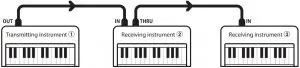
Transmitting instrument 1 sends transmit channel and keyboard information to receiving instruments 2/3.
The information arrives at the receiving instruments 2/3.
Receiving instruments 2/3 will respond to MIDI data that is sent if their receive channel is the same as the transmit channel of the transmitting instrument a. If the channels do not match, the receiving instruments 2/3 will not respond to any data that is sent.
For both receiving and transmitting, channels 1~16 can be used.
Recording/playing with a sequencer
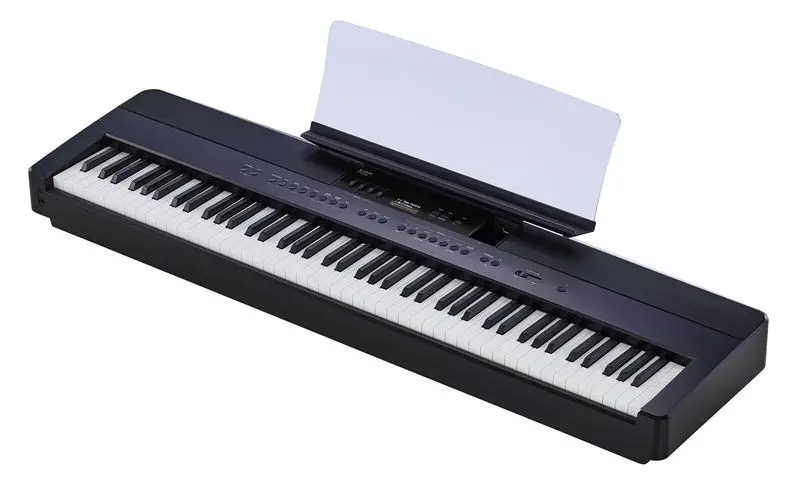
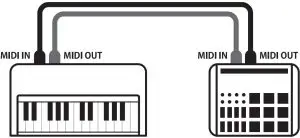
When connected to a sequencer (or a computer running MIDI sequencing software), the ES520 digital piano can be used to record and playback multi-track songs, with separate sounds playing simultaneously on each channel.
MIDI Functions
The ES520 digital piano supports the following MIDI functions:
- Transmit/receive note information
Transmit/receive note information to/from a MIDI-connected
musical instrument or device. - Transmit/receive channel settings
Specify transmit/receive channels within the range of 1 to 16. - Transmit/receive exclusive data
Transmit/receive front panel or menu function settings as exclusive data. - Multi-timbral mode setting
Receive multiple channel MIDI data from a MIDI-connected musical instrument or device. - Transmit/receive program change information
Transmit/receive program change data to/from a MIDIconnected musical instrument or device. - Transmit/receive pedal data
Transmit/receive sustain, sostenuto, and soft pedal data to/ from a MIDI-connected musical instrument or device. - Receive volume data
Receive MIDI volume data sent from a MIDI-connected musical instrument or device.
Note : Please refer to the “MIDI Implementation Chart” on page 10 for further information regarding the MIDI capabilities of the ES520 digital piano.
MIDI Settings
| Page no. Setting Description Default setting | |||
| 5-1 | MIDI Channel | Specify the channel that is used to transmit/receive MIDI information. | 1 |
| 5-2 | Send PGM Change # | Send a MIDI program change number from 1 to 128. | 1 |
| 5-3 | Local Control | Specify whether internal sounds will be heard when the keyboard is pressed. | On |
| 5-4 | Trans. PGM Change | Specify whether program change data is sent when sounds are changed. | On |
| 5-5 | Multi-timbral Mode | Specify whether the instrument can receive Multi-timbral MIDI information. | Off |
Note: Default settings will be shown in the first OLED display illustration (i.e. Step 1) for each setting explanation below.
While the normal playing mode screen is shown in the OLED display:
Press the  or
or  MENU buttons to select the MIDI Settings menu, then press the VALUE button to enter the menu.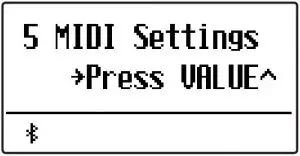
The first page of the MIDI Settings menu will be shown in the OLED display.
Selecting the desired setting
After entering the MIDI Settings menu:
Press the or MENU buttons to cycle through the different settings pages.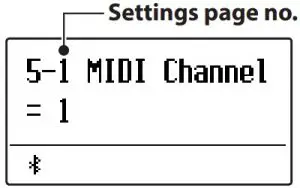
MIDI Channel
The MIDI Channel setting allows the transmit/receive channel to be specified. The selected channel will function as both the transmit and receive channel (separate transmit/receive channels cannot be specified).
Changing the MIDI Channel value
After entering the MIDI Settings menu (page 2):
The MIDI Channel setting will be selected automatically.
Press the or VALUE buttons to decrease or increase the value of the MIDI Channel setting.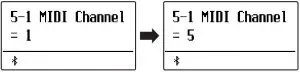
- The MIDI Channel setting can be adjusted within the range of 1~16.
- Any changes made to the MIDI Channel setting will remain until the power is turned off.
Preferred MIDI Channel settings can be stored to a Registration
memory for convenient recall. Please refer to ES520 Owner’s Manual page 37 for more information.
Press the EXIT button to exit the MIDI Channel setting and return to the main settings menu.
Omni mode
When the ES520 digital piano is turned on, the instrument is automatically set to “omni mode on”, allowing MIDI information to be received on all MIDI channels (1~16). When the MIDI Channel setting is used to specify a transmit/receive channel, the instrument will be set to “omni mode off”.
Press the and VALUE buttons simultaneously to reset the set channel and return to “omni mode on”.
Multi-timbral mode and Split/Dual mode
Using Split mode with Multi-timbral mode enabled
Notes played in the lower section of the keyboard will be transmitted on the channel that is 1 channel higher than the specified channel. For example, if the MIDI channel is set to 3, notes played in the lower section of the keyboard will be transmitted on channel 4.
Using Dual mode with Multi-timbral mode enabled
Notes played will be transmitted on two channels: the specified channel and the channel that is 1 channel higher.
For example, if the MIDI channel is set to 3, notes played on the keyboard will be transmitted on channels 3 and 4.
Note: If the specified MIDI channel is 16, the lower section / layered part will be transmitted on channel 1.
Send Program Change Number
The Send Program Change Number function is used to send a Program Change Number (1~128) to the connected MIDI device.
Specifying and transmitting a Program Change Number
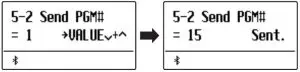
After entering the MIDI Settings menu (page 2):
Press the or MENU buttons to select the Send Program Change Number function.
Press the or VALUE buttons to decrease or increase the Program Change Number.
* The program change number can be set within the range of 1~128.
Press the and VALUE buttons simultaneously to send the specified Program Change Number.
Press the EXIT button to exit the Program Change Number function and return to the main settings menu.
Local Control
The Local Control setting determines whether the instrument will play an internal sound when the keys are pressed.
This setting is useful when using the ES520 digital piano to control an external MIDI device.
Local Control settings
| Local Control Description | |
| Off | The instrument will transmit information to an external MIDI device only. |
| On (default) | The instrument will play an internal sound and transmit information to an external MIDI device. |
Changing the Local Control setting
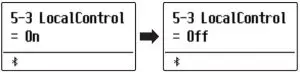
After entering the MIDI Settings menu (page 2):
Press the or MENU buttons to select the Local Control setting.
Press the or VALUE buttons to turn the Local Control setting on or off.
* Any changes made to the Local Control setting will remain until the power is turned off.
Preferred Local Control settings can be stored to a Registration memory for convenient recall. Please refer to ES520 Owner’s Manual page 37 for more information.
Press the EXIT button to exit the Local Control setting and return to the main settings menu.
Transmit Program Change Numbers
The Transmit Program Change Numbers setting determines whether the ES520 digital piano will transmit program change information via MIDI when the instrument’s panel buttons are pressed.
Transmit Program Change Numbers settings
| Transmit PGM# Multi-timbral setting Effect of pressing panel buttons | ||
| On (default) | Off, On1 | SOUND buttons will send PGM# shown in the left column*. |
| On | On2 | SOUND buttons will send PGM# shown in the right column*. |
| Off | Off | Program Change information will not be transmitted via MIDI. |
Changing the Transmit Program Change Numbers setting
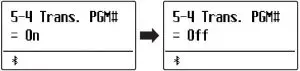
After entering the MIDI Settings menu (page 2):
Press the or MENU buttons to select the Transmit Program Change Numbers setting.
Press the or VALUE buttons to turn the Transmit Program Change Numbers setting on or off.
Note : Any changes made to the Transmit Program Change Numbers setting
will remain until the power is turned off.
Preferred Transmit Program Change Numbers settings can be stored to a Registration memory for convenient recall. Please refer to ES520 Owner’s Manual page 37 for more information.
Program Change Numbers and Dual/Split mode
- When using Dual or Split mode, On/Off information and sound type settings for are transmitted as exclusive data, however program change numbers will not be transmitted.
- Program change numbers will also be transmitted when Multitimbral mode is set to On1 or On2.
Multi-timbral Mode
The Multi-timbral Mode setting determines whether or not the ES520 digital piano is able to receive MIDI information on more than one MIDI channel simultaneously. This allows the instrument to play back multi-track, multi timbral performance data sent from an external MIDI device.
Multi-timbral Mode settings
| Multi-timbral Mode Effect on sound heard | |
| Off (default) | Only data received from the designated system channel will be sent to the panel setting. The sound shown in the left column is selected*. |
| On1 | Data received from all MIDI channels (ch1~ch16) will be sent to 16 multi timbral tracks. The sound shown in the left column is selected*. |
| On2 | Data received from all MIDI channels (ch1~ch16) will be sent to 16 multi timbral tracks. The sound shown in the right column is selected*. |
Changing the Multi-timbral Mode setting
After entering the MIDI Settings menu (page 2):
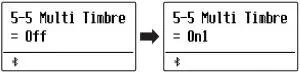
Press the or MENU buttons to select the Multi-timbral Mode setting.
Press the or VALUE buttons to change the Multi-timbral Mode setting.
Any changes made to the Multi-timbral Mode setting will remain until the power is turned off.
Preferred Multi-timbral Mode settings can be stored to a Registration memory for convenient recall. Please refer to ES520 Owner’s Manual page 37 for more information.
Press the EXIT button to exit the Multi-timbral Mode setting and return to the main settings menu.
Program Change Number List
PIANO1 | ||||
| SK ConcertGrand | 1 | 1 | 121 | 0 |
| EX ConcertGrand | 2 | 1 | 95 | 27 |
| Jazz Clean | 3 | 1 | 121 | 1 |
| Warm Grand | 4 | 1 | 121 | 2 |
| PIANO2 | ||||
| Upright Piano | 5 | 1 | 95 | 25 |
| Pop Grand | 6 | 1 | 95 | 28 |
| Modern Piano | 7 | 2 | 121 | 0 |
| Rock Piano | 8 | 2 | 121 | 1 |
| E.PIANO | ||||
| Classic E.Piano | 9 | 5 | 121 | 0 |
| Classic E.P. 2 | 10 | 5 | 121 | 1 |
| 60’s E.Piano | 11 | 5 | 121 | 3 |
| 60’s E.Piano 2 | 12 | 5 | 95 | 7 |
| Modern E.Piano | 13 | 6 | 121 | 0 |
| ORGAN | ||||
| Jazz Organ | 14 | 18 | 121 | 0 |
| Drawbar Organ | 15 | 17 | 121 | 0 |
| Ballad Organ | 16 | 17 | 95 | 5 |
| Principal Oct. | 17 | 20 | 95 | 24 |
| Church Organ | 18 | 20 | 121 | 0 |
| HARPSI/MALLETS | ||||
| Harpsichord | 19 | 7 | 121 | 0 |
| Vibraphone | 20 | 12 | 121 | 0 |
| Clavi | 21 | 8 | 121 | 0 |
| Marimba | 22 | 13 | 121 | 0 |
STRINGS/CHOIR | ||||
| String Ensemble | 23 | 49 | 121 | 0 |
| Slow Strings | 24 | 45 | 95 | 1 |
| String Pad | 25 | 49 | 95 | 8 |
| Warm Strings | 26 | 49 | 95 | 1 |
| Choir | 27 | 53 | 121 | 0 |
| Square Pad | 28 | 90 | 95 | 5 |
| New Age Pad | 29 | 89 | 121 | 0 |
BASS | ||||
| Electric Bass | 30 | 34 | 121 | 0 |
| Electric Bass 2 | 31 | 34 | 95 | 4 |
| Electric Bass 3 | 32 | 34 | 95 | 5 |
| Wood Bass | 33 | 33 | 121 | 0 |
| W. Bass & Ride | 34 | 33 | 95 | 1 |
MIDI Exclusive Data Format
| 1st byte | 2nd byte | 3rd byte | 4th byte | 5th byte | 6th byte | 7th byte | 8th byte | 9th byte | 10th byte |
| 1 | 2 | 3 | 4 | 5 | 6 | 7 | 8 | 9 | 10 |
| Byte | ID | Description |
| 1 | F0 | Start code |
| 2 | 40 | Kawai ID number |
| 3 | 00 – 0F | MIDI channel |
| 4 | 10, 30 | Function code (30 when setting Multi-timbre On/Off) |
| 5 | 04 | Indicates that the instrument is an electric piano |
| 6 | 20 | Indicates that the piano is a ES520 model |
| 7 | data 1 | See table below |
| 8 | data 2 | |
| 9 | data 3 | |
| 10 | F7 | End code |
| data 1 | data 2 | data 3 | Function |
| 00 | 00 | – | Multi-timbre Off |
| 01 | 00 | – | Multi-timbre On 1 |
| 02 | 00 | – | Multi-timbre On 2 |
| 0F | 00 – 7F | – | Split Point: A0 – C8 |
| 14 | 00 – 7F | – | Dual/Split balance |
| 16 | 1F – 60 | – | Tune, 40: 440 Hz |
| 17 | 00, 7F | – | 00: Program Change Off, 7F: Program Chage On |
| 19 | 00 – 03 | – | Lower Octave Shift |
| 20 | 00 – 21 | 00 – 21 | Dual, data 2: Right sound, data 3: Left sound |
| 21 | 00 – 21 | 00 – 21 | Split, data 2: Upper sound, data 3: Lower sound |
| 22 | 00 – 21 | 00 -21 | Four Hands, data2: Upper sound, data3: Lower sound |
| 25 | 00 – 08 | 00 – 0B | data2: Temperament 00 : Equal, |
| 26 | 00, 7F | 00 – 0F | Multi-timbre, data 2: 00 (Mute), 7F (Play), data 3: Channel |
MIDI Implementation Chart
Kawai ES520 digital piano
| Function | Transmit | Receive | Remarks | |
| Basic channel | At power-up Settable | 1 | 1 | |
| 1 – 16 | 1 – 16 | |||
| Mode | At power-up Message Alternative | Mode 3 X
| Mode 1 Mode 1, 3 X | * The default for the OMNI mode is On. Specifying MIDI channels automatically turns it Off. |
| Note number | 9 – 120** | 0 – 127 | ** The value depends on the Transpose setting. | |
– | Range |  | 0 – 127 | |
| Velocity | Note on Note off |  |
| |
| After touch | Key specific Channel specific | X X | X X | |
| Pitch bend | X | X | ||
| Control change | 0, 32 7 10 11 64 66 67 | | | Bank Select *1 |
| X | | Volume | ||
| X | | Panpot | ||
| | Expression Pedal | ||
| | Sustain Pedal | ||
| *2 | | Sostenuto Pedal | ||
| *2 | | Soft Pedal | ||
| Program change | True | 0-127
| | *1 |
| | On/Off Selectable | ||
| Common | Song position Song selection Tune | X X X | X X X | |
| Real time | Clock Commands | X X | X X | |
| Other functions | Local On / Off All notes Off Active sensing Reset | X | | |
| X | (123 – 127) | |||
| X | | |||
| X | X | |||
| ||||
- Mode 1: omni mode On, Poly
- Mode 2: omni mode On, Mono ™ : Yes
- Mode 3: omni mode Off, Poly
- Mode 4: omni mode Off, Mono