
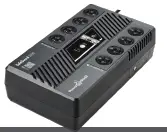
Power Shield PSG1000 PowerShield SafeGuard 1000
Feature

INTRODUCTION
Thank you for choosing PowerShield. This PowerShield SafeGuard 1000 UPS is designed to provide safe and reliable usage with minimal maintenance. Before you start please read this manual. It contains instructions relating to safety, installation, operation, maintenance and warranty of this UPS. Please keep this manual in a safe place for future use.
SAFETY INSTRUCTION
WARNING: This is a category C2 UPS product. In a residential environment, this product may cause radio interference, in which case the user may be required to take additional measures.
CAUTION
- The mains socket outlet that supplies the UPS shall be installed near the UPS and shall be easily accessible.
- Please replace the fuse or circuit breaker only with the same type and amperage in order to avoid fire hazards.
- CAUTION RISK OF EXPLOSION IF BATTERY IS REPLACED BY AN INCORRECT TYPE. DISPOSE OF USED BATTERIES ACCORDING TO THE INSTRUCTIONS.
- When replacing batteries, replace with the same type and number of batteries or battery packs.
- Servicing of batteries should be performed or supervised by personnel knowledgeable about batteries and the required precautions.
- CAUTION: Do not dispose of batteries in a fire. The batteries may explode.
- CAUTION: Do not open or mutilate batteries. Released electrolyte is harmful to the skin and eyes. It may be toxic.
- CAUTION: A battery can present a risk of electrical shock and high short circuit current. The following precautions should be observed when working on batteries.
- Remove watches, rings or other metal objects.
- Use tools with insulated handles.
- Wear rubber gloves and boots.
- Do not lay tools or metal parts on top of batteries.
- Disconnect the charging source prior to connecting or disconnecting battery terminals.
- Determine if battery is inadvertently grounded. If inadvertently grounded, remove source from ground. Contact with any part of a grounded battery can result in electrical shock. The likelihood of such shock can be reduced if such grounds are removed during installation and maintenance (applicable to equipment and remote battery supplies not having a grounded supply circuit).
PACKAGE CONTENTS
You should have received the following items inside of the package:
- PowerShield SAFEGUARD 1000VA UPS
- PowerShield User Manual
- Communication / USB cable
Note: Before installation, please inspect the unit and make sure that no damage has occurred during transit. If any damage is found, please notify your dealer. Please keep the shipping materials in the event the product must be returned to a repair centre for service.
PRODUCT OVERVIEW
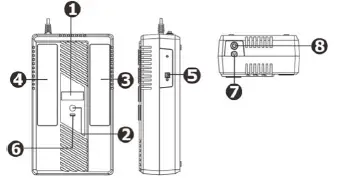
- LCD display
- Power switch
- Battery backup outlets (with surge protection)
- Surge only protected outlets
- USB port
- USB Charger port
- AC input power cord
- Circuit breaker
GETTING STARTED
PLACEMENT
Avoid placing SAFEGUARD in:
- Direct sunlight
- Excessive heat
- Excessive humidity or in contact with fluids of any type

CONNECTING EQUIPMENT & INITIAL STARTUP
Plug the AC input cord into the wall outlet. Turn on the UPS by pressing the “ON/OFF” button on the UPS. For the best results, charge the battery for at least 6 hours before initial use. Once UPS is fully charged proceed to connect equipment.

BATTERY BACKUP OUTLETS – UPS & SURGE PROTECTION (x4)
Only devices that require battery backup such as PCs should be plugged into these outlets.
FULL TIME SURGE ONLY PROTECTED OUTLETS (x4)
Devices like printers that do not require battery backup should be plugged into these outlets. These devices will be protected against surges and spikes.
CAUTION: NEVER connect a laser printer or scanner to the battery backup outlets. This may cause damage to the unit.
CONNECTING USB COMMUNICATION CABLE
To allow for unattended OS shutdown, start up and status monitoring, connect the USB communication cable at one end to the UPS and the other end to the PC.
COLD START FUNCTION
When the UPS is “OFF” and there is no utility power, it is still possible to cold start the UPS to power the loads providing your battery has sufficient charge.
WALL MOUNTING OF UPS
The SafeGuard 1000 UPS can be mounted to a wall surface. Use the template provided on your product box flaps as a template to position the mounting fastener (not supplied).
Wall mount this product as follows:
- Cut the template from your product box and hold the cardboard template against the wall in the desired location. Use thumbtack or tape to secure the template against the wall. Use a pin to puncture the center of each circle to mark the wall.
- Install the mounting fastener at the marked location. Leave the head of both fasteners 8mm out from the wall. The fastener must be able to support 7kg.
- Mount the unit by positioning the keyhole slots over the mounting fastener heads.
SOFTWARE INSTALLATION
- Download and install the latest NetGuard UPS monitoring Software from: powershield.com.au/support-menu/download-area/
- Follow the on-screen instructions to install the software.
- When your computer restarts, the monitoring software will appear as an orange plug icon located in the system tray, near the clock.
- Default password is: administrator
NATIVE BATTERY MANAGEMENT
PSG1000 UPS models support Human Interface Device (HID) protocol for inbuilt native Battery management compatible with Windows and Mac OSX.
If you wish to use NetGuard Monitoring Software please follow the instructions above.
UNDERSTANDING LCD DISPLAY
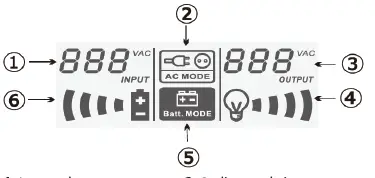
- Input voltage meter
- On line mode icon
- Output voltage meter
- Load level indicator
- On battery mode icon
- Battery level indicator
| STATUS | LCD | STATUS |
| On line operation | 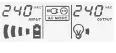 | Utility is stable and the unit is supplying its power from utility. No beep. |
| AVR | 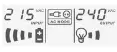 | The unit is boosting/ |
| operation | bucking input voltage. | |
| Online mode icon | ||
| flashes every 1 sec. No | ||
| beep. | ||
| On battery operation | 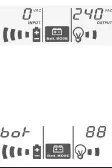
| There is a power disturbance/blackout. The unit is supplying power from battery. Beeps 2 beeps every 30 seconds. |
| Remaining time on batteries (in minutes) | ||
| Low | 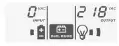 | Battery capacity |
| battery | becomes low. The unit | |
| status | will shut its output | |
| down. On battery mode | ||
| icon flashes. Rapid beep | ||
| one sec interval. | ||
| Overload status | 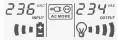 | Total output power has exceeded the maximum power rating of the unit. Load level indicator flashes. Constant beeping. |
| Fault mode |  | Please call for assistance. |
| Standby |  | On/Off button is Off. |
| mode | The unit is connected to | |
| utility. Battery is being | ||
| recharged. No beep. |
BATTERY REPLACEMENT
The SafeGuard 1000 has a user replaceable battery. Please read the following warnings and instructions carefully before proceeding with battery replacement:
- Remove watches, rings, or other metal objects.
- Use tools with insulated handles.
- Wear rubber gloves and boots.
- Do not lay tools or metal parts on top of batteries.
- Turn off the UPS (ensure all indicators are off)
- Turn off mains (AC supply)
- Disconnect AC input cord from the mains
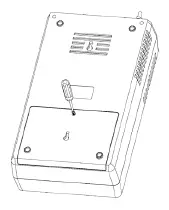
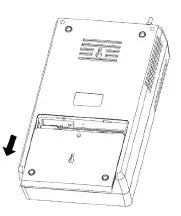
- Turn the unit over and remove the screw located on the bottom of the UPS to open the battery cover.

- Slide open the battery cover.

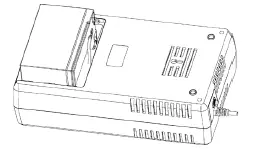
- Lift the battery out of its compartment and disconnect first the red and then the black wire connecting it to the UPS. Replace with the same type of battery.
Reconnect first the black wire and then the red wire on the new battery. Replace the new battery in its compartment.
- Slide the battery compartment cover back to close the battery housing.
Fasten the cover screw to secure cover.
TROUBLESHOOTING
Please follow the trouble shooting section below. If the problem cannot be resolved, please check the PowerShield FAQ web page or call our customer support for further assistance.
| PROBLEM | POSSIBLE CAUSES | SOLUTIONS |
|
LCD display not lit | Low battery | Recharge the unit for at least 6 hours and try to start it again |
| Battery may be faulty | Replace the battery with PowerShield battery kit | |
| Input circuit breaker tripped | Check circuit breaker at rear panel and reset if it is tripped | |
| Continous beeping while input utility power is normal | The unit may be overloaded | Remove some equipment that is connected to UPS outlets and check load level indicator on LCD display |
| Continous beeping while UPS operating | The battery is low/ faulty | Replace battery with PowerShield battery kit |
| Backup time is short/ none when power fails | Equipment may be connected to surge protection outlets | The surge protection does not have battery back up function. Connect your equipment to UPS battery backup outlet if it is required for battery back up. |
| The unit may be overloaded | Remove some equipment that is connected to UPS outlets and check load level indicator on LCD display | |
| Low battery | Recharge the unit for at least 6 hours and try to start it again | |
| Battery may be faulty | Replace the battery with PowerShield battery kit | |
| The unit stays on battery when the utility is normal | Input circuit breaker tripped | Check circuit breaker at rear panel and reset if it is tripped |
| Input power cord may be loose | Reconnect the power cord to the wall outlet properly |
SPECIFICATIONS
Specifications are subject to change without notice
| MODEL | PSG1000 |
| CAPACITY | 1KVA/600W |
| Input Voltage | 240VAC |
| Input Voltage Range | 177-290VAC |
| Output Voltage Regulation | ± 10 % (Bat. mode) |
| Transfer Time | Typical 6 ms, 10ms max. |
| Waveform | Simulated Sine Wave |
| Battery Type & No | 12V/9Ah x 1 |
| Charging Time | 6 hours recover to 90% capacity |
| Surge Protection | 475J / 13000A |
| Dimension (DxWxH) | 345 x 200 x 100 mm |
| Net Weight | 6.1 kgs |
| Humidity & Temperature | 0-90% RH @ 0-40°C (non-condensing) |
| Altitude | 0-2000m |
| Noise Level | Less than 40dB |
| Safety | EN62040- 1:2008+A1:2013 |
| EMC | EN62040-2:2018 |
| RoHs | 2011/65/EU |
If any abnormal situations occur that are not listed above, please call for service immediately.
WARRANTY AND SERVICE
WARRANTY CONDITIONS
The standard warranty is two (2) years from the date of purchase. For Warranty Conditions please visit: https://powershield.com.au/wp-content/uploads/Warranty/PowerShield-WARRANTY.pdf
WARRANTY CLAIMS
First please follow the troubleshooting procedure described above. If you are unable to solve your problem then please call 1300-305-393. You will be required to provide the following details:
The model number, serial number, and the date of purchase of the UPS. Be prepared to troubleshoot the problem over the telephone with technical support. If unsuccessful the technical support team will issue a Returned Material Authorization (RMA) Number & Warranty Procedure Document. Our technical support personnel will also guide you through the process.
PowerShield SafeGuard 1000 (PSG1000)
powershield.com.au
WARRANTY REGISTRATION
Please register your warranty by visiting: www.powershield.com.au