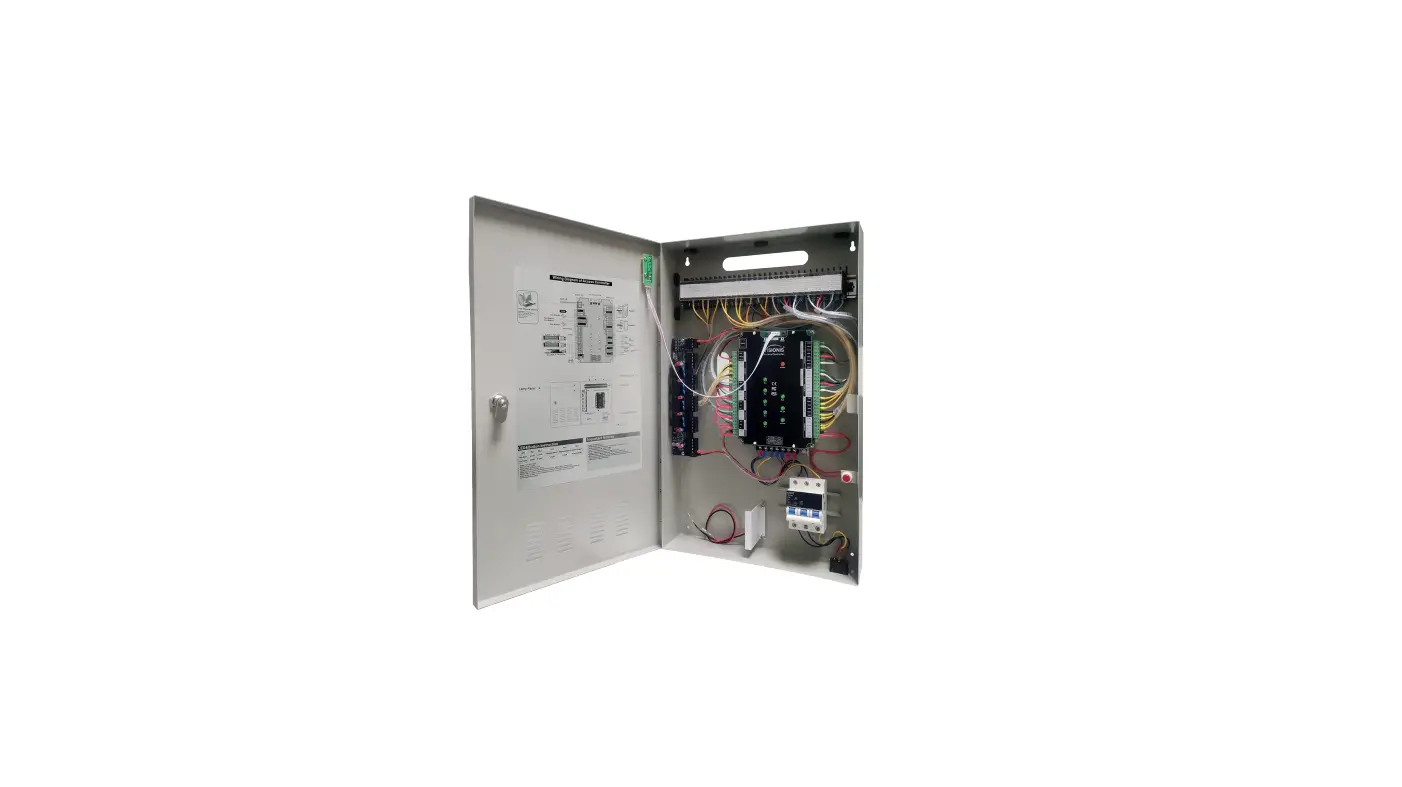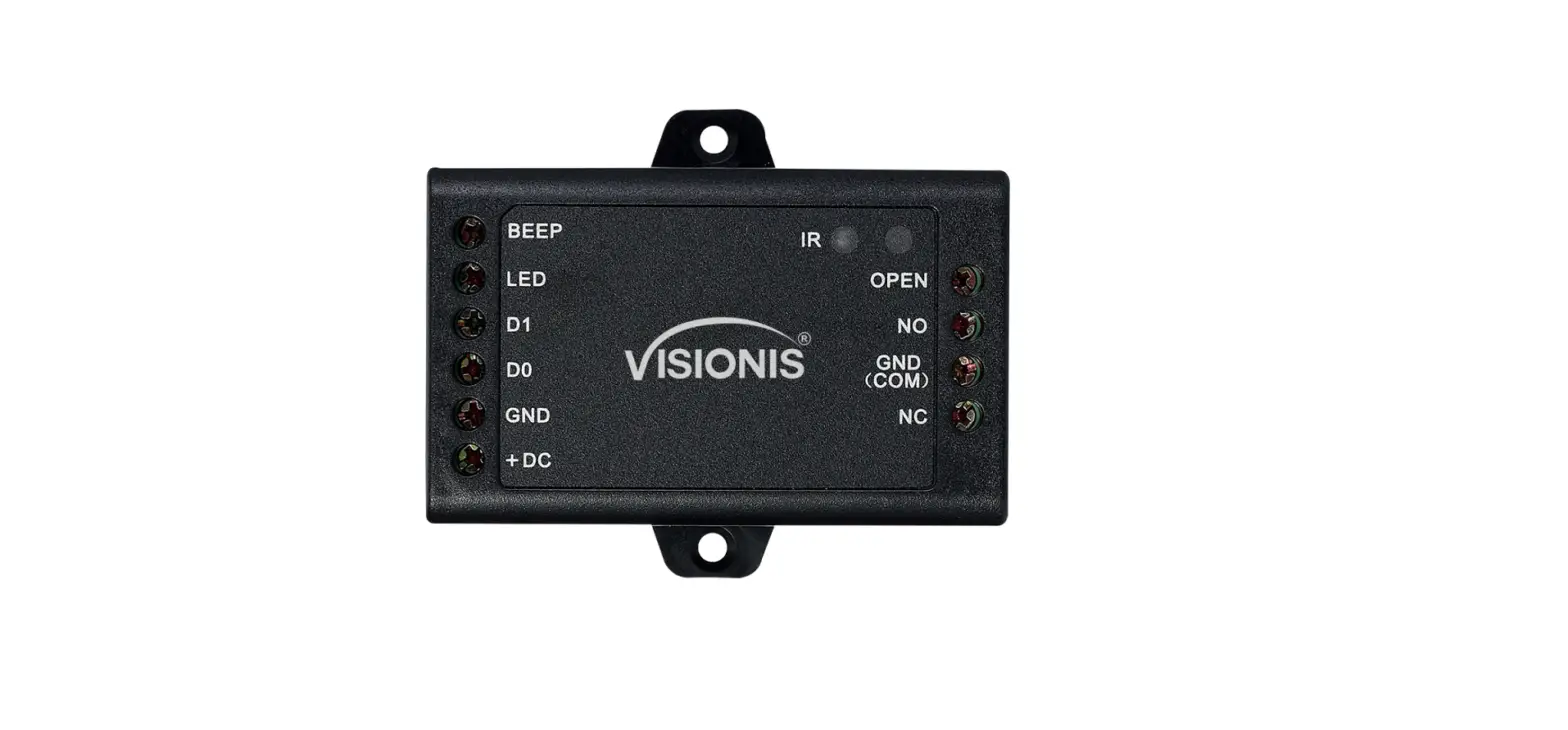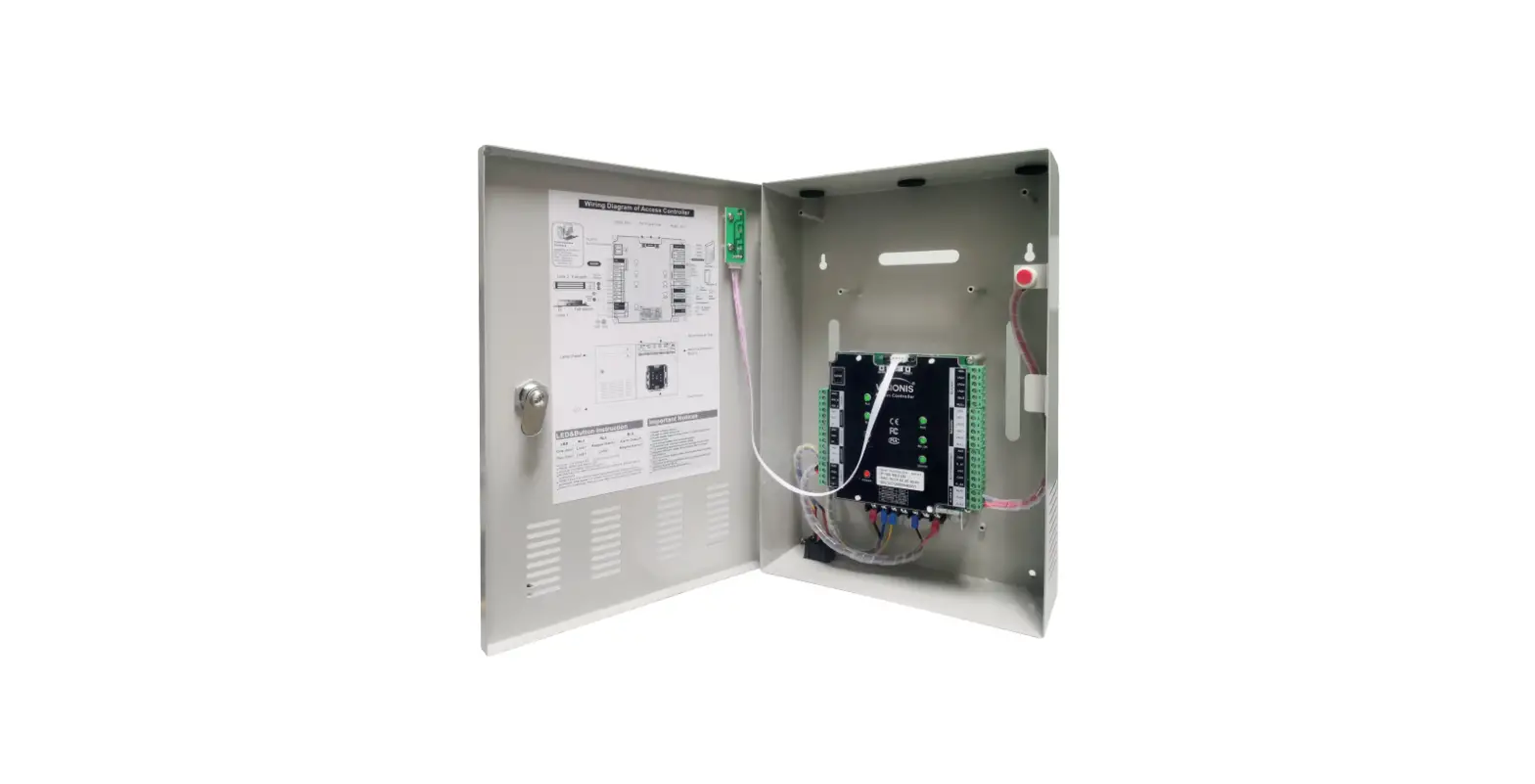

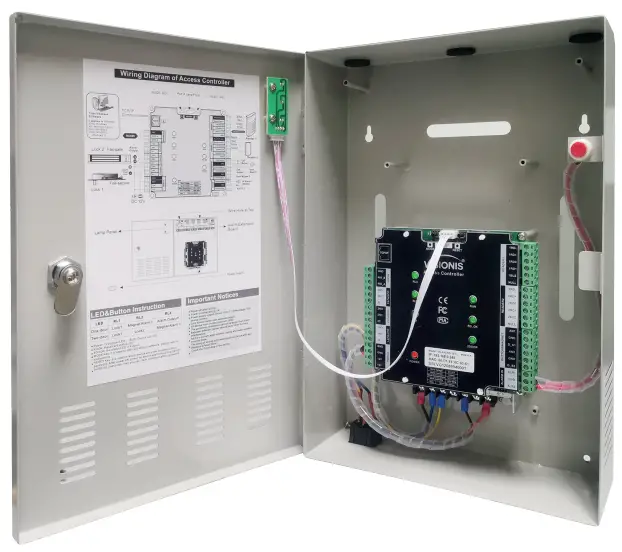
VISIONIS VS-AXESS-2ETL Commercial Access Control
Device Parameter
- Working Voltage: DC 12V
- Working Current: Non-loaded <200mA
- Working Temperature: -20°C – 50°C (-4°F – 122°F)
- Working Humidity: 10° – 90°
- Power Consumption: <3W
- Size: 342x241x83mm (13.46×9.49×3.27in.)
- Communication Mode: TCP/IP
- Communication Rate: 10/100M (TCP/IP)
- Extension Communication: RS485
- Users Capacity: 20.000
- Users Capacity: 70.000 records
- Max. Doors: 2
- Dry Contact Input: 6
- Dry Contact Output: 3
- Access Group: 200 Groups
- Default IP Address: 192.168.0.245
- Default Communication Password: NULL
IMPORTANT: These access control panels (Version 2.0) are only compatible with access control panels (Version 2.0) and with the Titan VSAxess software. They are not compatible with access control panels (Version 1.0) nor with VSAxess software.
Basic Function
- First card open
- Multi-card open
- Anti-passback
- Multi-door interlock
- Card, password, card+password, card or password open mode
- Different time differente open mode
- Transmission encryption setup
- Self-checking function
- Remote control
- Wiegand format can be self-defined
- Add card without software
- Multi-channel conection (max. 3 channels)
- Real-time events active or passive upload
- Arm/disarm by card
- Arm/disarm by software
- Relieve alarm by software
- Multi-event linkage alarm
- One event related to multi-relay trigger
- Alarm delay turn off
- Capacity can be expanded
- Self-defined door lock relay
- Self-defined control door quantity
- Door latch mode
- Active door normal open mode by card
- Timed automatic normal open mode
- Timed invalid for exit button
- Normal open time
- Normal open holiday forbidden schedule
- Access time schedule
- Forbid access holiday schedule
- Door lock delay setup
- Access group setup
- Threaten code setup
- Force open/close door
- Open door by software
- Relieve normal open by card
- Relieve card and card valid date setup
- Expand RS485 communication
- Real-time monitoring door and relay state
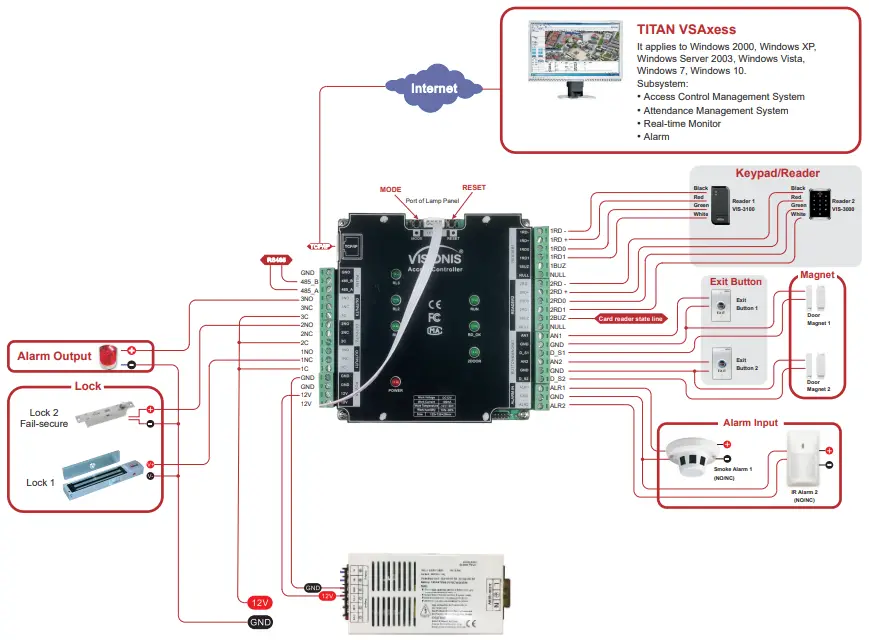
Wiring Introduction
| Wiring Position | Wire Model | Remark |
| Power Supply – Access Controller | RVV2*1.0 | Distance < 100M |
| Access Controller – Reader | RVV4*0.5 | Distance 60M, max. can not over 100M. |
| Access Controller – Electric Lock | RVV4*1.0 (Door-magnet feedback) | Distance < 150M |
| Access Controller – Exit Button | RVV2*0.5 | Distance < 200M |
| Access Controller – IR Alarm | RVV2*1.0 | Distance < 200M |
| Access Controller – Sound-light Alarm | RVV2*1.0 | Distance < 150M |
| RS485 Communication Cable | RVVP2*1.0 | Distance < 1000M, shield layer connect to ground |
| TCP/IP Communication Cable | CAT-5 | Distance < 100M |
Disclaimer
The document provides information according to products specification. Visionis does not undertake any type of guarantee, express or implied warranties, including any implied merchantability, specific purposes or the infringement. The information in the document are changed without prior notice. Visionis and its associated sales agents special statement does not assume the result of the use of Visionis equipment of any and all direct, indirect, special, in general, by chance, inevitably, punitive damages. Any user’s improper operation or use of the environment problem caused by direct or indirect losses, user pays full responsibility, equipment manufacturers and related sales agents does not undertake any responsability.
Connection
| I/O | Device | Standard | Quantity | Setup |
| Input | Reader | Wiegand 26-40 | 2 | as function |
| Output | Electric Lock | Switch Signal | 1/2 | as doors |
| Input | Door-magnet | Switch Signal | 1/2 | Support |
| Output | Sound-light alarm | Switch Signal | 1/2 | |
| Input | IR Sensor/Smoke Sensor/Others | Switch Signal | 2 | |
| Input | Exit button | Switch Signal | 1/2 | Support |
| Input | RS485 device | Communication | 1 |
| LED | RL1 | RL2 | RL3 |
| One-door | Lock1 | Magnet Alarm1 | Alarm Output1 |
| Two-door | Lock1 | Lock2 | Magnet Alarm1 |
- Power: 12V power LED
- RUN: Device run LED
- RDOK: Read card status LED
- 2DOOR: The status LED of 2 doors
- RDOK + RUN: Device enter online upgrade mode.
- RESET Key: It is used to reboot device and clear communication password. After power off, power on device again and press RESET button for 3 seconds, then you can clear communication password
Wiring Diagram of Access Controller
Quick Start
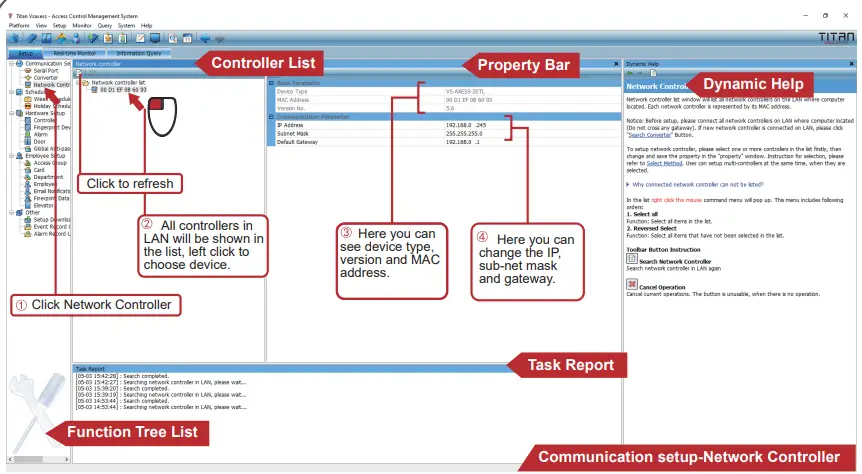
- Search Controller
 Notice:
- Search function is only valid in the same LAN, as adopt UDP communication protocol, across gateway will forbid communication.
- When connect network cable to device, Ethernet port green light is on, yellow light flash.
- Please note that IP address can not be the same.
- Domain name can be used in the software.
- Add Controller
Notice:
- Controller IP must be the same as you set.
- Controller model must be the same as device type. You can detect controller and check the device type in task report.
- Usually we can use ping command to test the device physical connection.
- Controller Address is only valid when use MS series controller or TCP/IP to RS485 connector, otherwise, the default is 0.
- Wrong time may no access and incorrect access record. Please adjust the time.
- Initialize the controller will clear the device records, please make sure the records are saved.
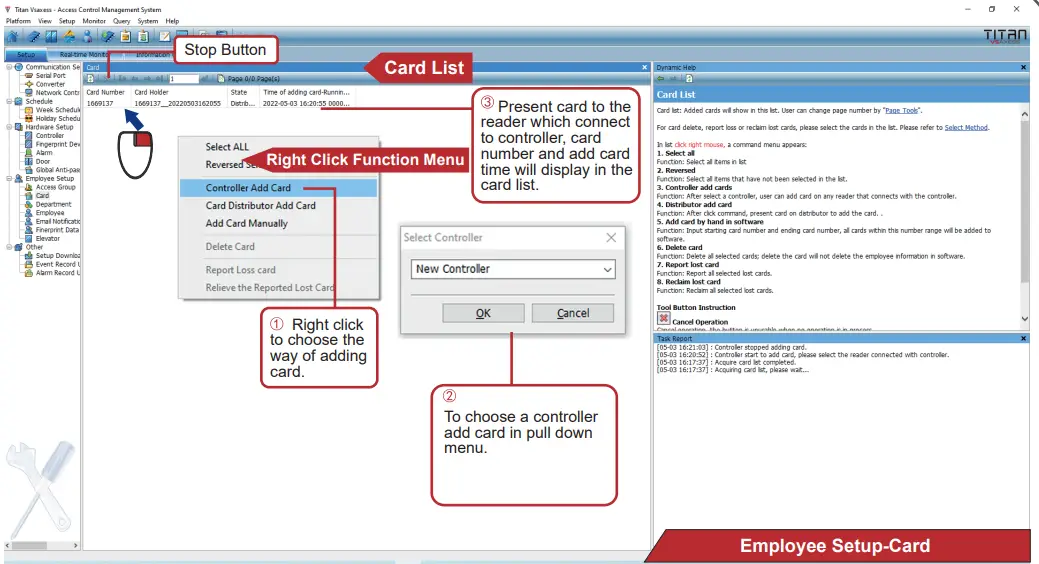
- Add Card
 Notice:
- Three ways to add card, card distributor add card, controller add card and add card manually. Card distributor add card need to choose our card distributor.
- Same card can only add once.
- Please note that delete card will clear the card related to employee.
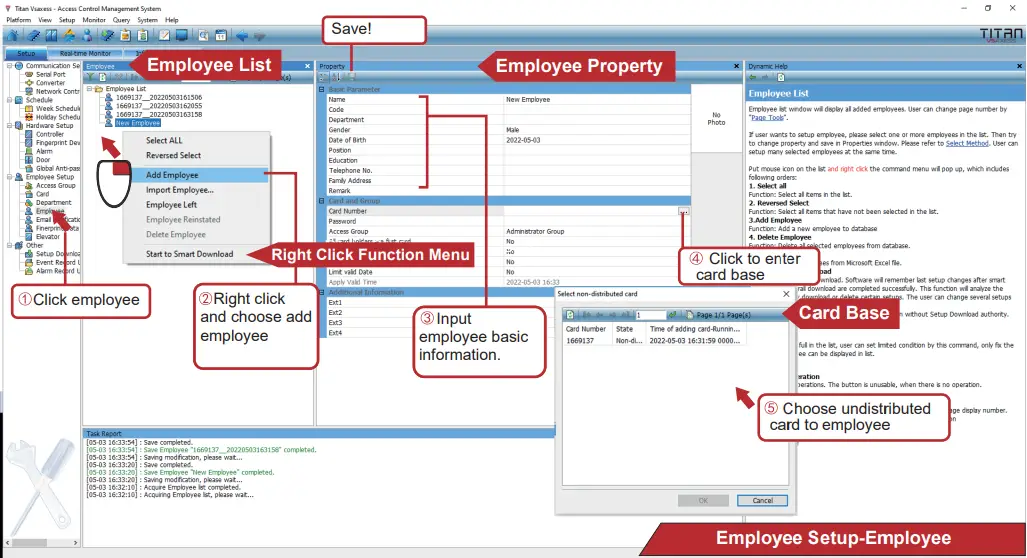
- Add Employee
 Notice:
- If there are employees with the same name, you can separate them by code. Code is unique.
- Card number is decimal number.
- Default administrator access group can pass anywhere anytime, it is the top authority.
- Each employee can access with a separate 6-digit password.
- Impor from Excel can quick register employees
- Download Setup

Notice:- Three download setup ways: Download setup, download all setups, smart download. Download setup refer to current device, download all setups and smart download refer to all devices. Smart download only download updated contents. Other two is download all setups.
- When adopt smart download and download all setups, if there is a device offline, it will prompts error.
- Default administrator access group can pass anywhere anytime, it is the top authority
 Notice: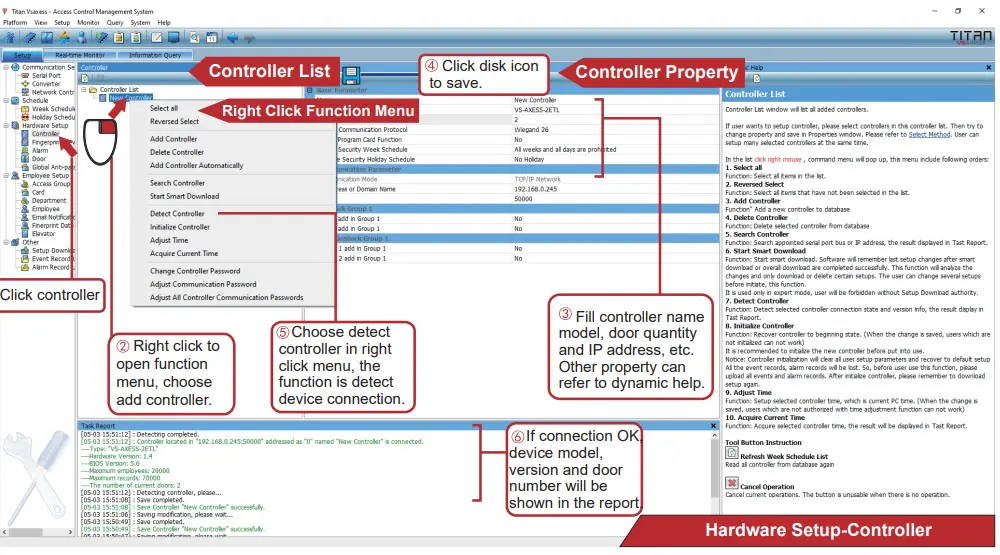
 Notice:
 Notice: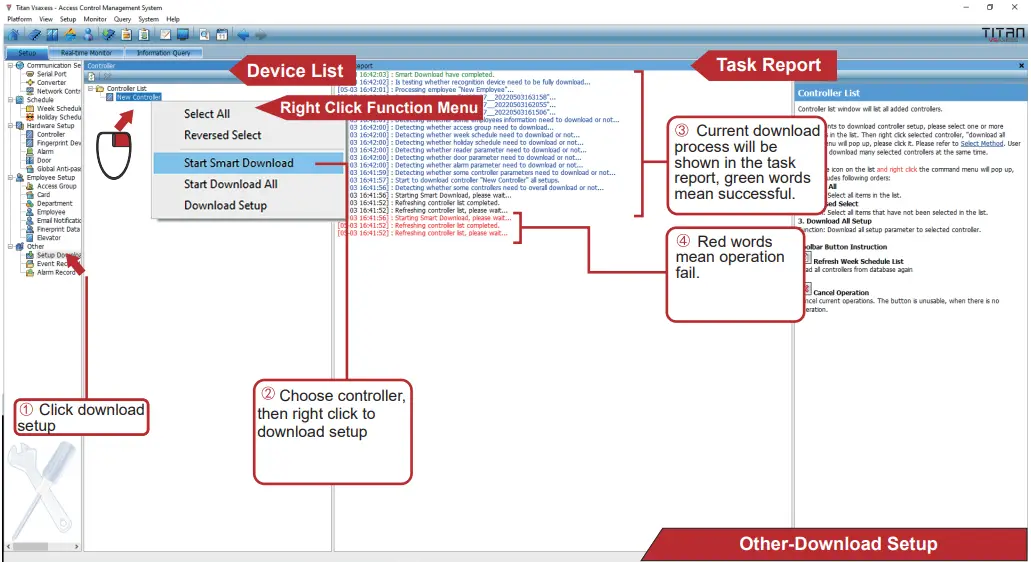
Important Notices
- Power off when wiring.
- Power on when wiring OK.
- Power supply output current must 1.3 times bigger than device work current.
- Lock should better use a separate power.
- All devices must be connected to common GND.
- RS485 communication must use hand to hand connection.
- Between different reader should have 10cm to avoid interference.
- As it is a current weak system, strong and weak isolation must be done.
- The wiring of strong and weak should not be parallel and distance at least 20cm.
- RS485 line should connect the cable shield to GND to avoid interference.
- When RS485 line interface more devices, user can add a 120Ω resistance between 485+ and 485- of last device.
- Reader can not nistall on the metal directly
 Home - Visionis