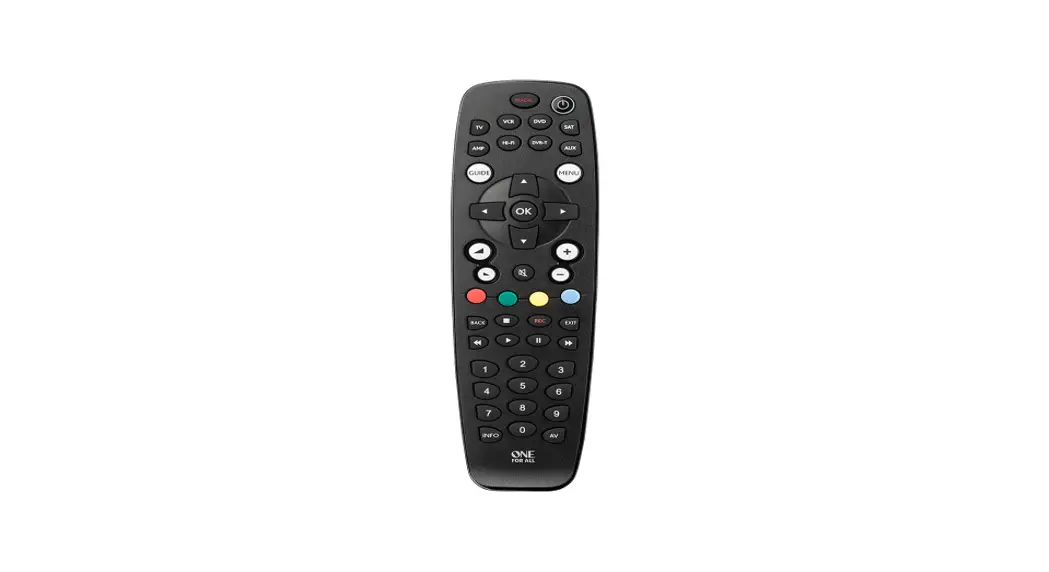

Universal Remote Control
User Guide
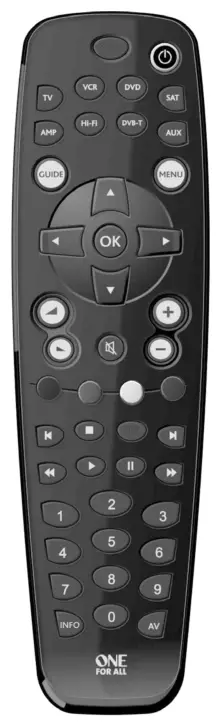
URC-2981
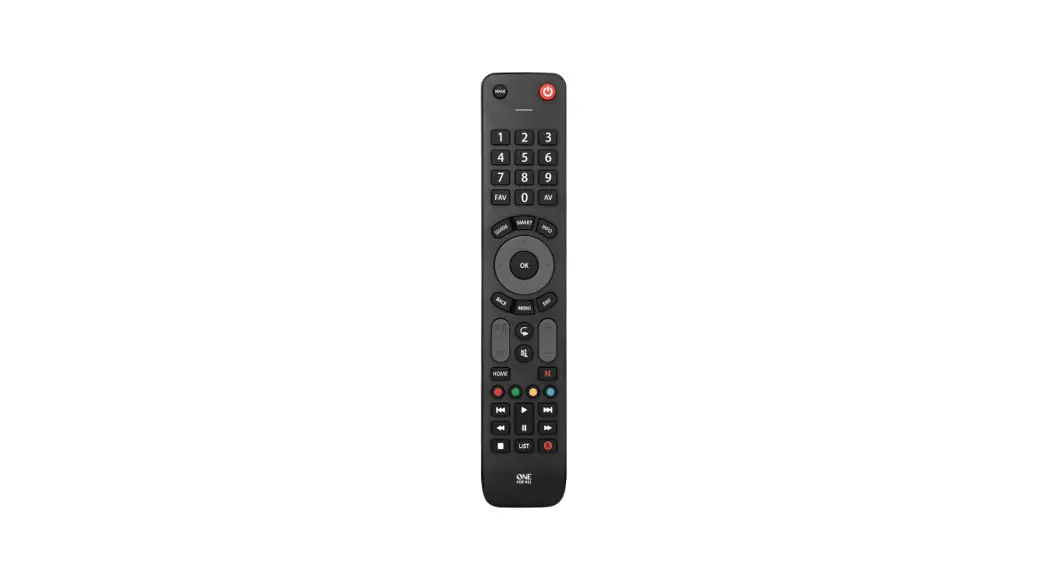
• Quick & Easy Setup …
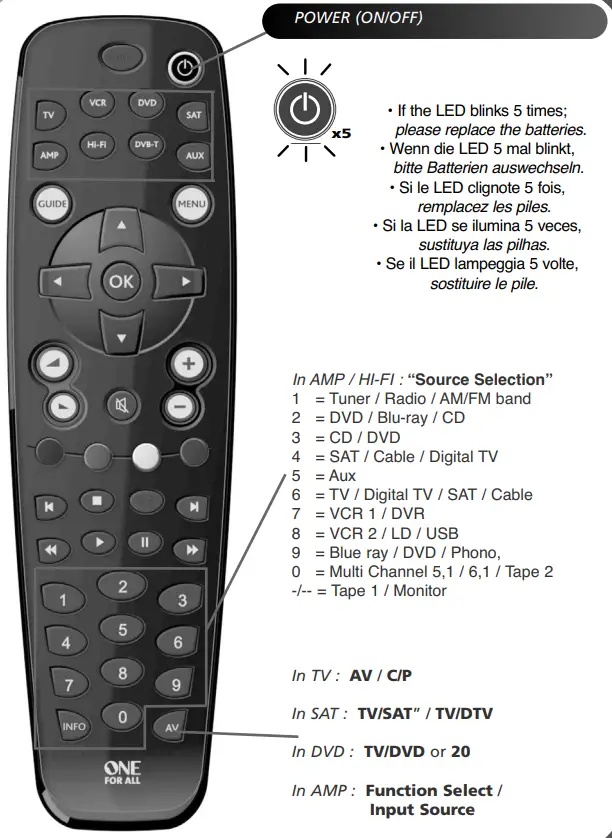
• Keypad …
URC-2981 Universal Remote Control
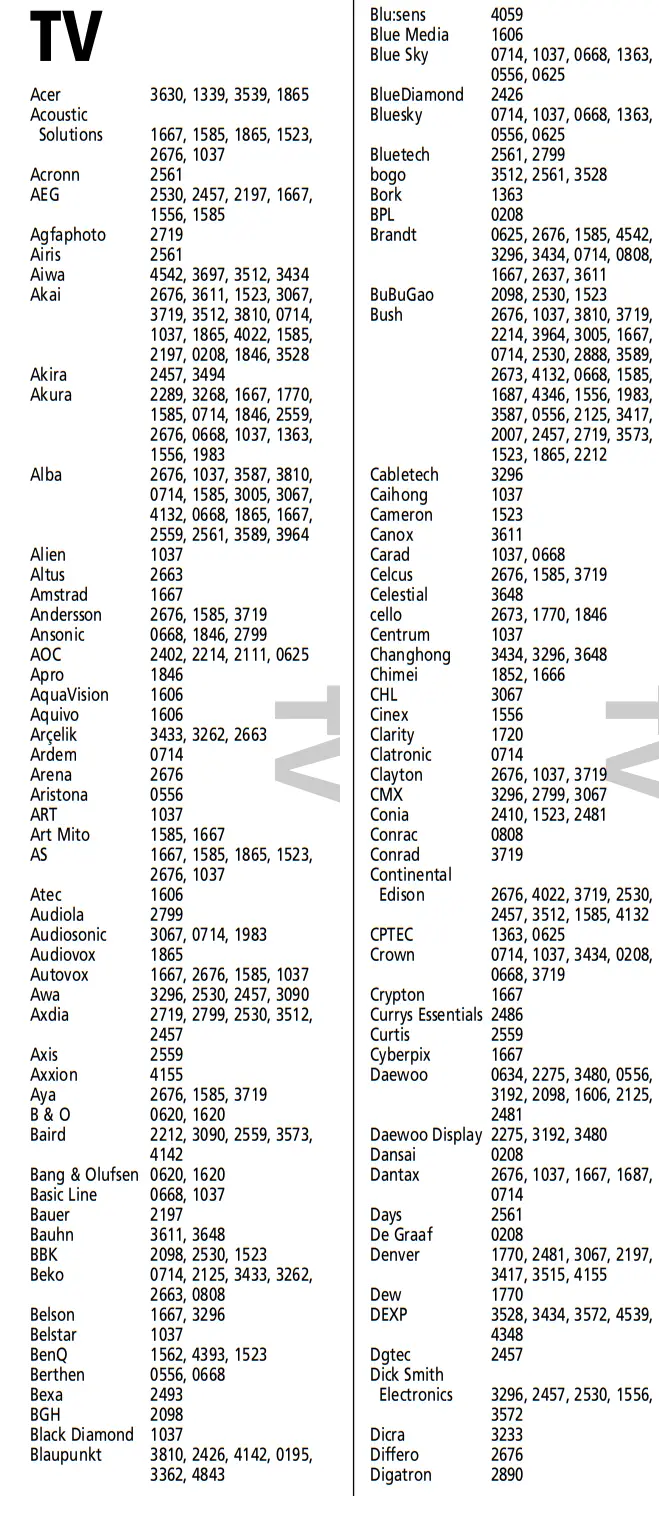
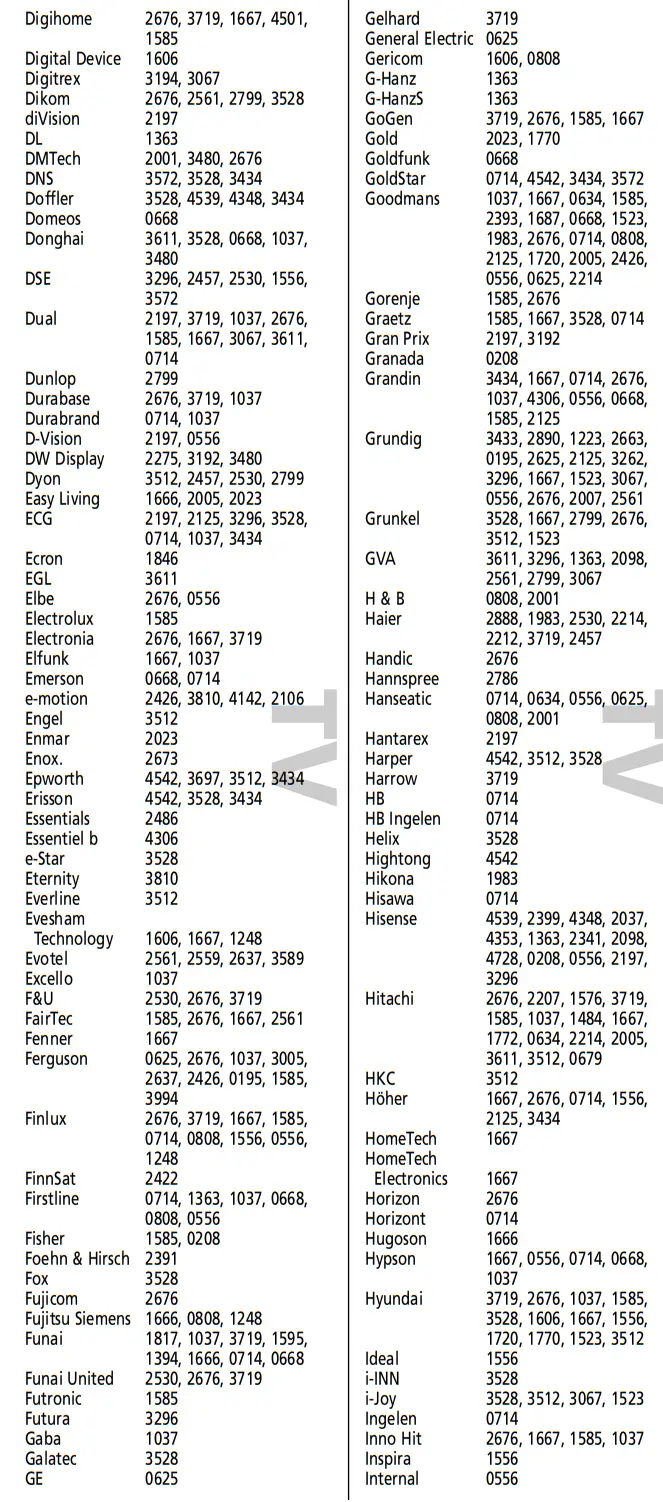
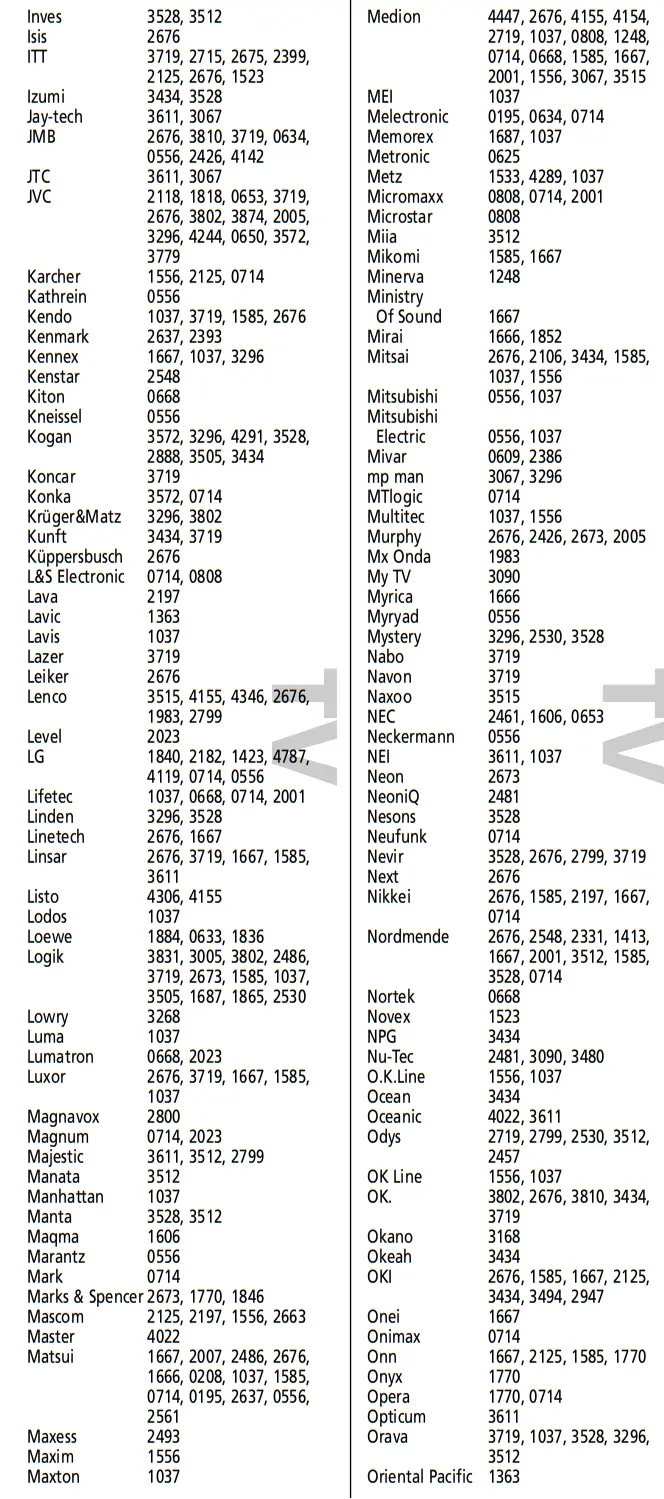
Direct code set up
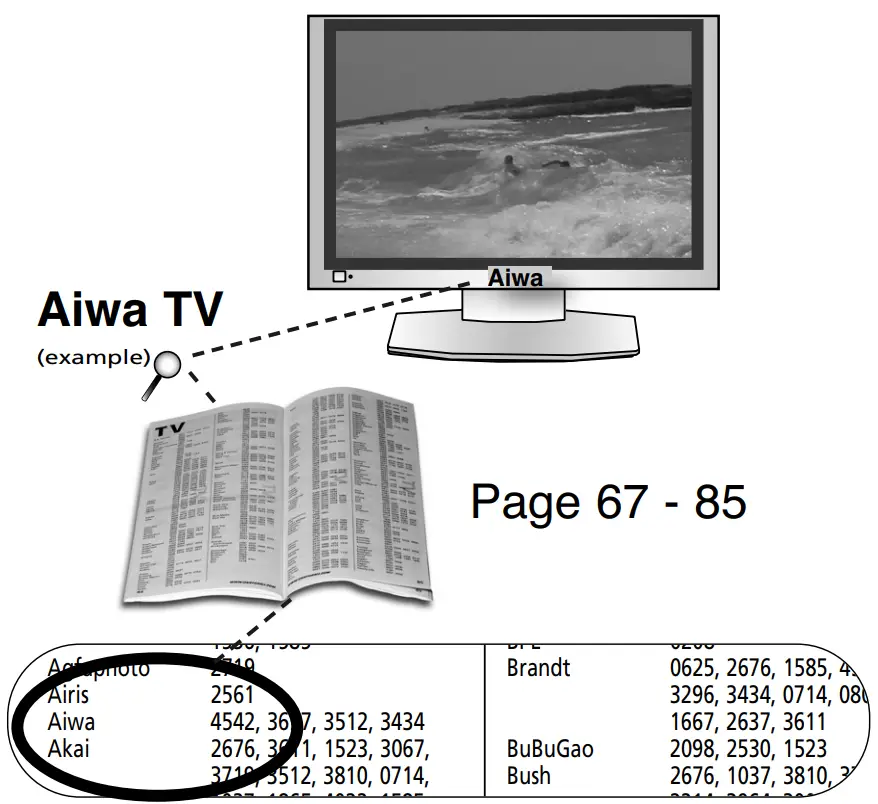
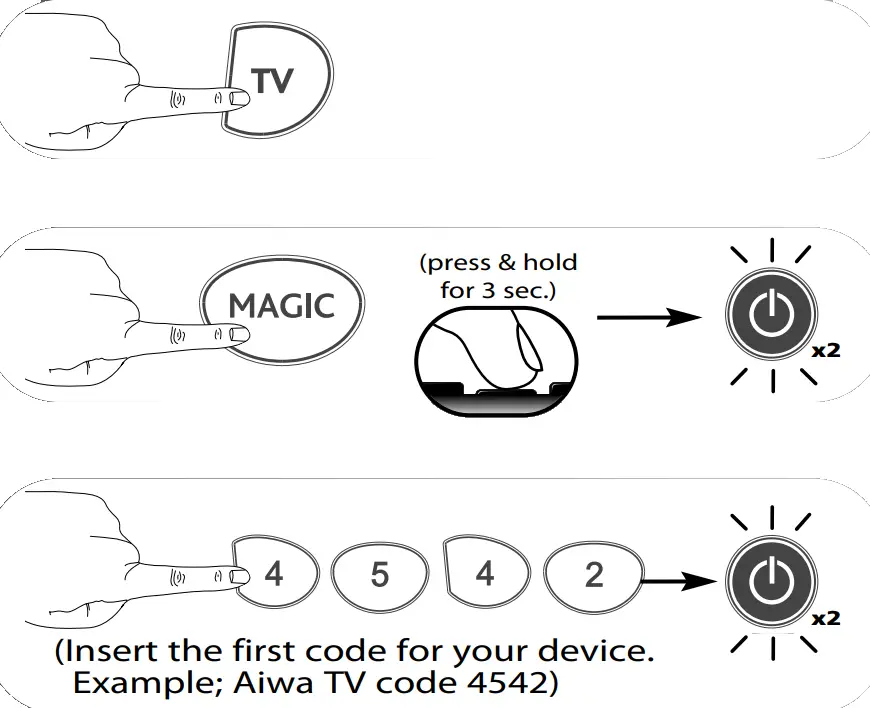
Example: To set up the ONE FOR ALL for your television:
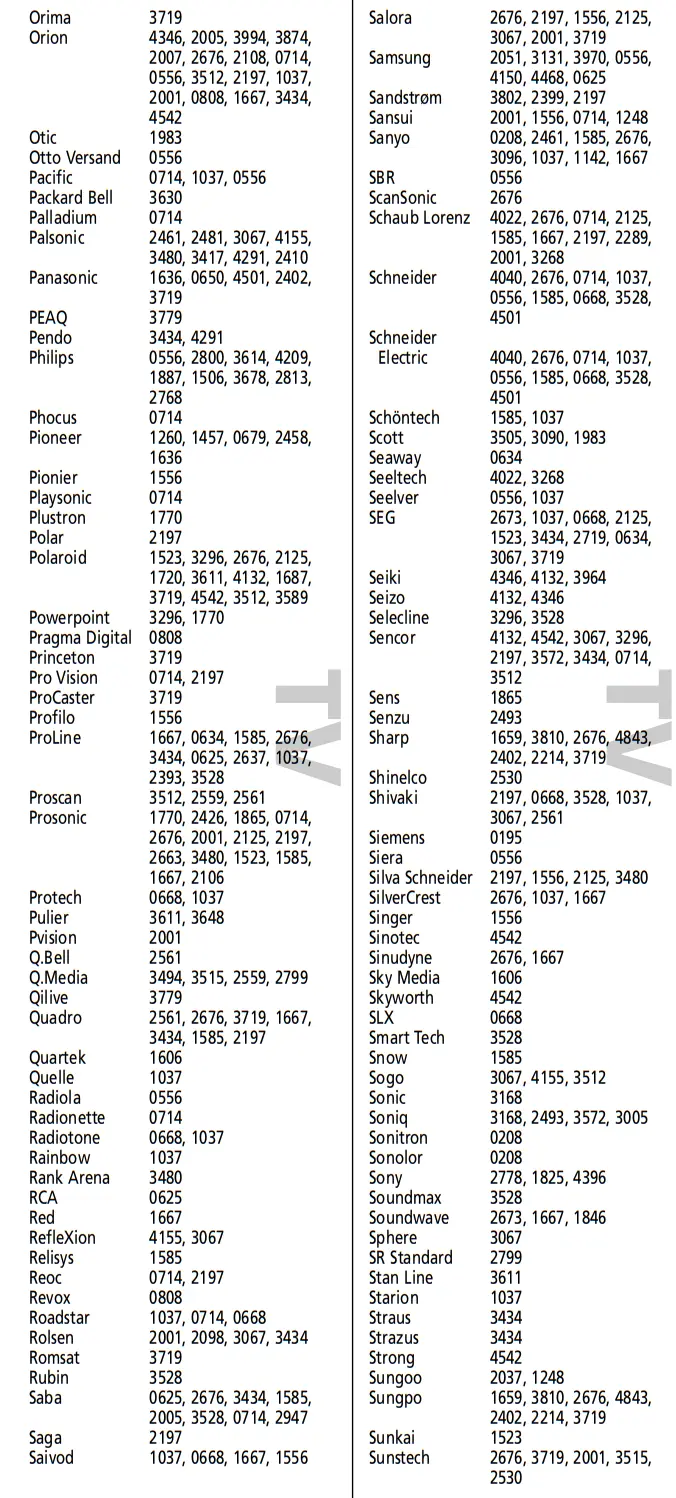
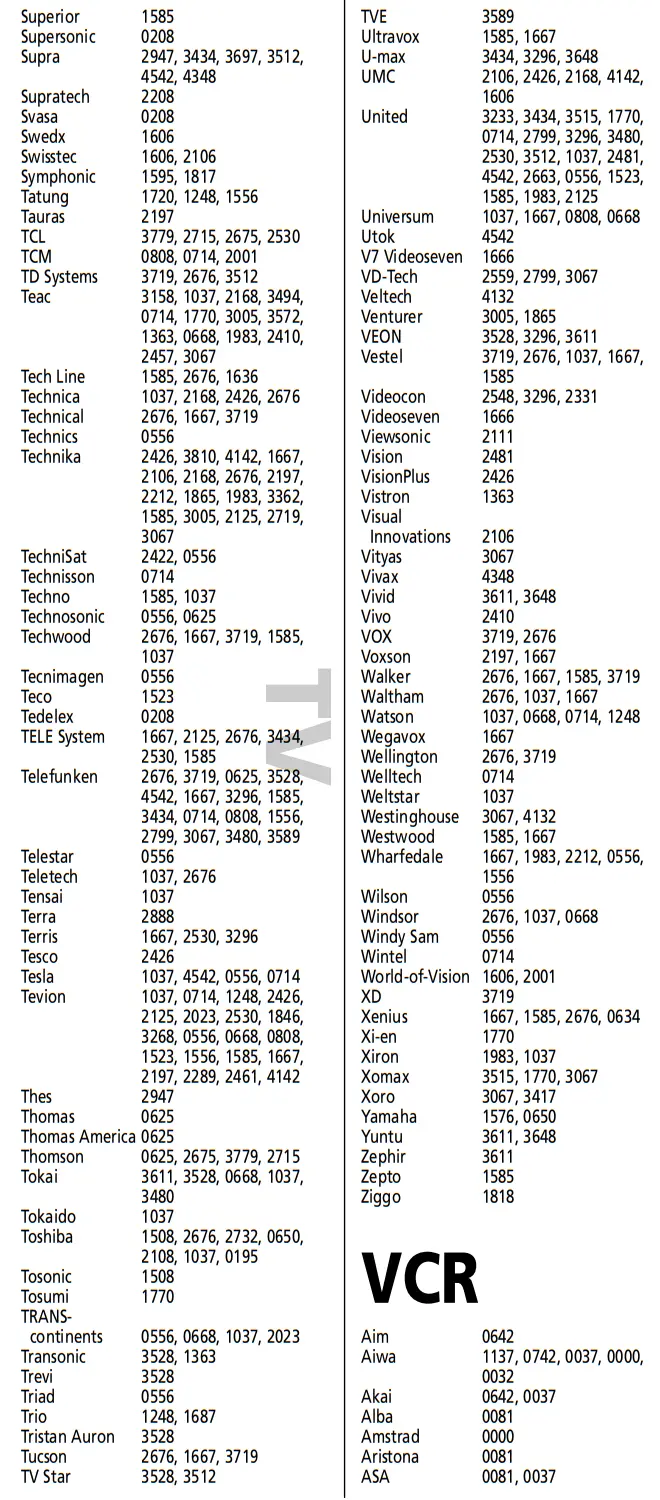
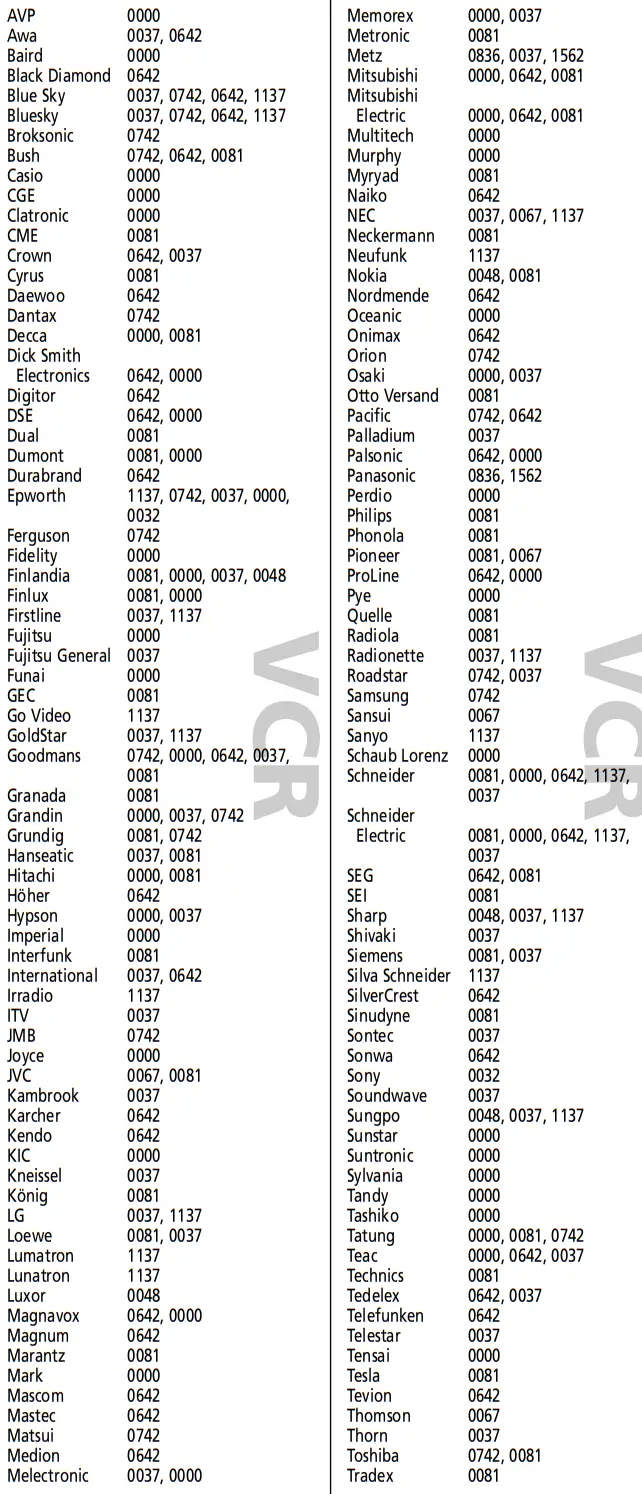
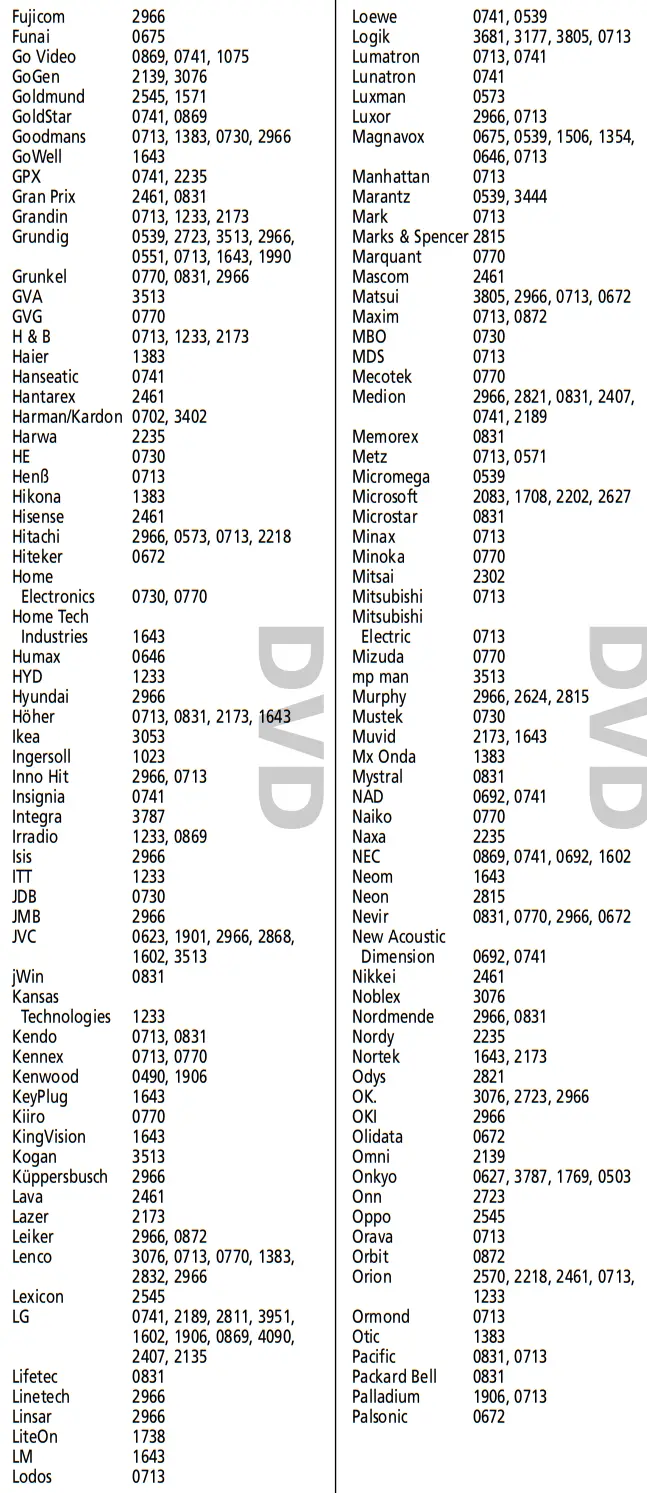
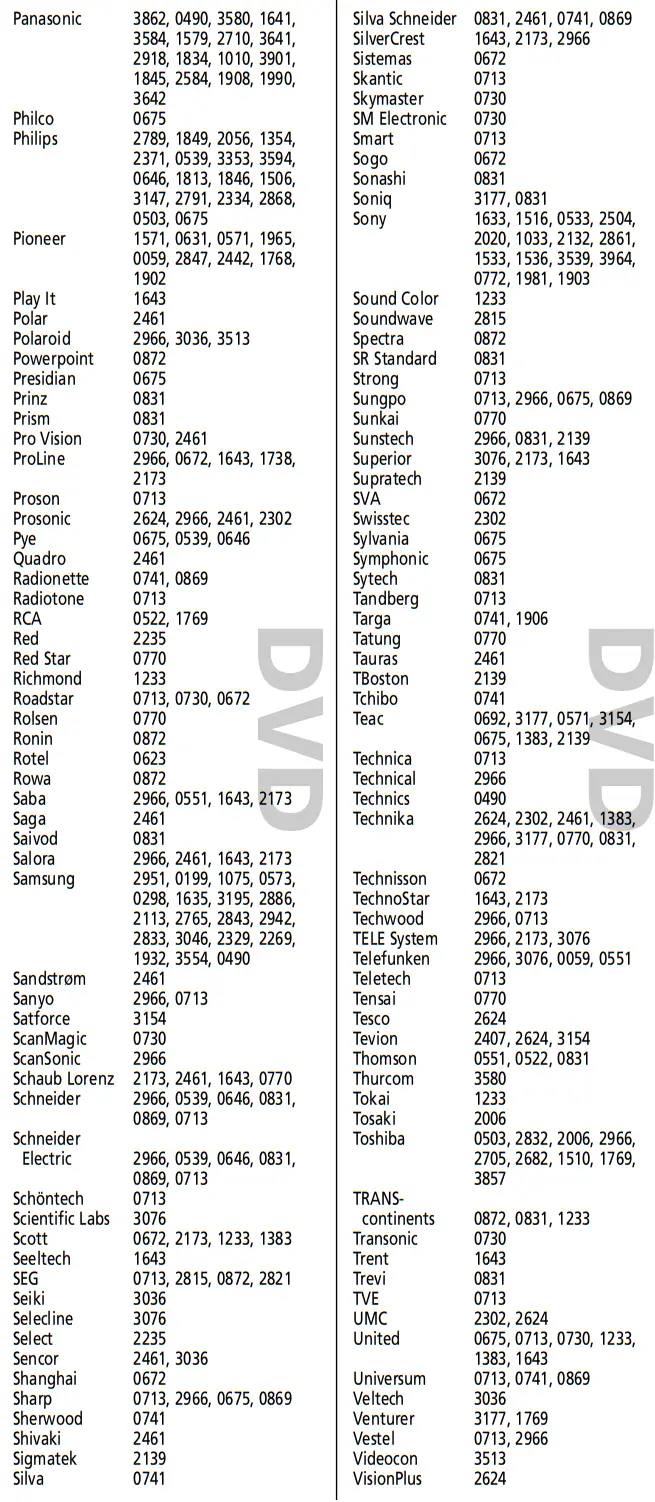
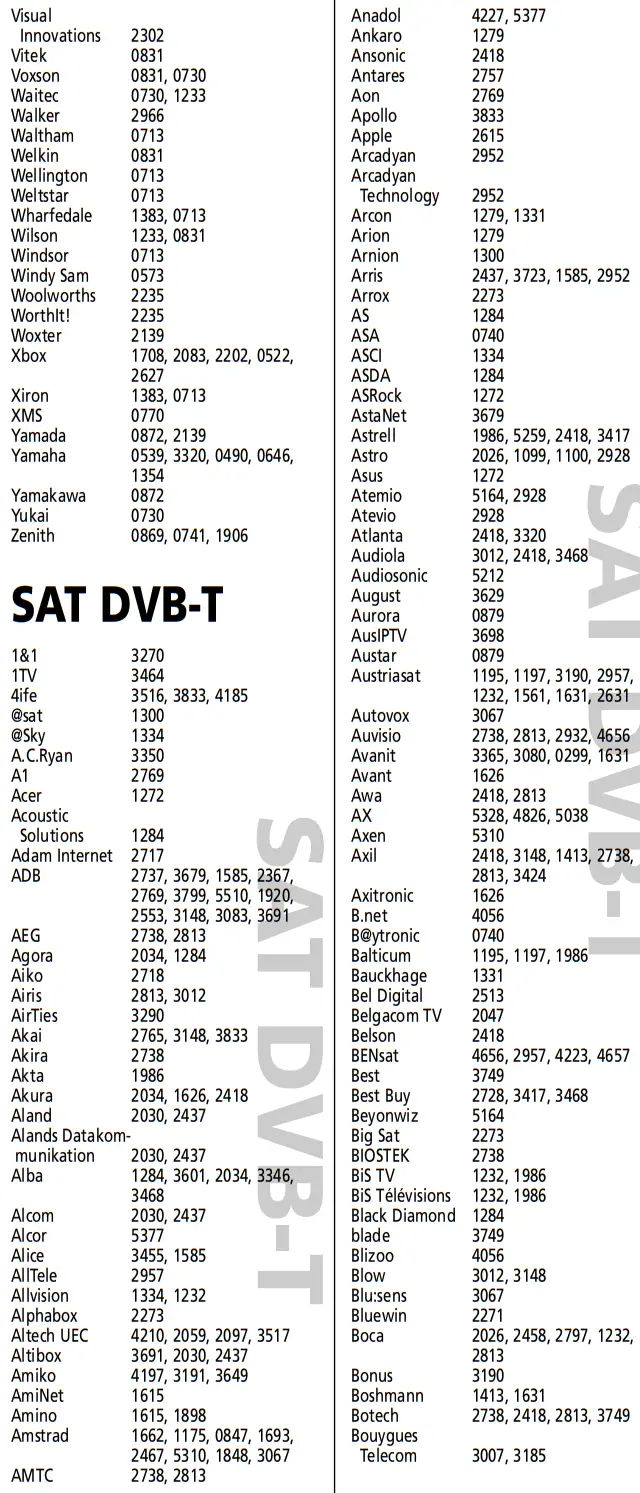
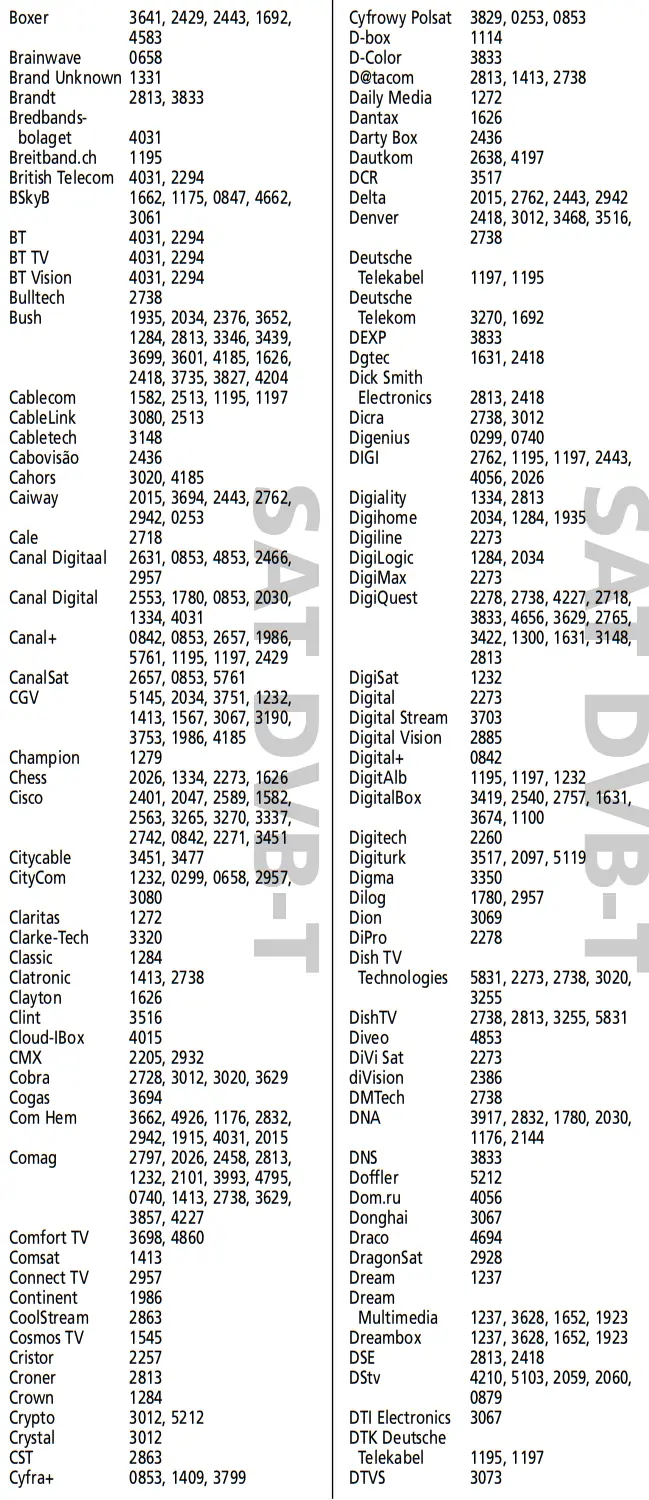
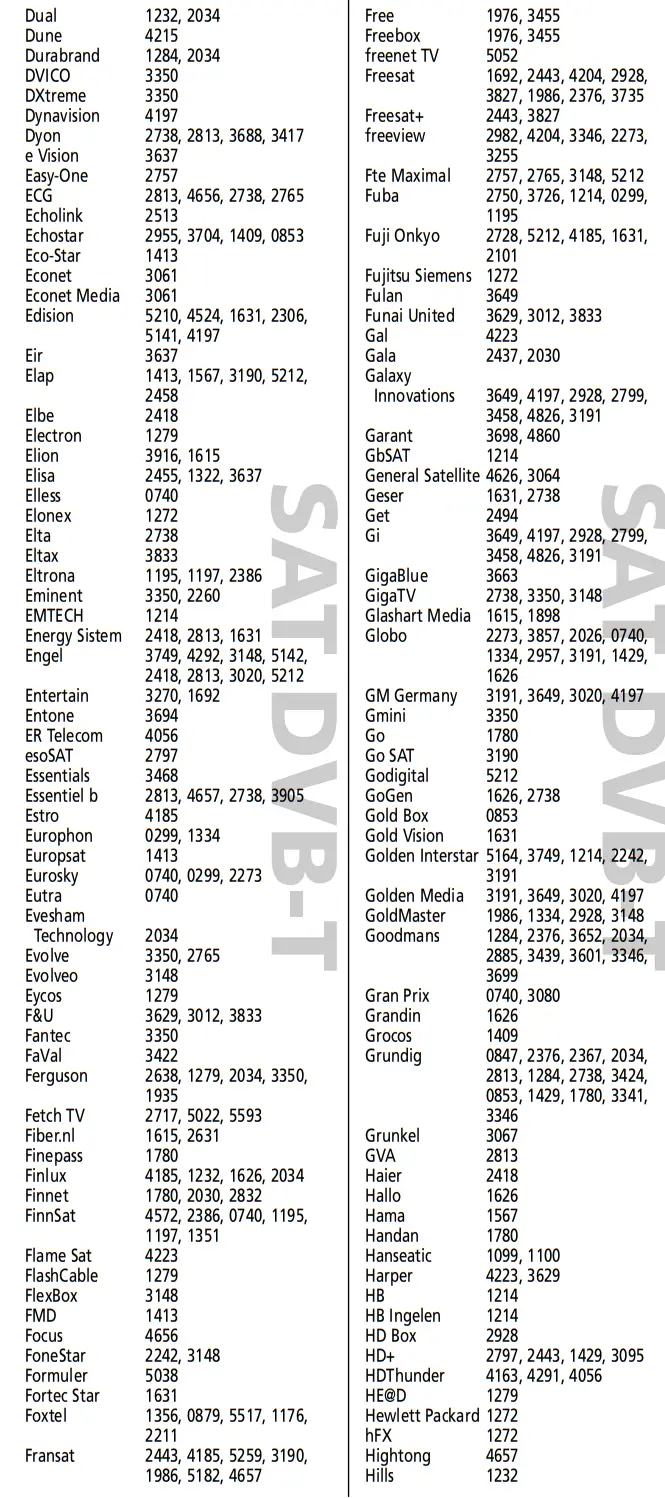
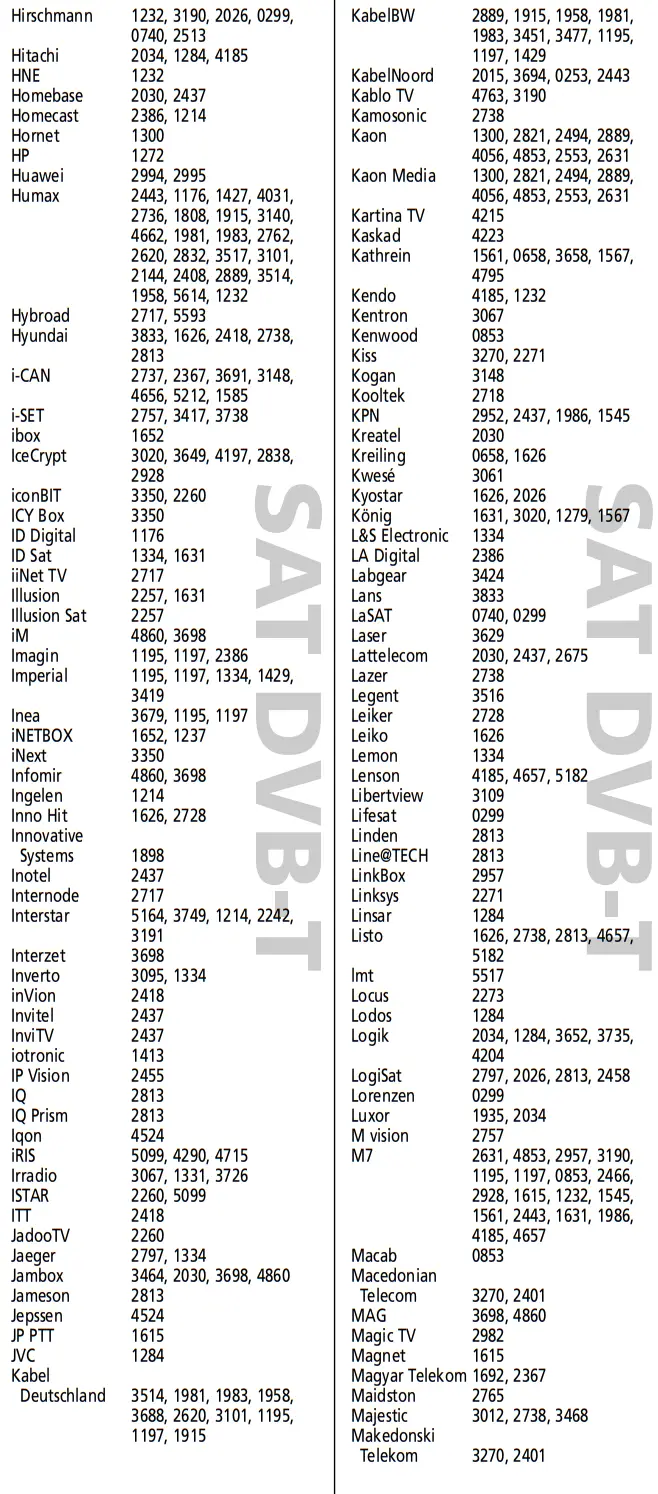
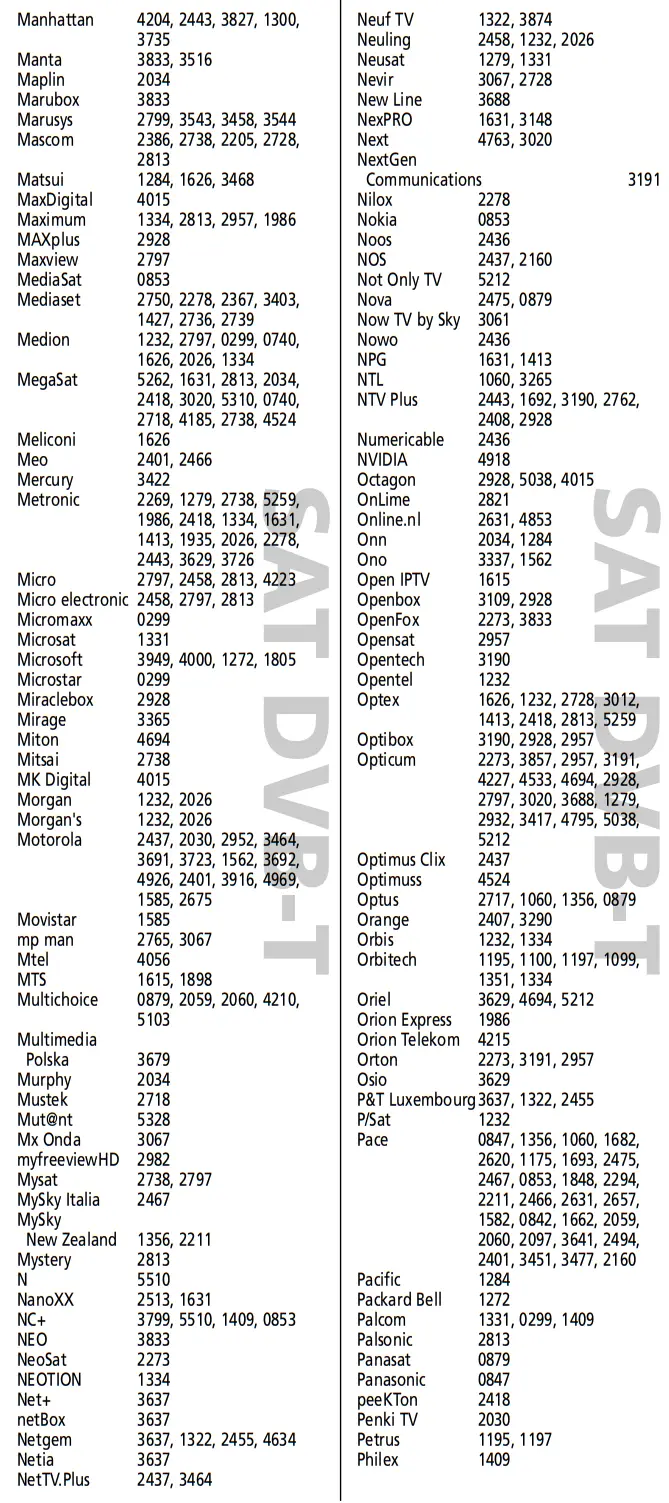
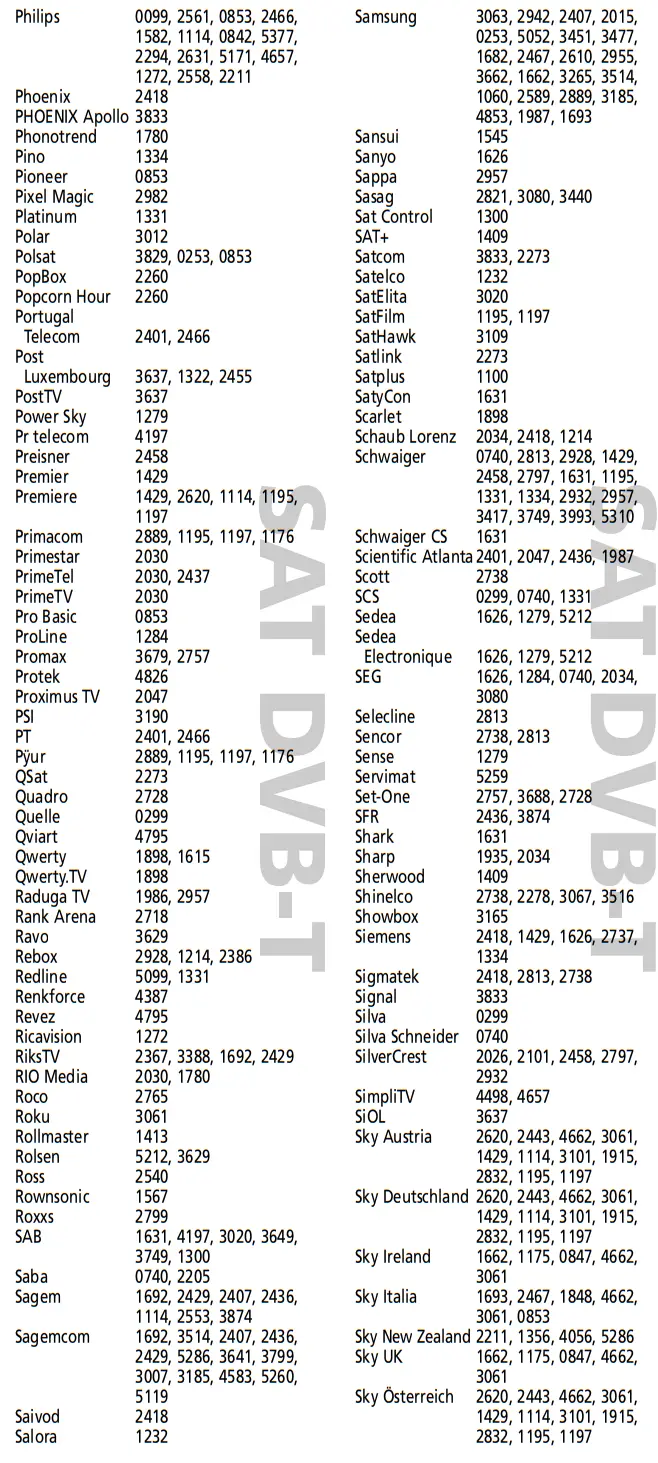
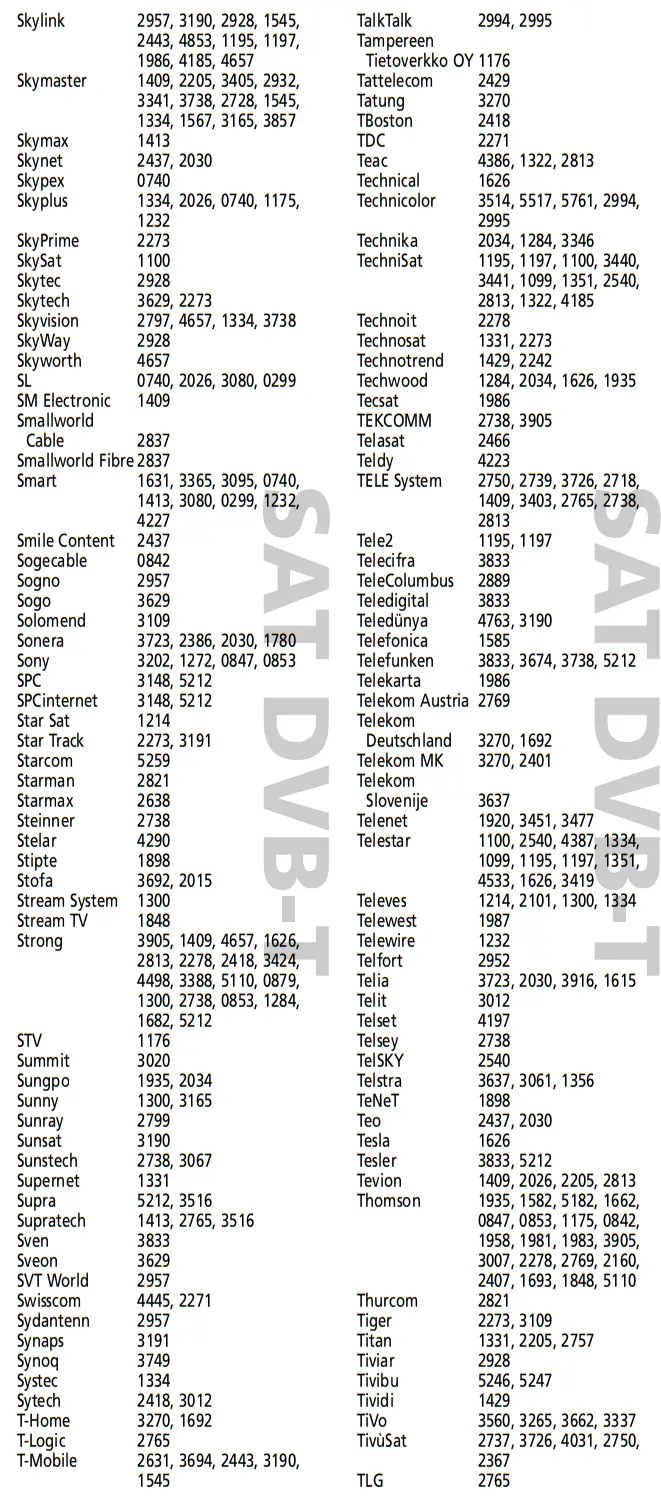
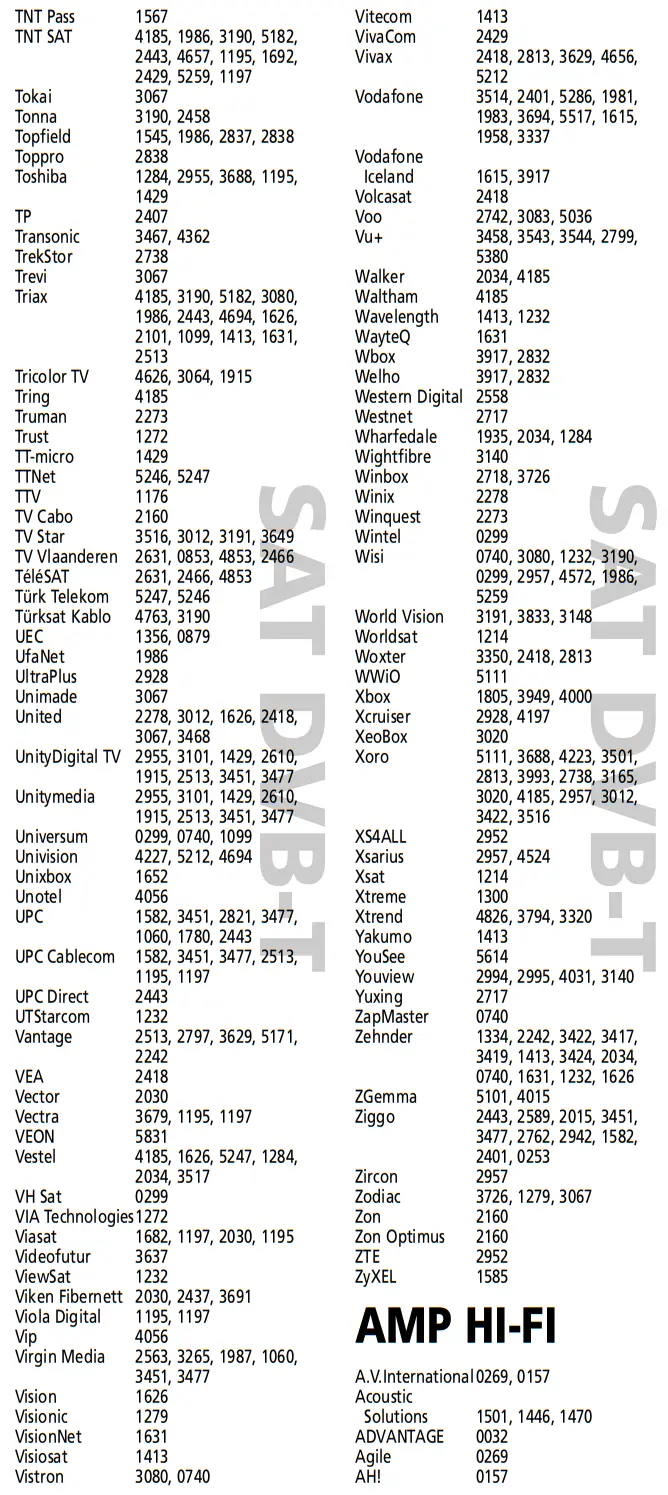
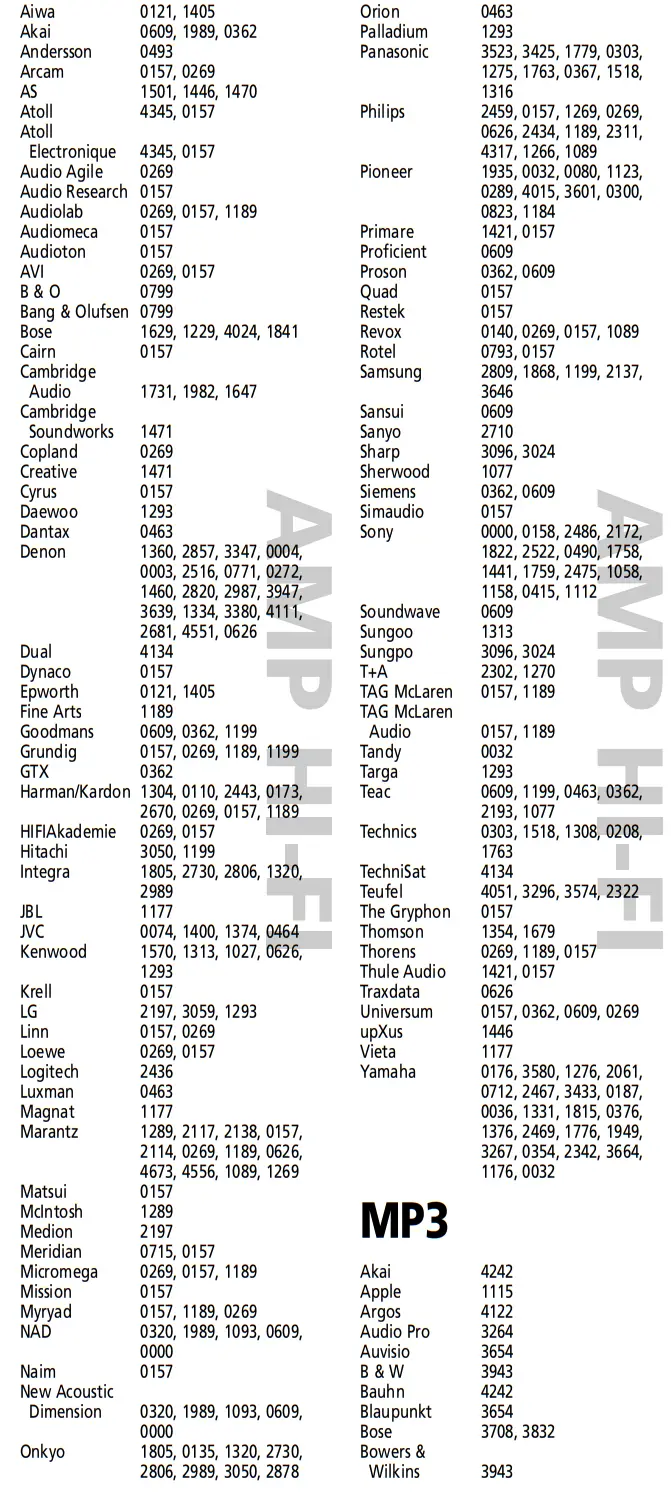
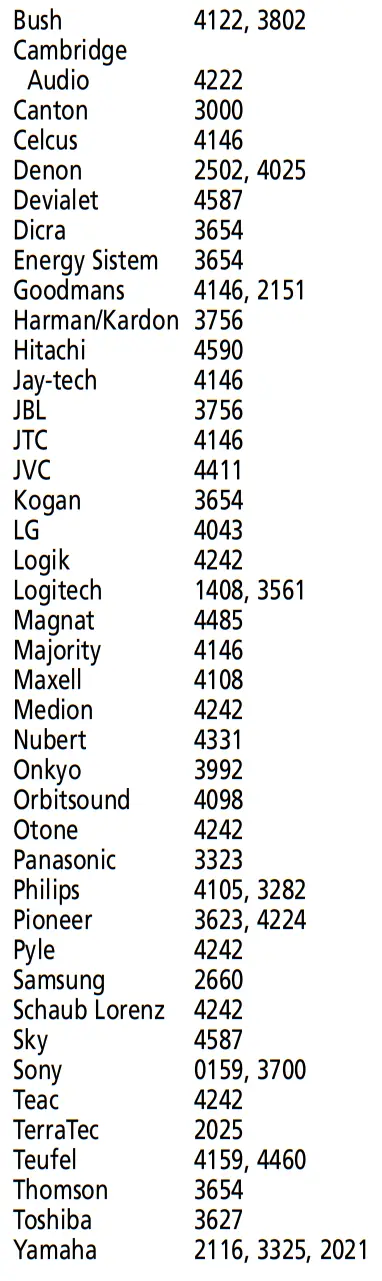
| 1 |  | Find the code for your device in the Code list (page 67 – 85). Codes are listed by device type and brand name. The most popular code is listed first. Make sure your device is switched on (not on standby). |
| 2 |  | Press the TV key on the ONE FOR ALL for the device you wish to Set-Up. |
| 3 |  | Press and hold down the MAGIC key until the red LED underneath the POWER key blinks twice (the red LED will blink once then twice). |
| 4 |  | Enter your (four-digit device code) using the number keys. The red LED will blink twice. |
| 5 |  | Now, aim the ONE FOR ALL at your device and press POWER. If your device switches off, the ONE FOR ALL is ready to operate your device. |
If your device does NOT switch off? Please repeat steps 1 – 5 trying the next code listed for your brand.
The Search Method
If your device does not respond to the ONE FOR ALL after you have tried all the codes listed for your brand, try searching for your code.
The Search Method allows you to find the code for your device by scanning through all the codes contained in the memory of the ONE FOR ALL. The Search Method may also work if your brand is not listed at all.
Example: To search for your TV code:
| 1 | Switch your television on (not on standby) and aim your ONE FOR ALL at your TV. | |
| 2 | | Press the TV key on your ONE FOR ALL. |
| 3 | | Press and hold down the MAGIC key until the red LED underneath the POWER key blinks twice (the red LED will blink once then twice). |
| 4 |  | Press 9 9 1. The red LED will blink twice. |
| 5 | | Next, press POWER. |
| 6 |  | Aim the ONE FOR ALL at your Television. Now press CH+over and over, until your Television turns off (every time you press the CH+ key the ONE FOR ALL will send out a POWER signal from the next code contained in the memory). You may have to press this key many times (up to 150 times) so please be patient. |
| 7 | | As soon as your television turns off, press the MAGIC key to store the code. |
Learning (copy)
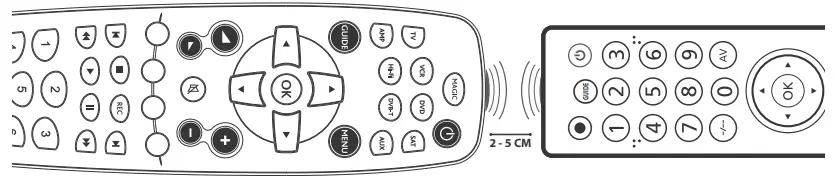
 Select the corresponding device e.g. TV
 Press and hold down the MAGIC key until the red LED underneath the POWER key blinks twice (the red LED will blink once then twice).
 Press 9 7 5
 Press and release the key you want to learn a function onto (for example the Power key) – The red LED will blink continuously.
- Press and release the corresponding key on the original remote, for example, Power.
- The red LED will blink twice to indicate the key has been learned correctly.
- Repeat steps 4 and 5 for each key you want to learn – remember you can learn from multiple remotes, but only one function per key.
- When you learned all the functions you require, press and hold the MAGIC key until the red LED blinks twice.
 Press 9 7 5
- If the red LED shows one long blink at step 6, the function was not learned correctly, please try again from step 4.
- If you find one or more keys don’t work properly after set up, you can re-enter the learning mode at any time by repeating the procedure from step 1.
How to delete a learned function to obtain the original function?
- Select the corresponding device mode (e.g. TV).
- Press and hold down the MAGIC key until the red LED underneath the POWER key blinks twice (the red LED will blink once then twice).
 Press 9 7 6.
- Press the key to be deleted (e.g. red key) twice.
 Press 9 7 6.
Volume Lock
This feature gives you the possibility to set the Volume (VOL+, VOL- and Mute) to always control a certain device (e.g. tv) independent of which device mode key (SAT, DVD, VCR, DVB-T, AMP, HI-FI, or AUX) is selected.
In this example, we will set Volume Control (VOL+, VOL- and Mute) to “tv volume”:
- Press and hold down the MAGIC key until the red LED underneath the POWER key blinks twice (the red LED will blink once then twice).
 Press 9 9 3.
- Then press the TV key and the red light will blink twice.
 Press 9 9 3.
Now you have set the Volume Control to “tv volume”. The VOL+, VOL-, and Mute keys will always control “tv volume” independent of which device mode key (TV, SAT, DVD, VCR, DVB-T, AMP, HI-FI or AUX) is selected.
How to remove a device from Volume Control
 Select the device key you wish to remove from Volume Control (e.g. HI-FI).
- Press and hold down the MAGIC key until the red LED underneath the POWER key blinks twice (the red LED will blink once then twice).
- Press 9 9 3.
 Press the VOL(+) key and the red LED will blink four times.
 Select the device key you wish to remove from Volume Control (e.g. HI-FI).
 Press the VOL(+) key and the red LED will blink four times.
The removed device will send out its own VOL+, VOL-, and MUTE.
How to deactivate Volume Control
- Press and hold down the MAGIC key until the red LED underneath the POWER key blinks twice (the red LED will blink once then twice).
- Press 9 9 3.
 Press the VOL(-) key and the red LED will blink four times.
 Press the VOL(-) key and the red LED will blink four times.
All devices will send out their own VOL+, VOL- and MUTE.
Set Up Codes
 |  |
 |  |
 |  |
 |  |
 |  |
 |  |
 |  |
 | |
 |  |
PRODUCT DISPOSAL
 This product bears the selective sorting symbol for waste electrical and electronic equipment (WEEE). This means that this product must be handled pursuant to European directive 2012/19 / EU in order to be recycled or dismantled to minimize its impact on the environment.
User has the choice to give this product to a competent recycling organization or to the retailer when a user buys new electrical or electronic equipment.
BATTERY DISPOSAL
(EUROPEAN DIRECTIVE 2006/66/EC)
Please do not dispose of your batteries with your normal household waste but inform yourself about the local separate collection for empty batteries to dispose of them correctly. This will help prevent potential negative effects on the environment and/or human health.
UNIVERSAL ELECTRONICS INC/ONE FOR ALL warrants to the original purchaser that this product will be free from defects in materials and workmanship under normal and correct use for a period of one (1) year from the date of original purchase. This product will be replaced free of charge if it has been proven to be defective within the one (1) year warranty period. This warranty does not cover cartons, carrying cases, batteries, broken or marred cabinets, or any other item used in connection with the product. Any further obligation than listed above is excluded. Please notice that we need your purchase receipt so that we may establish your eligibility for service. If you have bought this product for purposes that are not related to your trade, business, or profession, please remember that you may have legal rights under your national legislation governing the sale of consumer goods. This guarantee does not affect those rights.
Although all customer service information is updated before printing it may happen that during the time of use changes have occurred. Please check our website (www.oneforall.com) for our latest customer service information.
Universal Electronics BV
Europe & International
P.O. Box 3332
7500 DH, Enschede
The Netherlands URC-2981
711809
RDN-1240419
References
 Breitband
-
czech.cz
 Dom.ru
-
Internet, TV en Bellen via Glasvezel of DSL | Fiber NL
-
Internet, TV en Bellen | Online.nl
-
Parked at Loopia
-
Дистрибуция оборудования Hi-Fi и High End,систем домашнего кинотеатра и умного дома - Barnsly.ru
-
Call Center: outsourcing telemarketingu i obsługi klienta | ContactCenter
-
Web Server's Default Page
-
EMOS - drobné elektro pro vás | Nakupujte výhodně | EMOS
-
Инфотел 2000 – Ние сме Инфотел 2000
-
Home | One For All
-
Tehnocentar
 Breitband
 czech.cz
 Dom.ru
 Internet, TV en Bellen via Glasvezel of DSL | Fiber NL
 Internet, TV en Bellen | Online.nl
 Parked at Loopia
 Дистрибуция оборудования Hi-Fi и High End,систем домашнего кинотеатра и умного дома - Barnsly.ru
 Call Center: outsourcing telemarketingu i obsługi klienta | ContactCenter
 Web Server's Default Page
 EMOS - drobné elektro pro vás | Nakupujte výhodně | EMOS
 Инфотел 2000 – Ние сме Инфотел 2000
 Home | One For All
 Tehnocentar