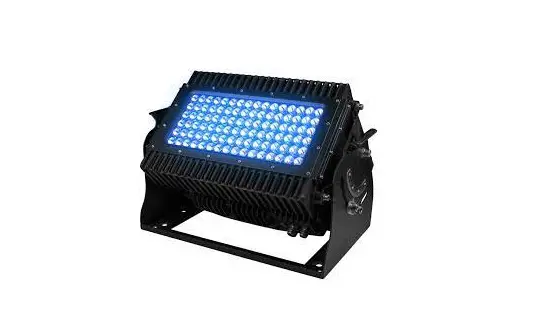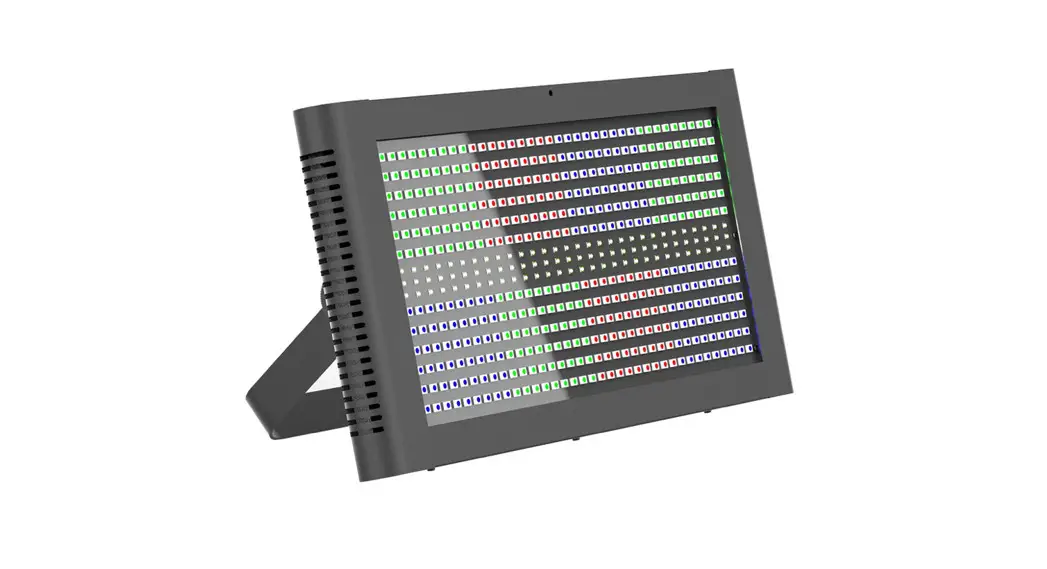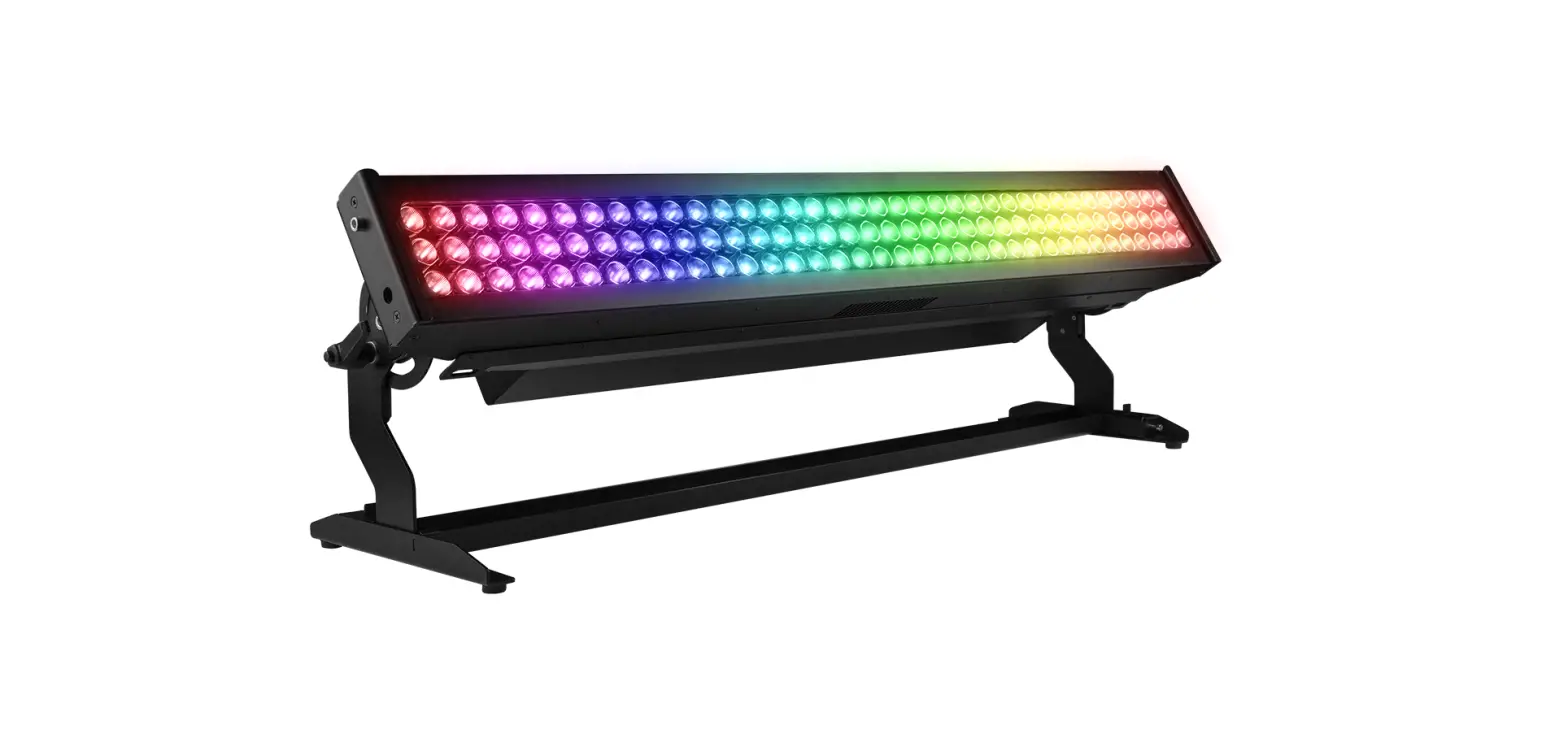
SOLARIS Flare LR Q+ Strobe and Blinder Lighting User Guide
SETUP
SAFETY INSTRUCTIONS
 Please read these instructions carefully. This user guide contains important information about the installation, usage, and maintenance of this product
- Keep this Quick Start Guide for future reference. If unit is sold to another user, make sure they also receive this instruction booklet.
- Ensure the unit is connected to proper voltage, and that line voltage is not higher than that stated on the device.
- Make sure there are no flammable materials close to the unit while operating.
- Always disconnect from the power source before servicing or fuse replacement. Always use the fuse specified in this manual.
- Maximum ambient temperature (Ta) is 40°C (104°F). Do not operate unit at temperatures above this rating.
- In the event of a serious operating problem, stop using the unit immediately. Repairs must be carried out by trained, authorized personnel. Contact the nearest authorized technical assistance center. Only OEM spare parts should be used.
- Do not connect the device to a dimmer pack.
- Make sure power cord is never crimped or damaged.
- Never disconnect power cord by pulling or tugging on the cord.
Caution! There are no user serviceable parts inside the unit. Do not open the housing or attempt any repairs yourself. In the unlikely event your unit may require service, please contact your distributor.
UNPACKING INSTRUCTIONS
Upon receipt of the unit, carefully unpack the carton and check the contents to ensure that all parts are present and in good condition. Notify the shipper immediately and retain packing material for inspection if any parts appear to be damaged from shipping or if the carton itself shows signs of mishandling. Save the carton and all packing materials. In the event that a unit must be returned to the factory, it is important that it be returned in the original factory box and packing.
POWER REQUIREMENTS
Before powering the unit, make sure the line voltage is within the range of accepted voltages. This unit accommodates 100-240VAC, 50/60Hz. All units must be powered directly from a switched circuit and cannot be operated with a rheostat (variable resistor) or dimmer circuit, even if the rheostat or dimmer channel is used solely for a 0-100% switch.
RIGGING SOLARIS FLARE Q+ LR
Always consult a certified rigging specialist before suspending any device overhead.
Solaris Flare Q+ LR weighs approx. 24.3 lbs (11 kg) and requires multiple attachment points for safety. Use ProBurger® couplers or equivalent C- or O-type clamps for attaching to truss, rated for fixture weight. After establishing the desired position, tighten all appropriate bolts.
- Always use safety cables!
- When selecting installation location, consider routine maintenance.
- Team lift the fixture into mounting location, never try to mount fixture with one person.
- Never mount fixture where it will be exposed to excess moisture, high humidity, extreme temperatures, or restricted ventilation for long periods of time

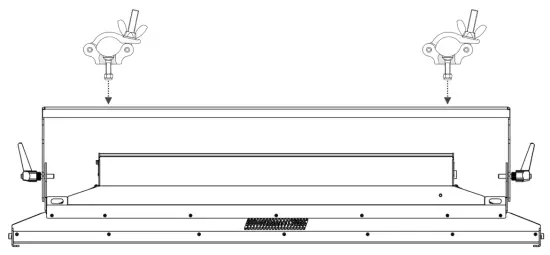
SOLARIS FLARE Q+ LR ATTACHABLE FEET
Solaris Flare Q+ LR has optional feet attachments which allow for floor mounting applications. The PreSet™ Yoke automatically snaps to 15° increments from -45° to +135° for ease of use and focusing.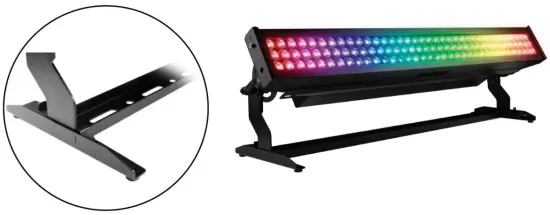
The default menu display shows the current DMX address, mode and footprint, as well as the option to rotate the screen and enter further menu options. Four control panel buttons are located near each corner of the LCD Display.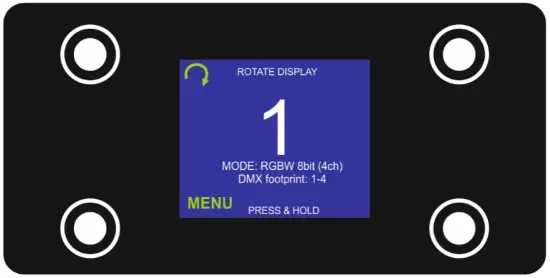
Press and hold the <MENU> button to scroll through the top-level menu items. Use the and buttons, located to the right of the LCD screen, to navigate the menu map and menu options. Press the < ✔ > button to access the menu function currently displayed or to enable a menu option. To return to the top of the menu map or menu without changing the value, press the < X > button.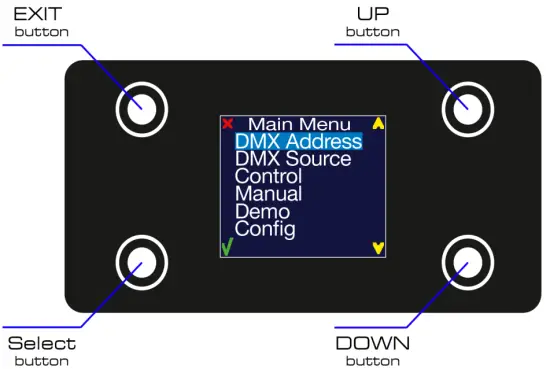
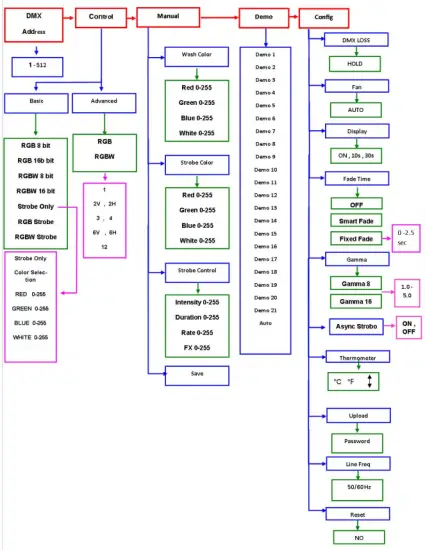
FLARE Q+ LR PIXEL MAP
Solaris Flare Q+ LR feature 108 10W Cree LEDs located in 3 rows and 36 columns.
The LEDs have multiple options of control, subdivided into different “pixel” quantities. In Advanced Control Modes the Flare Q+ LR has the additional function of selecting a desired pixel group.
LEDs are grouped into the following pixel options:
- 1-pixel unit – 1 group of 108 LEDs
- 2-pixel unit – 2 groups of 54 LEDs
- 3-pixel unit – 3 groups of 36 LEDs
- 4-pixel unit – 4 groups of 27 LEDs
- 6-pixel unit – 6 groups of 18 LEDs
- 12-pixel unit – 12 groups of 9 LEDs

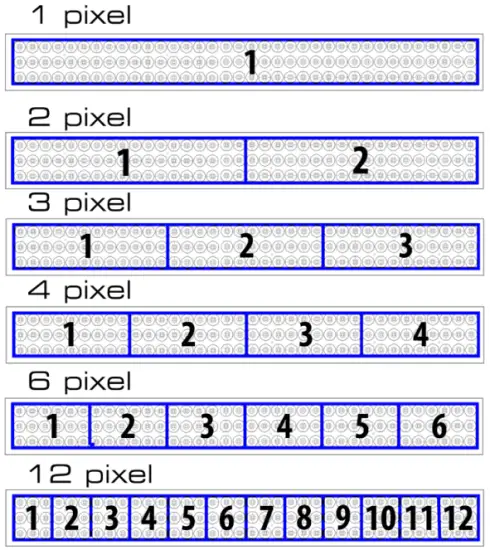
Note! Each mode can be inverted when last pixel becomes the first.
BASIC CONTROL MODES
Basic control modes for RGB and RGBW control the Flare Q+ LR as 1-pixel mode for color wash applications.
| Mode | Channel | DMX values | Preset | Function |
| RGB 8bit | 1 | 0 – 255 | 0 – 100 | Red Intensity |
| 2 | 0 – 255 | 0 – 100 | Green Intensity | |
| 3 | 0 – 255 | 0 – 100 | Blue Intensity | |
|
RGB 16bit | 1 | 0 – 255 | 0 – 100 | Red Intensity HI Byte |
| 2 | 0 – 255 | 0 – 100 | Red Intensity LOW Byte | |
| 3 | 0 – 255 | 0 – 100 | Green Intensity HI Byte | |
| 4 | 0 – 255 | 0 – 100 | Green Intensity LOW Byte | |
| 5 | 0 – 255 | 0 – 100 | Blue Intensity HI Byte | |
| 6 | 0 – 255 | 0 – 100 | Blue Intensity LOW Byte |
| Mode | Channel | DMX values | Preset | Function |
|
RGBW 8bit | 1 | 0 – 255 | 0 – 100 | Red Intensity |
| 2 | 0 – 255 | 0 – 100 | Green Intensity | |
| 3 | 0 – 255 | 0 – 100 | Blue Intensity | |
| 4 | 0 – 255 | 0 – 100 | White Intensity | |
|
RGBW 16bit | 1 | 0 – 255 | 0 – 100 | Red Intensity HI Byte |
| 2 | 0 – 255 | 0 – 100 | Red Intensity LOW Byte | |
| 3 | 0 – 255 | 0 – 100 | Green Intensity HI Byte | |
| 4 | 0 – 255 | 0 – 100 | Green Intensity LOW Byte | |
| 5 | 0 – 255 | 0 – 100 | Blue Intensity HI Byte | |
| 6 | 0 – 255 | 0 – 100 | Blue Intensity LOW Byte | |
| 7 | 0 – 255 | 0 – 100 | White Intensity HI Byte | |
| 8 | 0 – 255 | 0 – 100 | White Intensity LOW Byte |
STROBE MODES
| Strobe Only Mode | 1 | 0 – 255 | 0 – 100 | Strobe Intensity |
| 2 | 0 – 255 | 0 – 100 | Strobe Duration | |
| 3 | 0 – 255 | 0 – 100 | Strobe Rate | |
| 4 | 0 – 255 | 0 – 100 | Strobe FX |
Strobe Value Breakdown:
| DMX Value | DMX Percent | Strobe Intensity |
| 0 – 5 | 0 – 2 | Blackout |
| 6 – 255 | 3 – 100 | Intensity level |
| Strobe Duration | ||
| 0 – 254 | 0 – 99 | 0 – 650ms (50Hz AC) |
| 255 | 100 | HYPER |
| Strobe Rate | ||
| 0 – 5 | 0 – 2 | No flash |
| 6 – 255 | 3 – 100 | 0.5 – 25Hz (50Hz AC); 0.6 – 30Hz (60Hz AC) |
| Strobe effects | ||
| 0 – 4 | 0 – 2 | No effect |
| 5 | 3 | Wash Override (only available in RGB Strobe and RGBW Strobe modes) 1 |
| 6 – 42 | 4 -16 | Ramp up |
| 43 – 85 | 17 – 33 | Ramp down |
| 86 – 128 | 34 – 50 | Ramp up – down |
| 129 – 171 | 51 – 67 | Random |
| 172 – 214 | 68 – 84 | Lighting |
| 215 – 240 | 85 – 92 | Spikes |
| 241 – 245 | 93 – 95 | Burst (use Rate at full) 2 |
| 246 – 250 | 96 – 98 | “Meltdown” Random Pixels w/ Solid Background 3 |
| 251 – 255 | 99 – 100 | “Meltdown” Random Pixels w/ Burst Background4 |
| Mode | Channel | DMX Value | Percent | Function |
|
RGB Strobe | 1 | 0 – 255 | 0 – 100 | Red Strobe Intensity |
| 2 | 0 – 255 | 0 – 100 | Green Strobe Intensity | |
| 3 | 0 – 255 | 0 – 100 | Blue Strobe Intensity | |
| 4 | 0 – 255 | 0 – 100 | Strobe Intensity | |
| 5 | 0 – 255 | 0 – 100 | Strobe Duration | |
| 6 | 0 – 255 | 0 – 100 | Strobe Rate | |
| 7 | 0 – 255 | 0 – 100 | Strobe FX | |
|
RGBW Strobe | 1 | 0 – 255 | 0 – 100 | Red Strobe Intensity |
| 2 | 0 – 255 | 0 – 100 | Green Strobe Intensity | |
| 3 | 0 – 255 | 0 – 100 | Blue Strobe Intensity | |
| 4 | 0 – 255 | 0 – 100 | White Strobe Intensity | |
| 5 | 0 – 255 | 0 – 100 | Strobe Intensity | |
| 6 | 0 – 255 | 0 – 100 | Strobe Duration | |
| 7 | 0 – 255 | 0 – 100 | Strobe Rate | |
| 8 | 0 – 255 | 0 – 100 | Strobe FX |
ADVANCED RGB STROBE MODES
RGBW PIXEL MODE 11 RGBW PIXEL MODE 213 RGBW PIXEL MODE 317 RGBW PIXEL MODE 421 RGBW PIXEL MODE 625 RGBW PIXEL MODE 1233
| PIXEL MODE | CHANNEL | DMX VALUE | PERCENT | FUNCTION |
| RGB PIXEL MODE 1 | 1 | 0 – 255 | 0 – 100 | Red Strobe Intensity |
| 2 | 0 – 255 | 0 – 100 | Green Strobe Intensity | |
| 3 | 0 – 255 | 0 – 100 | Blue Strobe Intensity | |
| 4 | 0 – 255 | 0 – 100 | Strobe Intensity | |
| 5 | 0 – 255 | 0 – 100 | Strobe Duration | |
| 6 | 0 – 255 | 0 – 100 | Strobe Rate | |
| 7 | 0 – 255 | 0 – 100 | Strobe FX | |
| 8 | 0 – 255 | 0 – 100 | 1 pix Red intensity | |
| 9 | 0 – 255 | 0 – 100 | 1 pix Green intensity | |
| 10 | 0 – 255 | 0 – 100 | 1 pix Blue intensity | |
| RGB PIXEL MODE 2 | 11 | 0 – 255 | 0 – 100 | 2 pix Red intensity |
| 12 | 0 – 255 | 0 – 100 | 2 pix Green intensity | |
| 13 | 0 – 255 | 0 – 100 | 2 pix Blue intensity | |
| RGB PIXEL MODE 3 | 14 | 0 – 255 | 0 – 100 | 3 pix Red intensity |
| 15 | 0 – 255 | 0 – 100 | 3 pix Green intensity | |
| 16 | 0 – 255 | 0 – 100 | 3 pix Blue intensity | |
| RGB PIXEL MODE 4 | 17 | 0 – 255 | 0 – 100 | 4 pix Red intensity |
| 18 | 0 – 255 | 0 – 100 | 4 pix Green intensity | |
| 19 | 0 – 255 | 0 – 100 | 4 pix Blue intensity | |
| RGB PIXEL MODE 6 | 20 | 0 – 255 | 0 – 100 | 5 pix Red intensity |
| 21 | 0 – 255 | 0 – 100 | 5 pix Green intensity | |
| 22 | 0 – 255 | 0 – 100 | 5 pix Blue intensity | |
| 23 | 0 – 255 | 0 – 100 | 6 pix Red intensity | |
| 24 | 0 – 255 | 0 – 100 | 6 pix Green intensity | |
| 25 | 0 – 255 | 0 – 100 | 6 pix Blue intensity | |
| RGB PIXEL MODE 12 | 26 | 0 – 255 | 0 – 100 | 7 pix Red intensity |
| 27 | 0 – 255 | 0 – 100 | 7 pix Green intensity | |
| 28 | 0 – 255 | 0 – 100 | 7 pix Blue intensity | |
| 29 | 0 – 255 | 0 – 100 | 8 pix Red intensity | |
| 30 | 0 – 255 | 0 – 100 | 8 pix Green intensity | |
| 31 | 0 – 255 | 0 – 100 | 8 pix Blue intensity | |
| 32 | 0 – 255 | 0 – 100 | 9 pix Red intensity | |
| 33 | 0 – 255 | 0 – 100 | 9 pix Green intensity | |
| 34 | 0 – 255 | 0 – 100 | 9 pix Blue intensity | |
| 35 | 0 – 255 | 0 – 100 | 10 pix Red intensity | |
| 36 | 0 – 255 | 0 – 100 | 10 pix Green intensity | |
| 37 | 0 – 255 | 0 – 100 | 10 pix Blue intensity | |
| 38 | 0 – 255 | 0 – 100 | 11 pix Red intensity | |
| 39 | 0 – 255 | 0 – 100 | 11 pix Green intensity | |
| 40 | 0 – 255 | 0 – 100 | 11 pix Blue intensity | |
| 41 | 0 – 255 | 0 – 100 | 12 pix Red intensity | |
| 42 | 0 – 255 | 0 – 100 | 12 pix Green intensity | |
| 43 | 0 – 255 | 0 – 100 | 12 pix Blue intensity | |
| 0 – 255 | 0 – 100 | Red Strobe Intensity | ||
| 2 | 0 – 255 | 0 – 100 | Green Strobe Intensity | |
| 3 | 0 – 255 | 0 – 100 | Blue Strobe Intensity | |
| 4 | 0 – 255 | 0 – 100 | White Strobe Intensity | |
| 5 | 0 – 255 | 0 – 100 | Strobe Intensity | |
| 6 | 0 – 255 | 0 – 100 | Strobe Duration | |
| 7 | 0 – 255 | 0 – 100 | Strobe Rate | |
| 8 | 0 – 255 | 0 – 100 | Strobe FX | |
| 9 | 0 – 255 | 0 – 100 | 1 pix Red intensity | |
| 10 | 0 – 255 | 0 – 100 | 1 pix Green intensity | |
| 11 | 0 – 255 | 0 – 100 | 1 pix Blue intensity | |
| 12 | 0 – 255 | 0 – 100 | 1 pix White intensity | |
| 0 – 255 | 0 – 100 | 2 pix Red intensity | ||
| 14 | 0 – 255 | 0 – 100 | 2 pix Green intensity | |
| 15 | 0 – 255 | 0 – 100 | 2 pix Blue intensity | |
| 16 | 0 – 255 | 0 – 100 | 2 pix White intensity | |
| 0 – 255 | 0 – 100 | 3 pix Red intensity | ||
| 18 | 0 – 255 | 0 – 100 | 3 pix Green intensity | |
| 19 | 0 – 255 | 0 – 100 | 3 pix Blue intensity | |
| 20 | 0 – 255 | 0 – 100 | 3 pix White intensity | |
| 0 – 255 | 0 – 100 | 4 pix Red intensity | ||
| 22 | 0 – 255 | 0 – 100 | 4 pix Green intensity | |
| 23 | 0 – 255 | 0 – 100 | 4 pix Blue intensity | |
| 24 | 0 – 255 | 0 – 100 | 4 pix White intensity | |
| 0 – 255 | 0 – 100 | 5 pix Red intensity | ||
| 26 | 0 – 255 | 0 – 100 | 5 pix Green intensity | |
| 27 | 0 – 255 | 0 – 100 | 5 pix Blue intensity | |
| 28 | 0 – 255 | 0 – 100 | 5 pix White intensity | |
| 29 | 0 – 255 | 0 – 100 | 6 pix Red intensity | |
| 30 | 0 – 255 | 0 – 100 | 6 pix Green intensity | |
| 31 | 0 – 255 | 0 – 100 | 6 pix Blue intensity | |
| 32 | 0 – 255 | 0 – 100 | 6 pix White intensity | |
| 0 – 255 | 0 – 100 | 7 pix Red intensity | ||
| 34 | 0 – 255 | 0 – 100 | 7 pix Green intensity | |
| 35 | 0 – 255 | 0 – 100 | 7 pix Blue intensity | |
| 36 | 0 – 255 | 0 – 100 | 7 pix White intensity | |
| 37 | 0 – 255 | 0 – 100 | 8 pix Red intensity | |
| 38 | 0 – 255 | 0 – 100 | 8 pix Green intensity | |
| 39 | 0 – 255 | 0 – 100 | 8 pix Blue intensity | |
| 40 | 0 – 255 | 0 – 100 | 8 pix White intensity | |
| 41 | 0 – 255 | 0 – 100 | 9 pix Red intensity | |
| 42 | 0 – 255 | 0 – 100 | 9 pix Green intensity | |
| 43 | 0 – 255 | 0 – 100 | 9 pix Blue intensity | |
| 44 | 0 – 255 | 0 – 100 | 9 pix White intensity | |
| 45 | 0 – 255 | 0 – 100 | 10 pix Red intensity | |
| 46 | 0 – 255 | 0 – 100 | 10 pix Green intensity | |
| 47 | 0 – 255 | 0 – 100 | 10 pix Blue intensity | |
| 48 | 0 – 255 | 0 – 100 | 10 pix White intensity | |
| 49 | 0 – 255 | 0 – 100 | 11 pix Red intensity | |
| 50 | 0 – 255 | 0 – 100 | 11 pix Green intensity | |
| 51 | 0 – 255 | 0 – 100 | 11 pix Blue intensity | |
| 52 | 0 – 255 | 0 – 100 | 11 pix White intensity | |
| 53 | 0 – 255 | 0 – 100 | 12 pix Red intensity | |
| 54 | 0 – 255 | 0 – 100 | 12 pix Green intensity | |
| 55 | 0 – 255 | 0 – 100 | 12 pix Blue intensity | |
| 56 | 0 – 255 | 0 – 100 | 12 pix White intensity | |
RDM SENSORS AND FUNCTIONS
Solaris Flare Q+ LR can be operated via Remote Device Management (RDM) that will assist with fixture setup and maintenance.
| PID | Name |
| Category – Status Collection | |
| 0x0020 | QUEUED_MESSAGE |
| Category – RDM Information | |
| 0x0050 | SUPPORTED_PARAMETERS |
| 0x0051 | PARAMETER_DESCRIPTION |
| Category – Product Information | |
| 0x0060 | DEVICE_INFO |
| 0x0080 | DEVICE_MODEL_DESCRIPTION |
| 0x0081 | MANUFACTURER_LABEL |
| 0x0082 | DEVICE_LABEL |
| 0x0090 | FACTORY_DEFAULTS |
| 0x00C0 | SOFTWARE_VERSION_LABEL |
| Category – DMX512 Setup | |
| 0x00E0 | DMX_PERSONALITY |
| DMX_PERSONALITY_DESCRIPTION | |
| 0x00F0 | DMX_START_ADDRESS |
| Category – Sensors | |
| 0x0200 | SENSOR_DEFINITION |
| 0x0201 | SENSOR_VALUE |
| 0x0202 | RECORD_SENSORS |
| Category – Control | |
| 0x1000 | IDENTIFY_DEVICE |
| 0x1001 | RESET_DEVICE |
LIMITED WARRANTY
Solaris fixtures are warranted by TMB against defective materials or workmanship for a period of two (2) years from the date of original sale by TMB.
TMB’s warranty shall be restricted to the repair or replacement of any part that proves to be defective and for which a claim is submitted to TMB before the expiration of the applicable warranty periods.
This Limited Warranty is void if the defects of the Product are the result of:
- Opening the casing, repair, or adjustment by anyone other than TMB or persons specifically authorized by TMB
- Accident, physical abuse, mishandling, or misapplication of the product.
- Damage due to lightning, earthquake, flood, terrorism, war, or act of God.
TMB will not assume responsibility for any labor expended, or materials used, to replace and/or repair the Product without TMB’s prior written authorization. Any repair of the Product in the field, and any associated labor charges, must be authorized in advance by TMB. Freight costs on warranty repairs are split 50/50: Customer pays to ship defective product to TMB; TMB pays to ship repaired product, ground freight, back to Customer.
This warranty does not cover consequential damages or costs of any kind.
A Return Merchandise Authorization (RMA) Number must be obtained from TMB prior to return of any defective merchandise for warranty or non-warranty repair. For all repairs please contact TMB Tech Support Repair using the contact information below or email [email protected].
US
527 Park Ave
San Fernando, CA 91340
Tel: +1 818.899.8818
Fax: +1 818.899.8813
[email protected]
www.tmb.com
UK
21 Armstrong Way
Southall, UB2 4SD England
Tel: +44 (0)20.8574.9700
Fax: +44 (0)20.8574.9701
[email protected]
www.tmb.com
Solaris Flare LR Q+ Quick Start Guide
Solaris-Flare-LRQ+QSG-v1.0
Effective 14 April 2021
© Copyright 2021, TMB
All rights reserved
TMB authorizes its customers to download and print this electronically published Quick Start Guide for professional use only.
TMB prohibits reproduction, modification or distribution of this document for any other purposes, without express written consent.
Specifications are subject to change without notice. The information in this document supersedes all previously supplied information before the effective date listed above. TMB has confidence in the accuracy of the document information herein but assumes no responsibility or liability for any loss occurring as a direct or indirect result of errors or exclusions whether by accident or any other cause.
CONTACT INFORMATION
LOS ANGELES HEADQUARTERS
527 Park Avenue | San Fernando, CA 91340, USA
Tel: +1 818.899.8818 | Fax: +1 818.899.8813
[email protected]
TMB 24/7 TECH SUPPORT
US/Canada: +1.818.794.1286
Toll Free: 1.877.862.3833 (1.877.TMB.DUDE)
UK: +44 (0)20.8574.9739
Toll Free: 0800.652.5418
[email protected]
LOS ANGELES +1 818.899.8818
LONDON +44 (0)20.8574.9700
NEW YORK +1 201.896.8600
BEIJING +86 10.8492.1587
CANADA +1 519.538.0888

A full service company providing technical support, customer service, and follow-up. Providing products and services for the industrial, entertainment, installation, defense, broadcast, research, telecommunications, and signage industries. Servicing the global market from offices in Los Angeles, London, New York, Toronto, and Beijing.

 TMB
TMB