 www.lightemotion.com.au
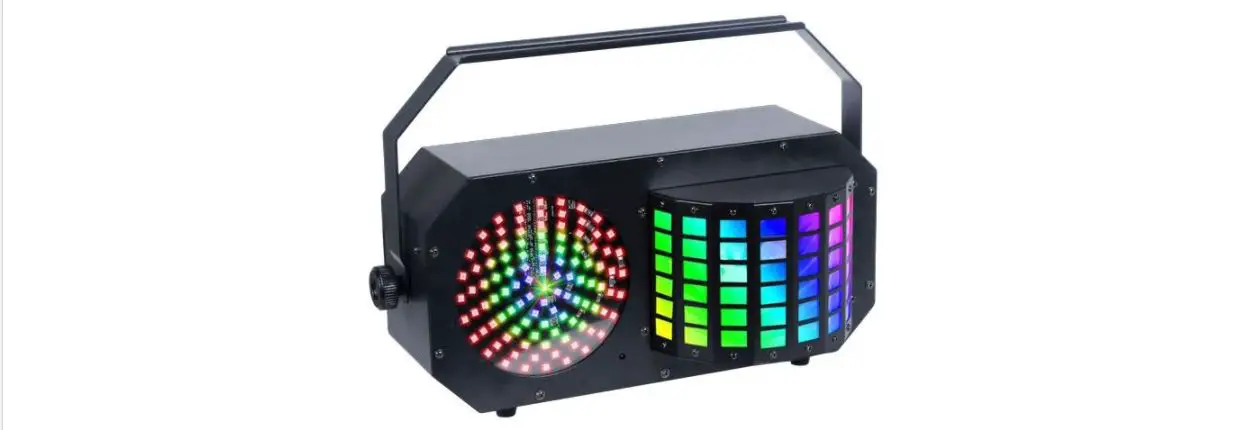
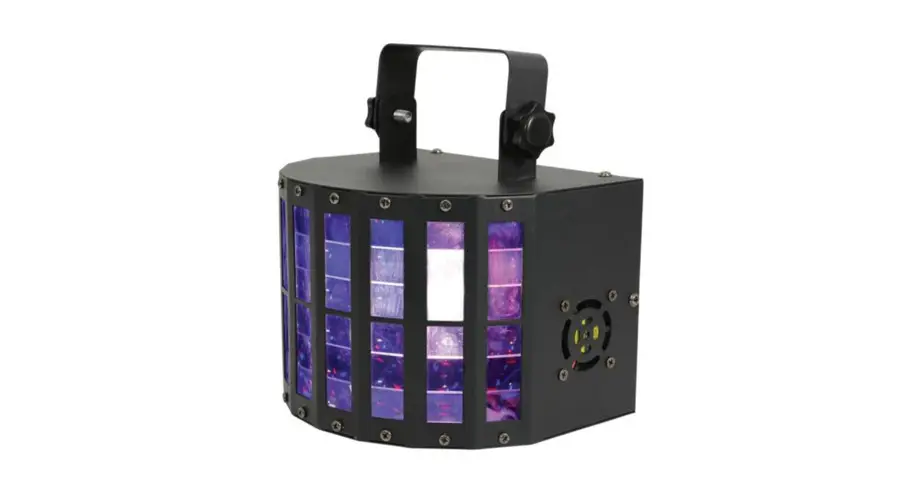
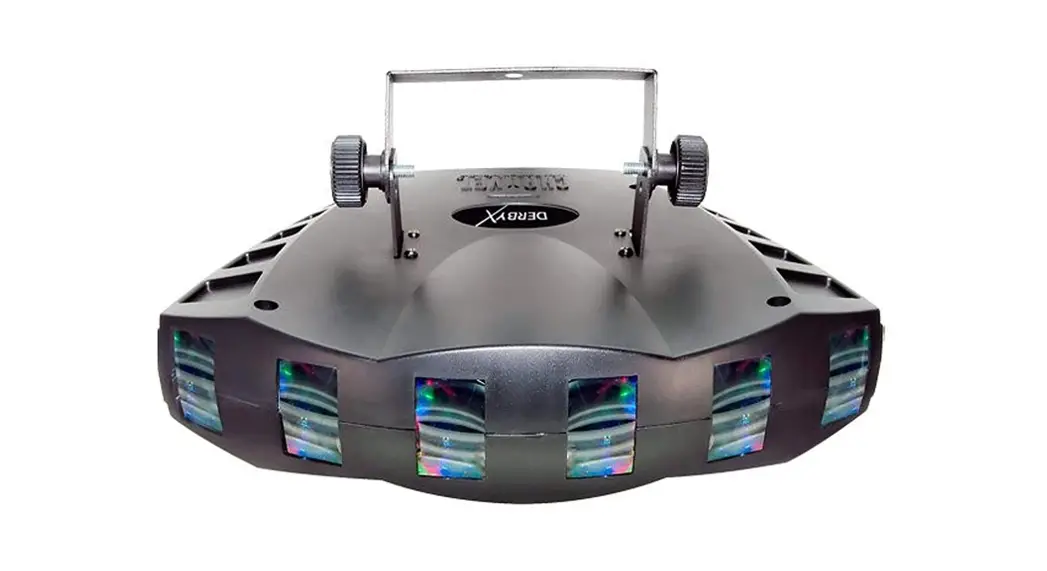
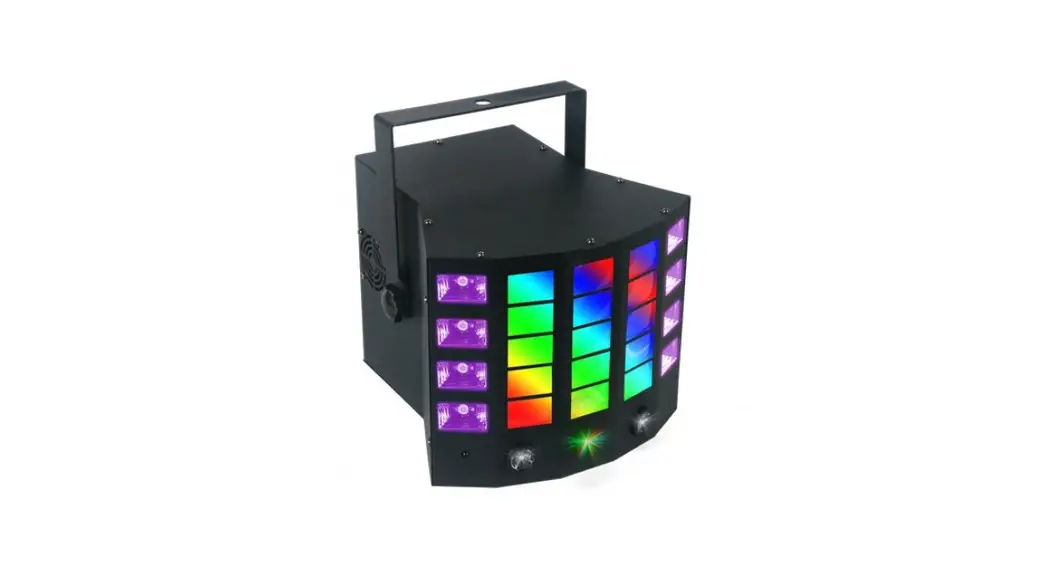
DERBY4
4-in-1 Entertainment Lighting Effect.
User’s instruction manual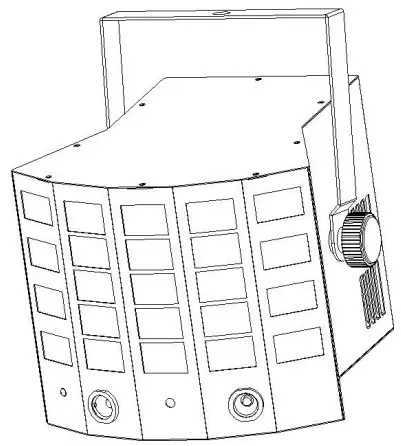
This manual contains important information about the safe installation and use of this product Please read this instruction manual carefully before installing or operating Please keep these instructions in a safe place for future reference V1.01
Introduction
Thank you for the purchase of your DERBY4 4-in-1 Lighting Effect by Light Emotion. We are confident you will be satisfied with your purchase and enjoy many years of use from this Professional Light Emotion product. Please read these instructions carefully to ensure the product is well looked after and used correctly to avoid any potential problems.
Please note that as part of our ongoing commitment to continuous improvement and product development, the specifications in this manual are subject to change without notice. Whilst every care has been taken in the preparation of this manual we reserve the right to change specifications in the course of product improvement.
What is in the box:
– 1 x DERBY4 fixture
– Power cable
– Laser safety switch key
– IR remote control
– This user manual
Safety Instructions:
Please read these instructions carefully. It includes important information about the installation usage and maintenance of this product.
– Please keep this User Manual for future consultation. If you sell the unit to another user, be sure that they also receive this instruction booklet.
– Always make sure that you are connecting to the proper voltage and that the line voltage you are connecting to is not higher than that stated on the sticker of the fixture.
– This product is intended for indoor use only. To prevent the risk of fire or shock, do not expose fixtures to rain or moisture.
– Make sure there are no flammable materials close to the unit while operating.
– The unit must be installed in a location with adequate ventilation, at least 50cm from the adjacent surface. Be sure that no ventilation slots are blocked.
– Always disconnect from the power source before servicing.
– Secure fixtures to stands, trusting, and the like using a safety chain.
– Maximum ambient temperature is 40˚C. Do not operate fixtures at temperatures higher than this.
– In the event of a serious operating problem, stop using the unit immediately. Never try to repair the unit by yourself.
Repairs carried out by unskilled people can lead to damage or malfunction. Please contact the nearest authorized technical assistance center.
– Make sure the power cord is never crimped or damaged.
– Never disconnect the power cord by pulling or tugging on the cord.
– Never carry the fixture directly from the cord. Carry by holding the unit directly or via the hanging bracket.
– Avoid direct eye exposure to the light source while it is on.
Installation:
Caution: For safe mounting of this product, please read the following carefully.
– Use a suitable clamp to attach to the lighting stand, trusting, or bar, together with the safety chain.
– When mounting the product, do not stand directly underneath the product
– Always use a safety chain when mounting the product on stands, trussing or bars. Make sure the breaking strain rating of the chain is at least 10 times the weight of the product.
– Make sure there is adequate ventilation around the product.
– Never look directly into the LED light or laser sources of the product.
– For indoor use only – do not use outdoors.
– To avoid electrical shock, keep away from rain and moisture.
Features
This product is designed as an entertainment effect lighting fixture and is only intended to be used as an effect for entertainment and production applications. Due to our ongoing commitment to constantly reviewing and improving products, features and specifications are subject to change without prior notice.
– Derby LED: 8 x 3W RGBY LED, 2 of each colour
– UV LED: 8 x 3W UV LED
– White LED: 2 x 3W cool white LED
– Laser: Red 80mW/650nm + green 30mW/532nm
– Control: Sound activated, auto, DMX, master/slave, IR remote control
– DMX channels: 2 / 10ch selectable profile
– Power input: 100-240VAC, 50/60Hz.
– Power consumption: 55W
– DMX connections: 3 pin male and female XLR
– Dimensions: 240 x 220 x 250mm
– Weight: 2kg
Operation
Because this light features a laser, there is a mandatory key-operated laser safety switch on the rear of the unit.
This is independent of the power on/off switch. The laser will not operate until the safety switch is placed into the on position using the included key. All other functions of the product will work regardless of when the power switch is on.
The four-button LED menu control on the rear of the product allows you to access all features of the product including how it is to be controlled.
LED Four Digit Display: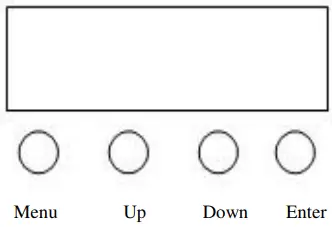
Using the four-button LED menu control, press the menu button repeatedly until you reach your desired mode. You can also scroll through the modes using the up and down buttons. Press enter to access being able to vary the settings for that mode or feature. Using the up and down buttons, adjust to the desired setting, then press enter again to save your setting.
The following table shows each of the modes and the settings able to be varied in each mode:
| MENU | UP/DOWN | DEFAULT VALUE | FUNCTION | |
| 1 | Address | 1-512 | 1 | Set DMX address |
| 2 | Chand | 10Ch | 10Ch | 10CH mode |
| 2Ch | 2CH mode | |||
| 3 | ShNd | Sh 1 | Sh 4 | Show 1 |
| Sh 2 | Show 2 | |||
| Sh 3 | Show 3 | |||
| Sh 4 | Show 4 (by random) | |||
| 4 | SPEE | 0-100 | 90 | Sh 1-Sh4 speed |
| 5 | SLMD | MASt | MASt | Master mode |
| SLAV | Slave mode | |||
| 6 | sound | ON/OFF | ON | Sound ON/OFF |
| 7 | SoSE | 1-100 | 90 | Set Sensitivity |
| 8 | DNS | MASt | MASt | When no DMX, run master /slave mode |
| BLNd | When no DMX, stand by | |||
| LAST | When no DMX, keep the last scene | |||
| 9 | LED | ON/OFF | ON | LED display backlight ON/OFF |
| 10 | Test | Test light function | ||
| 11 | DISP | LED display reverse | ||
| 12 | Chris | Total working time | ||
| 13 | Ver | V10 | Software version | |
| 14 | Rset | Light reset |
Explanation of Menu items.
Addr – DMX address
ChMd – DMX profile 2 or 10 channel mode
ShNd – Built in show
SPEE – Speed setting for shows 1-4 if not sound activated
SLMD – Chose between master or slave mode
SoUn – Sound activation on or off
SoSe – Sets sound sensitivity
DNST – Sets what the light does if there is loss of DMX signal
LED – LED display on or off – When you chose off, the LED display will turn itself off after 10
seconds of not being used. Pressing mode turns on the LED display.
TEST – Test mode
DISP – Turns the LED display upside down
Fhrs – shows the number of hours the light has been used for
Ver – shows the software version of the light
Rset – Resets the light.
Notes:
– DMX takes priority over all other mode settings. If there is a DMX lead connected and a DMX signal received, the light will immediately be controlled by DMX.
– After using the LED menu, hold down the menu button for 2 seconds for the light to resume normal operation. Otherwise, normal operation will resume after 10 seconds (as in light effects output).
InfraRed remote control. 
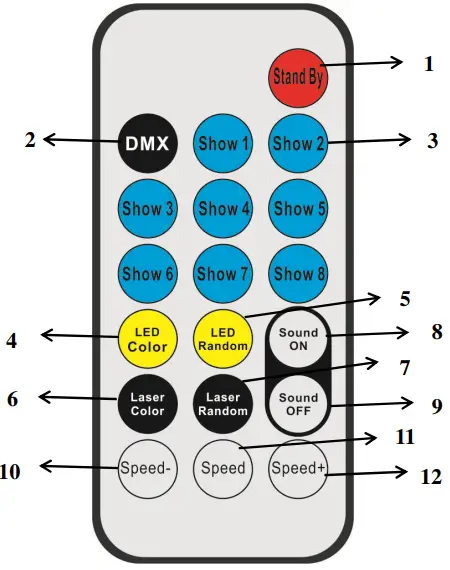
| NO | BUTTON | FUNCTION |
| 1 | Stand By | Standby mode — no light output |
| 2 | DMX | No function |
| 3 | Show 1-Show 8 | Show 1-Show 4(available) Show 5-Show8(no function) |
| 4 | LED Color | LED colour choose — press repeatedly to cycle colours |
| 5 | LED Random | LED colour random |
| 6 | Laser Color | Laser colour choose |
| 7 | Laser Random | Laser colour random |
| 8 | Sound ON | Sound control ON |
| 9 | Sound OFF | Sound control OFF |
| 10 | Speed – | Decrease Show speed |
| 11 | Speed | Set Show’s speed at middle speed |
| 12 | Speed+ | Increase Show speed |
DMX Control
Using DMX you can control each of the four effects built into this light individually. You can also use DMX to call upon built-in programs and shows. This fixture has 2 DMX profiles – 2 and 10 channels modes. The 10 channel mode allows individual control of all the effects while the 2 channel mode is a simpler way to control the light ny DMX simply calling upon built-in programs and features.
Channel DMX chart:
| DMX value | Function | ||
| CH1 | Control mode | 0-9 | No function |
| 10-69 | Show 1: Gobo Derby Show | ||
| 70-129 | Show 2: White LED and UV show | ||
| 130-179 | Show 3: Laser show | ||
| 180-255 | Show 4: Random combination | ||
| CH2 | LED Gobo Derby Control | 0-9 | Gobo Derby off (no LED) |
| 10-198 | Colour selection (15 options, 13 DMX values for each option) | ||
| 199-225 | Colour flowing 1 (single color) slow to fast | ||
| 226-255 | Colour flowing 2 (several colors) slow to fast | ||
| CH3 | Gobos LED strobe control | 0-9 | Gobo Derby LED strobe OFF |
| 10-244 | Gobo Derby strobe speed (slow to fast) | ||
| 245-255 | Gobo Derby strobe with sound control | ||
| CH4 | Gobos LED control | 0-127 | Gobo Derby position |
| 128-255 | Gobo Derby scanning (slow to fast) | ||
| CH5 | White LED dimmer | 0-255 | White LED dimmer (0-100%) |
| CH6 | White LED Strobe | 0-244 | White LED strobe speed (slow to fast) |
| 245-255 | White LED strobe with sound control | ||
| CH7 | UV LED dimmer | 0-255 | UV LED dimmer |
| CH8 | UV LED strobe | 0-244 | UV LED strobe speed (slow to fast) |
| 245-255 | UV LED strobe with sound control | ||
| CH9 | Laser colour | 0-9 | Laser closed |
| 10-63 | Red | ||
| 64-127 | Green | ||
| 128-255 | Red+Green | ||
| CH10 | Laser motor control | 0-9 | No function |
| 10-127 | Motor clockwise rotation | ||
| 128-255 | Motor anti-clockwise rotation | ||
| CH1 | Control mode | 0-9 | No function |
| 10-69 | Show 1: Gobo Derby LED show | ||
| 70-129 | Show 2: White LED + UV show | ||
| 130-179 | Show 3: Laser show | ||
| 180-255 | Show 4: Random effects | ||
| CH2 | Show speed/sound control | 0-247 | Show 1-Show 4 Speed from slow to fast |
| 248-255 | Show 1-Show 4 sound control |
DMX-512 Control Connection
Using a 3 pin XLR cable, you can connect the product to a DMX controller and then to other fixtures with 3 pin XLR inputs and outputs. When not using DMX, multiple fixtures can be connected together and operate under master/slave control. The signal cable should have two cores with shielded cable, the signal connectors are XLR input and output connectors. Please refer to the below diagram:
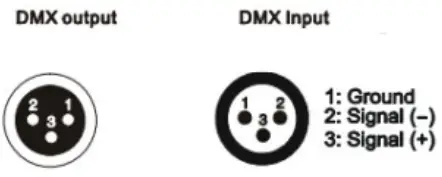
DMX Address Setting
When being used in conjunction with a DMX controller, each fixture must be set with a specific starting address. When receiving the signal, the fixture will receive channel control signals of this address from the DMX controller.
For simplicity, the user can use the same address for multiple fixtures but this will result in each fixture providing exactly the same output, and fixtures with the same DMX address cannot be individually controlled.
To control each fixture individually via DMX, each fixture must have its own unique DMX address. If this fixture is in 10 channel DMX mode then each address must be 10 channels apart. For example, if the first unit is on DMX channel 1, the 2 and must be on DMX channel 11, the 3 rd on channel 21, and so on.
Similarly, for 2 channel DMX mode, the DMX channels would be 1,3,5,7, and so on.
Some DMX controllers may group fixtures in lots of 16 channels – so in that case, fixture 1 on channel 1, fixture 2 on channel 17, 3 on 33, and so on. Refer to your DMX controllers’ instruction manual on how best to manage your DMX channel allocation.

DMX-512 connection with DMX terminator
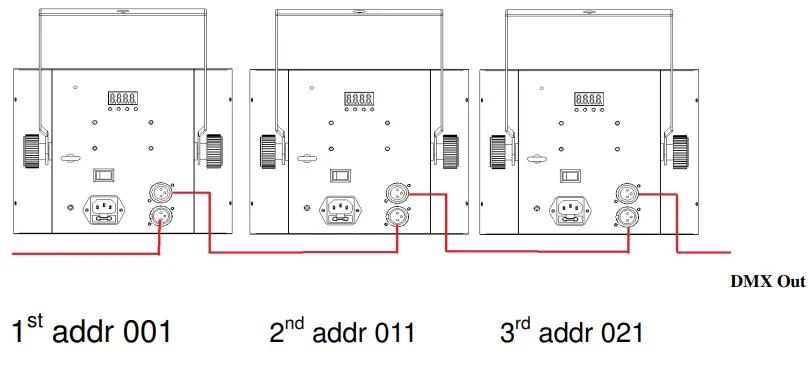
A DMX terminator helps to reduce ‘noise’ on the DMX chain and makes the light respond to control more accurately. It should be plugged into the last fixture in any chain. For Terminator connections please see below: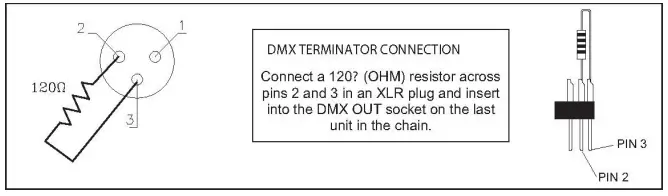
leaning and Maintenance
From time to time it is recommended the product is cleaned to ensure maximum light output and performance. Use a wet cloth to clean the housing as well as the lenses. Please note that alcohol-based cleaners and solvents cannot be used as they will cause damage to the product.
When used in a fixed long-term installation such as a venue or club, the unit should be periodically taken down from the installation and professionally cleaned. Dust build-up within the unit can cause damage and ultimately failure of components.
Technical Data
– Derby LED: 8 x 3W RGBY LED, 2 of each colour
– UV LED: 8 x 3W UV LED
– White LED: 2 x 3W cool white LED
– Laser: Red 80mW/650nm + green 30mW/532nm
– Control: Sound activated, auto, DMX, master/slave, IR remote control
– DMX channels: 2 / 10ch selectable profile
– Power input: 100-240VAC, 50/60Hz.
– Power consumption: 55W
– DMX connections: 3 pin male and female XLR
– Dimensions: 240 x 220 x 250mm
– Weight: 2kg
– Fuse BGDP 5x20mm 250VAC T2A
– working temperature 10-40 degrees C
Warranty
This product is warranted for 2 years from your purchase date. We are confident that this product will give many years of trouble-free operation but should an unlikely problem arise, warranty claims must be via the original place of purchase, together with the original purchase receipt. Please keep both your original purchase receipt and this instruction manual together and in a safe place for future reference.
Should the product be sold within the warranty period, be sure to pass on both to the new purchaser so they are able to claim a warranty should they need to. We recommend you register your warranty online at www.industrygear.com.au.
Purchased from:_________________________________________
Contact Details:_________________________________________
Date Purchased:_________________________________________
Invoice/Receipt Number:__________________________________
Copyright Light Emotion 2017. E&OE
Exclusively imported by LSW Imports and Distribution
PO Box 887, Kingsgrove, NSW, 2208
[email protected]
www.lightemotion.com.au
1800 643 111 (within Australia)
+612 9718 4900 (outside of Australia)
 Professional Lighting and Audio Industrygear – Professional Lighting and Audio | Sales and Hire
 Light Emotion