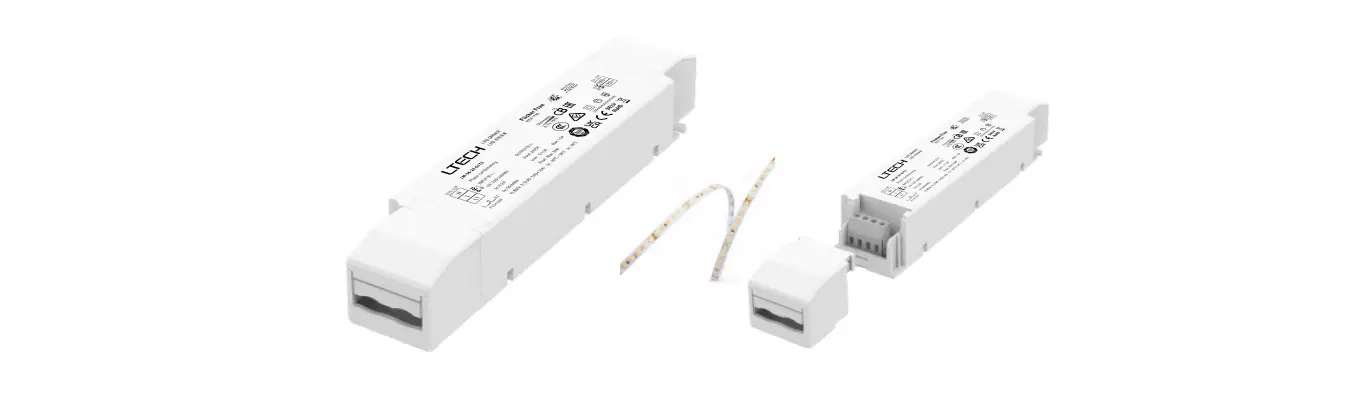
PE-N30ACA Dimming LED Driver
Product Information: The product is a device that is
designed for various purposes. It has multiple features and
functions that make it versatile and user-friendly. The device is
compact and lightweight, making it easy to carry and transport. It
is also equipped with advanced technology and high-quality
materials, ensuring durability and reliability. The product comes
with a user manual that provides detailed instructions on how to
use the device effectively. Product Usage Instructions: 1.
Start by familiarizing yourself with the different components of
the device. Refer to the user manual for illustrations and
descriptions of each part. 2. Before using the device, make sure it
is fully charged or connected to a power source. 3. Turn on the
device by pressing the power button. Refer to the user manual for
the location of the power button. 4. Once the device is powered on,
you can access the various functions and features using the control
buttons or touch screen, depending on the model. 5. To navigate
through the device’s menu or options, use the arrow keys or touch
gestures as indicated in the user manual. 6. If the device has
different modes or settings, select the desired mode or setting
using the corresponding buttons or on-screen options. 7. When using
specific functions or features, follow the instructions provided in
the user manual to ensure proper usage and optimal results. 8. If
the device requires any accessories or attachments for certain
tasks, make sure to attach them securely according to the
instructions in the user manual. 9. After using the device, turn it
off and disconnect it from the power source if applicable. 10.
Clean and maintain the device regularly as instructed in the user
manual to prolong its lifespan and ensure optimal performance.
Note: The above instructions are a general guide. Please refer to
the specific user manual provided with your product for detailed
and accurate usage instructions.
r°N r°N
….
7S H
((1&
789
&ODVV
Y_s
i i
¡
21
35, $&/ $&1
‘,0
‘,0
&&7
9’ L P P L Q J/ ( ” U L Y H U/ ( ‘
‘,0&&7 9 3:0 5;
0RGHO3(1$&$ 35,9a+]$ 6(&9’&P$PD[ 3)7D 7F 0D[RXWSXW9GF 0$;:
8VHGIRU/(‘PRGXOHRQO
ZLUHSUHS PP
&%
2XWSXW 2)) 2)) 2)) P$
WF 2)) 2)) 21 P$
2)) 21 2)) P$ 2)) 21 21 P$ 21 2)) 2)) P$ 21 2)) 21 P$ 21 21 2)) P$ 21 21 21 P$
0DGHLQ&KLQD
‘LPPLQJLQWHUIDFH ‘,09 ‘,03:09 ‘,05HVLVWRU. ‘,0&RORU7HPSHUDWXUH
6(& /(‘
/(‘&
/(‘
/(‘:
35, $&/ $&1
‘,0
‘,0
&&7
9’ L P P L Q J/ ( ” U L Y H U/ ( ‘
‘,0&&7 9 3:0 5;
0RGHO3(1$&$ 35,9a+]$ 6(&9’&P$PD[ 3)7D 7F 0D[RXWSXW9GF 0$;:
8VHGIRU/(‘PRGXOHRQO
ZLUHSUHS PP
&%
2XWSXW 2)) 2)) 2)) P$
WF 2)) 2)) 21 P$
2)) 21 2)) P$ 2)) 21 21 P$ 21 2)) 2)) P$ 21 2)) 21 P$ 21 21 2)) P$ 21 21 21 P$
0DGHLQ&KLQD
‘LPPLQJLQWHUIDFH ‘,09 ‘,03:09 ‘,05HVLVWRU. ‘,0&RORU7HPSHUDWXUH
6(& /(‘
/(‘&
/(‘
/(‘:
9
21
21
21
21
21
21
21
21
21
2 4
9a 35,
‘,0 ‘,0 &&7
‘,0&&7
9 3:0 5;
/(‘ /(‘& /(‘ /(‘:
.
<
<
7+’>@ 3)
P$ P$
P$ P$ P$ P$ P$ P$
P$ P$ P$ P$
P$ P$
P$
P$ P$
P$ P$ P$ P$ P$ P$
P$
P$ P$ P$
P$
P$ P$ P$
P$ P$ P$ P$
P$ P$ P$ P$
P$ P$ P$ P$
P$ P$
P$ P$