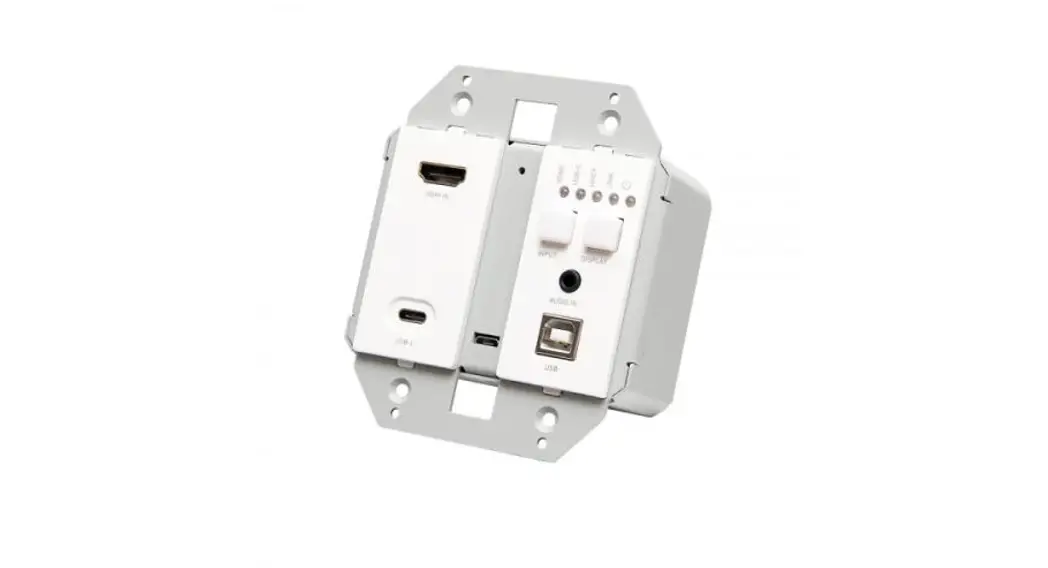
HDMI® HDBASET + USB-C®, 3.5MM, AND USB-A TO B OVER CAT EXTENDER
WALL PLATE TRANSMITTER TO BOX RECEIVER – 4K 60HZ
Model C2G30011
HDMI® HDBASET + USB-C®, 3.5MM, AND USB-A TO B OVER CAT EXTENDER WALL PLATE TRANS- MITTER TO BOX RECEIVER – 4K 60HZ
PRODUCT OVERVIEW
FRONT PANEL
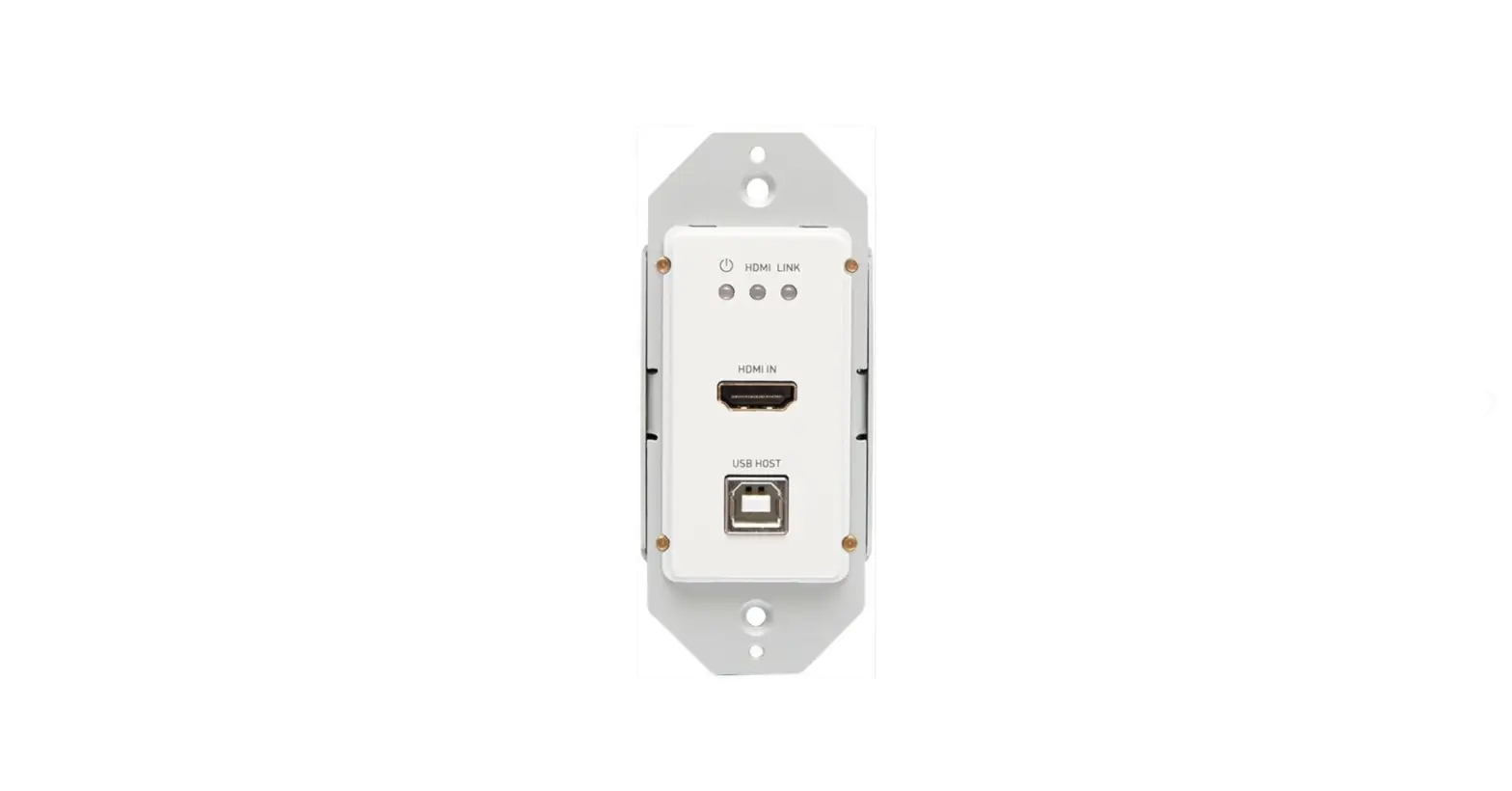
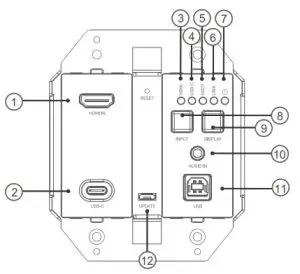 Transmitter
| FRONT PANEL | DESCRIPTION | |
| 1 | HDMI IN | Connect to an HDMI source using an HDMI cable. |
| 2 | USB-C IN | Connect to a USB-C source using a USB-C cable. |
| 3/4 | HDMI / USB-C LED | Only one light will be on at a time, indicating which input is selected. |
| 5 | HDCP LED | On: HDCP-protected content is being transmitted. Blinking: Non-HDCP-protected content is being transmitted. Off: No content is being transmitted. |
| 6 | Link LED | On: HDBT link is normal. Off/Blinking: No HDBT link or link error. |
| 7 | Power LED | On: Power is applied to the device. Off: No power is applied to the device. |
Rear Panel
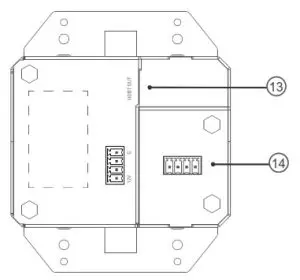 Transmitter
| 8 | INPUT Button | Short press: Switch input source. |
| 9 | DISPLAY Button | Short press: Turn the display on (CEC). Long press: 3 seconds to turn off the display (CEC). |
| 10 | AUDIO IN | Connect one-way analog audio pass-through from wall-plate transmitter to receiver. |
| 11 | USB-B Host Port | Supports USB 2.0 pass-through over HDBT. |
| 12 | USB Micro-B IN | Supports firmware updates through this port. |
| REAR PANEL | DESCRIPTION | |
| 13 | HDBT OUT | Connect to the receiver via a Cat 5e/6/6a cable. |
| 14 | Power | 4-pin phoenix connector for local DC 12V input. |
HDMI® HDBASET + USB-C®, 3.5MM, AND USB-A TO B OVER CAT EXTENDER WALL PLATE TRANS- MITTER TO BOX RECEIVER – 4K 60HZ
FRONT PANEL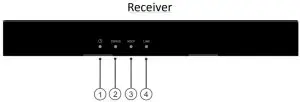
| FRONT PANEL | DESCRIPTION | |
| 1 | Power LED | On: Power is applied to the device. Off: No power is applied to the device. |
| 2 | Status LED | Blinking: The device is working properly. Off: The device is not working properly. |
| 3 | HDCP LED | On: HDCP-protected content is being transmitted. Blinking: Non-HDCP-protected content is being transmitted. Off: No content is being transmitted. |
| 4 | Link LED | On: HDBT link is normal. Off/Blinking: No HDBT link or link error. |
REAR PANEL
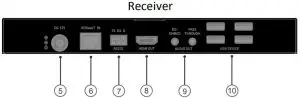
| REAR PANEL | DESCRIPTION | |
| 5 | DC 12V | Connect the power adapter provided. Note: One-way PoH, standard PSE module, to power the wall plate transmitter. |
| 6 | HDBT IN | Connect to the transmitter via a Cat 5e/6/6a cable. |
| 7 | RS232 | For RS232 pass-through. |
| 8 | HDMI OUT | Connect to an HDMI display using an HDMI cable. |
| 9 | 2x Audio Out | Connect for analog audio de-embedding of HDMI output or audio pass-through from wall plate transmitter to receiver. |
| 10 | 4x USB-A | Connect up to four USB 2.0 devices. |
HDMI® HDBASET + USB-C®, 3.5MM, AND USB-A TO B OVER CAT EXTENDER WALL PLATE TRANS- MITTER TO BOX RECEIVER – 4K 60HZ
FEATURES
- One-way Power over HDBaseT (PoH), so that the wall plate can be powered by the receiver.
- Extend 4Kx2K at 60Hz (4:2:0) up to 130ft and 1080p at 60Hz up to 230ft with Cat 6a/7 cable
- Extend 4Kx2K at 60Hz (4:2:0) up to 115ft and 1080p at 60Hz up to 200ft with Cat 5e/6 cable
- HDMI 1.4 with 4K at 60Hz, 4:2:0, 8bit, and HDCP 2.2 compliant
- One-way analog audio pass-through from wall-plate transmitter to receiver.
- Two buttons on the panel, one for input switching and the other for turn display on/off (CEC).
- Supports USB 2.0 pass through over HDBT, connecting up to 4 USB devices to the receiver.
- Supports CEC switch command sent by wall-plate.
- Supports firmware updates through the USB Micro-B port on the Transmitter.
PACKAGE CONTENTS
- 1 x Wall Plate Transmitter with screws
- 1 x Wall Plate Plastic Panel (2-gang US with screws)
- 1 x Receiver
- 1 x USB-A to B Cable
- 1 x 12V 2A Power Adapter
- 2 x Mounting Bracket (with screws)
- 1 x Phoenix Male Connector (3.5mm, 3 Pins)
- 1 x Phoenix Male Connector (3.5mm, 4-Pins)
- 1 x Manual
MOUNTING BRACKET INSTALLATION
Note: Before installation, please ensure the unit is disconnected from the power source.
- Choose a suitable location for mounting bracket installation.
- Position and install the mounting brackets of the receiver with the two mounting screws provided.
- Mount and secure the receiver to a surface or a suitable location respectively with mounting
screws.
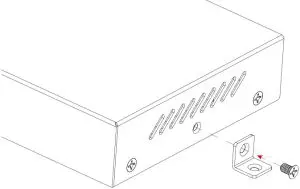
CABLE INSTALLATION
Note: Before installing cables, please ensure the unit is disconnected from the power source.
- Connect HDMI IN: Connect an HDMI source device (e.g. Laptop, Blu-ray player, etc.) to the HDMI IN of the transmitter using a high-quality HDMI cable.
- Connect USB-C IN: Connect a USB-C source device (e.g. Laptop, tablet, etc.) to the USB-C IN of the transmitter using a USB-C cable.
- Connect USB-B HOST PORT: Using the included USB-A to B Cable, connect the USB-A end to the source device (e.g. Laptop, etc.) and connect the USB-B end to the USB HOST PORT on the wall plate transmitter.
- Connect HDBT: Connect HDBT Out of the transmitter to the HDBT IN of the receiver using a Cat 5e/6/6a cable.
- Connect HDMI OUT: Connect an HDMI display device (e.g. TV, monitor, projector, LCD/LED display, etc.) to HDMI OUT of the receiver.
- Connect AUDIO OUT: Connect an amplifier to the AUDIO OUT of the receiver using a 3.5mm audio cable.
- Connect USB DEVICES: Connect up to four USB devices (e.g. keyboard, mouse, USB camera, etc.) to the USB DEVICE ports of the receiver.
- Power on all attached devices.
HDMI® HDBASET + USB-C®, 3.5MM, AND USB-A TO B OVER CAT EXTENDER WALL PLATE TRANS- MITTER TO BOX RECEIVER – 4K 60HZ
IMPORTANT SAFETY INFORMATION
Do not plug the unit in any outlet that does not have enough current to allow the device to function. Refer to the specifications in this manual for the power level of the unit.
Liquid: If this unit or its corresponding power adapter has had liquid spilled on or in it, do not attempt to use the unit. Do not attempt to use this product in an outdoor environment as elements such as rain, snow, hail, etc. can damage the product.
In case of a storm, it is recommended that you unplug this device from the outlet. Avoid placing this product next to objects that produce heat such as portable heaters, space heaters, or heating ducts.
THERE ARE NO USER-SERVICEABLE PARTS. Do not attempt to open this product and expose the internal circuitry. If you feel that the product is defective, unplug the unit and refer to the warranty information section of this manual.
C2G WARRANTY
At C2G we want you to be totally confident in your purchase. That is why we offer a warranty on this device. If you experience problems due to workmanship or material defects for the duration of this warranty, we will repair or replace this device. To request a Return Merchandise Authorization (RMA) number, contact customer service at 800-293-4970 or www.c2g.com.
FCC Statement
Note: This device complies with part 15 of the FCC Rules. Operation is subject to the following two conditions:
- This device may not cause harmful interference, and
- This device must accept any interference received, including interference that may cause undesired operation.
FCC Statement – §15.105(b):
“This equipment has been tested and found to comply with the limits for a Class B digital device, pursuant to part 15 of the FCC Rules. These limits are designed to provide reasonable protection against harmful interference in a residential installation. This equipment generates, uses, and can radiate radio frequency energy and, if not installed and used in accordance with the instructions, may cause harmful interference to radio communications. However, there is no guarantee that interference will not occur in a particular installation. If this equipment does cause harmful interference to radio or television reception, which can be determined by turning the equipment off and on, the user is encouraged to try to correct the interference by one or more of the following measures:
- Reorient or relocate the receiving antenna.
- Increase the separation between the equipment and receiver.
- Connect the equipment into an outlet on a circuit different from that to which the receiver is connected.
- Consult the dealer or an experienced radio/TV technician for help.
FCC Caution – §15.21:


© 2020 Legrand All Rights Reserved rev.01/21 Manual_C2G30011
6500 Poe Avenue
Dayton, OH 45414
Phone 800.293.4970
www.c2g.com
 Your One-Stop-Shop for Cables, Adapters, & More | C2G