
Air Music Tech 1.1 Flavor Pro Global Controls
Product Introduction
Thank you for purchasing the AIR Flavor Pro plugin effect.
Flavor Pro is a multi-effect that offers a range of ways to change the timbre of your sound, including pitch shifting, distortion modeling, digital downsampling, lo-fi EQ simulations, and more. This user guide explains the features and functions of the plugin effect. For more information on using this plugin with other software, please refer to your software’s documentation for adding and using plugin effects.
Product System Requirements & Product Support
For complete system requirements and compatibility information, visit airmusictech.com.
For technical support, visit support.airmusictech.com.
Product Installation
- Double-click the .exe (Windows) or .pkg (macOS) file you downloaded. Follow the on-screen instructions to install the software.
- Open the plugin application.
- Click Sign In to sign into your inMusic Brands Profile using your Internet browser. If you do not have an inMusic Brands Profile yet, you will be prompted to create one.
- Once you have signed in, click Activate in the plugin window to enter your serial key to unlock the plugin. You can unlock each plugin on up to three devices at a time.
- If you do not have a serial key, you can click Try Unlicensed to explore the plugin with intermittent audio alerts. You can also click 10-Day Trial to initiate a free, fully featured trial of the plugin for 10 days. If you would like to purchase a serial key, click the link to purchase a license at profile.inmusicbrands.com.
Product Operation
Overview
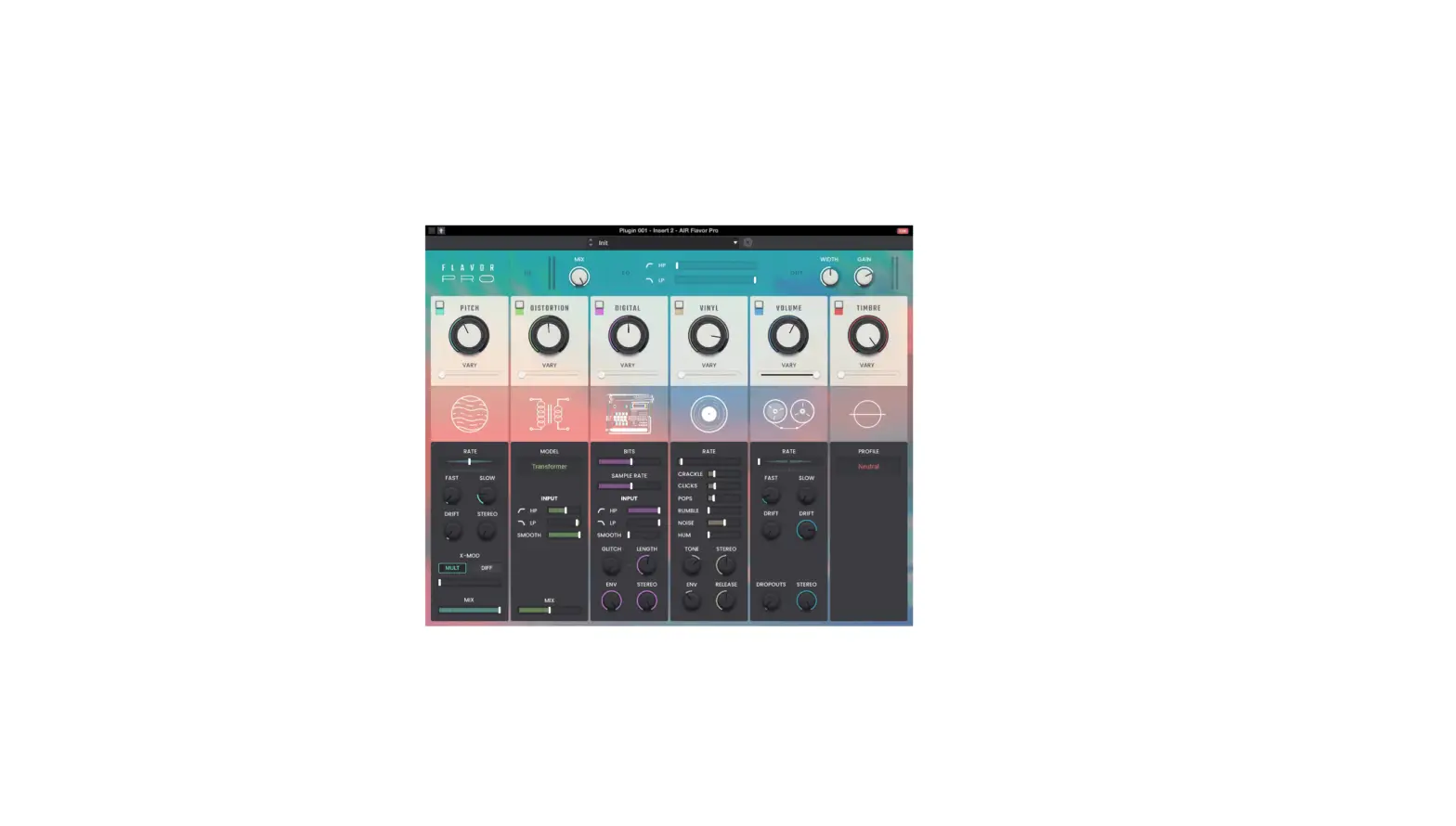
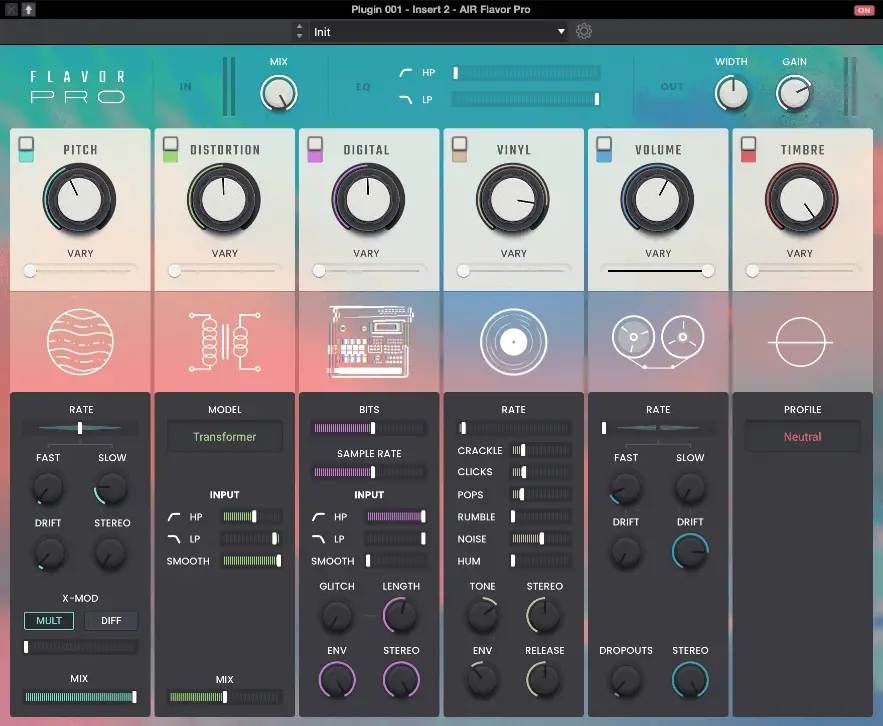
The Flavor Pro plugin effect has global controls and individual effect controls.
Global Controls
- Power: Use the switch to enable or disable the effect.
- Preset: Click this drop-down menu to view the list of included plugin presets. You can also click the up and down arrows next to this field to move to the previous or next preset.
- Intensity: Mix concentration of the Flavor Pro effect.
- EQ:
- HP (high-pass): Center frequency for the EQ high-pass filter.
- LP (low-pass): Center frequency for the EQ low-pass filter.
- Width: Stereo width of the effect output.
- Gain: Output gain of the effect.
Pitch
- Pitch:
- Off, On: Use the switch in the upper-left corner of the section to enable or disable the pitch effect.
- Depth: Depth of pitch modulation.
- Vary Rate:
- Fast: Rate of fast pitch modulation.
- Slow: Rate of slow pitch modulation.
- Drift: Amount of pitch modulation rate drifting.
- Stereo X-Mod: Cross-modulate the dry and wet signal by multiplication or difference to create more intense modulation.
- Amount Mix: Mix amount of the cross-modulation.
- Wet/dry amount of the pitch effect.
Distortion
- Distortion:
- Off, On: Use the switch in the upper-left corner of the section to enable or disable the distortion effect.
- Depth: Amount of distortion applied.
- Vary: Increase random variation of the distortion effect.
- Model: Type of distortion modeling.
- Input HP (high-pass): Center frequency of the input high-pass filter.
- Input LP (low-pass): Center frequency of the input low-pass filter.
- Input Smooth: Center frequency of additional low pass filtering to smooth the input audio.
- Wet/dry amount of the distortion effect.
Introduction
Thank you for purchasing the AIR Flavor Pro plugin effect. Flavor Pro is a multi-effect that offers a range of ways to change the timbre of your sound, including pitch shifting, distortion modeling, digital downsampling, lo-fi EQ simulations, and more.
This user guide explains the features and functions of the plugin effect. For more information on using this plugin with other software, please refer to your software’s documentation for adding and using plugin effects.
System Requirements & Product Support
For complete system requirements and compatibility information, visit airmusictech.com. For technical support, visit support.airmusictech.com.
Installation
- Double-click the .exe (Windows) or .pkg (macOS) file you downloaded. Follow the on-screen instructions to install the software.
- Open the plugin application.
- Click Sign In to sign into your inMusic Brands Profile using your Internet browser. If you do not have an inMusic Brands Profile yet, you will be prompted to create one.
- Once you have signed in, click Activate in the plugin window to enter your serial key to unlock the plugin. You can unlock each plugin on up to three devices at a time.
- If you do not have a serial key, you can click Try Unlicensed to explore the plugin with intermittent audio alerts. You can also click 10-Day Trial to initiate a free, fully featured trial of the plugin for 10 days. If you would like to purchase a serial key, click the link to purchase a license at profile.inmusicbrands.com.
Operation
Overview 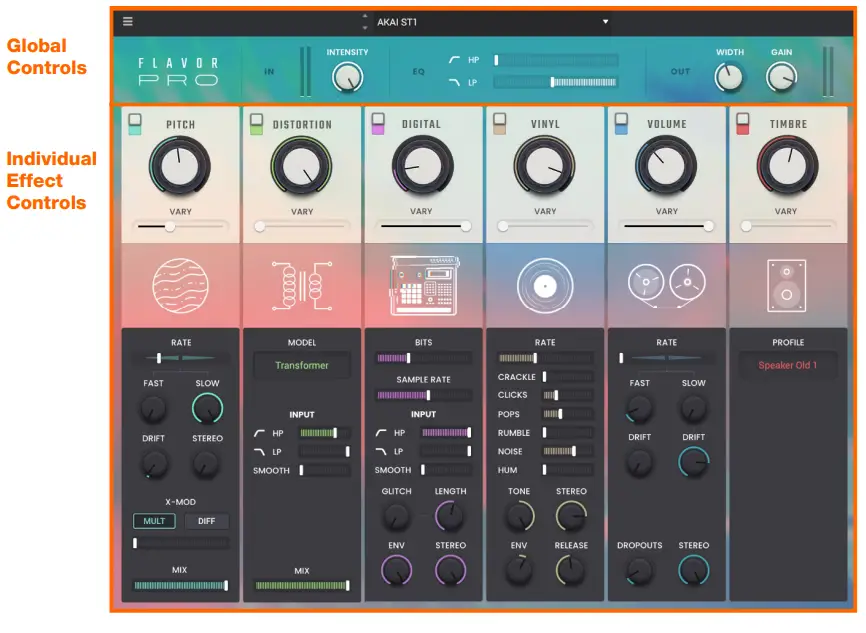
Global Controls 
- Menu: Click this icon to open the menu, where you can find the following options:
- Scale: Click here to select a value to scale the plugin window to a new size.
- Load Preset: Click here to load a saved preset.
- Save Preset: Click here to save the current preset.
- Open User Guide: Click here to open this User Guide.
- About: Click here to view plugin version information.
- Preset: Click this drop-down menu to view the list of included plugin presets. You can also click the up and down arrows next to this field to move to the previous or next preset.
Parameter/Description/Value Range
| Intensity | Mix concentration of the Flavor Pro effect. | 0–100% | |
| EQ | HP | Center frequency for the EQ high-pass filter. | Off, 21 – 6000 Hz |
| LP | Center frequency for the EQ low-pass filter. | 200– 19100 Hz, Off | |
| Width | Stereo width of the effect output. | 0–200% | |
| Gain | Output gain of the effect. | -Inf dB – 0.0 – +6.0 dB |
Pitch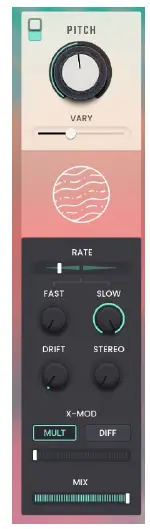
| Pitch | Use the switch in the upper-left corner of the section to enable or disable the pitch effect. | Off, On |
| Depth | Depth of pitch modulation. | 0–100% |
| Vary | Increase random variation of pitch modulation. | 0–100% |
| Rate | Balance between fast and slow pitch modulation. | F:100% S0% – F:100% S100% – F:0% S100% |
| Fast | Rate of fast pitch modulation. | 0.50 – 20.00 Hz |
| Slow | Rate of slow pitch modulation. | 0.10 – 4.00 Hz |
| Drift | Amount of pitch modulation rate drifting. | 0–100% |
| Stereo | Stereo width of the pitch modulation. | 0–100% |
| X-Mod | Cross-modulate the dry and wet signal by multiplication or difference to create more intense modulation. | Mult, Diff |
| Amount | Mix amount of the cross-modulation. | 0–100% |
| Mix | Wet/dry amount of the pitch effect. | 0–100% |
Distortion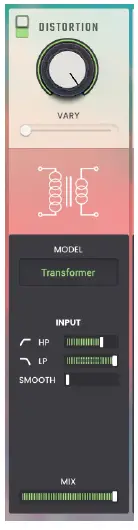
Parameter/Description/ValueRange
| Distortion | Use the switch in the upper-left corner of the section to enable or disable the distortion effect. | Off, On |
| Depth | Amount of distortion applied. | 0–100% |
| Vary | Increase random variation of the distortion effect. | 0–100% |
| Model | Type of distortion modeling. | Amp Classic |
| Amp Heavy | ||
| Tubes | ||
| Transformer | ||
| Vinyl | ||
| Speaker | ||
| Diodes | ||
| Synth | ||
| Digital | ||
| Input HP | Center frequency of the input high-pass filter. | 5 – 20000 Hz |
| Input LP | Center frequency of the input low-pass filter. | 5 – 20000 Hz |
| Input Smooth | Center frequency of additional low pass filtering to smooth the input audio. | 1000 – 20000 Hz |
| Mix | Wet/dry amount of the distortion effect. | 0–100% |
Digital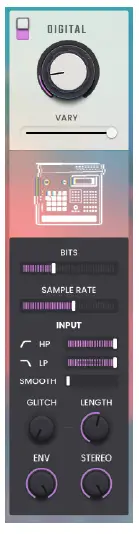
Parameter/Description/Value Range
| Digital | Use the switch in the upper-left corner of the section to enable or disable the digital effect. | Off, On |
| Depth | Amount of digital effect applied. | 0–100% |
| Vary | Increase random variation of the digital effect. | 0–100% |
| Bits | Amount of bit depth reduction. | 16.00 – 2.000 bit |
| Sample Rate | Amount of sample rate reduction. | 50.0 – 1.00 kHz |
| Input HP | Center frequency of the input high-pass filter. | 10.0 Hz – 10.0 kHz |
| Input LP | Center frequency of the input low-pass filter. | 100 Hz – 20.0 kHz |
| Input Smooth | Center frequency of additional low pass filtering to smooth the input audio. | 1.00 – 20.0 kHz |
| Glitch | Amount of glitch artifacts. | 0–100% |
| Glitch Length | Length of glitch artifacts. | 0–100% |
| Env | Apply an envelope follower to tie the digital effect level to the incoming audio level. | 0–100% |
| Stereo | Stereo width of the digital effect. | 0–100% |
Vinyl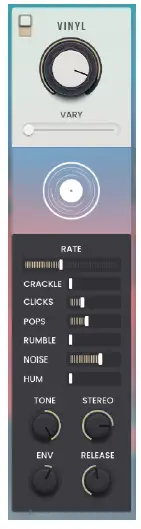
Parameter/Description/Value Range
| Vinyl | Use the switch in the upper-left corner of the section to enable or disable the vinyl effect. | Off, On |
| Depth | Amount of vinyl effect applied. | 0–100% |
| Vary | Amount of vinyl effect variation. | 0–100% |
| Rate | Speed of vinyl noise. | 0–100% |
| Crackle | Audio level of vinyl crackle sound. | -inf – 0.0 dB |
| Clicks | Audio level of vinyl click sound. | -inf – 0.0 dB |
| Pops | Audio level of vinyl pop sound. | -inf – 0.0 dB |
| Rumble | Audio level of vinyl rumble sound. | -inf – 0.0 dB |
| Noise | Audio level of vinyl noise sound. | -inf – 0.0 dB |
| Hum | Audio level of vinyl hum sound. | -inf – 0.0 dB |
| Tone | Tone shaping of the vinyl sound. | -100 – 0 – +100% |
| Stereo | Stereo width of the vinyl effect. | 0–100% |
| Env | Apply an envelope follower to tie the vinyl effect to the | -100 – 0 – +100% |
| incoming audio level. | ||
| At negative values, the vinyl effect is louder when the | ||
| input is quieter. | ||
| At positive values, the vinyl effect is louder as the input | ||
| is louder. | ||
| Release | Release time of the vinyl effect. | 10.0 ms – inf s |
Volume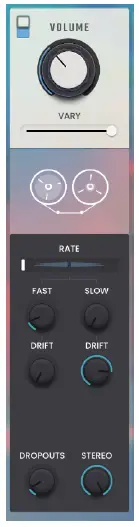
Parameter/Description/Value Range
| Volume | Use the switch in the upper-left corner of the section to enable or disable the volume effect. | Off, On |
| Depth | Amount of amplitude modulation. | 0–100% |
| Vary | Amount of amplitude modulation variation. | 0–100% |
| Rate | Balance between fast and slow amplitude modulation. | F:100% S0% – |
| F:100% S100% – | ||
| F:0% S100% | ||
| Fast | Rate of fast amplitude modulation. | 4.00 – 30.00 Hz |
| Slow | Rate of slow amplitude modulation. | 0.10 – 4.00 Hz |
| Fast Drift | Amount of fast amplitude modulation rate drifting. | 0–100% |
| Slow Drift | Amount of slow amplitude modulation rate drifting. | 0–100% |
| Dropouts | Amount of full volume dropouts. | 0–100% |
| Stereo | Stereo width of the volume effect. | 0–100% |
Timbre
Parameter/Description/Value Range
| Timbre | Use the switch in the upper-left corner to enable or disable the timbre effect. | of | the | section | Off, On |
| Depth | Amount of timbre effect applied. | 0–100% | |||
| Vary | Amount of timbre variation. | 0–100% | |||
| Profile | Type of timbre emulation. | Neutral | |||
| Amp Bass 1 | |||||
| Amp Bass 2 | |||||
| Amp Guitar 1 | |||||
| Amp Guitar 2 | |||||
| Dance Mix | |||||
| Earbuds New | |||||
| Earbuds Old | |||||
| Boom Box 1 | |||||
| Boom Box 2 | |||||
| Gramophone 1 | |||||
| Gramophone 2 | |||||
| Headphones 1 | |||||
| Headphones 2 | |||||
| Into The Pale | |||||
| Low & Soft | |||||
| Megaphone 1 | |||||
| Megaphone 2 | |||||
| Phone Handset | |||||
| Phone Mobile | |||||
| Radio Transistor 1 | |||||
| Radio Transistor 2 | |||||
| Radio Tube 1 | |||||
| Radio Tube 2 | |||||
| Speaker Old 1 | |||||
| Speaker Old 2 | |||||
| Speaker Old 3 | |||||
| Studio Large | |||||
| Studio Medium | |||||
| Studio Old | |||||
| Studio Small | |||||
| Studio Tiny | |||||
Trademarks and Licenses
- AIR Music Technology is a trademark of inMusic Brands, Inc., registered in the U.S. and other countries.
- macOS is a trademark of Apple Inc., registered in the U.S. and other countries.
- Windows is a registered trademark of Microsoft Corporation in the United States and other countries.
- All other product or company names are trademarks or registered trademarks of their respective owners.
 AIR | German-engineered virtual instruments and effects
 Customer Login
 Support : AIR