
VOCAL FX COLLECTION
User Guide
Manual Version 1.0
Introduction
Thank you for purchasing the AIR Vocal Bundle plugin effects. The Vocal Bundle is a group of effects that offers a range of ways to change the timbre of your sound from distortion, doubling, harmonizing, or tuning:
AIR Vocal Distortion
AIR Vocal Doubler
AIR Vocal Harmonizer Pro
AIR Vocal Tuner
This user guide explains the features and functions of the plugin effects. For more information on using the plugins with other software, please refer to your software’s documentation for adding and using plugin effects.
System Requirements & Product Support
For complete system requirements and compatibility information, visit airmusictech.com.
For technical support, visit support.airmusictech.com.
Installation
- Double-click the .exe (Windows) or .pkg (macOS) file you downloaded. Follow the on-screen instructions to install the software.
- Open your favorite DAW host software.
- Open your software’s Preferences, Options, or other menu to scan for the AIR Vocal FX Collection effects as new plugins. Consult your software’s documentation for more information.
- In your project, add an AIR Vocal FX Collection plugin as an insert effect to any audio or MIDI track, and then open the plugin window.
- Click Sign In to sign into your inMusic Brands Profile using your Internet browser. If you do not have an inMusic Brands Profile yet, you will be prompted to create one.
- Once you have signed in, click Activate in the plugin window to enter your serial key to unlock the plugin. You can unlock each plugin on up to three devices at a time.
- If you do not have a serial key, you can click Try Unlicensed to explore the plugin with intermittent audio alerts.
You can also click 10-Day Trial to initiate a free, fully featured trial of the plugin for 10 days.
If you would like to purchase a serial key, click the link to purchase a license at profile.inmusicbrands.com.
Setup Section

See the options below which details the common layout and settings available in each plugin:
- Menu: Click this icon to open the menu, where you can find the following options:
• Scale: Click here to select a value from 50-200% to scale the plugin window to a new size.
• Load Preset: Click here to load a saved preset.
• Save Preset: Click here to save the current preset.
• Open User Guide: Click here to open this User Guide.
• About: Click here to view plugin version information.
• Check For Updates: Click here to check for available software updates. - Preset: Click this drop-down menu to view the list of included plugin presets. You can also click the up and down arrows next to this field to move to the previous or next preset.
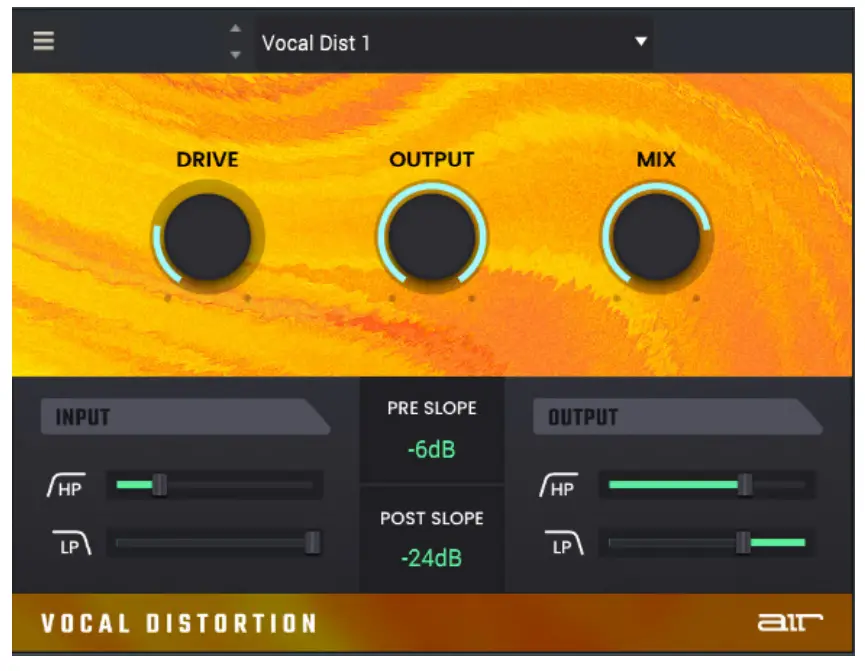
AIR Vocal Distortion
| Parameter | Description | Value Range |
| Drive | Amount of distortion applied. | 0 – 100% |
| Output | Output level of the driven signal. | -24.0 – 0.0 dB |
| Mix | Wet/dry amount of the effect. | 0 -100% |
| Input | HP Center frequency for the input high-pass filter. | 20 -1000 Hz |
| LP Center frequency for the input low-pass filter. | 500 – 20000 Hz | |
| Pre Slope | Adjusts the rate of frequency drop-off for the Input filters. | -6 dB, -12 dB, -24 dB |
| Post Slope | Adjusts the rate of frequency drop-off for the Output filters. | -6 dB, -12 dB, -24 dB |
| Output | HP Center frequency for the output high-pass filter. | 20 -1000 Hz |
| LP Center frequency for the output low-pass filter. | 500 – 20000 Hz |
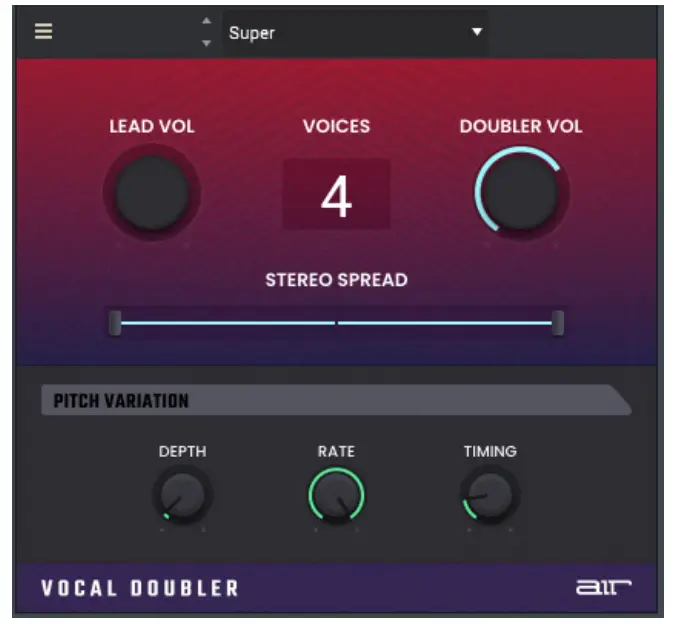
AIR Vocal Doubler
| Parameter | Description | Value Range |
| Lead Volume | Volume level of the input audio. | -inf – 0.0 – +6.0 dB |
| Voices | The number of doubling voices applied. | 1 – 8 |
| Doubler Volume | Volume level of the doubled voices. | -inf – 0.0 – +6.0 dB |
| Stereo Spread | Sets the width that the effect is spread across the stereo spectrum. | 0 – 100% |
| Depth | Amount of pitch variation. | +/- 0 – 250% |
| Rate | Balance between fast and slow pitch modulation. | 0 – 100% |
| Timing | Amount of timing offset for the pitch variation. | 0 – 800 ms |
AIR Vocal Harmonizer Pro
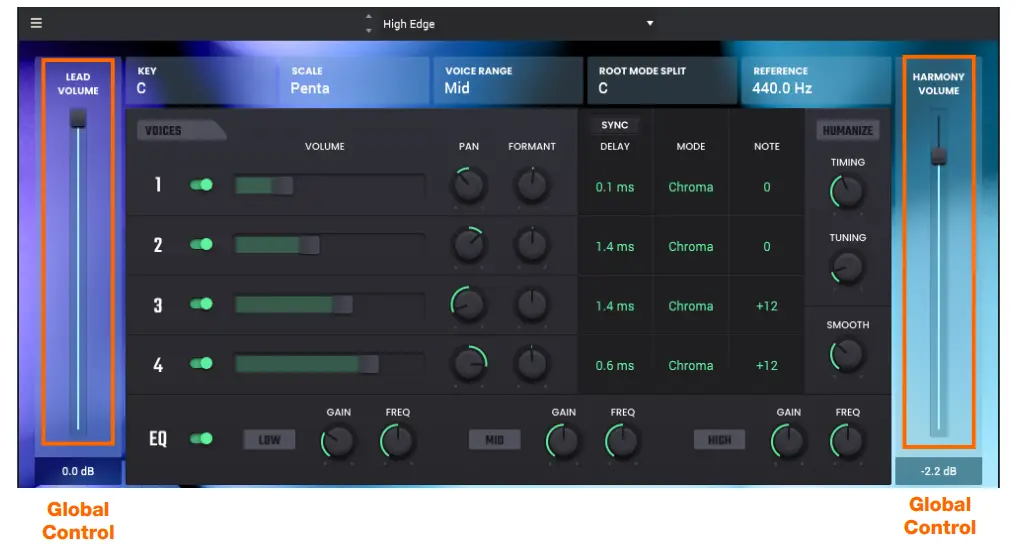
The Vocal Harmonizer Pro plugin lets you use up to 4 layers to thicken vocals, add texture, or pitch shift vocals.
| Parameter | Description | Value Range |
| Lead Volume | Volume level of the input audio. | -inf – 0.0 dB |
| Harmony Volume | Volume level of the harmonized voices. | -inf – 0.0 dB |
Voices
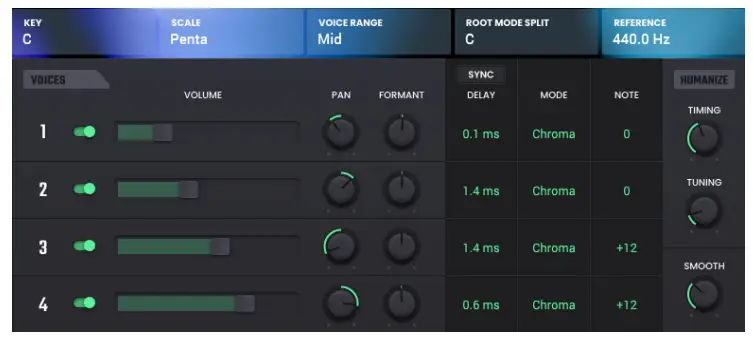
| Parameter | Description | Value Range |
| Voices | Add up to 4 layers of voices. Click “Add Voice’ to enable the selected voice. Click the switch to disable the selected voice. | Off, On |
| Volume | Adjust the voice’s volume. | -Inf — 0.0 dB |
| Pan | Adjusts the voice’s panning. | L100-C-R100 |
| Formant | Adjust to after the characteristics of the voice | -7.0 — 0.0 — 7.0 |
| Key | Sets the root note of the Scale for harmonization. | A, Alt, B, C, CC D, D# E, F, F#, G, G# |
| Scale Voice Range | Select the Scale used for harmonization when the Voice Mode is set to Scale. | Major, Minor, Melodic Minor, Harmonic Minor, Dorian, Phrygian, Lydian, Mixolydlan, Locrian, Chromatic, Penta, Major Triad, Minor Triad, Root |
| Selects the vocal range for tuning detection. | Very Low, Low, Mid, High, Very High | |
| Root Mode Split | The chord root is used to determine the harmony notes. | A, A#, B, C, C#, D, D# E, F, F#, G, G# |
| Reference | The hertz frequency used to determine the vocal harmony range. | 420.0 — 460.0 Hz |
| Delay | Sync Sync the Delay to the note value or millisecond value based on the Sync setting. | Off, On |
| Delay Adds a note delay for the voice. When Sync Is Off: When Sync is On: | 0.0 — 1000.0 ms 0, 1/64, 1/32T, 1/64D, 1/32, 1/16T, 1/32D, 1/16, 118T, 1/16D, 1/8, 1/4T, 118D, 1/4, 1/2T,1/4D, 1/2, 5/8, 3/4, 7/8, 4/4 Scale. Chroma. Fixed | |
| Mode | Determines how the voice is harmonized. |
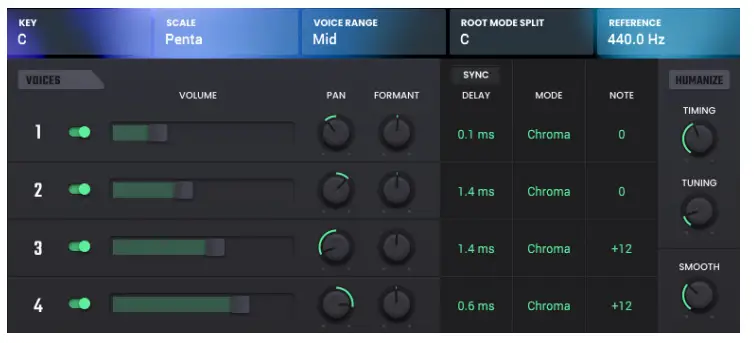
| Parameter | Description | Value Range |
| Note | Determines the pitch of each voice, depending on the Mode selected. When Mode is set to Scale: When Mode is set to Chroma: When Mode is set to Fixed: | Oct+, 7th+, 6th+, 5th+, 4th+, 3rd+, 2nd+, Unison, 7th-, 6th-, 5th-, 4th-, 3rd-, 2nd-, Oct- -24 – 0 – +24 G1 – G#6 |
| Humanize | Timing Adds more variance to the voice’s timing to sound more human. Tuning Adds more variance to the voice’s pitch to sound more human. Smooth Adjusts the voice’s smoothness. | 0 – 100% 0 – 100% 5 – 200 ms |
EQ

| Parameter | Description – _ | Value Range | |
| EO On/Off | Turns the EQ function on or off. | Off, On | |
| Low EQ | Galn | Adjusts the level of the Low EQ band. | -12.0 – 0.0 -12.0 dB |
| Frequency | Center frequency of the Low EQ band. | 20 – 800 Hz | |
| Mid EQ | Galn | Adjusts the level of the Mid EQ band. | -12.0 – 0.0 – 12.0 dB |
| Frequency | Center frequency of the Mid EQ band. | 200 -4000 Hz | |
| High EQ. | Galn | Adjusts the level of the High EQ band. | -12.0 – 0.0 -12.0 dB |
| Frequency | Center frequency of the High EQ band. | 1000 – 20000 Hz |
AIR Vocal Tuner
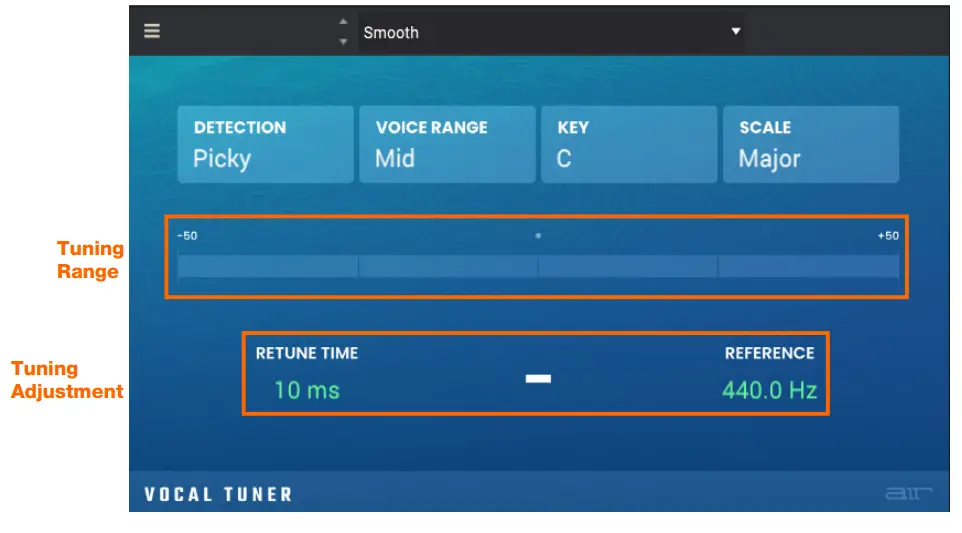
| Parameter | Description | Value Range-a |
| Detection | Selects how sensitive the tuning is to incorrect notes. | Unworried, Default, Selective, Picky, Blind |
| Voice Range | Selects the vocal range for tuning detection. | Very Low, Low, Mid, High, Very High |
| Key | Selects the root note of the scale that the voice tuning is in. | A, A#, B, C, C#, D, D#, E, F, F#, G, G# |
| Scale | Selects the scale used for voice tuning. | Major, Minor, Harmonic Minor, Melodic Minor, Dorian, Phrygian, Lydian, Mixolydian, Locrlan, Chromatic, Penta, Major Triad, Minor Triad Root |
| Tuning Range | Displays the tuning in real-time of what the key is being detected as. | -50 – 0.0 – +50 |
| Retune Time | Select how quickly the tuner will react to the incoming audio. | 1 – 1000 ms |
| Reference | Select the frequency that is used as the source to determine the pitch tuning. | 420.0 – 460.0 Hz |
Trademarks and Licenses
AIR Music Technology is a trademark of inMusic Brands, Inc., registered in the U.S. and other countries.
macOS is a trademark of Apple Inc., registered in the U.S. and other countries.
Windows is a registered trademark of Microsoft Corporation in the United States and other countries.
All other product or company names are trademarks or registered trademarks of their respective owners.
 AIR | German-engineered virtual instruments and effects
 Customer Login
 Support : AIR
 AIR | German-engineered virtual instruments and effects